1
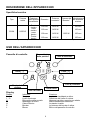
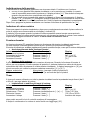
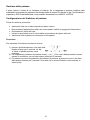
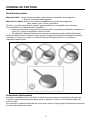
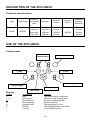
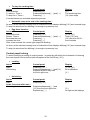
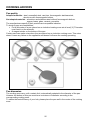
ISTRUZIONI D'USO INSTRUCTION OF USE SVI64 Caro cliente, Grazie per aver scelto il nostro piano cottura in vetroceramica a induzione. Al fine di utilizzare al meglio il vostro dispositivo, vi consigliamo di leggere attentamente le seguenti istruzioni e di conservarle per future consultazioni. INDICE SICUREZZA .................................................................................................................................. 3 PRECAUZIONI PRIMA DELL'USO ...................................................................................................... 3 USO DELL'APPARECCHIO ............................................................................................................... 3 PRECAUZIONI PER EVITARE DANNI ALL'APPARECCHIO ....................................................................... 4 PRECAUZIONI IN CASO DI MALFUNZIONAMENTO DELL'APPARECCHIO .................................................. 4 ALTRE PRECAUZIONI ..................................................................................................................... 5 DESCRIZIONE DELL'APPARECCHIO ......................................................................................... 6 SPECIFICHE TECNICHE .................................................................................................................. 6 USO DELL'APPARECCHIO.......................................................................................................... 6 PANNELLO DI CONTROLLO ............................................................................................................. 6 DISPLAY ...................................................................................................................................... 6 VENTILAZIONE .............................................................................................................................. 7 AVVIO E GESTIONE DELL'APPARECCHIO ............................................................................... 7 PRIMA DEL PRIMO UTILIZZO............................................................................................................ 7 PRINCIPIO DI INDUZIONE ................................................................................................................ 7 SENSIBILITÀ AL TOCCO .................................................................................................................. 7 AVVIO.......................................................................................................................................... 7 INDIVIDUAZIONE DELLA PENTOLA .................................................................................................... 8 INDICATORE DI CALORE RESIDUO ................................................................................................... 8 FUNZIONE BOOSTER ..................................................................................................................... 8 TIMER ......................................................................................................................................... 8 BLOCCO DEL PANNELLO DI CONTROLLO .......................................................................................... 9 CONSIGLI DI COTTURA............................................................................................................. 11 QUALITÀ DELLE PENTOLE ............................................................................................................ 11 DIMENSIONE DELLA PENTOLA ...................................................................................................... 11 ESEMPI DI IMPOSTAZIONE DI POTENZA DI COTTURA ........................................................................ 12 MANUTENZIONE E PULIZIA ...................................................................................................... 12 COSA FARE IN CASO DI PROBLEMI........................................................................................ 12 SALVAGUARDIA DELL'AMBIENTE .......................................................................................... 13 ISTRUZIONI DI INSTALLAZIONE .............................................................................................. 14 COLLEGAMENTO ELETTRICO ................................................................................................. 15 SICUREZZA Precauzioni prima dell'uso Togliere dall'imballaggio tutto il materiale. L'installazione e la connessione del dispositivo devono essere eseguite da personale specializzato e autorizzato. Il produttore non può essere ritenuto responsabile per danni causati da errori di incasso o di connessione. Per essere utilizzato l'apparecchio deve essere correttamente allestito e installato in un modulo di cucina componibile e su un piano di lavoro approvato e adattato. Questo elettrodomestico può essere usato unicamente per cucinare cibo, si esclude qualsiasi altro uso domestico, commerciale o industriale. Rimuovere tutte le etichette e gli adesivi dal piano in vetroceramica. Non apportare modifiche o alterare l'apparecchio. La piastra di cottura non può essere utilizzata come una superficie d'appoggio o di lavoro. L'apparecchio deve avere una messa a terra e una connessione in conformità con gli standard locali. Non utilizzare prolunghe per la sua connessione. L'apparecchio non può essere utilizzato sopra una lavastoviglie o un'asciugatrice: il vapore potrebbe danneggiare i dispositivi elettronici. L'apparecchio non è finalizzato all'uso mediante timer esterno o sistema separato di telecomando. Uso dell'apparecchio Spegnere la piastra riscaldante dopo l'utilizzo. Tenere sotto controllo l'area di cottura quando si usano oli o grasso: poiché potrebbero incendiarsi velocemente. Fare attenzione a non ustionarsi durante o dopo l'utilizzo dell'apparecchio. Assicurarsi che nessun cavo di altri dispositivi fissi o mobili entri in contatto con il vetro o con la pentola calda. Oggetti magnetici (carte di credito, floppy disc, calcolatrici) non devono essere posizionati vicino al dispositivo in funzione. Oggetti metallici come coltelli, forchette, cucchiai e coperchi non devono essere posizionati sul piano di cottura perché possono riscaldarsi. In generale, non posizionare nessun oggetto metallico eccetto i contenitori per la cottura sul vetro della superficie. In caso di 3 accensione non intenzionale o di calore residuo, questi potrebbero riscaldarsi, fondere e perfino incendiarsi. Mai coprire l'apparecchio con un panno o con un telo protettivo. Potrebbero riscaldarsi molto e prendere fuoco. Questo dispositivo può essere usato da bambini di età non inferiore a 8 anni e da persone con ridotte capacità fisiche, sensoriali e mentali o con esperienza e conoscenze insufficienti purché attentamente sorvegliate o istruite su come usare in modo sicuro l'apparecchio e sui pericoli che ciò comporta. I bambini non devono giocare con l'apparecchio. La pulizia e la manutenzione non devono essere eseguite da bambini non sorvegliati. Precauzioni per evitare danni all'apparecchio Pentole con il fondo ruvido o danneggiate (in ghisa non smaltata) possono danneggiare la vetroceramica. Sabbia o altri materiali abrasivi possono danneggiare la vetroceramica. Evitare di far cadere oggetti,anche piccoli, sulla vetroceramica. Non colpire i margini del vetro con le pentole. Assicurarsi che la ventilazione dell'apparecchio funzioni come previsto nelle istruzioni del produttore. Non mettere o lasciare pentole vuote sopra il piano di cottura in vetroceramica. Zucchero, materiali sintetici o fogli di alluminio non devono entrare in contatto con le piastre riscaldanti. Raffreddandosi potrebbero causare rotture o altre alterazioni del piano in vetroceramica: se accade, accendere l'apparecchio e toglierli immediatamente dalla piastra riscaldante (Facendo attenzione a non bruciarsi). ATTENZIONE: Pericolo di incendio: non ammassare oggetti sul piano di cottura. Mai posizionare contenitori caldi sul pannello di controllo. Se un cassetto è situato sotto l'apparecchio incassato, assicurarsi che lo spazio tra il suo contenuto e la parte inferiore dell'apparecchio sia sufficientemente ampio (2cm). Ciò è essenziale al fine di garantire una corretta ventilazione. Non posizionare mai oggetti infiammabili (come bombolette spray) nel cassetto sottostante il piano in vetroceramica. I cassetti per coltelleria e posateria devono essere resistenti al calore. Precauzioni in caso di malfunzionamento dell'apparecchio Se viene rilevato un difetto, spegnere l'apparecchio e chiudere l'alimentazione elettrica. Se il vetro è incrinato o crepato, dovete scollegare l'apparecchio e contattare il servizio post vendita. 4 Le riparazioni devono essere fatte da specialisti. Non aprite l'apparecchio da soli. ATTENZIONE: Se la superficie è incrinata, spegnere l'apparecchio per evitare la possibilità di folgorazione. Se il cavo di alimentazione è danneggiato, deve essere sostituito da un cavo o da un set apposito disponibile presso il produttore o il servizio post vendita. Altre precauzioni Assicurarsi che il contenitore sia sempre centrato sulla piastra di cottura. Il fondo della pentola deve coprire il più possibile la piastra di cottura. Si rende noto a coloro che utilizzano un pacemaker che il campo magnetico potrebbe influenzarne il funzionamento. Si raccomanda di informarsi presso il rivenditore o il proprio medico. Non utilizzate contenitori di alluminio o di materiale sintetico: potrebbero fondere a contatto con la piastra di cottura ancora calda. MAI cercare di spegnere un fuoco con acqua, ma spegnere l'apparecchio e coprire la fiamma es. con un coperchio o con una coperta ignifuga. L'USO SIA DI PENTOLE DI SCARSA QUALITÀ CHE DI ADATTARORI A INDUZIONE PER PENTOLE NON MAGNETICHE RISULTA UNA VIOLAZIONE DELLA GARANZIA. IN QUESTO CASO, IL PRODUTTORE NON PUÒ ESSERE RITENUTO RESPONSABILE PER QUALSIASI DANNO CAUSATO AL PIANO COTTURA E/O AL SUO AMBIENTE. 5 DESCRIZIONE DELL'APPARECCHIO Specifiche tecniche Tipo SVI64 Potenza totale Posizione della piastra riscaldante 6050 W Fronte sinistro Retro sinistro Retro destro Fronte destro Diametro Potenza nominale* Potenza del Booster* Individuazione del diametro minimo 190 mm 1400 W - 100 mm 160 mm 1400 W - 100 mm 190 mm 1400 W 1850 W 100 mm 160 mm 1400 W - 100 mm * La potenza data potrebbe cambiare a seconda delle dimensioni e del materiale della pentola. USO DELL'APPARECCHIO Pannello di controllo Timer e display della potenza Tasto di selezione Tasto [ - ] Tasto [ + ] Luce di controllo timer Display della potenza Tasto on/off Tasti del timer Display Display 0 1…9 U E H P L Indicatore Zero Livelli di potenza Rilevazione della pentola Messaggio di errore Calore residuo Booster Blocco Funzione La piastra riscaldante e attiva. Selezione del livello di cottura. Nessuna pentola o pentola non adatta. Malfunzionamento elettronico. La piastra è calda. La potenza del booster è attiva. Blocco del pannello di controllo. 6 Ventilazione Il sistema di raffreddamento opera continuativamente. Si avvia all'accensione del piano cottura e aumenta il regime di rotazione quando il piano è usato con intensità. La ventola di raffreddamento riduce il regime di rotazione e si arresta una volta che il circuito elettronico è sufficientemente raffreddato. AVVIO E GESTIONE DELL'APPARECCHIO Prima del primo utilizzo Pulire il piano cottura con un panno umido poi asciugare completamente la superficie. Non utilizzare detergenti che possano causare una colorazione bluastra sulla superficie del vetro. Principio di induzione Un induttore è posizionato sotto ogni piastra riscaldante. Quando è acceso, produce un campo magnetico variabile che genera correnti induttive sul fondo ferromagnetico della pentola. Il risultato è il riscaldamento della pentola posizionata sulla piastra riscaldante. Ovviamente la pentola deve essere adatta: Si raccomandano tutte le pentole ferromagnetiche (potete verificare grazie a una piccola calamita): pentole in ghisa e acciaio, pentole smaltate, pentole in acciaio inossidabile con fondo ferromagnetico... Sono esclusi: rame, puro acciaio inossidabile, alluminio, vetro, legno, coccio e litoceramica... La piastra a induzione si adatta automaticamente alla dimensione della pentola. Non funziona con pentole di diametro troppo piccolo. Tale misura di diametro varia in funzione del diametro della piastra riscaldante. Se la pentola non è adatta al piano a induzione il display indica [ U ]. Sensibilità al tocco Il vostro piano cottura in vetroceramica è dotato di controlli elettronici con tasti sensibili al tocco. Quando le dita premono un tasto, il comando corrispondente si attiva. Tale attivazione è confermata da un controllo luminoso, una lettera o un numero sul display e/o un segnale acustico. Nel corso del normale utilizzo premere soltanto un tasto alla volta. Avvio Dovete prima accendere il piano cottura e poi la piastra riscaldante: Avvio/spegnimento del piano cottura: Azione Pannello di controllo Per avviare Premere il tasto [ 0/I ] Toccare il tasto Premere il tasto [ 0/I ] Avvio/spegnimento della piastra riscaldante: Azione Pannello di controllo Selezionare la piastra Premere il tasto[ O ] Aumentare la potenza Premere il tasto [ + ] Diminuire la potenza Premere il tasto [ - ] Stop Premere il tasto[ - ] o premere simultaneamente [ O ] e [ - ] Display [0] Niente o [ H ] Display [0] da [ 1 ] a [ 9 ] da [ 9 ] a [ 1 ] [ 0 ] o[ H ] Se nessuna azione è compiuta entro 20 secondi il dispositivo elettronico torna in modalità di attesa. 7 Individuazione della pentola L'individuazione della pentola garantisce una sicurezza totale. L'induttore non funziona: se non ci sono pentole sulla piastra riscaldante o se la pentola non è adatta. In questo caso è impossibile aumentare la potenza e il display mostra [ U ]. Tale simbolo scompare quando una pentola viene posizionata sulla piastra. Se la pentola viene rimossa dalla piastra riscaldante si ferma il funzionamento. Il display mostra [ U ]. Il simbolo [ U ] scompare quando la pentola viene posizionata di nuovo sulla piastra riscaldante. La cottura continua con il livello di potenza impostato in precedenza. Dopo l'uso, spegnere la piastra riscaldante: non lasciare il rilevatore di pentola attivo su [ U ] . Indicatore di calore residuo Dopo aver spento la piastra riscaldante o dopo aver completamente arrestato il piano cottura, le zone di cottura sono ancora calde e sul display è indicato [H]. Il simbolo [H] scompare quando le piastre di cottura possono essere toccate senza pericolo. Finché gli indicatori di calore residuo sono accesi, non toccare le piastre di cottura e non mettervi sopra nessun oggetto sensibile al calore. Ci sono rischi di ustione e fuoco. Funzione booster La funzione booster [P] garantisce l'aumento di potenza alla piastra riscaldante selezionata. Se tale funzione è attiva la piastra funziona per 5 minuti con una potenza maggiore. Il booster è indicato per scaldare rapidamente grandi quantità d'acqua, come per la cottura della pasta. Avvio/spegnimento della funzione booster: Azione Pannello di controllo Display Selezionare la piastra Premere il tasto [ O ] [0] Aumentare la potenza Premere il tasto [ + ] da [ 1 ] a [ 9 ] Avvio del booster Premere il tasto [ + ] [ P ] per 5 min. Arrestare il booster Premere il tasto [ - ] [9] Gestione della potenza: Il piano di cottura è dotato di un livello massimo di potenza, Quando la funzione di booster è attiva, per non superare il livello massimo di potenza, il sistema elettronico ordina la riduzione automatica del livello di potenza di un'altra piastra riscaldante. Il display lampeggia su [ 9 ] per alcuni secondi e poi mostra la potenza massima consentita ( [ 6 ] o [ 8 ] ). Piastra selezionata Altre piastre: (esempio: livello di potenza 9) [ P ] è mostrato [ 9 ] fino a [ 7 ] a seconda del tipo di piastra Timer Il timer può essere utilizzato con tutte le piastre riscaldanti anche impostando tempi diversi (da 0 a 99 min.) per ogni piastra di cottura. Impostazione e modifica dei tempi di cottura: Azione Pannello di controllo Display Selezionare la piastra Premere il tasto[ O ] [0] Aumentare la potenza Premere il tasto [ + ] da [ 1 ] a [ 9 ] Selezionare « Timer » Premere simultaneamente [ - ] e [ + ] Timer [ 00 ] min Diminuire il tempo Premere il tasto [ - ] [ 00 ] fino a 30,29... Aumentare il tempo Premere il tasto [ + ] aumento del tempo dopo pochi secondi le luci di controllo smettono di lampeggiare. Il tempo è confermato e la cottura si avvia finché non raggiunge [ 00 ]. 8 Fermare il tempo di cottura: Azione Pannello di controllo Selezionare la piastra Premere il tasto[ O ] Selezionare « Timer » Premere simultaneamente [ - ] e [ + ] Selezionare « Timer » Premere tasto [ - ] Se più tempi sono impostati ripetere il procedimento. Display [0] Tempo restante [ 00 ] poi si ferma Arresto automatico alla fine del tempo di cottura: Appena il tempo di cottura selezionato finisce, il display del timer lampeggia su [00] e viene emesso un segnale acustico. Per arrestare il suono e il lampeggiamento basta premere un qualsiasi tasto. Funzione contaminuti: Azione Pannello di controllo attivare il piano cottura Premere il tasto [ 0/I ] Selezionare «Timer» Premere simultaneamente [ - ] e [ + ] Diminuire il tempo Premere il tasto [ - ] Aumentare il tempo Premere il tasto [ + ] dopo pochi secondi le luci di controllo smettono di lampeggiare. Display [0] o [ H ] Timer [ 00 ] min [ 00 ] fino a 30,29 aumento del tempo Appena il tempo di cottura selezionato finisce, il display del timer lampeggia su [00] e viene emesso un segnale acustico. Per arrestare il suono e il lampeggiamento basta premere un qualsiasi tasto. Blocco del pannello di controllo Per evitare la modifica delle impostazione delle piastre di cottura, in particolare al momento della pulizia, il pannello di controllo può essere bloccato (a eccezione del tasto on/off [ 0/I ]). Blocco: Azione Pannello di controllo Display Avvio blocco del piano Premere il tasto [ 0/I ] cottura premere in simultaneo [-] e [O] Premete di nuovo il tasto di selezione da Piastra riscaldante fronte destra [0] o [ H ] Nessuna modifica Azione Pannello di controllo Display Avvio Premere il tasto [ 0/I ] [L] [L] Sblocco: Nei 5 secondi dopo l'avvio: sblocco del piano cottura premere simultaneamente [ - ] e [ O ] dalla piastra fronte destra Premere di nuovo il tasto [ - ] 9 [0] Nessuna luce sui display Gestione della potenza Il piano cottura è dotato di un limitatore di potenza. Se si raggiunge la potenza massima sarà impossibile incrementare la potenza sulle diverse piastre di cottura e si sentirà un bip. Tale limitatore è impostato a 3000 W dal fabbricante, ma è possibile aumentare fino a 4500 W, o 6500 W. Configurazione del limitatore di potenza Prima di iniziare la procedura: Assicurarsi che non ci siano pentole sul piano cottura. Disconnettere l'apparecchio dalla rete rimuovendo il fusibile o spegnendo l'interruttore. Riconnettere il piano alla rete. Iniziare la procedura entro 2 minuti dalla riconnessione del piano alla rete. Assicurarsi che le piastre di cottura siano tutte spente. Procedura: Per impostare il limitatore di potenza, dovete: 1) premere simultaneamente i due tasti delle piastre inferiori per 3 secondi. Un bip si udirà e l'attuale potenza verrà mostrata. 2) Per impostare il limitatore di potenza usare [ + ] e [ - ]. Per uscire dalla procedura senza salvare le modifiche, non toccate nessun tasto per 60 secondi. 3) Per salvare la nuova impostazione di limitatore di potenza, premere di nuovo i due tasti delle piastre inferiori per 3 secondi. Una volta che le nuove limitazioni sono salvate, si udirà un bip. 10 CONSIGLI DI COTTURA Qualità delle pentole Materiali adatti : acciaio, acciaio smaltato, ghisa, acciaio inossidabile ferromagnetico, alluminio con fondo ferromagnetico. Materiali non adatti: alluminio e acciaio inossidabile senza fondo ferromagnetico, rame, ottone, vetro, coccio, porcellana. Di solito, i produttori specificano quando i propri prodotti sono compatibili con l'induzione. Per controllare che le pentole siano compatibili: Mettere poca acqua in una pentola e posizionarla su una piastra riscaldante a induzione a livello [9]. L'acqua si riscalderà in pochi secondi. Se la pentola è adatta all'induzione, avvicinando una calamita questa si attaccherà al fondo. Alcune pentole possono emettere rumori quando vengono posizionate sulle piastre di cottura a induzione. Il rumore non indica un malfunzionamento dell'apparecchio e non influenza l'operatività della cottura. Dimensione della pentola La piastra riscaldante, entro certi limiti, si adatterà automaticamente al diametro della pentola. Tuttavia il fondo di queste pentole deve avere un diametro minimo a seconda della piastra di cottura scelta. Per ottenere la massima efficienza del vostro piano cottura, siete pregati di posizionare la pentola al centro della piastra di cottura. 11 Esempi di impostazione di potenza di cottura (i valori qui sotto sono indicativi) da 1 a 2 Fondere Riscaldare da 2 a 3 Ebollizione Scongelamento da 3 a 4 da 4 a 5 Vapore Acqua da 6 a 7 Media cottura Ebollizione Cottura Friggere, arrostire, bollire acqua Friggere, arrostire Bollire acqua da 7 a 8 9 P Salse, burro, cioccolato, gelatina Piatti preparati in precedenza riso, budino, sciroppo di zucchero verdure essiccate, pesce, prodotti congelati Verdure, pesce, carne Patate al vapore, zuppe, pasta verdure fresche Carne, fegato, uova, salsicce Goulash, rollè, trippa patate, frittelle, cialde Bistecche, omelette, fritture, acqua Molluschi, bistecche Bollire notevoli quantità d'acqua MANUTENZIONE E PULIZIA Spegnere l'apparecchio prima di pulire. Non pulire la piastra se il vetro è troppo caldo perché c'è rischio di ustioni, Rimuovere le macchie leggere con un panno bagnato usando il detersivo per stoviglie diluito in acqua. Risciacquare con acqua fredda e asciugare completamente la superficie. Detergenti molto corrosivi o abrasivi e dispositivi di pulizia che possono causare graffi devono essere evitati assolutamente. Non utilizzare mai apparecchiature a vapore o a pressione. Non utilizzare oggetti che potrebbero graffiare la vetroceramica. Assicurarsi che la pentola sia asciutta e pulita. Assicurarsi che non ci siano granelli di polvere sul piano cottura o sulla pentola. Lo sfregamento di pentole ruvide potrebbe graffiare la superficie. Fuoriuscite di zucchero, marmellata, gelatina ecc, devono essere immediatamente rimosse. In questo modo eviterete di danneggiare la superficie. COSA FARE IN CASO DI PROBLEMI Il piano o la piastra di cottura non si avviano: Il piano di cottura è collegato male alla rete elettrica. Il fusibile è bruciato. La funzione di blocco è attiva. I tasti sensibili al tocco sono coperti da unto o acqua. Un oggetto è posizionato sul tasto. Il pannello di controllo mostra [ U ]: Non ci sono pentole sulla piastra di cottura. La pentola non è compatibile con l'induzione. Il fondo della pentola ha un diametro troppo piccolo. Ventilazione continua dopo lo spegnimento del piano cottura: Non si tratta di un malfunzionamento, la ventola continua a funzionare per proteggere il dispositivo elettronico. La ventola di raffreddamento si ferma automaticamente. 12 Una o tutte le piastre di cottura sono spente: Il sistema di sicurezza è in funzione. Avete dimenticato di spegnere le piastre di cottura per un lungo periodo. Uno o più tasti sensibili al tocco sono coperti. La pentola è vuota e il fondo è surriscaldato. Il piano cottura ha anche una funzione di riduzione automatica del livello di potenza che interrompe automaticamente il surriscaldamento Il pannello di controllo mostra [ L ]: Fare riferimento alla pagina del capitolo blocco del pannello di controllo. Il pannello di controllo mostra [Er03]: Un oggetto o un liquido coprono i tasti di controllo. Il simbolo scompare appena i tasti vengono scoperti o puliti. Il pannello di controllo mostra [ E2 ] o [ EH ] : Il piano è surriscaldato, lasciarlo freddare e poi accendere nuovamente. Il pannello di controllo mostra [ E3 ]: La pentola non è adatta, cambiare la pentola. Il pannello di controllo mostra [ E5 ]: Fornitura elettrica insufficiente. Controllare il voltaggio della rete elettrica. Il pannello di controllo mostra [ E6 ]: Fornitura elettrica insufficiente. Controllare la frequenza della rete elettrica. Il pannello di controllo mostra [ E8 ]: L'ingresso dell'aria nella ventola è ostruito, liberarlo. Il pannello di controllo mostra [ U400 ]: Il piano di cottura non è collegato alla rete elettrica. Controllare il collegamento e ricollegare il piano cottura. Se la presenza di uno di questi simboli persiste chiamare l'Assistenza post vendita (SAV). SALVAGUARDIA DELL'AMBIENTE I materiali di imballaggio sono ecologici e riciclabili. I dispositivi elettronici sono realizzati in materiale riciclabile e qualche volta in materiale nocivo per l'ambiente, ma necessario per il buon funzionamento e la sicurezza dell'apparecchio. Non gettate l'apparecchio nei rifiuti domestici. Mettetevi in contatto con l'azienda di raccolta dei rifiuti del vostro comune che è incaricata di riciclare gli elettrodomestici. 13 ISTRUZIONI DI INSTALLAZIONE L'installazione è responsabilità esclusiva di specialisti. L'utente dell'apparecchio è tenuto a rispettare la legislazione e gli standard in vigore nel proprio paese. Come incollare la guarnizione: La guarnizione in dotazione con il piano cottura impedisce le infiltrazioni di liquidi nel vano sottostante. La sua installazione deve essere fatta con molta attenzione, come illustrato di seguito. Attaccare la guarnizione (2) due millimetri dal bordo esterno del vetro, dopo aver rimosso il foglio protettivo (3). Incasso - installazione: Le misure del taglio sono: Tipo SVI64 misura del taglio 560 x 490 mm Assicurarsi che ci sia una distanza di almeno 50 mm tra il piano cottura e la parete o i lati. I piani cottura sono classificati come classe di protezione dal surriscaldamento Y. Idealmente il piano cottura dovrebbe essere installato con molto spazio sui lati. Ci può essere un muro sulla parte posteriore dell'apparecchio e moduli alti o un muro su uno dei sui lati. In tal caso, tuttavia, sull'altro lato non possono esserci moduli o divisori più alti del piano di cottura. I mobili o il supporto nei quali il piano deve essere incassato, così come i bordi dei mobili, il laminato di rivestimento e la colla utilizzata per fissarli, devono resistere a temperature superiori ai 100° C. Eventuali rivestimenti del muro devono essere resistente al calore. Non installate il piano cottura sopra forni non ventilati o sopra la lavastoviglie. Garantire al di sotto della parte inferiore del vano del piano cottura uno spazio di 20 mm per assicurare una buona circolazione dell'aria al dispositivo elettronico. Se un cassetto è posizionato sotto il piano, evitare di mettervi oggetti infiammabili (come bombolette spray) o oggetti non resistenti al calore. I materiali che spesso sono utilizzati per realizzare il piano di lavoro si dilatano con l'umidità. Per proteggere il bordo tagliato, applicare un rivestimento di vernice o uno speciale sigillante. Prestare particolare cura all'applicazione dell'adesivo di giunzione fornito con il piano di cottura per evitare sbavature sul mobile di supporto. Questa guarnizione garantisce una corretta tenuta se usata in combinazione con piani di lavoro lisci. Lo spazio di sicurezza tra il piano di cottura e la cappa aspirante deve rispettare le indicazioni del produttore della cappa. In caso di assenza di istruzioni rispettare una distanza minima di 760 mm. Il cavo di collegamento deve essere sistemato in modo che, dopo l'installazione, non sia soggetto a costrizioni meccaniche, come per esempio un cassetto. ATTENZIONE: Usare soltanto protezioni per il piano di cottura realizzate dal produttore dell'apparecchio o indicate dal produttore nelle istruzioni come idonee per l'utilizzo con l'apparecchio o incorporate in esso. L'utilizzo di protezioni inappropriate può causare incidenti. 14 COLLEGAMENTO ELETTRICO L'installazione di questo apparecchio e il collegamento alla rete elettrica dovrebbero essere affidate esclusivamente a un elettricista che sia consapevole delle normative e che le rispetti in modo scrupoloso. Protezione contro le parti sotto tensione deve essere assicurata dopo l'incasso. I dati necessari per il collegamento sono sugli adesivi posizionati sul vano del piano cottura vicino alla scatola di connessione. La connessione con la rete deve essere fatta utilizzando una spina con messa a terra o attraverso un interruttore onnipolare con un'apertura di contatto di almeno 3 mm. Il circuito elettrico deve essere separato dalla rete elettrica da dispositivi idonei per esempio interruttori di circuito, fusibili o contattori. Se l'apparecchio non è dotato di una spina accessibile, deve essere incorporato nell'installazione un dispositivo di disconnessione in conformità con le norme di installazione previste. Il cavo di alimentazione deve essere posizionato in modo da non toccare nessuna parte calda del piano di cottura o del forno. Attenzione! Questo apparecchio deve essere collegato solo a una rete da 220-240 V~ 50/60 Hz. Collegare sempre il cavo di messa a terra. Rispettare il diagramma di collegamento. La scatola di connessione è posizionata sotto il retro del vano del piano cottura. Per aprire il coperchio usare un cacciavite medio. Posizionarlo nelle fessure e aprire il coperchio. Rete elettrica 220-240V~ 50/60Hz 400V~ 50/60Hz Collegamento Diametro del cavo Cavo Fusibile di protezione 1 Fase + N 3 x 2,5 mm² H 05 V2V2 - F 25 A * 2 Fase + N 4 x 1,5 mm² H 05 V2V2 - F 16 A * * calcolato con fattore di simultaneità secondo lo standard EN 60 335-2-6 Collegamento del piano di cottura Impostare la configurazione: Per i vari tipi di collegamento, utilizzare i ponti di ottone che sono nella scatola vicino al terminale Monofase 230V~1P+N Mettere il ponte tra il terminale L1 e L2 e tra il terminale N1 e N2 Attaccare la messa a terra al terminate "terra", il neutro N a uno dei terminali N1 o N2 e la Fase L a uno dei terminali L1 o L2. Bifase 400V~2P+N Mettere un ponte tra il terminale N1 e N2. Attaccare la messa a terra al terminale "terra", il neutro N al terminale N1 o N2, la Fase L1 ai terminali L1 e la Fase L2 ai terminali L2. Il produttore non può essere ritenuto responsabile per incidenti causati dal collegamento scorretto dell'apparecchio o che possono insorgere dall'uso di un apparecchio che non è stato messo a terra o dotato di uno scorretto collegamento di messa a terra. 15 Dear customer, Thank you for having chosen our induction ceramic hob. In order to make the best use of your appliance, we would advise you to read carefully the following notes and to keep them for a later consulting. SUMMARY SAFETY ......................................................................................................................................... 3 PRECAUTIONS BEFORE USING........................................................................................................ 3 USING THE APPLIANCE .................................................................................................................. 3 PRECAUTIONS NOT TO DAMAGE THE APPLIANCE .............................................................................. 4 PRECAUTIONS IN CASE OF APPLIANCE FAILURE................................................................................ 4 OTHER PROTECTIONS ................................................................................................................... 5 DESCRIPTION OF THE APPLIANCE ........................................................................................... 6 TECHNICAL CHARACTERISTICS ....................................................................................................... 6 CONTROL PANEL .......................................................................................................................... 6 USE OF THE APPLIANCE ............................................................................................................ 6 DISPLAY ...................................................................................................................................... 6 VENTILATION ................................................................................................................................ 7 STARTING-UP AND APPLIANCE MANAGEMENT ..................................................................... 7 BEFORE THE FIRST USE................................................................................................................. 7 INDUCTION PRINCIPLE ................................................................................................................... 7 SENSITIVE TOUCH......................................................................................................................... 7 STARTING-UP ............................................................................................................................... 7 PAN DETECTION ........................................................................................................................... 8 RESIDUAL HEAT INDICATION .......................................................................................................... 8 BOOSTER FUNCTION ..................................................................................................................... 8 TIMER ......................................................................................................................................... 8 CONTROL PANEL LOCKING ............................................................................................................. 9 COOKING ADVICES ................................................................................................................... 10 PAN QUALITY ............................................................................................................................. 11 PAN DIMENSION.......................................................................................................................... 11 EXAMPLES OF COOKING POWER SETTING...................................................................................... 12 MAINTENANCE AND CLEANING .............................................................................................. 12 WHAT TO DO IN CASE OF A PROBLEM .................................................................................. 12 ENVIRONMENT PRESERVATION ............................................................................................. 13 INSTALLATION INSTRUCTIONS ............................................................................................... 14 ELECTRICAL CONNECTION ..................................................................................................... 15 SAFETY Precautions before using Unpack all the materials. The installation and connecting of the appliance have to be done by approved specialists. The manufacturer can not be responsible for damage caused by building-in or connecting errors. To be used, the appliance must be well-equipped and installed in a kitchen unit and an adapted and approved work surface. This domestic appliance is exclusively for the cooking of food, to the exclusion of any other domestic, commercial or industrial use. Remove all labels and self-adhesives from the ceramic glass. Do not change or alter the appliance. The cooking plate can not be used as freestanding or as working surface. The appliance must be grounded and connected conforming to local standards. Do not use any extension cable to connect it. The appliance can not be used above a dishwasher or a tumbledryer: steam may damage the electronic appliances. The appliance is not intended to be operated by means of external timer or separate remote control system. Using the appliance Switch the heating zones off after using. Keep an eye on the cooking using grease or oils: that may quickly ignite. Be careful not to burn yourself while or after using the appliance. Make sure no cable of any fixed or moving appliance contacts with the glass or the hot saucepan. Magnetically objects (credit cards, floppy disks, calculators) should not be placed near to the engaged appliance. Metallic objects such as knives, forks, spoons and lids should not be placed on the hob surface since they can get hot. In general do not place any metallic object except heating containers on the glass surface. In case of untimely engaging or residual heat, this one may heat, melt or even burn. 17 Never cover the appliance with a cloth or a protection sheet. This is supposed to become very hot and catch fire. This appliance can be used by children aged from 8 years and above and persons with reduced physical, sensory or mental capabilities or lack of experience and knowledge if they have been given supervision or instruction concerning use of the appliance in a safe way and understand the hazards involved. Children shall not play with the appliance. Cleaning and user maintenance shall not be made by children without supervision. Precautions not to damage the appliance Raw pan bottoms or damaged saucepans (not enamelled cast iron pots,) may damage the ceramic glass. Sand or other abrasive materials may damage ceramic glass. Avoid dropping objects, even little ones, on the vitroceramic. Do not hit the edges of the glass with saucepans. Make sure that the ventilation of the appliance works according to the manufacturer’s instructions. Do not put or leave empty saucepans on the vitroceramic hobs. Sugar, synthetic materials or aluminium sheets must not contact with the heating zones. These may cause breaks or other alterations of the vitroceramic glass by cooling: switch on the appliance and take them immediately out of the hot heating zone (be careful: do not burn yourself). WARNING: Danger of fire: do not store items on the cooking surface. Never place any hot container over the control panel. If a drawer is situated under the embedded appliance, make sure the space between the content of the drawer and the inferior part of the appliance is large enough (2 cm). This is essential to guaranty a correct ventilation. Never put any inflammable object (ex. sprays) into the drawer situated under the vitroceramic hob. The eventual cutlery drawers must be resistant to heat. Precautions in case of appliance failure If a defect is noticed, switch on the appliance and turn off the electrical supplying. 18 If the ceramic glass is cracked or fissured, you must unplug the appliance and contact the after sales service. Repairing has to be done by specialists. Do not open the appliance by yourself. WARNING: If the surface is cracked, switch off the appliance to avoid the possibility of electric shock. If the supply cor dis damaged, it must be replaced by a cable or special set available by the manufacturer or his after sale service. Other protections Note sure that the container pan is always centred on the cooking zone. The bottom of the pan must have to cover as much as possible the cooking zone. For the users of pacemaker, the magnetic field could influence its operating. We recommend getting information to the retailer or of the doctor. Do not to use aluminium or synthetic material containers: they could melt on still hot cooking zones. NEVER try to extinguish a fire with water, but switch off the appliance and then cover flame e.g. with a lid or a fire blanket. THE USE OF EITHER POOR QUALITY POT OR ANY INDUCTION ADAPTOR PLATE FOR NON-MAGNETIC COOKWARE RESULTS IN A WARRANTY BREACH. IN THIS CASE, THE MANUFACTURER CANNOT BE HELD RESPONSIBLE FOR ANY DAMAGE CAUSED TO THE HOB AND/OR ITS ENVIRONMENT. 19 DESCRIPTION OF THE APPLIANCE Technical characteristics Type SVI64 Total Power Position of the heating zone 6050 W Front left Rear left Rear right Front right Diameter Nominal Power* Booster Power* Minimum diameter detection 190 mm 160 mm 190 mm 160 mm 1400 W 1400 W 1400 W 1400 W 1850 W - 100 mm 100 mm 100 mm 100 mm * The given power may change according to the dimensions and material of the pan. USE OF THE APPLIANCE Control panel Timer and Power display [ - ] key Selection key [ + ] key Control light timer Power display On/off key Timer keys Display Display 0 1…9 U E H P L Designation Zero Power level Pan detection Error message Residual heat Booster Locking Function The heating zone is activated. Selection of the cooking level. No pan or inadequate pan. Electronic failure. The heating zone is hot. The boosted power is activated. Control panel locking. 20 Ventilation The cooling system operates continuously. He starts when turning on the hob and speeds up when the hob is used intensively. The cooling fan reduces its speed and stops automatically when the electronic circuit is cooled enough. STARTING-UP AND APPLIANCE MANAGEMENT Before the first use Clean your hob with a damp cloth, and then dry the surface thoroughly. Do not use detergent which risks causing blue-tinted colour on the glass surface. Induction principle An induction coil is located under each heating zone. When it is engaged, it produces a variable electromagnetic field which produces inductive currents in the ferromagnetic bottom plate of the pan. The result is a heating-up of the pan located on the heating zone. Of course the pan has to be adapted: All ferromagnetic pans are recommended (please verify it thanks a little magnet): cast iron and steel pans, enamelled pans, stainless-steel pans with ferromagnetic bottoms… Are excluded: cupper, pure stainless-steel, aluminium, glass, wood, ceramic, stoneware,… The induction heating zone adapts automatically the size of the pan. With a too small diameter the pan doesn’t work. This diameter is varying in function of the heating zone diameter. If the pan is not adapted to the induction hob the display will show [ U ]. Sensitive touch Your ceramic hob is equipped with electronic controls with sensitive touch keys. When your finger presses the key, the corresponding command is activated. This activation is validated by a control light, a letter or a number in the display and/or a “beep” sound. In the case of a general use press only one key at the same time. Starting-up You must first switching on the hob, then the heating zone: Start-up/ switch off the hob : Action Control panel To start Press key [ 0/I ] Touch the key Press key [ 0/I ] Start-up/ switch off a heating zone : Action Control panel Zone selection Press key [ O ] Increase power Press key [ + ] Decrease power Press key [ - ] Stop Press key [ - ] or press simultaneously [ O ] and [ - ] Display [0] Nothing or [ H ] Display [0] [ 1 ] to [ 9 ] [ 9 ] to [ 1 ] [ 0 ] or [ H ] If no action is made within 20 second the electronics returns in waiting position. 21 Pan detection The pan detection ensures a perfect safety. The induction doesn’t work: If there is no pan on the heating zone or if this pan is not adapted to the induction. In this case it is impossible to increase the power and the display shows [ U ]. This symbol disappears when a pan is put on the heating zone. If the pan is removed from the heating zone the operation is stopped. The display shows [ U ]. The symbol [ U ] disappears when the pan is put back to the heating zone. The cooking continues with the power level set before. After use, switch the heat element off: don’t let the pan detection [ U ] active. Residual heat indication After the switch off of a heating zone or the complete stop of the hob, the heating zones are still hot and indicates [ H ] on the display. The symbol [ H ] disappears when the heating zones may be touched without danger. As far as the residual heat indicators are on light, don’t touch the heating zones and don’t put any heat sensitive object on them. There are risks of burn and fire. Booster function The booster function [ P ] grants a boost of power to the selected heating zone. If this function is activated the heating zones works during 5 minutes with an ultra high power. The booster is foreseen for example to heat up rapidely big quantities of water, like nuddles cooking. Start up / Stop the booster function : Action Control panel Display Zone selection Press key [ O ] [0] Increase power Press key [ + ] [ 1 ] to [ 9 ] Start up the booster Press key [ + ] [ P ] during 5 min Stop the booster Press key [ - ] [9] Power management : The hole cooking hob is equipped by a maximum of power. When the booster function is activated, and not to exceed the maximum power, the electronic system orders to reduce automatically the power level of an other heating zone. The display is blinking on [ 9 ] during a few seconds and then shows the maximum of power allowed ( [ 6 ] or [ 8 ] ). Heating zone selected The other heating zone: (example: power level 9) [ P ] is displayed [ 9 ] goes to [ 7 ] depending the type of zone Timer The timer is able to be used simultaneous with all heating zones and this with different time settings (from 0 to 99 minutes) for each heating zone. Setting and modification of the cooking time : Action Control panel Display Zone selection Increase power To select « Timer » Decrease the time Increase the time Press key [ O ] Press key [ + ] Press simultaneously [ - ] and [ + ] Press key [ - ] Press key [ + ] After a few seconds the control light stops with blinking. The time is confirmed and the cooking starts until the time reaches [ 00 ]. 22 [0] [ 1 ] to [ 9 ] Timer [ 00 ] min [ 00 ] wents to 30,29… time increase To stop the cooking time : Action Control panel Zone selection Press key [ O ] To select « Timer » Press simultaneously [ - ] and [ + ] To stop the « Timer » Press key [ - ] If several timers are activated repeat the process. Display [0] The remaining time [ 00 ] then stops Automatic stop at the end of the cooking time : As soon as the selected cooking time is finished the timer displays blinking [ 00 ] and a sound rings. To stop the sound and the blinking it is enough to press any key. Egg timer function : Action Control panel Activate the hob Press key [ 0/I ] Select« Timer » Press simultaneously [ - ] and [ + ] Decrease the time Press key [ - ] Increase the time Press key [ + ] After a few seconds the control light stops with blinking. Display [ 0 ] or [ H ] Timer [ 00 ] min [ 00 ] wents to 30,29…. time increase As soon as the selected cooking time is finished the timer displays blinking [ 00 ] and a sound rings. To stop the sound and the blinking it is enough to press any key. Control panel locking To avoid modifying a setting of cooking zones , in particular with within the framework of cleaning the control panel can be locked (with exception to the On/Off key [ 0/I ]). Locking : Action Control panel Display Start Hob locking Press key [ 0/I ] Press simultaneously [ - ] and [ O ] Repress selection key from the front right zone [ 0 ] or [ H ] No modification Action Control panel Display Start Press key [ 0/I ] [L] Press simultaneously [ - ] and [ O ] from the front right zone Repress key [ - ] [0] No light on the displays [L] Unlocking : In the 5 seconds after start : Unlocking the hob 23 Power Management The hob is equipped with a power limitation. If you reach the maximum power it will be impossible to increase the power on the different cooking zones and a beep signal will sound. This limitation is set at 3000 W by the factory but it is possible to increase it to 4500 W, or 6500 W. Power limitation configuration Before beginning the procedure: Make sure there is no more pot on the hob Disconnect the appliance from the grid by removing the fuse or turning the circuit breaker off. Reconnect the table to the grid Start the procedure within 2 minutes after reconnecting the hob to the grid Make sure all cooking zones are off. Procedure: To set the power limitation, you must: 4) Press simultaneously the two key of the bottom zones during 3 seconds. A beep will sound and the current power is displayed. 5) To set the power limitation use the [ + ] and [ - ]. To exit the procedure without saving your changes, don’t touch any key for 60 seconds. 6) To save the new power limitation, re-press the two key of the bottom zones during 3 seconds. Once the new limitation registered, a beep will sound. 24 COOKING ADVICES Pan quality Adapted materials : steel, enamelled steel, cast iron, ferromagnetic stainless-steel, aluminium with ferromagnetic bottom. Not adapted materials : aluminium and stainless-steel without ferromagnetic bottom, cupper, brass, glass, ceramic, porcelain. The manufacturers specify if their products are compatible induction. To check if pans are compatibles : Put a little water in a pan placed on an induction heating zone set at level [ 9 ].This water must heat in a few seconds. A magnet stucks on the bottom of the pan. Certain pans can make noise when they are placed on an induction cooking zone. This noise doesn’t mean any failure on the appliance and doesn’t influence the cooking operating. Pan dimension The cooking zones are, until a certain limit, automatically adapted to the diameter of the pan. However the bottom of this pan must have a minimum of diameter according to the corresponding cooking zone. To obtain the best efficiency of your hob, please place the pan well in the centre of the cooking zone. 25 Examples of cooking power setting (the values below are indicative) 1 to 2 Melting Reheating 2 to 3 Simmering Defrosting 3 to 4 Steam 4 to 5 Water 6 to 7 7 to 8 9 P Sauces, butter, chocolate, gelatine Dishes prepared beforehand Rice, pudding, sugar syrup Dried vegetables, fish, frozen products Vegetables, fish, meat Steamed potatoes, soups, pasta, fresh vegetables Medium cooking Meat, lever, eggs, sausages Simmering Goulash, roulade, tripe Cooking Potatoes, fritters, wafers Frying, roosting, boiling water Steaks, omelettes, fried dishes, water Frying, roosting scallops, steaks Boiling water Boiling significant quantities of water MAINTENANCE AND CLEANING Switch-off the appliance before cleaning. Do not clean the hob if the glass is too hot because they are risk of burn. Remove light marks with a damp cloth with washing up liquid diluted in a little water. Then rinse with cold water and dry the surface thoroughly. Highly corrosive or abrasive detergents and cleaning equipment likely to cause scratches must be absolutely avoided. Do not ever use any steam-driven or pressure appliance. Do not use any object that may scratch the ceramic glass. Ensure that the pan is dry and clean. Ensure that there are no grains of dust on your ceramic hob or on the pan. Sliding rough saucepans will scratch the surface. Spillages of sugar, jam, jelly, etc. must be removed immediately. You will thus prevent the surface being damaged. WHAT TO DO IN CASE OF A PROBLEM The hob or the cooking zone doesn’t start-up : The hob is badly connected on the electrical network. The protection fuse cut-off. The locking function is activated. The sensitive keys are covered with grease or water. An object is put on a key. The control panel displays [ U ] : There is no pan on the cooking zone. The pan is not compatible with induction. The bottom diameter of the pan is too small. Continuous ventilation after cutting off the hob : This is not a failure, the fan continuous to protect the electronic device. The fan cooling stops automatically. 26 One or all cooking zone cut-off : The safety system functioned. You forgot to cut-off the cooking zone for a long time. One or more sensitive keys are covered. The pan is empty and its bottom overheated. The hob also has an automatic reduction of power level and breaking Automatic overheating The control panel displays [ L ] : Refer to the chapter control panel locking page. The control panel displays [ Er03 ] : An object or liquid covers the control keys. The symbol disappear as soon as the key is released or cleaned. The control panel displays [ E2 ] or [ EH ] : The hob is overheated, let it cool and then turn it on again. The control panel displays [ E3 ] : The pan is not adapted, change the pan. The control panel displays [ E5 ] : Defective network. Control the voltage of the electrical network. The control panel displays [ E6 ] : Defective network. Control the frequency of the electrical network. The control panel displays [ E8 ] : The air inlet of the ventilator is obstructed, release it. The control panel displays [ U400 ] : The hob is not connected to the network. Check the connection and reconnect the hob. If one of the symbols above persists, call the SAV. ENVIRONMENT PRESERVATION The materials of packing are ecological and recyclable. The electronic appliances are composed of recyclable, and sometimes harmful materials for the environment, but necessary to the good running and the safety of the appliance. Don't throw your appliance with the household refuses Get in touch with the waste collection centre of your commune that is adapted to the recycling of the household appliances. 27 INSTALLATION INSTRUCTIONS The installation comes under the exclusive responsibility of specialists. The installer is held to respect the legislation and the standards enforce in his home country. How to stick the gasket: The gasket supplied with the hob avoids all infiltration of liquids in the cabinet. His installation has to be done carefully, in conformity of the following drawing. Stick the gasket (2) two millimeters from the external edge of the glass, after removing the protection sheet (3). Fitting - installing: The cut out sizes are: Type SVI64 Cut-size 560 x 490 mm Ensure that there is a distance of 50 mm between the hob and the wall or sides. The hobs are classified as “Y” class for heat protection. Ideally the hob should be installed with plenty of space on either side. There may be a wall at the rear and tall units or a wall at one side. On the other side, however, no unit or divider must stand higher than the hob. The piece of furniture or the support in which the hob is to be fitted, as well as the edges of furniture, the laminate coatings and the glue used to fix them, must be able to resist temperatures of up to 100 °C. The mural rods of edge must be heat-resisting. Not to install the hob to the top of a not ventilated oven or a dishwasher. To guarantee under the bottom of the hob casing a space of 20 mm to ensure a good air circulation of the electronic device. If a drawer is placed under the work, avoid to put into this drawer flammable objects (for example: sprays) or not heat-resistant objects. Materials which are often used to make worktops expand on contact with water. To protect the cut out edge, apply a coat of varnish or special sealant. Particular care must be given to applying the adhesive joint supplied with the hob to prevent any leakage into the supporting furniture. This gasket guaranties a correct seal when used in conjunction with smooth work top surfaces. The safety gap between the hob and the cooker hood placed above must respect the indications of the hood manufacturer. In case of absence of instructions respect a distance minimum of 760 mm. The connection cord should be subjected, after building, with no mechanical constraint, such for example of the fact of the drawer. WARNING: Use only hob guards designed by the manufacturer of the cooking appliance or indicated by the manufacturer of the appliance in the instructions for use as suitable or hob guards incorporated in the appliance. The use of inappropriate guards can cause accidents. 28 ELECTRICAL CONNECTION The installation of this appliance and the connection to the electrical network should be entrusted only to an electrician perfectly to the fact of the normative regulations and which respects them scrupulously. Protection against the parts under tension must be ensured after the building-in. The data of connection necessary are on the stickers place on the hob casing near the connection box. The connection to the main must be made using an earthed plug or via an omnipolar circuit breaking device with a contact opening of at least 3 mm. The electrical circuit must be separated from the network by adapted devices, for example: circuit breakers, fuses or contactors. If the appliance is not fitted with an accessible plug, disconnecting means must be incorporated in the fixed installation, in accordance with the installation regulations. The inlet hose must be positioned so that it does not touch any of the hot parts of the hob or even. Caution! This appliance has only to be connected to a network 220-240 V~ 50/60 Hz. Connect always the earth wire. Respect the connection diagram. The connection box is located underneath at the back of the hob casing. To open the cover use a medium screwdriver. Place it in the slits and open the cover. Mains 230V~ 50/60Hz Connection 1 Phase + N Cable diameter 3 x 2,5 mm² 400V~ 50/60Hz 2 Phases + N 4 x 1,5 mm² Cable Protection calibre H 05 V2V2 - F 25 A * H 05 V2V2 - F 16 A * * calculated with the simultaneous factor following the standard EN 60 335-2-6 Connection of the hob Setting up the configurations: For the various kinds of connection, use the brass bridges which are in the box next the terminal Monophase 230V~1P+N Put a bridge between terminal L1 and L2 and between terminal N1 and N2. Attach the earth to the terminate “earth”, the neutral N to one of the terminals N1 or N2, the Phase L to one of the terminals L1 or L2. Biphase 400V~2P+N Put a bridge between terminal N1 and N2. Attach the earth to the terminate “earth”, the neutral N to terminal N1 or N2, the Phase L1 to the terminals L1 and the Phase L2 to the terminal L2. We cannot be held responsible for any incident resulting from incorrect connection or which could arise from the use of an appliance which has not been earthed or has been equipped with a faulty earth connection. 29 30 18749/0