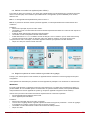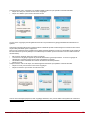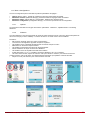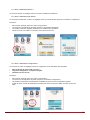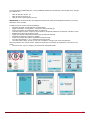
1
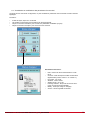
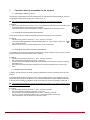
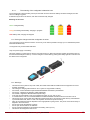
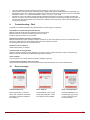
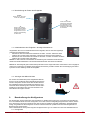
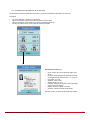
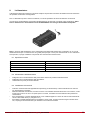
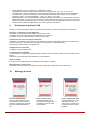
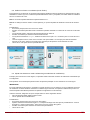
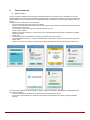
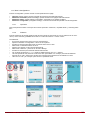
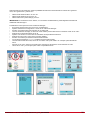
Vokkero Squadra
CEE Referees version
Notice d‘emploi
User Guide
Bedienungsanleitung
Istruzioni per l‘uso
Instrucciones para el uso
208407A-V1.4-UG-VOKKERO-SQUADRA_CEE_REFEREES
Préambule / Preamble / Präambel / Preambolo / Preámbulo
•
Ce guide décrit les fonctionnalités du système Vokkero® Squadra, ses options et ses accessoires. Il explique
comment le configurer pour permettre une communication de type conférence entre plusieurs utilisateurs.
•
This guide describes the functionality of the system Vokkero® Squadra, options and accessories. It explains
how to configure it to allow a conference-type communication between multiple users.
•
Diese Anleitung beschreibt die Funktionalität des Systems Vokkero® Squadra, Optionen und Zubehör. Es
erklärt, wie man es konfigurieren, um eine Konferenz-Art der Kommunikation zwischen mehreren Benutzern zu
ermöglichen.
•
Questa guida descrive la funzionalità del sistema Vokkero® Squadra, opzioni e accessori. E spiega come
configurare in modo da permettere una comunicazione di tipo conferenza tra più utenti.
•
Esta guía describe la funcionalidad del sistema Vokkero® Squadra, opciones y accesorios. En él se explica
cómo configurarlo para permitir una comunicación de tipo conferencia entre múltiples usuarios.
•
Aucun extrait de ce document ne pourra être reproduit ou transmis (sous format électronique ou papier, ou par
photocopie) sans l’accord d’Adeunis RF. Ce document pourra être modifié sans préavis. Toutes les marques
citées dans ce guide font l’objet d’un droit de propriété intellectuelle.
•
No part of this document may be reproduced or transmitted (in electronic or paper, or photocopying) without
the agreement Adeunis RF. This document may be changed without notice. All trademarks mentioned in this
guide are the subject of intellectual property rights. Adeunis RF.
•
Kein Teil dieses Dokuments darf reproduziert oder übertragen werden (in elektronischer oder Papierform oder
Fotokopie) ohne die Zustimmung ADEUNIS RF. Dieses Dokument darf ohne vorherige Ankündigung geändert
werden. Alle Marken in diesem Handbuch erwähnt werden, sind Gegenstand des geistigen Eigentums.
•
Nessuna parte di questo documento può essere riprodotta o trasmessa (in fotocopie elettronico o cartaceo,
o), senza il consenso RF ADEUNIS. Questo documento può essere modificato senza preavviso. Tutti i marchi
citati in questa guida sono oggetto di diritti di proprietà intellettuale.
•
Ninguna parte de este documento puede ser reproducida o transmitida (en fotocopias electrónico o en papel,
o) sin el acuerdo ADEUNIS RF. Este documento puede ser modificada sin previo aviso. Todas las marcas
comerciales mencionadas en esta guía son el tema de los derechos de propiedad intelectual.
ADEUNIS-RF
283, rue Louis Néel
38920 Crolles
France
Phone
Fax Web
+33(0)4 76 92 07 77
+33(0)4 76 08 97 46
www.VOKKERO.com
208407A-V1.4-UG-VOKKERO-SQUADRA_CEE_REFEREES
Table des matières
Préambule / Preamble / Präambel / Preambolo / Preámbulo
2
FRANCAIS
Introduction
11
Procédure d’installation du système
11
1.
Terminal VOKKERO® Squadra12
1.1.
Description des icônes de l’écran (par défaut)
12
1.2.
Description de l’ensemble des icônes de l’écran
12
1.3.
Description des touches du terminal
13
1.4.
Mise en route du terminal - Informations importantes
13
1.5.
Mise en place du micro-oreillette
13
2.
Description du configurateur
13
2.1.
Configurateur
14
2.2.
Description de l’écran d’accueil
14
2.3.
Menu Principal
14
2.4.
Visualisation des paramètres d’un terminal
15
3.
Mise en garde sur l’utilisation des fréquences
16
4.
Configuration automatique d’un système Vokkero® Squadra
17
4.1.
Choix d’un canal de «Class 1»
17
4.2.
Choix d’un canal de «Class 2»
17
5.
Paramétrage manuel d’un système Vokkero® Squadra
18
5.1.
Menu «Fréquences»
18
5.1.1. Choix manuel d’un canal «Class 1»
18
5.1.2. Choix manuel d’un canal de «Class 2»
18
5.2.
Attribuer un numéro à un système (menu «Role»)
19
5.3.
Régler les systèmes en mode conférence (procédure de cryptage)
19
6.
Autres sous-menus
21
6.1.
Menu «Mise à jour»
21
6.2.
Menu «Configuration»
22
6.2.1. Options
22
6.2.2. Sidetone
22
6.2.3. Speaker mode
23
6.2.4. Sélection d’écoute (Listening selection)
23
6.3.
Menu « Advanced settings »
24
6.4.
Menu «Paramètres Admin.»
26
6.5.
Menu «Paramètres par défaut»
26
6.6.
Menu «Paramètres configurateur»
26
7.
Fonctions directement accessibles via le terminal
27
7.1.
Réglage du volume d’écoute
27
7.2.
Visualisation du canal de communication utilisé
27
7.3.
Visualisation des terminaux connectés au réseau
27
7.4.
Modification du numéro de rôle
27
8.
Le chargeur
28
8.1.
Spécifications techniques 28
8.2.
Alimenter le chargeur 28
8.3.
Installer les terminaux
28
8.3.1. Signification des icônes batteries du configurateur
29
8.4.
Chaînage des chargeurs et du configurateur
29
208407A-V1.4-UG-VOKKERO-SQUADRA_CEE_REFEREES
8.5.
Avertissements 9.
Dépannage – FAQ
10.
Messages d’erreurs
ENGLISH
Introduction
Installation procedure for the system
1.
Vokkero® Squadra terminal 1.1.
Description of the screen icons (default settings)
1.2.
Description of all the screen icons
1.3.
Description of the terminal’s keys
1.4.
Start-up of the terminal – Important information
1.5.
Setting up the headset
2.
Description of the configurator
2.1.
Configurator
2.2.
Description of the home screen
2.3.
Main Menu
2.4.
Viewing a terminal’s parameters
3.
Warning about using frequencies
4.
Automatic configuration of a Vokkero® Squadra system
4.1.
Selecting a Class 1 channel
4.2.
Selecting a Class 2 channel
5.
Manual parameterisation of a Vokkero® Squadra system
5.1.
Frequencies menu
5.1.1. Manual selection of a Class 1 channel
5.1.2. Manual selection of a Class 2 channel
5.2.
Assigning a number to a system (Role menu)
5.3.
Setting the systems in conference mode (encryption procedure)
6.
Other sub-menus
6.1.
The Update menu
6.2.
The Configuration menu
6.2.1. Options
6.2.2. Sidetone
6.2.3. Speaker mode
6.2.4. Listening Selection 6.3.
Advanced Settings menu
6.4.
Admin Settings menu
6.5.
Default menu
6..
Configurator Settings menu
7.
Functions directly accessible via the terminal
7.1.
Adjusting the listening volume
7.2.
Viewing the communication channel used
7.3.
Viewing the terminals connected to the network
7.4.
Modifying the role number
8.
The charger
208407A-V1.4-UG-VOKKERO-SQUADRA_CEE_REFEREES
29
30
30
32
32
33
33
33
34
34
34
34
35
35
35
36
37
38
38
38
39
39
39
39
40
40
42
42
43
43
43
44
44
45
47
47
47
48
48
48
48
48
49
8.1.
Technical specifications
49
8.2.
Powering the charger 49
8.3.
Installing the terminals
49
8.3.1. The meaning of the configurator’s batteries icons
50
8.4.
Placing the chargers and the configurator in series
50
8.5.
Warnings 50
9.
Troubleshooting – FAQ
51
10.
Error messages
51
DEUTSCH
Einleitung
53
Vorgehensweise bei der Einrichtung des Systems
53
1.
Endgerät VOKKERO® Squadra 54
1.1.
Beschreibung der Icons auf dem Display (standardmäßig)
54
1.2.
Beschreibung der einzelnen Icons auf dem Display
54
1.3.
Beschreibung der Tasten des Endgeräts
55
1.4.
Inbetriebnahme des Endgeräts - Wichtige Informationen
55
1.5.
Anbringen des Mikroohrhörers
55
2.
Beschreibung des Konfigurators
55
2.1.
Konfigurator
56
2.2.
Beschreibung des Startbildschirms
56
2.3.
Hauptmenü
56
2.4.
Anzeige der Parameter eines Endgeräts
57
3.
Warnhinweise zur Benutzung der Frequenzen
58
4.
Automatische Konfiguration eines Systems Vokkero® Squadra
59
4.1.
Wahl eines Kanals der «Class 1»
59
4.2.
Wahl eines Kanals der «Class 2»
59
4.3.
Wählen Sie durch Anklicken mit Hilfe des Eingabestifts den gewünschten Ko
munikationskanal.
59
5.
Manuelle Parametrisierung eines Systems Vokkero® Squadra
60
5.1.
Menü «Frequencies»
5.1.1. Manuelle Wahl eines Kanals der «Class 1»
60
5.1.2. Manuelle Wahl eines Kanals der «Class 2»
60
5.2.
Zuweisung einer Nummer an ein System (Menü «Role»)
61
5.3.
Einstellung der Systeme im Modus Konferenz (Verschlüsselungsverfahren) 61
6.
Weitere Untermenüs
63
6.1.
Menü «Update»
63
6.2.
Menü «Configuration»
64
6.2.1. Optionen
64
6.2.2. Sidetone
64
6.2.3. Speaker mode
65
6.2.4. Auswahl der Mithörer (Listening Selection)
65
6.3.
Menü «Advanced Settings»
66
6.4.
Menü «Admin Settings»
68
6.5.
Menü «Default»
68
6.6.
Menü «Configurator Settings»
68
208407A-V1.4-UG-VOKKERO-SQUADRA_CEE_REFEREES
7.
Direkt vom Endgerät aus zugängliche Funktionen
7.1.
Einstellung der Lautstärke für das Mithören
7.2.
Anzeige des benutzten Kommunikationskanals
7.3.
Anzeige der mit dem Netzwerk verbundenen Endgeräte
7.4.
Änderung einer Rollennummer
8.
Ladegerät 8.1.
Technische Daten 8.2.
Stromversorgung des Ladegeräts 8.3.
Installing the terminals
8.3.1. Bedeutung der Icons «Batterie» des Konfigurators
8.4.
Verkettung der Ladegeräte und des Konfigurators
8.5.
Warnhinweise
9.
Behebung von Störungen – FAQ
10.
Fehlermeldungen
ITALIANO
Introduzione
Procedura di installazione del sistema
1.
Terminale VOKKERO® Squadra
1.1.
Descrizione delle icone dello schermo (di default)
1.2.
Descrizione dell’insieme delle icone dello schermo
1.3.
Descrizione dei tasti del terminale
1.4.
Avvio del terminale - Informazioni importanti
1.5.
Uso del micro-auricolare
2.
Descrizione del configuratore
2.1.
Configuratore
2.2.
Descrizione della schermata iniziale
2.3.
Menù Principale
2.4.
Visualizzazione dei parametri di un terminale 3.
Avviso sull’utilizzazione delle frequenze
4.
Configurazione automatica di un sistema Vokkero® Squadra
4.1.
Scelta di un canale di «Class 1»
4.2.
Scelta di un canale di «Class 2»
5.
Impostazione manuale di un sistema Vokkero® Squadra
5.1.
Menù «Frequencies»
5.1.1. Scelta manuale di un canale «Class 1»
5.1.2. Scelta manuale di un canale «Class 2»
5.2.
Attribuire un numero a un sistema (menù «Role»)
5.3.
Regolare i sistemi in modalità conferenza (procedura di criptaggio)
6.
Altri sottomenù
6.1.
Menù «update»
6.2.
Menù «Configuration»
6.2.1. Opzioni
6.2.2. Sidetone
6.2.3. Speaker mode
6.2.4. Selezione di ascolto (Listening selection) 208407A-V1.4-UG-VOKKERO-SQUADRA_CEE_REFEREES
69
69
69
69
69
70
70
70
70
71
71
71
72
72
74
74
75
75
75
76
76
76
76
77
77
77
78
79
80
80
80
81
81
81
81
82
82
84
84
85
85
85
86
86
6.3.
6.4.
6.5.
6.5.
Menù «Advanced settings»
Menù «Admin Settings»
Menù «Default»
Menù «Configurator Settings»
7.
Funzioni direttamente accessibili tramite il terminale 7.1.
Regolazione del volume di ascolto
7.2.
Visualizzazione del canale di comunicazione utilizzato
7.3.
Visualizzazione dei terminali connessi alla rete
7.4.
Modifica del numero di ruolo
8.
L’alimentatore
8.1.
Specifiche tecniche 8.2.
Alimentazione dell’alimentatore 8.3.
Installazione dei terminali
8.3.1. Significato delle icone batterie del configuratore 8.4.
Concatenamento degli alimentatori e del configuratore
8.5.
Avvertenze 9.
Risoluzione di problemi- FAQ
10.
Messaggi di errore ESPAÑOL
Introducción
Procedimiento de instalación del sistema
1.
Terminal VOKKERO® Squadra
1.1.
Descripción de los iconos de la pantalla (por defecto)
1.2.
Descripción del conjunto de iconos de la pantalla
1.3.
Descripción de los botones del terminal
1.4.
Puesta en marcha del terminal – Informaciones importantes
1.5.
Instalación del micro-auricular
2.
Descripción del configurador
2.1.
Configurador
2.2.
Descripción de la pantalla de inicio
2.3.
Menú Principal
2.4.
Visualización de los parámetros de un terminal
3.
Advertencia sobre la utilización de las frecuencias
4.
Configuración automática de un sistema Vokkero® Squadra
5.
6.
87
89
89
89
90
90
90
90
90
91
91
91
91
92
92
92
93
93
95
95
96
96
96
97
97
97
97
98
98
98
99
100
101
Configuración manual de un sistema Vokkero® Squadra
5.1.
Menú «Frequencies»
5.1.1. Selección manual de un canal de «Class 1»
5.1.2. Selección manual de un canal de «Class 2»
5.2.
Atribuir un número a un sistema (menú «Role»)
5.3.
Ajustar los sistemas en modo conferencia (procedimiento de codificación)
102
102
102
102
103
103
Otros submenús
6.1.
Menú «update»
6.2.
Menú «Configuration»
6.2.1. Opciones
105
105
106
106
208407A-V1.4-UG-VOKKERO-SQUADRA_CEE_REFEREES
7.
8.
9.
10.
6.3.
6.4.
6.5.
6.6.
6.2.2. Sidetone
6.2.3. Speaker mode
6.2.4. Selección de escucha (Listening selection)
Menú « Advanced settings »
Menú «Admin Settings»
Menú «Default»
Menú «Configurator Settings»
106
107
107
108
110
110
110
Funciones directamente accesibles vía el terminal
7.1.
Reglaje del volumen de escucha
7.2.
Visualización del canal de comunicación utilizado
7.3.
Visualización de los terminales conectados a la red
7.4.
Modificación del número de rol
111
111
111
111
111
El cargador
8.1.
Especificaciones técnicas 8.2.
Alimentar el cargador
8.3.
Instalar los terminales
8.3.1. Significado de los iconos de las baterías del configurador
8.4.
Encadenado de los cargadores y del configurador
8.5.
Advertencias 112
112
112
112
113
113
113
Reparación – FAQ
114
Mensajes de error
114
Déclaration De Conformité
Certificate Of Conformity
Konformitätserklärung
Certificato Di Conformita
Declaración De Conformidad
114
114
114
114
114
Restrictions d’usage
Restrictions of usage
Nutzungsbeschränkungen
Restrizioni all’uso
Restricciones de uso
115
115
115
115
208407A-V1.4-UG-VOKKERO-SQUADRA_CEE_REFEREES
FRANCAIS
208407A-V1.4-UG-VOKKERO-SQUADRA_CEE_REFEREES
9
Introduction
Les opérations décrites ci-dessous vous permettent de rapidement et simplement mettre en œuvre votre système de
communication VOKKERO® Squadra.
Toutes les opérations décrites sont communes aux versions de terminal VOKKERO® Squadra listées ci-dessous :
ARF7794AA
Note : la référence de votre produit se trouve sur l’étiquette située à l’arrière du boitier de votre terminal.
Le système se compose de trois éléments principaux :
•
•
•
Le terminal
Le configurateur
Le chargeur
Tous les paramètres de fonctionnement du système Vokkero® Squadra sont gérés par le configurateur. Celui ci
donne accès aux menus de réglages via un écran tactile. Pour fonctionner, le configurateur doit être connecté à un
ou plusieurs chargeurs et le(s) chargeur(s) doivent être connectés au bloc d’alimentation.
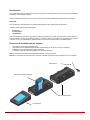
Procédure d’installation du système
•
•
•
•
Connecter le configurateur au(x) chargeur(s)
Connecter le bloc d’alimentation au dernier chargeur (si plusieurs sont chainés)
Brancher le bloc d’alimentation au secteur
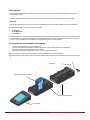
Connecter les terminaux Vokkero® Squadra comme montré ci-dessous
Note 1: l’ordre et la place des terminaux sur le(s) chargeur(s) n’a pas d’importance.
Note 2 : si l’opération vise uniquement à charger les terminaux, la présence du configurateur n’est pas nécessaire.
Bloc alimentation
Terminal Vokkero® Squadra
Chargeur(s)
Configurateur
208407A-V1.4-UG-VOKKERO-SQUADRA_CEE_REFEREES
10
1.
Terminal VOKKERO® Squadra
1.1. Description des icônes de l’écran (par défaut)
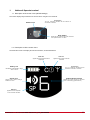
L’écran affiche les informations essentielles à l’utilisateur lors de l’utilisation de son terminal.
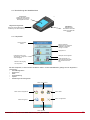
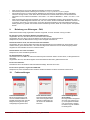
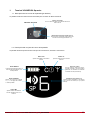
Indicateur de batterie
Statut du système
L’icône «antenne» indique que le terminal est relié à un
réseau.
Identifiant du produit (réglage du rôle)
Indique le numéro de l’appareil dans la conférence ou le mode écoute (system listener «L»).
1.2. Description de l’ensemble des icônes de l’écran
L’écran du terminal peut afficher toutes sortes d’informations, décrites ci-dessous :
Icône «C»
Apparaît lors de l’affichage du canal
sélectionné.
Icône batterie
Fournit des informations sur le
niveau de charge de la batterie, avec
4 niveaux possibles.
Icône volume
Apparait lorsque les touches «+»
et «-» de réglages de volume sont
actionnées. 11 niveaux possibles.
Icône «!»
Apparaît lorsqu’un canal de
«Class 2» est sélectionné.
Statut du système
L’icône «antenne» indique que le
terminal est relié à un réseau. Elle est
également présente lors de l’affichage
des terminaux connectés au réseau
(conférence).
Identifiant du produit (rôle)
Indique le numéro de l’appareil dans la
conférence ou le mode écoute («L» pour
system listener).
Icône SP
Apparait lorsque le mode «Speaker
mode» est activé sur le terminal.
208407A-V1.4-UG-VOKKERO-SQUADRA_CEE_REFEREES
11
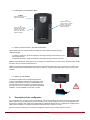
1.3. Description des touches du terminal
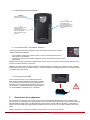
Marche/Arrêt
Permet la mise sous tension ou l’arrêt du terminal.
+/-
+/-
Permet l’accès direct au
réglage de volume. Dans
le menu de configuration
de l’appareil, permet
d’ajuster les paramètres.
Permet l’accès direct au
réglage de volume. Dans
le menu de configuration
de l’appareil, permet
d’ajuster les paramètres.
1.4. Mise en route du terminal - Informations importantes
Avant de procéder à la mise en route de votre terminal, assurez-vous que celui-ci a bien été
chargé via le chargeur dédié.
•
•
Pour allumer l’appareil, appuyer sur la touche «Marche / Arrêt» et maintenir l’appui
jusqu’à ce qu’il se mette en route, puis relâcher la touche.
Pour éteindre l’appareil, appuyer sur la touche «Marche / Arrêt» et maintenir l’appui
jusqu’à ce qu’il s’éteigne.
Note 1 : tous les paramètres, y compris le réglage du volume, sont conservés lorsqu’on éteint l’appareil et restent
identiques lorsqu’on rallume l’appareil.
Note 2 : le terminal se met automatiquement en mode économie d’énergie après quelques secondes s’il n’a pas été
sollicité. Ce mécanisme met en veille l’écran LCD du terminal. Pour réveiller l’écran LCD appuyer sur n’importe quelle
touche du terminal.
1.5. Mise en place du micro-oreillette
Le micro-oreillette fourni avec le kit Vokkero® Squadra
doit être connecté sur l’embase du terminal. Vérifier
que le connecteur est bien installé dans le logement en
appuyant fortement à la base du connecteur. Une mauvaise connection peut entrainer des problèmes de qualité
audio, voir l’impossibilité d’entendre et/ou d’écouter.
2.
Description du configurateur
Le configurateur ne dispose pas d’un connecteur permettant de l’alimenter directement, ni d’un interrupteur Marche/
Arrêt. Pour la mise en route, le configurateur doit être raccordé à un ou plusieurs chargeurs. Ceux-ci doivent être
alimentés par le secteur via le bloc d’alimentation spécifique, fourni avec le kit Vokkero® Squadra. Le configurateur
est équipé d’une prise USB pour les mises à jour ainsi que d’un stylet permettant d’utiliser l’écran tactile.
Dès la mise en route du système, le configurateur affiche le logo Vokkero, puis l’écran d’accueil.
208407A-V1.4-UG-VOKKERO-SQUADRA_CEE_REFEREES
12
2.1. Configurateur
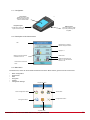
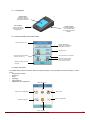
Ecran tactile
Affiche les menus et permet
de modifier les paramètres
des terminaux.
Stylet intégré
Tirer sur l’encoche pour
retirer le stylet de son
logement.
Connecteur USB
Permet le branchement
d’une clef USB lors d’une
mise à jour logicielle.
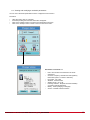
2.2. Description de l’écran d’accueil
Titre du menu en cours
Bouton chargeurs : permet
de visualiser les chargeurs
chaînés
Chargeur n°2
Niveau de charge du terminal
connecté au slot n°5
Slot d’accueil d’un terminal
Terminal connecté sur le
slot n°2. Ce terminal porte
le numéro de rôle 3
Boutons d’accès au menu
principal
2.3. Menu Principal
Accessible via le bouton «Menu» de l’écran d’accueil, le menu principal donne accès à 6 sous-menus :
•
•
•
•
•
•
Configuration rapide
Fréquences
Rôle
Cryptage
Mise à jour
Réglages du configurateur
Menu «Fréquences»
Menu «Configuration rapide»
Menu «Rôle»
Menu «Configuration»
Menu «Cryptage»
Menu «Mise à jour»
208407A-V1.4-UG-VOKKERO-SQUADRA_CEE_REFEREES
13
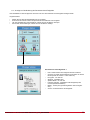
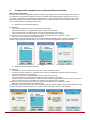
2.4. Visualisation et modifications des paramètres d’un terminal
A partir de l’écran d’accueil du configurateur, on peut visualiser les paramètres d’un terminal et accèder à certains
réglalages.
Procédure :
•
•
•
•
A l’aide du stylet, cliquer sur un terminal
Une fenêtre correspondant aux informations du terminal apparaît.
Cliquer sur le bouton «Modifer» pour accéder aux paramètres modifiables (cf ¶ 6.2)
Cliquer sur le bouton «Escape» pour revenir à l’écran d’accueil.
Informations terminal n°1
•
•
•
•
•
•
•
•
Rôle : numéro de rôle du terminal dans la conférence.
Channel : canal de fréquence utilisé et information
réglementaire (canaux «Class 1» ou «Class 2»).
Encryption : On ou Off.
Sidetone : valeur choisie.
Speaker mode : On ou Off
Listening selection : All (écoute de tous les terminaux) ou Custom (écoute partielle).
Battery : status (en charge ou chargée).
Version : version logicielle du terminal.
208407A-V1.4-UG-VOKKERO-SQUADRA_CEE_REFEREES
14
3.
Mise en garde sur l’utilisation des fréquences
Les deux sous-menus «Quick configuration» et «Fréquences» donnent accès aux réglages des canaux de communication (fréquences radio).
Note importante : avant d’utiliser l’appareil, veuillez observer les dispositions légales en vigueur dans votre pays.
Merci de vous reporter au chapitre «Restrictions d’usage» à la fin de ce document. Ces restrictions s’appliquent aux pays listés, sinon, les informations ci-dessous s’appliquent.
Vous pouvez paramétrer le terminal Vokkero® Squadra sur 6 canaux différents (selon les versions de terminal) qui
ont été séparés en 2 groupes distincts :
* les canaux CE, autorisés dans tous les pays de la Communauté Européenne, dits canaux de «Class 1» (utilisables
dans toute la communauté européenne - Standards harmonisés - Fréquences harmonisées). Ces fréquences sont
utilisables sans restriction au sein de la CEE.
* les canaux de «Class 2 ! » demandent une autorisation préalable à leur utilisation. Il appartient à l’utilisateur de
se renseigner auprès des autorités compétentes du pays où le système sera utilisé, afin de connaître quel canal
peut lui être autorisé. Dans certains cas, l’utilisation de ces canaux peut nécessiter l’obtention d’une licence permanente ou d’une licence temporaire.
Les liens ci-dessous vous permettront d’obtenir des informations complémentaires sur les démarches à suivre pour
l’obtention de vos licences temporaires.
http://www.efis.dk
http://www.erodocdb.dk/Docs/doc98/official/pdf/REC2510E.PDF
Note : tous les terminaux sont réglés sur les canaux de «class 1» CE1 lors de leur réglage en usine. Lors de leur
utilisation ils redémarrent sur le canal choisi lors du précédent réglage.
Les fréquences des différents canaux sont les suivantes :
Canaux EUROPE «Class 1» :
•
CE 1 : 869,525 MHz
Canaux EUROPE «Class 2»
•
•
•
SE1 : 866,5 MHz (Special Event - licence temporaire requise)
SE2 : 864,5 MHz (Special Event - licence temporaire requise)
SE3 : 863,5 MHz (Special Event - licence temporaire requise)
Lors de la navigation au travers des menus sollicitant les canaux de communication, des fenêtres surgissantes (popup) mettent en garde et alertent sur les aspects réglementaires de l’utilisation des différents canaux de communication.
Note importante : si un canal de «Class 2» a été sélectionné lors de la précèdente utilisation du système, l’icône !
du terminal clignote sur votre écran et un bip régulier retentit dans l’oreillette pendant 15 secondes (sans possibilité
d’utiliser le matériel) vous indiquant le réglage sur un canal de «Class 2» de votre terminal Vokkero® Squadra. Par la
suite, l’incone ! est maintenue sur l’écran du terminal pendant son utilisation.
208407A-V1.4-UG-VOKKERO-SQUADRA_CEE_REFEREES
15
4.
Configuration automatique d’un système Vokkero® Squadra
Menu «Configuration rapide»
Principe : le menu « Configuration rapide» permet de configurer très rapidement l’ensemble des terminaux présent
sur le(s) chargeur(s). Les paramètres nécessaires au fonctionnement du système (attribution du numéro de rôle de
1 à 6 ou Listener et Cryptage) sont gérés automatiquement. Le choix du canal de communication (fréquence radio)
reste manuel. Le mode «Configuration rapide» ne modifie pas les paramétres du terminal tels que le volume, le
niveau de sidetone ou la sélection d’écoute.
4.1. Choix d’un canal de «Class 1»
Procédure :
• Dans le menu principal, cliquer sur l’icône «Configuration rapide».
• Une fenêtre s’ouvre permettant la sélection du canal de communication.
• A l’aide du stylet, sélectionner le canal de communication en cliquant dessus.
• Cliquer sur le bouton «Ok» pour valider ou sur «Retour» pour sortir du sous-menu, sans validation.
Lorsque le bouton «Ok» a été cliqué, une fenêtre apparaît confirmant que l’opération s’est bien déroulée.
• Cliquer sur «Ok» pour revenir à l’écran d’accueil.
Les terminaux peuvent être retirés du (des) chargeur(s) et être utilisés. Note : lorsque les terminaux sont retirés du
chargeur, ils s’éteignent automatiquement, il faut alors les rallumer pour les utiliser.
4.2. Choix d’un canal de «Class 2»
Procédure :
• Dans le sous - menu «Configuration rapide» cliquer sur «Aller a: EUROPE class 2».
• Une fenêtre «Attention» s’ouvre mettant en garde sur l’aspect réglementé de ces canaux de «Class 2».
• Cliquer sur le bouton «Ok» pour valider.
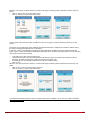
• Une fenêtre s’ouvre permettant la sélection du canal de communication.
• A l’aide du stylet, sélectionner le canal de communication en cliquant dessus.
• Une nouvelle fenêtre «Attention» s’ouvre mettant en garde sur l’aspect réglementé de ces canaux de «Class 2».
• Cliquer sur le bouton «Ok» pour valider ou «Retour» pour sortir du sous-menu.
Lorsque le bouton «Ok» a été cliqué, une fenêtre apparaît confirmant que l’opération s’est bien déroulée.
• Cliquer sur «Ok» pour revenir à l’écran d’accueil.
Les terminaux peuvent être retirés du (des) chargeur(s) et être utilisés. Note : lorsque les terminaux sont retirés du
chargeur, ils s’éteignent automatiquement, il faut alors les rallumer pour les utiliser.
208407A-V1.4-UG-VOKKERO-SQUADRA_CEE_REFEREES
16
5.
Paramétrage manuel d’un système Vokkero® Squadra
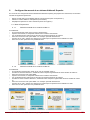
Dans le cas d’un paramétrage manuel du système Vokkero® Squadra, pour mettre en place une conférence, il est
nécessaire d’effectuer les opérations suivantes :
•
•
•
Définir le canal radio qui sera utilisé pour les communications (menu «Fréquences).
Donner un numéro distinct à chaque appareil (menu «Rôle»).
Appairer les appareils en mode conférence (menu «Cryptage»).
5.1. Menu «Fréquences»
5.1.1.
Choix manuel d’un canal «Class 1»
Procédure :
• Dans le menu principal, cliquer sur l’icône «Fréquences».
• Une fenêtre s’ouvre permettant la sélection du canal de communication.
• A l’aide du stylet, sélectionner le canal de communication en cliquant dessus.
• Cliquer sur le bouton «Ok» pour valider ou «Retour» pour sortir du sous-menu.
Lorsque le bouton «Ok» a été cliqué, une fenêtre apparaît confirmant que l’opération s’est bien déroulée.
• Cliquer sur «Ok» pour revenir à l’écran d’accueil
5.1.2.
Choix manuel d’un canal de «Class 2»
Procédure :
• Dans le sous - menu «Fréquences» cliquer sur «Aller a: EUROPE class 2».
• Une fenêtre «Attention» s’ouvre mettant en garde sur l’aspect réglementé de ces canaux de «Class 2».
• Cliquer sur le bouton «Ok» pour valider.
• Une fenêtre s’ouvre permettant la sélection du canal de communication.
• A l’aide du stylet, sélectionner le canal de communication en cliquant dessus.
• Une nouvelle fenêtre «Attention» s’ouvre mettant en garde sur l’aspect réglementé de ces canaux de «Class 2».
• Cliquer sur le bouton «Ok» pour valider ou «Retour» pour sortir du sous-menu.
Lorsque le bouton «Ok» a été cliqué, une fenêtre apparaît confirmant que l’opération s’est bien déroulée.
• Cliquer sur «Ok» pour revenir à l’écran d’accueil.
208407A-V1.4-UG-VOKKERO-SQUADRA_CEE_REFEREES
17
5.2. Attribuer un numéro à un système (menu «Role»)
Pour mettre en place une conférence, vous devez tout d’abord identifier tous les appareils qui y prendront part et leur
donner un numéro (rôle). Une conférence peut s’établir entre 2 et 6 appareils, qui seront identifiés par un numéro
allant de 1 à 6.
Note 1 : un des appareils doit impérativement porter le numéro 1.
Note 2 : ne pas donner le même numéro à plusieurs appareils, car cela empêcherait le bon fonctionnement de la
conférence.
Procédure :
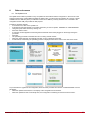
• Dans le menu principal, cliquer sur l’icône «Rôle».
• Une fenêtre s’ouvre vous demandant de choisir le terminal auquel doit être affecté un numéro de rôle. Cliquer sur
le bouton «Ok».
• A l’aide du stylet, sélectionner le terminal en cliquant dessus.
• Une fenêtre s’ouvre sur laquelle le terminal choisi s’affiche.
• A l’aide des boutons «+» et «-» modifier le numéro de rôle (de 1 à 6 ou «Listener» pour un mode écoute seule).
• Une fois le numéro choisi, cliquer sur le bouton «Ok» pour valider ou «Retour» pour sortir du sous-menu.
Lorsque le bouton «Ok» a été cliqué, une fenêtre apparaît confirmant que l’opération s’est bien déroulée.
• Cliquer sur «Ok» pour revenir à l’écran d’accueil.
5.3. Régler les systèmes en mode conférence (procédure de cryptage)
Principe : pour communiquer en mode sécurisé, les appareils doivent mémoriser une clé de cryptage fournie par le
configurateur.
Cette opération est nécessaire pour permettre à tous les appareils de participer à une conférence en mode sécurisé.
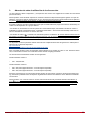
IMPORTANT
En mode crypté (sécurisé), un appareil ne peut pas communiquer avec un système si la procédure de cryptage n’a
pas été réalisée. Si vous souhaitez ajouter un terminal dans un système sécurisé existant, il est impératif de réaliser
cette procédure avec tous les appareils du système (y compris les appareils configurés en mode Listener).
Assurez-vous que chacun des critères suivants est respecté avant de commencer l’opération :
• tous les appareils doivent utiliser le même canal.
• seul un appareil porte l’identifiant 1.
Procédure :
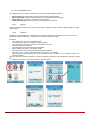
• Dans le menu principal, cliquer sur l’icône «Cryptage».
• Le sous-menu «Cryptage réseau» apparaît et permet de choisir deux types de procédures : «Lancer le cryptage»
et «Supprimer le cryptage». Cliquer sur le l’icône «Lancer le cryptage».
• Une fenêtre s’ouvre et demande de confirmer le lancement de cette procédure.
• Cliquer sur «OK».
208407A-V1.4-UG-VOKKERO-SQUADRA_CEE_REFEREES
18
Lorsque le bouton «OK» a été cliqué, une fenêtre apparaît confirmant que l’opération s’est bien déroulée.
• Cliquer sur «Ok» pour revenir au sous-menu «Cryptage».
• Cliquer sur «Retour» pour revenir à l’écran d’accueil.
Le sous-menu «Cryptage» permet également d’annuler une procédure de cryptage précédemment effectuée sur le
système.
Cette option peut être utile lorsque d’autres terminaux Vokkero® Squadra veulent intégrer la conférence sans avoir le
moyen d’être paramétrés par le configurateur.
Dans ce cas, le fait d’annuler la procédure de cryptage permettra de laisser «ouvert» le canal utilisé par le système et
les autres terminaux pourront participer à la conférence (à la condition qu’ils fonctionnent tous sur le même canal de
communication).
•
•
Dans le menu principal, cliquer sur l’icône «Cryptage».
Le sous-menu «Cryptage» apparaît et permet de choisir deux types de procédures : «Lancer le cryptage» et
«Supprimer le cryptage».Cliquer sur le l’icône «Supprimer le cryptage»
• Une fenêtre s’ouvre et demande de confirmer le lancement de cette procédure.
• Cliquer sur «Ok»
Lorsque le bouton «Ok» a été cliqué, une fenêtre apparaît confirmant que l’opération s’est bien déroulée.
• Cliquer sur «Ok» pour revenir au sous-menu «Cryptage».
• Cliquer sur «Retour» pour revenir à l’écran d’accueil.
Une fois ces trois étapes (Fréquence, Rôle, Cryptage) effectuées, vous pouvez utiliser votre système de communication Vokkero® Squadra.
208407A-V1.4-UG-VOKKERO-SQUADRA_CEE_REFEREES
19
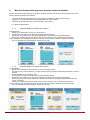
6.
Autres sous-menus
6.1. Menu «Mise à jour»
Le menu «Mise à jour» (Update) permet d’effectuer des mises à jour des terminaux et du configurateur. Dans le cas
de la mise à disposition d’une nouvelle version logicielle (fournie par Adeunis-RF) vous recevrez un software via
email que vous devrez charger sur une clef USB. Cette clef devra être connectée sur le configurateur via le port USB
prévu à cet effet.
Procédure de mise à jour des terminaux :
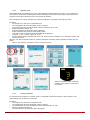
• Dans le menu principal, cliquer sur l’icône «Mise à jour».
• Une fenêtre s’ouvre vous demandant de choisir sur quel élément vous souhaitez procéder à une mise à jour
(Terminal IHM, Terminal audio, Set-up box).
• A l’aide du stylet, sélectionner l’élément en cliquant dessus.
• Appuyer sur le bouton «Select».
• Une fenêtre «Attention» apparaît, mentionnant que les terminaux doivent rester connectés au chargeur pendant
la procédure.
• Appuyer sur «OK».
• La procédure de mise à jour se lance. Cette mise à jour peut durer plusieurs minutes.
• Lorsque la procédure est effectuée et s’est correctement déroulée, une fenêtre d’information apparaît. Presser
«OK».
• Une fenêtre de résumé apparaît, confirmant le bon déroulement de l’ensemble des opérations. Presser «OK»
Pour procéder à la mise à jour du Configurateur, suivre la même procédure en choisissant «CONFIGURATEUR»
dans la première fenêtre.
• Lorsque la mise à jour est lancée, l’écran LCD du configurateur s’éteint.
• Lorsque la procédure de mise à jour s’est bien déroulée, le configurateur redémarre et affiche l’écran principal.
208407A-V1.4-UG-VOKKERO-SQUADRA_CEE_REFEREES
20
6.2. Menu «Configuration»
Le menu «Configuration permet d’accéder à plusieurs paramètres de réglages :
•
•
•
•
Options (Device option) : permet de configurer les fonctions optionnelles du terminal.
Paramètres avancés (advanced settings) : permet d’accéder aux réglages audio du terminal.
Paramètres admin (Admin settings) : inaccessibles - Réservés aux réglages usines.
Paramètres configurateur (Configurator settings) : ne concerne que l’écran LCD du configurateur.
6.2.1.
Options
Ce menu permet d’accéder à trois types de fonctions optionnelles : «Sidetone», «Speaker Mode» et «Listening
Selection».
6.2.2.
Sidetone
Le mode «Sidetone» vous permet de régler le niveau de retour audio (l’écoute de votre voix) dans le haut-parleur de
votre micro-casque (ou micro-oreillette) : 7 niveaux de volume + le mode «mute» sont accessibles.
Procédure :
• Dans le menu principal, cliquer sur l’icône «Configuration».
• Le sous-menu «Configuration» apparaît. Cliquer sur «Options».
• Une fenêtre s’ouvre et demande de sélectionner un terminal. Cliquer sur «Ok».
• Sélectionner un terminal en cliquant dessus.
• Une fenêtre correspondant aux options du terminal apparaît.
• Choisir «Sidetone» et cliquer sur le bouton «Modifier».
• Une fenêtre s’ouvre sur laquelle le terminal choisi s’affiche.
• A l’aide des boutons «+» et «-» modifier le niveau de «Sidetone» (de 1 à 7 ou «Mute»).
• Une fois la valeur choisie, cliquer sur le bouton «Ok» pour valider ou «Retour» pour sortir du sous-menu.
Lorsque le bouton «Ok» a été cliqué, une fenêtre apparaît confirmant que l’opération s’est bien déroulée.
• Cliquer sur «Ok» puis «Retour» pour revenir à l’écran d’accueil.
208407A-V1.4-UG-VOKKERO-SQUADRA_CEE_REFEREES
21
6.2.3.
Speaker mode
L’option «Speaker Mode» permet l’utilisation de l’un des terminaux Vokkero® Squadra comme «relais» vers un
système d’annonces (généralement un système audio permettant de s’adresser au public). Ce système est fréquemment utilisé par les arbitres dans certains sports, lorsqu’ils doivent annoncer leurs décisions.
Note : cette option ne fonctionne que si un (ou plusieurs) autres terminaux du système utilise un accessoire spécifique (Bouton Poussoir dédié au Speaker mode). Le terminal paramètré en Speaker Mode ne diffusera que le signal
audio provenant de ce (ou ces) terminal et uniquement lorsque son utilisateur pressera le bouton poussoir prévu à
cet effet.
Procédure :
• Dans le menu principal, cliquer sur l’icône «Configuration».
• Le sous-menu «Configuration» apparaît. Cliquer sur «Options»
• Une fenêtre s’ouvre et demande de sélectionner un terminal. Cliquer sur «Ok»
• Sélectionner un terminal en cliquant dessus.
• Une fenêtre correspondant aux options du terminal apparaît.
• Choisir «Speaker mode» et cliquer sur le bouton «Modifier»
• Une fenêtre s’ouvre sur laquelle le terminal choisi s’affiche.
• A l’aide des boutons «+» et «-» choisir «Off» ou «On»
• Une fois la valeur choisie, cliquer sur le bouton «Ok» pour valider ou «Retour» pour sortir du sous-menu.
Lorsque le bouton «Ok» a été cliqué, une fenêtre apparaît confirmant que l’opération s’est bien déroulée.
• Cliquer sur «Ok» puis «Retour» pour revenir à l’écran d’accueil.
Lorsque la fonction «Speaker mode»
à été sélectionnée sur un terminal, le
sigle «SP» apparait sur le LCD de ce
terminal.
6.2.4.
Sélection d’écoute (Listening selection)
Pour chaque appareil (en mode conférence ou Listener) , il est possible de sélectionner quel appareil on souhaite
écouter. Par défaut, tous les appareils sont sélectionnés.
Procédure :
• Dans le menu principal, cliquer sur l’icône «Configuration».
• Le sous-menu «Configuration» apparaît. Cliquer sur «Options».
• Une fenêtre s’ouvre et demande de sélectionner un terminal. Cliquer sur «Ok».
• Sélectionner un terminal en cliquant dessus.
• Une fenêtre correspondant aux options du terminal apparaît.
208407A-V1.4-UG-VOKKERO-SQUADRA_CEE_REFEREES
22
• Choisir «Listening select» et cliquer sur le bouton «Modifier».
Note : si la sélection d’écoute a déjà été modifiée, la mention «Custom» apparaît en face de l’option. Si tous les
terminaux sont écoutés, la mention «All» apparaît en face de l’option.
•
Une fenêtre s’ouvre sur laquelle apparaissent tous les terminaux. Si les terminaux sont «écoutés» un sigle vert
précède leurs numéros. Si les terminaux ne sont pas «écoutés» une croix rouge précède leurs noms.
• A l’aide du stylet, sélectionner les terminaux qui doivent être ou non écoutés.
• Une fois la sélection faite, cliquer sur le bouton «Ok» pour valider ou «Retour» pour sortir du sous-menu.
Lorsque le bouton «Ok» a été cliqué, une fenêtre apparaît confirmant que l’opération s’est bien déroulée.
• Cliquer sur «Ok» puis «Retour» pour revenir à l’écran d’accueil.
6.3. Menu « Advanced settings »
Attention ce menu est uniquement destiné à certains types d’utilisateurs (responsables de parc matériel télécom,
distributeurs, techniciens SAV…). De ce fait, l’accès à ce menu nécessite un code d’accès disponible sur demande
auprès d’ADEUNIS RF.
Le menu « Advanced settings » permet l’accès à quatre sous-menus :
•
•
•
•
Mic. settings
Gain-dB ADC mic
Gain-dB DAC Hp
AEC : Anti-echo
Principe :
Le terminal Vokkero® Squadra dispose d’une fonction de détection et d’ajustement automatique d’accessoires, permettant l’utilisation de nombreux types de micro-casques et micro-oreillettes.
•
Pour un paramétrage automatique sélectionner «Automatic» dans le sous-menu Mic. settings, pour un paramétrage manuel sélectionner «Manual»
208407A-V1.4-UG-VOKKERO-SQUADRA_CEE_REFEREES
23
Si le mode «Manual» est choisi, vous avez la possibilité de sélectionner manuellement les valeurs du gain micro, du
gain HP et de l’anti-écho.
•
•
•
Valeurs du Gain Mic : de 20 à -30.
Valeurs du Gain HP : de 20 à -42.
Valeurs d’anti-écho (AEC settings) : de 0 à 3.
IMPORTANT : la modification des valeurs peut fortement dégrader la qualité audio de votre équipement si elle n’est
pas effectuée avec soin.
Procédure commune aux menus «Paramètres avancés» :
• Dans le menu principal, cliquer sur l’icône «Configuration».
• Le sous-menu «Configuration» apparaît. Cliquer sur «Paramètres avancés».
• Une fenêtre s’ouvre et demande d’insérer un code PIN.
• Une fois le code inséré, une nouvelle fenêtre s’ouvre et demande de sélectionner un terminal. Cliquer sur «Ok»
• Sélectionner un terminal en cliquant dessus.
• Une fenêtre correspondant aux fonctions avancées du terminal apparaît.
• Choisir une fonction et cliquer sur le bouton «Modifier».
• Une fenêtre s’ouvre sur laquelle le terminal choisi s’affiche.
• A l’aide des boutons «+» et «-» modifier la fonction choisie.
• Une fois la valeur choisie, cliquer sur le bouton «Ok» pour valider ou «Retour» pour sortir du sous-menu.
Lorsque le bouton «Ok» a été cliqué, une fenêtre apparaît confirmant que l’opération s’est bien déroulée.
• Cliquer sur «Ok» puis «Retour» pour revenir à l’écran d’accueil.
208407A-V1.4-UG-VOKKERO-SQUADRA_CEE_REFEREES
24
6.4. Menu «Paramètres Admin.»
Ce menu est réservé aux réglages usine et n’est pas accessible aux utilisateurs.
6.5. Menu «Paramètres par défaut»
Ce menu permet d’effectuer un retour aux réglages usines sur l’ensemble des terminaux connectés au configurateur.
Procédure :
•
•
•
•
Dans le menu principal, cliquer sur l’icône «Configuration».
Le sous-menu «Configuration» apparaît. Cliquer sur «Paramètres par défaut»
Une fenêtre «Attention» apparaît demandant une validation de la procédure.
Cliquer sur «Ok» pour valider ou «Annuler» pour sortir du sous menu
6.6. Menu «Paramètres configurateur»
Ce menu donne accès aux réglages propres au configurateur. Trois paramètres sont ajustables :
•
•
•
Rétro-éclairage de l’écran LCD («backlight»)
Langue du configurateur : Français ou Anglais
Calibration de l’écran LCD
Procédure :
•
•
•
•
Dans le menu principal, cliquer sur l’icône «Configuration».
Le sous-menu «Configuration» apparaît. Cliquer sur «Paramètres configurateur»
Une fenêtre correspondant aux paramètres modifiables de l’écran LCD du configurateur apparaît.
A l’aide du stylet, modifier les paramètres souhaités puis cliquer sur Ok pour valider et revenir à l’écran de
veille.
208407A-V1.4-UG-VOKKERO-SQUADRA_CEE_REFEREES
25
7.
Fonctions directement accessibles via le terminal
7.1. Réglage du volume d’écoute
Le réglage de volume d’écoute est directement accessible via le terminal Vokkero® Squadra. Il
existe 11 niveaux de volume ajustables, de la valeur 0 à la valeur 10.
ATTENTION : les valeurs 9 et 10 doivent être utilisées avec précaution et uniquement dans des
environnement très bruyants.
Procédure :
• Lors de l’utilisation de votre terminal, utiliser les touches «+» et «-» situées de chaque côté de
votre terminal pour ajuster le niveau de volume d’écoute de votre oreillette.
• Le niveau en cours ainsi que l’icône «Haut parleur» s’affiche sur l’écran du terminal.
7.2. Visualisation du canal de communication utilisé
Le canal utilisé par le terminal Vokkero® Squadra peut être visualisé sur son écran LCD.
Procédure :
• Appuyer simultanément sur les touches «+» et «-» du terminal pendant 3 secondes.
• Le canal s’affiche ainsi que le sigle «C» s’il s’agit du canal de Class 1 ou «C ! » s’il s’agit d’un
canal de Class 2.
• Après 5 secondes, le LCD revient automatiquement à l’écran de veille.
7.3. Visualisation des terminaux connectés au réseau
Il est possible de visualiser l’ensemble des terminaux connectés au réseau créé de sorte à s’assurer que tous les intervenants sont bien présents dans la conférence.
Procédure :
• Appuyer simultanément sur les touches «+» et «-» du terminal pendant 3 secondes
• Lorsque le canal s’affiche, appuyer une fois sur la touche «+».
• Sur l’écran du terminal, l’icône «antenne» s’affiche et les numéros de tous les terminaux présents dans la conférences défilent les uns après les autres.
• Lorsque tous les terminaux ont été affichés, le LCD revient automatiquement à l’écran de veille.
7.4. Modification du numéro de rôle
Pour fonctionner correctement, la conférence audio doit impérativement posséder un terminal dont
le numéro de rôle est «1».
Si ce terminal vient à manquer (ex: problème d’alimentation ou défaut de fonctionnement), la conférence n’est plus possible. La fonction «modification du numéro de rôle» permet de palier à cette
situation en offrant la possibilité de modifier le numéro de rôle d’un terminal en lui attribuant le rôle
n°1.
IMPORTANT : cette fonction ne doit être utilisée que si le terminal ayant le rôle n°1 ne fonctionne
plus et que le configurateur n’est pas accessible !
Procédure :
• Appuyer simultanément sur les touches «+» et «-» du terminal pendant 3 secondes.
• Lorsque le canal s’affiche appuyer deux fois sur la touche «+».
• L’écran de votre terminal affiche alors le chiffre «1» clignotant.
• Pour confirmer le passage au rôle 1 du terminal, appuyer sur la touche «On/Off» du terminal.
• Après confirmation, le LCD revient à l’écran principal.
208407A-V1.4-UG-VOKKERO-SQUADRA_CEE_REFEREES
26
8.
Le chargeur
Le chargeur Vokkero® Squadra est un produit simple qui permet de recharger la batterie interne des terminaux et qui
permet d’alimenter le configurateur.
Jusqu’à 3 chargeurs peuvent être chaînés les uns aux autres, permettant ainsi le chargement simultané de 12 terminaux.
Un seul bloc d’alimentation est nécessaire à l’alimentation des chargeurs chaînés et du configurateur. Attention à
bien utiliser l’alimentation fournie par ADEUNIS RF lors de la livraison de votre kit Vokkero® Squadra.
Note: En fonction de la destination d’utilisation, le chargeur de batterie ARF7675AA est livré avec un câble d’alimentation européen ou nord-américain. Pour les autres pays (européens ou autres) nécessitant un câble d’alimentation
spécifique, merci d’utiliser une fiche secteur conforme aux normes locales.
8.1. Spécifications techniques
AC / DC convertisseur d’alimentation électrique
•
de 100 à 240 V ~ 12Vdc - 5 A - 50 à 60 Hz
Température de fonctionnement
•
5 ° C à 40 ° C (41 ° F à 104 ° F)
Durée de la charge
•
5 heures
Dimensions
•
L 136mm * H: 38 mm * l: 68 mm
Autonomie de batterie
•
> 500 cycles
8.2. Alimenter le chargeur
•
•
•
Brancher le bloc d’alimentation à la prise située sur la face arrière du chargeur.
Brancher le bloc d’alimentation sur le secteur.
Le chargeur est prêt à être utilisé.
8.3. Installer les terminaux
•
•
•
•
Placer les terminaux dans les emplacements prévus à cet effet (4 par chargeurs). Insérez-les verticalement de
sorte à ne pas endommager le connecteur.
Lorsque le terminal est détecté, le chargement débute. L’icône batterie du terminal s’incrémente confirmant le
chargement en cours. Si le voyant correspondant ne s’allume pas, vérifiez que le terminal a été correctement
positionné.
Si le configurateur est connecté au chargeur, des icônes de batterie apparaissent à côté de chacun des terminaux indiquant l’état de la charge (cf paragraphe 8.3.1).
Pour retirer les terminaux du chargeur, faites les basculer vers l’avant. Note : lorsque les terminaux sont retirés
du chargeur, ils s’éteignent automatiquement, il faut alors les rallumer pour les utiliser.
208407A-V1.4-UG-VOKKERO-SQUADRA_CEE_REFEREES
27
8.3.1.
Signification des icônes batteries du configurateur
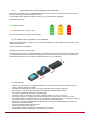
Le temps de recharge est d’environ 5 heures pour un terminal. Une fois que la batterie du terminal a été rechargée,
l’icône correspondant s’allume en vert.
Un terminal peut être laissé sur l’appareil, même après qu’il ait été complètement chargé.
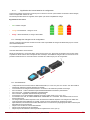
Significations des icônes:
•
Vert : batterie chargée.
•
Orange s’incrémentant : charge en cours.
•
Rouge : défaut de batterie, la charge a été arrêtée.
8.4. Chaînage des chargeurs et du configurateur
Jusqu’à 3 chargeurs peuvent être chaînés de sorte à offrir la possibilité de charger simultanément jusqu’à 12 terminaux Vokkero® Squadra.
Un configurateur peut leur être associé.
Une seule alimentation est nécessaire.
Placer les chargeurs sur une surface plane, (faces avant) face à vous. Approcher les chargeurs les uns des autres
et positionner les de sorte à faire correspondre leur mécanique. Verrouiller les chargeurs les uns aux autres en les
poussant fermement les uns contre les autres. Procéder de la même façon pour le configurateur.
8.5. Avertissements
•
•
•
•
•
•
•
•
•
•
•
•
Le dispositif de sectionnement étant le câble d’alimentation, le socle de prise de courant doit être installé à
proximité du matériel et doit être aisément accessible.
Le raccordement du chargeur ARF7675AA sur un réseau IT est seulement possible en Norvège.
Pour la Finlande : «Laite on liitettävä suojamaadoituskoskettimilla varustettuun pistorasiaan»
Pour la Norvege : “Apparatet må tilkoples jordet stikkontakt”
Pour la Suede : “Apparaten skall anslutas till jordat uttag
Au Royaume-Uni, la caractéristique assignée du circuit à retenir est de 13 A, et non 16 A
Au Canada et aux USA, la CARACTÉRISTIQUE ASSIGNÉE DU COURANT DE PROTECTION du circuit
retenue est de 20 A.
Ce chargeur doit être utilisé uniquement avec les terminaux Vokkero® Squadra. Si le chargeur est utilisé avec
n’importe quelles autres batteries ou produits, il existe un risque d’explosion et de blessures graves.
Après utilisation, les batteries doivent être éliminées dans un centre de recyclage approprié. Elles ne doivent pas
être jetées dans l’environnement.
Ne pas court-circuiter les contacts des batteries.
Ne pas ouvrir les terminaux et les batteries.
Ne pas exposer les batteries à des températures supérieures à 100°C (212°F).
208407A-V1.4-UG-VOKKERO-SQUADRA_CEE_REFEREES
28
•
•
•
•
Ce dispositif a été conçu pour une utilisation en intérieur.
La température ambiante lors de la recharge doit être comprise entre 5°C (41°F) et 40 °C (104°F).
Les terminaux peuvent être alimentés par d’autres alimentations externes que le chargeur Vokkero SQUADRA à
condition que ceux-ci soient des circuits TBTS et soient des Sources à Puissance Limitée au sens des chapitres
2.2 et 2.5 des normes IEC60950-1:2005+/A1:2009 et EN60950-1:2006+/A1:2010+/A11:2009.
Ce dispositif ne doit pas être utilisé par des personnes (y compris les enfants) dont les capacités physiques,
sensorielles ou mentales sont réduites, ou par ceux qui ne connaissent pas les méthodes nécessaires, à moins
qu’elles soient aidées par une personne en charge de leur sécurité, ou par une personne ayant déjà lu les instructions d’usage. Les enfants doivent être surveillés afin qu’ils ne puissent pas jouer avec le système.
9.
Dépannage – FAQ
Les problèmes fréquemment rencontrés sont présentés ci-dessous pour vous aider à les résoudre.
Je ne parviens pas à communiquer avec d’autres appareils.
• Assurez-vous que tous les appareils fonctionnent sur le même canal.
• Assurez-vous qu’un seul des appareils est identifié par le numéro 01.
• Vérifiez que votre micro-oreillette est bien connectée sur le terminal.
L’appareil ne réussit pas à rejoindre la conférence.
• Assurez-vous que l’opération de cryptage a été réalisée sur chacun des appareils afin de pouvoir participer à la
conférence, tout particulièrement si vous avez ajouté un appareil après le début de la conférence.
• Ne donnez pas le même numéro à plusieurs appareils.
L’appareil ne s’allume pas.
• Vérifiez que la batterie est chargée.
La communication est brouillée.
• Un autre système de conférence doit fonctionner près du vôtre. Modifiez le canal afin d’éviter les brouillages.
• Assurez-vous que tous les terminaux sont identifiés sur des numéros différents.
J’entends des grésillements.
• Le microphone de l’un des appareils est probablement endommagé. Remplacez-le.
Je m’entends parler, il y a un écho.
• Vérifiez que les microphones des différents appareils sont séparés les uns des autres de 10 mètres au minimum.
10.
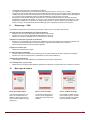
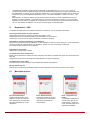
Messages d’erreurs
Erreur de communication :
Erreur - Prise en charge
Erreur - Produits invalides
Lors de la programmation, une
erreur de communication est
détectée. Vérifier que les terminaux sont bien installés sur le(s)
chargeur(s).
Le terminal installé n’est pas
reconnu par le configurateur.
Vérifier la version de firmware
installée.
Les terminaux installés ne sont
pas du même type (ex: produits
Europe et produits US). Vérifier
le type de produits installés.
208407A-V1.4-UG-VOKKERO-SQUADRA_CEE_REFEREES
29
ENGLISH
208407A-V1.4-UG-VOKKERO-SQUADRA_CEE_REFEREES
30
Introduction
The operations described below enable you to implement your Vokkero® Squadra communication system quickly
and easily.
All the operations described are common to the versions of the Vokkero® Squadra terminal listed below:
ARF7794A
Note: Your product reference is to be found on the label on the back of your terminal’s casing.
The system consists of three main items:
•
•
•
The terminal
The configurator
The charger
All the operating parameters of the Vokkero® Squadra system are managed by the configurator. This provides
access to the settings menus via a touch screen. In order to function, the configurator must be connected to one or
more chargers and the charger(s) must be connected to the power supply unit.
Installation procedure for the system
•
•
•
•
Connect the configurator to the charger(s).
Connect the power supply unit to the last charger (if several of them are in series).
Connect the power supply unit to the mains.
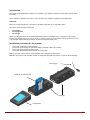
Connect the Vokkero® Squadra terminals as shown below.
Note 1: The order and the position of the terminals on the charger(s) is unimportant.
Note 2: If the purpose of the operation is solely to charge the terminals, then there is no need for the configurator.
Power supply
Vokkero® Squadra terminal
Charger(s)
Configurateur
208407A-V1.4-UG-VOKKERO-SQUADRA_CEE_REFEREES
31
1.
Vokkero® Squadra terminal
1.1. Description of the screen icons (default settings)
The screen displays key information for the user when using his or her terminal.
System status
The icon «Antenna» indicates that the terminal is
connected to a network.
Batterie level
Role number
Indicate the role number in the audio conference
or the system listener «L» status
1.2. Description of all the screen icons
The terminal’s screen can display all sorts of information, as described below:
Icon «C»
Appears when the selected channel
is displayed
Battery icon
Indicated the internal battery charge
status. 4 levels
Volume icon
Appears when volume setting is
modified. 11 levels
Icon «!»
Appears when a Class 2 channels
is selected
System status
The icon «Antenna» indicates that the
terminal is connected to a network.
Product ID (Role setting)
Specifies the device number in the conference or the listening (system listener).
SP icon
Appears when the «Speaker
mode» has been activated
208407A-V1.4-UG-VOKKERO-SQUADRA_CEE_REFEREES
32
1.3. Description of the terminal’s keys
On/Off
Allows powering up, or shutdown of the terminal.
+/-
+/-
Allows direct access to
volume control or channel
selection. In the setup
menu of the device can
adjust the settings.
Allows direct access to
volume control or channel
selection. In the setup
menu of the device can
adjust the settings.
1.4. Start-up of the terminal – Important information
Before starting up your terminal, make sure that it has been properly charged using the
dedicated charger.
•
•
To switch on the device, press the On/Off key and keep pressing it until it starts up, and
then release the key.
To switch off the device, press the On/Off key and keep pressing it until it is turned off.
Note 1: All the parameters, including the volume setting, are retained when you switch off the device and they remain
the same when you switch the device back on.
Note 2: The terminal automatically places itself in the power-saving mode after a few seconds if it is not being used.
This mechanism places the terminal’s LCD screen on stand-by. To wake up the LCD screen, press any key on the
terminal.
1.5. Setting up the headset
The headset supplied with the Vokkero® Squadra kit
must be connected the socket located at the base of the
terminal. Check that the connector is well installed in the
housing and secure the connexion by pushing strongly on
the connector. A poor connection may cause audio quality
problems, or the impossibility to hear and / or listen.
2.
Description of the configurator
The configurator does not have a connector enabling it to be powered directly, and it does not have an On/Off switch
either. To start it up, the configurator must be connected to one or more chargers. These must be powered from the
mains via the specific power supply unit supplied with the Vokkero® Squadra kit. The configurator is equipped with a
USB socket for updates, as well as a stylus which enables the touch screen to be used.
When the system is started up, the configurator displays the Vokkero logo, and then the home screen.
208407A-V1.4-UG-VOKKERO-SQUADRA_CEE_REFEREES
33
2.1. Configurator
Touch screen
Displays the menus and
allows to modify the parameters of the terminals.
Integrated stylus
Pull the slot to remove the
stylus from its housing.
USB connector
Allows to connect an USB
key when proceeding with
an update.
2.2. Description of the home screen
Title
Charger button : allows to
view the chargers chained
Charger n°2
Battery level of the terminal
connected to slot n°5
Terminal slot
Terminal connected to the
slot No. 2. This terminal has
number 3 role
Access button to the main
menu
2.3. Main Menu
The main menu, which can be accessed via the home screen’s “Menu” button, gives access to 6 sub-menus:
•
•
•
•
•
•
Quick configuration
Frequencies
Role
Encryption
Update
Configurator settings
Frequencies Menu
«Quick configuration» Menu
«Role» Menu
«Configuration» Menu
«Encryption» Menu
«Update» Menu
208407A-V1.4-UG-VOKKERO-SQUADRA_CEE_REFEREES
34
2.4. Viewing and modifying a terminal’s parameters
You can view a terminal’s parameters from the configurator’s home screen.
Procedure:
•
•
•
•
Using the stylus, click on a terminal.
A window providing the terminal’s information will appear.
Click on the «Modify» button to access to the parameters (see ¶ 6.2)
Click on the “Escape” button in order to return to the home screen.
Information on terminal n°1
•
•
•
•
•
•
•
•
Role : role number of the terminal in the audio
conference.
Channel : frequency channel used and regulatory
information (Class 1 or Class 2 channels).
Encryption : On or Off.
Sidetone : selected value.
Speaker mode : On or Off
Listening selection : All (listen at all the terminals)
or Custom (selecting listening).
Battery : status (charging or charged).
Version : terminal software versions.
208407A-V1.4-UG-VOKKERO-SQUADRA_CEE_REFEREES
35
3.
Warning about using frequencies
The Quick Configuration and Frequencies sub-menus provide access to the communication channels’ settings (radio
frequencies).
NB: Before using the device, please observe the legal provisions in force in your country. Please refer to the “Usage
restrictions” chapter at the end of this document. These restrictions apply to the countries listed. Otherwise,
the information below applies.
You can parameterise the Vokkero® Squadra terminal on 6 different channels (depending on the terminal version)
which have been split into 2 separate groups:
* EC channels, which are authorised in all European Community countries, and are referred to as “Class 1” channels
(they can be used throughout the European Community – Harmonised standards – Harmonised frequencies). These
frequencies can be used on an unrestricted basis within the EEC.
* “Class 2 ! channels require a permit prior to using them. It is the user’s responsibility to make enquiries with the
competent authorities in the country where the system will be used, in order to know what channel he or she may be
authorised to use. In certain cases, you may need to obtain a licence or a temporary licence to use these channels.
The links below enable you to obtain additional information concerning the procedures to follow in order to obtain your
temporary licences.
http://www.efis.dk
http://www.erodocdb.dk/Docs/doc98/official/pdf/REC2510E.PDF
Note: The terminal’s default setting is to start up on a Class 1 (EC1) channel setting, unless the Class 2 channels
option has been selected when previously adjusting the setting.
The frequencies for the various channels are as follows:
EUROPE Class 1 channels:
•
EC 1: 869.525 MHz
EUORPE Class 2 channels
•
•
•
SE1: 866.5 MHz (Special Event - temporary licence required)
SE2: 864.5 MHz (Special Event - temporary licence required)
SE3: 863.5 MHz (Special Event - temporary licence required)
When browsing through the menus relating to the communication channels, pop-up windows warn you and alert you
regarding the regulatory aspects of using the various communication channels.
NB: If a Class 2 channel has been selected when previously using the system, the terminal’s ! icon will flash on and
off on your screen and a regular beeping sound will be heard in the earpiece for 15 seconds (during which it will not
be possible to use the equipment), indicating to you that your Vokkero® Squadra has been set to a Class 2 channel.
208407A-V1.4-UG-VOKKERO-SQUADRA_CEE_REFEREES
36
4.
Automatic configuration of a Vokkero® Squadra system
Quick Configuration menu
Principle: the Quick Configuration menu makes it possible to very quickly configure all of the terminals connected to
the charger(s). The parameters required for operating the system (the encryption and the role number) are managed
automatically. The communication channel selection (radio frequency) remains manual. Note : the Quick configuration
mode does not modify the terminal parameters such as the volume, the sidetone level or le listening selection.
4.1. Selecting a Class 1 channel
Procedure:
• In the main menu, click on the “Quick configuration” icon.
• A window will open, enabling the communication channel to be selected.
• Using the stylus, select the communication channel by clicking on it.
• Click on the “OK” button in order to validate it, or on “Escape” in order to exit from the sub-menu.
When the “OK” button has been clicked on, a window will appear confirming that the operation has been duly completed.
• Click on “OK” to return to the home screen.
The terminals can be removed from the charger(s) and be used. Note:when the terminals are removed from the charger, they switch off automatically, you must switch them on to use them.
4.2. Selecting a Class 2 channel
Procedure:
• In the Quick Configuration sub-menu, click on “Go to: EUROPE class 2”.
• A Warning window will open, warning you about the regulated nature of these Class 2 channels.
• Click on the “OK” button in order to validate it.
• A window will open enabling the communication channel to be selected.
• Using the stylus, select the communication channel by clicking on it.
• Another Warning window will open, warning you about the regulated nature of these Class 2 channels.
• Click on the “OK” button in order to validate it, or on “Escape” in order to exit from the sub-menu.
When the “OK” button has been clicked on, a window will appear confirming that the operation has been duly completed.
• Click on “OK” to return to the home screen.
The terminals can be removed from the charger(s) and be used. Note:when the terminals are removed from the charger, they switch off automatically, you must switch them on to use them.
208407A-V1.4-UG-VOKKERO-SQUADRA_CEE_REFEREES
37
5.
Manual parameterisation of a Vokkero® Squadra system
In the case of manual parameterisation of the Vokkero® Squadra system, in order to set up a conference, you need
to carry out the following operations:
•
•
•
Define the radio channel that will be used for the communications (Frequencies menu).
Give each device a different number (Role menu).
Pair up the devices in conference mode (Encryption menu).
5.1. Frequencies menu
5.1.1.
Manual selection of a Class 1 channel
Procedure:
• In the main menu, click on the Frequencies icon.
• A window will open, enabling the communication channel to be selected.
• Using the stylus, select the communication channel by clicking on it.
• Click on the “OK” button in order to validate it, or on “Escape” in order to exit from the sub-menu.
When the “OK” button has been clicked on, a window will appear confirming that the operation has been duly completed.
• Click on “OK” to return to the home screen.
5.1.2.
Manual selection of a Class 2 channel
Procedure:
• In the Frequencies sub-menu, click on “Go to : EUROPE class 2”.
• A Warning window will open, warning you about the regulated nature of these Class 2 channels.
• Click on the “OK” button in order to validate it.
• A window will open, enabling the communication channel to be selected.
• Using the stylus, select the communication channel by clicking on it.
• Another Warning window will open, warning you about the regulated nature of these Class 2 channels.
• Click on the “OK” button in order to validate it, or on “Escape” in order to exit from the sub-menu.
When the “OK” button has been clicked on, a window will appear confirming that the operation has been duly completed.
• Click on “OK” to return to the home screen.
208407A-V1.4-UG-VOKKERO-SQUADRA_CEE_REFEREES
38
5.2. Assigning a number to a system (Role menu)
To set up a conference, firstly you have to identify all the devices that will be taking part and give them a number
(role). A conference may be established between 2 to 6 devices, which will be identified by a number ranging from 1
to 6.
Note 1: One of the devices absolutely must have the number 1.
Note 2: Do not assign the same number to several devices, as this will prevent the conference from running smoothly.
Procedure:
• In the main menu, click on the “Role” icon.
• A window will open, asking you to select the terminal that a role number must be assigned to. Click on the “OK”
button.
• Using the stylus, select the communication channel by clicking on it.
• A window will open, in which the terminal selected will be displayed.
• Using the “+” and “-” buttons, modify the role number (from 1 to 6 or “Listener” for a listening-only mode).
• Once the number has been selected, click on the “OK” button in order to validate it, or on “Escape” in order to
exit from the sub-menu.
When the “OK” button has been clicked on, a window will appear confirming that the operation has been duly completed.
• Click on “OK” to return to the home screen.
5.3. Setting the systems in conference mode (encryption procedure)
Principle: In order to communicate in secure mode, the devices must save an encryption key provided by the configurator.
This operation is required in order to enable all the devices to take part in a conference in secure mode.
IMPORTANT NOTE
In encrypted (secure) mode, a device cannot communicate with a system if the encryption procedure has not been
carried out. If you want to add a terminal to an existing system, you absolutely must carry out this procedure with all
the system’s devices (including devices configured in Listener mode).
Make sure that each of the following criteria are fulfilled before starting the operation:
• All the devices must use the same channel.
• Only one device should have the ID 1.
Procedure:
• In the main menu, click on the Encryption icon.
• The Network Encryption sub-menu will appear and enable you to select two types of procedures: Launch Encryption and Remove Encryption. Click on the “Launch Encryption” icon.
• A window will open and ask you to confirm the launching of this procedure.
• Click on “Yes”.
208407A-V1.4-UG-VOKKERO-SQUADRA_CEE_REFEREES
39
When the “Yes” button has been clicked on, a window will appear confirming that the operation has been duly completed.
• Click on “OK” to return to the Encryption menu.
• Click on “Escape” to return to the home screen.
The Encryption sub-menu also makes it possible to cancel an encryption procedure previously carried out on the
system.
This option may be useful when other Vokkero® Squadra terminals want to integrate the conference without having
the means of being parameterised by the configurator.
In this case, the act of cancelling the encryption procedure will make it possible to leave the channel used by the
system “open” and the other terminals will be able to participate in the conference (provided that they are all operating
on the same communication channel).
•
•
In the main menu, click on the Encryption icon.
The Network Encryption sub-menu will appear and enables two types of procedures to be selected: Launch
Encryption and Remove Encryption. Click on the Remove Encryption icon.
• A window will open and request confirmation of the launch of this procedure.
• Click on “Yes”.
When the “Yes” button has been clicked on, a window will appear confirming that the operation has been duly completed.
• Click on “OK” to return to the Encryption sub-menu.
• Click on “Escape” to return to the home screen.
Once these three stages (Frequency, Role, Encryption) have been completed, you can use your Vokkero® Squadra
communication system.
208407A-V1.4-UG-VOKKERO-SQUADRA_CEE_REFEREES
40
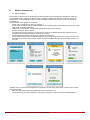
6.
Other sub-menus
6.1. The Update menu
The Update menu makes it possible to carry out updates of the terminals and the configurator. In the event of a new
software version being made available (supplied by Adeunis RF), you will receive the software via e-mail (or it will be
available from the Web site) which you will have to load onto a USB key. This key will have to be connected to the
configurator via the USB port provided for that purpose.
Procedure: terminals upgrade
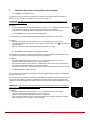
• In the main menu, click on the Update icon.
• A window will open that will ask you to select which item you want to update : TERMINAL or CONFIGURATOR.
• Using the stylus, select the item by clicking on it.
• Press the “Select” button
• A «warning» window appears mentionning that the terminals must remain plugged on the charger during the
procedure.
• Press OK
• The uploading procedure is launched and can run during several minutes.
• When the upload has been successfully executed, an info is displayed. Press OK.
• A final window, summarizing the uploading process is displayed. Press Ok to return to the main menu screen.
To proceed with the upgrade of the configurator, follow the same procedure and choose «CONFIGURATOR» into the
first display.
• When the upload is launched, the LCD display of the configurator becomes black.
• When the upload has been successfully done, the Configurator is restarting and shows the home screen.
208407A-V1.4-UG-VOKKERO-SQUADRA_CEE_REFEREES
41
6.2. The Configuration menu
The Configuration menu makes it possible to gain access to several settings parameters:
•
•
•
•
Device option: Makes it possible to configure the terminal’s optional functions.
Advanced Settings: Makes it possible to gain access to the terminal’s audio settings.
Admin Settings: Inaccessible – Reserved for factory settings.
Configurator Settings: These only relate to the configurator’s LCD screen.
6.2.1.
Options
This menu makes it possible to gain access to three types of optional functions: Sidetone, Speaker Mode, and Listening Selection.
6.2.2.
Sidetone
The Sidetone mode enables you to adjust the audio return level (enabling you to listen to your own voice) in your
headset (or earphone) speakers: 7 volume levels + the Mute mode are accessible.
Procedure:
• In the main menu, click on the Configuration icon.
• The Configuration sub-menu will appear. Click on “Options”.
• A window will open and ask you to select a terminal. Click on “OK”.
• Select a terminal by clicking on it.
• A window relating to the terminal’s options will appear.
• Select “Sidetone” and click on the “Modify” button.
• A window will open in which the terminal selected will be displayed.
• Using the “+” and “-” buttons, adjust the Sidetone level (from 1 to 7 or Mute).
• Once the value has been selected, click on the “OK” button in order to validate it, or on “Escape” in order to exit
from the sub-menu.
When the “OK” button has been clicked on, a window will appear confirming that the operation has been duly completed.
• Click on “OK” and then on “Escape” to return to the home screen.
208407A-V1.4-UG-VOKKERO-SQUADRA_CEE_REFEREES
42
6.2.3.
Speaker mode
The Speaker Mode option enables use of one of the Vokkero® Squadra terminals as a “relay” to a PA system (or in
other words an audio system enabling public address messages). This system is frequently used by referees and
umpires in certain sports when they have to announce their decisions.
Note: This option can only be used when the accessory dedicated to it (a specific push-button) is used.
Procedure:
• In the main menu, click on the Configuration icon.
• The Configuration sub-menu will appear. Click on “Options”.
• A window will open and you will be asked to select a terminal. Click on “OK”.
• Select a terminal by clicking on it.
• A window relating to the terminal’s options will appear.
• Select “Speaker mode” and click on the “Modify” button.
• A window will open in which the terminal selected will be displayed.
• Using the “+” and “-” buttons, select “Off” or “On”
• Once the value has been selected, click on the “OK” button in order to validate it, or on “Escape” in order to exit
from the sub-menu.
When the “OK” button has been clicked on, a window will appear confirming that the operation has been duly completed.
• Click on “OK” and then on “Escape” to return to the home screen.
When the «Speaker mode» is selected,
the letters «SP» appears on the LCD of
the terminal.
6.2.4.
Listening Selection
For each device (in Conference or Listener mode) , it is possible to select what device you want to listen to. The
default setting is for all devices to be selected.
Procedure:
• In the main menu, click on the Configuration icon.
• The Configuration sub-menu will appear. Click on “Options”.
• A window will open and you will be asked to select a terminal. Click on “OK”.
• Select a terminal by clicking on it.
• A window relating to the terminal’s options will appear.
208407A-V1.4-UG-VOKKERO-SQUADRA_CEE_REFEREES
43
• Select “Listening select” and click on the “Modify” button.
Note: If the listening selection has already been modified, the word “Custom” will appear opposite the option. If all the
terminals are being listened to, “All” will appear opposite the option.
•
A window will open in which all the terminals will appear. If the terminals are being listened to, a green abbreviation will precede their numbers. If the terminals are not being listened to, a red cross will precede their names.
• Using the stylus, select the terminals that should or should not be listened to.
• Once the selection has been made, click on the “OK” button in order to validate it, or on “Escape” in order to exit
from the sub-menu.
When the “OK” button has been clicked on, a window will appear confirming that the operation has been duly completed.
• Click on “OK” and then on “Escape” to return to the home screen.
6.3. Advanced Settings menu
Be aware of the fact that this menu is only intended for certain types of users (telecommunications equipment pool
managers, distributors, after-sales service technicians, etc.). Consequently, access to this menu requires an access
code available on demand from Adeunis RF.
The Advanced Settings menu enables access to four sub-menus:
•
•
•
•
Mic. settings
Gain-dB ADC mic
Gain-dB DAC speaker
AEC: Anti-echo
Principle:
The Vokkero® Squadra terminal has a function for detecting and automatically adjusting accessories, which makes it
possible to use numerous types of headsets and earpieces.
For automatic parameterisation, select “Automatic” from the Mic. Settings sub-menu; for manual parameterisation,
select “Manual”.
208407A-V1.4-UG-VOKKERO-SQUADRA_CEE_REFEREES
44
If the Manual mode is selected, you have the possibility of manually selecting the mic gain value, the speaker gain,
and the anti-echo.
•
•
•
Mic Gain Values: 20 to -30.
Speaker Gain Values: 20 to -42.
Anti-echo values (AEC settings): 0 to 3.
IMPORTANT: Modifying values can greatly reduce the audio quality of your equipment if it is not carried out carefully.
Procedure common to the Advanced Settings menu:
•
•
•
•
•
•
•
•
•
•
In the main menu, click on the Configuration icon.
The Configuration sub-menu will appear. Click on “Advanced Settings”.
A window will open and you will be asked to enter a PIN code.
Once the code has been entered, another window will open and will ask you to select a terminal. Click on “OK”.
Select a terminal by clicking on it.
A window relating to the terminal’s advanced functions will appear.
Select a function and click on the “Modify” button.
A window will open in which the terminal selected will be displayed.
Using the “+” and “-” buttons, modify the function selected.
Once the value has been selected, click on the “OK” button in order to validate it, or on “Escape” in order to exit
from the sub-menu.
When the “OK” button has been clicked on, a window will appear confirming that the operation has been duly completed.
• Click on “OK” and then on “Escape” to return to the home screen.
208407A-V1.4-UG-VOKKERO-SQUADRA_CEE_REFEREES
45
6.4. Admin Settings menu
This menu is reserved for factory settings and cannot be accessed by users.
6.5. Default settings
This menu allows to restore factory settings to all terminals plugged on the configurator.
Procedure :
•
•
•
•
In the main menu, click on the Configuration icon.
The Configuration sub-menu will appear. Click on “Default Settings”.
A warning window is asking for a confirmation.
Click on «OK» icon to restore factory settings.
6.6. Configurator Settings menu
This menu provides access to settings specific to the configurator. Three parameters are adjustable:
•
•
•
LCD screen backlight
Language of the configurator: French or English
LCD screen calibration
Procedure:
•
•
•
•
In the main menu, click on the Configuration icon.
The Configuration sub-menu will appear. Click on “Configurator Settings”.
A window relating to the modifiable parameters of the configurator’s LCD screen will appear.
Using the stylus, modify the parameters desired and then click on “OK” in order to validate them and return to the
screen saver.
208407A-V1.4-UG-VOKKERO-SQUADRA_CEE_REFEREES
46
7.
Functions directly accessible via the terminal
7.1. Adjusting the listening volume
The listening volume setting can be accessed directly via the Vokkero® Squadra terminal. There are
11 adjustable volume levels, ranging from a value of 0 to 10.
NB: The values 9 and 10 must be used with care, and only in very noisy environments.
Procedure:
• When using your terminal, use the “+” and “-” keys located on each side of your terminal in order
to adjust the listening volume level of your earpiece.
• The current level as well as the Speaker icon will be displayed on the terminal’s screen.
7.2. Viewing the communication channel used
The channel used by the Vokkero® Squadra terminal can be viewed on its LCD screen.
Procedure:
• Simultaneously press the terminal’s “+” and “-” keys for 3 seconds.
• The channel will be displayed as well as the abbreviation “C” if it is a Class 1 channel, or “C !” if
it is a Class 2 channel.
• After 5 seconds, the LCD will automatically return to the screen saver.
7.3. Viewing the terminals connected to the network
It is possible to view all of the terminals connected to the network created in such a way as to ensure
that all the parties involved are indeed at the conference.
Procedure:
• Simultaneously press the terminal’s “+” and “-” keys for 3 seconds.
• When the channel is displayed, press the “+” key once.
• Your terminal’s screen will then display all of the terminals connected to the network, as well as
the Antenna icon.
• When all the terminals have been displayed, the LCD will automatically return to the screen
saver.
7.4. Modifying the role number
In order to operate correctly, the audio conference absolutely must have a terminal whose role number is “1”.
If this terminal falls off-line (for example, due to a power supply problem or an operating fault), the
conference will no longer be possible. The “role number modification” function enables this situation
to be overcome by making it possible to modify a terminal’s role number by assigning it Role No. 1.
NB: This function should only be used if the terminal that has role No. 1 is no longer functioning and
the configurator is not accessible!
Procedure:
• Simultaneously press the terminal’s “+” and “-” keys for 3 seconds.
• When the channel is displayed, press the “+” key twice.
• Your terminal’s screen will then display the number “1” flashing on and off.
• In order to confirm the terminal’s shift to role 1, press the terminal’s “On/Off” key.
• After confirmation, the LCD will return to the home screen.
208407A-V1.4-UG-VOKKERO-SQUADRA_CEE_REFEREES
47
8.
The charger
The Vokkero® Squadra charger is a straightforward product that enables the terminals’ internal batteries to be recharged and enables the configurator to be powered.
Up to 3 chargers may be placed in series, thus enabling the simultaneous charging of 12 terminals.
A single power supply unit is required for powering the chargers in series and the configurator. Make sure you use the
power supply unit supplied by Adeunis RF when your Vokkero® Squadra kit is delivered.
Note: Depending on the intended use, the ARF7675AA battery charger is delivered with a European or North American power supply cable. For the other countries (European or elsewhere) requiring a specific power supply cable,
please use a mains plug that complies with local standards.
8.1. Technical specifications
AC/DC power supply converter
100 to 240 V ~ 12Vdc - 5 A-50 to 60 Hz
Operating temperature
5°C to 40°C (41°F to 104°F)
Charging time
5 hours
Dimensions
L 136 mm * H: 38 mm * D: 68 mm
Battery autonomy
> 500 cycles
8.2. Powering the charger
•
•
•
Connect the power supply unit to the socket located on the back of the charger.
Connect the power supply unit to the mains.
The charger is ready for use.
8.3. Installing the terminals
•
•
•
•
Place the terminals in the positions designed for that purpose (4 per charger). Insert them vertically so that you
do not damage the connector.
When the terminal is detected, charging will start. The terminal’s battery icon will rise incrementally, confirming
that the charging is in progress. If the relevant indicator light does not light up, check that the terminal has been
correctly positioned.
If the configurator is connected to the charger, battery icons will appear alongside each of the terminals, indicating the state of progress with the charging (cf. section 8.3.1).
To remove the terminals from the charger, tilt them forward. Note:when the terminals are removed from the charger, they switch off automatically, you must switch them on to use them.
208407A-V1.4-UG-VOKKERO-SQUADRA_CEE_REFEREES
48
8.3.1.
The meaning of the configurator’s batteries icons
The recharge time is approximately 5 hours per terminal. Once the terminal’s battery has been recharged, the relevant icon will light up green.
A terminal may be left on the device, even after it has been fully charged.
Meanings of the icons:
Green: Charged battery.
Orange increasing incrementally: charging in progress.
Red: Battery fault; charging has stopped.
8.4. Placing the chargers and the configurator in series
Up to 3 chargers may be placed in series in such a way as to make it possible to charge up to 12 Vokkero® Squadra
terminals simultaneously.
A configurator may be associated with them.
Only one power supply is necessary.
Place the chargers on a flat surface, with the front ends facing you. Bring the chargers together and position them so
that their mechanical parts match up. Lock the chargers to each other by pushing them firmly against one another. Do
the same for the configurator.
8.5. Warnings
•
•
•
•
•
•
•
•
•
•
•
•
•
The disconnection system is the power cable, the socket-outlet shall be installed near the equipment and must
be easily accessible.
Connecting the charging ARF7675AA on an IT system is only possible in Norway.
For Finland, «Laite is liitettävä suojamaadoituskoskettimilla varustettuun pistorasiaan»
For Norway: «Apparatet my tilkoples Jordet stikkontakt»
For Sweden: «Apparaten Skall anslutas till jordat uttag»
In the UK, the characteristic of the circuit assigned to apply is 13 A, and not 16 A.
In Canada and the USA, the CHARACTERISTIC RATED CURRENT PROTECTION circuit chosen is 20 A.
This charger must only be used with Vokkero® Squadra terminals. If the charger is used with any other batteries
or products whatsoever, there is a risk of an explosion and serious injuries occurring.
After use, the batteries must be disposed of at an appropriate recycling centre. They must not be thrown away to
degrade in the environment.
Do not short-circuit the batteries’ contacts.
Do not open the terminals or the batteries.
Do not expose the batteries to temperatures exceeding 100°C (212°F).
This device was designed for indoor use.
208407A-V1.4-UG-VOKKERO-SQUADRA_CEE_REFEREES
49
•
•
•
The room temperature when recharging must be between 5°C (41°F) and 40 °C (104°F):
The terminals can be powered by an external power supplies other than the dedicated Vokkero SQUADRA ,provided that these are SELV circuits and Limited Power Sources for the purposes of sections 2.2 and 2.5 standards
IEC60950-1: 2005 + / A1 : 2009 and EN60950-1: 2006 + / A1: 2010 + / A11: 2009.
This device must not be used by people (including children) whose physical, sensory or mental capacities are
reduced, or by those who are not acquainted with the methods required, unless they are helped by a guardian, or
someone who has already read the user instructions. Children must be watched in order to ensure that they do
not play with the device.
9.
Troubleshooting – FAQ
Frequently encountered problems are presented below in order to help you solve them.
I am unable to communicate with other devices.
Make sure that all the devices are operating on the same channel.
Make sure that one of the devices has the number 01 as its ID.
Check the proper connexion of your headset.
The device is unable to connect to a conference.
Make sure that the encryption operation has been carried out on each of the devices so that you can take part in the
conference, especially if you have added a device since the conference started.
Do not assign the same number to several devices.
The device will not switch on.
Check that the battery is charged.
Communication is being jammed.
Another conference system must be operating in your one’s vicinity. Change channels in order to avoid jamming.
Make sure that all the terminals are identified using different numbers.
I hear crackling.
The microphone in one of the devices is probably damaged. Replace it.
I can hear myself speaking – there is an echo.
Check that the microphones in the various devices have a minimum distance of 10 metres between them.
10.
Error messages
Communication error
Error - Support
Error - Invalid products
When programming, a communication error is detected. Check that
terminals are correctly installed on
the charger (s).
The terminal set is not recognized by the configurator. Check
the firmware version installed.
Terminals installed are not
the same type (eg, Europe
vs US). Check the type of
products installed.
208407A-V1.4-UG-VOKKERO-SQUADRA_CEE_REFEREES
50
DEUTSCH
208407A-V1.4-UG-VOKKERO-SQUADRA_CEE_REFEREES
51
Einleitung
Mit nachfolgend beschriebenen Operationen können Sie Ihr Kommunikationssystem VOKKERO® Squadra schnell
und einfach zum Einsatz bringen.
Alle dargelegten Arbeitsgänge gelten für unten aufgelistete Versionen des Endgeräts VOKKERO® Squadra :
ARF7794A
Hinweis : Die Artikel-Nummer Ihres Endgeräts finden Sie auf dem Typenschild auf der Rückseite des Gehäuses.
Das System besteht aus drei Hauptelementen :
•
•
•
dem Endgerät
dem Konfigurator
dem Ladegerät
Alle Betriebsparameter des Systems Vokkero® Squadra werden vom Konfigurator verwaltet. Mit ihm gelangen Sie
über einen Touchscreen in die Einstellmenüs. Der Konfigurator benötigt für seine Arbeit den Anschluss an ein oder
mehrere Ladegerät(e), und dieses bzw. diese wiederum müssen mit dem Netzteil verbunden sein
Vorgehensweise bei der Einrichtung des Systems
•
•
•
•
Verbinden Sie den Konfigurator mit dem (den) Ladegerät(en).
Verbinden Sie das Netzteil mit dem letzten Ladegerät (so denn mehrere miteinander verkettet sind).
Schließen Sie das Netzteil an das Stromnetz an.
Verbinden Sie die Endgeräte Vokkero® Squadra wie nachfolgend aufgezeigt.
Hinweis 1 : Die Reihenfolge und der Platz der Endgeräte am (an den) Ladegerät(en) haben keinerlei Bedeutung.
Hinweis 2 : Sollen nur die Endgeräte aufgeladen werden, ist der Konfigurator nicht erforderlich.
Netzteil
Endgerät Vokkero® Squadra
Ladegerät
Konfigurator
208407A-V1.4-UG-VOKKERO-SQUADRA_CEE_REFEREES
52
1.
Endgerät VOKKERO® Squadra
1.1. Beschreibung der Icons auf dem Display (standardmäßig)
Das Display zeigt die für den Benutzer beim Gebrauch seines Endgeräts wesentlichen Informationen an.
Status des Systems :
Das Icon «Antenna» zeigt an, dass das Endgerät mit
einem Netzwerk verbunden ist.
Batterieanzeige
Kennnummer des Produkts (Einstellung der «Role») :
Angabe der Nummer des Endgeräts innerhalb der Konferenz oder im Modus Mithören (System Listener «L»)
1.2. Beschreibung der einzelnen Icons auf dem Display
Das Display des Endgeräts kann alle unten beschriebenen Arten von Informationen anzeigen:
Icon «C»
erscheint bei der Anzeige des
gewählten Kanals
Icon Batterie
liefert Informationen zum Ladezustand der Batterie mit 4 möglichen
Anzeigen
Icon Lautstärke
erscheint, wenn die Tasten «+»
und «-» zur Einstellung der
Lautstärke aktiviert werden, wobei
11 Stufen möglich sind
Icon «!»
erscheint, wenn ein Kanal 2 ausgewählt ist.
Status des Systems :
Das Icon «Antenna» zeigt an, dass das
Endgerät mit einem Netzwerk verbunden ist.
Kennnummer des Produkts (Einstellung
der «Role») : Angabe der Nummer des
Endgeräts innerhalb der Konferenz oder im
Modus Mithören.
Icon SP
erscheint, wenn am Endgerät der
Modus «Speaker Mode» aktiviert
wird
208407A-V1.4-UG-VOKKERO-SQUADRA_CEE_REFEREES
53
1.3. Beschreibung der Tasten des Endgeräts
Ein/Aus :
Tasten zum Ein- bzw. Ausschalten des Endgeräts
+/-
+/-
Tasten für den direkten
Zugriff auf die Einstellung
der Lautstärke sowie im
Konfigurationsmenü des
Geräts für die Einstellung
der Parameter
Tasten für den direkten
Zugriff auf die Einstellung
der Lautstärke sowie im
Konfigurationsmenü des
Geräts für die Einstellung
der Parameter
1.4. Inbetriebnahme des Endgeräts - Wichtige Informationen
Vergewissern Sie sich vor Inbetriebnahme Ihres Endgeräts, dass es über das zugehörige
Ladegerät gut aufgeladen wurde.
• Drücken Sie zum Einschalten des Geräts auf die Taste «On/Off». Halten Sie diese
gedrückt, bis sich das Gerät einschaltet, und lassen Sie dann die Taste wieder los.
• Drücken Sie zum Ausschalten des Geräts auf die Taste «On/Off» und halten Sie diese
gedrückt, bis sich das Gerät ausschaltet.
Hinweis 1 : Alle Parameter einschließlich der Einstellung der Lautstärke werden bei Ausschalten des Geräts beibehalten und sind bei Wiedereinschalten des Geräts unverändert.
Hinweis 2 : Das Endgerät geht bei Nichtinanspruchnahme nach einigen Sekunden automatisch in den Energiesparmodus über, wobei das LCD-Display des Endgeräts auf Stand-by schaltet. Drücken Sie zur Beendigung des Standby-Modus auf eine beliebige Taste des Endgeräts.
1.5. Anbringen des Mikroohrhörers
Der mit dem Kit Vokkero® Squadra mitgelieferte Mikroohrhörer muss an die Buchse des Endgeräts angeschlossen
werden. Überprüfen Sie den festen Sitz des Anschlusses
durch kräftiges Drücken auf die Basis des Steckers. Eine
schlechte Steck-verbindung kann Probleme bei der Audioqualität zur Folge haben oder sogar das Verstehen und/
oder Mithören unmöglich machen.
2.
Beschreibung des Konfigurators
Der Konfigurator verfügt weder über einen Anschluss zur direkten Stromversorgung noch über einen Schalter Ein/
Aus. Zur Inbetriebnahme muss der Konfigurator an ein oder mehrere Ladegerät(e) angeschlossen werden, dessen
bzw. deren Strom-versorgung wiederum über das mit dem Kit Vokkero® Squadra mitgelieferte, spezielle Netzteil
erfolgt. Ausgestattet ist der Konfigurator mit einem USB-Anschluss für Updates sowie mit einem Eingabestift zur
Benutzung des Touchscreens.
Nach Inbetriebnahme des Systems zeigt der Konfigurator das Logo von Vokkero und dann den Startbildschirm an.
2.1. Konfigurator
208407A-V1.4-UG-VOKKERO-SQUADRA_CEE_REFEREES
54
2.2. Beschreibung des Startbildschirms
Touchscreen :
Anzeige der Menüs mit der
Möglichkeit, die Parameter
der Endgeräte zu ändern
Mitgelieferter Eingabestift :
Ziehen Sie den Eingabestift an der
Einkerbung aus seiner Halterung.
USB-Stecker :
Möglichkeit des
Anschlusses eines USBSticks beim Update der
Software
2.3. Hauptmenü
Titel des aktuellen
Menüs
Button Ladegeräte :
Möglichkeit, die miteinander
verketteten Ladegeräte
anzeigen zu lassen
Ladegerät Nr. 2
Ladezustand des an den
Steckplatz Nr. 5 angeschlossenen Endgeräts
Steckplatz eines Endgeräts
An den Steckplatz Nr. 2
angeschlossenes Endgerät,
das die Rollennummer 3
trägt
Buttons für den Zugang
zum Hauptmenü
Mit dem Hauptmenü, in das man über den Button «Menu» auf dem Startbildschirm gelangt, hat man Zugriff auf 6
Untermenüs :
• Schnellkonfiguration
• Frequenzen
• Rolle
• Verschlüsselung
• Update
• Einstellungen des Konfigurator
Menü «Frequencies»
Menü «Quick Configuration»
Menü «Role»
Menü «Configuration»
Menü «Encryption»
Menü «Update»
208407A-V1.4-UG-VOKKERO-SQUADRA_CEE_REFEREES
55
2.4. Anzeige und Veränderung der Parameter eines Endgeräts
Vom Startbildschirm des Konfigurators aus kann man sich die Parameter eines Endgeräts anzeigen lassen.
Vorgehensweise :
•
•
•
•
Klicken Sie mit Hilfe des Eingabestifts auf ein Endgerät.
Es erscheint ein Fenster mit den entsprechenden Informationen zum Endgerät.
Um zum Startbildschirm zurückzukehren, klicken Sie auf den Button «Escape».
Zum Ändern der Einstellungen, klicken Sie auf den Button «Modify»
Informationen zum Endgerät Nr. 1
•
•
•
•
•
•
•
•
Role : Rollennummer des Endgeräts bei der Konferenz
Channel : benutzter Frequenzkanal und Angaben zu dessen
Klasse (Kanal der «Class 1» oder «Class 2»)
Encryption : On oder Off
Sidetone : gewählter Wert
Speaker Mode : On oder Off
Listening Selection : All (Mithören aller Endgeräte) oder
Custom (teilweises Mithören)
Battery : Status (wird gerade aufgeladen oder ist aufgeladen)
Version : Softwareversion des Endgeräts
208407A-V1.4-UG-VOKKERO-SQUADRA_CEE_REFEREES
56
3.
Warnhinweise zur Benutzung der Frequenzen
Mit den beiden Untermenüs «Quick Configuration» und «Frequencies» gelangt man zu den Einstellungen der Kommunikations-kanäle (Funkfrequenzen).
Wichtiger Hinweis : Beachten Sie vor Benutzung des Geräts bitte die gesetzlichen Bestimmungen, die in Ihrem
Land gelten. Siehe Abschnitt «Einschränkungen beim Gebrauch» am Ende vorliegenden Dokuments. Diese
Einschränkungen gelten für die aufgelisteten Länder, ansonsten kommen nachstehende Informationen zur
Anwendung.
Sie können das Endgerät Vokkero® Squadra auf 6 verschiedene Kanäle parametrisieren (je nach Version des Endgeräts). Diese sind unterteilt in 2 Gruppen :
* die EG-Kanäle, die in allen Ländern der Europäischen Gemeinschaft zulässig sind, die so genannten Kanäle der
«Class 1» (verwendbar in der gesamten Europäischen Gemeinschaft – Harmonisierte Standards – Harmonisierte
Frequenzbereiche). Diese Frequenzen dürfen innerhalb der EG uneingeschränkt benutzt werden.
* die Kanäle der «Class 2 ! », für die vor ihrem Gebrauch eine Genehmigung einzuholen ist. Der Benutzer hat bei
den zuständigen Behörden des Landes, in dem das System zum Einsatz kommt, in Erfahrung zu bringen, welchen
Kanal er benutzen darf. In manchen Fällen kann die Benutzung dieser Kanäle den Erwerb einer ständigen oder
zeitweiligen Lizenz erforderlich machen.
Nachfolgende Links liefern Ihnen zusätzliche Informationen in Bezug auf die Schritte, die zum Erwerb Ihrer zeitweiligen Lizenzen zu unternehmen sind.
http://www.efis.dk
http://www.erodocdb.dk/Docs/doc98/official/pdf/REC2510E.PDF
Hinweis : Alle Endgeräte sind werkseitig auf die Kanäle der «Class 1» (EG 1) eingestellt. Während ihrer Benutzung
starten die Geräte auf dem Kanal, der bei der zuletzt erfolgten Einstellung gewählt wurde.
Für die einzelnen Kanäle gelten folgende Frequenzen :
Kanäle der EUROPE «Class 1» :
•
CE 1 : 869,525 MHz
Kanäle der EUROPE«Class 2» :
•
•
•
SE 1 : 866,5 MHz (Special Event – zeitweilige Lizenz erforderlich) SE 2 : 864,5 MHz (Special Event – zeitweilige Lizenz erforderlich)
SE 3 : 863,5 MHz (Special Event – zeitweilige Lizenz erforderlich)
Beim Navigieren durch die Menüs, die Kommunikationskanäle beanspruchen, weisen Pop-up-Fenster warnend auf
die Aspekte hinsichtlich der Vorschriften bei Benutzung der verschiedenen Kommunikationskanäle hin.
Wichtiger Hinweis : Wurde bei der vorangegangenen Benutzung des Systems ein Kanal der «Class 2» gewählt,
blinkt auf Ihrem Display das Icon ! des Endgeräts und im Ohrhörer ist 15 Sekunden lang ein gleichmäßiger Piepton zu hören (ohne die Ausrüstung benutzen zu können), um Sie darauf aufmerksam zu machen, dass Ihr Endgerät
Vokkero® Squadra auf einen Kanal der «Class 2» eingestellt ist. Bei der anschließenden Benutzung des Endgeräts
mit diesem Kanal bleibt das Icon ! auf dem Display angezeigt.
208407A-V1.4-UG-VOKKERO-SQUADRA_CEE_REFEREES
57
4.
Automatische Konfiguration eines Systems Vokkero® Squadra
Menü «Quick Configuration»
Prinzip : Mit dem Menü «Quick Configuration» können alle Endgeräte, die es am (an den) Ladegerät(en) gibt, ganz
schnell konfiguriert werden. Die für den Betrieb des Systems erforderlichen Parameter (Zuweisung der Rollennummer 1
bis 6 oder Listener und Verschlüsselung) werden automatisch verwaltet, während die Wahl des Kommunikationskanals
(der Funkfrequenz) manuell erfolgt. Mit dem Modus «Quick Configuration» werden keine Parameter des Endgeräts wie
Lautstärke, Schallpegel des Sidetones oder Auswahl der Mithörer geändert.
4.1. Wahl eines Kanals der «Class 1»
Vorgehensweise :
• Klicken Sie im Hauptmenü auf das Icon «Quick Configuration».
• Es öffnet sich ein Fenster für die Auswahl des Kommunikationskanals.
• Wählen Sie durch Anklicken mit Hilfe des Eingabestifts den gewünschten Kommunikationskanal.
• Klicken Sie zur Bestätigung auf den Button «OK» oder auf «Escape» zum Verlassen des Untermenüs ohne Eingabebestätigung.
Wurde der Button «OK» angeklickt, erscheint ein Fenster, das den korrekten Ablauf der Operation bestätigt.
• Um zum Startbildschirm zurückzukehren, klicken Sie auf «OK».
Die Endgeräte können nun vom Ladegerät (von den Ladegeräten) getrennt und benutzt werden. Hinweis : Sind die
Endgeräte vom Ladegerät getrennt, schalten sie sich automatisch aus, sodass sie zur Benutzung wieder eingeschaltet
werden müssen.
4.2. Wahl eines Kanals der «Class 2»
Vorgehensweise :
• Klicken Sie im Untermenü «Quick Configuration» auf «Go to: EUROPE class 2».
• Es öffnet sich ein Fenster «Attention», das Sie warnend auf den geregelten Aspekt dieser Kanäle der «Class 2» hinweist.
• Klicken Sie zur Bestätigung auf den Button «OK».
• Es öffnet sich ein Fenster für die Auswahl des Kommunikationskanals.
•
4.3. Wählen Sie durch Anklicken mit Hilfe des Eingabestifts den gewünschten Kommunikationskanal.
Es öffnet sich ein neues Fenster «Attention», das Sie warnend auf den geregelten Aspekt dieser Kanäle der «Class 2»
hinweist.
• Klicken Sie zur Bestätigung auf den Button «OK» oder auf «Escape» zum Verlassen des Untermenüs.
Wurde der Button «OK» angeklickt, erscheint ein Fenster, das den korrekten Ablauf der Operation bestätigt.
• Um zum Startbildschirm zurückzukehren, klicken Sie auf «OK».
Die Endgeräte können nun vom Ladegerät (von den Ladegeräten) getrennt und benutzt werden. Hinweis : Sind die Endgeräte vom Ladegerät getrennt, schalten sie sich automatisch aus, sodass sie zur Benutzung wieder eingeschaltet werden
müssen.
208407A-V1.4-UG-VOKKERO-SQUADRA_CEE_REFEREES
58
5.
Manuelle Parametrisierung eines Systems Vokkero® Squadra
Bei einer manuellen Parametrisierung des Systems Vokkero® Squadra zum Einrichten einer Konferenz ist es erforderlich, folgende Operationen auszuführen :
•
•
•
Legen Sie den für die Kommunikationen zu benutzenden Funkkanal fest (Menü «Frequencies»).
Vergeben Sie an jedes Gerät eine unterschiedliche Nummer (Menü «Role»).
Verbinden Sie die Geräte im Modus Konferenz (Menü «Encryption»).
5.1. Menü «Frequencies»
5.1.1.
Manuelle Wahl eines Kanals der «Class 1»
Vorgehensweise :
• Klicken Sie im Hauptmenü auf das Icon «Frequencies».
• Es öffnet sich ein Fenster für die Auswahl des Kommunikationskanals
• Wählen Sie durch Anklicken mit Hilfe des Eingabestifts den gewünschten Kommunikationskanal
• Klicken Sie zur Bestätigung auf den Button «OK» oder auf «Escape» zum Verlassen des Untermenüs.
Wurde der Button «OK» angeklickt, erscheint ein Fenster, das den korrekten Ablauf der Operation bestätigt.
• Um zum Startbildschirm zurückzukehren, klicken Sie auf «OK».
5.1.2.
Manuelle Wahl eines Kanals der «Class 2»
Vorgehensweise :
• Klicken Sie im Untermenü «Frequencies» auf «Go to: EUROPE class 2».
• Es öffnet sich ein Fenster «Attention», das Sie warnend auf den geregelten Aspekt dieser Kanäle der «Class 2»
hinweist.
• Sie zur Bestätigung auf den Button «OK».
• Es öffnet sich ein Fenster für die Auswahl des Kommunikationskanals.
• Wählen Sie durch Anklicken mit Hilfe des Eingabestifts den gewünschten Kommunikationskanal.
• Es öffnet sich ein neues Fenster «Attention», das Sie warnend auf den geregelten Aspekt dieser Kanäle der
«Class 2» hinweist.
• Klicken Sie zur Bestätigung auf den Button «OK» oder auf «Escape» zum Verlassen des Untermenüs.
Wurde der Button «OK» angeklickt, erscheint ein Fenster, das den korrekten Ablauf der Operation bestätigt.
• Um zum Startbildschirm zurückzukehren, klicken Sie auf «OK».
208407A-V1.4-UG-VOKKERO-SQUADRA_CEE_REFEREES
59
5.2. Zuweisung einer Nummer an ein System (Menü «Role»)
Zum Einrichten einer Konferenz müssen Sie zunächst alle beteiligten Geräte kennzeichnen und ihnen eine Nummer
(Rolle) geben. Erfolgen kann eine Konferenz zwischen 2 bis 6 Geräten, die mit einer Nummer von 1 bis 6 zu kennzeichnen sind.
Hinweis 1 : Eines der Geräte muss unbedingt die Nummer 1 tragen.
Hinweis 2 : Es darf nicht an mehrere Geräte dieselbe Nummer vergeben werden, da so die einwandfreie Funktion
der Konferenz beeinträchtigt würde.
Vorgehensweise :
• Klicken Sie im Hauptmenü auf das Icon «Role».
• Es öffnet sich ein Fenster, das von Ihnen die Auswahl des Endgeräts, dem eine Rollennummer zuzuteilen ist,
verlangt. Klicken Sie auf den Button «OK».
• Wählen Sie durch Anklicken mit Hilfe des Eingabestifts das gewünschte Endgerät.
• Es öffnet sich ein Fenster, auf dem das gewählte Endgerät angezeigt wird.
• Ändern Sie mit Hilfe der Buttons «+» und «-» die Rollennummer (von 1 bis 6 oder «Listener» nur beim Modus
Mithören).
• Klicken Sie nach Auswahl der Nummer zur Bestätigung auf den Button «OK» oder auf «Escape» zum Verlassen
des Untermenüs.
Wurde der Button «OK» angeklickt, erscheint ein Fenster, das den korrekten Ablauf der Operation bestätigt.
• Um zum Startbildschirm zurückzukehren, klicken Sie auf «OK».
5.3. Einstellung der Systeme im Modus Konferenz (Verschlüsselungsverfahren)
Prinzip : Um im abgesicherten Modus miteinander kommunizieren zu können, müssen die Geräte einen vom Konfigurator gelieferten Verschlüsselungscode speichern.
Diese Operation ist erforderlich, damit alle Geräte an einer Konferenz im abgesicherten Modus teilnehmen können.
WICHTIG
Ein Gerät kann im verschlüsselten (abgesicherten) Modus nur dann mit einem System kommunizieren, wenn das
Verschlüsse-lungsverfahren vorgenommen wurde. Möchten Sie zu einem bestehenden abgesicherten System ein
Endgerät hinzufügen, muss diese Prozedur unbedingt bei allen Geräten des Systems erfolgen (einschließlich der im
Modus Listener konfigurierten Geräte).
Vergewissern Sie sich, dass vor Beginn der Operation jedes der folgenden Kriterien eingehalten wurde :
• Alle Geräte müssen denselben Kanal benutzen.
• Nur ein Gerät darf die Kennnummer 1 tragen.
Vorgehensweise :
• Klicken Sie im Hauptmenü auf das Icon «Encryption».
• Es erscheint das Untermenü «Network Encryption», das die Wahl zwischen zwei Verfahrensweisen bietet :
«Launch Encryption» und «Remove Encryption». Klicken Sie auf das Icon «Launch Encryption».
• Es öffnet sich ein Fenster, das Sie bittet, den Start für dieses Verfahren zu bestätigen.
• Klicken Sie auf «OK».
208407A-V1.4-UG-VOKKERO-SQUADRA_CEE_REFEREES
60
Wurde der Button «OK» angeklickt, erscheint ein Fenster, das den korrekten Ablauf der Operation bestätigt.
•
•
Um in das Untermenü «Encryption» zurückzukehren, klicken Sie auf «OK».
Um zum Startbildschirm zurückzukehren, klicken Sie auf «Escape»
Mit dem Untermenü «Encryption» ist es auch möglich, ein vorher erfolgtes Verschlüsselungsverfahren für das System
zu löschen.
Diese Option kann nützlich sein, wenn weitere Endgeräte Vokkero® Squadra in die Konferenz eingebunden werden
sollen, ohne dass sie selbst durch den Konfigurator parametrisierbar sind.
In diesem Fall wird der vom System benutzte Kanal durch das Löschen des Verschlüsselungsverfahrens «offen»
gelassen, und die anderen Endgeräte können an der Konferenz teilnehmen (vorausgesetzt, sie arbeiten alle auf
demselben Kommunikationskanal).
•
•
•
•
•
•
Klicken Sie im Hauptmenü auf das Icon «Encryption».
Es erscheint das Untermenü «Encryption», das die Wahl zwischen zwei Verfahrensweisen bietet : «Launch
Encryption» und «Remove Encryption». Klicken Sie auf das Icon «Remove Encryption».
Es öffnet sich ein Fenster, das Sie bittet, den Start für dieses Verfahren zu bestätigen.
Klicken Sie auf «OK».
Wurde der Button «OK» angeklickt, erscheint ein Fenster, das den korrekten Ablauf der Operation bestätigt.
Um in das Untermenü «Encryption» zurückzukehren, klicken Sie auf «OK».
Um zum Startbildschirm zurückzukehren, klicken Sie auf «Escape»
Nach Vornahme dieser drei Einstellungen (Frequenz, Rolle, Verschlüsselung) kann Ihr Kommunikationssystem Vokkero® Squadra zum Einsatz kommen.
208407A-V1.4-UG-VOKKERO-SQUADRA_CEE_REFEREES
61
6.
Weitere Untermenüs
6.1. Menü «Update»
Mit dem Menü «Update» können Sie die Software der Endgeräte und des Konfigurators aktualisieren. Steht eine
neue Software-version (geliefert von Adeunis RF) zur Verfügung, erhalten Sie diese per E-Mail. Sie müssen die
Software dann auf einen USB-Stick laden, der über den hierfür vorgesehenen USB-Port an den Konfigurator anzuschließen ist.
Vorgehensweise beim Updaten der Endgeräte :
• Klicken Sie im Hauptmenü auf das Icon «Update».
• Es öffnet sich ein Fenster, das Sie bittet auszuwählen, für welches Element Sie ein Update vornehmen möchten
(IHM-Gerät, Audiogerät, Setup-Box).
• Wählen Sie durch Anklicken mit Hilfe des Eingabestifts das gewünschte Element.
• Drücken Sie auf den Button «Select».
• Es erscheint ein Fenster «Attention» mit dem Hinweis, dass die Endgeräte während des Updatens mit dem
Ladegerät verbunden bleiben müssen. Drücken Sie auf «OK».
• Das Updaten beginnt. Dieser Vorgang kann mehrere Minuten dauern.
• Ist der Updatevorgang erfolgt und korrekt abgelaufen, erscheint ein Informationsfenster. Drücken Sie auf «OK».
• Daraufhin öffnet sich ein neues Fenster, das den erfolgreichen Ablauf aller Operationen bestätigt. Drücken Sie
auf «OK».
Verfahren Sie zum Updaten des Konfigurators auf die gleiche Art und Weise, indem Sie im ersten Fenster «CONFIGURATOR» wählen.
• Beim Start des Updates geht der LCD-Bildschirm des Konfigurators aus.
• Ist der Updatevorgang korrekt abgelaufen, startet der Konfigurator wieder und zeigt den Hauptbildschirm an.
208407A-V1.4-UG-VOKKERO-SQUADRA_CEE_REFEREES
62
6.2. Menü «Configuration»
Mit dem Menü «Configuration» können Sie zu mehreren Einstellparametern gelangen :
Optionen (Device Option) : für die Konfiguration der Wahlfunktionen des Endgeräts
Erweiterte Parameter (Advanced Settings) : für den Zugang zu den Audio-Einstellungen des Endgeräts
Administrative Parameter (Admin Settings) : nicht zugänglich – den werkseitigen Einstellungen vorbehalten
Parameter des Konfigurators (Configurator Settings) : betrifft nur den LCD-Bildschirm des Konfigurators
6.2.1.
Optionen
In diesem Menü können Sie zu drei Arten von Wahlfunktionen gelangen : «Sidetone», «Speaker Mode» und «Listening Selection».
6.2.2.
Sidetone
Mit dem Modus «Sidetone» können Sie den Schallpegel des Rücktons (das Hören Ihrer eigenen Stimme) im
Lautsprecher Ihres Mikrohelms (oder Mikroohrhörers) einstellen : Verfügbar sind 7 Levels und der Modus «Mute».
Vorgehensweise :
•
•
•
•
•
•
•
•
•
Klicken Sie im Hauptmenü auf das Icon «Configuration».
Es erscheint das Untermenü «Configuration». Klicken Sie auf «Options».
Es öffnet sich ein Fenster, das Sie um die Auswahl eines Endgeräts bittet. Klicken Sie auf «OK».
Wählen Sie durch Anklicken das gewünschte Endgerät. Es erscheint ein Fenster mit den entsprechenden Optionen des Endgeräts.
Wählen Sie «Sidetone» und klicken Sie auf den Button «Modify».
Es öffnet sich ein Fenster, auf dem das ausgewählte Endgerät angezeigt wird.
Stellen Sie mit Hilfe der Buttons «+» und «-» den Schallpegel des Sidetones ein (von 1 bis 7 oder «Mute»).
Klicken Sie nach Auswahl des Werts zur Bestätigung auf den Button «OK» oder auf «Escape» zum Verlassen
des Untermenüs.
Wurde der Button «OK» angeklickt, erscheint ein Fenster, das den korrekten Ablauf der Operation bestätigt.
Um zum Startbildschirm zurückzukehren, klicken Sie auf «OK» und dann auf «Escape».
208407A-V1.4-UG-VOKKERO-SQUADRA_CEE_REFEREES
63
6.2.3.
Speaker mode
Mit der Option «Speaker Mode» können Sie eines der Endgeräte Vokkero® Squadra als «Relay» zu einem Mitteilungssystem (im Allgemeinen ein Audiosystem, das sich an ein Publikum wenden kann) benutzen. Zum Einsatz
kommt dieses System häufig in bestimmten Sportarten bei Schiedsrichtern, die ihre Entscheidungen mitteilen müssen.
Hinweis : Diese Option funktioniert nur, wenn von einem (oder mehreren) weiteren Endgerät(en) des Systems ein
spezielles Zubehör (Drucktaste für «Speaker Mode») verwendet wird.
Vorgehensweise :
• Klicken Sie im Hauptmenü auf das Icon «Configuration».
• Es erscheint das Untermenü «Configuration». Klicken Sie auf «Options».
• Es öffnet sich ein Fenster, das Sie um die Auswahl eines Endgeräts bittet. Klicken Sie auf «OK».
• Wählen Sie durch Anklicken das gewünschte Endgerät.
• Es erscheint ein Fenster mit den entsprechenden Optionen des Endgeräts.
• Wählen Sie «Speaker Mode» und klicken Sie auf den Button «Modify».
• Es öffnet sich ein Fenster, auf dem das ausgewählte Endgerät angezeigt wird.
• Wählen Sie mit Hilfe der Buttons «+» und «-» «Off» oder «On».
• Klicken Sie nach Ihrer Auswahl zur Bestätigung auf den Button «OK» oder auf «Escape» zum Verlassen des
Untermenüs.
Wurde der Button «OK» angeklickt, erscheint ein Fenster, das den korrekten Ablauf der Operation bestätigt.
• Um zum Startbildschirm zurückzukehren, klicken Sie auf «OK» und dann auf «Escape».
Wurde für ein Endgerät die Funktion
«Speaker Mode» gewählt, erscheint auf
dem LCD-Display dieses Endgeräts das
Kürzel «SP».
6.2.4.
Auswahl der Mithörer (Listening Selection)
Bei jedem Gerät (im Modus Konferenz oder Listener) ist es möglich zu wählen, welches Gerät man mithören möchte.
Standard-mäßig sind alle Geräte ausgewählt.
Vorgehensweise :
• Klicken Sie im Hauptmenü auf das Icon «Configuration».
• Es erscheint das Untermenü «Configuration». Klicken Sie auf «Options».
• Es öffnet sich ein Fenster, das Sie um die Auswahl eines Endgeräts bittet. Klicken Sie auf «OK».
• Wählen Sie durch Anklicken das gewünschte Endgerät.
• Es erscheint ein Fenster mit den entsprechenden Optionen des Endgeräts.
208407A-V1.4-UG-VOKKERO-SQUADRA_CEE_REFEREES
64
•
Wählen Sie «Listening Select» und klicken Sie auf den Button «Modify».
Hinweis : Wurde die Auswahl der Mithörer bereits geändert, erscheint neben der Option der Vermerk «Custom».
Sind alle Endgeräte Mithörer, erscheint neben der Option der Vermerk «All».
•
•
•
•
Es öffnet sich ein Fenster, auf dem alle Endgeräte erscheinen. Sind die Endgeräte Mithörer, steht vor ihren Nummern ein grünes Kürzel. Sind die Endgeräte keine Mithörer, steht vor ihren Namen ein rotes Kreuz.
Wählen Sie mit Hilfe des Eingabestifts die Endgeräte aus, die mithören oder nicht mithören sollen.
Klicken Sie nach Ihrer Auswahl zur Bestätigung auf den Button «OK» oder auf «Escape» zum Verlassen des
Untermenüs.
Wurde der Button «OK» angeklickt, erscheint ein Fenster, das den korrekten Ablauf der Operation bestätigt.
Um zum Startbildschirm zurückzukehren, klicken Sie auf «OK» und dann auf «Escape».
6.3. Menü «Advanced Settings»
Beachten Sie : Dieses Menü ist nur für bestimmte Benutzer wie Verantwortliche für Ausrüstungen der Telekom, Vertreiber oder Techniker des Kundendienstes vorgesehen, sodass der Zugang zu diesem Menü einen Zugangscode,
erhältlich auf Antrag bei ADEUNIS RF, erfordert macht.
Mit dem Menü «Advanced Settings» können Sie in vier Untermenüs gelangen :
•
•
•
•
Mic. settings
Gain-dB ADC mic
Gain-dB DAC HP
AEC: Anti-echo
Prinzip:
Das Endgerät Vokkero® Squadra verfügt über eine automatische Funktion zum Erkennen und Einstellen von
Zubehör, mit der die Benutzung zahlreicher Arten von Mikrohelmen und Mikroohrhörern möglich ist.
Wählen Sie im Untermenü «Mic. Settings» «Automatic» für eine automatische Parametrisierung und «Manual» für
eine manuelle Parametrisierung.
208407A-V1.4-UG-VOKKERO-SQUADRA_CEE_REFEREES
65
Wurde der Modus «Manual» gewählt, haben Sie die Möglichkeit, von Hand die Werte für die Mikro-Verstärkung, HPVerstärkung und das Antiecho auszuwählen.
•
•
•
Werte für die Mikro-Verstärkung : von 20 bis -30
Werte für die HP-Verstärkung : von 20 bis -42
Werte für das Antiecho (AEC Settings) : von 0 bis 3
WICHTIG : Die Änderung der Werte kann, wenn sie nicht sorgfältig erfolgt, die Audioqualität Ihrer Ausrüstung stark
beeinträchtigen.
Vorgehensweise bei allen Menüs «Advanced Settings» :
• Klicken Sie im Hauptmenü auf das Icon «Configuration».
• Es erscheint das Untermenü «Configuration». Klicken Sie auf «Advanced Settings».
• Es öffnet sich ein Fenster, das Sie um Eingabe eines PIN-Codes bittet.
• Nach Eingabe des Codes öffnet sich ein neues Fenster und bittet Sie um Auswahl eines Endgeräts. Klicken Sie
auf «OK».
• Wählen Sie durch Anklicken das gewünschte Endgerät.
• Es erscheint ein Fenster mit den entsprechenden erweiterten Funktionen des Endgeräts.
• Wählen Sie eine Funktion und klicken Sie auf den Button «Modify».
• Es öffnet sich ein Fenster, auf dem das ausgewählte Endgerät angezeigt wird.
• Ändern Sie mit Hilfe der Buttons «+» und «-» die ausgewählte Funktion.
• Klicken Sie nach Änderung des Werts zur Bestätigung auf den Button «OK» oder auf «Escape» zum Verlassen
des Untermenüs.
Wurde der Button «OK» angeklickt, erscheint ein Fenster, das den korrekten Ablauf der Operation bestätigt.
• Um zum Startbildschirm zurückzukehren, klicken Sie auf «OK» und dann auf «Escape».
208407A-V1.4-UG-VOKKERO-SQUADRA_CEE_REFEREES
66
6.4. Menü «Admin Settings»
Dieses Menü ist werkseitigen Einstellungen vorbehalten und nicht für die Benutzer zugänglich.
6.5.
Menü «Default»
Dieses Menü ermöglicht es Ihnen, eine Rückkehr zu den Werkseinstellungen auf allen Geräten mit dem Konfigurator
vornehmen.
Vorgehensweise:
• Im Hauptmenü auf das Symbol «Einstellungen» klicken.
• Das Untermenü «Configuration» erscheint. Klicken Sie auf «Default»
• Window «Warning» erscheint sucht Validierungsverfahren.
• Klicken Sie auf «OK» zu bestätigen oder auf «Abbrechen», um das Untermenü zu verlassen
6.6. Menü «Configurator Settings»
Mit diesem Menü gelangen Sie zu den Einstellungen des Konfigurators selbst. Es sind drei Parameter einstellbar :
•
•
•
Rückbeleuchtung des LCD-Bildschirms («Backlight»)
Sprache des Konfigurators : Französisch oder Englisch
Kalibrierung des LCD-Bildschirms
Vorgehensweise :
• Klicken Sie im Hauptmenü auf das Icon «Configuration».
• Es erscheint das Untermenü «Configuration». Klicken Sie auf «Configurator Settings»
• Es erscheint ein Fenster mit den entsprechenden veränderbaren Parametern für den LCD-Bildschirm des Konfigurators.
• Ändern Sie mit Hilfe des Eingabestifts die gewünschten Parameter, klicken Sie dann zur Bestätigung auf «OK»
und kehren Sie zum Stand-by-Bildschirm zurück.
208407A-V1.4-UG-VOKKERO-SQUADRA_CEE_REFEREES
67
7.
Direkt vom Endgerät aus zugängliche Funktionen
7.1. Einstellung der Lautstärke für das Mithören
Die Einstellung der Lautstärke für das Mithören ist direkt vom Endgerät Vokkero® Squadra aus
zugänglich. Es sind 11 Lautstärken einstellbar, vom Wert 0 bis zum Wert 10.
ACHTUNG : Die Werte 9 und 10 dürfen nur mit Vorsicht und in sehr geräuschvollen Umgebungen
benutzt werden.
Vorgehensweise :
• Verwenden Sie bei Benutzung Ihres Endgeräts zur Einstellung der Lautstärke Ihrer Ohrhörer die
Tasten «+» und «-», die sich jeweils seitlich an Ihrem Endgerät befinden.
• Auf dem Display des Endgeräts werden die aktuelle Lautstärke sowie das Icon «Lautsprecher»
angezeigt.
7.2. Anzeige des benutzten Kommunikationskanals
Der Kanal, den das Endgerät Vokkero® Squadra benutzt, kann auf dessen LCD-Display angezeigt
werden.
Vorgehensweise :
• Drücken Sie 3 Sekunden lang gleichzeitig die Tasten «+» und «-» des Endgeräts.
• Angezeigt werden der Kanal sowie das Kürzel «C» bei einem Kanal der Class 1 oder «C !» bei
einem Kanal der Class 2.
• Nach 5 Sekunden kehrt die LCD-Anzeige automatisch zum Stand-by-Display zurück.
7.3. Anzeige der mit dem Netzwerk verbundenen Endgeräte
Es ist möglich, sich alle mit dem geschaffenen Netzwerk verbundenen Endgeräte anzeigen zu lassen, um sich zu vergewissern, dass alle Teilnehmer bei der Konferenz zugegen sind.
Vorgehensweise :
• Drücken Sie 3 Sekunden lang gleichzeitig die Tasten «+» und «-» des Endgeräts.
• Wenn der Kanal angezeigt wird, drücken Sie einmal auf die Taste «+».
• Auf dem Display des Endgeräts wird das Icon «Antenna» angezeigt, und die Nummern aller an
der Konferenz beteiligten Endgeräte laufen nacheinander ab.
• Wurden alle Endgeräte angezeigt, kehrt die LCD-Anzeige automatisch zum Stand-by-Display
zurück.
7.4. Änderung einer Rollennummer
Um einwandfrei funktionieren zu können, muss die Audiokonferenz unbedingt ein Endgerät mit der
Rollennummer «1» besitzen.
Fällt dieses Endgerät aus (z. B. aufgrund eines Versorgungsproblems oder einer Betriebsstörung),
ist die Konferenz nicht mehr möglich. Eine Notlösung ist dann die Funktion «Role Number Modification», die die Möglichkeit bietet, die Rollennummer eines Endgeräts zu ändern und ihm die Rolle Nr.
1 zuzuteilen.
WICHTIG : Diese Funktion darf nur benutzt werden, wenn das Endgerät mit der Rolle Nr. 1 nicht
mehr funktioniert und der Konfigurator nicht zugänglich ist !
Vorgehensweise :
• Drücken Sie 3 Sekunden lang gleichzeitig die Tasten «+» und «-» des Endgeräts.
• Wenn der Kanal angezeigt wird, drücken Sie zweimal auf die Taste «+».
• Auf dem Display Ihres Endgeräts wird dann blinkend die Ziffer «1» angezeigt.
• Drücken Sie zur Bestätigung des Übergangs zur Rolle 1 des Endgeräts auf die Taste «On/Off»
des Endgeräts.
• Nach der Bestätigung kehrt die LCD-Anzeige zum Hauptdisplay zurück.
208407A-V1.4-UG-VOKKERO-SQUADRA_CEE_REFEREES
68
8.
Ladegerät
Das Ladegerät Vokkero® Squadra ist ein einfaches Produkt zum Aufladen der Batterie in den Endgeräten und zur
Strom-versorgung des Konfigurators.
Es können bis zu 3 Ladegeräte miteinander verkettet werden, sodass es möglich ist, gleichzeitig 12 Endgeräte aufzuladen.
Für die Stromversorgung der miteinander verketteten Ladegeräte und des Konfigurators ist ein einziges Netzteil
erforderlich. Achten Sie darauf, die mit Ihrem Kit Vokkero® Squadra mitgelieferte Stromversorgung von ADEUNIS RF
richtig zu benutzen.
Hinweis: Das Batterieladegerät ARF7675AA wird je nach Einsatzort mit einem europäischen oder einem nordamerikanischen Versorgungskabel geliefert. Für andere (europäische oder sonstige) Staaten, in denen ein spezielles
Versorgungskabel erforderlich ist, benutzen Sie bitte einen Netzstecker entsprechend den lokalen Vorschriften.
8.1. Technische Daten
AC/DC-Wandler für die Stromversorgung
100 bis 240 V – ~ 12Vdc - 5 A – 50 bis 60 Hz
Betriebstemperatur
5 °C bis 40 °C (41 °F bis 104 °F)
Ladedauer
5 Stunden
Abmessungen
Länge: 136 mm * Breite: 68 mm * Höhe: 38 mm
Batteriekapazität
> 500 Zyklen
8.2. Stromversorgung des Ladegeräts
•
•
•
Schließen Sie das Netzteil an den Anschluss auf der Rückseite des Ladegeräts an.
Schließen Sie das Netzteil an das Stromnetz an.
Das Ladegerät ist nunmehr einsatzbereit. 8.3. Installing the terminals
•
•
•
•
Bringen Sie die Endgeräte an den dafür vorgesehenen Plätzen an (4 Endgeräte pro Ladegerät). Setzen Sie die
Endgeräte senkrecht ein, um den Steckverbinder nicht zu beschädigen.
Wird das Endgerät erkannt, beginnt die Aufladung. Zur Bestätigung der im Gang seienden Aufladung vergrößert
sich das Icon «Batterie» des Endgeräts. Geht die entsprechende Kontrolllampe nicht an, so überprüfen Sie, ob
das Endgerät richtig eingesetzt ist.
Wird der Konfigurator an das Ladegerät angeschlossen, erscheint neben jedem der Endgeräte das Icon «Batterie» und gibt deren Ladezustand an (siehe Abschnitt 8.3.1).
Um die Endgeräte aus dem Ladegerät herauszunehmen, kippen Sie sie nach vorn. Hinweis : Die Endgeräte
gehen bei der Entnahme aus dem Ladegerät automatisch aus; zur Benutzung müssen sie also wieder eingeschaltet werden.
208407A-V1.4-UG-VOKKERO-SQUADRA_CEE_REFEREES
69
8.3.1.
Bedeutung der Icons «Batterie» des Konfigurators
Die Aufladezeit für ein Endgerät beträgt ungefähr 5 Stunden. Ist die Batterie des Endgeräts wieder aufgeladen, leuchtet das entsprechende Icon grün.
Ein Endgerät kann auch nach vollständiger Aufladung am Ladegerät belassen werden.
Bedeutung der Icons:
Grün : Batterie geladen
Orange (sich vergrößernd) : Aufladung im Gang
Rot : Fehler Batterie, Aufladung wurde gestoppt
8.4. Verkettung der Ladegeräte und des Konfigurators
Es können bis zu 3 Ladegeräte miteinander verkettet werden, sodass es möglich ist, gleichzeitig bis zu 12 Endgeräte
Vokkero® Squadra aufzuladen.
Dazu kann noch ein Konfigurator kommen.
Erforderlich dafür ist eine einzige Stromversorgung.
Legen Sie die Ladegeräte auf eine ebene Fläche mit der Vorderseite zu Ihnen hin. Schieben Sie die Ladegeräte
so aneinander, dass ihre Mechanik zusammenpasst. Verriegeln Sie die Ladegeräte miteinander, indem Sie sie fest
gegeneinander drücken. Gehen Sie beim Konfigurator auf die gleiche Art und Weise vor.
8.5. Warnhinweise
•
•
•
•
•
•
•
•
•
•
•
•
Die Trennung ist das Stromkabel, so wird die Steckdose in der Nähe des Gerätes befinden und leicht zugänglich
sein.
Anschließen des Ladevorgangs ARF7675AA auf einem IT-System ist nur möglich, in Norwegen.
Für Finnland, «ist Laite liitettävä suojamaadoituskoskettimilla varustettuun pistorasiaan»
Für Norwegen: «Apparatet meine tilkoples Jordet stikkontakt»
Für Schweden: «Apparaten Skall anslutas bis jordat uttag»
In Großbritannien ist die Kennlinie der Schaltung zugeordnet gelten 13 A, und nicht 16 A.
In Kanada und den USA, ist das charakteristische BEWERTET Überstromschutzschaltung gewählt 20 A.
Dieses Ladegerät darf nur mit den Endgeräten Vokkero® Squadra benutzt werden. Wird das Ladegerät bei
irgendwelchen anderen Batterien oder Erzeugnissen verwendet, besteht die Gefahr einer Explosion und von
schweren Verletzungen.
Die Batterien sind nach ihrem Gebrauch angemessen zu entsorgen. Sie dürfen nicht einfach weggeworfen werden.
Schließen Sie die Kontakte der Batterien nicht kurz.
Öffnen Sie keine Endgeräte und Batterien.
Setzen Sie die Batterien keinen Temperaturen über 100 °C (212 °F) aus.
208407A-V1.4-UG-VOKKERO-SQUADRA_CEE_REFEREES
70
•
•
•
•
Diese Vorrichtung ist nur für den Gebrauch innerhalb von Räumen vorgesehen.
Die Raumtemperatur bei der Aufladung muss zwischen 5 °C (41 °F) und 40 °C (104 °F) liegen.
Die Terminals können von einem externen Netzteilen mit Ausnahme des engagierten Vokkero SQUADRA
mit Strom versorgt werden, sofern diese SELV-Stromkreise und Limited Power Sources für die Zwecke der
Abschnitte 2.2 und 2.5 Normen IEC60950-1 sind: 2005 + / A1: 2009 und EN60950-1 : 2006 + / A1: 2010 + / A11:
2009.
Diese Vorrichtung darf nicht benutzt werden von Personen (einschließlich Kindern), deren körperliche, sensorische oder mentale Fähigkeiten reduziert sind, oder von solchen, die die erforderlichen Methoden nicht kennen,
es sei denn, dass ihnen von einer Person, die für ihre Sicherheit zuständig ist oder die Gebrauchsanweisung
bereits gelesen hat, geholfen wird. Kinder müssen beaufsichtigt werden, damit sie mit dem System nicht spielen
können.
9.
Behebung von Störungen – FAQ
Nachstehend werden häufig angetroffene Probleme vorgestellt, um Ihnen bei deren Lösung zu helfen.
Es gelingt mir nicht, mit anderen Geräten zu kommunizieren.
Vergewissern Sie sich, dass alle Geräte auf demselben Kanal arbeiten.
Vergewissern Sie sich, dass nur eines der Geräte mit der Nummer 01 gekennzeichnet ist.
Überprüfen Sie, dass der Mikroohrhörer richtig mit dem Endgerät verbunden ist.
Das Gerät schafft es nicht, sich der Konferenz anzuschließen.
Vergewissern Sie sich, dass bei jedem der Geräte die Verschlüsselung für die Teilnahme an der Konferenz vorgenommen wurde, ganz besonders dann, wenn Sie nach Beginn der Konferenz noch ein Gerät hinzugefügt haben.
Vergeben Sie nicht dieselbe Nummer an mehrere Geräte.
Das Gerät lässt sich nicht einschalten.
Überprüfen Sie, dass die Batterie geladen ist.
Die Kommunikation ist gestört.
Anscheinend ist in Ihrer Nähe ein weiteres Konferenzsystem in Betrieb. Ändern Sie den Kanal, um Störgeräusche zu
vermeiden.
Vergewissern Sie sich, dass alle Endgeräte mit unterschiedlichen Nummern gekennzeichnet sind.
Ich höre ein Rauschen.
Das Mikrofon eines der Geräte ist wahrscheinlich beschädigt. Tauschen Sie es aus.
Ich höre mich sprechen, es gibt einen Widerhall.
Überprüfen Sie, dass die Mikrofone der einzelnen Geräte mindestens 10 Meter voneinander entfernt sind.
10.
Fehlermeldungen
Fehler Kommunikation :
Bei der Programmierung wird
ein Kommunikationsfehler festgestellt. Überprüfen Sie, dass die
Endgeräte richtig auf das (die)
Ladegerät(e) eingerichtet sind.
Fehler Inbetriebnahme :
Das eingerichtete Endgerät
wird vom Konfigurator nicht
anerkannt. Überprüfen Sie
die Version der installierten
Firmware.
208407A-V1.4-UG-VOKKERO-SQUADRA_CEE_REFEREES
Fehler Nichttauglichkeit
der Produkte :
Die eingerichteten Endgeräte
sind nicht vom gleichen Typ
(z. B. europäische Produkte
und US-Produkte). Überprüfen Sie den Typ der installierten Erzeugnisse.
71
ITALIANO
208407A-V1.4-UG-VOKKERO-SQUADRA_CEE_REFEREES
72
Introduzione
Le operazioni descritte nel seguito permetteranno di mettere in funzione il sistema di comunicazione VOKKERO®
Squadra in modo semplice e rapido.
Tutte le operazioni descritte sono comuni alle versioni di terminale VOKKERO® Squadra elencate di seguito:
ARF7794A
Nota: il riferimento del prodotto si trova sull’etichetta situata sul retro della scatola del terminale.
Il sistema consiste di tre elementi principali:
•
•
•
Il terminale
Il configuratore
L’alimentatore
Tutti i parametri di funzionamento del sistema Vokkero® Squadra sono gestiti dal configuratore. Quest’ultimo permette di accedere ai menù di regolazione tramite uno schermo tattile. Per funzionare, il configuratore deve essere
connesso a uno o più alimentatori e gli alimentatori devono essere connessi al blocco di alimentazione.
Procedura di installazione del sistema
•
•
•
•
Connettere il configuratore all’alimentatore
Connettere il blocco di alimentazione all’ultimo alimentatore (se ve ne sono diversi concatenati)
Collegare il blocco di alimentazione alla presa di rete
Connettere i terminali Vokkero® Squadra come mostrato di seguito
Nota 1: l’ordine di posto dei terminali sul/gli alimentatore/i non ha importanza.
Nota 2: se l’operazione mira unicamente a ricaricare i terminali, la presenza del configuratore non è necessaria.
Alimentatore
Terminale Vokkero® Squadra
Blocco alimentazione
Configuratore
208407A-V1.4-UG-VOKKERO-SQUADRA_CEE_REFEREES
73
1.
Terminale VOKKERO® Squadra
1.1. Descrizione delle icone dello schermo (di default)
Lo schermo mostra le informazioni essenziali all’utilizzatore nel momento in cui usa il suo terminale
Status del sistema:
L’icona «antenna» indica che il terminale è connesso
a una rete.
Indicatore di batteria
Identificativo del prodotto (regolazione del ruolo):
Indica il numero dell’apparecchio in conferenza o la
modalità di ascolto (system listener «L»).
1.2. Descrizione dell’insieme delle icone dello schermo
Lo schermo del terminale può visualizzare tutti i tipi di informazioni descritte qui di seguito:
Icona «C»
Appare durante la visualizzazione
del canale selezionato.
Icona batterie
Appare quando la modalità «Speaker mode» è attivata sul terminale.
Icona volume
Appare quando vengono azionati
i tasti «+» e «-» di regolazione di
volume. 11 livelli possibili.
Icona «!»
Appare Quando si seleziona un
canale di classe 2.
Status del sistema:
L’icona «antenna» indica che il terminale
è connesso a una rete.
Identificativo del prodotto (ruolo):
Indica il numero dell’apparecchio nella conferenza o la modalità di ascolto («L» sta per
system listener).
Icona SP
Appare quando la modalità «Speaker mode» è attivata sul terminale.
208407A-V1.4-UG-VOKKERO-SQUADRA_CEE_REFEREES
74
1.3. Descrizione dei tasti del terminale
On/Off
Permette l’accensione o lo
spegnimento del terminale.
+/-
+/-
Permette l’accesso diretto
alla regolazione del
volume. Nel menù di configurazione dell’apparecchio, permette di regolare i
parametri.
Permette l’accesso diretto
alla regolazione del
volume. Nel menù di configurazione dell’apparecchio, permette di regolare i
parametri.
1.4. Avvio del terminale - Informazioni importanti
Prima di procedere alla accensione del terminale, assicurarsi che sia stato ben caricato
mediante l’alimentatore dedicato.
•
Per accendere l’apparecchio, premere il tasto «on/off» e mantenerlo premuto fino
all’accensione, poi rilasciarlo.
• Per spegnere l’apparecchio, premere il pulsante «on/off» e mantenerlo premuto fino allo
spegnimento.
Nota 1: tutti i parametri, compresa la regolazione del volume, vengono conservati quando si spegne l’apparecchio e
rimangono invariati quando lo si riaccende.
Nota 2: il terminale si mette automaticamente in modalità di risparmio energetico dopo qualche secondo di inattività.
Questo meccanismo mette in standby lo schermo LCD del terminale. Per risvegliare lo schermo LCD basta premere
un qualsiasi tasto del terminale.
1.5. Uso del micro-auricolare
Il micro-auricolare fornito con il kit Vokkero® Squadra
deve essere connesso sulla base del terminale. Verificare
che il connettore sia bene inserito nel suo alloggiamento
premendo con forza alla base del connettore. Una cattiva
connessione può comportare problemi di qualità audio, se
non l’impossibilità di comprendere e/o di ascoltare.
2.
Descrizione del configuratore
Il configurazione non dispone di un connettore che consenta di alimentarlo direttamente, né di un interruttore On/
Off. Per l’avvio, il configuratore deve essere collegato a uno o più alimentatori. Questi ultimi devono essere alimentati
dalla rete elettrica tramite il blocco di alimentazione specifico fornito con il kit Vokkero® Squadra. Il configuratore è
dotato di una presa USB per gli aggiornamenti di software nonché di uno stilo che consente di utilizzare lo schermo
tattile.
All’avvio del sistema, il configuratore visualizza il logo Vokkero, e poi la schermata iniziale.
208407A-V1.4-UG-VOKKERO-SQUADRA_CEE_REFEREES
75
2.1. Configuratore
Schermo tattile:
Visualizza i menù e
permette di modificare i
parametri dei terminali.
Stilo integrato:
Tirare sulla tacca per
togliere lo stilo dal suo
alloggiamento.
Connettore USB:
Permette il collegamento
di una chiavetta USB
per l’aggiornamento del
software.
2.2. Descrizione della schermata iniziale
Titolo del menù in corso
Pulsante alimentatori:
permette di visualizzare gli
alimentatori concatenati
Alimentatore n°2
Livello di carica del terminale
connesso alla slot n°5
Slot di ricezione di un terminale
Terminale connesso sulla
slot n°2. Questo terminale
reca il numero di ruolo 3
Pulsanti di accesso al menù
principale
2.3. Menù Principale
Accessibile tramite il pulsante «Menù» della schermata principale, il menù principale consente di accedere a 6 sottomenù:
• Configurazione rapida
• Frequenze
• Ruolo
• Criptaggio
• Aggiornamento
• Regolazioni del configuratore
Menù Frequencies
Menù «Quick configuration»
Menù «Role»
Menù «Configuration»
Menù «Encryption»
Menù «Update»
208407A-V1.4-UG-VOKKERO-SQUADRA_CEE_REFEREES
76
2.4. Visualizzazione dei parametri di un terminale
A partire dalla schermata iniziale del configuratore, si possono visualizzare i parametri di un terminale.
Procedura:
•
•
•
•
Con l’aiuto dello stilo, cliccare su un terminale.
Appare una finestra corrispondente alle informazioni del terminale.
Clicca su «Modifica» per accedere ai parametri modificabili (vedi ¶ 6.2)
Cliccare sul pulsante «Ok» per ritornare alla schermata iniziale.
Informazioni terminale n°1
•
•
•
•
•
•
•
•
Ruolo: numero di ruolo del terminale nella conferenza.
Channel: canale di frequenza utilizzato e informazioni regolamentari (canali «Class 1» o «Class 2».
Encryption: On o Off.
Sidetone: valore scelto.
Speaker mode: On o Off
Listening selection: All (ascolto di tutti i terminali) o
Custom (ascolto parziale).
Battery: status (in ricarica o caricata).
Versione: versione software del terminale.
Cliccare su «Ok» per ritornare alla schermata iniziale.
208407A-V1.4-UG-VOKKERO-SQUADRA_CEE_REFEREES
77
3.
Avviso sull’utilizzazione delle frequenze
I due sottomenù «Quick configuration» e «Frequencies» fanno accedere alle regolazioni dei canali di comunicazione
(frequenze radio).
Nota importante: prima di utilizzare l’apparecchio, si prega di osservare le disposizioni di legge in vigore nel proprio
paese. Si prega di fare riferimento al capitolo «Restrizioni d’uso» alla fine di questo documento. Queste restrizioni si applicano ai paesi elencati; altrimenti si applicano le informazioni che seguono.
Si può impostare il terminale Vokkero® Squadra su 6 canali differenti (a seconda della versione del terminale) che
sono stati separati in 2 gruppi distinti:
* i canali CE, autorizzati in tutti i paesi della Comunità Europea, detti canali di «Class 1» (utilizzabili in tutta la Comunità Europea - Standard armonizzati - Frequenze armonizzate). Queste frequenze sono utilizzabili senza limitazione
in seno alla CEE.
* i canali di «Class 2 ! » richiedono un’autorizzazione preventiva alla loro utilizzazione. Spetta all’utilizzatore
informarsi presso le autorità competenti del paese in cui il sistema sarà utilizzato, per sapere quale canale gli possa
essere concesso. In certi casi l’utilizzazione di questi canali può richiedere l’ottenimento di una licenza permanente o
di una licenza temporanea.
I link che seguono consentiranno di ottenere informazioni aggiuntive sui passi da seguire per ottenere le licenze
temporanee
http://www.efis.dk
http://www.erodocdb.dk/Docs/doc98/official/pdf/REC2510E.PDF
Nota: tutti i terminali sono regolati in fabbrica sui canali di «class 1» CE1. Quando vengono usati, si avviano sul
canale scelto alla regolazione precedente.
Le frequenze dei diversi canali sono le seguenti:
Canali EUROPE «Class 1»:
•
CE 1: 869,525 MHz
Canali EUROPE «Class 2»
•
•
•
SE1: 866,5 MHz (Special Event - necessaria licenza temporanea) SE2: 864,5 MHz (Special Event - necessaria licenza temporanea)
SE3: 863,5 MHz (Special Event - necessaria licenza temporanea)
Durante la navigazione attraverso menù che richiedono l’impostazione di canali di comunicazione, appaiono finestre
pop-up per avvisare sugli aspetti regolamentari dell’utilizzazione dei diversi canali di comunicazione.
Nota importante: se un canale di «Class 2» è stato selezionato nel corso della precedente utilizzazione del sistema,
l’icona ! del terminale viene visualizzata in modo intermittente sullo schermo e un bip regolare si sente nell’auricolare per 15 secondi (senza possibilità di utilizzare il materiale) indicando la regolazione su un canale di «Class 2»
del terminale Vokkero® Squadra. Di seguito, l’icona ! viene mantenuta sullo schermo del terminale durante la sua
utilizzazione.
208407A-V1.4-UG-VOKKERO-SQUADRA_CEE_REFEREES
78
4.
Configurazione automatica di un sistema Vokkero® Squadra
Menù «Quick configuration»
Principio: il menù «Quick configuration» permette di configurare molto rapidamente l’insieme dei terminali presente
sull’alimentatore (o sugli alimentatori). I parametri necessari al funzionamento del sistema (attribuzione del numero
di ruolo da 1 a 6 o Listener e Cryptage) vengono gestiti automaticamente. La scelta del canale di comunicazione
(frequenza radio) rimane manuale. La modalità «Quick configuration» non modifica i parametri del terminale come il
volume, il livello di sidetone o la selezione di ascolto.
4.1. Scelta di un canale di «Class 1»
Procedura:
• Nel menù principale, cliccare sull’icona «Quick configuration».
• Una finestra si apre permettendo la selezione del canale di comunicazione.
• Con l’aiuto dello stilo, selezionare il canale di comunicazione cliccandovi sopra.
• Cliccare su «Ok» per convalidare o su «escape» per uscire dal sottomenù, senza convalidare.
Quando il pulsante «Ok» è stato cliccato, appare una finestra per confermare che l’operazione si è svolta correttamente.
• Cliccare su «Ok» per ritornare alla schermata iniziale.
I terminali possono essere tolti dall’alimentatore ed essere utilizzati. Nota: quando i terminali vengono tolti dall’alimentatore, si spengono automaticamente; occorre allora riaccenderli per utilizzarli.
4.2. Scelta di un canale di «Class 2»
Procedura:
• Nel sottomenù «Quick configuration» cliccare su «Go to: EUROPE class 2».
• Una finestra «Attention» si apre per avvertire dell’aspetto regolamentato di questi canali di «Class 2».
• Cliccare sul pulsante «Ok» per convalidare.
• Una finestra si apre permettendo la selezione del canale di comunicazione.
• Con l’aiuto dello stilo, selezionare il canale di comunicazione cliccandovi sopra.
• Una nuova finestra «Attention» si apre per avvertire sull’aspetto regolamentato di questi canali di «Class 2».
• Cliccare su «Ok» per convalidare o su «escape» per uscire dal sottomenù.
Quando il pulsante «Ok» è stato cliccato, appare una finestra per confermare che l’operazione si è svolta correttamente.
• Cliccare su «Ok» per ritornare alla schermata iniziale.
I terminali possono essere tolti dall’alimentatore ed essere utilizzati. Nota: quando i terminali vengono tolti dall’alimentatore, si spengono automaticamente; occorre allora riaccenderli per utilizzarli.
208407A-V1.4-UG-VOKKERO-SQUADRA_CEE_REFEREES
79
5.
Impostazione manuale di un sistema Vokkero® Squadra
In caso di impostazione manuale del sistema Vokkero® Squadra per allestire una conferenza, è necessario effettuare
le operazioni seguenti:
•
•
•
Definire il canale radio che verrà utilizzato per le comunicazioni (menù «Frequencies»).
Attribuire un numero distinto a ciascun apparecchio (menù «Role»).
Accoppiare gli apparecchi in modalità conferenza (menù «Encryption»).
5.1. Menù «Frequencies»
5.1.1.
Scelta manuale di un canale «Class 1»
Procedura:
• Nel menù principale, cliccare sull’icona «Frequencies».
• Si apre una finestra che permette la selezione del canale di comunicazione.
• Con l’aiuto dello stilo, selezionare il canale di comunicazione cliccandovi sopra.
• Cliccare su «Ok» per convalidare o su «escape» per uscire dal sottomenù.
Quando il pulsante «Ok» è stato cliccato, appare una finestra per confermare che l’operazione si è svolta correttamente.
• Cliccare su «Ok» per fare ritorno alla schermata iniziale.
5.1.2.
Scelta manuale di un canale «Class 2»
Procedura:
• Nel sottomenù «Frequencies» cliccare su «Go to: EUROPE class 2».
• Una finestra «Attention» si apre per avvertire dell’aspetto regolamentato di questi canali di «Class 2».
• Cliccare sul pulsante «Ok» per convalidare.
• Si apre una finestra che permette la selezione del canale di comunicazione.
• Con l’aiuto dello stilo, selezionare il canale di comunicazione cliccandovi sopra.
• Una nuova finestra «Attention» si apre per avvertire dell’aspetto regolamentato di questi canali di «Class 2».
• Cliccare su «Ok» per convalidare o su «escape» per uscire dal sottomenù.
Quando il pulsante «Ok» è stato cliccato, appare una finestra per confermare che l’operazione si è svolta correttamente.
• Cliccare su «Ok» per fare ritorno alla schermata iniziale.
208407A-V1.4-UG-VOKKERO-SQUADRA_CEE_REFEREES
80
5.2. Attribuire un numero a un sistema (menù «Role»)
Per allestire una conferenza, per prima cosa occorre identificare tutti gli apparecchi che a essa prenderanno parte e
attribuire a essi un numero di ruolo (role). Il numero di apparecchi partecipanti alla conferenza va da 2 a 6, ed essi
saranno identificati da un numero da 1 a 6.
Nota 1: uno degli apparecchi deve tassativamente recare il numero 1.
Nota 2: non attribuire lo stesso numero a più apparecchi, in quanto ciò impedirebbe il buon funzionamento della
conferenza.
Procedura:
• Nel menù principale, cliccare sull’icona «Role».
• Si apre una finestra che chiede di scegliere il terminale al quale deve essere attribuito un numero di ruolo. Cliccare su «Ok».
• Con l’aiuto dello stilo, selezionare il terminale cliccandovi sopra.
• Si apre una finestra sulla quale viene visualizzato il terminale scelto.
• Con l’aiuto dei pulsanti «+» e «-» modificare il numero di ruolo (da 1 a 6 o «Listener» per una modalità di solo
ascolto).
• Una volta scelto il numero, cliccare su «Ok» per convalidare o su «escape» per uscire dal sottomenù.
Quando il pulsante «Ok» è stato cliccato, appare una finestra per confermare che l’operazione si è svolta correttamente.
• Cliccare su «Ok» per fare ritorno alla schermata iniziale.
5.3. Regolare i sistemi in modalità conferenza (procedura di criptaggio)
Principio: per comunicare in modalità sicura, gli apparecchi devono memorizzare una chiave di criptaggio fornita dal
configuratore.
Questa operazione è necessaria per consentire a tutti gli apparecchi di partecipare a una conferenza in modalità
sicura.
IMPORTANTE
In modalità criptata (sicura) un apparecchio non può comunicare con un sistema se la procedura di criptaggio non è
stata effettuata. Se si desidera aggiungere un terminale in un sistema sicuro esistente, occorre tassativamente realizzare questa procedura con tutti gli apparecchi del sistema (compresi gli apparecchi configurati in modalità Listener). Prima di iniziare l’operazione occorre assicurarsi che ciascuno dei seguenti criteri sia rispettato:
• Tutti gli apparecchi devono utilizzare il medesimo canale.
• Solo un apparecchio reca l’identificativo 1.
Procedura:
• Nel menù principale, cliccare sull’icona «Encryption».
• Appare il sottomenù «Network Encryption» che permette di scegliere tra due tipi di procedura: «Launch Encryption» e «Remove Encryption». Cliccare sull’icona «Launch Encryption».
• Si apre una finestra che richiede di confermare il lancio di questa procedura.
• Cliccare su «OK»
208407A-V1.4-UG-VOKKERO-SQUADRA_CEE_REFEREES
81
Quando il pulsante «Ok» è stato cliccato, appare una finestra per confermare che l’operazione si è svolta correttamente.
• Cliccare su «Ok» per tornare al sottomenù «Encryption».
• Cliccare su «escape» per ritornare alla schermata iniziale.
Il sottomenù «Encryption» permette anche di annullare una procedura di criptaggio precedentemente effettuata sul
sistema.
Questa opzione può essere utile quando altri terminali Vokkero® Squadra si devono unire alla conferenza senza
avere la possibilità di essere impostati dal configuratore.
In questo caso, il fatto di annullare la procedura di criptaggio permetterà di lasciare «aperto» il canale utilizzato dal
sistema e gli altri terminali potranno partecipare alla conferenza (a condizione che funzionino tutti sul medesimo
canale di comunicazione).
•
•
Nel menù principale, cliccare sull’icona «Encryption».
Il sottomenù «Encryption» appare e permette di scegliere tra due tipi di procedure: «Launch Encryption» e
«Remove Encryption». Cliccare sull’icona «Remove Encryption»
• Si apre una finestra e richiede di confermare il lancio di questa procedura.
• Cliccare su «Ok»
Quando il pulsante «Ok» è stato cliccato, appare una finestra per confermare che l’operazione si è svolta correttamente.
• Cliccare su «Ok» per ritornare al sottomenù «Encryption».
• Cliccare su «escape» per fare ritorno alla schermata iniziale.
Una volta effettuate queste tre tappe (Frequenza, Ruolo, Criptaggio) è possibile utilizzare il sistema di comunicazione
Vokkero® Squadra
208407A-V1.4-UG-VOKKERO-SQUADRA_CEE_REFEREES
82
6.
Altri sottomenù
6.1. Menù «update»
Il menù «update» (Update) permette di effettuare aggiornamenti dei terminali e del configuratore. Qualora venga
messa a disposizione una nuova versione di software (fornita da Adeunis-RF), si riceverà tramite e-mail un software
che dovrà essere caricato su una chiavetta USB. Tale chiavetta dovrà essere connessa al configuratore tramite la
porta USB apposita.
Procedura di aggiornamento dei terminali:
• Nel menù principale, cliccare sull’icona «update».
• Si apre una finestra che chiede di scegliere l’elemento su cui si desidera procedere a un aggiornamento (Terminale IHM, Terminal audio, Set-up box).
• Con l’aiuto dello stilo, selezionare l’elemento cliccandovi sopra.
• Cliccare su «Select».
• Si apre una finestra «Attention», per segnalare che i terminali devono rimanere connessi all’alimentatore durante
la procedura.
• Cliccare su «OK».
• La procedura di aggiornamento viene lanciata. Questo aggiornamento può durare diversi minuti.
• Allorché la procedura è stata effettuata e si è svolta correttamente, appare una finestra di informazioni. Premere
«OK».
• Appare una finestra di riepilogo, per confermare il buon svolgimento dell’insieme delle operazioni. Premere
«OK»
Per procedere all’aggiornamento del Configuratore, seguire la medesima procedura scegliendo «CONFIGURATOR»
nella prima finestra.
• Mentre è in corso l’aggiornamento, lo schermo LCD del configuratore rimane spento.
• Quando la procedura di aggiornamento si è svolta correttamente, il configuratore si riavvia e mostra lo schermo
principale.
208407A-V1.4-UG-VOKKERO-SQUADRA_CEE_REFEREES
83
6.2. Menù «Configuration»
Il menù «Configuration» permette di accedere a diversi parametri di regolazione:
•
•
•
•
Opzioni (Device option): permette di configurare le funzioni opzionali del terminale.
Impostazioni avanzate (advanced settings): permette di accedere alle regolazioni audio del terminale.
Impostazioni amministratore (Admin settings): inaccessibile, riservato alle regolazioni di fabbrica.
Impostazione configuratore (Configurator settings): riguarda solo lo schermo LCD del configuratore.
6.2.1.
Opzioni
Questo menù permette di accedere a tre tipi di funzioni opzionali: «Sidetone», «Speaker Mode» e «Listening Selection».
6.2.2.
Sidetone
La modalità «Sidetone» consente di regolare il livello di ritorno audio (l’ascolto della propria voce) nella micro-cuffia
(o micro-auricolare): sono accessibili 7 livelli di volume più la modalità «mute».
Procedura:
• Nel menù principale, cliccare sull’icona «Configuration».
• Appare il sottomenù «Configuration». Cliccare su «Options».
• Si apre una finestra e richiede di selezionare un terminale. Cliccare su «Ok».
• Selezionare un terminale cliccandovi sopra.
• Appare una finestra corrispondente alle opzioni del terminale.
• Scegliere «Sidetone» e cliccare su «Modify».
• Si apre una finestra sulla quale viene visualizzato il terminale scelto.
• Con l’aiuto dei pulsanti «+» e «-» regolare il «Sidetone level» (da 1 a 7 o «Mute»).
• Scelto il valore, cliccare su «Ok» per convalidare o «escape» per uscire dal sottomenù.
Quando il pulsante «Ok» è stato cliccato, appare una finestra per confermare che l’operazione si è svolta correttamente.
• Cliccare su «Ok» e poi su «escape» per fare ritorno alla schermata principale.
208407A-V1.4-UG-VOKKERO-SQUADRA_CEE_REFEREES
84
6.2.3.
Speaker mode
L’opzione «Speaker Mode» permette l’utilizzazione di uno dei terminali Vokkero® Squadra come «relay» verso un
sistema di annuncio (generalmente un sistema audio che permette di rivolgersi al pubblico). Questo sistema viene
frequentemente utilizzato dagli arbitri in certi sport, quando devono annunciare le loro decisioni.
Nota: questa opzione funziona solo se uno (o più) degli altri terminali del sistema utilizzano un accessorio specifico
(pulsante dedicato alla Speaker mode). Il terminale impostato in Speaker Mode diffonderà solo il segnale audio proveniente da questo/i terminale/i e solo quando il suo utilizzatore premerà il pulsante apposito.
Procedura:
• Nel menù principale, cliccare sull’icona «Configuration».
• Appare il sottomenù «Configuration». Cliccare su «Options»
• Si apre una finestra e chiede di selezionare un terminale. Cliccare su «Ok»
• Selezionare un terminale cliccandovi sopra.
• Appare una finestra corrispondente alle opzioni del terminale.
• Scegliere «Speaker mode» e cliccare su «Modify»
• Si apre una finestra sulla quale viene visualizzato il terminale scelto.
• Con l’aiuto dei pulsanti «+» e «-» scegliere «Off» o «On»
• Una volta scelto il valore, cliccare su «Ok» per convalidare o «escape» per uscire dal sottomenù.
Quando il pulsante «Ok» è stato cliccato, appare una finestra per confermare che l’operazione si è svolta correttamente.
• Cliccare su «Ok» e poi su «escape» per fare ritorno alla schermata principale.
Quando la funzione «Speaker mode»
è stata selezionata su un terminale, la
sigla «SP» appare sull’LCD di questo
terminale.
6.2.4.
Selezione di ascolto (Listening selection)
Per ogni apparecchio (in modalità conferenza o Listener), è possibile scegliere quale apparecchio si desidera ascoltare. Di default, sono selezionati tutti gli apparecchi.
Procedura:
• Nel menù principale, cliccare sull’icona «Configuration».
• Appare il sottomenù «Configuration». Cliccare su «Options».
• Si apre una finestra e richiede di selezionare un terminale. Cliccare su «Ok».
• Selezionare un terminale cliccandovi sopra.
• Compare una finestra corrispondente alle opzioni del terminale.
208407A-V1.4-UG-VOKKERO-SQUADRA_CEE_REFEREES
85
• Scegliere «Listening select» e cliccare sul pulsante «Modify».
Nota: se la selezione di ascolto è già stata modificata, la menzione «Custom» appare di fronte all’opzione. Se tutti i
terminali sono ascoltate, davanti all’opzione compare la menzione «All».
•
Si apre una finestra sulla quale sono visualizzati tutti i terminali. Se i terminali vengono ascoltati, una sigla verde
precede il loro numero. Se invece non vengono ascoltati, sono preceduti da una crocetta rossa.
• Con l’aiuto dello stilo, selezionare i terminali che devono essere ascoltati o meno.
• Una volta fatta la selezione, cliccare sul pulsante «Ok» per convalidare o «escape» per uscire dal sottomenù.
Quando il pulsante «Ok» è stato cliccato, appare una finestra per confermare che l’operazione si è svolta con successo.
• Cliccare su «Ok» e poi su «escape» per ritornare alla schermata iniziale.
6.3. Menù «Advanced settings»
Attenzione: questo menù è destinato esclusivamente a particolari tipi di utenti (responsabili di parco materiale telecomunicazioni, distributori, tecnici SAV…). Pertanto, l’accesso a questo menù richiede un codice di accesso disponibile
su richiesta presso ADEUNIS RF.
Il menù «Advanced settings» permette l’accesso a quattro sottomenù:
•
•
•
•
Mic. settings
Gain-dB ADC mic
Gain-dB DAC Hp
AEC: Anti-echo
Principio:
Il terminale Vokkero® Squadra dispone di una funzione di rilevazione e di regolazione automatica di accessori, per
consentire l’utilizzazione di numerosi tipi di micro-cuffie e micro-auricolari.
Per un’impostazione automatica selezionare «Automatic» nel sottomenù Mic. Settings; per un’impostazione manuale
selezionare «Manual»
208407A-V1.4-UG-VOKKERO-SQUADRA_CEE_REFEREES
86
Se viene scelta la modalità «Manual», vi è la possibilità di selezionare manualmente i valori del gain micro, del gain
HP e dell’anti-eco.
•
•
•
Valori di Gain Mic: da 20 a -30.
Valori di Gain HP: da 20 a -42.
Valori di anti-eco (AEC settings): da 0 a 3.
IMPORTANTE: la modifica dei valori può degradare fortemente la qualità audio dell’apparecchiatura se non viene
effettuata in modo accurato.
Procedura comune ai menù «Advanced settings» :
• Nel menù principale, cliccare sull’icona «Configuration».
• Appare il sottomenù «Configuration». Cliccare su «Advanced settings».
• Si apre una finestra che richiede di inserire un codice PIN.
• Una volta inserito il codice, si apre una nuova finestra e richiede di selezionare un terminale. Cliccare su «Ok»
• Selezionare un terminale cliccandovi sopra.
• Appare una finestra corrispondente alle funzioni avanzate del terminale.
• Scegliere una funzione e cliccare su «Modify».
• Si apre una finestra sulla quale è visualizzato il terminale scelto.
• Con l’aiuto dei pulsanti «+» e «-» modificare la funzione scelta.
• Una volta scelto il valore, cliccare su «Ok» per convalidare o «escape» per uscire dal sottomenù.
Allorché il pulsante «Ok» è stato cliccato, appare una finestra per confermare che l’operazione si è svolta con successo.
• Cliccare su «Ok» e poi su «escape» per ritornare alla schermata iniziale.
208407A-V1.4-UG-VOKKERO-SQUADRA_CEE_REFEREES
87
6.4. Menù «Admin Settings»
Questo menù è riservato alle regolazioni di fabbrica e non è accessibile agli utilizzatori.
6.5. Menu «Default»
Questo menu consente di effettuare un ritorno alle impostazioni di fabbrica su tutti i dispositivi collegati al configuratore.
Procedura:
• Nel menu principale, fare clic sull’icona «Impostazioni».
• Il sotto-menu «Configurazione». Fare clic su «Default»
• Finestra «Attenzione» appare alla ricerca di procedura di convalida.
• Fare clic su «Ok» per confermare o «Annulla» per uscire dal menu secondario
6.6. Menù «Configurator Settings»
Questo menù consente di accedere alle regolazioni proprie del configuratore. Sono regolabili tre parametri:
•
•
•
Retro-illuminazione dello schermo LCD («backlight»)
Lingua del configuratore: Francese o Inglese
Calibrazione dello schermo LCD
Procedura:
•
•
•
•
Nel menù principale, cliccare sull’icona «Configuration».
Appare il sottomenù «Configuration». Cliccare su «Configurator Settings»
Appare una finestra corrispondente ai parametri modificabili dello schermo LCD del configuratore.
Con l’aiuto dello stilo, modificare i parametri desiderati e poi cliccare su OK per convalidare ritornare alla schermata di standby.
208407A-V1.4-UG-VOKKERO-SQUADRA_CEE_REFEREES
88
7.
Funzioni direttamente accessibili tramite il terminale
7.1. Regolazione del volume di ascolto
La regolazione del volume di ascolto è direttamente accessibile tramite il terminale Vokkero® Squadra. Esistono 11 livelli di volume regolabili, dal valore 0 al valore 10.
ATTENZIONE: i valori 9 e 10 devono essere utilizzati con precauzione e solo in ambienti molto
rumorosi.
Procedura:
• Durante l’utilizzazione del terminale, usare i tasti «+» e «-» situati da ogni lato del terminale per
regolare il livello del volume di ascolto dell’auricolare.
• Il livello, insieme all’icona di altoparlante, vengono visualizzati sullo schermo del terminale.
7.2. Visualizzazione del canale di comunicazione utilizzato
Il canale utilizzato dal terminale Vokkero® Squadra può essere visualizzato sul suo schermo LCD.
Procedura:
• Premere simultaneamente i tasti «+» e «-» del terminale per 3 secondi.
• Il canale viene visualizzato insieme alla sigla «C» se si tratta del canale di Class 1 o «C ! » se si
tratta di un canale di Class 2.
• Dopo 5 secondi, l’LCD ritorna automaticamente alla schermata di standby.
7.3. Visualizzazione dei terminali connessi alla rete
È possibile visualizzare l’insieme dei terminali connessi alla rete creata in modo da assicurarsi che
tutti i partecipanti siano effettivamente presenti in conferenza.
Procedura:
• Premere simultaneamente i tasti «+» e «-» del terminale per 3 secondi
• Quando il canale viene visualizzato, premere una volta sul tasto «+».
• Sullo schermo del terminale, viene visualizzata l’icona «antenna» e i numeri di tutti i terminali
presenti in conferenza sfilano l’uno dopo l’altro.
• Quando tutti i terminali sono stati visualizzati, l’LCD ritorna automaticamente alla schermata di
standby.
7.4. Modifica del numero di ruolo
Per funzionare correttamente, la conferenza audio deve tassativamente comprendere un terminale e
il cui numero di ruolo sia «1».
Se questo terminale viene a mancare (es: problema di alimentazione o difetto di funzionamento), la
conferenza non è più possibile. La funzione «role number modification» permette di ovviare a questa
situazione offrendo la possibilità di modificare il numero di ruolo di un terminale attribuendogli il ruolo
n°1.
IMPORTANTE: questa funzione non deve essere utilizzata a meno che il terminale avente il ruolo
n°1 non funzioni più e il configuratore non sia accessibile!
Procedura:
• Premere simultaneamente i tasti «+» e «-» del terminale per 3 secondi.
• Quando il canale viene visualizzato, premere due volte il tasto «+».
• Lo schermo del terminale visualizza allora la cifra «1» a intermittenza.
• Per confermare il passaggio al ruolo 1 del terminale, premere il tasto «On/Off» del terminale.
• Dopo conferma, l’LCD ritorna alla schermata principale.
208407A-V1.4-UG-VOKKERO-SQUADRA_CEE_REFEREES
89
8.
L’alimentatore
L’alimentatore Vokkero® Squadra è un prodotto semplice che permette di ricaricare la batteria interna dei terminali e
che permette di alimentare il configuratore.
Fino a 3 alimentatori possono essere concatenati, in modo da permettere la carica simultanea di 12 terminali.
Un solo blocco di alimentazione è necessario all’alimentazione dei caricatori concatenati e del configuratore. Attenzione a utilizzare bene l’alimentazione fornita da ADEUNIS RF alla consegna del kit Vokkero® Squadra.
Nota: In funzione della destinazione d’uso, l’alimentatore di batteria ARF7675AA viene consegnato con un cavo di
alimentazione europeo o nordamericano. Per gli altri paesi (europei o meno) che necessitano di un cavo di alimentazione specifico, si prega di utilizzare una presa di rete conforme alle normative locali.
8.1. Specifiche tecniche
Convertitore AC / DC di alimentazione elettrica
da 100 a 240 V ~ 12Vdc - 5A-50 a 60 Hz
Temperatura di funzionamento
da 5 °C a 40 °C (da 41 °F a 104 °F)
Durata della carica
5 ore
Dimensioni
L 136mm * H: 38 mm * l: 68 mm
Vita utile della batteria
> 500 cicli
8.2. Alimentazione dell’alimentatore
•
•
•
Collegare il blocco di alimentazione alla presa situata sulla faccia posteriore del alimentatore.
Collegare il blocco di alimentazione alla rete elettrica.
L’alimentatore è pronto per essere utilizzato.
8.3. Installazione dei terminali
•
•
•
•
Collocare i terminali nelle sedi appositamente previste (4 per alimentatore). Inserirli verticalmente in modo da
non danneggiare il connettore.
Quando il terminale viene rilevato, ha inizio la carica. L’icona batteria del terminale mostra un incremento, confermando che la carica è in corso. Se questa spia non si attiva, controllare che il terminale sia stato posizionato
correttamente.
Se il configuratore è connesso all’alimentatore, icone di batteria appaiono a fianco di ciascuno dei terminali indicando lo stato della carica (cf. paragrafo 8.3.1).
Per togliere i terminali dall’alimentatore, farli slittare in avanti. Nota: quando i terminali vengono tolti dal caricatore, si spengono automaticamente; per utilizzarli occorre allora riaccenderli.
208407A-V1.4-UG-VOKKERO-SQUADRA_CEE_REFEREES
90
8.3.1.
Significato delle icone batterie del configuratore
Il tempo di ricarica è di circa 5 ore per un terminale. Una volta ricaricata la batteria del terminale, l’icona corrispondente diventa verde.
Un terminale può essere lasciato sull’apparecchio anche dopo essere stato caricato completamente.
Significato delle icone:
Verde: batteria carica.
Arancione in incremento: carica in corso.
Rosso: batteria guasta; la carica è stata arrestata.
8.4. Concatenamento degli alimentatori e del configuratore
Possono essere concatenati fino a 3 alimentatori in modo da offrire la possibilità di caricare simultaneamente fino a
12 terminali Vokkero® Squadra.
Un configuratore può essere associato a essi.
È necessaria una sola alimentazione.
Collocare gli alimentatori su una superficie piana, faccia avanti, di fronte a chi osserva. Avvicinare gli alimentatori gli
uni agli altri e posizionarli in modo da fare corrispondere la loro meccanica. Fissare gli alimentatori gli uni agli altri,
spingendoli con forza l’uno contro l’altro. Procedere allo stesso modo per il configuratore.
8.5. Avvertenze
•
•
•
•
•
•
•
•
•
•
•
•
Il sistema di disconnessione è il cavo di alimentazione, la presa di corrente deve essere installata vicino all’apparecchio e deve essere facilmente accessibile.
Collegamento del ARF7675AA carica su un sistema IT è possibile solo in Norvegia.
Per la Finlandia, «Laite è liitettävä suojamaadoituskoskettimilla varustettuun pistorasiaan»
Per la Norvegia: «Apparatet mio tilkoples Jordet stikkontakt»
Per la Svezia: «Apparaten Skall anslutas fino jordat uttag»
Nel Regno Unito, la caratteristica del circuito assegnato da applicare è 13 A, e non 16 A.
In Canada e negli Stati Uniti, la caratteristica del circuito CORRENTE NOMINALE DI PROTEZIONE scelto è di
20 A.
Questo alimentatore deve essere utilizzato esclusivamente con i terminali Vokkero® Squadra. Se l’alimentatore
viene utilizzato con qualsiasi altro tipo di batteria o di prodotto, esiste un rischio di esplosione e di lesioni gravi.
Al termine della loro vita utile, le batterie devono essere smaltite in un centro di riciclaggio appropriato. Non
devono essere disperse nell’ambiente.
Non cortocircuitare i contatti delle batterie.
Non aprire i terminali e le batterie.
Non esporre le batterie a temperature superiori a 100 °C (212 °F).
208407A-V1.4-UG-VOKKERO-SQUADRA_CEE_REFEREES
91
•
•
•
•
Questo dispositivo è stato concepito per un’utilizzazione in interni.
La temperatura ambiente durante la ricarica deve essere compresa tra 5 °C (41 °F) e 40 °C (104 °F).
I terminali possono essere alimentati da un alimentatori esterni diversi da quello dedicato Vokkero SQUADRA,
a condizione che questi sono circuiti SELV e fonti di energia limitata ai fini di cui ai punti 2.2 e 2.5 standard
IEC60950-1: 2005 + / A1: 2009 e EN60950-1 : 2006 + / A1: 2010 + / A11: 2009.
Questo dispositivo non deve essere utilizzato da persone (compresi i bambini) le cui capacità fisiche, sensoriali o
mentali siano ridotte, o da persone che non siano a conoscenza dei metodi necessari, a meno che non vengano
aiutate da altra persona incaricata della loro sicurezza o da una persona che abbia già letto le istruzioni per l’uso.
I bambini devono essere sorvegliati affinché non possano giocare con il sistema.
9.
Risoluzione di problemi- FAQ
Di seguito, vengono presentati i problemi riscontrati più di frequente per aiutare a risolverli qualora si presentino.
Non riesco a comunicare con altri apparecchi.
Controllare che tutti gli apparecchi funzionino sul medesimo canale.
Controllare che uno solo degli apparecchi sia identificato dal numero 01.
Controllare che il micro-auricolare sia ben connesso sul terminale.
L’apparecchio non riesce a unirsi alla conferenza.
Controllare che l’operazione di criptaggio sia stata effettuata su ciascuno degli apparecchi in modo da poter partecipare alla conferenza, in particolare se è stato aggiunto un apparecchio a conferenza iniziata.
Non attribuire lo stesso numero a più apparecchi.
L’apparecchio non si accende.
Controllare che la batteria sia carica.
La comunicazione è disturbata.
Un altro sistema di conferenza è probabilmente attivo nelle vicinanze. Modificare il canale in modo da evitare le interferenze.
Assicurarsi che tutti i terminali siano identificati su numeri differenti.
Sento dei crepitii.
Il microfono di uno degli apparecchi è probabilmente danneggiato. Sostituirlo.
Mi sento parlare; si sente un’eco.
Controllare che i microfoni dei diversi apparecchi siano separati gli uni dagli altri di 10 m come minimo.
10.
Messaggi di errore
Errore di comunicazione:
Nel corso della programmazione,
viene rilevato un errore di comunicazione. Controllare che i terminali
siano ben installati sull’alimentatore.
Errore - Presa in carico
Il terminale installato non è
riconosciuto dal configuratore.
Controllare la versione di firmware installata.
208407A-V1.4-UG-VOKKERO-SQUADRA_CEE_REFEREES
Errore - Prodotti non validi
I terminali installati non sono
dello stesso tipo (es.: prodotti Europa e prodotti USA).
Controllare il tipo di prodotti
installati.
92
ESPAÑOL
208407A-V1.4-UG-VOKKERO-SQUADRA_CEE_REFEREES
93
Introducción
Las operaciones descritas más adelante le permitirán utilizar, simple y rápidamente, su sistema de comunicación
VOKKERO® Squadra.
Todas las operaciones descritas son comunes a las versiones de terminal VOKKERO® Squadra siguientes:
ARF7794A
Nota: la referencia de su producto se encuentra en la etiqueta situada en la parte posterior de la caja del terminal.
El sistema se compone de tres elementos principales:
•
•
•
El terminal
El configurador
El cargador
Todos los parámetros de funcionamiento del sistema Vokkero® Squadra están gestionados por el configurador. Éste
permite acceder a los menús de reglaje vía una pantalla táctil. Para funcionar, el configurador debe estar conectado
a uno o a varios cargadores y estos deben estar conectados al bloque de alimentación.
Procedimiento de instalación del sistema
•
•
•
•
Conectar el configurador al (a los) cargador(es)
Conectar el bloque de alimentación al último cargador (si están encadenados varios cargadores)
Conectar el bloque de alimentación a la red eléctrica
Conectar los terminales Vokkero® Squadra como se indica a continuación:
Nota 1: el orden y el lugar de los terminales en el (los) cargador(es) no tiene importancia.
Nota 2: si el objeto de la operación es únicamente cargar los terminales, la presencia del configurador no es necesaria.
Cargador
Terminal Vokkero® Squadra
Bloque de alimentación
Configurador
208407A-V1.4-UG-VOKKERO-SQUADRA_CEE_REFEREES
94
1.
Terminal VOKKERO® Squadra
1.1. Descripción de los iconos de la pantalla (por defecto)
La pantalla muestra las informaciones esenciales para el usuario al utilizar el terminal.
Estatus del sistema:
el icono «antenna» indica que el terminal está conectado a una red.
Indicador de batería
Identificador del producto (reglaje del rol):
Indica el número del aparato en la conferencia o
el modo de escucha (system listener «L»).
1.2. Descripción del conjunto de iconos de la pantalla
La pantalla del terminal puede mostrar todo tipo de informaciones, descritas a continuación:
Icono «C»
Aparece al visualizar el canal seleccionado.
Icono batería
Proporciona informaciones sobre el
nivel de carga de la batería, con 4
niveles posibles.
Icono volumen
Aparece al accionar los botones
«+» y «-» de reglaje del volumen.
11 niveles posibles.
Icono «!»
Aparece al seleccionar un canal de
«Class 2»
Status del sistema
El icono «antenna» indica que el terminal está conectado a una red. Aparece
igualmente al visualizar los terminales
conectados a la red (conferencia).
Identificador del producto (rol):
Indica el número del aparato en la conferencia o el modo de escucha («L» por system
listener).
Icono SP
Aparece cuando está activado
el modo «Speaker mode» en el
terminal.
208407A-V1.4-UG-VOKKERO-SQUADRA_CEE_REFEREES
95
1.3. Descripción de los botones del terminal
Marcha/Paro:
Permite encender o apagar el terminal.
+/-
+/-
Permite acceder directamente al reglaje del
volumen. En el menú de
configuración del aparato,
permite ajustar los parámetros.
Permite acceder directamente al reglaje del
volumen. En el menú de
configuración del aparato,
permite ajustar los parámetros.
1.4. Puesta en marcha del terminal – Informaciones importantes
Antes de encender el terminal, asegurarse de que éste ha sido cargado vía el cargador
dedicado.
•
•
Para encender el aparato, pulsar el botón «on/off» y mantenerlo pulsado hasta la
puesta en marcha, soltándolo una vez encendido el aparato.
Para apagar el aparato, pulsar el botón «on/off» y mantenerlo pulsado hasta que se
apague.
Nota 1: Todos los parámetros, incluido el reglaje del volumen, se conservan al apagar el aparato y permanecen
idénticos al encenderlo.
Nota 2: El terminal se pone automáticamente en modo economía de energía si no se utiliza durante unos segundos.
Este mecanismo pone la pantalla LCD del terminal en stand-by. Para activar la pantalla LCD pulsar cualquier botón
del terminal.
1.5. Instalación del micro-auricular
El micro-auricular incluido con el kit Vokkero® Squadra
debe conectarse a la base del terminal. Verificar que el
conector esté correctamente instalado en su alojamiento,
presionando fuertemente en la base del conector. Una
mala conexión puede provocar problemas de calidad
audio, incluso la imposibilidad de oír y/o hablar.
2.
Descripción del configurador
El configurador no dispone de un conector que permita alimentarlo directamente, ni de un interruptor Marcha/Paro.
Para la puesta en marcha, el configurador debe estar conectado a uno o a varios cargadores. Estos deben estar
alimentados por la red eléctrica, vía el bloque de alimentación específico, incluido con el kit Vokkero® Squadra. El
configurador está equipado con una toma USB para las actualizaciones, así como con un puntero que permite utilizar
la pantalla táctil.
Al encender el aparato, el configurador muestra el logo Vokkero y, seguidamente, la pantalla de inicio.
208407A-V1.4-UG-VOKKERO-SQUADRA_CEE_REFEREES
96
2.1. Configurador
Pantalla táctil:
Muestra los menús y
permite modificar los parámetros de los terminales.
Puntero integrado:
Tirar de la muesca para
retirar el puntero de su
alojamiento.
Conector USB:
Permite conectar una llave
USB para una eventual
actualización del software.
2.2. Descripción de la pantalla de inicio
Título del menú en curso
Botón cargadores: permite
visualizar los cargadores
encadenados
Cargador n° 2
Nivel de carga del terminal
conectado al slot n°5
Slot para conectar un
terminal
Terminal conectado al slot
n° 2. Este terminal tiene el
número de rol 3
Botones de acceso al menú
principal
2.3. Menú Principal
Accesible vía el botón «Menu» de la pantalla de inicio. El menú principal permite acceder a 6 submenús:
•
•
•
•
•
•
Configuración rápida
Frecuencias
Rol
Codificación
Actualización
Reglajes del configurador
Menú Frequencies
Menú «Quick configuration»
Menú «Role»
Menú «Configuration»
Menú «Encryption»
Menú «Update»
208407A-V1.4-UG-VOKKERO-SQUADRA_CEE_REFEREES
97
2.4. Visualización de los parámetros de un terminal
A partir de la pantalla de inicio del configurador es posible visualizar los parámetros de un terminal.
Procedimiento:
•
•
•
•
Con ayuda del puntero, hacer clic en un terminal
Aparece la ventana que corresponde a las informaciones del terminal.
Hacer clic en «Modificar» para acceder a los parámetros editables (ver ¶ 6.2)
Hacer clic en el botón «Ok» para volver a la pantalla de inicio.
Informaciones del terminal n° 1
•
•
•
•
•
•
•
•
Rôle: número de rol del terminal en la conferencia.
Channel: canal de frecuencia utilizado e información reglamentaria (canales «Class 1» o «Class 2».
Encryption: On u Off.
Sidetone: valor seleccionado.
Speaker mode: On u Off
Listening selection: All (escucha de todos los terminales) o Custom (escucha parcial).
Battery: status (en carga o cargada).
Version: versión del software del terminal.
Hacer clic en «Ok» para volver a la pantalla de inicio.
208407A-V1.4-UG-VOKKERO-SQUADRA_CEE_REFEREES
98
3.
Advertencia sobre la utilización de las frecuencias
Los dos submenús «Quick configuration» y «Frequencies» dan acceso a los reglajes de los canales de comunicación
(frecuencias radio).
Nota importante: antes de utilizar el aparato es necesario observar las disposiciones legales vigentes en el país de
utilización. Consulte el capítulo «Restricciones de uso» al final de este documento. Dichas restricciones se aplican a
los países incluidos en la lista. En su defecto, se aplican las siguientes informaciones.
Es posible configurar el terminal Vokkero® Squadra para 6 canales diferentes (según las versiones del terminal), los
cuales han sido separados en 2 grupos distintos:
* los canales CE, autorizados en todos los países de la Comunidad Europea, denominados canales de «Class 1»
(utilizables en toda la Comunidad Europea – Estándares armonizados – Frecuencias armonizadas). Estas frecuencias son utilizables sin restricción en el seno de la CEE.
* los canales de «Class 2 ! » necesitan una autorización previa a su utilización. El usuario debe informarse ante las
autoridades competentes del país donde se utilizará el sistema, a fin de conocer qué canal puede serle autorizado.
En ciertos casos, la utilización de estos canales puede necesitar la obtención de una licencia permanente o de una
licencia temporal.
Los siguientes vínculos le permitirán obtener informaciones complementarias sobre las gestiones a realizar para la
obtención de sus licencias temporales.
http://www.efis.dk
http://www.erodocdb.dk/Docs/doc98/official/pdf/REC2510E.PDF
Nota: a la salida de fábrica, todos los terminales están ajustados en los canales de «class 1» CE1. Durante la utilización, los terminales se inician en el canal seleccionado durante el reglaje precedente.
Las frecuencias de los diferentes canales son las siguientes:
Canales EUROPE «Class 1»:
•
CE 1: 869,525 MHz
Canales EUROPE «Class 2»
•
•
•
SE1: 866,5 MHz (Especial Evento – licencia temporal requerida) SE2: 864,5 MHz (Especial Evento – licencia temporal requerida)
SE3: 863,5 MHz (Especial Evento – licencia temporal requerida)
Durante la navegación por los menús para solicitar canales de comunicación, aparecen ventanas emergentes (popup), advirtiendo y alertando sobre los aspectos reglamentarios relativos a la utilización de los diferentes canales de
comunicación.
Nota importante: si un canal de «Class 2» ha sido seleccionado durante la precedente utilización del sistema, el
icono ! del terminal parpadea en la pantalla y un bip regular se deja oír en el auricular durante 15 segundos (sin
posibilidad de utilizar el material), indicando el reglaje a un canal de «Class 2» del terminal Vokkero® Squadra.
Seguidamente, el icono ! se mantiene en la pantalla del terminal durante la utilización de este último.
208407A-V1.4-UG-VOKKERO-SQUADRA_CEE_REFEREES
99
4.
Configuración automática de un sistema Vokkero® Squadra
Menú «Quick configuration»
Principio: el menú «Quick configuration» permite configurar muy rápidamente todos los terminales presentes en el o
los cargadores. Los parámetros necesarios para el funcionamiento del sistema (atribución del número de rol de 1 a
6 o Listener y Codificación) son gestionados automáticamente. La selección del canal de comunicación (frecuencia
radio) sigue siendo manual. El modo «Quick configuration» no modifica parámetros del terminal tales como el volumen, el nivel de sidetone o la selección de escucha.
4.1. Selección de un canal de «Class 1»
Procedimiento:
• En el menú principal, hacer clic en el icono «Quick configuration».
• Aparece una ventana, la cual permite seleccionar el canal de comunicación.
• Con ayuda del puntero, seleccionar el canal de comunicación haciendo clic sobre él.
• Hacer clic en el botón «Ok» para validar o en «escape» para salir del menú sin validar.
Al hacer clic en «Ok», aparece una ventana que confirma que la operación se ha realizado con éxito.
• Hacer clic en «Ok» para volver a la pantalla de inicio.
Los terminales pueden ser retirados del o de los cargadores para ser utilizados. Nota: al retirar los terminales del
cargador, éstos se apagan automáticamente, por lo que es necesario encenderlos de nuevo para utilizarlos.
4.2. Selección de un canal de «Class 2»
Procedimiento:
• En el submenú «Quick configuration», hacer clic en «Go to: EUROPE class 2».
• Se abre una ventana «Attention», advirtiendo sobre el aspecto reglamentado de estos canales de «Class 2».
• Hacer clic en el botón «Ok» para validar.
• Aparece una ventana, la cual permite seleccionar el canal de comunicación.
• Con ayuda del puntero, seleccionar el canal de comunicación haciendo clic sobre él.
• Se abre una nueva ventana «Attention», advirtiendo sobre el aspecto reglamentado de estos canales de «Class 2».
• Hacer clic en el botón «Ok» para validar o en «escape» para salir del menú sin validar.
Al hacer clic en «Ok», aparece una ventana que confirma que la operación se ha realizado con éxito.
• Hacer clic en «Ok» para volver a la pantalla de inicio.
Los terminales pueden ser retirados del o de los cargadores para ser utilizados. Nota: al retirar los terminales del cargador, éstos se apagan automáticamente, por lo que es necesario encenderlos de nuevo para utilizarlos.
208407A-V1.4-UG-VOKKERO-SQUADRA_CEE_REFEREES
100
5.
Configuración manual de un sistema Vokkero® Squadra
En el caso de una configuración manual del sistema Vokkero® Squadra, para preparar una conferencia, es necesario
efectuar las siguientes operaciones:
•
•
•
Definir el canal radio que se utilizará para las comunicaciones (menú «Frequencies »).
Atribuir un número distinto a cada aparato (menú «Rôle»).
Emparejar los aparatos en modo conferencia (menú «Encryption»).
5.1. Menú «Frequencies»
5.1.1.
Selección manual de un canal de «Class 1»
Procedimiento:
• En el menú principal, hacer clic en el icono «Frequencies».
• Aparece una ventana, la cual permite seleccionar el canal de comunicación.
• Con ayuda del puntero, seleccionar el canal de comunicación haciendo clic sobre él.
• Hacer clic en el botón «Ok» para validar o en «escape» para salir del submenú.
Al hacer clic en «Ok», aparece una ventana que confirma que la operación se ha realizado con éxito.
• Hacer clic en «Ok» para volver a la pantalla de inicio.
5.1.2.
Selección manual de un canal de «Class 2»
Procedimiento:
• En el submenú «Frequencies» hacer clic en «Go to: EUROPE class 2».
• Se abre una ventana «Attention», advirtiendo sobre el aspecto reglamentado de estos canales de «Class 2».
• Hacer clic en el botón «Ok» para validar.
• Aparece una ventana, la cual permite seleccionar el canal de comunicación.
• Con ayuda del puntero, seleccionar el canal de comunicación haciendo clic sobre él.
• Se abre una nueva ventana «Attention», advirtiendo sobre el aspecto reglamentado de estos canales de «Class
2».
• Hacer clic en el botón «Ok» para validar o en «escape» para salir del submenú.
Al hacer clic en «Ok», aparece una ventana que confirma que la operación se ha realizado con éxito.
• Hacer clic en «Ok» para volver a la pantalla de inicio.
208407A-V1.4-UG-VOKKERO-SQUADRA_CEE_REFEREES
101
5.2. Atribuir un número a un sistema (menú «Role»)
Para preparar una conferencia, es necesario primeramente identificar todos los aparatos que tomarán parte en ella y
atribuirles un número (rol). Una conferencia puede establecerse entre 2 y 6 aparatos, los cuales deben ser identificados con un número del 1 al 6.
Nota 1: uno de los aparatos debe llevar imperativamente el nº 1.
Nota 2: no atribuya el mismo número a varios aparatos, ya que esto impediría el desarrollo correcto de la conferencia.
Procedimiento:
• En el menú principal, hacer clic en el icono «Rôle».
• Se abre una ventana para seleccionar el terminal al que debe afectarse un número de rol. Hacer clic en el botón
«Ok».
• Con ayuda del puntero, seleccionar el terminal haciendo clic sobre él.
• Se abre una ventana que muestra el terminal seleccionado.
• Con ayuda de los botones «+» y «-», modificar el número de rol (de 1 a 6 o «Listener» para un modo solo escucha).
• Una vez elegido el número, hacer clic en el botón «Ok» para validar o en «escape» para salir del submenú.
Al hacer clic en «Ok», aparece una ventana que confirma que la operación se ha realizado con éxito.
• Hacer clic en «Ok» para volver a la pantalla de inicio.
5.3. Ajustar los sistemas en modo conferencia (procedimiento de codificación)
Principio: para comunicar en modo seguro, los aparatos deben memorizar una llave de codificación suministrada por
el configurador.
Esta operación es necesaria para permitir a todos los aparatos participar en una conferencia en modo seguro.
IMPORTANTE:
En modo codificado (modo seguro), un aparato no puede comunicar con un sistema si no se ha realizado el proceso
de codificación. Si desea añadir un terminal a un sistema seguro existente, es imperativo realizar este proceso con
todos los aparatos del sistema (incluidos los aparatos configurados en modo Listener).
Antes de comenzar, asegúrese de que se respeta cada uno de los siguientes criterios:
• todos los aparatos deben utilizar el mismo canal.
• solo un aparato lleva el identificador 1.
Procedimiento:
• En el menú principal, hacer clic en el icono «Encryption».
• Aparece el submenú «Network Encryption », el cual permite elegir entre dos tipos de procedimientos: «Launch
Encryption» y «Remove Encryption». Hacer clic en el icono «Launch Encryption».
• Se abre una ventana para confirmar el inicio de este procedimiento.
• Hacer clic en «OK».
208407A-V1.4-UG-VOKKERO-SQUADRA_CEE_REFEREES
102
Al hacer clic en «Ok», aparece una ventana que confirma que la operación se ha realizado con éxito.
• Hacer clic en «Ok» para volver al submenú «Encryption».
• Hacer clic en «escape» para volver a la pantalla de inicio.
El submenú «Encryption» permite igualmente anular un procedimiento de codificación efectuado precedentemente
en el sistema.system.
Esta opción puede ser útil si otros terminales Vokkero® Squadra desean incorporarse a la conferencia sin poder ser
configurados por el configurador.
En este caso, el hecho de anular el procedimiento de codificación permitirá dejar «abierto» el canal utilizado por el
sistema, permitiendo así a los otros terminales participar en la conferencia (a condición de que funcionen todos con
el mismo canal de comunicación).
•
•
•
•
•
•
En el menú principal, hacer clic en el icono «Encryption».
Aparece el submenú «Encryption», el cual permite elegir entre dos tipos de procedimientos: «Launch Encryption» y «Remove Encryption». Hacer clic en el icono «Remove Encryption»
Se abre una ventana para confirmar el inicio de este procedimiento.
Hacer clic en «Ok»
Al hacer clic en «Ok», aparece una ventana que confirma que la operación se ha realizado con éxito.
Hacer clic en «Ok» para volver al submenú «Encryption».
Hacer clic en «escape» para volver a la pantalla de inicio.
Una vez efectuadas estas tres etapas (Frecuencia, Rol, Codificación), ya puede usted utilizar su sistema de comunicación Vokkero® Squadra.
208407A-V1.4-UG-VOKKERO-SQUADRA_CEE_REFEREES
103
6.
Otros submenús
6.1. Menú «update»
El menú «update» (Update) permite efectuar las actualizaciones de los terminales y del configurador. En caso de
disponibilidad de una nueva versión de software (proporcionada por Adeunis-RF), recibirá, vía email, un software que
deberá cargar en una llave USB. Dicha llave debe conectarse al configurador a través del puerto USB previsto para
este fin.
Procedimiento de actualización de los terminales:
• En el menú principal, hacer clic en el icono «update».
• Se abre una ventana para seleccionar el elemento en el que se desea efectuar una actualización (Terminal IHM,
Terminal audio, Set-up box).
• Con ayuda del puntero, seleccionar el elemento haciendo clic en él.
• Pulsar el botón «Select».
• Aparece una ventana «Attention», mencionando que los terminales deben permanecer conectados al cargador
durante el proceso.
• Pulsar «OK».
• Comienza el proceso de actualización. Este proceso puede durar varios minutos.
• Una vez finalizado el proceso, y si éste se ha desarrollado correctamente, aparece una ventana de información.
Pulsar «OK».
• Aparece una ventana de resumen, confirmando el correcto desarrollo de todas las operaciones. Pulsar «OK»
Para efectuar la actualización del Configurador, seguir el mismo procedimiento, seleccionando «CONFIGURATOR»
en la primera ventana.
• Una vez comenzada la actualización, la pantalla LCD del configurador se apaga.
• Si el proceso de actualización se desarrolla correctamente, el configurador se reinicia y muestra la pantalla
principal.
208407A-V1.4-UG-VOKKERO-SQUADRA_CEE_REFEREES
104
6.2. Menú «Configuration»
El menú «Configuration» permite acceder a varios parámetros de reglaje:
•
•
•
•
Opciones (Device option): permite configurar las funciones opcionales del terminal.
Parámetros avanzados (advanced settings): permite acceder a los reglajes audio del terminal.
Parámetros admin (Admin settings): inaccesibles – Reservado a los reglajes de fábrica.
Parámetros configurador (Configurator settings): concierne únicamente a la pantalla LCD del configurador.
6.2.1.
Opciones
Este menú permite acceder a tres tipos de funciones opcionales: «Sidetone», «Speaker Mode» y «Listening Selection».
6.2.2.
Sidetone
El modo «Sidetone» le permite ajustar el nivel de retorno audio (la escucha de su voz) en el altavoz de su microcasco (o micro-auricular): posibilidad de acceder a 7 niveles de volumen + al modo «mute».
Procedimiento:
• En el menú principal, hacer clic en el icono «Configuration».
• Aparece el submenú «Configuration». Hacer clic en «Options».
• Se abre una ventana para seleccionar un terminal. Hacer clic en «Ok».
• Seleccionar un terminal haciendo clic en él.
• Aparece una ventana con las opciones del terminal.
• Seleccionar «Sidetone» y hacer clic en el botón «Modify».
• Se abre una ventana que muestra el terminal seleccionado.
• Con ayuda de los botones «+» y «-» ajustar el «Sidetone level» (de 1 a 7 o «Mute»).
• Una vez ajustado el valor, hacer clic en el botón «Ok» para validar o en «escape» para salir del submenú.
Al hacer clic en «Ok», aparece una ventana que confirma que la operación se ha realizado con éxito.
• Hacer clic en «Ok» y en «escape» para volver a la pantalla de inicio.
208407A-V1.4-UG-VOKKERO-SQUADRA_CEE_REFEREES
105
6.2.3.
Speaker mode
La opción «Speaker Mode» permite utilizar uno de los terminales Vokkero® Squadra como «relay» hacia un sistema
de anuncios (generalmente, un sistema audio que permite dirigirse al público). Este sistema es frecuentemente utilizado por los árbitros en ciertos deportes, cuando deben anunciar sus decisiones.
Nota: esta opción solamente funciona si uno o varios otros terminales del sistema utilizan un accesorio específico
(Pulsador dedicado al Speaker mode). El terminal configurado en Speaker Mode solamente difundirá la señal audio
procedente de este (o de estos) terminal y solamente si el usuario del mismo pulsa el botón previsto para este fin.
Procedimiento:
• En el menú principal, hacer clic en el icono «Configuration».
• Aparece el submenú «Configuration». Hacer clic en «Options».
• Se abre una ventana para seleccionar un terminal. Hacer clic en «Ok».
• Seleccionar un terminal haciendo clic en él.
• Aparece una ventana con las opciones del terminal.
• Seleccionar «Speaker mode» y hacer clic en el botón «Modify»
• Se abre una ventana que muestra el terminal seleccionado.
• Con ayuda de los botones «+» y «-» seleccionar «Off» u «On»
• Una vez ajustado el valor, hacer clic en el botón «Ok» para validar o en «escape» para salir del submenú.
Al hacer clic en «Ok», aparece una ventana que confirma que la operación se ha realizado con éxito.
• Hacer clic en «Ok» y en «escape» para volver a la pantalla de inicio.
Al seleccionar la función «Speaker
mode» en un terminal, las siglas «SP»
aparecen en la pantalla LCD de este
terminal.
6.2.4.
Selección de escucha (Listening selection)
En cada aparato (en modo conferencia o Listener), es posible seleccionar qué aparato se desea escuchar. Por
defecto, están seleccionados todos los aparatos.
Procedimiento:
• En el menú principal, hacer clic en el icono «Configuration».
• Aparece el submenú «Configuration». Hacer clic en «Options».
• Se abre una ventana para seleccionar un terminal. Hacer clic en «Ok».
• Seleccionar un terminal haciendo clic en él.
• Aparece una ventana con las opciones del terminal.
208407A-V1.4-UG-VOKKERO-SQUADRA_CEE_REFEREES
106
• Seleccionar «Listening select» y hacer clic en el botón «Modify».
Nota: si la selección de escucha ya ha sido modificada, la mención «Custom» aparece enfrente de la opción. Si
todos los terminales son escuchados, la mención «All» aparece enfrente de la opción.
•
•
•
•
Se abre una ventana en la que aparecen todos los terminales. Si los terminales son escuchados, una sigla
verde precede sus números. Si los terminales no son escuchados, una cruz roja precede sus nombres.
Con ayuda del puntero, seleccionar los terminales que deben ser escuchados o no.
Una vez realizada la selección, hacer clic en el botón «Ok» para validar o en «escape» para salir del submenú.
Al hacer clic en «Ok», aparece una ventana que confirma que la operación se ha realizado con éxito.
Hacer clic en «Ok» y en «escape» para volver a la pantalla de inicio.
6.3. Menú « Advanced settings »
Atención: Este menú estad destinado únicamente a ciertos tipos de usuarios (responsables del parque material telecom, distribuidores, técnicos del servicio postventa…). Debido a esto, el acceso a este menú necesita un código de
acceso, disponible solicitándolo a ADEUNIS RF.
El menú « Advanced settings » permite acceder a cuatro submenús:
•
•
•
•
Mic. settings
Gain-dB ADC mic
Gain-dB DAC Hp
AEC: Anti-echo
Principio:
El terminal Vokkero® Squadra dispone de una función de detección y ajuste automático de accesorios, la cual permite utilizar numerosos tipos de micro-cascos y micro-auriculares.
Para una configuración automática, seleccionar «Automatic» en el submenú Mic. settings; para una configuración
manual, seleccionar «Manual»
208407A-V1.4-UG-VOKKERO-SQUADRA_CEE_REFEREES
107
Seleccionando el modo «Manual», existe la posibilidad de seleccionar manualmente los valores de la ganancia
micro, de la ganancia HP y del anti-eco.
•
•
•
Valores de la Ganancia Micro: de 20 a -30.
Valores de la Ganancia HP: de 20 a -42.
Valores del Anti-eco (AEC settings): de 0 a 3.
IMPORTANTE: la modificación de los valores, si no se efectúa cuidadosamente, puede degradar fuertemente la
calidad del audio del equipo.
Procedimiento común para los menús «Advanced settings»:
• En el menú principal, hacer clic en el icono «Configuration».
• Aparece el submenú «Configuration». Hacer clic en «Advanced settings».
• Se abre una ventana para la introducción de un código PIN.
• Una vez introducido el código, se abre una nueva ventana para la selección de un terminal. Hacer clic en «Ok»
• Seleccionar un terminal haciendo clic en él.
• Aparece una ventana con las funciones avanzadas correspondientes al terminal.
• Seleccionar una función y hacer clic en el botón «Modify».
• Se abre una ventana que muestra el terminal seleccionado.
• Con ayuda de los botones «+» y «-» modificar la función seleccionada.
• Una vez seleccionada la función, hacer clic en el botón «Ok» para validar o en «escape» para salir del submenú.
Al hacer clic en «Ok», aparece una ventana que confirma que la operación se ha realizado con éxito.
• Hacer clic en «Ok» y en «escape» para volver a la pantalla de inicio.
208407A-V1.4-UG-VOKKERO-SQUADRA_CEE_REFEREES
108
6.4. Menú «Admin Settings»
Este menú está reservado a los reglajes de fábrica y no es accesible a los usuarios.
6.5. Menú «Default»
Este menú le permite realizar un retorno al ajuste de fábrica de todos los dispositivos conectados al configurador.
Procedimiento:
• En el menú principal, haga clic en el icono de «Configuración».
• El sub-menú «Configuración». Haga clic en «Default»
• Ventana «Warning» aparece la búsqueda de procedimiento de validación.
• Hacer clic en «Aceptar» para confirmar o «Cancelar» para salir del submenú
6.6. Menú «Configurator Settings»
Este menú permite acceder a los reglajes propios del configurador. Es posible ajustar tres parámetros:
•
•
•
Retroiluminación de la pantalla LCD («backlight»)
Idioma del configurador: Francés o Inglés
Calibrado de la pantalla LCD
Procedimiento:
•
•
•
•
En el menú principal, hacer clic en el icono «Configuration».
Aparece el submenú «Configuration». Hacer clic en «Configurator Settings»
Aparece una ventana que corresponde a los parámetros modificables de la pantalla LCD del configurador.
Con ayuda del puntero, modificar los parámetros deseados y hacer clic en Ok para validar y volver a la pantalla
de inicio
208407A-V1.4-UG-VOKKERO-SQUADRA_CEE_REFEREES
109
7.
Funciones directamente accesibles vía el terminal
7.1. Reglaje del volumen de escucha
El reglaje del volumen de escucha es accesible directamente vía el terminal Vokkero® Squadra.
Existen 11 niveles de volumen ajustables, del valor 0 al valor 10.
ATENCIÓN: Los valores 9 y 10 deben utilizarse con precaución y únicamente en entornos muy
ruidosos.
Procedimiento:
• Durante la utilización del terminal, utilizar los botones «+» y «-» situados a cada lado del aparato para ajustar el nivel de volumen de escucha en el auricular.
• La pantalla del terminal muestra el nivel en curso, así como el icono Altavoz.
7.2. Visualización del canal de comunicación utilizado
El canal utilizado por el terminal Vokkero® Squadra puede visualizarse en su pantalla LCD.
Procedimiento:
• Pulsar simultáneamente los botones «+» y «-» del terminal durante 3 segundos.
• La pantalla muestra el canal, así como la sigla «C», si se trata del canal de Class 1 o «C ! » si
se trata del canal de Class 2.
• Transcurridos 5 segundos, la pantalla LCD vuelve automáticamente al modo stand-by.
7.3. Visualización de los terminales conectados a la red
Es posible visualizar todos los terminales conectados a la red creada, a fin de asegurarse de que
todos los participantes estén efectivamente presentes en la conferencia.
Procedimiento:
• Pulsar simultáneamente durante 3 segundos los botones «+» y «-» del terminal
• Cuando se muestra el canal, pulsar una vez el botón «+».
• En la pantalla del terminal aparece el icono «antenne» y los números de todos los terminales
presentes en la conferencia desfilan uno detrás de otro.
• Una vez que se han visualizado todos los canales, la pantalla LCD vuelve automáticamente al
modo stand-by.
7.4. Modificación del número de rol
Para funcionar correctamente, la conferencia audio debe poseer imperativamente un terminal cuyo
número de rol sea «1».
Si falta este terminal (ej: problema de alimentación o fallo de funcionamiento), la conferencia no es
posible. La función «role number modification» permite paliar esta situación ofreciendo la posibilidad
de modificar el número de rol de un terminal atribuyéndole el rol n°1.
IMPORTANTE: ¡Esta función solamente debe utilizarse si el terminal antes del rol n° 1 no
funciona y si el configurador no es accesible!
Procedimiento:
• Pulsar simultáneamente los botones «+» y «-» del terminal durante 3 segundos.
• Cuando se muestra el canal, pulsar dos veces el botón «+».
• La pantalla del terminal muestra entonces la cifra «1» parpadeante.
• Para confirmar el paso al rol 1 del terminal, pulsar el botón «On/Off» del terminal.
• Después de la confirmación, la pantalla LCD vuelve a la ventana principal.
208407A-V1.4-UG-VOKKERO-SQUADRA_CEE_REFEREES
110
8.
El cargador
El cargador Vokkero® Squadra es un producto simple que permite recargar la batería interna de los terminales y que
permite alimentar el configurador.
Pueden encadenarse unos a otros hasta 3 cargadores, permitiendo así cargar simultáneamente 12 terminales.
Para la alimentación de los cargadores encadenados solamente es necesario un bloque de alimentación. Atención:
utilizar la alimentación suministrada por ADEUNIS RF con la entrega del kit Vokkero® Squadra.
Nota: En función del destino de utilización, el cargador de batería ARF7675AA se suministra con un cable de alimentación europeo o norteamericano. Para los otros países (europeos u otros) donde se necesite un cable de alimentación específico, utilizar un enchufe de red conforme a las normas locales.
8.1. Especificaciones técnicas
AC / DC convertidor de alimentación eléctrica
de 100 a 240 V ~ 12Vdc - 5A - 50 a 60 Hz
Temperatura de funcionamiento
de 5°C a 40°C (de 41°F a 104°F)
Tiempo de carga
5 horas
Dimensiones
Largo 136 mm * Alto: 38 mm * ancho: 68 mm
Autonomía de la batería
> 500 ciclos
8.2. Alimentar el cargador
•
•
•
Enchufar el bloque de alimentación a la toma situada en la cara trasera del cargador.
Enchufar el bloque de alimentación a la red eléctrica.
El cargador está listo para su utilización.
8.3. Instalar los terminales
•
•
•
•
Colocar los terminales en los emplazamientos previstos para este fin (4 por cargador). Introducirlos verticalmente, con cuidado de no dañar el conector.
Una vez detectado el terminal, comienza la carga. El icono batería del terminal se incrementa, confirmado la carga en curso. Si el piloto correspondiente no se enciende, verificar que el terminal esté correctamente colocado.
Si el configurador está conectado al cargador, aparecen unos iconos de batería al lado de cada uno de los terminales, indicando el estado de la carga (cf. párrafo 8.3.1).
Para retirar los terminales del cargador, inclinarlos hacia adelante. Nota: los terminales se apagan automáticamente al retirarlos del cargador, por lo que es necesario encenderlos de nuevo para utilizarlos.
208407A-V1.4-UG-VOKKERO-SQUADRA_CEE_REFEREES
111
8.3.1.
Significado de los iconos de las baterías del configurador
El tiempo de carga es de 5 horas aproximadamente para un terminal. Una vez que la batería del terminal está cargada, el icono correspondiente se enciende en verde.
Los terminales pueden dejarse en el aparato, incluso una vez completamente racargados.
Significado de los iconos:
Verde: batería cargada.
Naranja incrementándose: carga en curso.
Rojo: fallo de la batería, la carga se ha interrumpido.
8.4. Encadenado de los cargadores y del configurador
Pueden encadenarse hasta 3 cargadores, a fin de ofrecer la posibilidad de cargar simultáneamente hasta 12 terminales Vokkero® Squadra.
Puede ser asociado un configurador.
Solamente es necesaria una alimentación.
Coloque los cargadores sobre una superficie plana, (caras delanteras) frente a usted. Acerque los cargadores entre
sí y colóquelos de forma que su mecánica corresponda unos con otros. Bloquee los cargadores unos a otros presionándolos firmemente unos contra otros. Proceda de igual forma con el configurador.
8.5. Advertencias
•
•
•
•
•
•
•
•
•
•
•
•
•
El sistema de desconexión es el cable de alimentación, la toma de corriente debe estar instalada cerca del
equipo y debe ser fácilmente accesible.
Conexión de la ARF7675AA de carga en un sistema informático sólo es posible en Noruega.
Para Finlandia, «Laite es liitettävä suojamaadoituskoskettimilla varustettuun pistorasiaan»
Para Noruega: «Apparatet mi tilkoples Jordet stikkontakt»
Por Suecia: «Apparaten Skall anslutas hasta jordat uttag»
En el Reino Unido, la característica del circuito asignado a aplicar es de 13 A, y no de 16 A.
En Canadá y los EE.UU., la característica del circuito calificó la protección de una corriente, es de 20 A.
Este cargador debe ser utilizado únicamente con los terminales Vokkero® Squadra. Si el cargador se utiliza con
cualquier otra batería o producto, existe un riesgo de explosión y de heridas graves.
Al final de su vida útil, las baterías deben ser eliminadas en un centro de reciclaje apropiado. No deben ser
desechadas en el medio ambiente.
No cortocircuitar los contactos de las baterías.
No abrir los terminales ni las baterías.
No exponer las baterías a temperaturas superiores a 100° C (212° F).
Este dispositivo ha sido concebido para una utilización en el interior.
208407A-V1.4-UG-VOKKERO-SQUADRA_CEE_REFEREES
112
•
•
•
La temperatura ambiente durante la recarga debe estar comprendida entre 5° C (41° F) y 40° C (104° F).
Los terminales pueden ser alimentados por una fuente de alimentación externa que no sean los dedicados Vokkero SQUADRA, a condición de que se trata de circuitos SELV y pocas fuentes de energía para los efectos de
los artículos 2.2 y 2.5 los estándares IEC60950-1: 2005 + / A1: 2009 y EN60950-1 : 2006 + / A1: 2010 + / A11:
2009.
Este dispositivo no debe ser utilizado por personas (incluidos los niños) con unas capacidades físicas, sensoriales o mentales reducidas, o por personas que no conozcan los métodos necesarios, a menos que sean
ayudadas por una persona encargada de su seguridad o por una persona que haya leído las instrucciones de
uso. Los niños deben ser vigilados, a fin de que no puedan jugar con este dispositivo. 9.
Reparación – FAQ
Los problemas sobrevenidos frecuentemente figuran a continuación, a fin de ayudarle a resolverlos.
No consigo comunicarme con otros aparatos.
Asegúrese de que todos los aparatos funcionen con el mismo canal.
Asegúrese de que uno solo de los aparatos esté identificado con el número 01.
Verifique que su micro-auricular esté correctamente conectado al terminal.
El aparato no consigue incorporarse a la conferencia.
Asegúrese de que la operación de codificación ha sido realizada en cada uno de los aparatos, a fin de poder participar en la conferencia, particularmente si ha añadido un aparato una vez comenzada la conferencia.
No atribuya el mismo número a varios aparatos.
El aparato no se enciende.
Verifique que la batería esté cargada.
La comunicación tiene interferencias.
Puede que otro sistema de conferencia esté funcionando cerca del suyo. Modifique el canal, a fin de evitar las interferencias.
Asegúrese de que todos los terminales estén identificados con números diferentes.
La comunicación tiene ruidos.
El micrófono de uno de los aparatos está probablemente dañado. Reemplácelo.
Me oigo hablar, hay eco.
Verifique que los micros de los diferentes aparatos estén separados unos de otros 10 metros como mínimo.
10.
Mensajes de error
Error de comunicación:
Durante la programación se ha
detectado un error de comunicación. Verifique que los terminales
estén bien instalados en el o los
cargadores.
Error - Reconocimiento
El terminal instalado no ha sido
reconocido por el configurador.
Verifique la versión del firmware instalado.
208407A-V1.4-UG-VOKKERO-SQUADRA_CEE_REFEREES
Error – Dispositivos no
válidos
Los terminales instalados no
son del mismo tipo (ej: productos Europa y productos
USA). Verifique el tipo de los
dispositivos instalados.
113
Déclaration De Conformité
Nous
ADEUNIS RF
283 rue LOUIS NEEL, 38920 CROLLES, FRANCE
déclarons sous notre responsabilité que les produits :
ARF7793AA-ARF7794AA-ARF7794BA-ARF7794CA-ARF7795AA-ARF7795BA-ARF7795CA-ARF7782AA-ARF7782BA
auxquels se référe cette déclaration sont conformes aux réglementations et autres documents normatifs :
• EN 300 220-2 V2.3.1 (2010-02)
• EN 300-422-2 V1.3.1 (2011-08)
• EN 301 357-2 (v1.4.1) (2008-11)
• EN 60950-1 (2001) + A11 (2004)
• EN 62209-2 (2010)
• EN301 489-1 (v1.8.1) (2008-04)
• EN 301 489-3 (v1.4.1) (2002-08)
Selon la directive RTTE 99/5/EC
Notes:
• La conformité a été évaluée selon la procédure décrite à l’annexe IV de la directive R&TTE (Avis d’ON # 111140-634457)
• DAS : 0.25W/Kg
• Receiver class (if applicable): 3
• Consulter le mode d’emploi pour les restrictions d’usage.
Adeunis RF, le 14 Novembre 2011 Hervé VINCENT
PDG
Certificate Of Conformity
We
ADEUNIS RF,
283 rue LOUIS NEEL, 38920 CROLLES, FRANCE
declare under our own responsibility that the products
ARF7793AA-ARF7794AA-ARF7794BA-ARF7794CA-ARF7795AA-ARF7795BA-ARF7795CA-ARF7782AA-ARF7782BA
to which this declaration refers conform with the relevant standards or other standardising documents
• EN 300 220-2 V2.3.1 (2010-02)
• EN 300-422-2 V1.3.1 (2011-08)
• EN 301 357-2 (v1.4.1) (2008-11)
• EN 60950-1 (2001) + A11 (2004)
• EN 62209-2 (2010)
• EN301 489-1 (v1.8.1) (2008-04)
• EN 301 489-3 (v1.4.1) (2002-08)
•
According to the RTTE Directive 99/5/EC
Notes:
• Conformity has been evaluated according to the procedure described in Annex IV of the RTTE directive (Statement of
opinion from a notified body # 111140-634457)
• SAR : 0.25W/Kg
• Receiver class (if applicable): 3
• Please refer to the user’s guide for using restrictions.
Adeunis RF, November 14th, 2011 208407A-V1.4-UG-VOKKERO-SQUADRA_CEE_REFEREES
Hervé VINCENT
CEO
114
Konformitätserklärung
Wir ADEUNIS RF
283 rue Louis Néel, 38920 CROLLES, FRANCE
erklären in alleiniger Verantwortung, dass die Produkte
ARF7793AA-ARF7794AA-ARF7794BA-ARF7794CA-ARF7795AA-ARF7795BA-ARF7795CA-ARF7782AA-ARF7782BA
auf das sich diese Erklärung bezieht mit den einschlägigen Normen oder anderen normativen Dokumenten
• EN 300 220-2 V2.3.1 (2010-02)
• EN 300-422-2 V1.3.1 (2011-08)
• EN 301 357-2 (v1.4.1) (2008-11)
• EN 60950-1 (2001) + A11 (2004)
• EN 62209-2 (2010)
• EN301 489-1 (v1.8.1) (2008-04)
• EN 301 489-3 (v1.4.1) (2002-08)
•
Nach der RTTE-Richtlinie 99/5/EC
Anmerkungen:
• Die Konformität wurde nach dem Verfahren in Anhang IV der Richtlinie RTTE beschrieben ausgewertet worden
(Erklärung der Stellungnahme von einem benachrichtigen Körper # 111140-634457)
• SAR : 0.25W/Kg
• Empfänger-Klasse (falls zutreffend): 3
• Bitte beachten Sie die Bedienungsanleitung für die Verwendung von Einschränkungen.
ADEUNIS RF, 14. November 2011 Hervé VINCENT
CEO
Certificato Di Conformita
Noi ADEUNIS RF
283 rue Louis Néel, 38920 CROLLES, FRANCE
dichiara sotto la propria responsabilità che i prodotti
ARF7793AA-ARF7794AA-ARF7794BA-ARF7794CA-ARF7795AA-ARF7795BA-ARF7795CA-ARF7782AA-ARF7782BA
al quale questa dichiarazione si riferisce è conforme alle pertinenti norme o altri documenti per la standardizzazione
• EN 300 220-2 V2.3.1 (2010-02)
• EN 300-422-2 V1.3.1 (2011-08)
• EN 301 357-2 (v1.4.1) (2008-11)
• EN 60950-1 (2001) + A11 (2004)
• EN 62209-2 (2010)
• EN301 489-1 (v1.8.1) (2008-04)
• EN 301 489-3 (v1.4.1) (2002-08)
Conformemente RTTE Direttiva 99/5/EC
Note:
• La conformità è stata valutata secondo la procedura descritta nell’allegato IV della direttiva RTTE (Dichiarazione di
opinione da un organismo notificato # 111140-634457)
• SAR : 0.25W/Kg
• Ricevitore di classe (se applicabile): 3
• Si prega di fare riferimento alla guida utente per l’utilizzo di restrizioni.
ADEUNIS RF, November 14th 2011 208407A-V1.4-UG-VOKKERO-SQUADRA_CEE_REFEREES
Hervé VINCENT
CEO
115
Declaración De Conformidad
Nosotros
ADEUNIS RF
283 rue Louis Néel, 38920 CROLLES, FRANCE
Declaramos bajo nuestra propia responsabilidad que los productos
ARF7793AA-ARF7794AA-ARF7794BA-ARF7794CA-ARF7795AA-ARF7795BA-ARF7795CA-ARF7782AA-ARF7782BA
a los que se refiere esta declaración cumple con las normas u otros documentos de normalización
• EN 300 220-2 V2.3.1 (2010-02)
• EN 300-422-2 V1.3.1 (2011-08)
• EN 301 357-2 (v1.4.1) (2008-11)
• EN 60950-1 (2001) + A11 (2004)
• EN 62209-2 (2010)
• EN301 489-1 (v1.8.1) (2008-04)
• EN 301 489-3 (v1.4.1) (2002-08)
De acuerdo con RTTE Directiva 99/5/EC
Notas:
• La conformidad ha sido evaluada de acuerdo con el procedimiento descrito en el anexo IV de la Directiva RTTE (Declaración de la opinión de un organismo notificado # 111140-634457)
• SAR : 0.25W/Kg
• Clase de receptor (si procede): 3
• Por favor, consulte la guía del usuario para el uso de restricciones.
ADEUNIS RF, November 14th 2011
Hervé VINCENT
CEO
Restrictions d’usage
Pays
Symbole
Restrictions
Autriche
AT
Interdit d’usage
Allemagne
DE
License requise
Belgique
BE
Canaux Class 1 : sans licence - Canaux Class 2 : non autorisés
Bulgarie
BG
Canaux Class 1 : sans licence - Canaux Class 2 : non autorisés
Espagne
ES
Canaux Class 1 : sans licence - Canaux Class 2 : non autorisés
France
FR
Canaux Class 1 : sans licence - Canaux Class 2 : licence requise
Hongrie
HU
Canaux Class 1 : sans licence - Canaux Class 2 : non autorisés
Italie
IT
Canaux Class 1 : sans licence - Canaux Class 2 : non autorisés
Lituanie
LT
Canaux Class 1 : sans licence - Canaux Class 2 : non autorisés
Luxembourg
LU
Canaux Class 1 : sans licence - Canaux Class 2 : non autorisés
Malte
MT
Canaux Class 1 : sans licence - Canaux Class 2 : licence requise
Portugal
PT
Canaux Class 1 : sans licence - Canaux Class 2 : non autorisés
Slovénie
SI
Non autorisé en dehors des fréquences 863-870MHz
Suisse & Liechtenstein
CH
Interdit d’usage
Lettonie
LV
Interdit d’usage à ce jour
208407A-V1.4-UG-VOKKERO-SQUADRA_CEE_REFEREES
116
Restrictions of usage
Country
Symbol
Restrictions
Austria
AT
Not authorized
Belgium
BE
Class 1 channels : no licence - Class 2 channels: non authorized
Bulgaria
BG
Commissioning prohibited in the band 859.5-872MHz (class2 channels)
France
FR
Class 1 channels : no licence - Class 2 channels : licence required
Italy
IT
Class 1 channels : no licence - Class 2 channels: non authorized
Germany
DE
Licence required
Hungaria
HU
Class 1 channels : no licence - Class 2 channels: non authorized
Latvia
LV
Class 1 channels : no licence - Class 2 channels: non authorized
Lituania
LT
Class 1 channels : no licence - Class 2 channels: non authorized
Luxembourg
LU
Class 1 channels : no licence - Class 2 channels: non authorized
Malta
MT
Class 1 channels : no licence - Class 2 channels : licence required
Portugal
PL
Class 1 channels : no licence - Class 2 channels: non authorized
Slovenia
SI
Not allowed outside 863-870MHz
Spain
ES
Class 1 channels : no licence - Class 2 channels: non authorized
Switzerland & Liechtenstein
CH
Not authorized
Nutzungsbeschränkungen
Land
Symbol
Einschränkungen
Österreich
AT
Nicht autorisiert
Deutschland
DE
Lizenz erforderlich
Belgien
BE
Channel Klasse 1: Schwarzseher - Channel Klasse 2: Unauthorized
Bulgarien
BG
Inbetriebnahme verboten in die Band 859,5-872MHz (Klasse 2 Kanäle)
Spanien
ES
Channel Klasse 1: Schwarzseher - Channel Klasse 2: Unauthorized
Frankreich
FR
Channel Klasse 1: Schwarzseher - Channel Klasse 2: Lizenz erforderlich
Ungarn
HU
Channel Klasse 1: Schwarzseher - Channel Klasse 2: Unauthorized
Italien
IT
Channel Klasse 1: Schwarzseher - Channel Klasse 2: Unauthorized
Litauen
LT
Channel Klasse 1: Schwarzseher - Channel Klasse 2: Unauthorized
Luxemburg
LU
Channel Klasse 1: Schwarzseher - Channel Klasse 2: Unauthorized
Malta
MT
Channel Klasse 1: Schwarzseher - Channel Klasse 2: Lizenz erforderlich
Portugal
PT
Channel Klasse 1: Schwarzseher - Channel Klasse 2: Unauthorized
Slowenien
SI
Nicht außerhalb 863-870MHz erlaubt
Schweiz & Liechtenstein
CH
Nicht autorisiert
Lettland
LV
Verboten ist bisher nutzen
208407A-V1.4-UG-VOKKERO-SQUADRA_CEE_REFEREES
117
Nutzungsbeschränkungen
Paese
Simbolo
Restrizioni
Austria
AT
Non autorizzati
Germania
DE
Licenza richiesta
Belgio
BE
Canale Classe 1: Unlicensed - Classe Canale 2: Unauthorized
Bulgaria
BG
Messa in proibito nella banda 859,5-872MHz (Classe 2 canali)
Spagna
ES
Canale Classe 1: Unlicensed - Classe Canale 2: Unauthorized
Francia
FR
Canale Classe 1: Unlicensed - Canale Classe 2: licenza necessaria
Ungheria
HU
Canale Classe 1: Unlicensed - Classe Canale 2: Unauthorized
Italia
IT
Canale Classe 1: Unlicensed - Classe Canale 2: Unauthorized
Lituania
LT
Canale Classe 1: Unlicensed - Classe Canale 2: Unauthorized
Lussemburgo
LU
Canale Classe 1: Unlicensed - Classe Canale 2: Unauthorized
Malta
MT
Canale Classe 1: Unlicensed - Canale Classe 2: licenza necessaria
Portogallo
PT
Canale Classe 1: Unlicensed - Classe Canale 2: Unauthorized
Slovenia
SI
Non ammessi al di fuori 863-870MHz
Svizzera e Liechtenstein
CH
Non autorizzati
Lituania
LV
Canale Classe 1: Unlicensed - Classe Canale 2: Unauthorized
Restrizioni all’uso
País
Símbolo
Restricciones
Austria
AT
No autorizada
Alemania
DE
Se requiere licencia
Bélgica
BE
Canal Clase 1: sin licencia - Clase Canal 2: no autorizado
Bulgaria
BG
La puesta en marcha prohibida en la banda de 859,5-872MHz (clase 2
canales)
España
ES
Canal Clase 1: sin licencia - Clase Canal 2: no autorizado
Francia
FR
Canal Clase 1: sin licencia - Clase Canal 2: Se necesita licencia
Hungría
HU
Canal Clase 1: sin licencia - Clase Canal 2: no autorizado
Italia
IT
Canal Clase 1: sin licencia - Clase Canal 2: no autorizado
Lituania
LT
Canal Clase 1: sin licencia - Clase Canal 2: no autorizado
Luxemburgo
LU
Canal Clase 1: sin licencia - Clase Canal 2: no autorizado
Malta
MT
Canal Clase 1: sin licencia - Clase Canal 2: Se necesita licencia
Portugal
PT
Canal Clase 1: sin licencia - Clase Canal 2: no autorizado
Eslovenia
SI
No se permite fuera de 863-870MHz
Suiza y Liechtenstein
CH
No autorizada
Lettonia
LV
Canal Clase 1: sin licencia - Clase Canal 2: no autorizado
208407A-V1.4-UG-VOKKERO-SQUADRA_CEE_REFEREES
118