1
EP 40/USB
EPROM, FLASH, EEPROM Programmer 40 pins, USB
MANUALE UTENTE
USER MANUAL
Via dell' Artigiano, 8/6
® 40016 San Giorgio di Piano
(Bologna) ITALY
ITALIAN TECHNOLOGY
E-mail: [email protected]
http://www.grifo.it
http://www.grifo.com
Tel. +39 051 892.052 (a. r.) FAX: +39 051 893.661
grifo
Rel. 3.00
Ed. 27 Marzo 2007
EP 40/USB
®
®
, GPC , grifo , sono marchi registrati della ditta grifo®
EP 40/USB
EPROM, FLASH, EEPROM Programmer 40 pins, USB
MANUALE UTENTE
EP 40/USB è un programmatore compatto, veloce e potente in grado di supportare
tutti i dispositivi di memoria programmablili, come EPROM, FLASH EPROM,
EEPROM, NVRAM e di funzionare come verificatore di RAM statiche.
La sua concezione permette di aggiungere facilmente nuovi dispositivi, di fornire un
prezzo molto competitivo, un'alta velocità di programmazione insieme ad una
elevata affidabilità. Indubbiamente offre uno dei migliori rapporti prezzo/prestazioni
tra i programmatori della sua classe.
Via dell' Artigiano, 8/6
® 40016 San Giorgio di Piano
(Bologna) ITALY
ITALIAN TECHNOLOGY
E-mail: [email protected]
http://www.grifo.it
http://www.grifo.com
Tel. +39 051 892.052 (a. r.) FAX: +39 051 893.661
grifo
Rel. 3.00
Ed. 27 Marzo 2007
EP 40/USB
®
®
, GPC , grifo , sono marchi registrati della ditta grifo®
Vincoli sulla documentazione
grifo® Tutti i Diritti Riservati
Nessuna parte del presente manuale può essere riprodotta, trasmessa, trascritta, memorizzata in un archivio o tradotta in altre lingue, con qualunque forma o mezzo, sia esso
elettronico, meccanico, magnetico ottico, chimico, manuale, senza il permesso scritto
della grifo®.
IMPORTANTE
Tutte le informazioni contenute sul presente manuale sono state accuratamente verificate, ciononostante grifo® non si assume nessuna responsabilità per danni, diretti o
indiretti, a cose e/o persone derivanti da errori, omissioni o dall'uso del presente manuale,
del software o dell' hardware ad esso associato.
grifo® altresi si riserva il diritto di modificare il contenuto e la veste di questo manuale
senza alcun preavviso, con l' intento di offrire un prodotto sempre migliore, senza che
questo rappresenti un obbligo per grifo®.
Per le informazioni specifiche dei componenti utilizzati sui nostri prodotti, l'utente deve
fare riferimento agli specifici Data Book delle case costruttrici o delle seconde sorgenti.
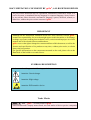
LEGENDA SIMBOLI
Nel presente manuale possono comparire i seguenti simboli:
Attenzione: Pericolo generico
Attenzione: Pericolo di alta tensione
Attenzione: Dispositivo sensibile alle cariche elettrostatiche
MARCHI REGISTRATI
, GPC®, grifo® : sono marchi registrati della grifo®.
Altre marche o nomi di prodotti sono marchi registrati dei rispettivi proprietari.
ITALIAN TECHNOLOGY
grifo®
INDICE GENERALE
INTRODUZIONE ........................................................................................................................ 1
INFORMAZIONI PRELIMINARI ............................................................................................ 3
CONVENZIONI E TERMINOLOGIA ................................................................................... 3
CONVENZIONI ..................................................................................................................... 3
TERMINOLOGIA ................................................................................................................. 3
CARATTERISTICHE GENERALI ........................................................................................... 4
CARATTERISTICHE TECNICHE ........................................................................................... 6
MATERIALE RICEVUTO ...................................................................................................... 6
GENERALI ................................................................................................................................ 6
DAC E PINDRIVERS ............................................................................................................... 6
PROGRAMMAZIONE ISP ..................................................................................................... 6
FAMIGLIE DISPOSITIVI GESTITI ..................................................................................... 8
TEMPI DI PROGRAMMAZIONE ......................................................................................... 8
ELEMENTI DELL'EP40/USB ................................................................................................. 9
OPERAZIONI SUI DISPOSITIVI ........................................................................................ 10
NORMALI ............................................................................................................................ 10
SICUREZZA ......................................................................................................................... 10
SPECIALI ............................................................................................................................. 10
OPERAZIONI SUL BUFFER ................................................................................................ 10
TIPI DI FILES SUPPORTATI ............................................................................................... 10
CONFIGURAZIONE MINIMA DEL PC ............................................................................. 11
CONFIGURAZIONE CONSIGLIATA DEL PC .................................................................. 11
INSTALLAZIONE ED USO ..................................................................................................... 12
INSTALLAZIONE PROGRAMMA DI CONTROLLO ..................................................... 12
PREPARAZIONE PROGRAMMATORE ............................................................................ 14
INSTALLAZIONE DRIVER USB......................................................................................... 14
AGGIORNAMENTO PROGRAMMA DI CONTROLLO ................................................. 16
PRECAUZIONI D'USO ......................................................................................................... 16
LEDS ......................................................................................................................................... 17
TEST DIAGNOSTICO (SELFTEST) ................................................................................... 17
DESCRIZIONE SOFTWARE ................................................................................................... 18
ESECUZIONE DEL PROGRAMMA DI CONTROLLO ................................................... 18
SCHERMATA PRINCIPALE ................................................................................................ 19
TASTI SPECIALI .................................................................................................................... 20
COMANDI DEL PROGRAMMA DI CONTROLLO ......................................................... 21
FILE ....................................................................................................................................... 21
BUFFER ................................................................................................................................ 24
COMPONENTE ................................................................................................................... 27
PROGRAMMATORE ......................................................................................................... 35
OPZIONI ............................................................................................................................... 38
AIUTO ................................................................................................................................... 40
EP 40/USB
Rel. 3.00
Pagina I
grifo®
ITALIAN TECHNOLOGY
CARATTERISTICHE SOFTWARE AGGIUNTIVE .......................................................... 42
COME INIZIARE ...................................................................................................................... 43
TERMINI DELLA GARANZIA ............................................................................................... 45
ARTICOLI AGGIUNTIVI ........................................................................................................ 45
RISOLUZIONE DEI PROBLEMI ........................................................................................... 45
ERRORI DI COMUNICAZIONE ......................................................................................... 45
PROLEMI DI LETTURA O PROGRAMMAZIONE ......................................................... 46
DISPOSITIVI NON SUPPORTATI....................................................................................... 46
INDICE ANALITICO .............................................................................................................. A-1
Pagina II
EP 40/USB
Rel. 3.00
ITALIAN TECHNOLOGY
grifo®
INDICE DELLE FIGURE
FIGURA 1: VISTA COMPLESSIVA EP40/USB ...................................................................................... 5
FIGURA 2: CONTENUTO DELLA CONFEZIONE ...................................................................................... 7
FIGURA 3: TEMPI DI PROGRAMMAZIONE ............................................................................................ 8
FIGURA 4: POSIZIONE LEDS, CONNETTORI, PULSANTE, ECC. ............................................................. 9
FIGURA 5: FINESTRA UTILIZZO MINI CD ......................................................................................... 12
FIGURA 6: RIASSUNTO DELLE SELEZIONI D'INSTALLAZIONE .............................................................. 13
FIGURA 7: INSTALLAZIONE DRIVER USB (1 DI 3) ............................................................................ 14
FIGURA 8: INSTALLAZIONE DRIVER USB (2 DI 3) ............................................................................ 15
FIGURA 9: INSTALLAZIONE DRIVER USB (3 DI 3) ............................................................................ 15
FIGURA 10: DESCRIZIONE LEDS .................................................................................................... 17
FIGURA 11: POD PER SELFTEST PLUS ............................................................................................. 17
FIGURA 12: FINESTRA PRINCIPALE PG4UW ................................................................................... 19
EP 40/USB
Rel. 3.00
Pagina III
grifo®
Pagina IV
ITALIAN TECHNOLOGY
EP 40/USB
Rel. 3.00
ITALIAN TECHNOLOGY
grifo®
INTRODUZIONE
L’uso di questi dispositivi è rivolto - IN VIA ESCLUSIVA - a personale specializzato.
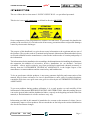
Questo prodotto non è un componente di sicurezza così come definito dalla direttiva 98-37/CE.
Alcuni componenti del programmatore sono sensibili ai fenomeni ESD: il personale che lo utilizza
e maneggia i dispositivi usati è invitato a prendere tutte le precauzioni necessarie per evitare i
possibili danni che potrebbero derivare dalle cariche elettorostatiche.
Scopo di questo manuale é la trasmissione delle informazioni necessarie all’uso competente e sicuro
dei prodotti. Esse sono il frutto di un’elaborazione continua e sistematica di dati e prove tecniche
registrate e validate dal Costruttore, in attuazione alle procedure interne di sicurezza e qualità
dell'informazione.
Le informazioni riguardanti installazione, montaggio, smontaggio, manutenzione, aggiustaggio,
riparazione ed installazione di eventuali accessori, dispositivi ed attrezzature, sono destinate - e
quindi eseguibili - sempre ed in via esclusiva da personale specializzato avvertito ed istruito, o
direttamente dall’ASSISTENZA TECNICA AUTORIZZATA, nel pieno rispetto delle
raccomandazioni trasmesse dal costruttore e delle norme di sicurezza e salute vigenti.
Per un corretto rapporto coi prodotti, é necessario garantire leggibilità e conservazione del manuale,
anche per futuri riferimenti. In caso di deterioramento o più semplicemente per ragioni di
approfondimento tecnico ed operativo, consultare i nostri siti www.grifo.it o www.grifo.com o
direttamente l’Assistenza Tecnica autorizzata.
Al fine di non incontrare problemi nell’uso di tali dispositivi, é conveniente che l’utente - PRIMA
DI COMINCIARE AD OPERARE - legga con attenzione tutte le informazioni contenute in questo
manuale. In una seconda fase, per rintracciare più facilmente le informazioni necessarie, si può fare
riferimento all’indice generale e all’indice analitico, posti rispettivamente all’inizio ed alla fine del
manuale.
Le informazioni contenute in questo manuale sono aggiornate alla data di rilascio del medesimo, ma
i nostri prodotti subiscono continui aggiornamenti e miglioramenti. Si prega di consultare l'help in
linea per eventuali cambiamenti dell'ultimo minuto.
EP 40/USB
Rel. 3.00
Pagina 1
grifo®
ITALIAN TECHNOLOGY
Il programma fornito per la gestione del programmatore è coperto da diritto d'autore, tutti i diritti sono
riservati. Nè il programma nè alcuna sua parte possono essere analizzati, disassemblati o modificati
in alcun modo, con qualunque mezzo, per qualunque scopo.
Questo documento è coperto da diritto d'autore, tutti i diritti sono riservati. Questo documento non
può essere copiato, riprodotto o tradotto in alcun modo o mediante alcun mezzo, nè per intero nè in
parte, senza il permesso scritto della grifo®.
grifo® non si assume alcuna responsabilità per l'uso errato di questo manuale e si riserva il diritto
di apportare cambiamenti o miglioramenti ai prodotti descritti in qualunque momento senza darne
notizia.
La grifo® non garantisce che questo prodotto soddisfi le richieste dell'utente, che la produzione non
cessi o sia priva di errori o che tutti gli eventuali errori siano corretti. La grifo® non é inoltre
responsabile dei problemi causati dalle modifiche dell'hardware dei calcolatori o dei sistemi
operativi che si possono verificare nel tempo.
Tutti i marchi registrati che compaiono nel presente manuale sono proprietà dei relativi costruttori.
Pagina 2
EP 40/USB
Rel. 3.00
grifo®
ITALIAN TECHNOLOGY
INFORMAZIONI PRELIMINARI
EP40/USB è un programmatore di memorie ed un tester logico dotato di 40 potenti pin driver con
molteplici capacità e funzionalità. Questa struttura permette di aggiungere facilmente il supporto a
nuovi dispositivi, di mantenere il costo molto competitivo rispetto ai concorrenti della stessa classe,
di ottenere un eccellente rapporto prezzo/prestazioni, ed allo stesso tempo una elevata affidabilità
della programmazione.
CONVENZIONI E TERMINOLOGIA
In questo manuale vengono usate alcune convenzioni ed alcuni termini specifici:
CONVENZIONI
I riferimenti alle funzioni del programma di controllo sono in grassetto come ad esempio CARICA,
FILE, DISPOSITIVO, ecc.
I riferimenti ai pulsanti di controllo sono racchiusi tra le parentesi angolari <>, ad esempio <F1>.
TERMINOLOGIA
Dispositivo target
Zoccolo ZIF
PC
Buffer
Porta Stampante
Porta USB
ISP
Formato HEX
DIL
PG4UW
EP 40/USB
Un qualunque tipo di dispositivo o circuito integrato programmabile.
Zoccolo a forza di inserzione nulla usato per inserire il dispositivo target nel
programmatore.
Un Personal Computer necessario per consentire all'utente di interagire con
il programmatore.
Area di memoria, o del disco rigido, utilizzata per memorizzare
temporeneamente dei dati.
Interfaccia parallela del PC, principalmente usata per la connessione alla
stampante.
Interfaccia seriale ad alta velocità del PC, generalmente usata per connettere
periferiche esterne come stampanti, dischi esterni, scanner, modem,
fotocamere digitali, ecc.
In System Programming, ovvero la capacità di programmare un dispositivo
target senza toglierlo dalla scheda in cui si trova, e quindi anche quando è già
saldato. La scheda utente deve essere compatibile con questa caratteristica.
Formato per file dati che può essere letto con un normale editor di testo; ad
esempio il byte 5AH viene memorizzato con i caratteri '5' ed 'A' corrispondenti
ad i bytes 35H e 41H. Ogni linea di questo tipo di file (denominata record)
contiene un'indirizzo iniziale un identificatore, i bytes di dati, ed infine un
checksum di sicurezza.
Formato del contenitore dei componenti a doppia fila di piedini per montaggio
tradizionale (Dual In Line).
Programma di controllo eseguito dal PC che gestisce il programmatore.
Rel. 3.00
Pagina 3
grifo®
ITALIAN TECHNOLOGY
CARATTERISTICHE GENERALI
Questo capitolo contiene una descrizione discorsiva e concisa del programmatore, incluso un
sommario delle sue caratteristiche tecniche ed operazionali. Per ottenere informazioni dettagliate
sulle caratteristiche tecniche e d'uso del programmatore si consiglia di esaminare i capitoli
successivi.
EP40/USB è un nuovo programmatore per memorie di ultima generazione basato sull'esperienza
grifo® da utilizzarsi in abbinamento ad un PC e progettato per rispondere alle rigorose esigenze dei
tecnici sia nei laboratori di sviluppo che sul campo.
EP40/USB é un piccolo, veloce e potente programmatore che supporta tutti i tipi di memorie
programmabili come EPROM, EEPROM, NVRAM, FLASH EPROM ed EEPROM seriali compreso
i modelli a bassa tensione.Inoltre EP40/USB non si limita alla programmazione ma agisce anche
come tester per RAM statiche.
Ha un prezzo molto competitivo ma è allo stesso tempo un programmatore affidabile grazie al suo
eccellente progetto hardware. In questo modo offre uno dei migliori rapporti prezzo/prestazioni nella
sua gamma.
EP40/USB ha dei tempi di programmazione ridotti, grazie all'hardware basato su FPGA ed alla
comunicazione tramite USB 2.0, a piena velocità.
Si interfaccia con tutti personal computer IBM o compatibili, sia nelle versioni da tavolo che portatili,
dotati di una porta USB. Questa caratteristica é molto importante per i nuovi PC, privi della porta
stampante usata dai precedenti programmatori, come ad esempio i note books.
EP40/USB è dotato di 40 potenti pindrivers TTL che generano livelli H/L/pull_up/pull_down e
forniscono la capacità di lettura. I nostri pindriver sono tecnologicamente avanzati e permettono di
ottenere programmazioni di alta qualità, ad alta velocità, senza sovraelongazioni di tensione o
rimbalzi di massa, per tutti i dispositivi supportati. Inoltre sono in grado di lavorare fino a 1,8 V
cosicchè sarete già in grado di programmare la totalità dei dispositivi a bassa tensione attualmente
sul mercato.
Il programmatore esegue il test di corretto inserimento del dispositivo e di buon contatto elettrico
prima di iniziare le operazioni. Tali capacità, integrate dal controllo del byte di identificazione
(signature) aiutano a prevenire danneggiamenti ai componenti dovuti ad errori dell'operatore.
EP40/USB effettua verifiche di programmazione ai livelli limite della tensione di alimentazione,
il che, ovviamente, migliora l'affidabilità e garantisce una lunga conservazione dei dati.
EP40/USB è pilotato da un programma di controllo facile da usare, con menù a tendina, tasti di
scelta rapida ed aiuto in linea. Si può selezionare un dispositivo target mediante la classe a cui
appartiene, oppure dal nome del produttore o semplicemente digitando una parte della sua sigla. Oltre
alle normali operazioni eseguibili sui dispositivi (lettura, verifica cancellazione, programmazione,
verifica di programmazione, cancellazione), sono state implementate alcune funzioni di controllo
aggiuntive (verifica di inserzione, controllo del byte di identificazione) ed alcune funzioni speciali
(autoincremento). Il programma di controllo permette la manipolazione dei dati del dispositivo
temporaneamente salvati dentro un apposito buffer, di trasferire il buffer da e su un file su disco,
esegue la rilevazione automatica del tipo di file e la eventuale conversione.
Pagina 4
EP 40/USB
Rel. 3.00
ITALIAN TECHNOLOGY
grifo®
La ricca funzione di autoincremento dell'EP40/USB permette di assegnare numeri di serie
individuali ad ogni dispositivo programmato. Tale funzione semplicemente incremente un numero
di serie nel buffer ogni volta che un nuovo dispositivo viene inserito. Inoltre, la funzione permette
all'operatore di prelevare i numeri di serie e/o le informazioni di identificazione del dispositivo da
un file.
Il programma di gestione fornisce molte informazioni aggiuntive specifiche del dispositivo scelto.
Ad esempio, potete trovare i disegni con quote di tutti i contenitori disponibili per il componente
ed il significato di tutti i prefissi e suffissi che compongono la sigla del dispositivo.
Sono disponibili diversi convertitori dal formato DIL a PLCC, SOIC, SSOP, TSOP, TSSOP ed altri
contenitori.
Tramite alcuni accessori ed il programma di gestione forniti, l'EP40/USB é in grado di eseguire un
test diagnostico, che verifica automaticamente i pindrivers, i livelli di tensione, le temporizzazioni
e la comunicazione col PC.
Infine é possibile ampliare le funzionalità ed il numero di dispositivi programmabili dell'EP40/USB
tramite un apposito intervento specializzato. In questo caso viene aggiunta anche la programmazione
ISP dei dispositivi già montati su scheda.
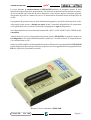
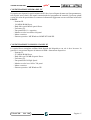
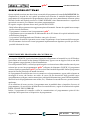
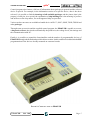
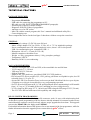
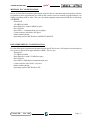
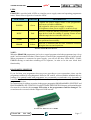
FIGURA 1: VISTA COMPLESSIVA EP40/USB
EP 40/USB
Rel. 3.00
Pagina 5
grifo®
ITALIAN TECHNOLOGY
CARATTERISTICHE TECNICHE
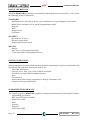
MATERIALE RICEVUTO
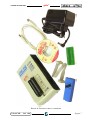
- Programmatore EP40/USB.
- Cavo USB per collegare il progammatore al PC.
- Cavo ISP (vedere paragrafo PROGRAMMAZIONE ISP).
- Adattatore per alimentazione da rete.
- Scheda per auto diagnosi del programmatore.
- Copertura anti polvere per zoccolo ZIF.
- Mini CD con il programma di controllo e altre di utilità (compreso il presente manuame utente).
- Confezione di cartone.
Tali componenti possono essere verificati nella figura 2 che li mostra tutti ad eccezione della
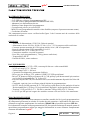
confezione di cartone.
GENERALI
- Tensione di alimentazione 15÷20 Vdc, 500 mA massimi.
- Alimentatore da rete 230 Vac; 50 Hz; 15 Vdc; 0,5 A; 7,5 VA compreso nella confezione.
- Consumo potenza massimo di 6 W in piena attività, circa 1,4W in sospensione.
- Porta di comunicazione USB compatibile 2.0 ed 1.1.
- Dimensioni 160 x 97 x 35 mm (A x L x P).
- Contenitore metallico con piedi in gomma.
- Peso 500 g (solo programmatore); 1100 g (intera confezione).
- Temperatura 5÷40 °C.
- Umidità 20÷80%, senza condensa.
DAC E PINDRIVER
- 2 D/A converter per VCCP e VPP, con tempi di discesa e salita controllabili.
- VCCP nel range 0÷7 V; 350 mA.
- VPP nel range 0÷25 V; 200 mA.
- Capacità di test diagnostico autonomo (Selftest).
- Driver per pin: 40 driver TTL, pindriver GND/VCC/VPP specializzati.
- Driver TTL basato su FPGA per generare H, L, CLK, pull-up e pull-down su tutti i pin; tensione
per livello H selezionabile da 1, 8 V fino a 5V.
- Zoccolo a 40 pins DIL ZIF (Zero Insertion Force) accetta direttamente dispositivi da 300 a 600
mil.
- Continuità: ogni pin viene verificato prima di iniziare la programmazione.
- Sei TTL driver per ISP generano H, L, CLK, pull-up e pull-down, livello analogico di uscita
H selezionabile da 1,8 V fino a 5 V per gestire tutti i dispositivi, inclusi quelli a bassa tensione.
- Tensione VCCP per ISP (2÷7 V, 100 mA) e tensione VPP per ISP (2÷25 V, 50 mA).
- La VCCP per ISP può sia erogare che assorbire corrente ed il suo livello viene monitorato.
PROGRAMMAZIONE ISP
Il programmatore é provvisto di un connettore a scatolino, maschio, da 10 vie per la programmazione
dei componenti già montati su scheda. Si ricorda che tale connettore é utilizzabile solo dopo aver
effettuato un apposito ampliamento che trasforma l'EP40/USB nel modello superiore SEP 40+.
Per informazioni complete sulla programmazione ISP, fare quindi riferimento al manuale utente di
quest'ultimo programmatore mentre per maggiori informazioni su come effettuare l'ampliamento
contattare direttamente la grifo®.
Pagina 6
EP 40/USB
Rel. 3.00
ITALIAN TECHNOLOGY
grifo®
FIGURA 2: CONTENUTO DELLA CONFEZIONE
EP 40/USB
Rel. 3.00
Pagina 7
grifo®
ITALIAN TECHNOLOGY
FAMIGLIE DISPOSITIVI GESTITI
Di seguito vengono descritte le principali famiglie di componenti gestibili con l'EP40/USB. Per un
elenco completo, aggiornato e dettagliato sui componenti programmabili si consiglia di usare il
programma di gestione e le sue modalità di ricerca.
- EPROM: NMOS/CMOS, serie 2708 (*3), 27xxx e 27Cxxx, con larghezza bus dati 8/16 bit e
pieno supporto per modelli a bassa tensione LV (*1 *2).
- EEPROM: serie NMOS/CMOS, 28xxx, 28Cxxx, 27EExxx, con larghezza bus dati 8/16 bit e
pieno supporto per modelli a bassa tensione LV (*1 *2).
- FLASH EPROM: serie 28Fxxx, 29Cxxx, 29Fxxx, 29BVxxx, 29LVxxx, 29Wxxx, 49Fxxx, con
larghezza bus dati 8/16 bit e pieno supporto per modelli a bassa tensione LV (*1 *2).
- EEPROM Seriali: serie 17Cxxx, 24Cxxx, 24Fxxx, 25Cxxx, 45Dxxx, 59Cxxx, 25Fxxx,
25Pxxx, NVM3060, MDA206x (*3), 85xxx, 93Cxxx con pieno supporto per modelli a bassa
tensione LV (*1).
- EEPROM per configurazioni: 37LVxx, XC17xxxx, AT17xxx con pieno supporto per modelli
a bassa tensione LV (*1).
- NV RAM: serie Dallas DSxxx, SGS/Inmos MKxxx, SIMTEK STKxxx, XICOR 2xxx, ZMD
U63x.
- RAM Statiche: 6116.. 624000 solo come tester.
NOTE:
(*1) Disponibili adattatori per package non DIL.
(*2) Gli adattatori disponibili per dispositivi oltre i 40 pin sono pochi. Valutate l'acquisto di un
programmatore più potente (UEP 49, UEP 49+) se avete bisogno di programmare un
dispositivo con più di 40 pin.
(*3) Programmabile con moduli aggiuntivi.
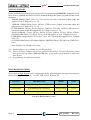
TEMPI DI PROGRAMMAZIONE
Questi tempi dipendono fortemente dalla configurazione del PC. Nella seguente tabella vengono
riportati alcuni tempi di programmazione ottenuti con un PC Pentium IV; 2,4GHz; USB 2.0 HS;
Windows XP.
DISPOSITIVO
OPERAZIONE
MODO
TEMPO
27C010
programmazione e verifica
su zoccolo ZIF
24 sec
AT29C040A
programmazione e verifica
su zoccolo ZIF
32 sec
AM29F040
programmazione e verifica
su zoccolo ZIF
69 sec
FIGURA 3: TEMPI DI PROGRAMMAZIONE
Pagina 8
EP 40/USB
Rel. 3.00
grifo®
ITALIAN TECHNOLOGY
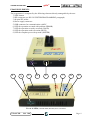
ELEMENTI DELL'EP40/USB
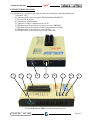
Il programmatore é composto dai seguenti elementi direttamente utilizzabili dall'utente:
1) Pulsante YES!
2) Connettore ISP (vedere paragrafo PROGRAMMAZIONE ISP)
3) Zoccolo ZIF da 40 pin
4) Connettore di alimentazione
5) Connettore USB per comunicazione con PC
6) LED indicatore di operazione avvenuta con errori (ERROR)
7) LED indicatore di operazione avvenuta correttamente (GOOD)
8) LED indicatore di operazione in corso (BUSY)
9) LED indicatore di accensione/sospensione (POWER)
1
2
3
4
5
6
7
8
9
FIGURA 4: POSIZIONE LEDS, CONNETTORI, PULSANTE, ECC.
EP 40/USB
Rel. 3.00
Pagina 9
grifo®
ITALIAN TECHNOLOGY
OPERAZIONI SUI DISPOSITIVI
Il programmatore EP40/USB in abbinamento al suo programma di controllo su PC, consente di
effettuare i seguenti gruppi di operazioni.
NORMALI
- Selezione intelligente del dispositivo per tipo, produttore o frazione della sua sigla.
- Verifica dispositivo vuoto, lettura e di corretta programmazione.
- Programmazione.
- Cancellazione.
- Test bit illegali.
- Checksum.
SICUREZZA
- Verifica di inserzione corretta del dispositivo.
- Controllo della bontà dei contatti elettrici.
- Controllo del byte di identificazione (Signature).
SPECIALI
- Statistiche.
- Incremento automatico del numero di serie.
- Conto alla rovescia dei dispositivi programmati.
OPERAZIONI SUL BUFFER
In questo paragrafo vengono elencate le operazioni che il programmatore può svolgere sul buffer che
contiene i dati letti o da scrivere sul dispositivo usato.
- Esamina/modifica, trova/sostituisci.
- Riempi/copia, sposta, scambia byte, spezza word o doppie word.
- Checksum (in diversi formati standard).
- Stampa.
- Salva su e carica da disco.
- Niente tempi di scaricamento né caricamento in quanto il programmatore è controllato da PC.
- Identificazione automatica del tipo di file.
TIPI DI FILES SUPPORTATI
Il programma di controllo dell'EP40/USB é in grado di gestire automaticamente i seguenti formati
di file:
- Binario (senza dati di formattazione aggiuntivi).
- HEX: Intel, Intel esteso.
- Motorola S-record.
- MOS.
- Exormax.
- Tektronix.
- ASCII-space-HEX.
Pagina 10
EP 40/USB
Rel. 3.00
ITALIAN TECHNOLOGY
grifo®
CONFIGURAZIONE MINIMA DEL PC
Di seguito sono riportati i requisiti minimi del PC che viene collegato ed usato con il programmatore;
tali requisiti sono relativi alle attuali caratteristiche del programma di controllo e possono quindi
variare al variare di quest'ultimo. Per ottenere informazioni aggiornate cercare nell'aiuto in linea del
PG4UW.
- Pentium III.
- 128 MB di RAM libera.
- Hard disk con 60 MB di spazio libero.
- Un lettore CD.
- Una portaUSB 1.1 o superiore.
- Monitor a colori con 800 x 600 punti.
- Mouse e tastiera.
- Sistema operativo: MS Windows 98/ME/NT/2000/XP.
CONFIGURAZIONE CONSIGLIATA DEL PC
Lo spazio libero consigliato sull'hard disk dipende dal dispositivo con cui si deve lavorare. In
generale é conveniente disporre di almeno 60 MB + dimensione dispositivo.
- Pentium IV.
- 512 MB di RAM libera.
- Hard disk con 150 MB di spazio libero.
- Un lettore CD.
- Una portaUSB 2.0 High Speed.
- Monitor a colori con 1024 x 768 punti.
- Mouse e tastiera.
- Sistema operativo: MS Windows XP.
EP 40/USB
Rel. 3.00
Pagina 11
grifo®
ITALIAN TECHNOLOGY
INSTALLAZIONE ED USO
In questo capitolo vengono riportate le informazioni principali relative alla messa in funzione del
programmatore, complete di alcuni suggerimenti per l'utente che ne semplificano e ne assicurano
l'uso in ogni condizione operativa. Si consiglia quindi di eseguire le operazioni descritte nei paragrafi
di questo capitolo nell'ordine riportato e quindi di non collegare il programmatore al PC prima di aver
installato il programma di controllo.
Si ricorda inoltre di consultare anche i capitoli successivi che approfondiscono la descrizione del
programma di gestione e riportano i passi per eseguire velocemente una prima programmazione.
INSTALLAZIONE PROGRAMMA DI CONTROLLO
1)
2)
3)
Selezionare il PC da utilizzare in abbinamento al programmatore che soddisfi i requisiti
descritti nel precedente capitolo.
Verificare che sul PC non sia già stato installato il programma di controllo PG4UW ed in questo
caso provvedere a disinstallarlo. Per fare questo, dal menu di avvio scegliere "Programmi”, poi
“Grifo(r)” e infine “Uninstall Pg4uw”. Seguire le istruzioni a video fino a completare la
disinstallazione.
Nella confezione viene fornito un mini CD contenente il programma di controllo, i manuali
utente dei programmatori ed il programma Acrobat Reader dedicato alla lettura degli stessi
manuali.
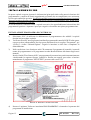
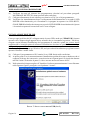
Inserite il mini CD nel lettore del PC, un programma di presentazione partirà automaticamente
visualizzando la seguente finestra. Qualora la finestra non appaia, provvedere a lanciare
manualmente il programma "SETUP.EXE" presente sullo stesso CD.
FIGURA 5: FINESTRA UTILIZZO MINI CD
4)
Premere il pulsante "Software instalation PROGRAMMERS" ed attendere la partenza del
programma di installazione.
Pagina 12
EP 40/USB
Rel. 3.00
ITALIAN TECHNOLOGY
5)
6)
7)
8)
9)
10)
grifo®
Selezionare la lingua "Italiano" da usare durante l'installazione e premere il pulsante "Ok".
Leggere la seguente finestra informativa e provvedere a chiudere ogni altra applicazione
eventualmente in esecuzione e premere il pulsante "Avanti".
Selezionare la cartella sull'hard disk del PC in cui installare il programma di controllo e
confermare con il pulsante "Avanti". A questo punto il programma avvisa dell'eventuale
esistenza della cartella scelta e l'utente può decidere se utilizzarla comunque oppure no.
Selezionare la cartella con il collegamento di lancio del programma da aggiungere al menù di
"Avvio" di Windows e premere il pulsante "Avanti".
Selezionare quali e quante icone di avvio rapido aggiungere sul PC (come ad esempio quella
sulla scrivania, quella sulla barra di Windows, ecc.).
Inoltre assicurare che l'installazione del supporto al controllo della Multiprogrammazione sia
disabilitato, in quanto per il programmatore EP40/USB non é disponibile.
A questo punto premere il pulsante "Avanti".
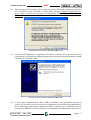
Controllare che nella finestra riassuntiva rappresentata tutte le selezioni effettuate siano
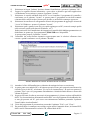
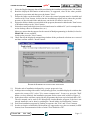
corrette e quindi confermare con il pulsante "Installa".
FIGURA 6: RIASSUNTO DELLE SELEZIONI D'INSTALLAZIONE
11)
12)
13)
14)
15)
Attendere la fine dell'installazione evidenziata da un'apposita barra a scorrimento.
A questo punto a seconda del PC e del sistema operativo usato, può comparire una finestra che
richiede il riavvio del PC: selezionare "Si, riavvia il sistema adesso". In ogni caso premere il
pulsante "Fine" con cui il programma d'installazione si chiude definitivamente e ritorna alla
videata di figura 5.
In questa fase tutto il software necessario al programmatore é già stato copiato sull'hard disk
del PC. Per la consultazione del manuale utente sul PC serve il programma Acrobat Reader che,
se non già presente sul PC, può essere convenientemente installato premendo il pulsante
"Install Adobe Acrobat Reader".
Uscire dal programma di presentazione premendo il pulsante "Exit" e poi "Close".
Per praticità d'uso é comunque conveniente copiare anche il manuale utente, in formato PDF,
dalla cartella \Documentation\ sul mini CD, all'hard disk del PC.
EP 40/USB
Rel. 3.00
Pagina 13
grifo®
ITALIAN TECHNOLOGY
PREPARAZIONE PROGRAMMATORE
16)
17)
18)
Verificare che tutti gli elementi del programmatore (descritti nel precedente paragrafo
MATERIALE RICEVUTO) siano presenti nella confezione.
Collegare alimentatore da rete ad una presa elettrica a 230 Vac ed al programmatore.
Verificare che immediatamente dopo il collegamento dell'alimentazione si accenda il LED
POWER ad alta luminosità, poi si accendano e si spengano in sequenza i tre LEDs BUSY,
GOOD, ERROR ed infine che rimanga acceso solo il LED POWER a bassa luminosità. Questa
è la normale sequenza di accensione con PC non collegato.
INSTALLAZIONE DRIVER USB
Come per ogni periferica del PC collegata tramite la porta USB, anche per l'EP40/USB il sistema
operativo deve disporre degli appositi driver software che ne consentano la gestione. Tali driver
vengono copiati durante l'installazione del programma di controllo, quindi per evitare inutili
complicazioni si consiglia prima di effettuare l'installazione descritta nei punti 4÷12 e solo dopo
collegare il programmatore.
Le istruzioni seguenti valogono per Windows XP, ma la procedura di installazione per gli altri sistemi
operativi Windows è molto simile.
19)
20)
21)
Collegare il programmatore al PC tramite il cavo USB fornito nella confezione.
A questo punto si avvia automaticamente l'installazione guidata di un nuovo hardware che si
compone di alcune fasi consecutive, come descritto nei seguenti punti. Si ricorda che durante
tali fasi il mini CD inserito al punto 3 si deve trovare ancora nel lettore del PC.
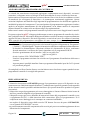
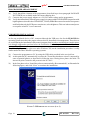
Nella prima fase bisogna scegliere di "Installare il software automaticamente" come illustrato
nella seguente figura e proseguire con il pulsante "Avanti".
FIGURA 7: INSTALLAZIONE DRIVER USB (1 DI 3)
Pagina 14
EP 40/USB
Rel. 3.00
grifo®
ITALIAN TECHNOLOGY
22)
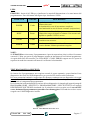
Successivamente il PC cercherà i driver migliori per il nuovo hardware collegato sui dischi del
PC, trovandoli sul mini CD fornito. A questo punto bisogna continuare l'installazione dei
driver anche se questi non rispettano la compatibilità Windows, premendo il pulsante
"Continua".
FIGURA 8: INSTALLAZIONE DRIVER USB (2 DI 3)
23)
Al termine dell'installazione e registrazione dei driver controllare che la periferica funzioni
correttamente verificando che la finestra rappresentata coincida con quella sottostante e quindi
chiuderla con il pulsante "Fine".
FIGURA 9: INSTALLAZIONE DRIVER USB (3 DI 3)
24)
A questo punto l'installazione dei driver USB é terminata ed il programmatore é pronto ad
operare. Si ricorda che in caso di successivi collegamenti o riaccensioni del programmatore i
driver USB saranno già presenti e quindi non richiesti, ammesso che si continui ad usare la
stessa porta USB del PC. Se invece tale porta viene cambiata si dovranno ripetere i passi 20÷23.
EP 40/USB
Rel. 3.00
Pagina 15
grifo®
ITALIAN TECHNOLOGY
AGGIORNAMENTO PROGRAMMA DI CONTROLLO
Le aziende che costruiscono componenti aggiungono continuamente nuovi dispositivi, con nuovi
contenitori, sviluppano nuove tecnologie in modo da soddisfare le nuove richieste del mercato.
Inoltre numerosi componenti subiscono variazioni durante il loro ciclo di vita (le cosiddette revisioni
di maschera) che correggono il dispositivo o lo mantengono tecnicamente aggiornato. Queste
variazioni implicano una modifica negli algoritmi di programmazione che definiscono appunto le
modalità di gestione del componente. Usare un algoritmo di programmazione aggiornato si traduce
anche in un migliore mantenimento dei dati programmati, in un ridotto numero di componenti
difettosi durante la scrittura ed in un ridotto tempo di programmazione.
Infine errare é umano e nel programma di controllo ci possono essere errori sfuggiti a tutti i controlli.
Per queste ragioni la grifo® sviluppa periodicamente un nuovo programma di controllo che risolve
tutti i problemi elencati. Ad esempio dalla prima all'ultima versione di un anno vengono mediamente
aggiunti 500 nuovi dispositivi, decine di algoritmi e corretti alcuni errori. Per ottenere il massimo
dalle capacità del programmatore consigliamo di usare sempre la versione più aggiornata di
PG4UW.EXE. Per ottenere tale versione si deve:
Disinstallare il programma già presente selezionando l'apposito collegamento in “Programmi”
| “Grifo(r)” | “Uninstall Pg4uw”. Seguire le istruzioni a video fino a completare la disinstallazione.
Se durante la disinstallazione compaiono richieste di eliminazione di driver confermare
facendo attenzione a verificare che questi riguardano solo il programma PG4UW.
Scaricare gratuitamente dai siti internet: http://www.grifo.com
http://www.grifo.it.
da cui si ottiene il file "PG4UWARC.EXE”.
Lanciare il programma scaricato che coincide con il programma di installazione della nuova
versione.
A questo punto è possibile installare il nuovo programma effettuando i passi da 5 a 23 riportati
nei precedenti paragrafi.
Si consiglia di verificare l'uscita di nuove versioni almeno una volta al mese oppure quando lo stesso
programma di controllo lo consiglia alla partenza.
PRECAUZIONI D'USO
L'elettronica incorporata nel EP40/USB protegge il programmatore stesso ed il dispositivo in uso
contro numerose condizioni anomale di utilizzo. Comunque non è possibile garantire la salvaguardia
dei due sistemi in tutte le possibili combinazioni d'uso e per questo l'utente deve prendere le seguenti
precauzioni:
- il dispositivo target da programmare può essere danneggiato se l'utente effettua selezioni errate od
inserisce parametri sbagliati nel programma di controllo;
- il dispositivo target può essere distrutto da interruzioni forzate del programma di controllo (reset
o spegnimento del PC) o dalla rimozione della connessione fisica col programmatore. Se il
componente non si danneggia avrà comunque un contenuto inaffidabile;
- non togliete il dispositivo target dallo zoccolo ZIF durante l'accesso da parte dell'EP40/USB,
ovvero quando il LED BUSY è acceso;
- un posizionamento errato del componente sullo zoccolo può provocare un danneggiamento od una
distruzione del componente.
Pagina 16
EP 40/USB
Rel. 3.00
grifo®
ITALIAN TECHNOLOGY
LEDS
EP40/USB è fornito di 4 LEDs per visualizzare lo stato dell'alimentazione e lo stato interno del
programmatore. Fate riferimento alla figura 4 per localizzare i LEDs.
NOME LED
COLORE
DESCRIZIONE
POWER
Verde
Segnala lo stato di alimentazione del programmatore. Può
assumere due stati:
alta luminosità in caso di accensione completa;
bassa luminosità in caso di basso consumo (sospensione).
BUSY
Rosso
Quando acceso indica che il programmatore sta accedendo
al dispositivo target in lettura o scrittura. Non toccare tale
dispositivo quando il LED è acceso.
GOOD
Verde
Quando acceso indica che l'ultima operazione eseguita si
è conclusa con successo.
ERROR
Giallo
Quando acceso indica che si è verificata una condizione
di errore durante l'ultima operazione eseguita.
FIGURA 10: DESCRIZIONE LEDS
NOTE:
Se l'EP40/USB non viene usato, il programmatore si pone in sospensione (sleep) e riduce il consumo
a meno di 1 Watt; per questo il programmatore non ha un interruttore di accensione/spegnimento.
A seguito della fase di accensione i tre LEDs BUSY, GOOD, ERROR vengono accesi e spenti in
sequenza in modo da consentire all'utente di verificarne la funzionalità.
TEST DIAGNOSTICO (SELFTEST)
Se ritenete che il programmatore non reagisca secondo le vostre aspettative, potete lanciare il test
diagnostico che fa uso del POD diagnostico (per zoccolo ZIF) incluso nella confezione.
Per avere prestazioni ottimali vi suggeriamo di effettuare comunque un test diagnostico circa ogni
6 mesi, in modo da anticipare eventuali anomalie di funzionamento che possono avere effetti
indesiderati sui componenti da programmare.
Per informazioni sulle modalità di esecuzione del test diagnostico si rimanda agli appositi paragrafi
PROGRAMMATORE | SELFTEST e PROGRAMMATORE | SELFTEST PLUS nel capitolo
DESCRIZIONE SOFTWARE ricordando che il primo deve essere eseguito con lo zoccolo ZIF
vuoto, altrimenti il programmatore potrebbe essere danneggiato. Il secondo invece deve essere
eseguito con il POD diagnostico inserito.
FIGURA 11: POD PER SELFTEST PLUS
EP 40/USB
Rel. 3.00
Pagina 17
grifo®
ITALIAN TECHNOLOGY
DESCRIZIONE SOFTWARE
Questo capitolo contiene una descrizione essenziale del programma di controllo PG4UW.EXE. Per
completezza si ricorda che nei capitoli precedenti sono descritte le modalità d'installazione del
programma e di collegamento del programmatore che devono essere naturalmente effettuate prima
di usarlo. Inoltre nel capitolo successivo COME INIZIARE viene illustrata una breve sequenza di
operazioni necessarie per effettuare una prima programmazione.
Di seguito vengono riportate alcune note generali del PG4UW:
- l'help in linea del programma viene aggiornato prima del manuale: l'utente deve quindi usare sempre
questo comodo strumento;
- il programma è comune a tutti i programmatori grifo®;
- il programma opera correttamente in abbinamento ad un PC dotato dei requisiti minimi descritti
nell'omonimo paragrafo;
- le operazioni in background sotto Windows sono prive di errori;
- il programma di controllo è garantito essere esente da qualunque virus al momento della consegna.
Per incrementare la sicurezza i nostri programmi implementano un algoritmo speciale per rilevare
possibili infezioni da virus.
ESECUZIONE DEL PROGRAMMA DI CONTROLLO
Per eseguire il PG4UW si può selezionare l'apposito collegamento nel menuù di avvio di Windows
(posizionato nella cartella scelta durante l'installazione) oppure con un doppio click su una delle
icone aggiunte sempre durante la fase d'installazione.
Una volta partito PG4UW, verifica la propria integrità e se riconosciuta valida scandisce tutte le porte
esistenti per trovarci un programmatore grifo® collegato ed alimentato. PG4UW è il programma
comune a tutti i programmatori grifo® per cui cercherà tutti i modelli disponibili. Infine il programma
mostra la finestra principale ed attende istruzioni.
Se il programma di controllo non riesce a comunicare col programmatore, appare sullo schermo un
messaggio di errore che fornisce un codice di errore ed una descrizione delle possibili cause
(programmatore scollegato, cattiva connessione, problemi di alimentazione, porta USB incompatibile,
numero di serie del programmatore non valido, ecc.). Eliminate la causa dell'errore e premete un tasto
qualunque.
Se la condizione di errore persiste, il programma entra in modalità demo e impedisce l'accesso al
programmatore. Se non riuscite ad identificare la causa dell'errore, seguite le istruzioni nel capitolo
RISOLUZIONE DEGLI ERRORI.
Inoltre, il programma di controllo verifica la comunicazione col programmatore prima di fare
qualunque altra operazione col dispositivo da programmare.
Pagina 18
EP 40/USB
Rel. 3.00
grifo®
ITALIAN TECHNOLOGY
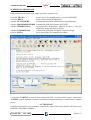
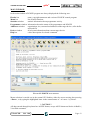
SCHERMATA PRINCIPALE
Nella schermata principale sono sempre presenti le seguenti aree:
barra del TITOLO
barra dei MENU
riquadro STATISTICHE
riquadro PROGRAMMATORE
riquadro INDIRIZZI (hex)
riquadro COMPONENTE
barra di AIUTO
mostra avvisi di copyright, nome e versione di PG4UW
elenco delle funzioni fondamentali
informazioni statistiche sull'attività del programmatore
informazioni sullo stato interno di PG4UW
organizzazione, dimensione, indirizzi di inizio e fine del
dispositivo target, del buffer e del file
informazioni principali sull'attuale dispositivo target
breve descrizione del comando selezionato.
FIGURA 12: FINESTRA PRINCIPALE PG4UW
La selezione del MENU avviene nel tipico modo delle GUI - cioè muovendo il cursore e premendo
<ENTER> oppure digitando la lettera evidenziata nel menu selezionato o, naturalmente, usando il
mouse.
! ATTENZIONE !
I dati inseriti da tastiera sono in formato esadecimale, tranne i blocchi di caratteri ASCII nei menu
BUFFER | MOSTRA/CAMBIA.
EP 40/USB
Rel. 3.00
Pagina 19
grifo®
ITALIAN TECHNOLOGY
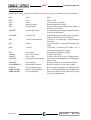
TASTI SPECIALI
Il PG4UW prevede e gestisce anche delle associazioni tra tasti e i comandi di uso più frequente:
<F1>
<F2>
<F3>
<F4>
<F5>
Aiuto
Salva
Carica
Mostra/Cambia
Scelta/default
<Alt+F5>
Scelta componente
<Ctrl+F5>
Scelta per ID
<F6>
Verifica cancellazione
<F7>
Lettura
<F8>
Verifica
<F9>
<Alt+Q>
<Alt+X>
<Ctrl+F1>
Programma
Esce senza salvare
Esce e salva
Informazioni componente
<Ctrl+F2>
<Ctrl+Shift+F2>
<Ctrl+F>
<Shift+Ctrl+F>
<Shift+Alt+D>
Cancellazione
Riempimento casuale
Trova programmatore
Ritrova programmatore
Lista componenti
Pagina 20
Help
Salva un file
Carica un file nel buffer
Esame/Modifica del buffer
Scelta del dispositivo target tra gli ultimi 10
dispositivi selezionati
Scelta del dispositivo target digitando il nome
o quello del produttore
Scelta del dispositivo target tramite suo codice
interno di identificazione (signature)
Verifica se il componente é completamente
cancellato
Copia nel buffer il contenuto del dispositivo
target
Confronta il contenuto del buffer con il
contenuto del dispositivo target
Programma il dispositivo target
Termina il PG4UW
Termina il PG4UW e salva le impostazioni
Mostra informazioni aggiuntive sul dispositivo
target scelto
Riempie il buffer con un valore assegnato
Riempie il buffer con un valori casuali
Ricerca ogni programmatore collegato al PC
Ricerca il programmatore già collegato al PC
Genera un elenco di tutti i dispositivi gestiti
da tutti i programmatori
EP 40/USB
Rel. 3.00
ITALIAN TECHNOLOGY
grifo®
COMANDI DEL PROGRAMMA DI CONTROLLO
Le seguenti pagine contengono i comandi disponibili nel programma di controllo, raggruppati nei
vari menù di cui il programma dispone. Accanto al nome del comando è presente, se esiste, la
combinazione di tasti che lo richiama rapidamente e una breve descrizione del suo scopo e modalità
d'uso. Si ricorda che l'aggiornamento più recente delle spiegazioni di questi comandi è sempre
presente nell'help in linea sensibile al contesto del programma di controllo, che quindi andrebbe
consultato prima del presente manuale.
FILE
Viene usato per gestire i files sorgenti, esaminare le cartelle su disco, cambiare drive e modiicare gli
indirizzi di inizio e di fine nel salvataggio e caricamento dei file di tipo binario, MOTOROLA,
MOS Technology, Intel (extended) HEX, Tektronix, ASCII space, JEDEC, e POF.
File | Carica... <F3>
Analizza il formato del file e carica i dati nel buffer. Si può selezionare il tipo di file desiderato
(binario, MOTOROLA, MOS Technology, Tektronix, Intel (extended) HEX, ASCII space,
JEDEC e POF). Il programma di controllo memorizza l'ultimo tipo di file selezionato. Per
rendere la memorizzazion persistente, salvare la configurazione con Options / Save options.
Spuntando la casella Automatic file format recognition il programma riconosce automaticamente
il formato. Se il formato non può essere riconosciuto, il file viene trattato come binario.
Togliendo lo spunto alla casella Automatic file format recognition il programma permette
all'utente di specificare il tipo di file desiderato nella lista della casella di riepilogo Selected file
format. Si può specificare l'indirizzo di inizio nel buffer con il formato binario. Tale indirizzo
indica da quale posizione nel buffer saranno scritti i dati letti dal file.
Il tasto <F3> farà apparire questo menu da qualunque posizioni in qualunque momento.
File | Salva... <F2>
Salva su disco i dati contenuti nel buffer, creati, modificati o letti da un dispositivo. Si può
selezionare il tipo di file desiderato (binario, MOTOROLA, MOS Technology, Tektronix,
Intel (extended) HEX, ASCII space, JEDEC o POF).
Il tasto <F2> farà apparire questo menu da qualunque posizioni in qualunque momento.
File | Carica progetto...
Carica un file di progetto, che contiene la configurazione per i dispositivi da usare e la
configurazione dell'interfaccia utente.
La finestra standard Load project contiene un'altra finestra - Project description - nella parte
bassa. Quest'ultima mostra le informazioni contenute nel file selezionato al momento dalla
finestra Load project.
EP 40/USB
Rel. 3.00
Pagina 21
grifo®
ITALIAN TECHNOLOGY
Le informazioni contenute in un progetto sono:
- nome e produttore del primo dispositivo selezionato nel progetto
- data e ora di creazione del progetto
- versione del programma con cui il progetto è stato creato
- descrizione testuale del progetto redatta dall'utente (si tratta di testo a piacere, di solito il nome
degli autori ed alcune note)
File | Salva progetto...
Quest'opzione serve a salvare il file di progetto, il quale contiene i dati di configurazione del
sipostitivo salvati. I dati di un progetto salvato possono essere richiamati in ogni momento col
comando File / Load project.
La finestra Save project contiene tre finestre addizionali nel pannello Project description posto
nella parte bassa della finestra Save project. Le finestre mostrano le informazioni contenute nel
fle di progetto al momento selezionato dalla finestra Save project e che stanno per essere salvate
su disco.
Le informazioni contenute in un progetto sono:
- nome e produttore del primo dispositivo selezionato nel progetto
- data e ora di creazione del progetto
- versione del programma con cui il progetto è stato creato
- descrizione testuale del progetto redatta dall'utente (si tratta di testo a piacere, di solito il nome
degli autori ed alcune note)
La prima finestra (più in alto) contiene informazioni sul progetto al momento selezionato dalla
finestra Save project.
La seconda finestra (a metà) mostra informazioni sull'attuale confugrazione del programma
compresi i dispositivi attualmente selezionati, lo stato di attività del programmatore, la data, l'ora
e la versione del programma. Questi dati vengono inseriti nella descrizione del progetto.
La terza finestra (in basso) è modificabile dall'utente e contiene una descrizione del progetto
(testo a piacere), di solito il nome degli autori ed alcune note.
File | Ricarica file
Questa opzione permette di ricaricare un file usato di recente.
Un file, dopo essere stato aperto, viene aggiunto alla lista chiamata Reload file. I nomi dei files
sono mostrati nell'ordine con cui sono stati aperti, ovvero in cima si trovano quelli usati di recente.
Per ricaricare un file:
1. Dal menu File, scegliere Reload file.
2. Viene mostrata la lista dei files usati di recente, clickare sul nome del file desiderato.
Nota: Quando un file viene ricaricato, si assume che sia del formato con cui è stato salvato l'ultima
volta.
Pagina 22
EP 40/USB
Rel. 3.00
ITALIAN TECHNOLOGY
grifo®
File | Ricarica progetto
Questa opzione permette di ricaricare un progetto usato di recente.
Un progetto, dopo essere stato aperto, viene aggiunto alla lista chiamata Reload project. I nomi
dei progetti sono mostrati nell'ordine con cui sono stati aperti, ovvero in cima si trovano quelli
usati di recente.
Per ricaricare un file:
1. Dal menu File, scegliere Reload project.
2. Viene mostrata la lista dei progetti usati di recente, clickare sul nome del file desiderato.
File | Opzioni progetto...
Questa opzione viene usate per esaminare/modificare le informazioni del progetto attualmente
caricato. Queste comprendono una descrizione essenziale del progetto ed i seguenti dati:
-
nome dispositivo e nome produttore
data creazione progetto
versione del programma sotto cui il progetto è stato creato
definizione del progetto fornita dall'utente (testo a piacere), ad esempio i nomi degli autori ed
ulteriori informazioni che descrivono il progetto
L'utente può modificare a piacimento il solo testo di descrizione e definizione del progetto. Le
altre informazioni sono aggiornate automaticamente dal programma.
File | Carica e table...
Questo comanda carica i dati da un file binario su disco e li salva nella parte della memoria
riservata alla tavola di criptazione ( di sicurezza).
File | Salva e table...
Questo comanda salva i dati in un file binario su disco prendendoli dalla parte della memoria
riservata alla tavola di criptazione ( di sicurezza).
File | Esci senza salvare...
Questo comando dealloca lo heap, cancella il buffer su disco (se esiste) e restituisce le risorse al
sistema operativo.
File | Esci e salva...
Questo comando dealloca lo heap, cancella il buffer su disco (se esiste), salva nel file di
configurazione le impostazione relative agli ultimi 10 dispositivi usati e restituisce le risorse al
sistema operativo.
EP 40/USB
Rel. 3.00
Pagina 23
grifo®
ITALIAN TECHNOLOGY
BUFFER
Permette di manipolare il buffer compiendo operazioni su blocchi di memoria, riempiendone una
parte con una stringa, cancellandolo, calcolando varie checksum e naturalmente visualizzando e
modificando ogni singolo valore (inoltre si può cercare una stringa, stampare il buffer, etc.).
Buffer | Mostra/Cambia... <F4>
Visualizza (View) o modifica (Edit) ogni singolo dato nel buffer (visualizza solo in DUMP
mode). Usate i tasti cursore per selezionare il dato da modificare, un dato modificato viene
mostrato con colore diverso.
Le seguenti funzioni (attivate da tasti e dai menu) sono richiamabili dagli appositi pulsante
presenti nella finestra di Mostra/Cambia Buffer.
<F1>
<F2>
<Ctrl+F2>
<Ctrl+Shift+F2>
<F3>
<F4>
<F5>
<F6>
<F7>
<F8>
<F9>
<F10>
<F11>
<F12>
<Tasti freccia>
<Home/End>
<PgUp/PgDn>
<Ctrl+PgUp/PgDn>
<Ctrl+Home/End>
<Backspace>
mostra la schermata di aiuto
riempie il buffer dall'indirizzo iniziale a quello finale con la stringa
(ASCII o esadecimale) specificata.
cancella il buffer riempiendolo col valore specificato
riempie il buffer con valori casuali
copia una sequenza di bytes da un indirizzo iniziale ad uno finale a
partire da un terzo indirizzo specificati dall'utente. Il terzo indirizzo
può essere incluso tra i primi due.
sposta una sequenza di bytes da un indirizzo iniziale ad uno finale a
partire da un terzo indirizzo specificati dall'utente. Il terzo indirizzo
può essere incluso tra i primi due.
scambia i bytes alti con i byte bassi nel campo di indirizzi specificato.
L'indirizzo iniziale deve essere pari ed il numero di bytes compresi
deve essere pari. Se questa condizione non viene rispettata, il
programma prende come indirizzo iniziale il primo pari precedente a
quello specificato e come indirizzo finale il primo pari successivo a
quello specificato.
stampa il contenuto del buffer
stringa da trovare (massimo 16 caratteri ASCII)
stringa da trovare e da sostituire (massimo 16 caratteri ASCII)
vai ad un altro indirizzo
communta tra visualizza e modifica
commuta tra 8 e 16 bit. Può essere fatto anche con il mouse clickando
il pulsante a destra di View/Edit. Il pulsante indica anche il modo di
visualizzazione attuale (8 o 16 bit).
calcola i vari checksum disponibili
spostano il cursore
salta all'inizio / alla fine della linea corrente
salta alla pagina precedente / successiva
salta all'inizio / alla fine delal pagina corrente
salta all'inizio / alla fine del contenuto del dispositivo attuale
sposta il cursore indietro di una posizione (a sinistra)
Nota: i caratteri 20H - FFH (ASCII) ed i numeri 0..9, A..F (esadecimali) modidicano
immediatamente il contenuto del buffer.
Attenzione: Non si possono gestire in ASCII i dati con dispositivi a 16 bit.
Pagina 24
EP 40/USB
Rel. 3.00
ITALIAN TECHNOLOGY
grifo®
Stampa buffer
Invia la parte selezionata del buffer su stampante o su un file. Il programma utilizza un editor di
testi esterno nel quale viene visualizzata la parte selezionata del buffer e dal quale questa può
essere salvata o stampata. Di default viene usato il semplice editor di testi Notepad.exe, il quale
viene fornito con qualunque versione di Windows.
In questa finestra le opzioni sono:
- Definisci l'indirizzo iniziale del blocco selezionato nel buffer.
- Definisci l'indirizzo finale del blocco selezionato nel buffer.
Trova testo
Inserite la stringa di ricerca da trovare (Testo da trovare) e premete il pulsante Trova per iniziare
la ricerca o scegliete il pulsante Annulla per lasciare perdere.
Direzione specifica in quale direzione deve avvenire la ricerca: Avanti a partire dalla posizione
corrente del cursore è il default. Indietro oltrepassal'inizio del buffer. In visualizzazione cerca
in tutto il buffer.
Origine specifica da dove deve iniziare la ricerca.
Sostituisci testo
Inserite la stringa da cercare nella casella Testo da trovare e la stringa con cui verrà sostituita
nella casella Sostituire con.
In Opzioni potete scegliere se la sostituzione avverrà automaticamente o se volete essere avvertiti
prima cha avvenga per poterla annullare.
Origine indica dove deve iniziare la ricerca.
Direzione specifica in quale direzione deve avvenire la ricerca: Avanti a partire dalla posizione
corrente del cursore è il default. Indietro oltrepassal'inizio del buffer. In visualizzazione cerca
in tutto il buffer.
Premete <Esc> o clickate sul pulsant Annulla per chiudere la finestra.
Premendo il pulsante Sostituisci la finestra viene chiusa ed appare un questionario che contiene
le seguenti scelte:
Si
sostituisci l'elemento trovato e cerca il prossimo
No
non sostituire l'elemento trovato e cerca il prossimo
Sostituisci tutto sostituisci tutto
Ferma ricerca
cancella questa operazione
Buffer | Riempi blocco...
Riempie il blocco selezionato del buffer con il valore specificato. Indicare l'indirizzo iniziale e
finale del blocco ed il valore di riempimento.
Buffer | Copia blocco...
Copia il blocco selezionato del buffer a partire dall'indirizzo specificato. Indicare l'indirizzo
iniziale e finale del blocco ed l'indirizzo di destinazione, anche compreso tra i primi due.
Buffer | Sposta blocco...
Sposta il blocco selezionato del buffer a partire dall'indirizzo specificato. Indicare l'indirizzo
iniziale e finale del blocco ed l'indirizzo di destinazione, anche compreso tra i primi due. Il blocco
iniziale verrà riempito con il carattere di vuoto.
EP 40/USB
Rel. 3.00
Pagina 25
grifo®
ITALIAN TECHNOLOGY
Buffer | Cambia dati nel blocco...
Scambia i bytes alti con i byte bassi nel campo di indirizzi specificato. L'indirizzo iniziale deve
essere pari ed il numero di bytes compresi deve essere pari. Se questa condizione non viene
rispettata, il programma prende come indirizzo iniziale il primo pari precedente a quello
specificato e come indirizzo finale il primo pari successivo a quello specificato.
Buffer | Cancellazione... <Ctrl+F2>
Riempie il buffer con il carattere di blank specificato dall'utente.
La combinazione <Ctrl+F2> farà apparire questo menu in ogni momento.
Buffer | Riempimento casuale... <Shift+Ctrl+F2>
Riempie il contenuto del buffer con valori casuali.
La combinazione <Shift+Ctrl+F2> farà apparire questo menu in ogni momento.
Buffer | Duplicazione contenuto del buffer...
Duplica il contenuto del buffer da una EPROM in una EPROM destinazione più ampia. Questa
procedura può, ad esempio, copiare in una 27C512 il contentuo di una 27C256 nella posizione
desiderata.
Nota: L'indirizzo iniziale del buffer è sempre 00000h.
Buffer | Checksum...
Calcola il checksum nel blocco del buffer selezionato. Il checksums viene calcolato con i seguenti
algoritmi :
Byte
Word
Byte (CY)
Word (CY)
CRC-CCITT
CRC-XModem
somma di bytes ad una “word”. Il flag CY viene ignorato
somma di word ad una “word”. Il flag CY viene ignorato
somma di bytes ad una “word”. Il flag CY viene aggiunto al risultato
somma di word ad una “word”. Il flag CY viene aggiunto al risultato
somma bytes a “word” con VAL=PRECEDENTE+(x^16 + x^12 + x^5 +1)
somma bytes a “word” con VAL=PRECEDENTE+(x^16 + x^15 + x^2 +1)
La colonna Neg. è il complemento a uno della somma cosicché Somma + Neg. = FFFFH.
La colonna Suppl. è il complemento a due della somma cosicché Somma + Suppl. = 0 (+ carry).
La finestra di checksum contiene i seguenti oggetti:
Da indirizzo: Indirizzo del primo byte del blocco selezionato sul quale viene calcolato il
checksum.
A indirizzo: Indirizzo dell'ultimo byte blocco del selezionato sul quale viene calcolato il
checksum.
Inserire checksum: Permette di selezionare il tipo di checksum verrà scritta nel buffer
all'esecuzione di Calculare e inserire.
Pagina 26
EP 40/USB
Rel. 3.00
ITALIAN TECHNOLOGY
grifo®
Inserire all'indirizzo: Permette di impostare la dimensione della checksum calcolata che verrà
scritta nel buffer all'esecuzione di Calculare e inserire. L'indirizzo non si può specificare come
un intervallo tipo Da indirizzo fino ad A indirizzo, ma come indirizzo di Byte.
Tipo: Determina la dimensione della checksum che verrà scritta nel buffer. Tale dimensione può
essere 8 (byte) o 16 (word) bits. Se viene selezionato 16 l'intera checksum verrà scritta nel buffer,
altrimenti verrà scritto solo il byte basso.
Nota: Se viene selezionata 16 come dimensione verrà scritto nel buffer il byte basso della
checksum all'indirizzo specificato mentre il byte alto verrà scritto all'indirizzo successivo.
Calcola: Clickando su questo pulsante si effettua il calcolo della checksum per il blocco
selezionato nel buffer. Non viene scritto nulla dentro il buffer.
Calculare e inserire: Clickando su questo pulsante si effettua il calcolo della checksum per il
blocco selezionato nel buffer. Il valore viene scritto nulla dentro il buffer all'indirizzo specificato
da Inserire all'indirizzo.
Chiudi: Clickando su questo pulsante si chiude la finestra Checksum.
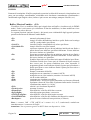
COMPONENTE
Questo menu contiene le funzioni che servono per selezionare e lavorare con un dispositivo
programmabile, ovvero selezione, programmazione, verifica e cancellazione.
Componente | Scelta/default... <F5>
Questa finestra permette di selezionare il dispositivo desiderato da una lista di dispositivi di
default. La lista è ciclica e contiente gli ultimi 10 dispositivi selezionati comprese le opzioni di
configurazione. La lista può essere salvata col comando File | Esci e salva.
Se desiderate visualizzare ulteriori informazioni sul dispositivo corrente, premete ma combinazione
di tasti <Ctrl+F1>. Apparirà una finestra che mostra la dimensione del dispositivo, la sua
organizzaazione, l'algoritmo di programmazioneed una lista di programmatori che lo supportano,
compresi gli eventuali moduli. Vi sono anche altre informazioni specifiche.
Usate il tasto <Del> per cancellare il dispositivo corrente dalla lista. Non è possibile svuotare
completamente la lista. Sull'ultimo dispositivo il tasto <Del> viene ignorato.
Componente | Scelta componente ... <Alt+F5>
Questa finestra permette di selezionare il dispositivo desiderato dalla lista di quelli supportati dal
programmatore attivo. I criteri sono Tutti, Solo tipo selezionato o Solo produttore scelto.
Il dispositivo selezionato viene salvato automaticamente nella lista dei 10 dispositivi di default
raggiungibile mediante il comando Componente | Scelta default....
EP 40/USB
Rel. 3.00
Pagina 27
grifo®
ITALIAN TECHNOLOGY
Se desiderate visualizzare ulteriori informazioni sul dispositivo corrente, premete ma combinazione
di tasti <Ctrl+F1>. Apparirà una finestra che mostra la dimensione del dispositivo, la sua
organizzaazione, l'algoritmo di programmazioneed una lista di programmatori che lo supportano,
compresi gli eventuali moduli. Vi sono anche altre informazioni specifiche.
Scelta componente | Tutti
Questa finestra permette di selezionare il dispositivo desiderato dalla lista completa dei
dispositivi supportati dal programmatore attivo. I nomi vengono mostrati in una casella a
scorrimento.
Il dispositivo può essere selezionato con un doppio click sulla lista o inserendo manualmente
parte del nome del dispositivo e/o del produttore (usate <Spazio> come separatore) e premete
<Enter> o clickate il pulsante OK.
Premete <Esc> o clickate il pulsante Annulla per annullare la selezione e rimanere all'ultimo
dispositivo selezionato.
Se desiderate visualizzare ulteriori informazioni sul dispositivo corrente, premete ma
combinazione di tasti <Ctrl+F1>. Apparirà una finestra che mostra la dimensione del
dispositivo, la sua organizzaazione, l'algoritmo di programmazioneed una lista di programmatori
che lo supportano, compresi gli eventuali moduli. Vi sono anche altre informazioni specifiche.
Scelta componente | Solo tipo selezionato
Questa finestra permette di selezionare il tipo di dispositivo desiderato (ad esempio EPROM)
ed il sottotipo (esempio 64Kx8 (27512)), tramite il mouse o i tasti cursore. Verrà visualizzata
una lista di produttori e dispositivi.
Il dispositivo può essere selezionato con un doppio click sulla lista o inserendo manualmente
parte del nome del dispositivo e/o del produttore (usate <Spazio> come separatore) e premete
<Enter> o clickate il pulsante OK.
Premete <Esc> o clickate il pulsante Annulla per annullare la selezione e rimanere all'ultimo
dispositivo selezionato.
Se desiderate visualizzare ulteriori informazioni sul dispositivo corrente, premete ma
combinazione di tasti <Ctrl+F1>. Apparirà una finestra che mostra la dimensione del
dispositivo, la sua organizzaazione, l'algoritmo di programmazioneed una lista di programmatori
che lo supportano, compresi gli eventuali moduli. Vi sono anche altre informazioni specifiche.
Scelta componente | Solo produttore scelto
Questa finestra permette di selezionare il dispositivo desiderato di un particolare produttore,
tramite il mouse o i tasti cursore. Verrà visualizzata una lista di produttori e dispositivi.
Il dispositivo può essere selezionato con un doppio click sulla lista o inserendo manualmente
parte del nome del dispositivo e/o del produttore (usate <Spazio> come separatore) e premete
<Enter> o clickate il pulsante OK.
Pagina 28
EP 40/USB
Rel. 3.00
ITALIAN TECHNOLOGY
grifo®
Premete <Esc> o clickate il pulsante Annulla per annullare la selezione e rimanere all'ultimo
dispositivo selezionato.
Se desiderate visualizzare ulteriori informazioni sul dispositivo corrente, premete ma
combinazione di tasti <Ctrl+F1>. Apparirà una finestra che mostra la dimensione del
dispositivo, la sua organizzazione, l'algoritmo di programmazioneed una lista di programmatori
che lo supportano, compresi gli eventuali moduli. Vi sono anche altre informazioni specifiche.
Componente | Scelta EPROM /FLASH per ID... <Ctrl+F5>
Si usa questo comando per selezionare automaticamente una EPROM o una Flash leggendo l'ID
del dispositivo. Il programmatore può identificare il dispositivo leggendo l'ID del produttore e
del dispositivo stesso “marchiato” dentro il chip. Questa possibilità esiste solo per EPROM o
Flash che la supportano. Se il dispositivo non supporta questo metodo di riconoscimento, un
messaggio che indica un dispositivo sconosciuto o non supportato verrà mostrato.
Se più di un dispositivo dello stesso costruttore condividono lo stesso ID verrà mostrata la lista
contutti i loro nomi. Quello desiderato può essere selezionato posizionandosi sul suo nome e
premendo <Enter> (o clickando il pulsante OK). Premete <Esc> o clickate il pulsante Annulla
per annullare la selezione e rimanere all'ultimo dispositivo selezionato.
ATTENZIONE: Il programma di conrtollo supporta solo memorie con massimo 40 piedini.
Tutti i programmatori grifo® determinano automaticamente il numero dei piedini. Con altri
programmatori dovreste inserire manualmente il numero dei piedini.
Il programmatore applica una tensione elevata agli appositi contatti dello zoccolo. Questo è
necessario per attivare il sistema di lettura degli ID. Non inserite nello zoccolo un dispositivo
diverso da una EPROM o da una Flash, potrebbe essere danneggiato dalla tensione elevata.
Vienesconsigliato di applicare questo comando ad EPROM di piccole dimensioni (tipo 2764 e
27128) perchè quasi tutte non supportano la lettura dell'ID.
Componente | Opzioni componente
Questo menu imposta parametri di programmazione, serializzazione e gestione dei file associati.
Il menu Componente | Opzioni componente | Opzioni operative contiene sempre elementi
specifici del dispositivo selezionato, per avere ulteriori informazioni si veda la finestra delle
informazioni specifiche del dispositivo (ottenibile premendo <Ctrl+F1>).
Componente | Opzioni componente | Opzioni operative... <Alt+O>
Le impostazioni di questo comando sono usate per controllare il processo di programmazione.
Questo è un ambiente flessibile che contiene impostazioni associate al dispositivo selezionato,
quelle non supportate dal programmatore attivo sono disabilitate. Le impostazioni vengono
salvate su disco eseguendo il comando File | Esci e salva.
In generale l'utente decide quali operazioni effettuare, oppure quali aree del componente
programmare in base alle sue esigenze d'uso del dispositivo da programmare.
Di seguito vengono elencate e brevemente descritte la lista delle impostazioni, suddivise nei
loro gruppi di appartenenza:
EP 40/USB
Rel. 3.00
Pagina 29
grifo®
- gruppo Indirizzi:
Inizio componente
Fine componente
Inizio buffer
Split
- gruppo Controllo inserimento:
Controllo inserimento
Riconoscimento ID
- gruppo Sequenza comandi:
cancella prima di programmare
verifica se è vuoto
verifica dopo la lettura
verifica dopo la programmazione
opzioni verifica
ITALIAN TECHNOLOGY
(default 0)
(default dimensione-1)
(default 0)
(nessuno)
(default abilitato)
(default abilitato)
(default disabilitato)
(default disabilitato)
(default disabilitato)
(una volta)
(VCC nominale)
Componente | Opzioni componente | Serializazione...
La serializzazione è una particolare modalità di programmazione. Quando è attivata, un
particolare codice numerico viene automaticamente scritto ad un indirizzo specificato del
buffer prima di ogni programmazione. Quando molti dispositivr vengono programmati
singolarmente, il numero di serie viene cambiato automaticamente prima della programmazione,
così ogni dispositivo ha un numero di serie univoco.
Ci sono tre tipi di serializzazione:
- Disabilitata
- Incrementale
- Da file
Quando viene selezionato un nuovo dispositivo la serializzazione viene automaticamente
disabilitata. Gli attuali parametri di serializzazione per il dispositivo corrente vengono salvati
nella configurazione generale con il comando File | Esci e salva.
Quando è abilitato il modo incrementale le seguenti configurazioni vengono salvate su file:
indirizzo, dimensione, numero seriale, passo dell'incremento e le impostazioni di ASCII / BIN,
DEC / HEX, LS / MS Byte .
Quando è abilitato il prelievo dei numeri da file le seguenti configurazioni vengono salvate:
nome del file dei numeri ed etichetta corrente, quest'ultima indica la linea del file dalla quale
verrà preso il prossimo numero.
Componente | Opzioni componente | Serializazione | Modo incrementale
La modalità incrementale permette di assegnare numeri di serie individuali ad ogni dispositivo
che viene programmato. Un valore iniziale viene incrementato ad ogni dispositivo programmato
correttamente e scritto nel formato selezionato all'indirizzo del buffer desiderato.
L'utente può modificare le seguenti opzioni in modalità incrementale:
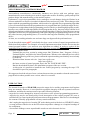
Dimensione S/N
definisce la lunghezza in bytes del numero di serie che verrà scritto nel buffer. Per serializzazioni
binarie i valori validi sono da 1 a 4, mentre per le serializzazioni in ASCII i valori validi sono
da 1 ad 8.
Indirizzo
Specifica l'indirizzo nel buffer dove il numero di serie viene scritto. Si noti che tale valore deve
essere compreso nel campo di indirizzi tra quello iniziale e quello finale e deve essere
Pagina 30
EP 40/USB
Rel. 3.00
ITALIAN TECHNOLOGY
grifo®
specificato correttamente, ovvero l'intero numero di serie deve ricadere entro il campo di
indirizzi validi.
Valore iniziale
Specifica il valore iniziale dei numeri di serie. Generalmente il valore massimo per serializzazioni
binarie con 4 bytes è $1FFFFFFF.
Quando il valore del numero di serie supera il massimo vengono azzerati i tre bit più
significativi del numero di serie corrente. Dopo tale azione il numero si trova ad essere sempre
compreso tra 0 e $1FFFFFFF (gestione degli overflow secondo lo stile del basic).
Passo
Specifica il passo di incremento del numero di serie.
Modo S/N
Definisce la forma con la quale il numero di serie viene scritto:
- ASCII: Significa che il numero verrà scritto come stringa ASCII. Per esempio il numero
di serie $0528CD in ASCII viene scritto nel buffer come la sequenza di bytes 30h
35h 32h 38h 43h 44h (‘0’ ‘5’ ‘2’ ‘8’ ‘C’ ‘D’), ovvero 6 bytes.
- Binario: Significa che il numero di serie viene scritto direttamete nel buffer. Se il numero
è composto da più di un byte, ci sono due possibili ordini di scrittura. L'ordine di
scrittura può essere cambiato con il comando “Save to buffer” item.
Stile
Definisce la base per i numeri di serie, che può essere:
- Decimale:
i numeri vengono inseriti e mostrati usando i caratteri da ‘0’ a ‘9’.
- Esadecimale: i numeri vengono inseriti e mostrati usando anche i caratteri da ‘A’ ad ‘F’.
Vi è il caso speciali dei numeri decimali codificati in binario, o BCD. Ciò significa che ogni cifra
decimale viene memorizzato in una cifra esadecimale, ovvero ogni nibble vale da 0 a 9, non
sono ammessi i valori da A ad F in un nibble BCD.
La base va scelta con l'opzione “Style” prima di inserire il numero di serie iniziale ed il passo.
Salva nel buffer
Specifica l'ordine di scrittura dei bytes del numero di serie. Questa opzione viene usata quando
il numero di serie è di tipo binario, non si applica ai numeri ASCII.
Vi sono due opzioni:
- LSByte first (usato dai processori Intel) posizionerà il byte meno significativo all'indirizzo
più basso del buffer.
- MSByte first (usato dai processori Motorola) posizionerà il byte più significativo all'indirizzo
più basso del buffer.
Componente | Opzioni componente | Serializazione | Modo da file
In modalità di serializzazione dal file i numeri vengono letti da un file specificato dell'utente e
scritti nell'indirizzo del buffer indicato dal file.
La modalità prevede due impostazioni:
Nome file
Specifica il nome del file da cui vengono letti gli indirizzi ed i relativi numeri di serie. Il file per
la serializzazione in questa modalità deve avere un formato specifico, che viene descritto nella
sezione più sotto.
Etichetta inizio
Definisce l'etichetta iniziale all'interno del file di numeri. La lettura dei valori dei numeri di serie
inizia da questa etichetta.
Il file per la serializzazione da file comprende indirizzi e numeri di serie, questi ultimi specificati
come gruppi di bytes. Il file è di tipo testuale, la sua struttura è:
EP 40/USB
Rel. 3.00
Pagina 31
grifo®
ITALIAN TECHNOLOGY
[label1] addr byte0 byte1 .. byten
...
[labeln] addr byte0 byte1 .. bytem , addr byte0 byte1 ... bytek
\_______________/ \__________________/
|
|
parte fissa
parte opzionale
; Commento
legenda:
parte fissa
La parte fissa definisce l'indirizzo nel buffer ed i bytes che vanno scritti a partire da tale indirizzo.
Tali dati vanno sempre scritti dopo l'etichetta.
parte opzionale
La parte opzionale definisce un secondo gruppo di indirizzo e bytes da scrivere nel buffer. Una
parte opzionale può essere definita dopo la parte fissa dei dati.
etichette (label1, labeln - labels)
Le etichette identificano ogni linea del file in ingresso. Vengono usate per idnirizzare
individualmente ogni riga del file, per cui ogni etichetta dovrebbe essere univoca. Lo scopo è
indirizzare la linea da cui inizia il conteggio dei numeri di serie
addr Definisce l'indirizzo nel buffer da cui inizare a scrivere il numero di serie.
byte0..byten, byte0..bytem, byte0..bytek I gruppi di bytes byte0..byten, byte0..bytem e byte0..bytek sono i dati che verranno scritti nel
buffer. Al massimo ci possono essere 64 bytes in un campo dati seguente ad un indirizzo.
I dati vengono scritti nel buffer dall'indirizzo addr all'indirizzo addr+n:
byte0 in addr
byte1 in addr + 1
byte2 in addr + 2
....
byten in addr + n
La parte opzionale viene separata dal carattere “ , “ (virgola) ed ha la stessa struttura della parte
precedente, ad esempio un indirizzo ed un gruppo di bytes.
Caratteri ad uso speciale per etichette:
[ ] - le etichette devono essere racchiuse da parentesi quadre
‘,’ – carattere separatore la parte fissa e quella opzionale
‘;’ - il carattere di punto e virgola indica l'inizio di un commento. Tutti i caratteri dal punto e
virgola alla fine della linea vengono ignorati. Un commento può anche essere a fine linea.
Note:
- Un nome di etichetta può contentere tutti i caratteri tranne ‘[‘ e ‘]’. I nomi di etichetta non
tengono conto della capitalizzazioe, ovvero ‘a’ è uguale ad ‘A’, ‘b’ è uguale a ‘B’ ecc..
- Tutti gli indirizzi ed i valori da scrivere devono essere in esadecimale.
- Gli indirizzi possono essere composta da 1 fino a 4 bytes.
- I gruppi di bytes di dati possono essere composti da 1 a 64 elementi. Quando ci sono due gruppi
su una stessa linea, il numero totale di elementi deve essere al massimo 80.
- Fate attenzione ad impostare l'indirizzo corretto. Questo deve essere definito nel campo tra gli
indirizzi iniziale e finale del dispositivo che viene programmato. Se l'indirizzo fosse fuori da
questo campo apparirebbe una finestra e si la serializzazione verrebbe disabilitata.
Pagina 32
EP 40/USB
Rel. 3.00
ITALIAN TECHNOLOGY
grifo®
Esempio:
[nav1] A7890 78 89 56 02 AB CD ; commento1
[nav2] A7890 02 02 04 06 08 0A
[nav3] A7890 08 09 0A 0B A0 C0 ; commento 2
[nav4] A7890 68 87 50 02 0B 8D
[nav5] A7890 A8 88 59 02 AB 7D
;la linea successiva contiene anche la parte opzionale
[nav6] A7890 18 29 36 42 5B 6D , FFFF6 44 11 22 33 99 88 77 66 55 16
; ultima linea - fine del file
Nel file di esempio vengono definiti sei valori di numeri di serie etichettati con “nav1”, “nav2”,
...“nav6” . ogni numero viene scritto all'indirizzo $A7890 ed è composto da 6 bytes. La linea
etichettata con “nav6” ha anche la parte opzionale, che viene scritta nel buffer dall'indirizzo
$FFFF6 ed è di 10 bytes, quindi il suo ultimo byte viene scritto all'indirizzo $FFFFF.
Componente | Opzioni componente | Statistiche...
Le statistiche forniscono informazioni circa l'attuale conteggio delle operazioni su un particolare
dispositivo. Se su ogni dispositivi viene effettuata una sola operazione allora il conteggio delle
operazioni effetuate coincide con il conteggio dei dispositivi programmati.
Un'altra funzione statistica è il conto alla rovescia. Questa permette di controllare sia il numero
di operazioni che il numero di dispositivi sui quali vengono effettuate. Dopo ogni operazione
andata a buon fine su un certo dispositivo il contatore viene decrementato. L'utente deve stabilire
il valore iniziale del conto alla rovescia, quando questo raggiunge lo zero si intende che è stato
raggiunto il limite del lotto e viene mostrato un messaggio di conteggio completato.
La finestra Statistiche contiene le seguenti opzioni:
Le caselle spuntabili Programma, Verifica, Verifica cancellazioni, Cancella e Lettura
decidono le operazioni che, se andate buon fine, incrementano il conteggio.
Le caselle spuntabili Count Down gestisce l'attività di conto alla rovescia (lo abilita o disabilita).
La casella di testo accanto alla casella spuntabile definisce il valore iniziale del conteggio.
La finestra Stato attuale si può aprire anche premendo il tasto destro del mouse sul pannello
Statistics e clickando sulla voce visualizzata.
I valori delle statistiche vengono mostrati nella finestra principale, nella casella Statistiche.
Quest'ultimo contiene in ordine i contatori di Successi, Fallimenti, Totali e l'attuale contatore
a rovescia, se abilitato.
Le operazioni completate con successo sono una qualunque tra le seguenti:
- programmazijone
- verifica di programmazione
- verifica se è vuoto
- cancellazione
- lettura
EP 40/USB
Rel. 3.00
Pagina 33
grifo®
ITALIAN TECHNOLOGY
Se una opeazione viene completata con errori non la si considera completata con successo.
Quando viene selezionato un nuovo dispositivo, tutti i valori delle statistiche vengono azzerati
e Count down viene disabilitato.
Il pulsante Reset nel pannello e casella Statistiche azzera i valori delle statistiche.
Il pulsante Ricarica Count down nella casella Statistiche ricarica il valore iniziale di Count
down.
Componente | Opzioni componente | File associato...
Associa un file al dispositivo corrente. Il file viene caricato automaticamente nel buffer non
appena il dispositivo corrente viene di nuovo selezionato dalla lista dei dispositivi o se era già
selezionato all'avvio del programma.
Il nome (completo di percorso) viene modificato nell'apposita casella di testo. Il programma
controlla automaticamente la presenza del file, il caricamento si può abilitare o disabilitare.
Entrambi questi settaggi (nome del file ed abilitazione del caricamento) si possono salvare su
disco con il comando File | Esci e salva.
Componente | Verifica cancellazione <F6>
Verifica se un dispositivo è vuoto, completamente o in parte, a seconda del dispositivo. Il risultato
dell'operazione viene comunicato da una finestra di avviso.
La finestra Componente | Opzioni componente | Opzioni operative permette di modificare
l'area standard del dispositivo che viene verificata da questo comando.
Componente | Lettura <F7>
Legge il contenuto di un dispositivo, completamente o in parte, a seconda del dispositivo. Il
termine dell'operazione viene comunicato da una finestra di avviso.
La finestra Componente | Opzioni componente | Opzioni operative permette di modificare
l'area del dispositivo che viene letta da questo comando. Abilitare la verifica dopo la lettura
(comando Verifica dopo lettura) in questo menu aumenta l'affidabilità della lettura stessa.
Componente | Verifica <F8>
Confronta il contenuto di un dispositivo con il buffer, completamente o in parte, a seconda del
dispositivo. Il risultato dell'operazione viene comunicato da una finestra di avviso.
La finestra Componente | Opzioni componente | Opzioni operative permette di modificare
l'area sulla quale lavora questo comando.
Il comando Opzioni | Opzioni generali | Errori permette di scrivere le eventuali differenze sullo
schermo o sul file VERIFY.ERR. Sullo schermo vengono mostrate al massimo le prime 45
differenze complete degli indirizzi.
Pagina 34
EP 40/USB
Rel. 3.00
ITALIAN TECHNOLOGY
grifo®
Componente | Programma <F9>
Programma il contenuto di un dispositivo, completamente o in parte, a seconda del dispositivo.
L'esito dell'operazione viene comunicato da una finestra di avviso.
La finestra Componente | Opzioni componente | Opzioni operative permette di specificare
un'altra area di lavoro e di impostare ulteriori elementi della sequenza di operazioni di
programmazione.
Componente | Cancellazione <F10>
Cancella il contenuto di un dispositivo. L'esito dell'operazione viene comunicato da una finestra
di avviso..
Componente | Test
Esegue il test dei dispositivi indicati nella lista di quelli che possono ammettere un test (ad
esempio RAM statiche) col il programmatore attuale.
Componente | IC test
Attiva la sezione di test per circuti logici che si trova separate sul mini-CD di distribuzione per
compatibilità. Prima si deve selezionare la libreria appropriata, poi il dispositivo desiderato,
infine una modalità del test tra continua e a passo singolo. La sequenza di controllo e il risultato
del test vengono mostrati in finestra.
Componente | JAM/VME/... Player
Esistono strumenti propietari realizzati dai maggiori produttori di circuiti integrati al mondo che
permettono di svolgere particolari attività di debugging. Il programmatore EP40/USB è in grado
di integrarsi con tali strutture propietarie e di gestirne le funzioni tramite questo menu.
Trattandosi di dispositivi speciali, la loro descrizioni esula dagli scopi di questo manuale.
Componente | Informazioni componente... <Ctrl+F1>
Fornisce informazioni aggiuntive sul dispositivo attuale (dimensione, organizzazione, algoritmo
di programmazione e una lista dei programmatori che lo supportano, corredata degli eventuali
moduli adattatori). Si trovano inoltre informazioni sul package ed eventuali ulteriori informazioni
specifiche.
PROGRAMMATORE
Questo menu contiene le funzioni che servono per interagire con il programmatore, ovvero gestire
la comunicazione, la diagnostica interna e le funzioni di lettura e programmazione.
EP 40/USB
Rel. 3.00
Pagina 35
grifo®
ITALIAN TECHNOLOGY
Programmatore | Trova programmatore... <Ctrl+F>
Cerca un altro programmatore o ripristina la comunicazione con il programmatore già collegato.
Offre le seguenti opzioni:
Programmatore - imposta uno tra i programmatori supportati dal programma di controllo. Se
viene selezionata la voce “Search all” verranno cercati tutti.
Stabilire communicazione - stabilisce la comunicazione con un nuovo programmatore o
ripristina la comunicazione con quello già collegato.
Velocità - Modificare la velocità di comunicazione è importante con i PC che hanno porte
parallele “lente” o che non hanno sufficiente potenza per pilotare il cavo di comunicazione PC<>programmer cable (laptop, notebook, ...). Usatie questa opzione per tentare di risolvere
eventuali problemi di comunicazione tra PC e programmatore (esampio, il programma di
controllo indica che il programmatore è assente, la comunicazione col programmatore non è
affidablie, ecc.).
Se è stata abilitata la comunicazione automatica allora il programma di controllo imposta la
massima velocità possibile.
Porta - sceglie la porta parallela dove verrà cercato il programmatore. Se la voce “All ports” viene
selezionata allora il programmatore verrà cercato su tutte le porte presenti agli indirizzi standard.
Indirizzo speciale - Imposta l'indirizzo per la porta parallela special , se selezionata.
Premendo <Enter> o il pulsante OK parte la scansione basata sui precedenti parametri. La stessa
scansione avviene all'avvio del programma di controllo. Il comando cancella la lista dei
dispositivi di default ma non il dispositivo corrente se il nuovo programmatore lo supporta.
Queste impostazioni vengono salvate col comando Opzioni | Salva opzioni
Programmatore | Ritrova programmatore <Shift+Ctrl+F>
Cerca un programmatore o ripristina la comunicazione con il programmatore già collegato e che
è stato specificato con il menu precedente. Offre le opzioni descritte nel precedente comando.
Programmatore | Handler...
La finestra Handler permette di definire un dispositivo esterno che viene abilitato ad effettuare
un controllo speciale controllare delle attività effettuate sui dispositivi programmabili. Quando
non viene selezionato alcun Handler il programma di controllo funziona come da default, ovvero
l'utente controlla direttamente le attività, altrimenti il programma di controllo si trova in modalità
speciale, quindi le operazioni sui dispositivi sono controllate in co-operazione con un dispositivo
esterno.
La finestra Handler contiene le seguenti opzioni:
Seleziona Handler
Cerca alla porta
selezione l'Handler desiderato.
seleziona una porta seriale (COM) dove verrà cercato l'Handler.
Premendo <Enter> o il pulsante OK si attiva la ricerca. Se l'Handler selezionato è di tipo
Nessuno, non verrà effettuatta alcuna ricerca. Le attuali impostazioni sull'Handler vengono
salvate su disco mediante il comando Opzioni | Salva opzioni o quando il programma di
controllo viene chiuso.
L'Handler non è disponibile per le vendita.
Pagina 36
EP 40/USB
Rel. 3.00
ITALIAN TECHNOLOGY
grifo®
Programmatore / Opzioni modulo...
Viene usato con un modulo multi-zoccolo per definire lo zoccolo MASTER e il tipo di attività
per ogni zoccolo. Il gruppo di opzoni Zoccolo MASTER permette di stabilire quale zoccolo
viene usato per le operazioni di lettura. Le caselle sputabili Abilita/Disabilita zoccolo abilitano
o disabilitano individualmente gli zoccoli. Lo zoccolo disabilitato non effettua alcuna operazione.
Programmatore | YES! automatico...
Imposta la modalità YES! automatico con cui basta inserire correttamente un dispositivo nello
zoccolo e l'ultima operazione effettuata verrà ripetuta. Automaticamente, il programma rileva
l'inserzione di un nuovo dispositivo nello zoccolo ed esegue l'ultima operazione effettuate senza
dover premere alcun tasto o pulsante. Viene visualizzata sullo schermo l'avvenuta inserzione di
un nuovo dispositivo. La modalità può essere annullata premendo il tasto <Esc> durante l'attesa
di inserzione di un nuovo dispositivo.
Nota: Durante l'attesa di un nuovo dispositivo il LED BUSY lampeggia.
Se viene selezionato un nuovo programmatore con Opzioni | Trova programmatore, questa
modalità viene disabilitata.
Con Tempo di risposta è possibile impostare un intervallo di tempo entro il quale deve essere
inserito il dispositivo nuovo. Di default viene preimpostato un intervallo standard. Se viene usato
uno zoccolo adattatore di formato, si consiglia di aumentare tale intervallo.
Con Pins con capacità si può specificare una lista di pins che vengono connessi attraverso delle
capacità (ad esempio se viene usato uno zoccolo convertitore con un condensatore inserito tra
Vcc e GND), che potrebbe creare problemi durante l'inserzione di un nuovo dispositivo.
Tale lista deve essere nella forma:
pinA, pinB, pinC....
Esempio: 4,6,17
La lista viene svuotata se viene eseguito il comando Componente | Scelta/default o Componente
| Scelta componente...
Queste impostazioni vengono salvate sul disco con il comando Opzioni | Salva opzioni.
Programmatore | Selftest...
Esegue una procedura di auto diagnostica senza il relativo POD (presente nella confezione). LO
ZOCCOLO ZIF DEVE ESSERE VUOTO PRIMA DI ESEGUIRE QUESTO COMANDO.
Si consiglia di eseguire anche il comando di auto diagnostica Programmatore | Selftest plus.
Programmatore | Selftest plus...
Esegue una procedura di auto diagnostica usando il relativo POD (presente nella confezione). Si
consiglia di eseguire questo comando periodicamente, ad esempio una volta ogni sei mesi.
EP 40/USB
Rel. 3.00
Pagina 37
grifo®
ITALIAN TECHNOLOGY
Programmatore | Selftest connettore ISP...
Esegue una procedura di auto-diagnostica per la struttura di programmazione ISP, usando il
relativo POD (presente nella confezione). LO ZOCCOLO ZIF DEVE ESSERE VUOTO
PRIMA DI ESEGUIRE QUESTO COMANDO.
Programmatore | Test calibrazione...
Esegue una verifica di calibrazione su numerosi componenti interni e sulle tensioni usate.
OPZIONI
Permette di verificare e modificare diverse impostazioni di default ed operative.
Opzioni | Opzioni generali...
Permette di controllare le seguenti opzioni.
Opzioni File
Permette di impostare la maschera per i file, attivare il caricamento automatico del file
selezionato e selezionare il tipo del file che verrà caricato.
Maschera di formato dei files imposta un filtro per selezionare i nomi dei file in File | Salva
e File | Carica per tutti i formati. La maschera deve contenere almeno un carattere speciale (*,
?).
Estensione di default per file di progetto imposta l'estensione del file usata di default in
File | Carica progetto e File | Salva progetto.
Il gruppo Quando il file corrente viene modificato da un altro processo permette di decidere
la politica di ricaricamento del file attualmente selezionato. Ci sono tre opzioni:
1.
Chiede prima di ricaricare
2.
Ricarica sempre
3.
Ignora i cambiamenti del file
Formato del file permette di decidere la politica di riconoscimento dei file che vengono caricati.
Quando viene messo in automatico, il programma analizza il formato cercando ogni tipo di file
supportato. Se il file corrisponde allo schema di validazioni di un formato supportato, verrà
caricato nel buffer usando quel formato.
Se messo in manuale l'utente può indicare esplicitamente il formato del file che sta per essere
caricato dalla lista dei formati supportati. In caso il formato indicato non corrisponda a quello
effettivo del file, ques'ultimo potrà essere caricato parzialmente o non correttamente.
Hex file options
Contiene diverse opzioni per controllare il caricamento dei file in formato HEX.
La prima opzione abilita la cancellazione del buffer (col valore desiderato) che avviene
automaticamente prima di caricare il file.
La seconda opzione imposta un offset negativo usato per modificare l'indirizzo di caricamento
di ogni file HEX in modo che ricada in un campo di indirizzi validi.
Esempio:
Un file contiene dati in formato Motorola S. Un blocco di dati inizia dall'indirizzo FFFF0H. Il
formato è S2 quindi l'indirizzo è un gruppo di 3 bytes. Potete associare un offset negativo di
FFFF0H alla lettura di ogni dato. Quindi l'offset verrà sottratto dall'effettivo indirizzo specificato.nel
file e i dati verranno caricati a partire dall'indirizzo 0.
Pagina 38
EP 40/USB
Rel. 3.00
ITALIAN TECHNOLOGY
grifo®
Avvertimento: Il valore di offset viene sottratto all'indirizzo effettivo quindi il risultato portebbe
essere un indirizzo minore di 0. Fate molta attenzione ad impostare l'offset negativo.
Lingua
Permette di selezionare un'altra lingua per l'interfaccia utente ovvero menu, pulsanti, finestre,
informazioni e messaggi. Permette anche di avere l'help in un'altra lingua. Per il supporto a questa
funzione è necessario che ci sia un file di definizione della lingua.
Suono
Permette all'utente di associare degli effetti sonori al completamento di determinate operazioni
come, ad esempio, programmazione, verifica, lettura, etc. Il programma genera un suono anche
quando viene mostrato un avvertimento o un errore. L'utente può selezionare un suono dal
sistema audio di MS Windows (richiede la corretta installazione di una scheda audio), dallo
speaker del PC o disabilitare i suoni.
Altro
Permette di impostare ulteriori parametri del programma.
Si possono disabilitare gli hint (suggerimenti) che appaiono sui pulsanti delle barre posizionandoci
sopra la freccia per alcuni secondi infine si può modificare la directory di partenza all'avvio del
programma, a scelta tra la directory di installazione e l'ultima directory visitata prima di chiudere
il programma.
Salva opzioni
Permette di decidere cosa salva il programma alla chiusura ed offre tre scelte:
- Non salvare opzioni e non chiedere se salvare le opzioni.
- Salva opzioni automaticamente senza chiedere conferma.
- Chiede all'utente se vanno o non vanno salvate le opzioni.
Opzioni | Mostra
Seleziona se mostrare o nascondere vari elementi dell'interfaccia utente come le barre.
Opzioni | Mostra | Barra strumenti principale
Mostra o nasconde la barra dei pulsanti principale.
Opzioni | Mostra | Barre degli strumenti aggiuntive
Mostra o nasconde la barra dei pulsanti secondaria.
Opzioni | Mostra | Opzioni componente prima di operazioni
Mostra o nasconde l'elenco delle opzioni di programmazione per un certo dispositivo prima che
la programmazione inizi, che funge da promemoria per l'utente che le può quindi verificare e
confermare.
Opzioni | Modo protetto...
La modalità protetta è una speciale modalità del programmatore. In questa situazione sono
disabilitate le operazioni di programmazione, quelle che possono modificare il contenuto del
buffer o che possono variare la configurazione del dispositivo da programmare. Quindi in questa
situazioni l'operatore non può modificare i parametri significativi della programmazione per
EP 40/USB
Rel. 3.00
Pagina 39
grifo®
ITALIAN TECHNOLOGY
errore, risulta utile nella programmazione di grandi lotti.
Ci sono due modi per attivare la modalità protetta:
1. con il comando Opzioni | Modo protetto. Questo comando richiede la password, l'utente la
deve inserire due volte per dare conferma. Dopo l'accettazione della password avviene il
passaggio in modalità protetta, la stessa password serve per tornare in modalità normale.
2. aprendo un progetto precedentemente salvato in modalità protetta.
Per tornare in modalità normale usate il comando Opzioni | Modo normale. La password che
verrà richiesta è la stessa usate per commutare in modalità protetta.
Un altro modo per uscire dalla modalità protetta consiste nel chiudere il programma, in quanto
la modalità protetta è attiva solo fino all'uscita dal software. Al prossimo avvio il programma si
troverà di nuovo in modalità normale (unica eccezione è il caso di un progetto caricato dalla linea
di comando precedentemente salvato in modalità protetta).
Opzioni | Salva opzioni
Questo comando salva tutte le impostazioni al momento abilitate ad essere salvate, persiono se
il salvataggio automatico viene disabilitato. Sono salvate le seguenti opzioni: quelle del menu
Opzioni, gli ultimi dieci dispositivi selezionati, gli ultimi file aperti, posizione e dimensione della
finestra principale.
AIUTO
Premendo <F1> si accede all'Help. Premendo <F1> mentre è selezionato un particolare elemento
di un menu, si accede all'help sensibile al contesto. Se PG4UW sta eseguendo una qualche operazione
sul programmatore <F1> non genera alcuna reazione.
Poichè il sistema di Help viene aggiornato continuamente con il programma di controllo, può
contenere informazioni non incluse in questo manuale.
Informazioni dettagliate sui comandi indivuduali si possono trovare nell'Help in linea.
Nota: Le informazioni sono precise al momento della pubblicazione dello stesso. I nostri prodotti
sono aggiornati di continuo. Si prega di consultare il sito www.grifo.it o www.grifo.com.
Aiuto | Contenuti F1
Mostra tutto l'aiuto in linea.
Aiuto | Cerca aiuto per...
Mostra la pagina di aiuto in linea riferita alla finestra, comando, casella, dato, valore, formato,
attualmente selezionato dal cursore.
Pagina 40
EP 40/USB
Rel. 3.00
ITALIAN TECHNOLOGY
grifo®
Aiuto | Componenti supportati
Mostra una lista con tutti i dispositivi supportati da almeno un programmatore.
Torna utile quando l'utente vuole trovare un qualunque dispositivo purchè sia supportati da
almeno uno di quelli compatibili con il programma di controllo.
Aiuto | Programmatori supportati
Mostra informazioni sui programmatori supportati dal programma di controllo.
Aiuto | Lista componenti (programmatore attuale)
Crea una lista di tutti i dispositivi supportati dal programmatore corrente nel file di testo
?????DEV.txt e nel file HTML ?????DEV.htm che vengono creati nella directory dalla quale
viene eseguito il programma di controllo. Il segno ????? viene sostituito con una forma abbreviata
del nome del programamtore al quale la lista è riferita.
Aiuto | Lista componenti (tutti i programmatori) <Shift+Alt+D>
Crea una lista di tutti i dispositivi supportati da tutti programmatori grifo® nel file di testo
?????DEV.txt e nel file HTML ?????DEV.htm che vengono creati nella directory dalla quale
viene eseguito il programma di controllo. Il segno ????? viene sostituito con una forma abbreviata
del nome del programamtore al quale la lista è riferita.
Aiuto | Lista componenti (riferimenti incrociati)
Crea una cross reference tra tutti i dispositivi supportati da tutti i programmatori presenti sul
mercato e quelli supportati dal programmatore corrente. Il risultato è in formato HTML e consiste
dei seguenti file:
- un file principale in HTML TOP_DEV.htm che lista i produttori dei dispositivi
- file HTML parziali che listano i dispositivi per ogni produttore
Il file HTML principale viene creato nella stessa directory ove si trova il programma di controllo.
I file parziali HTML vengono messi nelle sotto directory DEV_HTML che partono dalla
directory dove si trova il programma di controllo.
Aiuto | Crea report dei problemi
Crea il report diagnostico contenente particolari informazioni interna e lo scrive nella finestra
principale, poi copia il contenuto della finestra nel clipboard di Windows. Dalla clipboard il testo
contenuto può essere copiato in un qualunque editor di testi. Il report diagnostico è utile quando
si verifica un qualche errore nel programma di controllo o nel programmatore che l'utente non
è in grado di rimediare in autonomia, quindi deve contattare il produttore. In tal caso è
indispensabile allegare al messaggio per il produttore anche il report diagnostico, in quanto
questo può aiutare il produttore a localizzare più rapidamente la causa del problema e a risolverlo.
Aiuto | Informazioni...
Fa apparire una finestra che mosta le informazioni sul programmatore attuale, lingua scelta,
generalità della ditta realizzatrice ed il numero di versione.
EP 40/USB
Rel. 3.00
Pagina 41
grifo®
ITALIAN TECHNOLOGY
CARATTERISTICHE SOFTWARE AGGIUNTIVE
PG4UW è il programma di controllo comune a tutti i programmatori grifo®. Quindi potreste trovare
alcune voci di menu che non si riferiscono al vostro programmatore.
Si può associare un file particolare ad ogni dispositivo, in modo che venga caricato automaticamente
nel buffer se l'opzione Componente | Opzioni componente | File Associato | Caricamento
automatico è impostata a Si. Il file associato è l'ultimo caricato, a meno che non venga esplicitamente
dichiarato nella casella Componente | Opzioni componente | File Associato | Nome file.
Una caratteristica denominata YES! automatico permette in concreto, di ripetere l'ultima azione
eseguita senza bisogno di premere un pulsante o un tasto. Questo è possibile poichè il programmatore
determina autonomamente l'inserimento di un nuovo dispositivo nello zoccolo e ripete subito
l'ultima operazione. Tutti i parametri di questa caratteristica sono impostabili da menu Opzioni. Se
usate adattatori di formato che connettono dei condensatori ai pin, inserite tali pin nella apposita lista.
Il pulsante YES consente a sua volta di ripetere l'ultima operazione svolta senza dover usare la
tastiera del PC, in modo da velocizzare la fase di programmazione di numerosi componenti. Per
individuare la posizione di tale pulsante si faccia riferimento alla figura 4.
Alcuni dispositivi speciale (ad esempio i PHILIPS della famiglia Coolrunner) richiedono dei file
DAT esterni non forniti di default nel mini CD. Se avete bisogno di programmarli, esaminate la
sezione Download dei siti internet www.grifo.it o www.grifo.com.
Indipendentemente dal sistema operativo Windows usato, siete pregati di non spostare mai alcuna
finestra mentre il LED BUSY è acceso: il circuito di protezione del programmatore contro errori di
comunicazione o eccessiva lentezza del PC potrebbe attivarsi e mettere il programmatore in modalità
di sicurezza. Per la stessa ragione durante le operazioni sui dispositivi é consigliato non sovracaricare
il PC in uso con l'esecuzione contemporanea di numerosi altri programmi.
Pagina 42
EP 40/USB
Rel. 3.00
ITALIAN TECHNOLOGY
grifo®
COME INIZIARE
Questo capitolo contiene tutte le informazioni essenziali per la connessione del programmatore al
PC, installare il programma di controllo ed iniziare ad usare il programmatore in brevissimo tempo.
Si prega di leggere completamente questi passi prima di tentare qualunque utilizzo del
programmatore, soprattutto se l'utente non ha mai usato un programmatore. Per soddisfare le
esigenze della maggioranza degli utilizzatori il capitolo propone i passi da eseguire per copiare un
dispositivo e/o per programmarlo con un file salvato su PC.
Per ottenere informazioni più dettagliate sulle caratteristiche tecniche del programmatore e del
software di controllo potete riferirvi ai capitoli precedenti di questo manuale.
a)
Installate il software PG4UW come descritto nel paragrafo INSTALLAZIONE PROGRAMMA
DI CONTROLLO. Qualora il programma non sia installato dal mini CD, bensì dall'ultima
versione scaricata da internet, seguite le indicazioni del paragrafo AGGIORNAMENTO
PROGRAMMA DI CONTROLLO.
b)
Predisponete l'EP40/USB come descritto nel paragrafo PREPARAZIONE
PROGRAMMATORE.
c)
Collegate il programmatore al PC ed installate i necessari driver di comunicazione come
descritto nel paragrafo INSTALLAZIONE DRIVER USB.
d)
Eseguite il programma PG4UW come descritto nel paragrafo ESECUZIONE DEL
PROGRAMMA DI CONTROLLO.
e)
Scegliete il dispositivo che volete programmare sia tramite il menu Componente | Scelta
componente..., sia tramite la combinazione di tasti <Alt+F5> (premete <F5> mentre tenete
il tasto <Alt> premuto) oppure più semplicemente clicckare l'icona:
f)
Caricate i dati con cui programmare il dispositivo selezionato:
- Se volete caricare un file da disco, usate il menu File | Carica... o premete il tasto <F3> o più
semplicemente clicckare l'icona:
- Se volete copiare il contenuto di un dispositivo già programmato, dovete prima leggere il suo
contenuto. In questo caso: aprire lo zoccolo ZIF (leva in alto), inserite il dispositivo già
programmato facendo attenzione che l'orientamento corrisponda a quello dell'adiacente
disegno, chiudere lo zoccolo ZIF (leva in basso) ed effettuare la lettura tramite il menu
Componente | Lettura o premendo il tasto <F7> o più semplicemente clicckare l'icona:
Al termine della lettura, segnalata sia sul programma che dal LED GOOD del programmatore
provvedere ad aprire lo zoccolo ZIF ed ad estrarre il componente letto.
EP 40/USB
Rel. 3.00
Pagina 43
grifo®
ITALIAN TECHNOLOGY
g)
Inserite il dispositivo da programmare nello zoccolo ZIF sempre rispettando l'allineamento e
quindi chiudelo.
h)
Verificate che il componente da programmare sia cancellato e quindi programmabile tramite
il menu Componente | Verifica cancellazione., oppure il tasto <F6> o più semplicemente
clicckare l'icona:
i)
Programmate il contenuto attuale del buffer sul dispositivo col menu Componente | Programma
oppure premendo il tasto <F9> o più semplicemente con l'icona:
j)
Potete confrontare il contenuto del buffer con i dati appena scritti nel dispositivo da
programmare tramite il menu Device | Verifica oppure premendo il tasto <F8> o più
semplicemente con l'icona:
k)
Aprire lo zoccolo ZIF (leva in alto) ed estrarre il componente appena programmato. Quest'ultimo
é pronto per essere montato e provato sull'hardware dell'utente.
Pagina 44
EP 40/USB
Rel. 3.00
ITALIAN TECHNOLOGY
grifo®
TERMINI DELLA GARANZIA
La garanzia copre il programmatore e tutte le sue parti, purchè esenti da difetti di fabbricazione, i
materiali e la mano d'opera fino ad un anno dalla data di acquisto. La garanzia è altresì limitata a
25000 cicli per lo zoccolo ZIF DIL ad a 10000 cicli per glizoccoli ZIF non DIL. Se il prodotto viene
diagnosticato come difettoso, il centro autorizzato di riparazioni riparerà o sostituirà le parti difettose
gratuitamente. Le parti sostituite e/o l'intero programmatore saranno coperti solo per il rimanente
pediodo di garanzia.
La garanzia non copre danni prodotti da usura, lacerazioni o danneggiamenti meccanici. Allo stesso
modo non copre prodotti manipolati e/o riparati e/o aperti da personale non autorizzato dalla grifo®,
o prodotti che sono stati danneggiati durante un trasporto oppure usati e/o installati e/o maneggiati
impropriamente.
Prima di inviare il materiale in riparazione, si prega di contattare la grifo®.
In ogni caso, se il materiale giunge senza descrizione del problema la riparazione può essere respinta.
Analogamente, non si può garantire la riparazione se non vengono inviati anche tutti gli elementi del
programmatore e gli eventuali accessori esterni usati quando è stata riscontrato il difetto.
Richieste di riparazioni non necessarie o fuori garanzia verranno addebitate.
La grifo® od i suoi distributori determineranno se il prodotto difettoso debba essere riparato o
sostituito e giudicheranno se le condizioni di garanzia sono da applicarsi oppure no.
Si veda inoltre il capitolo RISOLUZIONE DEI PROBLEMI.
ARTICOLI AGGIUNTIVI
Per estendere con facilità la già vasta quantità di dispositivi programmabili con i programmatori
grifo®, i convertitori di formato permettono di usare formati diversi dal classico DIL come il PLCC,
SOIC, SSOP, TSOP, TSSOP, ecc.
Per ulteriori informazioni su quale convertitore di formato sia adatto al vostro programmatore si
prega di usare la finestra visualizzata dal comando Componente | Informazioni componente...
(<Ctrl+F1>) o di contattare direttamente la grifo®.
RISOLUZIONE DEI PROBLEMI
Il prodotto ed il materiale impiegato per costruirlo sono di ottima qualità. Nonostante ciò, se doveste
incontrare dei problemi, rileggete attentamente la documentazione contenuta in questo manuale,
probabilmente vi troverete la risposta cercata. Se così non fosse, seguite le istruzioni qui sotto.
ERRORI DI COMUNICAZIONE
- Il programmatore deve essere alimentato correttamente, il LED verde di alimentazione deve essere
sempre acceso e ad alta luminosità, l'alimentatore deve essere quello fornito in dotazione. Per
verificare l'integrità fisica del cavo di alimentazione provate a piegarlo leggermente dove si collega
al programmatore e vedete se succede qualcosa.
EP 40/USB
Rel. 3.00
Pagina 45
grifo®
ITALIAN TECHNOLOGY
- Aggiornate il programma di cotrollo, spesso una versione più recente migliora le caratteristiche di
comunicazione. Consultate il capitolo AGGIORNAMENTO PROGRAMMA DI CONTROLLO
per ulteriori informazioni.
- Il cavo di comunicazione USB deve essere quello fornito nella confezione.
- Provate ad installare il programmatore ed il PG4UW su un altro PC. Se questi funzionano bene
sull'altro computer potreste avere dei problemi col primo. Confrontate le differenze tra questi due.
PROLEMI DI LETTURA O PROGRAMMAZIONE
- Assicuratevi che il dispositivo target sia allineato correttamente nello zoccolo. Consultate la
serigrafia accanto allo zoccolo o sull'adattatore se ne state usando uno.
- Il dispositivo target deve essere selezionato su PG4UW prima di tentare di leggerlo o programmarlo.
- Il nome del dispositivo selezionato ed il nome del dispositivo inserito nello zoccolo devono essere
ESATTAMENTE GLI STESSI! Se tentate di operare su un dispositivo dal nome diverso o anche
solo simile potreste danneggiare sia il programmatore sia il dispositivo.
- Aggiornate il programma di controllo. I produttori di elettronica creano nuovi dispositivi quasi ogni
giorno per cui la cosa migliore è cercare il dispositivo che serve nell'ultima versione del PG4UW.
Se non lo trovate consultate il paragrafo DISPOSITIVI NON SUPPORTATI.
- Se il dispositivo è vergine o è stato usato e poi cancellato si ritrova privo di contenuto. Effettuate
un controllo tramite il menu Componente | Verifica cancellazione o premendo il tasto <F6> per
accertarvi che il dispositivo sia leggibile e vuoto.
- EP40/USB può effettuare un test di auto diagnostica per verificare il corretto funzionamento dei
componenti interni. Seguire le indicazioni del paragrafo TEST DIAGNOSTICO (SELFTEST).
- Alcuni dispositivi proteggono il contenuto delle loro memorie tramite fusibili di protezione. Per
poter gestire questi dispositivi i fusibili vanno disabilitati, usando le opzioni specifiche in
Componente | Opzioni componente | Opzioni operative. Altrimenti l'utilizzo di questi dispositivi
è impossibile, anche se i dispositivi, il PC ed il programmatore funzionano correttamente.
DISPOSITIVI NON SUPPORTATI
Dovendo usare dispositivi non supportati dal programma di controllo, leggete i consigli seguenti:
- Controllate l'elenco dei dispositivi supportati nell'ultima versione del programma di controllo
disponibile dai nostri siti internet. Il dispositivo che vi interessa può essere già incluso nel database
dell'ultima versione.
- Contattate la grifo® direttamente. Potremmo avere bisogno dei data sheets del componente e,
possibilmente, dei campioni. I campioni verrano restituiti dopo che il dispositivo da voi richiesto
sarà stato incluso nella prossima versione del PG4UW.
Pagina 46
EP 40/USB
Rel. 3.00
grifo®
ITALIAN TECHNOLOGY
APPENDICE A: INDICE ANALITICO
A
AGGIORNAMENTO 16
ASSISTENZA 1
B
BINARIO 10
BUFFER 10
BUFFER 24
C
CHECKSUM 26
COMANDI DEL PROGRAMMA
BUFFER 24
DEVICE 24
FILE 21
OPTIONS 36
CONNESSIONE COL PC 14
CONSUMO 6
21
D
DESCRIZIONE SOFTWARE
DIMENSIONI 6
DIRETTIVE 1
DISPOSITIVI 8
18
E
ENCRYPTION 23
EXORMAX 10
G
GARANZIA 45
H
HANDLER 36
HEX 3, 10
I
ID 29
INFORMAZIONI DISPOSITIVO
INTRODUZIONE 1
ISP 3
35
L
LED
17
EP 40/USB
Rel. 3.00
Pagina A-1
grifo®
ITALIAN TECHNOLOGY
M
MARCHI REGISTRATI 2
MODALITÀ PROTETTA 39
MOS 10
MOTOROLA S-RECORD 10
N
NORMATIVE 1
O
OPERAZIONI
10
P
PACKAGE 45
PASSWORD 40
PESO 6
POD DIAGNOSTICO
17, 37, 38
R
REPORT 41
RISOLUZIONE DEI PROBLEMI 45
DISPOSITIVI NON SUPPORTATI 46
ERRORI DI COMUNICAZIONE 45
PROLEMI DI LETTURA O PROGRAMMAZIONE
46
S
SELEZIONARE IL DISPOSITIVO
SELFTEST 17, 37, 38
SERIALIZZAZIONE 31
SICUREZZA 10
SICUREZZA 1
SOFTWARE 18
STATISTICHE 33
27
T
TARGET 3
TEKTRONIX 10
TEMPERATURA 6
TENSIONE DI LAVORO 6
U
UMIDITÀ
6
Y
YES!
9, 37
Z
ZIF
3
Pagina A-2
EP 40/USB
Rel. 3.00
EP 40/USB
EPROM, FLASH, EEPROM Programmer 40 pins, USB
USER MANUAL
EP 40/USB is a small, fast and powerful programmer of all kinds of programmable
memory devices as EPROM, FLASH EPROM, EEPROM, NVRAM and it supports
also a static RAM tester functionality.
Its design and development tecniques allow an easy and fast addition of new devices,
it has a remarkable low price, a short programming time in addition to an high
reliablity. It offers one of the best price/performances ratio in this range of products.
Via dell' Artigiano, 8/6
grifo
® 40016 San Giorgio di Piano
(Bologna) ITALY
E-mail: [email protected]
http://www.grifo.it
http://www.grifo.com
Tel. +39 051 892.052 (a. r.) FAX: +39 051 893.661
ITALIAN TECHNOLOGY
EP 40/USB
Rel. 3.00
Ed. 27 March 2007
, GPC®, grifo®, are trade marks of grifo®
DOCUMENTATION COPYRIGHT BY grifo® , ALL RIGHTS RESERVED
No part of this document may be reproduced, transmitted, transcribed, stored in a
retrieval system, or translated into any language or computer language, in any form or
by any means, either electronic, mechanical, magnetic, optical, chemical, manual, or
otherwise, without the prior written consent of grifo®.
IMPORTANT
Although all the information contained herein have been carefully verified, grifo®
assumes no responsability for errors that might appear in this document, or for damage
to things or persons resulting from technical errors, omission and improper use of this
manual and of the related software and hardware.
grifo® reserves the right to change the contents and form of this document, as well as the
features and specification of its products at any time, without prior notice, to obtain
always the best product.
For specific informations on the components mounted on the card, please refer to the
Data Book of the builder or second sources.
SYMBOLS DESCRIPTION
In the manual could appear the following symbols:
Attention: Generic danger
Attention: High voltage
Attention: ESD sensitive device
Trade Marks
, GPC®, grifo® : are trade marks of grifo®.
Other Product and Company names listed, are trade marks of their respective companies.
grifo®
ITALIAN TECHNOLOGY
GENERAL INDEX
INTRODUCTION ........................................................................................................................ 1
PRELIMINARY INFORMATION ............................................................................................. 3
CONVENTIONS AND TERMINOLOGY .............................................................................. 3
CONVENTIONS .................................................................................................................... 3
TERMINOLOGY ................................................................................................................... 3
GENERAL FEATURES ............................................................................................................... 4
TECHNICAL FEATURES .......................................................................................................... 6
PACKAGE INCLUDED ........................................................................................................... 6
GENERAL ................................................................................................................................. 6
DACS AND PINDRIVERS ....................................................................................................... 6
ISP: IN SYSTEM PROGRAMMING ..................................................................................... 6
DEVICES SUPPORT ................................................................................................................ 8
PROGRAMMING SPEED ....................................................................................................... 8
EP40/USB ELEMENTS ............................................................................................................ 9
DEVICE OPERATIONS ........................................................................................................ 10
STANDARD .......................................................................................................................... 10
SECURITY ........................................................................................................................... 10
SPECIAL ............................................................................................................................... 10
BUFFER OPERATIONS ........................................................................................................ 10
SUPPORTED FILE FORMATS ............................................................................................ 10
MINIMAL PC CONFIGURATION ...................................................................................... 11
RECOMMENDED PC CONFIGURATION ........................................................................ 11
INSTALLATION AND USE ...................................................................................................... 12
CONTROL PROGRAM INSTALLATION .......................................................................... 12
PROGRAMMER ARRANGEMENT .................................................................................... 14
USB DRIVER INSTALLATION............................................................................................ 14
NEW VERSIONS OF CONTROL PROGRAM ................................................................... 16
USER CAUTION ..................................................................................................................... 16
LEDS ......................................................................................................................................... 17
DIAGNOSTIC SELFTEST .................................................................................................... 17
SOFTWARE DESCRIPTION ................................................................................................... 18
RUN THE CONTROL PROGRAM ...................................................................................... 18
MAIN WINDOW ..................................................................................................................... 19
HOT KEYS .............................................................................................................................. 20
CONTROL PROGRAM COMMANDS ................................................................................ 21
FILE ....................................................................................................................................... 21
BUFFER ................................................................................................................................ 24
DEVICE ................................................................................................................................. 27
PROGRAMMER .................................................................................................................. 35
OPTIONS .............................................................................................................................. 38
HELP ..................................................................................................................................... 40
EP 40/USB
Rel. 3.00
Page I
grifo®
ITALIAN TECHNOLOGY
SOFTWARE ADDITIONAL FEATURES ............................................................................ 42
HOW TO START ....................................................................................................................... 43
WARRANTY TERMS ............................................................................................................... 45
ADDITIONAL TOOLS .............................................................................................................. 45
TROUBLESHOOTING ............................................................................................................. 45
COMMUNICATION ERRORS ............................................................................................. 45
READING OR PROGRAMMING PROBLEMS ................................................................ 46
UNSUPPORTED TARGET DEVICE ................................................................................... 46
APPENDIX A: ALPHABETICAL INDEX ............................................................................ A-1
Page II
EP 40/USB
Rel. 3.00
grifo®
ITALIAN TECHNOLOGY
FIGURE INDEX
FIGURE 1: COMPLETE VIEW OF EP40/USB ...................................................................................... 5
FIGURE 2: PACKAGE CONTENT .......................................................................................................... 7
FIGURE 3: PROGRAMMING TIMES ...................................................................................................... 8
FIGURE 4: LEDS, CONNECTORS, BUTTON, ETC. LOCATION ................................................................. 9
FIGURE 5: MINI CD MANAGEMENT WINDOW .................................................................................. 12
FIGURE 6: SUMMARY OF INSTALLATION SELECTIONS ........................................................................ 13
FIGURE 7: USB DRIVER INSTALLATION (1 OF 3) .............................................................................. 14
FIGURE 8: USB DRIVER INSTALLATION (2 OF 3) .............................................................................. 15
FIGURE 9: USB DRIVER INSTALLATION (3 OF 3) .............................................................................. 15
FIGURE 10: LEDS DESCRIPTION ..................................................................................................... 17
FIGURE 11: SELFTEST PLUS POD ................................................................................................... 17
FIGURE 12: PG4UW MAIN WINDOW .............................................................................................. 19
EP 40/USB
Rel. 3.00
Page III
grifo®
Page IV
ITALIAN TECHNOLOGY
EP 40/USB
Rel. 3.00
ITALIAN TECHNOLOGY
grifo®
INTRODUCTION
The use of these devices has turned - IN EXCLUSIVE WAY - to specialized personnel.
This device is not a safe component as defined in directive 98-37/CE.
Some componentes of the programmer are sensitive to ESD noises: so personnel who handles the
product or the used devices is invited to take all necessary precautions that avoid possible damages
caused by electrostatic discharges.
The purpose of this handbook is to give the necessary information to the cognizant and sure use of
the products. They are the result of a continual and systematic elaboration of data and technical tests
saved and validated from the manufacturer, related to the inside modes of certainty and quality of
the information.
The informations for the installation, the assemblage, the dismantlement, the handling, the adjustment,
the reparation, the addition of accessories, devices, installation, etc. are destined - and then
executable - always and in exclusive way from specialized warned and educated personnel, or
directly from the AUTHORIZED TECHNICAL ASSISTANCE, in the height respect of the
manufacturer recommendations and the actual safety and health norms.
To be on good terms with the products, is necessary guarantee legibility and conservation of the
manual, also for future references. In case of deterioration or more easily for technical updates,
consult the Web sites www.grifo.com www.grifo.it or directly the AUTHORIZED TECHNICAL
ASSISTANCE.
To prevent problems during product utilization, it is a good practice to read carefully all the
informations of this manual, BEFORE STARTING ANY OPERATION. After this reading, the user
can use the general index and the alphabetical index, respectly at the begining and at the end of the
manual, to find information in a faster and more easy way.
Information provided in this manual is intended to be accurate at the moment of release, but we
continuously improve all our products. Please consult the on line help on the enclosed distribution
disc for the last minute changes.
EP 40/USB
Rel. 3.00
Page 1
grifo®
ITALIAN TECHNOLOGY
This control program is copyrighted, all rights reserved. The control program or any part of it may
not be analyzed, disassembled or modified in any form, on any medium, for any purpose.
This document is copyrighted, all rights reserved. This document or any part of it may not be copied,
reproduced or translated in any form or in any way without the prior written permission of grifo®.
grifo® assumes no responsibility for misuse of this manual and it reserves the right to make changes
or improvements to the product described in this manual at any time, without notice.
grifo® provid this documentation "as is" without warranty of any kind. In no event shall grifo® be
liable for indirect, special, incidental or consequential damages of any kind arising from any error
in this documentation, including any loss or interruption of business, profits, use , or data. Moreover
is not guaranteed the updating of the product for new computers or new operating systems, that will
become available in the future.
All trademarks listed in this manual are copyright of the relative manufacturers.
Page 2
EP 40/USB
Rel. 3.00
grifo®
ITALIAN TECHNOLOGY
PRELIMINARY INFORMATION
EP40/USB is a programmer of all kinds of memory devices and a SRAM tester, provided of 40
powerfull pin driver with many capabilities and functionalities. Its design allows to easily add new
devices to the device list, to mantain a low price equal to a nice “value for money” in his class, to
obtain an excellent price/performances ratio and at the same time it reach a high reliability of the
programmation.
CONVENTIONS AND TERMINOLOGY
There are some special conventions and terms used in this manual:
CONVENTIONS
References to the control program functions are in capitals, e.g. LOAD, FILE, DEVICE, etc.
References to control keys are written in brackets <>, e.g. <F1>.
TERMINOLOGY
Target device
ZIF socket
PC
Buffer
Printer Port
Porta USB
ISP
HEX format
DIL
PG4UW
EP 40/USB
Any kind of programmable integrated circuits or programmable devices.
Zero Insertion Force socket used for insertion of target device.
A Personal Computer necessary for the user to interact with the programmer.
Part of memory or disk, used for temporary data storage.
Kind of parallel interface of PC, which is primarily dedicated to printer
connection.
Kind of high speed serial interface of PC, which is primarily dedicated to
external peripherals connection as printer,removable disks, scanner, modem,
digital photocamera, etc.
In System Programming, that is the ability to program a device without
removing it from its application board, even if it is soldered. The board must
be compatible with this feature.
Format of data file, which may be read with standard text viewers; for
examplebyte 5AH is stored as characters '5' and 'A', which means bytes 35H
and 41H. One line of this HEX file (named record) contains start address, an
identifier, data bytes and finally a security checksum.
Package format with Dual In Line pins placed on the longer sides of the target
device, for traditional mounting.
Control program executed by PC that manages the programmer.
Rel. 3.00
Page 3
grifo®
ITALIAN TECHNOLOGY
GENERAL FEATURES
This chapter contains a short loquacios description of the programmer, that includes a summary of
its technical and functional features. All the detailed information are described in the following
chapters.
EP40/USB is next member of new generation of Windows based grifo® specialized programmers.
Programmer is built to meet the demands of the development labs and field engineers for a
specialized memory programmer.
EP40/USB is a small, fast and powerful programmer of all kinds of memory programmable devices
as EPROM, EEPROM, NVRAM, Flash EPROM and serial EEPROM - low voltage types including.
EP40/USB isn’t only programmer, but also static RAM tester.
Provides very competitive price but excellent hardware design for reliable programming. Nice
“value for money” in this class.
Very fast programming due to high speed FPGA driven hardware and support of USB 2.0 high speed
communication port.
EP40/USB interfaces with the IBM PC, AT or above, portable or desktop personal computers
through any standard USB port (no special interface card needed). This is really important for new,
LPT port-less computers (notebooks for example). Therefore you can take programmer and move
it to another PC without assembly/disassembly of PC.
EP40/USB has 40 powerful TTL pindrivers provide H/L/pull_up/pull_down and read capability for
each pin of socket. Advanced pindrivers incorporate high-quality high-speed circuitry to deliver
signals without overshoot or ground bounce for all supported devices. Pin drivers operate down to
1.8V so you’ll be ready to program the full range of today’s advanced low voltage devices.
The programmer performs device insertion test (wrong device position in socket) and contact
check (poor contact pin to socket) before it programs each device. These capabilities, supported by
signature byte check help prevent chip damage due to operator error.
EP40/USB programmer performs programming verification at the marginal level of supply voltage,
which, obviously, improves programming yield, and guarantees long data retention.
EP40/USB is driven by an easy to use control program with pull down menus, hot keys and on line
help. Selecting of device is performed by its class, by manufacturer or simply by typing a fragment
of vendor name and/or part number. Standard device related commands (read, blank check, program,
verify, erase) are enhanced by some test functions (insertion test, signature byte check), and some
special functions (autoincrement). The control program allows the manipulation of the device data
temporaneously saved inside a proper buffer, the transfert of buffer from/to file on disk, the
automatic file format detection and conversion during load of file.
The rich featured autoincrement function enables to assign individual serial numbers to each
programmed device, or simply increments a serial number; alternatively the function enables to read
serial numbers and/or identification signatures of any programmed device, from a file.
Page 4
EP 40/USB
Rel. 3.00
ITALIAN TECHNOLOGY
grifo®
Control program also features a full set of information about packages in general and the selected
device in special. For example, in the information section of a specific device, after it has been
selected, it is possible to find the drawings of all available packages and the pinout, that is the
purpose of each pin. As a special, the explanation of chip labeling that is the meaning of prefixes
and suffixes on the chip names, for each supported chip are provided.
Various socket converters are available to handle device in PLCC, SOIC, SSOP, TSOP, TSSOP and
other packages.
Through some accessories and the supplied control program, the EP40/USB is capable to execute
a diagnostic self test, that checks automatically the pindrivers, the voltage levels, the timings and
the communication with PC.
Finally it is possible to expand the functionalities and the number of programmable devices of
EP40/USB through a dedicated and specialized intervention. In this condition it is added also the ISP
programmation of the devices already mounted on customer boards.
FIGURE 1: COMPLETE VIEW OF EP40/USB
EP 40/USB
Rel. 3.00
Page 5
grifo®
ITALIAN TECHNOLOGY
TECHNICAL FEATURES
PACKAGE INCLUDED
- Programmer EP40/USB.
- USB cable for connecting the programmer to PC.
- ISP cable (see ISP: IN SYSTEM PROGRAMMING paragraph).
- External power supply for mains voltage.
- Diagnostic POD for selftest of programmer.
- Anti dust cover for ZIF socket.
- Mini CD with the control program, this User’s manual and additional utility files.
- Carton shipping case.
These components can be checked on figure 2 that shows all them except the carton box.
GENERAL
- Power supply voltage: 15÷20 Vdc, max.500 mA.
- Mains voltage adapter 230 Vac; 50 Hz; 15 Vdc; 0.5 A. 7.5 VA included in package.
- Power consumption max. 6W when completely active, about 1.4 W in sleep mode.
- USB 2.0 communication port, compatible USB 1.1.
- Dimensions 160 x 97 x 35 mm (H x W x D).
- Metallic container with rubber feets.
- Weight ca. 500 g (programmer alone); 1100 g (complete package).
- Temperature 5÷40 °C
- Humidity 20÷80 %, non condensing.
DACS AND PINDRIVERS
- Two D/A converters for VCCP and VPP, with controllable rise and fall time.
- VCCP range 0÷7 V; 350 mA.
- VPP range 0÷25 V; 200 mA.
- Selftest capability.
- Pindriver: 40 TTL pindrivers, specialized GND/VCC/VPP pindriver.
- FPGA based TTL driver provides H, L, CLK, pull-up, pull-down on all pindriver pins; level H
selectable from 1.8 V up to 5V.
- 40 pins DIL ZIF (Zero Insertion Force) socket accepts both 300/600 mil devices up to 40 pins.
- Continuity test: each pin is tested before every programming operation.
- Six TTL driver for ISP generate H, L, CLK, pull-up and pull-down; output analog level H settable
from 1. 8 V up to 5 V to handle all devices, including new low voltage devices.
- VCCP voltage for ISP (range 2÷7 V, 100 mA) and VPP voltagefor ISP (range 2÷25 V, 50 mA).
- The VCCP for ISP has both source/sink capability and voltage sense.
ISP: IN SYSTEM PROGRAMMING
The programmer is provided with a low profile connector, male, 10 ways, with missinsertion lock
for the the in system programming of device that are already mounted on customer boards. Please
remind that this connector can be used only when a proper upgrade has been done. This upgrade
converts the EP40/USB in the higher model SEP40+.
For detailed information about on ISP please refer to user manual of the last programmer, while for
further information about the upgrade please contact directly grifo® offices.
Page 6
EP 40/USB
Rel. 3.00
ITALIAN TECHNOLOGY
grifo®
FIGURE 2: PACKAGE CONTENT
EP 40/USB
Rel. 3.00
Page 7
grifo®
ITALIAN TECHNOLOGY
DEVICES SUPPORT
Below are briefly described the main gruops of devices supported by EP40/USB. A complete list of
these devices, updated and detailed, can be obtained through the control program and his search
modalities.
- EPROM: NMOS/CMOS, 2708 (*3), 27xxx and 27Cxxx series, with 8/16 bit data width, full
support of Low Voltage series (*1 *2).
- EEPROM: NMOS/CMOS, 28xxx, 28Cxxx, 27EExxx series, with 8/16 bit data width, full
support of Low Voltage series (*1 *2).
- FLASH EPROM: 28Fxxx, 29Cxxx, 29Fxxx, 29BVxxx, 29LVxxx, 29Wxxx, 49Fxxx series,
with 8/16 bit data width, full support of Low Voltages series (*1 *2).
- Serial E(E)PROM: 17Cxxx, 24Cxxx, 24Fxxx, 25Cxxx, 45Dxxx, 59Cxxx, 25Fxxx, 25Pxxx,
NVM3060, MDA206x (*3), 85xxx, 93Cxxx with full support of Low Voltages series (*1).
- EEPROM for configuration: 37LVxx, XC17xxxx, AT17xxx with full support of Low Voltages
series (*1).
- NV RAM: Dallas DSxxx, SGS/Inmos MKxxx, SIMTEK STKxxx, XICOR 2xxx, ZMD U63x,
series.
- Static RAM: 6116.. 624000 as IC tester.
(*1) Suitable adapters are available for non DIL packages
(*2) There exist only few adapters for devices with more than 40 pins. Therefore think please about
more powerful programmer(UEP 49, UEP 49+), if you need to program devices with more
than 40 pins
(*3) Programming with additional module
PROGRAMMING SPEED
These times strongly depend on PC configuration. In the following tables are reported some times
measured with a PC Pentium IV; 2.4 GHz; USB 2.0 HS; Windows XP.
DEVICE
OPERATIONS
MODE
TIME
27C010
programming and verification
on ZIF socket
24 sec
AT29C040A
programming and verification
on ZIF socket
32 sec
AM29F040
programming and verification
on ZIF socket
69 sec
FIGURE 3: PROGRAMMING TIMES
Page 8
EP 40/USB
Rel. 3.00
grifo®
ITALIAN TECHNOLOGY
EP40/USB ELEMENTS
The programmer is composed by the following elements directly manageable by the user:
1) YES! button
2) ISP connector (see ISP: IN SYSTEM PROGRAMMING paragraph)
3) 40 pins ZIF socket
4) Power supply connector
5) USB connector for communication with PC
6) LED for operation executed with problem (ERROR)
7) LED for operation correctly executed (GOOD)
8) LED for operation under execution (BUSY)
9) LED for complete power/sleep mode (POWER)
1
2
3
4
5
6
7
8
9
FIGURE 4: LEDS, CONNECTORS, BUTTON, ETC. LOCATION
EP 40/USB
Rel. 3.00
Page 9
grifo®
ITALIAN TECHNOLOGY
DEVICE OPERATIONS
When the EP40/USB programmer is used with his control program executed on PC, it can execute
the following groups of operations:
STANDARD
- Intelligent device selection by device type, manufacturer or typed fragment of part name.
- Blank check, read and verify to check programmation results.
- Program.
- Erase.
- Illegal bit test.
- Checksum.
SECURITY
- Insertion test of device.
- Electric contact check.
- ID and signature byte check.
SPECIAL
- Statistic.
- Auto device serial number increment.
- Count down mode for programmed device
BUFFER OPERATIONS
In this paragraph are described all the operations that the programmer can perform on the buffer that
contains the data read/write from/on the used device.
- View/edit, find/replace.
- Fill/copy, move, byte swap, word or double word split.
- Checksum (in many different standard format).
- Print.
- File load/save.
- No download time because programmer is directly controlled by PC.
- Automatic file type identification.
SUPPORTED FILE FORMATS
The control program of EP40/USB is capable to manage autonomously the following file formats:
- Unformatted (raw) binary.
- HEX Intel, HEX Intel extended.
- Motorola S-record.
- MOS.
- Exormax.
- Tektronix.
- ASCII-space-HEX.
Page 10
EP 40/USB
Rel. 3.00
ITALIAN TECHNOLOGY
grifo®
MINIMAL PC CONFIGURATION
Below are listed the minimum requirements of the PC that is connected and used together with the
programmer; these requirements are valid for the current version of control program and they can
change according with its value. The user can obtain updated requirements inside the on line help
of PG4UW.
- Pentium III.
- 128 MB free RAM.
- Hard Disk drive with 60 MB free space.
- One CD drive.
- One USB 1.1 communication port or higher.
- Colour monitor with 800 x 600 pixel.
- Mouse and keyboard.
- Operating system: MS Windows 98/ME/NT/2000/XP.
RECOMMENDED PC CONFIGURATION
Free hard disk space requirements depends also on used IC device size. For large devices therequired
free space on disk will be approximately 60MB + Device size.
- Pentium IV.
- 512 MB free RAM.
- Hard Disk drive with 150 MB free space.
- One CD drive.
- One USB 2.0 High Speed communication port.
- Colour monitor with 1024 x 768 pixel.
- Mouse and keyboard.
- Operating system: MS Windows XP.
EP 40/USB
Rel. 3.00
Page 11
grifo®
ITALIAN TECHNOLOGY
INSTALLATION AND USE
In this chapter are reported the most important information about programmer activation, complete
of some suggestions for the user that simplify and and ensures the right use in any operative condition.
It is strongly recommended to execute the operations described in the paragraphs of this chapter in
the exact order and to install the software before connecting programmer to PC.
Furthermore the user can take advantages by reading the next chapters: the first (SOFTWARE
DESCRIPTION) describes the control program in details and the second (HOW TO START) lists
the step required to perform the first programming.
CONTROL PROGRAM INSTALLATION
1)
2)
3)
Select the PC that must be used with the programmer and check that it cover the minimal
requirements described in previous chapter.
If there is already a PG4UW control program installed on selected PC, first of all uninstall it.
To obtain this, from the Windows Start menu, select "Program", then Grifo(r) and finally
"Uninstall Pg4uw" or use classic uninstall modalities of Windows operating systems.
The programmer package contains a mini CD with the control program, the user manuals of
all programmers and the Acrobat Reader program useful for reading these documents.
Insert delivered mini CD to your CD drive and instal program starts automatically by showing
the following window. Whenever the window doesn't appear, please run manually the
"SETUP.EXE" program, saved on the same CD.
FIGURE 5: MINI CD MANAGEMENT WINDOW
4)
Press the button "Software installation PROGRAMMERS" and wait that the installation
program is executed.
Page 12
EP 40/USB
Rel. 3.00
grifo®
ITALIAN TECHNOLOGY
5)
6)
7)
8)
9)
10)
Select the English language that will be used during the installation and press the "Ok" button.
Read the displayed information windows then, as suggested, close all the other possible
programs in execution and then press the button "Next".
Selects the folder on the hard disk of PC where the control program must be installed and
confirm with "Next" button. At this time the installation program advise about the possible
presence of the selected folder and the user can decide if it must be used or not.
Selects the folder with the execution link of the program, that must be added at the "Start" menu
of Windows and press the "Next" button.
Selects how many and which icons for fast launch must be added on PC (as for example those
on the desktop, those on Windows bar, etc.).
Moreover ensure that the support for the control of Multiprogramming is disabled, in fact for
EP40/USB it is not available.
At this point press the "Next" button.
Check that int the displayed summarizing window all the performed selections are corrected
and thus confirm with the "Install" button.
FIGURE 6: SUMMARY OF INSTALLATION SELECTIONS
11)
12)
13)
14)
15)
Wait the end of installation indicated by a proper progressive bar.
At this point according with used PC and operating system, it could be displayed a window that
requires the restart of PC: select "Yes, restart computer now". In any way press the "End"
button to close definitely the installation program and to return at the window of figure 5.
In this phase all the software required by the programmer has been copied on hard disk of PC.
The user manual can be read on PC through the Acrobat Reader program; if the last is not
already installed it can be done by pushing the "Install Adobe Acrobat Reader" button.
Exit from installation program by pushing in sequence the "Exit" and "Close" buttons.
In order to obtain a comfortable environment it is suggested to copy the user manual, in PDF
format, from \Documentation\ folder of mini CD to hard disk of PC.
EP 40/USB
Rel. 3.00
Page 13
grifo®
ITALIAN TECHNOLOGY
PROGRAMMER ARRANGEMENT
16)
17)
18)
Verify that all the elements of the programmer (described in previous paragraph PACKAGE
INCLUDED) are available inside the carton shipping box.
Connects the power supply adapter to a 230 Vac mains voltage and to programmer.
Verify that immediately after the power supply is connected the LED POWER is turned on with
high brightness, then the other LEDs BUSY, GOOD, ERROR are turned on and off in sequence
and finally that only the LED power remains on, at low brightness. This one is the normal power
on sequence when PC is not connected.
USB DRIVER INSTALLATION
As for any peripheral device of PC, connected through the USB port, also for the EP40/USB the
operating system must have the proper software drivers, that allows its management. These drivers
are copied during the installation of the control program, thus in order to avoid useless complications,
it is strongly suggested to perform before the installation described at points 4÷12 and only after to
connect the programmer.
The following steps are the right ones under Windows XP, but the installation procedure is really
similar under the other Windows operating systems.
19)
20)
21)
Connect the programmer to PC by using the USB cable provided in the received box.
At this point the PC automatically executes the "Found new hardware wizard" composed by
some sequential phases as described in following steps. During these phases the mini CD
inserted at point 3 must be still present in the PC drive.
In the first phase select “Install the software automatically (Recommended)", as illustraded in
following figure, and click “Next” to continue the installation.
FIGURE 7: USB DRIVER INSTALLATION (1 OF 3)
Page 14
EP 40/USB
Rel. 3.00
grifo®
ITALIAN TECHNOLOGY
22)
Immediately after the PC will start the research of the best drivers for the new hardware on all
its disks and it will find them on the supplied mini CD. At this point it is necessary to continue
the software installation even if it doesn't respect the Windows compatibility, by pushing the
“Continue Anyway” button.
FIGURE 8: USB DRIVER INSTALLATION (2 OF 3)
23)
Atr the end of driver installation and registration, check if the new added device works correctly
by comparing the shown window with the following figure: then close the window with the
"Finish" button.
FIGURE 9: USB DRIVER INSTALLATION (3 OF 3)
24)
At this point the USB driver installation is complete and the programmer is ready to work.
Please remind that next reconnections and/or power ons of programmer will not require the
driver, in fact they are already available, if the used USB port is the same. Viceversa when a
different USB port is used, it will be necessary to execute agian the steps 20÷23.
EP 40/USB
Rel. 3.00
Page 15
grifo®
ITALIAN TECHNOLOGY
NEW VERSIONS OF CONTROL PROGRAM
Semiconductor manufacturers continuously introduce new devices with new package types,
manufactured by new technologies in order to support the need for flexibility, quality and speed in
product design and manufacturing, as the market requires.
Furthermore, a typical programmable device undergoes several changes during its lifetime in an
effort to maintain or to improve its technical characteristics and process yields. These changes often
impact with the programming algorithms, which need to be upgraded (the programming algorithm
is a set of instructions that tells the programmer how to program data into a particular target device).
Using the newest algorithms in the programming process is the key to obtaining high quality results.
In many cases, while the older algorithm will still program the device, they may not provide the level
of data retention that would be possible with an optimal algorithm. Failure to not use the most current
algorithm can decrease your programming yields (more improper programmed target devices), and
may often increase programming times, or even affect the long term reliability of the programmed
device.
At least, we are making mistakes too and some bugs can bypass all the performed tests.
For the described reason grifo® periodically develops a new version of control program that solve
all the described problems. For example, we usually implement more than 500 new devices into the
control program within a year and tens new algorithms are added. In order to exploit all the
capabilities of programmer we recommend using the latest version of PG4UW.EXE. To obtain this
version the customer must:
Uninstall the previous version by using proper link "Windows Start | Program | Grifo(r) |
Uninstall Pg4uw" and follow the shown instructions. Whenever the uninstall process advise
about the removing of drivers, please confirm the operation taking care that they are used only
by PG4UW.
Download from internet web site: http://www.grifo.com
http://www.grifo.it
the latest version of control program, that is the file "PG4UWARC.EXE".
Run the dowloaded file that is the installation program of the new version.
At this point it is possible to install the new control program by executing the steps 5÷23
described in previous paragraphs.
We suggest to check the release of new versions about one time per month or when the same control
program advise about possible new version, when it is executed.
USER CAUTION
The internal electronics of EP40/USB protect the target device and the programmer itself against
many use anomaly. However, it is not possible to grant the integrity of the two systems in each use
conditions, and thus the customer must respect the following cautions:
- target device can be damaged by incorrect selections or user selected programming parameters.
- target device may be not destroyed by forced interruption of the control program (PC reset or
switched off), by removing the physical connection to the programmer. If the device is not damaged
the content of actually programmed cell may remain undefined;
- don’t unplug the target device from the ZIF socket during work with devices (LED BUSY shine);
- a wrong position of the device on the ZIF socket can produce a damage or a complete breakage of
the component;
- electrostatic dicharges cause unpredictable results on each electronic devices.
Page 16
EP 40/USB
Rel. 3.00
grifo®
ITALIAN TECHNOLOGY
LEDS
EP40/USB is provided with 4 LEDs to visualize power supply status and operating programmer
status. Please refer to figure 4 to locate the LEDs.
LED NAME
COLOUR
DESCRIPTION
Green
It signals the power supply status of the programmer
between two possible conditions:
high brightness when power supply is complete;
low brightness when power supply is reduced (sleep).
BUSY
Red
When on, it indicates that the programmer is accessing the
target device, both for reading or writing. Please do not
touch the target device when this LED is on.
GOOD
Green
When on, it indicates that the last executed operation has
been performed successfully.
ERROR
Yellow
When on, it indicates that an error condition occoured
during the last executed operation.
POWER
FIGURE 10: LEDS DESCRIPTION
NOTE:
When the EP40/USB programmer isn’t active, control program switch the programmer into “sleep
mode” and it consumes less than 1 Watt of power. Therefore the programmer has no On/Off switch.
When programmer is connected to power supply, you will see the three LEDs BUSY, GOOD,
ERROR turning on and then switching off in sequence, in order to let the user check their
functionality.
DIAGNOSTIC SELFTEST
If you feel that your programmer does not react according to your expectation, please run the
programmer selftest by using diagnostic POD (for ZIF socket), enclosed with the standard delivery
package. For optimal results with programmer we recommend you undertake every 6 months, an
extended test in order to prevent possible anomalies that can produce unwanted effects on the
programmed devices.
See instructions for selftest execution in the proper paragraphs PROGRAMMER | SELFTEST and
PROGRAMMER | SELFTEST PLUS in SOFTWARE DESCRIPTION chapter and remind that the
first must be executed with an empty ZIF socket or the programmer could be damaged. The
second must be executed with the diagnostic POD inserted.
FIGURE 11: SELFTEST PLUS POD
EP 40/USB
Rel. 3.00
Page 17
grifo®
ITALIAN TECHNOLOGY
SOFTWARE DESCRIPTION
This chaptere contains an essential description of the control software PG4UW.EXE. Please remind
that in previous chapter are described the installation modalities of the program and the connections
modalities of the programmer; obviously this operations must be performed before using it.
Moreover the next chapter HOW TO START shows a brief list of operations sufficient for the user
that want to perform a first programmation.
Below are described some general notes about PG4UW:
- the on line help is updated before than the manual: the user must always use this comfortable tool
and the included search modalities;
- program is common for all grifo® programmers.
- the program works correctly when executed on PC provided of the features described in MINIMAL
PC CONFIGURATION paragraph;
- background operations under Windows is error free;
- the control program is granted to be free from any viruses at the moment of delivery. To increase
safety our programs include a special algorithm for detecting possible virus infections.
RUN THE CONTROL PROGRAM
In order to execute PG4UW it can be selected the proper link in the Start menu of Windows (placed
in the folder selected during the installation) or it can be used a double click to the icons added always
during the installation phase.
When the PG4UW is started, program is checked for its integrity and if it is valid then it automatically
scans all existing ports and search for the connected and powered grifo® programmer. Program
PG4UW is common for all the grifo® programmers, hence program try to find all available models.
Finally the program display the main window and waits for your instructions.
If the control program cannot communicate with the programmer, an error message appears on the
screen, including error code and description of possible reasons (disconnected programmer, bad
connection, power supply failure, incompatible USB port, programmer serial number not valid, etc).
Eliminate the error source and press any key.
If error condition still exist, the program resumes its operation in the demo mode and access to the
programmer is not possible. If you cannot find the cause of the error, follow the instructions in
Troubleshooting section.
In addition, the control program checks communication with programmer prior to any operation with
the programmed device.
Page 18
EP 40/USB
Rel. 3.00
grifo®
ITALIAN TECHNOLOGY
MAIN WINDOW
In the main window of PG4UW program are always displayed the following area:
Header bar
Menu bar
Statistics window
Programmer window
Addresses window
Device window
Help bar
name, copyright statement and version of PG4UW control program
list of basic functions
statistic information about programmer activity
information about the status of the programmer and PG4UW
organization, size, start and end addresses of the target device, of the buffer
and used file
all relevant information about current target device
a brief description of selected command
FIGURE 12: PG4UW MAIN WINDOW
Menu selection is carried out in the normal GUI fashion, either by cursor moving plus pressing
<Enter>, or by typing the highlighted letter in the wanted menu or - of course - by mouse.
! CAUTION !
All data entered through keyboard are in HEX format, except ASCII characters blocks in Buffer |
View/Edit command.
EP 40/USB
Rel. 3.00
Page 19
grifo®
ITALIAN TECHNOLOGY
HOT KEYS
PG4UW manages many hot keys that are available for quicker selection of the intensely used
commands.
<F1>
<F2>
<F3>
<F4>
<F5>
Help
Save
Load
View/Edit
Select/default
<Alt+F5>
Select device
<Ctrl+F5>
<F6>
<F7>
<F8>
Select by ID
Blank check
Read
Verify
<F9>
<Alt+Q>
<Alt+X>
Program
Exit without save
Exit and save
<Ctrl+F1>
Device info
<Ctrl+F2>
<Ctrl+Shift+F2>
<Ctrl+F>
<Shift+Ctrl+F>
Erase
Fill random data
Find programmer
Refind programmer
<Shift+Alt+D>
Device list
Page 20
Calls Help
Save file
Load a file into the buffer
Viewing and editing of buffer
Target device selection from 10 last selected
devices list
Target device selection by typing device or
vendor name
Target device selection by device family
Check if the device is completely erased
Reads device’s content into the buffer
Compares contents of the target device with
the buffer
Programs target device
Terminates the PG4UW
Terminates the PG4UW and saves settings
too
Displays additional information about current
device
Fills the buffer with a given value
Fills the buffer with random values
Search for any programmer connected to PC
Research for the programmer already
connected to PC
Generates a list of all the devices managed by
all the programmers
EP 40/USB
Rel. 3.00
ITALIAN TECHNOLOGY
grifo®
CONTROL PROGRAM COMMANDS
The following pages list all the commands available with control program, divided in groups
according with main menus of the PG4UW. The command name is matched with is keyboard
shortcut (if present) and a brief descripion of its purpose and employ modalities. Please remember
that the most recently updated instuctions list for the control program is always the on line help, which
should be consulted before this manual.
FILE
This submenu is used for source files manipulation, settings and viewing directory, changes drives,
changes start and finish address of buffer for loading and saving files by binary, MOTOROLA,
MOS Technology, Intel (extended) HEX, Tektronix, ASCII space, JEDEC, and POF format.
File | Load... <F3>
Analyse file format and loads the data from specified file to the buffer. You can choose the format
desired (binary, MOTOROLA, MOS Technology, Tektronix, Intel (extended) HEX, ASCII
space, JEDEC and POF). The control program stores a last valid mask for file listing. You can
save the mask into the config. file by command Options / Save options.
Checking the check box Automatic file format recognition tells program to detect file format
automatically. When program can’t detect file format from one of supported formats, the binary
file format is assumed.
When the check box Automatic file format recognition is unchecked program allows user to
manually select wished file format from list of available file formats on panel Selected file
format. When Binary file format is selected, there can be specified Buffer start value. Buffer start
value is buffer address from which data read from file will be written to buffer.
The reserved key <F3> will bring out this menu from any menu and any time.
File | Save... <F2>
Saves data in the buffer, which has been created, modified, or read from a device onto a specified
disk. You can choose the format desired (binary, MOTOROLA, MOS Technology, Tektronix,
Intel (extended) HEX, ASCII space, JEDEC and POF).
The reserved key <F2> will bring out this menu from any menu and any time.
File | Load project...
This option is used for loading project file, which contains device configuration buffer data saved
and user interface configuration.
The standard dialog Load project contains additional window - Project description - placed
at the bottom of dialog. This window is for displaying information about currently selected
project file in dialog Load project.
EP 40/USB
Rel. 3.00
Page 21
grifo®
ITALIAN TECHNOLOGY
Project information consists of:
- name and manufacturer of the first device selected in the project
- date and time of project creation
- version of program by which project was created
- user written description of project (it can be arbitrary text, usually author of project and some
notes)
File | Save project...
This option is used for saving project file, which contains settings of device configuration and
buffer data saved. Data saved to project file can be restored anytime by menu command File /
Load project.
The dialog Save project contains three additional windows in Project description panel placed
at the bottom of dialog Save project. The windows are for displaying information about currently
selected project file in dialog Save project and information about current project which has to
be saved.
Project information consists of:
- name and manufacturer of the first device selected in the project
- date and time of project creation
- version of program by which project was created
- user written description of project (it can be arbitrary text, usually author of project and some
notes)
The first (upper) window contains information about currently selected project file in dialog Save
project.
The second (middle) windows displays information about actual program configuration including
currently selected device, active programmer, date and time and program version. These actual
program settings are used for creation of project description header.
The third (bottom) window is user editable and contains project description (arbitrary text) which
usually consists of project author and some notes.
File | Reload file
Choose this option to reload a recently used file.
When you use a file, it is added to the Reload file list. Files are listed in order depending on time
of use of them. Lastly used files are listed before files used far off.
To Reload a file:
1. From the File menu, choose Reload file.
2. List of lastly used files is displayed. Click the file you want to reload.
Note: When reloading a file the file format is used, by which the file was lastly loaded/saved.
Page 22
EP 40/USB
Rel. 3.00
ITALIAN TECHNOLOGY
grifo®
File | Reload project
Choose this option to reload a recently used project.
When you use a project, it is added to the Reload project list. Projects are listed in order
depending on time of use of them. Lastly used projects are listed before projects used far off.
To Reload a project:
1. From the File menu, choose Reload project.
2. List of lastly used projects is displayed. Click the project you want to reload.
File | Project options...
This option is used for display/edit project options of actually loaded project. Project options
means basic description of project including following project data:
-
device name and manufacturer
project creation date
version of program by which project was created
user defined project description (arbitrary text), e.g. project author and other text data for more
detailed project description
User can directly edit user defined project description only. Device name, manufacturer, project
date and program version are generated automatically by program.
File | Load e table...
This command loads the data from binary file from disk and it saves them into the part of memory,
reserved for an encryption (security) table.
File | Save e table...
This command writes the content of the memory’s part, reserved for an encryption table, into the
file on the disk as a binary data.
File | Exit without save...
The command deallocates heap, cancels buffer on disk (if exists) and returns back to the operation
system.
File | Exit and save...
The command deallocates heap, cancels buffer on the disk (if exists), saves current setting of last
10 selected devices to disk and returns back to the operation system
EP 40/USB
Rel. 3.00
Page 23
grifo®
ITALIAN TECHNOLOGY
BUFFER
This menu is used for buffer manipulation, block operation, filling a part of buffer with string,
erasing, checksum and of course editing and viewing with other items (find and replace string, move
data, printing, etc.).
Buffer | View/Edit... <F4>
This command is used to view (view mode) or edit (edit mode) data inside the buffer. Use arrow
keys for select the object for edit. Edited data are signified by colour.
The following functions can be enabled by proper keys and menu, or alternatively by the buttons
available in the View/Edit Buffer window.
<F1>
<F2>
<Ctrl+F2>
<Ctrl+Shift+F2>
<F3>
<F4>
<F5>
<F6>
<F7>
<F8>
<F9>
<F10>
<F11>
<F12>
<Arrow keys>
<Home/End>
<PgUp/PgDn>
<Ctrl+PgUp/PgDn>
<Ctrl+Home/End>
<Backspace>
display help of actual window
fill block causes filling selected block of buffer by requested hex (or
ASCII) string. Sets start and end block for filling and requested hex or
ASCII string.
erase buffer with specified blank value
fill buffer with random data
copy block is used to copy specified block of data in current buffer on
new address. Target address needn’t be out from source block addresses.
move block is used to move specified block of data in current buffer
on new address. Target address needn’t be out from source block
addresses. Source address block (or part) will be filled by topical blank
character.
swap bytes command swaps a high- and low- order of byte pairs in
current buffer block. This block must started on even address and must
have an even number of bytes. If this conditions do not fulfil, the
program modifies addresses itself (start address is moved on lower
even address and/or end address is moved on higher odd address).
print buffer
find string (max. length 16 ASCII characters)
find and replace string (max. 16 ASCIIchars.)
change current address
change mode view / edit
switch the mode of buffer data view between 8 bit and 16 bit view. It
can be also do by mouse clicking on the button to the right of View/
Edit mode buffer indicator. This button indicates actual data view
mode (8 bit or 16 bit), too.
checksum dialog allows to count checksum of selected block of buffer
change mode view / edit
move cursor up, down, right and left
jump on start / end current line
jump on previous / next page
jump on start / end current page
jump on start / end current device
move cursor one position left (back)
Note: characters 20H - FFH (mode ASCII) and numbers 0..9, A..F (mode HEX) immediately
changes content of edit area.
Warning: Editing of ASCII characters for word devices is disabled.
Page 24
EP 40/USB
Rel. 3.00
ITALIAN TECHNOLOGY
grifo®
Print buffer
This command allows write selected part of buffer to printer or to file. Program uses an external
text editor in which selected block of buffer is displayed and can be printed or saved to file, too.
By default is set simple text editor Notepad.exe, which is standard part of all versions of MS
Windows.
In Print buffer dialog are following options:
Defines start address of selected block in buffer.
Block end
Defines end address of selected block in buffer.
Find dialog box
Enter the search String to find to text input box and choose Find to begin the search or choose
Cancel to forget it.
Direction box specifies which way you want to search, starting from the current cursor position
(In edit mode). Forward (from the current position or start of buffer to the end of the buffer) is
the default. Backward searches toward the beginning. In view mode searches all buffer.
Origin specifies where the search should start.
Find & Replace dialog box
Enter the search string in the Text to find string input box and enter the replacement string in the
Replace with input box.
In Options box you can select prompt on replace: if program finds instance you will be asked
before program change it.
Origin specifies where the search should start.
Direction box specifies which way you want to search, starting from the current cursor position
(In edit mode). Forward (from the current position or start of buffer to the end of the buffer) is
the default. Backward searches toward the beginning. In view mode searches all buffer.
Press <Esc> or click Cancel button to close dialog window.
By pressing Replace button the dialog box is closed and a Question window is displayed. This
window contains following choices:
Yes
replaces found item and finds next
No
finds next item without replacing current one
Replace All
replaces all found items
Abort search
aborts this command
Buffer | Fill block...
Selecting this command causes filling selected block of buffer by requested hex (or ASCII) string.
Sets start and end block for filling and requested hex or ASCII string.
Buffer | Copy block...
This command is used to copy specified block of data in current buffer on new address. Target
address needn’t be out from source block addresses.
Buffer | Move block...
This command is used to move specified block of data in current buffer on new address. Target
address needn’t be out from source block addresses. Source address block (or part) will be filled
by topical blank character.
EP 40/USB
Rel. 3.00
Page 25
grifo®
ITALIAN TECHNOLOGY
Buffer | Swap data in block...
This command swaps a high- and low- order of byte pairs in current buffer block. This block must
started on even address and must have an even number of bytes. If this conditions do not fulfil,
the program modifies addresses itself (start address is moved on lower even address and/or end
address is moved on higher odd address).
Buffer | Erase... <Ctrl+F2>
If this command is selected, the content of the buffer will be filled with topical blank character.
The reserved key <Ctrl+F2> will bring out this menu from any menu and any time.
Buffer | Fill random data... <Shift+Ctrl+F2>
If this command is selected, the content of the buffer will be filled with random data.
The reserved key <Shift+Ctrl+F2> will bring out this menu from any menu and any time.
Buffer | Duplicate buffer...
This command performs duplicate buffer content in range of source EPROM to range of
destination EPROM. This procedure is suitable if there is used for example 27C512 EPROM to
27C256 EPROM position.
Note: The procedure always uses buffer start address 00000h.
Buffer | Checksum...
The checksum dialog is used for calculate checksums of selected block in buffer. The checksums
are calculated by next way :
Byte
Word
Byte (CY)
Word (CY)
CRC-CCITT
CRC-XModem
sum by bytes to “word”. CY flag is ignored
sum by words to “word”. CY flag is ignored
sum by bytes to “word”. CY flag is added to result.
sum by words to “word”. CY flag is added to result.
sum by bytes to “word” using RESULT=PREVIOUS+(x^16 + x^12 + x^5 +1)
sum by bytes to “word” using RESULT=PREVIOUS+(x^16 + x^15 + x^2 +1)
Column marked as Neg. is a negation of checksum so, that Sum + Neg. = FFFFH.
Column marked as Suppl. is complement of checksum so, that Sum + Suppl. = 0 (+ carry).
Dialog checksum contains following items:
From address: This is a start address of block selected for calculating checksums in buffer.
Address is defined as Byte address.
To address: This is an end address of block selected for calculating checksums in buffer. Address
is defined as Byte address.
Insert checksum: This is special item used for select which kind of checksum will be written into
the buffer when, the Calculate & insert was executed.
Page 26
EP 40/USB
Rel. 3.00
ITALIAN TECHNOLOGY
grifo®
Insert address: This is special item that specifies an address from the buffer where a result of
chosen checksum will be written, when the Calculate & insert was executed. Address can not
be specified inside the range From address to To address. Address is defined as Byte address.
Size: This item is used for setting a size of chosen checksum result, which will be written into
the buffer. A size of checksum result may be 8 (byte) or 16 (word) bits long. If word size was
selected, whole checksum value will be written into the buffer. In other case will be written only
low byte of checksum value.
Note: If word size was selected, a low byte of checksum value will be written on address specified
in box Insert address and a high byte will be written on address incremented by one.
Calculate: Click on the button Calculate starts calculating checksums for selected block in
buffer. No writes into the buffer are executed.
Calculate & insert: Click on the button Calculate & insert starts calculating checksums for
selected block in the buffer and writes the chosen checksum into the buffer on address specified
by Insert address.
DEVICE
The functions for a work with selected programmable devices - device select, read data from device,
device blank check, device program, device verify and device erase.
Device | Select/default... <F5>
This window allows selecting the desired type of the device from list of default devices. This one
is a cyclic buffer in which are stored last 10 selected devices including its device options. This
list is saved to disk by command File | Exit and save.
If you wish display additional information about the current device, use an <Ctrl+F1> key. This
command provides a size of device, organization, programming algorithm and a list of
programmers (including auxiliary modules), that supported this device. You can find here a
package information and other general information about current device too.
Use a <Del> key for delete of current device from list of default devices. There isn’t possible to
empty this list, if you repeat this access. The last device stays in buffer and the <Del> key isn’t
accepted.
Device | Select device ... <Alt+F5>
This window allows selecting the desired type of the device from all devices supported by current
programmer. It is possible to choose device by name, by type or by manufacturer.
Selected device is automatically saved to buffer of default devices (max. 10 devices). This buffer
is accessible with Device | Select from default devices command.
EP 40/USB
Rel. 3.00
Page 27
grifo®
ITALIAN TECHNOLOGY
If you wish display additional information about the current device, use an <Ctrl+F1> key. This
command provides a size of device, organization, programming algorithm and a list of
programmers (including auxiliary modules), that supported this device. You can find here a
package information and other general information about current device too.
Select device ... | All
This window allows selecting the desired type of the device from all devices supported by
current programmer. Supported devices are displayed in a list box.
Device can be select by double click on a line from list with desired manufacturer name and
device number or by entering manufacturer name and/or device number in a search box (use
a key <Space> as a separation character) and press <Enter> or click OK button.
Press a key <Esc> or click Cancel button at any time to cancel device selection without
affecting the currently selected device.
If you wish display additional information about the current device, use an <Ctrl+F1> key.
This command provides a size of device, organization, programming algorithm and a list of
programmers (including auxiliary modules) which supported this device. You can find here a
package information and other general information about current device too.
Select device ... | Only selected type
This window allows selecting the desired type of the device. At the first - you must select a
device type (e.g. EPROM) and device subtype (e.g. 64Kx8 (27512)), using mouse or cursor
keys. It will cause a list of manufacturers and devices will be displayed.
Device can be select by double click on a line from list with desired manufacturer name and
device number or by entering manufacturer name and/or device number in a search box (use
a key <Space> as a separation character) and press <Enter> or click OK button.
Press a key <Esc> or click Cancel button at any time to cancel device selection without
affecting the currently selected device.
If you wish display additional information about the current device, use an <Ctrl+F1> key.
This command provides a size of device, organization, programming algorithm and a list of
programmers (including auxiliary modules) which supported this device. You can find here a
package information and other general information about current device too.
Select device ... | Only selected manufacturer
This window allows selecting the desired device type by manufacturer. First select a required
manufacturer in Manufacturer box using mouse or cursor keys. It will cause a list of selected
manufacturer devices will be displayed.
Device can be select by double click on a line from list with desired manufacturer name and
device number or by entering device number in a search box (use a key <Space> as a separation
character) and press <Enter> or click OK button.
Page 28
EP 40/USB
Rel. 3.00
ITALIAN TECHNOLOGY
grifo®
Press a key <Esc> or click Cancel button at any time to cancel device selection without
affecting the currently selected device.
If you wish display additional information about the current device, use an <Ctrl+F1> key.
This command provides a size of device, organization, programming algorithm and a list of
programmers (including auxiliary modules) which supported this device. You can find here a
package information and other general information about current device too.
Device | Select EPROM/Flash by ID... <Ctrl+F5>
Use this command for autoselect an EPROM or Flash as active device by reading the device ID.
The programmer can automatically identify certain devices by the reading the manufacturer and
the device-ID that are burnt into the chip. This only applies to EPROM or Flash that supports this
feature. If the device does not support a chip ID and manufacturer’s ID, a message will be
displayed indicating this as an unknown or not supported device.
If more devices with identical chip ID and manufacturer’s ID were detected, the list of these
devices will be displayed. A corresponding device can be choosed from this list by selecting its
number (or manufacturer name) from list and press <Enter> (or click OK button). Press a key
<Esc> or click Cancel button at any time to cancel device selection without affecting the
currently selected device.
WARNING: The control program only support this time EPROM’s and Flash with 28 and 32
pins. Any of programmers determines pins number automatically. For other programmers you
must enter this number manually.
The programmer applies a high voltage to the appropriate pins on the socket. This is necessary
to enable the system to read the device ID. Do not insert into the socket a device that is not an
EPROM or Flash. It may be damaged when the programmer applies the high voltage.
We don’t recommend apply this command to 2764 and 27128 EPROM types, because most of
them ID not supports.
Device | Device options
Settings of this menu are used for programming process, serialization and associated file control.
Device | Device options / Edit device options is always a device specific menu, please refer to
device information window (pressing <Ctrl+F1>) to know its meaning.
Device | Device options | Operation options... <Alt+O>
All settings of this command are used for programming process control. This is a flexible
environment which content items associated with current device and programmer type. Items,
which are valid for the current device but aren’t supported by current programmer, are disabled.
These settings are saving to disk along with associated device by File | Exit and save command.
Below are listed and briefly described all the operation options, divided into their categorical
groups:
EP 40/USB
Rel. 3.00
Page 29
grifo®
- group Addresses:
device start address
device end address
buffer start address
split
- group Insertion test:
insertion test
check ID bytes
- group Command execution:
erase before programming
blank check before programming
verify after reading
verify after programming
verify options
ITALIAN TECHNOLOGY
(default 0)
(default device size-1)
(default 0)
(none)
(default ENABLE)
(default ENABLE)
(default DISABLE)
(default DISABLE)
(default ENABLE)
(ONCE, TWICE)
(nominal VCC)
Device | Device options | Serialization...
Serialization is special mode of program. When a serialization mode is activated, a specified
value is automatically inserted on predefined address into buffer before programming each
device. When more devices are programmed one by one, the serial number value is changed
for each device automatically and inserted into buffer before programming device, so each
device has unique serial number.
There are three types of serialization:
- Disabled
- Incremental mode
- From file mode
If a new device is selected, the serialization function is set to a default state i.e. disabled.
Actual serialization settings for actually selected device are saving to disk along with associated
device by File / Exit and save command.
When incremental mode is active following actual settings are saved to configuration file:
address, size, serial value, incremental step and settings of modes ASCII / BIN, DEC / HEX,
LS byte / MS Byte first.
When from-file mode is active following actual settings are saved to configuration file: name
of input serialization file and actual label, which indicates the line with actual serial number in
input file.
Device | Device options | Serialization | Incremental mode
The Incremental mode enables to assign individual serial numbers to each programmed
device. A starting number entered by user will be incremented by specified step for each device
program operation and loaded in selected format to specified buffer address prior to programming
of each device.
There are following settings, that user can modify for incremental mode:
S / N size
S / N size option defines the number of bytes of serial value which will be written to buffer. For
Bin (binary) serialization modes values 1-4 are valid for S / N size and for ASCII serialization
modes values 1-8 are valid for S / N size.
Address
Address option specifies the buffer address, where serial value has to be written. Note that
Page 30
EP 40/USB
Rel. 3.00
ITALIAN TECHNOLOGY
grifo®
address range must be inside the device start and device end addresses. Address must be
correctly specified so the last (highest or lowest) byte of serial value must be inside device start
and device end address range.
Start value
Start value option specifies the initial value, from which serialization will start. Generally the
max. value for serialization is $1FFFFFFF in 32 bit long word.
When the actual serial value exceeds maximum value, three most significant bits of serial
number are set to zero. After this action the number is always inside 0..$1FFFFFFF interval (this
is basic style of overflow handling).
Step
Step options specifies the increment step of serial value incrementation.
S / N mode
S / N mode option defines the form in which serial value has to be written to buffer. Two options
are available:
- ASCII means the serial number is written to buffer as ASCII string. For example number
$0528CD is in ASCII mode written to buffer as 30h 35h 32h 38h 43h 44h (‘0’ ‘5’ ‘2’
‘8’ ‘C’ ‘D’), i.e. six bytes.
- Bin
means the serial number is written directly to buffer. If the serial number has more
than one byte length, it can be written in one of two possible byte orders. The byte
order can be changed in „Save to buffer“ item.
Style
Style option defines serial number base. There are two options:
- Decimal
numbers are entered and displayed using the characters ‘0’ through ‘9’.
- Hexadecimal numbers also use characters ‘A’ through ‘F’.
The special case is Binary Dec, that means BCD number style. BCD means the decimal number
is stored in hexadecimal number, i.e. each nibble must have value from 0 to 9. Values A to F
are not allowed as nibbles of BCD numbers.
Select the base in „Style“ options before entering numbers of serial start value and step.
Save to buffer
Save to buffer option specifies the serial value byte order to write to buffer. This option is used
for Bin S / N mode (for ASCII mode it has no effect).
Two options are available:
- LSByte first (used by Intel processors) will place the Least Significant Byte of serial number
to the lowest address in buffer.
- MSByte first (used by Motorola processors) will place the Most significant Byte first to the
lowest address in buffer.
Device | Device options | Serialization | From file mode
Using the From file method, serial values are read from the user specified input file and written
to buffer on address specified in input file.
This modality provides two settings:
File name
File name option specifies the file name from which serial addresses and values will be read. The
input file for From file serialization must have special format, which is described in From file
serialization file format below.
Start label
Start label defines the start label in input file. The reading of serial values from file starts from
defined start label.
EP 40/USB
Rel. 3.00
Page 31
grifo®
ITALIAN TECHNOLOGY
From file serialization input file includes addresses and arrays of bytes defining buffer addresses
and data to write to buffer. Input file has text type format, which structure is:
[label1] addr byte0 byte1 .. byten
...
[labeln] addr byte0 byte1 .. bytem , addr byte0 byte1 ... bytek
\_______________/ \__________________/
|
|
basic part
optional part
; Comment
meaning is:
basic part
Basic part defines buffer address and array of bytes to write to buffer. Basic part must be always
defined after label in line.
optional part
Optional part defines the second array of bytes and buffer address to write to buffer. One optional
part can be defined after basic part of data.
label1, labeln - labels
Labels are identifiers for each line of input file. They are used for addressing each line of file. The
labels should be unique. Addressing lines of file means, the required start label entered by user
defines line in input file from which serial values reading starts.
addr Addr defines buffer address to write data following the address.
byte0..byten, byte0..bytem, byte0..bytek Bytes arrays byte0..byten, byte0..bytem and byte0..bytek are defining data, which are assigned
to write to buffer. Maximum count of bytes in one data field following the address is 64 bytes.
Data bytes are written to buffer from address addr to addr+n.
The process of writing particular bytes to buffer is:
byte0 to addr
byte1 to addr + 1
byte2 to addr + 2
....
byten to addr + n
Optional part is delimited from the first data part by character “ , “ (comma) and its structure is
the same as in the first data part, i.e. address and following array of data bytes.
Characters with special use for labels:
[ ] - labels must be defined inside square brackets
‘,’ – character which delimiters basic part and optional part of data
‘;’ - the semicolon character means the beginning of a comment. All characters from „;„ to the
end of line are ignored. Comment can be on individual line or in the end of definition line.
Note:
- Label names can contain all characters except ‘[‘ and ‘]’. The label names are analysed as non
case sensitive, i.e. character ‘a’ is same as ‘A’, ‘b’ is same as ‘B’ etc..
- All address and byte number values in input file are hexadecimal.
- Allowed address value size is from 1 to 4 bytes.
- Allowed size of data arrays in one line is in range from 1 to 64 bytes. When there are two data
arrays in one line, the sum of their size in bytes can be maximally 80 bytes.
- Be careful to set correct addresses. Address must be defined inside device start and device end
address range. In case of address out of range, warning window appears and serialization is
set to disabled (None).
Page 32
EP 40/USB
Rel. 3.00
ITALIAN TECHNOLOGY
grifo®
Example:
[nav1] A7890 78 89 56 02 AB CD ; comment1
[nav2] A7890 02 02 04 06 08 0A
[nav3] A7890 08 09 0A 0B A0 C0 ; comment2
[nav4] A7890 68 87 50 02 0B 8D
[nav5] A7890 A8 88 59 02 AB 7D
;next line contains also second definition
[nav6] A7890 18 29 36 42 5B 6D , FFFF6 44 11 22 33 99 88 77 66 55 16
; this is last line - end of file
In the example file six serial values with labels „nav1“, „nav2“, ...“nav6“ are defined. Each value
is written to buffer on address $A7890. All values have size 6 bytes. The line with „nav6“ label
has also second value definition, which is written to buffer on address $FFFF6 and has size 10
bytes, i.e. the last byte of this value will be written to address $FFFFF.
Device | Device options | Statistics...
Statistics gives the information about actual count of device operations, which were proceeded
on selected type device. If one device is corresponding to one device operation, e.g. programming,
the number of device operations will be equal to number of programmed devices.
The next function of statistics is Count down. Count down allows checking the number of device
operations, and then number of devices, on which device operations have to be done. After each
successful device operation the value of count down counter is decremented. Count down has
user defined start number of devices to do. When count down value reach zero, it means, specified
number of devices is complete and user message about complete count down will be displayed.
Statistics dialog contains following options:
Check boxes Program, Verify, Blank, Erase and Read define operations, after which statistics
values increment.
Check box Count down sets Count down activity (enable or disable). Edit box following the
Count down check box defines initial number of count down counter, from which count down
starts.
Statistics dialog can be also opened by pressing right mouse button on Statistics panel and
clicking diplayed item Statistics.
Actual statistics values are displaying in main window of control program in Statistics panel.
Statistics panel contains three statistics values – Success, Failure, Total and two Count down
information values Count down and Remains. Meanings of these values are:
Success
number of operations which where successfully completed
Failure
number of operations which where not successfully completed
Total
number of all operations
Count down
informs about Count down activity (Enabled or Disabled)
Remains
informs about remaining number of device operations to do
Successful operation means any device operation of these, which is completed without errors:
EP 40/USB
Rel. 3.00
Page 33
grifo®
ITALIAN TECHNOLOGY
- program
- verify
- blank check
- erase
- read
If device operation is finished with error(s) it is not successful operation.
When new device type is selected, all statistics values are set to zero and Count down is set to
Disabled.
Reset button in Statistics panel reset statistics values.
Reload Count down button in Statistics panel reloads initial value to Count down.
Device | Device options | Associated file...
This command is used for setting associated file with current device. This is a file, which can be
automatic loaded to buffer after device is selected from default devices select list or by start
control program.
You can edit the associated file name in file name box, put a full pathname. The control program
checks the present of this file on the disk. Also is possible enabling or disabling automatic load
of this file.
You can save both settings i.e. associated file and enabling of automatic load of this file to disk
by command File | Exit and save.
Device | Blank check <F6>
This command allows to blank check of all devices or its part if possible. The control program
reports a result of this action by a write of a warning message to INFO window.
The menu command Device | Device options | Operation options allows to set another working
area as the standard.
Device | Read <F7>
This command allows to read all device or its part into the buffer. The control program reports
a finish of this action by write a message to INFO window.
The menu command Device | Device options | Operation options allows to set another working
area as the standard. Setting an option Verify data after reading in this menu command means a
higher reliability for device reading.
Device | Verify <F8>
This command compares the programmed data of the all device or its part with data in buffer. The
control program reports a result of this action by a write of an error message to INFO window.
The menu command Device | Device options / Operation options allows to set another working
area as the standard.
By the setting in the menu Options | Display errors the command lets to write the found errors
on the display or write the found errors to VERIFY.ERR file. In the Display errors mode to the
screen can display the program max. 45 the first found differences, which are located by the
address where they were caused.
Page 34
EP 40/USB
Rel. 3.00
ITALIAN TECHNOLOGY
grifo®
Device | Program <F9>
This command allows to programming of the all device or its part by the data of the buffer. The
control program reports a result of this action by a write of an error message to INFO window.
The menu command Device / Device options / Operation options allows to set another working
area as the standard, and set other operation options for programming process control.
Device | Erase <F10>
This command allows to erase the all programmable device. The program reports the end without
error or end with the error by writes the warning report on the display.
Device | Test
This command executes a test with device selected from list of supported devices (e.g. static
RAM) on programmers, which support this test.
Device | IC test
This command activates a test section for ICs separated by compatibility to any libraries (on
distribution diskette). First select an appropriate library, wished device and then a mode for test
vectors run (Loop, Single step). Control sequence and test results are displayed to Log window.
Device | JAM/VME/... Player
There are propietary devices made by the biggest manufacturers of integrated circuits of the
world that allow special debugging operations on their products. Programmer SPE 40+ can
integrate with these devices and manage them through the functions of this menu.
The specific descriptions of these special devices is out of the purpose of this manual.
Device | Device info... <Ctrl+F1>
The command provides additional information about the current device - size of device,
organization, programming algorithm and a list of programmers (including auxiliary modules),
that supported this device. You can find here a package information and other general information
about current device too.
PROGRAMMER
The Programmer menu contains commands to communicate, diagnose status and use read and
program functions of the programmer.
EP 40/USB
Rel. 3.00
Page 35
grifo®
ITALIAN TECHNOLOGY
Options | Find programmer... <Ctrl+F>
Selects a new type of programmer and communication parameters. This command contains
following items:
Programmer - sets a new type of programmer for find. If a Search all is selected, the control
program finds all supported programmers.
Establish communication - allows manual or automatic establishing communication for a new
programmer.
Speed - sets speed, if a manual establishing communication is selected, which PC sends data into
the programmer. Speed is expressed as a percent from a maximal speed.
The communication speed modification is important for PCs with “slow” LPT ports, which
haven’t sufficient driving power for a PC<->programmer cable (laptop, notebook, ...). Use this
command, if you have any communication problems with connected programmer on the LPT
port of your PC (e.g. control program reports a programmer absence, the communication with the
programmer is unreliable, etc.).
If automatic establishing communication is selected, then control program sets a maximal
communication speed.
Port - selects a LPT port, which will be scanned for a requested programmer. If All port is
selected, the control program scans all LPT ports, which are available on standard addresses.
Address for special port - sets address of LPT port, if a Special port is selected.
Pressing key <Enter> or button OK initiates scanning for programmer by set parameters. There
is same activity as at start the control program. The command clears a list of default devices
without the current device, if the new selected programmer supports this one.
This setting is saved to disk by command Options | Save options.
Options | Refind programmer <Shift+Ctrl+F>
Repeats a programmer and communication parameters search operation already selected from
previous menu. This command contains the items described for previous command.
Programmer | Handler...
In dialog Handler a Handler type and Handler communication parameters can be set. Handler
is an external device for special control of device operations in control program. When None
Handler is selected, this means default state of control program, i.e. device operations are
controlled directly by user otherwise control program is in special mode, when device operations
are controlled automatically with co-operation with Handler.
Dialog Handler contains following items:
Selected Handler select wished Handler type.
Search at port
select a COM port, which will be scanned for a requested Handler.
Pressing key <Enter> or button OK initiates scanning for Handler by set parameters. If selected
Handler type is None, no Handler scanning will be processed. Current Handler settings are saved
to configuration file by command Options | Save options or when control program is closed.
Handler is not available for sale.
Page 36
EP 40/USB
Rel. 3.00
ITALIAN TECHNOLOGY
grifo®
Programmer | Module options...
This option is used for multiple socket programmers for defining MASTER socket and activity
of each socket. MASTER socket group box allows user to set socket which is preferentially used
for device reading operation. Enable/Disable socket checkbox array allows user to set enabling
and disabling of each socket individually. Disabled sockets are ignored for any device operation.
Programmer | Automatic YES!
This command is used for setting Automatic YES! mode. In this mode you just put a device into
ZIF socket and a last operation will be repeated automatically. Program automatically detects an
insertion of a new device and runs last executed operation without pressing any key or button.
An insertion of device into ZIF is displayed on the screen. Repeated operation executing will be
cancelled by pressing key <Esc> during waiting for insert/remove a device to/from ZIF.
Note: During waiting for an insertion a new device into ZIF socket, the LED BUSY on the
programmer is blinking.
This mode may be enabled or disabled by item Automatic YES! mode. If a new programmer is
selected Options | Find programmer, this mode will be disabled.
In Response time is possible to set a time interval within must be detected device in ZIF socket
to accept an insertion of a new device. Default is set standard interval. If socket adapter is used
then is recommended to set an elongated interval.
In Pins with capacitors bar may be entered a list of a pins interconnected by capacitors (for
example: if a converter, which have connected capacitor between VCC and GND, is used), which
may makes problems at detecting insertion of a new device.
List of pins of device is in form:
pinA, pinB, pinC....
Example: 4,6,17
This list is erased if a new device is selected by Device | Select/default or Device | Select device
This setting is saved to disk by command Options | Save options.
Programmer | Selftest...
Command executes a selftest of current programmer without diagnostic POD. ZIF SOCKET
MUST BE EMPTY TO EXECUTE THIS COMMAND. We recommend execute also
Diagnostics | Selftest plus of programmer.
Programmer | Selftest plus...
Command executes a selftest of current programmer using diagnostic POD, which is included
in standard delivery of programmer. We recommend run this test as often as possible, e.g. once
per month.
EP 40/USB
Rel. 3.00
Page 37
grifo®
ITALIAN TECHNOLOGY
Programmer | Selftest ISP Connector...
Command executes a selftest of current programmer ISP connector using the specific diagnostic
POD for ISP (included in delivery). ZIF SOCKET MUST BE EMPTY TO EXECUTE THIS
COMMAND.
Programmer | Calibration test...
Executes a test of calibration on many internal components and on used voltages.
OPTIONS
This menu let you view and change various default settings and operating modalities.
Options | General options...
General options dialog allows user to control following options of program.
File options
File options page allows you to set file masks, auto-reload of current file and choose file format
recognizing for loaded files.
File format masks is used for setting file-name masks to use as a filter for file listing in File
| Save and File | Load file window for all file formats. Mask must contain one of wildcards (*,
?) at least and must be applied correctly by syntax.
Project file default extension is used for setting project files-extension used as default
extension in File | Load project and File | Save project dialogs.
In group When current file is modified by another process can be set mode of reloading of
actually loaded (current) file. There are three choices:
1.
Prompt before reloading file
2.
Reload automatically
3.
Ignore change scanning of current file
Load file format allows to set mode of file format recognition for loading files. When
automatic file format is selected, program analyses format of loading file and test file for each
of supported formats, that are available in program. If file format matches one of supported
formats, the file is read to buffer in detected format.
Manual file format allows user to select explicitly wished file format from list of supported file
formats. File may be loaded no completely or incorrectly, if file format does not match to user
selected format.
Hex file options
This page contains several options for loading control by any of HEX formats.
The first option sets erasing buffer (with desired value) automatically before the loading by
any of HEX formats.
The second option sets a negative offset, which is used for data addresses modification by
loading from any HEX file so, that data can be written to existing buffer addresses.
Example:
A file contents data by Motorola S - format. A data block started at address FFFF0H. It is a S2
format with length of address array of 3 bytes. For all data reading you can set a value of
negative offset to FFFF0H. It means, that the offset will be subtracted from current real
addresses and so data will be written from buffer address 0.
Page 38
EP 40/USB
Rel. 3.00
ITALIAN TECHNOLOGY
grifo®
Warning: The value of negative offset is subtracted from real address and therefore a result
of subtraction can be negative number. Because take care of correct setting of this value.
Language
This page allows you to select another language for user interface such as menu, buttons, dialogs,
information and messages. It also allows to select wished help file in another language. For
another language support of user interface the language definition file is required.
Sound
Sound page allows user to select the sound mode of program. Program generates sounds after
some activities, e.g. activities on device (programming, verifying, reading, etc.). Program
generates sound also when warning or error message is displayed. User can now select sound
from MS Windows system sound (required installed sound card), PC speaker or none sound.
Errors
This option allows you set a form of errors displaying as a result of programmed data verifying.
Errors can be displayed to the screen (max. 45 differences), saved to VERIFY.ERR file on the
disk in current directory or it will not displayed. In case the displaying errors are turned off, the
control program reports a warning message in INFO window only.
Other
Page Other allows user to manage other program settings. In the panel Tool buttons, hint display
options on toolbar buttons in main program window can be modified. In the panel Start-up
directory can be selected mode of selecting directory when program starts. Default start-up
directory means directory, from which program is called. Directory in which program was lastly
ended means the last current directory when program was lastly ended. This directory assumes
the first directory from directory history list.
Save options
Save options page allows you to select the program options saving when exiting program. Three
options are available here:
- Don’t save options during quiting program and don’t ask for saving options.
- Auto save options during quiting program without asking for saving options.
- Prompt for save options before quting program. User can select to save or not to save options.
Options | View
Use the View menu commands to display or hide different elements of program environment
such as toolbars.
Options | View | Main toolbar
Choose this command to show or hide the Main toolbar.
Options | View | Additional toolbar
Choose this command to show or hide the Additional toolbar.
Options | View | Programming conditions before programming
Choose this command to enable/disable display of Programming conditions before device
program operation is confirmed.
EP 40/USB
Rel. 3.00
Page 39
grifo®
ITALIAN TECHNOLOGY
Options | Protected mode...
Protected mode is special mode of program. When program is in Protected mode, there are
disabled program operation and commands which can modify buffer or device settings. Protected
mode is used for prevent operator from modify buffer or device settings due to insignificance.
Protected mode is suitable for the programming of a large amount of the same type of devices.
There are two ways how to switch program to Protected mode:
1. by using menu command Options | Protected mode. This command displays password
dialog. User have to enter password twice to confirm the password is correct. After password
confirmation program switches to Protected mode. The entered password is then used to switch
off Protected mode.
2. by reading project, which was previously saved in Protected mode.
To switch program from Protected mode to normal mode use the menu command Options |
Normal mode. The ”Password required” dialog appears. User have to enter the same password
as the password entered during switch to Protected mode.
Other way to cancel Protected mode of program is closing of program, because program
Protected mode is active until program is closed. The next program start will be to Normal
(standard) mode (the only exception is case of project loaded by command line parameter name
of project and the project was saved in Protected mode).
Options | Save options
This command saves all settings that are currently supported for saving, even if auto-save is
turned off. Following options are saved: options under the Options menu, ten last selected
devices, file history, main program window position and size.
HELP
Pressing the <F1> key accesses the Help. When you selecting menu item and press <F1>, you access
context sensitive help. If PG4UW is executing an operation with the programmer <F1> generates
no response.
Since the Help system is continuously updated together with the control program, it may contain
information not included in this manual.
Detailed information on individual menu commands can be found in the integrated on line Help.
Note: Information provided in this manual is intended to be accurate at the moment of release, but
we continuously improve all our products. Please consult www.grifo.com or www.grifo.it.
Help | Contents F1
This command shows all the on line help.
Help | Search for Help On...
This command shows the on line help page referenced to current window, command, box, data,
value, format, etc. currently selected by cursor.
Page 40
EP 40/USB
Rel. 3.00
ITALIAN TECHNOLOGY
grifo®
Help | Supported devices
This command displays list of all devices supported by at least one type of all supported
programmers. It is usefull especially when user wants to find any device supported by at least one
model of programmers.
Help | Supported programmers
This command displays information about programmers, where supported this program.
Help | Device list (current programmer)
This command makes a list of all devices supported by current programmer and saves its to
?????DEV.txt text file and ?????DEV.htm HTML file in the directory where control program
is run from. Marks ????? are replaced by abbreviated name of current programmer, the device
list is generated for.
Help | Device list (all programmers) <Shift+Alt+D>
This command makes a list of all devices supported by all grifo® programmers and saves its to
?????DEV.txt text file and ?????DEV.htm HTML file in the directory where control program
is run from. Marks ????? are replaced by abbreviated name of current programmer, the device
list is generated for.
Help | Device list (cross reference)
This command makes cross reference list of all devices supported by all programmers available
on market and supported by this control program. The resulting list is in HTML format and
consists of following files:
- one main HTML file TOP_DEV.htm with supported device manufacturers listed
- partial HTML files with list of supported devices for each device manufacturer
Main HTML file is placed to directory where this control program for programmers is located.
Partial HTML files are placed to subdirectory DEV_HTML placed to the directory where control
program for programmers is located.
Help | Create diagnostic report
Command Create Diagnostic report is used for writing more particular diagnostic information to
Log window and consequently copy Log window content to clipboard. The Log window content
can be placed from clipboard to any text editor. Diagnostic report is useful when error occurs in
control program or programmer and kind of the error is, that user can not resolve it oneself and
he must contact programmer manufacturer. In this case when customer send message to
manufacturer about his problem it is good to send also diagnostic report. Diagnostic report can
help manufacturer to localise the reason of error and resolve it sooner.
Help | About...
This command shows a window where are reported information about current programmer,
selected languages, general information on developer company and version number.
EP 40/USB
Rel. 3.00
Page 41
grifo®
ITALIAN TECHNOLOGY
SOFTWARE ADDITIONAL FEATURES
PG4UW is common control program for all of the grifo® programmers. Thus, during work with him
it is possible to find some items, not referenced to current selected programmer.
There is possible to attach to selected file “device associated file” too. This file may be automatically
loaded into the buffer, if item Device options |Associated file | Automatic load is set to Yes. File
can be associated manually or accepting last loaded file into the buffer. For this purpose is used item
Device options |Associated file | File name.
There exist feature of control program, named Automatic YES!. In concrete, it mean there isn’t
necessary to press YES labeled button to repeat last activity, because auto sensing feature of
programmer detect insertion of new chip into ZIF socked and start last executed automatically. This
feature can be set in menu Options. If you use package converter with come pins coupled by
capacitor, enter list of these pins.
The YES button allows to re-executes the last performed operation without any use of PC keyboard.
in order to reduce the management time especially when numerous devices must be programmed.
The location of YES button is described on figure 4.
Some special devices (e.g. Philips Coolrunner family) require external DAT files, that isn’t present
in standard PG4UW software delivery on mini CD. If you need to program these devices, look at
www.grifo.com or www.grifo.it.
Please don’t move any window when BUSY LED is on in fact the watching circuit can be activate
to switch the programmer in safe status when communication with PC is slow or there are errors. For
the same reason, during any operation on the target device it is preferible to reduce working load of
PC (i.e. disable the contemporaneous execution of many other programs).
Page 42
EP 40/USB
Rel. 3.00
ITALIAN TECHNOLOGY
grifo®
HOW TO START
This chapter contain all the information essential to connect the programmer to the PC, install the
software and begin to use the programmer quickly. Please read completely these steps before
attempting any use of Your programmer, especially when the operator has never used a
programmer before. In order to satisfy the most frequent requests of the users, the chapter describes
the steps necessary for making a copy of a device or program it with a file saved on PC.
For more detailed information about the technical features of each the and the control software,
please refer to the specific chapters in previous pages of this manual.
a)
Install the software PG4UW as described in CONTROL PROGRAM INSTALLATION
paragraph. Whenever the program is not installed from mini CD, but from last version
downloaded from web site, please follow the indications of NEW VERSION OF CONTROL
PROGRAM paragraph.
b)
Arrange the EP40/USB as described in the PROGRAMMER ARRANGEMENT paragraph.
c)
Connect the programmer to PC and install the required USB communication drivers, as
described in USB DRIVER INSTALLATION paragraph.
d)
Execute the PG4UW program as described in RUN THE CONTROL PROGRAM paragraph.
e)
Select the device You want to program, either through the Device | Select device menu or the
keyboard shortcut <Alt+F5> (press key <F5> while keeping <Alt> key pressed) or more
easily by a click on icon:
f)
Load the data to program into the selected device:
- When data must be loaded from disk, use the File | Load... command or press the <F3> key,
or more easily click the icon:
- When data must be taken by another device already programmed, first it must be read its
content. So: open the ZIF socket (lever up), insert the source device taking care that the
orientation coincide with the near design, close the ZIF socket (lever down) and perform the
reading through the Device | Read command or press the <F7> key, or more easily click the
icon:
At the end of reading, visualized either by programor and by GOOD LED of programmer,
open the ZIF socket and remove the source device just read.
EP 40/USB
Rel. 3.00
Page 43
grifo®
ITALIAN TECHNOLOGY
g)
Insert the device to program on the ZIF socket, by always taking care of orientation and
position, and then close it.
h)
Verify that the component to program is completely erased hrough the Device | Blank check
command or press the <F7> key, or more easily click the icon:
i)
Program the current content of buffer on the device hrough the Device | Program command
or press the <F9> key, or more easily click the icon:
j)
Now it is possible to compare the buffer content with the device just programmed hrough the
Device | Verify command or press the <F8> key, or more easily click the icon:
k)
Open the ZIF socket (lever up) and exctract the device just programmed. This last is ready to
be mounted and tested on the customer's hardware.
Page 44
EP 40/USB
Rel. 3.00
ITALIAN TECHNOLOGY
grifo®
WARRANTY TERMS
Warranty guarantees on failure free operating of the programmer and all its parts, materials and
workmanship for one years from the date of purchase. This warranty is limited to 25,000 cycles on
DIL ZIF socket or 10,000 cycles on non DIL ZIF sockets). If the product is diagnosed as defective,
the authorized repair center will repair or replace defective parts at no charge. Parts used for
replacement and/or whole programmer are warranted only for the reminder of the original warranty
period.
The warranty does not apply to products that are of wear and tear or mechanically damaged. Equally,
the warranty does not apply to products opened and/or repaired and/or altered by personnel not
authorized by grifo®, or to products that have been misused, abused, accidentated or that were
improperly installed.
Before sending the programmer, please contact grifo® directly to agree about the shipping
modalities. However it is essential to return to grifo® the transport packing of the programmer in
good state and complete of all the items (communication cable, power supply, diagnostic POD,
adapters, etc.) and include a brief and exhaustive descrtiption of the problem encountered.
For unwarrantable repairs You will be billed according to the costs of replacement materials, service
time and freight. grifo® or its distributors will determine whether the defective product should be
repaired or replaced and judge whether or not the warranty applies.
Please also see TROUBLESHOOTING chapter.
ADDITIONAL TOOLS
To extend easily the already large amount of devices programmable thorugh the grifo® programmers,
the package converters allow to use also packaging types different from the classic DIL as the PLCC,
SOIC, SSOP, TSOP, TSSOP, etc.
For more information about which package converter can be used with your programmer please use
the information window shown by Device | Device info... (<Ctrl+F1>) command and the contact
grifo® directly.
TROUBLESHOOTING
We really want you to enjoy our product. Nevertheless, problems can occur. In such cases please read
carefully all the enclosed documentation again. Probably you will find the needed answer right away.
When the problem persist, please follow the instructions below.
COMMUNICATION ERRORS
- Programmer must be supplied correctly, so the green supply LED must be ON with high brightness
and the power supply must be the one delivered with the programmer. To test the supply cable's
physical integrity twist it delicately and see if something changes.
EP 40/USB
Rel. 3.00
Page 45
grifo®
ITALIAN TECHNOLOGY
- Update the control program, often a more recent version includes enhancements also in communication
reliability. Please refer to NEW VERSION OF CONTROL PROGRAM paragraph for more
information.
- Programmer must be connected using USB cable from delivery.
- Try to install programmer and PG4UW on another PC. If your programmer works normally on the
other computer you might have a problem with the first PC. Compare differences between both
computers.
READING OR PROGRAMMING PROBLEMS
- Assure the correct alignment of target device in the socket. Check the serigraph on the programmer
or see the adapter serigraph if using one.
- Target device name must be selected on PG4UW before attempting to read or to program it.
- Target device name and selected device on PG4U/PG4UW MUST BE EXACTLY THE SAME!
If You attempted to program or to read a device with a name different or just similar to the target
device name You may have damaged both the target device and the programmer.
- Update the control program. Electronic manifacturers create new devices almost everyday so it is
essential to serch target device names in the latest version of PG4UW. If You still can't find Your
target device please refer to paragraph UNSUPPORTED TARGET DEVICE.
- If the target device has never been programmed before or has been deleted it has returned to blank
state. Perform Blank check test through Device | Blank check command or the shortcut <F6>.
- EP40/USB can perform a self test to assure the correct working of its internal components. Please
follow the instructions of DIAGNOSTIC SELFTEST paragraph.
- Some devices protect the content of their EPROM thorugh protection fuses. These fuses must be
disengaged (using the specific options in Device | Device Options | Operation options menus).
Otherwise programming or reading one of these devices results impossible, even if the device itself,
the programmer and the PC are working correctly.
UNSUPPORTED TARGET DEVICE
If You need to use a target device not supported by control program, please follow the next steps:
- Look in the device list of the latest version of the control program on our Internet web sites. Your
new target device might already be included in this version.
- Contact grifo® directly. We may need detailed data sheets of your target device and, if possible,
samples. The samples will be returned to you after we include your target device in a new version
of PG4UW.
Page 46
EP 40/USB
Rel. 3.00
grifo®
ITALIAN TECHNOLOGY
APPENDIX A: ALPHABETICAL INDEX
A
ASSISTANCE 1
AUTOMATIC YES!
37
B
BINARY 10
BLANK CHECK 34
BUFFER 3
BUSY 17
C
CHECKSUM 26
COMMANDS OF CONTROL PROGRAM
FILE 21
HELP 40
OPTIONS 38
D
DEVICE 3
DEVICE OPTIONS 29
DEVICE SELECTION 27
DIMENSIONI 6
E
ELECTROSTATIC NOISES 1
ELEMENTS 9
ENCRYPTION 23
ERASE 35
ERROR 17
F
FILE FORMATS
10, 21
G
GOOD 17
H
HANDLER 36
HELP 40
HEX 3, 10
I
IC TEST 35
IDE 38
INCLUDED IN PACKAGE 6
L
LEDS
17
EP 40/USB
Rel. 3.00
Page A-1
grifo®
ITALIAN TECHNOLOGY
M
MOS 10
MOTOROLA
10
O
OPERATIONS
10
P
PASSWORD 40
PC CONFIGURATION 11, 18
PINDRIVERS 6, 8
POD 17, 37, 38
POWER 17
PROGRAM 35
PROJECT 21
PROJECT OPTIONS 23
PROTECTED MODE 40
R
READ 34
REPORT 41
S
SELFTEST 17, 37, 38
SERIALIZATION 30
SOFTWARE ADDITIONAL FEATURES 42
SOFTWARE DESCRIPTION 18
SPEED 8
STATISTICS 33
T
TEKTRONIX 10
TERMINOLOGY 3
TRADEMARKS 2
TROUBLESHOOTING
45
V
VERIFY
34
W
WARRANTY
2, 45
Y
YES!
9, 37
Z
ZIF
3
Page A-2
EP 40/USB
Rel. 3.00