1
F
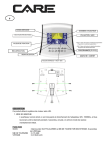
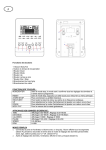
PLEASE INSERT THE COMPUTER DRAWING
Fonctions et caractéristiques :
1. Touche démarrage rapide : vous permet de démarrer l'ordinateur dans sélectionner de programme. Le
temps commence automatiquement à être compté de zéro. Utilisez les touches haut et bas pour ajuster
la résistance.
2. SCAN : Pendant l'exercice, l'ordinateur scanne automatiquement les fonctions TIME, SPEED,
DISTANCE, PULSE, CALORIES et RPM, chacune pendant 6 secondes, sauf si vous appuyez sur la
touche ENTER pour sortir de la fonction auto-scan. Quand l'ordinateur sort du scan manuel, la fenêtre de
message indique “SCAN” pendant 2 secondes puis passe à la fonction auto-scan.
3. TEMPS : Montre votre temps d'entraînement écoulé en minutes et secondes. Votre ordinateur comptera
automatiquement de 0:00 à 99:59 par intervalles d'une seconde. Vous pouvez également programmer
votre ordinateur pour décompter à partir d'une valeur réglée en utilisant les touches UP et DOWN. Si
vous continuez l’exercice une fois que le temps a atteint 0:00, l'ordinateur commencera à biper et se
remettra au temps réglé, vous faisant savoir que votre séance d'entraînement est terminée.
4. DISTANCE : Montre la distance cumulée pendant chaque séance d'entraînement jusqu’au maximum de
99.9KM.
5. RPM : Votre cadence de pédalage.
6. VITESSE : Montre votre vitesse d'entraînement en KM par heure.
7. CALORIES : Votre ordinateur estimera les calories cumulatives brûlées à un moment donné pendant
votre séance d'entraînement.
8. POULS : Votre ordinateur indique votre pouls en battements par minute pendant votre séance
d'entraînement.
9. RETOUR AU CALME : Pendant l'étape START, laissez les mains sur les poignées ou l'émetteur de
poitrine attaché et puis appuyez sur la touche “PULSE RECOVERY”, tous les affichages de fonction
s'arrêteront excepté le TEMPS. Le temps est compté de 00:60 - 00:59 - - à 00:00. Dès que 00:00 est
atteint, l'ordinateur indique votre statut de retour au calme de la fréquence cardiaque avec une note de
F1.0 à F6.0.
1.0 veut dire PARFAIT
1.0 F 2.0 veut dire EXCELLENT
2.0 F 2.9 veut dire BON
3.0 F 3.9 veut dire MOYEN
4.0 F 5.9 veut dire EN DESSOUS DE LA MOYENNE
6.0 veut dire FAIBLE
Note : Si aucun signal de pouls n’est capté, alors l'ordinateur indiquera “P” sur la fenêtre POULS. Si
l'ordinateur indique “ERR” sur la fenêtre de l’écran, veuillez pressez à nouveau sur la touche PULSE
RECOVERY et assurez-vous que vos mains restent bien sur les poignées ou que l'émetteur de poitrine est
bien attaché.
10. TEMPERATURE : Indique la température ambiante.
Fonctions des touches :
Il y a 6 touches et la description des fonctions est la suivante :
1.
Touche START/STOP :
a.
Fonction démarrage rapide : Vous permet de mettre en marche l'ordinateur sans choisir de
programme. Entraînement manuel seulement. Le temps commence automatiquement à compter à partir de
zéro.
b.
Pendant le mode d'exercice, appuyez sur cette touche pour ARRÊTER l'exercice.
c. Pendant le mode d'arrêt, appuyez sur cette touche pour COMMENCER l'exercice
2.
Touche UP :
a.
Faites tourner la molette pour augmenter la résistance pendant le mode d'exercice.
b.
Pendant le mode réglage, faites tourner la molette pour augmenter les valeurs de temps, distance,
calories, âge et pour choisir le sexe et le programme.
3.
Touche DOWN :
a.
Appuyez sur cette touche pour diminuer la résistance pendant le mode d'exercice.
b.
Pendant le mode réglage, appuyez sur cette touche pour diminuer les valeurs de temps, distance,
calories, âge et pour choisir le sexe et le programme.
4.
Touche ENTER :
a.
Pendant le mode réglage, appuyez sur cette touche pour confirmer la saisie des données.
b.
Au mode arrêt, en tenant cette touche pendant plus de deux secondes, l'utilisateur peut remettre
toutes les valeurs à zéro ou à la valeur par défaut.
c.
Pendant le réglage de l'horloge, appuyez sur cette touche pour accepter le réglage de l'heure et la
minute.
5.
Touche PULSE RECOVERY : Appuyez sur cette touche pour activer la fonction de retour au calme de
la fréquence cardiaque.
6. Touche PROGRAMME : Appuyez sur cette touche pour activer le programme
Introduction & mode d’emploie des programmes :
Programme manuel : Manuel
P1 est un programme manuel. L'utilisateur peut commencer l'exercice en appuyant sur la touche
START/STOP. Le niveau de résistance par défaut est 5. Les utilisateurs peuvent s'exercer à tout niveau
de résistance désiré (en ajustant par les touches UP et DOWN pendant la séance d'entraînement) avec
un certain temps ou un certain nombre de calories ou une certaine distance.
Mode d’emploi :
1.
Employez les touches UP et DOWN pour choisir le programme MANUEL (P1).
2.
Appuyez sur la touche ENTER pour entrer dans le programme MANUEL.
3.
Le TEMPS clignotera et vous pouvez appuyer sur les touches UP et DOWN pour régler votre
TEMPS d'exercice. Appuyez sur la touche ENTER pour confirmer votre TEMPS désiré.
4.
La DISTANCE clignotera et vous pouvez appuyer sur les touches UP et DOWN pour régler votre
DISTANCE ciblée. Appuyez sur la touche ENTER pour confirmer votre DISTANCE désirée.
5.
Les CALORIES clignoteront et vous pouvez appuyer sur les touches UP et DOWN pour régler vos
CALORIES ciblées. Appuyez sur la touche ENTER pour confirmer les CALORIES désirées.
6.
Appuyez sur la touche START/STOP pour commencer l'exercice.
Programme préréglé : roulement, vallée, rampe, montagne,
Les PROGRAMMES 2 à 6 sont des programmes préréglés. Les utilisateurs peuvent s'entraîner avec
différents niveaux dans différents intervalles comme les profils l’indiquent. Les utilisateurs peuvent
s'entraîner au niveau de résistance désiré (en ajustant avec les touches UP et DOWN pendant la
séance d'entraînement) avec une certaine période ou un nombre de calories ou une distance.
Mode d’emploi :
1.
Employez les touches UP et DOWN pour choisir les programmes de P2 à P6.
2.
Appuyez sur la touche ENTER pour entrer dans le programme.
3.
Le TEMPS clignotera et vous pouvez appuyer sur les touches UP et DOWN pour régler votre
TEMPS d'exercice. Appuyez sur la touche ENTER pour confirmer votre TEMPS désiré.
4.
La DISTANCE clignotera et vous pouvez appuyer sur les touches UP et DOWN pour régler votre
DISTANCE ciblée. Appuyez sur la touche ENTER pour confirmer votre DISTANCE désirée.
5.
Les CALORIES clignoteront et vous pouvez appuyer sur les touches UP et DOWN pour régler vos
CALORIES ciblées. Appuyez sur la touche ENTER pour confirmer les CALORIES désirées.
6.
Appuyez sur la touche START/STOP pour commencer l'exercice.
Instructions d'utilisation :
1.
Branchez l'alimentation.
Branchez l'adaptateur à l'équipement ou placez les piles, l'ordinateur émet un bip puis s'allume dans le mode
Manuel.
3. Sélection du Programme et réglage de valeurs
A. Utilisez la touche PROGRAM pour sélectionner le mode programme puis appuyez sur ENTER pour
confirmer le mode d'exercice.
B. Dans le mode Manuel, l'ordinateur utilise les touches UP ou DOWN pour régler les valeurs TIME,
DISTANCE et CALORIES. Appuyez sur les touches UP + DOWN pour remettre les valeurs à zéro.
C. Appuyez sur la touche START/STOP pour démarrer l'exercice.
D. Quand vous atteignez la cible, l'ordinateur émet des bips puis s'arrête.
E. Si vous réglez plus d'une cible et que vous voulez atteindre la prochaine cible, appuyez sur la touche
START/STOP pour continuer l'exercice.
L'ordinateur entre dans le mode réglage de l'horloge à l'allumage. Vous pouvez régler les heures et minutes
à l'aide des touches HAUT et BAS.
Mode Horloge :
a. L'ordinateur entre dans le mode horloge quand il n'y a aucun signal ou qu'aucune touche n'est pressée
pendant 4 minutes. Vous pouvez appuyer sur la touche ENTER pour passer de l'horloge à la température
dans le mode horloge ou appuyer sur d'autres touches sauf la touche ENTER pour quitter le mode horloge.
b. Vous pouvez régler l'horloge en appuyant sur la touche ENTER pendant plus de deux secondes puis
ajuster avec les touches HAUT et BAS..
c. Si vous tenez les touches ENTER et UP (haut) ensemble pendant plus de deux secondes, vous pouvez
vérifier l'heure dans le mode “NO SPEED”.
Pendant la séance d'entraînement, quand le moniteur n'a pas obtenu de signal de compte du moteur depuis
plus de 4 secondes et après les contrôles 3 fois de suite, l’écran indique E1.
Le moteur retourne à zéro automatiquement, quand le signal du moteur ne peut pas être détecté pendant
plus de 4 secondes alors le conducteur du moteur sera coupé immédiatement et l’écran indiquera E1. Tous
les autres nombres et fonctions sont blancs, et les signaux sortants sont également coupés.
Quand le moniteur a lu les données de mémoire, si le code d'identification n'est pas correct ou que la
mémoire IC est endommagée le moniteur indique E2 immédiatement au démarrage.
Après 4 secondes en mode démarrage, l'ordinateur détecte si le moteur défectueux n'a pas laissé un zéro,
puis les barres d'affichage indiquent « E3 ».
Données techniques de l'adaptateur courant
1. Disponible pour l'entrée : 230V/50Hz ou 60Hz Rendement : 6V AC/0.5A
2. Disponible pour l'entrée : 110V/50Hz ou 60Hz Rendement : 6V AC/0.5A
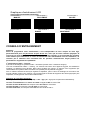
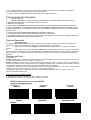
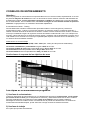
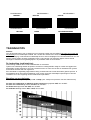
Graphiques d’entraînement LCD
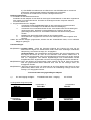
PROFILS DE PROGRAMME PREREGLES :
PROGRAMME 1
PROGRAMME 2
PROGRAMME 3
MANUEL
ROULEMENT
VALLEE
PROGRAMME 4
PROGRAMME 5
RAMPE
PROGRAMME 6
MONTAGNE
CONSEILS D’ENTRAINEMENT
Attention :
Avant de programmer votre entraînement, il est indispensable de tenir compte de votre âge,
particulièrement pour les personnes de plus de 35 ans, ainsi que de votre condition physique. Si
vous avez un mode de vie sédentaire sans activité physique régulière, il est primordial de consulter
votre médecin pour déterminer le niveau d’intensité de votre entraînement. Une fois déterminé, ne
chercher pas à atteindre votre maximum dès les premiers entraînements. Soyez patient vos
performances augmenteront rapidement.
L’entraînement Cardio – Training :
Il permet de développé le système cardio – vasculaire (tonicité cœur / vaisseaux sanguin).
Lors d'un entraînement Cardio – Training , les muscles ont besoin d'un apport d'oxygène, de substances
nutritives, et d'éliminer leurs déchets. Notre cœur accélère son rythme, et véhicule vers l'organisme par
l'intermédiaire du système cardio-vasculaire une quantité plus importante d'oxygène.
Plus on effectue d'exercices de façon régulière et répétitive, plus le cœur se développe à la manière d'un
muscle ordinaire. Dans la vie courante, ceci se traduit par la faculté de supporter des efforts physiques plus
importants, et d'augmenter ses facultés intellectuelles.
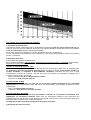
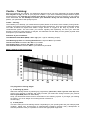
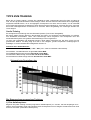
Définition de votre Zone de travail :
La fréquence cardiaque maximale (FCM) = 220 – âge (180 – âge pour les personnes sédentaires).
La Zone d’échauffement et de retour au calme est égale à 55% de votre FCM.
La Zone de Perte de Graisse est comprise entre 55 / 65% de votre FCM.
La Zone Aérobie est comprise entre 65 / 85% de votre FCM.
La Zone Anaérobie, est comprise entre 85% de votre FCM et celle ci.
Les étapes d’un entraînement progressif :
1) Une phase d'échauffement :
Commencez chaque entraînement par un échauffement progressif (10-20 mn, plus au-delà de 50 ans) qui
mettra en éveil vos muscles et élèvera doucement votre rythme cardiaque. Elevez doucement vos pulsations
à 55% de votre FCM (Fréquence Cardiaque Maximale).
Tenez votre Fréquence Cardiaque à ce niveau pendant la durée de l’échauffement.
Si vous commencez trop rapidement votre entraînement, vous risquez d’augmenter les risques de blessures
tendino - musculaire.
2) Une phase de travail :
C’est la partie principale de l’entraînement.
Selon vos buts spécifiques, perte de poids, amélioration de la résistance cardio – vasculaire (travail aérobie),
développement de la résistance (travail anaérobie) il est possible de choisir la zone cible adéquate.
-
La Zone de Perte de Graisse, 55 - 65%
La fréquence cardiaque doit être basse et la durée d'exercice assez longue. Cette zone est conseillée pour
les personnes reprenant une activité physique depuis longtemps oubliée, recherchant à éliminer un
surcroît pondérale, ou exposées à des problèmes cardiaques. N’oubliez pas que pour ce type
d’entraînement la durée de l’exercice doit être d’au moins 30 minutes et la Fréquence Cardiaque (FC)
comprise entre 55 et 65% de la FCM .
Elevez graduellement de 30 à 60 minutes par séance.
Exercez vous 3 ou 4 fois par semaine.
-
La Zone Aérobie, 65-85%
Cette zone est recommandée pour ceux qui ont une bonne condition physique et qui s’entraînent
régulièrement. En vous entraînant dans cette zone, vous augmenterez votre condition physique en évitant
le surmenage.
Durée : 20 à 30 minutes par séance
Fréquence : Au moins 3 ou 4 fois par semaine.
La Zone Anaérobie, 85%-FCM
Cette zone est seulement prévue pour des athlètes confirmés et n’est jamais recommandé sans
approbation ou surveillance médicale. Cette zone est uniquement destinée à des personnes très
entraînées. Elle est utilisée pour un entraînement en intervalle (ou pour des courtes courses de sprint) pour
aider à améliorer ou mesurer les niveaux d'endurance.
Le temps passé dans cette zone doit être bref sous peine d’accident.
3) Une phase de retour au calme :
Il s’agit de la réduction de l'effort (10 à 20 mn). Cela permet un retour au calme du système cardiovasculaire (55% de la FCM) et d’éviter ou de diminuer les douleurs musculaires tel que les crampes et les
courbatures.
Les étirements doivent suivre la séance d'étirements pendant que les articulations sont encore chaudes.
Cela détend les muscles et aide à éviter les courbatures.
Etirez-vous lentement et doucement , il ne faut jamais vous étirer jusqu'à un point de douleur. Tenez chaque
étirement pendant 30 à 60 secondes en expirant.
Contrôlez votre progrès
En s’améliorant votre système cardio-vasculaire aura au repos une FC (fréquence cardiaque) qui se
réduira. Vous mettrez plus longtemps pour atteindre votre zone cible et il sera plus facile pour vous de
vous y maintenir. Les séances vous paraîtront de plus en plus facile et vous serez plus résistant au
quotidien .
Si au contraire votre FC au repos est plus haute qu’à l’habitude, il vous faudra vous reposer ou
diminuer l’intensité de l’entraînement.
Fréquence d’entraînement :
Ne vous laissez pas décourager par les premières séances, motivez vous en planifiant des plages
d’entraînement fixes. Bon courage !
Entraînement quotidien = environ 10 minutes par séance.
2 à 3 séances par semaine = environ 30 minutes par séance.
1 à 2 séances par semaine = environ 50 minutes par séance.
* Il s’agit de la phase de travail. Les durées indiquées ne tiennent pas compte des phases d’échauffement et
de retour au calme.
POUR COMMANDER DES PIECES DETACHEES
Dans un soucis d’efficacité munissez-vous des éléments suivants avant de contacter notre Service
Après Vente :
Le nom ou la référence du produit.
Le numéro de fabrication indiqué sur le châssis principal et sur le carton d’emballage.
Contacter du lundi au vendredi de 9H00 à 12H00 et de 13H00 à 17H00 (sauf jour fériés).
STRIALE Service Après Vente
18 / 22 rue Bernard – Z.I. les Vignes
93012 BOBIGNY Cedex
Tél. : 0820 821 167 - Fax : 00 33 1 48 43 51 03
E mail : [email protected]
.
GB
PLEASE INSERT THE COMPUTER DRAWING
The things you should know before exercising
Functions and Features:
1.Quick Start: Allows you to start the computer just press the START key without selecting a program. TIME
automatically begins to count up from zero. Use the UP and DOWN keys to adjust the resistance.
2.
SCAN: During the exercise stage, the computer will automatically scan the function of TIME, SPEED,
DISTANCE, PUSLE, CALORIES and RPM per each for 6 seconds unless press the ENTER key to exit the
auto-scan function. When the computer exits the manual-scan then the message window will show “SCAN”
for 2 seconds then switch to auto-scan function.
3.
2.TIME: Shows your elapsed workout time in minutes and seconds. Your computer will automatically
count up from 0:00 to 99:59 in one second intervals. You can also program your computer to count down
from a set value by using the UP and DOWN keys. If you continue exercising once the time has reached
0:00, the computer will begin beeping, and reset itself to the original time set, letting you know your workout
is done.
4.
3.DISTANCE: Displays the accumulative distance traveled during each workout up to a maximum of
99.9KM/MILE.
5.
4.RPM: Your pedal cadence.
6.
5.SPEED: Displays your workout speed value in KM/MILE per hour.
7.
6.CALORIES: Your computer will estimate the cumulative calories burned at any given time during
your workout.
8.
7.PULSE: Your computer displays your pulse rate in beats per minute during your workout.
9.
8.PULSE RECOVERY: During the START stage, leave the hands holding on grips or leave the chest
transmitter attached and then press “PULSE RECOVERY” key, all function displays will stop except “TIME”.
Time starts counting from 00:60 - 00:59 - - to 00:00. As soon as 00:00 is reached, the computer will show
your heart rate recovery status with the grade F1.0 to F6.0.
1.0 means OUTSTANDING
1.0 F 2.0 means EXCELLENT
2.0 F 2.9 means GOOD
3.0 F 3.9 means FAIR
4.0 F 5.9 means BELOW AVERAGE
6.0 means POOR
Note: If no pulse signal input then the computer will show “P” on the PULSE window. If the computer
shows “ERR” on the message window, please re-press the PULSE RECOVERY key and please make sure
your hands are keeping well on the grips or the chest transmitter is attached well.
10. TEMPERATURE: Display the current temperature.
Key function:
There are 6 button keys and the function description as follows:
1.
START/STOP key:
a.
Quick Start function: Allows you to start the computer without selecting a program. Manual .workout
only. Time automatically begins to count up from zero
b.
During the exercise mode, press the key to STOP exercise.
c. During the stop mode, press the key to START exercise.
2.
UP key:
a.
Turn the toggle wheel to increase the resistance during exercise mode.
b.
During the setting mode, turn the toggle wheel to increase the value of Time, Distance, Calories, Age
and select Gender and Program.
3.
DOWN key:
a.
Press the key to decrease the resistance during exercise mode.
b.
During the setting mode, press the key to decrease the value of Time, Distance, Calories, Age and
select Gender and Program.
4.
ENTER key:
a.
During the setting mode, press the key to accept the current data entry.
b.
At the stop mode, by holding this key for over two seconds the user can reset all values to zero or
default value.
c.
During setting the Clock, press this key can accept the setting hour and setting minute.
5.
PULSE RECOVERY key: Press the key to activate heart rate recovery function.
6.
PROGRAM key: Press the key to select the program from P1 to P6.
Program Introduction & Operation:
Manual Program: Manual
P1 is a manual program. User can start exercise by pressing START/STOP key. The default resistance level
is 5. Users may exercise in any desirous of resistance level (Adjusting by UP/DOWN keys during the
workout) with a period of time or a number of calories or a certain distance.
Operations:
1.
Use UP/DOWN keys to select the MANUAL (P1) program.
2.
Press the ENTER key to enter MANUAL program.
3.
The TIME will flash and you can press UP or DOWN keys to set your exercise TIME. Press ENTER
key to confirm your desired TIME.
4.
The DISTANCE will flash and you can press UP or DOWN keys to set your target DISTANCE. Press
ENTER key to confirm your desired DISTANCE.
5.
The CALORIES will flash and you can press UP or DOWN keys to set your exercise CALORIES.
Press ENTER key to confirm your desired CALORIES.
6.
Press the START/STOP key to begin exercise.
Preset Program:
Rolling, Valley, Fat Burn, Ramp, Mountain, Program
PROGRAM 2 to PROGRAM 6 is the preset programs. Users can exercise with different level of loading in
different intervals as the profiles show. Users may exercise in any desirous of resistance level (Adjusting by
UP/DOWN keys during the workout) with a period of time or a number of calories or a certain distance.
Operations:
1.
Use UP/DOWN keys to select one of the above programs from P2 to P6.
2.
Press the ENTER key to enter your workout program.
3.
The TIME will flash and you can press UP or DOWN keys to setting your exercise TIME. Press
ENTER key to confirm your desired TIME.
4.
The DISTANCE will flash and you can press UP or DOWN keys to setting your target DISTANCE.
Press ENTER key to confirm your desired DISTANCE.
5.
The CALORIES will flash and you can press UP or DOWN keys to setting your exercise CALORIES.
Press ENTER key to confirm your desired CALORIES.
6.
Press the START/STOP key to begin exercise.
Operation Instruction:
1.Plug in the power
Plug in the adaptor to the equipment or input the batteries in the back of bottom case then the computer will
produce a beep sound and then turn on the computer at the Manual mode.
3. Program select and setting value
. Use the PROGRAM key to select program mode and then press ENTER to confirm your exercise mode.
. At the Manual mode, the computer will use the UP or DOWN key to set up your workout TIME,
DISTANCE and CALORIES. Press UP + DOWN keys can clear out the setting value to zero.
C. Press the START/STOP key to begin exercise.
D. When you reach the target, the computer will produce beep sounds and then stop.
E. If you set up more than one target and you would like to reach next target, press START/STOP key to
keep on exercise.
Operation guide:
The computer will enter CLOCK setting mode when power on it. You should set up the current time by the
UP or DOWN keys to adjust the Hours and minutes.
Clock Mode:
a. The computer will enter the clock mode when there is no signal input or no keys be pressed after 4
minutes. You can press ENTER key to switch the clock and temperature at the clock mode or press other
keys to quit the clock mode.
b. You can set up the CLOCK by holding ENTER key for over 2 seconds then adjust by UP or DOWN keys.
c. By holding the ENTER and UP keys together for over two seconds, you can check the current clock at
“NO SPEED” mode.
Error Message:
E1 (ERROR 1):
Normal state:During workout, when the monitor did not get the count signal from the gear motor more than
4 seconds and check under successive 3 times then the LCD will show E1.
Power on state:
The gear motor will return to zero automatically, when the signal of motor cannot be
detected for more than 4 seconds then the gear motor’s driver will be cut off immediately and show the E1 on
the LCD display. All the other digital and function mark are blank, and the output signals are cut off also.
E2 (ERROR 2):
When the monitor read the memory data, if the I.D. code is not correct or the
memory IC damages then the monitor will show E2 immediately at power on.
E3 (ERROR 3):
After 4 seconds by start mode, the computer detects the faulty motor did not leave
the zero point then the LCD bar displays “E3”.
Technical data of the current adapter
1. Available for Input: 230V/50Hz or 60Hz Output: 6V AC/0.5A
2. Available for Input: 110V/50Hz or 60Hz Output: 6V AC/0.5A
LCD Workout Graphics
PRESET PROGRAM PROFILES:
PROGRAM 1
MANUAL
PROGRAM 4
FAT BURN
PROGRAM 2
ROLLING
PROGRAM 5
RAMP
PROGRAM 3
VALLEY
PROGRAM 6
MOUNTAIN
Cardio – Training:
Before programming your training, it is essential to take account of your age, particularly for people of more
than 35 years of age, as well as your physical condition. If you have a sedentary lifestyle without regular
physical activity, it is vital that you consult your doctor to determine the level of intensity of your training.
Once determined, do not attempt to achieve your maximum during the first training sessions. Be
patient; your performance will quickly improve.
Cardio – Training:
This enables you to develop your cardiovascular system (fitness of the heart / blood vessels). During CardioTraining, the muscles need a supply of oxygen and nutritive substances. They also need to eliminate waste.
Our heart increases its rhythm and sends a larger amount of oxygen to the body by means of the
cardiovascular system. The more often you exercise regularly and repetitively, the more your heart will
develop, just like any other muscle. In daily life, this translates into the ability to bear greater physical effort
and improve your intellectual faculties.
Definition of your work Zone:
The Maximum Heart Rate (MHR) = 220 - age (180 – age for sedentary people).
The Warming Up Zone and Cooling Down Zone are equal to 55% of your MHR.
The Fat Loss Zone is between 55 / 65% of your MHR.
The Aerobic Zone is between 65 / 85% of your MHR.
The Anaerobic Zone is between 85% of your MHR and your MHR.
Make a diagram of the target zones
The progressive training stages:
1) A warming up phase:
Start each training session by warming up progressively (10-20 min, more if you are over 50) which
will put your muscles on standby and gently increase your heart rate. Gently increase your pulse to
55% of your MHR (Maximum Heart Rate).
Keep your Heart Rate at this level for the duration of the warming up time. If you begin your training
too quickly, you are in danger of increasing the risk of tendon or
muscle injury.
2) A work phase:
This is the main part of the training session. Depending on your specific goals and your initial physical
condition, weight loss, improvement of cardiovascular resistance (aerobic work), development of
stamina (anaerobic work), it is possible to choose the appropriate target zone.
The Fat Loss Zone, 55 – 65%
The heart rate must be low and the duration of the exercise quite long. This zone is advised for people
resuming physical activity after a long period of idleness, who are trying to eliminate excess
weight or are susceptible to cardiac problems. Do not forget that for this type of training the
duration of the exercise must be at least 30 minutes and the Heart Rate (HR) between 55 and 65% of
the MHR.
- Gradually increase from 30 to 60 minutes per session.
- Exercise 3 or 4 times a week.
The Aerobic Zone, 65-85%
This zone is recommended for those who are in good physical condition who train regularly. By
training in this zone, you will improve your physical condition but avoid overworking.
- Duration: 20 to 30 minutes per session.
- Frequency: At least 3 or 4 times a week.
The Anaerobic Zone, 85% - MHR
This zone is exclusively for experienced athletes and is never recommended without medical
approval and supervision. This zone is designed only for very fit people. It is used for interval
training (or for short sprints) to help you to improve or measure your level of stamina. The time spent
in this zone must be brief to avoid the risk of accident.
3) A cooling down phase:
This entails a reduction of exertion (10 to 20 min). It enables you to return your cardiovascular system
to normal (55% of your MHR) and prevent or reduce muscular pain such as cramp and stiffness. You
must follow the training with a session of stretching exercises while your joints are still warm. This
relaxes the muscles and helps to prevent stiffness. Stretch slowly and gently. You must never stretch
until you reach the pain threshold. Hold each stretch for 30 to 60 seconds while breathing out.
Check your progress
As it improves, your cardiovascular system will have an HR which will be lower when at rest. You will
take longer to reach your target zone and it will be easier for you to maintain it. Sessions will seem
easier and easier and you will have more stamina in your daily life.
If, on the other hand, your HR is higher than usual when at rest, you will have to rest or reduce the
intensity of your training.
Do not be discouraged by the initial sessions. Motivate yourself by scheduling specific training times.
Work hard!
To order spare parts
To guarantee an efficient service, make sure you have the following items before you contact our
After Sales Service:
The name or reference of the product.
The manufacturing number shown on the main chassis and on the packing box.
The number of the missing or faulty part shown on the exploded view of the product described in
this manual.
Contact us from Monday to Friday between 9h00 and 12h00 and 13h00 and 17h00 (except for public
holidays).
C.A.R.E.
After Sales Service
18 / 22 rue Bernard – Z.I. les Vignes
93012 BOBIGNY Cedex
Tel.: 0820 821 167
Fax: 00 33 1 48 43 51 03
Email: [email protected]
D
Funktionen und Features
1
TIME: Zeigt die Trainingsdauer in Minuten und Sekunden an. Ihr Computer wird automatisch von 0:00
bis zu 99:59 in Intervallen zu jeweils einer Sekunde aufzählen. Sie können Ihren Computer auch so
einstellen, dass er von einem vorgegeben Wert herab zählt. Nutzen Sie hierzu die Auf (UP) und Ab
(DOWN) Tasten. Sollten Sie nach Erreichen der 0:00 Marke das Training fortsetzen, wird der Computer
einen Ton abgeben um das Ende Ihres Trainings zu signalisieren und die ursprüngliche Zeiteinstellung
wiederherstellen.
2
SCAN: Während des Trainingsprogrammes überprüft der Boardcomputer automatisch die
Funktionen ZEIT, GESCHWINDIGKEIT, DISTANZ, PULS, KALORIEN und UMDREHUNGEN
während je 6 Sekunden, es sei denn, Sie betätigen die ENTER-Taste um die automatische
Scanfunktion zu deaktivieren. Wenn der Computer den manuellen Prüfmodus beendet, so
zeigt das Anzeigefenster 2 Sekunden lang „SCAN“ an, und wechselt dann zum automatischen
Prüfmodus.
3
DISTANCE: Zeigt die, über sämtliche Trainingseinheiten aufsummierte, zurückgelegte Trainingsdistanz
bis zu einem Höchstwert von 99.9 KM/MILE an.
RPM: Ihre Pedal Umdrehungen pro Minute.
SPEED: Zeigt Ihre Geschwindigkeit in KM/MILE pro Stunde an.
CALORIES: Der Computer wird zu jeder beliebigen Trainingszeit einen aktuellen Schätzwert über die
verbrauchten Kalorien anzeigen.
PULSE: Der Computer gibt den Pulsschlag pro Minute während des Trainings an.
TARGET HEART RATE (TARGET PULSE): Der Pulsschlag, den Sie während des Trainings
beibehalten sollten, wird als Ihr angestrebter Zielpulsschlag bezeichnet.
PULSE RECOVERY: Drücken Sie während der START Phase “PULSE RECOVERY” und halten beide
Hände an den Sensoren der Haltegriffe oder belassen den Brustgurt mit integriertem Pulssensor
umgeschnallt. Bis auf TIME werden alle angezeigten Funktionen ausgeblendet. Im Fenster TIME wird
von 60 Sekunden herab gezählt und anschließend wird der Computer Ihre ganz persönliche
Pulsschlagerholungsnote (im Bereich von F1.0 bis F6.0) anzeigen.
1.0
bedeutet außergewöhnlich
1.1 - 1.9 bedeutet ausgezeichnet
2.0 - 2.9 bedeutet gut
3.0 - 3.9 bedeutet in Ordnung
4.0 - 5.9 bedeutet unterdurchschnittlich
6.0
bedeutet ärmlich
Beachte: Wenn kein Pulseingangssignal vorhanden ist, wird im „PULSE“-Fenster ein „P“
aufleuchten. Wenn der Computer „ERR“ im Nachrichten-Fenster ausgibt, betätigen Sie bitte
erneut die „PULSE RECOVERY“ Taste und vergewissern sich, dass Sie mit beiden Händen
die Haltegriffe umfassen oder der Brustgurt ordentlich befestigt ist.
4
5
6
7
8
9
10 TEMPERATURE: Zeigt die gegenwärtige Temperatur an.
Funktionstasten
Es existieren 6 Tasten mit folgenden Funktionalitäten:
1.)
START/STOP: a) Schnellstart Funktion: Ermöglicht Ihnen den Computer auch ohne vorherige Anwahl
eines Programmes zu starten. Nur manueller Modus möglich. Die Zeit wird automatisch von Null
hochgezählt.
b) Betätigen Sie diese Taste während des Trainings um das Workout anzuhalten.
c) Betätigen Sie diese Taste während des Stop Modus um das Workout fortzusetzen.
2.)
UP (Auf): a) Betätigen Sie diese Taste während des Trainings um den Schwierigkeitslevel zu erhöhen.
b) Betätigen Sie diese Taste während Sie die Einstellung der Trainingsparameter vornehmen um die Werte
für Zeit, Entfernung, Kalorien, Alter zu erhöhen und das Geschlecht oder das Trainingsprogramm
auszuwählen.
3.)
DOWN (Ab): a) Betätigen Sie diese Taste während des Trainings um den Schwierigkeitslevel zu
verringern.
b) Betätigen Sie diese Taste während Sie die Einstellung der Trainingsparameter vornehmen um die Werte
für Zeit, Entfernung, Kalorien, Alter zu verringern und das Geschlecht oder das Trainingsprogramm
auszuwählen.
4.)
ENTER: a) Betätigen Sie diese Taste während Sie die Einstellung der Trainingsparameter vornehmen,
um die Einstellungen zu bestätigen.
b) Während des Stop Modus können Sie durch das gedrückt Halten der Taste für mehr als zwei Sekunden
alle Werte auf null, bzw. die Standardwerte zurücksetzen.
c) Durch das Drücken dieser Taste während Sie die Uhrzeit einstellen, bestätigen Sie die eingegebenen
Werte.
6.)
PULSE RECOVERY: Drücken Sie diese Taste um die Pulsschlagerholung zu aktivieren.
Programmbeschreibung & -abläufe
Manuelles Programm: MANUAL
P1 ist ein manuelles Programm. Der Nutzer kann das Training durch Betätigen der START/STOP Taste
aufnehmen. Der voreingestellte Widerstandslevel beträgt 5. Der Nutzer kann in jedweden beliebigen
Widerstandsgrad (die Werte können Sie jederzeit während des Trainings durch UP/DOWN anpassen),
innerhalb einer gewissen Zeitperiode, bis zu einer bestimmten Kalorienanzahl oder einer bestimmten
Entfernung trainieren.
Abläufe:
1.) Benutzen Sie UP/DOWN um das MANUAL (P1) Programm auszuwählen.
3.) TIME wird aufleuchten und Sie können mit UP/DOWN die gewünschte Trainingszeit einstellen.
Bestätigen Sie mit ENTER.
4.) DISTANCE wird aufleuchten und Sie können mit UP/DOWN die gewünschte Trainingsstrecke festlegen.
Bestätigen Sie mit ENTER.
5.) CALORIES wird aufleuchten und Sie können mit UP/DOWN die zu verbrennen gewünschte
Kalorienanzahl festlegen. Bestätigen Sie mit ENTER.
7.) Drücken Sie START/STOP um das Training aufzunehmen.
Voreingestellte Programme:
(ansteigend), Programm
Rolling (rollend), Valley (Tal),Fat Burn (Fettverbrennung), Ramp
Die Programme P2 bis P6 sind vorinstallierte Programme. Der Nutzer kann in verschiedenen Levels
und Intervallen, wie es das Trainingsprofil vorgibt, zu trainieren. Der Nutzer kann in jedweden
beliebigen Widerstandsgrad (die Werte können Sie jederzeit während des Trainings durch UP/DOWN
anpassen), innerhalb einer gewissen Zeitperiode, bis zu einer bestimmten Kalorienanzahl oder einer
bestimmten Entfernung trainieren.
Abläufe:
1.) Benutzen Sie UP/DOWN um das gewünschte Programm aus den Programmen
(P2 - P6) zu wählen.
2.) Bestätigen Sie die Auswahl mit ENTER.
3.) TIME wird aufleuchten und Sie können mit UP/DOWN die gewünschte
Trainingszeit einstellen. Bestätigen Sie mit ENTER.
4.) DISTANCE wird aufleuchten und Sie können mit UP/DOWN die gewünschte
Trainingsstrecke festlegen. Bestätigen Sie mit ENTER.
5.) CALORIES wird aufleuchten und Sie können mit UP/DOWN die zu verbrennen
gewünschte Kalorienanzahl festlegen. Bestätigen Sie mit ENTER.
6.) Drücken Sie START/STOP um das Training aufzunehmen.
Bedienungsanleitung:
10. Schließen Sie den Stromanschluss an.
Schließen Sie den Adapter an das Gerät an oder legen Sie die Batterien in das dafür vorgesehene
Fach hinten am Fuß des Geräts ein. Es ertönt ein Audiosignal und der Computer startet im
manuellen Modus auf.
3. Programmauswahl und –Eingabe
i.
Verwenden Sie die PROGRAMM-Taste um den gewünschten Programmmodus
auszuwählen und betätigen sie die ENTER-Taste zur Bestätigung.
ii.
Verwenden Sie im manuellen Modus die UP- oder DOWN-Taste zur Einstellung der
gewünschten ZEIT, DISTANZ, und KALORIEN ihres Trainings. Durch das
gleichzeitige Drücken der UP- und DOWN-Taste kann der Wert auf Null gesetzt
werden.
iii.
Betätigen Sie die START/STOP-Taste für den Programmstart.
iv.
Nach Ablauf der vorgegebenen Zeit ertönt ein Audiosignal und das Programm wird
beendet.
Haben Sie mehrere Etappen programmiert, drücken Sie die START/STOP-Taste, um zur nächsten
Etappe zu gelangen.
Fehlermeldungen
E1 (ERROR 1): normaler Status - Wenn der Computer während des Trainings für mehr als vier
Sekunden kein Signal vom Antriebsmotor erhält, selbst nach dreimaliger fortlaufender
Überprüfung, wird auf der Anzeige „E1“ ausgegeben.
im Betrieb Status - Der Antriebsmotor wird automatisch auf null zurückgesetzt, wenn
das Signal des Motors für mehr als vier Sekunden nicht erkannt werden kann. In
diesem Fall wird die Welle sofort vom Antriebsmotor genommen und auf der Anzeige
wird „E1“ ausgegeben. Alle anderen Digitalanzeigen und Funktionalitäten werden
ausgeblendet, bzw. abgeschalten und auch die Ausgangssignale werden unterdrückt.
E2 (ERROR 2): Wenn der Monitor die gespeicherten Daten einliest und der ID Code nicht korrekt,
oder die gespeicherten Daten fehlerhaft sind, wird auf der Anzeige sofort „e2“
ausgegeben werden.
E3 (ERROR 3): Wenn der Computer nach vier Sekunden ab dem Start Modus kein Signal von dem
(fehlerhaften) Motor erhält, der sich nicht aus der Nullstellung bewegt, wird auf der
Anzeige „E3“ ausgegeben werden.
Technische Daten des gegenwärtigen Adapters
1.)
2.)
Für den Eingang verfügbar:
Für den Eingang verfügbar:
230V/50Hz oder 60Hz Ausgang:
110V/50Hz oder 60Hz Ausgang:
6V AC/0.5A
6V AC/0.5A
Voreingestellte Programmprofile:
PROGRAMM 1
MANUAL
PROGRAMM 4
FAT BURN
PROGRAMM 2
ROLLING
PROGRAMM 5
RAMP
PROGRAMM 3
VALLEY
PROGRAMM 6
MOUNTAIN
TIPPS ZUM TRAINING
Bevor Sie Ihr Training planen, müssen Sie unbedingt Ihr Alter, insbesondere wenn Sie über 35 Jahre alt
sind, und Ihre physische Kondition berücksichtigen. Wenn Sie eine sitzende Lebensweise ohne regelmäßige
körperliche Aktivität führen, ist es unumgänglich, Rücksprache mit Ihrem Arzt zu halten, um die Intensität
Ihres Trainingsprogramms zu bestimmen. Wenn das Programm festgelegt ist, versuchen Sie nicht, schon bei
den ersten Trainingseinheiten Ihr Maximum zu erreichen. Seien Sie geduldig, Ihre Leistungen werden sich
rasch steigern.
Cardio-Training
Es ermöglicht eine Förderung des Herz-Kreislauf-Systems (Tonus Herz / Blutgefäße).
Bei einem Cardio-Training brauchen die Muskeln die Zufuhr von Sauerstoff und Nährstoffen und müssen
ihre Abfallstoffe ausscheiden. Unser Herz beschleunigt seinen Rhythmus und transportiert über das
kardiovaskuläre System eine größere Sauerstoffmenge in den Organismus.
Je mehr man regelmäßig und wiederholt trainiert, desto stärker entwickelt sich das Herz, genau wie ein
gewöhnlicher Muskel. Im Alltag zeigt sich das in der Fähigkeit, größere körperliche Anstrengungen zu
bewältigen. Auch die intellektuellen Fähigkeiten nehmen zu.
Definition Ihres Arbeitsbereichs:
Die maximale Herzfrequenz (MHF) = 220 – Alter (180 – Alter bei sitzender Lebensweise).
Der Aufwärm- und Abkühlbereich ist gleich 55 % Ihrer MHF.
Der Fettabbaubereich liegt zwischen 55 und 65 % Ihrer MHF.
Der aerobische Bereich liegt zwischen 65 und 85 % Ihrer MHF.
Der anaerobische Bereich liegt zwischen 85 und 100 % Ihrer MHF.
Schematische Darstellung der
Die Etappen eines progressiven Trainings:
1) Eine Aufwärmphase:
Beginnen Sie jedes Training mit einer progressiven Aufwärmphase (10 – 20 Min., bei über 50-jährigen noch
länger), die Ihre Muskeln weckt und behutsam Ihren Herzrhythmus erhöht. Steigern Sie behutsam Ihren Puls
auf 55 % Ihrer MHF (maximalen Herzfrequenz).
Halten Sie während der Aufwärmphase Ihre Herzfrequenz auf dieser Höhe.
Wenn Sie zu rasch mit Ihrem Training beginnen, gehen Sie ein erhöhtes Risiko von Muskel- und
Sehnenverletzungen ein.
2) Eine Arbeitsphase:
Dies ist der Hauptteil des Trainings.
Je nach Ihrer physischen Ausgangskondition und Ihren spezifischen Zielen, Gewichtsverlust, Verbesserung
der kardiovaskulären Ausdauer (aerobische Arbeit), Entwicklung der Ausdauer (anaerobische Arbeit),
können Sie Ihren adäquaten Zielbereich wählen.
Der Fettabbaubereich, 55 – 65 %
Die Herzfrequenz muss niedrig und die Übungsdauer relativ lang sein. Dieser Bereich wird denjenigen
Personen empfohlen, die nach langer Zeit der Inaktivität wieder eine physische Aktivität aufnehmen,
Übergewicht abbauen möchten oder Herzprobleme aufweisen. Beachten Sie, dass bei dieser Trainingsform
die Übungsdauer mindestens 30 Minuten betragen muss und die Herzfrequenz (HF) zwischen 55 und 65 %
der MHF liegen muss.
- Steigern Sie allmählich von 30 auf 60 Minuten pro Trainingseinheit.
- Trainieren Sie 3 oder 4 Mal pro Woche.
Der aerobische Bereich, 65 – 85 %
Dieser Bereich wird denjenigen empfohlen, die eine gute physische Kondition haben und regelmäßig
trainieren. Wenn Sie in diesem Bereich trainieren, verbessern Sie Ihre physische Kondition und vermeiden
zugleich Überanstrengung.
Dauer: 20 bis 30 Minuten pro Sitzung
Häufigkeit: Mindestens 3 oder 4 Mal pro Woche
Der anaerobische Bereich, 85 % – MHF
Dieser Bereich ist nur für ausgewiesene Leistungssportler vorgesehen und bedarf der ärztlichen Zustimmung
und Überwachung. Dieser Bereich ist lediglich für gut durchtrainierte Personen gedacht. Er wird in einem
Intervalltraining (oder für kurze Sprintläufe) eingesetzt, um dabei zu helfen, die Ausdauer zu verbessern oder
zu messen.
Die in diesem Bereich verbrachte Zeit muss kurz sein, weil sonst Unfallgefahr besteht.
3) Eine Abwärmphase:
Es handelt sich um ein Zurückschrauben der Anstrengung (10 bis 20 Min.). Dies ermöglicht eine Beruhigung
des kardiovaskulären Systems (55 % der MHF). Zugleich werden Muskelschmerzen wie Krämpfe und
Muskelkater vermieden oder verringert.
Die Trainingseinheit muss mit Dehnungsübungen abgeschlossen werden, solange die Gelenke noch warm
sind. Das entspannt die Muskeln und trägt dazu bei, Muskelkater zu vermeiden.
Dehnen Sie sich langsam und behutsam. Dehnen Sie sich nie bis zur Schmerzgrenze. Halten Sie jede
Dehnung 30 bis 60 Sekunden lang und atmen Sie dabei aus.
Kontrollieren Sie Ihren Fortschritt
Wenn sich Ihr kardiovaskuläres System verbessert, wird Ihre HF im Ruhezustand niedriger werden. Sie
brauchen länger, um Ihren Zielbereich zu erreichen, und es fällt Ihnen leichter, ihn beizubehalten. Die
Trainingseinheiten erscheinen Ihnen immer leichter, und im Alltag haben Sie eine größere Ausdauer.
Wenn dagegen Ihre HF im Ruhezustand höher als gewöhnlich ist, müssen Sie sich ausruhen oder die
Intensität des Trainings verringern.
Lassen Sie sich nicht durch die ersten Trainingseinheiten entmutigen. Motivieren Sie sich, indem Sie feste
Trainingszeiten planen. Viel Erfolg!
Bestellung von Einzelteilen
Für eine effizientere Abwicklung stellen Sie bitte, bevor Sie unseren Kundendienst
kontaktieren, folgende Angaben zusammen:
Den Namen oder die Artikelnummer des Produkts.
Die Fabrikationsnummer, die auf dem Hauptrahmen und dem Verpackungskarton steht.
Die Nummer des fehlenden oder schadhaften Teils, wie sie aus der diesen Informationen
beigefügten Explosionszeichnung hervorgeht.
Kontaktieren Sie uns montags bis donnerstags von 9.00 Uhr bis 12.00 Uhr und von 13.00
Uhr bis 17.00 Uhr (außer an Feiertagen).
C.A.R.E
Service Après Vente (Kundendienst)
18 / 22 rue Bernard – Z.I. les Vignes
93012 BOBIGNY Cedex
Tél. : 0820 821 167
Fax : 00 33 1 48 43 51 03
E mail : [email protected]
E
Funciones
1.
TIEMPO: Muestra el tiempo de ejercicio que ha elapsado en minutos y segundos. La computadora
automáticamente contará de 0:00 á 99:59 en intervals de un Segundo. También puede programar su computadora para
que cuente regresivamente de un valor ya programado usando las teclas ARRIBA ó ABAJO (UP or DOWN). Si continua
ejercitando una vez que el tiempo haya alcanzado 0:00, la computadora seguirá sonando, y se auto-reseteará al tiempo
programado original, dejándole saber que el ejercicio ha terminado.
2.
SCANEO: Durante el estado de ejercicio; la computadora automáticamente escaneará la función de
TIEMPO, VELOCIDAD, PULSO, CALORIAS y RPM cada 6 segúndos a menos que presione el botón
ENTER para salir de la función auto-escaneadora. Cuando la computadora termine la función de escaneo
manual, la ventana de mensaje mostrará ESCANEO por 2 segúndos y luego cambiará a la función de autoescaneo.
3.
DISTANCIA: Presenta la distancia acumulada durante cada ejercicio hasta una distancia maxima de 99.9K/Milla
4.VELOCIDAD: Presenta la velocidad del ejercicio en KM/MILLAS por hora.
4.
CALORIAS: La computadora estimará la cantidad de calories quemadas durante cualquier momento mientras
ejercita.
5.
PULSO: La computadora estimará su pulso por minuto durante su ejercicio.
6.
EDAD: La computadora se puede programar con la edad de 10-99 años. Si no programa ninguna edad,la
computadora siempre va a programar el ejercicio para una persona de 35 años.
7.
LATIDOS DEL CORAZON (PULSO): Es el pulso que debe mantener por minuto mientras ejercita.
8.
RECUPERACION DE PULSO: Durante la etapa de comienzo, deje las manos sobre las manilas o colóquese el
transmisor para el pecho y luego presione la tecla de RECUPERACION DE PULSO (PULSE RECOVERY), todas las
funciones aparecerán excepto la de TIEMPO. El tiempo empezará a contra de 00:60 – 00:59 - - hasta 00:00. Una vez
que llegue a 00:00, la computadora mostrará su estado de recuperación de pulso con un grado de F1.0 á F6.0.
1.0
2.0
3.0
4.0
1.0 means DESTACADO
F 2.0 means EXCELENTE
F 2.9 means BUENO
F 3.9 means REGULAR
F 5.9 means POR DEBAJO DEL PROMEDIO
6.0 means MALO
Nota: Si no hay entrada de señal, la computadora mostrará una “P” en la pantalla de PULSO. Si la computadora
muestra “ERR” en la ventana de mensaje, vuelva a presionar la tecla de PULSE RECOVERY y asegúrese que sus
manos esten bien agarradas de las manilas ó que el transmisor de pecho este bien colocado.
10. TEMPERATURA: Muestra la temperatura actual
Función de teclas:
Hay 6 teclas y sus funciones son las siguientes:
1. COMENZAR/PARAR: (START/STOP): a. Funcion de comienzo rápido: Le permite prender la computadora sin
seleccionar un prográma. Sólo modo manual. El tiempo automáticamente empieza a contar desde cero.
b. Durante el modo de ejercicio, presione la tecla para PARAR (STOP) el ejercicio.
c. Durante el modo apagado, presione lal tecla COMENZAR (START) para ejercitar.
2. ARRIBA (UP): a. Presione la tecla para aumentar la resistencia del ejericio.
b. Durante el modo de selección, presione la tecla para aumentar el valor de Tiempo, Distancia, Calories, Edad, Género
y Prográma.
3. ABAJO (DOWN): a. Presione la tecla para disminuir la resistencia durante el ejercicio.
b. Durante el modo de selección, presione la tecla para aumentar el valor de Tiempo, Distancia, Calories, Edad, Género
y Prográma
4. ENTER : a. Durante el modo de selección, presione la tecla para aceptar la información.
b. En el modo apagado, si mantiene presionado la tecla “ENTER” mas de 2 segundos, el usuario puede resetear todos
los valores a cero o al valor original.
c. Al modificar el reloj, presione esta clave para aceptar los cambios de horas y minutos.
5. RECUPERACION DE PULSO (PULSE RECOVERY): Presione la tecla para activar la función de recuperación de
pulso.
Prográma de introducción y Operación:
Prográma Manual: Manual
P1 es un prográma manual. Usuarios pueden empezar a ejercitar presionando presionando la tecla
COMENZAR/PARAR (START/STOP). El nivel de resistencia original es 5. Usuarios pueden ejercitar bajo cualquier nivel
de resistencia deseado (usando las teclas ARRIBA/ABAJO durante el ejercicio) con un período de tiempo, una cantidad
de calories o una distancia.
Operaciones: 1. Use la tecla ARRIBA/ABAJO (UP/DOWN) para seleccionar el prográma MANUAL (P1)
2. Presione ENTER para entrar al prográma MANUAL
3. El TIEMPO va a titilar y puede presionar la tecla ARRIBA/ABAJO para seleccionar el tiempo de ejercicio. Luego
presione ENTER para confirmar el TIEMPO deseado.
4. La DISTANCIA va a titular y puede presionar la tecla ARRIBA/ABAJO para seleccionar su objetivo de DISTANCIA.
Presione ENTER para confirmar la DISTANCIA desada.
5. Las CALORIAS titilaran y puede presionar la tecla ARRIBA/ABAJO para seleccionar su ejercio de CALORIAS.
Presione ENTEr para confirmar que tantas calorías desea quemar.
6. Presione la tecla COMENZAR/PARAR (START/STOP) para empezar el ejercicio.
Programas de ejercicio: Pasos, Valle, Rampa, Montaña, , Fartlek.
PROGRAMA 2 á PROGRAMA 6 son los prográmas de ejercicio. Los usuarios pueden hacer ejercicio con diferentes
niveles y con diferentes intervals como los perfíles muestran. Usuarios pueden ejercitar bajo cualquier nivel de
resistencia (ajustando la tecla ARRIBA/ABAJO durante el ejercicio) con un período de tiempo ó un número de calorías ó
una cierta distancia.
Operaciones: 1. Use la tecla ARRIBA/ABAJO para seleccionar cualquiera de los prográmas de P2 á P6.
2. Presione ENTER para seleccionar el prográma.
3. El TIEMPO va a titilar y puede presionar la tecla ARRIBA/ABAJO para seleccionar el tiempo de ejercicio. Luego
presione ENTER para confirmar el TIEMPO deseado.
4. La DISTANCIA va a titular y puede presionar la tecla ARRIBA/ABAJO para seleccionar su objetivo de DISTANCIA.
Presione ENTER para confirmar la DISTANCIA desada.
5. Las CALORIAS titilaran y puede presionar la tecla ARRIBA/ABAJO para seleccionar su ejercio de CALORIAS.
Presione ENTEr para confirmar que tantas calorías desea quemar.
6. Presione la tecla COMENZAR/PARAR (START/STOP) para empezar el ejercicio.
Instrucciones de Operación:
1.
Conecte el swiche
2.
Conecte el adaptador al equipo ó introduzca las baterías en la parte trasera de la caja; luego la
computadora hará un ruido y se encenderá en modo manual.
3. Selección de prográma
A. Use la tecla de PROGRAMA para seleccionar el modo y presione ENTER para confirmar la selección.
B. En el modo Manual, la computadora usará las teclas ARRIBA ó ABAJO para seleccionar su ejercicio de
TIEMPO, DISTANCIA, y CALORIAS. Presione las teclas ARRIBA ó ABAJO para borrar o modificar el valor
de base a cero.
C. Presione las teclas COMENZAR/ PARAR para empezar el ejercicio.
D. Cuando alcance la meta, la computadora hará sonidos y luego parará.
E. Si ha seleccionado más de una meta y desea seguir hasta alcanzaz la próxima meta, presione las teclas
COMENZAR/ PARAR para seguir haciendo ejercicios.
Guía de Operación:
3.
Modo de Descanso:
La computadora entrará en modo de descanso cuando no haya entrada de señal y ninguna tecla se ha presionado
después de 4 minutos. Puede presionar cualquier tecla para ‘despertar’ la computadora.
4.
BMI (Indice de Masa Corporal) BMI es la medida de grasa corporal basada en el peso y estatura para
adultos.
5.
BMR (Proporción de base metabólica): BMR muestra la cantidad de calorías que su cuerpo necesita para
funcionar. Esto no está basado en ningún tipo de ejercicio, es simplemente la energía que se necesita para mantener el
pulso, respiración y una temperatura corporal normal. Mide el cuerpo cuando descansa, no durmiendo, a temperatura
ambiente.
Mensaje de Error:
E1 (ERROR 1):
Estado normal: Durante el ejercicio, cuando el monitor no reciba la señal de conteo de el motor por más de 4 segundos
y revisa sucesivamente 3 veces, la pantalla va a mostrar E1.
Energía en estado: El motor volverá a cero automáticamente, cuando la señal del motor no puede ser detectada por
más de 4 segundos entonces la velocidad del motor se apagará inmediatemente y mostrará E1 en la pantalla. Todas las
otras funciones digitales son marcadas, y las señales de salida también se apagarán.
E2 (ERROR 2): Cuando el monitor lea la data de la memoria, si el código de identificación no es correcto o si la memoria
se daña, entonces el monitor mostrará E2 una vez que se encienda la máquina.
E3 (ERROR 3): Después de 4 segundos al empezar, la computadora detecta que el motor no dejó el punto cero
entonces la pantalla mostrará “E3”
Datos técnicos del adaptor actual
1. Disponible para entrada: 230V/50Hz or 60Hz Salida: 6V AC/0.5A
2. Disponible para entrada: 110V/50Hz or 60Hz Salida: 6V AC/0.5A
Gráficos de ejercicios en la pantalla
PRESET PROGRAM PROFILES:
PROGRAM 1
MANUAL
PROGRAM 4
RAMPA
GRASA
PROGRAM 2
RODAR
PROGRAM 5
MONTANA
PROGRAM 3
VALLE
PROGRAM 6
QUEMADOR DE
CONSEJOS DE ENTRENAMIENTO
Attention :
Antes de programar su entrenamiento es imprescindible tener en cuenta su edad, especialmente en el caso
de personas mayores de 35 años, así como su forma física. Si lleva usted un modo de vida sedentario sin
actividad física regular, es muy importante consultar a su médico para determinar el nivel de intensidad
de su entrenamiento. Una vez determinado, no intente conseguir su nivel máximo durante las primeras
sesiones. Tenga paciencia, su rendimiento aumentará rápidamente.
El entrenamiento Cardio - Training
Permite desarrollar el sistema cardiovascular (tonicidad cardiaca / vasos sanguíneos). Durante un
entrenamiento Cardio - Training, los músculos requieren un aporte de oxígeno y sustancias nutritivas, y
también necesitan eliminar las sustancias de desecho. Nuestro corazón acelera el ritmo cardiaco, enviando
una mayor cantidad de oxígeno al organismo a través del sistema cardiovascular. Como con cualquier otro
músculo, cuanto más ejercicio se haga de manera regular y repetitiva, más se desarrollará el corazón. En la
vida cotidiana, esto se traduce en una mayor capacidad para soportar esfuerzos físicos considerables, y en
un aumento de las facultades mentales.
Definición de su zona de trabajo
La frecuencia cardiaca máxima (FCM) = 220 - edad (180 - edad, para las personas sedentarias).
La zona de calentamiento y enfriamiento es igual al 55% de su FCM.
La zona de pérdida de grasa está comprendida entre el 55 y el 65% de su FCM.
La zona aeróbica esta comprendida entre el 65 y el 85% de su FCM.
La zona anaeróbica está comprendida entre 85% y el 100% de su FCM.
Confeccionar el esquema de los objetivos de zona
Las etapas de un entrenamiento progresivo
1) Una fase de calentamiento
Comience cada sesión de entrenamiento con un calentamiento progresivo (10-20 minutos, o más tiempo
por encima de los 50 años) que le despertará los músculos y aumentará suavemente su ritmo cardiaco.
Aumente gradualmente sus pulsaciones hasta el 55% de su FCM (frecuencia cardiaca máxima).
Mantenga su frecuencia cardiaca a este nivel durante todo el periodo de calentamiento. Si comienza su
entrenamiento demasiado deprisa, puede aumentar el riesgo de lesiones tendinomusculares.
2) Una fase de trabajo
Es la parte principal del entrenamiento.
Dependiendo de su forma física de partida y de sus objetivos concretos, pérdida de peso, mejora de la
resistencia cardiovascular (trabajo aeróbico), desarrollo de la resistencia (trabajo anaeróbico), podrá
escoger la zona objetivo adecuada.
La zona de pérdida de grasa (55 - 65%)
La frecuencia cardiaca debe ser baja, y la duración del ejercicio bastante larga. Esta es la zona
recomendada para las personas que retoman una actividad física después de mucho tiempo, que
desean reducir el exceso de peso o que están expuestos a problemas cardiacos. No olvide que para
este tipo de entrenamiento, la duración del ejercicio debe ser de al menos 30 minutos, y la frecuencia
cardiaca (FC) debe estar comprendida entre el 55 y el 65% de la FCM.
Aumente gradualmente la sesión de 30 a 60 minutos
Ejercítese 3 ó 4 veces a la semana
La zona aeróbica (65 - 85%)
Esta zona es la recomendada para aquellos que tienen una buena forma física y que se entrenan
regularmente. Entrenándose en esta zona aumentará su forma física evitando al mismo tiempo el
cansancio excesivo.
Duración: de 20 a 30 minutos por sesión
Frecuencia: al menos 3 ó 4 veces a la semana
La Zone Anaérobie, 85%-FCM
Esta zona está prevista únicamente para atletas confirmados, y se recomienda no utilizarla nunca sin
la aprobación o supervisión de un médico. Esta zona es sólo para personas con mucho entrenamiento.
Se utiliza para un entrenamiento en intervalos (o para carreras cortas de esprint) para ayudar a mejorar o
medir el nivel de resistencia.
El tiempo de entrenamiento en esta zona debe ser breve por el elevado riesgo de accidentes.
3) Una fase de enfriamiento
Aquí se trata de reducir el esfuerzo (10 ó 20 minutos). Ello permite que el sistema cardiovascular se
recupere (55% de la FCM), y evita o disminuye dolores musculares tales como los calambres y las agujetas.
Después de la sesión es necesario hacer estiramientos mientras las articulaciones todavía están calientes.
Ello afloja los músculos y ayuda a evitar las agujetas.
Estírese lentamente y con suavidad, nunca hasta un punto tal que llegue a sentir dolor. Mantenga cada
estiramiento de 30 a 60 segundos mientras espira.
Controle su progreso
A medida que su sistema cardiovascular mejora, su frecuencia cardiaca en reposo disminuirá. Tardará
más tiempo en alcanzar su zona objetivo y le será más fácil mantenerse en ella. Las sesiones de
entrenamiento le parecerán cada vez más fáciles y tendrá más resistencia en la vida cotidiana.
Si por el contrario, su frecuencia cardiaca en reposo es más alta de lo normal, tendrá que reposar o
reducir la intensidad del entrenamiento.
No se desanime durante las primeras sesiones, motívese planificando zonas de entrenamiento fijas. ¡Ánimo!
Para solicitar piezas sueltas
En aras de la eficacia, antes de ponerse en contacto con nuestro Servicio Posventa, tenga
a mano los siguientes datos:
El nombre o la referencia del producto.
El número de fabricación indicado en el chasis principal y en la caja de embalaje.
El número de la pieza que falta o está defectuosa, indicado en la vista despiezada del
producto que encontrará en estas instrucciones.
Nuestro horario de atención al público es de lunes a viernes de 9:00 a 12:00 y de 13:00 a
17:00 horas (excepto festivos).
C.A.R.E
Servicio Posventa
18 / 22 rue Bernard – Z.I. les Vignes
93012 BOBIGNY Cedex
Tel.: 0820 821 167
Fax: 00 33 1 48 43 51 03
Correo electrónico: [email protected]
I
Funzioni e Caratteristiche:
1
TIME (tempo): Visualizza il tempo trascorso in allenamento in minuti e secondi. Il computer conta
automaticamente e progressivamente da 0:00 fino a 99:59. Si può anche programmare il computer a
contare alla rovescia, da un valore impostato, usando i tasti UP e DOWN (su e giù). Se si continua
l’allenamento, una volta raggiunto il valore 0:00, il computer emette una seria di “bip” e riazzera
automaticamente il valore tempo, segnalando che l’allenamento è stato completato.
2 Scan: Durante l’esercizio il computer fa scorrere alternativamente ogni 6 secondi le funzioni TIME,
SPEED, DISTANCE, PULSE, CALORIES e RPM (durata, velocità, distanza, polso, calorie e RPM)
automaticamente, salvo premere ENTER per escludere la funzione auto-scan. Quando il computer
esce da manual-scan, la finestra dei messaggi visualizza per 2 secondi “SCAN” e passa alla funzione
auto-scan.
3 DISTANZA: Visualizza la distanza percorsa durante ogni allenamento fino ad un massimo di 99.9
km/miglio.
4 RPM (giri al minuto): La cadenza della pedalata.
5 SPEED (velocità): Visualizza la velocità dell’allenamento in Km/h-MpH.
6 CALORIE: Il computer può fare una stima delle calorie accumulate e bruciate in ogni momento
dell’allenamento.
7 PULSE (polso): Il computer visualizza la frequenza del polso in battiti al minuto durante l’allenamento.
8 TARGET HEART RATE (TARGET PULSE) - target frequenza cardiaca/polso: La frequenza cardiaca
desiderata è chiamata Target Frequenza Cardiaca in battiti al minuto.
9 PULSE RECOVERY (ricupero polso): Nella fase di AVVIO (start), posare ambedue le mani sui sensori
del manubrio oppure indossare la fascia toracica durante l’allenamento, quindi premere il tasto “PULSE
RECOVERY”. Tutte le funzioni si fermeranno, ad eccezione di TIME (tempo). Time inizia un conteggio
progressivo da 00:60 – 00:59 - - a 00:00. Quando raggiunge il valore 00:00, il computer visualizza lo
stato di ricupero della frequenza cardiaca gradualmente da F1.0 a F6.0.
1.0
1.0
2.0
3.0
4.0
6.0
F
F
F
F
= NOTEVOLE
2.0 =ECCELLENTE
2.9 = BUONO
3.9= DISCRETO
5.9 = SOTTO LA MEDIA
= SCARSO
Nota: Se non perviene alcun segnale dal polso, il computer visualizza “P” sulla finestra PULSE. Se il
computer visualizza “ERR” sulla finestra dei messaggi, premere di nuovo il tasto PULSE RECOVERY ed
assicurarsi che ambedue le mani siano in contatto con i sensori del manubrio oppure che la cinghia pettorale
sia ben aderente al corpo.
10. TEMPERATURA: Visualizza la temperatura attuale.
FUNZIONE DEI TASTI:
Ci sono 6 tasti con le seguenti funzioni:
1. Tasto START/STOP:
a..Funzione di avviamento veloce: permette di avviare il computer senza selezionare programmi.
Solo
allenamento manuale. Time/tempo conta progressivamente da 0 in su.
b. In modalità esercizio, premere il tasto per fermare l’esercizio.
c. In modalità stop, premere il tasto per AVVIARE l’esercizio.
2. Tasto UP (su):
a. Premere il tasto per aumentare la resistenza in modalità esercizio.
b. In modalità impostazione, premere il tasto per aumentare il valore di Time, Distance, Calories,
Age (tempo,
distanza, calorie, età) e la selezione di Sesso e Programma.
3. Tasto Down (giù):
a. Premere il tasto per diminuire la resistenza in modalità esercizio.
b. In modalità impostazione, premere il tasto per diminuire il valore di Time, Distance, Calories,
Age (tempo,
distanza, calorie, età) e la selezione di Sesso e Programma.
4. Tasto ENTER (avvio):
a. In modalità impostazione, premere il tasto per confermare i dati impostati.
b. In modalità STOP, tenendo premuto il tasto per 2 secondi, si azzerano tutti i valori o il
computer imposta un valore di default.
c. Premendo il tasto si può regolare l’orologio e confermare l’impostazione delle ore e dei minuti.
6.Tasto PULSE RECOVERY (ricupero polso):
Premere il tasto per attivare la funzione del ricupero della frequenza cardiaca.
Introduzione del Programma e la sua Funzione:
Programma Manuale: Manuale
P1 è un programma manuale. L’utente può iniziare l’esercizio premendo il tasto START/STOP. Il
livello di resistenza di default è di 5. L’utente può selezionare il livello di resistenza, la durata, il
numero di calorie o la distanza azionando il tasto UP/DOWN (su/giù).
Funzioni:
1. Usare il tasto UP/DOWN per selezionare il programma MANUALE (P1)
2. Premere il tasto ENTER per avviare il programma MANUALE.
3. TIME lampeggia, quindi si può impostare la durata dell’esercizio premendo il tasto UP/DOWN.
Premere ENTER per confermare la DURATA selezionata.
4. DISTANZA lampeggia, quindi si può impostare la distanza dell’esercizio premendo il tasto
UP/DOWN. Premere il tasto ENTER per confermare la selezione della DISTANZA.
5. CALORIES lampeggia, quindi si possono impostare le calorie da bruciare durante l’esercizio.
Premere il tasto ENTER per confermare la selezione delle calorie.
6. Premere il tasto START/STOP per iniziare l’esercizio.
Programmi Preimpostati: Rotolare, Vallata, Bruciagrassi, Rampa, Montagna
I PROGRAMMI da 2 a 6 sono programmi preimpostati. L’utente può esercitarsi con diversi livelli di
carico, con intervalli differenti come mostrano i profili. L’utente può esercitarsi ad ogni livello di
resistenza desiderato, agendo sui tasti UP/DOWN durante l’esercizio, selezionare la durata, il numero
di calorie da bruciare o la distanza.
Funzioni:
1. Agire sui tasti UP/DOWN per selezionare i programmi da P2 a P6.
2. Premere il tasto ENTER per impostare il programma di allenamento.
3. TIME lampeggia, quindi si può impostare la durata dell’esercizio premendo il tasto
UP/DOWN. Premere ENTER per confermare la DURATA selezionata.
4. DISTANZA lampeggia, quindi si può impostare la distanza dell’esercizio premendo il
tasto UP/DOWN. Premere il tasto ENTER per confermare la selezione della DISTANZA.
5. CALORIES lampeggia, quindi si possono impostare i calorie da bruciare durante
l’esercizio. Premere il tasto ENTER per confermare la selezione delle calorie.
Funzionamento:
1. Inserire la spina. Inserire l’adattatore all’apparecchio oppure inserire le batterie nell’apposito
vano sul retro. Il computer emette un bip ed entra in modalità manuale.
2. Selezione del programma e impostazione dei valori:
A. Usare il tasto PROGRAM per selezionare la modalità del programma, quindi premere
ENTER per confermare la selezione.
B. In modalità Manual, usare i tasti UP e DOWN per impostare i valori desiderati di
TIME,DISTANCE e CALORIES (durata, distanza e calorie). Premere i tasti
UP+DOWN per azzerare i valori.
C. Premere il tasto START/STOP per iniziare l’esercizio.
D. Quando è stato raggiunto il target, il computer emette un “bip” e si ferma.
E. Se è stato impostato più di un target e si desidera continuare l’esercizio, premere
START/STOP per passare al target seguente.
Messaggi di Errore:
E1 (ERRORE 1):
In stato normale: Se il monitor durante l’allenamento non riceve il segnale di conteggio dal motore
per più di 4 secondi, ripetuto per 3 volte, l’LCD visualizza E1.
Sotto alimentazione: Il motore torna a zero automaticamente, quando il segnale dal motore non
perviene per più di 4 secondi. Il driver del motore sarà immediatamente staccato e sul
display si visualizza E1. Tutte le altre indicazioni di funzione e digitali restano bianche.
Saranno tagliati anche tutti gli altri segnali in uscita.
E2(ERROR 2): Quando il monitor legge i dati della memoria e il codice I.D. non è corretto, oppure se
la memoria è danneggiata, il monitor quando e sotto alimentazione visualizza
immediatamente E1.
E3(ERROR 3): In modalità start, quando il computer rileva che il motore difettoso non è partito dal
punto zero, la barra LCD visualizza “E3”.
Dati tecnici dell’ adattatore di corrente
1. Disponibile per alimentazione 230V/50Hz or 60Hz Uscita: 6V AC/0.5A
2. Disponibile per alimentazione 110V/50Hz or 60Hz Uscita: 6V AC/0.5A
LCD Grafici di Allenamento
PROFILI DI PROGRAMMI PRESELEZIONATI
PROGRAMMA 1
PROGRAMMA 2
MANUALE
ROTOLAIRE
PROGRAMMA 3
VALLATA
PROGRAMMA 4
PROGRAMMA 6
RAMPA
PROGRAMMA 5
MONTAGNA
BRUCIAGRASSI
CONSIGLI PER L’ALLENAMENTO
Prima di programmare l’allenamento, è indispensabile considerare la propria età, in particolare per le
persone oltre i 35 anni, come pure le proprie condizioni fisiche. Se si conduce una vita sedentaria
senza svolgere attività fisica regolare, è assolutamente necessario consultare il proprio medico
per stabilire l’intensità dell’allenamento. Una volta determinato, non cercare di dare il massimo sin
dai primi allenamenti. È necessario avere pazienza e le proprie prestazioni aumenteranno
rapidamente.
Allenamento Cardio – Training:
Permette di sviluppare il sistema cardio-vascolare (tonicità del cuore / vasi sanguigni).
Durante un allenamento Cardio-Training, i muscoli hanno bisogno di un apporto di ossigeno, di
sostanze nutritive e di eliminare le scorie. Il cuore accelera il proprio ritmo e per mezzo del sistema
cardio-vascolare trasporta verso l’organismo una quantità maggiore di ossigeno.
Più si fanno esercizi in maniera regolare e ripetitiva più il cuore si sviluppa come un muscolo normale.
Nella vita di tutti i giorni ciò si traduce nella facoltà di sostenere degli sforzi fisici più considerevoli e di
aumentare le proprie facoltà intellettive.
Definizione dell’area dello sforzo:
Ritmo cardiaco massimo (RCM) = 220 – età (180 – età per le persone sedentarie).
L’area di riscaldamento e di ritorno al riposo è uguale al 55% del proprio RCM.
L’area di perdita di grasso è compresa tra il 55 e il 65% del proprio RCM
L’area aerobica è compresa tra il 65 e l’85% del proprio RCM
L’area anaerobica è compresa tra l’85% del proprio RCM e l’RCM stesso.
Fare uno schema delle aree obiettivo
Fasi di un allenamento progressivo:
1) Fase di riscaldamento
Iniziare ogni allenamento con un riscaldamento progressivo (10-20 minuti, di più se si hanno più
di 50 anni) che risveglierà i muscoli e aumenterà adagio il ritmo cardiaco. Aumentare
lentamente le pulsazioni al 55% del proprio RCM (ritmo cardiaco massimo).
Mantenere il ritmo cardiaco a questo livello per tutta la durata del riscaldamento.
Se si inizia l’allenamento troppo rapidamente, si rischia di aumentare il pericolo di danneggiare tendini
e muscoli.
2) Fase di sforzo:
E’ la parte principale dell’allenamento.
Secondo i propri scopi specifici e le condizioni di partenza del proprio fisico: perdita di peso,
miglioramento della resistenza cardio-vascolare (sforzo aerobico), sviluppo della resistenza (sforzo
anaerobico); è possibile scegliere l’area obiettivo adeguata.
Area di perdita di grasso, 55 - 65%
Il ritmo cardiaco deve essere basso e la durata dell’esercizio piuttosto lunga. Quest’area è consigliata
per le persone che riprendono un’attività fisica dopo molto tempo, cercando di eliminare un
sovrappeso ponderale o che sono soggette a disturbi di tipo cardiaco. Non dimenticare che per
questo tipo di allenamento, la durata dell’esercizio deve essere almeno di 30 minuti e il Ritmo
Cardiaco (RC) compreso tra 55 e 65% dell’RCM.
- aumentare gradatamente da 30 a 60 minuti per seduta
- esercitarsi almeno 3 o 4 volte la settimana.
Area aerobica, 65 - 85%
Quest’area è consigliata per coloro che si trovano in buone condizioni fisiche e che si allenano
regolarmente. Allenandosi in quest’area, è possibile migliorare le condizioni del proprio fisico
evitando di sovraffaticarlo.
- durata: da 20 a 30 minuti per seduta
- frequenza: almeno 3 o 4 volte la settimana.
Area anaerobica: 85% - RCM
Quest’area è prevista unicamente per atleti e non può essere mai consigliata senza
approvazione o controllo medico. E’ destinata solamente a persone molto allenate ed è utilizzata
per un allenamento a intervalli (o per brevi corse di scatto) per aiutare a migliorare o misurare i livelli di
resistenza.
Il tempo trascorso in quest’area deve essere breve per evitare incidenti.
3) Fase di ritorno al riposo:
Si tratta della riduzione dello sforzo (da 10 a 20 minuti). Ciò consente un ritorno al riposo del sistema
cardio-vascolare (55% dell’RCM) e di evitare o ridurre i dolori muscolari quali crampi e indolenzimenti.
Lo stretching deve seguire la seduta di allenamento mentre le articolazioni sono ancora calde. Così
facendo si distendono i muscoli e si possono evitare gli indolenzimenti.
Tirarsi lentamente e adagio, mai fino a raggiungere un punto in cui si prova dolore. Mantenere ogni
posizione di stiramento dai 30 ai 60 secondi espirando.
Controllare i propri progressi
Migliorando, il sistema cardio-vascolare nella fase di riposo avrà un RC che si ridurrà. Si impiegherà
più tempo per raggiungere la propria area obiettivo e sarà più facile mantenerla. Le sedute
sembreranno sempre più facili e aumenterà la resistenza alle fatiche quotidiane.
Se al contrario il proprio RC a riposo è più alto del solito, è necessario riposarsi o diminuire l’intensità
dell’allenamento.
Non bisogna farsi scoraggiare dalle prime sedute ma motivarsi, pianificando delle sedute di
allenamento fisse. Coraggio!
Per ordinare pezzi di ricambio
Prima di contattare il nostro Servizio post-vendita, assicurarsi di disporre dei seguenti
elementi:
Il nome o il riferimento del prodotto.
Il numero di serie indicato sul telaio principale e sul cartone dell’imballaggio.
Il numero del pezzo mancante o difettoso indicato sull’esploso del prodotto presente
in queste istruzioni.
Contattarci dal lunedì al venerdì dalle 9.00 alle 12.00 e dalle 13.00 alle 17.00
(eccetto i giorni festivi).
C.A.R.E
Servizio post-vendita
18 / 22 rue Bernard - Z. I. les Vignes
93012 BOBIGNY Cedex
Tél. : 0820 821 167
Fax : 00 33 1 48 43 51 03
E mail : [email protected]
NL
Functies en Kenmerken
1.
TIME: Geeft de verstreken trainingstijd aan in minuten en seconden. De computer telt automatisch de
seconden op van 0:00 tot 99:59. U kunt ook de computer zo programmeren dat hij aftelt vanaf een
ingestelde waarde door de UP en DOWN toetsen te gebruiken. Als u doorgaat met trainen wanneer u bij
0:00 bent, begint de computer te piepen ten teken dat de training af is en gaat terug naar de eerder
ingestelde tijdswaarde.
2. Scan: Tijdens de oefening scant de computer automatisch afwisselend de functies TIME, SPEED,
DISTANCE, PULSE, CALORIES en RPM (tijd, snelheid, afstand, pols, calorieën en RPM) elk voor 6
seconden, tenzij de auto-scan functie wordt stopgezet door op ENTER te drukken.
Wanneer de manual-scan wordt stopgezet, geeft het berichten venster gedurende 2 seconden
2.
“SCAN” weer en gaat dan over op de auto-scan functie.
3.
DISTANCE (afstand): Geeft de afstand aan die tijdens de training is afgelegd met een maximum van
99.9 km/Mph.
4.
RPM (omwentelingen per minuut): Uw trapritme.
5.
SPEED (snelheid): Geeft de waarde van uw trainingssnelheid weer in Km/Mph.
6.
CALORIES: De computer maakt op ieder moment van de training een schatting van de hoeveelheid
door u verbrande calorieën .
7.
PULSE (pols): De computer geeft tijdens de training uw polsslag weer in hartslag per minuut.
8.
TARGET HEART RATE (doelstelling hartslag): De ten doel gestelde hartslag is de Target Heart Rate,
uitgedrukt in slagen per minuut.
9.
PULSE RECOVERY ( recuperatie pols): Tijdens de startfase moet de borstband goed bevestigd zijn of
beide handen moeten op de handvaten geplaatst zijn. Vervolgens drukt u op de toets “ PULSE
RECOVERY”, zodat alle functies stoppen behalve TIME. TIME begint af te tellen van 00:60 - 00:59—tot
00:00. Zodra 00:00 is bereikt geeft de computer uw hartslag recuperatiewaarde weer van niveau F.0 tot
niveau F6.0.
1.0
2.0
3.0
4.0
1.0
= BUITENGEWOON
F 2.0 = EXCELLENT
F 2.9 = GOED
F 3.9= REDELIJK
F 5.9= ONDER GEMIDDELD
6.0
= ZWAK
Aantekening: Als er geen hartslagsignaal doorkomt, geeft de computer “P” aan op het PULSE display. Als
de computer “ERR” weergeeft op het berichten display, druk dan opnieuw op de toets PULSE
RECOVERY. Controleer of de borstband correct is bevestigd of beide handen op de handvaten zijn
geplaatst.
10. TEMPERATURE: Geeft de huidige temperatuur weer.
Toetsenfuncties
Er zijn 6 toetsen met de volgende functies:
1.START/STOP toets:
a.
Quick Start (snelstart) functie. U kunt de computer starten zonder programmaselectie.
Alleen manual trainingsprogramma. TIME begint automatisch te tellen vanaf 0.
b.
Druk op de STOP toets in de exercise - mode om te stoppen met oefenen.
c.
Druk op de START toets in de stop-mode om de training te starten.
2.UP toets: a.Druk op deze toets om de weerstand te verhogen in de exercise-mode.
b.Druk op deze toets om de waarden van Time, Distance, Calories, Age te verhogen in de
setting-mode en selecteer Geslacht en Program.
3. DOWN toets: a. Druk op deze toets om de weerstand te verlagen in de exercise-mode.
b.Druk op deze toets om de waarden van Time, Distance, Calories, Age te verhogen in de
setting-mode en selecteer Geslacht en Program.
4. ENTER toets: a. Druk op deze toets om de ingestelde data gegevens te bevestigen in de setting-mode.
b. Door deze toets twee seconden ingedrukt te houden in de stop – mode, worden alle
waarden teruggebracht tot nul of tot de default waarde.
c. Door op deze toets te drukken bij het instellen van de klok bevestigt u de ingestelde uren
en minuten.
6. PULSE RECOVERY ( recuperatie pols): Druk op deze toets om de hartslag recuperatie functie te
activeren.
Programma Inleiding en Functies:
Manual Programma: Handmatig
P1 is een handmatig programma. De gebruiker kan de training starten door op de START/STOP toets te
drukken. Het default weerstandsniveau is 5. De gebruiker kan op elk gewenst weerstandsniveau, voor elke
tijdsduur of met elke gewenste hoeveelheid te verbranden calorieën trainen door de UP/DOWN toetsen te
gebruiken.
Functies:
1.
Gebruik de UP/DOWN toetsen voor het selecteren van het programma manual (P1).
2.
Druk op de ENTER toets om het handmatige (manual) programma in te stellen.
3.
Als Time flikkert kunt u de gewenste tijdsduur van de training instellen door de UP/DOWN toetsen te
gebruiken. Druk op de ENTER toets om uw keuze te bevestigen.
4.
Als Distance flikkert kunt u de gewenste afstand van de training instellen door de UP/DOWN toetsen
te gebruiken. Druk op de ENTER toets om uw keuze te bevestigen.
5.
Als Calories flikkert kunt u de gewenste hoeveelheid te verbranden calorieën tijdens de training
instellen door de UP/DOWN toetsen te gebruiken. Druk op de ENTER toets om uw keuze te bevestigen.
6.
Als Pulse flikkert kunt u het gewenste hartritme tijdens de training instellen door de UP/DOWN
toetsen te gebruiken. Druk op de ENTER toets om uw keuze te bevestigen.
7.
Druk op de START/STOP toets om uw training te starten.
Vooraf Ingestelde programma’s: , Stappen, Vallei, Vetverbranding, Helling ? Programma
De Programma’s 2 tot 6 zijn vooraf ingestelde programma’s. De gebruiker kan op verschillende niveaus en
met verschillende tussentijden trainen zoals uit de profielen blijkt. Elk gewenst weerstandsniveau, elke
afstand en elke hoeveelheid te verbranden calorieën kunnen tijdens de training met de UP/DOWN toetsen
worden ingesteld.
Functies:
1.
Gebruik de UP/DOWN toetsen voor het selecteren van een van de bovengenoemde programma’s
P2-P6.
2.
Druk op de ENTER toets om het handmatige (manual) programma in te stellen.
3.
Als Time flikkert kunt u de gewenste tijdsduur van de training instellen door de UP/DOWN toetsen te
gebruiken. Druk op de ENTER toets om uw keuze te bevestigen.
4.
Als Distance flikkert kunt u de gewenste afstand van de training instellen door de UP/DOWN toetsen
te gebruiken. Druk op de ENTER toets om uw keuze te bevestigen.
5.
Als Calories flikkert kunt u de gewenste hoeveelheid te verbranden calorieën tijdens de training
instellen door de UP/DOWN toetsen te gebruiken. Druk op de ENTER toets om uw keuze te bevestigen.
6.
Als Pulse flikkert kunt u het gewenste hartritme tijdens de training instellen door de UP/DOWN
toetsen te gebruiken. Druk op de ENTER toets om uw keuze te bevestigen.
7.
Druk op de START/STOP toets om uw training te starten.
Gebruiksaanwijziging:
1.
Stroomaansluiting. Sluit de adapter aan op het toestel of plaats de batterijen in de onderste
batterijhouder. De computer piept en begint in de manual mode.
2.
Programmaselectie en instelwaarden:
A.
Gebruik de PROGRAM toets om een programma mode te selecteren en druk op ENTER om de keuze
te bevestigen.
B.
Gebruik in de MANUAL mode de UP en DOWN toetsen om de gewenste waarden van TIME,
DISTANCE en CALORIES in te stellen. Druk op de UP + DOWN toets om de ingestelde waarden terug te
brengen tot 0.
C.
Druk op de START/STOP toets om de training te starten.
D.
Als het target is bereikt, piept de computer en stopt dan.
E.
Als u meer dan een target heeft ingesteld, druk dan op START/STOP om door te gaan naar het
volgende target.
Foutmelding:
E1 (ERROR 1):
Normale Staat: Als tijdens de training de monitor voor langer dan 4 seconden geen tellings signaal ontvangt
van de motor, 3 maal achtereenvolgend herhaald, geeft het LCD scherm E1 aan.
Power on Staat: De motor valt automatisch terug op nul, als er voor meer dan 4 minuten geen signaal van
de motor wordt ontvangen. De driver van de motor houdt onmiddellijk op te functioneren en het LCD scherm
geeft E1 weer. Alle andere digitale signalen en functietekens worden blank en ook alle uitgaande signalen
vallen uit.
E 2 (ERROR 2): Als de monitor de gegevens uit het geheugen leest en de ID code niet correct is, of het IC
geheugen beschadigd is, geeft de monitor onmiddellijk E2 aan bij Power on.
E 3 (ERROR 3): Als in de start mode na 4 seconden de defecte motor het nulpunt nog niet voorbij is, geeft
de LCD balk “E3” aan.
Technische Gegevens van de Stroomadapter
1.Beschikbaar voor Input: 230V/50Hz or 60Hz Output: 6V AC/0.5A
2.Beschikbaar voor Input: 110V/50Hz or 60Hz Output: 6V AC/0.5A
LCD Trainingsgrafiek
VOORAF INGESTELDE PROGRAMMA PROFIELEN:
PROGRAMMA 1
MANUAL
PROGRAMMA 2
ROLLEN
PROGRAMMA 4
HELLING
PROGRAMMA 5
BERG
PROGRAMMA 3
VALLEI
PROGRAMMA 6
VETVERBRANDEND
TRAININGSTIPS
Attentie:
Voor de programmering van uw training moet u rekening houden met uw leeftijd (met name als u ouder dan
35 jaar bent) en uw lichamelijke conditie. Als u eerder een zittend leven heeft, zonder regelmatige
lichaamsbeweging, is het absoluut noodzakelijk eerst uw arts te raadplegen om het intensiteitniveau voor uw
training vast te stellen. Na deze vaststelling moet u niet proberen uw maximum gelijk al met de eerste
trainingen te bereiken maar geduldig blijven: uw prestaties zullen snel toenemen.
De harttraining (cardiotraining):
Deze training heeft tot doel uw hart en bloedvaten te versterken.
Tijdens een harttraining hebben de spieren zuurstof en voedingsstoffen nodig en moeten de vrijgekomen
afvalstoffen worden afgevoerd. Ons hart versnelt het ritme en voert via het hart en vaatstelsel een grotere
hoeveelheid zuurstof naar het organisme.
Een herhaalde en regelmatig uitgevoerde training versterkt het hart net als alle andere gewone spieren. In
het dagelijkse leven komt dit tot uitdrukking in een groter vermogen lichamelijke inspanningen te kunnen
verwerken en in een vergroting van de intellectuele capaciteiten.
Bepaling van uw doelzone:
De maximale hartfrequentie (MHF) = 220 - leeftijd (180 - leeftijd voor personen met een zittend leven).
De zone voor opwarming en afkoeling na de inspanning is gelijk aan 55% van uw MHF.
De zone voor vetverlies ligt tussen 55 / 65% van uw MHF.
De aërobe zone ligt tussen 65 / 85% van uw MHF.
De anaërobe zone ligt tussen 85% / 100% van uw MHF.
De etappes van een geleidelijke trainingsopbouw:
1) Een fase van opwarming (warming-up):
Elke training moet met een geleidelijke opwarming worden begonnen (10-20 minuten, meer na 50 jaar) om
uw spieren soepel te maken en uw hartfrequentie geleidelijk aan te verhogen. Het aantal slagen moet
stapsgewijs naar 55% van uw MHF (maximale hartfrequentie) worden gebracht.
Tijdens de duur van de opwarming moet uw hartfrequentie op dit niveau worden gehouden.
U verhoogt het risico op pees- en spierblessures als te snel de eigenlijke training wordt begonnen.
2) Een fase van training:
Dit is het hoofdgedeelte van de training.
Afhankelijk van uw eigen doelstellingen en uw lichamelijke conditie kunt u de passende doelzone kiezen en
gericht trainen: gewichtsverlies, verbetering van uw hart en bloedvaten (aërobe training) of vergroting van uw
uithoudingsvermogen (anaërobe training).
De zone voor vetverlies, 55 - 65%
De hartfrequentie moet laag en de trainingsduur vrij lang zijn. Deze zone wordt met name aangeraden voor
personen die opnieuw een lichamelijke inspanning doen na een lange periode van inactiviteit, personen
die overtollig gewicht willen kwijtraken of personen die hartproblemen ondervinden. U moet niet
vergeten dat voor dit type training de trainingsduur minstens 30 minuten moet zijn en dat de hartfrequentie
(HF) tussen 55 en 65% van de MHF moet liggen.
- Geleidelijk verhogen van 30 naar 60 minuten per training.
- Regelmatig 3 of 4 keer per week trainen.
De aërobe zone, 65 - 85%
Deze zone wordt aanbevolen voor personen met een goede lichamelijke conditie die regelmatig
trainen. Met een training in deze zone vergroot u uw lichamelijke conditie en brengt u de gevolgen van
stress en een druk leven terug.
- Duur: 20 tot 30 minuten per training.
- Frequentie: minstens 3 of 4 keer per week.
De anaërobe zone, 85% - 100%
Deze zone is alleen geschikt voor geoefende atleten en wordt afgeraden zonder toestemming of
begeleiding door een arts. Deze zone is alleen bedoeld voor goed getrainde personen en wordt gebruikt
voor intervaltrainingen (of korte sprintoefeningen) om het uithoudingsvermogen te verbeteren of te meten.
De trainingstijd in deze zone moet kort zijn om ongevallen uit te sluiten.
3) Een fase van afkoeling (cool-down):
Dit is de afbouwfase voor de inspanning (10 tot 20 minuten) om het hart en bloedvaten weer tot rust te laten
komen (55% van de MHF) en het risico van spierpijn, kramp en stijfheid te voorkomen of verkleinen.
De training moet worden afgesloten met rek- en strekoefeningen, terwijl de gewrichten nog warm zijn. Dit
ontspant de spieren en bestrijdt stijfheid.
U moet langzaam en zonder forceren stretchen: u mag nooit pijn voelen. Elke stretchbeweging 30 tot 60
seconden vasthouden terwijl u uitademt.
Controleer uw vooruitgang
De verbetering van uw hart en bloedvatstelsel met dit toestel leidt tot een lagere rust HF (hartfrequentie). U
zult er steeds langer over doen om uw doelzone te bereiken en het zal steeds gemakkelijker worden uw
hartslag binnen deze zone te houden. De trainingssessies zullen u steeds gemakkelijker toelijken en u zult
meer uithoudingsvermogen in het dagelijkse leven krijgen.
Als uw rust HF hoger dan gebruikelijk is, moet u rusten of de intensiteit van de training verlagen.
Trainingsfrequentie:
Dagelijkse training = circa 10 minuten per keer.
2 tot 3 trainingen per week = circa 30 minuten per keer.
1 tot 2 trainingen per week = circa 50 minuten per keer.
* Het gaat om de trainingsfase. De aangegeven tijden houden geen rekening met de opwarming en afkoeling.
Laat u niet ontmoedigen door uw eerste trainingssessies: motiveer u door vaste trainingstijden te plannen.
Veel succes!
BESTELLING VAN VERVANGENDE ONDERDELEN
Voor een snellere afhandeling van uw bestelling vragen wij u de volgende elementen
onder bereik te houden alvorens onze Klantendienst te bellen:
De naam of de referentie van het artikel.
Het fabricagenummer dat op het hoofdframe en op de verpakking staat vermeld.
Het onderdeelnummer van het ontbrekende of defecte onderdeel dat op de
overzichtstekening van het artikel in deze handleiding wordt aangegeven.
U kunt contact met ons opnemen van maandag tot vrijdag van 9.00 tot 12.00 en 13.00 tot
17.00 uur (behalve op feestdagen).
C.A.R.E. Klantendienst
18/22 rue Bernard - Z.I. les Vignes
93012 BOBIGNY Cedex
Tel.: 0820 821 167 Fax: 00 33 1 48 43 51 03
E-mail: [email protected]