1
2-890-968-41 (1)
A
FM/AM
Compact Disc Player
Source selector
(not supplied)
Selector de fuente
(no suministrado)
杗㷴彭㉍◌
)曂斨彥*
Supplied with XA-C40
Suministrado con el XA-C40
斨ⶊᷲ!YB.D51
AUDIO OUT REAR*
Supplied with the CD/MD changer
Suministrado con el cambiador de CD/MD
斨ⶊᷲ!DE0NE!㋆䠃㚞
XA-C40
*1
BUS AUDIO IN
*1 RCA pin cord (not supplied)
*2 AUDIO OUT can be switched SUB or
REAR. For details, see the supplied
Operating Instructions.
L
R
* AUDIO OUT SUB/REAR
from car antenna (aerial)
desde la antena del automóvil
㛉兎㯡廊⢍丣
Installation/Connections
B
Instalación/Conexiones
⫭堩濊丣嵓彂㌉
BUS AUDIO OUT
IN
REAR/SUB
AUDIO OUT
REAR*2
*1 Cable con terminales RCA
(no suministrado)
*2 AUDIO OUT (Salida de audio) puede
cambiarse a SUB (Secundaria) o REAR
(Posterior). Para obtener información,
consulte el manual de instrucciones
suministrado.
BUS
CONTROL IN
Fuse (10 A)
Fusible (10 A)
ὁ旍ᶁ!)21!B*
BUS AUDIO IN
3
BUS CONTROL IN
AMP REM
Blue/white striped
Con rayas azules y blancas
呁凖濊䗡凖㛅丝
Max. supply current 0.3 A
Corriente máx. de alimentación de 0,3 A
㙤⢋䒙㲥!1/4!B
Left
Izquierdo
ⵊ
Right
Derecho
⍗
BUS CONTROL IN
CDX-GT460US
CDX-GT460U
* not supplied
no suministrado
! 曂斨彥
Black
Negro
渵凖
White/black striped
Con rayas blancas y negras
䗡凖濊渵凖㛅丝
Grey
Gris
㿔凖
Blue
Azul
呁凖
Green
Verde
乣凖
Left
Izquierdo
ⵊ
XA-C40
White
Blanco
䗡凖
Grey/black striped
Con rayas grises y negras
㿔凖濊渵凖㛅丝
BUS AUDIO IN
Source selector*
Selector de fuente*
杗㷴彭㉍◌*
*1!SDB!揬䒙丣濃曂斨彥濄
*2!BVEJP!PVU!⍓Ⅻ㋆兗!TVC!ㅺ!SFBSɁ孊个⃩
⬝濇孛⌦敩斨ⶊ䗨ợ䒌存㕲᷊Ɂ
1
ANT REM
Max. supply current 0.1 A
Corriente máx. de alimentación de 0,1 A
㙤⢋䒙㲥 1/2!B
Red
Rojo
丆凖
4
Green/black striped
Con rayas verdes y negras
乣凖濊渵凖㛅丝
Purple
Morado
䲏凖
Right
Derecho
⍗
2
Yellow
Amarillo
渨凖
5
Purple/black striped
Con rayas moradas y negras
䲏凖濊渵凖㛅丝
© 2006 Sony Corporation Printed in Thailand
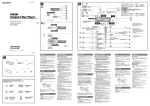
Connection diagram
Cautions
• This unit is designed for negative ground (earth) 12 V
DC operation only.
• Do not get the leads under a screw, or caught in moving
parts (e.g. seat railing).
• Before making connections, turn the car ignition off to
avoid short circuits.
• Connect the yellow and red power supply leads only
after all other leads have been connected.
• Run all ground (earth) leads to a common
ground (earth) point.
• Be sure to insulate any loose unconnected leads with
electrical tape for safety.
×2
Notes on the power supply lead (yellow)
• When connecting this unit in combination with other
stereo components, the connected car circuit’s rating
must be higher than the sum of each component’s fuse.
• When no car circuits are rated high enough, connect
the unit directly to the battery.
Parts Iist
×4
Equipment used in illustrations (not supplied)
Equipo utilizado en las ilustraciones (no suministrado)
㌶♢ᶑ䗨堩仒濃曂斨彥濄
Front speaker
Altavoz frontal
↱㇐⡔◌
• The numbers in the list are keyed to those in the
instructions.
• The bracket and the protection collar are
attached to the unit before shipping. Before mounting
the unit, use the release keys to remove the bracket
and the protection collar from the unit. For
details, see “Removing the protection collar and the
bracket ()” on the reverse side of the sheet.
• Keep the release keys for future use as they
are also necessary if you remove the unit from
your car.
Caution
Handle the bracket carefully to avoid injuring your
fingers.
Power amplifier
Amplificador de potencia
∃䋫㒢⢋◌
Catch
Rear speaker
Altavoz posterior
⍲㇐⡔◌
CD/MD changer
Cambiador de CD/MD
DE0NE!㋆䠃㚞
Note
Before installing, make sure that the catches on both sides of
the bracket are bent inwards 2 mm (3/32 in). If the catches are
straight or bent outwards, the unit will not be installed securely
and may spring out.
Connection example
Active subwoofer
Altavoz potenciador de
graves activo
㙭㷴峩愱Ẳ杗㇐⡔◌
Notes (-A)
• Be sure to connect the ground (earth) lead before connecting
the amplifier.
• The alarm will only sound if the built-in amplifier is used.
Tip (-B- )
For connecting two or more CD/MD changers, the source
selector XA-C40 (not supplied) is necessary.
To a metal surface of the car
First connect the black ground (earth) lead, then connect the
yellow and red power supply leads.
To the power antenna (aerial) control lead or
power supply lead of antenna (aerial) booster
Notes
• It is not necessary to connect this lead if there is no power
antenna (aerial) or antenna (aerial) booster, or with a
manually-operated telescopic antenna (aerial).
• When your car has a built-in FM/AM antenna (aerial) in
the rear/side glass, see “Notes on the control and power
supply leads.”
To AMP REMOTE IN of an optional power
amplifier
This connection is only for amplifiers. Connecting any other
system may damage the unit.
To the +12 V power terminal which is
energized in the accessory position of the
ignition switch
Notes
• If there is no accessory position, connect to the +12 V
power (battery) terminal which is energized at all times.
Be sure to connect the black ground (earth) lead to a
metal surface of the car first.
• When your car has a built-in FM/AM antenna (aerial) in
the rear/side glass, see “Notes on the control and power
supply leads.”
To the +12 V power terminal which is
energized at all times
Be sure to connect the black ground (earth) lead to a metal
surface of the car first.
Notes on the control and power supply leads
• The power antenna (aerial) control lead (blue) supplies +12 V
DC when you turn on the tuner.
• When your car has built-in FM/AM antenna (aerial) in the rear/
side glass, connect the power antenna (aerial) control lead
(blue) or the accessory power supply lead (red) to the power
terminal of the existing antenna (aerial) booster. For details,
consult your dealer.
• A power antenna (aerial) without a relay box cannot be used
with this unit.
Memory hold connection
When the yellow power supply lead is connected, power will
always be supplied to the memory circuit even when the ignition
switch is turned off.
Notes on speaker connection
• Before connecting the speakers, turn the unit off.
• Use speakers with an impedance of 4 to 8 ohms, and with
adequate power handling capacities to avoid its damage.
• Do not connect the speaker terminals to the car chassis, or
connect the terminals of the right speakers with those of the
left speaker.
• Do not connect the ground (earth) lead of this unit to the
negative (–) terminal of the speaker.
• Do not attempt to connect the speakers in parallel.
• Connect only passive speakers. Connecting active speakers
(with built-in amplifiers) to the speaker terminals may damage
the unit.
• To avoid a malfunction, do not use the built-in speaker leads
installed in your car if the unit shares a common negative (–)
lead for the right and left speakers.
• Do not connect the unit’s speaker leads to each other.
Note on connection
If speaker and amplifier are not connected correctly, “FAILURE”
appears in the display. In this case, make sure the speaker and
amplifier are connected correctly.
Diagrama de conexión
Precauciones
• Esta unidad ha sido diseñada para alimentarse sólo con
cc de 12 V de masa negativa.
• No coloque los cables debajo de ningún tornillo, ni
los aprisione con partes móviles (p. ej. los raíles del
asiento).
• Antes de realizar las conexiones, desactive el
encendido del automóvil para evitar cortocircuitos.
• Conecte los cables de fuente de alimentación amarillo
y rojo solamente después de haber conectado los
demás.
• Conecte todos los cables de conexión a masa
a un punto común.
• Por razones de seguridad, asegúrese de aislar con cinta
aislante los cables sueltos que no estén conectados.
Notas sobre el cable de fuente de alimentación
(amarillo)
• Cuando conecte esta unidad en combinación con otros
componentes estéreo, la capacidad nominal del circuito
conectado del automóvil debe ser superior a la suma
del fusible de cada componente.
• Si no hay circuitos del automóvil con capacidad
nominal suficientemente alta, conecte la unidad
directamente a la batería.
Lista de componentes
• Los números de la lista corresponden a los de las
instrucciones.
• La unidad se comercializa con el soporte y el marco
de protección ya colocados. Antes de montarla,
utilice las llaves de liberación para extraer el
soporte y el marco de protección de la misma.
Para obtener más información, consulte “Extracción
del marco de protección y del soporte ()”.
• Conserve las llaves de liberación para
utilizarlas en el futuro, ya que también las
necesitará si retira la unidad del automóvil.
Precaución
Tenga mucho cuidado al manipular el soporte para
evitar posibles lesiones en los dedos.
Enganche
Nota
Antes de instalar la unidad, compruebe que los enganches de
ambos lados del soporte están doblados hacia adentro 2 mm.
Si no lo están o están doblados hacia afuera, la unidad no se
instalará correctamente y puede saltar.
Ejemplo de conexiones
Notas (-A)
• Asegúrese de conectar primero el cable de conexión a masa
antes de realizar la conexión del amplificador.
• La alarma sonará únicamente si se utiliza el amplificador
incorporado.
Sugerencia (-B- )
Si desea conectar dos o más cambiadores de CD/MD,
necesitará el selector de fuente XA-C40 (no suministrado).
A una superficie metálica del automóvil
Conecte primero el cable de conexión a masa negro, y
después los cables amarillo y rojo de fuente de alimentación.
Al cable de control de la antena motorizada
o al cable de fuente de alimentación del
amplificador de señal de la antena
Notas
• Si no se dispone de antena motorizada ni de amplificador
de antena, o se utiliza una antena telescópica accionada
manualmente, no será necesario conectar este cable.
• Si el automóvil incorpora una antena de FM/AM en el
cristal trasero o lateral, consulte “Notas sobre los cables
de control y de fuente de alimentación”.
A AMP REMOTE IN de un amplificador de
potencia opcional
Esta conexión es sólo para amplificadores. La conexión de
cualquier otro sistema puede dañar la unidad.
Al terminal de alimentación de +12 V que
recibe energía en la posición de accesorio
del interruptor de encendido
Notas
• Si no hay posición de accesorio, conéctelo al terminal de
alimentación (batería) de +12 V que recibe energía sin
interrupción.
Asegúrese de conectar primero el cable de conexión a
masa negro a una superficie metálica del automóvil.
• Si el automóvil incorpora una antena de FM/AM en el
cristal trasero o lateral, consulte “Notas sobre los cables
de control y de fuente de alimentación”.
Al terminal de alimentación de +12 V que
recibe energía sin interrupción
Asegúrese de conectar primero el cable de conexión a masa
negro a una superficie metálica del automóvil.
Notas sobre los cables de control y de fuente de
alimentación
• El cable de control de la antena motorizada (azul) suministrará
cc de + 12 V cuando conecte la alimentación del sintonizador.
• Si el automóvil dispone de una antena de FM/AM incorporada
en el cristal trasero o lateral, conecte el cable de control de
antena motorizada (azul) o el cable de fuente de alimentación
auxiliar (rojo) al terminal de alimentación del amplificador de
antena existente. Para obtener más información, consulte a su
distribuidor.
• Con esta unidad no es posible utilizar una antena motorizada
sin caja de relé.
Conexión para protección de la memoria
Si conecta el cable de fuente de alimentación amarillo, el circuito
de la memoria recibirá siempre alimentación, aunque apague el
interruptor de encendido.
Notas sobre la conexión de los altavoces
• Antes de conectar los altavoces, desconecte la alimentación
de la unidad.
• Utilice altavoces con una impedancia de 4 a 8 Ω con la
capacidad de potencia adecuada para evitar que se dañen.
• No conecte los terminales de altavoz al chasis del automóvil,
ni conecte los terminales del altavoz derecho con los del
izquierdo.
• No conecte el cable de conexión a masa de esta unidad al
terminal negativo (–) del altavoz.
• No intente conectar los altavoces en paralelo.
• Conecte solamente altavoces pasivos. Si conecta altavoces
activos (con amplificadores incorporados) a los terminales de
altavoz, puede dañar la unidad.
• Para evitar fallas de funcionamiento, no utilice los cables de
altavoz incorporados instalados en el automóvil si la unidad
comparte un cable negativo común (–) para los altavoces
derecho e izquierdo.
• No conecte los cables de altavoz de la unidad entre sí.
Nota sobre la conexión
Si el altavoz no está conectado correctamente, aparecerá
“FAILURE” en la pantalla. Si es así, compruebe la conexión del
altavoz.
㱌び
丣嵓彂㌉♢!
•!㚐㚞⍎偡ợ䒌岃㛥㌉⚔䗨!23!W!䙘㲥䒙㷴Ɂ
•!≣ợ⭠丣⢝⚌圞ᶁᵯ濇ㅺ亄⚌䥟∌恌Ṛᵮ濃⣦⸋㡩
㇚ㆯ濄Ɂ
•!彂㌉丣嵓ᶯ↱濇孛⃗救㯡廊㐲濇ṉ忣₱䝑嵓Ɂ
•!⍎㙭彂㌉ᷪㆤ㙭⃚Ḻ⭠丣ᶯ⍲濇彂㌉渨凖⏰丆凖
䒙㷴⭠丣Ɂ
•!⭪ㆤ㙭⚔丣恡彂㌉↔⍰ᵤ㌉⚔䀝Ɂ
•!ᶞᷪ⫭濇孛∅⼩䒌乁乼做ⶊợㆤ㙭㛢㓇㚎彂㌉䗨
⭠丣乁乼Ɂ
!兗㯡廊愵⯂埌曆
⃗ᷲ䒙㷴⭠丣濃渨凖濄䗨㱌びᷯ柝
•!⭪㚐㚞ᵲ⃚⫧䨯ặ⡔堩仒丨⍬ợ䒌㕚濇ㆤ彂㌉䗨㯡
廊䒙嵓⬝愳⼩柟⢋ᷲ⍨堩仒ὁ旍ᶁ⬝愳䗨⾟⏰Ɂ
•!⺷㯡廊䒙嵓⬝愳ᵱ⢃⢋㕚濇孛⭪㚐㚞䙘㌉ᵲ吨䒙㯄
䙜彂㌉Ɂ
!兗!,23!W!䒙㷴䩓⪴濇孉䩓⪴⚌䀝㿏⃗斨Ṛằ仒
彾䒙
晚Ṛᵤ夬埌!
棺€彂㌉渵凖⚔丣濇䂚⍲彂㌉渨凖⏰丆凖䒙㷴⭠丣Ɂ
!兗䒙∌⢍丣㌋↚⭠丣ㅺ⢍丣⊫亍◌䗨䒙㷴⭠丣
㱌
•!⣦㜀㰅㙭䒙∌⢍丣ㅺ⢍丣⊫亍◌濇ㅺ㙭ㆯ∌ẜ亍⢍丣濇
ⅽ㕄晤彂㌉㫈⭠丣Ɂ
•!剉㯡廊䗨⍲0Ἃ䌟䏧⃩㙭⃩仒!GN0BN!⢍丣濇孛⌦敩ĥ⃗ᷲ
㌋↚⭠丣⏰䒙㷴⭠丣䗨㱌びᷯ柝ĦɁ
!兗彭岑䗨∃䋫㒢⢋◌䗨!BNQ!SFNPUF!JO
㫈彂㌉ḩ彦䒌ᷲ∃䋫㒢⢋◌Ɂ彂㌉⃚⫧䱟乃⍓偡㋃⚳㚐㚞Ɂ
㱌
•!⣦㜀㰅㙭斨Ṛằ仒濇ⅽ彂㌉兗!,23!W!䒙㷴濃吨䒙㯄濄䩓
⪴濇孉䩓⪴旳㕚⡨ᷲ彾䒙䈚⽥Ɂ
! 䟒ὁ棺€⭪渵凖⚔丣彂㌉兗㯡廊愵⯂埌曆Ɂ
•!剉㯡廊䗨⍲0Ἃ䌟䏧⃩㙭⃩仒!GN0BN!⢍丣濇孛⌦敩ĥ⃗ᷲ
㌋↚⭠丣⏰䒙㷴⭠丣䗨㱌びᷯ柝ĦɁ
!兗!,23!W!䒙㷴䩓⪴濇孉䩓⪴旳㕚⡨ᷲ彾䒙䈚⽥
䟒ὁ棺€⭪渵凖⚔丣彂㌉兗㯡廊愵⯂埌曆Ɂ
•!埌ᶑ㓔⪻ᵲ存㕲᷊ᶑ䗨㓔⪻㖓ᵤ兘䗨Ɂ
•!堩⋜㒓㜚!!⏰ὁ㈈䌓!!㖓⅞⋦↱堩⚌㚐堩仒
ᵮ䗨Ɂ⫭堩㚐堩仒ᶯ↱濇ợ䒌摥搉≽!!Ḳ㚐
堩仒ᵮ⌺ᵯ堩⋜㒓㜚!!⏰ὁ㈈䌓!!Ɂ孊个⃩
⬝濇孛⌦敩㚐柙⌱曆䗨ĥ㈪⋜ὁ㈈䌓⏰堩⋜㒓㜚!
)*ĦɁ
•!ὁ⪼⣡摥搉≽!!ṉ⡫⍲䒌Ɂ「Ḳ㯡廊ᵮ⌺ᵯ㚐
堩仒㕚濇㙭⼩壥䒌↔孉搉≽Ɂ
㱌び
⭳⼧ợ䒌堩⋜㒓㜚!!ṉ₱Ẉ↔ㆯ㉫Ɂ
♞⫾䆫
㱌
⫭堩↱濇孛䟒嬈堩⋜㒓㜚!!ᶈ弝䗨♞⫾䆫⍵⃩⺓㙖!3!nnɁ⣦㜀
♞⫾䆫䩸䙘ㅺ⍵⡺⺓㙖濇㚐堩仒⭪ᵱ偡䇆♞⫭堩ⷚ⍓偡⺝⅞Ɂ
丣嵓彂㌉♢ữ!
㱌!(-A)
•!∅⼩⚌彂㌉㒢⢋◌ᶯ↱彂㌉㌉⚔丣Ɂ
•!⍎㙭⚌ợ䒌⃩仒䗨㒢⢋◌㕚濇嫊㈉ㆱṾ⌵⅞⡔Ɂ
㌴䢞濃-B- 濄
剉壥彂㌉!3!⍔ㅺ㙘⡾!DE0NE!㋆䠃㚞濇⼩柟ợ䒌杗㷴彭㉍◌!
YB.D51濃曂斨彥濄Ɂ
⃗ᷲ㌋↚⭠丣⏰䒙㷴⭠丣䗨㱌びᷯ柝
•!㌉彾孧孴◌䒙㷴㕚濇䒙∌⢍丣䗨㌋↚⭠丣濃呁凖濄ἣ偡㌴ỿ!
,23!W!䙘㲥䒙Ɂ
•!⺷㯡廊䗨⍲0Ἃ䌟䏧䧻ᵮ㙭⃩仒!GN0BN!⢍丣㕚濇孛⭪䒙∌⢍丣
㌋↚丣濃呁凖濄ㅺ廩∍䒙㷴⭠丣濃丆凖濄彂㌉兗䌔㙭⢍丣⊫亍
◌ᵮ䗨䒙㷴䩓⪴ᵮɁ孊个存㕲濇孛ᵲ「䗨丳摤⒪侸䱟Ɂ
•!㚐㚞ᵱ偡ợ䒌ᵱ⃛⡫之䒙◌䘶䗨䒙∌⢍丣Ɂ
ὁ㉥嬔⼪䗨丣嵓彂㌉㰹
⺷彂㌉ᷪ渨凖䗨䒙㷴⭠丣㕚濇⋗ợ䀝㿏⃗⃗救濇䒙㷴ḱ⭪⭝嬔
⼪䒙嵓ỿ䒙Ɂ
⃗ᷲ㇐⡔◌彂㌉䗨㱌びᷯ柝
•!彂㌉㇐⡔◌ᶯ↱濇孛⃗救㚐㚞䒙㷴Ɂ
•!孛ợ䒌斟ㇻᶞ!5.9!㪋⤪ᵸ⃛㙭崗⢃∃䋫⡨䍪偡⇿䗨㇐⡔◌濇ṉ
₱㋃⚳Ɂ
•!≣⭪㇐⡔◌䩓⪴彂㌉↔㯡廊ⷹ䘼ᵮ濇ㅺ⭪⍗㇐⡔◌䗨䩓⪴ᵲⵊ
㇐⡔◌䗨䩓⪴彂㌉Ɂ
•!≣⭪㚐㚞䗨⚔丣彂㌉↔㇐⡔◌䗨岃㛥濃.濄䩓⪴ᵮɁ
•!㇐⡔◌ᵱ⍓ⷚ侸彂㌉Ɂ
•!孛ḩ彂㌉㕄㷴㇐⡔◌Ɂ⭪㙭㷴㇐⡔◌濃⃛㙭⃩仒㒢⢋◌濄彂㌉
↔㇐⡔◌䩓⪴⍓偡Ṿ㋃⚳㚐㚞Ɂ
•!剉㚐㚞ợ䒌ⵊɀ⍗㇐⡔◌䗨⃕䒌岃㛥濃.濄⭠丣濇ᶞᷪ忣₱㒩
昀濇Ⅻ≣ợ䒌⫭堩⚌㯡廊⃩䗨⃩仒㇐⡔◌⭠丣Ɂ
•!孛≣⭪㚐㚞㇐⡔◌⭠丣䙜᷶彂㌉Ɂ
彂㌉䗨㱌びᷯ柝
⣦㜀㚎㫇䟒彂㌉㇐⡔◌⏰㒢⢋◌濇ⅽ㖢䢞⮳ᵮṾ⅞䌔
ĥGBJMVSFĦɁ弽㕚濇孛䟒ὁ㇐⡔◌⏰㒢⢋◌彂㌉㫇䟒Ɂ
1
2
A TOYOTA
Face the hook
inwards.
損⪴曆⍵⃩Ɂ
Orient the release key
correctly.
Oriente la llave de
liberación en la
dirección correcta.
max. size
5 × 8 mm
(7/32 × 11/32 in)
Tamaño máx.
5 × 8 mm
㙤⢋⮞⭜
69!nn
El gancho debe
encontrarse en la
parte interior.
B NISSAN
to dashboard/center console
al tablero o consola central
兗Ṏ埌㛣0ᶑ⢒㌋↚䬕
Bracket
Soporte
ㆼ㜚
㫇䟒䟒⫾摥搉≽㔝⍵Ɂ
1
2
max. size
5 × 8 mm
(7/32 × 11/32 in)
Tamaño máx.
5 × 8 mm
㙤⢋⮞⭜
69!nn
Bracket
Soporte
ㆼ㜚
3
Dashboard
Tablero
Ṏ埌㛣
Existing parts supplied with your car
Piezas existentes suministradas con su automóvil
旳㯡廊斨彥䗨䌔㙭恌Ṛ
Fire wall
Cortafuegos
斖㿏⠥
mm
A
m
B
Claws
Uñas
⋅䆎
Precautions
• Choose the installation location carefully so that the
unit will not interfere with normal driving operations.
• Avoid installing the unit in areas subject to dust, dirt,
excessive vibration, or high temperatures, such as in
direct sunlight or near heater ducts.
• Use only the supplied mounting hardware for a safe
and secure installation.
Mounting angle adjustment
Adjust the mounting angle to less than 45°.
Mounting the unit in a Japanese
car
You may not be able to install this unit in some makes of
Japanese cars. In such a case, consult your Sony dealer.
Note
To prevent malfunction, install only with the supplied screws .
How to detach and attach the
front panel
Before installing the unit, remove the protection
collar and the bracket from the unit.
1 Remove the protection collar .
2
Engage the release keys together with the
protection collar .
Pull out the release keys to remove the
protection collar .
Remove the bracket .
Insert both release keys together between
the unit and the bracket until they click.
Pull down the bracket , then pull up the unit
to separate.
Frequency select switch
The MW (FM) tuning interval is factory-set to the 9 k
(50 k) position. If the frequency allocation system of
your country is based on 10 kHz (200 kHz) interval, set
the switch on the bottom of the unit to the 10 k (200 k)
position before making connections.
• Elija cuidadosamente el lugar de montaje de forma que
la unidad no interfiera con las funciones normales de
conducción.
• Evite instalar la unidad donde pueda quedar sometida
a polvo, suciedad, vibraciones excesivas o altas
temperaturas como, por ejemplo, a la luz solar directa o
cerca de conductos de calefacción.
• Para realizar una instalación segura y firme, utilice
solamente elementos de instalación suministrados.
Ajuste del ángulo de montaje
Before installing the unit, detach the front panel.
Removing the protection collar
and the bracket
Precauciones
Ajuste el ángulo de montaje a menos de 45°.
-A To detach
Extracción del marco de
protección y del soporte
Before detaching the front panel, be sure to press .
Press , and pull it off towards you.
-B To attach
Engage part of the front panel with part of the unit,
as illustrated, and push the left side into position until it
clicks.
Warning if your car’s ignition
has no ACC position
Be sure to set the Auto Off function. For details, see the
supplied Operating Instructions.
The unit will shut off completely and automatically in
the set time after the unit is turned off, which prevents
battery drain.
If you do not set the Auto Off function, press and hold
until the display disappears each time you turn
the ignition off.
RESET button
When the installation and connections are completed,
be sure to press the RESET button with a ball-point pen,
etc., after detaching the front panel.
Antes de instalar la unidad, retire el marco de
protección y el soporte de la misma.
1 Retire el marco de protección .
2
Acople las llaves de liberación al marco de
protección .
Retire las llaves de liberación para extraer
el marco de protección .
Montaje de la unidad en un
automóvil japonés
Es posible que no pueda instalar esta unidad en algunos
automóviles japoneses. En tal caso, consulte a su
distribuidor Sony.
Nota
Para evitar que se produzcan fallas de funcionamiento, realice la
instalación solamente con los tornillos suministrados .
Selector de frecuencia
El intervalo de sintonía de MW (FM) ha sido ajustado
en fábrica a la posición 9 k (50 k). Si el sistema de
asignación de frecuencias de su país se basa en el
intervalo de 10 kHz (200 kHz), ponga este selector,
situado en la base de la unidad, en la posición 10 k
(200 k) antes de realizar las conexiones.
Forma de extraer e instalar el
panel frontal
Antes de instalar la unidad, extraiga el panel
frontal.
-A Para extraerlo
Antes de extraer el panel frontal, asegúrese de presionar
. Después presione y tire de él hacia usted.
-B Para instalarlo
Coloque la parte del panel frontal en la parte de
la unidad, como se muestra en la ilustración, y después
presione la parte izquierda hasta que encaje.
Advertencia: si el encendido del
automóvil no dispone de una
posición ACC
Asegúrese de ajustar la función de desconexión
automática. Para obtener más información, consulte el
manual de instrucciones suministrado.
La unidad se apagará completa y automáticamente en
el tiempo establecido después de que se desconecte la
unidad, lo que evita que se desgaste la batería.
Si no ha ajustado la función de desconexión automática,
mantenga presionado cada vez que apague
el interruptor de encendido, hasta que la pantalla
desaparezca.
Botón RESET
Una vez finalizada la instalación y las conexiones,
desmonte el panel frontal y presione el botón RESET con
un bolígrafo o un objeto similar.
Mounting example
Installation in the dashboard
Notes
• Bend these claws outward for a tight fit, if necessary (-2).
• Make sure that the 4 catches on the protection collar are
properly engaged in the slots of the unit (-3).
Ejemplo de montaje
Instalación en el tablero
Notas
• Si es necesario, doble estos uñas hacia fuera para que encaje
firmemente (-2).
• Compruebe que los 4 enganches del marco de protección
estén bien fijados en las ranuras de la unidad (-3).
•!Ḹ个彭⌺⫭堩ằ仒濇ṉợ㚐堩仒ᵱⷖ㇔㫇䗨槢槚
㐱ỀɁ
•!忣₱⭪㚐㚞⫭堩⚌⌻㿔⭼濇㯅䇍⏰⺞䀬㊓∌⻕䗨
⊞❃濇ㅺ⫭堩⚌樼㶍⡨濇⣦䙘⭨斗₭ᵯㅺ䁑㭸䬅德
斨張Ɂ
•!ᶞᷪ⫭堩⫭⏰⍓曄濇⍎偡ợ䒌斨彥䗨⫭堩㛨ṚɁ
⫭堩夶⸊ᶯ孧㓘
Retire el soporte .
Inserte ambas llaves de liberación entre la
unidad y el soporte hasta que encajen.
Presione el soporte y, a continuación,
levante la unidad para separar ambos
elementos.
ợ䒌↱㱌びᷯ柝
孛⚌!56ṉ⃩孧㓘⫭堩夶⸊Ɂ
⭪㚐㚞⫭堩ᷲ㕉㚐ḋ㯡廊ᵮ!
㙭䗨㕉㚐ḋ㯡廊ᵱ偡⫭堩㚐㚞Ɂ⚌弽䤱〩⻆ᵯ濇孛⍵!
Tpoz!丳摤⒪␌孆Ɂ
㱌
ᶞ斖㫆⌵䒃㒩昀濇⫭堩㕚⍎偡ợ䒌斨彥䗨圞ᶁ!Ɂ
⣦ẹ㈪⋜⏰堩悱↱曆㛣!
⫭堩㚐堩仒ᶯ↱濇孛€㈪⋜↱曆㛣Ɂ
㈪⋜ὁ㈈䌓⏰堩⋜㒓㜚!
⫭堩㚐堩仒ᶯ↱濇孛€Ḳ㚐堩仒ᵮ⌺ᵯὁ㈈䌓!!
⏰堩⋜㒓㜚!Ɂ
1!!㈪⋜ὁ㈈䌓!Ɂ
!垸㌉摥搉≽!!⏰ὁ㈈䌓!Ɂ
!㈭⅞摥搉≽!!ṉ⌺ᵯὁ㈈䌓!Ɂ
2!!㈪⋜堩⋜㒓㜚!Ɂ
!⭪!3!ᶎ摥搉≽!!㌶㚐堩仒⏰堩⋜㒓
㜚!!ᶯ敘䙘↔⎐夥ⓤ┶⡔Ɂ
!⍵ᵯ㈭堩⋜㒓㜚!濇䂚⍲⍵ᵮ㈭⅞㚐堩仒
ṉἣⅪ䤟Ɂ
柵䋫彭㉍⃗
ⵉ⋦柨嬢䗨!NX濃GN濄孧孴敘旸ᶞ!:!l濃61!l濄Ɂ⣦
㜀「♡⬚䗨柵䋫⫾ằ䱟乃㖓❞ᷲ!21!lI{濃311!lI{濄
䗨敘旸濇孛⚌彂㌉↱⭪堩仒ⷹ恌䗨⃗Ⅻ㋆↔!21!l
濃311!l濄䗨ằ仒Ɂ
.B!㈪⋜
㈪⋜↱曆㛣↱濇柟㉭!Ɂ㉭! 濇䂚⍲⭪↱曆㛣
⍵「帏ặ㔝⍵㈭⅞Ɂ
.C!堩悱
⣦♢ㆤ䢞濇⭪↱曆㛣䗨!!恌Ⅺ㎑⚌㚐㚞䗨!!恌
Ⅺᵮ濇䂚⍲㌌ⵊἋ䙘兗⎐夥ⓤ┶⡔Ɂ
「䗨㯡廊㐲㰅㙭!BDD!ằ仒㕚
䗨嫊⎮
⼩柟嬢⫾兎∌㔑䒙∃偡Ɂ孊个存㕲濇孛⌦敩㌴ỿ䗨
ợ䒌存㕲᷊Ɂ
㚐㚞⚌⃗㚞⍲Ṿ⚌嬢⫾䗨㕚敘⃩⫰ⷚ兎∌Ⅻ㔑䒙
㷴濇ṉ斖㫆䒙㯄㳬佻Ɂ
⣦㜀「㚎嬢⫾兎∌㔑䒙∃偡濇ⅽ⚌㬳㪅⃗救㐲㕚㉭
ẳ!濇䙘兗㖢䢞䒟曆㳬⢕Ɂ
SFTFU!㉭搒
⺷⫭堩⏰彂㌉⫰ㅴ濇⌺ᵯ↱曆㛣⍲濇∅孛䒌♪䍄䩸䪭
㉭⋯!SFTFU!㉭搒Ɂ
⫭堩䢞ữ!
⫭堩⚌Ṏ埌㛣愰
㱌
•!⣦㙭⼩壥濇⍵⡺⺓㙖⋅䆎ṉ䲋♞⫭堩濃.3濄Ɂ
•!孛䟒ὁὁ㈈䌓!!ᵮ䗨!5!ᶎ♞⫾䆫ᵲ㚐堩仒䗨⋅㥡㫇䟒垸㌉
濃.4濄Ɂ
max. size
5 × 8 mm
(7/32 × 11/32 in)
Tamaño máx.
5 × 8 mm
㙤⢋⮞⭜
69!nn
Existing parts supplied with your car
Piezas existentes suministradas con su automóvil
旳㯡廊斨彥䗨䌔㙭恌Ṛ
53 m
Bracket
Soporte
ㆼ㜚
Bracket
Soporte
ㆼ㜚
182
to dashboard/center console
al tablero o consola central
兗Ṏ埌㛣0ᶑ⢒㌋↚䬕
max. size
5 × 8 mm
(7/32 × 11/32 in)
Tamaño máx.
5 × 8 mm
㙤⢋⮞⭜
69!nn