1
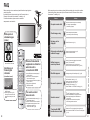
Accessories/Options
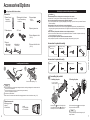
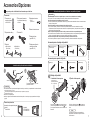
Check you have all the items shown.
Caution
Accessories
□Remote Control
□Batteries for the Remote
Transmitter
•
Attaching the pedestal to the plasma television
Control Transmitter (2)
•
EUR7737Z30
•
F-Type
for 5C-2V
□Operating Instructions
□AC cord
□Product Registration Card
(U.S.A.)
□Pedestal
•
TBL2AX00041
(TH-42PX6U)
•
□Customer Care Plan Card
TBL2AX00031
(TH-50PX6U)
(U.S.A.)
•
•
•
•
•
Accessories for pedestal assembly
A Assembly screw (4)
(Silver screw)
B Assembly screw (4)
(Black screw)
D Base (1)
3 Wood screw (2)
4 Clamp (2)
M5 x 30
Accessories for pedestal security
Installing remote’s batteries
1
2
Open
1 Band (2)
Close
M4 x 10
1
Hook
Note the correct polarity (+ or -).
•
••
2 Screw (2)
Accessories/Options
M5 x 20
C Pole (2)
Quick Start Guide
□Cable clamper (2)
AA Battery
□Antenna Adapter
Do not use any television or displays other than those given in this manual.
Otherwise the unit may fall over and become damaged, and personal injury may result.
Do not use the pedestal if it becomes warped or physically damaged.
If you use the pedestal while it is physically damaged, personal injury may result. Contact your nearest Panasonic
Dealer immediately.
During setting-up, make sure that all screws are securely tightened.
If sufficient care is not taken to ensure screws are properly tightened during assembly, the pedestal will not be
strong enough to support the plasma television, and it might fall over and become damaged, and personal injury
may result.
Use the accessory fall-prevention brackets to secure the plasma television.
If the unit is knocked or children climb onto the pedestal with the Plasma TV installed, the plasma television may
fall over and personal injury may result.
Two or more people are required to install and remove the television.
If two people are not present, the television may be dropped, and personal injury may result.
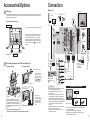
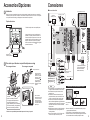
Assembling the pedestal
1. Installing the poles
2. Securing the poles
For 42˝, 50˝ Plasma
television (Outside)
Caution
Front
Incorrect installation may cause battery leakage and corrosion, resulting in damage to the remote control unit.
Do not mix old and new batteries.
Do not mix different battery types (such as alkaline and manganese batteries).
Do not use rechargeable (Ni-Cd) batteries.
Do not burn or break batteries.
Make a note of the remote control codes before changing batteries in case the codes are reset. (p. 29)
Optional accessories
Wall-hanging bracket
(vertical)
•
TY-WK42PV3U
(angle)
••
TY-WK42PR2U
TY-WK42PR3U
Insert the poles C into the left and right holes
in the underside of the base D so that they fit
securely as shown in the illustration above.
Use the assembly screws A to secure the poles
firmly to the bottom of the base.
Note
Forcing the assembly screws the wrong way will
strip the threads.
6
7