1
EFIE digital 2010
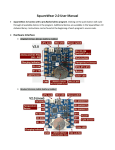
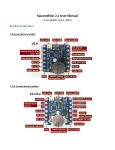
Diagrama de conexión EFIE 2010.
EFIE 2010, Connection Diagram
Figure X
The colors can change
http://www.dtsal.com
www.tumercadito.net
Skype: pas.sv
USA: +1 305 407-2736
El Salvador: +503 7976-1897
Gracias por comprar nuestro producto.
Sinceramente, PAS-SV
Thank you for purchasing our product.
Sincerely, PAS-SV
Manual de usuario
User manual
IMPORTANTE.
IMPORTANT.
POR FAVOR IMPRIMA Y REVISE TODOS LOS
DIAGRAMAS DE CONECCION ANTES DE INSTALAR
ESTE PRODUCTO.
PLEASE PRINT AND CHECK ALL DIAGRAMS
CONNECTION BEFORE INSTALLING THIS PRODUCT.
Conexión de los pines del EFIE DIGITAL 2010:
Connecting pins DIGITAL EFIE 2010:
No. descripción
1. Conectar a 12 voltios a través del interruptor
de encendido.
2. Conectar al negativo de la batería o tierra de
sensores.
3. Salida del sensor de oxigeno #2.
4. Entrada del sensor de oxigeno #2.
5. Salida del sensor de oxigeno #1.
6. Entrada del sensor de oxigeno #1
7. Salida del sensor MAP.
8. Entrada del sensor MAP.
9. Entrada de señal del sensor de temperatura de
la celda.
10. Salida de voltaje (5 voltios), para el sensor de
temperatura y nivel.
11. No conectado
12. Entrada de señal del sensor de nivel.
13. Salida de señal de control del driver
(modulador).
14. Salida de tierra para sensores.
Pasos para conectar los sensores de Oxigeno y MAP:
1. cortar el cable que lleva la señal, el color del
cable es diferente para cada marca o modelo
de vehículo, consultar un diagrama eléctrico
del carro para identificar cual es el color
correcto para su carro.
2. Tendremos dos puntas, una está unida al
sensor y la otra a la computadora del carro.
3. el cable que está unido al sensor lo
http://www.dtsal.com
www.tumercadito.net
We appreciate your help in the
translation of it; you can send
email to [email protected].
Description List
1. To connect to 12 volts through ignition switch.
2. Connect the negative battery or ground sensors.
3. Output # 2 Oxygen sensor.
4. Input # 2 Oxygen sensor.
5. Output # 1 Oxygen sensor.
6. Input # 1 Oxygen sensor
7. MAP sensor output.
8. MAP sensor input.
9. Input temperature sensor signal from the cell.
10. Output voltage (5 V) for temperature and level
sensor.
11. Not connected
12. Signal input level switch.
13. Output driver control signal (modulator).
14. Ground output for sensors.
Steps to connect the oxygen sensor and MAP:
1. cut the cable carrying the signal, wire color is
different for each brand or model of vehicle, consult a
wiring diagram of the car to identify which is the right
color for your car. (Refer to figure X)
2. there will be two points, one is attached to the
sensor and the other one to the car's computer.
3. the cable is attached to the sensor connects to the
input signal in the "DIGITAL EFIE.
4. The other cable is attached to the car's computer
connect to DIGITAL EFIE output signal
5. Repeat for each sensor that you'll use, if you only
Skype: pas.sv
USA: +1 305 407-2736
El Salvador: +503 7976-1897
conectamos a la entrada de señal en el “EFIE
DIGITAL”.
4. El otro cable que está unido a la computadora
del carro lo conectamos a la salida de señal del
“EFIE DIGITAL”.
5. Repetir para cada sensor que vamos a usar, si
solamente tenemos que conectar un sensor de
oxigeno podemos usar cualquiera de los dos
canales disponibles, son independientes.
Pasos para conectar el sensor de nivel:
1. Conectar la señal del sensor magnético
provisto o usar un interruptor como fuente de
la señal.
2. si la señal se conecta a tierra se reconoce como
nivel bajo, si lo dejamos sin conexión o abierto
es un nivel lleno.
Pasos para conectar el sensor de temperatura:
1. Conectar el sensor MCP9701 a 5 voltios y
tierra en el EFIE DIGITAL.
2. Conectar la señal del sensor (19.5 mV/°C
MCP9701) provisto.
3. Si desea conectar uno de otro fabricante tiene
que tener (19.5 mV/°C), o puede decirnos
que numero usara y modificaremos el
programa para usted.
Pasos para conectar el DRIVER:
1. Conectar los 12 voltios, a través del interruptor
de encendido y la tierra.
2. Conectar la señal de control (modulador) al
driver, La señal de control del driver se
representa con un voltaje de 80 mili voltios por
ampere, 5 voltios para 63 amperes.
3. Conectar la línea del sensor de nivel al driver,
es opcional.
Descripción de características del “EFIE DIGITAL 2010”
Sensor de temperatura:
El límite máximo del sensor de temperatura es
ajustable, si se detecta una temperatura mayor que el
limite previamente ajustado, la pantalla parpadeará de
forma regular indicando una falla por temperatura
excesiva, los ajustes se restablecerán a cero y se
apagara el generador de hidrogeno (DRIVER OFF), el
valor de la temperatura se mostrara en la pantalla.
Para restablecer el funcionamiento es necesario que el
http://www.dtsal.com
www.tumercadito.net
have to connect an oxygen sensor you can use any of
the two available channels they are independent.
Steps to connect the sensor level:
1. Connect the magnetic sensor signal provided or use
a switch as signal source.
2. if the signal is grounded is recognized as low level , if
left open is offline or full level.
Steps to connect the sensor temperature:
1. Connecting the MCP9701 sensor to 5 volts and
ground on the DIGITAL EFIE.
2. Connect the sensor signal (19.5 mV / ° C MCP9701)
provided.
3. If you want to connect a product form a different
party must have (19.5 mV / ° C), or you can tell us what
number is been use so we can modify the program for
you.
Steps to connect the DRIVER:
1. Connect the 12 volts through the switch and the
ground
2. Connect the control signal (modulator) to the driver,
the driver control signal is represented by a voltage of
80 millivolts per AMPS, 5 volts to 63 AMPS.
3. it´s optional to connect the sensor line to the driver.
Description of characteristics of "DIGITAL EFIE 2010
Temperature Sensor:
The maximum limit of the sensor temperature is
adjustable, if you have a temperature greater than the
preset limit, the display will flash indicating a fault of
excessive temperature, the settings will reset to zero
and turn off the hydrogen generator (DRIVER OFF), the
temperature value is shown on the screen.
In order to reset function the system must cool off by
decreasing to a lower number tan the pre-set, or by
accessing the setup menu and set a higher value.
Note: The display will not indicate a fault if set at 255.
Skype: pas.sv
USA: +1 305 407-2736
El Salvador: +503 7976-1897
sistema se enfrié a un valor menor que el límite
ajustado, o podemos acceder al menú de ajuste y fijar
un valor mayor.
Nota: un ajuste de 255 hará que nunca se active la falla
por temperatura alta.
Sensor de nivel:
El sensor de nivel se puede leer en la pantalla como un
icono, se muestra vacio o lleno según la condición del
sensor.
Si el sensor registra una condición de nivel bajo, la
pantalla parpadeará de forma regular indicando una
falla por nivel bajo, El icono de celda vacía se mostrara
en pantalla, los ajustes se restablecerán a cero y se
apagara el generador de hidrogeno (DRIVER OFF).
Para restablecer el funcionamiento es necesario que el
sistema sea llenado con líquido o desactivar el sensor
desconectándolo.
Advertencia: si desconecta el sensor de nivel se corre
el riesgo de hacer funcionar el generador de hidrogeno
con poca o ninguna solución (electrolito), pudiendo
causar calentamiento o cortocircuito dañando el
generador y el driver.
Configuración y ajuste del “EFIE DIGITAL 2010”
Para hacer el ajuste de las características de efie digital
se dispone de tres teclas (UP, DOWN, MODE), con las
que se desplaza a través del menú.
Activar o desactivar EFIE:
El EFIE DIGITAL se puede activar o desactivar al
mantener presionadas las teclas (UP + MODE), al
mismo tiempo, el sistema regresara a la condición en
que se encontraba al apagar el carro.
Por ejemplo: si el EFIE estaba inactivo al apagar el
carro, cuando encienda el carro el EFIE retornara al
modo inactivo, manteniendo el driver apagado y sin
ajuste en los sensores.
Cambiar juego de ajustes:
El EFIE DIGITAL cuenta con dos juegos de
configuraciones o ajustes independientes que se
pueden programar, para cambiar entre ellas, mantener
presionadas al mismo tiempo las teclas (DOWN +
MODE), por ejemplo: se puede usar un ajuste para la
ciudad y el otro para carretera.
http://www.dtsal.com
www.tumercadito.net
Level sensor:
The sensor level can be read on the screen as an icon,
it shows empty or full depending on the condition of
the sensor.
If the sensor registers a low level condition, the display
will flash indicating a malfunction due to a low level,
empty cell icon will be displayed on screen, the settings
are reset to zero and turn off the hydrogen generator
(DRIVER OFF) .
In order to reset the system is necessary to fill with
liquid or to disconnect the sensor.
Warning: if you disconnect the sensor level you run the
risk of operating the hydrogen generator with little or
no solution (electrolyte), which can cause overheating
or a short circuit that may damage the generator and
the driver.
Configuration and Tuning "DIGITAL EFIE 2010
To make the adjustment of the characteristics of digital
EFIE there are three keys (UP, DOWN, MODE), which
will navegate you through the menu.
Enable or Disable EFIE:
The DIGITAL EFIE can be turned on or off by holding
down the keys (UP + MODE), this will not affect the
mode .
For example: if the EFIE was inactive by turning off the
car, when you turn on the car the EFIE will return to
previous mode, keeping the driver off and without
setting off the sensors.
Switching between sets of configuration:
The DIGITAL EFIE has two sets of independent
configurations which can be program individualy, you
may go between them by pressing (DOWN+ MODE) at
the sametime.
Example: you can use an adjustment for the city and
the other for the freeway.
Skype: pas.sv
USA: +1 305 407-2736
El Salvador: +503 7976-1897
Menú de ajustes:
Para acceder al menú de ajustes del EFIE DIGITAL
presionar la tecla MODE una vez, se mostrara una
flecha en el valor activo para edición, con las teclas UP
se incrementa el valor activo y con la tecla DOWN se
decremento el valor activo, para cambiar al siguiente
valor a editar presionar la tecla MODE, el orden de
edición es el siguiente:
Primera pantalla de edición (DRIVER):
1. SET AMP: ajustar los amperios fijos del
generador, este es un valor fijo.
2. SYNC: ajustar los amperios de forma
sincronizada con la señal del sensor MAP.
3. TEMP: ajustar el valor de la temperatura
máxima de operación, desactivar si sobrepasa
el límite.
La señal de control del driver se representa con un
voltaje de 80 mili voltios por ampere, 5 voltios para 63
amperes.
Nota: los amperios totales para el generador de
hidrogeno es la suma del ajuste fijo mas el
sincronizado con el MAP.
Menu settings:
To access the menu /settings of the DIGITAL EFIE press
the MODE button once this will display an arrow next
to the asset value for editing, to increase the asset
value press UP key/arrow and to decrease DOWN
key/arrow. To edit the next asset value press the
MODE button. Using the UP and increasing the asset
value and decrease the DOWN key asset value to
change the next value to edit, press the MODE button,
the order of release is as follows:
First screen of setting (DRIVER)
1. AMP SET: Set the fixed amp generator, it is a fixed
value.
2. SYNC: Set the amp in sync with the MAP sensor
signal.
3. TEMP: Adjust the value of the maximum operating
temperature, turn off if it exceeds the limit.
The driver control signal is represented by a voltage of
80 millivolts per ampere, 5 volts to 63 amperes.
Note: Total amps for the hydrogen generator is the
sum of fixed setting but the sync with the MAP.
Segunda pantalla de edición (MAP):
1. MAP OFFSET: ajuste fijo que se resta de la
señal del sensor MAP.
2. SYNC: ajuste sincronizado con los amperes en
el generador de hidrogeno, mili voltios por
ampere en la celda.
Second screen of setting (MAP):
1. MAP OFFSET: fixed adjustment that is subtracted
from the sensor MAP.
2. SYNC: Setting Sync with amps in the hydrogen
generator,
Reading at millivolts per amps in a cell.
Nota: el ajuste fijo más el ajuste sincronizado se restan
de la señal del sensor MAP.
Ejemplo: MAP - (OFFSET + SYNC).
Note: The fixed setting plus the sync adjustment is
subtracted from the MAP sensor.
Example: MAP - (OFFSET + SYNC).
Tercera pantalla de edición (OX):
1. OX OFFSET: ajuste fijo que se suma a la señal
del sensor OX.
2. SYNC: ajuste sincronizado con los amperes en
el generador de hidrogeno, mili voltios por
ampere en la celda.
Nota: el ajuste fijo más el ajuste sincronizado se suman
a la señal del sensor OX.
Ejemplo: OX + (OFFSET + SYNC).
http://www.dtsal.com
www.tumercadito.net
Third screen of settings (OX)
1. OX OFFSET: fixed setting that adds to the OX sensor
signal.
2. SYNC: setting sync with the amps in the hydrogen
generator, millivolts per ampere in the cell.
Note: The fixed setting + synchronized adjustment add
to the OX sensor signal.
Example: OX + (OFFSET + SYNC).
Glossary.
EFIE: System Optimizer electronic fuel injection.
ECM: Truck-board computer.
Skype: pas.sv
USA: +1 305 407-2736
El Salvador: +503 7976-1897
Glosario.
EFIE: optimizador del sistema de inyección electrónico
de combustible.
ECM: computador de abordo del carro.
OX: sensor de oxigeno
MAP: sensor del múltiple de admisión
DRIVER: controlador y amplificador de la señal de
control.
CELDA: generador de gas hidrogeno y oxigeno por el
método de electrolisis del agua.
ELECTROLITO: solución de agua con una sustancia
básica, conductora de electricidad.
OX: oxygen sensor
MAP: sensor intake manifold
DRIVER: driver and amplifier control signal.
CELL: generating hydrogen and oxygen gas by
electrolysis of water method.
Electrolyte: solution of water and a basic substance,
electrically conductive.
Renuncia:
La modificación de la instalación eléctrica del carro
debe de realizarla una persona con los conocimientos
necesarios, no somos responsables por el uso
inadecuado de este producto ni de los daños que
pueda causar de forma directa o indirectamente, si no
está de acuerdo no lo use y póngase en contacto con
su proveedor para devolverlo sin haberlo usado, si lo
saca de su embalaje se asume que está de acuerdo con
esta renuncia.
Tome toda la precaución necesaria para su seguridad y
use el sentido común en la instalación de esta unidad
así como con el generador de hidrogeno, recuerde es
un combustible muy explosivo y peligroso, no seremos
responsables por daños personales o materiales en el
uso de nuestras unidades electrónicas.
Suerte con su proyecto.
PAS-SV
Disclaimer:
The modification of the wiring of the car should a
person do with the necessary knowledge, we are not
responsible for misuse of this product nor for any
damage it may cause, directly or indirectly, if you
disagree and do not use contact your provider without
having to return used, if removed from its packaging is
assumed that you agree to this waiver.
Take all necessary precautions for their safety and use
common sense in the installation of this unit as well as
the generator of hydrogen fuel in mind is a very
explosive and dangerous will not be liable for personal
injury or property in the use of our units electronic.
http://www.dtsal.com
www.tumercadito.net
Skype: pas.sv
USA: +1 305 407-2736
El Salvador: +503 7976-1897