1
ES
CARACTERISTÍCAS E INSTALACIÓN
CONEXIÓN ELÉCTRICA
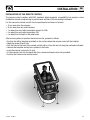
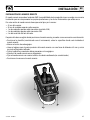
El mando remoto responde al estándar EMC (compatibilidad electromagnética) pero se exige una correcta
instalación para no comprometer las propias prestaciones y las de los instrumentos que están cerca.
Por este motivo los cables del mando tienen que estar lejos por lo menos:
• 1 m de cables que transportan señales de radio (excluido de radio-transmisor SSB).
• 2 m de cables que transportan señales radio de radio-transmisor SSB.
Seguir las reglas que están en seguida para realizar la instalación eléctrica relacionada con el mando remoto:
• Conectar los conectores del mando remoto a los conectores procedentes de los propulsores de maniobra.
• Montar un interruptor para prender y apagar el mando remoto (no suministrado).
• Posicionar el interruptor de modo que sea de fácil alcance, en el caso en que sea necesario apagar el
equipo para evitar situaciones de peligro.
• Montar un fusible rápido de 8A en la linea de alimentación del mando remoto (no suministrado).
• Dimensionar correctamente la sección de los cables de alimentación del mando remoto en función de
su longitud.
• No utilizar la tensión procedente del grupo baterías de los motores o propulsores para alimentar el
mando remoto.
• Alimentar el mando remoto sólo después de haber realizado y comprobado la exactitud de todas las
conexiones eléctricas.
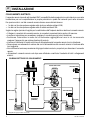
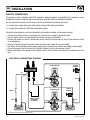
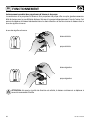
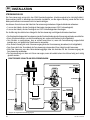
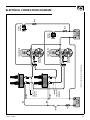
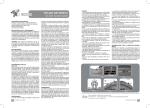
ESQUEMA ELÉCTRICO DE LAS CONEXIONES
DISPOSITIVO DE
DISCONEXIÓN
PROPULSOR POPA
MOTOR
ROJO
NEGRO
FUSIBLE
PROPULSOR PROA
INTERRUPTOR
DISPOSITIVO DE
DISCONEXIÓN
MOTOR
PROLONGACIONES
(OPCIONALES)
FUSIBLE
*
BATERÍA
DE SERVICIOS
FUSIBLE
*
BATERÍA
PROPULSORES
* Negativo de los grupos batería en común.
46
TCD1044 - REV001B