1
www.nokia.com
Printed in Mexico.
Impreso en México.
User Guide
Manual del Usuario
Nokia 6555 User Guide
Nota: La traducción en español de este manual inicia en la página 117.
1
Issue 1, Part No. 9201381
Copyright © 2007 Nokia. All rights reserved.
Nokia, Nokia Connecting People, NaviTM, and Nokia Original Enhancements logo are trademarks or
registered trademarks of Nokia Corporation. Nokia tune is a sound mark of Nokia Corporation. Other
product and company names mentioned herein may be trademarks or tradenames of their
respective owners.
Reproduction, transfer, distribution or storage of part or all of the contents in this document in
any form without the prior written permission of Nokia is prohibited.
US Patent No 5818437 and other pending patents. T9 text input software
Copyright (C) 1997-2007. Tegic Communications, Inc. All rights reserved.
Includes RSA BSAFE cryptographic or security protocol software from RSA Security.
Java is a trademark of Sun Microsystems, Inc.
Bluetooth is a registered trademark of Bluetooth SIG, Inc.
This product is licensed under the MPEG-4 Visual Patent Portfolio License (i) for personal and
noncommercial use in connection with information which has been encoded in compliance
with the MPEG-4 Visual Standard by a consumer engaged in a personal and noncommercial
activity and (ii) for use in connection with MPEG-4 video provided by a licensed video provider.
No license is granted or shall be implied for any other use. Additional information including that
relating to promotional, internal and commercial uses may be obtained from MPEG LA, LLC.
See http://www.mpegla.com.
Nokia operates a policy of ongoing development. Nokia reserves the right to make changes and
improvements to any of the products described in this document without prior notice.
TO THE MAXIMUM EXTENT PERMITTED BY APPLICABLE LAW, UNDER NO CIRCUMSTANCES SHALL
NOKIA OR ANY OF ITS LICENSORS BE RESPONSIBLE FOR ANY LOSS OF DATA OR INCOME OR ANY
SPECIAL, INCIDENTAL, CONSEQUENTIAL OR INDIRECT DAMAGES HOWSOEVER CAUSED.
2
THE CONTENTS OF THIS DOCUMENT ARE PROVIDED "AS IS". EXCEPT AS REQUIRED BY APPLICABLE
LAW, NO WARRANTIES OF ANY KIND, EITHER EXPRESS OR IMPLIED, INCLUDING, BUT NOT LIMITED
TO, THE IMPLIED WARRANTIES OF MERCHANTABILITY AND FITNESS FOR A PARTICULAR PURPOSE,
ARE MADE IN RELATION TO THE ACCURACY, RELIABILITY OR CONTENTS OF THIS DOCUMENT.
NOKIA RESERVES THE RIGHT TO REVISE THIS DOCUMENT OR WITHDRAW IT AT ANY TIME
WITHOUT PRIOR NOTICE.
The availability of particular products and applications and services for these products may vary by
region. Please check with the Nokia dealer for details, and availability of language options.
Export controls
This device may contain commodities, technology or software subject to export laws and
regulations from the US and other countries. Diversion contrary to law is prohibited.
FCC NOTICE
Your device may cause TV or radio interference (for example, when using a telephone in close
proximity to receiving equipment). The FCC can require you to stop using your telephone if such
interference cannot be eliminated. If you require assistance, contact your local service facility. This
device complies with part 15 of the FCC rules. Operation is subject to the following two conditions:
(1) This device may not cause harmful interference, and (2) this device must accept any interference
received, including interference that may cause undesired operation. Any changes or modifications
not expressly approved by Nokia could void the user's authority to operate this equipment.
3
Contents
For your safety............................................................................................................... 6
General information .................................................................................................. 10
1. Get started............................................................................................................ 13
2. Your phone ........................................................................................................... 23
3. Call functions....................................................................................................... 29
4. Write text.............................................................................................................. 32
5. Navigate the menus........................................................................................... 34
6. Messaging............................................................................................................. 34
7. Contacts ................................................................................................................ 47
8. Log........................................................................................................................... 51
9.
Settings ................................................................................................................ 52
10. Gallery.................................................................................................................... 66
11. Push to talk........................................................................................................... 67
12. Media ..................................................................................................................... 75
13. Organizer............................................................................................................... 80
14. Instant messaging ............................................................................................. 85
15. Applications.......................................................................................................... 89
16. SIM services.......................................................................................................... 93
4
17. Web......................................................................................................................... 94
18. PC connectivity................................................................................................. 102
19. Battery information ........................................................................................ 103
Care and maintenance........................................................................................... 106
Additional safety information.............................................................................. 107
Index............................................................................................................................ 112
5
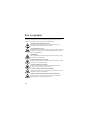
For your safety
Read these simple guidelines. Not following them may be dangerous or illegal. Read
the complete user guide for further information.
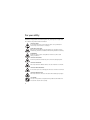
SWITCH ON SAFELY
Do not switch the phone on when wireless phone use is prohibited or
when it may cause interference or danger.
ROAD SAFETY COMES FIRST
Obey all local laws. Always keep your hands free to operate the vehicle
while driving. Your first consideration while driving should be road safety.
INTERFERENCE
All wireless phones may be susceptible to interference, which could
affect performance.
SWITCH OFF IN HOSPITALS
Follow any restrictions. Switch the phone off near medical equipment.
SWITCH OFF IN AIRCRAFT
Follow any restrictions. Wireless devices can cause interference in aircraft.
SWITCH OFF WHEN REFUELLING
Do not use the phone at a refueling point. Do not use near fuel or chemicals.
SWITCH OFF NEAR BLASTING
Follow any restrictions. Do not use the device where blasting is in progress.
USE SENSIBLY
Use only in the positions as explained in the product documentation. Do
not touch the antenna unnecessarily.
6
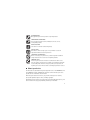
QUALIFIED SERVICE
Only qualified personnel may install or repair this product.
ENHANCEMENTS AND BATTERIES
Use only approved enhancements and batteries. Do not connect
incompatible products.
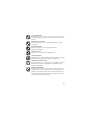
WATER-RESISTANCE
Your device is not water-resistant. Keep it dry.
BACK-UP COPIES
Remember to make back-up copies or keep a written record of all
important information stored in your device.
CONNECTING TO OTHER DEVICES
When connecting to any other device, read its user guide for detailed
safety instructions. Do not connect incompatible products.
EMERGENCY CALLS
Ensure the phone function of the device is switched on and in service.
Press the end key as many times as needed to clear the display and return
to the standby mode. Enter the emergency number, then press the call
key. Give your location. Do not end the call until given permission to do so.
■
About your device
The wireless device described in this guide is approved for use on the WCDMA 850 and
1900, EGSM 850 and 900, and GSM 1800 and 1900 networks. Contact your service
provider for more information about networks.
When using the features in this device, obey all laws and respect local customs,
privacy and legitimate rights of others, including copyrights.
Copyright protections may prevent some images, music (including ringing tones), and
other content from being copied, modified, transferred, or forwarded.
7
Warning: To use any features in this device, other than the alarm clock, the
device must be switched on. Do not switch the device on when wireless
device use may cause interference or danger.
■ Network services
To use the phone you must have service from a wireless service provider. Many of
the features require special network features. These features are not available on all
networks; other networks may require that you make specific arrangements with your
service provider before you can use the network services. Your service provider can
give you instructions and explain what charges will apply. Some networks may have
limitations that affect how you can use network services. For instance, some networks
may not support all language-dependent characters and services.
Your service provider may have requested that certain features be disabled or not
activated in your device. If so, these features will not appear on your device menu.
Your device may also have a special configuration such as changes in menu names,
menu order, and icons. Contact your service provider for more information.
This device supports WAP 2.0 protocols (HTTP and SSL) that run on TCP/IP protocols.
Some features of this device, such as multimedia messaging (MMS), browsing, e-mail
application, instant messaging, presence enhanced contacts, remote synchronization,
and content downloading using the browser or MMS, require network support for
these technologies.
■
Shared memory
The following features in this device may share memory: gallery, contacts, text messages,
multimedia messages, and instant messages, e-mail, calendar, to-do notes, JavaTM
games and applications, and note application. Use of one or more of these features
may reduce the memory available for the remaining features sharing memory. For
example, saving many Java applications may use all of the available memory. Your
device may display a message that the memory is full when you try to use a shared
memory feature. In this case, delete some of the information or entries stored in the
shared memory features before continuing.
8
■
Enhancements
A few practical rules about accessories and enhancements
• Keep all accessories and enhancements out of the reach of small children.
• When you disconnect the power cord of any accessory or enhancement, grasp and
pull the plug, not the cord.
• Check regularly that enhancements installed in a vehicle are mounted and are
operating properly.
• Installation of any complex car enhancements must be made by qualified
personnel only.
9
General information
■
Overview of functions
Your phone provides many functions that are practical for daily use, such as
text and multimedia messaging, calendar, clock, alarm clock, music
player, and built-in camera. Your phone also supports the following functions:
• Plug and play online service to get the configuration settings. See "Plug
and play service," p. 20 and "Configuration settings service," p. 11.
• Active standby. See "Active standby," p. 25.
• Audio messaging. See "Nokia Xpress audio messaging," p. 38.
• Instant messaging. See "Instant messaging," p. 85.
• E-mail application. See "E-mail application," p. 40.
• Enhanced voice dialing. See "Enhanced voice dialing," p. 30 and "Voice
commands," p. 55.
• Java 2 Platform, Micro Edition (J2METM). See "Applications," p. 89.
■
Access codes
Security code
The security code (5 to 10 digits) helps to protect your phone against
unauthorised use. For more information on security codes, see "Security," p. 65.
PIN codes
The personal identification number (PIN) code and the universal personal
identification number (UPIN) code (4 to 8 digits) help to protect your SIM
card against unauthorized use. See "Security," p. 65.
10
The PIN2 code (4 to 8 digits) may be supplied with the SIM card and is
required for some functions.
The module PIN is required to access the information in the security module.
See "Security module," p. 100.
The signing PIN is required for the digital signature. See "Digital signature,"
p. 101.
PUK codes
The personal unblocking key (PUK) code and the universal personal unblocking
key (UPUK) code (8 digits) is required to change a blocked PIN code and UPIN
code, respectively. The PUK2 code (8 digits) is required to change a blocked
PIN2 code. If the codes are not supplied with the SIM card, contact your
local service provider for the codes.
Restriction password
The restriction password (4 digits) is required when using the Call
restrictions. See "Security," p. 65.
■
Configuration settings service
To use some of the network services, such as mobile Internet services, MMS,
Nokia Xpress audio messaging, or remote Internet server synchronization,
your phone needs the correct configuration settings. For more information
on availability, contact your network operator, service provider, nearest
authorized Nokia dealer, or visit the support area on the Nokia Web site,
www.nokia.com/support.
11
When you have received the settings as a configuration message, and the
settings are not automatically saved and activated, Configuration sett.
received is displayed.
To save the settings, select Show > Save. If required, enter the PIN code
supplied by the service provider.
To discard the received settings, select Exit or Show > Discard.
■
Download content
You may be able to download new content (for example, themes) to the
phone (network service).
For the availability of different services and pricing, contact your
service provider.
Important: Use only services that you trust and that offer adequate security
and protection against harmful software.
■
Nokia support
Check www.nokia.com/support or your local Nokia website for the latest
version of this guide, additional information, downloads, and services
related to your Nokia product.
On the website, you can get information on the use of Nokia products and
services. If you need to contact customer service, check the list of local
Nokia Care contact centers at www.nokia.com/customerservice.
For maintenance services, check your nearest Nokia service center at
www.nokia.com/repair.
12
1. Get started
■
Install SIM card and battery
Always switch the device off and disconnect the charger before removing the battery.
Keep all SIM cards out of the reach of small children.
For availability and information on using SIM card services, contact your SIM card
vendor. This may be the service provider, network operator, or other vendor.
This device is intended for use with BL-5C battery. Always use original Nokia
batteries. See "Nokia battery authentication," p. 104.
The SIM card and its contacts can easily be damaged by scratches or
bending, so be careful when handling, inserting, or removing the card.
Always switch off the power and disconnect the charger and any other device
before removing the covers. Avoid touching electronic components while
changing the covers. Always store and use the device with the covers attached.
Warning: Use only batteries, chargers, and enhancements approved by
Nokia for use with this particular model. The use of any other types
may invalidate any approval or warranty, and may be dangerous.
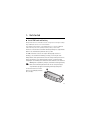
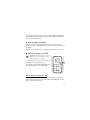
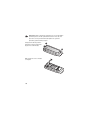
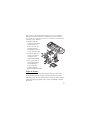
To remove the back cover of the
phone, press sightly (1) and slide
the cover (2).
13
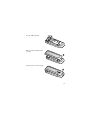
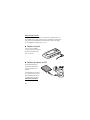
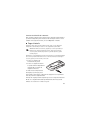
Remove the battery as shown.
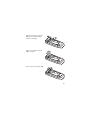
To open the SIM card holder, press
slightly (1) and lift the holder (2).
Insert the SIM card properly into
the holder.
14
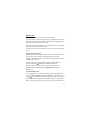
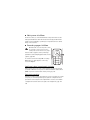
Close the SIM card holder.
Replace the battery and the back
cover (1).
Slide the back cover into place (2).
15
■ Insert a microSD card
Keep all microSD memory cards out of the reach of small children.
A microSD card can be loaded with ringing tones, themes,
tones, images and videos. If you delete, reload, or replace this
card, these functions and features may not function properly.
Use only compatible microSD cards with this device. Other memory cards, such as Reduced
Size MultiMedia cards, do not fit in the microSD card slot and are not compatible with this
device. Using an incompatible memory card may damage the memory card as well as the
device, and data stored on the incompatible card may be corrupted.
Use only microSD cards approved by Nokia for use with this device. Nokia utilizes the
approved industry standards for memory cards but not all other brands may function
correctly or be fully compatible with this device.
1. Remove the back cover
and the battery of the
phone. Slide the
microSD memory card
holder down (1) and flip
the card holder up (2).
2. Insert the card into the
memory card holder
with the gold-colored
contact area facing
up (3).
3. Close the card holder
(4 and 5), reinsert the
battery and slide the
back cover back in place.
16
Memory card
Keep all memory cards out of the reach of small children.
You can use the microSD memory card to store your multimedia files such as
video clips, music tracks, and sound files, images, and messaging data, and
to back up information from phone memory.
Some of the folders in Gallery with content that the phone use, for example,
Themes, may be stored on a memory card.
To insert and remove the microSD memory card see "Insert a microSD card,"
p. 16.
Format the memory card
When a memory card is formatted, all data on the card is permanently lost.
Some memory cards are supplied preformatted and others require
formatting. Consult your retailer to find out if you must format the memory
card before you can use it.
To format a memory card, select Menu >Gallery or Applications, the
memory card folder
, Options > Format mem. card > Yes.
When formatting is complete, enter a name for the memory card.
An unformatted memory card may have NO NAME listed instead of
Memory card.
Lock the memory card
To set a password to lock your memory card to help prevent unauthorised
use, select Options > Menu > Gallery or Applications > the memory card
folder
> Set password. The password can be up to eight characters long.
The password is stored in your phone and you do not have to enter it again
while you are using the memory card on the same phone. If you want to use
17
the memory card on another phone, you are asked for the password.
To delete the password, select Options > Delete password.
Check memory consumption
To check the memory consumption of different data groups and the
available memory for installing new applications or software on your
memory card, select Options > Details.
■
Charge the battery
Check the model number of any charger before use with this device. This device is
intended for use when supplied with power from an AC-3, AC-4, or AC-5 charger.
Warning: Use only batteries, chargers, and enhancements approved by Nokia
for use with this particular model. The use of any other types may invalidate
any approval or warranty, and may be dangerous.
For availability of approved enhancements, please check with your dealer. When you
disconnect the power cord of any enhancement, grasp and pull the plug, not the cord.
1. Connect the charger to a
wall socket.
2. Connect the charger to your
phone. A CA-44 charging
adapter can be used with
older charger models.
If the battery is completely
discharged, it may take a few
minutes before the charging
indicator appears on the display
or before any calls can be made.
18
The charging time depends on the charger used. Charging a BL-5C battery
with the AC-4 charger takes approximately 1 hour and 30 minutes while the
phone is in the standby mode.
■
Open and close the phone
You open and close the phone manually. When you open the fold of the
phone, it opens up to approximately 165 degrees. Do not try to force the fold
open more.
Depending on the Theme a tone sounds when you open and close the phone.
■
Switch the phone on and off
Warning: Do not switch the phone on when
wireless phone use is prohibited or when it
may cause interference or danger.
To switch the phone on or off, press and hold the
power key. See "Keys and parts," p. 23.
If the phone asks for a PIN or a UPIN code, enter
the code (displayed as ****), and select OK.
Set the time, time zone, and date
Enter the local time, select the time zone of your location in terms of the
time difference with respect to Greenwich Mean Time (GMT), and enter the
date. See "Date and time," p. 54.
19
Plug and play service
When you switch on your phone for the first time, and the phone is in
the standby mode, you are asked to get the configuration settings from
your service provider (network service). Confirm or decline the query.
See "Configuration settings service," p. 11.
■
Connect a headset
You can connect a Nokia
2.5 mm headset to your device.
Connect the headset to the
device as shown.
■
Connect your phone and PC
The CA-101 data cable is
used for data transfer and
synchonising your phone
and PC.
See "Data transfer," p. 59 for
more information. You must
download Nokia PC Suite to
use with your device. Go to
www.nokia.com/support
for more information.
20
1. Connect the lead from the CA-101 to the micro USB socket on the lower
left side of your phone.
2. Connect the CA-101 to your PC or laptop. USB data cable connected.
Select mode. appears on the display screen of your phone.
3. Select OK and Default mode.
■
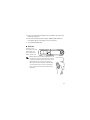
Antenna
Your device has an
internal antenna located
at the bottom of the
device. Avoid contact
with the antenna area.
Note: As with any other radio transmitting device, do
not touch the antenna unnecessarily when the device
is switched on. Contact with the antenna affects call
quality and may cause the device to operate at a
higher power level than otherwise needed. Avoiding
contact with the antenna area when operating the
device optimizes the antenna performance and the
battery life.
21
■
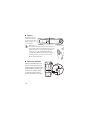
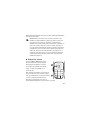
Phone strap
Remove the back cover of the phone.
Insert a thread through the eyelet.
Place the thread around the post of
the phone as shown in the picture.
Tighten the thread. Put the back
cover back in place.
■
Digital rights management
Content owners may use different types of digital rights management (DRM)
technologies to protect their intellectual property, including copyrights. This
device uses various types of DRM software to access DRM-protected content.
With this device you may be able to access content protected with WMDRM
10. If certain DRM software fails to protect the content, content owners may
ask that such DRM software’s ability to access the new DRM-protected content
be revoked. Revocation may also prevent renewal of such DRM-protected
content already in your device. Revocation of such DRM software does not
affect the use of content protected with other types of DRM or the use of
non-DRM-protected content.
Digital rights management (DRM) protected content comes with an associated
activation key that defines your rights to use the content. If your device has
WMDRM protected content, both the activation keys and the content will
be lost if the device memory is formatted. You may also lose the activation
keys and the content in case the files on your device get corrupted. Losing the
activation keys or the content may limit your ability to use the same content
on your device again. For more information, contact your service provider.
22
2. Your phone
■
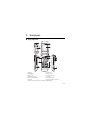
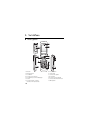
Keys and parts
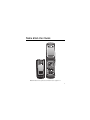
1) Earpiece
2) Main display
3) NaviTM key
4) Right selection key
5) End key and power key
6) Key pad
7) Camera key or PTT key if PTT is activated
8) Volume key
9) USB connector
10) Charger connector
11) Call key
12) Left selection key
13) Universal headset connector
14) Mini display
23
■
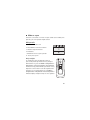
Standby mode
When the phone is ready for use, and you have not entered any characters,
the phone is in the standby mode.
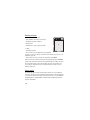
Mini display
1 Network mode indicator
2 Signal strength of the cellular network
3 Battery charge status
4 Indicators
5 Network name or the operator logo
6 Clock and date or profile
Analog clock
The Mini display settings include a screensaver to display
an analog clock. To show the clock, select Menu >
Settings > Mini display > Screen saver > Analog clock.
The time-out default to display the clock after closing
the fold is ten seconds. To display the clock sooner,
select Menu > Settings > Mini display > Screen saver >
Time-out and set the time to five seconds.
24
Main display
1 Network mode indicator
2 Signal strength of the cellular network
3 Battery charge status
4 Indicators
5 Network name or the operator logo
6 Clock
7 Main display
8 The left selection key is Go to or a shortcut to
another function. See "Left selection key," p. 55.
9 The middle selection key mode is Menu.
10 The right selection key may be Names to access the list of contacts in the
Contacts menu, an operator-specific name to access an operator-specific
website, or a shortcut to a function that you selected. See "Right selection
key," p. 55.
Active standby
In the active standby mode there is a list of selected phone features and
information on the screen that you can directly access in the standby mode.
To switch on or off the mode, select Menu > Settings > Main display >
Active standby > Active standby mode > On or Off.
In the active standby mode, scroll up or down to navigate the list. Left and
right arrows at the beginning and end of a line indicate that further information
is available by scrolling left or right. To end the active standby navigation
mode, select Exit.
25
To organize and change the active standby mode, activate the navigation
mode, and select Options > Customize view.
Indicators
You have unread messages.
You have new voice mail.
You have unsent, canceled or failed messages.
The phone registered a missed call.
,
Your phone is connected to the instant messaging service, and the
availability status is online or offline.
You received one or several instant messages.
The keypad is locked.
The phone does not ring for an incoming call or text message.
The alarm clock is activated.
The countdown timer is running.
The stopwatch is running.
The phone is registered to the GPRS or EGPRS network.
A GPRS or EGPRS connection is established.
The GPRS or EGPRS connection is suspended (on hold).
A Bluetooth connection is active.
26
Push-to-talk connection is active or suspended.
,
If you have two phone lines, the second phone line is selected.
All incoming calls are forwarded to another number.
The loudspeaker is activated, or the music stand is connected to
the phone.
Calls are limited to a closed user group.
The timed profile is selected.
,
,
, or
A headset, handsfree, loopset, or music stand enhancement is
connected to the phone.
■
Flight mode
You can deactivate all radio frequency functions and still have access to
offline games, calendar, and phone numbers. Use the flight mode in radio
sensitive environments—on board aircraft or in hospitals. When the flight
mode is active,
is shown.
Select Menu > Settings > Profiles > Flight > Activate or Customize.
To deactivate the flight mode, select any other profile.
In the flight mode you can make an emergency call. Enter the emergency
number, press the call key, and select Yes when asked Exit flight profile?
The phone attempts to make an emergency call.
When the emergency call ends, the phone automatically changes to the
normal profile mode.
27
Warning: With the flight mode profile, you cannot make or receive
any calls, including emergency calls, or use other features that
require network coverage. To make calls, you must first activate the
phone function by changing profiles. If the device has been locked,
enter the lock code. If you need to make an emergency call while the
device is locked and in the flight profile, you may be also able to
enter an official emergency number programmed in your device in
the lock code field and select Call. The device will confirm that you
are about to exit flight profile to start an emergency call.
■
Keypad lock (keyguard)
Select Menu or Unlock (1), and press * (2)
within 1.5 seconds to lock or unlock
the keypad.
If the security keyguard is activated, enter the
security code if requested.
To answer a call when the keyguard is on,
press the call key or open the phone. When
you end or reject the call, the keypad
automatically locks.
For Security keyguard, see "Phone," p. 63.
When the keyguard is on, calls still may be possible
to the official emergency number programmed into your device.
28
■
Functions without a SIM card
Several functions of your phone may be used without installing a SIM card
(for example, the data transfer with a compatible PC or another compatible
device). Without a SIM card, some functions appear dimmed in the menus
and cannot be used.
For an emergency call, some networks may require that a valid SIM card is properly
inserted in the device.
3. Call functions
■
Make a voice call
1. Enter the phone number, including the area code.
For international calls, press * twice for the international prefix (the +
character replaces the international access code), enter the country code,
the area code without the leading 0, if necessary, and the phone number.
2. To call the number, press the call key.
To increase the volume in a call, press the volume up key and to decrease
press the volume down key.
3. To end the call or to cancel the call attempt, press the end key, or close
the phone.
To search for a name or phone number that you have saved in Contacts, see
"Search for a contact," p. 48. Press the call key to call the number.
To access the list of dialed numbers, press the call key once in the standby
mode. To call the number, select a number or name, and press the call key.
29
1-touch dialing
Assign a phone number to one of the sped dialing keys, 2 to 9. See "1-touch
dialing," p. 51. Call the number in either of the following ways:
• Press a speed-dialing key, then the call key.
• If 1-touch dialing is set to On, press and hold a 1-touch dialing key until
the call begins. See Speeding dialing in "Call," p. 62.
Enhanced voice dialing
You can say the name saved in the contact list of the phone to make a phone
call. Voice commands are not language-dependent. To set the language, see
Voice recognition language in "Phone," p. 63.
Note: Using voice tags may be difficult in a noisy environment or during an
emergency, so you should not rely solely upon voice dialing in all circumstances.
1. In the standby mode, press and hold the volume down key. A short tone is
played, and Speak now is displayed.
2. Say the voice command clearly. If the voice recognition was successful, a
list with matches is shown. The phone plays the voice command of the
match on the top of the list. If the result is not the correct one, scroll to
another entry.
Using voice commands to carry out a selected phone function is similar
to voice dialing. See Voice commands in "My shortcuts," p. 55.
■
Answer or decline a call
To answer an incoming call, press the call key, or open the phone. To end the
call, press the end key or close the phone.
30
To decline an incoming call, press the end key or close the phone. To reject
an incoming call when the phone is closed, press and hold a volume key.
To mute the ringing tone, press a volume key when the phone is closed, or
select Silence when the phone is open.
Call waiting
To answer the waiting call during an active call, press the call key. The first
call is put on hold. To end the active call, press the end key.
To activate the Call waiting function, see "Call," p. 62.
■
Options during a voice call
Many of the options that you can use during a call are network services.
For availability, contact your service provider.
During a call, select Options and from the following:
Call options are Mute or Unmute, Contacts, Menu, Lock keypad, Record,
Loudspeaker or Handset.
Network services options are Answer or Decline, Hold or Unhold, New call,
Add to conference, End call, End all calls, and the following:
Touch tones — to send tone strings
Swap — to switch between the active call and the call on hold
Transfer calls — to connect a call on hold to an active call and
disconnect yourself
Conference — to make a conference call of up to five persons
Private call —to discuss privately in a conference call
Warning: Do not hold the device near your ear when the loudspeaker is in
use, because the volume may be extremely loud.
31
4. Write text
You can enter text (for example, when writing messages) using traditional or
predictive text input. When you write text, text input indicators appear at
the top of the display.
indicates traditional text input.
indicates
predictive text input. Predictive text input allows you to write text quickly
using the phone keypad and a built-in dictionary. You can enter a letter with
a single keypress.
indicates predictive text input with Word suggestions.
The phone predicts and completes the word before you enter all the characters.
, , or
appears next to the text input indicator, indicating the
character case. To change the character case, press #.
indicates number mode. To change from the letter to number mode,
press and hold #, and select Number mode.
To set the writing language while writing text, select Options >
Writing language.
■
Predictive text input
To set predictive text input on, select Options > Prediction options >
Prediction > On.
Tip: To quickly set predictive text input on or off when writing text,
press # twice, or select and hold Options.
To select the prediction input type, select Options > Prediction options >
Prediction type > Normal or Word suggestions.
1. Start writing a word using the 2 to 9 keys. Press each key only once for
one letter. The entered letters are displayed underlined.
32
If you selected Word suggestions as prediction type, the phone starts to
predict the word you are writing. After you enter a few letters, and if
these entered letters are not a word, the phone tries to predict longer
words. Only the entered letters are displayed underlined.
To insert a special character, press and hold *, or select Options > Insert
symbol. Scroll to a character, and select Insert.
To write compound words, enter the first part of the word; to confirm it,
press the scroll key right. Write the next part of the word and confirm
the word.
To enter a full stop, press 1.
2. When you finish writing the word and it is correct, to confirm it, press 0
to add space.
If the word is not correct, press * repeatedly. When the word that you
want appears, select the word.
If the ? character is displayed after the word, the word you intended to
write is not in the dictionary. To add the word to the dictionary, select
Spell. Complete the word (traditional text input is used), and select Save.
■
Traditional text input
To set traditional text input on, select Options > Prediction
options >Prediction > Off.
Press a number key, 1 to 9, repeatedly until the desired character appears.
Not all characters available under a number key are printed on the key.
The characters available depend on the selected writing language.
If the next letter you want is located on the same key as the present one,
wait until the cursor appears.
33
The most common punctuation marks and special characters are available
under the 1 key. For more characters, press *.
5. Navigate the menus
The phone offers you an extensive range of functions, which are grouped
into menus.
1. To access the menu, select Menu.
To change the menu view, select Options > Main menu view > List, Grid
Grid with labels or Tab.
To rearrange the menu, scroll to the menu you want to move, and select
Options > Organize > Move. Scroll to where you want to move the
menu, and select OK. To save the change, select Done > Yes.
2. Scroll through the menu, and select an option (for example, Settings).
3. If the selected menu contains further submenus, select the one you want
(for example, Call).
4. If the selected menu contains further submenus, repeat step 3.
5. Select the setting of your choice.
6. To return to the previous menu level, select Back. To exit the menu,
select Exit.
6. Messaging
You can read, write, send, and save text, multimedia, e-mail,
audio, and flash messages. All messages are organized into folders.
34
■
Text messages
With the short message service (SMS) you can send and receive text
messages, and receive messages that can contain pictures (network service).
Before you can send any text or SMS e-mail messages, you must save your
message center number. See "Message settings," p. 44.
To check SMS e-mail service availability and to subscribe to the service,
contact your service provider. To save an e-mail address in Contacts, see
"Save details," p. 48.
Your device supports the sending of text messages beyond the character limit for a
single message. Longer messages are sent as a series of two or more messages. Your
service provider may charge accordingly. Characters that use accents or other marks,
and characters from some language options like Spanish, take up more space limiting
the number of characters that can be sent in a single message.
An indicator at the top of the display shows the total number of characters
left and the number of messages needed for sending. For example, 673/2
means that there are 673 characters left and that the message is sent as a
series of two messages.
Note: When the phone is sending the message, the animated
is
shown. This is an indication that the message has been sent by your
device to the message center number programmed into your device.
This is not an indication that the message has been received at the
intended destination. For more details about messaging services,
check with your service provider.
Write and send a message
1. Select Menu > Messaging > Create message > Message.
35
2. Enter one or more phone numbers or e-mail addresses in the To: field. To
retrieve a phone number or e-mail address from a memory, select Add.
3. Write your message in the Text: field.
4. To send the message, select Send. See "Message sending," p. 37.
Read and reply to a message
1. To view a received message, select Show. To view it later, select Exit.
To read the message later, select Menu > Messaging > Inbox.
2. To reply to a message, select Reply. Write the reply message.
3. To send the message, select Send. See "Message sending," p. 37.
■
Multimedia messages
Only devices that have compatible features can receive and display multimedia
messages. The appearance of a message may vary depending on the receiving device.
A multimedia message can contain some attachments.
To check availability and to subscribe to the multimedia messaging network
service, contact your service provider.
Write and send a multimedia message
The wireless network may limit the size of multimedia messages. If the inserted image
exceeds this limit, the device may make it smaller so that it can be sent by multimedia
messaging service (MMS).
1. Select Menu > Messaging > Create message > Message > Options >
Change to multim..
2. Write your message. To add a file, scroll to the icons at the bottom of the
display and find the type of file you want and select Insert.
36
3. To view the message before sending it, select Options > Preview.
4. To send the message, select Send. See "Message sending," p. 37.
5. Enter one or more phone numbers or e-mail addresses in the To: field. To
retrieve a phone number or e-mail address from a memory, select Add.
6. To send the message, select Send. See "Message sending," p. 37.
Message sending
Copyright protections may prevent some images, music (including ringing tones), and
other content from being copied, modified, transferred or forwarded.
To send the message, select Send. The phone saves the message in the
Outbox folder, and the sending starts.
Note: When the phone is sending the message, the animated
is shown.
This is an indication that the message has been sent by your device to the
message center number programmed into your device. This is not an indication
that the message has been received at the intended destination. For more
details about messaging services, check with your service provider.
If an interruption occurs while the message is being sent, the phone tries to
resend the message a few times. If these attempts fail, the message remains
in the Outbox folder. To cancel the sending of the messages in the Outbox
folder, scroll to the desired message, and select Options > Cancel sending.
Read and reply to a message
Important: Exercise caution when opening messages. Multimedia message
objects may contain malicious software or otherwise be harmful to your
device or PC.
1. To view a received message, select Show. To view it later, select Exit.
37
2. To view the whole message if the received message contains a presentation,
select Play.
To view the files in the presentation or the attachments, select Options >
Objects or Attachments.
3. To reply to the message, select Options > Reply > Message, E-mail
message, Flash message, or Audio message. Write the reply message.
4. To send the message, select Send.
■
Flash messages
Flash messages are text messages instantly displayed upon reception.
Flash messages are not automatically saved.
Write a message
Select Menu > Messaging > Create message > Flash message. Enter the
recipient’s phone number and write your message. To insert a blinking text
into the message, select Options > Insert symbol > Blink character to set a
marker. The text behind the marker blinks until a second marker is inserted.
Receive a message
A received flash message is indicated with Message: and a few words from
the beginning of the message. To read the message, select Read. To extract
numbers and addresses from the current message, select Options > Use
detail. To save the message, select Save and the folder in which you want
to save it.
■
Nokia Xpress audio messaging
You can use the MMS to create and send a audio message in a convenient
way. MMS must be activated before you can use audio messages.
38
Create a message
1. Select Menu > Messaging > Create message > Audio message. The recorder
opens. To use the recorder, see "Voice recorder," p. 79.
2. Speak your message.
3. Enter one or more phone numbers in the To: field, or select Add to
retrieve a number.
4. To send the message, select Send.
Listen to a message
To open a received audio message, select Play. If more than one message is
received, select Show > Play. To listen to the message later, select Exit.
■
Memory full
When you receive a message, and the memory for the messages is full,
Memory full. Unable to receive msgs. is shown. To first delete old messages,
select OK > Yes and the folder. Scroll to the desired message, and select
Delete. If more messages are to be deleted, select Mark. Mark all the
messages you want to delete, and select Options > Delete marked.
■
Folders
The phone saves received messages in the Inbox folder.
Messages that have not yet been sent are saved in the Outbox folder.
To set the phone to save the sent messages in the Sent items folder, see Save
sent messages in "General settings," p. 44.
39
To edit and send messages that you have written and saved in the Drafts
folder, select Menu > Messaging > Drafts.
You can move your messages to the Saved items folder. To organize your
Saved items subfolders, select Menu > Messaging > Saved items. To add a
folder, select Options > Add folder. To delete or rename a folder, scroll to the
desired folder, and select Options > Delete folder or Rename folder.
Your phone has templates. To create a new template, save a message as a
template. To access the template list, select Menu > Messaging > Saved
items > Templates.
■
E-mail application
The e-mail application uses a packet data connection (network service) to
allow you to access your e-mail account. This e-mail application is different
from the SMS e-mail function. To use the e-mail function on your phone,
you need a compatible e-mail system.
You can write, send, and read e-mail with your phone. Your phone supports
POP3 and IMAP4 e-mail servers. This application does not support keypad tones.
Before you can send and retrieve any e-mail messages, you must obtain a
new e-mail account or use your current account. To check the availability of
your e-mail account, contact your e-mail service provider.
Check your e-mail settings with your e-mail service provider. You may
receive the e-mail configuration settings as a configuration message.
See "Configuration settings service," p. 11.
To activate the e-mail settings, select Menu > Messaging > Message settings >
E-mail messages. See "E-mail messages," p. 47.
40
Setting wizard
The setting wizard will start automatically if no e-mail settings are defined
in the phone. To enter the settings manually, select Menu > Messaging >
E-mail mailbox > Options > Yes > Create manually.
The Manage accounts options allow you to add, delete, and change the e-mail
settings. Make sure that you have defined the correct preferred access point
for your operator. See "Configuration," p. 64.
The e-mail application requires an Internet access point without a proxy.
WAP access points normally include a proxy and do not work with the
e-mail application.
Write and send an e-mail
You can write your e-mail message before connecting to the e-mail service;
or connect to the service first, then write and send your e-mail.
1. Select Menu > Messaging > E-mail message.
2. If more than one e-mail account is defined, select the account from
which you want to send the e-mail.
3. Enter the recipient’s e-mail address, write the subject, and enter the e-mail
message. To attach a file from Gallery, select Options > Insert.
4. To send the e-mail message, select Send > Send now.
To save the e-mail in the Outbox folder to be sent later, select Send >
Send later.
To edit or continue writing your e-mail later, select Options > Save as
draft. The e-mail is saved in Outboxes > Drafts.
To send the e-mail later, select Menu > Messaging > E-mail > Options >
Send now or Send/check e-mail.
41
Download e-mail
1. To download e-mail messages that have been sent to your e-mail
account, select Menu > Messaging > E-mail > Check new e-mail.
If more than one e-mail account is defined, select the account from
which you want to download the e-mail.
The e-mail application only downloads e-mail headers at first.
2. Select Back > Inboxes, the account name, and the new message, and
select Retrieve to download the complete e-mail message.
To download new e-mail messages and to send e-mail that has been saved
in the Outbox folder, select Options > Send/check e-mail.
Read and reply to e-mail
Important: Exercise caution when opening messages. E-mail messages may
contain malicious software or otherwise be harmful to your device or PC.
1. Select Menu > Messaging > E-mail > Inboxes, the account name, and
the desired message.
2. To reply to an e-mail, select Reply > Original text or Empty message. To
reply to many, select Options > Reply to all. Confirm or edit the e-mail
address and subject, then write your reply.
3. To send the message, select Send > Send now.
E-mail folders
Your phone saves e-mail that you have downloaded from your e-mail account
in the Inboxes folder. The Outboxes folder contains the following folders:
“Account name” for incoming e-mail, Archive for archiving e-mail, Custom
1—Custom 3 for sorting e-mail, Junk where all spam e-mail is stored, Drafts
42
for saving unfinished e-mail, Outbox for saving e-mail that has not been
sent, and Sent items for saving e-mail that has been sent.
To manage the folders and their e-mail content, select Options to view the
available options of each folder.
Spam filter
To activate and define a spam filter, select Options > Spam filter > Settings
in the main e-mail idle screen. The spam filter allows you to put specific
senders on a black or white list. Black list sender messages are filtered to the
Junk folder. Unknown and white list sender messages are downloaded into
the account inbox. To blacklist a sender, select the e-mail message in the
Inboxes folder and Options > Blacklist sender.
■
Voice messages
The voice mailbox is a network service and you may need to subscribe to it.
For more information contact your service provider.
To call your voice mailbox, select Menu > Messaging > Voice messages >
Listen to voice msgs. To enter, search for, or edit your voice mailbox number,
select Voice mailbox number.
If supported by the network,
indicates new voice messages. To call your
voice mailbox number, select Listen.
■
Info messages
You can receive messages on various topics from your service provider
(network service). For more information, contact your service provider.
Select Menu > Messaging > Info messages.
43
■
Service commands
Write and send service requests (also known as USSD commands), such as
activation commands for network services, to your service provider. Select
Menu > Messaging > Serv. commands.
■
Delete messages
To delete messages, select Menu > Messaging > Delete messages > By
message to delete single messages, By folder to delete all messages from a
folder, or All messages.
■
SIM messages
SIM messages are specific text messages saved to your SIM card. You can copy
or move those messages to the phone memory, but not vice versa. To read
SIM messages, select Menu > Messaging > Options > SIM messages.
■
Message settings
General settings
General settings are common for text and multimedia messages.
Select Menu > Messaging > Message settings > General settings and from
the following options:
Save sent messages > Yes — to set the phone to save the sent messages in
the Sent items folder
Overwriting in Sent > Allowed — to set the phone to overwrite the old sent
messages with the new ones when the message memory is full. This setting
is shown only if you set Save sent messages > Yes.
Font size — to select the font size used in messages
44
Favorite recipient — to define contacts or groups as favorites and easily
found in the contacts and groups lists
Graphical smileys > Yes — to set the phone to replace character-based
smileys with graphical ones
Text messages
The text message settings affect the sending, receiving, and viewing of text
and SMS e-mail messages.
Select Menu > Messaging > Message settings > Text messages and from
the following options:
Delivery reports > Yes — to ask the network to send delivery reports about
your messages (network service)
Message centers > Add center — to set the phone number and name of the
message center that is required for sending text messages. You receive this
number from your service provider.
Msg. center in use — to select the message center in use
Message validity — to select the length of time for which the network
attempts to deliver your message
Messages sent via — to select the format of the messages to be sent: Text,
Page, or Fax (network service)
Use packet data > Yes — to set GPRS as the preferred SMS bearer
Character support > Full — to select all characters in the messages to be
sent as viewed. If you select Reduced, characters with accents and other
marks may be converted to other characters.
Rep. via same center > Yes — to allow the recipient of your message to send
you a reply using your message center (network service)
45
Multimedia messages
The message settings affect the sending, receiving, and viewing of multimedia
messages. You may receive the configuration settings for multimedia messaging
as a configuration message. See "Configuration settings service," p. 11. You
can also enter the settings manually. See "Configuration," p. 64.
Select Menu > Messaging > Message settings > Multimedia msgs. and from
the following options:
Delivery reports > Yes — to ask the network to send delivery reports about
your messages (network service)
MMS creation mode - Allows you to select whether or not to create multimedia
messages with restrictions on content. When selecting Restricted receiving
phone is more likely to support sent messages. Select Free enables you to
add various types of multimedia to the message.
Image size — to set the image size in multimedia messages
Default slide timing — to define the default time between slides in
multimedia messages
Incoming MMS msgs. — to allow the reception of multimedia messages
automatically, manually after being prompted, or to reject the reception.
This setting is not shown if Allow multimedia reception is set to No.
Allow adverts — to receive or reject advertisements. This setting is not shown
if Allow multimedia reception is set to No, or Incoming multimedia messages is
set to Reject.
Configuration sett. > Configuration — only the configurations that support
multimedia messaging are shown. Select a service provider, Default, or
Personal config. for multimedia messaging. Select Account and an MMS
account contained in the active configuration settings.
46
E-mail messages
The settings affect the sending, receiving, and viewing of e-mail. You
may receive the settings as a configuration message. See "Configuration
settings service," p. 11. You can also enter the settings manually.
See "Configuration," p. 64.
Select Menu > Messaging > Message settings > E-mail messages and from
the following options:
New e-mail notif. — turn new e-mail notification on or off
Allow mail reception — to always allow messages, or only in your
home network
Reply with orig. msg. — to reply with the original text in an e-mail
Image size in e-mail — to define the default size of an image in an e-mail
Edit mailboxes — to add, delete, or change the mailboxes in use
7. Contacts
You can save names and phone numbers (contacts) in the
phone memory and in the SIM card memory.
The phone memory may save contacts with additional details, such as
various phone numbers and text items. You can also save an image for a
limited number of contacts.
The SIM card memory can save names with one phone number attached to
them. The contacts saved in the SIM card memory are indicated by
.
47
■
Search for a contact
Select Menu > Contacts > Names. Scroll through the list of contacts, or
enter the first characters of the name you are searching for.
■
Save names and phone numbers
Names and numbers are saved in the used memory. To save a name and phone
number, select Menu > Contacts > Names > Options > Add new contact.
■
Save details
In the phone memory you can save different types of phone numbers, a tone
or a video clip, and short text items for a contact.
The first number you save is automatically set as the default number, and it
is indicated with a frame around the number type indicator (for example,
). When you select a name from contacts (for example, to make a call),
the default number is used unless you select another number.
Make sure that the memory in use is Phone or Phone and SIM.
See "Settings," p. 50.
Search for the contact to which you want to add a detail, and select Details >
Options > Add detail. Select from the options available.
■
Copy or move contacts
You can move and copy contacts from the phone memory to the SIM card
memory, or vice versa. The SIM card can save names with one phone number
attached to them.
To move or copy contacts one by one, select Menu > Contacts > Names.
Scroll to the contact, and select Options > Move contact or Copy contact.
48
To move or copy marked contacts, select Menu > Contacts > Names. Scroll
to a contact, and select Options > Mark. Then mark all other contacts, and
select Options > Move marked or Copy marked.
To move or copy all contacts, select Menu > Contacts > Move contacts or
Copy contacts.
■
Edit contact details
Search for the contact, and select Details. To edit a name, number, text item,
or to change the image, select Options > Edit. To change the number type,
scroll to the desired number, and select Options > Change type. To set the
selected number as the default number, select Set as default.
■
Synchronize all
Synchronize your calendar, contacts data, and notes with a remote Internet
server (network service). For details see "Synchronize from a server," p. 61.
■
Delete contacts
To delete all the contacts and the details attached to them from the phone
or SIM card memory, select Menu > Contacts > Del. all contacts > From
phone memory or From SIM card.
To delete a contact, search for the desired contact, and select Options >
Delete contact.
To delete a number, text item, or an image attached to the contact, search
for the contact, and select Details. Scroll to the desired detail, and select
Options > Delete and your desired option.
49
■
Business cards
You can send and receive a person’s contact information from a compatible
device that supports the vCard standard as a business card.
To send a business card, search for the contact whose information you want
to send, and select Details > Options > Send business card.
When you have received a business card, select Show > Save to save the
business card in the phone memory. To discard the business card, select
Exit > Yes.
■
Settings
Select Menu > Contacts > Settings and from the following options:
Memory in use — to select the SIM card or phone memory for your contacts.
Select Phone and SIM to recall names and numbers from both memories. In that
case, when you save names and numbers, they are saved in the phone memory.
Contacts view — to select how the names and numbers in Contacts are displayed
Name display — to select whether the contact’s first or last name is
displayed first
Font size — to set the font size for the list of contacts
Memory status — to view the free and used memory capacity
■
Groups
Select Menu > Contacts > Groups to arrange the names and phone numbers
saved in the memory into caller groups with different ringing tones and
group images.
50
■
1-touch dialing
To assign a number to a speed-dialing key, select Menu > Contacts > 1-touch
dialing and scroll to the speed-dialing number you want.
Select Assign, or if a number has already been assigned to the key, select
Options > Change. Select Find and locate the contact you want to assign.
If the 1-touch dialing function is off, the phone asks whether you want to
activate it. See also 1-touch dialing in "Call," p. 62.
To make a call using the speed-dialing keys, see "1-touch dialing," p. 30.
■
Info, service, and my numbers
Select Menu > Contacts and from one of these submenus:
Info numbers — to call the information numbers of your service provider if
the numbers are included on your SIM card (network service)
Service numbers — to call the service numbers of your service provider if the
numbers are included on your SIM card (network service)
My numbers — to view the phone numbers assigned to your SIM card, if the
numbers are included on your SIM card
8. Log
The phone registers your missed, received, and dialed calls if the
network supports it and the phone is switched on and within the network
service area.
51
To view the information on your calls, select Menu > Log > Missed calls,
Received calls, or Dialed numbers. To view your recent missed and received
calls and the dialed numbers chronologically, select Call log. To view the
contacts to whom you most recently sent messages, select Msg. recipients.
To view the information on your recent communications, select Menu >
Log > Call duration, Data counter, or Packet data timer.
To view how many text and multimedia messages you have sent and received,
select Menu > Log > Message log.
Note: The actual invoice for calls and services from your service provider may
vary, depending on network features, rounding off for billing, taxes, and so forth.
Note: Some timers may be reset during service or software upgrades.
9. Settings
■
Profiles
Your phone has various settings groups called profiles, for which you can
customize the phone tones for different events and environments.
Select Menu > Settings > Profiles, the desired profile and from the
following options:
Activate — to activate the selected profile
Customize — to customize the profile. Select the setting you want to
change, and make the changes.
Timed — to set the profile to be active until a certain time up to 24 hours,
and set the end time. When the time set for the profile expires, the previous
profile that was not timed becomes active.
52
■
Themes
A theme contains elements for personalizing your phone.
Select Menu > Settings > Themes and from the following options:
Select theme — to set a theme. A list of folders in Gallery opens. Open the
Themes folder, and select a theme.
Theme downloads — to open a list of links to download more themes
■
Tones
You can change the tone settings of the selected active profile.
Select Menu > Settings > Tones. You can find the same settings in the
Profiles menu. See Customize in "Profiles," p. 52.
To set the phone to ring only for calls from phone numbers that belong to a
selected caller group, select Alert for. Scroll to the caller group you want or
All calls, and select Mark.
Select Options > Save to save the settings or Cancel to leave the
settings unchanged.
If you select the highest ringing tone level, the ringing tone reaches its highest level
after a few seconds.
■
Main Display
Select Menu > Settings > Main display and from the available options:
Wallpaper — to add the background image in the standby mode
Active standby — to switch the active standby mode on or off and to
organize and customize the active standby mode.
Standby mode font color — to select the color for the texts in the standby mode
53
Navigation key icons — to display the icons of the current navigation key
shortcuts in the standby mode when active standby is off
Notification details — to display or hide details, such as contact information
in a missed call or message received notifications
Fold animation — to set your phone to display an animation when you open
and close the phone
Font size — to set the font size for messaging, contacts and web pages
Operator logo — to set your phone to display or hide the operator logo
Cell info display > On — to display the cell identity, if available from the network
■
Mini display
Select Menu > Settings > Mini display. You can change the settings for
Wallpaper, Screen saver, Power saver, Sleep mode, and Fold animation. To set
the analog clock as a screensaver for the Mini display, see "Analog clock," p. 24.
■
Date and time
To change the time, time zone, and date settings, select Menu > Settings >
Date and time > Date & time settings, Date and time format, or Auto-update
of time (network service).
When traveling to a different time zone, select Menu > Settings > Date and
time > Date & time settings > Time zone and the time zone of your location
in terms of the time difference with respect to Greenwich Mean Time (GMT)
or Universal Time Coordinated (UTC). The time and date are set according to
the time zone and enable your phone to display the correct sending time of
received text or multimedia messages. For example, GMT -5 denotes the
time zone for New York (USA), 5 hours west of Greenwich/London (UK).
54
■
My shortcuts
With personal shortcuts you get quick access to often used functions of
the phone.
Left selection key
To select a function from the list, select Menu > Settings > My shortcuts >
Left selection key.
If the left selection key is Go to to activate a function, in the standby mode,
select Go to > Options and from the following options:
Select options — to add a function to the shortcut list or to remove one
Organize — to rearrange the functions on your personal shortcut list
Right selection key
To select a function from the list, select Menu > Settings > My shortcuts >
Right selection key.
Navigation key
To assign other phone functions from a predefined list to the navigation key
(scroll key), select Menu > Settings > My shortcuts > Navigation key.
Active standby key
To assign the navigation keys used to access the active standby, select
Menu > Settings > My shortcuts > Active standby key.
Voice commands
To call contacts and carry out phone functions, say the voice commands.
Voice commands are not language-dependent. To set the language, see
Voice recognition language in "Phone," p. 63.
55
To select the phone functions to activate with voice commands, select
Menu > Settings > My shortcuts > Voice commands and a folder. Scroll to a
function.
indicates that the voice tag is activated. To activate the voice
tag, select Add. To play the activated voice command, select Playback.
To use voice commands, see "Enhanced voice dialing," p. 30.
To manage the voice commands, scroll to a phone function, and select from
the following options:
Edit or Remove — to change or deactivate the voice command of the
selected function
Add all or Remove all — to activate or deactivate voice commands to all
functions in the voice commands list
■
Connectivity
You can connect the phone to a compatible device using a Bluetooth
wireless technology or a USB data cable connection. You can also define
the settings for EGPRS or 3G dial-up connections.
Bluetooth wireless technology
This device is compliant with Bluetooth Specification 2.0 + EDR supporting the
following profiles: generic access, network access, generic object exchange, hands-free,
headset, object push, file transfer, dial-up networking, SIM card access, personal area
network profile, service discovery application profile, generic audio/video distributuion,
service discovery application profile, advanced audio and distribution profile, audio/
video remote control profile, generic audio/video distribution profile, and serial port.
To ensure interoperability between other devices supporting Bluetooth technology,
use Nokia approved enhancements for this model. Check with the manufacturers of
other devices to determine their compatibility with this device.
56
There may be restrictions on using Bluetooth technology in some locations. Check with
your local authorities or service provider.
Features using Bluetooth technology or allowing such features to run in the background
while using other features, increase the demand on battery power and reduce the
battery life.
Bluetooth technology allows you to connect the phone to a compatible
Bluetooth device within 10 meters (32 feet). Since devices using Bluetooth
technology communicate using radio waves, your phone and the other
devices do not need to be in direct line-of-sight, although the connection
can be subject to interference from obstructions such as walls or from other
electronic devices.
Set up a Bluetooth connection
Select Menu > Settings > Connectivity > Bluetooth and from the
following options:
Bluetooth > On or Off — to activate or deactivate the Bluetooth function.
indicates that Bluetooth is activated. When activating Bluetooth
technology for the first time, you are asked to give a name for the phone.
Use a unique name that is easy for others to identify.
Search audio enhanc. — to search for compatible Bluetooth audio devices.
Select the device that you want to connect to the phone.
Paired devices — to search for any Bluetooth device in range. Select New to
list any Bluetooth device in range. Select a device, and Pair. Enter an agreed
Bluetooth passcode of the device (up to 16 characters) to associate (pair)
the device to your phone. You must only give this passcode when you connect
to the device for the first time. Your phone connects to the device, and you
can start data transfer.
57
Bluetooth wireless connection
Select Menu > Settings > Connectivity > Bluetooth. To check which Bluetooth
connection is currently active, select Active devices. To view a list of Bluetooth
devices that are currently paired with the phone, select Paired devices.
Bluetooth settings
To define how your phone is shown to other Bluetooth devices, select
Menu > Settings > Connectivity > Bluetooth > My phone's visibility or
My phone's name.
If you are concerned about security, turn off the Bluetooth function, or select My
phone's visibility > Hidden. Always accept only Bluetooth communication from
others with whom you agree.
Packet data
General packet radio service (GPRS) or 3G are network services that
allow mobile phones to send and receive data over an internet protocol
(IP)-based network.
To define how to use the service, select Menu > Settings > Connectivity >
Packet data > Packet data conn. and from the following options:
When needed — to set the packet data connection to established when
an application needs it. The connection is closed when the application
is terminated.
Always online — to set the phone to automatically connect to a packet data
network when you switch the phone on
58
Modem settings
You can connect the phone using Bluetooth wireless technology or USB data
cable connection to a compatible PC and use the phone as a modem to enable
GPRS 0r 3G connectivity from the PC.
To define the settings for connections from your PC, select Menu >
Settings > Connectivity > Packet data > Packet data settings > Active
access point, and activate the access point you want to use. Select Edit
active access pt. > Packet data acc. pt., enter a name to change the access
point settings, and select OK. Select Packet data acc. pt., enter the access
point name (APN) to establish a connection to an network, and select OK.
You can also set the EGPRS dial-up service settings (access point name)
on your PC using the Nokia Modem Options software. See "Nokia PC Suite,"
p. 102. If you have set the settings both on your PC and on your phone, the
PC settings are used.
Data transfer
Synchronize your calendar, contacts data, and notes with another compatible
device (for example, a mobile phone), a compatible PC, or a remote Internet
server (network service).
Your phone allows data transfer with a compatible PC or another compatible
device when using the phone without a SIMcard.
Transfer contact list
To copy or synchronize data from your phone, the name of the device and
the settings must be in the list of transfer contacts. If you receive data from
another device (for example, a compatible mobile phone), the corresponding
transfer contact is automatically added to the list, using the contact data
59
from the other device. Server sync and PC synchronisation are the original
items in the list.
To add a new transfer contact to the list (for example a mobile phone), select
Menu > Settings > Connectivity > Data transfer > Options > Add transfer
contact > Phone synchronisation or Phone copy, and enter the settings
according to the transfer type.
To edit the copy and synchronize settings, select a contact from the transfer
contact list and Options > Edit.
To delete a transfer contact, select it from the transfer contact list, select
Options > Delete.
Data transfer with a compatible device
For synchronization use Bluetooth wireless technology or a cable
connection. The other device must be activated for receiving data.
To start data transfer, select Menu > Settings > Connectivity > Data
transfer and the transfer contact from the list, other than Server sync or
PC synchronisation. According to the settings, the selected data is copied
or synchronized.
Synchronize from a compatible PC
To synchronize data from calendar, notes, and contacts, install the Nokia PC
Suite software for your phone on the PC. Use Bluetooth wireless technology
or a USB data cable for the synchronization, and start the synchronization
from the PC.
60
Synchronize from a server
To use a remote internet server, subscribe to a synchronization service. For
more information and the settings required for this service, contact your
service provider. You may receive the settings as a configuration message.
See "Configuration settings service," p. 11 and "Configuration," p. 64.
To start the synchronization from your phone, select Menu > Settings >
Connectivity > Data transfer > Server sync. Depending on the settings,
select Initialising syn-chronisation or Initialising copy.
Synchronizing for the first time or after an interrupted synchronization may
take up to 30 minutes to complete.
USB data cable
You can use the USB data cable to transfer data between the phone and a
compatible PC or a printer supporting PictBridge. You can also use the USB
data cable with Nokia PC Suite.
To activate the phone for data transfer or image printing, connect the data
cable. Confirm USB data cable connected. Select mode. and select from the
following options:
Nokia mode — to use the phone to interact with applications on a PC that
has Nokia PC Suite
Printing & Media — to connect the phone to a PC to synchronize it with
Windows Media Player (music, video)
Data storage — to connect to a PC that does not have Nokia software and
use the phone as a data storage
To change the USB mode, select Menu > Settings > Connectivity > USB
data cable > Nokia mode, Printing & Media, or Data storage.
61
■
Call
Select Menu > Settings > Call and from the following options:
Call forwarding — to forward your incoming calls (network service). You may
not be able to forward your calls if some call restriction functions are active.
See Call restrictions in "Security," p. 65.
Anykey answer > On — to answer an incoming call by briefly pressing any
key, except the power key, the camera key, the left and right selection keys,
or the end key
Automatic redial > On — to make a maximum of 10 attempts to connect the
call after an unsuccessful call attempt
Voice clarity > Active — to enhance speech intelligibility especially in
noisy environments
1-touch dialing > On — to dial the names and phone numbers assigned to
the speed-dialing keys 2 to 9 by pressing and holding the corresponding
number key
Call waiting > Activate — to have the network notify you of an incoming call
while you have a call in progress (network service). See "Call waiting," p. 31.
Summary after call > On — to briefly display the approximate duration and
cost (network service) of the call after each call
Send my caller ID > Yes — to show your phone number to the person you are
calling (network service). To use the setting agreed upon with your service
provider, select Set by network.
Answ. if fold opened > On — to answer an incoming call by opening the fold.
62
■
Phone
Select Menu > Settings > Phone and from the following options:
Language settings — to set the display language of your phone, select Phone
language. Automatic selects the language according to the information on
the SIM card. To set a language for the voice playback, select Voice recognition
language. See "Enhanced voice dialing," p. 30 and Voice commands in "My
shortcuts," p. 55.
Memory status — to view the amount of used and available phone memory
Automatic keyguard — to set the keypad of your phone to lock automatically
after a preset time delay when the phone is in the standby mode and no
function of the phone has been used. Select On, and set the time.
Security keyguard — to set the phone to ask for the security code when you
unlock the keyguard. Enter the security code, and select On.
Welcome note — to write the note that is shown when the phone is
switched on
Phone updates — to update phone software or check the current software
Network mode — to select dual mode (UMTS and GSM), UMTS, or GSM. You
cannot access this option during an active call.
Operator selection > Automatic — to set the phone to automatically select
one of the cellular networks available in your area. With Manual you can
select a network that has a roaming agreement with your service provider.
Help text activation — to select whether the phone shows help texts
Start-up tone > On — the phone plays a tone when switched on
Fold close handling — to select whether to return to standby mode or keep
all applications open when the fold is closed
63
Flight query > On — the phone asks whether to use the flight profile every time
when switched on. With flight profile all radio connections are switched off.
The flight profile should be used in areas sensitive to radio emissions.
■
Enhancements
This menu or the following options are shown only if the phone is or has
been connected to a compatible mobile enhancement.
Select Menu > Settings > Enhancements. Select an enhancement, and
depending on the enhancement, from the following options:
Default profile — to select the profile that you want to be automatically
activated when you connect to the selected enhancement
Lights — to set the lights permanently On. Select Automatic to set the lights
on for 15 seconds after a key press.
■
Configuration
You can configure your phone with settings required for certain services to
function correctly. Your service provider may also send you these settings.
See "Configuration settings service," p. 11.
Select Menu > Settings > Configuration and from the following options:
Default config. sett.— to view the service providers saved in the phone. To set
the configuration settings of the service provider as default settings, select
Options > Set as default.
Activ. def. in all apps. — to activate the default configuration settings for
supported applications
Preferred access pt. — to view the saved access points. Scroll to an access
point, and select Options > Details to view the name of the service provider,
data bearer, and packet data access point or GSM dial-up number.
64
Connect to support — to download the configuration settings from your
service provider
Personal config. sett. — to add new personal accounts for various services
manually, and to activate or delete them. To add a new personal account if
you have not added any, select Add new; otherwise, select Options > Add
new. Select the service type, and select and enter each of the required
parameters. The parameters differ according to the selected service type.
To delete or activate a personal account, scroll to it, and select Options >
Delete or Activate.
■
Security
When security features that restrict calls are in use (such as call restriction, closed
user group, and fixed dialing) calls still may be possible to the official emergency
number programmed into your device.
Select Menu > Settings > Security and from the following options:
PIN code request and UPIN code request — to set the phone to ask for your
PIN or UPIN code every time the phone is switched on. Some SIM cards do
not allow the code request to be turned off.
Call restrictions — to restrict incoming calls to and outgoing calls from your
phone (network service). A restriction password is required.
Closed user group — to specify a group of people whom you can call and who
can call you (network service)
Security level > Phone — to set the phone to ask for the security code
whenever a new SIM card is inserted into the phone. If you select Memory,
the phone asks for the security code when the SIM card memory is selected,
and you want to change the memory in use.
65
Access codes — to change the security code, PIN code, UPIN code, PIN2 code,
or restriction password
Code in use — to select whether the PIN code or UPIN code should be active
PIN2 code request — to select whether the PIN2 code is required when using
a specific phone feature which is protected by the PIN2 code. Some SIM
cards do not allow the code request to be turned off.
Authority certificates or User certificates — to view the list of the authority
or user certificates downloaded into your phone. See "Certificates," p. 100.
User certificates — to view a list of user certificates downloaded to your phone.
Security module sett. — to view Security module details, select Module
PIN request, or change the module PIN and signing PIN. See also "Access
codes," p. 10.
■
Restore factory settings
To reset some of the menu settings to their original values, select Menu >
Settings > Rest. factory sett. Enter the security code. If you have not created
a passcode, the phone will prompt you to create one. The names and phone
numbers saved in Contacts, are not deleted.
10. Gallery
In this menu you can manage images, video clips, music files,
themes, graphics, tones, recordings, and received files. These files are stored
in the phone memory or an attached microSD memory card and may be
arranged in folders.
66
Your phone supports an activation key system to protect acquired content.
Always check the delivery terms of any content and activation key before
acquiring them, as they may be subject to a fee.
Copyright protections may prevent some images, music (including ringing tones), and
other content from being copied, modified, transferred or forwarded.
To see the list of folders, select Menu > Gallery.
To see the available options of a folder, select a folder > Options.
To view the list of files in a folder, select a folder > Open.
To see the available options of a file, select a file > Options.
To view the folders of the memory card when moving a file, scroll to the
memory card, and press the scroll key right.
■
Print images
Your device supports Nokia XPressPrint. To connect it to a compatible printer
use a data cable or send the image via Bluetooth to a printer supporting
Bluetooth technology. See "Connectivity," p. 56.
You can print images that are in the .jpg format. The images taken with the
camera are automatically saved in the .jpg format.
Select the image you want to print and Options > Print.
11. Push to talk
Select Menu > Push to talk.
Push to talk (PTT) over cellular is a two-way radio service available over a
GPRS cellular network (network service).
67
You can use PTT to have a conversation with one person or with a group of
people (channel) having compatible devices. While you are connected to the
PTT service, you can use the other functions of the phone.
To check availability and costs, and to subscribe to the service, contact your
network operator. Roaming services may be more limited than for normal calls.
Before you can use the PTT service, you must define the required PTT service
settings. See "PTT settings," p. 73 and "Configuration settings," p. 74.
■
PTT channels
A PTT channel comprises a group of people (for example, friends or a workteam)
who joined the channel after they where invited to. When you call a channel,
all members joined to the channel hear the call simultaneously.
There are different types of PTT channels:
Public channel — Every channel member can invite other persons.
Private channel — Only persons which receive an invitation by the channel
creator can join in.
Provisioned channel — A permanent channel is created by the service provider.
You can set the status of each channel to Active or Inactive.
The number of active channels and the number of members per channel is
limited. Contact your service provider for details.
Create a channel
To add a channel, select Menu > Push to talk > Add channel and enter the
settings in the form fields:
Channel name: — Enter a name for the new channel.
Channel status: — Select Active to set the channel active, or Inactive to
disable the channel.
68
Chnl. nickname: — Enter your nick name to be shown the new channel.
Chnl. security: > Public channel or Private channel
Image: — Select Change and an image from the Gallery or the Default graphic
to set a graphic for the new channel.
To send an invitation to the channel, select Yes when the phone requests it.
The recipient of the invitation is added to the member list of the channel
when the invitation is accepted. To send further invitations select Menu >
Push to talk > Channel list, a channel, and Options > Send invitation. To
send the invitation, use a text message.
To add a provisioned channel, select Menu > Push to talk > Add channel >
Options > Edit add. manually. Enter the Channel addr.: provided by your
service provider.
Receive an invitation
1. When you receive a text message invitation to a channel, Channel
invitation received: is displayed.
2. To view the nickname of the person who sent the invitation and the
channel address if the channel is not a private channel, select View.
3. To add the channel to your phone, select Save.
4. To set the status for the channel, select Active or Inactive.
To reject the invitation, select Exit > Yes, or select View > Discard > Yes.
■
Switch PTT on and off
To connect to the PTT service, select Menu > Push to talk > Switch PTT on, or
press and hold the PTT key.
indicates the PTT connection.
indicates
that the service is temporarily unavailable. If you have added channels to
the phone, you are automatically joined to the active channels.
69
You may assign a default function to the PTT key to open the channel list,
the contacts list or a single channel or contact. See "PTT settings," p. 73.
To disconnect from the PTT service, select Switch PTT off.
■
Make and receive a PTT call
Warning: Do not hold the device near your ear when the loudspeaker is in
use, because the volume may be extremely loud.
To make a channel call, a one-to-one call, or a call to multiple recipients,
you must hold the PTT key as long as you talk. To listen to the response,
release the PTT key.
You may be able to check the login status of your contacts in Menu >
Push to talk > Contacts list. This service depends on your network operator
and is only available for subscribed contacts. To subscribe a contact, select
Options >Subscribe contact, or if one or more contacts are already marked
Subscribe marked.
or
indicate that the person is either available or unknown.
indicates that the person wants not to be disturbed, but can receive
callback requests.
indicates that the person has PTT not switched on.
Make a channel call
To make a call to a channel, select Channel list in the PTT menu, scroll to the
desired channel, and press and hold the PTT key.
Make a one-to-one call
To start a one-to-one call from the list of contacts to which you have
added the PTT address, select Contacts > Names or Menu > Push to talk >
Contacts list. Scroll to a contact, and press and hold the PTT key.
70
To start a one-to-one call from the list of PTT channels, select Channel list,
scroll to the desired channel, and select Members. Scroll to the desired
contact, and press and hold the PTT key.
To start a one-to-one call from the list of callback requests you have
received, select Callback inbox. Scroll to the desired nickname, and press
and hold the PTT key.
Make a PTT call to multiple recipients
You can select multiple PTT contacts from the contact list. The recipients receive
an incoming call and need to accept the call in order to participate. If supported
by your network operator, you also may select contacts with a phone number
but without PTT number. For details, contact your network operator.
1. Select Menu > Push to talk > Contacts list, and mark the desired contacts.
2. Press and hold the PTT key to start the call. The participating contacts are
shown on the display, as soon as they join the call.
3. Press and hold the PTT key to talk to them. Release the PTT key to hear
the response.
4. Press the end key to terminate the call.
Receive a PTT call
A short tone notifies you of an incoming PTT call. Informations, such as the
channel, the phone number, or the nickname (network service) of the caller
are displayed.
You can either accept or reject an incoming one-to-one call if you have set
the phone to first notify you of the one-to-one calls.
71
When you press and hold the PTT key while the caller is talking, you hear a
queuing tone, and Queuing is displayed. Press and hold the PTT key, and wait
for the other person to finish; then you can talk immediately.
■
Callback requests
If you make a one-to-one call and do not get a response, you can send a
request for the person to call you back.
Send a callback request
You can send a callback request in the following ways:
To send a callback request from the contacts list in the Push to talk menu,
select Contacts list. Scroll to a contact, and select Options > Send PTT callback.
To send a callback request from Contacts, search for the desired contact, and
select Details. Scroll to the PTT address, and select Options > Send PTT callback.
To send a callback request from the channel list in the PTT menu, select
Channel list, and scroll to the desired channel. Select Members, scroll to the
desired contact, and select Options > Send PTT callback.
To send a callback request from the callback request list in the Push to talk
menu, select Callback inbox. Scroll to a contact, and select Options > Send
PTT callback.
Respond to a callback request
When someone sends you a callback request, Callback request received is
displayed in the standby mode.
To open the Callback inbox, select View. The list of nicknames of the persons
who have sent you callback requests is shown.
72
To make a one-to-one call, select the desired request and press and hold the
PTT key.
To send a call request back to the sender, select Options > Send PTT callback.
To delete the request, select Delete.
To save a new contact or to add the PTT address to a contact from a received
callback request, select Options > Save as or Add to contact.
■
Add a one-to-one contact
You can save the names of persons to whom you often make one-to-one
calls in the following ways:
To add a PTT address to a name in Contacts, search for the desired contact,
select Details > Options > Add detail > PTT address. A contact will only
appear in the PTT contact list, if the PTT address is entered.
To add a contact to the PTT contacts list, select Menu > Push to talk >
Contacts list > Options > Add contact.
To add a contact from the channel list, connect to the PTT service, select
Channel list, and scroll to the desired channel. Select Members, scroll to the
member whose contact information you want to save, and select Options.
To add a new contact, select Save as. To add a PTT address to a name in
Contacts, select Add to contact.
■
PTT settings
Select Menu >Push to talk > PTT settings.
1 to 1 calls > On — to select the phone to allow the reception of incoming
one-to-one calls. To make but not receive one-to-one calls, select Off.
73
The service provider may offer some services that override these settings.
To set the phone to first notify you of incoming one-to-one calls with a
ringing tone, select Notify.
PTT key default function — to set the PTT key to following functions: Open
contact list, Open channel list, Call contact/group. Select a contact, a group,
or Call PTT channel and select a channel. When you press and hold the PTT
key, the selected function will be performed.
Show my login status — to enable or disable the sending of the login status
PTT status in startup > Yes or Ask first— to set the phone to automatically
connect to the PTT service when you switch the phone on
Push to talk when roaming — to switch the PTT service on or off when the
phone is used outside of the home network
Send my PTT address > No — to hide your PTT address from channel and
one-to-one calls
■
Configuration settings
You may receive the settings for connecting to the service from your service
provider. See "Configuration settings service," p. 11. You can enter the
settings manually. See "Configuration," p. 64.
To select the settings for connecting to the service, select Menu > Push to
talk > Configuration settings. Select from the following options:
Configuration — to select a service provider, Default, or Personal config. for
PTT service. Only the configurations that support the PTT service are shown.
Account — to select a PTT service account contained in the active
configuration settings
74
Other parameters are PTT user name, Default nickname, PTT password,
Domain, and Server address.
■
Web
Select Menu > Push to talk > Web to access the internet site of your
PTT provider.
12. Media
When taking and using images or video clips, obey all laws and respect
local customs as well as privacy and legitimate rights of others, including copyrights.
You can take photos or record live video clips with the built-in VGA camera with
autofocus and zoom.
■
Camera
The camera produces pictures in .jpg format, and you can digitally zoom up
to eight times.
Take a photo
To open the camera viewfinder, select Menu > Media > Camera.
You can also take a photo when the phone is folded. Press left or right
selection keys and select Camera.
To zoom in and out in camera mode, press volume keys up or down.
To take an image, select Capture, or press camera key. The phone saves the
images on the memory card.
75
Select Options to set Night mode on if the lighting is dim, Self-timer on to
activate the self-timer, Img. sequence on to take images in a fast sequence.
With the highest image size setting three images are taken in a sequence,
with other size settings eight images are taken.
Select Options > Settings >Image preview time and a preview time to display
the taken images on the display. During the preview time, select Back to take
another image or Send to send the image as a multimedia message.
Your device supports an image capture resolution of 1024 x 1280 pixels.
Camera and video options
To use a filter, select Options > Effects > Normal, Grayscale, Sepia, Negative.
To change the camera and video settings, select Options > Settings.
■
Video
You can record video clips in .3gp format. Available recording time depends
on the video clip length and quality settings.
The length and file size of the clips may vary depending on the selected
quality and available memory. To set the quality of your video clips, select
Menu > Media > Video > Options > Settings >Video clip quality > High,
Normal or Basic.
To select the file size limit, select Menu > Media > Video > Options >
Settings > Video clip length. Default means that the file size is limited so
that it fits into a multimedia message (multimedia message size can vary
among devices). Maximum means that all available memory is used.
Available memory depends on where the video clip is stored.
76
Record a video clip
Select Menu > Media > Video >Record. You can also press and hold the
camera key. To pause the recording, select Pause; to resume the recording,
select Continue. To stop the recording, select Stop. The phone saves the
recording in Gallery > Video clips.
To zoom in or out, press the volume key up or down, or scroll left and right.
■
Music player
Your phone includes a music player for listening to music tracks, recordings
or, other sound files that you have transferred to the phone with the Nokia
Audio Manager application, which is part of Nokia PC Suite. See "Nokia PC
Suite," p. 102.
Music files stored in a folder in the phone memory or in a folder of the memory
card, will automatically be detected and added to the default track list.
To open the music player, select Menu > Media > Music player.
Playing the music tracks
Warning: Listen to music at a moderate level. Continuous exposure to high
volume may damage your hearing. Do not hold the device near your ear when
the loudspeaker is in use, because the volume may be extremely loud.
Operate the music player with the keys on the phone or with the virtual keys
on the display.
When you open the Music player menu, the details of the first track on the
default track list are shown. To play, select .
To adjust the volume level, use the volume keys on the side of the phone.
77
To pause the playing, select .
To stop the playing, press and hold the end key
To skip to the next track, select
track, select
.
. To skip to the beginning of the previous
To rewind the current track, select and hold
. To fast forward the current
track, select and hold
. Release the key at the position you want.
Options in Music player
In the Music player menu, music tracks can be saved in the following categories:
All songs — to view all music tracks
Playlists — to create new playlists, check the currently playing music, view
recently added playlists or tracks, find the tracks played most often, and
view all playlists
Artists — to view all music tracks by the artist’s name
Albums— to view music tracks by albums
Genres — to view music tracks by genres
Videos — to view a list of music videos
Settings
In the Settings menu, the following options may be available:
Shuffle — to play music tracks in random order
Repeat— to repeat the current song, all songs, or to turn off repeat
Equalizer — to open the list of media equalizer sets. See "Equalizer," p. 80.
Stereo widening — to enhance the audio output of the phone by enabling a
wider stereo sound effect
78
Other options
Go to Music player— to go to the main music menu
Now playing — to view the track currently playing
Add to playlist— to add the current song to the Favorites track list.
Downloads— to download music through web.
Web page — to go to the browser
Mute audio — to mute the audio
Play via Bluetooth — to connect and play music through a bluetooth enabled
audio accessory using bluetooth connection.
■
Voice recorder
You can record pieces of speech, sound, or an active call, and save them in
Gallery. This is useful when recording a name and phone number to write
down later.
The recorder cannot be used when a data call or GPRS connection is active.
Record sound
1. Select Menu > Media > Voice recorder.
To use the graphical keys , , or
to the desired key, and select it.
on the display, scroll left or right
2. To start the recording, select . To start the recording during a call,
select Options > Record. While recording a call, all parties to the call
hear a faint beeping sound. When recording a call, hold the phone in the
normal position near to your ear. To pause the recording, select .
79
3. To end the recording, select
. The recording is saved in
Gallery > Recordings.
To listen to the latest recording, select Options > Play last recorded.
To send the last recording, select Options > Send last recorded.
To see the list of recordings in Gallery, select Options > Recordings
list > Recordings.
■
Equalizer
To control the sound quality when using the music player by amplify or
diminish frequency bands.
Select Menu > Media > Equalizer.
To activate a set, scroll to one of the equalizer sets, and select Activate.
To view, edit, or rename a selected set, select Options > View, Edit, or
Rename. Not all sets can be edited or renamed.
■
Stereo widening
Stereo widening enhances the audio output of the phone by enabling a
wider stereo sound effect. To change the setting, select Menu > Media >
Stereo widening.
13. Organizer
■
Alarm clock
You can set the phone to alarm at a desired time. Select Menu >
Organizer > Alarm clock.
80
To set the alarm, select Alarm time, and enter the alarm time. To change the
alarm time when the alarm time is set, select On.
To set the phone to alert you on selected days of the week, select Repeat alarm.
To set a snooze time-out, select Snooze time-out and the time.
Stop the alarm
The phone sounds an alert tone even if the phone was switched off. To stop
the alarm, select Stop. If you let the phone continue to sound the alarm for
a minute or select Snooze, the alarm stops for the time you set in Snooze
time-out, then resumes.
If the alarm time is reached while the device is switched off, the device switches itself
on and starts sounding the alarm tone. If you select Stop, the device asks whether you
want to activate the device for calls. Select No to switch off the device or Yes to make
and receive calls. Do not select Yes when wireless phone use may cause interference
or danger.
■
Calendar
Select Menu > Organizer > Calendar.
The current day is indicated by a frame. If there are any notes set for the day,
the day is in bold type, and the beginning of the note is shown below the
calendar. To view the day notes, select View. To view a week, select Options >
Week view. To delete all notes in the calendar, select the month or week
view, and select Options > Delete all notes.
To set the date, time, time zone, date or time format, date separator, default
view, or the first day of the week, select Settings.
81
To set the phone to delete old notes automatically after a specified time,
select Auto-delete notes.
Make a calendar note
Select Menu > Organizer > Calendar. Scroll to the date, and select Options >
Make a note and one of the following note types:
Meeting,
Call,
Birthday,
Memo, or
Reminder. Fill in the fields.
Note alarm
The phone displays the note and if set, sounds a tone. With a call note
on the display, to call the displayed number, press the call key. To stop the
alarm and to view the note, select View. To stop the alarm for 10 minutes,
select Snooze.
To stop the alarm without viewing the note, select Exit.
■
To-do list
To save a note for a task that you must do, select Menu > Organizer >
To-do list.
To make a note if no note is added, select Add note. Fill in the fields, and
select Save.
To view a note, scroll to it, and select View. While viewing a note, you can also
select an option to edit the attributes. You can also select an option to delete
the selected note and delete all the notes that you have marked as done.
■
Notes
To write and send notes, select Menu > Organizer > Notes.
82
To make a note if no note is added, select Add note. Write the note, and
select Save.
■
Calculator
The calculator in your phone provides basic arithmetic and trigonometric
functions, calculates the square and the square root, the inverse of a number,
and converts currency values.
Select Menu > Organizer > Calculator. When 0 is displayed on the screen,
enter the first number in the calculation. Press # for a decimal point. Scroll
to the desired operation or function or select it from the Options. Enter the
second number. Repeat this sequence as many times as it is necessary. To
start a new calculation, first select and hold Clear.
To perform a currency conversion, select Menu > Organizer > Calculator. To
save the exchange rate, select Options > Exchange rate. Select either of the
displayed options. Enter the exchange rate, press # for a decimal point, and
select OK. The exchange rate remains in the memory until you replace it
with another one. To perform the currency conversion, enter the amount to
be converted, and select Options > To home or To foreign.
Note: When you change base currency, you must enter new exchange rates
because all previously set exchange rates are cleared.
■
Countdown timer
To start the countdown timer, select Menu > Organizer > Countd. timer >
Normal timer, enter the alarm time, and write a note text that is displayed
when the time expires. To start the countdown timer, select Start. To change
the countdown time, select Change time. To stop the timer, select Stop timer.
83
To have an interval timer with up to 10 intervals started, first enter the intervals.
Select Menu > Organizer > Countd. timer > Interval timer. To start the timer,
select Start timer > Start.
■
Stopwatch
You can measure time, take intermediate times, or take lap times using the
stopwatch. During timing, the other functions of the phone can be used.
To set the stopwatch timing in the background, press the end key.
Using the stopwatch or allowing it to run in the background when using other
features increases the demand on battery power and reduces the battery life.
Select Menu > Organizer > Stopwatch and from the following options:
Split timing — to take intermediate times. To start the time observation,
select Start. Select Split every time that you want to take an intermediate
time. To stop the time observation, select Stop.
To save the measured time, select Save.
To start the time observation again, select Options > Start. The new time is
added to the previous time. To reset the time without saving it, select Reset.
Lap timing — to take lap times
Continue — to view the timing that you have set in the background
Show last time — to view the most recently measured time if the stopwatch
is not reset
View times or Delete times — to view or delete the saved times
84
14. Instant messaging
■
Instant messaging
With instant messaging (IM) (network service) you can send short, simple
text messages to online users. You have to subscribe to a service and register
with the IM service you want to use. For more information about signing up
for IM services, contact your service provider.
To set the required settings for the IM service, see Connect. settings in
"Access," p. 85. The icons and texts on the display may vary, depending on
the IM service.
Note: Depending on your IM service, you may not have access to all
of the features described in this guide.
Access
Select Menu > Messaging > Instant messages. Instant messages may be
replaced by another term depending on the service provider. If more than
one set of connection settings for IM service is available, select the one you
want. Select from the following options:
Login — to connect to the IM service. To set the phone to automatically
connect to the IM service when you switch on the phone; in the login
session, select Automatic login: > On, or select Menu > Messaging >
Instant messages, connect to the IM service, and select Options >
Settings > Automatic login > On.
Saved convers. — to view, erase, or rename the conversations you saved
during an IM session
85
Connect. settings — to edit the settings needed for messaging and
presence. connection
Connect
To connect to the service, access the instant messages menu, select the IM
service, if needed, and select Login.
To disconnect from the IM service, select Options > Logout.
Sessions
When connected to the service your status as seen by others is shown in a
status line: Status: Online, My status: Busy or Status: App. off. To change own
status, select Change.
Below the status line there are three folders containing your contacts and
showing their status: Convers., Online and Offline. To expand the folder, scroll
to it and select Expand (or press scroll right), to collapse the folder select
Collapse (or press scroll left).
Conversations — shows the list of new and read instant messages or
invitations to IM during the active IM session.
indicates a new group message.
indicates a read group message.
indicates a new instant message.
indicates a read instant message.
indicates an invitation.
The icons and texts on the display depend on the IM service.
86
Online — shows the number of contacts that are online
Offline — shows the number of contacts that are offline
To start a conversation, expand the Online or the Offline folder and scroll
to the contact with whom you would like to chat and select Chat. To answer
an invitation or to reply to a message expand the Conversations folder and
scroll to the contact to whom you would like to chat and select Open. To add
contacts, see "Add IM contacts," p. 88.
Groups > Public groups (not visible if groups are not supported by the
network) — the list of bookmarks to public groups provided by the service
provider is displayed. To start a IM session with a group, scroll to a group,
and select Join. Enter the screen name that you want to use as your nickname
in the conversation. When you have successfully joined the group conversation,
you can start a group conversation. You can create a private group. See
"Groups," p. 89.
Search > Users or Groups — to search for other IM users or public groups on
the network by phone number, screen name, e-mail address, or name. If you
select Groups, you can search for a group by a member in the group, or by
group name, topic, or ID.
Options > Chat or Join group — to start the conversation when you have
found the user or the group you want.
Accept or reject an invitation
If you receive a new invitation, to read it, select Read. If more than one
invitation is received, select an invitation and Open. To join the private
group conversation, select Accept, and enter the screen name you want to
use as your nickname. To reject or delete the invitation, select Options >
Reject or Delete.
87
Read an instant message
If you receive a new message not associated with an active conversation,
New instant message is displayed. To read it, select Read. If more than one
message is received, select a message, and Open.
New messages received during an active conversation are held in Instant
messages > Conversations. If you receive a message from someone not in IM
contacts, the sender ID is displayed. To save a new contact that is not in the
phone memory, select Options > Save contact.
Participate in a conversation
To join or start an IM session, write your message; and select Send.
If you receive a new message during a conversation from a person not taking
part in the current conversation,
is displayed, and the phone sounds an
alert tone.
Write your message; and select Send. Your message is displayed, and the
reply message is displayed below your message.
Add IM contacts
When connected to the IM service, in the IM main menu select Options >
Add contact > By mobile number, Enter ID manually, Search from serv., or
Copy from server (depending on service provider).
Scroll to a contact. To start a conversation, select Chat.
Block or unblock messages
When you are in a conversation and want to block messages, select
Options > Block contact.
88
To block messages from a specific contact in your contacts list, scroll to the
contact in Conversations, Online or Offline and select Options > Block
contact > OK.
To unblock a contact, in the IM main menu select Options > Blocked list.
Scroll to the contact you want to unblock, and select Unblock > OK.
Groups
You can use the public groups provided by the service provider, or create
your own private groups for an IM conversation.
Public
You can bookmark public groups your service provider may maintain. Connect
to the IM service, and select Groups > Public groups. Select a group, and Join.
If you are not in the group, enter your screen name as your nickname for the
group. To delete a group from your list, select Options > Delete group.
To search for a group, select Groups > Public groups > Search groups.
Private
Connect to the IM service, and from the main menu select Options > Create
group. Enter the name for the group and the screen name you want to use as
your nickname. Mark the private group members in the contacts list, and
write an invitation.
15. Applications
In this menu you can manage applications and games. These files
are stored in the phone memory or an attached microSD memory
card and may be arranged in folders.
89
For options to format or lock and unlock the memory card see "Memory
card," p. 17.
The third-party applications provided with your device may have been created and
may be owned by persons or entities not affiliated with or related to Nokia. Nokia
does not own the copyrights or intellectual property rights to the third-party
applications. As such, Nokia does not take any responsibility for end-user support,
functionality of the applications, or the information in the applications or these
materials. Nokia does not provide any warranty for the third-party applications.
BY USING THE APPLICATIONS YOU ACKNOWLEDGE THAT THE APPLICATIONS ARE
PROVIDED AS IS WITHOUT WARRANTY OF ANY KIND, EXPRESS OR IMPLIED, TO THE
MAXIMUM EXTENT PERMITTED BY APPLICABLE LAW. YOU FURTHER ACKNOWLEDGE
THAT NEITHER NOKIA NOR ITS AFFILIATES MAKE ANY REPRESENTATIONS OR
WARRANTIES, EXPRESS OR IMPLIED, INCLUDING BUT NOT LIMITED TO WARRANTIES
OF TITLE, MERCHANTABILITY OR FITNESS FOR A PARTICULAR PURPOSE, OR THAT
THE APPLICATIONS WILL NOT INFRINGE ANY THIRD-PARTY PATENTS, COPYRIGHTS,
TRADEMARKS, OR OTHER RIGHTS.
■
Launch a game
Your phone software includes some games.
Select Menu > Applications > Games. Scroll to the desired game, and
select Open.
■
Launch an application
Your phone software includes some Java applications.
Select Menu > Applications > Collection. Scroll to an application, and
select Open.
90
■
Some application options
Update version — to check if a new version of the application is available for
download from Web (network service)
Web page — to provide further information or additional data for the
application from an Internet page (network service), if available
App. access — to restrict the application from accessing the network
■
Download an application
Your phone supports J2ME Java applications. Make sure that the application
is compatible with your phone before downloading it.
Important: Only install and use applications and other software from sources
that offer adequate security and protection against harmful software.
You can download new Java applications and games in different ways.
Use the Nokia Application Installer from PC Suite to download the
applications to your phone, or select Menu > Applications > Options >
Downloads > App. downloads; the list of available bookmarks is shown.
See "Bookmarks," p. 96.
For the availability of different services and pricing contact your
service provider.
Your device may have preinstalled bookmarks and links for third-party internet sites.
You may also access other third-party sites through your device. Third-party sites are
not affiliated with Nokia, and Nokia does not endorse or assume liability for them. If
you choose to access such sites, you should take precautions for security or content.
91
■
Presenter
The presenter enables you to control slide presentations (compatible with
Microsoft Office PowerPoint), a software DVD, an MP3 player, or other PC
applications remotely from your device.
To use applications other than slide presentations and desktop mode, you
must create a corresponding custom profile on the PC application.
Before you can use the application you must do the following:
1. Install the Nokia Presenter PC application on your PC.
This component is available for download on the Nokia website.
See "Nokia support," p. 12.
2. Launch and configure the PC component. Make sure that the selected
incoming Bluetooth serial port (COM port) corresponds to the one
defined in the Bluetooth software settings on the Bluetooth device of
your PC. For details, refer to the PC component documentation and "Set
up a Bluetooth connection," p. 57.
3. Open the slide presentation, or start the application you want to control
remotely from your phone.
Select Applications > Collection > Presenter > Open > Connect and the
device you want to connect.
When the Bluetooth Connection Successful dialog appears on your PC screen,
you must click on it to confirm the Bluetooth connection.
The list of available application types is displayed. Select Open to access the
desired application. Select Options > Settings to set the Speaker notes size
for the speaker notes, and Presentation timer (in minutes) to optimize the
slide presentation time available. To save the settings, select Options > Back.
92
After you select the slide presentation, browse or skip slides, or jump ahead
by using the scroll key. To view your speaker notes, select Notes. To point
things out on the slides, select Pointer to activate a small black round marker
that you control with the scroll key. Select Options > Slide list to return to the
slide list. Select Options > Applications list to return to the list of applications.
To control the mouse pointer (the cursor) remotely from the phone, select
the desktop mode. After you open the desktop, the phone automatically
controls your mouse pointer. To return to the list of applications, select
Options > Applications list.
To quit the presenter, select Options > Exit.
16. SIM services
Your SIM card may provide additional services. You can access
this menu only if it is supported by your SIM card. The name and
contents of the menu depend on the available services.
For availability and information on using SIM card services, contact your SIM card
vendor. This may be the service provider, network operator, or other vendor.
To set the phone to show you the confirmation messages sent between your
phone and the network when you are using the SIM services, select Menu >
Settings > Phone > Confirm SIM service actions > Yes.
Accessing these services may involve sending messages or making a phone
call for which you may be charged.
93
17. Web
You can access various mobile internet services with your
phone browser.
Important: Use only services that you trust and that offer adequate security
and protection against harmful software.
Check the availability of these services, pricing, and instructions with your
service provider.
With the phone browser you can view the services that use wireless markup
language (WML) or extensible hypertext markup language (XHTML) on their
pages. Appearance may vary due to screen size. You may not be able to view
all details of the internet pages.
■
Set up browsing
You may receive the configuration settings required for browsing as a
configuration message from the service provider that offers the service that
you want to use. See "Configuration settings service," p. 11. You can also
enter all the configuration settings manually. See "Configuration," p. 64.
■
Connect to a service
Ensure that the correct configuration settings of the service are activated.
1. To select the settings for connecting to the service, select Menu > Web >
Settings > Configuration settings.
2. Select Configuration. Only the configurations that support browsing
service are shown. Select a service provider, Default, or Personal config.
for browsing. See "Set up browsing," p. 94.
94
3. Select Account and a browsing service account contained in the active
configuration settings.
4. Select Display terminal window > Yes to perform manual user
authentication for intranet connections.
Make a connection to the service in one of the following ways:
• Select Menu > Web > Home; or in the standby mode, press and hold 0.
• To select a bookmark of the service, select Menu > Web > Bookmarks.
• To select the last URL, select Menu > Web > Last web address.
• To enter the address of the service, select Menu > Web > Go to address.
Enter the address of the service, and select OK.
■
Browse pages
After you make a connection to the service, you can start browsing its pages. The
function of the phone keys may vary in different services. Follow the text guides
on the phone display. For more information, contact your service provider.
Browse with phone keys
To browse through the page, scroll in any direction.
To select an item, press the call key, or select Select.
To enter letters and numbers, press the 0 to 9 keys. To enter special
characters, press *.
Direct calling
While browsing, you can make a phone call, and save a name and a phone
number from a page.
95
■
Bookmarks
You can save page addresses as bookmarks in the phone memory.
1. While browsing, select Options > Bookmarks; or in the standby mode,
select Menu > Web > Bookmarks.
2. Scroll to a bookmark, and select it, or press the call key to make a
connection to the page associated with the bookmark.
3. Select Options to view, edit, delete, or send the bookmark; to create a
new bookmark; or to save the bookmark to a folder.
The third-party applications provided with your device may have been created and
may be owned by persons or entities not affiliated with or related to Nokia. Nokia
does not own the copyrights or intellectual property rights to the third-party
applications. As such, Nokia does not take any responsibility for end-user support,
functionality of the applications, or the information in the applications or these
materials. Nokia does not provide any warranty for the third-party applications.
BY USING THE APPLICATIONS YOU ACKNOWLEDGE THAT THE APPLICATIONS ARE
PROVIDED AS IS WITHOUT WARRANTY OF ANY KIND, EXPRESS OR IMPLIED, TO THE
MAXIMUM EXTENT PERMITTED BY APPLICABLE LAW. YOU FURTHER ACKNOWLEDGE
THAT NEITHER NOKIA NOR ITS AFFILIATES MAKE ANY REPRESENTATIONS OR
WARRANTIES, EXPRESS OR IMPLIED, INCLUDING BUT NOT LIMITED TO WARRANTIES
OF TITLE, MERCHANTABILITY OR FITNESS FOR A PARTICULAR PURPOSE, OR THAT THE
APPLICATIONS WILL NOT INFRINGE ANY THIRD-PARTY PATENTS, COPYRIGHTS,
TRADEMARKS, OR OTHER RIGHTS.
Receive a bookmark
When you have received a bookmark that is sent as a bookmark, 1 bookmark
received is displayed. To view the bookmark, select Show.
96
■
Appearance settings
While browsing, select Options > Other options > Appear. settings; or in
the standby mode, select Menu > Web > Settings > Appearance settings
and from the following options:
Text wrapping — to select how the text shall appear on the display
Font size — to set the font size
Show images > No — to hide images on the page
Alerts > Alert for unsecure connection > Yes — to set the phone to alert
when a secure connection changes to an unsecure one during browsing
Alerts > Alert for unsecure items > Yes — to set the phone to alert when a
secure page contains an unsecure item. These alerts do not guarantee a
secure connection. For more information, see "Browser security," p. 99.
Character encoding > Content encoding — to select the encoding for the
browser page content
Character encoding > Unicode (UTF-8) web addresses > On — to set the
phone to send a URL as a UTF-8 encoding
Screen size > Full or Small— to set the screen layout
Show page title > Yes or No— to set the phone to display the title of the
web page.
JavaScript > Enable — to enable the Java scripts
■
Security settings
Cookies
A cookie is data that a site saves in the cache memory of your phone. Cookies are
saved until you clear the cache memory. See "Cache memory," p. 99.
97
While browsing, select Options > Other options > Security > Cookie settings;
or in the standby mode, select Menu > Web > Settings > Security settings >
Cookies. To allow or prevent the phone from receiving cookies, select Allow
or Reject.
Scripts over secure connection
You can select whether to allow the running of scripts from a secure page.
The phone supports WML scripts.
While browsing, to allow the scripts, select Options > Other options >
Security > WMLScript sett.; or in the standby mode, select Menu > Web >
Settings > Security settings > WMLScripts over secure connection > Allow.
■
Download settings
To automatically save all downloaded files in Gallery, select Menu > Web >
Settings > Downloading settings > Automatic saving > On.
■
Service inbox
The phone is able to receive service messages sent by your service provider
(network service). Service messages are notifications (for example, news
headlines), and they may contain a text message or an address of a service.
To access the Service inbox in the standby mode, when you have received a
service message, select Show. If you select Exit, the message is moved to the
Service inbox. To access the Service inbox later, select Menu > Web >
Service inbox.
To access the Service inbox while browsing, select Options > Other options >
Service inbox. Scroll to the message you want, and to activate the browser
98
and download the marked content, select Retrieve. To display detailed
information on the service notification or to delete the message, select
Options > Details or Delete.
Service inbox settings
Select Menu > Web > Settings > Service inbox settings.
To set whether you want to receive service messages, select Service
messages > On or Off.
To set the phone to receive service messages only from content authors
approved by the service provider, select Message filter > On. To view the list
of the approved content authors, select Trusted channels.
To set the phone to automatically activate the browser from the standby
mode when the phone has received a service message, select Automatic
connection > On. If you select Off, the phone activates the browser only
after you select Retrieve when the phone has received a service message.
■
Cache memory
A cache is a memory location that is used to store data temporarily. If you have tried to
access or have accessed confidential information requiring passwords, empty the cache
after each use. The information or services you have accessed is stored in the cache.
To empty the cache while browsing, select Options > Other options > Clear
the cache; in the standby mode, select Menu > Web > Clear the cache.
■
Browser security
Security features may be required for some services, such as online banking
or shopping. For such connections you need security certificates and possibly a
99
security module, which may be available on your SIM card. For more
information, contact your service provider.
Security module
The security module improves security services for applications requiring a
browser connection, and allows you to use a digital signature. The security
module may contain certificates as well as private and public keys. The
certificates are saved in the security module by the service provider.
To view or change the security module settings, select Menu > Settings >
Security > Security module settings.
Certificates
Important: Even if the use of certificates makes the risks involved in remote
connections and software installation considerably smaller, they must be
used correctly in order to benefit from increased security. The existence of a
certificate does not offer any protection by itself; the certificate manager
must contain correct, authentic, or trusted certificates for increased security
to be available. Certificates have a restricted lifetime. If Expired certificate or
Certificate not valid yet is shown even if the certificate should be valid, check
that the current date and time in your device are correct.
Before changing any certificate settings, you must make sure that you really
trust the owner of the certificate and that the certificate really belongs to the
listed owner.
There are three kinds of certificates: server certificates, authority certificates,
and user certificates. You may receive these certificates from your service
provider. Authority certificates and user certificates may also be saved in the
security module by the service provider.
100
To view the list of the authority or user certificates downloaded into
your phone, select Menu > Settings > Security > Authority certificates
or User certificates.
is displayed during a connection, if the data transmission between the
phone and the content server is encrypted.
The security icon does not indicate that the data transmission between the gateway
and the content server (or place where the requested resource is stored) is secure.
The service provider secures the data transmission between the gateway and the
content server.
Digital signature
You can make digital signatures with your phone if your SIM card has a
security module. Using the digital signature can be the same as signing your
name to a paper bill, contract, or other document.
To make a digital signature, select a link on a page, for example, the title of
the book you want to buy and its price. The text to sign, which may include
the amount and date, is shown.
Check that the header text is Read and that the digital signature icon
is shown.
If the digital signature icon does not appear, there is a security breach, and
you should not enter any personal data such as your signing PIN.
To sign the text, read all of the text first, and select Sign.
The text may not fit within a single screen. Therefore, make sure to scroll
through and read all of the text before signing.
Select the user certificate you want to use. Enter the signing PIN. The digital
signature icon disappears, and the service may display a confirmation of
your purchase.
101
18. PC connectivity
You can send and receive e-mail, and access the Internet when your phone is
connected to a compatible PC through a Bluetooth or a data cable connection.
You can use your phone with a variety of PC connectivity and data
communications applications.
■
Nokia PC Suite
With Nokia PC Suite you can synchronize contacts, calendar, notes, and todo notes between your phone and the compatible PC or a remote internet
server (network service). You may find more information and PC Suite on the
Nokia website at www.nokia.com/support or your local Nokia website.
■
Packet data, HSCSD, and CSD
With your phone you can use the packet data, high-speed circuit switched
data (HSCSD), and circuit switched data (CSD, GSM data) data services. For
availability and subscription to data services, contact your network operator
or service provider. See "Modem settings," p. 59.
The use of HSCSD services consumes the phone battery faster than normal
voice or data calls.
■
Bluetooth
Use the Bluetooth technology to connect your compatible laptop to the
internet. Your phone must have activated a service provider that supports
internet access and your PC has to support Bluetooth PAN (personal area
network profile). After connecting to the network access point (NAP) service
102
of the phone and pairing with your PC your phone automatically opens a
packet data connection to the internet. PC Suite software installation is not
necessary when using the NAP service of the phone.
See "Bluetooth wireless technology," p. 56.
■
Data communication applications
For information on using a data communication application, refer to the
documentation provided with it.
Making or answering phone calls during a computer connection is not
recommended, as it might disrupt the operation.
For better performance during data calls, place the phone on a stationary
surface with the keypad facing downward. Do not move the phone by
holding it in your hand during a data call.
19. Battery information
■
Charging and discharging
Your device is powered by a rechargeable battery. The full performance of a new battery
is achieved only after two or three complete charge and discharge cycles. The battery
can be charged and discharged hundreds of times, but it will eventually wear out.
When the talk and standby times are noticeably shorter than normal, replace the battery.
Use only Nokia approved batteries, and recharge your battery only with Nokia approved
chargers designated for this device.
If a replacement battery is being used for the first time or if the battery has not been
used for a prolonged period, it may be necessary to connect the charger and then
disconnect and reconnect it to start the charging.
103
Unplug the charger from the electrical plug and the device when not in use. Do not
leave fully charged battery connected to a charger, since overcharging may shorten its
lifetime. If left unused, a fully charged battery will lose its charge over time.
If the battery is completely discharged, it may take a few minutes before the charging
indicator appears on the display or before any calls can be made.
Use the battery only for its intended purpose. Never use any charger or battery that
is damaged.
Do not short-circuit the battery. Accidental short-circuiting can occur when a
metallic object such as a coin, clip, or pen causes direct connection of the positive (+)
and negative (-) terminals of the battery. (These look like metal strips on the battery.)
This might happen, for example, when you carry a spare battery in your pocket or purse.
Short-circuiting the terminals may damage the battery or the connecting object.
Leaving the battery in hot or cold places, such as in a closed car in summer or winter
conditions, will reduce the capacity and lifetime of the battery. Always try to keep the
battery between 15°C and 25°C (59°F and 77°F). A device with a hot or cold battery
may not work temporarily, even when the battery is fully charged. Battery
performance is particularly limited in temperatures well below freezing.
Do not dispose of batteries in a fire as they may explode. Batteries may also explode if
damaged. Dispose of batteries according to local regulations. Please recycle when possible.
Do not dispose as household waste.
Do not dismantle or shred cells or batteries. In the event of a battery leak, do not allow
the liquid to come in contact with the skin or eyes. In the event of such a leak, flush
your skin or eyes immediately with water, or seek medical help.
■
Nokia battery authentication
Always use original Nokia batteries for your safety. To check that you are getting an
original Nokia battery, purchase it from an authorized Nokia dealer, and inspect the
hologram label using the following steps:
104
Successful completion of the steps is not a total assurance of the authenticity of the
battery. If you have any reason to believe that your battery is not an authentic,
original Nokia battery, you should refrain from using it, and take it to the nearest
authorized Nokia service point or dealer for assistance. Your authorized Nokia service
point or dealer will inspect the battery for authenticity. If authenticity cannot be
verified, return the battery to the place of purchase.
Authenticate hologram
1. When looking at the hologram on the label, you should
see the Nokia connecting hands symbol from one angle
and the Nokia Original Enhancements logo when looking
from another angle.
2. When you angle the hologram left, right, down, and up,
you should see 1, 2, 3, and 4 dots on each side respectively.
What if your battery is not authentic?
If you cannot confirm that your Nokia battery with the hologram on the label is an
authentic Nokia battery, please do not use the battery. Take it to the nearest
authorized Nokia service point or dealer for assistance. The use of a battery that is not
approved by the manufacturer may be dangerous and may result in poor performance
and damage to your device and its enhancements. It may also invalidate any approval
or warranty applying to the device.
For additional information, refer to the warranty and reference leaflet included with
your Nokia device.
105
Care and maintenance
Your device is a product of superior design and craftsmanship and should be treated
with care. The suggestions below will help you protect your warranty coverage.
• Keep the device dry. Precipitation, humidity and all types of liquids or moisture
can contain minerals that will corrode electronic circuits. If your device does get
wet, remove the battery and allow the device to dry completely before replacing it.
• Do not use or store the device in dusty, dirty areas. Its moving parts and electronic
components can be damaged.
• Do not store the device in hot areas. High temperatures can shorten the life of
electronic devices, damage batteries, and warp or melt certain plastics.
• Do not store the device in cold areas. When the device returns to its normal
temperature, moisture can form inside the device and damage electronic
circuit boards.
• Do not attempt to open the device other than as instructed in this guide.
• Do not drop, knock, or shake the device. Rough handling can break internal circuit
boards and fine mechanics.
• Do not use harsh chemicals, cleaning solvents, or strong detergents to clean
the device.
• Do not paint the device. Paint can clog the moving parts and prevent proper operation.
• Do not touch the main display with hard or angular materials. Objects like earrings
or jewelry may scratch the display.
• Use a soft, clean, dry cloth to clean any lenses (such as camera, proximity sensor,
and light sensor lenses).
• Use only the supplied or an approved replacement antenna. Unauthorized
antennas, modifications, or attachments could damage the device and may
violate regulations governing radio devices.
• Use chargers indoors.
106
• Always create a backup of data you want to keep (such as contacts and calendar
notes) before sending your device to a service facility.
• To reset the device from time to time for optimum performance, power off the
device and remove the battery.
All of the above suggestions apply equally to your device, battery, charger, or any
enhancement. If any device is not working properly, take it to the nearest authorized
service facility for service.
Additional safety information
■ Small children
Your device and its enhancements may contain small parts. Keep them out of the
reach of small children.
■ Operating environment
Remember to follow any special regulations in force in any area, and always switch
off your device when its use is prohibited or when it may cause interference or danger.
Use the device only in its normal operating positions. This device meets RF exposure
guidelines when used either in the normal use position against the ear or when
positioned at least 2.2 centimeters (7/8 inch) away from the body. When a carry case,
belt clip or holder is used for body-worn operation, it should not contain metal and
should position the device the above-stated distance from your body.
To transmit data files or messages, this device requires a quality connection to the
network. In some cases, transmission of data files or messages may be delayed until
such a connection is available. Ensure that the above separation distance instructions
are followed until the transmission is completed.
Parts of the device are magnetic. Metallic materials may be attracted to the device.
Do not place credit cards or other magnetic storage media near the device, because
information stored on them may be erased.
107
■ Medical devices
Operation of any radio transmitting equipment, including wireless phones, may interfere
with the functionality of inadequately protected medical devices. Consult a physician
or the manufacturer of the medical device to determine if they are adequately shielded
from external RF energy or if you have any questions. Switch off your device in health
care facilities when any regulations posted in these areas instruct you to do so.
Hospitals or health care facilities may be using equipment that could be sensitive to
external RF energy.
Implanted medical devices
Manufacturers of medical devices recommend that a minimum separation of
15.3 centimeters (6 inches) should be maintained between a wireless device and an
implanted medical device, such as a pacemaker or implanted cardioverter defibrillator
to avoid potential interference with the medical device. Persons who have such
devices should:
• Always keep the wireless device more than 15.3 centimeters (6 inches) from the
medical device when the wireless device is turned on
• Do not carry the wireless device in a breast pocket
• Hold the wireless device to the ear opposite the medical device to minimize the
potential for interference.
• Turn the wireless device off immediately if there is any reason to suspect that
interference is taking place.
• Read and follow the directions from the manufacturer of their implanted
medical device.
If you have any questions about using your wireless device with an implanted medical
device, consult your health care provider.
Hearing aids
Some digital wireless devices may interfere with some hearing aids. If interference
occurs, consult your service provider.
108
■ Vehicles
RF signals may affect improperly installed or inadequately shielded electronic systems
in motor vehicles such as electronic fuel injection systems, electronic antiskid (antilock)
braking systems, electronic speed control systems, and air bag systems. For more
information, check with the manufacturer or its representative of your vehicle or any
equipment that has been added.
Only qualified personnel should service the device, or install the device in a vehicle. Faulty
installation or service may be dangerous and may invalidate any warranty that may apply
to the device. Check regularly that all wireless device equipment in your vehicle is
mounted and operating properly. Do not store or carry flammable liquids, gases, or
explosive materials in the same compartment as the device, its parts, or enhancements.
For vehicles equipped with an air bag, remember that air bags inflate with great force. Do
not place objects, including installed or portable wireless equipment in the area over the
air bag or in the air bag deployment area. If in-vehicle wireless equipment is improperly
installed and the air bag inflates, serious injury could result.
Using your device while flying in aircraft is prohibited. Switch off your device before
boarding an aircraft. The use of wireless devices in an aircraft may be dangerous to the
operation of the aircraft, disrupt the wireless telephone network, and may be illegal.
■ Potentially explosive environments
Switch off your device when in any area with a potentially explosive atmosphere and
obey all signs and instructions. Potentially explosive atmospheres include areas where
you would normally be advised to turn off your vehicle engine. Sparks in such areas
could cause an explosion or fire resulting in bodily injury or even death. Switch off the
device at refueling points such as near gas pumps at service stations. Observe restrictions
on the use of radio equipment in fuel depots, storage, and distribution areas; chemical
plants; or where blasting operations are in progress. Areas with a potentially explosive
atmosphere are often but not always clearly marked. They include below deck on boats,
chemical transfer or storage facilities and areas where the air contains chemicals or
particles such as grain, dust, or metal powders. You should check with the
109
manufacturers of vehicles using liquefied petroleum gas (such as propane or butane)
to determine if this device can be safely used in their vicinity.
■
Emergency calls
Important: Wireless phones, including this device, operate using radio
signals, wireless networks, landline networks, and user-programmed
functions. Because of this, connections in all conditions cannot be
guaranteed. You should never rely solely on any wireless device for essential
communications like medical emergencies.
To make an emergency call:
1. If the device is not on, switch it on. Check for adequate signal strength.
Some networks may require that a valid SIM card is properly inserted in the device.
2. Press the end key as many times as needed to clear the display and ready the
device for calls.
3. Enter the official emergency number for your present location. Emergency
numbers vary by location.
4. Press the call key.
If certain features are in use, you may first need to turn those features off before you
can make an emergency call. If the device is in the offline or flight mode, you must
change the profile to activate the phone function before you can make an emergency
call. Consult this guide or your service provider for more information.
When making an emergency call, give all the necessary information as accurately as
possible. Your wireless device may be the only means of communication at the scene
of an accident. Do not end the call until given permission to do so.
110
■ Certification information (SAR)
This mobile device meets guidelines for exposure to radio waves
Your mobile device is a radio transmitter and receiver. It is designed not to exceed the
limits for exposure to radio waves recommended by international guidelines. These
guidelines were developed by the independent scientific organization ICNIRP and
include safety margins designed to assure the protection of all persons, regardless of
age and health.
The exposure guidelines for mobile devices employ a unit of measurement known as
the Specific Absorption Rate or SAR. The SAR limit stated in the ICNIRP guidelines is
2.0 watts/kilogram (W/kg) averaged over 10 grams of tissue. Tests for SAR are conducted
using standard operating positions with the device transmitting at its highest certified
power level in all tested frequency bands. The actual SAR level of an operating device
can be below the maximum value because the device is designed to use only the power
required to reach the network. That amount changes depending on a number of factors
such as how close you are to a network base station. The highest SAR value under the
ICNIRP guidelines for use of the device at the ear is 0.89 W/kg.
Use of device accessories and enhancements may result in different SAR values.
SAR values may vary depending on national reporting and testing requirements
and the network band. Additional SAR information may be provided under product
information at www.nokia.com.
Your mobile device is also designed to meet the requirements for exposure to radio
waves established by the Federal Communications Commission (USA) and Industry
Canada. These requirements set a SAR limit of 1.6 W/kg averaged over one gram of
tissue. The highest SAR value reported under this standard during product certification
for use at the ear is 1.33 W/kg and when properly worn on the body is 0.85 W/kg.
Information about this device model can be found at http://www.fcc.gov/oet/fccid
by searching the equipment authorization system using FCC ID QMNRM-276.
111
Index
NUMERICS
1-touch dialing 30, 51
A
access codes 10
accessories. See enhancements.
active standby 25, 53
active standby key 55
alarm clock 80
analog clock Mini display 24
analog clock mini display 24
antenna 21
applications 90
audio messages 38
B
battery
authentication 104
charging 18
charging, discharging 103
installation 13
blacklist 43
Bluetooth 56, 102
bookmarks 96
browser 94, 96, 97
business cards 50
call
functions 29
log 51
options 31
settings 62
waiting 31
call register. See call log.
calls 29, 30
camera
effects 76
filter 76
settings 76
take an image 75
certificates 100
character case 32
charge the battery 18
clock settings 54
codes 10, 11
configuration 64
setting service 11
settings 20
contact information 12
contacts 48, 49, 50, 51
cookies 97
countdown timer 83
customer service 12
C
D
cache memory 99
calculator 83
calendar 81, 82
data
communication 103
transfer 59
112
data cable 61
date settings 54
delete messages 44
digital signature 101
display 24, 25
downloads 12, 98
E
EGPRS 58
e-mail application 40
emergency calls 110
end
call 29
enhancements 9, 64
equalizer 80
explosive environments 109
F
factory settings 66
flash messages 38
fold animation 54
font size 54
G
gallery 66
games 90
GPRS 58
H
handsfree. See loudspeaker.
hearing aid 108
I
image 75
IMAP4 40
indicators 26
info messages 43
installation
battery 13
SIM card 13
instant messaging 85
internet 94
J
junk folder 43
K
keyguard 28
keypad lock 28
keys 28
L
language settings 63
lights 64
log 51
loudspeaker 31
M
main display 25, 53
maintenance 106
memory card 17
memory full 39
menu 34
113
message center number 35
message folder 39
message settings 44, 45, 46, 47
messages
audio message 38
delete 44
flash message 38
info messages 43
length indicator 35
message settings 44
service commands 44
text 35
voice message 43
mini display 24, 54
MMS. See multimedia messages.
multimedia messages 36
music player 77
settings 78
N
navigation 34
navigation key 55
network
name on display 25
services 8
network mode 24, 25
Nokia contact information 12
notes 82
numbers 51
O
offline mode 29
organizer 80
overview functions 10
114
P
pacemakers 108
packet data 58, 102
parts 23
PC connectivity 102
PC Suite 102
phone
configuration 64
keys 23
open 19
parts 23
settings 63
phone lock. See keypad lock.
PIN codes 10, 19
plug and play service 20
POP3 40
predictive text input 32
presenter 92
profiles 52
PTT 67
PUK codes 11
Push to talk. See PTT.
pushed messages 98
R
recorder 79
restriction password 11
ringing tones 53
S
safety information 6, 107
SAR 111
scrolling 34
security
codes 10
module 100
settings 65
service
commands 44
inbox 98
messages 98
numbers 51
services 94
settings
active standby 53
call 62
camera 76
clock 54
configuration 64
connectivity 56
data transfer 59
date 54
downloads 98
enhancements 64
fold animation 54
GPRS, 3G 58
main display 53
messages 44
mini display 54
music player 78
my shortcuts 55
phone 63
profiles 52
PTT 73
PTT configuration 74
restore factory settings 66
security 65
service inbox 99
themes 53
time 54
tones 53
USB data cable 61
wallpaper 53
shared memory 8
shortcuts 55
signal strength 24, 25
SIM
card 29
card installation 13
messages 44
services 93
SMS. See text messages
spam filter 43
standby mode 24, 55
status indicators 24, 25
stereo widening 80
stopwatch 84
strap 22
switch on and off 19
synchronization 59
T
take an image 75
text 32, 33
text message 35
themes 53
115
time settings 54
to-do list 82
tones 53
traditional text input 33
U
unlock keypad 28
UPIN 19
USB data cable 61
V
vehicles 109
voice
commands 55
dialing 30
messages 43
recorder 79
116
W
wallpaper 53
Web 94
wireless markup language 94
wrist strap 22
write text 32
X
XHTML 94
Manual del usuario de Nokia 6555
117
Edición 1. Número de parte 9201381.
Copyright © 2007 Nokia. Todos los derechos reservados.
Nokia, Nokia Connecting People, Nokia Care, NaviTM, PC Suite y Nokia Original Enhancements son
marcas registradas o no de Nokia Corporation. Nokia tune es una marca de sonido registrada de
Nokia Corporation. Otros nombres de productos y compañías aquí mencionados pueden ser
marcas registradas o marcas comerciales de sus respectivos propietarios.
Se prohíbe la duplicación, transferencia, distribución o almacenamiento parcial o de todo el
contenido de este documento, en ninguna forma sin previo permiso escrito de Nokia.
Número de patente de EE. UU. 5818437 y otras patentes pendientes. Software de ingreso de texto
T9. Copyright © 1997-2007. Tegic Communications, Inc. Todos los derechos reservados.
Se incluye el software de protocolo de seguridad o criptográfico RSA BSAFE
de RSA Security.
Java es una marca registrada de Sun Microsystems, Inc.
Bluetooth es una marca registrada de Bluetooth SIG, Inc.
Este producto está autorizado bajo la licencia en Cartera de Patentes Visual MPEG-4 (i) para uso
personal y no comercial en relación con la información codificada de acuerdo con el Estándar
Visual MPEG-4 por un consumidor que se dedica a una actividad personal y no comercial, y (ii)
para uso en relación con el video MPEG-4 provisto por un proveedor autorizado de video. No se
otorga ni se considera implícita licencia alguna para cualquier uso. Se puede obtener
informaciones adicionales, incluso acerca de usos promocionales, internos y comerciales, en MPEG
LA, LLC. Visite http://www.mpegla.com (en inglés)
This product is licensed under the MPEG-4 Visual Patent Portfolio License (i) for personal and
noncommercial use in connection with information which has been encoded in compliance
with the MPEG-4 Visual Standard by a consumer engaged in a personal and noncommercial
activity and (ii) for use in connection with MPEG-4 video provided by a licensed video provider.
No license is granted or shall be implied for any other use. Additional information including that
relating to promotional, internal and commercial uses may be obtained from MPEG LA, LLC.
See http://www.mpegla.com.
118
Nokia opera según un sistema de desarrollo continuo. Nokia se reserva el derecho de hacer
cambios y mejoras en cualquier producto descrito en este manual sin previo aviso.
EN LA EXTENSIÓN MÁXIMA PERMITIDA POR LA LEGISLACIÓN VIGENTE, BAJO NINGUNA
CIRCUNSTANCIA NOKIA O SUS CEDENTES DE LICENCIAS SERÁN RESPONSABLES POR CUALQUIER
PÉRDIDA DE DATOS, O GANANCIAS, O POR CUALQUIER OTRO DAÑO ESPECIAL, INCIDENTAL,
CONSECUENTE O INDIRECTO QUE PUEDE DERIVAR DE DICHAS PÉRDIDAS.
EL CONTENIDO DE ESTE DOCUMENTO está provisto “TAL CUAL”. A MENOS QUE SEA REQUERIDO
POR LA LEGISLACIÓN APLICABLE, NO SE EMITE NINGUNA OTRA GARANTÍA, DE NINGÚN TIPO, SEA
EXPRESA O IMPLÍCITA, INCLUYENDO, PERO SIN LIMITARSE A, GARANTÍAS IMPLÍCITAS DE
MERCADEO Y DE CAPACIDAD PARA UN PROPÓSITO PARTICULAR, EN CUANTO A LA PRECISIÓN Y
FIABILIDAD O CONTENIDO DE ESTE DOCUMENTO. NOKIA SE RESERVA EL DERECHO DE REVISAR
ESTE DOCUMENTO O DESCONTINUAR SU USO EN CUALQUIER MOMENTO SIN PREVIO AVISO.
La disponibilidad de productos y servicios específicos, y de las aplicaciones para dichos puntos,
pueden variar de una región a otra. Comuníquese con su distribuidor Nokia para obtener
informaciones detalladas e información sobre la disponibilidad de idiomas.
Control de exportaciones
Este dispositivo podría contener bienes, tecnología o software sujetos a leyes y regulaciones de los
Estados Unidos y otros países. Se prohíbe su desvío contraveniendo las leyes.
AVISO DE LA FCC
Su dispositivo puede causar interferencias radioeléctricas y televisivas (por ejemplo, cuando
se utilice el dispositivo muy próximo a equipos receptores electrónicos). La FCC/Industria
Canadiense puede exigirle que deje de usar su teléfono si tales interferencias no se pueden
eliminar. Si necesita ayuda, comuníquese con su centro de servicio local. Este dispositivo es
compatible con la sección 15 de los reglamentos de la FCC. El funcionamiento de este dispositivo
está sujeto a las siguientes condiciones: (1) este dispositivo no debe causar interferencia
perjudicial, y (2) este dispositivo debe aceptar cualquier interferencia recibida, incluso
interferencia que pueda causar un funcionamiento no deseado. Cualquier cambio o modificación
que no haya sido expresamente aprobado por Nokia puede anular la autoridad del usuario para
operar este equipo.
119
Contenido
Para su seguridad .................................................................................................... 122
Informaciones generales ....................................................................................... 126
1. Inicio.................................................................................................................... 129
2. Su teléfono ........................................................................................................ 140
3. Funciones de llamada ..................................................................................... 146
4. Escribir texto ..................................................................................................... 149
5. Navegar por los menús................................................................................... 152
6. Mensajería ......................................................................................................... 152
7. Contactos ........................................................................................................... 167
8. Registro............................................................................................................... 171
9.
Configuraciones .............................................................................................. 172
10. Galería................................................................................................................. 188
11. PTT........................................................................................................................ 189
12. Multimedia ........................................................................................................ 197
13. Organizador ....................................................................................................... 204
14. Mensajería instantánea ................................................................................ 209
15. Aplicaciones ...................................................................................................... 214
16. Servicios SIM..................................................................................................... 217
120
17. Web...................................................................................................................... 218
18. Conectividad con PC ....................................................................................... 227
19. Información sobre las baterías..................................................................... 229
Cuidado y mantenimiento .................................................................................... 232
Informaciones adicionales de seguridad........................................................... 233
Índice .......................................................................................................................... 239
121
Para su seguridad
Lea estas sencillas indicaciones. El incumplimiento de éstas puede ser peligroso o
ilegal. Lea el manual del usuario para obtener más informaciones.
ENCIENDA EL TELÉFONO EN FORMA SEGURA
No encienda el dispositivo donde el uso de teléfonos móviles esté
prohibido o pueda causar interferencia o peligro.
LA SEGURIDAD VIAL ANTE TODO
Obedezca todas las leyes locales. Mantenga siempre las manos libres para
maniobrar el vehículo mientras conduce. Su prioridad cuando conduce
debe ser la seguridad vial.
INTERFERENCIAS
Todos los dispositivos móviles pueden ser sensibles a interferencias que
pueden afectar su rendimiento.
APAGUE EL TELÉFONO EN LOS HOSPITALES
Respete todas las restricciones existentes. Apague el dispositivo cuando
se encuentre cerca de equipo médico.
APAGUE EL TELÉFONO EN LOS AVIONES
Respete todas las restricciones existentes. Los dispositivos móviles
pueden ocasionar interferencias en los aviones.
APAGUE EL TELÉFONO CUANDO CARGUE COMBUSTIBLE
No utilice el dispositivo en las estaciones de servicio. Tampoco cerca de
combustibles ni de elementos químicos.
APAGUE EL TELÉFONO CERCA DE DONDE SE REALIZAN EXPLOSIONES
Respete todas las restricciones existentes. No utilice el dispositivo en
lugares donde se estén realizando explosiones.
122
ÚSELO CORRECTAMENTE
Use el dispositivo sólo en la posición correcta, tal y como se explica en la
documentación del producto. Evite el contacto innecesario con el área de
la antena.
SERVICIO TÉCNICO CALIFICADO
Sólo personal de servicio técnico calificado puede instalar o reparar
este producto.
ACCESORIOS Y BATERÍAS
Utilice sólo baterías y accesorios aprobados. No conecte
productos incompatibles.
RESISTENCIA AL AGUA
Su teléfono no es resistente al agua. Manténgalo seco.
COPIAS DE SEGURIDAD
Acuérdese de hacer copias de seguridad o llevar un registro por escrito de
toda la información importante que guarda en su dispositivo.
CONEXIÓN CON OTROS DISPOSITIVOS
Al conectar el teléfono con otro dispositivo, lea el manual del usuario para
informarse de las instrucciones detalladas de seguridad. No conecte
productos incompatibles.
LLAMADAS DE EMERGENCIA
Asegúrese de que el teléfono esté encendido y en servicio. Pulse la tecla
Finalizar tantas veces como sea necesario para borrar lo que aparece en la
pantalla y regresar al modo standby. Ingrese el número de emergencia y
luego pulse la tecla Llamar. Indique su ubicación. No finalice la llamada
hasta que reciba instrucciones de hacerlo.
123
■
Acerca de su dispositivo
El dispositivo móvil descrito en este manual está aprobado para su uso en las redes
WCDMA 850 y 1900, EGSM 850 y 900, y GSM 1800 y 1900. Para obtener más
informaciones acerca de redes, comuníquese con el proveedor de servicios.
Cuando use las funciones de este dispositivo, obedezca todas las leyes y respete la
privacidad y todos los derechos legítimos de los demás, incluyendo la protección de
propiedad intelectual.
La protección de los derechos de propiedad intelectual puede impedir la copia,
modificación, transferencia o desvío de imágenes, música (incluyendo tonos de
timbre) y otros contenidos.
Advertencia: Para usar cualquier función de este dispositivo, excepto la alarma,
es necesario que el teléfono esté encendido. No encienda el dispositivo móvil
cuando su uso pueda causar interferencia o situación de peligro.
■
Servicios de red
Para usar el teléfono, se debe estar suscrito con un proveedor de servicios móviles.
Muchas de las funciones de este dispositivo dependen de funciones de red especiales.
Estas funciones no están disponibles en todas las redes; puede que tenga que hacer
arreglos específicos con su proveedor de servicios antes de utilizar los servicios de red.
Su proveedor de servicios podrá darle instrucciones adicionales acerca de su utilización
y cualquier información de los cargos aplicables. Algunas redes pueden tener limitaciones
que afecten el uso de los servicios de red. Por ejemplo, puede que algunas redes no
admitan todos los servicios y caracteres que dependen del idioma.
Su proveedor de servicios puede haber solicitado que ciertas funciones sean
deshabilitadas o no activadas. De ser así, éstas no aparecerán en el menú. Es posible
que su dispositivo también tenga una configuración especial, como cambios en los
nombres de menús, orden del menú e iconos. Para obtener más informaciones,
comuníquese con el proveedor de servicios.
124
Este dispositivo admite los protocolos WAP 2.0 (HTTP y SSL) que se ejecutan en los
protocolos TCP/IP. Algunas funciones de este dispositivo, como mensajería multimedia
(MMS), exploración, aplicación de e-mail, mensajería instantánea, contactos de presencia
mejorados, sincronización remota y descarga de contenido con el explorador o MMS,
requieren soporte de la red para estas tecnologías.
■
Memoria compartida
Las siguientes funciones de este dispositivo pueden compartir memoria: galería,
contactos, mensajes de texto, mensajes multimedia, mensajes instantáneos, e-mail,
agenda, notas de tareas, juegos y aplicaciones JavaTM, y aplicación de notas. El uso de
una o más de estas funciones puede reducir la memoria disponible para las demás
funciones que compartan la memoria. Por ejemplo, si se guardan muchas aplicaciones
Java, es posible que se utilice toda la memoria disponible. Es posible que su dispositivo
muestre un mensaje para avisar que la memoria está llena cuando esté intentando
usar una función de memoria compartida. En este caso, antes de continuar, elimine
alguna información o entradas almacenadas en las funciones de memoria compartida.
■
Accesorios
Normas prácticas acerca de los accesorios
• Mantenga todos los accesorios fuera del alcance de los niños.
• Cuando desconecte el cable de alimentación de cualquier accesorio, sujételo y tire
del enchufe, no del cable.
• Verifique con regularidad que los accesorios instalados en un vehículo estén bien
montados y funcionen correctamente.
• Sólo personal calificado debe instalar accesorios complejos para automóvil.
125
Informaciones generales
■
Descripción general de las funciones
El teléfono tiene muchas funciones prácticas para el uso diario, como mensajería
de texto y multimedia, agenda, reloj, alarma, reproductor de música y
cámara incorporada. El teléfono también admite las siguientes funciones:
• Servicio en línea plug and play para obtener ajustes de configuración.
Consulte "Servicio plug and play", pág. 136, y "Servicio de ajustes de
configuración", pág. 127.
• Espera activa. Consulte "Espera activa", pág. 142.
• Mensajería de audio. Consulte "Mensajería de audio Nokia Xpress",
pág. 157.
• Mensajería instantánea. Consulte "Mensajería instantánea", pág. 209.
• Aplicación de e-mail. Consulte "Aplicación de e-mail", pág. 159.
• Marcación por voz mejorada. Consulte "Marcación por voz mejorada",
pág. 147, y "Comandos de voz", pág. 176.
• Plataforma Java 2, Edición Micro (J2METM). Consulte "Aplicaciones",
pág. 214.
■
Códigos de acceso
Código de seguridad
El código de seguridad (de 5 a 10 dígitos) permite proteger el teléfono contra
el uso no autorizado. Para obtener informaciones sobre código de seguridad,
consulte "Seguridad", pág. 187.
126
Códigos PIN
El código del número de identificación personal (PIN) y el código del número
de identificación personal universal (UPIN) (de 4 a 8 dígitos) permiten proteger
la tarjeta SIM contra el uso no autorizado. Consulte "Seguridad", pág. 187.
El código PIN2 (de 4 a 8 dígitos) puede venir incluido con la tarjeta SIM y es
necesario para usar algunas funciones.
Para acceder a la información guardada en el módulo de seguridad, es necesario
tener el PIN de módulo. Consulte "Módulo de seguridad", pág. 225.
El PIN de firma es necesario para las firmas digitales. Consulte "Firma
digital", pág. 226.
Códigos PUK
El código de la clave de desbloqueo personal (PUK) y el código de la clave de
desbloqueo personal universal (UPUK) (8 dígitos) son necesarios para cambiar
un código PIN y un código UPIN bloqueados, respectivamente. El código
PUK2 (8 dígitos) se necesita para cambiar un código PIN2 bloqueado. Si la
tarjeta SIM no viene con los códigos, comuníquese con el proveedor de
servicios local para solicitárselos.
Contraseña de restricción
La contraseña de restricción (4 dígitos) es necesaria para usar la función
Restricción llam. Consulte "Seguridad", pág. 187.
■
Servicio de ajustes de configuración
Para utilizar algunos de los servicios de red, como los servicios de Internet
móvil, MMS, mensajería de audio Nokia Xpress o sincronización con el servidor
de Internet remoto, el teléfono necesita los ajustes de configuración correctos.
127
Para obtener más informaciones acerca de la disponibilidad, comuníquese
con el operador de red, el proveedor de servicios o el distribuidor
autorizado de Nokia más cercano, o visite el área de soporte en el
sitio Web de Nokia www.nokia.com/support para Estados Unidos y
www.latinoamerica.nokia.com/soporte para Latinoamérica.
Cuando haya recibido los ajustes como un mensaje de configuración y
éstos no se guarden ni se activen de manera automática, aparecerá el
texto Ajustes de configuración recibidos.
Para guardar los ajustes, seleccione Mostrar > Guardar. Ingrese el código
PIN proporcionado por el proveedor de servicios, si se le solicita hacerlo.
Para eliminar los ajustes recibidos, seleccione Salir o Mostrar > Descartar.
■
Descargar contenido
Puede descargar contenido nuevo (por ejemplo, temas) en el teléfono
(servicio de red).
Comuníquese con el proveedor de servicios para conocer la disponibilidad de
distintos servicios y los precios.
Importante: Utilice sólo servicios de confianza, que proporcionen una
seguridad y una protección adecuadas contra software dañino.
■
Asistencia técnica de Nokia
Visite www.nokia.com/support para Estados Unidos y
www.latinoamerica.nokia.com/soporte para Latinoamérica o el sitio Web
local de Nokia para obtener la última versión de este manual, informaciones
adicionales, descargas y servicios relacionados con los productos Nokia.
128
En el sitio Web, puede obtener información acerca del uso de los productos y
servicios de Nokia. Si necesita comunicarse con el servicio de atención al
cliente, consulte la lista de centros de atención locales de Nokia que se
encuentra en www.nokia.com/customerservice para Estados Unidos y
www.latinoamerica.nokia.com/contactenos para Latinoamérica.
Para obtener información acerca de los servicios de mantenimiento, consulte
cuál es el centro de servicios de Nokia más cercano en www.nokia.com/repair
para Estados Unidos y www.latinoamerica.nokia.com/centrosdeservicio
para Latinoamérica.
1. Inicio
■
Instalar la tarjeta SIM y la batería
Apague siempre el dispositivo y desconecte el cargador antes de extraer la batería.
Mantenga todas las tarjetas SIM fuera del alcance de los niños.
Para obtener información acerca de la disponibilidad o el uso de servicios de tarjetas
SIM, comuníquese con el proveedor de su tarjeta SIM. Puede ser el proveedor de
servicios, el operador de red u otro proveedor.
Este dispositivo está diseñado para su uso con la batería BL-5C. Utilice
siempre baterías originales de Nokia. Consulte "Normas de autenticación de
baterías Nokia", pág. 230.
La tarjeta SIM y sus contactos se pueden dañar fácilmente al rayarse o
doblarse, así que tenga cuidado al manipular, instalar o extraer la tarjeta.
Siempre apague el dispositivo y desconecte el cargador y todos los otros
dispositivos antes de retirar la cubierta. Evite tocar los componentes
electrónicos mientras cambia la cubierta. Siempre utilice y guarde el
dispositivo con la cubierta colocada.
129
Advertencia: Utilice sólo baterías, cargadores y accesorios aprobados
por Nokia para este modelo particular de teléfono. El uso de otros
tipos de accesorios puede anular toda aprobación o garantía
aplicables y podría resultar peligroso.
Para quitar la cubierta posterior
del teléfono, presione suavemente
(1) y deslice la cubierta (2).
Quite la batería como se muestra
en la figura.
130
Para abrir el soporte de la tarjeta
SIM, presione suavemente (1) y
levante el soporte (2).
Inserte correctamente la tarjeta
SIM en el soporte.
Cierre el soporte de la tarjeta SIM.
131
Vuelva a colocar la batería y la
cubierta posterior (1).
Deslice la cubierta posterior
hasta que quede encajada en
su lugar (2).
■
Insertar una tarjeta microSD
Mantenga todas las tarjetas de memoria microSD fuera del alcance de los niños.
Se puede cargar una tarjeta microSD con tonos de timbre,
temas, tonos, imágenes y videos. Si elimina, reemplaza o
vuelve a cargar esta tarjeta, es posible que estas
características no funcionen correctamente.
Utilice sólo tarjetas microSD compatibles con este dispositivo. Otras tarjetas de
memoria, como las tarjetas RS-MMC (Reduced Size MultiMedia Card), no caben en la
ranura de la tarjeta microSD y no son compatibles con este dispositivo. El uso de una
tarjeta de memoria incompatible puede dañarla y, además, puede dañar el dispositivo
y los datos almacenados en la tarjeta.
132
Utilice sólo tarjetas microSD aprobadas por Nokia para su uso en este dispositivo.
Nokia emplea estándares aprobados de la industria para las tarjetas de memoria,
pero es posible que no todas las marcas funcionen correctamente o sean totalmente
compatibles con este dispositivo.
1. Extraiga la cubierta
posterior y la batería del
teléfono. Presione y
deslice el soporte de la
tarjeta de memoria
microSD (1) y levante el
soporte de la tarjeta (2).
2. Coloque la tarjeta en el
soporte con el área de
contacto de color
dorado hacia arriba (3).
3. Cierre el soporte de la
tarjeta (4 y 5), vuelva a
colocar la batería y
deslice la cubierta
posterior hasta que
quede insertada en su lugar.
Tarjeta de memoria
Mantenga todas las tarjetas de memoria fuera del alcance de los niños.
Puede utilizar la tarjeta de memoria microSD para almacenar archivos
multimedia, como videoclips, pistas de música, archivos de audio, imágenes
y datos de mensajería, y para hacer una copia de seguridad de la memoria
del teléfono.
133
Puede almacenar en una tarjeta de memoria algunas de las carpetas de Galería
con contenido que utiliza el teléfono (por ejemplo, la carpeta Temas).
Para insertar y extraer la tarjeta de memoria microSD, consulte "Insertar una
tarjeta microSD", pág. 132.
Formatear la tarjeta de memoria
Cuando se formatea una tarjeta de memoria, se pierden definitivamente
todos los datos de la tarjeta. Algunas tarjetas de memoria se suministran ya
formateadas, mientras que otras deben formatearse. Comuníquese con el
proveedor para consultarle si debe formatear la tarjeta de memoria antes
de utilizarla.
Para formatear una tarjeta de memoria, seleccione Menú > Galería o
Aplicaciones, la carpeta de la tarjeta de memoria
, Opciones >
Formatear tarjeta > Sí.
Cuando se complete el formateo, escriba un nombre para la tarjeta de memoria.
Es posible que una tarjeta de memoria sin formato NO INCLUYA NOMBRES
en lugar de la tarjeta de memoria.
Bloquear la tarjeta de memoria
Para establecer una contraseña y bloquear la tarjeta de memoria a fin de
evitar el uso no autorizado, seleccione Menú > Galería o Aplicaciones >
la carpeta de la tarjeta de memoria
> Opciones > Fijar contraseña.
La contraseña puede tener hasta ocho caracteres.
La contraseña se almacena en el teléfono, y usted no deberá escribirla
nuevamente mientras use la tarjeta de memoria en el mismo teléfono.
Si desea utilizar la tarjeta de memoria en otro teléfono, se le solicitará
la contraseña. Para eliminar la contraseña, seleccione Opciones >
Eliminar contraseña.
134
Consultar la utilización de la memoria
Para consultar la utilización de la memoria de los diferentes grupos de datos
y la memoria disponible para la instalación de nuevas aplicaciones o nuevo
software en la tarjeta de memoria, seleccione Opciones > Detalles.
■
Cargar la batería
Verifique el número de modelo del cargador antes de usarlo con este dispositivo.
El dispositivo está diseñado para usarse con un cargador AC-3, AC-4 o AC-5.
Advertencia: Utilice sólo baterías, cargadores y accesorios aprobados por
Nokia para este modelo particular de teléfono. El uso de otros tipos de
accesorios puede anular toda aprobación o garantía aplicables y podría
resultar peligroso.
Comuníquese con su distribuidor para obtener información acerca de la disponibilidad
de accesorios aprobados. Cuando desconecte el cable de alimentación de cualquier
accesorio, sujételo y tire del enchufe, no del cable.
1. Conecte el cargador a un
tomacorriente de pared.
2. Conecte el cargador al teléfono.
Se puede utilizar un adaptador de
carga CA-44 con modelos de
cargadores anteriores.
Si la batería está completamente
descargada, es posible que pasen
varios minutos antes de que el indicador de carga aparezca en la pantalla o
antes de poder hacer alguna llamada.
El tiempo de carga depende del cargador que se use. La carga de una batería
BL-5C con el cargador AC-4 tarda aproximadamente una hora y treinta
minutos con el teléfono en el modo en espera.
135
■
Abrir y cerrar el teléfono
El teléfono se abre y se cierra manualmente. La tapa del teléfono se abre
hasta aproximadamente 165º. No intente forzar la tapa para abrirla más.
Según el tema configurado, es posible que se reproduzca un tono cuando
abra y cierre el teléfono.
■
Encender y apagar el teléfono
Advertencia: No encienda el dispositivo cuando
esté prohibido el uso de teléfonos móviles o
cuando pueda ocasionar interferencias o peligro.
Para encender o apagar el teléfono, mantenga
pulsada la tecla Encender/Apagar. Consulte "Teclas
y partes", pág. 140.
Si el teléfono solicita un código PIN o un código
UPIN, ingrese el código (aparece como ****) y
seleccione Aceptar.
Configurar la hora, la zona horaria y la fecha
Ingrese la hora local, seleccione la zona horaria de su ubicación teniendo
en cuenta la diferencia con respecto a la hora del meridiano de Greenwich
(GMT) e ingrese la fecha. Consulte "Fecha y hora", pág. 175.
Servicio plug and play
Cuando encienda el teléfono por primera vez y éste se encuentre en el modo
en espera, se le solicitará que obtenga los ajustes de configuración de su
proveedor de servicios (servicio de red). Confirme o rechace la solicitud de
configuración. Consulte "Servicio de ajustes de configuración", pág. 127.
136
■
Conectar un auricular
Puede conectar un auricular
Nokia de 2,5 mm a su dispositivo.
Conecte el auricular al dispositivo
como se muestra en la figura.
■
Conectar el teléfono a una PC
El cable de datos CA-101 se
utiliza para la transferencia
de datos y la sincronización
del teléfono y una PC.
Para obtener más
informaciones, consulte
"Transferencia de datos",
pág. 180. Debe descargar
Nokia PC Suite para utilizarlo con el dispositivo. Visite www.nokia.com/
support para Estados Unidos y www.latinoamerica.nokia.com/soporte
para Latinoamérica para obtener más informaciones.
1. Conecte el cable del CA-101 al conector micro USB que está en la parte
inferior izquierda del teléfono.
2. Conecte el CA-101 a la PC o laptop. Aparecerá Cable de datos USB
conectado. Seleccionar modo. en la pantalla del teléfono.
3. Seleccione Aceptar y Modo predeterminado.
137
■
Antena
El dispositivo tiene una
antena interna ubicada
en la parte inferior. Evite
cualquier contacto con el
área de la antena.
Nota: Al igual
que al usar otros dispositivos de transmisión por radio, no
toque ninguna antena sin necesidad. El contacto con una
antena transmisora o receptora afecta la calidad de la
comunicación por radio, mientras el dispositivo esté
encendido. Para optimizar el rendimiento de la antena y la
vida útil de la batería, no toque el área de la antena,
durante el uso del dispositivo.
■
Correa del teléfono
Extraiga la cubierta posterior del
teléfono. Inserte una cuerda por el
pasador. Coloque la cuerda alrededor
de la hendidura del teléfono como
se muestra en la imagen. Ajuste
la cuerda. Coloque la cubierta
posterior nuevamente en su lugar.
138
■
Gestión de derechos digitales
Los propietarios de contenido pueden emplear distintos tipos de tecnologías
de gestión de derechos digitales (DRM) para proteger su propiedad intelectual,
incluso los copyright. Este dispositivo usa variados tipos de software DRM
para acceder al contenido protegido por la tecnología DRM. Con este dispositivo,
se puede acceder al contenido protegido por WMDRM 10. Si algunos softwares
DRM presentan fallos en la protección del contenido, los propietarios del
contenido pueden solicitar la revocación de dichos softwares DRM, para que
no tengan más acceso a los nuevos contenidos protegidos por la tecnología
DRM. Esa revocación también puede impedir la renovación del contenido
protegido por DRM que ya está en su dispositivo. La revocación de software
DRM no afecta el uso del contenido protegido por otros tipos de tecnología
DRM ni el uso del contenido no protegido por la tecnología DRM.
El contenido protegido por la gestión de derechos digitales (DRM) viene
acompañada de una tecla de activación asociada que define sus derechos
de uso del contenido. Si el contenido de su dispositivo es protegido por la
tecnología WMDRM, al formatear la memoria del dispositivo se perderán
tanto las teclas de activación como el contenido. Puede también que las
claves de activación y el contenido se pierdan en el caso de corrupción de
los archivos de su dispositivo. La pérdida de las claves de activación o del
contenido puede impedir que usted siga utilizando el mismo contenido de
su dispositivo. Comuníquese con su proveedor de servicios para obtener
más informaciones.
139
2. Su teléfono
■
Teclas y partes
1) Auricular
2) Pantalla principal
3) Tecla NaviTM
4) Tecla de selección derecha
5) Tecla Finalizar y tecla Encender/Apagar
6) Teclado
7) Tecla de la cámara o tecla PTT
(si la función PTT está activada)
140
8) Tecla de volumen
9) Conector USB
10) Conector del cargador
11) Tecla Llamar
12) Tecla de selección izquierda
13) Conector del auricular universal
14) Mini pantalla
■
Modo en espera
El teléfono se encuentra en el modo en espera cuando está encendido y listo
para usar, y no se ha ingresado ningún carácter.
Mini pantalla
1 Indicador de modo de red
2 Intensidad de la señal de la red móvil
3 Estado de carga de la batería
4 Indicadores
5 Nombre de la red o logo del operador
6 Fecha y hora o perfil
Reloj analógico
La configuración de la mini pantalla incluye un
protector de pantalla que muestra un reloj analógico.
Para mostrar el reloj, seleccione Menú > Configuraciones >
Mini pantalla > Protector de pantalla > Reloj analógico.
El límite de tiempo predeterminado para mostrar el reloj
después de cerrar el teléfono es de diez segundos. Para
mostrar el reloj con anterioridad, seleccione Menú >
Configuraciones > Mini pantalla > Protector de pantalla >
Límite de tiempo y configure el tiempo en cinco segundos.
141
Pantalla principal
1 Indicador de modo de red
2 Intensidad de la señal de la red móvil
3 Estado de carga de la batería
4 Indicadores
5 Nombre de la red o logo del operador
6 Reloj
7 Pantalla principal
8 La tecla de selección izquierda tiene asignada la
opción Ir a o un acceso directo a otra función. Consulte "Tecla de selección
izquierda", pág. 175.
9 La tecla de selección central tiene asignado el modo Menú.
10 La tecla de selección derecha puede tener asignada la función Nombres
para acceder a la lista de contactos del menú Contactos, el nombre específico
de un operador para acceder a un sitio Web específico del operador o un
acceso directo a una función seleccionada. Consulte "Tecla de selección
derecha", pág. 176.
Espera activa
En el modo de espera activa, hay una lista de funciones seleccionadas del
teléfono e informaciones en la pantalla a la que puede acceder directamente
en el modo en espera. Para activar o desactivar el modo, seleccione Menú >
Configuraciones > Pant. principal > Espera activa > Modo espera activa >
Activar o Desactivar.
142
En el modo de espera activa, desplácese hacia arriba o hacia abajo para
navegar por la lista. Las flechas izquierda y derecha al principio y al final de
una línea indican que existe más información disponible al desplazarse
hacia la izquierda o hacia la derecha. Para finalizar el modo de navegación
de la espera activa, seleccione Salir.
Para organizar y cambiar el modo de espera activa, active el modo de
navegación y seleccione Opciones > Person. espera activa.
Indicadores
Tiene mensajes no leídos.
Tiene un nuevo correo de voz.
Tiene mensajes no enviados, cancelados o que no se pudieron enviar.
El teléfono registró una llamada perdida.
,
El teléfono está conectado al servicio de mensajería instantánea, y
el estado de disponibilidad es conectado o desconectado.
Ha recibido uno o varios mensajes instantáneos.
El teclado está bloqueado.
El teléfono no suena cuando se recibe una llamada o un mensaje
de texto.
La alarma está activada.
El temporizador está funcionando.
El cronómetro está funcionando.
El teléfono está registrado en la red GPRS o EGPRS.
143
Se estableció una conexión GPRS o EGPRS.
La conexión GPRS o EGPRS está suspendida (en espera).
Hay una conexión Bluetooth activa.
Hay una conexión push-to-talk activa o suspendida.
,
Si tiene dos líneas telefónicas, la segunda línea está seleccionada.
Todas las llamadas entrantes se reenvían a otro número.
El altavoz está activado o el soporte musical está conectado al teléfono.
Las llamadas están restringidas a un grupo de usuarios cerrado.
Se ha seleccionado el perfil programado.
,
,
o
Hay un auricular, dispositivo manos libres, adaptador de audífono o
soporte musical conectado al teléfono.
■
Modo de vuelo
Puede desactivar todas las funciones de frecuencia de radio y aún tener acceso
a los juegos, la agenda y los números de teléfono sin conexión. Utilice el modo
de vuelo en los ambientes sensibles a las emisiones de radio (a bordo de un
avión o en un hospital). Cuando el modo de vuelo está activo, se muestra
.
Seleccione Menú > Configuraciones > Perfiles > Vuelo > Activar o Personalizar.
Para desactivar el modo de vuelo, seleccione cualquier otro perfil.
En el modo de vuelo, puede realizar llamadas de emergencia. Ingrese el
número de emergencia, pulse la tecla Llamar y seleccione Sí cuando
aparezca el mensaje ¿Salir de perfil de vuelo? El teléfono intenta realizar
una llamada de emergencia.
144
Cuando finaliza la llamada de emergencia, el teléfono cambia automáticamente
al modo de perfil normal.
Advertencia: Con el modo de vuelo, no puede realizar ni recibir
llamadas, incluidas llamadas de emergencia, tampoco puede usar
otras funciones que requieren cobertura de red. Para realizar
llamadas, primero debe activar la función del teléfono cambiando los
perfiles. Si se trabó el dispositivo, ingrese el código de bloqueo. Si
necesita realizar una llamada de emergencia mientras el dispositivo
está trabado y está en el modo de vuelo, también puede ingresar el
número de emergencia oficial programado en su dispositivo en el
campo del código de bloqueo y seleccione Llamar. Este dispositivo
confirmará que está por salir del modo de vuelo para iniciar una
llamada de emergencia.
■
Bloqueo del teclado
Seleccione Menú o Desbloq. (1) y pulse *
(2) antes de que transcurra 1,5 segundo
para bloquear o desbloquear el teclado.
Si el bloqueo de seguridad está activado,
ingrese el código de seguridad si se le
solicita hacerlo.
Para contestar una llamada con el bloqueo de
teclas activado, pulse la tecla Llamar o abra el
teléfono. Cuando finaliza o rechaza la llamada,
el teclado se bloquea automáticamente.
Para obtener más informaciones sobre la
función Bloqueo seguridad, consulte "Teléfono", pág. 184.
145
Aunque el bloqueo del teclado esté activado, es posible realizar llamadas al número de
emergencia oficial programado en el dispositivo.
Funciones sin una tarjeta SIM
■
El teléfono cuenta con una variedad de funciones que se pueden usar sin
instalar una tarjeta SIM (por ejemplo, la transferencia de datos con una
PC compatible u otro dispositivo admitido). Cuando no hay una tarjeta
SIM instalada, algunas funciones aparecen atenuadas en los menús y no
se pueden usar.
Para realizar una llamada de emergencia, es posible que algunas redes requieran que
haya una tarjeta SIM válida correctamente insertada en el dispositivo.
3. Funciones de llamada
Realizar una llamada de voz
■
1. Ingrese el número de teléfono con el código de área incluido.
Para realizar llamadas internacionales, pulse * dos veces para indicar
el prefijo internacional (el carácter + reemplaza el código de acceso
internacional) y luego ingrese el código del país, el código de área sin
anteponer el número 0, si es necesario, y el número de teléfono.
2. Para llamar al número, pulse la tecla Llamar.
Para subir o bajar el volumen durante una llamada, pulse las teclas de
volumen arriba o abajo, respectivamente.
3. Para finalizar la llamada o cancelar el intento de llamada, pulse la tecla
Finalizar o cierre el teléfono.
146
Para buscar un nombre o un número de teléfono guardado en Contactos,
consulte "Buscar un contacto", pág. 167. Pulse la tecla Llamar para llamar a
ese número.
Para acceder a la lista de números marcados, pulse la tecla Llamar una vez
en el modo en espera. Para llamar al número, seleccione un número o un
nombre y pulse la tecla Llamar.
Marcación rápida
Asigne un número de teléfono a una de las teclas de marcación rápida, de
2 a 9. Consulte "Marcación rápida", pág. 170. Llame al número de una de las
siguientes maneras:
• Pulse una tecla de marcación rápida y luego la tecla Llamar.
• Si la opción Marcación rápida está configurada en Activado, mantenga
pulsada la tecla de marcación rápida hasta que se inicie la llamada.
Consulte Marcación rápida en "Llamada", pág. 183.
Marcación por voz mejorada
Puede realizar una llamada telefónica con sólo pronunciar un nombre
guardado en la lista de contactos del teléfono. Los comandos de voz no
dependen del idioma. Para configurar el idioma, consulte Idioma reconocim.
en "Teléfono", pág. 184.
Nota: Puede resultar complejo usar etiquetas de voz en ambientes ruidosos o
durante emergencias; por lo tanto, no debe confiar únicamente en la marcación
por voz en todas las circunstancias.
1. En el modo en espera, mantenga pulsada la tecla de volumen abajo.
Se reproduce un tono breve y se muestra el texto Hable ahora.
147
2. Pronuncie con claridad el comando de voz. Si el reconocimiento de voz es
correcto, aparecerá una lista de coincidencias. El teléfono reproduce el
comando de voz de la coincidencia en la parte superior de la lista. Si el
resultado no es el correcto, desplácese hasta otra entrada.
El uso de comandos de voz para ejecutar una función seleccionada del
teléfono es similar a la marcación por voz. Consulte Comandos de voz en
"Mis accesos directos", pág. 175.
■
Contestar o rechazar una llamada
Para contestar una llamada entrante, pulse la tecla Llamar o abra el teléfono.
Para finalizar la llamada, pulse la tecla Finalizar o cierre el teléfono.
Para rechazar una llamada entrante, pulse la tecla Finalizar o cierre el
teléfono. Para rechazar una llamada entrante cuando el teléfono está
cerrado, mantenga pulsada una tecla de volumen.
Para silenciar el tono de timbre, pulse una tecla de volumen cuando el teléfono
esté cerrado o seleccione Silencio cuando el teléfono esté abierto.
Llamada en espera
Para contestar una llamada en espera durante una llamada activa, pulse la
tecla Llamar. La primera llamada queda en espera. Para finalizar la llamada
activa, pulse la tecla Finalizar.
Para activar la función Llamada en espera, consulte "Llamada", pág. 183.
■
Opciones durante una llamada de voz
Muchas de las opciones que puede usar durante una llamada son servicios
de red. Comuníquese con su proveedor de servicios para obtener información
acerca de la disponibilidad.
148
Durante una llamada, seleccione Opciones y alguna de las siguientes opciones:
Las opciones de llamada son: Silenciar micrófono o Activar micrófono,
Contactos, Menú, Bloquear teclado, Grabar, Altavoz o Teléfono.
Las opciones de servicios de red son: Contestar o Rechazar, Retener o
Atender, Llamada nueva, Agregar a conferenc., Finalizar llamada, Finalizar
llamadas y las siguientes opciones:
Enviar DTMF: para enviar secuencias de tonos.
Intercambiar: para alternar entre la llamada activa y la llamada en espera.
Transferir: para conectar una llamada en espera a una llamada activa y
desconectarse usted.
Conferencia: para realizar una llamada de multiconferencia de cinco
personas como máximo.
Llamada privada: para hablar en privado durante una llamada
de multiconferencia.
Advertencia: Cuando utilice el altavoz, no sostenga el dispositivo cerca de su
oreja, ya que el volumen puede ser demasiado alto.
4. Escribir texto
Puede ingresar texto (por ejemplo, cuando escribe mensajes) por medio del
ingreso de texto tradicional o del ingreso de texto predictivo. Al escribir texto,
aparecen los indicadores de ingreso de texto en la parte superior de la pantalla.
indica el ingreso de texto tradicional, mientras que
indica el
ingreso de texto predictivo. El ingreso de texto predictivo permite escribir
texto rápidamente con el teclado del teléfono y un diccionario incorporado.
149
Puede escribir letras con sólo pulsar una tecla.
indica el ingreso de
texto predictivo con la opción Sugeren. palabras. El teléfono predice y
completa la palabra antes de que se ingresen todos los caracteres.
,
o
aparecen junto al indicador de ingreso de texto para indicar
si se está escribiendo en mayúsculas o minúsculas. Para alternar entre
mayúsculas y minúsculas, pulse #.
indica el modo numérico. Para cambiar del modo alfabético al numérico,
mantenga pulsada la tecla # y seleccione Modo numérico.
Para configurar el idioma de escritura mientras está escribiendo, seleccione
Opciones > Idioma escritura.
■
Ingreso de texto predictivo
Para activar el ingreso de texto predictivo, seleccione Opciones > Opciones
predicción > Texto predictivo > Activar.
Sugerencia: Para activar o desactivar rápidamente el ingreso de texto
predictivo cuando está escribiendo, pulse # dos veces o seleccione y
mantenga pulsada la tecla Opciones.
Para activar el tipo de texto predictivo, seleccione Opciones > Opciones
predicción > Tipo texto predictivo > Normal or Sugeren. palabras.
1. Comience a escribir una palabra con las teclas 2 a 9. Pulse cada tecla sólo
una vez para cada letra. Las letras ingresadas aparecen subrayadas.
Si seleccionó Sugeren. palabras como tipo de texto predictivo, el teléfono
comienza a predecir la palabra que está escribiendo. Después de escribir
algunas letras, y si estas letras no forman una palabra, el teléfono intenta
predecir palabras más largas. Sólo las letras ingresadas aparecen subrayadas.
150
Para insertar un carácter especial, mantenga pulsada la tecla * o
seleccione Opciones > Insertar símbolo. Desplácese hasta un carácter
y seleccione Usar.
Para escribir palabras compuestas, ingrese la primera parte de la palabra;
para confirmarla, pulse la tecla de desplazamiento hacia la derecha.
Escriba la siguiente parte de la palabra y confirme la palabra.
Para ingresar un punto, pulse 1.
2. Cuando termine de escribir la palabra y ésta sea correcta, pulse 0 para
confirmarla y agregar un espacio.
Si la palabra no es correcta, pulse * varias veces. Cuando aparezca la
palabra deseada, selecciónela.
Si aparece el carácter ? después de la palabra, significa que esa palabra
no está en el diccionario. Para agregar la palabra al diccionario, seleccione
Deletrear. Complete la palabra (se usa el ingreso de texto tradicional) y
seleccione Guardar.
■
Ingreso de texto tradicional
Para activar el ingreso de texto tradicional, seleccione Opciones > Opciones
predicción > Texto predictivo > Desactivar.
Pulse varias veces una tecla numérica, de 1 a 9, hasta que aparezca el carácter
deseado. No todos los caracteres disponibles en cada tecla numérica aparecen
impresos en la tecla. Los caracteres disponibles dependen del idioma de
escritura seleccionado.
Si la siguiente letra que desea escribir está en la misma tecla que la letra que
acaba de ingresar, espere hasta que aparezca el cursor.
Los signos de puntuación más comunes y los caracteres especiales están
disponibles en la tecla 1. Para buscar otros caracteres, pulse *.
151
5. Navegar por los menús
El teléfono ofrece una amplia gama de funciones agrupadas en menús.
1. Para acceder al menú, seleccione Menú.
Para cambiar la vista del menú, seleccione Opciones > Vista menú
principal > Lista, Cuadrícula, Cuadrícula con etiq. o Lengüeta.
Para reorganizar el menú, desplácese hasta el menú que desea mover y
seleccione Opciones > Organizar > Mover. Desplácese hasta el lugar
adonde desea mover el menú y seleccione OK. Para guardar el cambio,
seleccione Listo > Sí.
2. Desplácese por el menú y seleccione una opción (por ejemplo,
Configuraciones).
3. Si el menú seleccionado contiene más submenús, seleccione el que desea
(por ejemplo, Llamada).
4. Si el menú seleccionado contiene más submenús, repita el paso 3.
5. Seleccione la configuración que desea.
6. Para volver al nivel anterior del menú, seleccione Atrás. Para salir del
menú, seleccione Salir.
6. Mensajería
Puede leer, escribir, enviar y guardar mensajes de texto,
multimedia, de e-mail, de audio y flash. Todos los mensajes
son organizados en carpetas.
152
■
Mensajes de texto
Con el servicio de mensajes cortos (SMS), puede enviar y recibir mensajes de
texto y, además, puede recibir mensajes con imágenes (servicio de red).
Antes de enviar cualquier mensaje de texto o de e-mail SMS, debe guardar el
número del centro de mensajes. Consulte "Configuraciones de mensajes",
pág. 163.
Para comprobar la disponibilidad del servicio de e-mail SMS y suscribirse a
él, comuníquese con el proveedor de servicios. Para guardar una dirección de
e-mail en Contactos, consulte "Guardar detalles", pág. 168.
Su dispositivo puede enviar mensajes de texto que excedan el límite de caracteres
para un único mensaje. Los mensajes largos se envían como una serie de dos o más
mensajes. Es posible que el proveedor de servicios le cobre los cargos correspondientes.
Los caracteres que llevan tilde u otros signos, y los caracteres de algunos idiomas,
como el español, ocupan más espacio, lo que limita el número de caracteres que se
pueden enviar en un único mensaje.
El indicador que aparece en la parte superior de la pantalla muestra el número
total de caracteres restantes y la cantidad de mensajes que se necesita para
el envío. Por ejemplo, 673/2 significa que hay 673 caracteres disponibles
para el ingreso y que el mensaje se enviará en una serie de dos mensajes.
Nota: Cuando el teléfono está enviando el mensaje, se muestra el
icono animado
. Esto significa que el mensaje ha sido enviado por
su dispositivo al número del centro de mensajes programado en el
teléfono. Esto no significa que el mensaje ha sido recibido por el
destinatario. Para obtener más información sobre los servicios de
mensajería, consulte al proveedor de servicio.
153
Escribir y enviar un mensaje
1. Seleccione Menú > Mensajería > Crear mensaje > Mensaje.
2. Ingrese uno o varios números de teléfono o direcciones de e-mail en el
campo Para: . Para recuperar un número de teléfono o una dirección de
e-mail de la memoria, seleccione Agregar.
3. Escriba el mensaje en el campo Texto: .
4. Para enviar el mensaje, seleccione Enviar. Consulte "Envío de mensajes",
pág. 155.
Leer y responder un mensaje
1. Para ver un mensaje recibido, seleccione Mostrar. Para verlo en otro
momento, seleccione Salir.
Para leer el mensaje en otro momento, seleccione Menú > Mensajería >
Buzón entrada.
2. Para responder un mensaje, seleccione Respond. Escriba el mensaje
de respuesta.
3. Para enviar el mensaje, seleccione Enviar. Consulte "Envío de mensajes",
pág. 155.
■
Mensajes multimedia
Sólo los dispositivos con funciones compatibles pueden recibir y mostrar
mensajes multimedia. La apariencia de un mensaje puede variar en función
del dispositivo receptor.
Un mensaje multimedia puede contener algunos archivos adjuntos.
Para comprobar la disponibilidad y suscribirse al servicio de red de
mensajería multimedia, comuníquese con el proveedor de servicios.
154
Escribir y enviar un mensaje multimedia
La red inalámbrica puede limitar el tamaño de los mensajes multimedia. Si la imagen
insertada excede este límite, el dispositivo puede reducir el tamaño para enviarla
mediante el servicio de mensajería multimedia (MMS).
1. Seleccione Menú > Mensajería > Crear mensaje > Mensaje > Opciones >
Cambiar a multim.
2. Escriba el mensaje. Para agregar un archivo, desplácese hasta los iconos
de la parte inferior de la pantalla, busque el tipo de archivo deseado y
seleccione Insertar.
3. Para ver el mensaje antes de enviarlo, seleccione Opciones > Vista previa.
4. Para enviar el mensaje, seleccione Enviar. Consulte "Envío de mensajes",
pág. 155.
5. Ingrese uno o varios números de teléfono o direcciones de e-mail en el
campo Para: . Para recuperar un número de teléfono o una dirección de
e-mail de la memoria, seleccione Agregar.
6. Para enviar el mensaje, seleccione Enviar. Consulte "Envío de mensajes",
pág. 155.
Envío de mensajes
La protección del copyright puede impedir la copia, modificación, transferencia y
reenvío de imágenes, música (incluidos los tonos de timbre) y otro tipo de contenido.
Para enviar el mensaje, seleccione Enviar. El teléfono guarda el mensaje en
la carpeta Buzón de salida y se inicia el envío.
Nota: Cuando el teléfono está enviando el mensaje, se muestra el icono
animado
. Esto significa que el mensaje ha sido enviado por su dispositivo
al número del centro de mensajes programado en el teléfono. Esto no significa
que el mensaje ha sido recibido por el destinatario. Para obtener más información
sobre los servicios de mensajería, consulte al proveedor de servicio.
155
Si se produce una interrupción durante la transmisión del mensaje, el
teléfono intentará enviarlo de nuevo varias veces. Si el reenvío no se logra, el
mensaje permanecerá en la carpeta Buzón de salida. Para cancelar el envío
de los mensajes de la carpeta Buzón de salida, desplácese hasta el mensaje
deseado y seleccione Opciones > Cancelar envío.
Leer y responder un mensaje
Importante: Sea precavido al abrir los mensajes. Los objetos de los mensajes
multimedia pueden contener software malicioso o pueden ser peligrosos de
otra manera para su dispositivo o su PC.
1. Para ver un mensaje recibido, seleccione Mostrar. Para verlo en otro
momento, seleccione Salir.
2. Para ver todo el mensaje si éste contiene una presentación,
seleccione Reprod.
Para ver los archivos de la presentación o los archivos adjuntos, seleccione
Opciones > Objetos o Archivos adjuntos.
3. Para responder el mensaje, seleccione Opciones > Respond. > Mensaje,
Mensaje de e-mail, Mensaje Flash o Mensaje de voz. Escriba el mensaje
de respuesta.
4. Para enviar el mensaje, seleccione Enviar.
■
Mensajes flash
Los mensajes flash son mensajes de texto que se muestran de manera
instantánea después de su recepción. Estos mensajes no se guardan
automáticamente.
156
Escribir un mensaje
Seleccione Menú > Mensajería > Crear mensaje > Mensaje Flash. Ingrese el
número de teléfono del destinatario y escriba el mensaje. Para insertar un
texto que destelle en el mensaje, seleccione Opciones > Insertar símbolo >
Carácter destellante para configurar un marcador. El texto detrás del
marcador destellará hasta que se inserte un segundo marcador.
Recibir un mensaje
Los mensajes flash recibidos se indican con el texto Mensaje: y algunas
palabras del principio del mensaje. Para leer el mensaje, seleccione Leer. Para
extraer números y direcciones del mensaje actual, seleccione Opciones > Usar
información. Para guardar el mensaje, seleccione Guardar y la carpeta en la
que desea guardarlo.
■
Mensajería de audio Nokia Xpress
Puede utilizar el servicio MMS para crear y enviar un mensaje de audio con
facilidad. MMS debe estar activado para poder usar mensajes de audio.
Crear un mensaje
1. Seleccione Menú > Mensajería > Crear mensaje > Mensaje de voz.
Se abre el grabador. Para utilizar el grabador, consulte "Grabador de voz",
pág. 202.
2. Diga su mensaje.
3. Ingrese uno o varios números de teléfono en el campo Para: o seleccione
Agregar para recuperar un número.
4. Para enviar el mensaje, seleccione Enviar.
157
Escuchar un mensaje
Para abrir un mensaje de audio recibido, seleccione Reprod. Si ha recibido
más de un mensaje, seleccione Mostrar > Reprod. Para escuchar el mensaje
en otro momento, seleccione Salir.
■
Memoria llena
Cuando recibe un mensaje y la memoria para mensajes está llena, aparece el
texto Memoria llena. Imposible recibir mensajes. Para eliminar primero los
mensajes antiguos, seleccione Aceptar > Sí y la carpeta. Desplácese hasta
el mensaje deseado y seleccione Eliminar. Si desea eliminar más mensajes,
seleccione Marcar. Marque todos los mensajes que desea eliminar y seleccione
Opciones > Eliminar marcado(s).
■
Carpetas
El teléfono guarda los mensajes recibidos en la carpeta Buzón entrada.
Los mensajes que aún no se han enviado se guardan en la carpeta
Buzón de salida.
Para configurar el teléfono para que guarde los mensajes enviados en la carpeta
Elementos enviados, consulte Guard. mens. enviad. en "Configuraciones
generales", pág. 163.
Para editar y enviar los mensajes que escribió y guardó en la carpeta Borradores,
seleccione Menú > Mensajería > Borradores.
Puede mover los mensajes a la carpeta Elem. guardados. Para organizar las
subcarpetas de Elem. guardados, seleccione Menú > Mensajería > Elem.
guardados. Para agregar una carpeta, seleccione Opciones > Agregar carpeta.
Para eliminar una carpeta o cambiar su nombre, desplácese hasta la carpeta
deseada y seleccione Opciones > Eliminar carpeta o Renombrar carpeta.
158
Su teléfono contiene plantillas. Para crear una plantilla nueva, guarde un
mensaje como una plantilla. Para acceder a la lista de plantillas, seleccione
Menú > Mensajería > Elem. guardados > Plantillas.
■
Aplicación de e-mail
La aplicación de e-mail utiliza una conexión de paquete de datos (servicio de
red) para que usted pueda acceder a su cuenta de e-mail. Esta aplicación de
e-mail difiere de la función de e-mail SMS. Para usar la función de e-mail en
su teléfono, necesita un sistema de e-mail compatible.
Con su teléfono, puede escribir, enviar y leer mensajes de e-mail. El teléfono
admite los servidores de e-mail POP3 e IMAP4. Esta aplicación no admite
tonos de teclado.
Para poder enviar y recuperar cualquier mensaje de e-mail, deberá obtener
una nueva cuenta de e-mail o utilizar su cuenta actual. Para comprobar la
disponibilidad de su cuenta de e-mail, comuníquese con el proveedor de
servicios de e-mail.
Compruebe la configuración de e-mail con el proveedor de servicios de e-mail.
Puede recibir los ajustes de la configuración de e-mail como un mensaje de
configuración. Consulte "Servicio de ajustes de configuración", pág. 127.
Para activar la configuración de e-mail, seleccione Menú > Mensajería >
Config. mensajes > Mensajes e-mail. Consulte "Mensajes de e-mail", pág. 166.
Asistente de configuración
El asistente de configuración se inicia automáticamente si no hay ninguna
configuración de e-mail definida en el teléfono. Para ingresar la configuración
manualmente, seleccione Menú > Mensajería > Buzón de e-mail > Opciones >
Sí > Crear manualmente.
159
Las opciones de Administrar cuentas permiten agregar, eliminar y cambiar la
configuración de e-mail. Asegúrese de que haya definido el punto de acceso
preferido correcto para su operador. Consulte "Configuración", pág. 186.
La aplicación de e-mail requiere un punto de acceso a Internet sin proxy.
Los puntos de acceso WAP normalmente incluyen un proxy y no funcionan
con la aplicación de e-mail.
Escribir y enviar un e-mail
Puede escribir un mensaje de e-mail antes de conectarse al servicio de e-mail
o puede conectarse primero al servicio y luego escribir y enviar su e-mail.
1. Seleccione Menú > Mensajería > Mensaje de e-mail.
2. Si hay más de una cuenta de e-mail definida, seleccione la cuenta con la
cual desea enviar el e-mail.
3. Ingrese la dirección de e-mail del destinatario, especifique el asunto y
escriba el mensaje de e-mail. Para adjuntar un archivo de la carpeta
Galería, seleccione Opciones > Insertar.
4. Para enviar el mensaje de e-mail, seleccione Enviar > Enviar ahora.
Para guardar el e-mail en la carpeta Buzón de salida para enviarlo en otro
momento, seleccione Enviar > Enviar después.
Para editar o continuar escribiendo el e-mail en otro momento, seleccione
Opciones > Guardar mensaje > Como mens. borrador. El e-mail se
guarda en Buzones de salida > Borradores.
Para enviar el e-mail en otro momento, seleccione Menú > Mensajería >
E-mail > Opciones > Enviar ahora o Env. y verif. si hay e-mail.
160
Descargar e-mail
1. Para descargar mensajes de e-mail que se han enviado a su cuenta de e-mail,
seleccione Menú > Mensajería > E-mail > Verif. nuevo e-mail.
Si hay más de una cuenta de e-mail definida, seleccione la cuenta con la
cual desea descargar el e-mail.
Al principio, la aplicación de e-mail sólo descarga los encabezados.
2. Seleccione Atrás > Buzones de entrada, el nombre de la cuenta y el mensaje
nuevo, y elija Recuper. para descargar todo el mensaje de e-mail.
Para descargar nuevos mensajes de e-mail y para enviar un e-mail que está
guardado en la carpeta Buzón de salida, seleccione Opciones > Env. y verif.
si hay e-mail.
Leer y responder un e-mail
Importante: Sea precavido al abrir los mensajes. Los mensajes de e-mail
pueden contener software malicioso o pueden ser peligrosos de otra manera
para su dispositivo o su PC.
1. Seleccione Menú > Mensajería > E-mail > Buzones de entrada, el
nombre de la cuenta y el mensaje deseado.
2. Para responder un e-mail, seleccione Respond. > Texto original o Mensaje
en blanco. Para responder varios mensajes de e-mail, seleccione Opciones >
Responder a todos. Confirme o edite la dirección de e-mail y el asunto;
luego, escriba su respuesta.
3. Para enviar el mensaje, seleccione Enviar > Enviar ahora.
Carpetas de e-mail
El teléfono guarda los mensajes de e-mail que descargó de su cuenta de e-mail
en la carpeta Buzones de entrada. La carpeta Buzones de salida contiene las
161
siguientes carpetas: “Nombre de cuenta” para mensajes de e-mail entrantes,
Archivo para archivar mensajes de e-mail, Personalizado 1 a Personalizado 3
para clasificar mensajes de e-mail, Correo basura para guardar spam,
Borradores para guardar mensajes de e-mail sin terminar, Buzón de salida
para guardar mensajes de e-mail sin enviar y Elementos enviados para
guardar mensajes de e-mail enviados.
Para administrar las carpetas y su contenido de e-mail, seleccione Opciones
para ver las opciones disponibles para cada carpeta.
Filtro de spam
Para activar y definir un filtro de spam, seleccione Opciones > Filtro de spam >
Configuraciones en la pantalla inactiva del e-mail principal. El filtro de spam
permite colocar determinados remitentes en listas negras o blancas. Los
mensajes de los remitentes de la lista negra se filtran a la carpeta Correo
basura. Los mensajes de los remitentes de la lista blanca o de los remitentes
desconocidos se descargan en el buzón de entrada de la cuenta. Para incluir
un remitente en la lista negra, seleccione el mensaje de e-mail en la carpeta
Buzones de entrada y Opciones > Remitente a lista negra.
■
Mensajes de voz
El buzón de voz es un servicio de red, y es posible que tenga que suscribirse
a dicho servicio. Comuníquese con el proveedor de servicios para obtener
más información.
Para llamar al buzón de voz, seleccione Menú > Mensajería > Mensajes de
voz > Escuchar mens. voz. Para ingresar, buscar o editar el número del buzón
de voz, seleccione Número buzón de voz.
Si la red lo admite,
indica que hay nuevos mensajes de voz. Para llamar
al número del buzón de voz, seleccione Escuchar.
162
■
Mensajes informativos
Puede recibir del proveedor de servicios mensajes sobre diversos temas
(servicio de red). Comuníquese con el proveedor de servicios para obtener
más información. Seleccione Menú > Mensajería > Mensajes info.
■
Comandos de servicio
Escriba solicitudes de servicio (también denominadas comandos USSD),
como comandos de activación para servicios de red, y envíelas al proveedor
de servicios. Seleccione Menú > Mensajería > Comandos serv.
■
Eliminar mensajes
Para eliminar mensajes, seleccione Menú > Mensajería > Elim. mensajes >
Por mensaje para eliminar mensajes individuales, Por carpeta para eliminar
todos los mensajes de una carpeta, o Todos.
■
Mensajes SIM
Los mensajes SIM son mensajes de texto específicos que se guardan en la
tarjeta SIM. Puede copiar o transferir esos mensajes a la memoria del
teléfono, pero no puede hacerlo de la memoria del teléfono a la tarjeta SIM.
Para leer los mensajes SIM, seleccione Menú > Mensajería > Opciones >
Mensajes SIM.
■
Configuraciones de mensajes
Configuraciones generales
Las configuraciones generales son comunes para los mensajes de texto y los
mensajes multimedia.
163
Seleccione Menú > Mensajería > Config. mensajes > Configurac. generales
y alguna de las siguientes opciones:
Guard. mens. enviad. > Sí: para que el teléfono guarde los mensajes enviados
en la carpeta Elementos enviados.
Sobrescrit. Enviados > Permitida: para que el teléfono sobrescriba los mensajes
enviados antiguos con los nuevos cuando la memoria para mensajes esté llena.
Esta opción sólo aparece si configura Guardar mens. enviad. > Sí.
Tamaño de letra: para seleccionar el tamaño de la letra utilizado en los mensajes.
Destinatario favorito: para definir los contactos o los grupos como favoritos
y encontrarlos fácilmente en las listas de contactos y de grupos.
Emoticones gráficos > Sí: para que el teléfono reemplace los emoticones
basados en caracteres con emoticones gráficos.
Mensajes de texto
Las configuraciones de los mensajes de texto afectan el envío, la recepción y
la visualización de los mensajes de texto y de e-mail SMS.
Seleccione Menú > Mensajería > Config. mensajes > Mensajes de texto y
alguna de las siguientes opciones:
Informes de entrega > Sí: para que la red envíe informes de entrega de sus
mensajes (servicio de red).
Centros de mensajes > Agregar centro: para configurar el número de
teléfono y el nombre del centro de mensajes que se necesitan para el envío
de mensajes de texto. El proveedor de servicios le enviará este número.
Centro mens. en uso: para seleccionar el centro de mensajes en uso.
Validez de mensaje: para seleccionar el lapso de tiempo durante el cual la
red debe intentar la entrega del mensaje.
164
Mens. enviados como: para seleccionar el formato de los mensajes que se
enviarán: Texto, Página o Fax (servicio de red).
Usar paquetes datos > Sí: para configurar GPRS como el portador SMS preferido.
Soporte de caracteres > Completo: para seleccionar que todos los caracteres
de los mensajes se envíen como se ven. Si selecciona Reducido, los
caracteres con tilde y otras marcas especiales pueden aparecer
convertidos en otros caracteres.
Resp. mismo centro > Sí: para que el destinatario de su mensaje pueda
enviarle una respuesta a través de su centro de mensajes (servicio de red).
Mensajes multimedia
Las configuraciones de los mensajes afectan el envío, la recepción y la
visualización de los mensajes multimedia. Puede recibir los ajustes de
configuración para la mensajería multimedia como un mensaje de
configuración. Consulte "Servicio de ajustes de configuración", pág. 127.
También puede ingresarlos manualmente. Consulte "Configuración", pág. 186.
Seleccione Menú > Mensajería > Config. mensajes > Mensajes multimedia
y alguna de las siguientes opciones:
Informes de entrega > Sí: para que la red envíe informes de entrega de sus
mensajes (servicio de red).
Modo creación MMS: permite seleccionar si desea crear o no mensajes
multimedia con restricciones en cuanto al contenido. Cuando se selecciona
la opción Restringido, es más probable que el teléfono receptor admita los
mensajes enviados. Si se selecciona la opción Libre, se pueden agregar varios
tipos de archivos multimedia a los mensajes.
Tamaño imag.: para configurar el tamaño de la imagen de los
mensajes multimedia.
165
Duración diapo. pred.: para definir el intervalo predeterminado entre las
diapositivas de los mensajes multimedia.
Mens. MMS entrantes: para permitir la recepción de mensajes multimedia
de manera automática o de forma manual después de una consulta, o para
rechazarla. Esta configuración no aparece si la opción Permitir recepc. MMS
está configurada en No.
Permitir publicidad: para recibir o rechazar anuncios publicitarios.
Esta configuración no aparece si la opción Permitir recepc. MMS está
configurada en No o si la opción Mens. MMS entrantes está configurada
en Rechazar.
Ajustes config. > Configuración: sólo se muestran las configuraciones que
admiten la mensajería multimedia. Seleccione un proveedor de servicios,
Predeterminadas o Ajuste personal, para la mensajería multimedia.
Seleccione Cuenta y una cuenta de MMS incluida en los ajustes de
configuración activos.
Mensajes de e-mail
Las configuraciones de los mensajes afectan el envío, la recepción y la
visualización de los mensajes de e-mail. Puede recibir los ajustes como un
mensaje de configuración. Consulte "Servicio de ajustes de configuración",
pág. 127. También puede ingresarlos manualmente. Consulte
"Configuración", pág. 186.
Seleccione Menú > Mensajería > Config. mensajes > Mensajes e-mail y
alguna de las siguientes opciones:
Notific. nuevo e-mail: para activar o desactivar la notificación de los nuevos
mensajes de e-mail.
Permit. recep. correo: para permitir mensajes siempre o sólo en la red local.
166
Resp. c/ mens. orig.: para responder con el mensaje original de un e-mail.
Tam. imagen e-mail: para definir el tamaño predeterminado de una imagen
de un e-mail.
Editar buzones: para agregar, eliminar o cambiar los buzones de correo en uso.
7. Contactos
Puede guardar nombres y números de teléfono (contactos) en
la memoria del teléfono y de la tarjeta SIM.
La memoria del teléfono puede guardar contactos con detalles adicionales,
como diferentes números de teléfono y elementos de texto. También puede
guardar una imagen para una cantidad limitada de contactos.
La memoria de la tarjeta SIM puede guardar nombres con un número de
teléfono adjunto. Los contactos guardados en la memoria de la tarjeta SIM
son indicados con
.
■
Buscar un contacto
Seleccione Menú > Contactos > Nombres. Desplácese por la lista de
contactos o ingrese las primeras letras del nombre que desea buscar.
■
Guardar nombres y números de teléfono
Los nombres y los números se guardan en la memoria usada. Para guardar un
nombre y un número de teléfono, seleccione Menú > Contactos > Nombres >
Opciones > Agregar nvo. contac.
167
■
Guardar detalles
En la memoria del teléfono, puede guardar diferentes tipos de números de
teléfono, un tono o un videoclip, y elementos de texto cortos para cada contacto.
El primer número que guarda se configura automáticamente como el número
predeterminado y se muestra con un marco alrededor del indicador del tipo
de número (por ejemplo,
). Cuando selecciona un nombre de los contactos
(por ejemplo, para realizar una llamada), se utiliza el número predeterminado, a
menos que elija otro.
Asegúrese de que la memoria en uso sea Teléfono o Teléfono y SIM.
Consulte "Configuraciones", pág. 170.
Busque el contacto al cual desea agregar un detalle y seleccione Detalles >
Opciones > Agregar detalles. Seleccione alguna de las opciones disponibles.
■
Copiar o mover contactos
Puede mover y copiar contactos de la memoria del teléfono a la memoria de
la tarjeta SIM, o viceversa. La tarjeta SIM puede guardar nombres con un
número de teléfono adjunto.
Para mover o copiar contactos uno por uno, seleccione Menú > Contactos >
Nombres. Desplácese hasta el contacto y seleccione Opciones > Mover
contacto o Copiar contacto.
Para mover o copiar contactos marcados, seleccione Menú > Contactos >
Nombres. Desplácese hasta un contacto y seleccione Opciones > Marcar.
A continuación, marque todos los otros contactos y seleccione Opciones >
Mover marcado(s) o Copiar marcado(s).
Para mover o copiar todos los contactos, seleccione Menú > Contactos >
Mover contactos o Copiar contactos.
168
■
Editar detalles de contactos
Busque el contacto y seleccione Detalles. Para editar un nombre, un número
o un elemento de texto, o para cambiar una imagen, seleccione Opciones >
Editar. Para cambiar el tipo de número, desplácese hasta el número deseado
y seleccione Opciones > Cambiar tipo. Para configurar el número seleccionado
como el número predeterminado, seleccione Como predetermin.
■
Sincronizar todo
Sincronice la agenda, los datos de contactos y las notas con un servidor de
Internet remoto (servicio de red). Para obtener más informaciones, consulte
"Sincronizar desde un servidor", pág. 182.
■
Eliminar contactos
Para eliminar todos los contactos y los detalles adjuntos de la memoria del
teléfono o de la tarjeta SIM, seleccione Menú > Contactos > Elim. todos
cont. > De memoria teléfono o De tarjeta SIM.
Para eliminar un contacto, busque el contacto deseado y seleccione
Opciones > Borrar contacto.
Para eliminar un número, un elemento de texto o una imagen adjunta,
busque el contacto y seleccione Detalles. Desplácese hasta el detalle
deseado y seleccione Opciones > Eliminar y la opción deseada.
■
Tarjetas de negocios
Puede enviar y recibir, como una tarjeta de negocios, la información de
contacto de una persona desde un dispositivo compatible que admita el
estándar vCard.
Para enviar una tarjeta de negocios, busque el contacto cuya información
desea enviar y seleccione Detalles > Opciones > Enviar tarj. negocios.
169
Cuando reciba una tarjeta de negocios, seleccione Mostrar > Guardar para
guardarla en la memoria del teléfono. Para rechazar la tarjeta de negocios,
seleccione Salir > Sí.
■
Configuraciones
Seleccione Menú > Contactos > Configuraciones y alguna de las
siguientes opciones:
Memoria en uso: para seleccionar la memoria de la tarjeta SIM o del teléfono
para sus contactos. Seleccione Teléfono y SIM para recuperar nombres y
números de ambas memorias. En ese caso, cuando guarde nombres y números,
éstos se guardarán en la memoria del teléfono.
Vista Contactos: para seleccionar cómo se mostrarán los nombres y los
números de Contactos.
Visualizac. nombre: para seleccionar si aparecerá primero el nombre o el
apellido del contacto.
Tamaño de letra: para configurar el tamaño de letra de la lista de contactos.
Estado de memoria: para ver la capacidad libre y usada de la memoria.
■
Grupos
Seleccione Menú > Contactos > Grupos para organizar los nombres y los
números de teléfono guardados en la memoria, en grupos de llamantes con
diferentes tonos de timbre e imágenes de grupo.
■
Marcación rápida
Para asignar un número a una tecla de marcación rápida, seleccione Menú >
Contactos > Marcación ráp. y desplácese hasta el número de marcación
rápida que desea.
170
Seleccione Asignar o, si ya hay un número asignado a la tecla, seleccione
Opciones > Cambiar. Seleccione Buscar y ubique el contacto que desea
asignar. Si la función Marcación ráp. está desactivada, el teléfono le
preguntará si desea activarla. Consulte también Marcación rápida en
"Llamada", pág. 183.
Para realizar una llamada con las teclas de marcación rápida, consulte
"Marcación rápida", pág. 147.
■
Números de información, números de servicio
y mis números
Seleccione Menú > Contactos y alguno de los siguientes submenús:
Números info.: para llamar a los números de información del proveedor de
servicios si estos números están incluidos en la tarjeta SIM (servicio de red).
Números servic.: para llamar a los números de servicio del proveedor de
servicios si los números están incluidos en la tarjeta SIM (servicio de red).
Mis números: para ver los números asignados a la tarjeta SIM si los números
están incluidos en ella.
8. Registro
El teléfono registra las llamadas perdidas, recibidas y marcadas
si la red admite dichas funciones y si el teléfono está encendido y dentro del
área de servicio de la red.
Para ver la información de las llamadas, seleccione Menú > Registro > Llam.
perdidas, Llam. recibidas o Núm. marcados. Para ver las llamadas perdidas y
171
recibidas y los números marcados más recientes en orden cronológico,
seleccione Registro. Para ver los contactos a los que envió mensajes
recientemente, seleccione Destinat. mens.
Para ver la información de las comunicaciones más recientes, seleccione
Menú > Registro > Temporizadores, Contador datos o Temp. paq. datos.
Para ver cuántos mensajes de texto y mensajes multimedia ha enviado y
recibido, seleccione Menú > Registro > Registro mens.
Nota: La facturación real de las llamadas y los servicios de su proveedor
puede variar de acuerdo con las funciones de red, el redondeo de la
facturación, los impuestos, etc.
Nota: Algunos cronómetros pueden reiniciarse durante las actualizaciones
de servicios o software.
9. Configuraciones
■
Perfiles
El teléfono tiene varios grupos de configuraciones, denominados perfiles,
con los cuales se pueden personalizar los tonos del teléfono para distintos
eventos y entornos.
Seleccione Menú > Configuraciones > Perfiles, el perfil deseado y alguna de
las siguientes opciones:
Activar: para activar el perfil seleccionado.
Personalizar: para personalizar el perfil. Seleccione la configuración que
desea modificar y realice los cambios.
172
Programado: para que el perfil se active hasta con 24 horas de antelación y
para programar la hora de finalización. Cuando el tiempo definido para el
perfil caduca, se activa el perfil anterior que no se programó.
■
Temas
Un tema contiene elementos para personalizar el teléfono.
Seleccione Menú > Configuraciones > Temas y alguna de las
siguientes opciones:
Seleccionar tema: para configurar un tema. Se abre una lista de carpetas en
Galería. Abra la carpeta Temas y seleccione un tema.
Descargas temas: para abrir una lista de enlaces y descargar más temas.
■
Tonos
Puede cambiar los ajustes de tonos del perfil activo seleccionado.
Seleccione Menú > Configuraciones > Tonos. Puede encontrar las
mismas configuraciones en el menú Perfiles. Consulte Personalizar en
"Perfiles", pág. 172.
Para que su teléfono suene sólo cuando recibe llamadas de un grupo de
llamantes seleccionado, seleccione Aviso para. Desplácese hasta el grupo
de llamantes deseado o hasta Todas llamadas y seleccione Marcar.
Seleccione Opciones > Guardar para guardar la configuración o Cancelar
para no cambiar la configuración.
Si selecciona el nivel de tono de timbre más alto, el tono alcanza su nivel más alto
después de algunos segundos.
173
■
Pantalla principal
Seleccione Menú > Configuraciones > Pant. principal y alguna de las
opciones disponibles:
Imagen de fondo: para agregar la imagen de fondo en el modo en espera.
Espera activa: para activar o desactivar el modo de espera activa y para
organizar y personalizar dicho modo.
Color fuente en esp.: para seleccionar el color para los textos en el modo
en espera.
Iconos tecla navegac.: para mostrar los iconos de los accesos directos
actuales para la tecla de navegación en el modo en espera cuando el
modo de espera activa está desactivado.
Detalles notificación: para mostrar u ocultar los detalles, como la información
del contacto en una llamada perdida o la notificación de un mensaje recibido.
Animación de tapa: para que se muestre una animación cuando se abra o se
cierre el teléfono.
Tamaño de letra: para configurar el tamaño de letra de los mensajes, los
contactos y las páginas Web.
Logo del operador: para que el teléfono muestre u oculte el logo del operador.
Ver info. de célula > Activar: para mostrar la identidad de la célula, si está
disponible en la red.
■
Mini pantalla
Seleccione Menú > Configuraciones > Mini pantalla. Puede cambiar las
configuraciones de Imagen de fondo, Protector de pantalla, Ahorro de
energía, Modo pausa y Animación de tapa. Para configurar el reloj analógico
como protector de la mini pantalla, consulte "Reloj analógico", pág. 141.
174
■
Fecha y hora
Para cambiar las configuraciones de la hora, la zona horaria y la fecha,
seleccione Menú > Configuraciones > Fecha y hora > Config. fecha y hora,
Formato fecha y hora o Act. auto. fecha/hora (servicio de red).
Al viajar a otra zona horaria, seleccione Menú > Configuraciones > Fecha y
hora > Config. fecha y hora > Zona horaria y la zona horaria de su ubicación
teniendo en cuenta la diferencia con respecto a la hora del meridiano de
Greenwich (GMT) o la hora universal coordinada (UTC). La hora y la fecha se
configuran según la zona horaria y permiten que el teléfono muestre la hora
de envío y de recepción correctas para los mensajes de texto y multimedia.
Por ejemplo, GMT -5 es la zona horaria de Nueva York (EE. UU.), 5 horas al
oeste de Greenwich, Londres (Reino Unido).
■
Mis accesos directos
Con los accesos directos personales, puede acceder rápidamente a las
funciones del teléfono que usa con más frecuencia.
Tecla de selección izquierda
Para seleccionar una función de la lista, seleccione Menú > Configuraciones >
Mis acces. direc. > Tecla selec. izquierda.
Si la tecla de selección izquierda es Ir a, para activar una función, en el modo
en espera, seleccione Ir a > Opciones y alguna de las siguientes opciones:
Seleccionar opciones: para agregar una función a la lista de accesos directos
o quitarla de esa lista.
Organizar: para reorganizar las funciones de la lista de accesos
directos personales.
175
Tecla de selección derecha
Para seleccionar una función de la lista, seleccione Menú > Configuraciones >
Mis acces. direc. > Tecla selec. derecha.
Tecla de navegación
Para asignar otras funciones de teléfono de una lista predeterminada a
la tecla de navegación (tecla de desplazamiento), seleccione Menú >
Configuraciones > Mis acces. direc. > Tecla de navegación.
Clave de espera activa
Para asignar las teclas de navegación que se utilizan para acceder al modo
de espera activa, seleccione Menú > Configuraciones > Mis acces. direc. >
Clave espera activa.
Comandos de voz
Para hacer llamadas a contactos y utilizar funciones del teléfono, diga
los comandos de voz. Los comandos de voz no dependen del idioma. Para
configurar el idioma, consulte Idioma reconocim. en "Teléfono", pág. 184.
Para seleccionar las funciones del teléfono a fin de activarlas con comandos
de voz, seleccione Menú > Configuraciones > Mis acces. direc. > Comandos
de voz y una carpeta. Desplácese hasta una función.
indica que la etiqueta
de voz está activada. Para activar la etiqueta de voz, seleccione Agregar.
Para reproducir el comando de voz activado, seleccione Reproducir. Para
utilizar comandos de voz, consulte "Marcación por voz mejorada", pág. 147.
Para administrar los comandos de voz, desplácese hasta una función del
teléfono y seleccione alguna de las siguientes opciones:
176
Editar o Eliminar: para cambiar o desactivar el comando de voz de la
función seleccionada.
Agregar todos o Eliminar todos: para activar o desactivar los comandos de
voz de todas las funciones en la lista de comandos de voz.
■
Conectividad
Puede conectar el teléfono a un dispositivo compatible por medio de la
tecnología inalámbrica Bluetooth o una conexión de cables de datos USB.
También puede definir las configuraciones para las conexiones de acceso
telefónico EGPRS o 3G.
Tecnología inalámbrica Bluetooth
Este dispositivo cumple con las Especificaciones Bluetooth 2.0 + EDR y es compatible
con los siguientes perfiles: acceso genérico, acceso a redes, intercambio de objetos
genérico, manos libres, auricular, objeto push, transferencia de archivos, acceso
telefónico a redes, acceso a tarjeta SIM, perfil de red de área personal, perfil de
aplicación de detección de servicio, distribución de audio y video genérica, perfil de
aplicación de detección de servicio, perfil de distribución y audio avanzado, perfil de
control remoto de audio y video, perfil de distribución de audio y video genérico, y
puerto serie. Para asegurar la interoperabilidad con los demás dispositivos que admiten
la tecnología Bluetooth, utilice los accesorios aprobados por Nokia para este modelo.
Verifique con los fabricantes de otros dispositivos la compatibilidad de otros dispositivos
con éste.
Es posible que haya restricciones en cuanto al uso de la tecnología Bluetooth en
algunos lugares. Consulte a las autoridades locales o al proveedor de servicios.
Las funciones que utilizan la tecnología Bluetooth o que permiten su activación
en segundo plano mientras se utilizan otras funciones aumentan la demanda de
alimentación y reducen la vida útil de la batería.
177
La tecnología Bluetooth permite conectar el teléfono a un dispositivo Bluetooth
compatible que esté a una distancia de hasta 10 metros. Debido a que los
dispositivos que usan la tecnología Bluetooth se comunican mediante ondas
de radio, su teléfono y los otros dispositivos no necesitan estar en línea
directa, aunque la conexión puede recibir interferencias de obstrucciones,
como paredes, o de otros dispositivos electrónicos.
Configurar una conexión Bluetooth
Seleccione Menú > Configuraciones > Conectividad > Bluetooth y alguna
de las siguientes opciones:
Bluetooth > Activado o Desactivado: para activar o desactivar la función
Bluetooth.
indica que Bluetooth está activado. Cuando se active la
tecnología Bluetooth por primera vez, se le solicitará que proporcione un
nombre para el teléfono. Utilice un nombre exclusivo que sea fácil de
identificar para los demás.
Buscar acces. audio: para buscar dispositivos de audio compatibles con
Bluetooth. Seleccione el dispositivo que desea conectar al teléfono.
Disposit. acoplados: para buscar cualquier dispositivo Bluetooth dentro
del área de alcance. Seleccione Nuevo para obtener una lista de todos los
dispositivos Bluetooth dentro del área de alcance. Elija un dispositivo y
seleccione Acoplar. Ingrese el código de acceso Bluetooth del dispositivo
(hasta 16 caracteres) para vincularlo (acoplarlo) con su teléfono. Sólo tendrá
que proveer este código de acceso cuando conecte el dispositivo por primera
vez. Su teléfono se conecta al dispositivo y puede comenzar la transferencia
de datos.
178
Conexión inalámbrica Bluetooth
Seleccione Menú > Configuraciones > Conectividad > Bluetooth. Para
comprobar cuál de las conexiones Bluetooth está activa, seleccione Dispositivos
activos. Para ver una lista de los dispositivos Bluetooth vinculados actualmente
con el teléfono, seleccione Disposit. acoplados.
Configuraciones de Bluetooth
Para definir cómo se muestra su teléfono en los otros dispositivos Bluetooth,
seleccione Menú > Configuraciones > Conectividad > Bluetooth > Visibilidad
mi teléf. o Nombre mi teléfono.
Si le preocupa la seguridad, desactive la función Bluetooth o seleccione Visibilidad mi
teléf. > Oculto. Acepte comunicaciones Bluetooth solamente de los usuarios deseados.
Paquete de datos
El servicio general de radio por paquetes (GPRS) o 3G son servicios de redes
que permiten que los teléfonos móviles envíen y reciban datos a través de
una red basada en el protocolo de Internet (IP).
Para definir cómo usar el servicio, seleccione Menú > Configuraciones >
Conectividad > Paquete de datos > Conexión paq. datos y alguna de las
siguientes opciones:
Cuando necesario: para que la conexión de paquete de datos se establezca
cuando una aplicación lo necesite. La conexión se cerrará cuando finalice
la aplicación.
Siempre en línea: para que el teléfono se conecte automáticamente a una
red de paquete de datos cuando se encienda.
179
Configuraciones de módem
Puede conectar el teléfono por medio de la tecnología inalámbrica Bluetooth
o una conexión de cables de datos USB a una PC compatible y usarlo como
módem para habilitar la conectividad GPRS o 3G desde la PC.
Para definir las configuraciones para las conexiones desde la PC, seleccione
Menú > Configuraciones > Conectividad > Paquete datos > Config. paq.
datos > Activar punto acceso y active el punto de acceso que desea utilizar.
Seleccione Editar pto. acceso act. > Pto. acces. paq. datos, ingrese un nombre
para cambiar las configuraciones del punto de acceso y seleccione Aceptar.
Seleccione Pto. acces. paq. datos, ingrese el nombre del punto de acceso
(APN) para establecer una conexión con una red y seleccione Aceptar.
También puede definir las configuraciones del servicio de acceso telefónico
EGPRS (nombre del punto de acceso) en su PC con el software Nokia Modem
Options. Consulte "Nokia PC Suite", pág. 227. Si ha definido las configuraciones
en la PC y en el teléfono, se utilizarán las configuraciones de la PC.
Transferencia de datos
Sincronice la agenda, los datos de contactos y las notas con otro dispositivo
compatible (por ejemplo, un teléfono móvil), una PC compatible o un servidor
de Internet remoto (servicio de red).
El teléfono permite la transferencia de datos con una PC u otro dispositivo
compatible cuando se lo utiliza sin una tarjeta tarjeta SIM.
Transferir la lista de contactos
Para copiar o sincronizar datos desde su teléfono, el nombre del dispositivo y
las configuraciones deberán estar en la lista de contactos de transferencia.
Si recibe datos de otro dispositivo (por ejemplo, un teléfono móvil compatible),
180
el contacto de transferencia correspondiente se agrega automáticamente a
la lista, con los datos de contactos del otro dispositivo. Sincroniz. servidor y
Sincroniz. con PC son los elementos originales de la lista.
Para agregar un nuevo contacto de transferencia a la lista (por ejemplo,
un teléfono móvil), seleccione Menú > Configuraciones > Conectividad >
Transferen. datos > Opciones > Agreg. contac. transf. > Sincr. de teléfono o
Copia de teléfono e ingrese las configuraciones según el tipo de transferencia.
Para editar las configuraciones de copia y sincronización, seleccione un
contacto de la lista de contactos de transferencias y elija Opciones > Editar.
Para eliminar un contacto de transferencia, selecciónelo de la lista de contactos
de transferencia y elija Opciones > Eliminar.
Transferencia de datos con un dispositivo compatible
Para la sincronización, utilice la tecnología inalámbrica Bluetooth o una
conexión de cables. El otro dispositivo debe estar activado para recibir
los datos.
Para iniciar la transferencia de datos, seleccione Menú > Configuraciones >
Conectividad > Transferen. datos y el contacto de transferencia de la lista, que
no sea Sincroniz. servidor ni Sincroniz. con PC. Según las configuraciones, se
copiarán o se sincronizarán los datos seleccionados.
Sincronizar desde una PC compatible
Para sincronizar los datos de la agenda, las notas y los contactos, debe instalar
el software Nokia PC Suite de su teléfono en la PC. Utilice la tecnología
inalámbrica Bluetooth o un cable de datos USB para la sincronización e
inicie la sincronización desde la PC.
181
Sincronizar desde un servidor
Para utilizar un servidor de Internet remoto, debe suscribirse a un servicio de
sincronización. Para obtener más informaciones y los ajustes requeridos
para este servicio, comuníquese con el proveedor de servicios. Puede recibir
los ajustes como un mensaje de configuración. Consulte "Servicio de ajustes
de configuración", pág. 127, y "Configuración", pág. 186.
Para iniciar la sincronización desde su teléfono, seleccione Menú >
Configuraciones > Conectividad > Transferen. datos > Sincroniz.
servidor. Según las configuraciones, seleccione Iniciando sincronización
o Iniciando copia.
La sincronización que se realiza por primera vez o que se reinicia después
de una sincronización interrumpida puede tardar hasta 30 minutos.
Cable de datos USB
Puede utilizar el cable para datos USB para transferir datos entre el teléfono
y una PC compatible o una impresora que admita PictBridge. También puede
usar el cable de datos USB con Nokia PC Suite.
Para activar el teléfono para la transferencia de datos o la impresión de
imágenes, conecte el cable de datos. Confirme el mensaje Cable de datos USB
conectado. Seleccionar modo y seleccione alguna de las siguientes opciones:
Modo Nokia: para usar el teléfono de modo que interactúe con las aplicaciones
de una PC que tenga Nokia PC Suite.
Impresión y medios: para conectar el teléfono a una PC a fin de sincronizarlo
con el Reproductor de Windows Media (música, video).
Almacenam. datos: para conectarse a una PC que no tiene el software de
Nokia y utilizar el teléfono para el almacenamiento de datos.
182
Para cambiar el modo USB, seleccione Menú > Configuraciones >
Conectividad > Cable de datos USB > Modo Nokia, Impresión y medios
o Almacenam. datos.
■
Llamada
Seleccione Menú > Configuraciones > Llamada y alguna de las
siguientes opciones:
Desvío de llamadas: para desviar las llamadas entrantes (servicio de red). Es
posible que no pueda desviar las llamadas si están activas algunas funciones de
restricción de llamadas. Consulte Restricción llam. en "Seguridad", pág. 187.
Cualq. tecla contesta > Activar: para contestar una llamada entrante al pulsar
brevemente cualquier tecla, excepto la tecla Encender/Apagar, la tecla de la
cámara, las teclas de selección izquierda y derecha o la tecla Finalizar.
Remarcado auto. > Activar: para realizar un máximo de diez intentos para
establecer la llamada después de un intento fallido.
Claridad de la voz > Activar: para mejorar la comprensibilidad de la voz, en
especial, en ambientes ruidosos.
Marcación rápida > Activar: para marcar los nombres y los números de
teléfono asignados a las teclas de marcación rápida, de 2 a 9, al mantener
pulsada la tecla numérica correspondiente.
Llamada en espera > Activar: para que la red lo notifique acerca de una
llamada entrante mientras tiene una llamada en curso (servicio de red).
Consulte "Llamada en espera", pág. 148.
Resumen tras llam. > Activar: para mostrar brevemente el tiempo y el costo
aproximados después de cada llamada (servicio de red).
183
Enviar mi ID > Sí: para mostrar su número de teléfono a la persona que está
llamando (servicio de red). Para utilizar la configuración acordada con el
proveedor de servicios, seleccione Definido por la red.
Contest. al abrir tapa > Activar: para contestar una llamada entrante al abrir
la tapa.
■
Teléfono
Seleccione Menú > Configuraciones > Teléfono y alguna de las
siguientes opciones:
Config. de idioma: para configurar el idioma de la pantalla del teléfono,
seleccione Idioma del teléfono. La opción Automático selecciona el idioma según
la información de la tarjeta SIM. Para configurar un idioma para la reproducción
de voz, seleccione Idioma reconocim. Consulte "Marcación por voz mejorada",
pág. 147, y Comandos de voz en "Mis accesos directos", pág. 175.
Estado de memoria: para ver la capacidad libre y usada de la memoria.
Bloqueo automático: para configurar el teclado del teléfono de modo que se
bloquee automáticamente después de un período de retraso predeterminado
cuando el teléfono esté en modo en espera y no se haya utilizado ninguna
función. Seleccione Activar y configure el tiempo.
Bloqueo seguridad: para que el teléfono le solicite el código de seguridad cuando
desbloquee el teclado. Ingrese el código de seguridad y seleccione Activar.
Saludo inicial: para escribir la nota que desea mostrar cuando se encienda
el teléfono.
Actualiz. teléfono: para actualizar el software del teléfono o consultar el
software actual.
184
Modo de red: para seleccionar el modo dual (UMTS y GSM), UMTS o GSM.
No puede acceder a esta opción durante una llamada activa.
Seleccione operador > Automática: para que el teléfono seleccione
automáticamente una de las redes celulares disponibles en su área.
Con Manual, puede seleccionar una red que tenga un acuerdo de
roaming con el proveedor de servicios.
Activac. textos ayuda: para que el teléfono muestre o no los textos de ayuda.
Tono de inicio > Activar: el teléfono reproduce un tono cuando lo encienda.
Manejo con tapa cerr.: para seleccionar si el teléfono vuelve al modo en espera
o mantiene todas las aplicaciones abiertas cuando la tapa está cerrada.
Perfil de vuelo > Activar: para que el teléfono le pregunte si usará el perfil de
vuelo cada vez que lo enciende. Con el perfil de vuelo, todas las conexiones de
radio quedan desactivadas. El perfil de vuelo se debe usar en áreas sensibles a
emisiones de radio.
■
Accesorios
Este menú o las siguientes opciones aparecen sólo si el teléfono está
conectado o se ha conectado a un accesorio móvil compatible.
Seleccione Menú > Configuraciones > Accesorios. Seleccione un accesorio
y, según el accesorio, alguna de las siguientes opciones:
Perfil predetermin.: para seleccionar el perfil que desea que se active
automáticamente cuando conecte el accesorio seleccionado.
Luces: para configurar las luces permanentemente en Activar. Seleccione
Automáticas para que las luces se enciendan durante 15 segundos después
de pulsar una tecla.
185
■
Configuración
Puede ajustar el teléfono con las configuraciones necesarias para que ciertos
servicios funcionen correctamente. El proveedor de servicios también puede enviarle
estos ajustes. Consulte "Servicio de ajustes de configuración", pág. 127.
Seleccione Menú > Configuraciones > Configuración y alguna de las
siguientes opciones:
Ajustes config. pred.: para ver los proveedores de servicios guardados en
el teléfono. Para definir los ajustes de configuración del proveedor de
servicios como configuraciones predeterminadas, seleccione Opciones >
Como predetermin.
Act pred en tod aplic: para activar los ajustes de configuración predeterminados
para las aplicaciones admitidas.
Punto acceso prefer.: para ver los puntos de acceso guardados. Desplácese
hasta un punto de acceso y seleccione Opciones > Detalles para ver el
nombre del proveedor de servicios, portador de datos y punto de acceso de
paquete de datos o número de acceso telefónico GSM.
Conectar con soporte: para descargar los ajustes de configuración del
proveedor de servicios.
Ajustes config. pers.: para agregar manualmente nuevas cuentas personales
para varios servicios y activarlas o eliminarlas. Para agregar una nueva cuenta
personal si no lo ha hecho, seleccione Agregar; de lo contrario, seleccione
Opciones > Agregar nuevo. Seleccione el tipo de servicio y elija e ingrese
cada uno de los parámetros requeridos. Los parámetros difieren de acuerdo
con el tipo de servicio seleccionado. Para eliminar o activar una cuenta
personal, desplácese hasta ella y seleccione Opciones > Eliminar o Activar.
186
■
Seguridad
Cuando están en uso las funciones de seguridad que restringen las llamadas
(como restricción de llamadas, grupo cerrado de usuarios y marcación fija), es posible
realizar llamadas al número de emergencia oficial programado en el dispositivo.
Seleccione Menú > Configuraciones > Seguridad y alguna de las
siguientes opciones:
Solicitud código PIN y Solicitud código UPIN: para que el teléfono solicite el
código PIN o UPIN cada vez que lo encienda. Algunas tarjetas SIM no permiten
desactivar la solicitud del código.
Restricción llamadas: para restringir las llamadas entrantes y salientes del
teléfono (servicio de red). Se requiere una contraseña de restricción.
Grupo usuar. cerrado: para especificar un grupo de personas a quienes puede
llamar y que pueden llamarlo (servicio de red).
Nivel de seguridad > Teléfono: para que el teléfono solicite el código de
seguridad cuando se inserte una nueva tarjeta SIM. Si selecciona Memoria,
el teléfono solicita el código de seguridad cuando usted selecciona la memoria
de la tarjeta SIM y desea cambiar la memoria en uso.
Códigos de acceso: para cambiar el código de seguridad, el código PIN, el
código UPIN, el código PIN2 o la contraseña de restricción.
Código en uso: para seleccionar si el código PIN o el código UPIN deben
estar activados.
Solicitud código PIN2: para seleccionar si se necesita el código PIN2 cuando
se usa una función específica del teléfono que está protegida por el código
PIN2. Algunas tarjetas SIM no permiten desactivar la solicitud del código.
Certificad. autoridad o Certificados usuario: para ver la lista de los certificados
de autoridad o de usuario descargados en el teléfono. Consulte "Certificados",
pág. 225.
187
Certificados usuario: para ver una lista de los certificados de usuario
descargados en el teléfono.
Config. módulo seg.: para ver Detalles módulo seg., seleccionar Solicitud PIN
módulo o cambiar el PIN de módulo y el PIN de firma. Consulte también
"Códigos de acceso", pág. 126.
■
Restaurar configuraciones de fábrica
Para restaurar algunas de las configuraciones del menú a los valores originales,
seleccione Menú > Configuraciones > Rest. conf. orig. Ingrese el código de
seguridad. Si no hay creado un código de acceso, el teléfono pedirá para
crearlo. Los nombres y números de teléfono guardados en Contactos no
se eliminan.
10. Galería
En este menú, puede administrar imágenes, videoclips, archivos
de audio, temas, gráficos, tonos, grabaciones y archivos recibidos.
Estos archivos se guardan en la memoria del teléfono o en una tarjeta
de memoria microSD insertada, y se pueden organizar en carpetas.
El teléfono admite un sistema de claves de activación para proteger el
contenido adquirido. Revise siempre los términos de entrega de cualquier
contenido y clave de activación antes de adquirirlos, ya que es posible que
no sean gratuitos.
La protección del copyright puede impedir la copia, modificación, transferencia y reenvío
de imágenes, música (incluidos los tonos de timbre) y otro tipo de contenido.
Para ver la lista de carpetas, seleccione Menú > Galería.
188
Para ver las opciones disponibles de una carpeta, seleccione una
carpeta > Opciones.
Para ver la lista de archivos de una carpeta, seleccione una carpeta > Abrir.
Para ver las opciones disponibles de un archivo, seleccione un
archivo > Opciones.
Para ver las carpetas de la tarjeta de memoria cuando se mueve un
archivo, desplácese hasta la tarjeta de memoria y pulse la tecla de
desplazamiento derecha.
■
Imprimir imágenes
El teléfono es compatible con Nokia XPressPrint. Para
conectarlo a una impresora compatible, utilice un cable de datos o envíe la
imagen mediante Bluetooth a una impresora que admita esta tecnología.
Consulte "Conectividad", pág. 177.
Puede imprimir imágenes con formato .jpg. Las imágenes capturadas con la
cámara se guardan automáticamente en formato .jpg.
Seleccione la imagen que desea imprimir y Opciones > Imprimir.
11. PTT
Seleccione Menú > PTT.
Push-to-talk (PTT) por red celular es un servicio de radio bidireccional que
está disponible en una red celular GPRS (servicio de red).
Puede utilizar PTT para conversar con una persona o un grupo de personas
(canal) que tengan dispositivos compatibles. Mientras está conectado al
servicio PTT, puede utilizar otras funciones del teléfono.
189
Para comprobar la disponibilidad y los costos, y para suscribirse al servicio,
comuníquese con el operador de red. Los servicios de roaming pueden ser
más limitados que en las llamadas normales.
Para poder utilizar el servicio PTT, debe definir las configuraciones de
servicio PTT requeridas. Consulte "Configuraciones de PTT", pág. 196, y
"Ajustes de configuración", pág. 197.
■
Canales PTT
Un canal PTT consta de un grupo de personas (por ejemplo, amigos o
compañeros de trabajo) que se conectan al canal después de haber sido
invitados. Cuando llama a un canal, todos los miembros que participan
del canal escuchan la llamada de manera simultánea.
Existen diferentes tipos de canales PTT:
Canal público: cada miembro del canal puede invitar a otras personas.
Canal privado: sólo pueden participar las personas que han recibido una
invitación del creador del canal.
Canal asignado: el proveedor de servicios crea un canal permanente.
Puede cambiar el estado de cada canal a Activo o Inactivo.
La cantidad de canales activos y de miembros por canal es limitada. Para
obtener más información, comuníquese con el proveedor de servicios.
Crear un canal
Para agregar un canal, seleccione Menú > PTT > Agregar canal e ingrese las
configuraciones en los campos del formulario:
Nombre de canal: escriba un nombre para el nuevo canal.
190
Estado de canal: seleccione Activo para activar el canal o Inactivo
para desactivarlo.
Sobrenombre en canal: escriba un sobrenombre para mostrar en el
nuevo canal.
Seguridad de canal: > Canal público o Canal privado.
Imagen: seleccione Cambiar y una imagen de Galería o Gráfico predetermin.
para configurar un gráfico para el nuevo canal.
Para enviar una invitación al canal, seleccione Sí cuando el teléfono lo
solicite. Cuando se acepta la invitación, se agrega al destinatario de esta
invitación a la lista de miembros del canal. Para enviar más invitaciones,
seleccione Menú > PTT > Lista de canales, un canal y Opciones > Enviar
invitación. Para enviar la invitación, utilice un mensaje de texto.
Para agregar un canal asignado, seleccione Menú > PTT > Agregar canal >
Opciones > Editar direc. manual. Complete la opción Dirección de canal:
proporcionada por el proveedor de servicios.
Recibir una invitación
1. Cuando recibe una invitación por mensaje de texto a un canal, aparece el
texto Invitación de canal recibida: .
2. Para ver el sobrenombre de la persona que envió la invitación y la
dirección del canal (si no se trata de un canal privado), seleccione Ver.
3. Para agregar el canal al teléfono, seleccione Guardar.
4. Para configurar el estado del canal, seleccione Activo o Inactivo.
Para rechazar la invitación, seleccione Salir > Sí o seleccione Ver >
Descartar > Sí.
191
■
Activar y desactivar PTT
Para conectarse al servicio PTT, seleccione Menú > PTT > Conectarse a PTT
o mantenga pulsada la tecla PTT.
indica que hay una conexión PTT.
indica que el servicio no está disponible por el momento. Si agregó
canales al teléfono, se unirá automáticamente a los canales activos.
Puede asignar una función predeterminada a la tecla PTT para abrir la
lista de canales, la lista de contactos o un solo canal o contacto.
Consulte "Configuraciones de PTT", pág. 196.
Para desconectarse del servicio PTT, seleccione Desactivar PTT.
■
Realizar y recibir una llamada PTT
Advertencia: Cuando utilice el altavoz, no sostenga el dispositivo cerca de su
oreja, ya que el volumen puede ser demasiado alto.
Para realizar una llamada al canal, una llamada individual o una llamada a
varios destinatarios, debe mantener pulsada la tecla PTT mientras esté
hablando. Para escuchar la respuesta, suelte la tecla PTT.
Podrá comprobar el estado de inicio de sesión de sus contactos en Menú >
PTT > Lista contactos. Este servicio depende del operador de red, y sólo está
disponible para los contactos suscritos. Para suscribir un contacto,
seleccione Opciones >Suscribir contacto o si ya hay uno o varios contactos
marcados Suscribir marcado(s).
o
indican que la persona está disponible o que es desconocida.
indica que la persona no desea que la interrumpan, pero puede recibir
solicitudes de devolución de llamada.
indica que la persona no está
conectada al servicio PTT.
192
Realizar una llamada al canal
Para realizar una llamada al canal, seleccione Lista de canales en el menú
PTT, desplácese hasta el canal deseado y mantenga pulsada la tecla PTT.
Realizar una llamada individual
Para iniciar una llamada individual desde la lista de contactos a la cual ha
agregado la dirección PTT, seleccione Contactos > Nombres o Menú > PTT >
Lista contactos. Desplácese hasta un contacto y mantenga pulsada la tecla PTT.
Para iniciar una llamada individual desde la lista de canales PTT, seleccione
Lista de canales, desplácese hasta el canal deseado y seleccione Miembros.
Desplácese hasta el contacto deseado y mantenga pulsada la tecla PTT.
Para iniciar una llamada individual desde la lista de solicitudes de devolución
de llamada que ha recibido, seleccione Buzón dev. llam. Desplácese hasta el
sobrenombre deseado y mantenga pulsada la tecla PTT.
Realizar una llamada PTT a varios destinatarios
Puede seleccionar varios contactos PTT de la lista de contactos. Los destinatarios
reciben una llamada entrante y deben aceptarla para poder participar. Si lo
admite el operador de red, también puede seleccionar los contactos con un
número de teléfono, pero sin número PTT. Si desea obtener más información,
comuníquese con el operador de red.
1. Seleccione Menú > PTT > Lista contactos y marque los contactos deseados.
2. Mantenga pulsada la tecla PTT para iniciar la llamada. Los contactos que
participan se muestran en la pantalla no bien se unen a la llamada.
3. Mantenga pulsada la tecla PTT para conversar con ellos. Suelte la tecla
PTT para escuchar la respuesta.
4. Pulse la tecla Finalizar para terminar la llamada.
193
Recibir una llamada PTT
Un breve tono le avisa que hay una llamada PTT entrante. Se muestran
algunos datos, como el canal, el número de teléfono o el sobrenombre
(servicio de red) de la persona que llama.
Puede aceptar o rechazar una llamada individual entrante si ha configurado
el teléfono para que primero lo informe sobre las llamadas individuales.
Si mantiene pulsada la tecla PTT mientras la persona que llama está hablando,
escuchará un tono de espera y se mostrará el mensaje En cola. Mantenga
pulsada la tecla PTT y espere a que la otra persona finalice; luego, podrá
hablar inmediatamente.
■
Solicitudes de devolución de llamada
Si realiza una llamada individual y no obtiene ninguna respuesta, puede
enviar una solicitud para que la persona le devuelva la llamada.
Enviar una solicitud de devolución de llamada
Puede enviar una solicitud de devolución de llamada de las siguientes maneras:
Para enviar una solicitud de devolución de llamada desde la lista de contactos
del menú PTT, seleccione Lista contactos. Desplácese hasta un contacto y
seleccione Opciones > Enviar dev. llam. PTT.
Para enviar una solicitud de devolución de llamada desde Contactos, busque
el contacto deseado y seleccione Detalles. Desplácese hasta una dirección
PTT y seleccione Opciones > Enviar dev. llam. PTT.
Para enviar una solicitud de devolución de llamada desde la lista de canales
del menú PPT, seleccione Lista de canales y desplácese hasta el canal deseado.
Seleccione Miembros, desplácese hasta el contacto deseado y seleccione
Opciones > Enviar dev. llam. PTT.
194
Para enviar una solicitud de devolución de llamada desde la lista de solicitudes
de devolución de llamadas del menú PTT, seleccione Buzón dev. llam.
Desplácese hasta un contacto y seleccione Opciones > Enviar dev. llam. PTT.
Responder a una solicitud de devolución de llamada
Cuando alguien le envía una solicitud de devolución de llamada, aparece
Solicitud de devolución de llamada recibida en el modo en espera.
Para abrir Buzón dev. llam., seleccione Ver. Se muestra la lista de sobrenombres
de las personas que le han enviado solicitudes de devolución de llamada.
Para realizar una llamada individual, seleccione la solicitud deseada y
mantenga pulsada la tecla PTT.
Para enviar una solicitud de llamada nuevamente al remitente, seleccione
Opciones > Enviar dev. llam. PTT.
Para eliminar la solicitud, seleccione Eliminar.
Para guardar un nuevo contacto o agregar la dirección PTT a un contacto
desde una solicitud de devolución de llamada recibida, seleccione
Opciones > Guardar como o Agregar a contacto.
■
Agregar un contacto de una llamada individual
Puede guardar los nombres de las personas con las que suele tener llamadas
individuales de las siguientes maneras:
Para agregar una dirección PTT a un nombre de Contactos, busque el contacto
deseado y seleccione Detalles > Opciones > Agregar detalles > Dirección PTT.
Un contacto sólo aparecerá en la lista de contactos PTT si está especificada
la dirección PTT.
195
Para agregar un contacto a la lista de contactos PTT, seleccione Menú >
PTT > Lista contactos > Opciones > Agregar contacto.
Para agregar un contacto desde la lista de canales, conéctese al servicio PTT,
seleccione Lista de canales y desplácese hasta el canal deseado. Seleccione
Miembros, desplácese hasta el miembro cuya información de contacto desea
guardar y seleccione Opciones. Para agregar un contacto nuevo, seleccione
Guardar como. Para agregar una dirección PTT a un nombre de Contactos,
seleccione Agregar a contacto.
■
Configuraciones de PTT
Seleccione Menú >PTT > Configurac. PTT.
Llam. individuales > Activar: para que el teléfono permita la recepción de
llamadas individuales entrantes. Si desea realizar llamadas individuales,
pero no desea recibirlas, seleccione Desactivar. El proveedor de servicios
también puede ofrecer algunos servicios que anulen estas configuraciones.
Para que el teléfono le avise primero acerca de las llamadas individuales
entrantes con un tono de timbre, seleccione Notificar.
Func. pred. tecla PTT: para configurar la tecla PTT para las siguientes funciones:
Abrir lista contactos, Abrir lista de canales, Llam. contacto/grupo. Seleccione
un contacto, un grupo o Llamar a canal de PTT y seleccione un canal. Si mantiene
pulsada la tecla PTT, se ejecutará la función seleccionada.
Most. mi est. inic. ses.: para activar o desactivar el envío del estado de inicio
de sesión.
Estado PTT al inicio > Sí o Preguntar primero: para que el teléfono se conecte
automáticamente al servicio PTT cuando lo encienda.
PTT en el extranjero: para activar o desactivar el servicio PTT cuando el
teléfono se utiliza fuera de la red local.
196
Enviar mi direc. PTT > No: para ocultar su dirección PTT en las llamadas al
canal y las llamadas individuales.
■
Ajustes de configuración
El proveedor de servicios puede enviarle los ajustes para conectarse al
servicio. Consulte "Servicio de ajustes de configuración", pág. 127. Puede
ingresar los ajustes manualmente. Consulte "Configuración", pág. 186.
Para seleccionar los ajustes para conectarse al servicio, seleccione Menú >
PTT > Ajustes configurac. Seleccione una de las siguientes opciones:
Configuración: para seleccionar un proveedor de servicios, Predeterminada
o Ajuste personal para el servicio PTT. Sólo aparecerán las configuraciones
que admiten el servicio PTT.
Cuenta: para seleccionar una cuenta de servicio PTT incluida en los ajustes
de configuración activos.
Otros parámetros son: Nombre usuario PTT, Sobrenombre predet., Contraseña
de PTT, Dominio y Dirección de servidor.
■
Web
Seleccione Menú > PTT > Web para acceder al sitio de Internet del
proveedor de PTT.
12. Multimedia
Al tomar y usar imágenes o videoclips, obedezca las leyes y respete las
costumbres locales tanto como los derechos legítimos y de privacidad de otros,
incluido el copyright.
197
Puede tomar fotos o grabar videoclips en vivo con la cámara VGA incorporada, con las
funciones de foco automático y de zoom.
■
Cámara
La cámara produce imágenes en formato .jpg, que se pueden acercar
digitalmente hasta ocho veces.
Tomar una foto
Para abrir el visor de la cámara, seleccione Menú > Multimedia > Cámara.
También puede tomar una foto cuando el teléfono está cerrado. Pulse las
teclas de selección izquierda o derecha y seleccione Cámara.
Para acercar o alejar la imagen en el modo de cámara, pulse las teclas de
volumen arriba o abajo.
Para tomar una imagen, seleccione Capturar o pulse la tecla de la cámara.
El teléfono guarda la imagen en la tarjeta de memoria.
Seleccione Opcion. para configurar Activar modo noctur. si la luz es tenue,
Activar temporizad. para activar el temporizador o Activar secuen. imág.
para tomar imágenes en una secuencia rápida. Con la configuración de
tamaño de imagen más grande, se toman tres fotos en una secuencia; con
otras configuraciones de tamaño, se toman ocho imágenes.
Seleccione Opcion. > Configuraciones >Tpo. vta. previa imag. y un tiempo
de vista previa para mostrar las imágenes capturadas en la pantalla. Durante
el tiempo de vista previa, seleccione Atrás para tomar otra imagen o Enviar
para enviar la imagen como un mensaje multimedia.
Su dispositivo admite una resolución de captura de imágenes de 1024 x 1280 píxeles.
198
Opciones de cámara y de video
Para utilizar un filtro, seleccione Opcion. > Efectos > Normal, Escala de
grises, Sepia, Negativo.
Para cambiar las configuraciones de cámara o de video, seleccione
Opcion. > Configuraciones.
■
Video
Puede grabar videoclips en formato .3gp. El tiempo de grabación disponible
depende de las configuraciones de calidad y de duración del videoclip.
El tamaño del archivo y la duración de los videoclips pueden variar según
la calidad seleccionada y la memoria disponible. Para configurar la
calidad del videoclip, seleccione Menú > Multimedia > Video > Opcion. >
Configuraciones > Calidad de videoclip > Alta, Normal o Básica.
Para seleccionar el límite de tamaño del archivo, seleccione Menú >
Multimedia > Video > Opcion. > Configuraciones > Duración videoclip.
Predeterminada significa que el tamaño del archivo es limitado para que
entre en un mensaje multimedia (el tamaño del mensaje multimedia puede
variar entre los dispositivos). Máxima significa que se utiliza toda la memoria
disponible. La memoria disponible depende del lugar donde se almacene
el videoclip.
Grabar un videoclip
Seleccione Menú > Multimedia > Video > Grabar. También puede mantener
pulsada la tecla de la cámara. Para hacer una pausa en la grabación, seleccione
Pausa; para reanudar la grabación, seleccione Continuar. Para detener
la grabación, seleccione Parar. El teléfono guarda la grabación en
Galería > Videoclips.
199
Para acercar o alejar la imagen, pulse las teclas de volumen arriba o abajo, o
desplácese hacia la izquierda o hacia la derecha.
■
Reproductor de música
El teléfono incluye un reproductor de música para que pueda escuchar pistas
de música, grabaciones u otros archivos de audio que haya transferido al
teléfono con la aplicación Nokia Audio Manager, la cual forma parte de
Nokia PC Suite. Consulte "Nokia PC Suite", pág. 227.
Los archivos de música guardados en una carpeta de la memoria del teléfono
o en una carpeta de la tarjeta de memoria se detectarán y se agregarán
automáticamente a la lista de pistas predeterminada.
Para abrir el reproductor de música, seleccione Menú > Multimedia >
Reprod. música.
Reproducir las pistas de música
Advertencia: Escuche música a un volumen moderado. La exposición
continua a un alto volumen puede dañar su audición. Cuando utilice el
altavoz, no sostenga el dispositivo cerca de su oreja, ya que el volumen
puede ser demasiado alto.
Utilice el reproductor de música con las teclas del teléfono o con las teclas
virtuales de la pantalla.
Cuando abre el menú Reprod. música, aparecen los detalles de la primera
pista en la lista de pistas predeterminada. Para iniciar la reproducción,
seleccione .
Para ajustar el nivel del volumen, utilice las teclas de volumen ubicadas en la
parte lateral del teléfono.
Para hacer una pausa en la reproducción, seleccione .
200
Para detener la reproducción, mantenga pulsada la tecla Finalizar.
Para pasar a la pista siguiente, seleccione
pista anterior, seleccione
.
. Para pasar al comienzo de la
Para retroceder en la pista actual, seleccione y mantenga pulsada la tecla
. Para adelantar la pista actual, mantenga pulsada la tecla
.
Suelte la tecla en la posición que desee.
Opciones del reproductor de música
En el menú Reprod. música, se pueden guardar las pistas de música en las
siguientes categorías:
Todas canciones: para reproducir todas las pistas de música.
Listas de reproducción: para crear nuevas listas de reproducción, consultar la
música que se reproduce en el momento, ver las listas o las pistas agregadas
recientemente, buscar las pistas que se reproducen con mayor frecuencia y
ver todas las listas de reproducción.
Artistas: para ver todas las pistas de música por nombre de artista.
Álbumes: para ver las pistas de música por álbumes.
Géneros: para ver las pistas de música por géneros.
Videos: para ver una lista de los videos de música.
Configuraciones
En el menú Configuraciones, pueden estar disponibles las siguientes opciones:
Reprod. aleatoria: para reproducir pistas de música en orden aleatorio.
Repetir para reproducir la canción actual o todas las canciones, o desactivar
la repetición.
201
Ecualizador: para abrir la lista de los grupos de ecualizadores multimedia.
Consulte "Ecualizador", pág. 203.
Ampliación estéreo: para mejorar la salida de audio del teléfono mediante la
activación de un efecto de sonido estéreo más amplio.
Otras opciones
Ir a menú Música: para ir al menú de música principal.
En reproducción: para ver las pistas que se están reproduciendo.
Agregar a lista rep.: para agregar la canción actual a la lista de pistas Favoritos.
Descargas: para descargar música a través de la Web.
Página Web: para ir al explorador.
Desactivar audio: para desactivar el audio.
Repr. vía Bluetooth: para conectarse y reproducir música mediante un accesorio
de audio habilitado para Bluetooth por medio de una conexión Bluetooth.
■
Grabador de voz
Puede grabar discursos, sonidos o llamadas activas y guardarlos en Galería.
Esto resulta útil cuando graba un nombre y un número de teléfono para
luego anotarlos.
No se puede usar el grabador cuando hay una conexión GPRS o una llamada de
datos activa.
Grabar sonido
1. Seleccione Menú > Multimedia > Grabador voz.
202
Para utilizar las teclas gráficas ,
o
en la pantalla, desplácese
hacia la izquierda o hacia la derecha y selecciónelas.
2. Para iniciar la grabación, seleccione . Para iniciar la grabación durante
una llamada, seleccione Opciones > Grabar. Mientras graba una llamada,
todos los participantes de la llamada escuchan un sonido discreto.
Mientras graba una llamada, sostenga el teléfono cerca del oído en la
posición normal de funcionamiento. Para hacer una pausa en la
grabación, seleccione .
3. Para finalizar la grabación, seleccione
Galería > Grabaciones.
. La grabación se guarda en
Para escuchar la grabación más reciente, seleccione Opciones > Reprod.
última grab.
Para enviar la última grabación, seleccione Opciones > Enviar última grabac.
Para ver la lista de grabaciones de Galería, seleccione Opciones > Lista
grabaciones > Grabaciones.
■
Ecualizador
Para controlar la calidad de sonido, utilice el reproductor de música para
amplificar o reducir las bandas de frecuencia.
Seleccione Menú > Multimedia > Ecualizador.
Para activar un grupo, desplácese hasta uno de los grupos de ecualizadores y
seleccione Activar.
Para ver o editar un conjunto seleccionado o para cambiar su nombre,
seleccione Opciones > Editar o Renombrar. No es posible editar todos los
grupos ni cambiar el nombre de todos ellos.
203
■
Ampliación estéreo
La ampliación estéreo mejora la salida de audio del teléfono mediante la
activación de un efecto de sonido estéreo más amplio. Para cambiar la
configuración, seleccione Menú > Multimedia > Ampliac. estéreo.
13. Organizador
■
Alarma
Puede configurar el teléfono para que emita una alarma a una hora
determinada. Seleccione Menú > Organizador > Alarma.
Para programar la alarma, pulse Hora de alarma e ingrese la hora de la
alarma. Para cambiar la hora de la alarma cuando ya esté configurada,
seleccione Activar.
Para configurar el teléfono para que la alarma suene ciertos días de la
semana, seleccione Repetir alarma.
Para programar el límite de tiempo de la pausa entre la alarma, seleccione
Límite tiempo pausa y la hora.
Detener la alarma
El teléfono reproduce el tono de alarma aun cuando está apagado. Para detener
la alarma, seleccione Parar. Si deja que el teléfono continúe sonando por un
minuto o selecciona Pausa, la alarma se detiene durante el tiempo configurado
en Límite tiempo pausa y luego vuelve a sonar.
204
Si llega la hora de la alarma mientras el dispositivo está apagado, éste se enciende
solo, y comienza a sonar el tono de alarma. Si selecciona Parar, se le preguntará si
desea activar el dispositivo para las llamadas. Seleccione No para apagar el dispositivo o
Sí para realizar y recibir llamadas. No seleccione Sí cuando el uso de un teléfono móvil
pueda causar interferencias o algún riesgo.
■
Agenda
Seleccione Menú > Organizador > Agenda.
La fecha actual aparece enmarcada. Si hay notas definidas para el día, el día
aparece en negrita y el comienzo de la nota se muestra debajo de la agenda.
Para ver las notas del día, seleccione Ver. Para ver una semana, seleccione
Opciones > Vista semana. Para eliminar todas las notas de la agenda,
seleccione la vista de mes o de semana y seleccione Opciones > Eliminar
todas notas.
Para configurar la fecha, la hora, la zona horaria, el formato de fecha o de
hora, el separador de fecha, la vista predeterminada o el primer día de la
semana, seleccione Configuraciones.
Para que el teléfono elimine las notas más antiguas automáticamente
después de un período especificado, seleccione Notas elim. auto.
Crear una nota en la agenda
Seleccione Menú > Organizador > Agenda. Desplácese hasta una fecha y
seleccione Opciones > Crear nota y uno de los siguientes tipos de nota:
Reunión,
Llamada,
Cumpleaños,
Memo o
Recordatorio.
Complete los campos.
205
Alarma de nota
El teléfono muestra la nota y emite un tono, si está configurado. Cuando hay
una nota de llamada
en la pantalla, para llamar al número que se muestre,
pulse la tecla Llamar. Para detener la alarma y ver la nota, seleccione Ver.
Para detener la alarma por diez minutos, seleccione Pausa.
Para detener la alarma sin ver la nota, seleccione Salir.
■
Lista de tareas
Para guardar una nota de una tarea, seleccione Menú > Organizador >
Lista de tareas.
Para crear una nota si no ha agregado ninguna, seleccione Agregar.
Complete los campos y seleccione Guardar.
Para ver una nota, desplácese hasta ella y seleccione Ver. Mientras ve una
nota, puede seleccionar una opción para editar sus propiedades. También
puede seleccionar una opción para eliminar la nota seleccionada y eliminar
todas las notas que haya marcado como listas.
■
Notas
Para escribir y enviar notas, seleccione Menú > Organizador > Notas.
Para crear una nota si no ha agregado ninguna, seleccione Agregar. Escriba
la nota y seleccione Guardar.
■
Calculadora
La calculadora del teléfono incluye funciones básicas de aritmética y
trigonometría, calcula el cuadrado, la raíz cuadrada y el inverso de un
número, y convierte divisas.
206
Seleccione Menú > Organizador > Calculadora. Cuando aparezca 0 en la
pantalla, ingrese el primer número de la operación. Pulse # para insertar
un punto decimal. Desplácese hasta la operación o función deseada o
selecciónela desde Opciones. Ingrese el segundo número. Repita esta
secuencia tantas veces como sea necesario. Para comenzar un cálculo
nuevo, primero seleccione y mantenga pulsada la tecla Borrar.
Para realizar una conversión de divisas, seleccione Menú > Organizador >
Calculadora. Para guardar la tasa de cambio, seleccione Opciones > Tasa de
cambio. Elija una de las opciones que aparecen en la pantalla. Ingrese la tasa
de cambio, pulse # para insertar un punto decimal y seleccione Aceptar. La
tasa de cambio permanecerá en la memoria hasta que la reemplace por otra.
Para convertir divisas, ingrese la cantidad que desea convertir y seleccione
Opciones > A nacional o A extranjera.
Nota: Cuando cambie la moneda base, deberá ingresar las nuevas tasas de
cambio, ya que se borran todos los tipos de tasas de cambio ingresados
anteriormente.
■
Temporizador
Para iniciar el temporizador, seleccione Menú > Organizador > Temporizador >
Temporizador, ingrese el tiempo de la alarma y escriba la nota que se
mostrará cuando caduque el tiempo. Para iniciar el temporizador, seleccione
Iniciar. Para cambiar el tiempo del temporizador, seleccione Cambiar
tiempo. Para detener el temporizador, seleccione Parar temporizador.
Para usar un temporizador con diez intervalos iniciados como máximo,
primero escriba los intervalos. Seleccione Menú > Organizador >
Temporizador > Temporiz. intervalos. Para iniciar el temporizador, seleccione
Iniciar temporizador > Iniciar.
207
■
Cronómetro
Con el cronómetro, puede medir el tiempo y registrar tiempos intermedios o
duración de vueltas. Mientras mide el tiempo, puede usar las otras funciones
del teléfono. Para programar el cronómetro para que funcione en segundo
plano, pulse la tecla Finalizar.
El uso del cronómetro o su ejecución en segundo plano mientras se están utilizando
otras funciones aumenta la demanda de alimentación de la batería y reduce su vida útil.
Seleccione Menú > Organizador > Cronómetro y alguna de las
siguientes opciones:
Duración parcial: para registrar tiempos intermedios. Para iniciar la medición
del tiempo, seleccione Iniciar. Seleccione Partir cada vez que desee registrar
un tiempo intermedio. Para detener la medición del tiempo, seleccione Parar.
Para guardar el tiempo registrado, seleccione Guardar.
Para comenzar otra vez a medir el tiempo, seleccione Opciones > Iniciar.
El tiempo nuevo se agrega al tiempo anterior. Para reiniciar el tiempo sin
guardarlo, seleccione Reiniciar.
Duración de vuelta: para registrar el tiempo de las vueltas.
Continuar: para ver la medición que ha configurado en segundo plano.
Mostrar último: para ver el último tiempo registrado si el cronómetro no
se reinició.
Ver tiempos o Eliminar tiempos: para ver o eliminar los tiempos guardados.
208
14. Mensajería instantánea
■
Mensajería instantánea
Mediante la mensajería instantánea (MI) (servicio de red), puede enviar
mensajes de texto cortos y simples a los usuarios que están conectados.
Deberá suscribirse a un servicio y registrarse en el servicio de MI que desea
usar. Para obtener más información sobre cómo registrarse en los servicios
de MI, comuníquese con el proveedor de servicios.
Para programar las configuraciones requeridas para el servicio de MI, consulte
Config. de conexión en "Acceso", pág. 209. Los iconos y el texto que
aparecen en la pantalla pueden variar según el servicio de MI.
Nota: Según el servicio de MI, es posible que no tenga acceso a todas
las funciones descritas en este manual.
Acceso
Seleccione Menú > Mensajería > MI. MI se puede reemplazar por otro
término según el proveedor de servicios. Si hay más de un conjunto de
configuraciones disponible para el servicio de MI, seleccione el que desee.
Seleccione una de las siguientes opciones:
Iniciar sesión: para conectarse al servicio de MI. Para que el teléfono se
conecte automáticamente al servicio de MI cuando lo encienda, en el inicio
de sesión, seleccione Inicio de sesión auto.: > Activar o seleccione Menú >
Mensajería > MI, conéctese al servicio de MI y elija Opciones >
Configuraciones > Inicio automático > Activar.
Convers. guardadas: para ver o borrar las conversaciones que guardó durante
una sesión de MI o cambiar su nombre.
209
Config. de conexión: para editar las configuraciones necesarias para la
conexión de mensajería y presencia.
Conectarse
Para conectarse al servicio, acceda al menú de mensajes instantáneos,
seleccione el servicio de MI, si es necesario, y seleccione Iniciar sesión.
Para desconectarse del servicio de MI, seleccione Opciones > Finalizar sesión.
Sesiones
Cuando está conectado al servicio, aparece su estado como lo ven los demás
en una línea de estado: Mi estado: Conect., Mi estad.: Ocupado o Estado:
Apar. desc. Para cambiar su propio estado, seleccione Cambiar.
Debajo de la línea de estado, hay tres carpetas que contienen sus contactos
y el estado de éstos: Conversac., Conectados y Desconectad. . Para expandir
la carpeta, desplácese hasta ella y seleccione Expandir (o pulse la tecla de
desplazamiento derecha); para contraer la carpeta, seleccione Contraer
(o pulse la tecla de desplazamiento izquierda).
Conversaciones: muestra la lista de mensajes instantáneos nuevos y leídos o
las invitaciones a MI durante la sesión activa de MI.
indica un nuevo mensaje de grupo.
indica un mensaje de grupo leído.
indica un nuevo mensaje instantáneo.
indica un mensaje instantáneo leído.
indica una invitación.
Los iconos y el texto que aparecen en la pantalla varían según el servicio de MI.
Conectados: muestra la cantidad de contactos conectados.
210
Desconectad.: muestra la cantidad de contactos desconectados.
Para iniciar una conversación, expanda la carpeta Conectados o Desconectad.,
desplácese hasta el contacto con el cual desea conversar y seleccione Chatear.
Para contestar una invitación o responder un mensaje, expanda la carpeta
Conversaciones, desplácese hasta el contacto con el cual desea conversar y
seleccione Abrir. Para agregar contactos, consulte "Agregar contactos de MI",
pág. 212.
Grupos > Grupos públicos: aparece la lista de favoritos para grupos públicos
proporcionada por el proveedor de servicios (no aparece si la red no admite
grupos). Para iniciar una sesión de MI con un grupo, desplácese hasta un
grupo y seleccione Unirse. Escriba el nombre de usuario que desea utilizar
como sobrenombre en la conversación. Cuando se conecte correctamente a
la conversación del grupo, podrá comenzar a enviar y recibir mensajes.
Puede crear un grupo privado. Consulte "Grupos", pág. 213.
Buscar > Usuarios o Grupos: para buscar otros usuarios de MI o grupos
públicos en la red, por número de teléfono, nombre de usuario, dirección de
e-mail o nombre. Si selecciona Grupos, puede buscar un grupo por miembro
del grupo o por nombre del grupo, tema o ID.
Opciones > Chatear o Unirse a grupo: para iniciar la conversación cuando
encuentre el usuario o el grupo deseado.
Aceptar o rechazar una invitación
Para leer una invitación nueva que haya recibido, seleccione Leer. Si ha recibido
más de una invitación, seleccione una invitación y Abrir. Para unirse a una
conversación de grupo privada, seleccione Aceptar e ingrese el nombre de
usuario que desea usar como sobrenombre. Para rechazar o eliminar la
invitación, seleccione Opciones > Rechazar o Eliminar.
211
Leer un mensaje instantáneo
Si recibe un mensaje nuevo que no está relacionado con una conversación
activa, aparecerá Nuevo mensaje instantáneo. Para leerlo, seleccione Leer.
Si ha recibido más de un mensaje, seleccione un mensaje y Abrir.
Los nuevos mensajes recibidos durante una conversación activa se
encuentran en MI > Conversaciones. Si recibe un mensaje de alguien que no
está en Contactos de IM, aparece la ID del remitente. Para guardar un nuevo
contacto que no esté en la memoria del teléfono, seleccione Opciones >
Guardar contacto.
Participar en una conversación
Para unirse a una sesión MI o para iniciar una, escriba el mensaje y
seleccione Enviar.
Si, durante una conversación, recibe un nuevo mensaje de una persona que
no está en la conversación activa,
aparece en la pantalla, y el teléfono
emite un tono de aviso.
Escriba el mensaje y seleccione Enviar. Aparece su mensaje, y el mensaje de
respuesta se muestra debajo de su mensaje.
Agregar contactos de MI
Cuando esté conectado al servicio de MI, en el menú principal de MI, seleccione
Opciones > Agregar contacto > Vía número móvil, Ingresar ID manualm.,
Buscar en servidor o Copiar de servidor (según el proveedor de servicios).
Desplácese hasta un contacto. Para iniciar una conversación,
seleccione Chatear.
212
Bloquear o desbloquear mensajes
Si está en una conversación y desea bloquear mensajes, seleccione
Opciones > Bloquear contacto.
Para bloquear los mensajes de un contacto específico de su lista de contactos,
desplácese hasta el contacto en Conversaciones, Conectados o Desconectad. y
seleccione Opciones > Bloquear contacto > Aceptar.
Para desbloquear un contacto, en el menú principal de MI, seleccione
Opciones > Lista bloqueada. Desplácese hasta el contacto que desea
desbloquear y seleccione Desbloq. > Aceptar.
Grupos
Puede utilizar los grupos públicos proporcionados por el proveedor de
servicios o puede crear sus propios grupos privados para una conversación
de MI.
Públicos
Puede guardar como favoritos grupos públicos que su proveedor de servicios
mantiene. Conéctese al servicio de MI y seleccione Grupos > Grupos públicos.
Seleccione un grupo y Unirse. Si no está en el grupo, ingrese su nombre de
usuario como su sobrenombre para el grupo. Para borrar un grupo de su lista
de grupos, seleccione Opciones > Borrar grupo.
Para buscar un grupo, seleccione Grupos > Grupos públicos > Buscar grupos.
Privados
Conéctese al servicio de MI y, en el menú principal, seleccione Opciones >
Crear grupo. Ingrese un nombre para el grupo y el nombre de usuario que desea
utilizar como su sobrenombre. Marque los miembros del grupo privado en la
lista de contactos y escriba una invitación.
213
15. Aplicaciones
En este menú, puede utilizar las aplicaciones y los juegos.
Estos archivos se guardan en la memoria del teléfono o en una tarjeta
de memoria microSD insertada, y se pueden organizar en carpetas.
Para conocer las opciones para formatear y desbloquear la tarjeta de
memoria, consulte "Tarjeta de memoria", pág. 133.
Las aplicaciones de terceros incluidas en su dispositivo pueden haber pertenecido o
haber sido creadas por otras personas o entidades no asociados o relacionadas a Nokia.
Nokia no posee copyrights ni derechos de propiedad intelectual para aplicaciones de
terceros. Asimismo, Nokia no se hace responsable de la asistencia para el usuario
final, la funcionabilidad de las aplicaciones o la información de aplicaciones o de
estos materiales. Nokia no proporciona garantía para las aplicaciones de terceros.
AL UTILIZAR ESTAS APLICACIONES, USTED ACEPTA QUE LAS APLICACIONES SE
INCLUYEN SIN NINGUNA OTRA GARANTÍA, EXPRESA O IMPLÍCITA, EN LA EXTENSIÓN
MÁXIMA PERMITIDA POR LA LEGISLACIÓN VIGENTE. ASIMISMO, USTED ACEPTA QUE
NI NOKIA NI SUS ASOCIADOS OFRECEN NINGUNA REPRESENTACIÓN O GARANTÍA,
EXPRESA O IMPLÍCITA, INCLUIDAS, PERO SIN LIMITARSE A, GARANTÍAS DE TÍTULO,
COMERCIABILIDAD O CAPACIDAD PARA UN PROPÓSITO PARTICULAR, O QUE LAS
APLICACIONES NO VIOLARÁN NINGUNA PATENTE, COPYRIGHT, MARCAS COMERCIALES
U OTROS DERECHOS DE TERCEROS.
■
Iniciar un juego
El software del teléfono incluye algunos juegos.
Seleccione Menú > Aplicaciones > Juegos. Desplácese hasta el juego
deseado y seleccione Abrir.
214
■
Iniciar una aplicación
El software del teléfono incluye algunas aplicaciones Java.
Seleccione Menú > Aplicaciones > Colección. Desplácese hasta una
aplicación y seleccione Abrir.
■
Algunas opciones de aplicaciones
Verificar versión: para verificar si hay una nueva versión disponible de la
aplicación para descargarla de Web (servicio de red).
Página Web: para brindar más informaciones o datos adicionales sobre la
aplicación de una página de Internet (servicio de red), si está disponible.
Acceso a aplicación: para restringir el acceso de la aplicación a la red.
■
Descargar una aplicación
El teléfono admite aplicaciones Java J2ME. Asegúrese de que la aplicación
sea compatible con el teléfono antes de descargarla.
Importante: Instale y utilice sólo aplicaciones y software de fuentes que
proporcionen una seguridad y una protección adecuadas contra
software dañino.
Puede descargar nuevas aplicaciones y juegos Java de distintas maneras.
Utilice Nokia Application Installer de PC Suite para descargar las aplicaciones
al teléfono o seleccione Menú > Aplicaciones > Opciones > Descargas >
Descarg. aplicaciones; se mostrará la lista de los favoritos disponibles.
Consulte "Favoritos", pág. 220.
Comuníquese con el proveedor de servicios para conocer la disponibilidad de
distintos servicios y los precios.
215
Es posible que el teléfono tenga favoritos y enlaces preinstalados de sitios de Internet
de terceros. También puede acceder a otros sitios de terceros con su teléfono. Los sitios
de terceros no están asociados a Nokia, y Nokia no respalda ni asume obligación por
ellos. Si desea acceder a ellos, debe tomar precauciones por razones de seguridad
o contenido.
Presenter
■
Presenter permite controlar las presentaciones de diapositivas (compatible
con Microsoft Office PowerPoint), un DVD de software, un reproductor MP3
u otras aplicaciones para PC, de manera remota, desde su dispositivo.
Para usar otras aplicaciones que no sean presentaciones ni el modo desktop,
debe crear un perfil personalizado correspondiente en la aplicación para PC.
Para poder usar la aplicación, deberá hacer lo siguiente:
1. Instale la aplicación Nokia Presenter PC en su PC.
Este componente está disponible para su descarga en el sitio Web de
Nokia. Consulte "Asistencia técnica de Nokia", pág. 128.
2. Inicie y configure el componente para PC. Asegúrese de que el puerto
serie Bluetooth entrante (puerto COM) coincida con el definido en las
configuraciones de software Bluetooth, en el dispositivo Bluetooth de
su PC. Para obtener más información, consulte la documentación del
componente para PC y "Configurar una conexión Bluetooth", pág. 178.
3. Abra la presentación o inicie la aplicación que desea controlar de manera
remota desde el teléfono.
Seleccione Aplicaciones > Colección > Presenter > Abrir > Conectar y el
dispositivo que desea conectar.
216
Cuando aparece el mensaje que indica que la conexión Bluetooth es
correcta en la pantalla de su PC, debe hacer clic en él para confirmar la
conexión Bluetooth.
Aparece la lista de tipos de aplicaciones disponibles. Seleccione Abrir para
acceder a la aplicación deseada. Seleccione Opciones > Configuraciones
para configurar el tamaño de Notas de interlocutor para las notas del
discurso y Temporizador presentación (en min.) para optimizar el tiempo
disponible para las diapositivas de la presentación. Para guardar las
configuraciones, seleccione Opciones > Atrás.
Después de seleccionar la presentación de diapositivas, puede explorar las
diapositivas, saltar algunas o adelantar con la tecla de desplazamiento. Para
ver las notas del discurso, seleccione Notas. Para apuntar a elementos de las
diapositivas, seleccione Puntero para activar un pequeño marcador negro
que se controla con la tecla de desplazamiento. Seleccione Opciones > Lista
diapo. para volver a la lista de diapositivas. Seleccione Opciones > Lista
aplicaciones para volver a la lista de aplicaciones.
Para controlar el puntero (cursor) del mouse de manera remota desde el
teléfono, seleccione el modo desktop. Después de abrir el desktop, el
teléfono controla automáticamente el cursor del mouse. Para volver a la
lista de aplicaciones, seleccione Opciones > Lista aplicaciones.
Para salir de Presenter, seleccione Opciones > Salir.
16. Servicios SIM
La tarjeta SIM puede ofrecer servicios adicionales. Puede acceder
a este menú sólo si la tarjeta SIM lo admite. El nombre y el contenido del menú
dependen de los servicios disponibles.
217
Para obtener información acerca de la disponibilidad o el uso de servicios de tarjetas
SIM, comuníquese con el proveedor de su tarjeta SIM. Puede ser el proveedor de
servicios, el operador de red u otro proveedor.
Para que el teléfono muestre los mensajes de confirmación enviados entre
el teléfono y la red cuando utiliza los servicios SIM, seleccione Menú >
Configuraciones > Teléfono > Confirmar serv. SIM > Sí.
Para acceder a estos servicios, es posible que deba enviar mensajes o realizar
una llamada telefónica, lo que puede implicar un costo.
17. Web
Puede acceder a varios servicios de Internet móvil con el
explorador de su teléfono.
Importante: Utilice sólo servicios de confianza, que proporcionen una
seguridad y una protección adecuadas contra software dañino.
Compruebe la disponibilidad de estos servicios, los precios y las
instrucciones con el proveedor de servicios.
Con el explorador del teléfono, puede ver los servicios que usan Lenguaje
de marcado inalámbrico (WML, Wireless Markup Language) o Lenguaje de
marcado extensible de hipertexto (XHTML, Extensible HyperText Markup
Language) en sus páginas. El aspecto puede variar de acuerdo con el tamaño
de la pantalla. Tal vez no pueda ver todos los detalles de las páginas de Internet.
■
Configurar la exploración
El proveedor de servicios que ofrece el servicio que desea usar puede enviarle
los ajustes de configuración requeridos para la exploración como un mensaje
218
de configuración. Consulte "Servicio de ajustes de configuración", pág. 127.
También puede ingresar manualmente todos los ajustes de configuración.
Consulte "Configuración", pág. 186.
■
Conectarse a un servicio
Asegúrese de que estén activados los ajustes de configuración correctos
del servicio.
1. Para seleccionar las configuraciones necesarias para conectarse al servicio,
seleccione Menú > Web > Configuraciones > Ajustes configurac.
2. Seleccione Configuración. Sólo aparecerán las configuraciones que
admitan el servicio de exploración. Seleccione un proveedor de servicios,
Predeterminadas o Ajuste personal para la exploración. Consulte
"Configurar la exploración", pág. 218.
3. Seleccione Cuenta y la cuenta del servicio de exploración incluida en los
ajustes de configuración activos.
4. Seleccione Mostrar vent. termin. > Sí para realizar la autenticación del
usuario de forma manual para las conexiones de intranet.
Establezca una conexión con el servicio de una de las siguientes maneras:
• Seleccione Menú > Web > Página de inicio o, en el modo en espera,
mantenga pulsada la tecla 0.
• Para seleccionar un favorito del servicio, seleccione Menú > Web > Favoritos.
• Para seleccionar la última dirección URL, seleccione Menú > Web >
Última dir. Web.
• Para ingresar la dirección del servicio, seleccione Menú > Web > Ir a
dirección. Ingrese la dirección del servicio y seleccione OK.
219
■
Explorar páginas
Después de establecer una conexión con el servicio, puede comenzar a explorar
sus páginas. La función de las teclas del teléfono puede variar según los
servicios. Siga las instrucciones que se muestran en la pantalla del teléfono.
Comuníquese con el proveedor de servicios para obtener más informaciones.
Explorar con las teclas del teléfono
Para explorar la página, desplácese hacia cualquier dirección.
Para seleccionar un elemento, pulse la tecla Llamar o Selec.
Para ingresar letras y números, pulse las teclas 0 a 9. Para ingresar caracteres
especiales, pulse la tecla *.
Llamada directa
Durante la exploración, puede realizar una llamada telefónica y guardar un
nombre y un número de teléfono de una página.
■
Favoritos
Puede guardar direcciones de páginas como favoritos en la memoria
del teléfono.
1. Durante la exploración, seleccione Opciones > Favoritos o, en el modo en
espera, seleccione Menú > Web > Favoritos.
2. Desplácese hasta un favorito y selecciónelo o pulse la tecla Llamar para
establecer una conexión con la página relacionada con el favorito.
3. Seleccione Opciones para ver, editar, eliminar o enviar el favorito, para
crear uno nuevo o para guardar un favorito en una carpeta.
220
Las aplicaciones de terceros incluidas en su dispositivo pueden haber pertenecido o
haber sido creadas por otras personas o entidades no asociados o relacionadas a Nokia.
Nokia no posee copyrights ni derechos de propiedad intelectual para aplicaciones de
terceros. Asimismo, Nokia no se hace responsable de la asistencia para el usuario final,
la funcionabilidad de las aplicaciones o la información de aplicaciones o de estos
materiales. Nokia no proporciona garantía para las aplicaciones de terceros.
AL UTILIZAR ESTAS APLICACIONES, USTED ACEPTA QUE LAS APLICACIONES SE
INCLUYEN SIN NINGUNA OTRA GARANTÍA, EXPRESA O IMPLÍCITA, EN LA EXTENSIÓN
MÁXIMA PERMITIDA POR LA LEGISLACIÓN VIGENTE. ASIMISMO, USTED ACEPTA QUE
NI NOKIA NI SUS ASOCIADOS OFRECEN NINGUNA REPRESENTACIÓN O GARANTÍA,
EXPRESA O IMPLÍCITA, INCLUIDAS, PERO SIN LIMITARSE A, GARANTÍAS DE TÍTULO,
COMERCIABILIDAD O CAPACIDAD PARA UN PROPÓSITO PARTICULAR, O QUE LAS
APLICACIONES NO VIOLARÁN NINGUNA PATENTE, COPYRIGHT, MARCAS
COMERCIALES U OTROS DERECHOS DE TERCEROS.
Recibir un favorito
Cuando haya recibido un favorito enviado como tal, aparecerá el mensaje 1
favorito recibido. Para ver el favorito, seleccione Mostrar.
■
Configuración de la apariencia
Durante la exploración, seleccione Opciones > Otras opciones > Config. de
apariencia o, en el modo en espera, seleccione Menú > Web >
Configuraciones > Config. apariencia y alguna de las siguientes opciones:
Justificación de texto: para seleccionar cómo aparecerá el texto en la pantalla.
Tamaño de letra: para definir el tamaño de la letra.
Mostrar imágenes > No: para ocultar las imágenes de la página.
Avisos > Aviso conex. no seg. > Sí: para que el teléfono le avise que una
conexión segura se convierte en una no segura durante la exploración.
221
Avisos > Aviso elemen. no seg. > Sí: para que el teléfono le avise que una
página segura contiene un elemento no seguro. Estos avisos no garantizan la
seguridad de la conexión. Para obtener más informaciones, consulte "Seguridad
del explorador", pág. 224.
Codificac. caracteres > Codificac. contenido: para seleccionar la codificación
del contenido de la página del explorador.
Codificac. caracteres > Dir Web Unic (UTF-8) > Activar: para que el teléfono
envíe una dirección URL como codificación UTF-8.
Tamaño de pantalla > Completa o Pequeña: para configurar el tamaño
de la pantalla.
Mostrar título página > Sí o No: para que el teléfono muestre el título de la
página Web.
JavaScript > Activar: para activar los scripts de Java.
■
Configuraciones de seguridad
Cookies
El término cookie hace referencia a los datos que guarda un sitio en la
memoria caché del teléfono. Las cookies se guardan hasta que el usuario
las borra de la memoria caché. Consulte "Memoria caché", pág. 224.
Durante la exploración, seleccione Opciones > Otras opciones >
Seguridad > Configurac. cookies o, en el modo en espera, seleccione Menú >
Web > Configuraciones > Config. de seguridad > Cookies. Para permitir o
evitar que el teléfono reciba cookies, seleccione Permitir o Rechazar.
Scripts en una conexión segura
Puede optar por permitir la ejecución de scripts de una página segura.
El teléfono admite los scripts WML.
222
Durante la exploración, para permitir el uso de scripts, seleccione Opciones >
Otras opciones > Seguridad > Config. de WMLScript o, en el modo en espera,
seleccione Menú > Web > Configuraciones > Config. de seguridad >
WMLScripts con. seg. > Permitir.
■
Configuraciones de descarga
Para guardar automáticamente todos los archivos descargados en Galería,
seleccione Menú > Web > Configuraciones > Config. de descarga >
Guardado automático > Activar.
■
Buzón de servicio
El teléfono puede recibir mensajes de servicio enviados por el proveedor de
servicios (servicio de red). Los mensajes de servicio son notificaciones (por
ejemplo, noticias de última hora) y pueden contener un mensaje de texto o
la dirección de un servicio.
Para acceder al Buzón servicio, en el modo en espera, cuando reciba un
mensaje de servicio, seleccione Mostrar. Si selecciona Salir, el mensaje se
mueve al Buzón servicio. Para acceder al Buzón de servicio en otro momento,
seleccione Menú > Web > Buzón servicio.
Para acceder al Buzón de servicio durante la exploración, seleccione
Opciones > Otras opciones > Buzón servicio. Desplácese hasta el mensaje
deseado y, para activar el explorador y descargar el contenido marcado,
seleccione Recuper. Para mostrar informaciones detalladas sobre la
notificación de servicio o para borrar el mensaje, seleccione Opciones >
Detalles o Eliminar.
Configuraciones del buzón de servicio
Seleccione Menú > Web > Configuraciones > Config. buzón serv.
223
Para configurar si desea recibir mensajes de servicio o no, seleccione
Mensajes de servicio > Activar o Desactivar.
Para que el teléfono reciba mensajes de servicio sólo de autores de
contenido aprobados por el proveedor de servicios, seleccione Filtro de
mensaje > Activar. Para ver la lista de los autores de contenido aprobados,
seleccione Canales seguros.
Para que el teléfono active automáticamente el explorador en el modo
en espera cuando reciba un mensaje de servicio, seleccione Conexión
automática > Activar. Si selecciona Desactivar, el teléfono activará el
explorador sólo después de que haya seleccionado Recuper. cuando el
teléfono reciba un mensaje de servicio.
■
Memoria caché
Una caché es una ubicación de memoria que se utiliza para almacenar datos de manera
temporal. Si intentó acceder o accedió a información confidencial que requería
contraseñas, vacíe la caché después de cada uso. La información o los servicios a los
que accede quedan guardados en la caché.
Para vaciar la memoria caché durante la exploración, seleccione Opciones >
Otras opciones > Borrar caché o, en el modo en espera, seleccione Menú >
Web > Borrar caché.
■
Seguridad del explorador
Es posible que algunos servicios requieran funciones de seguridad, como las
transacciones bancarias o las compras en línea. Para este tipo de conexiones,
se necesitan certificados de seguridad y, posiblemente, un módulo de seguridad,
el cual puede estar disponible en la tarjeta SIM. Comuníquese con el proveedor
de servicios para obtener más información.
224
Módulo de seguridad
El módulo de seguridad mejora los servicios de seguridad para aplicaciones
que requieren una conexión de explorador y permite el uso de firmas digitales.
El módulo de seguridad puede incluir certificados y, además, claves privadas
y públicas. El proveedor de servicios guarda los certificados en el módulo
de seguridad.
Para ver o cambiar las configuraciones del módulo de seguridad, seleccione
Menú > Configuraciones > Seguridad > Config. módulo seg.
Certificados
Importante: Si bien el uso de certificados reduce considerablemente los
riesgos que implican las conexiones remotas y la instalación de software, es
necesario utilizarlos correctamente para poder aprovechar al máximo la
seguridad que ofrecen. La existencia de un certificado no proporciona
ninguna protección por sí sola; el administrador de certificados debe
contener certificados correctos, auténticos o confiables para poder contar
con una mayor seguridad. Los certificados tienen una duración limitada. Si
aparecen mensajes como “Certificado caducado” o “Certificado no válido”,
aunque el certificado sea válido, compruebe que la fecha y la hora actuales de
su dispositivo sean correctas.
Antes de cambiar cualquier configuración del certificado, asegúrese de poder
confiar totalmente en el propietario del certificado y de que éste realmente
pertenezca al propietario indicado.
Hay tres tipos de certificados: certificados de servidor, certificados de
autoridad y certificados de usuario. El proveedor de servicios puede enviarle
estos certificados. El proveedor de servicios también puede guardar los
certificados de autoridad y de usuario en el módulo de seguridad.
225
Para ver la lista de certificados de autoridad y de usuario descargados en el
teléfono, seleccione Menú > Configuraciones > Seguridad > Certificad.
autoridad o Certificados usuario.
aparecerá durante una conexión si la transmisión de datos entre el
teléfono y el servidor de contenido está encriptada.
El icono de seguridad no indica que la transmisión de datos establecida entre el
gateway y el servidor de contenido (o el lugar donde se almacena el recurso solicitado)
sea segura. El proveedor de servicios asegura la transmisión de datos entre el gateway
y el servidor de contenido.
Firma digital
Puede crear firmas digitales en el teléfono si la tarjeta SIM tiene un módulo
de seguridad. El uso de la firma digital es similar a firmar una factura, un
contrato u otro documento.
Para crear una firma digital, seleccione un enlace de una página, por
ejemplo, el título de un libro que desea comprar y su precio. Aparecerá el
texto que debe firmar, el cual puede incluir la cantidad y la fecha.
Verifique que el texto del encabezado sea Leer y que aparezca el icono de
firma digital
.
Si no aparece el icono de firma digital, significa que no se cumplen los
requisitos de seguridad y que no se debe ingresar ningún dato personal,
como el PIN de firma.
Para firmar el texto, primero léalo todo y luego seleccione Firmar.
Es posible que el texto no entre en una sola pantalla. Por lo tanto, desplácese
para leerlo todo antes de firmarlo.
226
Seleccione el certificado de usuario que desea usar. Ingrese el PIN de firma.
Desaparecerá el icono de la firma digital, y quizá el servicio muestre una
confirmación de la compra.
18. Conectividad con PC
Puede enviar y recibir e-mail, y acceder a Internet cuando el teléfono está
conectado a una PC compatible mediante una conexión Bluetooth o de
cables de datos. Puede usar el teléfono con una variedad de aplicaciones
de comunicación de datos y conectividad con PC.
■
Nokia PC Suite
Con Nokia PC Suite, puede sincronizar contactos, agenda, notas y notas de
tarea entre el teléfono y una PC compatible o un servidor de Internet remoto
(servicio de red). Puede encontrar más información acerca de PC Suite en
el sitio Web de Nokia www.nokia.com/pcsuite para Estados Unidos y
www.latinoamerica.nokia.com/pcsuite para Latinoamérica o en el sitio
Web local de Nokia.
■
Paquete de datos, HSCSD y CSD
Con el teléfono, puede utilizar el paquete de datos, los servicios de datos
conmutados por circuito de alta velocidad (HSCSD) y los servicios de datos
conmutados por circuito (CSD, Datos GSM). Para obtener información sobre
la suscripción a los servicios de datos y su disponibilidad, comuníquese con
el operador de red o el proveedor de servicios. Consulte "Configuraciones de
módem", pág. 180.
227
El uso del servicio HSCSD consume la carga de la batería del teléfono más
rápido que las llamadas de voz o de datos.
■
Bluetooth
Utilice la tecnología Bluetooth para conectar una laptop compatible a
Internet. El teléfono deber contar con un proveedor de servicios que admita
la función de acceso a Internet; y la PC debe admitir, además, la tecnología
Bluetooth PAN (perfil de red de área personal). Después de conectarse al
servicio de punto de acceso de red (NAP) del teléfono y de conectarse a la
PC, el teléfono abrirá automáticamente una conexión de paquetes de datos
a Internet. La instalación del software PC Suite no es necesaria cuando se
utiliza el servicio NAP del teléfono.
Consulte "Tecnología inalámbrica Bluetooth", pág. 177.
■
Aplicaciones de comunicación de datos
Para obtener más información sobre el uso de aplicaciones de comunicación
de datos, consulte la documentación provista con dicha aplicación.
No se recomienda realizar ni contestar llamadas durante una conexión con
una computadora, ya que esto puede interrumpir la operación.
Para lograr un mejor rendimiento durante las llamadas de datos, coloque el
teléfono en una superficie firme, con el teclado hacia abajo. No mueva el
teléfono durante una llamada de datos.
228
19. Información sobre las baterías
■
Carga y descarga
Su dispositivo recibe alimentación eléctrica a través de una batería recargable. El
rendimiento óptimo de una batería nueva se obtiene solamente después de dos o tres
ciclos completos de carga y descarga. La batería se puede cargar y descargar varias
veces, pero con el tiempo se gastará. Cuando los tiempos de conversación y de espera
sean notablemente más cortos de lo normal, ya es momento de sustituir la batería.
Utilice únicamente las baterías aprobadas por Nokia, y recárguelas sólo con los
cargadores APROBADOS por Nokia para este dispositivo.
Si se está usando una batería de repuesto por primera vez, o si la batería no ha sido
usada por un tiempo prolongado, tal vez sea necesario conectar el cargador,
desconectarlo y volverlo a conectar para iniciar la carga de la batería.
Desconecte el cargador del enchufe eléctrico y del dispositivo cuando no esté en uso.
No deje la batería conectada al cargador tras haberla cargado completamente, puesto
que la sobrecarga puede acortar su vida útil. Si una batería completamente cargada
no se utiliza por un tiempo, se descargará paulatinamente.
Si la batería está completamente descargada, es posible que pasen varios minutos
antes de que el indicador de carga aparezca en la pantalla o antes de poder hacer
alguna llamada.
Utilice la batería solamente para el propósito para el que fue diseñada. No utilice
nunca el cargador o la batería si están dañados.
No cause un cortocircuito en la batería. Puede producirse un cortocircuito accidental
si un objeto metálico, como una moneda, un clip o un bolígrafo, ocasiona la conexión
directa de los terminales positivos (+) y negativos (-) de la batería. (Éstos parecen tiras
metálicas en la batería). Puede ocurrir, por ejemplo, cuando lleva una batería de
repuesto en su bolsillo o bolso. El cortocircuito de los terminales puede dañar la
batería o el objeto que esté conectado a ella.
229
Dejar la batería en lugares calurosos o fríos, como el interior de un automóvil cerrado
y expuesto a la intemperie del verano o del invierno, reducirá su capacidad y vida útil.
Intente mantener la batería siempre entre 15 °C y 25 °C. Un dispositivo con la batería
demasiado caliente o fría puede dejar de funcionar temporalmente, aun cuando la
batería se encuentre completamente cargada. El rendimiento de la batería se ve
especialmente limitado en temperaturas inferiores al punto de congelación.
No arroje las baterías al fuego, ya que pueden explotar. También pueden explotar si
están dañadas. Elimine las baterías conforme a las normas locales. Recíclelas siempre
que sea posible. No las deseche junto con los desperdicios domésticos.
No desmonte ni rompa las células o las baterías. En el caso de escape de líquido, evite
su contacto con la piel o los ojos. Si por casualidad se produce este contacto, lávese la
piel o los ojos inmediatamente con agua abundante o busque ayuda médica.
■
Normas de autenticación de baterías Nokia
Siempre use baterías Nokia originales para su seguridad. Para asegurar la adquisición
de batería Nokia original, cómprela en un centro de distribución autorizado por Nokia
e inspeccione el holograma siguiendo estos pasos:
Completar con éxito los pasos no asegura totalmente la autenticidad de la batería. Si
tiene alguna razón para creer que su batería no es una batería auténtica y original de
Nokia, evite usarla y llévela al centro de servicio autorizado Nokia más cercano o a un
distribuidor Nokia para solicitar asistencia. Su distribuidor Nokia o centro de servicio
Nokia autorizados inspeccionarán la batería para confirmar su autenticidad. Ante la
imposibilidad de verificar la autenticidad de la batería, devuélvala al lugar de compra.
230
Autenticación del holograma
1. Al mirar el holograma en la etiqueta, deberá ver
el símbolo de las manos conectadas Nokia desde
un ángulo y el logo Nokia Original Enhancements
desde otro ángulo.
2. Cuando mueva el holograma a un ángulo hacia la
izquierda, la derecha, abajo y arriba, verá 1, 2, 3 y 4
puntitos en cada lado respectivamente.
¿Qué ocurre si la batería no es auténtica?
Si no puede confirmar que su batería Nokia con el holograma en la etiqueta es una
batería auténtica de Nokia, no la use. Llévela al centro de servicio autorizado Nokia o
al distribuidor más cercano para solicitar asistencia. El uso de una batería no aprobada
por el fabricante podría ser peligroso y podría resultar en un rendimiento inferior y
dañar su dispositivo y los accesorios. También podría invalidar cualquier aprobación o
garantía aplicables al dispositivo.
Para obtener más informaciones, consulte la garantía y el folleto de referencia
inclusos con el dispositivo Nokia.
231
Cuidado y mantenimiento
Su dispositivo es un producto de diseño y fabricación excelentes, y debe tratarse
con cuidado. Las sugerencias a continuación le ayudarán a mantener la cobertura
de su garantía.
• Mantenga el dispositivo seco. Las precipitaciones, la humedad y los líquidos
contienen minerales que corroen los circuitos electrónicos. Si su dispositivo se
moja, quite la batería y espere que el dispositivo quede completamente seco
para volver a colocarla.
• No utilice ni guarde el dispositivo en lugares sucios o polvorientos. Las piezas
móviles y los componentes electrónicos pueden dañarse.
• No guarde el dispositivo en lugares calurosos. Las altas temperaturas pueden
reducir la vida de los dispositivos electrónicos, dañar las baterías y deformar o
derretir algunos tipos de plástico.
• No guarde el dispositivo en lugares fríos. Cuando el dispositivo recupera su
temperatura normal, su interior puede quedarse húmedo y se pueden dañar las
placas de los circuitos electrónicos.
• Abra siempre el dispositivo conforme a las instrucciones contenidas en este manual.
• No deje caer, golpee ni mueva bruscamente el dispositivo. Los manejos bruscos
pueden dañar las placas interiores de los circuitos y los mecanismos más delicados.
• No utilice productos químicos abrasivos, solventes de limpieza ni detergentes para
limpiar el dispositivo.
• No pinte el dispositivo. La pintura puede obstruir las partes movibles e impedir su
funcionamiento adecuado.
• No toque la pantalla principal con materiales duros o angulares. Los objetos como
pendientes o joyas pueden rayar la pantalla.
• Use sólo un paño suave, limpio y seco para limpiar cualquier lente, como el de la
cámara y de los sensores de proximidad y de luz.
232
• Utilice sólo la antena suministrada o una de repuesto aprobada. El uso de antenas,
modificaciones o elementos no aprobados puede dañar el dispositivo, además de
infringir los reglamentos que rigen los dispositivos de radio.
• Use los cargadores en ambientes internos.
• Haga siempre una copia de seguridad de los datos que desea guardar, como sus
contactos y notas de agenda, antes de enviar su dispositivo a un centro de servicio.
• Para reiniciar el dispositivo periódicamente y optimizar su rendimiento, apáguelo
y quite la batería.
Estas recomendaciones se aplican de igual manera a su dispositivo, batería, cargador
o cualquier accesorio. Si algún dispositivo no funciona adecuadamente, llévelo al
centro de servicio autorizado más próximo.
Informaciones adicionales de seguridad
■ Niños pequeños
Su dispositivo y accesorios pueden contener partes pequeñas. Manténgalos fuera del
alcance de los niños.
■ Entorno operativo
Respete la normativa especial vigente de la zona donde se encuentre y apague el
dispositivo siempre que esté prohibido su uso, cuando pueda causar interferencias o
resultar peligroso. Use el dispositivo sólo en la posición correcta. Este dispositivo
cumple con las normas de exposición a RF cuando es usado en su posición normal de
funcionamiento, cerca del oído o portado a una distancia mínima de 2,2 centímetros
del cuerpo. Al portar el dispositivo en accesorios, como un estuche, clip para cinturón
o soporte, utilice sólo los que no contengan metal y que mantengan el dispositivo
lejos del cuerpo a la distancia mínima del cuerpo, como indicada arriba.
233
Para transmitir archivos de datos o mensajes, este dispositivo requiere una conexión
de calidad a la red. En algunos casos, la transmisión de archivos de datos o mensajes
pueden demorarse hasta que la conexión adecuada esté disponible. Siga las instrucciones
anteriores sobre las distancias de separación hasta que la transmisión haya finalizado.
Algunas piezas del dispositivo son magnéticas. Su dispositivo puede atraer materiales
metálicos. No coloque tarjetas de crédito, ni otros medios magnéticos de almacenamiento
de datos, cerca del dispositivo, pues que la información que almacenen puede perderse.
■ Dispositivos médicos
Los aparatos de radiotransmisión, incluso los teléfonos móviles, pueden interferir con
el funcionamiento de dispositivos médicos que no estén protegidos adecuadamente.
Consulte con un médico o con el fabricante del dispositivo médico si tiene alguna
pregunta o para determinar si está correctamente protegido contra las señales
externas de radiofrecuencia. Apague su dispositivo en los lugares específicos de los
centros de salud donde se le indique hacerlo. Es probable que en los hospitales o en los
centros de salud se utilicen equipos sensibles a las señales externas de RF.
Dispositivos médicos implantados
Los fabricantes de dispositivos médicos recomiendan que se mantenga una separación
mínima de 15,3 cm entre un teléfono móvil y el dispositivo médico implantado, por
ejemplo, marcapaso o desfibrilador cardioversor implantado a fin de evitar la potencia para
interferencias con el dispositivo médico. Aquellos que tiene dichos dispositivos deben:
• Mantener siempre una distancia de más de 15,3 cm entre su dispositivo móvil y el
dispositivo médico cuando el dispositivo móvil esté encendido.
• No llevar el dispositivo en el bolsillo superior de la ropa.
• Utilizar el dispositivo móvil en el oído contrario al dispositivo médico para
minimizar las posibles interferencias.
• Apagar su dispositivo móvil de inmediato si existe alguna razón para sospechar
que hay intereferencias.
• Leer y seguir las orientaciones del fabricante de sus dispositivos médicos implantados.
234
Si tiene alguna pregunta acerca del uso de su dispositivo móvil con un dispositivo
médico implantado, consulte con un médico.
Aparatos auditivos
Algunos dispositivos móviles digitales pueden interferir con determinados aparatos
auditivos. Si sucede alguna interferencia, consulte con su proveedor de servicios.
■ Vehículos
Las señales de RF pueden afectar los sistemas electrónicos que están inadecuadamente
instalados o protegidos en los automóviles, por ejemplo, sistemas electrónicos de
inyección directa, sistemas electrónicos de frenos antirresbalantes (antibloqueo),
sistemas electrónicos de control de velocidad y sistemas de airbag. Para obtener
detalles, verifique estos aspectos con el fabricante o el concesionario de su vehículo o
de los equipos que haya incorporado posteriormente.
Sólo personal especializado debe reparar el dispositivo o instalarlo en su vehículo. Si
la instalación o reparación no es correcta puede resultar peligrosa y anular cualquier
garantía que se aplique al dispositivo. Compruebe con regularidad que el equipo completo
del dispositivo móvil de su vehículo esté correctamente montado y funcionando
debidamente. No almacene ni transporte líquidos inflamables, gases o materiales
explosivos en el mismo compartimiento destinado al dispositivo, sus piezas o
accesorios. Para los automóviles con sistemas de bolsa de aire (airbag) incorporado,
recuerde que se infla con mucha fuerza. No coloque objetos, incluso equipos
instalados o celulares, en el área encima de la bolsa de aire o en la zona donde éste
pueda desplegarse. Si el equipo de telefonía móvil no está bien instalado en el
vehículo y las bolsas de aire se despliegan, pueden ocasionar lesiones graves.
Se prohíbe el uso de dispositivos celulares a bordo de las aeronaves. Apague su
dispositivo antes de abordar el avión. Su uso puede resultar peligroso para el
funcionamiento del avión, interrumpir la red de servicio móvil, incluso ser ilegal.
235
■ Zonas potencialmente explosivas
Apague el dispositivo en áreas donde puedan producirse explosiones y obedezca todas
las señales e instrucciones. Las zonas potencialmente explosivas incluyen las áreas
donde existan avisos reglamentarios requiriéndole que apague el motor de su vehículo.
Las chispas en dichas zonas pueden producir explosiones o incendios que causarán
daño corporal o incluso la muerte. Apague el dispositivo en lugares de abastecimiento
de combustible tales como cerca de estaciones de servicio o gasolineras. Respete las
restricciones de uso de equipos de radio en los depósitos y en áreas de almacenamiento y
distribución de combustible, en plantas químicas o en lugares donde se realicen
explosiones. Las zonas potencialmente explosivas suelen estar marcadas, pero no
siempre con claridad. Se incluyen las áreas bajo la cubierta de los barcos, las instalaciones
de transferencia o almacenamiento de productos químicos y las áreas donde el aire
contiene elementos químicos o partículas, como grano, polvo o partículas metálicas.
Verifique con los fabricantes de vehículos que utilizan gas licuado de petróleo (como
propano o butano) para saber si se puede utilizar este dispositivo con seguridad
alrededor de estos vehículos.
■
Llamadas de emergencia
Importante: Los teléfonos móviles, incluso este dispositivo, funcionan con
señales de radio, redes celulares, redes terrestres y funciones programadas
por el usuario. Por lo tanto, no se puede garantizar que la conexión funcione
en todas las condiciones. Nunca dependa únicamente de un dispositivo móvil
para las comunicaciones importantes, como las emergencias médicas.
Para hacer una llamada de emergencia
1. Si el dispositivo está apagado, enciéndalo. Compruebe que la intensidad de la
señal sea adecuada.
Algunas redes de servicio pueden requerir que se inserte adecuadamente una
tarjeta SIM válida en el dispositivo.
236
2. Pulse la tecla Finalizar las veces necesarias para borrar la pantalla y preparar el
dispositivo para las llamadas.
3. Ingrese el número de emergencia oficial de la localidad en la que se encuentre.
Los números de emergencia pueden variar de una localidad a otra.
4. Pulse la tecla Llamar.
Si algunas funciones están activas, puede que necesite desactivarlas antes de poder
efectuar una llamada de emergencia. Si el dispositivo está en el modo fuera de línea o de
vuelo, puede que necesite cambiar el perfil del teléfono antes de hacer una llamada de
emergencia. Consulte este manual o a su proveedor de servicios para obtener información.
Cuando haga una llamada de emergencia, recuerde dar toda la información necesaria
de la forma más exacta posible. Su dispositivo móvil puede ser el único medio de
comunicación en el lugar de un accidente. No finalice la llamada hasta que reciba
instrucciones de hacerlo.
■ Información de certificado (SAR)
Este dispositivo móvil cumple las normas referentes a la exposición a ondas de radio.
Su dispositivo móvil es radiotransmisor y receptor. Está diseñado para no exceder a los
límites de exposición a ondas de radio recomendados por las normas internacionales.
La organización científica independiente ICNIRP ha desarrollado estas normas e
incluido márgenes de seguridad diseñados para asegurar la protección de todas las
personas, independientemente de su edad o salud.
Las normas de exposición para dispositivos móviles emplean una unidad de
medida conocida como Tasa Específica de Absorción (SAR - Specific Absorption Rate).
El límite de SAR que las normas ICNIRP establecen es un promedio de 2,0 W/kg
(vatios/kilogramo) en 10 gramos de tejido corporal. Se realizan las pruebas de SAR
mediante el uso de posiciones estándar, con el dispositivo transmitiendo al nivel más
alto de potencia certificado en todas las bandas de frecuencia comprobadas. El nivel
de SAR real de un dispositivo en funcionamiento puede estar por debajo del valor
máximo, puesto que el dispositivo está diseñado para usar sólo la potencia requerida
237
para alcanzar la red. La cantidad cambia dependiendo de variados factores, por
ejemplo, su proximidad a una estación base de red. El valor de SAR más alto que
las normas ICNIRP establecen para la posición de este dispositivo cerca del oído
es de 0,89W/kg.
El uso de los accesorios del dispositivo puede generar distintos valores de SAR. Es
posible que estos valores varíen, dependiendo las regulaciones nacionales y de los
requisitos para las pruebas, además de la banda de la red de servicios. Obtenga más
información sobre SAR en la sección de información de productos del sitio
www.nokia.com (en inglés).
Su dispositivo móvil también está diseñado para cumplir con los requisitos referentes
a la exposición a ondas de radio que establecen la FCC (Federal Communications
Commission), de EE. UU. Y la Industria Canadiense. Estos requisitos determinan un
límite SAR de un promedio de 1,6 W/kg en un gramo de tejido corporal. El valor SAR
más elevado establecido según este estándar durante la certificación del producto,
para uso cerca del oído, es de 1,33 W/kg; cuando portado adecuadamente cerca
del cuerpo, es de 0,85 W/kg. Obtenga información acerca de este modelo de
dispositivo en http://www.fcc.gov/oet/fccid (en inglés); busque el sistema de
autorización del equipo con el código FCC ID:QMNRM-276.
238
Índice
A
accesorios 125, 185
accesos directos 175
agenda 205
alarma 204
altavoz 148
ampliación estéreo 204
animación de tapa 174
antena 138
aparatos auditivos 235
aplicación de e-mail 159
aplicaciones 215
B
batería
autenticación 230
carga 135
carga, descarga 229
instalación 129
bloqueo de teclas 145
bloqueo del teclado 145
bloqueo del teléfono. Consulte bloqueo
del teclado.
Bluetooth 177, 228
C
cable de datos 182
cable para datos USB 182
calculadora 206
cámara
configuraciones 199
efectos 199
filtro 199
tomar una imagen 198
cargar la batería 135
carpeta de correo basura 162
carpeta de mensajes 158
certificados 225
clave de espera activa 176
códigos 126, 127
códigos de acceso 126
códigos PIN 127, 136
códigos PUK 127
conectividad con PC 227
configuración 186
configuraciones 136
servicio de ajustes 127
configuraciones
accesorios 185
animación de tapa 174
buzón de servicio 223
cable para datos USB 182
cámara 199
conectividad 177
configuración 186
configuración de PTT 197
descargas 223
espera activa 174
fecha 175
239
GPRS, 3G 179
hora 175
imagen de fondo 174
llamada 183
mensajes 163
mini pantalla 174
mis accesos directos 175
pantalla principal 174
perfiles 172
PTT 196
reloj 175
reproductor de música 201
restaurar configuraciones
de fábrica 188
seguridad 187
teléfono 184
temas 173
tonos 173
transferencia de datos 180
configuraciones de fábrica 188
configuraciones de fecha 175
configuraciones de hora 175
configuraciones de idioma 184
configuraciones
de mensajes 163, 164, 165, 166
configuraciones de reloj 175
contactos 167, 168, 169, 170, 171
contraseña de restricción 127
cookies 222
correa 138
correa para muñeca 138
cronómetro 208
240
D
datos
comunicación 228
transferencia 180
desbloquear teclado 145
descargas 128, 223
descripción general de las funciones 126
desplazamiento 152
E
ecualizador 203
EGPRS 179
eliminar mensajes 163
encender y apagar 136
escribir texto 149
espera activa 142, 174
explorador 218, 220, 221, 222
F
favoritos 220
filtro de spam 162
finalizar
llamada 146
firma digital 226
G
galería 188
GPRS 179
grabador 202
I
M
imagen 198
imagen de fondo 174
IMAP4 159
indicadores 143
indicadores de estado 141, 142
información de contacto 128
información de seguridad 122, 233
ingreso de texto predictivo 150
ingreso de texto tradicional 151
instalación
batería 129
tarjeta SIM 129
intensidad de la señal 141, 142
Internet 218
manos libres. Consulte altavoz.
mantenimiento 232
marcación rápida 147, 170
marcapasos 234
mayúsculas o minúsculas 149
mejoras. Consulte accesorios.
memoria caché 224
memoria compartida 125
memoria llena 158
mensajería instantánea 209
mensajes
comandos de servicio 163
configuraciones de mensajes 163
eliminar 163
indicador de longitud 153
mensaje de audio 157
mensaje de voz 162
mensaje flash 156
mensajes informativos 163
texto 153
mensajes de audio 157
mensajes de servicio 223
mensajes de texto 153
mensajes flash 156
mensajes informativos 163
mensajes multimedia 154
menú 152
mini pantalla 141, 174
mini pantalla del reloj analógico 141
MMS. Consulte mensajes multimedia.
modo de red 141, 142
modo en espera 141, 175
modo sin conexión 146
J
juegos 214
L
lenguaje de marcado inalámbrico 218
lista de tareas 206
lista negra 162
llamada
configuraciones 183
en espera 148
funciones 146
opciones 148
registro 171
llamadas 146, 147, 148
llamadas de emergencia 236
luces 185
241
N
S
navegación 152
Nokia, información de contacto 128
notas 205, 206
número del centro de mensajes 153
números 171
SAR 237
seguridad
códigos 126
configuraciones 187
módulo 225
servicio
buzón 223
comandos 163
mensajes 223
números 171
servicio de atención al cliente 128
servicio plug and play 136
servicios 218
SIM
instalación de la tarjeta 129
mensajes 163
servicios 217
tarjeta 146
sincronización 180
SMS. Consulte mensajes de texto.
O
organizador 204
P
pantalla 141, 142
pantalla principal 142, 174
paquete de datos 179, 227
partes 140
PC Suite 227
perfiles 172
POP3 159
Presenter 216
PTT 189
push-to-talk. Consulte PTT.
R
red
nombre en pantalla 142
servicios 124
registrar llamadas.
Consulte registro de llamadas.
registro 171
reloj analógico, mini pantalla 141
reproductor de música 200
configuraciones 201
242
T
tamaño de letra 174
tarjeta de memoria 133
tarjetas de negocios 169
tecla de navegación 176
teclas 145
teléfono
abrir 136
configuración 186
configuraciones 184
partes 140
teclas 140
temas 173
temporizador 207
texto 149, 150, 151
tomar una imagen 198
tonos 173
tonos de timbre 173
W
U
Z
UPIN 136
zonas explosivas 236
Web 218, 219
X
XHTML 218
V
vehículos 235
voz
comandos 176
grabador 202
marcación 147
mensajes 162
243
Notas
244
Notas
245
Notas
246
Notas
247
Notas
248