1
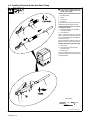
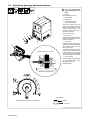
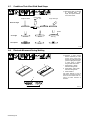
4-6. Installing Electrode Holder And Work Clamp
!
Turn Off unit and disconnect input
power before installing electrode
holder or work clamp.
Removing Barrel From Electrode Holder
1
2
3
4
Electrode Holder
Barrel
Access Hole
Set Screw
Loosen set screw through access hole and
slide barrel away from electrode holder.
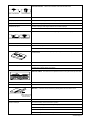
Installing Electrode Cable and Barrel
onto Electrode Holder
3
2
5
6
5
4
1
Electrode Cable From Unit (Has Bare
Conductors on End)
Terminal Screw
Back out terminal screw from electrode
holder. Insert electrode cable through barrel
into end of electrode holder and tighten terminal screw securely.
Move barrel toward electrode holder and
tighten set screw to secure barrel in place.
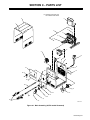
Installing Work Cable onto Work Clamp
7
8
6
9
Work Clamp
Work Cable From Unit (Has Ring
Terminal on End)
Mounting Bolt
Route work cable through work clamp as
shown and install onto mounting bolt using
supplied hardware.
8
PIECE
Tools Needed:
7
9
14 mm
6 mm
Ref. 802 251-A / 802 105-D
OM-950 Page 16