1
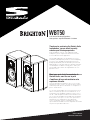
WBT50
5.25” Active Bluetooth Speakers
Haut-parleurs amplifié Bluetooth à 133mm
Thank you for purchasing the Sinclair Audio
loudspeakers, you are about to greatly
enhance your listening experience.
At Sinclair Audio we strive to create loudspeakers and
loudspeaker systems engineered to deliver the best value
in stereo and home theatre applications.
Sinclair Audio loudspeakers are designed for ease of use,
installation, and will provide you with excellent sound quality
for years to come. Reading this manual will assist you in
getting acquainted with your Sinclair Audio system. Sinclair
Audio provides a 1 year parts and service warranty on all drivers and amplifiers. To obtain servicing, please contact your
Sinclair Audio representative. The original bill of sale is required for service.
Merci pour avoir choisi les enceintes de
Sinclair Audio, vous êtes sur le point
d’améliorer de façon extraordinaire votre
expérience d’écoute.
Chez Sinclair Audio nous travaillons sans cesse à créer des
haut-parleurs et des enceintes conçus pour offrir le meilleur
rendement possible pour les utilisations en stéréophonie et
pour le cinéma maison.
Les enceintes Sinclair Audio sont conçues pour être faciles à
utiliser et à installer, de plus elles vous offriront une excellente qualité sonore pendant de nombreuses années. La lecture de ce mode d’emploi vous aidera à vous familiariser avec
vos enceintes Sinclair Audio. Sinclair Audio offre une garantie
d’une (1) année sur les pièces et sur le service pour tous les
haut-parleurs et les amplificateurs. Pour obtenir du
service sous garantie, veuillez communiquer avec votre
représentant Sinclair Audio. La facture originale de l’achat doit
être présentée pour obtenir du service.
Owners Manual
Manuel de l’Utilisateur
IMPORTANT SAFETY PRECAUTIONS
The exclamation point within an equilateral triangle is
intended to alert the user of the presence of important
operating and maintenance (servicing) instructions in
the literature accompanying the appliance.
TO PREVENT THE RISK OF ELECTRIC SHOCK, DO NOT REMOVE
COVER (OR BACK). NO USER SERVICABLE PARTS INSIDE.
REFER SERVICING TO QUALIFIED SERVICE PERSONNEL.
The lightning flash with arrowhead, within an
equilateral triangle, is intended to alert the user of the
presence of uninsulated "dangerous voltage" within the
product's enclosure that may be of sufficient magnitude
to constitute a risk of electric shock to persons.
1.
2
3.
4.
5.
Read Instructions - All the safety and operation instructions should be read before the sound bar is operated.
Reta Instructions - The safety and operating instructions should be kept for future reference.
Heed Warnings - All warnings on the sound bar and in these operating instructions should be followed.
Follow Instructions - All operating and other instructions should be followed.
Water and Moisture - The sound bar should not be used near water. For example, near a bathtub, washbowl, kitchen sink, laundry tub, in a wet
basement or near a swimming pool.
6. Ventilation - The Sound Bar should be situated so that its location or position does not interfere with its proper ventilation. For example, the system
should not be situated on a bed, sofa, rug or similar surface that may block airflow past the rear heat sinks; or placed in a built-in installation such
as a bookcase or cabinet that may impede the flow of air past the heat sinks.
7. Heat - The sound bar should be situated away from heat sources such as radiators, heaters, furnace outflow vents or other devices which produce
heat.
8. Power Sources - The Sound Bar should be connected to a power supply only of the type described in these operation instructions or as marked on
the Component.
9. Grounding or Polarization - The sound bar is equipped with a polarized alternating-current line plug (a plug having one blade wider than the other).
This plug will fit into the power outlet only one way. This is an intentional safety feature. If you are unable to insert the plug fully into the outlet, try
reversing the plug. If the plug should still fail to fit, contact an electrician to replace the obsolete (unpolarized) outlet. Do not defeat the safety
purpose of the polarized plug.
10. Power Cord Protection - Power supply cords should be routed so that they are not likely to be walked upon or pinched by items placed upon or
against them. Pay particular attention to cords at plugs, convenience receptacles, and the point where they exit the Sound Bar. To prevent electric
shock, do not use the sound bar polarized plug with an extension cord, receptacle or other outlet unless the blades can be fully inserted to prevent
blade exposure.
11. Non-use Periods - The power cord of the sound bar should be unplugged from the outlet when left unused for a long period of time.
12. Damage Requiring Service - The sound bar should be serviced only by qualified service personnel when:
A. Sound Bar power supply cord or the plug has been damaged; or
B. Objects have fallen or liquid has spilled into the sound bar; or
C. The sound bar has been exposed to rain; or
D. The sound bar does not appear to operate or exhibits a marked change in performance; or
E. The sound bar has been dropped or damaged.
13. Servicing - The user should not attempt to service the sound bar beyond those means described in this operating manual. All other servicing should
be referred to an authorized Service Center.
14. Cleaning - Unplug the sound bar from the wall outlet before cleaning. Do not use liquid cleaners or aerosol cleaners. Use a damp cloth for cleaning.
15. Attachments - Do not use attachments not recommended as they may cause hazards.
16. Accessories - Do not place the sound bar on an unstable cart, stand, tripod, bracket, or table. The sound bar may fall, causing serious injury to a
child or adult, and serious damage to the product. Use only with a cart, stand, tripod, bracket or table recommended by manufacturer, or sold with
the product. Any mounting of the sound bar should follow manufacturer's instructions, and should use a mounting accessory recommended by
manufacturer. An sound bar and cart combination should be moved with care. Quick stops, excessive force, and uneven surfaces may cause the
product and cart combination to overturn.
17. Lightning - For added protection for the sound bar during a lightning storm, or when it is left unattended and unused for long periods of time,
unplug it from the wall outlet.
18. Overloading - Do not overload wall outlets, extension cords, or integral convenience receptacles as this can result in a risk of fire or electric shock.
19. Safety Check - Upon completion of any service or repairs to this product, ask the service technician to perform safety checks to determine that the
product is in proper operating condition.
20. Servicing - Do not attempt to service the Sound Bar yourself as opening or removing covers may expose you to dangerous voltages or other hazards.
Refer all servicing to qualified service personnel.
21. Replacement Parts - When replacement parts are required, be sure the service technician has used replacement parts specified by manufacturer or
have the same characteristics as the original part. Unauthorized substitutions may result in fire, electric shock, or other hazards.
22. Wall or Ceiling Mounting - The product should be mounted to a wall or ceiling only as recommended by manufacturer.
23. Object and Liquid Entry - Never push objects of any kind into this product through openings, as they may touch dangerous voltage points or short-out
parts that could result in a fire or electric shock. Never spill liquid of any kind on the product.
WARNING - To reduce the risk of fire or electric shock, do not expose this appliance to rain or moisture.
IMPORTANTES MESURES DE SÉCURITÉ
Ce symbole de sécurité vise à avertir l’utilisateur que
la notice jointe à l’appareil contient des instructions
importantes au sujet du fonctionnement et de
l’entretien (réparation).
POUR PRÉVENIR LES RISQUES D’ÉLECTROCUTION, NE PAS
OUVRIR LE BOÎTIER. AUCUNE PIÈCE NE PEUT ÊTRE RÉPARÉE
PAR L’UTILISATEUR. NE CONFIER L’ENTRETIEN QU’À UN
PERSONNEL QUALIFIÉ.
Ce symbole de sécurité vise à avertir l’utilisateurque
le boîtier contient un voltage dangereux non isolé,
suffisamment puissant pour constituer un risque
d’électrocution.
1. Lisez les instructions - Vous devez lire toutes les instructions relatives à la sécurité et au fonctionnement avant de faire fonctionner le hautparleur
d’extrêmes graves.
2. Conservez les instructions - Vous devez conserver les instructions relatives à la sécurité et au fonctionnement pour des consultations ultérieures.
3. Avertissement - Vous devez suivre tous les avertissements apposés sur le haut-parleur d’extrêmes graves et dans les instructions relatives àson
fonctionnement.
4. Suivez les instructions - Vous devez suivre toutes les instructions relatives au fonctionnement du haut-parleur.
5. Eau et humidité - Vous ne devez pas utiliser le haut-parleur d’extrêmes graves près d’une source d’eau. Par exemple, ne le placez pas à côté d’un
bain, d’un évier, d’un lavabo ou d’une cuvette, dans un sous-sol humide ou près d’une piscine.
6. Ventilation - Vous devez placer le haut-parleur d’extrêmes graves de manière à ce que sa position ne gêne pas son système d’aération. Par exemple,
ne le placez pas sur un lit, un fauteuil, un tapis ou une surface semblable qui pourrait bloquer l’écoulement d’air provenant du dissipateur thermique
arrière, ou dans un meuble tel une bibliothèque ou un module.
7. Chaleur - Vous devez éviter de placer le haut-parleur d’extrêmes graves près d’une source de chaleur tel un radiateur, une chaufferette, des
ouvertures d’aération ou tout autre appareil qui produit de la chaleur.
8. Sources d’alimentation - Vous devez raccorder le haut-parleur d’extrêmes graves à une source d’alimentation du type décrit dans ce manuel
d’instructions ou tel qu’indiqué sur le produit.
9. Mise à la terre ou polarisation - Ce haut-parleur d’extrêmes graves est muni d’une fiche de courant alternatif polarisée (une prise possédant une
lame plus large que l’autre). Cette fiche s’insère d’une seule façon dans la prise de courant. Il s’agit d’une mesure de sécurité volontaire. Si vous
électricien pour faire remplacer la prise obsolète (non polarisée). Ne retirez pas l’élément de sécurité de la prise polarisée.
10. Protection du cordon d’alimentation - Vous devez placer le cordon d’alimentation de manière à ce qu’il ne soit pas écrasé ou coincé par d’autres éléments.
Portez une attention particulière aux cordons raccordés à une prise, à une prise de courant de service ainsi qu’à son point de sortie du haut-parleur
d’extrêmes graves. Pour prévenir les électrocutions, n’utilisez pas la prise polarisée du haut-parleur avec une ral longe, une prise ou toute autre sortie de
courant, sauf si les lames peuvent être entièrement insérées sans laisser aucune partie à découvert.
11. Période de non utilisation - Vous devez débrancher de la prise le cordon d’alimentation du haut-parleur si vous ne l’utilisez pas pendant une longue période.
12. Dommages nécessitant une réparation - Vous devez faire réparer le haut-parleur par un professionnel lorsque :
A. le cordon d’alimentation ou la prise du haut-parleur a été endommagé;
B. un objet ou un liquide est tombé sur le haut-parleur;
C. le haut-parleur a été exposé à la pluie;
D. le haut-parleur ne semble pas fonctionner ou que son rendement est altéré;
E. le haut-parleur a été échappé ou endommagé.
13. Réparation - L’utilisateur ne devrait pas essayer de réparer le haut-parleur lui-même, sauf dans les situations décrites dans ce manuel d’utilisation. Toute
autre réparation devrait être confiée à un centre de réparation autorisé.
14. Nettoyage - Débranchez le haut-parleur de la prise de courant murale avant de le nettoyer. N’utilisez pas de nettoyants liquides ou de nettoyants en aérosol.
Nettoyez-le avec un chiffon humide.
15. Accessoires - N’utilisez pas des accessoires qui ne sont pas recommandés pour ce produit, car il pourraient devenir une source de danger.
16. Support - Ne placez pas le haut-parleur sur un chariot, un support, un trépied, une tablette ou une table instable. Le haut-parleur pourrait tomber et causer
des blessures graves à un enfant ou à un adulte, et endommager considérablement le produit. N’utilisez qu’un chariot, un support, un trépied, une tablette ou
une table recommandé par le fabricant ou vendu avec le produit. Toute installation du haut-parleur devrait se faire conformément aux directives du fabricant,
et avec un support recommandé par le fabricant. Si vous placez le haut-parleur sur un chariot, déplacez-le avec soin. Des arrêts brusques, une force excessive
et des surfaces inégales pourraient faire basculer le chariot et le haut-parleur.
17. Orage - Pour une protection additionnelle du haut-parleur durant un orage ou lorsque vous ne l’utilisez pendant une longue période, débranchez-le de la
prise de courant murale.
18. Surcharge - Ne surchargez pas les prises murales, les cordons d’alimentation ou les prises de courant de service intégrales, car ceci pourrait entraîner des
risques d’incendie ou d’électrocution.
19. Vérification de sécurité - Après avoir fait réparer ce produit, demandez à un technicien d’effectuer des vérifications de sécurité pour déterminer si le produit
est en bonne condition de fonctionnement.
20. Réparation - N’essayez pas de réparer vous-même le haut-parleur, car le fait d’ouvrir ou de retirer le couvercle pourrait vous exposer à un voltage dangereux
ou à d’autres dangers. Confiez toute réparation du produit à un professionnel.
21. Pièces de rechange - Si vous devez remplacer une pièce, assurez-vous que le technicien utilise une pièce de rechange précisée par le fabricant ou que cette
pièce comporte les mêmes caractéristiques que la pièce originale. Des pièces de rechange non autorisées peuvent entraîner un incendie, une électrocution ou
d’autres dangers.
22. Installation sur un mur ou au plafond - Ce produit peut-être installé sur un mur ou sur un plafond en suivant les recommandations du fabricant seulement.
23. Infiltration d’un objet ou d’un liquide - N’insérez jamais un objet par les ouvertures de ce produit, car il pourrait toucher des points de voltage dangereux ou
provoquer un court-circuit et ainsi entraîner un incendie ou une électrocution. Ne renversez jamais un liquide sur ce haut-parleur.
AVERTISSEMENT - Pour réduire les risques d’incendie ou d’électrocution, n’exposez pas cet appareil à la pluie ou à l’humidité.
BRIGHTON WBT50
Bookshelf Loudspeaker / Haut-parleur de tablette
Warning / Avertissement
FCC Warings
1) The user that changes or modifications not expressly approved by the party responsible for compliance could void the
user’s authority to operate the equipment.
2)
This equipment has been tested and found to comply with the limits for a Class B digital device
IC Warnings
a.
"Under Industry Canada regulations, this radio transmitter may only operate using an antenna of a type and maximum (or lesser) gain
approved for the transmitter by Industry Canada. To reduce potential radio interference to other users, the antenna type and its gain
should be sochosen that the equivalent isotropically radiated power (e.i.r.p.) is not more than that necessary for successful
communication."
"Conformément à la réglementation d'Industrie Canada, le présent émetteur radio peut fonctionner avec une antenne d'un type et d'un
gain maximal (ou inférieur) approuvé pour l'émetteur par Industrie Canada. Dans le but de réduire les risques de brouillage
radioélectrique à l'intention des autres utilisateurs, il faut choisir le type d'antenne et son gain de sorte que la puissance isotrope
rayonnée équivalente (p.i.r.e.) ne dépasse pas l'intensité nécessaire à l'établissement d'une communication satisfaisante."
b.
"This device complies with Industry Canada licence-exempt RSS standard(s).
Operation is subject to the following two conditions:
(1) this device may not cause interference, and
(2) this device must accept any interference, including interference that may cause undesired operation of the device."
"Le présent appareil est conforme aux CNR d'Industrie Canada applicables aux appareils radio exempts de licence. L'exploitation est
autorisée aux deux conditions suivantes :
(1) l'appareil ne doit pas produire de brouillage, et
(2) l'utilisateur de l'appareil doit accepter tout brouillage radioélectrique subi, même si le brouillage est susceptible d'en
compromettre le fonctionnement."
IMPORTANT NOTE: Radiation Exposure Statement:
This equipment complies with IC radiation exposure limits set forth for an uncontrolled environment. This equipment should be installed and
operated with minimum distance 20cm between the radiator & your body.
Déclaration d'exposition aux radiations:
Cet équipement est conforme aux limites d'exposition aux rayonnements IC établies pour un environnement non contrôlé. Cet équipement
doit être installé et utilisé avec un minimum de 20 cm de distance entre la source de rayonnement et votre corps.
www.sinclairaudio.com
BRIGHTON WBT50
Bookshelf Loudspeaker / Haut-parleur de tablette
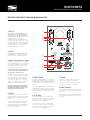
Rear Panel Connections / Connexions du panneau arrière
1. Aux 1 in
1
You can connect this analog input with the
supplied wire to the analog output of your
TV, audio system, cable box, satellite, game,
or whatever device you’d like to connect. /
Vous pouvez brancher cette entrée
analogique à la sortie analogique de votre
téléviseur, votre chaine stéréo, votre convertisseur de câble, votre convertisseur satellite,
votre appareil de jeu ou tout autre appareil
que vous aimeriez relier à l’enceinte en vous
servant du câble fourni à cet effet.
2
3
4
2. Aux 2 in
This 3.5mm input can be used with many
portable devices. / Vous pouvez utilser cette
entrée avec pleusiers appareils portative.
5
6
3. Optical 1& 2 in / Entreet 2 et 1 optique
Sometimes referred to as Toslink or SPDIF,
this digital input allows the use of an optical
wire from the sound bar to your TV, audio
system, cable box, satellite, game, or whatever device you’d like to connect.
7
8
OPTICAL CABLE NOT INCLUDED IN THIS PACKAGE,
PLEASE CONSULT YOUR DEALER FOR ADVICE ON
THE PURCHASE OF AN OPTICAL CABLE.
On l’appelle aussi l’entrée Toslink ou S/PDIF,
cette entrée numérique permet l’utilisation
d’un câble optique entre la haut-parleur et
votre téléviseur, votre chaine stéréo, votre
convertisseur de câble, votre convertisseur
satellite, votre appareil de jeu ou tout autre
appareil que vous aimeriez brancher.
AUCUN CÂBLE OPTIQUE N’EST FOURNI AVEC CET
ENSEMBLE, INFORMEZ-VOUS AUPRÈS DE VOTRE
MARCHAND POUR OBTENIR DES CONSEILS CONCERNANT L’ACHAT D’UN CÂBLE OPTIQUE.
4. Sub out
This allows you to connect a Sinclair Audio
powered subwoofer to your speaker to add
thunderous bass and improve the home theater effect.
Cette sortie permet le branchement d’un
caisson de grave amplifié Sinclair Audio à
votre haut-parleur pour y ajouter du grave
retentissant et améliorer substantiellement
l’effet de cinéma maison.
5. Right Ch. Output
7. AC input
Connect the supplied speaker wire from here to
the right speaker’s input. Be sure to maintain
the polarity of the wire, keeping the positive and
negative signals consistent to ensure best performance.
The power cord connects here, plug the other
side into a wall receptacle or power bar.
Connect the supplied speaker wire from here to
the right speaker’s input. Be sure to maintain
the polarity of the wire, keeping the positive and
negative signals consistent to ensure best performance.
8. Power / Puissance
6. DC 5V charge
The speaker has two slots to charge USB devices such as a phone or MP3. These inputs do
not play music, they are integrated strictly for
the convenience of charging devices.
The power cord connects here, plug the other
side into a wall receptacle or power bar.
This will turn the speaker on and off. Make sure
to make all your connections before turning the
speaker on.
This will turn the speaker on and off. Make sure
to make all your connections before turning the
speaker on.
The speaker has two slots to charge USB devices such as a phone or MP3. These inputs do
not play music, they are integrated strictly for
the convenience of charging devices.
www.sinclairaudio.com
BRIGHTON WBT50
Bookshelf Loudspeaker / Haut-parleur de tablette
Using the Remote functions / Utilisation les fonctions de la télécommandens
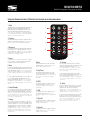
1. Mute
This button will cut all sound playing, regardless of
input and change the display light from blue to
blinking orange. Pushing it again will restore the
volume and the display light will return to blue. /
Cette touche va couper tout le son de l’haut parleur
et le temoin bleu va changer a l’orange qui clignoter.
Toucher le encore pour avoir le son.
1
6
7
2
8
9
10
3
2. Previous
11
This button will play the previous song on the Bluetooth device that has been paired. / Cette touche va
jouer le chanson avant sur l’appareil Bluetooth.
12
4
13
3. Bluetooth
Pressing this button will engage the Bluetooth function so you can use your Bluetooth device to wirelessly send music. / Appuyer sure cette touche pour
engager le fonction Bluetooth, qui vous permettrez
d’ecouter de la musique sans fils.
14
5
15
4. Reset
This button will reset the bass and treble to original
factory settings. / Cette touche pour retourner les
niveaux des hautes et bas fréquences.
8. Next
14. Volume
5. Bass
This will advance to the next track on the
Bluetooth device. / Vous permettrez d’avancer a la prochaine chanson.
( + ) Pressing this button makes the volume
louder. The blue display light will blink when this
function is being used. / Appuyez sur cette
touche pour augmenter le volume. Le témoin
bleue sur l’enceinte clignotera lorsque cette
fonction sera utilisée.
( + ) Pressing this button will increase the bass content. The blue display light will blink when this function is being used. / Appuyer sure cette touché pour
augmenter les bas frequences. Le temoin bleu sure
l’enceinte clignotera lorsque cette fonction est utilisée.
( - ) Pressing this button will decrease the bass content. The blue display light will blink when this
function is being used. / Appuyer sure cette touche
pour diminuer les bas frequences. Le temoin bleu
sure l’enceinte clignotera lorsque cette fonction est
utilisée.
6. Power/Standby
Use this button to turn the speaker on and off. When
off, a orange light will be displayed on the speaker.
When on, a blue light will be displayed on the speaker.
/ Utilisez cette touche pour mettre en marche ou à
l’arrêt la haut-parleur. À l’arrêt, un témoin rouge sera
visible sur la haut-parleur. En marche, un témoin vert
sera visible sur la haut-parleur.
7. Charge
This system can charge your USB device. When the
system is playing music it will charge without having
to push this button. If the system is in standby or not
playing anything then push this button to engage the
charging feature. / Ce système permet de recharger
votre appareil USB. Lorsque le système joue de la
musique il va charger l’appareil. Si le système n’est
pas allumer, toucher ce bouton pour activer la fonction de charge.
9. Play/Pause
This button will play and pause the song
currently selected on the Bluetooth device
that has been paired. / Cette touche va jouer
ou fair pause a la chanson sur l’appareil
Bluetooth
( - ) Pressing this button makes the volume
lower. The blue display light will blink when this
function is being used. / Appuyez sur cette
touche pour diminuer le volume. Le témoin bleue
sur l’enceinte clignotera lorsque cette fonction
sera utilisée.
10. MP3
Pressing this button will engage the Aux 2
analog 3.5mm input. / Appuyer sure cette
touché pour engager l’entrée analogue
3.5mm Aux 2.
11. AUX
Pressing this button will engage the Aux 1
analog RCA input. / Appuyer sure cette
touché pour engager l’entrée analogue RCA
Aux 1.
12. Optical 2
Pressing this button will engage the Optical
2 input. / Appuyer sure cette touché pour
engager l’entrée optique 2.
15. Treble
( + ) Pressing this button will increase the high
frequency content. The blue display light will
blink when this function is being used. /
Appuyer sure cette touché pour augmenter les
haute frequences. Le temoin bleu sure l’enceinte
clignotera lorsque cette fonction est utilisée.
( - ) Pressing this button will decrease the high
frequency content. The blue display light will
blink when this function is being used. / Appuyer
sure cette touché pour diminuer les haute frequences. Le temoin bleu sure l’enceinte clignotera lorsque cette fonction est utilisée.
13. Optical 1
Pressing this button will engage the Optical
1 input. / Appuyer sure cette touché pour
engager l’entrée optique 1.
www.sinclairaudio.com
BRIGHTON WBT50
Bookshelf Loudspeaker / Haut-parleur de tablette
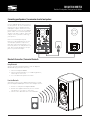
Connecting your Speakers / La connexion de votre haut-parleur
Use the supplied speaker wire to connect
the two speakers. Be sure to maintain the
polarity of the wire, keeping the positive
and negative signals consistent to ensure
best performance. Then, use the supplied
power cord to connect from the powered
speaker to the wall receptacle. You’re now
ready to connect your devices and enjoy
your speakers.
Utiliser le fils d’haut parleur pour
brancher les deux haut parleurs en vous
assurant que la polarité est préservée
pour avoir la meilleure performance. Finalement, brancher la corde puissance au
mur. Vous etes prêt de brancher vos appareils et jouer de la musique.
Bluetooth Connection / Connexion Bluetooth
Using Bluetooth
You can easily pair your Bluetooth device with the Brighton
WBT50 and enjoy your music wirelessly.
1 - Turn on the Brighton WBT50
2 - Turn on your Bluetooth device, let it find “My Speakers”,
and accept the connection.
3 - Select the Bluetooth input on the remote.
Fonction Bluetooth
Vous pouvez connecter votre appareil Bluetooth avec les haut
parleurs Brighton WBT50 pour écouter votre musique sans fils.
1 - Allumer les haut parleurs Brighton WBT50
2 - Allumer votre appareil Bluetooth, laisser le trouver
“My Speakers” et accepter le connection.
3 - Choisir l’entrée Bluetooth sure le télécommande.
www.sinclairaudio.com
BRIGHTON WBT50
Bookshelf Loudspeaker / Haut-parleur de tablette
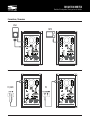
Connections / Connexion
iPod
MP3
TV, DVD
PC
www.sinclairaudio.com
BRIGHTON WBT50
Bookshelf Loudspeaker / Haut-parleur de tablette
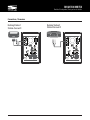
Connections / Connexion
Docking Station 1
Station d'accueil1
Docking Station 2
Station d'accueil 2
www.sinclairaudio.com
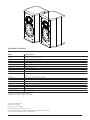
Specifications / Spécifications
MODEL
Brighton WBT50
Description
2-Way, 5.25” Active Bluetooth Speakers
Tweeters
1” Black Diamond Silk Dome
Woofers
5.25” Woven Fiberglass Hybrid Cone
Amplifier
50 Watts
Frequency Response
55Hz - 20kHz
Inputs
Stereo RCA, 3.5mm, 2 optical
Outputs
Subwoofer output
Charging inputs
2 USB
Dimensions, inches (HWD)
12.4” x 7.5” x 8”
Description
Haut-parleurs amplifié Bluetooth à 133mm
Haut-parleur grave
Dôme souple de 25mm en soie de diamant noire
Haut-parleur d’Aigus
Cônes de 133mm hybride de fibre de verre tissé
Amplificateur
50 Watts
Réponse en fréquence
55Hz - 20kHz
Entrées
RCA stereo, 3.5mm, 2 optiques
Sortie
Sous-grave
Chargement
2 USB
Dimensions, mm (HLP)
314 x 190 x 206mm
*Specifications are subject to change without notice.
Spécifications sont sujettes à changement sans préavis.
Erikoson Consumer, 21000 TransCanada
Baie D’Urfé • Québec • H9X 4B7
Tél.: (514) 457-2555 • Fax: (514) 457-5507
© 2012 Erikson Consumer, Incorporated. All rights reserved.
Sinclair Audio is a trademark of Erikson Consumer, Incorporated, registered in the United States and/or other countries.
Features, specifications and appearance are subject to change without notice.
www.sinclairaudio.com