1
UPA-120TU / UPA-240TU
AMPLIFICATEUR MIXEUR LIGNE 100V
LINE 100V POWER AMPLIFIER MIXER
AMPLIFICADOR DE MESA DE MISTURA LINE 100V
100V OJAČEVALEC / MIKSER
MIXER LINIE 100V
UPA-120TU
UPA-240TU
( 95-1533 )
( 95-1534 )
GB - INSTRUCTION MANUAL
F - MANUEL D’UTILISATION
PT - MANUAL DE INSTRUÇÕES
RO – MANUAL DE UTILIZARE
SLO – NAVODILA ZA UPORABO
© Copyright LOTRONIC 2014
Page 1
UPA-120TU / UPA-240TU
FRANÇAIS
Nous vous remercions pour l’achat de cet amplificateur professionnel. Pour votre sécurité, lisez attentivement ce manuel avant d’installer
l’appareil.
CONSIGNES DE SECURITE ET D’UTILISATION
• Si l’appareil a été exposé à des changements de température, ne le mettez pas immédiatement sous tension. La condensation qui peut se
produire, risque d’endommager les circuits. Attendez que l’appareil ait atteint la température ambiante avant de le mettre sous tension.
• L’appareil fait partie de la classe de protection I. Il est donc primordial qu’il soit relié à la terre.
• Assurez-vous que la tension secteur ne dépasse pas celle indiquée à la fin de ce mode d’emploi.
• Assurez-vous que le cordon d’alimentation n’est pas écrasé ou endommagé. Dans ce cas, demandez à votre revendeur ou un technicien de
remplacer le cordon.
• Débranchez toujours l‘appareil du secteur lorsqu’il n’est pas utilisé ou avant de le nettoyer. Ne tirez que sur la fiche, jamais sur le cordon.
• Lorsque le cordon d'alimentation ou un coupleur d'appareil est utilisé comme dispositif de déconnexion, ce dispositif doit rester facilement
accessible
Si un interrupteur omnipolaire est utilisé comme dispositif de déconnexion, l'emplacement sur l'appareil et la fonction de l'interrupteur doit
être décrite, et le commutateur doit rester facilement accessible
ATTENTION :
1. Les dommages résultant du non respect des instructions ou de la modification de l’appareil ne sont pas couverts par la garantie. Tenir loin
des enfants et des personnes non-qualifiées.
2. L’appareil ne contient aucune pièce remplaçable ( a l’exception des batteries ). Vérifiez si toutes les pièces sont bien installées et que les vis
sont bien serrées avant la mise en service. Ne pas utiliser l’appareil lorsque le boîtier est ouvert.
REGLES GENERALES
• Cet appareil doit être alimenté uniquement en courant alternatif de 110-120/220-240Vac/50-60Hz et utilisé uniquement à l’intérieur.
• Utilisez cet appareil uniquement si vous vous êtes familiarisés avec ses fonctions. Ne pas autoriser une personne inexpérimentée d’utiliser
cet appareil. La plupart des dommages résultent d’une mauvaise utilisation.
• Conservez l’emballage d’origine pour tout transport.
Pour des raisons de sécurité, il est interdit de modifier cet appareil de quelque sorte que ce soit. Toute manipulation non décrite dans ce manuel
peut conduire à des courts-circuits, un choc électrique, l’explosion de la lampe, une chute, etc. et invaliderait la garantie
IMPORTANT
L'emploi de contrôles ou ajustements ou utilisations autres que celles indiquées peuvent provoquer une exposition
aux radiations.
© Copyright LOTRONIC 2014
Page 2
UPA-120TU / UPA-240TU
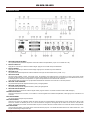
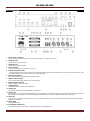
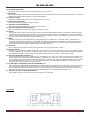
DESCRIPTION
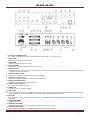
1. REGLAGES NIVEAU ENTREES
Ces 5 potentiomètres permettent d’ajuster le niveau des entrées correspondantes ( Input 1 à 4 et entrée Aux / CD )
2. BOUTON CARILLON
Appuyez sur ce bouton pour activer le carillon intégré. Appuyez une nouvelle fois pour le désactiver.
3. BOUTON SIRENE
Appuyez sur ce bouton pour activer la sirène intégré. Appuyez une nouvelle fois pour le désactiver.
4. REGLAGE ECHO
Ce potentiomètre permet d’ajuster le niveau de l’effet écho envoyé vers les entrées micros ( entrée 1 à 4 )
5. SÉLECTION ZONE
Cet ampli mixer possède 4 zones. C’est à dire que si, par exemple, vous séparer la zone à sonoriser en 4 zones, vous pourrez choisir
d’envoyer le signal de sortie sur une ou plusieurs zones et pas forcément sur toutes les zones en même temps. Pour sélectionner une zone,
il suffit d’appuyer sur le bouton correspondant. Le voyant correspondant à la zone sélectionnée s’allumera.
Vous disposez aussi d’un bouton ALL qui permettra de sélectionner toutes les zones à la fois en une seule pression.
6. RÉGLAGE TONALITÉ BASSE
Ce potentiomètre ajuste les fréquences basses ( bass ) du signal général.
7. RÉGLAGE TONALITÉ HAUTE
Ce potentiomètre ajuste les fréquences hautes ( treble ) du signal général.
8. REGLAGE NIVEAU MASTER
Utilisez ce bouton pour ajuster le niveau du signal master ( signaux entrées 1 à 4,entrée Aux/CD et lecteur USB mélangés )
INTERRUPTEUR ON/OFF
Lorsque vous appuyez sur ce bouton, vous mettez en marche l’appareil .Pour éteindre l’amplificateur, il faut appuyer une nouvelle fois sur
ce bouton.
INDICATEUR POWER
Ce voyant s’allume lorsque l’ampli est allumé
INDICATEUR SIGNAL
Cette led vous donne une indication visuelle du niveau du signal. Si la led est éteinte, cela signifie que soit le niveau est trop bas, soit les
sources en entrées ne diffusent pas de son. Si la led commence à clignoter, cela signifie que le niveau du son est bon. Si la led reste
allumé, cela signifie que le niveau commence à être trop fort. Il faut donc diminuer le niveau master ou le niveau de l’entrée correspondante.
INDICATEUR PEAK
Lorsque cette led s’allume, cela signifie que le niveau est beaucoup trop fort. Vous devez absolument diminuer le niveau master sinon, vous
risquez d’endommager l’ampli ou les Hps.
© Copyright LOTRONIC 2014
Page 3
UPA-120TU / UPA-240TU
MODULE USB
Module USB intégré. Voir explication plus tard
ANTENNE FM
Le module USB intégre un tuner. Pour pouvoir capter les ondes FM, vous devez connecter l’antenne FM sur cette prise
ANTENNE AM
Le module USB intégre un tuner. Pour pouvoir capter les ondes AM, vous devez connecter l’antenne FM sur cette prise
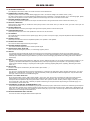
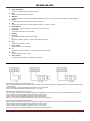
9. PRISE SECTEUR + FUSIBLE
Connectez sur cette prise le câble d’alimentation.
Le fusible permet de protéger l’amplificateur contre tout problème électrique. En cas de destruction du fusible, veuillez le remplacer par un
de même taille et de même valeur
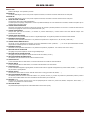
10. CONNECTEUR HP MONITEUR
Ce bornier vous permet de connecter un peit HP de contrôle ( HP moniteur ) de faible puissance 1W / 8 Ohms. Le niveau de cette sortie est
controlé par le réglage de niveau Aux et le potentiomètre Mon ( 24 )
11. CONNECTEUR PRIORITY
Lorsque cette prise est court-circuiter ( en utilisant un poussoir électronique ), l’entrée Aux/CD sera alors atténuée lorsque vous
enclencherez le carillon.
12. CONNECTEUR TELEPHONE
Ces connecteurs vous permettent de connecter un signal téléphonique. Ce signal est prioritaire sur toutes les autres entrées
13. BORNIER SORTIE HP ZONE
Ce bornier va vous permettre de brancher un ou plusieurs-haut parleurs sur chaque zone Z1, Z2, Z3 et Z4 ( sortie 100V )
14. CONNECTEUR ALIMENTATION DC
Ce bornier va vous permettre de connecteur une source d’alimentation 24DC ( batteries, …. ). En cas de perte d’alimentation secteur,
l’ampli bascule automatiquement sur l’alimentation 24V DC.
15. BORNIER SORTIE HP
Ce bornier va vous permettre de brancher un ou plusieurs-haut parleurs ( impédance : 8 ou 8 Ohms, sortie 70V et 100V )
16. REGLAGE NIVEAU TELEPHONE
Ce réglage vous permet d’ajuster le niveau du signal téléphonique
17. REGLAGE NIVEAU SORTIE MONITOR
Ce réglage vous permet d’ajuster le niveau de sortie du HP de contrôle ( monitor )
18. SÉLECTEUR NIVEAU ENTRÉE AUX/CD
Ce sélecteur vous permet de choisir le niveau de l’entrée Aux/CD
19. SORTIE PRE OUT
Si vous souhaitez utiliser un effet externe, connectez cette sortie sur l’entrée de votre effet externe
20. ENTREE AMP IN
Si vous souhaitez utiliser un effet externe, La sortie de votre effet externe sur cette entrée
21. SORTIE REC OUT
Si vous souhaitez enregistrer le signal général, connectez cette sortie un appareil d’enregistrement ( lecteur DVDR, minidisc,…. ). Ce signal
est pré-master et pré-équaliseur.
22. ENTREE AUX/CD
Connectez sur cette entrée une source audio de niveau AUX ou CD ( type lecteur CD, tablette,…. )
23. SELECTEUR NIVEAU ENTREE 1 A 4
Ce sélecteur permet de choisir le niveau des entrées 1 à 4 ( soit Mic, soit line ). Il y a aussi une position Ph ( alimentation phantom ) dans le
cas où vous souhaitez utiliser des micros nécessitant une alimentation pour fonctionner
24. ENTREES 1 A 4
Connectez sur ces entrées soit des micros, soit des périphériques de niveau line ( lecteur CD, tablette, smartphone, lecteur DVD,… ).
L’entrée 1 est prioritaire sur toutes les autres
25. REGLAGE MUTING
Ce potentiomètre permet d’ajuster le niveau d’atténuation de la fonction priority
© Copyright LOTRONIC 2014
Page 4
UPA-120TU / UPA-240TU
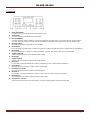
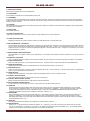
LECTEUR USB
A.
SELECTEUR AM/FM
Ce sélecteur vous permet de choisir entre AM et FM pour le tuner
B.
BOUTON MP3
Ce bouton vous permet de sélectionner le lecteur MP3
C.
BOUTON MEMORY
Ce bouton est actif en fonction TUNER. Il vous permet de mémoriser une station radio. Vous pouvez mémoriser jusqu’à 5 stations.
Pour cela, réglez votre fréquence. Ensuite appuyez sur MEMORY puis appuyez sur l’un des 5 boutons M1, M2, M3, M4 ou M5.
D.
BOUTON USB/SD
Permet de choisir entrée l’entrée USB et l’entrée SD/MMC
E.
BOUTON REP
Permet de choisir le mode de lecteur : répétition d’une chanson, répétition de toutes les chansons ou lecteur dans un ordre aléatoire.
F.
BOUTON EQ
Permet de sélectionner un réglage de tonalité pré-enregistré : CLASSIC, POP, ROCK, JAZZ, FLAT ou paramétrable
G.
CONNECTEUR USB
Attention à ne pas connecter de clé USB plus grande que 8Go
H.
AFFICHEUR
I.
CONNECTEUR SD
Attention à ne pas connecter de carte SD plus grande que 8Go
J.
BOUTON I<<
En mode MP3, il permet de sélectionner la chanson précédente. En tuner, il permet d’ajuster la fréquence.
K.
BOUTON VOL Permet de diminuer le volume du signal de sortie du module USB
L.
BOUTON PLAY / PAUSE
Permet de lancer la lecture ou de mettre en pause la chanson
M.
BOUTON <<I
En mode MP3, il permet de sélectionner la chanson suivante. En tuner, il permet d’ajuster la fréquence.
N.
BOUTON VOL +
Permet d’augmenter le volume du signal de sortie du module USB
O.
BOUTON STOP / ON-OFF
Une pression stoppe la lecture de la chanson MP3. Une pression prolongé allume ou éteint le module USB
© Copyright LOTRONIC 2014
Page 5
UPA-120TU / UPA-240TU
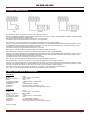
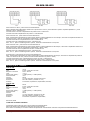
CONNEXION DES ENCEINTES
Sur la sortie 4-16 Ohms, vous pouvez connecter une ou plusieurs enceintes.
Attention : l’impédance totale des enceintes doit être comprise entre 4 et 16 Ohms. ( rappel : deux enceintes en parallèle = impédance divisé
par 2 ), deux enceintes en série = impédance x2 )
Connectez la sortie 4-16 Ohms de l’ampli sur les borniers + de vos enceintes
Connectez le bornier com de votre ampli sur les borniers – de vos enceintes
Sur la sortie 70V, vous pouvez connecter un ou plusieurs haut-parleurs PA 70V ( équipé de transfo ).
Attention : Le nombre de haut-parleurs en sortie dépend de la puissance de l’ampli et de la puissance des haut-parleurs ( exemple : si votre
ampli fait 60W ( comme l’UPA-60 ) et que la puissance d’un HP est de 15W, vous ne pourrez mettre que 4 HP en sortie ( 4x15W = 60W)
Connectez la sortie 70V de l’ampli sur les borniers + de vos HPs
Connectez le bornier com de votre ampli sur les borniers – de vos HPs
Note : En P.A., il est quand même conseillé de garder 20% de puissance libre ( par sécurité )
Sur la sortie 100V, vous pouvez connecter un ou plusieurs haut-parleurs PA 100V ( équipé de transfo ).
Attention : Le nombre de haut-parleurs en sortie dépend de la puissance de l’ampli et de la puissance des haut-parleurs ( exemple : si votre
ampli fait 60W ( comme l’UPA-60 ) et que la puissance d’un HP est de 15W, vous ne pourrez mettre que 4 HP en sortie ( 4x15W = 60W)
Connectez la sortie 100V de l’ampli sur les borniers + de vos HPs
Connectez le bornier com de votre ampli sur les borniers – de vos HPs
Note : En P.A., il est quand même conseillé de garder 20% de puissance libre ( par sécurité )
Sur les sorties zone, vous pouvez connecter un ou plusieurs haut-parleurs PA 100V ( équipé de transfo ).
Attention : Le nombre de haut-parleurs en sortie dépend de la puissance de l’ampli et de la puissance des haut-parleurs ( exemple : si votre
ampli fait 120W ( comme l’UPB-120 ) et que la puissance d’un HP est de 15W, vous ne pourrez mettre que 8 HP en sortie ( 8x15W = 120W)
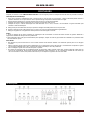
Connectez la sortie zone de l’ampli sur les borniers + de vos HPs ( comme indiqué sur le dessin figure 4 )
Connectez le bornier com de votre ampli sur les borniers – de vos HPs ( comme indiqué sur le dessin figure 4 )
Note : En P.A., il est quand même conseillé de garder 20% de puissance libre ( par sécurité )
CARACTERISTIQUES TECHNIQUES :
UPA-120 TU :
Puissance :
Sorties :
Réponse en fréquence :
THD :
Tonalité ( bass / treble ) :
Alimentation phantom :
Alimentation :
Dimensions :
Protection :
120W
4 zones / 100V / 70V/4-8 Ohms
50Hz – 18KHz
<0.5%
+/-10dB (100Hz) / +/-10dB (10KHz)
+24V
110-120/220-240V / 50-60Hz
484 x 88 x 280mm ( rackable 19’’ / 2U )
Court circuit, surchauffe, surcharge, sortie continue,…
UPA-240 TU :
Puissance :
Sorties :
Réponse en fréquence :
THD :
Tonalité ( bass / treble ) :
Alimentation phantom :
Alimentation :
Dimensions :
Protection :
240W
4 zones / 100V / 70V/4-8 Ohms
50Hz – 18KHz
<0.5%
+/-10dB (100Hz) / +/-10dB (10KHz)
+24V
110-120/220-240V / 50-60Hz
484 x 88 x 280mm ( rackable 19’’ / 2U )
Court circuit, surchauffe, surcharge, sortie continue,…
Norme CE, ROHS
© Copyright LOTRONIC 2014
Page 6
UPA-120TU / UPA-240TU
CONDITIONS DE GARANTIE :
Les équipements BST PRO sont couverts par une garantie de 2 ans pièces et main d’œuvre.
Les principes suivants s’appliquent à partir du moment où l’appareil quitte nos usines.
La facture de mise à la consommation sera foi de date de départ de la garantie, dans la mesure ou celle-ci n’excède pas 12 mois par rapport à
la date de fabrication.
Seules les compagnies agréées par BST PRO sont autorisées à opérer sur ces équipements.
La garantie devient nulle si l’intervenant appartient à un autre groupe.
Durant la période sous garantie, tout matériel défectueux doit nous être retourné dans son emballage d’origine sous colis pré-payé.
BST PRO vous retournera vos biens par colis pré-payé au cours de l’année de garantie. Au-delà, les frais d’expédition seront à la charge du
client.
Les potentiomètres ont une durée de vie limitée et ne sont pas garantis par le fabricant en cas d’utilisation très intensive.
Pour toute demande relative à ces services, adressez-vous à votre distributeur habituel, qui sera le plus apte à vous renseigner
ENGLISH
Thank you for having chosen our A BST PRO POWER AMPLIFIER . For your own safety, please read this user manual carefully before
installing the device.
SAFETY INTRODUCTION
• If the device has been exposed to temperature changes due to environmental changes, do not switch it on immediately. The arising
condensation could damage the device. Leave the device switched off until it has reached room temperature.
• It is essential that the device is earthed. A qualified person must carry out the electric connection.
• Make sure that the available voltage is not higher than stated at the end of this manual.
• Make sure the power cord is never crimped or damaged. If it is damaged, ask your dealer or authorized agent to replace the power cord.
• Always disconnect from the mains, when the device is not in use or before cleaning it. Only handle the power cord by plug. Never pull out the
plug by tugging the power cord.
• DISCONNECT DEVICE: Where the MAINS plug or an appliance coupler is used as the disconnect device, the disconnect device shall
remain readily operable.
CAUTION:
1. Please be aware that damages caused by manual modifications to the device are not subject to warranty. Keep away from children and nonprofessionals.
2. The light doesn’t include any spare parts for repair, please check if all the parts are well installed and screws are fitted tightly before
operating. Do not use the light when the cover is open.
GENERAL GUIDELINES
• This device is only allowed to be operated with an alternating current of max.110-120 / 220-240VAC/50Hz and was designed for indoor use
only.
• Operate the device only after having familiarized yourself with its functions. Do not permit operation by person not qualified for operating the
device. Most damages are the result of unprofessional operation.
• Please use the original packaging if the device is to be transported.
• For safety reasons, please be aware that all modifications on the device are forbidden. Furthermore, any other operation may lead to shortcircuit, burns, electric shock, crash, etc. If this device will be operated in any way different to the one described in this manual, the product
may suffer damages and the guarantee becomes void.
© Copyright LOTRONIC 2014
Page 7
UPA-120TU / UPA-240TU
DESCRIPTION :
1. INPUT LEVEL CONTROLS
These 5 controls are used to set the level of each inputs ( Input 1 to 4 and Aux / CD input )
2. CHIME BUTTON
Use to start or stop chime function
3. SIREN BUTTON
Use to start or stop siren function
4. ECHO CONTROL
Used to control level of echo function on input 1 to 4
5. PAGING ZONE SELECTORS
The power amplifier have 5 zones outputs. You can seperate speaker by zone. With these button, you can choose in which zone you want
to send the sound. The ALL button is used to select all in same time
6. BASS TONE CONTROL
This control is used to adjust bass tone of the main signal
7. TREBLE TONE CONTROL
This control is used to adjust treble tone of the main signal
8. MASTER LEVEL CONTROL
Used to adjust the main level volume
9. POWER SWITCH
Use this switch to switch your power amplifier on
10. POWER LED
This indicator lights when the power amplifier is switching on
11. SIGNAL LED
This led gives you an information about signal level. If the led is light off, that means the signal is low. If the led start to flash, that means the
signal is good. If the led lights on, that means the signal is a little bit strong. You must to decrease master level or input level
12. PEAK LED
If this le dis on, that means the signal is too high. You must to decrease it or the signal must be bad quality and the power amplifier or
speakers can be defect.
13. USB PLAYER
See explaination later
14. FM ANTENNA CONNECTOR
The USB player have a built-in radio. This socket is used to connect FM antenna
© Copyright LOTRONIC 2014
Page 8
UPA-120TU / UPA-240TU
15. AM ANTENNA CONNECTOR
The USB player have a built-in radio. This socket is used to connect AM antenna
16. POWER SUPPLY SOCKET + FUSE
Plug the AC power cord on this socket. Before plugging this cord in, be sure the voltage of AC outlet is correct. ( 220V )
The fuse is used to protect your power amplifier from different kinds of ac problems. If the power amplifier is “on” and nothing lights, please
verify the fuse compartment. If fuse is broken, please read it and change with a new one of same size and value.
17. MONITOR SPEAKER CONNECTOR
You can plug a small monitor speaker on this output. Controls the level in using Aux/Cd level control or Mon level controlss ( 24 )
18. PRIORITY CONNECTOR
Short-circuit this socket and you enable the chime priority function. Taht means when you start the chime, you level of aux input will
automatically decrease
19. PHONE CONNECTOR
This socket is use to connect a phone signal. This signal have a priority function on all the other inputs
20. ZONE SPEAKER OUTPUT
These output are used to connect 100V speakers for each zone Z1, Z2, Z3 and Z4
21. DC POWER IN
This socket are use to connect a 24V DC power supply. When you have no AC power supply, the power amplifier will start automatically the
DC power supply.
22. SPEAKER OUTPUT
These output are used to connect low impedance speaker, 70V speaker or 100V speaker
23. PHONE LEVEL CONTROL
This control is used to adjust the level of phone signal
24. MONITOR SPEAKER CONTROL
This control is used to adjust the level of monitor speaker signal
25. AUX/CD INPUT LEVEL SELECTOR
When it is AUX the low signal is present , It is CD the high signal is present.
26. PRE OUT
This terminal output the mixed audio signals of all sources that are connected to the amplifier's inputs and can be utilized to feed an
external power amplifier, a signal processor (e.g. an equalizer), or any other external appliance. The unbalanced signal is affected by the
individual input controls. Before using the PRE OUT you have to remove the bridging strip between this binding post and the "AMP IN"
terminal (27).
27. AMP IN
After removing the bridging-strip between the "PRE OUT" and the "AMP IN" terminals you can include an external signal processor (e.g. an
equalizer) in the audio-chain between the preamplifier and the power output stage of the power amplifier. This opportunity provides a
proper solution whenever shaping or improving the audio signal is necessary (adjusting delay times, equalizing, eliminating the Larsen
effect, etc.).
28. REC OUTPUT
Connect on this ouput a record device ( as DVD recorder, tape recorder,… ).
29. AUX/CD INPUT
The "R" and "L" sockets permit input of the right ("R")and left ("L") channels of an audio source with a high-level output signal , such as an
AM/FM tuner, a cassette deck, a CD player, etc. Use input sensitivity switch (25),suitable for difference appliances. They are able to take
RCA-type coaxial connectors, and unbalanced signals.
30. INPUT 1 TO 4 LEVEL SELECTOR
By turning these switch onto the "LINE" position the"IN1", "IN2", "IN3", "IN4" input can be connected to an audio source with high level
signal output. By turning these switches onto the "MIC" position the "IN1","IN2","IN3", "IN4" input can be connected to a dynamic
microphone with low Impedance. By turning these switch onto the "24V" opsition connects "the 24V" phantom supply on XLR of pin2 and
pin3 of inputs "IN1","IN2","IN3","IN4", necessary to operate condenser type microphone which require this type of external supply. It is
recommended to use this switch with
31. THE GENERAL VOLUME SET ON MINIMUM.INPUT 1 TO 4
These three balanced/unbalanced combination type jack (XLR and 6.3mm) inputs, meant for the connection of condenser type microphone
that accepts 24V phantom power, dynamic microphone (30- 600 ohms) or a high level sound source (e.g. AM/FM tuner, cassette desk, CD
player, etc.). In case you are using, it is necessary to use the switch (30). "Input 1" has a "Voice Priority" function that excludes all the other
inputs as soon as a message is transmitted with a
32. MICROPHONE.MUTING LEVEL CONTROL
This knob can control the signals that be muted output level.
© Copyright LOTRONIC 2014
Page 9
UPA-120TU / UPA-240TU
USB PLAYER :
A.
AM/FM SELECTOR
Press this key to select AM or FM
B.
MP3 BUTTON
Press this key to select Mp3 player.
C.
MEMORY BUTTON
Press the memory key, Then press the PRESET key from M1 to M5, LCD displays frequency and saving code,
D.
USB/SD BUTTON
Press this key to select the SD Card or USB player.
E.
REP BUTTON
Press this key to select repeat mode : repeat one , repeat all , random
F.
EQ BUTTON
It can adjust panorama mode, such as classic , pop, rock, jazz, flat parameter setting
G.
USB SOCKET
Insert USB player ( not bigger than 8Go )
H.
DISPLAY
I.
SD SOCKET
Insert SD/MMC card ( not bigger than 8Go )
J.
I<< BUTTON
Play the last program, in the radio model, It attenuates the band
K.
VOL - BUTTON
Press this key the sound level is attenuated.
L.
PLAY / PAUSE BUTTON
Press this key it start to play
M.
<<I BUTTON
N.
VOL + BUTTON
Press this key the sound level is increased.
O.
STOP / ON-OFF BUTTON
Press this key it switches the power or stop the program
Play the next program, In the radio model, It increase the band.
SPEAKERS CONNEXION
On the 4-16 Ohms output, you can connect several speakers.
Note : The total impedance of the speakers must to be from 4 to 16 Ohms. ( Two speakers in parallel = impedance divide by 2 ), Two speakers
in serie = impedance x2 )
Connect the 4-16 Ohms output of the power amplifier + socket of the speaker
Connect the com socket of the power amplifier on the – socket of the speaker
© Copyright LOTRONIC 2014
Page 10
UPA-120TU / UPA-240TU
On the 70V output, you can connect several PA speakers.
Note : The total power of the PA speakers is equal to power of the power amplifier. For example, if you have a 60W power amplifier and 15W
PA speaker, you must connect only 4 PA speakers ( 15Wx4 = 60W )
Connect the 70V output of the power amplifier + socket of the PA speaker
Connect the com socket of the power amplifier on the – socket of the PA speaker
Note : In P.A., for more operating security, you must to keep 20% of free power
On the 100V output, you can connect several PA speakers.
Note : The total power of the PA speakers is equal to power of the power amplifier. For example, if you have a 60W power amplifier and 15W
PA speaker, you must connect only 4 PA speakers ( 15Wx4 = 60W )
Connect the 100V output of the power amplifier + socket of the PA speaker
Connect the com socket of the power amplifier on the – socket of the PA speaker
Note : In P.A., for more operating security, you must to keep 20% of free power
On each zone outputs, you can connect one or severals PA speaker.
Note : The total power of the PA speakers is equal to power of the power amplifier. For example, if you have a 120W power amplifier and 15W
PA speaker, you must connect only 8 PA speakers ( 15Wx8 = 120W )
Connect the zone output of each zone of the power amplifier + socket of the PA speaker
Connect the com socket of each zone of the power amplifier on the – socket of the PA speaker
Note : In P.A., for more operating security, you must to keep 20% of free power
TECHNICAL SPECIFICATIONS :
UPB-120 USB :
Power :
Outputs :
Frequency response :
THD :
Tone ( bass / treble ) :
Phantom power :
Consumption :
Power supply :
Dimensions :
Protection :
120W
4 zones / 100V/70V/4-16 Ohms
50Hz – 20KHz
<0.5%
+/-10dB (100Hz) / +/-10dB (10KHz)
+24V
200W
110-120 / 220-240V / 50-60Hz or 24V DC
484 x 88 x 280mm ( rackable 19’’ / 2U )
short circuit, overload, overheat, DC output,…
UPB-240 USB :
Power :
Outputs :
Frequency response :
THD :
Tone ( bass / treble ) :
Phantom power :
Consumption :
Power supply :
Dimensions :
Protection :
240W
4 zones / 100V/70V/4-16 Ohms
50Hz – 20KHz
<0.5%
+/-10dB (100Hz) / +/-10dB (10KHz)
+24V
200W
110-120 / 220-240V / 50-60Hz or 24V DC
484 x 88 x 280mm ( rackable 19’’ / 2U )
short circuit, overload, overheat, DC output,…
CE, ROHS norms
WARRANTY CONDITIONS
BST PRO equipment is covered by a 2years warranty on parts and labour
The following rules apply from the day the equipment leaves the factory:
The date on the invoice is considered to be the date the warranty begins.
Only companies approved by BST PRO are allowed to work on the equipment. Warranty becomes void when other service technicians open the
equipment.
During warranty period, defective equipment must be sent by pre-paid mail in the original box.
BST PRO will return the goods by pre-paid mail during the first year of warranty; thereafter the mailing cost is to be paid by the recipient
Potentiometers have a limited lifetime and are not covered by the manufacturer for more than normal use.
For all service enquiries, refer to your local distributor, as he is best able to help you
© Copyright LOTRONIC 2014
Page 11
UPA-120TU / UPA-240TU
PORTUGUÊS
Obrigado por escolher o nosso AMPLIFICADOR BST PRO. Para sua segurança leia com atenção este manual antes de proceder à instalação.
INTRODUÇÃO DE SEGURANÇA
• Nunca ligue o aparelho imediatamente após o transporte de um local frio para um local quente. A água condensada poderia danificar o
aparelho resultando num choque eléctrico. Deixe o aparelho atingir a temperatura ambiente antes de o ligar.
• É essencial existir ligação terra. A ligação eléctrica deve ser feita por uma pessoa qualificada.
• Certifique-se de que a voltagem disponível não é superior à mencionada neste manual.
• Certifique-se de que o cabo de alimentação não está danificado. Se for o caso, consulte o seu revendedor ou agente autorizado para
substituir o cabo de alimentação.
•
•
Desligue sempre da tomada antes de limpar o aparelho. Desligue da tomada pela ficha e nunca pelo cabo.
Durante o arranque inicial, pode aparecer fumo ou cheiro. Isso é normal e deverá desaparecer gradualmente.
• Desligue o equipamento: O equipamento estará operacional se estiver ligado a corrente.
AVISO:
1. Tenha em atenção de que danos causados por modificações não mencionadas no manual não estão incluídos na garantia. Mantenha o
equipamento afastado de crianças e de não profissionais.
3. Este equipamento não inclui peças sobressalentes para reparação, verifique se todas as peças estão bem instaladas e os parafusos estão
bem fixos antes de operar.
GUIA GERAL
• Este aparelho só pode ser activado com uma corrente máxima de 220-240VAC 50/60Hz e foi desenhado apenas para uso em espaços
fechados.
• Utilizar o aparelho apenas quando estiver familiarizado com as respectivas funções. Não permitir o manuseamento do aparelho a alguém
que não esteja qualificado para o fazer. A maioria das avarias é causada por uso não profissional.
• Use a embalagem original caso tenha de transportar o aparelho.
• Por razões de segurança todas as modificações feitas ao equipamento estão proibidas. Além disso, qualquer alteração poderá levar ao
curto-circuito, queimaduras, electrocussão, explosão da lâmpada, queda do aparelho, etc. Se o aparelho for utilizado de outra forma que
não a mencionada no manual, este poderá sofrer danos e por consequência a garantia não será mais válida.
DESCRIÇÃO:
© Copyright LOTRONIC 2014
Page 12
UPA-120TU / UPA-240TU
1. CONTROLOS DE ENTRADA LEVEL
Estes 5 controlos são usados para configurar o nível de cada entrada (Entrada 1 a 4 e entrada Aux / CD)
2. BOTÃO CHIME
Use para iniciar ou parar a função chime
3. BOTÃO SIREN
Use para iniciar ou parar a função de sirene
4. CONTROLO ECHO
Usado para controlar o nível da função eco na entrada 1 a 4
5. SELECTORES DE PAGINAÇÃO DE ZONA
O amplificador de potência tem 5 zonas de saída. Pode separar a coluna por zona. Com estes botões, pode escolher para que zona deseja
enviar o som. O botão ALL é usado para seleccionar tudo ao mesmo tempo.
6. CONTROLO BASS TONE
Este controlo é usado para ajustar o tom dos graves no sinal principal
7. CONTROLO TREBLE TONE
Este controlo é usado para ajustar o tom dos agudos no sinal principal
8. CONTROLO MASTER LEVEL
Usado para ajustar o nível de volume principal
9. INTERRUPTOR DE POTENCIA
Use para ligar o seu amplificador
10. POWER LED
Este indicador acende quando o amplificador esta ligado
11. LED DE SINAL
Este led dá uma informação sobre o nível do sinal. Se o LED estiver apagado, significa que o sinal é baixo. Se LED começar a piscar,
significa que o sinal é bom. Se as luzes LED acenderem, isso significa que o sinal é um pouco forte. Deve diminuir o nível master ou de
entrada.
12. PEAK LED
Se este LED ligar, significa que o sinal é muito alto. Deve diminuir ou o sinal deve ficará com má qualidade e o amplificador de potência ou
as colunas tornarem-se anómalas.
13. LEITOR USB
Confirmar informação mais à frente
14. LIGAÇÃO ANTENA FM
O leitor USB possui um radio incorporado. Esta ficha é usada para ligar uma antena FM
15. LIGAÇÃO ANTENA AM
O leitor USB possui um radio incorporado. Esta ficha é usada para ligar uma antena AM
16. FICHA DE ENTRADA DE FONTE DE ALIMENTAÇÃO + FUSIVEL
Ligue o cabo de alimentação AC nesta tomada. Antes de ligar este cabo certifique-se de que a voltagem da tomada está correcta (220V).
O fusível é usado para proteger o seu amplificador de potência de diferentes tipos de problemas de AC. Se o amplificador de potência
estiver ligado e não acender qualquer luz, deverá verificar o compartimento do fusível. Se o fusível estiver queimado, deve retirar e mudar
por um novo do mesmo tamanho e valor.
17. LIGAÇÂO DE COLUNA MONITOR
Pode ligar uma coluna monitor nesta saída. O nível de utilização é controlado pelo nível Aux/CD ou controlos de nível MON (24)
18. LIGAÇÂO DE PRIORIDADE
Se ocorrer o curto-circuito nesta tomada e irá activar a função de prioridade Chime. Isso significa que quando iniciar o Chime, o seu nível
de entrada aux diminuirá automaticamente
19. CONECTOR PHONE
Esta ficha serve para ligar um sinal de Phone. Isto significa que este sinal tem a função de prioridade sobre todas as outras entradas
© Copyright LOTRONIC 2014
Page 13
UPA-120TU / UPA-240TU
20. COLUNA DE SAIDA ZONE
Esta saída é usada para ligar colunas de 100V para cada zona, Z1, Z2, Z3 e Z4
21. ENTRADA DC
Esta tomada é usada para ligar uma fonte de alimentação de 24V DC. Quando não tiver nenhuma fonte de alimentação AC, o amplificador
de potência inicia-se automaticamente com a fonte de alimentação DC.
22. SAIDA DE COLUNA
Esta saída é usada para ligar colunas de baixa impedância de 70V ou 100V
23. CONTROLOS PHONE LEVEL
Este controlo é usado para ajustar o nível de sinal phone
24. CONTROLO DE COLUNA MONITOR
Este controlo é usado para ajustar o nível do sinal da coluna monitor
25. SELECTOR DE NIVEL DE ENTRADA AUX/CD
Quando o sinal baixo das entradas AUX e sinal alto do CD estão presentes.
26. PRE OUT
Este terminal de saída mistura os sinais de áudio de todas as fontes que estão ligadas às entradas do amplificador e pode ser utilizado
para alimentar um amplificador externo de energia, um processador de sinal (por exemplo, um equalizador), ou qualquer outro aparelho
externo. O sinal não balanceado é afectado pelos controlos de entrada individuais. Antes de usar a PRE OUT tem que remover a faixa de
transição entre esta função de ligação e o terminal "AMP IN" (27).
27. AMP IN
Depois de remover a faixa de transição entre esta função de ligação entre a "PRE OUT" e os terminais "AMP IN", poderá incluir um
processador de sinal externo (por exemplo, um equalizador) na cadeia de áudio entre o pré-amplificador e o estágio do amplificador de
potência de saída de energia. Esta oportunidade oferece uma solução adequada quando é necessário moldar ou melhorar o sinal de
áudio (ajustando os tempos de atraso, igualando, eliminando o efeito Larsen, etc.)
28. SAIDA REC
Ligue um dispositivo de gravação a este dispositivo de gravação (como um gravador de DVD, cassete,… ).
29. ENTRADA AUX/CD
As fichas "L" e "R" permitem a entrada de canais direita ("R") e esquerda ("L") de uma fonte de áudio com um sinal de saída de alto nível,
como um sintonizador AM / FM, um leitor de cassetes, um leitor de CD, etc. Use o interruptor de sensibilidade de entrada (25), adequado
para a diferentes aparelhos. Os mesmos são capazes de levar ligações coaxiais do tipo RCA, e sinais não balanceados.
30. SELECTOR DE ENTRADA DE NIVEL 1 A 4
Ao colocar estes interruptores para a posição de "LINE", a entrada "IN1", "IN2", "IN3", e "IN4" pode ser ligada a uma fonte de áudio com a
saída de sinal de alto nível. Ao colocar estes interruptores na posição "MIC", a entrada "IN1", "IN2", "IN3" e "IN4" pode ser ligada a um
microfone dinâmico de baixa impedância. Ao coloca este interruptor na posição "24V", é ligada a alimentação fantasma "24V" em XLR de
pin2 e pin3 das entradas "IN1", "IN2", "IN3", "IN4", necessárias para operar o microfone de tipo condensador que exige este tipo de
alimentação externa. Recomenda-se usar essa opção com
31. VOLUME GERAL CONFIGURADO PARA ENTRADA MINIMA 1 A 4
Estas 3 combinações balanceadas/não balanceadas de entradas jack (XLR e 6,3 milímetros), são dirigidas para a ligação do microfone do
tipo condensador que aceita alimentação fantasma de 24V, microfone dinâmico (30-600 ohms) ou um alto nível de fonte de som (por
exemplo, sintonizador AM/FM, leitor cassete, de CD, etc.) No caso de estar a usar, é necessário usar o interruptor (30). "Entrada 1" tem
uma função de "Voice Priority" que exclui todas as outras entradas assim que uma mensagem é transmitida com um
32. CONTROLO DE NIVEL DE MUTE DE MICROFONE
Este regulador permite-lhe controlar os sinais a serem cortados no nível de saída.
LEITOR USB:
© Copyright LOTRONIC 2014
Page 14
UPA-120TU / UPA-240TU
A.
SELECTOR AM/FM
Pressione este botão para seleccionar AM ou FM
B.
MP3
Pressione para seleccionar o leitor Mp3.
C.
MEMORY
Pressione este botão, pressionando de seguida PRESET de M1 a M5, e o LCD irá mostrar a frequência e código a guardar,
D.
USB/SD
Pressione para seleccionar o leitor de cartões SD ou USB.
E.
REP
Pressione para seleccionar o modo de repetição: repeat one , repeat all , random
F.
EQUALIZADOR
Pode ajustar o modo de panorama, como classic, pop, rock, jazz, flat
G.
FICHA USB
Insira o leitor USB (não mais do que 8GB)
H.
DISPLAY
I.
FICHA SD
Insira o cartão SD/MMC (não mais do que 8GB)
J.
I<<
Reproduza o último programa, e no modo radio irá diminuir a banda
K.
VOL Pressione para diminuir o volume.
L.
PLAY / PAUSE
Pressione para iniciar a reprodução
M.
>>I
N.
VOL +
Pressione para aumentar o volume.
O.
STOP / ON-OFF
Pressione para ligar/desligar ou para parar um programa
Reproduza o próximo programa, e no modo radio irá aumentar a banda.
LIGAÇÃO DAS COLUNAS
Na saída de 4-16 Ohms, pode ligar várias colunas.
Nota: A impedância total das colunas deve ser de 4 a 16 Ohms. (Duas colunas em paralelo = impedância divide por 2), duas colunas em série
= impedância x2)
Ligue a saída de 4-16 Ohms do amplificador de potência na ficha + da coluna
Ligue a ficha COM do amplificador de potência na ficha – da coluna
Na saída de 70V, pode ligar varias colunas PA.
Nota: A potência total das colunas PA é igual a potência do amplificador de potência. Por exemplo, se tiver um amplificador de potência de
60W e coluna PA de 15W, deve ligar apenas 4 colunas PA (15Wx4 = 60W)
Ligue a saída de 70V do amplificador de potência na ficha + da coluna PA
Ligue a tomada COM do amplificador de potência na ficha – da coluna PA
Nota: Em PA, para maior segurança operacional, deve manter 20 % da energia livre
Na saída de 100V, pode ligar varias colunas PA.
Nota: A potência total das colunas PA é igual a potência do amplificador de potência. Por exemplo, se tiver um amplificador de potência de
60W e coluna PA de 15W, deve ligar apenas 4 colunas PA (15Wx4 = 60W)
Ligue a saída de 100V do amplificador de potência na ficha + da coluna PA
Ligue a tomada COM do amplificador de potência na ficha – da coluna PA
Nota: Em PA, para maior segurança operacional, deve manter 20 % da energia livre
© Copyright LOTRONIC 2014
Page 15
UPA-120TU / UPA-240TU
Em cada saída de zona, pode ligar um ou varias colunas PA.
Nota: A potência total das colunas PA é igual a potência do amplificador de potência. Por exemplo, se tiver um amplificador de potência de
120W e coluna PA de 15W, deve ligar apenas 8 colunas PA (15Wx8 = 120W)
Ligue a saída de zona de cada zona do amplificador de potência na ficha + da coluna PA
Ligue a tomada COM de cada zona do amplificador de potência na ficha – da coluna PA
Nota: Em PA, para maior segurança operacional, deve manter 20 % da energia livre
ESPECIFICAÇÕES TÉCNICAS:
UPB-120 USB:
Potencia :
Saídas:
Frequência:
THD :
Tone (Bass/Treble) :
Potência Phantom:
Consumo:
Fonte de alimentação:
Dimensões:
Protecção:
120W
4 Zonas / 100V/70V/4-16 Ohms
50Hz – 20KHz
<0.5%
+/-10dB (100Hz) / +/-10dB (10KHz)
+24V
200W
110-120 / 220-240V / 50-60Hz ou 24V DC
484 x 88 x 280mm (Rack de 19’’ / 2U)
Curto-circuito, sobrecarga, sobreaquecimento, saída DC,…
UPB-240 USB:
Potencia :
Saídas:
Frequência:
THD :
Tone (Bass/Treble) :
Potencia Phantom:
Consumo:
Fonte de alimentação:
Dimensões:
Protecção:
240W
4 Zonas / 100V/70V/4-16 Ohms
50Hz – 20KHz
<0.5%
+/-10dB (100Hz) / +/-10dB (10KHz)
+24V
200W
110-120 / 220-240V / 50-60Hz ou 24V DC
484 x 88 x 280mm (Rack de 19’’ / 2U)
Curto-circuito, sobrecarga, sobreaquecimento, saída,…
Normas CE, ROHS
CONDIÇÕES DE GARANTIA
O equipamento BST PRO é coberto por uma garantia de dois anos em peças e mão-de-obra
As seguintes regras aplicam-se a partir do dia em que o equipamento sai de fábrica:
A data da factura é considerada a data em que a garantia começa.
Somente as empresas aprovadas pela BST PRO estão autorizadas a trabalhar no equipamento. A garantia torna-se nula assim que outros
técnicos de reparação abrem o equipamento.
Durante o período de garantia o equipamento com defeito deve ser enviado por correio pré-pago na caixa original.
A BST PRO vai devolver a mercadoria por correio pré-pago durante o primeiro ano de garantia; depois dessa data o custo de envio deve ser
pago pelo destinatário
Potenciômetros têm uma vida útil limitada e não são cobertos pelo fabricante para mais do que o uso normal.
Para todas as questões de reparação, consulte o seu distribuidor local.
ROMANA
Va multumim pentru alegerea produsului nostru AMPLIFICATOR BST PRO. Pentru siguranta proprie, va rugam sa cititi cu atentie manualul
inainte de utilizarea dispozitivului.
MASURI DE SIGURANTA
• Daca aparatul a fost expus la schimbaril extreme de temperatura din cauza schimbarilor de mediu, nu-l porniti imediat. Condensul rezultat ar
putea deteriora aparatul. Lasati aparatul oprit pana cand ajunge la temperatura camerei.
• Este esential ca aparatul sa aiba alimentare de la retea cu pamantare. O persoana calificata trebuie sa efectueze conexiunea electrica.
• Asigurati-va ca tensiunea disponibila nu este mai mare decat cea inscrisa la sfarsitul acestui manual.
• Asigurati-va ca, cablul de alimentare nu este indoit sau deteriorat. Daca acesta este deteriorat, cereti furnizorului sau agentului autorizat sa
va inlocuiasca cablul de alimentare.
• Deconectati intotdeauna de la priza, atunci cand dispozitivul nu este in uz sau inainte de a-l curata. Tineti cablul de alimentare numai de
stecher. Nu scoateti stecherul tragand de cablul de alimentare.
•
DECONECTARE: In cazul in care aparatul trebuie deconectat de urgenta de la reteaua de alimentare, priza de perete trebuie sa fie usor
accesibila.
© Copyright LOTRONIC 2014
Page 16
UPA-120TU / UPA-240TU
ATENTIE:
1. Va rugam sa fiti atenti la faptul ca modificarile aduse dispozitivului vor anula garantia produsului. Nu lasati la indemana copiilor si amatorilor.
2. Produsul nu include piese de schimb pentru reparatii, va rugam sa verificati daca toate componentele sunt instalate corespunzator si daca
suruburile sunt montate bine inainte de a utiliza. Nu utilizati produsul atunci cand capacul este deschis.
INDICATII GENERALE
•
•
•
•
Acest dispozitiv functioneaza doar cu tensiune de 220-240VAC/50Hz si a fost conceput exclusiv pentru utilizarea in interior.
Utilizati aparatul numai dupa ce va familiarizati cu functiile sale. Nu permiteti utilizarea aparatului de catre persoane care nu sunt
calificate. Cele mai multe daune sunt rezultatul utilizarii neprofesionale.
Va rugam sa folositi ambalajul original in cazul in care dispozitivul urmeaza sa fie transportat.
Din motive de siguranta, va rugam sa fiti constienti de faptul ca toate modificarile aduse dispozitivului sunt interzise. Mai mult decat
atat, orice alta operatiune poate duce la scurt-circuit, arsuri, soc electric, accident, etc. In cazul in care acest dispozitiv va fi operat in
alt mod decat cel descris in acest manual, produsul poate suferi daune si garantia devine nula.
DESCRIERE :
1. COMENZI NIVEL INTRARE
Aceste 5 comenzi sunt utilizate pentru setarea nivelului fiecarei intrari ( Intrare 1 la 4 si intrare Aux / CD).
2. BUTON SONERIE
Folosit pentru pornirea sau oprirea fucnctiei soneriei.
3. BUTON SIRENA
Folosit pentru pornirea sau oprirea functiei sirenei.
4. COMANDA ECOU
Folosit pentru controlul nivelului functiei ecoului la intrarea 1 la 4.
5. SELECTORI PAGING ZONE
Amplificatorul de putere are 5 iesiri pentru zone. Puteti separa difuzorul de zona. Cu aceste butoane, puteti alege zona in care doriti sa
trimiteti sunetul. Butonul ALL este folosit pentru a selecta toate zonele in acelasi timp.
6. CONTROL SUNET DE BASS
Aceasta comanda este folosita pentru a regla tonul de bass al semnalului.
7. CONTROLUL SUNETELOR INALTE
Aceasta comanda este folosita pentru a regla sunetele inalte ale semnalului.
8. CONTROL NIVEL MASTER
Folosit pentru a regla volumul principal.
© Copyright LOTRONIC 2014
Page 17
UPA-120TU / UPA-240TU
9. COMUTATOR PORNIRE
Folositi acest comutator pentru a porni amplificatorul.
10. LED PORNIRE
Acest indicator se aprinde atunci cand amplificatorul este pornit.
11. LED SEMNAL
Acest led va ofera informatii despre nivelul de semnal. Daca led-ul este stins, inseamna ca semnalul este slab. Daca led-ul incepe sa palpaie,
inseamna ca semnalul este bun. Daca lumina LED-ului este aprinsa, inseamna ca semnalul este putin mai puternic. Trebuie sa reduceti nivelul
master sau nivelul de intrare.
12. LED PEAK
Daca acest led este aprins,inseamna ca semnalul este prea mare. Trebuie sa-l reduceti sau semnalului este de calitate proasta si amplificatorul
sau difuzoarele pot fi defecte.
13. USB PLAYER
Vezi explicatii mai tarziu
14. CONECTOR ANTENA FM
USB player-ul dispune de un radio incorporat. Acest soclu este utilizat pentru a conecta antena FM.
15. CONECTOR ANTENA AM
USB player-ul dispune de un radio incorporat. Acest soclu este utilizat pentru a conecta antena AM.
16. MUFA ALIMENTARE + SIGURANTA
Conectati cablul de alimentare la aceasta mufa. Inainte de a conecta acest cablu, asigurati-va ca tensiunea prizei de curent alternativ este
corecta. ( 220V ) Siguranta este folosita pentru a proteja amplificatorul de putere. In cazul in care amplificatorul de putere este " pornit " si
luminile sunt oprite , va rugam sa verificati compartimentul sigurantei . Daca siguranta este arsa , va rugam sa o schimbati cu una noua de
aceeasi dimensiune si valoare .
17. MONITORIZARE CONECTOR DIFUZOR
Aveti posibilitatea sa conectati un difuzor mic la aceasta iesire . Controleaza nivelul utilizand comenzile nivelului Aux / Cd sau ale nivelului
Mon. (24)
18. PRIORITATE CONECTOR
Scurt - circuitati acest soclu si activati functia de prioritate CHIME, ceea ce inseamna ca nivelul de intrare AUX va scadea in mod automat.
19. CONECTOR MICROFON
Acest soclu este folosit pentru a conecta semnalul unui microfon . Acest semnal are o functie de prioritate pe toate celelalte intrari.
20. IESIRE DIFUZOR ZONA
Aceasta iesire este folosita pentru a conecta difuzoare de 100V pentru fiecare zona Z1, Z2, Z3 and Z4.
21. INTRARE SURSA DC
Acest soclu este folosit pentru a conecta o sursa de alimentare de 24V DC . Cand nu aveti nici o sursa de curent alternativ , amplificator de
putere va porni automat sursa de alimentare DC .
22. IESIRE DIFUZOR
Aceasta iesire este folosita pentru a conecta un difuzor de impedanta joasa de 70V sau un difuzor de 100V.
23. CONTROL NIVEL MICROFON
Acest control este folosit pentru a regla nivelul de semnal al microfonului.
24. CONTROL MONITORIZARE DIFUZOR
Aceasta comanda este folosita pentru a regla nivelul de semnal al difuzorului.
25. SELECTOR NIVEL INTRARE AUX/CD
In cazul intrarii AUX, semnalul este de nivel mic ,in cazul intrarii CD semnalul este de nivel inalt.
26. IESIRE PRE
Acest terminal de iesire al semnalelor audio mixte pentru toate sursele care sunt conectate la intrarile amplificatorului si pot fi utilizate
pentru a alimenta un amplificator extern, un procesor de semnal ( de exemplu, un egalizator ) , sau orice alt dispozitiv extern. Semnalul
necompensat este afectat de comenzile individuale de intrare . Inainte de a utiliza IESIREA PREAMPLIFICATORULUI trebuie să
indepartati conexiunea dintre acest post obligatoriu si terminalul " AMP IN " ( 27 ) .
27. INTRARE AMP
Dupa indepartarea conexiunii intre terminalele " PRE OUT " si terminalele " AMP IN" puteti include un procesor de semnal extern ( de
exemplu, un egalizator ) in lantul audio intre preamplificator si iesir a amplificatorului de putere . Aceasta oportunitate ofera o solutie
adecvata de fiecare data cand configurarea si imbunatatirea semnalului audio este necesara ( ajustarea duratei de intarziere , egalizarea ,
eliminarea efectului Larsen , etc ) .
28. IESIRE REC
Conectati la aceasta iesire un dispozitiv de inregistrare ( un DVD recorder, casetofon,… ).
29. INTRARE AUX/CD
Mufele "R" si " L" permite intrarea la canalele din dreapta ( " R " ) si stanga („L”) ale unei surse audio cu semnal de iesire de nivel inalt ,
cum ar fi un radio AM/FM , un casetofon , un CD player , etc. Utilizati comutatorul de intrare al sensibilitatii ( 25 ) , pentru diferite aparate.
Acestea pot sa accepte conectori coaxiali de tip RCA sau semnale necompensate.
© Copyright LOTRONIC 2014
Page 18
UPA-120TU / UPA-240TU
30. INPUT 1 TO 4 LEVEL SELECTOR
Prin setarea acestui comutator in pozitia " LINIE " " IN1 " , " IN2 " , " IN3 " , " IN4 ", acesta poate fi conectat la o sursa audio cu semnal de
iesire de nivel inalt . Prin setarea acestor comutatoare in pozitia " MIC " " IN1", " IN2" , "IN3", " IN4" acesta poate fi conectat la un microfon
dinamic cu Impedanta joasa. Prin setarea acestor comutatoare in pozitia " 24V " conecteaza sursa de alimentare de "24V " pe conectorul
XLR al pin2 si pin3 al intrarilor "IN1" , " N2" , "IN3" , "IN4" , necesar pentru a opera microfonul de tip condensator care necesita acest tip de
alimentare externa .
31. VOLUMUL GENERAL SETAT PE INTRARE MINIMA 1 LA 4
Aceste trei intrari de mufe jack combinate compensate / necompensate ( XLR si 6,3 mm) , destinate conexiunii microfonului de tip
condensator care accepta alimentare de 24V phantom, microfon dinamic ( 30-600 ohmi ) sau o sursa de sunet nivel ridicat ( de exemplu,
un radio AM/FM , casetofon , CD player , etc ) . In cazul in care utilizati una dintre acestea, este necesar sa utilizati comutatorul (30) . "
Intrarea 1 " are o functie de " Voice Priority ", care exclude toate celelalte intrari de indata ce un mesaj prin microfon este transmis.
32. DEZACTIVAREA SUNETULUI MICROFONULUI
Acest buton poate controla semnalele care vor fi dezactivate.
USB PLAYER :
A. SELECTOR AM/FM
Apasati aceasta tasta pentru a selecta optiunea AM sau FM.
B. BUTON MP3
Apasati aceasta tasta pentru a selecta Mp3 player.
C. BUTON MEMORARE
Apasati tasta memorare, apoi tasta PRESETARE de la M1 la M5, ecranul LCD afiseaza frecventa si postul de radio memorat. .
D. BUTON USB/SD
Apasati aceasta tasta pentru a selecta cardul SD Card sau USB player.
E. BUTON REP
Apasati aceasta tasta pentru a selecta modul repetare : repetare o piesa , repetare toate piesele , redare aleatorie.
F. BUTON EQ
Cu ajutorul acestui buton puteti regla modul panorama, modul classic , pop, rock, jazz, setarea parametrilor.
G. MUFA USB
Introduceti player-ul USB ( cu o capacitate de maxim 8Gb )
H. AFISAJ
I. SLOT SD
Introduceti un card SD/MMC ( cu o capacitate nu mai mare de 8Gb )
J. BUTON I<<
Redarea ultimului program, pe modul radio, se scade frecventa.
K. BUTON VOL Apasand aceasta tasta nivelul de sunet este atenuat.
L. BUTON REDARE / PAUZA
Apasati aceasta tasta pentru a porni redarea.
M. BUTON >>I
Redarea urmatorului program, pe modul radio , pentru marirea frecventei.
N. BUTON VOL +
Apasand aceasta tasta nivelul de sunet este marit.
O. BUTON STOP / ON-OFF
Apasati aceasta tasta pentru a comuta sursa de alimentare sau a opri programul.
CONEXIUNE DIFUZOARE
© Copyright LOTRONIC 2014
Page 19
UPA-120TU / UPA-240TU
Pentru iesirea 4-16 Ohmi , puteti conecta mai multe difuzoare .
Nota: Impedanta totala a difuzoarelor trebuie sa fie cuprinsa intre 4-16 ohmi. ( Doua difuzoare in paralel = impartiti impedanta la 2 ) , doua
difuzoare in serie = impedanta x 2 )
Conectati iesirea 4-16 Ohmi a amplificatorului de putere la mufa + a difuzorului
Conectati mufa com a amplificatorului de putere la - mufa difuzorului
Pentru iesirea de 70V , puteti conecta mai multe difuzoare PA .
Noaă : Puterea totala a difuzoarelor PA poate fi maxim egala cu puterea amplificatorului . De exemplu , daca aveti un amplificator de 60W si un
difuozr PA de 15W , puteti sa conectati doar 4 difuzoare PA ( 15Wx4 = 60W )
Conectati iesirea de 70V a amplificatorului la mufa + a difuzorului PA
Conectati mufa com a amplificatorului la mufa – a difuzorului PA
Nota : La P.A. , pentru mai multa siguranta in operare , trebuie sa mentineti libera 20 % din putere.
Pentru iesirea de 100V , puteti conecta mai multe difuzoare PA .
Noaă : Puterea totala a difuzoarelor PA poate fi maxim egala cu puterea amplificatorului. De exemplu , daca aveti un amplificator de 60W si un
difuozr PA de 15W , puteti sa conectati doar 4 difuzoare PA ( 15Wx4 = 60W )
Conectati iesirea de 100V a amplificatorului la mufa + a difuzorului PA
Conectati mufa com a amplificatorului la mufa – a difuzorului PA
Nota : La P.A. , pentru mai multa siguranta in operare , trebuie sa mentineti libera 20 % din putere.
Pe fiecare iesiri , puteti conecta unul sau mai multe difuzoare PA .
Nota : Puterea totala a difuzoarelor PA poate fi maxim egala cu puterea amplificatorului. De exemplu , daca aveti un amplificator de putere de
120W si un difuzor PA de 15W , puteti sa conectati numai 8 difuzoare PA ( 15Wx8 = 120W )
Conectati iesirea fiecarei zone a amplificatorului de putere la mufa + a difuzorului PA
Conectati mufa com a fiecarei zone a amplificatorului de putere la mufa – a difuzorului PA
Nota : La P.A. , pentru mai multa siguranta in operare , trebuie sa mentineti libera 20 % din putere.
SPECIFICATII TEHNICE :
UPB-120 USB :
Putere:
Iesiri:
Raspuns in frecventa:
THD :
Sunet ( bass / treble ) :
Putere Phantom:
Consum:
Alimentare:
Dimensiuni:
Protectie :
120 W
4 zone / 100V/70V/4-16 Ohmi
50 Hz – 20 KHz
< 0.5 %
+/-10dB (100Hz) / +/-10dB (10KHz)
+24 V
200 W
110-120 / 220-240V / 50-60Hz sau 24V DC
484 x 88 x 280mm ( rackable 19’’ / 2U )
la scurtcircuit, suprasarcina, supraincalzire, iesire DC,…
UPB-240 USB :
Putere:
iesiri:
Raspuns in frecventa:
THD :
Sunet ( bass / treble ) :
Putere Phantom:
Consum:
Alimentare:
Dimensiuni:
Protectie :
240 W
4 zone / 100V/70V/4-16 Ohmi
50 Hz – 20 KHz
<0.5%
+/-10dB (100Hz) / +/-10dB (10KHz)
+24 V
200 W
110-120 / 220-240V / 50-60Hz or 24V DC
484 x 88 x 280mm ( rackable 19’’ / 2U )
la scurtcircuit, suprasarcina, supraincalzire,
Norme CE, ROHS
CONDITIILE ACORDARII GARANTIEI
Urmatoarele reguli se aplica din ziua in care echipamentul paraseste fabrica:
Data de pe factura este considerata a fi data de la care incepe garantia.
Doar service-uri autorizate pot sa aduca modificari echipamentului. Garantia devine nula atunci cand persoane neautorizate deschid
© Copyright LOTRONIC 2014
Page 20
UPA-120TU / UPA-240TU
echipamentul.
Potentiometrele au o durata de functionare limitata si nu sunt acoperite de catre producator pentru mai mult de perioada de utilizare normala.
Pentru toate solicitarile de servicii, consultati distribuitorul local, intrucat acesta este cel mai in masura sa va ajute.
SLOVENIJA
Hvala, ker ste se odločili za naš BST PRO OJAČEVALEC. Za vašo lastno varnost, prosim, pred namestitvijo naprave pozorno preberite ta
navodila za uporabo.
VARNOSTNI UVOD
• Če je bila naprava izpostavljena temperaturnim spremembam zaradi sprememb v okolju, ne vklopite je takoj.Izhajajoči kondenz lahko
poškoduje napravo. Pustite naprava izklopljeno, dokler ne doseže sobno temperaturo.
• Pomembno je, da je naprava ozemljena. Usposobljena oseba mora opraviti električno povezavo.
• Poskrbite, da napetost na voljo ni višja kot je navedeno na koncu tega priročnika.
• Poskrbite, da napajalni kabel nikoli zavihan ali poškodovan. Če je poškodovan, se obrnite na svojega prodajalca ali pooblaščenega
zastopnika za zamenjavo kabla.
• Vedno izklopite iz električnega omrežja, ko naprava ni v uporabi ali pred čiščenjem. Samo odklopite vtikač napajalnega kabla. Nikoli ne
izvlecite vtikač vlečenjem za napajalni kabel.
• ODKLOP NAPRAVE: Kje se vtikač ali sponka uporablja kot pripomoček za odklop, dostop za odklop mora biti preprosto dostopen.
POZOR:
1. Zavedajte se, da škode povzorčene z ročnimi spremembami naprave, niso predmet garancije. Hranite izven dosega otrok in nestrokovnjakov.
2. Naprava ne vključuje nobenih rezervne dele za popravilo, preverite, če so vsi deli dobro nameščeni in vijaki so dobro opremljeni, preden
začnete uporabljati. Ne uporabljajte naprave, ko je pokrov odprt.
SPLOŠNE SMERNICE
• Ta naprava je dovoljena le treba upravljati z izmeničnim tokom max.110-120 / 220-240VAC/50Hz in je namenjena le za uporabo v zaprtih
prostorih.
• Napravo uporabljajte šele potem, ko se seznanijo s svojimi funkcijami. Ne dovolite delovanje, osebi, ki ni bila usposobljena za obratovanje
naprave. Največ poškodb je posledica nestrokovnega delovanja.
• Prosimo, uporabite originalno embalažo, če naprava prevažate.
• Iz varnostnih razlogov, prosimo, se zavedajte, da so vse spremembe na napravi prepovedane. Poleg tega se lahko kateri koli drug postopek
pripelje do kratkega stika, opeklin, električnega udara, crash, itd. Če bo ta naprava delovala v kakšnem drugem načino ki se razlikuje od
tistega, opisanega v tem priročniku, lahko izdelek utrpi škodo in garancija postane nična.
OPIS:
© Copyright LOTRONIC 2014
Page 21
UPA-120TU / UPA-240TU
1. KONTROLE VHODNIH NIVOJEV
Teh 5 kontrol se uporablja za določitev nivojev posameznih vhodov (vhodi 1 do 4 in vhod Aux / CD)
2. CHIME GUMB
Uporablja se za start ali stop chime funkcije
3. SIREN GUMB
Uporablja se za start ali stop siren funkcije
4. ECHO KONTROLA
Uporablja se za kontorlo nivoja echo funkcije na vhodih 1 do 4
5. CONE KONTROLE
Ojačevalec ima 5 cone izhodov. Lahko ločite zvočnika po conah. S temi gumb, lahko izberete, v katero cono želite poslati zvok.Tipka ALL
se uporablja za izbiro vseh istočasno
6. KONTROLA NIZKIH TONOV
7. Ta kontrola se uporablja za nastavitev nizkih tonov glavnega signala
8. KONTROLA VISOKIH TONOV
Ta kontrola se uporablja za nastavitev visokih tonov glavnega signala
9. KONTROLA MASTER NIVOJA
Uporablja se za nastavitev glasnosti glavnega nivoja
10. STIKALO ZA VKLOP/IZKLOP
Uporablja se za vklop/izklop ojačevalca
11. POWER LED
Ta inikator svetli ko je Ojačevalec vklopljen
12. SIGNAL LED
13. Ta LED vam daje informacije o ravni signala. Če LED-lučka ne sveti, to pomeni, da signal nizek. Če LED začne utripati, pomeni, da je signal
dober. Če lučke LED ON, pomeni, da signal je malo premočan. Morate zmanjšati glavni ali vhodni nivo
14. PEAK LED
Če je ta LED ON, pomeni, da je signal premočan. Morate, ga zmanjšati ali bo signal slabe kakovosti in ojačevalec ali zvočniki se lahko
poškodujejo.
15. USB PREDVAJALNIK
Oglejte si razlago kasneje
16. KONEKTOR FM ANTENE
USB predvajalnik ima vgrajen radio. Ta priključek se uporablja za priključitev FM Antene
17. KONEKTOR AM ANTENE
USB predvajalnik ima vgrajen radio. Ta priključek se uporablja za priključitev AM Antene
© Copyright LOTRONIC 2014
Page 22
UPA-120TU / UPA-240TU
18. VTIČNICA ZA NAPAJANJE + VAROVALKA
Priključite napajalni kabel na to vtičnico. Pred priklopom tega kabla, se prepričajte, da je napetost električne vtičnice pravilna. (220V)
Varovalka se uporabljajo za zaščito vašega ojačevalca iz različnih vrst težav z izmeničnim tokom. Če ojačevalnik je "VKLOPLJEN" in nič ne
svetli, prosimo preverite predal varovalke. Če je varovalka pregorela, prosimo, zamenjajte z novo iste velikosti in vrednosti.
19. PRIKLJUČEK ZA MONITOR ZVOČNIK
Lahko priključite majhen monitor zvočnik na izhodu. Kontrola nivojev v uporabi Aux / CD, kontrola nivojev monitorja ( 24 )
20. PRIORITY PRIKLJUČEK
Kratkiega stika to vtičnico in omogočite Chime prednostno nalogo. To pomeni, da ob zagonu gonge, ko raven AUX vhoda bo samodejno
zmanjša nivo.
21. PHONE PRIKLJUČEK
Ta vtičnica se uporablja za povezavo Phono signala. Ta signal imajo prednostno nalogo na vseh drugih vhodih
22. CONE ZVOČNIK IZHOD
Ti izhodi se uporabljajo za priključitev 100V zvočnikov za vsako cono Z1, Z2, Z3 in Z4
23. DC VHOD
Ta vtičnica se uporabljajo za povezovanje napajanja 24V DC. Če nimate napajanja AC, bo ojačevalec samodejno zagnal napajalnik DC.
24. IZHOD ZA ZVOČNIKE
Ti izhod se uporablja za povezavo zvočnikov z nizko impedanco, 70V zvočnik in 100V zvočnik
25. KONTROLA NIVOJEV PHONE
Ta kontrola se uporablja za nastavitev nivoja Phono signala
26. KONTROLA MONITOR ZVOČNIKA
Ta kontrola se uporablja za nastavitev nivoja signala monitor zvočnika
27. AUX/CD IZBIRA VHODNEGA NIVOJA
Ko je AUX signal nizek signal, je CD signal visok
28. PRE IZHOD
Ta terminal izhod meša zvočne signale iz vseh virov, ki so priključeni na vhode ojačevalca in se lahko uporabljajo za krmiljenje zunanjega
ojačevalca, procesorja signala (npr. equalizer) ali katere koli druge zunanje naprave. Neuravnotežen signal vpliva na posamezne vhodne
kontrole. Pred uporabo PRE OUT boste morali odstraniti premostitveni trak med tem zavezujočim vratcima in "AMP IN" terminaloml (27).
29. AMP VHOD
Po odstranitvi premostitvenega traka med "PRE OUT" in "AMP IN" terminalov lahko vključite procesor zunanjega signala (npr.
izenačevalnik) v avdio verigi med predojačevalcem in končni stopnji z ojačevalcem. Ta možnost zagotavlja ustrezno rešitev, kje je
oblikovanje ali izboljšanje zvočnega signala potrebno (prilagajanje zakasnitvenga časa, izenačenje, odpravljanje Larsen učinek, etc.).
30. REC IZHOD
Povežite ta izhod na snemalno napravo ( kot DVD rekorder, Kasetofon,… ).
31. AUX/CD VHOD
Vtičnice "R" in "L" omogočajo vhod desno ("R") in levo ("L"), kanalov zvočnih virov z izhodnim signalom na visoki ravni, kot je AM / FM,
kasete, CD predvajalnik, itd. Uporabite vhodno stikalo občutljivosti (25), ki je primerna za razlčne aparate. Možno je priključiti RCA tip
koaksialnih priključkov, in nebalansirane signale.
32. VHOD 1 DO 4 IZBOR
Z vrtenjem tega stikala na položaj "LINE" "IN1", "IN2", "IN3" lahko "IN4" vhode priključite na zvočni vir z močjo signala na visoki ravni. Z
vrtenjem teh stikal na položaju "MIC" "IN1", "IN2", "IN3" lahko "IN4" vhod se priključi dinamični mikrofon z nizko impedanca. Z vrtenjem
tega stikala "24V" priključite "24V" phantom napajanje na XLR z pin2 in pin3 vhode "IN1", "IN2", "IN3", "IN4", ki je potreben za delovanje
kondenzatorskih mikrofonov, ki potrebujejo to vrsta zunanjega napajanja. Priporočljivo je, da uporabite to stikalo
33. GLASNOST NA MINIMUM VHODI 1 DO 4
Te tri simetrično / asimetrično kombinacije tipa jack (XLR in 6,3 mm) vhodi, namenjeni za priključitev kondenzatorskega mikrofona, ki
sprejema 24V phantom napajanje, dinamičnega mikrofona (30 - 600 Ohmov) ali zvočnega vira na visoki ravni (npr. AM / FM sprejemnikom
, kasetofon, CD predvajalnik, itd.) V primeru, da se uporablja, je treba uporabiti stikalo (30). "Input 1" ima "Voice Priority" funkcijo, ki
izključuje vse ostale vhode na takoj, ko se sporočilo prenese
34. KONTROLA NIVOJA MUTINGA MIKROFONA
Z tem gumbom lahko kontrolirate signale, ko utišate izhodni nivo.
USB PREDVAJALNIK :
© Copyright LOTRONIC 2014
Page 23
UPA-120TU / UPA-240TU
A.
AM/FM IZBIRNIK
Pritisnite ta gumb za izbor AM ali FM
B.
MP3 GUMB
Pritisnite ta gumb za izbor MP3 predvajalnik.
C.
GUMB SPOMIN
Pritisnite gumb spomin, Nato pritisnite tipko PRESET od M1 do M5, LCD zaslona frekvenco in shranjevanje kode,
D.
USB/SD GUMB
Pritisnite ta gumb za izbor SD Card ali USB predvajalnika.
E.
REP GUMB
Pritisnite ta gumb za izbor načina ponavljanja : ponavljaj enega, ponavljaj vse, naključno
F.
EQ GUMB
IPrav tako lahko prilagodite panoramski način, kot so klasika, pop, rock, jazz, flat pripravljeni parametri
G.
USB VTIČNICA
Vstavite USB predvajalnik ( ne večji kot 8GB )
H.
ZASLON
I.
SD VTIČNICA
Vstavite SD/MMC kartico ( ne večjo kot 8GB )
J.
I<< GUMB
K.
Predvajanje zadnjega programa, v radijskih modelih, se zmanjša pas
L.
VOL - GUMB
Pritisnite ta gumb za zmanjšanje nivoja glasnosti.
M.
PLAY / PAUSE GUMB
Pritisnite ta gumb za začetek predvajanja
N.
<<I GUMB
Predvajanje naslednjega programa, v radijskem modelu pa se povečuje pas.
O.
VOL + GUMB
Pritisnite ta gumb za zvišanje nivoja glasnosti.
P.
STOP / ON-OFF GUMB
Pritisnite ta gumb za vklop ali zaustavitev programa
POVEZAVA ZVOČNIKOV
Na 4-16 Ohm izhod, lahko priključite več zvočnikov.
Opomba: skupna impedanca zvočnikov mora biti 4 do 16 ohmov. (Dva zvočnika vzporedno = impedanca deli z 2), dva zvočnika v serie =
impedanca x2)
Povežite 4-16 Ohmov izhod ojačevalca na + vtičnico zvočnika
Povežite com vtičnico ojačevalca na - priključek zvočnika
Na 70V izhod, lahko povežete več PA zvočnikov.
© Copyright LOTRONIC 2014
Page 24
UPA-120TU / UPA-240TU
Opomba: skupna moč zvočnikov PA je enaka moči ojačevalca. Na primer, če imate 60W ojačevalec moči in 15W PA zvočnike, lahko povežete
samo 4 PA zvočnikov (15Wx4 = 60W)
Povežite 70V izhod ojačevalca na + vtičnico PA zvočnika
Povežite com vtičnico ojačevalca na - vtičnico PA zvočnika
Opomba: V PA, za več varnosti obratovanja, morate ohraniti 20% proste moči
Na 100V izhod, lahko povežete več PA zvočnikov.
Opomba: skupna moč zvočnikov PA je enaka moči ojačevalca. Na primer, če imate 60W ojačevalec moči in 15W PA zvočnike, lahko povežete
samo 4 PA zvočnikov (15Wx4 = 60W)
povežite 100V izhod ojačevalca na + vtičnico PA zvočnika
Povežite com vtičnico ojačevalca na - vtičnico PA zvočnika
Opomba: V PA, za več varnosti obratovanja, morate ohraniti 20% proste moči
Na vsak izhod cone, lahko povežete enega ali več PA zvočnikov.
Opomba: skupna moč zvočnikov PA je enaka moči ojačevalnika. Na primer, če imate 120W ojačevalec moči in 15W PA zvočnike, lahko
povežete le 8 PA zvočnikov (15Wx8 = 120W)
Povežite izhod cone ojačevalca na + vtičnico PA zvočnika
Povežite com vtičnico ojačevalca na - vtičnico PA zvočnika
Opomba: V PA, za več varnosti obratovanja, morate ohraniti 20% proste moči
TEHNIČNI PODATKI:
UPB-120 USB :
Moč :
Izhodi :
Frekvenčni razpon:
Popačenje :
Toni ( nizki/visoki ) :
Phantom napajanje :
Poraba:
Napajanje :
Dimenzije :
Zaščita :
120W
4 cone / 100V/70V/4-16 Ohms
50Hz – 20KHz
<0.5%
+/-10dB (100Hz) / +/-10dB (10KHz)
+24V
200W
110-120 / 220-240V / 50-60Hz ali 24V DC
484 x 88 x 280mm ( rack ohišje 19’’ / 2U )
kratek stik, preobremenjenost, pregrevanje, DC izhod,…
UPB-240 USB :
Moč :
Izhodi :
Frekvenčni razpon :
Popačenje :
Toni ( nizki / visoki ) :
Phantom napajanje :
Poraba :
Napajanje :
Dimenzije :
Zaščita :
240W
4 cone / 100V/70V/4-16 Ohms
50Hz – 20KHz
<0.5%
+/-10dB (100Hz) / +/-10dB (10KHz)
+24V
200W
110-120 / 220-240V / 50-60Hz ali 24V DC
484 x 88 x 280mm ( rack ohišje 19’’ / 2U )
kratek stik, preobremenjenost, pregrevanje, DC izhod,…
CE, ROHS norme
POGOJI GARANCIJE
BST PRO oprema ima 2 letno garancijo za dele in delovanje
Naslednja pravila veljajo od dneva, oprema zapusti tovarno:
Datum na računu se šteje za datum garancija začne.
Le podjetja, ki jih BST PRO odobri smejo delati na opremi. Garancija preneha veljati, ko drugi serviserji odprejo opremo.
V garancijskem roku, poškodovana oprema se mora poslati po predplačniških pošti v originalni embalaži.
BST PRO bo vrnil blago s predplačniško pošte v prvem letu garancijskega roka, potem poštne stroške, plača prejemnik
Potenciometri imajo omejeno življenjsko dobo in jih proizvajalec ni zajel za več kot normalno uporabo.
Za vsa vprašanja servisiranja, obrnite na lokalnega distributerja, ki vam bo najbolje znal pomagati
Za Slovenijo
© Copyright LOTRONIC 2014
Page 25