1
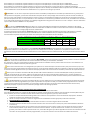
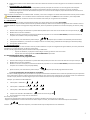
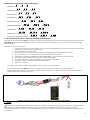
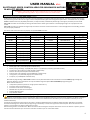
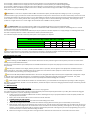
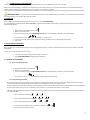
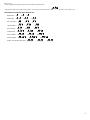
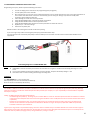
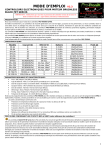
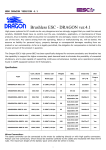
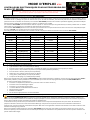
MODE D’EMPLOI V2.1 CONTROLEURS ELECTRONIQUES POUR MOTEUR BRUSHLESS BLACK FET SERIES IMPORTANT : vérifiez bien que vous êtes en possession de la dernière version de la notice en allant à l’adresse suivante : a2pro-online.com/notices-d-utilisation.html PRESENTATION Nous vous remercions pour l’achat d’un contrôleur PRO-TRONIK A2PRO. De faible encombrement, ces contrôleurs de nouvelle génération sont à la fois légers, puissants et très performants. Le micro contrôleur dont ils sont dotés assure un pilotage très précis du moteur ainsi que la sécurité de la batterie, maintenant le pack dans les meilleures conditions de performances. Afin de faciliter leur utilisation, les contrôleurs PRO-TRONIK présentent de nombreux paramètres réglables, permettant d’adapter de façon précise et efficace leur fonctionnement au moteur, à la batterie et au modèle. Les contrôleurs PRO-TRONIK sont exclusivement destinés à piloter un moteur électrique de type Brushless (sans balais) installé dans un modèle réduit volant par l’intermédiaire d’un ensemble de radiocommande proportionnel. Les contrôleurs PRO-TRONIK peuvent fournir au moteur qu’ils contrôlent le courant permanent dont la valeur est inscrite sur l’étiquette (exemple : 10 A pour le BF-10A), à la condition qu’ils soient correctement ventilés. Il est indispensable de lire attentivement et en totalité ce mode d’emploi pour utiliser correctement votre contrôleur PRO-TRONIK. CARACTERISTIQUES Modèle BF-6A BF-8A BF-10A BF-12A BF-20A BF-30A BF-45A BFu-45A BFu-70A BFu-95A BFu-120A Courant (A) 6 8 10 12 20 30 45 (40A/6LiPo) 45 (40A/6LiPo) 70 (60A/6LiPo) 95 (85A/6LiPo) 120 (110A/6LiPo) BEC (10 V) 1A max. 2A max. 2A max. 2A max. 2A max. 3A max. 3A max. 4A max. Ubec* 4A max. Ubec* 4A max. Ubec* 4A max. Ubec* Batterie Dimensions Poids (g) 2-3 LiPo 2-3 LiPo 2-3 LiPo 2-3 LiPo 2-4 LiPo 2-4 LiPo 2**-6 LiPo 2**-6 LiPo 2**-6 LiPo 2**-6 LiPo 2**-6 LiPo 13x22x4.5mm 16x27x4.5mm 16x27x7.8mm 16x27x10.4mm 41.9x24.2x11mm 56x24.5x11.3mm 70x28x16mm 70x28x16mm 70x28x16mm 70x28x16mm 70x28x16mm 6.8 9.1 10.3 12.7 21.6 30.4 52.1 53.5 56.2 66.1 69.5 PARAMETRES REGLABLES ET CARACTERISTIQUES : Frein : Off / Moyen / On (Off par défaut) Type de batterie : Nixx / 2 à 5 LiPo (3 LiPo par défaut). Seuil de coupure moteur sur batterie faible : 47/55/63/71 % (Nixx) ou 2,7/2,8/2,9/3/3,1 V (LiPo) (2,8 V par défaut). Coupure moteur : Off / Limitation de puissance / Coupure brutale (limitation par défaut). Sens de rotation : Normal / Inverse (normal par défaut). Démarrage : Doux / Moyen / Normal (moyen par défaut). Timing : Auto / Faible / Moyen / Fort (auto par défaut). Fréquence de découpage : 8 / 16 kHz (8 kHz par défaut). Notez que la programmation des contrôleurs PRO-TRONIK peut être réalisée soit depuis un émetteur, soit avec la carte de programmation EPRG-3 (optionnelle). Toutefois, certains paramètres ne sont accessibles qu’à travers la carte de programmation optionnelle PRO-TRONIK EPRG-3. Les autres caractéristiques communes sont : Protection en température (réduction de la puissance moteur au dessus de 120 °C). Protection contre les démarrages inopinés. Protection en cas de perte du signal radio. Transistors MosFets à très faible résistance interne. Microprocesseur puissant Radiateur très efficace. Fils de sections appropriées aux courants admissibles. PRECISIONS CONCERNANT LES CIRCUITS BEC et UBEC (selon référence du controleur) Les contrôleurs BLACK FET BF series sont dotés d’un circuit de type BEC (Circuit Eliminateur de Batterie à régulation linéaire). Il délivre une tension de 5V permettant d’alimenter l’ensemble de réception (récepteur et servos) installé à bord du modèle à partir de la batterie de propulsion. Ainsi, il devient superflu d’utiliser une batterie de réception supplémentaire. Ce circuit BEC est conçu de telle sorte que l’alimentation du moteur est interrompue automatiquement dès que la tension de la batterie de propulsion descend en dessous d’un seuil raisonnable de décharge. Cela permet d’une part de conserver dans cette batterie suffisamment d’énergie pour continuer d’alimenter l’ensemble de réception. Mais cela assure également le maintien de la batterie en bon état en évitant à cette dernière une décharge trop profonde. Notez que l’utilisation du BEC intégré aux contrôleurs PRO-TRONIK doit se faire après avoir vérifié que la puissance limite de ce circuit n’est pas atteinte. En pratique, vous trouverez dans les caractéristiques techniques les informations vous permettant de savoir dans quelles conditions vous pouvez utiliser le BEC intégré. 1 A titre indicatif, un circuit BEC de 1 A peut alimenter tout au plus 2 servos (LiPo 3S) ou 3 servos (LiPo 2S) d’un modèle léger. A titre indicatif, un circuit BEC de 2 A peut alimenter tout au plus 3 servos (LiPo 3S) ou 4 servos (LiPo 2S) d’un modèle de poids moyen. A titre indicatif, un circuit BEC de 3 A peut alimenter tout au plus 4 servos (LiPo 3S) ou 5 servos (LiPo 2S) d’un modèle de poids moyen. Sachez que dans tous les cas, si la batterie de propulsion dépasse 3 LiPo ou 10 Nixx, l’échauffement devient trop élevé et le circuit BEC n’est plus en mesure d’alimenter en toute sécurité votre modèle. Dans ce cas, reportez-vous aux lignes qui suivent. IMPORTANT : en cas de non respect de la puissance max du circuit BEC, la température du contrôleur peut atteindre 115 °C, provoquant la mise protection de l’appareil, qui cesse alors d’alimenter la réception afin de s’auto-protéger. Cela conduit à la perte de contrôle du modèle, et donc à son crash ! Afin d’éviter que cette protection n’entre en action, il vous appartient de vérifier par tout moyen que vous jugerez nécessaire que cette température de 115 °C n’est pas atteinte en cours d’utilisation. En cas de doute, procédez à des tests au sol, en faisant tourner le moteur sur la durée totale de décharge de la batterie, et en déplaçant régulièrement les gouvernes comme lors d’un vol « classique ». Aucune réclamation ne pourra être adressée à A2PRO en cas de problème. * Les contrôleurs BLACK FET BFu series sont dotés d’un circuit de type UBEC (Circuit Eliminateur de Batterie à régulation à découpage). Les limitations inhérentes au mode de régulation linéaire sont éliminées. Un UBEC est en effet en mesure de fournir sa tension nominale de 5,5V sous le courant nominal sur une large plage de tension d’alimentation. Le courant permanent que peut délivrer l’U-BEC 4 A intégré à votre contrôleur dépend notamment de sa tension d’alimentation. Le tableau suivant indique la valeur du courant permanent admissible selon le nombre d’éléments LiPo que compte la batterie d’alimentation. Il est essentiel de respecter cette limite pour éviter toute interruption de l’alimentation de votre réception. CAPACITE DE COURANT PERMANENT U-BEC 4A PRO-TRONIK BATTERIE LIPO TENSION COURANT PERMANENT 2S 7V 4A 3S 10,5 V 4A 4S 14 V 3,8 A 5S 17,5 V 3,5 A 6S 22 V 3A Le courant permanent que peut délivrer votre Contrôleur BFu-XX PRO-TRONIK dépend également de sa température, et donc de la température ambiante. En cas d’élévation trop importante de la température du module, la protection en température s’active et réduit lentement la tension de sortie afin d’éviter sa destruction. En cas d’utilisation dans une ambiance chaude, le courant permanent doit être réduit à 3 A. INSTALLATION ET TEST IMPORTANT : Avant de procéder à l’installation de votre contrôleur PRO-TRONIK, sachez que cet appareil n’est pas doté de protection contre les inversions de polarité. Toute erreur de branchement au niveau de la batterie se traduit par sa destruction immédiate. Par conséquent, nous vous recommandons de vérifier minutieusement l’installation avant la première mise sous tension. Toute utilisation non conforme de ce contrôleur entraîne la perte de la garantie. Nous attirons votre attention sur la dangerosité que représente un moteur électrique en fonctionnement, tant pour les biens que pour les personnes. Nous vous recommandons de réaliser les tests sur un plan de travail totalement vide de tout objet et en l’absence d’autres personnes ou animaux. Veuillez également noter qu’un moteur électrique peut devenir très chaud durant son utilisation, entraînant des risques de brûlures. Notez que les contrôleurs de référence BF-45A, BFu-45A et BFu-70A font référence au courant admissible (45A et 70A) en permanence lorsqu’ils sont alimentés par une tension inférieure ou égale à 12 V (3S). Si la tension d’alimentation dépasse 12 V, il convient d’appliquer un coefficient de sécurité qui évitera au contrôleur de trop chauffer. Ainsi, ces contrôleurs utilisés sous 6S ne doivent pas être soumis à des courants respectivement supérieurs à 40A ou 60A (chiffres entre parenthèse). ** UTILISATION SOUS 2S : lorsque les contrôleurs Bfx-45 et 70 sont utilisés sous 2S, il est impératif de désactiver leur paramètre de coupure moteur (utiliser la carte de programmation pour passer le paramètre correspondant sur OFF). Le nombre de LiPo programmé dans le contrôleur n’a donc aucune importance. Ainsi paramétré, un tel contrôleur stoppera le moteur si la tension de la batterie descend en dessous de 3,1 V/élément (soit 6,2V). Le pack sera donc normalement protégé contre toute décharge profonde. 1 / INSTALLATION INSTALLATION DES CONNECTEURS D’ALIMENTATION Les fils Rouge et Noir sortant du côté du cordon de servo du contrôleur véhiculent l’alimentation. Il est indispensable d’utiliser un système de détrompage afin d’éviter un branchement de la batterie avec des polarités inversées (destructif pour votre contrôleur). Nous vous conseillons d’utiliser des connecteurs dorés de type PK 2 / 4 / 6 mm, selon le courant. 1. Soudez sur chaque extrémité des fils Rouge et Noir les connecteurs correspondant à ceux de vos batteries de propulsion. Vérifiez la qualité des soudures et les polarités des connecteurs. 2. Glissez sur chaque connecteur une section de gaine thermo rétractable de couleur appropriée, et rétractez à la chaleur. BRANCHEMENT DU MOTEUR 1. 2. Glissez sur chacun des trois fils Rouges d’alimentation du moteur une section de gaine thermo rétractable. Soudez les trois fils du moteur sur les trois fils du contrôleur sans vous soucier de leur ordre (vous pouvez alternativement utiliser des connecteurs). Glissez les sections de gaine sur les soudures mais ne les rétractez pas pour l’instant. Testez le sens de rotation du moteur à l’aide de votre émetteur (veillez à ne pas mettre en contact les trois fils du moteur : risque de destruction du contrôleur non couverte par la garantie). Si le moteur ne tourne pas dans le bon sens, retirez deux des gaines pour laisser apparaître les soudures et intervertissez les fils du moteur. Si vous possédez la carte de programmation, vous pourrez inverser le sens de rotation sans défaire les soudures. 3. 2 4. Vérifiez que le moteur tourne cette fois dans le bon sens. Glissez de nouveau les sections de gaine sur les soudures et rétractez à la chaleur. BRANCHEMENT AU RECEPTEUR Branchez le connecteur de servo 3 points compatible JR / Futaba / Graupner du contrôleur sur la sortie gaz de votre récepteur. Notez que la tension d’alimentation de la réception est véhiculée la broche centrale de ce connecteur. Il est par conséquent indispensable de ne pas connecter de batterie de réception sur une autre voie du récepteur (risque de destruction du contrôleur non couverte par la garantie). Votre contrôleur est maintenant correctement câblé. Toutefois, il vous reste à configurer son mode de fonctionnement avant de pouvoir l’utiliser. NOTE IMPORTANTE : si vous souhaitez utilisez une batterie de réception ou un UBEC avec votre contrôleur, il est indispensable d’extraire la broche centrale du connecteur de servo du contrôleur et de l’isoler par une gaine thermo rétractable. 2 / UTILISATION Une fois les branchements réalisés et soigneusement vérifiés, vous pouvez utiliser votre contrôleur PRO-TRONIK. Sachez toutefois que votre contrôleur est livré avec des paramètres établis par défaut. Il est essentiel de programmer votre contrôleur avant sa première utilisation ou après un changement de type de batterie, sauf si les paramètres par défaut vous conviennent (LiPo, pas de frein, timing Auto). 1. 2. 3. . Placez le manche de gaz de l’émetteur en position Ralenti (vérifiez que le sens de la course de cette voie n’est pas inversé) Mettez alors sous tension l’émetteur. Mettez sous tension la réception en branchant la batterie de propulsion sur le contrôleur PRO-TRONIK (ou branchez la batterie de réception si le contrôleur n’est pas équipé de BEC). 4. 5. 6. , indiquant que le contrôleur est initialisé et prêt à fonctionner. Après un instant, vous entendez une petite musique Juste après l’initialisation, le contrôleur vous indique si le frein est activé (1 bip), partiellement activé (3 bips) ou désactivé (2 bips). Vous pouvez maintenant voler. 3 / PROGRAMMATION Il est essentiel de programmer votre contrôleur avant sa première utilisation ou après un changement de type de batterie, sauf si les paramètres par défaut vous conviennent (LiPo, pas de frein, timing Auto). L’accès au mode programmation peut être obtenu de deux façons différentes : A partir de l’émetteur, en plaçant le manche de gaz sur Plein gaz avant la mise sous tension. A partir de la carte de programmation PRO-TRONIK EPRG-3 optionnelle. 3.1 PROGRAMMATION AVEC L’EMETTEUR 3.1.1 Entrée en mode programmation : 1. 2. 3. Placez le manche de gaz de l’émetteur en position Plein Gaz (vérifiez que le sens de la course de cette voie n’est pas inversé) Mettez alors sous tension l’émetteur. Mettez sous tension la réception en branchant la batterie de propulsion sur le contrôleur PRO-TRONIK (ou branchez la batterie de réception si le contrôleur n’est pas équipé de BEC). 4. Après un instant, vous entendez une petite musique . , indiquant que le mode programmation est activé. 3.1.2 Programmation des paramètres accessibles : Une fois en mode programmation, le contrôleur vous propose successivement de sélectionner la valeur des paramètres les plus importants dans l’ordre décrit ci-dessous. Chaque paramètre est identifié par trois séries de sons composés de un ou plusieurs notes. Pour sélectionner la valeur requise, baissez le manche de gaz lorsque vous entendez la série de note qui correspond à votre souhait. Exemple : pour sélectionner BATTERIE LiPo : 5. Laissez passer « FREIN ON » 6. Laissez passer « FREIN OFF » 7. Laissez passer « BATTERIE Nixx » 8. Lorsque vous entendez « BATTERIE LiPo » , baissez le manche de gaz . 9. Vous entendez alors un bip court de confirmation. A ce stade, vous pouvez : - poursuivre la programmation d’autres paramètres en replaçant rapidement le manche de gaz sur plein gaz. - stopper la programmation en laissant le manche au ralenti. A près un instant, le contrôleur fait entendre la séquence d’initialisation suivante : . Après cette séquence, le contrôleur émet le bip correspondant au frein sélectionné. 3 PARAMETRES ACCESSIBLES DEPUIS L’EMETTEUR : FREIN ON : FREIN OFF: BATTERIE Nixx: BATTERIE LiPo: DEMARRAGE DOUX : DEMARRAGE NORMAL : TIMING DOUX : TIMING FORT : RETOUR AUX VALEUR PAR DEFAUT : 3.2 PROGRAMMATION AVEC LA CARTE DE PROGRAMMATION EPRG-3 L’utilisation de la carte optionnelle EPRG-3 vous permet d’une part de programmer de façon très simple et totalement fiable tous les contrôleurs PRO-TRONIK. Mais elle vous donne également accès à la totalité des paramètres des contrôleurs, ce qui n’est pas le cas de la programmation depuis un émetteur. L’utilisation de la carte est très simple : 1. Connectez le cordon de servo du contrôleur sur le connecteur de programmation de la carte en respectant la position des fils indiquée par le code de couleurs (voir graphique). 2. Connectez la batterie sur le contrôleur. 3. Après un instant, vous entendez une petite musique, vous indiquant que les branchements sont corrects. 4. Les Leds allumées sur la carte indiquent alors la valeur actuelle de chaque paramètre. 5. Sélectionnez le paramètre à modifier avec le bouton NEXT MENU. La Led du paramètre concerné clignote. 6. Vous pouvez changer la valeur du paramètre avec le bouton NEXT VALUE. 7. Pour valider votre choix et passer au paramètre suivant, pressez sur NEXT MENU. 8. Répétez les étapes 5 à 7 pour les autres paramètres à modifier. 9. Débranchez la batterie. Vous pouvez à tout moment rappeler les paramètres d’usine en pressant le bouton DEFAULT. Si vous constatez que la carte EPRG-3 ne passe pas à l’étape 3 après branchement de la batterie, procédez comme suit : Réalisez 3 fois de suite l’opération de branchement-débranchement de la batterie en l’espace de 3 secondes. Cela permet de reseter la communication entre le contrôleur et la carte. Schéma de branchement pour la programmation d’un contrôleur PROTONIK 4 / NOTES IMPORTANT : Ne laissez jamais la batterie de propulsion connectée sur le contrôleur sur une longue période. Dans ces conditions, le circuit BEC continue de consommer un faible courant qui, à la longue, peut décharger complètement la batterie. Par conséquent, nous vous recommandons de prendre l’habitude de ne brancher la batterie que juste avant d’utiliser le modèle, puis de débrancher la batterie juste après son utilisation. 4 Le circuit BEC dispose d’une capacité en courant dépendant de la tension délivrée par la batterie de propulsion. Vérifiez systématiquement que la consommation de votre ensemble de réception (récepteur + servos) ne dépasse pas la capacité BEC du contrôleur. Dans le cas contraire, vous risquez de crasher votre modèle sur interruption d’alimentation de la réception. 5 / GARANTIE Votre contrôleur PRO-TRONIK dispose d’une durée de garantie de 1 an contre tout vice de fabrication. Les erreurs de branchements ne sont pas couvertes par la garantie. Les courts-circuits de tous types ne sont pas couverts par la garantie. Toute détérioration de l’emballage, des fils ou de tout autre composant du produit entraîne la perte de la garantie. De façon générale, toute utilisation sortant du cadre de l’utilisation normale du produit entraîne l’annulation de la garantie. 6 / REGLES DE SECURITE Le moteur, la batterie, les fils et le contrôleur peuvent atteindre des températures élevées. Ne touchez pas ces éléments avant un refroidissement complet sous peine de graves brûlures. Une hélice en rotation peut se révéler très dangereuse pour les objets et les personnes. Faites preuve de bon sens lors de l’utilisation de votre modèle. Testez systématiquement la portée de votre ensemble de radiocommande avec le moteur coupé, puis à mi gaz et enfin à plein gaz. MISE EN GARDE SUR LES CONTROLEURS DE LA SERIE BFu Comme tous les UBEC ou SBEC du marché, l’UBEC présent dans les contrôleurs de la série BFu PRO-TRONIK reposent sur le principe du découpage à haute fréquence. Bien que toutes les précautions soient prises afin que ce module perturbe le plus faiblement possible votre réception, il est de votre responsabilité de vérifier que ce BEC est compatible avec votre ensemble radio. En effet, tout UBEC génère deux types de perturbations : - Des perturbations électromagnétiques (par rayonnement). La conception même de votre contrôleur BFu PRO-TRONIK permet de limiter ces phénomènes. Mais les remarques figurant dans cette notice doivent impérativement être prises en compte lors de l’installation à bord du modèle (éloignement du récepteur et du fil d’antenne notamment). - Des perturbations véhiculées par les fils d’alimentation. Ce phénomène insidieux peut réduire de manière conséquente la portée de votre ensemble. Notez que tous les récepteurs du commerce ne sont pas égaux face à ces perturbations. Les modèles fonctionnant sur les bandes 35, 40/41 et 72 MHz sont particulièrement sensibles et méritent une attention particulière. De manière générale, le test de portée est OBLIGATOIRE avant de voler. Ce test doit permettre de valider que votre contrôleur BFu ne réduit pas la portée de façon trop importante et n’introduit pas d’autres perturbations sur le fonctionnement des servos notamment. Tout fonctionnement anormal doit systématiquement entraîner la non utilisation du modèle jusqu’à résolution du problème (changement de récepteur, modification du câblage, passage en 2,4 GHz,…). 5 USER MANUAL V2.1 ELECTRONIC SPEED CONTROLLERS FOR BRUSHLESS MOTORS BLACK FET SERIES WARNING : please make sure that you are reading the latest version of the manual by checking the following address : a2pro-online.com/notices-d-utilisation.html OVERVIEW Thank you for purchasing a PRO-TRONIK A2PRO controller. Small footprint, these new generation controllers are both lightweight and powerful with high performances. The micro controller which ensures they have a very precise control of the engine and the safety of the battery pack maintaining its best performance. To facilitate their use, the ProTronik controllers have many adjustable parameters, to adapt accurately and efficiently functioning to the engine, the battery and the model. Pro-Tronik controllers are exclusively for driving a brushless electric motor type installed in a model flying through a set of proportional radio control. Pro-Tronik controllers can provide the engine they controls the continuous current whose value is on the label (eg 10 A for the BF-10A), provided they are properly ventilated. It is vital to read all the instructions to properly use your Pro-Tronik controller. FEATURES Model Current (A) BEC (10 V) Battery Dimensions Weight (g) BF-6A BF-8A BF-10A BF-12A BF-20A BF-30A BF-45A BFu-45A BFu-70A BFu-95A BFu-120A 6 8 10 12 20 30 45 (40A/6LiPo) 45 (40A/6LiPo) 70 (60A/6LiPo) 95 (85A/6LiPo) 120 (110A/6LiPo) 1A max. 2A max. 2A max. 2A max. 2A max. 3A max. 3A max. 4A max. Ubec* 4A max. Ubec* 4A max. Ubec* 4A max. Ubec* 2-3 LiPo 2-3 LiPo 2-3 LiPo 2-3 LiPo 2-4 LiPo 2-4 LiPo 2-6 LiPo 2**-6 LiPo 2**-6 LiPo 2**-6 LiPo 2**-6 LiPo 13x22x4.5mm 16x27x4.5mm 16x27x7.8mm 16x27x10.4mm 41.9x24.2x11mm 56x24.5x11.3mm 70x28x16mm 70x28x16mm 70x28x16mm 70x28x16mm 70x28x16mm 6.8 9.1 10.3 12.7 21.6 30.4 52.1 53.5 56.2 66.1 69.5 ADJUSTABLE PARAMETERS : Brake : Off / Medium / On (Off is default value) Battery type : Nixx / 2 to 5 LiPo (3 LiPo is default value). Battery cutting off voltage : 47/55/63/71 % (Nixx) or 2,7/2,8/2,9/3/3,1 V (LiPo) (2,8 V default value). Cut OFF type : Off / Limited / Cut OFF (Limited is default value). Rotation : Normal / Reverse (Normal is default value). Starting mode : Soft / Medium / Normal (Medium is default value). Timing : Auto / Low / Medium / High (auto is default value). Frequency : 8 / 16 kHz (8 kHz is default value). Note that the programming of Pro-Tronik controllers can be performed either from a transmitter or with the EPRG-3 programming card (optional). However, some parameters are only accessible through the optional Pro-Tronik EPRG-3 programming card. Other common features are: Temperature protection (reduction of engine power above 120 ° C). Protection against unexpected start. Protection in case of loss of radio signal. MOSFET with very low internal resistance. Powerful Microprocessor. Very effective radiator. DETAILS ON BEC AND UBEC CIRCUITS (Depending on the ESC model) BLACK FET controllers (BF series) are equipped with a BEC circuit-type (Battery Eliminator Circuit with linear regulation). It delivers a voltage of 5V to power the entire reception (receiver and servos) installed on the model from the main battery. Thus, it becomes unnecessary to use an additional RX battery. The BEC circuit is designed so that power to the motor is stopped automatically when the battery voltage propulsion falls below a reasonable threshold of discharge. This allows to keep enough energy in the battery to continue to support the entire reception. But it also maintains the battery in good condition and avoid to discharge it too deep. Note that using the Pro-Tronik ESC built-in BEC must be done after checking that the power limit of the circuit is not reached. In practice, you will find the technical information you can find out under what conditions you can use the built-in BEC. 6 As an example, a 1A BEC circuit can power at most two servos (3S LiPo) or 3 servos (2S LiPo) of a lightweight model. As an example, a 2A BEC circuit can supply at most 3 servos (3S LiPo) or 4 servos (2S LiPo) of a model of average weight. As an example, a 3A BEC circuit can supply at most 4 servos (3S LiPo) or 5 servos (2S LiPo) of a model of average weight. Know that in all cases, if the battery is greater than 3 LiPo or 10 Nixx, heat becomes too high and the BEC is no longer able to supply your model safely. In this case, see the following lines. IMPORTANT: in case of non compliance with the BEC circuit maximum power, the ESC temperature will go up to 115 ° C, causing the protection device to go on, the ESC then ceases to feed the reception to self-protect. This leads to loss of control of the model, and thus the crash! To prevent this protection to come into action, it is your responsibility to check by any means you deem necessary that the temperature of 115 ° C is not reached in use. If in doubt, perform tests on the ground, turning the motor on the total discharge of the battery, and moving the control surfaces on a regular basis as on a “classic” flight. No claim will be sent to A2PRO in case of problems. . The BLACK FET BFU series controllers feature a UBEC circuit type (Battery Eliminator Circuit controlled switching). The limitations inherent in the method of linear regulation are eliminated. A UBEC is indeed able to provide its rated voltage of 5.5 V at rated current over a wide range of supply voltage. The continuous current that can deliver the U-BEC 4 A part of your particular controller depends on its supply voltage. The following table shows the value of ampacity based on number of elements that make up the LiPo battery pack. It is essential to respect this limit to avoid any interruption in the supply of your reception. Amp delivered by U-BEC 4A PRO-TRONIK LIPO BATTERY VOLTAGE Amp Delivered by UBEC 2S 7V 4A 3S 10,5 V 4A 4S 14 V 3,8 A 5S 17,5 V 3,5 A 6S 22 V 3A The constant current that can deliver your BFU-XX PRO-TRONIK also depends on its temperature, and thus the room temperature. In case of excessive rise of temperature in the module, the temperature protection is activated and slowly reduces the output voltage to prevent its destruction. When used in a hot environment, the continuous current must be reduced to 3 A. INSTALLATION and TEST WARNING : Before installing your Pro-Tronik ESC, know that this device does not have protection against reverse polarity. Incorrect connection at the battery leads to its immediate destruction. Therefore, we recommend that you carefully check the installation before the first power. Any improper use of this controller causes the loss of the guarantee. We draw your attention to the danger posed by an electric motor in operation, both for goods and for people. We recommend that you perform the tests on a work plan completely empty of any object and in the absence of other people or animals. Please also note that electric motor can become very hot during use, causing risk of burns. Note that the BF-45A, BFu45A and Bfu70A refers to the current rating (45A and 70A) continuously when supplied with a voltage less or equal to 12 V (3S). If the supply voltage exceeds 12 V, it is appropriate to apply a safety factor that will prevent the ESC to overheat. Thus, these controllers used in 6S should not be subjected to currents respectively exceed 40A or 60A (figures in brackets). ** USING 2 CELLS : When the Bfx-45 and 70 ESCs are used with 2S LiPo, you must disable the cutt-off process by setting it to OFF. Doing this, the cell count programmed in the ESC is not used. Set like this, the ESC will stop the motor if the voltage goes below 3.1V/cell. The battery pack will be totally protected. 1 / INSTALLATION CONNECTING TO THE BATTERY The Red and Black wires out of the side of the ESC servo cord are carrying power. It is essential to use a coding system to avoid connecting the battery with reversed polarity (destructive to your ESC). We recommend using gold connectors of type PK 2 / 4 / 6 mm, depending on the current. 1. Solder on each end of the Red and Black wires connectors matching those of your propulsion batteries. Check the quality of welds and the polarity of the connectors. 2. Slide a piece of heat shrink tube on each connector and retract with heat. CONNECTING TO THE MOTOR 1. 2. 3. Slide a piece of heat shrink tube on each of the three wires leading to the motor. Solder the three engine wires to the three ESC wires without worrying about their order (you can alternatively use connectors). Slide the heat shrink tubes on the welds but does not retract now. Test the rotation of the engine with your transmitter (do not short cut the three wires of the engine: the risk of destruction of the controller is not covered by warranty). If the engine is not running in the right direction, remove two heat shrink tubes to reveal the weld and swap the wires of the engine. If you have the programming card, you can reverse the direction of rotation without breaking the welds. Make sure the engine is running this time in the right direction. Slide back the sleeve sections on the welds and heat to retract. 4. 7 CONNECTING TO THE RECEIVER Connect the 3-point JR / Futaba / Graupner compatible ESC servo link on the THROTTLE channel of your receiver. Note that the supply voltage is conveyed to the reception center pin of the connector. It is therefore essential not connect receiver battery on another receptor channel (risk of destruction of the controller is not covered by warranty). Votre contrôleur est maintenant correctement câblé. Toutefois, il vous reste à configurer son mode de fonctionnement avant de pouvoir l’utiliser. IMPORTANT NOTE : if you want to use a receiver battery pack or external UBEC with your controller, it is essential to remove the center pin of the connector and insulate it with heat shrink tube. 2 / UTILISATION Please verify one more time all the connections. You can now use your PRO-TRONIK ESC. It is setup with factory default settings. So it is essential to program your ESC before the first flight, except if these settings are ok for you (LiPo, brake Off, timing Auto). . 1. Place throttle stick in iddle position 2. Switch on the transmitter. 3. Connect the power pack to the PRO-TRONIK controller (or external battery / UBEC for an OPTO controller). , indicating it is ready to use. 4. Your ESC play a music 5. If you hear one beep, brake is FULL. If you hear 3 beeps, break SOFT. If you hear 2 beeps, brake is OFF. 6. You can fly. 3 / PROGRAMMING PARAMETERS Please program your controller before flying or after changing battery type for example, except if these settings are ok for you (LiPo, brake OFF, timing Auto). You can access programming mode in two ways: - From your transmitter, using the throttle stick at power on. Using PRO-TRONIK EPRG-3 programming card (option). 3.1 TRANSMITTER PROGRAMING 3.1.1 Enter in programing mode: . 1. Place throttle stick in full position 2. Switch on the transmitter. 3. Connect the power pack to the PRO-TRONIK controller (or external battery / UBEC for an OPTO controller). 4. Your ESC play a music , indicating programming mode is activated. 3.1.2 Programming parameters: After the piece of music, you can follow the prompting sound to begin programming. When you hear a prompting sound (sound 3 times), move the throttle stick from high to low position quickly. You should hear a “beep”. Your setting is done. Move the stick back to max position, waiting for the prompting sound and repeat above steps for other settings. After your setting, keep the stick at lowest position for 5 seconds. You will hear a piece of music. You can begin to fly with your new settings. Example : changing battery type. Move stick to low position when you hear the sound sequence corresponding to the battery parameter. To select LiPo BATTERY : 1. don’t move stick (brake ON) 2. don’t move stick (brake OFF) 3. don’t move stick (Nixx battery) 4. move stick to low position when you hear “LiPo battery” 5. you may hear a confirmation beep. . 8 Now, you can: - continue programming other parameters by quickly moving the stick up. - stop programming. Let the stick at llow position. You may hear startup sequence : . Your ESC is now ready to use. PROGRAMMING PARAMETERS FROM TRANSMITTER : BRAKE ON : BRAKE OFF : Nixx BATTERY : LiPo BATTERY : SOFT START : HARD START : SOFT TIMING : HARD TIMING : RESET TO FACTORY SETTING : 9 3.2 PROGRAMMING PARAMETERS FROM EPRG-3 CARD Programming is very easy. Please respect the following instructions: 1. 2. 3. 4. 5. 6. 7. 8. 9. Connec the JR plug of the controller to the programming card (see graphic). Connect power pack to the controller. Afer a few seconds, you can hear music, indicating everything is correct. At this moment, the card “read” all the parameters of the controller and shows them on the Leds. That’s the way you can verify your settings. If you want to modify some parameters, please follow the next setp. Leds indicating the actual value of each parameter. Using the NEXT MENU button, select the parameter to be edited. Using the NEXT VALUE button to edit the parameter value. Using the NEXT MENU button will save the current parameter and select the next one. Repeat step 5 ~ 7 for other settings. Disconnect the power pack. DEFAULT button is for resetting the controller to the factory setting. If you cannot go to step 3 after connecting the power pack, please follow these steps: Connect and disconnect successively and quickly 3 times the battery to the controller. This will restore communication between these equipments. Connecting diagram of a PROTRONIK ESC. NOTES IMPORTANT: never let the battery connected to the controller for a long time. The BEC circuit will deeply discharge it in a few hours. If you cannot establish communication between card and controller, verify that the battery voltage is > 8 V. If the motor does not start normally, please change the timing value. WARRANTY Your PRO-TRONIK ESC is a one year warranty. Reverse polarity errors are not covered by the warranty. Short circuits are not covered by the warranty. WARNING ABOUT BFu series ESC Like all UBEC or SBEC on the market, the UBEC in this BFU Pro-Tronik ESC series is based on the principle of high frequency switching. Although precautions are taken to enable this module disrupts the lowest possible your reception, it is your responsibility to check that BEC is compatible with all your radio gear. Indeed, any UBEC generates two types of disturbances: - The electromagnetic (radiation). The design of your controller BFU Pro-Tronik can limit these phenomena. But the comments contained in this manual must always be taken into account during the installation on the model (distance from the receiver and the antenna wire in particular). - Disturbances conveyed by the wires. This insidious phenomenon can consistently reduce the radio range of your set. Note that all receivers on the market are not equal before the disturbance. Models running on the strips 35, 40/41 and 72 MHz are particularly vulnerable and deserve special attention. In general, the range check is required before flying. This test is meant to validate that your controller BFU does not reduce the radio range too large and does not introduce other disturbances on the operation of such servos. Any abnormal result should force you to not routinely use the model and solve the problem (changing receiver, wiring modification, moving to 2.4 GHz, ...) 10