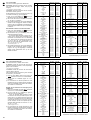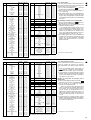
1
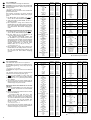
Kanal
1
Funktion
DMX-Wert
dezimal
DMX-Wert
prozentual
Gobo-Rotation
Stopp
sehr schnell
schnell
mittel
langsam
Stopp
000 – 015
016 – 023
024 – 055
056 – 087
088 – 118
119 – 136
00 – 05 %
06 – 09 %
10 – 21 %
22 – 34 %
35 – 46 %
47 – 53 %
langsam
mittel
schnell
sehr schnell
137 – 167
168 – 199
200 – 231
232 – 255
54 – 65 %
66 – 78 %
79 – 90 %
91 – 100 %
000 – 001
002 – 008
009 – 011
012 – 019
020 – 021
022 – 028
029 – 031
032 – 037
038 – 041
042 – 048
049 – 050
051 – 057
058 – 061
062 – 067
068 – 071
072 – 078
079 – 081
082 – 087
088 – 095
0%
1–3%
3–4%
5–7%
8%
09 – 11 %
11 – 12 %
13 – 14 %
15 – 16 %
16 – 19 %
19 – 20 %
20 – 22 %
23 – 24 %
24 – 26 %
27 – 28 %
28 – 31 %
31 – 32 %
32 – 34 %
35 – 37 %
096 – 103
104 – 110
111 – 112
113 – 119
120 – 123
124 – 129
130 – 132
133 – 140
141 – 143
144 – 149
150 – 152
153 – 159
160 – 163
164 – 169
170 – 172
173 – 179
180 – 182
183 – 189
190 – 199
38 – 40 %
41 – 43 %
43 – 44 %
44 – 47 %
47 – 48 %
49 – 51 %
51 – 52 %
52 – 55 %
55 – 56 %
56 – 58 %
59 – 60 %
60 – 62 %
63 – 64 %
64 – 66 %
66 – 67 %
68 – 70 %
70 – 71 %
72 – 74 %
75 – 77 %
200 – 219
220 – 239
240 – 255
78 – 85 %
86 – 93 %
94 – 100 %
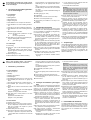
DMX value
decimal
DMX value
percental
Gobo Rotation
stop
very fast
fast
medium
slow
stop
000 – 015
016 – 023
024 – 055
056 – 087
088 – 118
119 – 136
00 – 05 %
06 – 09 %
10 – 21 %
22 – 34 %
35 – 46 %
47 – 53 %
slow
medium
fast
very fast
137 – 167
168 – 199
200 – 231
232 – 255
54 – 65 %
66 – 78 %
79 – 90 %
91 – 100 %
000 – 001
002 – 008
009 – 011
012 – 019
020 – 021
022 – 028
029 – 031
032 – 037
038 – 041
042 – 048
049 – 050
051 – 057
058 – 061
062 – 067
068 – 071
072 – 078
079 – 081
082 – 087
088 – 095
0%
1–3%
3–4%
5–7%
8%
09 – 11 %
11 – 12 %
13 – 14 %
15 – 16 %
16 – 19 %
19 – 20 %
20 – 22 %
23 – 24 %
24 – 26 %
27 – 28 %
28 – 31 %
31 – 32 %
32 – 34 %
35 – 37 %
096 – 103
104 – 110
111 – 112
113 – 119
120 – 123
124 – 129
130 – 132
133 – 140
141 – 143
144 – 149
150 – 152
153 – 159
160 – 163
164 – 169
170 – 172
173 – 179
180 – 182
183 – 189
190 – 199
38 – 40 %
41 – 43 %
43 – 44 %
44 – 47 %
47 – 48 %
49 – 51 %
51 – 52 %
52 – 55 %
55 – 56 %
56 – 58 %
59 – 60 %
60 – 62 %
63 – 64 %
64 – 66 %
66 – 67 %
68 – 70 %
70 – 71 %
72 – 74 %
75 – 77 %
200 – 219
220 – 239
240 – 255
78 – 85 %
86 – 93 %
94 – 100 %
Kanal
3
2
Channel
1
2
Farbscheibe
Weiß
Weiß + Orange
Orange
Orange + Grün
Grün
Grün + Gelb
Gelb
Gelb + Rosa
Rosa
Rosa + Hellblau
Hellblau
Hellblau + Rot
Rot
Rot + Hellgrün
Hellgrün
Hellgrün + Violett
Violett
Violett + Dunkelblau
Dunkelblau
Korrekturfilter ein + Farbe:
Dunkelblau
Dunkelblau + Violett
Violett
Violett + Hellgrün
Hellgrün
Hellgrün + Rot
Rot
Rot + Hellblau
Hellblau
Hellblau + Rosa
Rosa
Rosa + Gelb
Gelb
Gelb + Grün
Grün
Grün + Orange
Orange
Orange + Weiß
Weiß
ständiger Farbwechsel
langsam
mittel
schnell
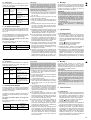
Function
Colour Disc
white
white + orange
orange
orange + green
green
green + yellow
yellow
yellow + pink
pink
pink + light-blue
light-blue
light-blue + red
red
red + light-green
light-green
light-green + violet
violet
violet + dark-blue
dark-blue
correction filter on + colour:
dark-blue
dark-blue + violet
violet
violet + light-green
light-green
light-green + red
red
red + light-blue
light-blue
light-blue + pink
pink
pink + yellow
yellow
yellow + green
green
green + orange
orange
orange + white
white
continuous colour change
slow
medium
fast
Goboscheibe
Gobo A
Gobo B
Gobo C
Gobo D
Gobo E
Gobo F
Gobo G
Gobo H
Gobo I
Gobo J
ständiger Wechsel
langsam
mittel
schnell
DMX-Wert
prozentual
000 – 019
020 – 039
040 – 059
060 – 079
080 – 099
100 – 119
120 – 139
140 – 159
160 – 179
180 – 199
00 – 07 %
08 – 15 %
16 – 23 %
24 – 30 %
31 – 38 %
39 – 46 %
47 – 54 %
55 – 62 %
62 – 70 %
71 – 78 %
200 – 219
220 – 239
240 – 255
79 – 85 %
86 – 93 %
94 – 100 %
kein Stroboskop
Stroboskop langsam → schnell
000 – 063
064 – 255
00 – 24 %
25 – 100 %
5
Drehung (Pan), grob 540°
000 – 255
0 – 100 %
6
Drehung, fein
000 – 255
0 – 100 %
7
Neigung (Tilt), grob 270°
000 – 255
0 – 100 %
8
Neigung, fein
000 – 255
0 – 100 %
9
Dimmer
Modus CLOP: dunkel → hell
Modus OPCL: hell → dunkel
000 – 255
000 – 255
0 – 100 %
0 – 100 %
Pan / Tilt-Geschwindigkeit
langsam
mittel
schnell
sehr schnell
Fokus (1 m – ∞)
000 – 063
064 – 127
128 – 191
192 – 255
000 – 255
00 – 25 %
26 – 50 %
51 – 75 %
76 – 100 %
0 – 100 %
12
Frostfilter + Prisma aus
Frostfilter ein
Prisma ein
Prismadrehung, langsam
mittel
schnell
sehr schnell
Stopp
Prismadrehung, langsam
mittel
schnell
sehr schnell
000 – 010
011 – 047
048 – 058
059 – 078
079 – 099
100 – 120
121 – 141
142 – 162
163 – 182
183 – 203
204 – 224
225 – 255
00 – 03 %
04 – 18 %
19 – 22 %
23 – 30 %
31 – 38 %
39 – 47 %
48 – 55 %
56 – 63 %
64 – 72 %
73 – 79 %
80 – 87 %
88 – 100 %
13
Beschleunigen und Bremsen
der Pan/Tilt-Bewegungen*
langsam
normal → schnell
Reset, verzögert
Normalbetrieb
Lampe aus
000 – 031
032 – 127
128 – 191
192 – 250
251 – 255
00 – 12 %
13 – 50 %
51 – 75 %
76 – 98 %
99 – 100 %
11
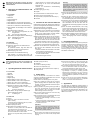
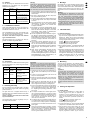
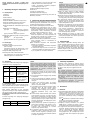
6.4.2 16-Bit-Betrieb
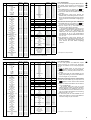
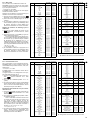
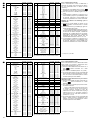
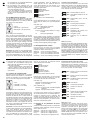
Für den 16-Bit-Betrieb benötigt der TWIST-250 dreizehn Kanäle, deren Funktionen und Zuordnung in
der nebenstehenden Tabelle (Abb. 7) angegeben
sind.
1) Die MENU-Taste so oft drücken, bis
erscheint. Mit der Taste ENTER bestätigen.
2) Jetzt mit der Taste UP oder DOWN „13“ (Kanäle)
einstellen.
3) Das Abspeichern erfolgt durch Drücken der
ENTER-Taste, bis die Anzeige aufhört zu blinken.
Noch nicht abgespeicherte Änderungen werden
durch Drücken der Taste MENU rückgängig gemacht.
D
A
CH
Start-Adresseneinstellung für den 16-Bit-Betrieb
1) Die MENU-Taste (5) so oft drücken, bis
erscheint. Mit der Taste ENTER (8) bestätigen.
2) Mit den Tasten UP (7) und DOWN (6) die
gewünschte Start-Adresse einstellen.
Alle folgenden DMX-Geräte müssen eine um
mindestens 13 Kanäle höhere Start-Adresse bekommen. Beispiel: Die Start-Adresse des
TWIST-250 ist 25. Dann belegt der TWIST-250
die Adressen 25 bis 37. Die nächstmögliche
Start-Adresse für folgende DMX-Geräte ist dann
25 + 13 = 38.
3) Das Abspeichern erfolgt durch Drücken der
ENTER-Taste, bis die Anzeige aufhört zu blinken.
Die noch nicht abgespeicherte Änderung wird
durch Drücken der Taste MENU rückgängig
gemacht.
* siehe Kapitel 6.3, Menüpunkt nChn
Kanalzuordung im 16-Bit-Betrieb
Channel
Function
3
Gobo Disk
Gobo A
Gobo B
Gobo C
Gobo D
Gobo E
Gobo F
Gobo G
Gobo H
Gobo I
Gobo J
continuous change
slow
medium
fast
DMX value
decimal
DMX value
percental
000 – 019
020 – 039
040 – 059
060 – 079
080 – 099
100 – 119
120 – 139
140 – 159
160 – 179
180 – 199
00 – 07 %
08 – 15 %
16 – 23 %
24 – 30 %
31 – 38 %
39 – 46 %
47 – 54 %
55 – 62 %
62 – 70 %
71 – 78 %
200 – 219
220 – 239
240 – 255
79 – 85 %
86 – 93 %
94 – 100 %
4
no stroboscope
stroboscope slow → fast
000 – 063
064 – 255
00 – 24 %
25 – 100 %
5
panning, coarse 540°
000 – 255
0 – 100 %
6
panning, fine
000 – 255
0 – 100 %
7
tilting, coarse 270°
000 – 255
0 – 100 %
8
tilting, fine
000 – 255
0 – 100 %
000 – 255
000 – 255
0 – 100 %
0 – 100 %
000 – 063
064 – 127
128 – 191
192 – 255
000 – 255
00 – 25 %
26 – 50 %
51 – 75 %
76 – 100 %
0 – 100 %
000 – 010
011 – 047
048 – 058
059 – 078
079 – 099
100 – 120
121 – 141
142 – 162
163 – 182
183 – 203
204 – 224
225 – 255
00 – 03 %
04 – 18 %
19 – 22 %
23 – 30 %
31 – 38 %
39 – 47 %
48 – 55 %
56 – 63 %
64 – 72 %
73 – 79 %
80 – 87 %
88 – 100 %
000 – 031
032 – 127
128 – 191
192 – 250
251 – 255
00 – 12 %
13 – 50 %
51 – 75 %
76 – 98 %
99 – 100 %
9
10
11
12
13
➆
DMX-Wert
dezimal
4
10
➆
Funktion
dimmer
mode CLOP: dark → bright
mode OPCL: bright → dark
pan / tilt- speed
slow
medium
fast
very fast
focus (1 m – ∞)
frost filter + prism off
frost filter on
prism on
prism rotation, slow
medium
fast
very fast
stop
prism rotation, slow
medium
fast
very fast
accelerating and stopping of
the panning/tilting movements*
slow
normal → fast
reset, delayed
standard operation
lamp off
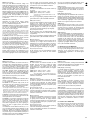
6.4.2 16-bit operation
For the 16-bit operation the TWIST-250 requires
thirteen channels, the functions and assignment
of which are indicated in the accompanying table
(fig. 7).
1) Press the MENU button so many times until
appears. Confirm with the button ENTER.
2) Now adjust “13” (channels) with the button UP or
DOWN.
3) To memorize press the button ENTER until the
display stops flashing. Press the button MENU to
cancel changes not yet memorized.
GB
Start address adjustment for the 16-bit operation
1) Press the button MENU (5) so many times until
appears. Confirm with the button ENTER
(8).
2) Adjust the desired start address with the buttons
UP (7) and DOWN (6).
All following DMX units must get a start
address higher by at least 13 channels. Example:
the start address of the TWIST-250 is 25. Then
the TWIST-250 reserves the addresses 25 to 37.
The next possible start address for the following
DMX units is 25 + 13 = 38.
3) To memorize press the button ENTER until the
display stops flashing. Press the button MENU to
cancel the change not yet memorized.
* see chapter 6.3, menu item nChn
Channel assignment in the 16-bit operation
9