1
10
English
Note:To prevent burns, wear oven mitts when you remove the lid. Remove the lid slowly and away from
you. Let condensation drip off the lid into the steaming basket.
Note: Use a kitchen utensil with long handles to remove the food from the steaming baskets.
5When you remove a steaming basket, let condensation drip off the basket in the underlying
steaming basket or the drip tray.
6Remove the plug from the wall socket and let the steamer cool down completely before you
remove the drip tray.
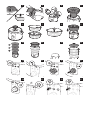
7Empty the water tank after each use by tilting the base backwards and pouring the water
from the back of the base (Fig. 3).
Be careful when you remove the drip tray and empty the water tank, because the water in both
of them may still be hot, even if the other parts of the appliance have cooled down already.
Note: If the water runs out during steaming, the ‘water tank empty’ light and the light ring start flashing
to indicate that you need to refill the water tank (Fig. 15).
Note: If you want to steam more food and need more water, you can add small quantities of water
through the water refill spout to refill the water tank.
Note:The appliance automatically goes into the standby mode if it has not been used for 2 minutes.
Press the start/stop button to activate the control panel again.
Manual mode
Use this mode to activate the steamer quickly.
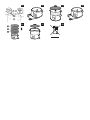
1Turn the timer adjustment knob to the left or right to select the required steaming
time (Fig. 16).
2Press the start/stop button to start steaming (Fig. 17).
,, The steaming process starts. The light ring and the turbo light flash slowly and the timer
counts down the set steaming time (Fig. 18).
,, When the set steaming time has elapsed, the appliance beeps and switches to the keep-warm
mode. The keep-warm light goes on (Fig. 19).
Meal mode
Use this mode to prepare a complete meal with different preparation times for each steaming
basket. The appliance automatically starts to steam the food in the steaming basket with the longest
preparation time and beeps to let you know when to place the steaming basket or baskets with a
shorter preparation time. The last steaming basket has the lowest preparation time.
Note: If you want to prepare a meal without using all three steaming baskets, only set the timer for the
steaming baskets you are using.
1Press steaming basket button 1, 2 or 3 to select one of the baskets (Fig. 20).
,, The corresponding light starts to flash.
2Turn the timer adjustment knob to the left or right to select the required steaming
time (Fig. 16).
3Press the steaming basket button you are setting the time for again to confirm (Fig. 21).
,, The dot below the steaming basket button goes on to indicate that the time has been set.
4Repeat steps 2 and 3 until you have set the time for all steaming baskets you want to use.