1
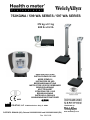
752KGWA / 599 WA SERIES / 597 WA SERIES
272 kg x 0.1 kg
600 lb x 0.2 lb
0459
USER INSTRUCTIONS
INSTRUCCIÓNES DE USO
MODE D'EMPLOI
INSTRUÇÕES DE USO
BEDIENUNGSANLEITUNG
INSTRUCTIES VOOR DE GEBRUIKER
BRUGSVEJLEDNING
KÄYTTÖOHJEET
ISTRUZIONI PER L'USO
BRUKSANVISNING
INSTRUKCJA OBSŁUGI
ANVÄNDNINGSINSTRUKTIONER
使用说明
PELSTAR, LLC 11800 Austin Ave. Alsip, IL 60803
PATENTS: D584649 (US); Patents 001020283-0001 and 001020283-0002 (EU)
Rev. 20101109
Distributed by:
www.welchallyn.com
752KGWA / 599 WA SERIES / 597 WA SERIES
TABLE OF CONTENTS
ENGLISH............................................................................................................................................................... 2
ESPAÑOL ............................................................................................................................................................. 12
FRANÇAIS............................................................................................................................................................ 22
PORTUGUÊS....................................................................................................................................................... 32
DANSK ................................................................................................................................................................. 42
DEUTSCH ............................................................................................................................................................. 52
NEDERLANDS .................................................................................................................................................... 62
SUOMI .................................................................................................................................................................. 72
ITALIANO ............................................................................................................................................................ 82
NORSK .................................................................................................................................................................. 92
POLSKI .................................................................................................................................................................. 102
SVENSKA ............................................................................................................................................................. 112
简体中文 .............................................................................................................................................................. 122
1
752KGWA / 599 WA SERIES / 597 WA SERIES
REMOTE DISPLAY, WAIST HIGH AND EYE LEVEL
PROFESSIONAL DIGITAL SCALES
USER INSTRUCTIONS
Thank you for your purchase of this Health o meter® Professional scale.
Please read this manual carefully and keep it for easy reference or training.
TABLE OF CONTENTS
CAUTIONS AND WARNINGS ................................................................................................. 3
SYMBOLS AND SPECIFICATIONS FOR THIS SCALE ........................................................... 3
CONNECTIVITY / CERTIFICATIONS / DISPOSAL / SERVICE ............................................... 4
SET UP / BATTERIES ............................................................................................................. 5
QUICK START INSTRUCTIONS ............................................................................................. 6
OPERATION OF THE SCALES ............................................................................................... 6
MAINTENANCE ....................................................................................................................... 7
CALIBRATION ......................................................................................................................... 8
TROUBLESHOOTING ............................................................................................................. 8
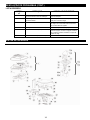
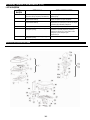
DETAILED VIEWS ................................................................................................................... 9
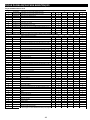
PARTS LIST FOR MAINTENANCE ......................................................................................... 10
WARRANTY ............................................................................................................................ 11
2
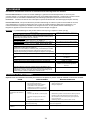
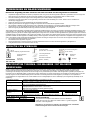
CAUTIONS AND WARNINGS
To prevent injury and damage to your scale, please follow these instructions very carefully:
•
•
•
•
•
•
•
Do not transport the scale while platform is loaded. Be sure the scale is tilted enough to assure it is rolling properly on its wheels
when it is moved for cleaning or transported from one area to another.
For accurate weighing the scale must be placed on a flat, stable surface.
For accurate weighing, verify proper operation according to the procedure described in this manual before each use.
Do not use in the presence of flammable materials.
Operating at other voltages and frequencies than specified could damage the equipment.
If the “LOW BAT” indicator activates, for accurate weighing replace the batteries or connect the scale to an AC power source, using
the power adapter, as soon as possible, depending on use—see Connectivity section.
Only authorized, qualified personnel shall service the scale.
This equipment has been tested and found to comply with the EMC limits for the Medical Device Directive 93/42/EEC (EN 55011 Class A
and EN 60601-1-2). These limits are designed to provide reasonable protection against harmful interference in a typical medical
installation. The equipment generates, uses and may radiate radio frequency energy and, if not installed and used in accordance with
these instructions, may cause harmful interference to other devices in the vicinity. However, there is no guarantee that interference will
not occur in a particular installation. If this equipment does cause harmful interference with other devices, which can be determined by
turning the equipment off and on, the user is encouraged to try to eliminate the interference by one or more of the following measures:
•
Reorient or relocate the receiving device.
•
Increase the separation between the equipment.
•
Connect the equipment into an outlet on a circuit different from that to which the other device(s) is connected.
•
Consult Customer Service or a field service technician for help.
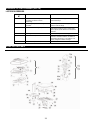
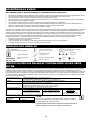
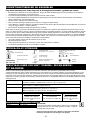
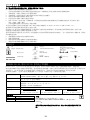
DEFINITION OF SYMBOLS
CAUTION
Attention, see instructions for use
Temperature range
(50°F to 104°F / 10°C to 40°C)
Type BF Applied Parts
Humidity range
(10% - 85% RH)
AC to DC power supply
Atmospheric pressure range
(500hPa – 1060hPa)
AC to DC power supply
(6V DC, 100mA)
DC Connector Polarity
Keep dry
Fragile
752KGWA / 599 WA SERIES/ 597 WA SERIES SCALE SPECIFICATIONS
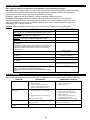
Health o meter® Professional Digital Physician Scales in the 597 WA Series, 599 WA Series and 752KGWA use sophisticated
microprocessor technology. Each precision instrument is designed to provide accurate, reliable and repeatable weight measurements
and features that make the weighing process simple, fast and convenient. Each scale is set up to determine the weight of a stationary
patient. The weight can be displayed in pounds or in kilograms. The 599 WA Series and 597 WA Series models feature a swivel display
which allows for viewing from either side of the scale plus wheels for easy mobility. The scales can be operated with a power adaptor or
by 6-C cell batteries (not included), depending on use.
Capacity and Resolution:
Power Requirements:
Environmental:
Platform Dimensions:
Assembled Dimensions:
597KLWA / 599KLWA: 600 lb x 0.2 lb (272 kg x 0.1 kg)
597KGWA / 599KGWA / 752KGWA: Max 272kg / Min 1kg, e=0.1kg (Class III)
120-240V AC – 6V DC 50-60Hz, Adapter Model ADPT50 (INCLUDED),
or 6 C-cell 1.5V batteries (not included).
Operating Temperatures: 50°F to 104°F / 10°C to 40° C
Storage temperatures: 30°F to 125°F (-1°C to +52°C)
Maximum Humidity: 85% RH in use or in storage
14-¾” x 14-11/16” x 2 ¼” / 37.5cm x 37.3cm x 5.7cm
597 WA SERIES (Eye Level)
599 WA SERIES (Waist High)
752KGWA (Two Piece)
14-¾” x 22-11/16” x 54-¼”
14-¾” x 23-7/8” x 41-13/16”
14-¾” x 14-11/16” x 2 ¼”
(37.5cm x 57.6cm x 137.8cm)
(37.5cm x 60.6cm x 106.2 cm)
(37.5cm x 37.3cm x 5.7cm)
STORAGE SPECIFICATIONS
Storage Temperatures:
Humidity:
Atmospheric Pressure:
30°F to 125°F (-1°C to +52°C)
10% - 85% RH
500hPa – 1060hPa
*WARNING:
For use with AC Adaptor Model ADPT50 or with 6 C-cell batteries.
Complies with C22.2 No. 601.1-M90 and UL Std No. 60601-1. Type BF
applied parts. Internally powered.
Equipment is not suitable for use in the presence of flammable
anesthetic mixture with air nor with oxygen or nitrous oxide.
3
CONNECTIVITY / CERTIFICATIONS
SCALE CONNECTIVITY INFORMATION:
This scale is designed to connect to other devices via a USB port, to allow acquisition of weight, height and BMI from
the scale, to help close a source of potential medical errors caused by incorrectly copying and then recording a weight
taken. This scale is EMR-EHR compatible. For more information regarding how to connect this scale to your computer, a
monitor or other device please contact Customer Service at one of the numbers listed below.
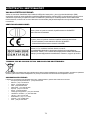
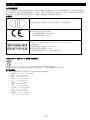
CERTIFICATION DESCRIPTIONS:
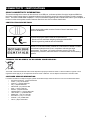
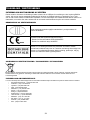
Scales carrying this symbol meet the Precision Class III standards of the
Directive 90/384/EEC
0459
Products carrying this symbol meet the requirements of:
1. Directive for non-automatic weighing instruments 90/384/EEC
2. Directive governing medical devices 93/42/EEC
Pelstar, LLC has been officially certified as a manufacture of Health o meter®
Professional medical devices to be in compliance with stringent legal
requirements. The Pelstar, LLC quality assurance system covers the
development, production, sales and service of medical scales and measuring
systems.
752KGWA / 599 WA SERIES/ 597 WA SERIES SCALE DISPOSAL:
This Health o meter® Professional scale must be disposed of properly as electronic waste. Follow the national, regional or local
regulations which apply to you for disposal of electronic waste or batteries. Do not dispose of this device in domestic waste.
CUSTOMER SERVICE INFORMATION:
For further information or telephone support, please contact Welch Allyn Customer Service at one of the numbers listed below:
•
European Call Center - (+353) 46-90-67790
•
France - (+33) 1-55-69-58-49
•
Germany - (+49) 695-098-5132
•
Italy - (+39) 026-968-2425
•
Netherlands- (+31) 202-061-360
•
Spain - (+34) 917-499-357
•
Sweden - (+46) 85-853-6551
•
United Kingdom - (+44) 207-365-6780
•
Latin America - (+1) 305-669-9003
•
Middle East - (+49) 7477-927186
•
South Africa - (+27) 11-777-7555
•
Australia - (+61) 2-9638-3000
•
China - (+86) 21-6327-9631
4
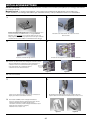
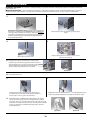
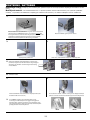
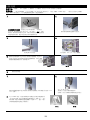
SET UP / BATTERIES
Tools Needed (not included)–5mm Hex Driver, Phillips Screwdriver, Flat-Head Screwdriver (for 597 WA Series models height rod mount only)
Materials Included –4-Hex Head Machine Screws; 1-Phillips Screw (597 WA/ 599 WA Series models), 2-Phillips Screws (752KGWA model);
1-Custom Height Rod Attachment Screw (for 597 WA Series models); 1-Power Adapter Holder with 2-sheet metal screws.
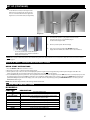
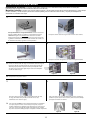
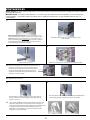
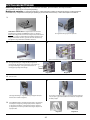
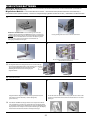
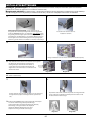
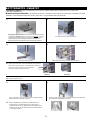
1.
2.
Place batteries in battery holder at base of scale (if using battery
operation we recommend EVEREADY Energizer® e2™ batteries). Warning:
If the scale will not be used for some time, remove all batteries to avoid a
safety hazard. Disposal of batteries should be done according to the
national, regional or local regulations which apply to you for disposal of
batteries.
Feed load cell wire through pillar base.
3.
4.
Insert pillar into pillar base.
5.
Thread in 4 hex screws with (5mm) hex driver.
Plug load cell wire into load cell plug in scale base
(see diagram 2a). The base of the scale has been
designed to provide wire management for the load
cell cable. See diagram 2b for wire management of
load cell cable.
Diagram 2a
6.
Diagram 2b
Set base upright
7.
8.
For models 597 WA / 599 WA Series models, place display module on top
of the pillar and use Phillips screw to tighten module to pillar.
Plug load cell wire into load cell plug in display module (correct plug
is labeled “load cell”)
9.
For 752KGWA model, insert display module into wall
mount/table top adapter. For wall mount place
display module in adapter (see diagram 5a). For
table-top place display module in adapter (see
diagram 5b). Use 2 Phillips screws to secure the
adapter to the display module.
Diagram 5a
5
Diagram 5b
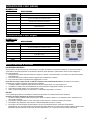
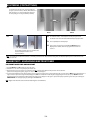
SET UP (CONTINUED)
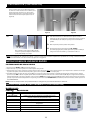
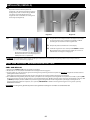
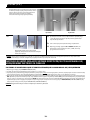
10.
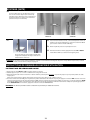
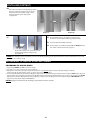
For 597 WA Series models, insert height rod into
Pillar base slot (see diagram 6a). Feed screw into
hole. Use a #3 metric Allen wrench to tighten the
height rod to scale from the back (see diagram 6b).
Diagram 6a
Diagram 6b
.
1 .
1 .
1 .
For wall power operation – plug adapter into base of scale
and into power source, or use the DC IN plug on
the back of the display module.
Remove protective plastic film from display
Turn scale on by pressing the I / O or ON/OFF button. The
display will show “START”, the software version code and then 0.0
For models 597 WA Series and 599 WA Series
models, attach the power adapter holder with 2
Phillips sheet metal screws.
NOTE: if the set up procedure failed, refer to the troubleshooting instructions. If the problem is not corrected, refer to Customer Service at one of the numbers
listed on page 4.
QUICK START / OPERATING INSTRUCTIONS
QUICK START INSTRUCTIONS
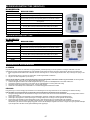
1. Press the ON/OFF or I/O button to turn the scale on.
2. Wait until ‘0.0’ and ‘Zero’ on the left side of the display appear.
3. Ask the patient to step on the scale. The scale will display the patient’s weight. Note: the weight will change until the patient weight is stable. Once the
patient is standing still, the scale will beep three times and the word “Lock” will appear on the display.
4. To use the BMI feature, place the patient onto the scale platform and obtain the patient’s weight, then press the BMI button. The scale will prompt you to enter
the patient’s height. Use the arrow (▼▲) keys to find the correct height (the default height is 5 feet, 6 inches or 168 cm.). Press ENTER. Display will show the
patient’s BMI. Weight may be held on the display, so the scale operator can move the patient, by pressing the HOLD/RELEASE button. To release, press the
HOLD/RELEASE button again.
NOTE: The scale will always default to the settings and units last used.
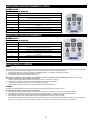
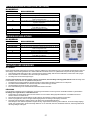
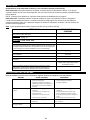
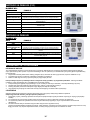
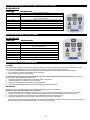
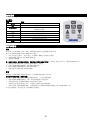
OPERATING INSTRUCTIONS
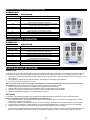
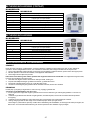
KG MODELS:
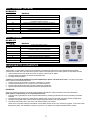
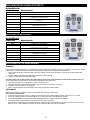
FUNCTION
I/O
→0←
HOLD/RELEASE
kg
▲
BMI
▼
CE
ENTER
DESCRIPTION
Turns scale ON and OFF.
Zeros the scale prior to weighing.
Holds the value of the weighed object on the display until the button
is pressed again to clear the value.
No function in the KG model—button will just beep when pushed.
Scrolling method for entering height
Prompts entry of data to calculate the patient’s Body Mass Index (BMI)
Scrolling method for entering height
Functions as menu escape in BMI mode
Used to accept height in BMI mode
6
OPERATING INSTRUCTIONS (CONTINUED)
KL MODELS:
FUNCTION
ON / OFF
ZERO
HOLD/RELEASE
KG / LB
▲
BMI
▼
CLEAR
ENTER
DESCRIPTION
Turns scale ON and OFF.
Zeros the scale prior to weighing.
Holds the value of the weighed object on the display until the button
is pressed again to clear the value.
Toggles between kilograms or pounds
Scrolling method for entering height
Prompts entry of data to calculate the patient’s Body Mass Index (BMI)
Scrolling method for entering height
Functions as menu escape in BMI mode
Used to accept height in BMI mode
MAINTENANCE AND CLEANING
GENERAL
This section provides instructions for maintenance, cleaning, calibration, troubleshooting, and operator replaceable parts for these
scales. Maintenance operations other than those described in this section should be performed by qualified service personnel.
1. This scale contains electronic parts. Use it carefully. Do not drop, kick or jump on it.
2. Do not store near chemicals, heaters or radiators.
3. Do not store any of these scales on their side.
Before first use and after periods of non-use, check the scale for proper operation. If the scale does not operate correctly, refer to
qualified service personnel.
1. Check overall appearance of the total scale for any obvious damage, abuse, etc.
2. Inspect condition of AC adapter cord and prongs, replace if needed.
3. Clean all external surfaces with a clean damp cloth or tissue.
4. Use a domestic cleaning agent or commercially available disinfectant.
CLEANING
Proper care and cleaning is essential to ensure a long life of accurate and effective operation.
Disconnect the scale from the power source, if plugged in.
1. To clean these scales, wipe the outside of the scale with a soft cloth and mild detergent. Dry with a clean soft cloth.
2. Do not use abrasive or acid cleaners, white spirits, benzene or any caustic product for cleaning.
3. Do not use isopropyl alcohol, other solutions or sanitizing wipes to clean the display surface.
4. Never place the any part of these scales in water. Do not spray any of them with liquid.
4.
These scales are extremely sensitive weighing devices. Items such as clothing or towels placed or dropped on the scale may cause a
scale to activate. In order to prevent battery depletion, do not store or leave anything on the scale.
7
CALIBRATION
These scales are factory calibrated and do not require calibration prior to use.
For KG scales, on the back of the display module, to the left of the DC IN power jack, is a small access cover
plate. The cover plate is held on by a hex sealing screw. Removing the cover plate exposes the Calibration
Enable / Disable (push off / push on) switch.
NOTE: The scale is shipped with the switch in the calibration disable position (push on).
For KL scales, the calibration procedure may be performed using a known / certified weight in either pounds or
kilograms. The default is in pounds, but calibration can be done in kilograms. The following instructions assume
the scale is set to pounds. If you prefer to calibrate in kilograms, please call Customer Service at one of the
numbers given on page 4.
Note: Calibration weight must be no less than 60 lb (27kg) and no more than 300 lb (150 kg).
ACTION
DISPLAY SHOWS
For KG models only, the calibration switch on the display must be set to the
enabled position—toggle the calibration push switch to OFF (see above).
For KG models, while the display module is on and “START” is displayed
(for 3 seconds); Press →0← / kg / kg / →0←
For KL models, while the display module is on and “START” is displayed
(for 3 seconds); Press ZERO - KG/LB - KG/LB - ZERO
Press ENTER
Press ENTER to calibrate with 150 kg (KG models) or 300 lb (KL models)
Press BMI to change the weight and then the arrows to change the flashing
digit, BMI to move to the next digit, until you reach the required weight (no
less than 28 kg / 60 lb and no more than 135 kg / 300 lb)
Clear the platform and press ENTER
Wait without touching or shaking the scale until the zero calibration process
is finished
Load the platform with the required weight and press ENTER
Wait without touching or shaking the scale until calibration process is
finished
Remove weight from the platform
“CAL” will appear on the LCD
“CAL” will appear on the LCD
Enter load weight “Load/150.0”
“CLEAR”
Zero Calibration
“-----------”
Weight calibration
“Put XXX.X”
“-----------”
“DONE”/“CLEAR”
Scale will reboot. “StArt” will appear
followed by the software version and “0.0”
For KG models only, wait until the scale resumes normal operation then
reset the calibration switch to the disabled position—toggle the calibration
push switch to ON (see above). Replace the access cover.
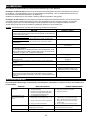
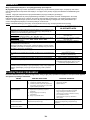
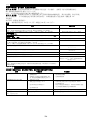
TROUBLESHOOTING
5.
Refer to the following instructions to check and correct any failure before contacting Customer Service.
SYMPTOM
POSSIBLE CAUSE
CORRECTIVE ACTION
Scale does not turn on
1.
2.
3.
Dead Battery
Faulty electrical outlet
Bad Power Supply (Check LED
light at back of display module to
determine if adapter cord is
working)
1.
2.
3.
Replace batteries
Use a different outlet
Replace adapter
Questionable weight or the
scale does not zero
1.
External object interfering with
the scale
The display did not show ‘0.0’
before weighing
1.
3.
Scale is not placed on a level floor
3.
4.
Scale is out of calibration
Remove interfering object
from the scale
Ask the patient to get off the
scale, zero the scale and begin
weighing process again
Place the scale on a level floor
and begin weighing process
again
Check weight with known
weight value
2.
2.
4.
The display shows “OVER”
The load on the scale exceeds the capacity
(600 lbs / 272 kg)
Remove the excess weight and use the
scale according to its limits
The display shows “LO Bat”
message
The batteries are low.
Replace batteries according to instructions
8
TROUBLESHOOTING (CONTINUED)
ERROR LIST
ERROR
NO.
DEFINITION
CHECK/REPLACE
Err 1
Mathematical mistake; division by zero.
Cannot calculate calibration factor
Will show when trying to calibrate with no
calibration weight
Err 2
Weight loaded too low. Cannot calibrate
While in calibration procedure add more weight in
load mode
Err 3
Unstable weight. Cannot calibrate
Check the load cells mechanical surroundings and
see nothing touches them and the cables are well
connected
Err 5
Calibration disabled
Toggle the calibration switch to enable
Err 6
High saturation state (high A/D)
The load cell is not connected correctly. Check
the connection, cables, and mechanical
connection. If the problem persists, replace the
set of load cells
Err 7
Low saturation state (low A/D)
See Err 6
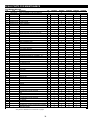
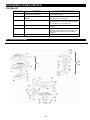
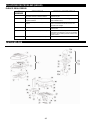
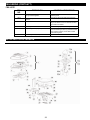
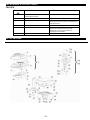
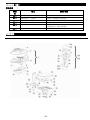
DETAILED VIEWS
9
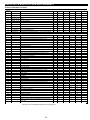
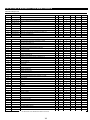
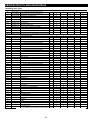
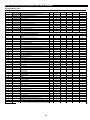
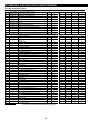
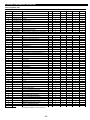
SCALE PARTS FOR MAINTENANCE
Field Replaceable parts
Key #
Part#
1
T597DISPWA
1
2
Description
Qty.
DISPLAY ASSEMBLY FOR KLWA MODELS
1
T597DISPWAKG DISPLAY ASSEMBLY FOR KGWA MODELS
KGKEYPAD
KEYPAD FOR KG MODELS
1
1
597KGWA
597KLWA
599KGWA
X
X
X
599KLWA
752KGWA
X
X
X
2
T42-014900-00
KEYPAD FOR KL MODELS
1
33
T16-087011-00
FEET
4
X
X
X
X
X
37
T16-087311-00
BATTERY DOOR
1
X
X
X
X
X
39
T46-087411-00
WHEEL ASSEMBLY
2
X
X
X
X
42
44
T16-088411-00
T18-004700-00*
FEET FOR PILLAR BASE
597-599 SERIES LOAD CELL CABLE
2
1
X
X
X
X
X
X
X
X
T18-004800-00*
752 SERIES LOAD CELL CABLE
1
X
X
X
X
X
1
X
X
X
X
X
X
X
X
X
X
X
X
X
X
X
X
X
X
X
X
X
X
X
X
X
X
X
X
X
X
X
X
X
X-1
X-1
X-1
X-1
X
X
X
X
X
X
X
X
X-2
X
X
X
X
X
X
X
X
X
X
X
X
X
X
X
X
X
X
X
X
X
X
X
X
X
X
X
X
X
X
X
X
X
X
X
X
X
X
X
X
X
X
X
X
X
X
X
X
X
X
X
X
X
X
X
X
X
X
X
X
X
X
X
X
X
X
X
X
X
X
X
X
X
X
X
X
X
X
X
X
X
X
X
X
X
X
X
X
X
X
X
X
X
X
X
X
X
X
X
X
X
X
X
X
X
X
X
X
X
X
X
X
X
45
46
47
X
1
T18-005000-00* COMMUNICATION CABLE
ADPT50WA*
X
X
X
POWER ADAPTER 120V-240V (W/PLUGS)
X
Below listed items are for reference only (refer to detailed view on page 9)
3
4
5
6
7
8
9
10
11
12
13a
13b
14a
14b
15
16
17
18
19
20
21
22
23a
23b
24
25
26
27
28
DISPLAY MODULE COVER
M3 x 12MM PLASTIC SELF TAPPING SCREWS
PCB WITH LCD DISPLAY
DISPLAY MODULE BASE
M3 x 12MM ZINC PLATED MACHINE SCREWS
TRIMMER COVER
COPPER-STAND
WALL MOUNT BRACKET
M3 x 12MM ZINC PLATED MACHINE SCREWS
Φ3 ZINC PLATED WASHER
597 SERIES NECK/SWIVEL ASSEMBLY - 25°
599 SERIES NECK/SWIVEL ASSEMBLY - 45°
PILLAR NECK 25°
PILLAR NECK 45°
1.0mm RING
PILLAR NECK PLUG
M4 X 12mm ZINC PLATED MACHINE SCREWS
SWIVEL BASE
SPRING WASHER
4.5mm RING
SWIVEL HOLDING WASHER
3 X 16MM PLASTIC SELF-TAPPING SCREWS
SHORT PILLAR
LONG PILLAR
GRADIENTER
MAT
PLATFORM
BUMPER
LOAD CELL
1
4
1
1
4
2
2
1
2
2
1
1
1
1
1
2
2
1
2
1
1
29
30
31
32
34
35
36
38
40
41
43
48
FLAT HEAD M6 x 22mm MACHINE SCREW
BASE PCB
M3 X 8MM ZINC PLATED SCREWS
BASE
C-BATTERY-HOLDER
C-CELL BATTERIES (Not Included)
M3 X 5MM ZINC PLATED SCREWS
PILLAR BASE
E-RING
SOCKET BUTTON HEAD-SCREW -M5x12
M6x40MM HEX SOCKET MACHINE HEAD SCREW
ADAPTER HOLDER
8
1
2
1
1
6
3
1
2
6
4
1
*
1
1
1
1
1
4
2
* Not pictured in detailed view of scale shown on page 9.
10
X
X
X
X
X
X
X
X
X
X
X
X
2-YEAR LIMITED WARRANTY
752KGWA / 599 WA SERIES / 597 WA SERIES
What does the Warranty Cover?
This Health o meter® Professional scale is warranted from date of purchase against defects of materials or in
workmanship for a period of two (2) years. If product fails to function properly, return the product, freight prepaid and
properly packed to Customer Service (see “To Get Warranty Service”, below, for instructions). If the authorized
customer service provider determines that a defect of material or in workmanship exists, the customer’s sole remedy
will be repair or replacement of the scale at no charge. Replacement will be made with a new or remanufactured
product or component. If the product is no longer available, replacement may be made with a similar product of equal
or greater value. All parts including repaired and replaced parts are covered only for the original warranty period.
Who is Covered?
The original purchaser of the product must have proof of purchase to receive warranty service. Please save your
invoice or receipt. Authorized dealers selling Pelstar products do not have the right to alter, or modify or any way
change the terms and conditions of this warranty.
What is Excluded?
Your warranty does not cover normal wear of parts or damage resulting from any of the following:
negligent use or misuse of the product, use on improper voltage or current, use contrary to the operating
instructions, abuse including tampering, damage in transit, or unauthorized repair or alternations. Further, the
warranty does not cover Acts of God, such as fire, flood, hurricanes and tornadoes. This warranty gives you
specific legal rights, and you may also have other rights that vary from country to country, state to state,
province to province or jurisdiction to jurisdiction.
To get Warranty Service make sure you keep your sales receipt or document showing proof of
purchase. If you are advised to return a product for repair or replacement, schedule the repair with the
service center nearest you. Call the Customer Service Center nearest you for assistance--please see page
4 of this manual. Before returning a product, you must obtain authorization from Customer Service.
Customer Service personnel will give you a Service Notification number. Please note this number on the
outside of your shipping box. Returns without a Service Notification number will not be accepted for
delivery. Attach your proof of purchase to your defective product along with your name, address,
daytime telephone number and description of the problem. Carefully package the product and send
it with shipping and insurance prepaid to the address you are given by Customer Service. Write,
“Attention SN#________”, and the shipping address, on the shipping label, following Customer Service
instructions.
PRODUCT LIFE: 10 YEARS / 100,000 CYCLES
QNET BV
HOMMERTERWEG 286
6436 AM AMSTENRADE
THE NETHERLANDS
0459
PELSTAR, LLC
11800 South Austin Avenue • Alsip, IL 60803 • USA
www.homscales.com
Health o meter® Professional products are manufactured, designed and owned by Pelstar, LLC and are distributed by
WelchAllyn® outside of the US and Canada. Health o meter® is a registered trademark of Sunbeam Products, Inc. used
under license. We reserve the right to improve, enhance or modify Health o meter® Professional product features or
specifications without notice.
© Pelstar, LLC 2010
11
SERIES 752KGWA/599 WA/597 WA
BÁSCULAS DIGITALES PROFESIONALES CON PANTALLA
REMOTA, ALTURA HASTA LA CINTURA Y HASTA EL
NIVEL DE LOS OJOS
INSTRUCCIONES PARA EL USUARIO
Gracias por la compra de esta báscula Health o meter® Professional.
Lea atentamente este manual y guárdelo para facilitar la consulta o el aprendizaje.
ÍNDICE
PRECAUCIONES Y ADVERTENCIAS..................................................................................... 13
SÍMBOLOS Y ESPECIFICACIONES PARA ESTA BÁSCULA ................................................. 13
CONECTIVIDAD/CERTIFICACIONES/ELIMINACIÓN/SERVICIO ........................................... 14
CONFIGURACIÓN/BATERÍAS ................................................................................................ 15
INSTRUCCIONES DE INICIO RÁPIDO ................................................................................... 16
FUNCIONAMIENTO DE LAS BÁSCULAS ............................................................................... 16
MANTENIMIENTO ................................................................................................................... 17
CALIBRACIÓN......................................................................................................................... 18
SOLUCIÓN DE PROBLEMAS ................................................................................................. 18
VISTAS DETALLADAS ............................................................................................................ 19
LISTA DE PIEZAS PARA MANTENIMIENTO .......................................................................... 20
GARANTÍA .............................................................................................................................. 21
12
PRECAUCIONES Y ADVERTENCIAS
Para prevenir lesiones personales y daños en la báscula, siga cuidadosamente estas instrucciones:
•
•
•
•
•
•
•
No desplace la báscula si la plataforma se encuentra cargada. Asegúrese de que la báscula esté suficientemente inclinada para garantizar la
correcta rotación de sus ruedas al desplazarla para su limpieza o de un lugar a otro.
Para que el pesaje sea preciso, la báscula debe colocarse sobre una superficie plana y estable.
Para que el pesaje sea preciso, compruebe el correcto funcionamiento de acuerdo con el procedimiento descrito en este manual antes de cada
uso.
No utilice la báscula en presencia de materiales inflamables.
El funcionamiento del equipo con voltajes y frecuencias diferentes de las especificadas puede ocasionar daños en el mismo.
Si se activa el indicador "LOW BAT", para que el pesaje sea preciso, recambie las baterías o conecte la báscula a una fuente de alimentación de
CA, utilizando el adaptador de alimentación, tan pronto como sea posible, en función del uso; consulte la sección "Conectividad".
El mantenimiento de la báscula sólo deberá llevarlo a cabo personal autorizado y cualificado.
Este equipo ha sido probado y cumple con los límites de EMC de la Directiva para dispositivos médicos 93/42/EEC (EN 55011 Clase A y EN 60601-1-2).
Estos límites están diseñados para proporcionar una protección razonable contra interferencias perjudiciales en instalaciones médicas típicas. El equipo
genera, utiliza y puede irradiar energía en forma de radiofrecuencia y, si no se instala y utiliza conforme a estas instrucciones, puede generar
interferencias perjudiciales en otros dispositivos cercanos. Sin embargo, no existe ninguna garantía de que no se produzcan interferencias en una
instalación determinada. Si este equipo causara interferencias perjudiciales para otros dispositivos, las cuales se pueden determinar apagando y
encendiendo el equipo, le recomendamos que intente eliminar la interferencia tomando una o varias de las siguientes medidas:
•
Cambie la orientación o la ubicación del dispositivo receptor.
•
Aumente la distancia entre los equipos.
•
Conecte el equipo a una toma de corriente de un circuito diferente al circuito donde el/los otro/s dispositivo/s se encuentre/n conectado/s.
•
Consulte al departamento de Atención al cliente o a un técnico de campo para obtener ayuda.
DEFINICIÓN DE LOS SÍMBOLOS
PRECAUCIÓN
Atención, consulte las instrucciones de uso
Piezas utilizadas tipo BF
Adaptador de
alimentación de CA a CC
Rango de temperatura
(50°F a 104°F/10°C a 40°C)
Adaptador de
alimentación de CA a CC
(6 V de CC, 100 mA)
Polaridad del conector
de CC
Rango de humedad
(10% - 85% de HR)
Rango de presión atmosférica
(500 hPa - 1060 hPa)
Mantener
seco
Frágil
ESPECIFICACIONES DE LAS BÁSCULAS DE LAS SERIES 752KGWA/599
WA/597 WA
Las básculas médicas digitales Health o meter® Professional de las series 597 WA, 599 WA y 752KGWA utilizan una sofisticada tecnología de
microprocesadores. Cada instrumento de precisión ha sido diseñado para realizar mediciones de peso precisas, fiables y repetibles, e incluye
características que simplifican, agilizan y hacen más conveniente el proceso de pesaje. Todas las básculas están configuradas para determinar el peso
de un paciente inmóvil. El peso puede visualizarse en libras o kilogramos. Los modelos de series 599 WA y 597 WA cuentan con una pantalla giratoria
que permite la visualización desde ambos lados de la báscula y con ruedas para facilitar su movilidad. Las básculas pueden funcionar con un adaptador
de alimentación o 6 baterías C (no incluidas), en función del uso.
Capacidad y resolución:
Requisitos de alimentación:
Entorno:
Dimensiones de la
plataforma:
Dimensiones del equipo
montado:
597KLWA/599KLWA: 600 x 0,2 libras (272 x 0,1 kg)
597KGWA/599KGWA/752KGWA: Máx. 272 kg/Mín. 1 kg, e = 0,1 kg (Clase III)
120 - 240 V de CA, 6 V de CC 50 - 60Hz, Adaptador modelo ADPT50 (INCLUIDO),
o 6 baterías C de 1,5 V (no incluidas).
Temperaturas de funcionamiento: 50°F a 104°F/10°C a 40°C
Temperaturas de almacenamiento: 30°F a 125°F (-1°C a +52°C)
Humedad máxima: 85% de humedad relativa en uso o en almacenamiento
14-¾ x 14-11/16 x 2 ¼"/37,5 x 37,3 x 5,7 cm
SERIE 597 WA (nivel de los ojos)
14-¾ x 22-11/16 x 54-¼"
(37,5 x 57,6 x 137,8 cm)
SERIE 599 WA (altura de cintura)
14-¾ x 23-7/8 x 41-13/16”
(37,5 x 60,6 x 106,2 cm)
752KGWA (dos piezas)
14-¾ x 14-11/16 x 2 ¼"
(37.5 x 37,3 x 5,7 cm)
ESPECIFICACIONES DE ALMACENAMIENTO
Temperaturas de
almacenamiento:
Humedad:
Presión atmosférica:
30°F a 125°F (-1°C a +52°C)
*ADVERTENCIA:
10% - 85% de HR
500 hPa - 1060 hPa
Debe utilizarse con un adaptador de CA modelo ADPT50 o con 6 baterías C.
Cumple con las normas C22.2 N.º 601.1-M90 y UL Sed N.º 60601-1. Piezas utilizadas
tipo BF. Alimentación interna.
El equipo no es apto para su uso en presencia de una mezcla anestésica
inflamable con aire ni con oxígeno u óxido nitroso.
13
CONECTIVIDAD/CERTIFICACIONES
INFORMACIÓN DE CONECTIVIDAD DE LA BÁSCULA:
Esta báscula está diseñada para conectarse a otros dispositivos mediante un puerto USB, para permitir la determinación del peso,
talla e índice de masa corporal desde la báscula, a fin de evitar una fuente de posibles errores médicos causados por la copia
incorrecta de los valores de peso y su posterior registro. Esta báscula es compatible con EMR-HME. Para más información sobre
cómo conectar esta báscula a su ordenador, un monitor u otro dispositivo, póngase en contacto con el Servicio de atención al cliente
mediante alguno de los números indicados a continuación.
DESCRIPCIÓN DE LAS CERTIFICACIONES:
Las básculas que cuentan con este símbolo cumplen con los estándares de precisión
Clase III de la Directiva 90/384/EEC
0459
Los productos que cuentan con este símbolo cumplen los requisitos de:
1. La Directiva para instrumentos de pesaje de funcionamiento no automático
90/384/EEC
2. La Directiva sobre dispositivos médicos 93/42/EEC
Pelstar, LLC ha sido certificada oficialmente como fabricante de dispositivos médicos
Health o meter® Professional en cumplimiento de estrictos requisitos legales. El
sistema de garantía de la calidad de Pelstar, LLC, abarca el desarrollo, la producción,
la venta y el servicio técnico de básculas médicas y sistemas de medición.
ELIMINACIÓN DE LAS BÁSCULAS SERIES 752KGWA/599 WA/597 WA:
Las básculas Health o meter® Professional deben desecharse de forma adecuada como desechos electrónicos. Cumpla con las normativas nacionales,
regionales o locales aplicables a la eliminación de desechos electrónicos o baterías. No deseche este equipo junto a la basura doméstica.
INFORMACIÓN SOBRE LA ATENCIÓN AL CLIENTE:
Para más información o asistencia telefónica, póngase en contacto con el Servicio de atención al cliente de Welch Allyn mediante uno de los números
indicados a continuación:
•
Centro deatención telefónica enEuropa: (+353) 46-90-67790
•
Francia: (+33) 1-55-69-58-49
•
Alemania: (+49) 695-098-5132
•
Italia: (+39) 026-968-2425
•
Países Bajos: (+31) 202-061-360
•
España: (+34) 917-499-357
•
Suecia: (+46) 85-853-6551
•
Reino Unido: (+44) 207-365-6780
•
América Latina: (+1) 305-669-9003
•
Oriente Medio: (+49) 7477- 927186
•
Sudáfrica: (+27) 11-777-7555
•
Australia: (+61) 2-9638-3000
•
China: (+86) 21-6327-9631
14
CONFIGURACIÓN/BATERÍAS
Herramientas necesarias (no incluidas): destornillador hexagonal de 5 mm, destornillador Phillips, destornillador de cabeza plana
(únicamente para el montaje de la barra medidora de altura de la serie 597 WA)
Materiales incluidos: 4 tornillos rosca chapa de cabeza hexagonal; 1 tornillo Phillips (modelos de las series 597 WA/599 WA), 2 tornillos Phillips
(modelo 752KGWA); 1 tornillo de fijación para la barra de altura ajustable (para los modelos de la serie 597 WA); 1 soporte para el adaptador de
alimentación con 2 tornillos rosca chapa.
1.
2.
Coloque las baterías en el soporte de baterías situado en la base de la
báscula (si utiliza la báscula con baterías, recomendamos las baterías
EVEREADY Energizer® e2™). Advertencia: Si la báscula no se utiliza
durante mucho tiempo, retire todas las baterías para evitar un riesgo de
seguridad. La eliminación de las baterías debe realizarse de acuerdo con
las normativas nacionales, regionales o locales aplicables.
U
Coloque el cable de celdas de carga a través de la base de la columna.
U
3.
4.
Coloque la columna en la base.
5.
Coloque los 4 tornillos hexagonales con una llave hexagonal de 5 mm.
Conecte el cable de celdas de carga en el enchufe de celdas de carga, de
la base de la báscula (consulte la figura 2a). La base de la báscula está
diseñada para proporcionar el espacio necesario para manipular el cable
de celdas de carga. Consulte la figura 2b para saber cómo manipular
el cable de celdas de carga.
Figura 2a
6.
Coloque la base en posición vertical
7.
8.
Para los modelos de las series 597 WA/599 WA, coloque el módulo de
pantalla en la parte superior de la columna y utilice los tornillos Phillips
para ajustar el módulo a la columna.
Coloque el cable de celda de carga en el enchufe del cable de celda
de carga, del módulo de la pantalla (el enchufe correcto está
identificado cómo "celda de carga")
9.
Figura 2b
Para el modelo 752KGWA, inserte el módulo de pantalla en el adaptador
de soporte, de pared o mesa. Para el montaje en la pared, coloque el
módulo de pantalla en el adaptador (vea la figura 5a). Para el montaje en
una mesa, coloque el módulo de pantalla en el adaptador (vea la figura
5b). Utilice dos tornillos Phillips para fijar el adaptador al módulo de pantalla.
Figura 5a
15
Figura 5b
CONFIGURACIÓN (CONTINUACIÓN)
10.
Para los modelos de la serie 597 WA, inserte la barra
de altura en la ranura de la base de la columna (vea la
figura 6a). Coloque el tornillo en el orificio. Utilice
una llave Allen métrica N.º 3 para ajustar la barra de
altura de la báscula desde la parte posterior (vea la
figura 6b).
Figura 6a
11
12.
13.
14.
Para los modelos de las series 597 WA y 599 WA,
coloque el soporte del adaptador de alimentación
con 2 tornillos Phillips rosca chapa.
Figura 6b
Para el funcionamiento con alimentación de la pared: conecte el
adaptador en la base de la báscula y a una fuente de energía, o utilice el
enchufe DC IN (entrada de CC) de la parte posterior del módulo de
pantalla.
Retire la película protectora plástica de la pantalla.
Encienda la báscula presionando el botón I/O o ON/OFF
(encendido/apagado). En la pantalla aparecerán la palabra "START", el
código de la versión de software y, a continuación la cifra 0.0
NOTA: si el procedimiento de configuración ha fallado, consulte las instrucciones de solución de problemas. Si el problema no se corrige, consulte al Servicio de
atención al cliente llamando a uno de los números que aparecen en la página 14.
INSTRUCCIONES DE USO/INICIO RÁPIDO
INSTRUCCIONES DE INICIO RÁPIDO
1. Presione el botón ON/OFF o I/O para encender la báscula.
2. Espere hasta que '0.0' y 'Zero' aparezcan en el lado izquierdo de la pantalla.
3. Pida al paciente que se suba a la báscula. La báscula indicará el peso del paciente. Nota: el valor variará hasta que el peso del paciente se estabilice. Una vez que
el paciente esté quieto, la báscula emitirá tres pitidos y aparecerá en la pantalla la palabra "Lock" (bloqueo).
4. Para utilizar la función de índice de masa corporal (BMI, por sus siglas en inglés), sitúe al paciente en la plataforma de la báscula y obtenga su peso; después
presione el botón BMI. La báscula le pedirá que introduzca la altura del paciente. Utilice las teclas con forma de flecha (▼ ▲) para corregir el valor de altura (la
altura predeterminada es de 5 pies, 6 pulgadas o 168 cm.). Presione ENTER. En la pantalla, aparecerá el BMI del paciente. El peso puede retenerse en la pantalla,
para que el operador de la báscula pueda mover al paciente, presionando el botón HOLD/RELEASE (retener/liberar). Para borrar la lectura, vuelva a presionar el
botón HOLD/RELEASE.
NOTA: la báscula siempre tendrá como predeterminadas la configuración y las unidades utilizadas la última vez.
INSTRUCCIONES DE FUNCIONAMIENTO (CONTINUACIÓN)
MODELOS KG:
FUNCIÓN
DESCRIPCIÓN
I/O
→0←
HOLD/RELEASE
kg
▲
BMI
▼
CE
ENTER
ENCIENDE y APAGA la báscula.
Pon en cero el valor de lectura de la báscula antes del pesaje.
Guarda el valor de peso obtenido en la pantalla hasta que se
presiona nuevamente para quitar dicho valor.
Sin función en el modelo KG; sólo emitirá un pitido cuando se presione.
Función de desplazamiento para introducir valores de altura
Solicita la introducción de datos para calcular el índice de masa corporal
del paciente
Función de desplazamiento para introducir valores de altura
Permite salir del menú en el modo BMI
Se utiliza para introducir el valor de altura en el modo BMI
16
INSTRUCCIONES DE FUNCIONAMIENTO
MODELOS KL:
FUNCIÓN DESCRIPCIÓN
ON/OFF
ZERO
HOLD/RELEASE
KG/LB
▲
BMI
▼
CLEAR
ENTER
ENCIENDE y APAGA la báscula.
Pon en cero el valor de la lectura de la báscula antes del pesaje.
Conserva el valor del objeto pesado en la pantalla hasta que se vuelva a
presionar el botón para borrarlo.
Cambia la unidad de medida de kilogramos a libras
Función de desplazamiento para introducir valores de altura
Solicita la introducción de datos para calcular el índice de masa corporal
del paciente
Función de desplazamiento para introducir valores de altura
Permite salir del menú en el modo BMI
Se utiliza para introducir el valor de altura en el modo BMI
MANTENIMIENTO Y LIMPIEZA
Generalidades
En esta sección se proporcionan instrucciones para el mantenimiento, la limpieza, la calibración, la solución de problemas y el cambio
de piezas de repuesto por parte del operador para estas básculas. Las operaciones de mantenimiento que no se describen en esta
sección deben ser realizadas por personal de servicio técnico cualificado.
1. Esta báscula contiene piezas electrónicas. Utilícela con cuidado. Evite dejarla caer, golpearla o saltar sobre ella.
2. No la almacene cerca de productos químicos, calentadores ni radiadores.
3. No almacene ninguna de estas básculas sobre uno de sus laterales.
Antes del primer uso y tras períodos de inactividad de la báscula, compruebe su correcto funcionamiento. Si la báscula no
funcionara correctamente, consulte al personal de servicio técnico cualificado.
1. Observe el aspecto general de la báscula en busca de daños evidentes, uso abusivo, etc.
2. Inspeccione el estado del cable del adaptador de CA y los enchufes; sustitúyalo si fuera necesario.
3. Limpie todas las superficies externas con un paño o una servilleta de papel húmedos y limpios.
4. Utilice un detergente doméstico o un desinfectante disponible en el mercado.
LIMPIEZA
El cuidado y la limpieza adecuados son fundamentales para garantizar un funcionamiento preciso y eficaz a largo plazo.
Desconecte la báscula de la fuente de alimentación, si se encuentra conectada.
1. Para limpiar la báscula, limpie el exterior con un paño y un detergente suaves. Séquela con un paño limpio y suave.
2. No utilice limpiadores abrasivos ni ácidos, aguarrás, benceno ni ningún otro producto de limpieza cáustico.
3. No utilice alcohol isopropílico, u otras soluciones, ni toallas desinfectantes para limpiar la superficie de la pantalla.
4. No sumerja en agua las piezas de estas básculas. No rocíe ninguna de ellas con líquidos.
4.
Estas básculas son dispositivos de pesaje extremadamente sensibles. Si se apoyan o se dejan caer objetos, como prendas o
toallas, sobre la báscula, ésta podría activarse. Para evitar el agotamiento de las baterías, no almacene ni coloque objetos sobre la
báscula.
17
CALIBRACIÓN
Las básculas vienen calibradas de fábrica y no es necesario calibrarlas antes de su uso.
En las básculas KG, hay una pequeña cubierta de acceso ubicada en la parte posterior del módulo de la pantalla, a la
izquierda del enchufe de alimentación DC IN. La cubierta está fijada con un tornillo hexagonal de cierre. El desmontaje de la
cubierta deja expuesto el interruptor de Calibration Enable / Disable (push off / push on).
NOTA: la báscula se envía con el interruptor de calibración en la posición de deshabilitación (activado).
Para las básculas KL, el procedimiento de calibración se puede realizar utilizando un peso conocido y certificado, ya sea en
libras o en kilogramos. El valor predeterminado de calibración es en libras, pero la calibración se puede realizar en kilogramos.
En las siguientes instrucciones, se supone que la báscula está configurada en libras. Si prefiere realizar la calibración en
kilogramos, contacte con el Servicio de atención al cliente llamando a uno de los números proporcionados en la página 14.
Nota: el peso de calibración no debe ser inferior a 60 libras (27 kg) ni superior a 300 libras (150 kg).
ACCIÓN
MENSAJE EN PANTALLA
Sólo para los modelos KG, el interruptor de calibración de la pantalla debe estar la posición
de habilitación; póngalo en la posición de DESACTIVACIÓN (ver arriba).
Para los modelos KG: mientras se encuentre encendido el módulo de la pantalla y aparezca
la palabra "START" (inicio, durante 3 segundos), presione →0← /kg/kg/ →0←
Para los modelos KL: mientras se encuentre encendido el módulo de la pantalla y se
muestre la leyenda "START" (durante 3 segundos), presione ZERO-KG/LB-KG/LB-ZERO
Presione ENTER
Presione ENTER para la calibración con 150 kg (modelos KG) o 300 lb (modelos KL)
Presione el botón BMI para cambiar el peso y luego las teclas de flecha para cambiar el
dígito intermitente, y presione BMI para pasar al siguiente dígito, hasta llegar al peso
requerido (que no será inferior a 28 kg/60 libras ni superior a 135 kg/300 lb)
Libere la plataforma y presione ENTER
Espere sin tocar ni sacudir la báscula hasta que haya finalizado el proceso de calibración a
cero
Cargue la báscula con el peso requerido y presione el botón ENTER.
Espere sin tocar ni sacudir la báscula hasta que haya finalizado el proceso de calibración
Quite el peso de la plataforma
La leyenda "CAL" (calibración) aparecerá
en la pantalla LCD
La leyenda "CAL" aparecerá en la
pantalla
Introduzca el peso de la carga
("Load/150.0")
"CLEAR"
Zero Calibration
"-----------" (calibración a cero)
Calibración del peso
"Put XXX.X" (introduzca XXX.X)
“-----------”
"DONE"/"CLEAR" (listo/despejar)
La báscula se reiniciará. En la pantalla
aparecerá la leyenda "Start" seguida de
la versión de software y de la cifra "0.0"
Sólo en los modelos KG, espere hasta que la báscula reanude el funcionamiento normal y
luego vuelva a colocar el interruptor de calibración en la posición de deshabilitación;
póngalo en la posición de DESACTIVACIÓN (ver arriba). Vuelva a colocar la cubierta de
acceso.
SOLUCIÓN DE PROBLEMAS
5.
Consulte las siguientes instrucciones para comprobar y corregir cualquier fallo antes de ponerse en contacto con el Servicio
de atención al cliente.
SÍNTOMA
CAUSA PROBABLE
ACCIÓN CORRECTIVA
La báscula no se enciende
1.
2.
3.
Batería agotada
Fallo en la toma de corriente
Fallo en el suministro de energía
(compruebe la luz LED de la parte posterior
del módulo de la pantalla para determinar
si el cable del adaptador funciona)
1.
2.
3.
Recambie las baterías
Utilice otra toma de corriente
Sustituye el adaptador
La lectura de peso es dudosa o
la báscula no vuelve a cero
1.
Interferencia de un objeto externo en el
funcionamiento de la báscula
En la pantalla, no aparece la cifra "0.0" antes del
pesaje
1.
La báscula no se encuentra en una superficie
nivelada
La báscula está descalibrada
3.
Retire el objeto que obstaculiza el
movimiento de la báscula
Pida al paciente que baje de la báscula,
realice la puesta a cero de ésta y vuelva a
iniciar el proceso de pesaje
Coloque la báscula sobre una superficie
nivelada y vuelva a iniciar el proceso de pesaje
Compruebe el valor de la lectura del
peso con un valor de peso conocido
2.
3.
4.
2.
4.
En la pantalla, aparece la
leyenda "OVER" (exceso)
La carga de la báscula excede su capacidad (600 lbs/
272 kg)
Retire el exceso de peso y utilice la báscula de
acuerdo con sus límites
En la pantalla, aparece la
leyenda "LO Bat" (batería baja)
La carga de las baterías es baja.
Recambie las baterías de acuerdo con las
instrucciones
18
SOLUCIÓN DE PROBLEMAS (CONTINUACIÓN)
LISTA DE ERRORES
ERROR
N.º
DEFINICIÓN
COMPROBAR/SUSTITUIR
Err 1
Error matemático; división por cero. No se
puede calcular el factor de calibración
Aparecerá al intentar realizar la calibración sin
peso de calibración
Err 2
El peso cargado es demasiado reducido. No
se puede realizar la calibración
Durante el procedimiento de calibración, agregue
más peso
Err 3
Peso inestable. No se puede realizar la
calibración
Revise el entorno mecánico de las celdas de
carga para controlar que nada entre en contacto
con las mismas y que los cables se encuentren
bien conectados
Err 5
Calibración deshabilitada
Ponga el interruptor de calibración en la posición
de habilitación
Err 6
Condición de alta saturación (A/D alto)
La celda de carga no está conectada
correctamente. Compruebe la conexión, los
cables y la conexión mecánica. Si el problema
persiste, sustituya el conjunto de celdas de carga
Err 7
Condición de baja saturación (A/D bajo)
Vea el err 6
VISTAS DETALLADAS
19
PIEZAS DE LA BÁSCULA PARA MANTENIMIENTO
Piezas recambiables en campo
N.º de
referencia
1
1
N.º de pieza
T597DISPWA
Descripción
Cant.
597KGWA
597KLWA
599KGWA
CONJUNTO DE PANTALLA PARA LOS MODELOS KLWA
1
T597DISPWAKG CONJUNTO DE PANTALLA PARA LOS MODELOS KGWA
1
X
X
X
X
X
599KLWA
752KGWA
X
X
2
KGKEYPAD
TECLADO PARA LOS MODELOS KG
1
2
T42-014900-00
TECLADO PARA LOS MODELOS KL
1
33
T16-087011-00
PATAS
4
X
X
X
X
X
37
T16-087311-00
TAPA DE BATERÍAS
1
X
X
X
X
X
39
T46-087411-00
CONJUNTO DE RUEDAS
2
X
X
X
X
42
T16-088411-00
PATAS PARA BASE DE LA COLUMNA
2
X
X
X
X
44
T18-004700-00 * CABLE DE CELDA DE CARGA DE LAS SERIES 597-599
1
X
X
X
X
45
T18-004800-00 * CABLE DE CELDA DE CARGA DE LA SERIE 752
1
46
T18-005000-00 * CABLE DE COMUNICACIÓN
1
X
X
X
X
X
1
X
X
X
X
X
47
ADPT50WA *
ADAPTADOR DE ALIMENTACIÓN DE 120 - 240 V (CON ENCHUFES)
X
X
X
X
A continuación, se enumeran una serie de elementos sólo a modo de referencia (consulte la vista detallada de la página 19)
3
CUBIERTA DE MÓDULO DE PANTALLA
1
X
X
X
X
X
4
TORNILLOS AUTORROSCANTES DE PLÁSTICO M3 X 12 mm
4
X
X
X
X
X
5
TARJETA DE CIRCUITO IMPRESO CON PANTALLA LCD
1
X
X
X
X
X
6
BASE DE MÓDULO DE PANTALLA
1
X
X
X
X
X
7
TORNILLOS ROSCA CHAPA M3 x 12 MM CINCADOS
4
X
X
X
X
X
8
CUBIERTA DE REGULACIÓN
2
X
X
X
X
X
9
SOPORTE DE COBRE
2
X
X
X
X
X
10
SOPORTE DE MONTAJE EN PARED
1
11
TORNILLOS ROSCA CHAPA M3 x 12 MM CINCADOS
2
X-1
X-1
X-1
X-1
X-2
X
X
X
X
X
X
X
X
X
X
X
X
X
X
X
X
X
X
X
X
X
X
X
X
X
X
X
X
X
X
X
X
X
X
X
X
X
12
ARANDELA CINCADA Φ3
2
13a
13b
14a
14b
15
16
17
18
19
20
21
22
23a
23b
24
25
26
27
28
29
30
CONJUNTO DE CUELLO/GIRATORIO DE LA SERIE 597; 25°
CONJUNTO DE CUELLO/GIRATORIO DE LA SERIE 599; 45°
CUELLO DE LA COLUMNA, 25°
CUELLO DE LA COLUMNA, 45°
ANILLO DE 1,0 mm
TAPÓN DE CUELLO DE LA COLUMNA
TORNILLOS ROSCA CHAPA M4 x 12 MM CINCADOS
BASE GIRATORIA
ARANDELA ELÁSTICA
ANILLO DE 4,5 MM
ARANDELA DE SUJECIÓN GIRATORIA
TORNILLOS AUTORROSCANTES DE PLÁSTICO 3 X 16 MM
PILAR CORTO
PILAR LARGO
INDICADOR DE INCLINACIÓN
ALFOMBRA
PLATAFORMA
AMORTIGUADOR
CELDA DE CARGA
TORNILLO ROSCA CHAPA DE CABEZA PLANA M6 x 22 MM
TARJETA DE CIRCUITO IMPRESO DE LA BASE
1
1
1
1
1
2
2
1
2
1
1
3
1
1
1
1
1
4
2
8
1
31
TORNILLOS M3 x 8 MM CINCADOS
2
X
X
X
X
X
32
BASE
1
X
X
X
X
X
34
SOPORTE DE BATERÍAS C
1
X
X
X
X
X
35
BATERÍAS C (no incluidas)
6
X
X
X
X
X
36
TORNILLOS M3 x 5 MM CINCADOS
3
X
X
X
X
X
38
40
BASE DE COLUMNA
ANILLO "E"
1
2
X
X
X
X
X
X
X
X
41
TORNILLO CON CABEZA HUECA REDONDEADA; M5 X 12
6
X
X
X
X
43
TORNILLO ROSCA CHAPA CON CABEZA HUECA HEXAGONAL
M6 x 40 MM
SOPORTE DEL ADAPTADOR
4
X
X
X
X
1
X
X
X
X
48
*
* No aparece en la vista detallada de la báscula, de la página 19.
20
X
X
X
X
X
X
X
X
X
X
X
X
X
X
X
X
X
X
X
X
X
X
X
X
X
X
X
X
X
X
X
X
X
X
X
X
X
X
X
X
X
X
X
X
GARANTÍA LIMITADA DE 2 AÑOS
SERIE 752KGWA/599 WA/597 WA
¿Qué cubre la garantía?
La báscula Health o meter® Professional está garantizada desde la fecha de compra contra defectos en los materiales o en la
mano de obra por un período de dos (2) años. Si el producto no funciona correctamente, devuélvalo a través del servicio de
transporte prepago y correctamente embalado al Servicio de atención al cliente (consulte la sección "Para obtener servicio de
garantía", a continuación, para más instrucciones). Si el proveedor autorizado de servicio técnico determina que existe un defecto
en los materiales o en la mano de obra, el único resarcimiento para el cliente será la reparación o sustitución de la báscula sin
cargo alguno. La sustitución se realizará con un producto o componente nuevo o reconstruido. Si el producto ya no está
disponible, se podrá realizar el recambio con un producto de similares características y de igual o mayor valor. Todas las piezas,
incluidas las piezas sustituidas y reparadas, sólo están cubiertas durante el período inicial de garantía.
¿Quién está cubierto?
El comprador original del producto debe tener un comprobante de compra para poder acceder a los servicios de la garantía.
Guarde su factura o comprobante de compra. Los distribuidores autorizados que venden productos Pelstar no tienen el derecho
de alterar, modificar, o cambiar de ninguna manera los términos y condiciones de esta garantía.
¿Qué se excluye de la garantía?
La garantía no cubre el desgaste normal de las piezas ni daños resultantes de cualquiera de las siguientes condiciones:
un uso negligente o ineficiente del producto, una utilización con voltajes o corrientes inapropiadas, un uso contrario a las
instrucciones o abusivo (incluyendo modificaciones, daños en tránsito, reparación no autorizada o alternancias). Además, esta
garantía no cubre casos fortuitos, tales como incendios, inundaciones, huracanes y tornados. Esta garantía le otorga derechos
legales específicos, y puede que también tenga otros derechos en función del país, estado, provincia y jurisdicción en los que se
encuentre.
Para acceder al servicio de garantía, asegúrese de conservar su recibo o documento prueba de la compra. Si se
le aconsejara devolver un producto para su reparación o sustitución, programe la reparación con el centro de servicio técnico
más cercano. Póngase en contacto con el Centro de servicio de atención al cliente más cercano para obtener ayuda; consulte
la página 14 de este manual. Antes de devolver un producto, debe obtener la autorización del Centro de servicio de
atención al cliente. El personal de Centro del servicio de atención al cliente le proporcionará un número de notificación de
servicio. Anote este número en el exterior de la caja donde envíe el producto. Las devoluciones sin un número de notificación de
servicio no serán aceptadas en la entrega. Adjunte el comprobante de compra del producto defectuoso junto con su
nombre, dirección y número de teléfono, y con una descripción del problema que presente el equipo. Embale el
producto cuidadosamente y envíelo con transporte y seguro prepago a la dirección que le proporcione el Servicio de
atención al cliente. Escriba, "A la atención de la notificación de servicio N.º________", y la dirección de envío en la etiqueta de
envío, siguiendo las instrucciones del Servicio de Atención al Cliente.
VIDA ÚTIL DEL PRODUCTO: 10 AÑOS/100.000 CICLOS
QNET BV
HOMMERTERWEG 286
6436 AM AMSTENRADE
PAÍSES BAJOS
0459
PELSTAR, LLC
11800 South Austin Avenue • Alsip, IL 60803 • EE.UU.
www.homscales.com
Pelstar, LLC fabrica, diseña y posee la propiedad de los productos Health o meter® Professional, distribuidos por Welch Allyn fuera de
EE.UU. y Canadá. Health o meter® es una marca registrada de Sunbeam Products, Inc. utilizada bajo licencia. Nos reservamos el
derecho de mejorar, aumentar o modificar las características del producto Health o meter® Professional sin previo aviso.
© Pelstar, LLC 2010
21
752KGWA/SERIE 599 WA/SERIE 597 WA
BALANCES NUMERIQUES PROFESSIONNELLES A
TELEAFFICHAGE, A HAUTEUR DE TAILLE ET A HAUTEUR
D’ŒIL
MODE D’EMPLOI
Nous vous remercions pour l’achat de cette balance Health o meter® Professional.
Veuillez lire attentivement le présent manuel et conservez-le pour une référence ou pour une
formation facile.
TABLE DES MATIERES
MISES EN GARDE ET AVERTISSEMENTS............................................................................ 23
SYMBOLES ET SPECIFICATIONS DE LA BALANCE............................................................. 23
CONNECTIVITE/HOMOLOGATIONS/ELIMINATION/ENTRETIEN ......................................... 24
REGLAGE/PILES .................................................................................................................... 25
INSTRUCTIONS DE DEMARRAGE RAPIDE .......................................................................... 26
UTILISATION DES BALANCES ............................................................................................... 26
MAINTENANCE ....................................................................................................................... 27
ETALONNAGE ........................................................................................................................ 28
DIAGNOSTIC DES PANNES ................................................................................................... 28
VUES DETAILLEES................................................................................................................. 29
LISTE DES PIECES POUR LA MAINTENANCE ..................................................................... 30
GARANTIE .............................................................................................................................. 31
22
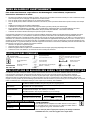
MISES EN GARDE ET AVERTISSEMENTS
Pour éviter des blessures corporelles ou des dommages à votre balance, respectez les
instructions suivantes à la lettre :
•
•
•
•
•
•
•
Ne portez pas la balance lorsque le plateau est chargé. Assurez-vous que la balance est assez inclinée pour rouler correctement lorsque
vous la transportez pour le nettoyage ou la déplacez d’un endroit à l’autre.
Pour une pesée précise, placez la balance sur une surface plane et stable.
Pour une pesée précise, vérifiez si la balance fonctionne correctement, selon la procédure décrite dans le présent manuel, avant chaque
usage.
N’utilisez pas la balance près de matières inflammables.
L’utilisation de cet équipement à des tensions et fréquences autres que celles prévues peut l’endommager.
En cas d’activation de l’indicateur de « LOW BAT », pour une pesée précise, remplacez les piles ou connectez la balance à une source
d’alimentation à CA, à l’aide d’un adaptateur d’alimentation, dès que possible, selon l’utilisation - voir la section Connectivité.
L’entretien de la balance doit être effectué par du personnel agréé et compétent.
Cet équipement a été testé et prouvé conforme aux restrictions EMC de la Directive relative aux dispositifs médicaux 93/42/EEC (EN 55011
Catégorie A et EN 60601-1-2). Ces restrictions constituent une protection raisonnable contre des interférences préjudiciables dans une
installation médicale typique. L’équipement génère, utilise et peut rayonner de l’énergie à radiofréquences ; par ailleurs, en cas de montage ou
d’utilisation non conformes à ces instructions, il peut provoquer des interférences préjudiciables aux dispositifs environnants. Toutefois, rien ne
garantit que des interférences ne se produiront pas dans une installation spécifique. Lorsque cet équipement provoque des interférences avec
d’autres dispositifs, ce qui peut être vérifié par la mise de l’équipement hors tension et sous tension, l’utilisateur peut tenter une élimination des
interférences en prenant une ou plusieurs des mesures suivantes :
•
Réorienter ou déplacer le dispositif récepteur.
•
Augmenter l’espace entre les équipements.
•
Brancher l’équipement dans une prise sur un circuit différent de celui sur lequel l’ (les) autre(s) dispositif(s) est/sont branché(s).
•
Contacter le service à la clientèle ou un technicien de service mobile pour assistance.
DEFINITION DES SYMBOLES
MISE EN GARDE
Attention, voir les instructions d’utilisation
Plage de température
(50°F à 104°F/10°C à 40°C)
Pièces appliquées de
type BF
Plage d’humidité
(10% - 85% RH)
Alimentation électrique
AC vers DC
Plage de pressions atmosphériques
(500 hPa – 1 060 hPa)
Alimentation électrique AC vers DC
(Courant continu 6 V, 100 mA)
Polarité du connecteur
à courant continu
Tenir au sec
Fragile
SPECIFICATIONS DE BALANCE DES SERIES 752KGWA/599 WA/597 WA
Les balances médicales numériques Health o meter® Professional des séries 597 WA, 599 WA et 752KGWA utilisent une technologie à
microprocesseur d’avant-garde. Chaque instrument de précision est conçu pour fournir des mesures de poids précises, fiables et
reproductibles, et des fonctions qui rendent le processus de pesée plus simple, rapide et pratique. Chaque balance est configurée pour
déterminer le poids d’un patient stationnaire. Le poids peut s’afficher en livres ou en kilogrammes. Les modèles 599 WA et 597 WA sont
équipés d’un écran pivotant qui permet l’affichage à partir des deux côtés de la balance, en plus de roues pour une mobilité facile. Vous pouvez
utiliser ces balances avec un adaptateur électrique ou avec 6 piles C (non incluses), selon l’utilisation.
Capacité et résolution :
Spécifications
d’alimentation :
Spécifications
environnementales :
Dimensions du plateau :
Dimensions après
montage :
597KLWA/599KLWA : 600 lb x 0,2 lb (272 kg x 0,1 kg)
597KGWA/599KGWA/752KGWA : 272 kg max./1 kg min, e=0,1 kg (Catégorie III)
CA 120-240 V – CC 6 V 50-60 Hz, Adaptateur ADPT50 (INCLUS),
ou 6 piles C de 1,5 V (non incluses).
Températures d’utilisation : 50°F à 104°F/10°C à 40°C
Températures de stockage : 30°F à 125°F (-1°C à +52°C)
Humidité maximale : 85% RH pour l’utilisation ou pour le stockage
14-¾ po x 14-11/16 po x 2 ¼ po/37,5 cm x 37,3 cm x 5,7 cm
SERIE 597 WA (à hauteur d’œil)
SERIE 599 WA (à hauteur de la
752KGWA (Deux pièces)
14-¾ po x 22-11/16 po x 54-¼ po
taille)
14-¾ po x 14-11/16 po x 2 ¼ po
14-¾ po x 23-7/8 po x 41-13/16 po
(37,5 cm x 57,6 cm x 137,8 cm)
(37,5 cm x 37,3 cm x 5,7 cm)
(37,5 cm x 60,6 cm x 106,2 cm)
SPECIFICATIONS DE STOCKAGE
Températures de
stockage :
Humidité :
Pression
atmosphérique :
30°F à 125°F (-1°C à +52°C)
*AVERTISSEMENT :
10% - 85% RH
500 hPa – 1 060 hPa
Pour utilisation avec un adaptateur CA modèle ADPT50 ou avec 6 piles C.
En conformité avec les normes C22.2 N° 601.1-M90 et UL Std N° 60601-1.
Pièces appliquées de type BF. Alimentation interne.
Vous ne devez pas utiliser l’équipement en présence de mélange anesthésiant
inflammable dans l’air, ni avec de l’oxygène ou de l’oxyde nitreux.
23
CONNECTIVITE/HOMOLOGATIONS
INFORMATIONS SUR LA CONNECTIVITE DE LA BALANCE :
Cette balance est conçue pour être connectée à d’autres dispositifs par le biais d’un port USB, afin de faciliter l’acquisition du
poids, de la taille et de l’IMC (indice de masse corporelle) à partir de la balance, afin de permettre d’éviter une source
d’éventuelles erreurs médicales suite à une copie, puis à un enregistrement incorrects, d’un poids mesuré. Cette balance est
compatible EMR-EHR. Pour plus d’informations sur la connexion de cette balance à votre ordinateur, à un moniteur ou à tout
autre dispositif, contactez le Service à la clientèle à l’un des numéros indiqués ci-dessous.
DESCRIPTIONS DE L’HOMOGATION :
Les balances qui portent ce symbole sont conformes aux normes de la Catégorie
III de précision de la Directive 90/384/EEC
0459
Les produits qui portent ce symbole sont conformes aux prescriptions des
directives suivantes :
1. Directive 90/384/EEC relative aux instruments de pesée non automatiques
2. Directive 93/42/EEC relative aux dispositifs médicaux
Pelstar, LLC a été officiellement certifié comme fabricant de dispositifs médicaux
Health o meter® Professional, répond à des prescriptions juridiques rigoureuses.
Le système d’assurance qualité de Pelstar, LLC, couvre la fabrication, la
production, la vente et l’entretien des balances et des systèmes de mesure à
usage médical.
ELIMINATION DE LA BALANCE 752KGWA/599 WA SERIE/597 WA :
Cette balance médicale Health o meter® Professional doit être éliminée de manière appropriée en tant que déchet électronique.
Respectez les règles nationales, régionales ou locales qui s’appliquent pour l’élimination des déchets électroniques ou des piles. Ne
vous débarrassez pas de ce dispositif dans les ordures ménagères.
INFORMATIONS SUR LE SERVICE A LA CLIENTELE :
Pour plus d’informations ou pour une assistance téléphonique, contactez le service à la clientèle Welch Allyn à l’un des numéros
suivants :
•
Centre d’appel en Europe - (+353) 46 90 67790
•
France - (+33) 1 55 69 58 49
•
Allemagne - (+49) 695 098 5132
•
Italie - (+39) 026 968 2425
•
Pays-Bas- (+31) 202 061 360
•
Espagne - (+34) 917 499 357
•
Suède - (+46) 85 853 6551
•
Royaume-Uni - (+44) 207 365 6780
•
Amérique latine - (+1) 305 669 9003
•
Moyen-Orient - (+49) 7477 927186
•
Afrique du Sud - (+27) 11 777 7555
•
Australie - (+61) 2 9638 3000
•
Chine - (+86) 21 6327 9631
24
MONTAGE/PILES
Outils requis (non inclus)–Tournevis hexagonal de 5 mm, tournevis cruciforme, tournevis à lame plate (pour le montage de la toise des modèles de
la série 597 WA uniquement)
Matériel inclus –4 vis à métaux à tête hexagonale ; 1 vis cruciforme (pour les modèles de la série 597 WA/599 WA), 2 vis cruciformes (pour le
modèle 752KGWA) ; 1 vis de fixation de toise personnalisée (pour les modèles de la série 597 WA); 1 support d’adaptateur électrique avec 2 vis
autotaraudeuses.
1.
2.
Placez les piles dans le porte-piles à la base de la balance (si vous
utilisez une alimentation par piles, nous vous recommandons les piles
EVEREADY Energizer® e2™). Avertissement : Si vous n’utiliserez pas la
balance pendant longtemps, enlevez les piles pour éviter un risque de
sécurité. Eliminez les piles selon les règles nationales, régionales ou
locales applicables pour l’élimination des piles.
U
Alimentez les fils électriques de la cellule de charge à travers
la base du pilier.
U
3.
4.
Insérez le pilier dans sa base.
5.
Enfilez les 4 vis hexagonales à l’aide du tournevis hexagonal (5 mm).
Branchez le fil électrique de la cellule de charge dans la prise de
la cellule de charge au niveau de la base de la balance (voir
Schéma 2a). La conception de la base de la balance permet
une gestion des fils électriques du câble de la cellule de
charge. Voir le Schéma 2b pour la gestion des fils électriques
du câble de la cellule de charge.
Schéma 2a
6.
Orientez la base vers le haut.
7.
8.
Pour les modèles de la série 597 WA/599 WA, placez le module d’affichage audessus du pilier, puis fixez-le au montant à l’aide de la vis cruciforme.
Branchez le fil de la cellule de charge dans la prise de la cellule de
charge à l’intérieur du module d’affichage (la prise appropriée est
marquée « load cell »).
9.
Schéma 2b
Pour le modèle 752KGWA, insérez le module d’affichage à l’intérieur de
l’adaptateur supérieur fixé sur le mur/la table. Pour le montage sur le
mur, placez le module d’affichage dans l’adaptateur (voir Schéma 5a). Pour
le montage sur table, placez le module d’affichage à l’intérieur de
l’adaptateur (voir le Schéma 5b). A l’aide de 2 vis cruciformes, fixez
l’adaptateur au module d’affichage.
Schéma 5a
25
Schéma 5b
MONTAGE (SUITE)
10.
Pour les modèles de la série 597 WA, insérez la toise
dans le cran de la base du pilier (voir le Schéma 6a).
Introduisez la vis à l’intérieur du trou. A l’aide d’une clé
hexagonale métrique n°3, fixez la toise à la balance à
partir de l’arrière (voir le Schéma 6b).
Schéma 6a
11
12.
13.
14.
Schéma 6b
Pour un fonctionnement sur le mur, connectez l’adaptateur à la base de
la balance, puis au bloc d’alimentation, ou servez-vous de la fiche DC IN
qui se trouve à l’arrière du module d’affichage.
Enlevez la pellicule protectrice en plastique de l’écran.
Pour mettre la balance en marche, appuyez sur le bouton I/O ou ON/OFF.
L’écran affiche « START », le code de la version logicielle, puis 0.0
Pour les modèles des séries 597 WA et 599 WA, fixez
le support de l’adaptateur électrique à l’aide de 2 vis
autotaraudeuses cruciformes.
REMARQUE: En cas d’échec de la procédure de démarrage, reportez-vous aux instructions de diagnostic des pannes. Si le problème n’est pas résolu, contactez
le service à la clientèle à l’un des numéros indiqués à la page 24.
INSTRUCTIONS DE DEMARRAGE RAPIDE/D’UTILISATION
INSTRUCTIONS DE DEMARRAGE RAPIDE
1. Appuyez sur le bouton ON/OFF ou I/O pour mettre la balance en marche.
2. Patientez jusqu’à ce que « 0.0 » et « Zero » s’affichent sur le côté gauche de l’écran.
3. Demandez au patient de monter sur la balance. La balance affiche le poids du patient. Remarque : le poids varie jusqu’à ce que le poids du patient soit stable.
Lorsque que le
patient est en position stable, la balance émet un bip sonore trois fois, puis le terme « Lock » s’affiche sur l’écran.
4. Pour vous servir de la fonction IMC, placez le patient sur le plateau de la balance afin d’obtenir son poids, puis appuyez sur le bouton BMI. La balance vous invite
à entrer le poids du patient. A l’aide des touches fléchées (▼▲), repérez le poids approprié (le poids par défaut est 5 pieds 6 po, ou 168 cm). Appuyez sur ENTER.
L’écran affiche l’IMC du patient. Pour maintenir la valeur du poids sur l’écran afin de permettre à l’utilisateur de la balance de déplacer le patient, appuyez sur le
bouton HOLD/RELEASE. Pour le relâcher, appuyez de nouveau sur le bouton HOLD/RELEASE.
REMARQUE: Les derniers paramètres utilisés constituent les paramètres par défaut de la balance.
26
INSTRUCTIONS D’UTILISATION (SUITE)
MODELES KG :
FONCTION
I/O
→0←
HOLD/RELEASE
kg
▲
BMI
▼
CE
ENTER
DESCRIPTION
Permet d’activer et de désactiver la balance.
Met la balance à zéro avant la pesée.
Permet de maintenir la valeur de l’objet pesé sur l’écran jusqu’au nouvel
appui du bouton pour supprimer cette valeur.
Les boutons de commande du modèle KG n’émettent pas de signal
sonore lorsque vous appuyez dessus.
Méthode de défilement pour l’entrée de la taille.
Permet d’afficher une invite pour l’entrée de données afin de calculer
l’index de masse corporelle (IMC) du patient.
Méthode de défilement pour l’entrée de la taille.
Permet d’échapper du menu en mode BMI.
Permet de valider la taille en mode BMI.
INSTRUCTIONS D’UTILISATION
MODELES KL :
FONCTION
ON/OFF
ZERO
HOLD/RELEASE
KG/LB
▲
BMI
▼
CLEAR
ENTER
DESCRIPTION
Permet d’activer et de désactiver la balance.
Met la balance à zéro avant la pesée.
Permet de maintenir la valeur de l’objet pesé sur l’écran jusqu’au nouvel
appui du bouton pour supprimer cette valeur.
Bascule entre les kilogrammes et les livres.
Méthode de défilement pour l’entrée de la taille.
Permet d’afficher une invite pour l’entrée de données afin de calculer
l’index de masse corporelle du patient.
Méthode de défilement pour l’entrée de la taille.
Permet d’échapper du menu en mode BMI.
Permet de valider la taille en mode BMI.
MAINTENANCE ET NETTOYAGE
GENERALITES
Cette section fournit les instructions de maintenance, de nettoyage, d’étalonnage, de diagnostic des pannes et les pièces de rechange
de ces balances. Seul un technicien qualifié peut effectuer des travaux de maintenance autres que ceux décrits dans cette section.
1. Cette balance contient des pièces électroniques. Utilisez-la avec extrême prudence. Evitez de la laisser tomber, de la heurter ou de
sauter dessus.
2. Ne la gardez pas à proximité des produits chimiques, des éléments de chauffage ou des radiateurs.
3. Ne posez aucune de ces balances sur le coté.
Après le premier usage et après les périodes de non-utilisation, inspectez la balance pour vous assurer qu’elle fonctionne
correctement. Si elle ne fonctionne pas correctement, veuillez consulter un technicien qualifié.
1. Vérifiez l’apparence de la balance à la recherche de dommages évidents, d’abus, etc.
2. Vérifiez l’état du cordon et des broches de l’adaptateur CA, puis remplacez-les en cas de besoin.
3. Nettoyez toutes les surfaces extérieures à l’aide d’un chiffon ou d’une lingette propre ou humide.
4. Utilisez un dégraissant de ménage ou un désinfectant de commerce.
NETTOYAGE
Un entretien et un nettoyage appropriés sont essentiels pour garantir l’efficacité et la précision à long terme de l’équipement.
Débranchez la balance de la source d’alimentation si elle est branchée.
1. Pour nettoyer la balance, nettoyez la surface extérieure à l’aide d’un chiffon doux et d’une solution de détergent doux. Séchez
ensuite avec un chiffon doux et propre.
2. N’utilisez pas d’abrasifs ou de nettoyants acides, de l’essence minérale, du benzène ou de produit caustique pour le nettoyage.
3. N’utilisez pas de l’isopropanol, d’autres solutions ou de produits d’assainissement pour le nettoyage de la surface d’affichage.
4. Ne trempez jamais les pièces de ces balances dans l’eau. Ne les pulvérisez pas avec un liquide.
4.
Ces balances sont des dispositifs de pesée extrêmement sensibles. Evitez de poser ou de laisser tomber des éléments tels qu’un
tissu ou un chiffon dessus de peur de les activer. Pour empêcher la déplétion des piles, ne posez aucun objet sur la balance.
27
ETALONNAGE
Ces balances sont étalonnés en usine et ne nécessitent aucun étalonnage avant leur utilisation.
Pour les balances KG, sur le revers du module d’affichage, à gauche de la fiche électrique IN DC, se trouve un petit
couvercle d’accès. Le couvercle d’accès est maintenu par une vis d’étanchéité hexagonale. La dépose du couvercle d’accès
permet d’accéder au commutateur Enable/Disable pour l’étalonnage (interrupteur à poussoir à enclenchement).
REMARQUE : La balance est fournie avec l’interrupteur en position de désactivation de l’étalonnage (interrupteur enfoncé).
Pour les balances KL, vous pouvez effectuer la procédure d’étalonnage en utilisant un poids reconnu/certifié soit en livres,
soit en kilogrammes. La valeurs par défaut est en livre, mais il est possible d’effectuer l’étalonnage en kilogramme. Les
instructions suivantes supposent que la balance est configurée en livres. Si vous préférez effectuer l’étalonnage en
kilogrammes, appelez le service à la clientèle à l’un des numéros indiqués à la page 24.
Remarque : Le poids d’étalonnage ne doit pas être inférieur à 60 lb (27 kg) ni supérieur à 300 lb (150 kg).
MESURES
AFFICHAGE SUR L’ECRAN
Pour les modèles KG uniquement, vous devez régler l’interrupteur d’étalonnage
sur l’écran sur la position d’activation - basculez l’interrupteur à bouton-poussoir
d’étalonnage sur la position OFF (voir ci-dessus).
Pour les modèles KG, lorsque le module d’affichage est activé et que « START »
s’affiche (pendant 3 secondes), appuyez sur →0← /kg/kg/→0←
Pour les modèles KL, lorsque le module d’affichage est activé et que « START »
s’affiche (pendant 3 secondes), appuyez sur ZERO - KG/LB - KG/LB - ZERO
Appuyez sur le bouton ENTER.
Appuyez sur le bouton ENTER pour effectuer l’étalonnage avec 150 kg (pour les
modèles KG) ou 300 lb (pour les modèles KL)
Appuyez sur le bouton BMI pour modifier le poids, puis les flèches pour modifier
le chiffre clignotant, BMI pour passer au chiffre suivant, jusqu’à ce que vous
atteigniez le poids requis (pas inférieur à 28 kg/60 lb ni supérieur à 135 kg/300 lb)
Dégagez le plateau, puis appuyez sur le bouton ENTER.
Patientez sans toucher ni secouer la balance jusqu’à la fin de l’étalonnage du
zéro.
Chargez le plateau avec le poids requis puis appuyez sur ENTER.
Patientez sans toucher ni secouer la balance jusqu’à la fin de l’étalonnage.
Enlevez le poids du plateau.
CAL s’affiche sur l’écran à cristaux liquides
CAL s’affiche sur l’écran à cristaux liquides
Entrez le poids de la charge « Load/150.0 »
« CLEAR »
Etalonnage du zéro
« ----------- »
Etalonnage du poids
« Put XXX.X »
“-----------”
« DONE »/« CLEAR»
La balance se réinitialise. « START »
s’affiche, suivi de la version logicielle et
de « 0.0 »
Pour les modèles KG uniquement, patientez jusqu’à la réinitialisation de la
balance, puis réglez de nouveau l’interrupteur d’étalonnage sur la position de
désactivation) - basculez l’interrupteur à bouton-poussoir d’étalonnage vers la
position ON (voir ci-dessus). Remplacez le couvercle d"accès.
DIAGNOSTIC DES PANNES
5.
Reportez-vous aux instructions suivantes pour rechercher et réparer les pannes avant de contacter le service à la clientèle.
PANNE
CAUSE POSSIBLE
MESURE CORRECTIVE
La balance ne s’allume pas
1.
2.
3.
Pile déchargée
Prise électrique défectueuse
Alimentation défectueuse (vérifiez le
voyant DEL au revers du module
d’affichage pour vérifier si le cordon de
l’adaptateur fonctionne normalement)
1.
2.
3.
Changez les piles
Utilisez une autre prise
Changez l’adaptateur
Poids douteux ou non
réinitialisation de la balance
à zéro
1.
Interférence d’un objet externe avec la
balance
L’écran n’a pas affiché 0.0 avant la pesée.
1.
Enlevez l’objet à l’origine de l’interférence sur la balance.
2.
La balance n’est pas posée sur un sol
plat
La balance n’est pas bien calibrée
3.
Demandez au patient de descendre de la balance, mettez
la balance à zéro, puis reprenez le processus de pesée.
Placez la balance sur une surface plane, puis reprenez le
processus de pesée.
Vérifiez le poids avec un poids de valeur connue
2.
3.
4.
4.
L’écran affiche « OVER ».
La charge placée sur la balance dépasse la
capacité (600 lb/272 kg)
Retirez le poids en trop et utilisez la balance en respectant les
limites de l’équipement
L’écran affiche le message
« LO Bat ».
Les piles sont faibles.
Remplacez les piles conformément aux instructions
28
DIAGNOSTIC DES PANNES (SUITE)
LISTE DES ERREURS
ERREUR
N°
DEFINITION
VERIFIER/CHANGER
Err 1
Erreur de calcul ; division par zéro.
Impossible de calculer le facteur
d’étalonnage
S’affiche lorsque l’étalonnage est effectué sans
poids d’étalonnage
Err 2
Poids chargé trop faible Etalonnage
impossible
Pendant le processus d’étalonnage, augmentez le
poids en mode de charge
Err 3
Poids instable Etalonnage impossible
Vérifiez le mécanisme des cellules de charge pour
vous assurer qu’elles ne sont en contact avec
aucun objet et que les câbles sont correctement
branchés
Err 5
Etalonnage désactivé
Basculez l’interrupteur d’étalonnage pour active
Err 6
Saturation élevée (A/D élevé)
La cellule de charge n’est pas correctement
branchée. Vérifiez la connexion, les câbles et
l’assemblage mécanique. Si le problème n’est
résolu, changez les cellules de charge
Err 7
Saturation faible (A/D faible)
Voir Err 6
VUES DETAILLEES
29
PIECES DE LA BALANCE POUR MAINTENANCE
Pièces de rechange sur site
N° de code
N° de pièce
1
T597DISPWA
1
2
Description
Qté 597KGWA
ENSEMBLE D’AFFICHAGE DES MODELES KLWA
1
T597DISPWAKG ENSEMBLE D’AFFICHAGE DES MODELES KGWA
KGKEYPAD
CLAVIER NUMERIQUE DES MODELES KG
597KLWA 599KGWA 599KLWA
X
752KGWA
X
1
X
X
X
1
X
X
X
2
T42-014900-00
CLAVIER NUMERIQUE DES MODELES KL
1
33
T16-087011-00
PIED
4
X
X
X
X
X
X
X
37
T16-087311-00
VOLET DES PILES
1
X
X
X
X
X
39
T46-087411-00
ENSEMBLE DE ROUE
2
X
X
X
X
42
T16-088411-00
PIED DE LA BASE DU PILIER
2
X
X
X
X
44
T18-004700-00* CABLE DE LA CELLULE DE CHARGE DE LA SERIE 597-599
1
X
X
X
X
45
T18-004800-00* CABLE DE LA CELLULE DE CHARGE DE LA SERIE 752
1
46
T18-005000-00* CABLE DE TRANSMISSION
1
X
X
X
X
X
1
X
X
X
X
X
X
47
ADPT50WA*
ADAPTATEUR ELECTRIQUE 120 V-240 V (AVEC PRISES)
X
Les articles cités ci-dessus sont uniquement à titre de référence (reportez-vous aux vues détaillées à la page 29).
3
COUVERCLE DU MODULE D’AFFICHAGE
1
X
X
X
X
4
VIS AUTARAUDEUSES EN PLASTIQUE M3 x 12 MM
4
X
X
X
X
X
5
PCB AVEC AFFICHAGE A CL
1
X
X
X
X
X
6
BASE DU MODULE D’AFFICHAGE
1
X
X
X
X
X
7
VIS A METAUX ZINGUEES M3 x 12 MM
4
X
X
X
X
X
8
COUVERCLE DU CONDENSATEUR D’APPOINT
2
X
X
X
X
X
9
STATIF EN CUIVRE
2
X
X
X
X
X
X-1
X-1
X-1
X-1
X-2
X
X
X
X
10
SUPPORT MURAL
1
11
VIS A METAUX ZINGUEES M3 x 12 MM
2
X
12
RONDELLE ZINGUEE Φ3
2
13a
ENSEMBLE COL/TOURILLON DE LA SERIE 597- 25°
1
13b
ENSEMBLE COL/TOURILLON DE LA SERIE 599- 45°
1
14a
COL DU PILIER 25°
1
14b
COL DU PILIER 45°
1
15
BAGUE 1 mm
1
X
X
16
BOUCHON DU COL DU PILIER
2
X
X
X
X
17
VIS A METAUX ZINGUEES M4 x 12 MM
2
X
X
X
X
18
BASE DU TOURILLON
1
X
X
X
X
19
RONDELLE ELASTIQUE
2
X
X
X
X
20
BAGUE de 4,5 mm
1
X
X
X
X
21
RONDELLE DE FIXATION DU TOURILLON
1
X
X
X
X
X
X
X
X
X
X
X
X
X
22
VIS AUTAUTARAUDEUSES EN PLASTIQUE 3 X 16 MM
3
X
X
23a
PILIER COURT
1
X
X
23b
PILIER LONG
1
X
X
24
DISPOSITIF DE GRADIENT
1
X
X
X
X
25
MAT
1
X
X
X
X
X
26
PLATEAU
1
X
X
X
X
X
27
AMORTISSEUR
4
X
X
X
X
X
28
CELLULE DE CHARGE
2
X
X
X
X
X
29
VIS A METAUX M6 x 22 mm A TETE PLATE
8
X
X
X
X
X
30
PCB DE LA BASE
1
X
X
X
X
X
31
VIS ZINGUEES M3 X 8 MM
2
X
X
X
X
X
32
BASE
1
X
X
X
X
X
34
PORTE-PILES C
1
X
X
X
X
X
35
PILES C (Non incluses)
6
X
X
X
X
X
36
VIS ZINGUEES M3 X 5 MM
3
X
X
X
X
X
38
BASE DU PILIER
1
X
X
X
X
X
40
BAGUE EN E
2
X
X
X
41
VIS A PANS CREUX -M5x12
6
X
X
X
X
43
VIS A METAUX A TETE CYLINDRIQUE A SIX PANS CREUX M6 x 40 MM
4
X
X
X
X
SUPPORT DE L’ADAPTATEUR
1
X
X
X
X
48
*
Non illustré dans la vue détaillée de la balance à la page 29.
30
X
GARANTIE LIMITEE DE DEUX ANS
SERIE 752KGWA/SERIE 599 WA/597 WA
Que couvre la présente garantie ?
Cette balance Health o meter® Professional est garantie à partir de la date d’achat contre tout dommage matériel ou de
fabrication pendant une période de deux ans. En cas de dysfonctionnement du produit, renvoyez-le au service à la
clientèle, fret payé d’avance et bien emballé (pour les instructions, voir la section « Obtenir les services couverts par la
garantie » ci-dessous). Si le fournisseur de service autorisé par client constate un défaut de matériel ou de fabrication, le
seul recours du client est la réparation ou le remplacement de la balance sans frais. Le remplacement se fera contre un
nouveau produit ou un produit réusiné. Si le produit n’est plus disponible, il sera remplacé par un produit similaire de valeur
égale ou supérieure. Toutes les pièces réparées et remplacées sont couvertes uniquement pour la période de garantie
originale.
Qui est couvert par cette garantie ?
L’acheteur original du produit doit disposer d’une preuve d’achat pour bénéficier d’un service de garantie. Veuillez
enregistrer votre facture ou reçu. Les concessionnaires agréés pour la vente des produits Pelstar n’ont pas le droit
d’altérer, de modifier ou de changer les termes et conditions de cette garantie.
Qu’est ce qui n’est pas couvert ?
Votre garantie ne couvre pas l’usure normale des pièces ni les dommages résultant de l’un des cas
suivants : négligence ou mauvais usage du produit, utilisation de tension ou de courant non approprié, utilisation
contraire aux instructions d’utilisation, y compris l’abus de manipulation, les dommages en transit et les réparations
ou remplacements non autorisés. En outre, la garantie ne couvre pas les catastrophes naturelles telles que les
incendies, les inondations, les ouragans et les tornades. Cette garantie vous donne des droits légaux spécifiques, et
vous pouvez également avoir d’autres droits qui varient selon les pays, les états, les provinces et les juridictions.
Pour obtenir un service de garantie prenez soin de conserver votre facture ou un document
prouvant votre achat. Si vous êtes appelés à retourner un produit pour réparation ou remplacement,
programmez la réparation avec le centre de service le plus proche. Appelez le centre de service à la clientèle le
plus proche pour une assistance (reportez-vous à la page 24 du présent manuel). Avant de retourner un
produit, vous devez obtenir l’autorisation du service à la clientèle. Le personnel du service à la clientèle
vous fournira un numéro de service de notification. Notez ce numéro sur la partie extérieure de la boîte
d’expédition. Les retours sans numéro de notification de service ne sont pas acceptés pour la livraison. Joignez
la preuve d’achat du produit défectueux ainsi que votre nom, adresse, numéro de téléphone de jour et la
description du problème. Emballez soigneusement le produit et envoyez-le, fret et assurance payés, à
l’adresse fournie par le service à la clientèle. Inscrivez la mention « Attention SN#________ », ainsi que
l’adresse d’expédition, sur l’étiquette d’expédition, à la suite des instructions du service à la clientèle.
CYCLE DE VIE DU PRODUIT 10 ANS/100 000 CYCLES
QNET BV
HOMMERTERWEG 286
6436 AM AMSTENRADE
PAYS-BAS
0459
PELSTAR, LLC
11800 South Austin Avenue • Alsip, IL 60803 • Etats-Unis
www.homscales.com
Les produits Health o meter® Professional sont fabriqués et conçus par, et appartiennent à Pelstar, LLC et sont
distribués par Welch Allyn en dehors des EU et du Canada. Health o meter® est une marque déposée de Sunbeam
Products, Inc, utilisée sous licence. Nous nous réservons le droit d’améliorer, de renforcer ou de modifier les
caractéristiques et les spécifications du produit Health o meter® Professionnal, sans préavis.
© Pelstar, LLC 2010
31
752KGWA/SÉRIE 599 WA/597 WA SÉRIE
BALANÇAS DIGITAIS PROFISSIONAIS COM VISOR
REMOTO, NÍVEL CINTURA E OLHOS
INSTRUÇÕES DE UTILIZAÇÃO
Obrigado por adquirir esta balança Health o meter® Professional.
Ler este manual atentamente e guardar para consulta fácil e formação.
ÍNDICE
ADVERTÊNCIAS E AVISOS.................................................................................................... 33
SÍMBOLOS E ESPECIFICAÇÕES PARA ESTA BALANÇA..................................................... 33
CONECTIVIDADE/CERTIFICAÇÕES/ELIMINAÇÃO/ASSISTÊNCIA ....................................... 34
CONFIGURAÇÃO/PILHAS ...................................................................................................... 35
INSTRUÇÕES DE INÍCIO RÁPIDO ......................................................................................... 36
FUNCIONAMENTO DAS BALANÇAS ..................................................................................... 36
MANUTENÇÃO ....................................................................................................................... 37
CALIBRAÇÃO .......................................................................................................................... 38
RESOLUÇÃO DE PROBLEMAS.............................................................................................. 38
VISTAS DETALHADAS ........................................................................................................... 39
LISTA DE PEÇAS PARA MANUTENÇÃO ............................................................................... 40
GARANTIA .............................................................................................................................. 41
32
ADVERTÊNCIAS E AVISOS
Para impedir lesões e danos na balança, ler atentamente estas instruções:
•
•
•
•
•
•
•
Não transportar a balança enquanto a plataforma estiver carregada. Certificar-se de que a balança está suficientemente equilibrada para garantir
que roda de forma adequada sobre as rodas quando é movida para limpeza ou transportada de uma zona para outra.
Para uma pesagem correcta, é necessário colocar a balança numa superfície plana e estável.
Para uma pesagem correcta, verificar o funcionamento adequado de acordo com o procedimento descrito neste manual antes de cada utilização.
Não utilizar na presença de materiais inflamáveis.
O funcionamento noutras voltagens e frequências diferentes das especificadas pode danificar o equipamento.
Se o indicador "LOW BAT" for activado, para uma pesagem exacta, substituir as pilhas ou ligar a balança a uma fonte de alimentação de CA,
utilizando o adaptador, assim que possível, dependendo da utilização - consultar a secção "Conectividade".
Apenas técnicos autorizados e qualificados devem prestar assistência à balança.
Este equipamento foi testado e está em conformidade com os limites de CEM da Directiva sobre Dispositivos Médicos, 93/42/EEC (EN 55011 Classe A e
EN 60601-1-2). Esses limites foram concebidos para facultar protecção razoável contra interferências prejudiciais numa instalação médica típica. O
equipamento gera, utiliza e pode emitir energia de rádio frequência e, se não estiver instalado e não for utilizado de acordo com estas instruções, pode
causar interferências prejudiciais a outros dispositivos nas proximidades. No entanto, não existe qualquer garantia de que não ocorram interferências
numa instalação específica. Se este equipamento causar interferências prejudiciais com outros dispositivos, que pode ser determinado ligando e
desligando o equipamento, o utilizador é encorajado a tentar eliminar a interferência através de uma ou mais das seguintes medidas:
•
Reorientar ou colocar noutro local o dispositivo de recepção.
•
Aumentar a separação entre o equipamento.
•
Ligar o equipamento numa tomada num circuito diferente daquele onde está ligado o outro ou outros dispositivos.
•
Consultar a Assistência ao liente ou um técnico da assistência para obter ajuda.
DEFINIÇÃO DOS SÍMBOLOS
ADVERTÊNCIAS
Atenção, ver instruções de utilização
Intervalo de temperaturas
(50 ° F a 104 ° F / 10 ° C a 40 °
C)
Peças aplicadas tipo BF
Intervalo de humidade
(10% - 85% RH)
Fonte de alimentação AC
para DC
Intervalo de pressão atmosférica
(500 hPa – 1060 hPa)
Fonte de alimentação AC para DC
(6 VCC, 100 mA)
Polaridade do
conector CC
Manter
seco
Frágil
ESPECIFICAÇÕES DAS BALANÇAS 752KGWA/SÉRIE 599 WA/ SÉRIE
597 WA
As balanças médicas digitais Health o meter® Professional na série 597 WA, série 599 WA e 752KGWA utilizam uma tecnologia de microprocessador
sofisticada. Cada instrumento de precisão destina-se a fornecer medições de peso exactas, fiáveis e repetíveis e funcionalidades que tornam o
processo de pesagem simples, rápido e conveniente. Cada balança está configurada para determinar o peso de um paciente estacionário. O peso pode
ser apresentado em libras ou quilogramas. Os modelos das séries 599 WA e 597 WA incluem um visor móvel que permite a visualização em qualquer
dos lados da balança e rodas para uma mobilidade facilitada. As balanças podem funcionar com um adaptador de corrente ou pilhas de 6 células (não
incluídas), dependendo da utilização.
Capacidade e resolução:
Potência:
Ambientais:
Dimensões da plataforma:
Dimensões do conjunto:
597KLWA/599KLWA: 600 lb x 0.2 lb (272 kg x 0,1 kg)
597KGWA/599KGWA/752KGWA: Máx. 272 kg/Mín. 1 kg, e = 0,1 kg (Classe III)
120 - 240 VCA – 6 VCC 50 - 60 Hz, Modelo de adaptador ADPT50 (INCLUÍDO),
ou pilhas em série de 6 células de 1,5 V (não incluídas).
Temperaturas de funcionamento: 50 ° F a 104 ° F / 10 ° C a 40 ° C
Temperaturas de armazenamento: 30 ° F a 125 ° F (-1 ° C a +52 ° C)
Humidade máxima: 85% HR em utilização ou em armazenamento
14-¾" x 14-11/16" x 2 ¼" / 37,5 cm x 37,3 cm x 5,7 cm
SÉRIE 597 WA (Nível dos olhos)
SÉRIE 599 WA (Nível da cintura)
752KGWA (Dois
14-¾" x 22-11/16" x 54-¼"
14-¾" x 23-7/8" x 41-13/16"
componentes)
(37,5 cm x 57,6 cm x 137,8 cm)
(37,5 cm x 60,6 cm x 106,2 cm)
14-¾" x 14-11/16" x 2 ¼"
(37,5 cm x 37,3 cm x 5,7 cm)
ESPECIFICAÇÕES DE ARMAZENAMENTO
Temperaturas de
armazenamento:
Humidade:
Pressão atmosférica:
30 ° F a 125 ° F (-1 ° C a +52 °
C)
10% - 85% HR
500 hPa – 1060 hPa
* AVISO:
Para utilizar com o Adaptador de CA modelo ADPT50 ou pilhas em 6 células.
Está em conformidade com as normas C22.2 nº 601.1-M90 e UL nº 60601-1.
Peças aplicadas tipo BF. Alimentação interna.
O equipamento não está adequado à utilização na presença de mistura de
anestésico inflamável com ar ou com oxigénio ou óxido nitroso.
33
CONECTIVIDADE/CERTIFICAÇÕES
INFORMAÇÃO SOBRE CONECTIVIDADE DAS BALANÇAS:
Esta balança destina-se a ligar a outros dispositivos através de uma porta USB, para permitir gravar o peso, altura e IMC da balança,
para ajudar a terminar uma origem de potenciais erros médicos causados pela cópia incorrecta dos valores ou pelo registo incorrecto
de uma pesagem. Esta balança é compatível com REM-RES. Para obter mais informações sobre como ligar esta balança a um
computador, monitor ou outro dispositivo, contactar a Assistência ao Cliente num dos telefones listados em baixo.
DESCRIÇÕES DAS CERTIFICAÇÕES:
As balanças que incluem este símbolo cumprem as normas de Precisão Classe III da
Directiva 90/384/EEC.
Os produtos que incluem este símbolo cumprem os requisitos de:
1. Directiva sobre instrumentos de pesagem não automáticos - 90/384/EEC
2. Directiva sobre dispositivos médicos - 93/42/EEC
0459
A Pelstar, LLC foi certificada oficialmente como fabricante de dispositivos médicos
profissionais Health o meter® que estão em conformidade com rigorosos requisitos
legais. O sistema de garantia de qualidade da Pelstar, LLC abrange o
desenvolvimento, produção, comercialização e assistência de balanças médicas e
sistemas de medição.
ELIMINAÇÃO DA BALANÇA - 752KGWA/SÉRIE 599 WA/SÉRIE 597 WA:
Esta balança Health o meter® Professional tem de ser eliminada como resíduo electrónico. Na eliminação de resíduos electrónicos ou
pilhas, seguir os regulamentos nacionais, regionais ou locais que se apliquem. Não colocar este dispositivo nos resíduos domésticos.
INFORMAÇÕES SOBRE ASSISTÊNCIA AO CLIENTE:
Para mais informações ou apoio telefónico, contactar a Assistência ao Cliente da Welch Allyn num dos números enumerados a seguir:
•
Europa - Call Center - (+353) 46-90-67790
•
França - (+33) 1-55-69-58-49
•
Alemanha - (+49) 695-098-5132
•
Itália - (+39) 026-968-2425
•
Holanda - (+31) 202-061-360
•
Espanha - (+34) 917-499-357
•
Suécia - (+46) 85-853-6551
•
Reino Unidos - (+44) 207-365-6780
•
América Latina - (+1) 305-669-9003
•
Médio Oriente - (+49) 7477-927186
•
África do Sul - (+27) 11-777-7555
•
Austrália - (+61) 2-9638-3000
•
China - (+86) 21-6327-9631
34
CONFIGURAÇÃO/PILHAS
Ferramentas necessárias (não incluídas) – chave hexagonal de 5 mm, chave de fenda Phillips, chave de fendas de cabeça chata (apenas para instalação de
suporte para vara de altura para modelos da série 597 WA)
Materiais incluídos – 4 parafusos hexagonais para cabeça da máquina; 1 parafuso Phillips (modelos série 597 WA/599 WA), 2 parafusos Phillips (modelo
752KGWA); 1 parafuso de ligação de vara de altura personalizado (para modelos série 597 WA); 1 suporte de adaptador de corrente com 2 parafusos auto-roscantes.
1.
2.
Colocar as pilhas no suporte na base da balança (se estiver a utilizar o
funcionamento com pilhas, recomendamos a utilização de pilhas EVEREADY
Energizer® e2™). Aviso: Se a balança não for utilizada durante algum tempo,
remover todas as pilhas para evitar um perigo para a segurança. A eliminação das
pilhas deve ser realizada de acordo com as regulamentações nacionais, regionais
ou locais, que se aplicam à eliminação de pilhas.
U
Colocar o fio da célula de carga através da base da coluna.
U
3.
4.
Inserir a coluna na base da coluna.
5.
Apertar os 4 parafusos hexagonais com a chave de fendas hexagonal
(5 mm).
Ligar o fio da célula de carga à ficha de célula de carga na base da balança
(ver diagrama 2a). A base da balança foi desenhada para facultar a gestão de
cabos para o cabo da célula de carga. Consultar o diagrama 2b para
ver a gestão de cabos do cabo de célula de carga.
Diagrama 2a
6.
Colocar a base na posição vertical
7.
8.
Para modelos da série 597 WA/599WA, colocar o módulo do visor no topo da coluna
e utilizar o parafuso Phillips para fixar o módulo à coluna.
Ligar o fio da célula de carga na ficha de célula de carga no módulo do visor (a
tomada correcta está identificada como "load cell").
9.
Diagrama 2b
Para o modelo 752KGWA, inserir o módulo do visor no suporte de parede/adaptador
superior de mesa. Para instalação na parede, colocar o módulo do visor no adaptador
(ver diagrama 5a). Para instalação em suporte de mesa, colocar o módulo do visor no
adaptador (ver diagrama 5b). Utilizar 2 parafusos Phillips para fixar o adaptador ao
módulo do visor.
Diagrama 5a
35
Diagrama 5b
CONFIGURAÇÃO (CONT.)
10.
Para modelos da série 597 WA, inserir a vara de altura
na ranhura da base da coluna (ver diagrama 6a).
Colocar o parafuso pelo orifício. Utilizar uma chave
Allen n.º 3 para apertar a vara de altura à balança na
parte de trás (ver diagrama 6b).
Diagrama 6a
11
12.
13.
14.
Para modelos da série 597 WA e 599 WA, ligar o
suporte do adaptador de corrente com dois
parafusos auto-roscantes Phillips.
Diagrama 6b
Para funcionamento com alimentação de parede, ligar o adaptador à
base da balança e a uma tomada, ou utilizar a ficha DC IN (IN CC) na
parte de trás do módulo do visor.
Remover a película protectora de plástico do visor
Ligar a balança premindo o botão I/O ou ON/OFF (Ligar/Desligar). O
irá mostrar "START" (Início), o código da versão do software e, depois,
0.0
OBS.: se o procedimento de configuração tiver falhado, consultar as instruções na secção Resolução de problemas. Se o problema não for corrigido, consultar a
secção Assistência ao Cliente num dos números de telefone listados na página 34.
INÍCIO RÁPIDO/INSTRUÇÕES DE FUNCIONAMENTO
INSTRUÇÕES DE INÍCIO RÁPIDO
1. Premir o botão ON/OFF (Ligar/Desligar) ou I/O (Ligar/Desligar) para ligar a balança.
2. Aguardar até aparecer '0.0' e 'Zero' no lado esquerdo do visor.
3. Pedir ao paciente para se colocar em cima da balança. A balança irá apresentar o peso do paciente. Obs.: o peso irá alterar-se até que o peso do paciente se
estabilize. Assim que o
paciente estiver estabilizado, a escala irá emitir um sinal sonoro três vezes e a palavra "Lock" (Bloquear) irá aparecer no visor.
4. Para utilizar a funcionalidade de IMC, colocar o paciente na plataforma da balança e obter o peso do paciente, em seguida, premir o botão BMI (IMC). A balança
irá pedir para introduzir a altura do paciente. Utilizar as teclas de seta (▼▲) para encontrar a altura correcta (a altura predefinida é 168 cm ou 5 pés e 6
polegadas). Premir ENTER. O visor irá apresentar o IMC do paciente. O peso pode ser mantido no ecrã, para que o operador da balança possa mover o paciente,
premindo o botão HOLD/RELEASE (Manter/Libertar). Para libertar, premir novamente o botão HOLD/RELEASE (Manter/Libertar).
OBSERVAÇÃO: A balança irá sempre apresentar as predefinições e as unidade utilizadas mais recentemente.
36
INSTRUÇÕES DE FUNCIONAMENTO (CONT.)
MODELOS KG:
FUNÇÃO
I/O
→0←
HOLD/RELEASE
kg
▲
BMI
▼
CE
ENTER
DESCRIÇÃO
ON e OFF a balança.
Colocar a balança a zeros antes da pesagem.
Mantém o valor do objecto pesado no visor até que o botão
seja premido novamente para eliminar o valor.
Sem função no modelo KG - o botão emite um sinal sonoro quando premido.
Método de deslocamento para introduzir a altura
Pede a entrada de dados para calcular o Índice de Massa Corporal (BMI) do
paciente.
Método de deslocamento para introduzir a altura
Funciona como o menu de escape no modo BMI
Utilizada para aceitar a altura no modo BMI
INSTRUÇÕES DE FUNCIONAMENTO
MODELOS KL:
FUNÇÃO
ON/OFF
ZERO
HOLD/RELEASE
KG/LB
▲
BMI
▼
CLEAR
ENTER
DESCRIÇÃO
ON e OFF a balança.
Coloca a balança a zeros antes da pesagem.
Mantém o valor do objecto pesado no visor até que o botão
seja premido novamente para eliminar o valor.
Alterna entre quilogramas e libras
Método de deslocamento para introduzir a altura
Pede a entrada de dados para calcular o Índice de Massa Corporal (BMI) do
paciente.
Método de deslocamento para introduzir a altura
Funciona como o menu de escape no modo BMI
Utilizada para aceitar a altura no modo BMI
MANUTENÇÃO E LIMPEZA
GERAL
Esta secção fornece instruções para manutenção, limpeza, calibração, resolução de problemas e peças substituíveis para estas balanças. As operações
de manutenção, que não as descritas nesta secção, devem ser realizadas por técnicos de assistência qualificados.
1. Esta balança contém peças electrónicas. Utilizar com cuidado. Não deixar cair, pontapear ou saltar sobre a balança.
2. Não armazenar perto de químicos, aquecedores ou radiadores.
3. Não armazenar qualquer uma destas balanças de lado.
Antes da primeira utilização, e após períodos de não utilização, verificar se a balança funciona correctamente. Se a balança não funcionar
correctamente, contactar os técnicos de assistência qualificados.
1. Verificar o aspecto geral da balança para ver se existem danos óbvios, marcas de uso abuso, etc.
2. Inspeccionar a condição dos cabos e do braço do adaptador de CA, substituir, se necessário.
3. Limpar todas as superfícies externas com um pano ou tecido húmido limpo.
4. Utilizar um agente de limpeza doméstico ou um desinfectante comercialmente disponível.
LIMPEZA
O cuidado e limpeza adequados são essenciais para garantir uma vida longa de funcionamento preciso e eficaz.
Desligar a balança da fonte de alimentação, se estiver ligada.
1. Para limpar estas balanças, limpar o exterior da balança com um pano macio e detergente neutro. Secar com um pano macio limpo.
2. Não utilizar agentes de limpeza abrasivos ou ácidos, solvente Stoddard, benzeno ou qualquer outro produto de limpeza cáustico.
3. Não utilizar álcool isopropílico, outras soluções ou toalhitas desinfectantes para limpar a superfície do visor.
4. Nunca mergulhar qualquer das peças destas balanças em água. Não pulverizar nenhuma peça com líquido.
4.
Estas balanças são dispositivos de pesagem extremamente sensíveis. Artigos como roupa ou toalhas colocados ou largados em cima da balança
podem causar a activação da mesma. Para impedir que a pilhas se esgotem, não armazenar nem deixar nada em cima da balança.
37
CALIBRAÇÃO
Estas balanças são calibradas em fábrica e não exigem calibração antes da utilização.
Para balanças KG, na parte de trás do módulo do visor, à esquerda da entrada de DC IN, encontra-se uma pequena tampa de acesso. A
tampa está fixa com seis parafusos hexagonais. Remover a tampa expõe o interruptor Calibration Enable/Disable (push off/push on).
OBSERVAÇÃO: A balança é enviada com o interruptor na posição Calibration disable.
Para balanças KL, o procedimento de calibração poderá ser realizado utilizando um peso conhecido/certificado em libras ou quilogramas. A
predefinição é libras, mas a calibração pode ser realizada em quilogramas. As instruções que se seguem pressupõem que a balança está
definida para libras. Se preferir calibrar em quilogramas, contactar a Assistência ao Cliente através de um dos números de telefone indicados
na página 34.
Observação: O peso da calibração não pode ser inferior a 60 lb (27 kg) e não deve exceder os 300 lb (150 kg).
ACÇÃO
VISOR MOSTRA
Apenas para modelos KG, o interruptor de calibração no visor tem de ser definido
para a posição activada - mudar o interruptor de calibração para OFF (ver em
cima).
Para modelos KG, enquanto o módulo do visor estiver ligado e for apresentada a
palavra "START" (Início) (durante 3 segundos); premir →0← / kg/kg/ →0←
Para modelos KL, enquanto o módulo do visor estiver ligado e for apresentada a
palavra "START" (Início) (durante 3 segundos); premir ZERO - KG/LB - KG/LB ZERO
Premir ENTER
Premir ENTER para calibrar com 150 kg (modelos KG) ou 300 lb (modelos KL)
Premir BMI para alterar o peso e, em seguida, as setas para alterar o dígito
intermitente para passar para o dígito seguinte, até chegar ao peso pretendido
(não menos de 28 kg/60 lb e não mais de 150 kg/300 lb)
Eliminar a plataforma e premir ENTER
Aguardar sem tocar ou agitar a balança até que o processo de calibração a zeros
termine
Carregar a plataforma com o peso pretendido e premir ENTER
Aguardar sem tocar ou agitar a balança até que o processo de calibração termine
Remover o peso da plataforma
Irá aparecer "CAL" no LCD
Irá aparecer "CAL" no LCD
Introduzir o peso da carga "Carga/150,0"
"CLEAR"
Calibração a zeros
"-----------"
Calibração por pesos
"Put XXX,X"
“-----------”
"DONE"/"CLEAR"
A balança irá reiniciar. Irá aparecer
"Start" seguido da versão do software e
"0,0"
Apenas para modelos KG, aguardar até que a balança retome o funcionamento
normal, depois, redefina o interruptor de calibração para a posição desactivada alterar o interruptor de calibração para ON (ver em cima). Colocar novamente a
tampa de acesso.
RESOLUÇÃO DE PROBLEMAS
5.
Consultar as instruções seguintes para verificar e corrigir quaisquer falhas antes de contactar a Assistência ao Cliente.
SINTOMA
CAUSA POSSÍVEL
ACÇÃO DE CORRECÇÃO
A balança não liga
1.
2.
3.
Pilhas fracas
Tomada eléctrica avariada
Fonte de alimentação com problemas
(verificar a luz do LED na parte de trás do
módulo do visor para determinar se o cabo
do adaptador está a funcionar)
1.
2.
3.
Substituir as pilhas
Utilizar uma tomada diferente
Substituir o adaptador
Peso questionável ou a balança
não passa a zeros
1.
2.
Objecto externo a interferir na balança
O visor não mostrou '0,0' antes da pesagem
1.
Remover objecto que está a
causar a interferência
Pedir ao paciente para sair da
balança, colocar a balança a
zeros e iniciar novamente o
processo de pesagem
Colocar a balança num piso
nivelado e iniciar novamente o
processo de pesagem
Verificar o peso com um valor
de peso conhecido
2.
3.
A balança não está colocada num piso nivelado
4.
A balança está descalibrada
3.
4.
O visor mostra a palavra "OVER"
A carga na balança excede a capacidade (600 lb /272 kg)
Remover o peso em excesso e utilizar a
balança de acordo com os limites
O visor mostra uma mensagem
"Low Bat"
As pilhas estão fracas.
Substituir as pilhas de acordo com as
instruções
38
RESOLUÇÃO DE PROBLEMAS (CONT.)
LISTA DE ERROS
ERRO
nº
DEFINIÇÃO
VERIFICAR/SUBSTITUIR
Err 1
Erro matemático; divisão por zero.
Impossível calcular o factor de calibração
Será apresentado este erro ao tentar calibrar sem
peso de calibração
Err 2
Peso carregado demasiado baixo.
Impossível calibrar.
Durante o procedimento de calibração, adicionar
mais peso no modo de carga
Err 3
Peso instável. Impossível calibrar
Verificar as proximidades mecânicas das células
de carga e ver se não existe nada a tocar-lhes e
se os cabos estão bem ligados
Err 5
Calibração desactivada
Alterar o interruptor de calibração para activado
Err 6
Estado de elevada saturação (A/D elevada)
A célula de carga não está correctamente ligada.
Verificar a ligação, os cabos e a ligação mecânica.
Se o problema continuar, substituir o conjunto de
células de carga
Err 7
Estado de baixa saturação (A/D baixa)
Ver Err 6
VISTAS DETALHADAS
39
PEÇAS DA BALANÇAS PARA MANUTENÇÃO
Peças substituíveis no local
nº legenda
nº peça
1
T597DISPWA
1
Descrição
Quant.
CONJUNTO DO VISOR PARA MODELOS KLWA
1
T597DISPWAKG CONJUNTO DO VISOR PARA MODELOS KGWA
597KGWA
597KLWA
599KGWA
X
599KLWA
752KGWA
X
1
X
X
2
KGKEYPAD
TECLADO PARA MODELOS KG
1
X
X
2
T42-014900-00
TECLADO PARA MODELOS KL
1
33
T16-087011-00
PÉS
4
X
X
X
X
X
37
T16-087311-00
PORTA PARA PILHAS
1
X
X
X
X
X
39
T46-087411-00
CONJUNTO DE RODAS
2
X
X
X
X
T16-088411-00
PÉS PARA BASE DA COLUNA
42
X
X
X
X
2
X
X
X
X
44
T18-004700-00 * CABO PARA CÉLULA DE CARREGAMENTO SÉRIE 597-599
1
X
X
X
X
45
T18-004800-00 * CABO PARA CÉLULA DE CARGA SÉRIE 752
1
46
T18-005000-00 * CABO DE COMUNICAÇÃO
1
X
X
X
X
X
1
X
X
X
X
X
47
ADPT50WA *
ADAPTADOR DE CORRENTE 120 V-240 V (COM CONECTORES)
X
A seguir encontram-se os itens listados para referência (consultar a página 39 para visualização detalhada)
3
TAMPA DO MÓDULO DO VISOR
1
X
X
X
X
X
4
PARAFUSOS AUTO-ROSCANTES DE PLÁSTICO M3 X 12 MM
4
X
X
X
X
X
5
PCB COM VISOR LCD
1
X
X
X
X
X
6
BASE DO MÓDULO DO VISOR
1
X
X
X
X
X
7
PARAFUSOS DA MÁQUINA EM CHAPA DE ZINCO M3 X 12 MM
4
X
X
X
X
X
8
TAMPA DO COMPENSADOR
2
X
X
X
X
X
9
SUPORTE DE COBRE
2
X
X
X
X
X
10
SUPORTE PARA INSTALAÇÃO DE PAREDE
1
11
PARAFUSOS DA MÁQUINA DE CHAPA DA ZINCO M3 X 12 MM
2
X-1
X-1
X-1
X-1
X-2
X
X
X
X
X
12
ANILHA DE CHAPA DE ZINCO Φ 3
2
13a
CONJUNTO EIXO/PIVÔ DA SÉRIE 597 - 25°
1
13b
CONJUNTO EIXO/PIVÔ DA SÉRIE 599 - 45°
1
14a
EIXO DA COLUNA 25°
1
14b
EIXO DA COLUNA 45°
1
15
ANEL 1,0 mm
1
X
X
X
X
16
CONECTOR DO EIXO DA COLUNA
2
X
X
X
X
17
PARAFUSOS DA MÁQUINA DE CHAPA DE ZINCO M4 X 12 MM
2
X
X
X
X
18
BASE DO PIVÔ
1
X
X
X
X
19
ARRUELA DE SEGURANÇA
2
X
X
X
X
20
ANEL 4,5 mm
1
X
X
X
X
21
ARRUELA DE SEGURANÇA
1
X
X
X
X
X
X
X
X
X
X
X
22
PARAFUSOS AUTO-ROSCANTES DE PLÁSTICO M3 X 16 MM
3
X
X
23a
COLUNA CURTA
1
X
X
23b
COLUNA LONGA
1
X
X
24
BÁSCULA ZENITAL
1
X
X
X
X
25
TAPETE
1
X
X
X
X
X
26
PLATAFORMA
1
X
X
X
X
X
27
AMORTECEDOR
4
X
X
X
X
X
28
CÉLULA DE CARGA
2
X
X
X
X
X
X
29
PARAFUSO DA MÁQUINA M6 x 22 MM DE CABEÇA PLANA
8
X
X
X
X
X
30
PCB BASE
1
X
X
X
X
X
31
PARAFUSOS DE CHAPA DE ZINCO M3 X 8 MM ZINC
2
X
X
X
X
X
32
BASE
1
X
X
X
X
X
34
SUPORTE DE PILHAS
1
X
X
X
X
X
35
PILHAS DE CÉLULA (Não incluídas)
6
X
X
X
X
X
36
PARAFUSOS DE CHAPA DE ZINCO M3 X 5 MM
3
X
X
X
X
X
38
BASE DA COLUNA
1
X
X
X
X
40
E-RING (ANEL)
2
X
X
X
X
41
PARAFUSO ALLEN - M5 X 12
6
X
X
X
X
PARAFUSO HEXAGONAL DE MÁQUINA M6 X 40 MM
4
X
X
X
X
SUPORTE PARA ADAPTADOR
1
X
X
X
X
43
48
*
Sem imagem na vista detalhada da balança na página 39.
40
GARANTIA LIMITADA DE 2 ANOS
752KGWA/SÉRIE 599 WA/SÉRIE 597 WA
O que abrange a garantia?
Esta balança Health o meter® Professional está sob garantia desde a data da aquisição contra defeitos de materiais ou de
fabrico durante um período de 2 (dois) anos. Se o produto não funcionar correctamente, devolver o produto, com
transporte pré-pago e adequadamente embalado para a Assistência ao Cliente (consultar a secção "Para obter
assistência durante a garantia", em baixo, para obter instruções). Se o fornecedor de assistência ao cliente autorizado
determinar que existe um defeito do material ou de fabrico, a única solução do cliente será mandar reparar ou substituir a
balança, sem quaisquer encargos. A substituição será efectuada com um produto ou componente novo ou refabricado. Se
o produto já não estiver disponível, a substituição será efectuada por um produto semelhante de valor igual ou superior.
Todas as peças, incluindo as peças reparadas ou substituídas, estão abrangidas apenas pelo período de garantia original.
Quem está abrangido?
O comprador original do produto tem de fazer prova da compra para receber a assistência durante o período de
garantia. Guardar a factura ou recibo da compra. Os fornecedores autorizados que vendem produtos Pelstar não têm o
direito de alterar, modificar ou mudar de qualquer forma os termos e condições desta garantia.
O que está excluído?
A garantia não abrange o desgaste normal das peças ou danos resultantes de qualquer uma das situações
que se seguem: utilização negligente ou má utilização do produto, utilização contrária às instruções de
funcionamento, utilização abusiva que inclua adulteração, danos durante o transporte ou reparações ou alterações
não autorizadas. Mais, a garantia não abrange acidentes naturais como incêndios, inundações, furacões ou
tornados. Esta garantia fornece ao proprietário direitos legais, que pode também ter outros direitos que variam de
país para país, de estado para estado, de província para província ou de jurisdição para jurisdição.
Para ter direito à Assistência durante o período de garantia certificar-se de que guarda o
recibo da aquisição ou documento comprovativo da mesma. Se for aconselhado a devolver o produto para
reparação ou substituição, marcar a reparação através do centro de assistência mais próximo. Contactar o
Centro de Assistência ao Cliente mais próximo - consultar a página 34 deste manual. Antes de devolver um
produto, tem de obter autorização da Assistência ao Cliente. O pessoal da Assistência ao Cliente irá
facultar-lhe um número de Notificação de Assistência. Anotar esse número no lado exterior da caixa de envio.
Não serão aceites devoluções sem o número de Notificação de Assistência. Juntar prova da aquisição do
produto com defeito, juntamente com o nome, morada, número de telefone diurno e descrição do
problema. Embalar cuidadosamente o produto e enviar com envio e seguro pré-pagos para a morada que
lhe foi fornecida pela Assistência ao Cliente. Escrever, "Atenção nº N________", e a morada de envio, na
etiqueta de envio, seguindo as instruções da Assistência ao Cliente.
VIDA ÚTIL DO PRODUTO: 10 ANOS/100.000 CICLOS
QNET BV
HOMMERTERWEG 286
6436 AM AMSTENRADE
HOLANDA
0459
PELSTAR, LLC
11800 South Austin Avenue • Alsip, IL 60803 • EUA
www.homscales.com
Os produtos Health o meter® Professional são fabricados, concebidos e propriedade da Pelstar, LLC e são distribuídos
para Welch Allyn fora dos EUA e Canadá. Health o meter® é uma marca comercial registada da Sunbeam Products,
Inc. utilizada sob licença. A Pelstar reserva-se o direito de melhorar, aperfeiçoar ou modificar as funcionalidades ou
especificações dos produtos Health o meter® Professional sem aviso prévio.
© Pelstar, LLC 2010
41
752KGWA/599 WA-SERIEN/597 WA-SERIEN
PROFESSIONELLE DIGITALE VÆGTE TIL FJERNBETJENT
DISPLAY, TALJEHØJDE OG ØJENIVEAU
BRUGERVEJLEDNING
Tak for dit køb af denne professionelle Health o meter® vægt.
Læs denne vejledning grundigt, og gem den til hurtigt opslag eller undervisningsformål.
INDHOLDSFORTEGNELSE
FORHOLDSREGLER OG ADVARSLER.................................................................................. 43
SYMBOLER OG SPECIFIKATIONER TIL DENNE VÆGT....................................................... 43
OPKOBLING/CERTIFICERINGER/BORTSKAFFELSE/SERVICEEFTERSYN ........................ 44
OPSTILLING/BATTERIER ....................................................................................................... 45
VEJLEDNING TIL HURTIG START ......................................................................................... 46
BETJENING AF VÆGTEN....................................................................................................... 46
VEDLIGEHOLDELSE .............................................................................................................. 47
KALIBRERING ......................................................................................................................... 48
FEJLFINDING .......................................................................................................................... 48
VISNINGER I DETALJER ........................................................................................................ 49
RESERVEDELSLISTE TIL VEDLIGEHOLDELSE ................................................................... 50
GARANTI ................................................................................................................................. 51
42
FORHOLDSREGLER OG ADVARSLER
For at undgå personskade eller beskadigelse af vægten bedes du følge denne vejledning meget
nøje:
•
•
•
•
•
•
•
Undlad at transportere vægten med last på platformen. Sørg for, at vægten er vippet tilstrækkeligt for at sikre, at den ruller korrekt på
hjulene, når den flyttes til rengøring eller transporteres fra et sted til et andet.
For at opnå en nøjagtig vejning skal vægten anbringes på en plan, stabil flade.
For at opnå nøjagtig vejning skal det sikres, at den betjenes korrekt i henhold til den procedure, der er beskrevet i denne vejledning inden
den tages i brug.
Må ikke bruges, hvis der er brandfarlige materialer til stede.
Betjening ved andre spændinger og frekvenser end dem, der er angivet, kan beskadige udstyret.
For at opnå en nøjagtig vejning, hvis indikatoren “LOW BAT” aktiveres, skal batterierne udskiftes eller vægten tilsluttes en stikkontakt med
strømadapteren så hurtigt som muligt, afhængigt af anvendelsen – se afsnittet Opkobling.
Kun autoriseret, kvalificeret personale må reparere vægten.
Dette udstyr er blevet testet og fundet i overensstemmelse med EMC-grænserne for direktivet om medicinsk udstyr 93/42/EEC (EN 55011 klasse
A og EN 60601-1-2). Disse grænser er designet til at yde rimelig beskyttelse mod skadelig interferens i en typisk medicinsk installation. Udstyret
genererer, bruger og kan udsende radiofrekvensenergi og kan, hvis det ikke opsættes og anvendes i henhold til denne vejledning, forårsage
skadelig interferens på andre anordninger i nærheden. Der er dog ingen garanti for, at der ikke vil opstå interferens i en bestemt opsætning. Hvis
dette udstyr forårsager skadelig interferens på andre anordninger, hvilket kan afgøres ved at tænde og slukke for udstyret, opfordres brugeren til
at forsøge at eliminere interferensen ud fra en eller flere af følgende metoder:
•
Vend eller anbring modtageranordningen et andet sted.
•
Øg afstanden mellem udstyret.
•
Sæt udstyret i en stikkontakt i et andet kredsløb end det, som den anden anordning (de andre anordninger) et tilsluttet.
•
Spørg kundeservice eller en servicetekniker til råds.
DEFINITION AF SYMBOLER
Temperaturinterval
(50 °F til 104 °F/10 °C til 40 °C)
FORSIGTIG
OBS, se brugsvejledningen
Anvendte dele type BF
Fugtighedsinterval
(10 % – 85 % relativ luftfugtighed)
Veksel/jævnstrømforsyning
Atmosfærisk trykinterval
(500 hPa – 1060 hPa)
Veksel-/jævnstrømforsyning
(6 V jævnstrøm, 100 mA)
Stikpolaritet ved
jævnstrøm
Holdes tør
Skrøbelig
VÆGTSPECIFIKATIONER TIL 752KGWA/599 WA-SERIEN/
597 WA-SERIEN
Professionelle digitale Health o meter® lægevægte inden for 597 WA-serien, 599 WA-serien og 752KGWA anvender avanceret
mikroprocessorteknologi. Hvert præcisionsinstrument er udviklet til at yde nøjagtige, pålidelige og repeterbare vægtmålinger og funktioner, der
gør vejeprocessen enkel, hurtig og bekvem. Hver vægt er indstillet til at bestemme vægten på en stillestående patient. Vægten kan vises i kilo
eller pund. Modellerine i 599 WA-serien og 597 WA-serien har et drejeligt display, som kan aflæses fra begge sider af vægten, samt hjul, så den
let kan flyttes. Vægten kan betjenes med en strømadapter eller med 6 C-batterier (medfølger ikke) afhængigt af anvendelsen.
Kapacitet og opløsning:
Strømkrav:
Miljømæssig:
Platformens mål:
Mål i samlet form:
597 KLWA/599 KLWA: 600 pund x 0,2 pund (272 kg x 0,1 kg)
597 KGWA/599 KGWA/752 KGWA: Maks. 272 kg/min. 1 kg, e = 0,1 kg (klasse III)
120-240 V vekselstrøm – 6 V jævnstrøm 50-60 Hz, adaptermodel ADPT50 (medfølger),
eller 6 x 1,5 V C-batterier (medfølger ikke).
Driftstemperaturer: 50 °F til 104 °F/10 °C til 40 °C
Opbevaringstemperaturer: 30 °F til 125 °F (-1 °C til +52 °C)
Maksimal fugtighed: 85 % relativ fugtighed i brug eller under opbevaring
14-¾" x 14-11/16" x 2 ¼" /37,5 cm x 37,3 cm x 5,7 cm
597 WA-SERIEN (øjeniveau)
599 WA-SERIEN (taljehøjde)
752KGWA (to dele)
14-¾" x 22-11/16" x 54-¼"
14-¾" x 23-7/8" x 41-13/16"
14-¾" x 14-11/16" x 2 ¼"
(37,5 cm x 57,6 cm x 137,8
(37,5 cm x 37,3 cm x 5,7
(37,5 cm x 60,6 cm x 106,2 cm)
cm)
cm)
OPBEVARINGSSPECIFIKATIONER
Opbevaringstemperaturer:
Fugtighed:
Atmosfærisk tryk:
30 °F til 125 °F
(-1 °C til +52 °C)
10 % – 85 % relativ
fugtighed
500 hPa – 1060 hPa
*ADVARSEL:
Til brug med vekselstrømsadaptermodel ADPT50 eller med 6 C-batterier.
Overholder C22.2 nr. 601.1-M90 og UL Std nr. 60601-1. Anvendte dele af typen
BF Intern strømforsyning.
Udstyret er ikke egnet til brug, hvis der er brandfarlige anæstetiske
blandinger med luft eller med ilt eller lattergas til stede.
43
OPKOBLING/CERTIFICERINGER
INFORMATION OM VÆGTOPKOBLING:
Denne vægt er konstrueret til at kunne forbindes med andre anordninger via en USB-port, så der kan aflæses vægt,
højde og BMI fra vægten for at hjælpe med til at lukke for en kilde af potentielle, medicinske fejl som følge af forkert
kopiering og derpå notering af en målt vægt. Denne vægt er kompatibel med elektroniske patientjournaler. For yderligere
oplysninger om, hvordan denne vægt forbindes til din computer, en skærm eller anden anordning, kan du kontakte
kundeservice på et af telefonnumrene anført herunder.
CERTIFICERINGSBESKRIVELSER:
Vægte med dette symbol opfylder præcisionsklasse III-standarderne i direktiv
90/384/EEC
0459
Produkter med dette symbol opfylder kravene i:
1. Direktivet for ikke-automatiske vægte 90/384/EEC
2. Direktivet, der regulerer medicinsk udstyr 93/42/EEC
Pelstar, LLC er officielt blevet certificeret som en producent af professionelt
medicinsk Health o meter® udstyr, der overholder de strenge lovmæssige
krav. Pelstar, LLC's kvalitetssikringssystem dækker udvikling, produktion, salg
og reparation af medicinske vægte og målesystemer.
BORTSKAFFELSE AF 752KGWA/599 WA-SERIEN/597 WA-SERIEN:
Denne professionalle Health o meter® vægt skal bortskaffes på korrekt vis som elektronisk affald. Overhold de nationale, regionale eller
lokale bestemmelser, som gælder for dig vedrørende bortskaffelse af elektronisk affald eller batterier. Denne anordning må ikke
bortskaffes sammen med husholdningsaffald.
KUNDESERVICEINFORMATION:
For yderligere oplysninger eller telefonsupport kan du kontakte Welch Allyns kundeservice på et af de numre, der er anført herunder:
•
Europæisk call -center - (+353) 46-90-67790
•
Frankrig - (+33) 1-55-69-58-49
•
Tyskland - (+49) 695-098-5132
•
Italien - (+39) 026-968-2425
•
Holland - (+31) 202-061-360
•
Spanien - (+34) 917-499-357
•
Sverige - (+46) 85-853-6551
•
Storbritannien - (+44) 207-365-6780
•
Latinamerika - (+1) 305-669-9003
•
Mellemøsten - (+49) 7477-927186
•
Sydafrika - (+27) 11-777-7555
•
Australien - (+61) 2-9638-3000
•
Kina - (+86) 21-6327-9631
44
OPSTILLING/BATTERIER
Nødvendigt værktøj (medfølger ikke) – 5 mm sekskantet skruetrækker, stjerneskruetrækker, almindelig skruetrækker
(kun til modeller i 597 WA-serien med højdestangsopstilling)
Medfølgende materialer – 4 sekskantede maskinskruer, 1 Phillips stjerneskrue (modeller i 597 WA-/599 WA-serierne), 2 Phillips stjerneskruer
(752 KGWA-model), 1 fastgørelsesskrue til tilpasning af højdestangen (kun til modeller i 597 WA-serien), 1 holder til strømadapter med 2 blikskruer.
1.
2.
Sæt batterier i batteriholderen i vægtens fod (hvis der anvendes
batteribetjening, anbefaler vi EVEREADY Energizer® e2™-batterier).
Advarsel: Hvis vægten ikke skal anvendes i længere tid, skal alle batterier
tages ud for at undgå en sikkerhedsfarer. Bortskaffelse af batterier skal
foregå i henhold til de nationale, regionale eller lokale bestemmelser,
som gælder for dig vedrørende bortskaffelse af batterier.
U
Før vægtcelleledningen gennem søjlefoden.
U
3.
4.
Sæt søjlen ned i søjlefoden.
5.
Skru 4 sekskantede skruer i med den 5 mm sekskantede skruetrækker.
Sæt vægtcelleledningen i et vægtcellestik på vægtens fod
(se diagram 2a). Vægtens fod er konstrueret, så den holder styr
på vægt celleledningen. Se diagram 2b til illustration af
ledningsstyring af vægtcelleledningen.
Diagram 2a
6.
Stil foden lodret
7.
8.
For modeller i 597 WA-/599 WA-serien skal displaymodulet anbringes
oven på søjlen og stjerneskruetrækkeren anvendes til at fastspænde
modulet på søjlen.
Sæt vægtcelleledningen i vægtcellestikket på displaymodulet (det
korrekte stik er mærket “vægtcelle”)
9.
Diagram 2b
Ved 752KGWA-modellen skal displaymodulet sættes i væg beslaget/
bordadapteren. Vægbeslag: anbring displaymodulet i adapteren
(se diagram 5a). Bordplade : anbring displaymodulet i adapteren
(se diagram 5b). Anvend 2 stjerneskruer til at fastgøre adapteren til
displaymodulet.
Diagram 5a
45
Diagram 5b
OPSTILLING (FORTSAT)
10.
Ved modeller i 597 WA-serien skal højdestangen sættes i
åbningen på søjlefoden (se diagram 6a). Sæt skruen i
hullet. Anvend en metrisk umbraconøgle nr. 3 til at
fastspænde højdestangen til vægten bagfra
(se diagram 6b).
Diagram 6ª
11
12.
13.
14.
Diagram 6b
Til hovedstrømsbetjening – sæt adapteren i vægtens fod og i
strømkilden, eller anvend DC IN-stikket bag på displaymodulet.
Tag den beskyttende plastikfilm af displayet
Tænd for vægten ved at trykke på knappen I/O eller ON/OFF. Displayet
viser “START”, softwareversionskoden og derpå 0.0
Ved modeller i 597 WA-serien og 599 WA-serien skal
holderen til strømadapteren fastgøres med 2
stjerneblikskruer.
BEMÆRK: Hvis opstillingsproceduren mislykkedes, henvises der til fejlfindingsvejledningen. Hvis problemet ikke løses, henvises der til kundeservice på et af de
telefonnumre, der er anført på side 44.
VEJLEDNING TIL HURTIG START/BETJENING
VEJLEDNING TIL HURTIG START
1. Tryk på knappenON/OFF eller I/O for at tænde for vægten.
2. Vent, indtil “0.0” og “Zero” (“Nul”) vises til venstre på displayet.
3. Bed patienten om at træde op på vægten. Vægten vil vise patientens vægt. Bemærk: Vægten vil ændres, indtil patientvægten er stabil. Når
patienten står stille, vil vægten bippe tre gange, og ordet “Lock” kommer frem på displayet.
4. For at anvende BMI-funktionen skal patienten anbringes på vægtens platform, og patientens vægt skal aflæses, hvorpå der trykkes på BMI-knappen. Vægten vil
bede dig indtaste patientens højde. Anvend piletasterne (▼▲) til at finde den korrekte højde (standardhøjden er 168 cm eller 5 fod, 6 tommer). Tryk på ENTER.
Displayet vil vise patientens BMI. Vægten kan holdes på displayet, så vægtoperatøren kan flytte patienten, ved at trykke på knappenHOLD/RELEASE. For at
slippe skal der atter trykkes på knappen HOLD/RELEASE.
BEMÆRK: Vægten vil altid starte fra de indstillinger og enheder, der sidst blev anvendt.
46
BETJENINGSVEJLEDNING (FORTSAT)
KG-MODELLER:
FUNKTION
I/O
→0←
HOLD/RELEASE
kg
▲
BMI
▼
CE
ENTER
BESKRIVELSE
Tænder (ON) og slukker (OFF) for vægten.
Nulstiller vægten inden vejning.
Holder værdien af den vejede genstand på displayet, indtil der trykkes på
knappen igen for at rydde værdien.
Ingen funktion på KG-modellen – knappen vil blot bippe, når der trykkes på den.
Rullemetode til indtastning af højde
Beder om indtastning af data for at beregne patientens BMI (Body Mass Index)
Rullemetode til indtastning af højde
Fungerer som menuudgang i BMI-tilstand
Anvendes til at acceptere højde i BMI-tilstand
BETJENINGSVEJLEDNING
KL-MODELLER:
FUNKTION
ON/OFF
ZERO
HOLD/RELEASE
KG/LB
▲
BMI
▼
CLEAR (RYD)
ENTER
BESKRIVELSE
Tænder (ON) og slukker (OFF) for vægten.
Nulstiller vægten inden vejning.
Holder værdien af den vejede genstand på displayet, indtil der trykkes på
knappen igen for at rydde værdien.
Skifter mellem kilo og pund
Rullemetode til indtastning af højde
Beder om indtastning af data for at beregne patientens BMI (Body Mass Index)
Rullemetode til indtastning af højde
Fungerer som menuudgang i BMI-tilstand
Anvendes til at acceptere højde i BMI-tilstand
VEDLIGEHOLDELSE OG RENGØRING
GENERELT
Dette afsnit giver vejledning i vedligeholdelse, rengøring, kalibrering, fejlfinding af disse vægte samt dele, der kan udskiftes af
operatøren. Anden vedligeholdelse end den, der er beskrevet i dette afsnit, bør foretages af kvalificeret servicepersonale.
1. Denne vægt indeholder elektroniske dele. Anvend den med forsigtighed. Undlad at tabe den, sparke til den eller hoppe på den.
2. Må ikke opbevares i nærheden af kemikalier, varmeapparater eller radiatorer.
3. Disse vægte må ikke opbevares på siden.
Inden første anvendelse og efter inaktive perioder skal vægten kontrolleres for korrekt drift. Hvis vægten ikke fungerer korrekt,
henvises der til kvalificeret servicepersonale.
1. Kontrollér hele vægtens almene udseende for åbenlyse skader, misbrug osv.
2. Inspicér strømadapterledningen og stikbenenes tilstand, og udskift efter behov.
3. Rengør alle udvendige flader med en ren, fugtig klud eller serviet.
4. Anvend et husholdningsrengøringsmiddel eller et desinfektionsmiddel, der kan fås i håndkøb.
RENGØRING
Korrekt pleje og rengøring er afgørende for at sikre en lang, nøjagtig og effektiv drift.
Tag vægten ud af stikkontakten, hvis den er sat i.
1. For at rengøre disse vægte skal vægtens yderside tørres af med en blød klud og et mildt rengøringsmiddel. Tør med en ren,
blød klud.
2. Undlad at bruge slibende eller ætsende rengøringsmidler, mineralsk terpentin, benzen eller eventuelle ætsende produkter
til rengøring.
3. Undlad at bruge isopropylalkohol, andre opløsninger eller renseservietter til at rengøre displayets overflade.
4. Anbring aldrig nogen dele af disse vægte i vand. Undlad at sprøjte væske på nogen af dem.
4.
Disse vægte er yderst følsomt vejeudstyr. Artikler såsom beklædning eller håndklæder, der anbringes eller tabes på vægten, kan
aktivere den. For at forhindre batteriudtømning bør der ikke opbevares eller efterlades noget på vægten.
47
KALIBRERING
Disse vægte er kalibreret fra fabrikkens side og behøver ingen kalibrering før brugen.
KG-vægte: Bag på displaymodulet, til venstre for DC IN-stikket, sidder der en lille dækplade. Dækpladen holdes
på plads med en sekskantet tætningsskrue. Bag dækpladen sidder kontakten Calibration Enable/Disable
(Aktivér/deaktivér kalibrering) (push off/push on (tænd/sluk-trykkontakt)).
BEMÆRK: Vægten sendes med kontakten i stillingen kalibrering deaktiveret (tryk ind).
KL-vægte: Kalibreringsproceduren kan udføres med en kendt/certificeret vægt i enten kilo eller pund.
Standardindstillingen er i pund, men kalibreringen kan udføres i kilo. Der gås i følgende vejledning ud fra, at
vægten er indstillet til pund. Hvis du foretrækker at kalibrere i kilo, skal du ringe til kundeservice på et af de
telefonnumre, der er angivet på side 44.
Bemærk: Kalibreringsvægten må ikke være under 27 kg (60 pund) og ikke over 150 kg (300 pund).
HANDLING
DISPLAYET VISER
Kun KG-modeller: Kalibreringskontakten på displayet skal være sat i
aktiveringsstillingen – skift kalibreringstrykkontakten til OFF (se ovenfor).
KG-modeller: Mens displaymodulet er tændt, og “START” vises (i 3
sekunder), skal der trykkes →0← / kg/kg/ →0←
KL-modeller: Mens displaymodulet er tændt, og “START” vises (i 3
sekunder), skal der trykkes på ZERO - KG/LB - KG/LB - ZERO
Tryk på ENTER
Tryk på ENTER for at kalibrere med 150 kg (KG-modeller) eller 300 pund
(KL-modeller).
Tryk på BMI for at ændre vægten og dernæst på pilene for at ændre det
blinkende tal, på BMI for at gå videre til det næste tal, indtil du når den
påkrævede vægt (ikke mindre end 28 kg/60 pund og ikke mere end
135 kg/300 pund)
Ryd platformen, og tryk på ENTER
Vent uden at røre ved eller ryste vægten til nulstillingen af kalibreringen
er afsluttet.
Sæt den påkrævede vægt på platformen, og tryk på ENTER
Vent uden at røre ved eller ryste vægten, indtil kalibreringsprocessen
er afsluttet.
Tag vægten af platformen
“CAL” vises på LCD-skærmen
“CAL” vises på LCD-skærmen
Indtast vægten “Load/150.0”
“CLEAR”
Nulstil kalibrering
“-----------”
Vægtkalibrering
“Put XXX.X” “Sæt XXX,X”
“-----------”
“DONE”/“CLEAR”
Vægten vil genstarte. “START” vil komme
frem efterfulgt af softwareversionen og
“0,0”
Kun KG-modeller: Vent, til vægten genoptager normal drift, og sæt derpå
kalibreringskontakten tilbage i deaktiveringsstillingen – flyt
kalibreringstrykkontakten til ON (se ovenfor). Sæt dækpladen tilbage på
plads.
FEJLFINDING
5.
Der henvises til følgende vejledning for at kontrollere og udbedre eventuelle driftssvigt, inden kundeservice kontaktes.
SYMPTOM
MULIG ÅRSAG
UDBEDRENDE HANDLING
Der kan ikke tændes for vægten.
1.
2.
3.
Dødt batteri
Defekt stikkontakt
Dårlig strømforsyning (kontrollér
lysdioden bagpå displaymodulet for at
fastslå, om adapterledningen virker)
1.
2.
3.
Udskift batterierne
Benyt en anden stikkontakt
Udskift adapteren
Tvivlsom vægt, eller vægten
nulstiller ikke
1.
2.
Genstand udefra forstyrrer vægten
Displayet viste ikke “0.0” inden vejning
1.
2.
3.
Vægten er ikke anbragt på et plant gulv
3.
4.
Vægten er ikke kalibreret
4.
Tag den forstyrrende genstand af vægten
Bed patienten om at træde ned fra
vægten, nulstil vægten, og påbegynd
vejeprocessen igen
Anbring vægten på et plant gulv, og
begynd vejeprocessen igen
Kontrollér vægten med en kendt vægt
Displayet viser “OVER”
Lasten på vægten overstiger kapaciteten
(272 kg/600 pund)
Tag den overskydende vægt af, og brug vægten
inden for det tilladte interval
Displayet viser meddelelsen
“LO BAT”
Batteriopladningen er lav.
Udskift batterierne i henhold til vejledningen
48
FEJLFINDING (FORTSAT)
FEJLLISTE
FEJL
NR.
DEFINITION
KONTROLLER/UDSKIFT
Fejl 1
Matematisk fejl, division med nul. Kan ikke
beregne kalibreringsfaktoren
Vil vises, når det forsøges at kalibrere uden
kalibreringsvægt
Fejl 2
For lav vægt. Kan ikke kalibrere
Tilføj mere last i vægttilstanden under
kalibreringsproceduren
Fejl 3
Ustabil vægt Kan ikke kalibrere
Kontrollér vægtcellernes mekaniske omgivelser,
og sørg for, at intet rører ved dem, og at
ledningerne er korrekt forbundet.
Fejl 5
Kalibrering er deaktiveret
Flyt kalibreringskontakten for at aktivere den
Fejl 6
Høj mætningstilstand (høj A/D)
Vægtcellen er ikke tilsluttet korrekt. Kontrollér
tilslutning, ledninger og mekanisk forbindelse. Hvis
problemet vedbliver, skal vægtcellesættet
udskiftes
Fejl 7
Lav mætningstilstand (lav A/D)
Se Fejl 6
VISNINGER I DETALJER
49
VÆGTENS DELE TIL VEDLIGEHOLDELSE
Udskiftelige dele i felter
Nøglenr.
Delnr.
1
T597 DISPWA
Beskrivelse
Ant.
597KGWA
597KLWA
599KGWA
X
599KLWA
752KGWA
DISPLAYSAMLING FOR KLWA-MODELLER
1
X
1
T597 DISPWAKG DISPLAYSAMLING FOR KGWA-MODELLER
1
X
X
X
2
KG-TASTATUR TASTATUR TIL KG-MODELLER
1
X
X
X
2
T42-014900-00
TASTATUR TIL KL-MODELLER
1
33
T16-087011-00
FØDDER
4
X
X
X
X
X
37
T16-087311-00
BATTERIPLADE
1
X
X
X
X
X
39
T46-087411-00
HJULSAMLING
2
X
X
X
X
42
T16-088411-00
FØDDER TIL SØJLEFOD
2
X
X
X
X
44
T18-004700-00* 597-599-SERIEN, VÆGTCELLELEDNING
1
X
X
X
X
45
T18-004800-00* 752-SERIEN, VÆGTCELLELEDNING
1
46
T18-005000-00* KOMMUNIKATIONSKABEL
1
X
X
X
X
X
1
X
X
X
X
X
X
47
ADPT50WA*
STRØMADAPTER 120 V – 240 V (MED STIK)
X
X
X
Artiklerne anført herunder er kun til reference (se den detaljerede visning på side 49)
3
DISPLAYMODULPLADE
1
X
X
X
X
4
M3 x 12 MM SELVSKÆRENDE PLASTIKSKRUER
4
X
X
X
X
X
5
PRINTPLADE MED LCD-DISPLAY
1
X
X
X
X
X
6
DISPLAYMODULETS FOD
1
X
X
X
X
X
7
M3 x 12 MM ZINKBELAGTE MASKINSKRUER
4
X
X
X
X
X
8
AFSTEMNINGSKONDENSATORENS DÆKPLADE
2
X
X
X
X
X
9
KOBBERSTATIV
2
X
X
X
X
X
10
BESLAG TIL VÆGMONTERING
1
11
M3 x 12 MM ZINKBELAGTE MASKINSKRUER
2
X-1
X-1
X-1
X-1
X-2
X
X
X
X
12
Φ3 ZINKBELAGT SPÆNDESKIVE
2
13a
597-SERIEN, HALS-/DREJESAMLING - 25°
1
13b
599-SERIEN, HALS-/DREJESAMLING - 45°
1
14a
SØJLEHALS 25°
1
X
X
X
X
X
X
14b
SØJLEHALS 45°
1
15
1,0 mm RING
1
X
X
X
X
16
SØJLEHALSSTIK
2
X
X
X
X
17
M4 x 12 MM ZINKBELAGTE MASKINSKRUER
2
X
X
X
X
18
DREJEFOD
1
X
X
X
X
19
FJEDERSPÆNDESKIVE
2
X
X
X
X
20
4,5 mm RING
1
X
X
X
X
21
SPÆNDESKIVE, DER HOLDER DREJEANORDNINGEN
1
X
X
X
X
22
3 x 16 MM SELVSKÆRENDE PLASTIKSKRUER
3
X
X
X
X
23a
KORT SØJLE
1
X
X
23b
LANG SØJLE
1
X
X
24
GRADIENTER
1
X
X
X
X
25
MÅTTE
1
X
X
X
X
X
26
PLATFORM
1
X
X
X
X
X
27
STEMPEL
4
X
X
X
X
X
28
VÆGTCELLE
2
X
X
X
X
X
29
M6 x 22 MM FLAD MASKINSKRUE
8
X
X
X
X
X
30
FODPRINTPLADE
1
X
X
X
X
X
31
M3 x 8 MM ZINKBELAGTE SKRUER
2
X
X
X
X
X
32
FOD
1
X
X
X
X
X
34
C-BATTERIHOLDER
1
X
X
X
X
X
35
C-BATTERIER (medfølger ikke)
6
X
X
X
X
X
36
M3 x 5 MM ZINKBELAGTE SKRUER
3
X
X
X
X
X
38
SØJLEFOD
1
X
X
X
X
40
E-RING
2
X
X
X
X
41
UNDERSÆNKET RUNDHOVEDSKRUE - M5 x 12
6
X
X
X
X
43
M6 x 40 MM MASKINSKRUEMED INDVENDIG SEKSKANT
4
X
X
X
X
ADAPTERHOLDER
1
X
X
X
X
48
*
* Ikke afbildet på den detaljerede visning af vægten på side 49.
50
X
2-ÅRS BEGRÆNSET GARANTI
752KGWA/599 WA-SERIEN/597 WA-SERIEN
Hvad dækker garantien?
Denne professionelle Health o meter® vægt er garanteret i en periode af to (2) år fra købsdatoen mod defekter i
materialer eller håndværksmæssig udførelse. Hvis produktet holder op med at fungere korrekt, skal det returneres
med fragten forudbetalt og korrekt emballeret til kundeservice (se “Reparation under garantien” herunder for
vejledning). Hvis den autoriserede kundeserviceudbyder fastslår, at der er en defekt i materialet eller i den
håndværksmæssige udførelse, vil kundens eneste udvej være reparation eller udskiftning af vægten uden
beregning. Udskiftning vil ske med et nyt eller genfremstillet produkt eller komponent. Hvis produktet ikke længere er
tilgængeligt, skal udskiftningen ske med et lignende produkt af samme eller større værdi. Alle dele, herunder
reparerede eller udskiftede dele, er kun dækket i den originale garantiperiode.
Hvem er dækket?
Den originale køber af produktet skal have bevis på køb for at modtage reparation under garantien. Gem din
faktura eller kvittering. Autoriserede forhandlere, der sælger Pelstar-produkter, har ikke ret til at omarbejde,
modificere eller på måde ændre denne garantis vilkår og betingelser.
Hvad er ekskluderet?
Din garanti dækker ikke almindeligt slid eller beskadigelse af delene, der skyldes et af følgende:
skødesløs brug eller misbrug af produktet, brug af forkert spænding eller strøm, brug i modstrid med
brugsvejledningen, misbrug, herunder hvor der pilles ved produktet, det beskadiges under transport, eller der
foretages uautoriseret reparation eller udskiftning. Desuden dækker garantien ikke force majeure som f.eks.
brand, oversvømmelse, orkaner og tornadoer. Denne garanti giver dig specifikke lovbestemte rettigheder, og
du kan også have andre rettigheder, der varierer fra land til land, region til region, provins til provins eller
jurisdiktion til jurisdiktion.
Reparation under garanti: Sørg for, at du gemmer din kvittering eller dokument, der viser bevis
på køb. Hvis du bliver bedt om at returnere et produkt til reparation eller udskiftning, skal du arrangere
reparation med det servicecenter, der ligger tættest på dig. Ring til kundeservice-centret, der ligger tættest
på dig, for at få assistance – se side 44 i denne vejledning. Inden du returnerer produktet, skal du
indhente autorisation fra kundeservice. Kundeservicepersonalet vil give dig et
servicemeddelelsesnummer. Dette nummer skal påføres udvendigt på forsendelsespakken. Returnerede
produkter uden et servicemeddelelsesnummer vil ikke blive accepteret til levering. Fastgør dit bevis på
køb til det defekte produkt sammen med dit navn, adresse, telefonnummer i dagtimerne og
beskrivelse af problemet. Emballér produktet omhyggeligt, og send det med fragt og forsikring
forudbetalt til den adresse, du har fået oplyst af kundeservice. Skriv “ATT serienummer________” og
leveringsadressen på fragtmærkaten i henhold til kundeservicevejledningen.
PRODUKTETS LEVETID: 10 ÅR/100.000 CYKLUSSER
QNET BV
HOMMERTERWEG 286
6436 AM AMSTENRADE
HOLLAND
0459
PELSTAR, LLC
11800 South Austin Avenue • Alsip, IL 60803 • USA
www.homscales.com
Professionelle Health o meter® produkter er produceret, designet og ejet af Pelstar, LLC og distribueres af Welch Allyn
uden for USA og Canada. Health o meter® er et registreret varemærke tilhørende Sunbeam Products, Inc., der bruges
på licens. Vi forbeholder os ret til at forbedre, forstærke eller modificere professionelle Health o meter®
produktegenskaber eller -specifikationer uden varsel.
© Pelstar, LLC 2010
51
BAUREIHEN 752KGWA/599 WA/597 WA
PROFESSIONELLE DIGITALWAAGE MIT FERNANZEIGE
AUF HÜFT- UND AUGENHÖHE
PFLEGEANWEISUNG
Vielen Dank für den Kauf dieser Health o meter® Professional-Digitalwaage.
Bitte lesen Sie diese Anleitung sorgfältig und bewahren Sie sie zur Referenz auf.
INHALTSVERZEICHNIS
VORSICHTSMASSNAHMEN UND WARNUNGEN.................................................................. 53
SYMBOLE UND TECHNISCHE DATEN DER WAAGE ........................................................... 53
KONNEKTIVITÄT/ZERTIFIZIERUNGEN/ENTSORGUNG/WARTUNG .................................... 54
EINRICHTUNG/BATTERIEN ................................................................................................... 55
KURZANLEITUNG ................................................................................................................... 56
BEDIENUNG DER WAAGE ..................................................................................................... 56
WARTUNG .............................................................................................................................. 57
KALIBRIERUNG ...................................................................................................................... 58
FEHLERBEHEBUNG ............................................................................................................... 58
DETAILANSICHTEN ................................................................................................................ 59
ERSATZTEILE FÜR DIE WARTUNG ...................................................................................... 60
GARANTIE .............................................................................................................................. 61
52
VORSICHTSMASSNAHMEN UND WARNUNGEN
Zur Vermeidung von Verletzungen und von Schäden an der Waage bitte diese Anweisungen
sorgfältig befolgen:
•
•
•
•
•
•
•
Die Waage nicht transportieren, wenn sich eine Last auf der Plattform befindet. Sicherstellen, dass die Waage ausreichend geneigt ist und korrekt
auf den Rädern rollt, wenn diese für die Reinigung oder aus anderen Gründen von einem Bereich zu einem anderen bewegt wird.
Für ein präzises Wiegen muss die Waage auf einer ebenen, stabilen Fläche aufgestellt werden.
Für präzises Wiegen den ordnungsgemäßen Betrieb gemäß dem in diesem Handbuch beschriebenen Verfahren vor jedem Gebrauch überprüfen.
Nicht in der Nähe von brennbaren Materialien verwenden.
Betrieb mit nicht vorschriftsmäßigen Spannungen und Frequenzen kann das Gerät beschädigen.
Wenn die Anzeige „LOW BAT“ (iedriger Batteriestand) leuchtet, sobald wie möglich die Batterien austauschen oder die Waage über das Netzteil
versorgen, um ein präzises Wiegen sicherzustellen, siehe Abschnitt „Konnektivität“.
Wartung der Waage nur durch autorisierte und qualifizierte Mitarbeiter.
Dieses Gerät wurde getestet und entspricht den EMV-Grenzwerten der Richtlinie 93/42/EEC für Medizinprodukte (EN 55011 Klasse A und EN 60601-1-2).
Diese Grenzwerte sollen einen angemessenen Schutz gegen schädliche Störungen in einer typischen medizinischen Umgebung gewährleisten. Das
Gerät erzeugt, verwendet und kann Hochfrequenzenergie ausstrahlen und Störungen anderer Geräte in der Nähe verursachen, wenn es nicht in
Übereinstimmung mit diesen Anweisungen installiert und verwendet wird. Es kann nicht garantiert werden, dass bei einer bestimmten Installation keine
Störungen auftreten. Wenn das Gerät störende Interferenzen mit anderen Geräten verursacht, was durch Aus- und Wiedereinschalten des Geräts
festgestellt werden kann, wird der Benutzer aufgefordert, die Störungen durch eine oder mehrere der folgenden Maßnahmen zu beseitigen:
•
Das empfangende Gerät neu ausrichten oder an einem anderen Ort aufstellen.
•
Den Abstand zwischen den Geräten vergrößern.
•
Das Gerät an eine Steckdose anschließen, die mit einem anderen Stromkreis als die des anderen Geräts verbunden ist.
•
Den Kundendienst oder einen Außendienst-Techniker konsultieren.
DEFINITION DER SYMBOLE
VORSICHT
Achtung, siehe Gebrauchsanleitung
Temperaturbereich
(50 bis 104 °F/10 bis 40 °C)
Verwendete Teile Typ BF
Feuchtebereich
(10 bis 85 % RH)
AC/DC-Netzteil
Umgebungsdruckbereich
(500 bis 1060 hPa)
AC/DC-Netzteil
(6 VDC, 100 mA)
Polarität des DC-Steckers
Vor Nässe
schützen
Zerbrechlich
TECHNISCHE DATEN FÜR WAAGEN DER BAUREIHEN
752KGWA/599 WA/597 WA
Die Health o meter® Professional-Digitalwaagen für den Medizinbereich der Baureihen 597 WA, 599 WA und 752KGWA verfügen über modernste
Mikroprozessor-Technologie. Diese Präzisionsinstrumente ermöglichen genaue, zuverlässige und wiederholbare Gewichtsmessungen und verfügen
über Funktionen, die ein einfaches, schnelles und bequemes Wiegen ermöglichen. Die Waagen sind für die Gewichtsbestimmung stationärer Patienten
ausgelegt. Das Gewicht kann in Pfund oder in Kilogramm angezeigt werden. Die Modelle der Baureihen 599 WA und 597 WA verfügen über ein
schwenkbares Display für die Anzeige auf beiden Seiten und über Räder für ein problemloses Bewegen der Waage. Die Waage kann je nach
Anwendung mit einem Netzteil oder mit 6 Batterien vom Typ C (nicht im Lieferumfang enthalten) betrieben werden.
Tragfähigkeit und
Auflösung:
Stromversorgung:
Umgebungsbedingungen:
Abmessungen der
Plattform:
Abmessungen im
aufgebauten Zustand:
597KLWA/599KLWA: 600 × 0,2 lb (272 × 0,1 kg)
597KGWA/599KGWA/752KGWA: Max. 272 kg/Min. 1 kg, e=0,1 kg (Klasse III)
120-240 VAC – 6 VDC, 50-60 Hz, Netzteil Modell ADPT50 (im Lieferumfang enthalten),
oder 6 Batterien Typ C, 1,5 V (nicht im Lieferumfang enthalten).
Betriebstemperaturbereich: 50 bis 104 °F/10 bis 40 °C
Lagertemperaturbereich: 30 bis 125 °F (-1 bis +52 °C)
Maximale Luftfeuchte: 85 % RH bei Betrieb und Lagerung
14-¾ × 14-11/16 × 2 ¼"/37,5 × 37,3 × 5,7 cm
BAUREIHE WA 597 (Augenhöhe)
14-¾ × 22-11/16 × 54-¼"
(37,5 × 57,6 × 137,8 cm)
TECHNISCHE DATEN LAGERUNG
Lagertemperatur:
Luftfeuchte:
Luftdruck:
30 bis 125 °F (-1 bis +52 °C)
10 bis 85 % RH
500 bis 1060 hPa
BAUREIHE WA 599 (Hüfthöhe)
14-¾ × 23-7/8 × 41-13/16"
(37,5 × 60,6 × 106,2 cm)
752KGWA (zweiteilig)
14-¾ × 14-11/16 × 2 ¼"
(37,5 × 37,3 × 5,7 cm)
*ACHTUNG:
Für den Einsatz mit Netzteil Modell ADPT50 oder mit 6 Batterien der Größe C.
Entspricht C22.2 Nr. 601.1-M90 und UL-Norm Nr. 60601-1. Teile vom Typ BF.
Interne Stromversorgung.
Das Gerät ist nicht zur Verwendung in Gegenwart entflammbarer
Anästhetikagemische mit Luft oder mit Sauerstoff oder Lachgas geeignet.
53
KONNEKTIVITÄT/ZERTIFIZIERUNGEN
INFORMATIONEN ZUR KONNEKTIVITÄT DER WAAGE:
Diese Waage ist für die Verbindung mit anderen Geräten über einen USB-Anschluss ausgelegt, um Gewicht, Größe und BMI der
Waage zu ermitteln und eventuelle Fehler durch fehlerhafte Eingabe und Erfassung eines gemessenen Gewichts zu vermeiden. Diese
Waage ist EMR-EHR-kompatibel. Für weitere Informationen zum Anschluss der Waage an einen Computer, einen Monitor oder ein
anderes Gerät kontaktieren Sie bitte den Kundenservice unter einer der nachfolgend aufgeführten Telefonnummern.
BESCHREIBUNG DER ZERTIFIZIERUNG:
Waagen mit diesem Symbol erfüllen die Standards der Präzisionsklasse III der
Richtlinie 90/384/EEC
Produkte mit diesem Symbol erfüllen folgende Anforderungen:
1. Richtlinie für nicht selbsttätige Waagen 90/384/EEC
2. Richtlinie über Medizinprodukte 93/42/EEC
0459
Pelstar, LLC ist offiziell als Hersteller der Health o meter® ProfessionalMedizinprodukte zertifiziert und erfüllt die strengen gesetzlichen Anforderungen. Das
Qualitätssicherungssystem von Pelstar, LLC umfasst Entwicklung, Produktion,
Vertrieb und Service von medizinischen Waagen und Messsystemen.
ENTSORGUNG VON WAAGEN DER BAUREIHEN 752KGWA/599 WA/597 WA:
Diese Health o meter® Professional-Digitalwaage muss ordnungsgemäß als Elektronikschrott entsorgt werden. Befolgen Sie die
geltenden nationalen, regionalen und örtlichen Vorschriften für die Entsorgung von Elektronikschrott und Batterien. Werfen Sie das
Gerät nicht in den Hausmüll.
KUNDENSERVICE-INFORMATIONEN:
Für weitere Informationen oder telefonische Unterstützung wenden Sie sich unter einer der unten aufgeführten Telefonnummern an den
Kundenservice von Welch Allyn:
•
Europäisches Call Center - (+353) 46-90-67790
•
Frankreich - (+33) 1-55-69-58-49
•
Deutschland - (+49) 695-098-5132
•
Italien - (+39) 026-968-2425
•
Niederlande - (+31) 202-061-360
•
Spanien - (+34) 917-499-357
•
Schweden - (+46) 85-853-6551
•
Großbritannien - (+44) 207-365-6780
•
Lateinamerika - (+1) 305-669-9003
•
Mittlerer Osten - (+49) 7477-927186
•
Südafrika - (+27) 11-777-7555
•
Australien - (+61) 2-9638-3000
•
China - (+86) 21-6327-9631
54
EINRICHTUNG/BATTERIEN
Benötigtes Werkzeug (nicht mitgeliefert): 5-mm-Inbusschlüssel, Kreuzschlitzschraubendreher, Schlitzschraubendreher (nur Modelle der
Baureihe 597 WA mit Stangenmontage)
Mitgeliefertes Material: 4 Innensechskant-Maschinenschrauben, 1 Kreuzschlitzschraube (Modelle der Baureihen 597 WA/599 WA), 2
Kreuzschlitzschrauben (Modell 752KGWA), 1 Schraube zur Stangenbefestigung (Modelle der Baureihe 597 WA), 1 Netzteilhalter mit 2 Blechschrauben.
1.
2.
Batterien in das Batteriefach im Sockel der Waage einsetzen (wir
empfehlen für den Batteriebetrieb EVEREADY Energizer® e2™-Batterien).
Warnung: Wenn die Waage längere Zeit nicht benutzt wird, die Batterien
entfernen, um ein Sicherheitsrisiko zu vermeiden. Die Batterien gemäß
den nationalen, regionalen und örtlichen Vorschriften für die
Entsorgung von Batterien entsorgen.
U
Leitung der Wägezelle durch den Sockel der Säule führen.
U
3.
4.
Säule in den Sockel einsetzen.
5.
Die vier Innensechskantschrauben mit einem 5-mmInbusschlüssel einschrauben.
Das Wägezellenkabel in den Wägezellenstecker im Sockel der Waage
einstecken (siehe Abbildung 2a). Der Sockel der Waage ist so ausgelegt
dass das Wägezellenkabel verstaut werden kann. Siehe
Abbildung 2b für Informationen zur Verlegung des
Wägezellenkabels.
Abbildung 2a
6.
Sockel aufrecht stellen.
7.
8.
Bei den Modellen 597 WA/599 WA das Display-Modul oben auf der Säule
platzieren und das Modul mit einem Kreuzschraubendreher an der Säule
befestigen.
Wägezellenkabel in Wägezellenstecker am Display-Modul einstecken
(der Stecker ist mit der Aufschrift „Load Cell“ (Wägezelle)
gekennzeichnet).
9.
Abbildung 2b
Beim Modell 752KGWA das Display-Modul in den Adapter für die Wandbzw. Tischhalterung einsetzen. Für die Wandmontage das Display-Modul
in den Adapter einsetzen (siehe Abbildung 5a). Für die Tischaufstellung das
Display-Modul in den Adapter einsetzen (siehe Abbildung 5b). Das DisplayModul mit zwei Kreuzschlitzschrauben am Adapter befestigen.
55
Abbildung 5a
Abbildung 5b
EINRICHTUNG (FORTSETZUNG)
10.
Beim Modell 597 WA die Stange zur Höhenanpassung
in die Nut im Sockel der Säule einsetzen (siehe
Abbildung 6a). Die Schraube in die Bohrung einsetzen.
Die Stange zur Höhenanpassung mit einem 3-mmInbusschlüssel von hinten festziehen (siehe
Abbildung 6b).
Abbildung 6a
11
12.
13.
14.
Bei den Modellen der Baureihe 597 WA und 599 WA
die Netzteilhalterung mit zwei KreuzschlitzBlechschrauben befestigen.
Abbildung 6b
Für den Betrieb mit dem Netzteil dieses in den Sockel der Waage
und in eine Steckdose einstecken oder die DC IN-Buchse auf der
Rückseite des Display-Moduls verwenden.
Kunststoff-Schutzfolie vom Display entfernen.
Waage durch Drücken der Taste I/O bzw. ON/OFF einschalten. Auf dem
Display werden „START“, der Code der Software-Version und dann 0.0
angezeigt.
HINWEIS: siehe Anweisungen zur Fehlerbehebung, falls die Einrichtung fehlschlägt. Wenn das Problem nicht behoben werden kann, wenden Sie sich unter eine
der auf Seite 54 aufgeführten Nummern an den Kundenservice.
KURZANLEITUNG/BEDIENUNGSANLEITUNG
KURZANLEITUNG
1. Drücken Sie die Taste ON/OFF bzw. I/O, um die Waage einzuschalten.
2. Warten Sie, bis „0.0“ und „Null“ auf der linken Seite des Displays angezeigt werden.
3. Bitten Sie den Patienten, auf die Waage zu steigen. Die Waage zeigt das Gewicht des Patienten an. Hinweis: Das angezeigte Gewicht ändert sich, bis der Patient
stillsteht. Sobald der
Patient stillsteht, piept die Waage drei Mal und das Wort „Lock“ (Gesperrt) wird auf dem Display angezeigt.
4. Für die Verwendung der BMI-Funktion den Patienten auf die Plattform der Waage stellen und das Gewicht des Patienten ermitteln, anschließend die Taste BMI
drücken. Die Waage fordert Sie auf, die Größe des Patienten einzugeben. Mit den Pfeiltasten (▼▲) die richtige Körpergröße einstellen (die Standardeinstellung
ist 168 cm). Die Taste ENTER drücken. Das Display zeigt den BMI des Patienten an. Das Gewicht kann durch Drücken der Taste HOLD/RELEASE auf dem Display
gehalten werden, so dass der Bediener der Waage den Patienten bewegen kann. Zum Freigeben der Gewichtsanzeige erneut die Taste HOLD/RELEASE drücken.
HINWEIS: Die Waage verwendet stets die zuletzt verwendeten Einstellungen und Einheiten.
56
BEDIENUNGSANLEITUNG (FORTSETZUNG)
KG-MODELLE:
FUNKTIONS
I/O
→0←
HOLD / RELEASE
kg
▲
BMI
▼
CE
ENTER
BESCHREIBUNG
Schaltet die Waage EIN und AUS.
Stellt die Waage vor dem Wiegen auf Null.
Zeigt das Gewicht des gewogenen Patienten auf dem Display an, bis die
Taste erneut gedrückt wird.
Keine Funktion beim Modell KG, bei Drücken der Taste wird lediglich ein
Signalton ausgegeben.
Scrollen zur Eingabe der Größe.
Aufforderung zur Eingabe der Daten zur Berechnung des Body Mass
Index (BMI) des Patienten.
Scrollen zur Eingabe der Größe.
Verlassen des Menüs im BMI-Modus.
Bestätigung der Größeneingabe im BMI-Modus.
BEDIENUNGSANLEITUNG
KL-MODELLE:
FUNKTIONS
ON/OFF
ZERO
HOLD/RELEASE
KG/LB
▲
BMI
▼
TADELLOS
ENTER
BESCHREIBUNG
Schaltet die Waage EIN und AUS.
Stellt die Waage vor dem Wiegen auf Null.
Zeigt das Gewicht des gewogenen Patienten auf dem Display an, bis die
Taste erneut gedrückt wird.
Schaltet zwischen Kilogramm und Pfund um.
Scrollen zur Eingabe der Größe.
Aufforderung zur Eingabe der Daten zur Berechnung des Body Mass
Index (BMI) des Patienten.
Scrollen zur Eingabe der Größe.
Verlassen des Menüs im BMI-Modus.
Bestätigung der Größeneingabe im BMI-Modus.
WARTUNG UND REINIGUNG
ALLGEMEIN
Dieser Abschnitt enthält Anweisungen zur Wartung, Reinigung, Kalibrierung, Fehlerbehebung und zu vom Betreiber austauschbaren Teilen für
diese Waage. Andere Wartungsarbeiten als in diesem Abschnitt beschrieben müssen von qualifiziertem Fachpersonal durchgeführt werden.
1. Diese Waage enthält elektronische Teile. Verwenden Sie das Gerät sorgfältig. Das Gerät nicht fallenlassen, darauf treten oder springen.
2. Nicht in der Nähe von Chemikalien, Öfen oder Heizungen aufbewahren.
3. Die Waage nicht auf der Seite liegend lagern.
Vor dem ersten Gebrauch und nach längerer Lagerung sicherstellen, dass die Waage ordnungsgemäß arbeitet. Sollte die Waage nicht
korrekt arbeiten, wenden Sie sich an qualifiziertes Fachpersonal.
1. Das allgemeine Erscheinungsbild der gesamten Waage auf offensichtliche Schäden, Missbrauch usw. überprüfen.
2. Den Zustand des Netzteilkabels und -steckers überprüfen und das Kabel ggf. ersetzen.
3. Alle Außenflächen mit einem feuchten Tuch reinigen.
4. Einen Haushaltsreiniger oder handelsübliches Desinfektionsmittel verwenden.
REINIGUNG
Korrekte Pflege und Reinigung sind unabdingbar, um eine lange Lebensdauer und einen genauen und effektiven Betrieb zu gewährleisten.
Die Waage, falls angeschlossen, vom Netzteil trennen.
1. Zum Reinigen der Waage diese außen mit einem weichen Tuch und mildem Reinigungsmittel abwischen. Anschließend mit einem
sauberen weichen Tuch abtrocknen.
2. Keine Scheuermittel oder scharfen Reiniger, Spiritus, Benzin oder ätzenden Produkte zur Reinigung verwenden.
3. Keinen Isopropylalkohol, andere Lösungen oder Reinigungstücher zum Reinigen des Displays verwenden.
4. Keinesfalls Teile der Waage in Wasser tauchen. Die Waage nicht mit Flüssigkeit besprühen.
5. Diese Waage ist eine äußerst empfindliche Wägeeinrichtung. Gegenstände wie Kleidung oder Handtücher, die auf der Waage abgelegt
werden oder auf diese fallen, können die Waage aktivieren. Um zu vermeiden, dass sich die Batterien entleeren, keine Gegenstände auf
der Waage ablegen oder lagern.
57
KALIBRIERUNG
Diese Waage ist ab Werk kalibriert und erfordert keine Kalibrierung vor dem Gebrauch.
Bei Waagen der Baureihe KG befindet sich auf der Rückseite des Display-Moduls eine kleine Abdeckplatte links neben der
DC IN-Buchse. Die Abdeckplatte ist mit einer Innensechskantschraube befestigt. Unter der Abdeckplatte befindet sich der
Druckschalter für das Aktivieren/Deaktivieren der Kalibrierung.
HINWEIS: Die Waage wird mit dem Schalter in Stellung „Kalibrierung deaktiviert“ (ON) geliefert.
Bei Waagen der Baureihe KL kann die Kalibrierung mithilfe eines bekannten/zertifizierten Gewichts in Pfund oder Kilogramm
durchgeführt werden. Die Standardeinstellung ist Pfund, aber die Kalibrierung kann in Kilogramm erfolgen. Die folgenden
Anweisungen gehen davon aus, dass die Waage auf Pfund eingestellt ist. Wenn Sie in Kilogramm kalibrieren möchten,
wenden Sie sich bitte unter einer der auf Seite 54 aufgeführten Nummern an den Kundenservice.
Hinweis: Das Kalibriergewicht muss zwischen 60 lb (27 kg) und 300 lb (150 kg) liegen.
AKTION
DISPLAY ZEIGT
Bei Modellen der Baureihe KG muss der Kalibrierungsschalter auf dem Display
auf die Position „aktiviert“ gestellt werden. Den Druckschalter für die Kalibrierung
auf OFF stellen (siehe oben).
Bei Modellen der Baureihe KG →0←/kg/kg/→0← drücken, während das
Display-Modul eingeschaltet ist und für 3 Sekunden „START“ angezeigt wird.
Bei Modellen der Baureihe KL ZERO - KG/LB - KG/LB - ZERO drücken,
während das Display-Modul eingeschaltet ist und für 3 Sekunden „START“
angezeigt wird.
Die Taste ENTER drücken.
Auf dem Display wird „CAL“ angezeigt
Auf dem Display wird „CAL“ angezeigt
Das Gewicht der Last eingeben
(„Load/150.0“)
„CLEAR“
Die Taste ENTER drücken, um mit 150 kg (KG-Modelle) oder 300 lb
(KL-Modelle) zu kalibrieren.
Die Taste BMI drücken, um das Gewicht zu ändern, dann die Pfeile drücken, um die
blinkende Ziffer zu ändern, mit BMI zur nächsten Ziffer springen, bis das gewünschte
Gewicht (min. 27 kg/60 lb; max. 135 kg/300 lb) angezeigt wird.
Gewicht von der Plattform nehmen und die Taste ENTER drücken.
Zero Calibration
„-----------“
Weight calibration
„Put XXX.X“
„-----------”
Ohne Berührung oder Erschütterung der Waage warten, bis die Null-Kalibrierung
abgeschlossen ist.
Die Plattform mit dem erforderlichen Gewicht belasten und die Taste ENTER
drücken.
Ohne Berührung oder Erschütterung der Waage warten, bis die Kalibrierung
abgeschlossen ist.
Gewicht von der Plattform nehmen.
„DONE“/ „CLEAR“
Die Waage wird neu gestartet. Auf dem
Display wird „START“ gefolgt von der
Software-Version und „0.0“ angezeigt
Bei Modellen der Baureihe KG warten, bis die Waage den normalen Betrieb
wieder aufnimmt und dann den Schalter für die Kalibrierung auf „Deaktiviert“
stellen (den Druckschalter auf ON stellen, siehe oben). Die Abdeckplatte wieder
anbringen.
FEHLERBEHEBUNG
4.
Die nachfolgenden Anweisungen unterstützen Sie beim Überprüfen und Beheben von Fehlern, bevor Sie den Kundenservice
benachrichtigen.
SYMPTOM
MÖGLICHE URSACHE
KORREKTURMASSNAHME
Waage lässt sich nicht
einschalten
1.
2.
3.
Batterien leer
Steckdose fehlerhaft
Netzteil fehlerhaft (mithilfe der LED auf der
Rückseite des Display-Moduls überprüfen,
ob das Netzteilkabel in Ordnung ist)
1.
2.
3.
Batterien ersetzen
Eine andere Steckdose verwenden
Netzteil austauschen
Fehlerhaftes Gewicht oder
Waage stellt nicht auf Null
zurück
1.
2.
Externes Objekt stört die Waage
Display zeigt vor dem Wiegen nicht „0.0“ an
1.
2.
3.
Waage nicht auf ebener Fläche aufgestellt
3.
4.
Waage ist nicht korrekt kalibriert
4.
Störendes Objekt von der Waage entfernen
Patient bitten, von der Waage zu steigen,
Waage auf Null stellen und erneut wiegen
Waage auf eine ebene Fläche stellen und
erneut wiegen
Messwert mit bekanntem Gewicht prüfen
Display zeigt „OVER“ an
Last auf der Waage überschreitet die
Tragfähigkeit (600 lb/272 kg)
Überschüssiges Gewicht entfernen und Waage
innerhalb der Grenzwerte betreiben
Display zeigt „LO Bat“ an
Batterien sind schwach
Batterien gemäß den Anweisungen ersetzen
58
FEHLERBEHEBUNG (FORTSETZUNG)
FEHLERLISTE
FEHLER
NR.
BESCHREIBUNG
PRÜFEN/AUSTAUSCHEN
Err 1
Mathematischer Fehler, Teilung durch Null.
Kann Kalibrierungsfaktor nicht berechnen.
Wird beim Versuch einer Kalibrierung ohne
Kalibriergewicht angezeigt.
Err 2
Gewicht zu niedrig. Kalibrierung nicht
möglich.
Im Kalibrierungsmodus, im Lastmodus mehr
Gewicht hinzufügen.
Err 3
Gewicht instabil. Kalibrierung nicht möglich.
Umgebung der Wägezellen prüfen und
sicherstellen, dass diese nichts berühren und die
Kabel ordnungsgemäß angeschlossen sind.
Err 5
Kalibrierung deaktiviert
Kalibrierungsschalter betätigen, um die
Kalibrierung zu ermöglichen
Err 6
Hohe Sättigung (A/D hoch)
Die Wägezelle ist nicht korrekt angeschlossen.
Anschluss, Kabel und mechanische Verbindung
überprüfen. Wenn das Problem weiterhin besteht,
die Wägezellen ersetzen.
Err 7
Niedrige Sättigung (A/D niedrig)
Siehe Err 6
DETAILANSICHTEN
59
ERSATZTEILE FÜR DIE WARTUNG DER WAAGE
Austauschbare Teile
Schlüsselnr.
Teilenr.
1
T597DISPWA
1
Beschreibung
Anz.
DISPLAY-BAUGRUPPE FÜR MODELLE KLWA
1
T597DISPWAKG DISPLAY-BAUGRUPPE FÜR MODELLE KGWA
597KGWA
597KLWA
599KGWA
X
599KLWA
752KGWA
X
1
X
X
2
KGKEYPAD
TASTATUR FÜR MODELLE KG
1
X
X
2
T42-014900-00
TASTATUR FÜR MODELLE KL
1
33
T16-087011-00
STANDFÜSSE
4
X
X
X
X
X
37
T16-087311-00
BATTERIEFACHKLAPPE
1
X
X
X
X
X
39
T46-087411-00
RADBAUGRUPPE
2
X
X
X
X
42
T16-088411-00
FÜSSE FÜR SOCKELPLATTE
2
X
X
X
X
44
T18-004700-00* KABEL FÜR WÄGEZELLE BAUREIHE 597-599
1
X
X
X
X
45
T18-004800-00* KABEL FÜR WÄGEZELLE BAUREIHE 752
1
46
T18-005000-00* KOMMUNIKATIONSKABEL
1
X
X
X
X
X
1
X
X
X
X
X
47
ADPT50WA*
NETZTEIL 120-240 V (MIT STECKERN)
X
X
X
X
X
Die unten aufgeführten Artikel dienen nur der Referenz (siehe Detailansicht auf Seite 59)
3
ABDECKUNG FÜR ANZEIGEMODUL
1
X
X
X
X
X
4
4
X
X
X
X
X
5
SELBSTSCHNEIDENDE KUNSTSTOFFSCHRAUBEN M3 ×
12 MM
LEITERPLATTE MIT LCD-DISPLAY
1
X
X
X
X
X
6
SOCKEL DISPLAY-MODUL
1
X
X
X
X
X
7
GALVANISIERTE MASCHINENSCHRAUBEN M3 × 12 mm
4
X
X
X
X
X
8
TRIMMER-ABDECKUNG
2
X
X
X
X
X
X
X
X
X
9
KUPFERFUSS
2
10
WANDHALTERUNG
1
11
GALVANISIERTE MASCHINENSCHRAUBEN M3 × 12 mm
2
12
GALVANISIERTE UNTERLEGSCHEIBE Φ3
2
13a
SOCKEL-/SCHWENKBAUGRUPPE BAUREIHE 597 – 25°
1
13b
SOCKEL-/SCHWENKBAUGRUPPE BAUREIHE 597 – 45°
1
14a
SOCKELSTUTZEN 25°
1
14b
SOCKELSTUTZEN 45°
1
15
RING 1,0 mm
16
X
X
X-1
X-1
X
X
X
X
1
X
X
KAPPE SOCKELSTUTZEN
2
X
17
GALVANISIERTE MASCHINENSCHRAUBEN M4 × 12 mm
2
18
SCHWENKSOCKEL
19
20
X-1
X-1
X-2
X
X
X
X
X
X
X
X
X
X
X
X
X
X
1
X
X
X
X
FEDERSCHEIBE
2
X
X
X
X
RING 4,5 mm
1
X
X
X
X
21
UNTERLEGSCHEIBE SCHWENKSICHERUNG
1
X
X
X
X
22
3
X
X
X
X
23a
SELBSTSCHNEIDENDE KUNSTSTOFFSCHRAUBEN
M3 × 16 MM
KURZE SÄULE
1
X
X
23b
LANGE SÄULE
1
X
X
24
WINKELSTÜCK
1
X
X
X
X
X
25
MATTE
1
X
X
X
X
X
26
PLATTFORM
1
X
X
X
X
X
27
STOSSDÄMPFER
4
X
X
X
X
X
28
WÄGEZELLE
2
X
X
X
X
X
29
FLACHKOPF-MASCHINENSCHRAUBE M6 × 22 mm
8
X
X
X
X
X
30
LEITERPLATTE
1
X
X
X
X
X
31
GALVANISIERTE SCHRAUBEN M3 × 8 mm
2
X
X
X
X
X
32
SOCKEL
1
X
X
X
X
X
34
C BATTERIEHALTER
1
X
X
X
X
X
35
C BATTERIEN (nicht im Lieferumfang enthalten)
6
X
X
X
X
X
36
GALVANISIERTE SCHRAUBEN M3 × 5 mm
3
X
X
X
X
X
38
SOCKELFUSS
1
X
X
X
X
40
E-RING
2
X
X
X
X
41
INNENSECHSKANTSCHRAUBE M5 × 12 mm
6
X
X
X
X
43
INNENSECHSKANT-MASCHINENSCHRAUBE M6 × 40 mm
4
X
X
X
X
ADAPTERHALTER
1
X
X
X
X
48
*
* Nicht in der Detailansicht der Waage auf Seite 59 abgebildet.
60
2 JAHRE EINGESCHRÄNKTE GARANTIE
BAUREIHEN 752KGWA/599 WA/597 WA
Was umfasst die Garantie?
Diese Health o meter® Professional-Digitalwaage verfügt über eine Garantie für Defekte von Material und Verarbeitung für einen
Zeitraum von zwei (2) Jahren ab Kaufdatum. Falls das Produkt nicht ordnungsgemäß arbeitet, schicken Sie das Produkt frachtfrei
und ordnungsgemäß verpackt an den Kundenservice (siehe „Um Garantieleistungen zu erhalten“ unten für Anweisungen). Wenn
der autorisierte Anbieter des Kundenservice einen Defekt von Material oder Verarbeitung feststellt, besteht das einzige
Rechtsmittel des Kunden in kostenloser Reparatur oder kostenlosem Ersatz der Waage. Ersatz erfolgt durch ein neues oder
instandgesetztes Produkt/Bauteil. Ist das Produkt nicht mehr verfügbar, kann der Ersatz durch ein ähnliches Produkt von
gleichem oder höherem Wert erfolgen. Alle Teile, einschließlich reparierten und ersetzten Teilen, sind nur für den ursprünglichen
Garantiezeitraum abgedeckt.
Wer ist abgedeckt?
Der ursprüngliche Käufer des Produkts muss den Kaufbeleg vorlegen, um Garantieleistungen zu erhalten. Bitte bewahren Sie
Ihre Rechnung oder Quittung auf. Autorisierte Händler, die Pelstar Produkte verkaufen, sind nicht berechtigt, die Bedingungen
dieser Garantie zu verändern, zu modifizieren oder auf irgendeine Weise zu ändern.
Was ist ausgeschlossen?
Die Garantie deckt keine normale Abnutzung von Teilen oder Schäden aufgrund folgender Fälle ab: fahrlässiger
Gebrauch oder Missbrauch des Produkts, Verwendung mit unsachgemäßer Spannung oder Strom, Verwendung entgegen
der Bedienungsanleitung, Missbrauch einschließlich Manipulationen, Transportschäden und nicht autorisierte Reparatur
oder Änderungen. Zudem umfasst die Garantie nicht die Auswirkungen höherer Gewalt wie Feuer, Überschwemmungen,
Hurrikane und Tornados. Diese Garantie gibt Ihnen bestimmte gesetzliche Rechte, und Sie haben unter Umständen noch
weitere Rechte, die von Land zu Land, Bundesstaat zu Bundesstaat, Provinz zu Provinz verschieden sind.
Um Garantieleistungen zu erhalten, bewahren Sie unbedingt Ihren Kaufbeleg oder ein Dokument
mit einer Kaufbestätigung auf. Wenn Sie angewiesen werden, ein Produkt zur Reparatur oder zum Austausch
einzuschicken, planen Sie die Reparatur mit dem Ihnen nächstgelegenen Service-Center. Rufen Sie das Ihnen
nächstgelegene Customer Service Center an –siehe Seite 54 dieses Dokuments. Vor dem Versand eines Produkts
müssen Sie eine Genehmigung vom Kundenservice erhalten. Von den Mitarbeitern des Kundenservice erhalten Sie
eine Service Notification-Nummer. Geben Sie diese Nummer auf der Außenseite Ihres Versandkartons an.
Rücksendungen ohne Service Notification-Nummer werden nicht angenommen. Legen Sie der Sendung Ihren
Kaufbeleg für das defekte Produkt zusammen mit Ihrem Namen, Adresse, Telefonnummer zu Geschäftszeiten
und einer Beschreibung des Problems bei. Verpacken Sie das Produkt sorgfältig und senden Sie es mit
bezahlten Versandkosten und Versandversicherung an die Adresse, die Sie vom Kundenservice erhalten haben.
Schreiben Sie entsprechend der Anweisungen des Kundenservice „Attention SN#________“ und die Versandadresse
auf den Adressaufkleber.
PRODUKTLEBENSDAUER: 10 JAHRE/100.000 ZYKLEN
QNET BV
HOMMERTERWEG 286
6436 AM AMSTENRADE
NIEDERLANDE
0459
PELSTAR, LLC
11800 South Austin Avenue • Alsip, IL 60803 • USA
www.homscales.com
Health o meter® Professional-Produkte werden vom Eigentümer Pelstar, LLC hergestellt und entwickelt und von Welch
Allyn außerhalb der USA und Kanada vertrieben. Health o meter® ist ein eingetragenes Warenzeichen von Sunbeam
Products, Inc. und wird unter Lizenz verwendet. Wir behalten uns das Recht für Verbesserungen und Veränderungen
der Produkteigenschaften und Spezifikationen der Health o meter® Professional-Produkte ohne Ankündigung vor.
© Pelstar, LLC 2010
61
752KGWA / 599 WA-SERIE / 597 WA-SERIE
PROFESSIONELE DIGITALE WEEGSCHALEN MET EXTERN
DISPLAY OP HEUP- EN OOGHOOGTE
GEBRUIKERSINSTRUCTIES
Hartelijk dank voor het aanschaffen van deze Health o meter® Professional-weegschaal.
Lees deze handleiding zorgvuldig door en bewaar deze voor naslag- of trainingsdoeleinden.
INHOUDSOPGAVE
OPMERKINGEN EN WAARSCHUWINGEN ............................................................................ 63
SYMBOLEN EN SPECIFICATIES VOOR DEZE WEEGSCHAAL ............................................ 63
AANSLUITINGEN/CERTIFICERINGEN/AFVOER/SERVICE ................................................... 64
INSTALLATIE/BATTERIJEN .................................................................................................... 65
SNEL AAN DE SLAG ............................................................................................................... 66
BEDIENING VAN DE WEEGSCHALEN................................................................................... 66
ONDERHOUD ......................................................................................................................... 67
KALIBRATIE ............................................................................................................................ 68
PROBLEEMOPLOSSING ........................................................................................................ 68
DETAILWEERGAVEN ............................................................................................................. 69
ONDERDELENLIJST VOOR ONDERHOUD ........................................................................... 70
GARANTIE .............................................................................................................................. 71
62
OPMERKINGEN EN WAARSCHUWINGEN
Houd u zeer zorgvuldig aan deze instructies om letsel en schade aan de weegschaal te voorkomen:
•
•
•
•
•
•
•
Verplaats de weegschaal niet als er iemand op het platform staat. Zorg ervoor dat de weegschaal voldoende is gekanteld om ervoor te zorgen dat
deze soepel rolt op de wieltjes als het instrument wordt verplaatst voor reiniging of wordt overgebracht naar een andere ruimte.
Teneinde nauwkeurig te kunnen wegen moet de weegschaal op een vlakke, stabiele ondergrond staan.
Controleer de correcte werking door voor elk gebruik de procedure die in deze handleiding uit te voeren. Alleen zo bent u verzekerd van
nauwkeurige weeggegevens.
Gebruik het instrument niet in de aanwezigheid van ontvlambare materialen.
Bediening met andere dan de opgegeven voltages en frequenties kan tot schade aan de apparatuur leiden.
Als de indicator "LOW BAT" wordt geactiveerd, moet u, afhankelijk van de toepassing, zo spoedig mogelijk de batterijen vervangen of de
weegschaal zo op een netvoedingsbron aansluiten met behulp van de voedingsadapter. Zie het gedeelte Aansluitingen.
Alleen bevoegd en gekwalificeerd personeel mag onderhoud uitvoeren op de weegschaal.
Tijdens tests met deze apparatuur is gebleken dat het voldoet aan de EMC-limieten in de richtlijn voor medische apparatuur 93/42/EEC (EN 55011 Class
A en EN 60601-1-2). Deze limieten zijn bedoeld om redelijke bescherming te bieden tegen schadelijke storing in een standaard medische installatie. De
apparatuur genereert, gebruikt en straalt mogelijk radiofrequente energie uit en kan, als deze niet wordt geïnstalleerd en gebruikt volgens deze instructies,
schadelijke storing in andere apparaten in de omgeving veroorzaken. Er kan echter geen garantie worden gegeven dat er geen storing zal optreden in een
specifieke installatie. Als deze apparatuur schadelijke storing in andere apparaten veroorzaakt, hetgeen kan worden vastgesteld door de apparatuur uit en
weer in te schakelen, wordt de gebruiker aangemoedigd te proberen de storing te verhelpen door een of meer van de volgende maatregelen te treffen:
•
Het ontvangend apparaat verdraaien of verplaatsen.
•
De afstand tussen de apparatuur vergroten.
•
Sluit het apparaat aan op een stopcontact in een ander elektriciteitsnet dan het net waar de andere apparatuur op aangesloten is.
•
Vraag de klantenservice of een servicemonteur om hulp.
DEFINITIE VAN SYMBOLEN
LET OP
Attentie. Raadpleeg de gebruiksinstructies
Type BF toegepaste
onderdelen
AC-naar-DCvoedingsbron
Temperatuurbereik
(50°F tot 104°F / 0°C tot 40°C)
AC-naar-DC-voedingsbron
(6V DC, 100mA)
Luchtvochtigheidsbereik
(10% tot 85% RH)
Atmosferische drukbereik
(500hPa – 1060hPa)
Polariteit DCconnector
Droog
houden
Kwetsbaar
SPECIFICATIES 752KGWA / 599 WA-SERIE / 597 WA-SERIE
WEEGSCHAAL
Health o meter® Professional digitale artsenweegschalen in de 597 WA-serie, 599 WA-serie en 752KGWA maken gebruik van geavanceerde
microprocessortechnologie. Elk precisie-instrument is ontworpen voor nauwkeurige, betrouwbare en herhaalbare gewichtsmetingen en biedt
voorzieningen die het wegen van personen tot een eenvoudig, snel en probleemloos proces maken. Elke weegschaal is ingesteld op het bepalen van
het gewicht van een stilstaande patiënt. Het gewicht kan worden weergegeven in ponden of kilogrammen. De modellen uit de 599 WA-serie en 597 WAserie zijn uitgerust met een kantelbaar display dat van alle kanten van de weegschaal kan worden afgelezen plus wieltjes om het verplaatsen te
vergemakkelijken. De weegschalen kunnen worden bediend met een voedingsadapter of via 6 C-celbatterijen (niet meegeleverd), afhankelijk van de
toepassing.
Capaciteit en resolutie:
Voedingsvereisten:
Omgevingsinformatie:
Afmetingen platform:
Afmetingen in gemonteerde
toestand:
597KLWA / 599KLWA: 600 lb x 0,2 lb (272 kg x 0,1 kg)
597KGWA / 599KGWA / 752KGWA: Max 272 kg / Min 1 kg, e=0,1 kg (Klasse III)
120-240V AC – 6V DC 50-60 Hz, adaptermodel ADPT50 (MEEGELEVERD),
of 6 1,5V C-celbatterijen (niet meegeleverd).
Bedrijfstemperaturen: 50°F tot 104°F / 10°C tot 40° C
Opslagtemperaturen: 30°F tot 125°F / -1°C tot +52°C
Maximale luchtvochtigheid: 85% RH bij gebruik of opslag
37,5 cm x 37,3 cm x 5,7 cm
597 WA-SERIE (oogniveau)
599 WA-SERIE (heuphoogte)
752KGWA (tweedelig)
14-¾” x 22-11/16” x 54-¼”
14-¾” x 23-7/8” x 41-13/16”
14-¾” x 14-11/16” x 2 ¼”
37,5 cm x 57,6 cm x 137,8 cm
37,5 cm x 60,6 cm x 106,2 cm
37,5 cm x 37,3 cm x 5,7 cm
OPSLAGSPECIFICATIES
Opslagtemperaturen:
Luchtvochtigheid:
Atmosferische druk:
30°F tot 125°F (-1°C tot +52°C)
10% tot 85% RH
500hPa – 1060hPa
*WAARSCHUWING:
Voor gebruik met AC-adapter model ADPT50 of met 6 C-celbatterijen.
Voldoet aan C22.2 No. 601.1-M90 en UL Std No. 60601-1. Type BF toegepaste
onderdelen. Intern aangedreven.
Apparatuur is niet geschikt voor gebruik in de aanwezigheid van ontvlambare
anesthesiemengsels met lucht of met zuurstof of lachgas.
63
AANSLUITINGEN/CERTIFICERINGEN
AANSLUITINGSGEGEVENS WEEGSCHAAL:
Deze weegschaal is zodanig ontworpen dat deze via een USB-poort kan worden aangesloten op andere apparaten, waarbij de
gewicht, het lengte en de BMI kunnen worden vastgelegd van de weegschaal, zodat een bron van potentiële medische fouten door het
onjuist overnemen en vervolgens registreren van een gemeten gewicht kan worden uitgesloten. Deze weegschaal is compatibel met
EMR-EHR. Voor meer informatie over hoe u deze weegschaal kunt aansluiten op uw computer, een beeldscherm of ander apparaat
neemt u contact op met de klantenservice op een van de hieronder weergegeven nummer.
BESCHRIJVINGEN VAN CERTIFICERINGEN:
Weegschalen die zijn voorzien van dit symbool voldoen aan de Klasse IIInauwkeurigheidsnormen van de richtlijn 90/384/EEC
Producten die zijn voorzien van dit symbool voldoen aan de vereisten van:
1. Richtlijn voor niet-automatische weeginstrumenten 90/384/EEC
2. Richtlijn inzake medische apparaten 93/42/EEC
0459
Pelstar, LLC is officieel gecertificeerd als fabrikant van Health o meter® Professional
medische instrumenten die aan strenge wettelijke vereisten voldoet. Het
kwaliteitsbewakingssysteem van Pelstar, LLC omvat ontwikkeling, productie, verkoop
en onderhoud van medische weegschalen en meetsystemen.
VERWIJDEREN VAN WEEGSCHALEN 752KGWA / 599 WA-SERIE/ 597 WA-SERIE:
Deze Health o meter® Professional-weegschaal moet op correcte wijze als elektronisch afval worden afgevoerd. Volg de nationale,
regionale of lokale voorschriften die gelden voor de verwijderen van elektronisch afval of batterijen. Gooi dit instrument niet weg met het
huishoudelijke afval.
KLANTENSERVICEGEGEVENS:
Neem voor nadere informatie of telefonische ondersteuning contact op met de klantenservice van Welch Allyn op een van de
onderstaande nummers:
•
Europees callcenter - (+353) 46-90-67790
•
Frankrijk - (+33) 1-55-69-58-49
•
Duitsland - (+49) 695-098-5132
•
Italië - (+39) 026-968-2425
•
Nederland - (+31) 202-061-360
•
Spanje - (+34) 917-499-357
•
Zweden - (+46) 85-853-6551
•
Verenigd Koninkrijk - (+44) 207-365-6780
•
Latijns-Amerika - (+1) 305-669-9003
•
Midden-Oosten - (+49) 7477-927186
•
Zuid-Afrika - (+27) 11-777-7555
•
Australië - (+61) 2-9638-3000
•
China - (+86) 21-6327-9631
64
INSTALLATIE/BATTERIJEN
Benodigde gereedschappen (niet meegeleverd)–5mm zeskantschroevendraaier, kruiskopschroevendraaier, platte schroevendraaier
(uitsluitend voor montage van lengtemeter voor modellen uit de 597 WA-serie)
Meegeleverde materialen –4-zeskantschroeven; 1-kruiskopschroef (modellen uit 597 WA-/ 599 WA-serie), 2-kruiskopschroeven (model 752KGW); 1Speciale bevestigingsschroef voor lengtemeter (voor modellen uit 597 WA-serie); 1-Houder voor voedingsadapter met schroeven voor bladmetaal.
1.
2.
Plaats batterijen in het batterijvak aan de onderkant van de
weegschaal (als u met batterijvoeding werkt, adviseren wij gebruik te
maken van EVEREADY Energizer® e2™-batterijen). Waarschuwing: Als de
weegschaal gedurende langere tijd niet zal worden gebruikt, verwijdert
u alle batterijen om veiligheidsrisico's te vermijden. Batterijen dienen te
worden afgevoerd in overeenstemming met de van toepassing zijnde
nationale, regionale of lokale voorschriften voor de afvoer van batterijen.
U
Voer de draad van de laadcel door het
voetstuk van de kolom.
U
3.
4.
Breng in 4 zeskantschroeven aan met de zeskantschroevendraaier (5 mm).
Plaats de kolom in het voetstuk.
5.
Steek de draad van de laadcel in het voetstuk van de weegschaal
(zie diagram 2a). Het voetstuk van de weegschaal is
zodanig ontworpen dat de draad van de laadcel op
correcte wijze door het instrument wordt geleid. Zie
diagram 2b voor meer informatie over het leiden van de
draad van de laadcel.
Diagram 2a
6.
Diagram 2b
Zet het voetstuk rechtop
7.
8.
Bij modellen uit de 597 WA / 599 WA-serie plaatst u de weergavemodule
boven op de kolom en gebruikt u de kruiskopschroevendraaier om de
module aan de kolom te bevestigen.
Steek de draad van de laadcel in de aansluiting voor de laadcel in de
weergavemodule (de juiste aansluiting bevat het opschrift "load
cell")
9. Bij het model 752KGWA steekt u de weergavemodule in de adapter
voor wand- of tafelmontage. Plaats bij wandmontage
de weergavemodule in de adapter (zie diagram 5a). Plaats bij
tafelmontage de weergavemodule in de adapter (zie
diagram 5b). Gebruik 2 kruiskopschroeven om de
adapter aan de weergavemodule te bevestigen.
Diagram 5a
65
Diagram 5b
INSTALLATIE (VERVOLG)
10.
Bij modellen uit de 597 WA-serie plaatst u de
lengtemeter in de sleuf in het voetstuk van de kolom
(zie diagram 6a). Steek de schroef in het gat. Gebruik
een nummer 3 metrische inbussleutel om de
lengtemeter vanaf de achterkant aan de weegschaal
te bevestigen (zie diagram 6b).
Diagram 6a
11
12.
13.
14.
Bevestig bij modellen uit de 597 WA-serie en de 599
WA-serie de houder voor de voedingsadapter met 2
kruiskopschroeven voor plaatmetaal.
Diagram 6b
Voor gebruik via het voedingsnet steekt u de adapter in het voetstuk
van de weegschaal en in de voedingsbron of gebruikt u de DC INaansluiting aan de achterkant van de weergavemodule.
Verwijder de plastic beschermfolie van van het display
Schakel de weegschaal in door o de knop I / O of ON/OFF te drukken.
Op het display worden achtereenvolgens "START", de code voor de
softwareversie en vervolgens 0.0 weergegeven
OPMERKING: als de installatieprocedure is mislukt, raadpleegt u de instructies voor probleemoplossing. Als het probleem niet is verholpen, belt u de
klantenservice op een van de nummers op pagina 64.
SNEL AAN DE SLAG / BEDIENINGSINSTRUCTIES
SNEL AAN DE SLAG
1. Druk op de knop ON/OFF of I/O om de weegschaal in te schakelen.
2. Wacht totdat '0.0' en 'Zero' (Nul) aan de linkerkant van het display worden weergegeven.
3. Vraag de patiënt om op de weegschaal te gaan staan. De weegschaal geeft nu het gewicht van de patiënt aan. Opmerking: het gewicht verandert totdat het
patiëntgewicht stabiel is. Wanneer de
patiënt stilstaat, geeft de weegschaal drie pieptonen af en wordt het wordt "Lock" (Vergrendelen) weergegeven op het display.
4. Als u de BMI-functie wilt gebruiken, plaatst u de patiënt op het platform van de weegschaal, stelt u het gewicht van de patiënt vast en drukt u op de knop BMI.
De weegschaal vraagt u de lengte van de patiënt in te voeren. Gebruik de pijltoetsen (▼▲) om de juiste lengte te zoeken (de standaardlengte is 168 cm.). Druk
op ENTER. Op het display wordt nu de BMI van de patiënt weergegeven. Het gewicht kan worden vastgehouden op het display, zodat degene die de
weegschaal bedient de patiënt kan verplaatsen, door op de knop HOLD/RELEASE te drukken. U kunt het gewicht vrijgeven door nogmaals op de knop
HOLD/RELEASE te drukken.
OPMERKING: De weegschaal gebruikt altijd de als laatste gebruikte instellingen en eenheden als standaardwaarden.
66
BEDIENINGSINSTRUCTIES (VERVOLG)
KG-MODELLEN:
FUNCTIE
I/O
→0←
HOLD/RELEASE
kg
▲
BMI
▼
CE
ENTER
BESCHRIJVING
Hiermee wordt de weegschaal AAN en UIT gezet.
Hiermee wordt de weegschaal op nul gezet alvorens het gewicht te bepalen.
Hiermee wordt de waarde voor het gewogen object vastgehouden op het
display totdat opnieuw op de knop wordt gedrukt om de waarde te wissen.
Geen functie bij het KG-model. Er klinkt alleen een pieptoon als op de knop
wordt gedrukt.
Bladermethode voor het invoeren van de lengte
Hiermee wordt om invoer van gegevens gevraagd voor het berekenen van
de Body Mass Index (lichaamsmassa-index of BMI) van de patiënt
Bladermethode voor het invoeren van de lengte
Functioneert als optie om terug te gaan naar het menu in de BMI-modus
Wordt gebruikt om de lengte te accepteren in de BMI-modus
BEDIENINGSINSTRUCTIES
KL-MODELLEN:
FUNCTIE
ON / OFF
ZERO
HOLD/RELEASE
KG / LB
▲
BMI
▼
CLEAR
ENTER
BESCHRIJVING
Hiermee wordt de weegschaal AAN en UIT gezet.
Hiermee wordt de weegschaal op nul gezet alvorens het gewicht te bepalen.
Hiermee wordt de waarde voor het gewogen object vastgehouden op het
display totdat opnieuw op de knop wordt gedrukt om de waarde te wissen.
Hiermee wordt omgeschakeld tussen kilogrammen en ponden
Bladermethode voor het invoeren van de lengte
Hiermee wordt om invoer van gegevens gevraagd voor het berekenen van
de Body Mass Index (lichaamsmassa-index of BMI) van de patiënt
Bladermethode voor het invoeren van de lengte
Functioneert als optie om terug te gaan naar het menu in de BMI-modus
Wordt gebruikt om de lengte te accepteren in de BMI-modus
ONDERHOUD EN REINIGING
ALGEMEEN
Dit gedeelte bevat instructies voor onderhoud, reiniging, kalibratie, probleemoplossing en door de operator te vervangen onderdelen voor deze
weegschalen. Andere onderhoudsactiviteiten dan in dit gedeelte worden beschreven dienen te worden uitgevoerd door bevoegd servicepersoneel.
1. Deze weegschaal bevat elektronische onderdelen. Ga hier voorzichtig mee om. Laat de weegschaal niet vallen, trap er niet tegen en spring er niet
op.
2. Sla dit instrument niet op in de buurt van chemicaliën, verwarmingstoestellen of radiatoren.
3. Sla geen van deze weegschalen op hun kant op.
Vóór het eerste gebruik en nadat u de weegschaal langere tijd niet hebt gebruikt, controleert u of deze nog correct werkt. Als de weegschaal
niet naar behoren werkt, roept u de hulp in van bevoegd servicepersoneel.
1. Controleer de algemene toestand van de totale weegschaal en kijk of er sprake is van duidelijke tekenen van schade, misbruik, enz.
2. Controleer de toestand van het snoer en de stekker van de voedingsadapter en vervang deze indien nodig.
3. Reinig alle externe oppervlakken met een schone, vochtige doek of tissue.
4. Gebruik een huishoudelijk schoonmaakmiddel of in de handel verkrijgbaar desinfecterend middel.
REINIGING
Een goede zorg en correcte reiniging zijn essentieel voor het waarborgen van een lange levensduur en een nauwkeurige en effectieve werking.
Haal de stekker van de weegschaal uit het stopcontact als het instrument is aangesloten op het voedingsnet.
1. Reinig deze weegschalen door de buitenkant af te vegen met een zachte doek en een mild schoonmaakmiddel. Droog de weegschaal af met een
schone, zachte doek.
2. Gebruik geen schurende of zuurhoudende schoonmaakmiddelen, terpentine, wasbenzine of bijtende reinigingsproducten.
3. Gebruik geen isopropylalcohol, andere oplossingen of vochtige doekjes voor het reinigen van het oppervlak van het display.
4. Dompel nooit enig onderdeel van deze weegschalen onder in water. Besproei geen van de weegschalen met vloeistoffen.
4. Deze weegschalen zijn buitengewoon gevoelige weeginstrumenten. De weegschaal kan worden geactiveerd als artikelen zoals kleding of
handdoeken op het instrument wordt gelegd of gegooid. Voorkom dat de batterijen leegraken door ervoor te zorgen dat er geen gewicht achterblijft
op de weegschaal en dat deze zonder gewichtsbelasting wordt opgeborgen.
67
KALIBRATIE
Deze weegschalen zijn in de fabriek gekalibreerd en hoeven niet te worden gekalibreerd vóór het gebruik.
Voor KG-weegschalen geldt dat aan de achterkant van de weergavemodule, links van de gelijkstroomaansluiting, een klein
afdekplaatje is aangebracht. Dit afdekplaatje wordt op zijn plaats gehouden door een zeskantschroef. Als u het afdekplaatje
verwijdert, krijgt u toegang tot de schakelaar voor het in-/uitschakelen van de kalibratie (OFF resp. ON).
OPMERKING:
De weegschaal wordt geleverd met de schakelaar in de stand waarbij geen kalibratie mogelijk is (stand ON).
Bij KL-weegschalen kan de kalibratieprocedure worden uitgevoerd met een bekend/gecertificeerd gewicht in ponden of
kilogrammen. Standaard wordt gebruikgemaakt van ponden, maar de kalibratie kan plaatsvinden in kilogrammen. Bij de
volgende instructies wordt ervan uitgegaan dat de weegschaal is ingesteld op ponden. Als u er de voorkeur aan geeft om te
kalibreren in kilogrammen, belt u de klantenservice op een van de nummers op pagina 64.
Opmerking: Het kalibratiegewicht mag niet minder zijn dan 60 lb (27 kg) en niet meer dan 300 lb (150 kg).
ACTIE
DISPLAYWEERGAVE
Uitsluitend bij KG-modellen moet de kalibratieschakelaar worden ingesteld op de
ingeschakelde stand. Zet de kalibratieschakelaar in de stand OFF (zie boven).
Druk bij KG-modellen, terwijl de weergavemodule is ingeschakeld en "START" wordt
weergegeven (gedurende 3 seconden), op →0← / kg / kg / →0←
Druk bij KL-modellen, terwijl de weergavemodule is ingeschakeld en "START" wordt
weergegeven (gedurende 3 seconden), op ZERO - KG/LB - KG/LB - ZERO
Druk op ENTER.
Druk op ENTER om te kalibreren met 150 kg (KG-modellen) of 300 lb (KL-modellen)
Druk op BMI om het gewicht te veranderen en vervolgens op de pijlen om het
knipperende cijfer te wijzigen, weer op BMI om naar het volgende cijfer te gaan totdat
u het vereiste gewicht hebt bereikt (niet minder dan 28 kg/60 lb en niet meer dan
135 kg/300 lb)
Maak het platform leeg en druk op ENTER
Wacht zonder de weegschaal aan te raken of hiermee te schudden totdat het proces
van nulkalibratie is voltooid
Laad het platform met het vereiste gewicht en druk op ENTER
Wacht zonder de weegschaal aan te raken of hiermee te schudden totdat het
kalibratieproces is voltooid
Verwijder het gewicht van het platform
"CAL" wordt weergegeven op het LCD-scherm
"CAL" wordt weergegeven op het LCD-scherm
Voer het laadgewicht in "Load/150.0"
"CLEAR"
Nulkalibratie
"-----------"
Gewichtkalibratie
"Put XXX.X"
“-----------”
"DONE"/"CLEAR"
De weegschaal wordt opnieuw opgestart. "Start"
wordt weergegeven gevolgd door de
softwareversie en "0.0"
Wacht, uitsluitend bij KG-modellen, totdat de weegschaal weer normaal werkt en zet
vervolgens de kalibratieschakelaar vervolgens terug in de uitgeschakelde stand (de
kalibratieschakelaar wordt op ON gezet). Zie boven. Plaats het afdekplaatje terug.
PROBLEEMOPLOSSING
5.
Raadpleeg de volgende instructies voor het controleren en corrigeren van eventuele storingen voordat u contact opneemt met
de klantenservice.
SYMPTOOM
MOGELIJKE OORZAAK
CORRECTIEVE HANDELING
Weegschaal wordt niet
ingeschakeld
1.
2.
3.
Lege batterij
Defect stopcontact
Defecte voedingseenheid (controleer
het LED-lampje aan de achterkant
van de weergavemodule om te
bepalen of het adaptersnoer werkt)
1.
2.
3.
Vervang batterijen
Gebruik een ander stopcontact
Vervang de adapter
Dubieus gewicht of de schaal
gaat niet terug naar nul
1.
Extern voorwerp verstoort de juiste
werking van de weegschaal
Vóór het wegen werd niet '0.0'
weergegeven op het display
1.
3.
De weegschaal is niet op een vlakke
ondergrond geplaatst
3.
4.
De weegschaal moet worden
gekalibreerd
4.
Verwijder het voorwerp dat de juiste
werking van de weegschaal verstoort
Vraag de patiënt om van de weegschaal
te stappen, de weegschaal op nul te
zetten en het weegproces opnieuw te
starten
Plaats de weegschaal op een vlakke
ondergrond en start het weegproces
opnieuw
Controleer het gewicht met een bekende
gewichtswaarde
2.
2.
Op het display wordt "OVER"
weergegeven
De last op de weegschaal overschrijdt de
capaciteit (600 lbs/272 kg)
Verwijder het overtollige gewicht en gebruik de
weegschaal binnen de limieten
Op het display wordt het bericht
"LO Bat" weergegeven.
De batterijen zijn bijna leeg.
Vervang de batterijen aan de hand van de instructies
68
PROBLEEMOPLOSSING (VERVOLG)
FOUTENLIJST
FOUT NR.
DEFINITIE
CONTROLEER/VERVANG
Err 1
Wiskundige fout; deling door nul. Kan
kalibratiefactor niet berekenen
Wordt weergegeven bij een poging om te kalibreren
zonder kalibratiegewicht
Err 2
Geladen gewicht te gering. Kan niet
kalibreren
Voeg tijdens het uitvoeren van de kalibratieprocedure
meer gewicht toe in de laadmodus
Err 3
Instabiel gewicht. Kan niet kalibreren
Controleer de mechanische omgeving van de
laadcellen en kijk of zij door niets worden aangeraakt
en of de kabels correct zijn aangesloten
Err 5
Kalibratie uitgeschakeld
Druk op de kalibratieschakelaar op kalibreren in te
schakelen
Err 6
Hoge verzadigingsgraad (hoge A/D)
De laadcel is niet correct aangesloten. Controleer de
aansluiting, kabels en mechanische verbinding. Als
het probleem blijft aanhouden, vervangt u de set
laadcellen
Err 7
Lage verzadigingsgraad (lage A/D)
Zie Err 6
DETAILWEERGAVEN
69
ONDERDELEN VAN WEEGSCHAAL VOOR ONDERHOUD
Op locatie te vervangen onderdelen
Legendanr.
Onderdeelnr.
Omschrijving
1
T597DISPWA
DISPLAYASSEMBLAGE VOOR KLWA-MODELLEN
1
T597DISPWAKG DISPLAYASSEMBLAGE VOOR KGWA-MODELLEN
1
Aantal
597KGWA
597KLWA
599KGWA
X
599KLWA
752KGWA
X
1
X
X
2
KGKEYPAD
TOETSENBLOK VOOR KG-MODELLEN
1
X
X
2
T42-014900-00
TOETSENBLOK VOOR KL-MODELLEN
1
33
T16-087011-00
VOETJES
4
X
X
X
X
X
37
T16-087311-00
KLEPJE VAN BATTERIJVAK
1
X
X
X
X
X
39
T46-087411-00
WIELASSEMBLAGE
2
X
X
X
X
42
T16-088411-00
VOETJES VOOR VOETSTUK KOLOM
2
X
X
X
X
44
T18-004700-00*
LAADCELKABEL VOOR 597-599 SERIE
1
X
X
X
X
45
T18-004800-00*
LAADCELKABEL VOOR 752-SERIE
1
46
T18-005000-00*
COMMUNICATIEKABEL
1
X
X
X
X
X
47
ADPT50WA*
VOEDINGSADAPTER 120V-240V (MET STEKKERS)
1
X
X
X
X
X
X
X
X
X
X
De hieronder weergegeven items dienen uitsluitend ter referentie (raadpleeg detailweergave op pagina 69)
3
AFDEKKING WEERGAVEMODULE
1
X
X
X
X
X
4
4
X
X
X
X
X
5
M3 x 12MM PLASTIC ZELFTAPPENDE
SCHROEVEN
PCB MET LCD-SCHERM
1
X
X
X
X
X
6
VOET WEERGAVEMODULE
1
X
X
X
X
X
7
M3 x 12MM VERZINKTE MACHINESCHROEVEN
4
X
X
X
X
X
8
AFDEKKING WEERSTANDSREGELAAR
2
X
X
X
X
X
9
KOPEREN AFSTANDSSTUK
2
X
X
X
X
X
10
BEUGEL VOOR WANDMONTAGE
1
11
M3 x 12MM VERZINKTE MACHINESCHROEVEN
2
X-1
X-1
X-1
X-1
X-2
X
X
X
X
X
12
Φ3 VERZINKTE SLUITRING
2
13a
HALS-/KANTELASSEMBLAGE 597 SERIE - 25°
1
13b
HALS-/KANTELASSEMBLAGE 599 SERIE - 45°
1
14a
KOLOMHALS 25°
1
14b
KOLOMHALS 45°
1
15
1,0mm RING
1
X
X
X
X
16
PLUG KOLOMHALS
2
X
X
X
X
X
X
X
X
X
17
M4 X 12mm VERZINKTE MACHINESCHROEVEN
2
X
X
X
X
18
KANTELVOET
1
X
X
X
X
19
VEERRING
2
X
X
X
X
20
4,5mm RING
1
X
X
X
X
21
KOPRING KANTELVOET
1
X
X
X
X
22
3 x 16MM PLASTIC ZELFTAPPENDE SCHROEVEN
3
X
X
X
X
23a
KORTE KOLOM
1
X
X
23b
LANGE KOLOM
1
X
X
24
INSTELLER HELLINGHOEK
1
X
X
X
X
25
MAT
1
X
X
X
X
X
26
PLATFORM
1
X
X
X
X
X
X
27
AANSLAG
4
X
X
X
X
X
28
LAADCEL
2
X
X
X
X
X
29
M6 x 22mm MACHINESCHROEF MET PLATTE KOP
8
X
X
X
X
X
30
BASIS-PCB
1
X
X
X
X
X
31
M3 x 8MM VERZINKTE SCHROEVEN
2
X
X
X
X
X
32
VOETSTUK
1
X
X
X
X
X
34
C-BATTERIJHOUDER
1
X
X
X
X
X
35
C-CELBATTERIJEN (niet inbegrepen)
6
X
X
X
X
X
36
M3 x 5MM VERZINKTE SCHROEVEN
3
X
X
X
X
X
38
VOETSTUK KOLOM
1
X
X
X
X
40
E-RING
2
X
X
X
X
41
PLATKOPSCHROEF -M5x12
6
X
X
X
X
M6x40MM ZESKANTSCHROEF
4
X
X
X
X
ADAPTERHOUDER
1
X
X
X
X
43
48
*
* Niet afgebeeld in detailweergave van weegschaal op pagina 69.
70
2-JARIGE BEPERKTE GARANTIE
752KGWA / 599 WA-SERIE/597 WA-SERIE
Wat valt onder de garantie?
Voor deze Health o meter® Professional-weegschaal geldt, vanaf de datum van aankoop, een garantie tegen materiaal- en
productiefouten gedurende een periode van twee (2) jaar. Als het product niet langer naar behoren functioneert, stuurt u
het product terug, met voorbetaalde transportkosten en correct verpakt naar de klantenservice (zie "Garantieservice
ontvangen" hieronder voor nadere instructies). Als de bevoegde klantenserviceaanbieder bepaalt dat sprake is van
materiaal- of productiefouten, bestaat het enige rechtsmiddel van de klant uit gratis reparatie of vervanging van de
weegschaal. Vervanging vindt plaats door een nieuw of geherproduceerd product of onderdeel. Als het product niet langer
beschikbaar is, wordt dit vervangen door een vergelijkbaar product van gelijke of grotere waarde. Alle onderdelen met
inbegrip van gerepareerde en vervangen onderdelen worden uitsluitend gedekt gedurende de oorspronkelijke
garantieperiode.
Voor wie geldt de garantie?
De oorspronkelijke koper van het product moet over een bewijs van aankoop beschikken om garantieservice te kunnen
ontvangen. Bewaar uw factuur of kassabon. Geautoriseerde dealers die Pelstar-producten verkopen hebben niet het
recht om de voorwaarden en bepalingen van deze garantie op welke wijze dan ook aan te passen of te wijzigen.
Wat is uitgesloten?
Uw garantie dekt geen normale slijtage van onderdelen of schade die het gevolg is van een van de volgende
zaken: nalatig gebruik of misbruik van het product, gebruik bij een onjuiste spanning of stroomsterkte, gebruik in
strijd met de gebruiksinstructies, misbruik met inbegrip van geknoei, schade bij het transport of onbevoegde
reparatie of aanpassingen. Verder dekt de garantie geen gevallen van overmacht, zoals brand, overstroming,
orkanen en wervelstormen. Deze garantie biedt u specifieke wettelijke rechten en mogelijk hebt u nog andere
rechten die van land tot land, van staat tot staat, van provincie tot provincie of van rechtsgebied tot rechtsgebied
kunnen variëren.
Als u garantieservice wilt ontvangen, moet u uw kassabon of aankoopbewijs bewaren. Als u wordt
verzocht een product te retourneren voor reparatie of vervanging, plant u de reparatie in overleg met het
dichtstbijzijnde servicecentrum. Bel het dichtstbijzijnde klantenservicecentrum voor assistentie. Raadpleeg pagina
64 van deze handleiding. Voordat u een product retourneert, moet u autorisatie ontvangen van de
klantenservice. Het personeel van de klantenservice verstrekt u een servicemeldingsnummer. Noteer dit
nummer aan de buitenkant van uw verzenddoos. Retourzendingen zonder servicemeldingsnummer worden niet
geaccepteerd bij de aflevering. Voeg uw aankoopbewijs voor het defecte product toe en vermeld uw naam,
adres, telefoonnummer overdag en beschrijving van het probleem. Pak het product goed in en verzend
het met vooruitbetaalde verzend- en verzekeringskosten naar het adres dat u ontvangt van de
klantenservice. Schrijf "Attention SN#________" en het verzendadres op het verzendetiket, na instructies van
de klantenservice.
LEVENSDUUR PRODUCT: 10 JAAR/100.000 CYCLI
QNET BV
HOMMERTERWEG 286
6436 AM AMSTENRADE
NEDERLAND
0459
PELSTAR, LLC
11800 South Austin Avenue • Alsip, IL 60803 • VS
www.homscales.com
Health o meter® Professional-producten worden gefabriceerd en ontworpen en zijn het eigendom van Pelstar, LLC. Buiten de VS
en Canada worden deze producten gedistribueerd door Welch Allyn. Health o meter® is een gedeponeerd handelsmerk van
Sunbeam Products, Inc. dat wordt gebruikt onder licentie. Wij behouden ons het recht voor Health o meter® Professionalproductfuncties of -specificaties zonder kennisgeving te verbeteren, uit te breiden of te wijzigen.
© Pelstar, LLC 2010
71
752KGWA / 599 WA -SARJA / 597 WA -SARJA
ETÄNÄYTÖLLÄ VARUSTETTU, VYÖTÄRÖN- JA
SILMÄNKORKEUDELLE ULOTTUVAT
AMMATTILAISTASON DIGITAALIVAA'T
KÄYTTÖOHJEET
Kiitos, että hankit ammattilaistason Health o meter® -vaa'an.
Lue käyttöohjeet huolellisesti ja säilytä harjoittelua tai muuta myöhempää tarvetta varten.
SISÄLLYSLUETTELO
HUOMAUTUKSET JA VAROITUKSET .................................................................................... 73
SYMBOLIT JA VAA'AN TEKNISET TIEDOT ............................................................................ 73
LIITETTÄVYYS/ SERTIFIKAATIOT / HÄVITTÄMINEN / HUOLTO........................................... 74
KÄYTTÖÖNOTTO / PARISTOT ............................................................................................... 75
PIKA-ALOITUSOHJEET .......................................................................................................... 76
VAA'AN KÄYTTÖ ..................................................................................................................... 76
HUOLTO .................................................................................................................................. 77
KALIBROINTI........................................................................................................................... 78
VIANMÄÄRITYS ...................................................................................................................... 78
YKSITYISKOHTAISET KUVAT ................................................................................................ 79
OSALUETTELO HUOLTOA VARTEN..................................................................................... 80
TAKUU..................................................................................................................................... 81
72
HUOMAUTUKSET JA VAROITUKSET
Noudata huolellisesti seuraavia ohjeita välttyäksesi tapaturmilta ja vaa'an vaurioitumiselta:
•
•
•
•
•
•
•
Älä siirrä vaakaa, kun alusta on ladattuna. Varmista, että vaaka on riittävästi kallellaan ja pyörii kunnolla pyörien varassa, kun sitä
liikutetaan puhdistusta varten tai siirretään alueelta toiselle.
Tarkkojen punnitustulosten varmistamiseksi vaaka täytyy asettaa tasaiselle ja vakaalle pinnalle.
Varmista ennen jokaista käyttökertaa, että vaakaa käytetään asianmukaisesti tässä oppaassa kuvatulla tavalla, jotta
punnitustulokset ovat tarkat.
Älä käytä syttyvien materiaalien läheisyydessä.
Jos laitetta käytetään muilla kuin teknisten tietojen mukaisilla jännitteillä ja taajuuksilla, laite voi vaurioitua.
Jos ”LOW BAT”-merkkivalo aktivoituu, vaihda tarkkojen punnitustulosten aikaansaamiseksi paristot tai kytke vaaka
vaihtovirtalähteeseen verkkolaitteen avulla mahdollisimman pian käytöstä riippuen. Katso lisätietoja osasta Liitettävyys.
Ainoastaan valtuutetut ja pätevät henkilöt saavat tehdä huoltotoimia vaa'alle.
Laite on testattu ja sen on todettu täyttävän lääkintälaitteita koskevan direktiivin 93/42/EEC (EN 55011 luokka A ja EN 60601-1-2)
sähkömagneettisen yhteensopivuuden rajat. Rajat antavat kohtuullisen suojan haitallisia häiriöitä vastaan tyypillisessä lääketieteellisessä
asennuksessa. Laitteisto synnyttää, käyttää ja voi säteillä radiotaajuusenergiaa. Ellei sitä asenneta ja käytetä ohjeiden mukaisesti, se
saattaa aiheuttaa haitallisia häiriöitä muille lähellä oleville laitteille. Ei ole kuitenkaan takeita siitä, ettei häiriöitä tapahdu tietyssä
asennuksessa. Jos laite aiheuttaa haitallisia häiriöitä muihin laitteisiin, mikä voidaan määrittää kytkemälla laite päälle ja pois päältä, on
suositeltavaa pyrkiä eliminoimaan häiriöt jollakin seuraavista keinoista:
•
Suuntaa vastaanottava laite uudelleen tai sijoita se toiseen paikkaan.
•
Lisää laitteiden välistä välimatkaa.
•
Liitä laite pistorasiaan, joka on eri piirissä kuin se, johon muut laitteet on liitetty.
•
Käänny asiakaspalvelun tai kenttähuoltoteknikon puoleen saadaksesi apua.
SYMBOLIEN MÄÄRITYKSET
Lämpötilaväli
(50–104 °F / 10–40 °C)
VAROITUS
Huomio, katso käyttöohjeet
Tyypin BF sovellettuja osia
Ilmankosteuden vaihteluväli
(10–85 % suhteellinen ilmankosteus)
Vaihtovirta/tasavirtalähde
Ilmanpaineen vaihteluväli
(500–1060 hPa)
Vaihtovirta/tasavirtalähde
(6V DC, 100 mA)
DC-liittimen napaisuus
Pidä
kuivana
Särkyvä
752KGWA / 599 WA -SARJA/ 597 WA -SARJA VAA'AN TEKNISET
TIEDOT
Ammattilaistason digitaaliset 597 WA -sarjan, 599 WA -sarjan sekä mallin 752KGWA Health o meter® -lääkärivaa'at käyttävät
kehittynyttä mikroprosessoritekniikkaa. Jokainen tarkkuusinstrumentti on suunniteltu antamaan tarkkoja, luotettavia ja toistettavia
painonmittauksia sekä tarjoamaan ominaisuuksia, jotka tekevät punnitusprosessista yksinkertaista, nopeaa ja mukavaa. Kukin vaaka on
asetettu määrittämään paikallaan pysyvän potilaan paino. Paino voidaan esittää kilogrammoina tai paunoina. 599 WA -sarjan sekä 597
WA -sarjan malleissa on kääntönäyttö, jonka ansiosta näyttöä voidaan katsella kummalta tahansa vaa'an sivulta, sekä pyörät helppoa
liikuttamista varten. Vaakoja voidaan käyttää verkkolaitteen tai 6:lla C-paristolla (eivät kuulu toimitukseen), riippuen käyttötavasta.
Kapasiteetti ja
erottelutarkkuus:
Virrankulutus:
597KLWA / 599KLWA: 600 lb x 0,2 lb (272 kg x 0,1 kg)
597KGWA / 599KGWA / 752KGWA: Maks. 272 kg / Min. 1 kg, e=0,1 kg (luokka III)
120–240 V AC – 6 V DC 50–60Hz, verkkolaitemalli ADPT50 (KUULUU TOIMITUKSEEN),
tai 6 kpl C-paristoa 1,5 V (eivät kuulu toimitukseen).
Käyttölämpötilat: (50–104 °F / 10–40 °C)
Säilytyslämpötilat: (30–125 °F / -1–+52 °C)
Suurin sallittu ilmankosteus: 85 % suhteellinen ilmankosteus käytössä tai säilytyksessä
14-¾” x 14-11/16” x 2 ¼” / 37,5 cm x 37,3 cm x 5,7 cm
597 WA -SARJA
599 WA -SARJA
752KGWA (kaksiosainen)
(silmänkorkeus)
(vyötärönkorkeus)
14-¾” x 14-11/16” x 2 ¼”
14-¾” x 22-11/16” x 54-¼”
14-¾” x 23-7/8” x 41-13/16”
(37,5 cm x 37,3 cm x 5,7
(37,5 cm x 57,6 cm x 137,8
(37,5 cm x 60,6 cm x 106,2 cm)
cm)
cm)
Ympäristötiedot:
Tason mitat:
Mitat koottuna:
SÄILYTYSTIEDOT
Säilytyslämpötilat:
Ilmankosteus:
Ilmanpaine:
30–125 °F (-1–+52 °C)
10–85 % suhteellinen
ilmankosteus
500–1060 hPa
*VAROITUS:
Käytettävä verkkolaitemallin ADPT50 tai 6 C-pariston kanssa.
Täyttää standardit C22.2 No. 601.1-M90 ja UL Std No. 60601-1. Tyypin BF
sovellettuja osia. Sisäisesti virroitettu.
Laite ei sovi käytettäväksi syttyvän anesteettisen ilma-, happi- tai
typpioksidiseoksen läheisyydessä.
73
LIITETTÄVYYS / SERTIFIKAATIOT
VAA'AN LIITETTÄVYYSTIEDOT:
Vaaka on suunniteltu liitettäväksi toisiin laitteisiin USB-portin kautta paino-, pituus ja painoindeksitietojen (BMI)
saamiseksi vaa'alta ja auttaa estämään mahdollinen lääketieteellisten virheiden lähde, jonka aiheuttaa punnitun painon
virheellisen kopioimisen ja kirjaamisen Vaaka on EMR-EHR -yhteensopiva. Lisätietoja tämän vaa'an liittämisestä
tietokoneeseesi, monitoriin tai muuhun laitteeseen saat ottamalla yhteyttä asiakaspalveluumme yhdessä alla listatuissa
numeroissa.
SERTIFIKAATIOKUVAUKSET:
Vaa'at, joissa on kyseinen merkintä, täyttävät direktiivin 90/384/EEC
tarkkuusluokan III standardit
0459
Tuotteet, joissa on kyseinen merkintä, täyttävät seuraavat vaatimukset:
1. Ei-automaattisten punnituslaitteiden direktiivi 90/384/EEC
2. Lääkinnällisiä laitteita koskeva direktiivi 93/42/EEC
Pelstar, LLC on virallisesti sertifioitu Health o meter® ammattilaislääkintälaitteiden valmistajana täyttävän tiukat lakisääteiset
vaatimukset. Pelstar, LLC:n laadunvarmistusjärjestelmä kattaa lääkinnällisten
vaakojen ja mittausjärjestelmien kehittämisen, tuotannon, myynnin ja huollon.
752KGWA / 599 WA -SARJAN/ 597 WA -SARJAN VAA'AN HÄVITTÄMINEN:
Health o meter® -ammattilaisvaaka tulee hävittää asianmukaisesti elektroniikkajätteenä. Noudata kansallisia, alueellisia tai paikallisia
asetuksia, jotka koskevat elektroniikkajätteiden tai paristojen hävittämistä. Älä hävitä laitetta talousjätteiden mukana.
ASIAKASPALVELUTIEDOT:
Lisätietoja tai puhelintukea saat ottamalla Welch Allyn -asiakaspalveluun yhdessä alla luetelluista numeroista:
•
Euroopan puhelinpalvelukeskus - (+353) 46-90-67790
•
Ranska - (+33) 1-55-69-58-49
•
Saksa - (+49) 695-098-5132
•
Italia - (+39) 026-968-2425
•
Alankomaat - (+31) 202-061-360
•
Espanja - (+34) 917-499-357
•
Ruotsi - (+46) 85-853-6551
•
Yhdistynyt kuningaskunta - (+44) 207-365-6780
•
Latinalainen Amerikka - (+1) 305-669-9003
•
Lähi-itä - (+49) 7477-927186
•
Etelä-Afrikka - (+27) 11-777-7555
•
Australia - (+61) 2-9638-3000
•
Kiina - (+86) 21-6327-9631
74
KÄYTTÖÖNOTTO / PARISTOT
Tarvittavat työkalut (eivät kuulu toimitukseen)–5 mm kuusioavain, Phillips-ruuvitaltta, litteä ruuvitaltta (vain 597 WA -sarjan mallien
korkeustangon kiinnittämiseen)
Mukana toimitetut materiaalit –4 kpl kuusiokolo-koneruuvia; 1 kpl Phillips-ruuvi (597 WA/ 599 WA -sarjan mallit), 2 kpl Phillips-ruuvia (malli
752KGWA); 1 kpl korkeustangon kiinnitysruuvi (597 WA -sarjan mallit); 1 kpl virta-adapterin pidike 2:lla peltiruuvilla.
1.
2.
Aseta paristot paristokoteloon vaa'an jalustassa (käytettäessä paristoja
suosittelemme EVEREADY Energizer® e2™ -paristoja). Varoitus: Jos vaaka
on pois käytöstä pidemmän ajan, poista kaikki paristot vaaratilanteen
välttämiseksi. Paristot tulee hävittää kansallisten, alueellisten tai
paikallisten paristojen hävittämistä koskevien määräysten mukaisesti.
U
Vie voima-anturijohto tangon jalustan läpi.
U
3.
4.
Aseta tanko tangon jalustaan.
5.
Kiinnitä 4 kuusiokoloruuvia (5 mm) kuusiokoloavaimella.
Kytke voima-anturin johto voima-anturiliitäntään vaa'an jalustassa
(katso kaavio 2a). Vaa'an jalusta on suunniteltu niin, että siinä on
johtojen vienti voima-anturin kaapelia varten. Katso
kaaviosta 2b voima-anturin johdon vienti.
Kaavio 2a
6.
Aseta jalusta pystyasentoon
7.
8.
597 WA / 599 WA -sarjan malleissa aseta näyttömoduuli tangon päähän ja
käytä Phillips-ruuvia kiristämään se tankoon.
Kytke voima-anturin johto voima-anturin liittimen näyttömoduulissa
(oikeaan liittimeen on merkitty ”load cell”)
9.
Kaavio 2b
Mallissa 752KGWA aseta näyttömoduuli seinäkiinnikkeeseen
/pöytäsovittimeen. Seinäkiinnityksessä aseta näyttömoduuli
sovittimeen (katso kaavio 5a). Pöytäkäytössä aseta näyttömoduuli
sovittimeen (katso kaavio 5b). Käytä 2 Phillips-ruuvia kiinnittämään
sovitin näyttömoduuliin.
Kaavio 5a
75
Kaavio 5b
KÄYTTÖÖNOTTO (JATKUU)
10.
597 WA -sarjan malleissa vie korkeustanko
tangon jalustauraan (katso kaavio 6a). Kierrä ruuvi
reikään. Kiristä #3 metrisellä kuusiokoloruuvilla
Korkeustanko vaakaan takaapäin (katso kaavio 6b).
Kaavio 6a
11
Kaavio 6b
12.
13.
14.
Verkkovirtakäyttö – kytke liitin vaa'an jalustaan ja virtalähteeseen tai
käytä DC IN -liitintä näyttömoduulin takaosassa.
Poista muovinen suojakalvo näytön päältä
Kytke vaaka päälle painamalla I / O- tai ON/OFF-painiketta. Näytössä
lukee ”START”, ohjelmistoversio ja 0.0
597 WA -sarjan ja 599 WA -sarjan malleissa kiinnitä
verkkolaitteen pidike kahdella Phillips-peltiruuvilla.
HUOMAA: jos käyttöönotto epäonnistui, katso vianmääritysohjeet. Jos ongelma ei poistunut, käänny asiakaspalvelumme puoleen yhdessä sivulla 74 luetelluista
numeroista.
PIKA-ALOITUS/KÄYTTÖOHJEET
PIKA-ALOITUSOHJEET
1. Paina ON/OFF- tai I/O-painiketta kytkeäksesi vaa'an päälle.
2. Odota, kunnes näytön vasemmalla puolella lukee ’0.0’ ja ’Zero’.
3. Pyydä potilasta astumaan vaa'alle. Vaaka näyttää potilaan painon. Huomaa: paino vaihtelee, kunnes potilaan paino on vakiintunut vaa'alla. Kun
potilas seisoo paikallaan, vaaka piippaa kolme kertaa ja sana ”Lock” ilmestyy näyttöön.
4. Käyttääksesi painoindeksiominaisuutta (BMI), ohjaa potilas vaa'an tasolle ja ota potilaan paina, ja paina sitten BMI-painiketta. Vaaka kysyy potilaan pituuden. Hae
oikea pituus nuolinäppäimillä (▼▲) (oletusarvo on 168 cm, eli 5 jalkaa 6 tuumaa). Paina ENTER. Näyttö esittää potilaan painoindeksin. Paino voidaan pitää
näytöllä, joten vaa'an käyttäjä voi painaa HOLD/RELEASE-painiketta ja liikuttaa potilasta painamalla. Vapauta vaaka painamalla uudestaan HOLD/RELEASEpainiketta.
HUOMAA: Vaaka palautuu aina viimeksi käytettyihin asetuksiin ja yksikköihin.
76
KÄYTTÖOHJEET (JATKUU)
KG-MALLIT:
TOIMINTO
KUVAUS
I/O
Kytkee vaa'an ON ja pois OFF.
Nollaa vaa'an ennen punnitusta.
→0←
HOLD/RELEASE
kg
▲
BMI
▼
CE
ENTER
Säilyttää punnitun esineen painon näytöllä, kunnes arvo nollataan
painamalla painiketta uudelleen.
Ei toimintoa KG-mallissa – painike vain piippaa painettaessa.
Vieritysmenetelmä korkeuden syöttämiseksi.
Pyytää antamaan tiedot potilaan painoindeksin (BMI) laskemiseksi.
Vierityskeino korkeuden syöttämiseksi.
Painikkeella poistutaan valikosta BMI-tilassa.
Painikkeella hyväksytään pituus BMI-tilassa.
KÄYTTÖOHJEET
KL-MALLIT:
TOIMINTO
ON / OFF
ZERO
HOLD/RELEASE
KG / LB
▲
BMI
▼
CLEAR
ENTER
KUVAUS
Kytkee vaa'an ON ja pois OFF.
Nollaa vaa'an ennen punnitusta.
Säilyttää punnitun esineen painon näytöllä, kunnes painiketta
painetaan uudelleen arvon nollaamiseksi.
Vaihtaa kilogrammojen ja paunojen välillä.
Vierityskeino korkeuden syöttämiseksi
Pyytää antamaan tiedot potilaan painoindeksin (BMI) laskemiseksi.
Vieritysmenetelmä pituuden syöttämiseen.
Painikkeella poistutaan valikosta BMI-tilassa.
Painikkeella hyväksytään pituus BMI-tilassa.
KUNNOSSAPITO JA PUHDISTUS
YLEISTÄ
Tässä osassa on ohjeita näiden vaakojen kunnossapidosta, puhdistuksesta, kalibroinnista, vianmäärityksestä sekä käyttäjän
vaihdettavissa olevista osista. Muut kuin tässä osassa kuvatut kunnossapitotoimet tulee suorittaa pätevän huoltohenkilön toimesta.
1. Vaaka sisältää elektroniosia. Käytä sitä varoen. Älä pudota, potki tai hypi sen päällä.
2. Älä säilytä lähellä kemikaaleja, lämmittimiä tai lämpöpattereita.
3. Älä säilytä vaakoja kyljellään.
Tarkista ennen ensimmäistä käyttökertaa ja pitkien käyttötaukojen jälkeen, että vaaka toimii oikein. Jos vaaka ei toimi oikein,
käänny pätevän huoltohenkilöstön puoleen.
1. Tarkista vaa'an ulkopuoli ilmeisten vaurioiden, väärinkäytön jne. varalta.
2. Tarkista verkkovirtajohdon ja sen nastojen kunto ja vaihda tarvittaessa.
3. Puhdista kaikki ulkopinnat puhtaalla, kostealla kankaalla tai paperiliinalla.
4. Käytä talouspuhdistusainetta tai kaupallisesti saatavaa desinfiointiainetta.
PUHDISTUS
Oikea kunnossapito ja puhdistus ovat oleellisen tärkeitä laitteen pitkäaikaisen, tarkan ja tehokkaan toiminnan takaamiseksi.
Kytke vaaka irti verkkovirrasta, jos se on kytketty pistorasiaan.
1. Puhdista vaaka pyyhkimällä sen ulkopinnat pehmeällä kankaalla ja miedolla puhdistusaineella. Kuivaa puhtaalla ja pehmeällä
kankaalla.
2. Älä käytä hankaavia tai happamia puhdistusaineita, lakkabensiiniä, bentseeniä tai mitään syövyttäviä tuotteita puhdistukseen.
3. Älä käytä isopropyylialkoholia, muita nesteitä tai puhdistuspyyhkeitä näytön pinnan puhdistamiseen.
4. Älä koskaan laita mitään vaa'an osaa veteen. Älä suihkuta mitään osaa nesteillä.
4.
Nämä vaa'at ovat erittäin herkkiä punnituslaitteita. Vaa'an päälle asetetut esineet, kuten vaatteet tai pyyhkeet, voivat saada vaa'an
kytkeytymään päälle. Jotta ehkäistään paristojen tyhjeneminen, sen päällä ei saa säilyttää eikä jättää mitään esineitä.
77
KALIBROINTI
Vaa'at kalibroidaan tehtaalla, eikä niitä tarvitse kalibroida ennen käyttöä.
KG-vaaoissa on pieni käyttöluukku näyttömoduulin takana DC IN -virtaliitännän vasemmalla puolella.
Käyttöluukkua pitää paikallaan kuusiokoloruuvi. Käyttöluukun poistaminen paljastaa Calibration Enable / Disable kytkimen.
HUOMAA: Vaaka toimitetaan kytkin kalibrointi pois päältä -asennossa (työnnä päälle).
KL-vaaoissa kalibrointi voidaan suorittaa tunnetulla/sertifioidulla painolla joko kilogrammoina tai paunoina.
Oletusarvo on pauna, mutta kalibrointi voidaan tehdä myös kilogrammoina. Seuraavat ohjeet olettavat, että vaaka
on asetettu paunoille. Jos haluat kalibroida kilogrammoina, soita sivulla 74 annettuun asiakaspalvelunumeroon.
HUOMAA: Kalibrointipainon tulee olla vähintään 27 kg (60 lb) ja korkeintaan 150 kg (300 lb).
TOIMINTA
NÄYTÖSSÄ LUKEE
Näytön kalibrointikytkin tulee asettaa päälle-asentoon ainoastaan KGmalleissa. Kytke kalibroinnin kytkin asentoon OFF (katso yllä).
Kun KG-malleissa näyttömoduuli on päällä ja näytöllä lukee ”START” (3
sekunnin ajan); paina →0← / kg / kg / →0←
Kun KL-malleissa näyttömoduuli on päällä ja näytössä lukee ”START” (3
sekunnin ajan); paina ZERO - KG/LB - KG/LB - ZERO
Paina ENTER.
Paina ENTER kalibroidaksesi 150 kg:llä (KG-mallit) tai 300 lb:llä (KL-mallit)
Vaihda painoa painamalla BMI ja muuta sitten vilkkuvaa numeroa
nuolinäppäimillä, BMI siirtyäksesi seuraavaan numeroon, kunnes
painolukema on oikea ( ei alle 28 kg/ 60 lb eikä yli 135 kg/300 lb)
Tyhjennä alusta ja paina ENTER
Odota koskettamatta tai tärisyttämättä vaakaa, kunnes
nollakalibrointiprosessi on valmis.
Lastaa alusta käytettävällä painolla ja paina ENTER
Odota koskettamatta tai tärisyttämättä vaakaa, kunnes kalibrointiprosessi on
valmis.
Poista paino alustalta.
”CAL” ilmestyy nestekidenäyttöön
”CAL” ilmestyy nestekidenäyttöön
Anna kalibrointipainon paino ”Load/150.0”
”CLEAR”
Nollakalibrointi
”-----------”
Painon kalibrointi
”Put XXX.X”
“-----------”
”DONE”/”CLEAR”
Vaaka käynnistyy uudelleen. Näyttöön tulee
”START” sekä ohjelmistoversio ja ”0.0”
Odota KG-malleissa, kunnes vaaka palautuu normaaliin toimintaan ja nollaa
sitten kalibrointikytkin pois päältä -asentoon – kytke kalibrointikytkin
asentoon ON (katso yllä). Kiinnitä käyttöluukku takaisin paikalleen.
VIANMÄÄRITYS
5.
Tarkista seuraavista ohjeista vika ja yritä korjata se ennen kuin otat yhteyttä asiakaspalveluun.
OIRE
MAHDOLLINEN SYY
KORJAAVA TOIMI
Vaaka ei käynnisty
1.
2.
3.
Paristot lopussa
Viallinen jakorasia
Viallinen verkkolaite (tarkista
näyttömoduulin takaosassa
oleva LED määrittääksesi,
toimiiko verkkolaitteen johto)
1.
2.
3.
Vaihda paristot
Käytä toista pistorasiaa
Vaihda verkkolaite
Arveluttava paino tai vaaka ei
nollaannu
1.
Ulkoinen esine häiritsee vaa'an
toimintaa
Vaa'an näytössä ei ole ’0.0’
ennen punnitusta
1.
2.
Poista häiritsevä esine vaa'alta
Pyydä potilasta siirtymään
pois vaa'alta, nollaa vaaka ja
aloita punnitus uudelleen
Aseta vaaka tasaiselle lattialle
ja aloita punnitus uudelleen
Tarkista paino käyttäen
tunnettua painoarvoa
2.
3.
Vaakaa ei ole asetettu tasaiselle lattialle
4.
Vaa'an kalibrointi on virheellinen
3.
4.
Näytössä lukee ”OVER”
Vaa'assa oleva paino ylittää sen kapasiteetin
(272 kg/600 lb).
Poista liika paino ja käytä vaakaa sen
ohjearvojen mukaan.
Näytössä lukee viesti ”LO Bat”
Paristot ovat lopussa.
Vaihda paristot ohjeiden mukaisesti.
78
VIANMÄÄRITYS (JATKUU)
VIRHELUETTELO
VIRHE
NRO
MÄÄRITELMÄ
TARKISTA/VAIHDA
Err 1
Matemaattinen virhe; jako nollalla.
Kalibrointitekijää ei voida laskea
Näkyy, kun kalibrointia yritetään ilman
kalibrointipainoa
Err 2
Lastattu paino liian alhainen. Ei voida
kalibroida
Lisää kalibroinnissa lisää painoa lastaustilassa
Err 3
Epävakaa paino. Ei voida kalibroida
Tarkista voima-anturien mekaaninen ympäristö ja
katso, ettei mikään kosketa niitä ja että kaapelit on
kytketty hyvin
Err 5
Kalibrointi estetty
Kytke kalibrointikytkin päälle salliaksesi
Err 6
Korkea saturaatiotila (korkea A/D)
Voima-anturi ei ole kytketty oikein. Tarkista
liitäntä, johdot ja mekaaninen liitäntä. Jos
ongelma jatkuu, vaihda voima-anturisarja
Err 7
Alhainen saturaatiotila (alhainen A/D)
Katso Err 6
YKSITYISKOHTAISET KUVAT
79
VAA'AN OSAT HUOLTOA VARTEN
Kentällä vaihdettavat osat
Koodi
Osanro
1
T597DISPWA
1
Kuvaus
Määrä
NÄYTTÖKOKOONPANO KLWA-MALLEILLE
597KGWA
1
T597DISPWAKG NÄYTTÖKOKOONPANO KGWA-MALLEILLE
597KLWA
599KGWA
X
599KLWA
752KGWA
X
1
X
X
X
2
KGKEYPAD
NÄPPÄIMISTÖ KG-MALLEILLE
1
X
X
X
2
T42-014900-00
NÄPPÄIMISTÖ KL-MALLEILLE
1
33
T16-087011-00
JALAT
4
X
X
X
X
X
X
X
37
T16-087311-00
PARISTOLUUKKU
1
X
X
X
X
X
39
T46-087411-00
PYÖRÄKOKOONPANO
2
X
X
X
X
42
T16-088411-00
TANGON JALUSTA JALAT
2
X
X
X
X
44
T18-004700-00*
597-599 -SARJOJEN VOIMA-ANTURIJOHTO
1
X
X
X
X
45
T18-004800-00*
752-SARJAN VOIMA-ANTURIJOHTO
1
46
T18-005000-00*
KOMMUNIKAATIOKAAPELI
1
X
X
X
X
X
47
ADPT50WA*
VERKKOLAITE 120 V–240 V (LIITTIMILLÄ)
1
X
X
X
X
X
X
Alla luetellut kohdat ovat vain viitteellisiä (katso yksityiskohtainen näkymä sivulta 79)
3
NÄYTTÖMODUULIN KANSI
1
X
X
X
X
X
4
M3 x 12 MM KIERTEITTÄVÄT RUUVIT
4
X
X
X
X
X
5
PIIRILEVY LCD-NÄYTÖLLÄ
1
X
X
X
X
X
6
NÄYTTÖMODUULIN ALUSTA
1
X
X
X
X
X
7
M3 x 12MM SINKITYT KONERUUVIT
4
X
X
X
X
X
8
PÖLYSUOJUS
2
X
X
X
X
X
X
X
X
X
9
KUPARITELINE
2
10
SEINÄKIINNITYSKANNATIN
1
11
M3 x 12 MM SINKITYT KONERUUVIT
2
12
Φ3 SINKITTY VÄLILEVY
2
13a
597-SARJAN KAULUS/KÄÄNTÖKOKOONPANO - 25°
1
13b
599-SARJAN KAULUS/KÄÄNTÖKOKOONPANO - 45°
1
14a
TANGON KAULA 25°
1
14b
TANGON KAULA 45°
1
15
1,0 MM RENGAS
16
X
X
X-1
X-1
X
X
X
X
1
X
X
TANKOKAULUKSEN TAPPI
2
X
17
M4 X 12 MM SINKITYT KONERUUVIT
2
18
KÄÄNTÖJALUSTA
1
19
JOUSIVÄLILEVY
20
4,5 MM RENGAS
21
X-1
X-1
X-2
X
X
X
X
X
X
X
X
X
X
X
X
X
X
X
X
X
X
2
X
X
X
X
1
X
X
X
X
KÄÄNTÖPIDIKEVÄLIRENGAS
1
X
X
X
X
22
3 X 16 MM MUOVISET KIERTEITTÄVÄT RUUVIT
3
X
X
X
X
23a
LYHYT TANKO
1
X
X
23b
PITKÄ TANKO
1
X
X
24
KALTEVUUSKULMAIN
1
X
X
X
X
X
25
MATTO
1
X
X
X
X
X
26
TASO
1
X
X
X
X
X
27
SUOJUS
4
X
X
X
X
X
28
VOIMA-ANTURI
2
X
X
X
X
X
29
LATTAPÄINEN M6 x 22 MM KONERUUVI
8
X
X
X
X
X
30
JALUSTAN PIIRILEVY
1
X
X
X
X
X
31
M3 x 8 MM SINKITYT RUUVIT
2
X
X
X
X
X
32
JALUSTA
1
X
X
X
X
X
34
C-PARISTOPIDIKE
1
X
X
X
X
X
35
C-PARISTOT (eivät kuulu toimitukseen)
6
X
X
X
X
X
36
M3 x 5 MM SINKITYT RUUVIT
3
X
X
X
X
X
38
TANGON JALUSTA
1
X
X
X
X
40
E-RENGAS
2
X
X
X
X
41
KUUSIOKOLORUUVI M5 x 12
6
X
X
X
X
M6 x 40 MM KUUSIOKOLOKONERUUVI
4
X
X
X
X
VERKKOLAITTEEN PIDIKE
1
X
X
X
X
43
48
*
* Ei kuvattu yksityiskohtaisessa mittakaavakuvassa sivulla 79.
80
2 RAJOITETTU TAKUU
752KGWA / 599 WA -SARJA / 597 WA -SARJA
Mitä takuu kattaa?
Health o meter® -ammattilaisvaakaa koskeva takuu on voimassa ostohetkestä lähtien ja se kattaa kaikki materiaalija valmistusviat kahden (2) vuoden ajan. Jos tuote ei toimi oikein, palauta se rahtikulut esimaksettuna ja oikein
pakattuna asiakaspalveluun (katso ohjeet kohdasta ”Takuuhuolto” alla). Jos valtuutettu asiakaspalvelun tarjoaja
määrittää, että kyseessä on materiaali- tai valmistusvirhe, ainoa korvausmenetelmä on vaa'an korjaaminen tai vaihto
ilmaiseksi. Vaihto tehdään uuteen tai uudelleenvalmistettuun tuotteeseen tai komponenttiin. Ellei tuote ole enää
saatavana, vaihto voidaan suorittaa vastaavaan samanarvoiseen tai kalliimpaan tuotteeseen. Kaikki korjatut ja
vaihdetut osat ovat ainoastaan alkuperäisen takuuajan alaisia.
Ketä takuu koskee?
Takuuhuoltoa varten tuotteen alkuperäisen ostajan on esitettävä ostotodistus. Säilytä laskusi tai kuittisi. Pelstartuotteita myyvillä valtuutetuilla jälleenmyyjillä ei ole oikeutta muuttaa, muokata tai millään tavalla vaihtaa takuun
ehtoja.
Mitä ei kuulu takuuseen?
Takuu ei kata normaalia osien kulumista tai vaurioita, jotka johtuvat mistä tahansa seuraavista: tuotteen
väärinkäyttö, käyttö väärällä jännitteellä tai sähkövirralla, käyttöohjeiden vastainen käyttö, väärinkäyttö,
mukaan lukien luvaton muuntelu, kuljetusvauriot tai luvattomat korjaukset tai vaihtelu. Takuu ei myöskään kata
force majeure -tapahtumia, kuten tulipalo, tulva, pyörremyrsky tai tornado. Takuu turvaa erityiset lailliset
oikeudet. Muut oikeudet vaihtelevat eri maiden, osavaltioiden, provinssien tai oikeuspiirien välillä.
Takuuhuolto Varmista, että säilytät ostokuittisi tai muun asiakirjan, joka toimii ostotodistuksena.
Jos tuote neuvotaan palauttamaan korjauksia tai vaihtoa varten, järjestä korjauksen aikataulu lähimmän
huoltokeskuksen kanssa. Saat ohjeitasoittamalla lähimpään asiakaspalveluun – katso oppaan sivu 4.
Tuotteet palauttamiseen täytyy saada etukäteen valtuutus asiakaspalvelusta. Asiakaspalvelun
henkilökunta antaa huoltoilmoitusnumeron. Merkitse numero paketin ulkokuoreen. Ilman
huoltoilmoitusnumeroa lähetettyjä palautuksia ei hyväksytä toimitukseen. Liitä ostotodistuksesi mukaan
vialliseen laitteeseesi yhdessä nimesi, osoitteesi, puhlinnumerosi ja ongelman kuvauksen kanssa.
Pakkaa tuote hyvin ja palauta se rahti ja vakuutus esimaksettuna osoitteeseen, jonka saat
asiakaspalvelusta. Kirjoita ”Attention SN#________”, ja toimitusosoite rahtiosoitelappuun, noudattaen
asiakaspalvelun ohjeita.
TUOTTEEN KESTOIKÄ: 10 VUOTTA / 100 000 SYKLIÄ
QNET BV
HOMMERTERWEG 286
6436 AM AMSTENRADE
ALANKOMAAT
0459
PELSTAR, LLC
11800 South Austin Avenue • Alsip, IL 60803 • USA
www.homscales.com
Health o meter® -ammattilaistuotteet valmistaa, suunnittelee ja omistaa Pelstar, LLC ja niitä jälleenmyy USA:n ja
Kanadan ulkopuolella. Health o meter® on Sunbeam Products, Inc:n rekisteröity tavaramerkki. Käytetään linsenssillä.
Varaamme oikeuden parantaa, kehittää tai muokata Health o meter® -ammattilaistuotteiden ominaisuuksia tai teknisiä
ominaisuuksia ilman eri ilmoitusta.
© Pelstar, LLC 2010
81
SERIE 752KGWA/SERIE 599 WA/597 WA
BILANCE DIGITALI PROFESSIONALI CON DISPLAY
REMOTO, ALL'ALTEZZA DELLA VITA E A LIVELLO
DEGLI OCCHI
ISTRUZIONI PER L'USO
Grazie per avere acquistato questa bilancia professionale Health o meter®.
Si consiglia di leggere questo manuale attentamente e tenerlo a portata di mano per consultarlo
facilmente.
INDICE
PRECAUZIONI E AVVERTENZE............................................................................................. 83
SIMBOLI E DATI TECNICI ....................................................................................................... 83
CONNETTIVITÀ/CERTIFICAZIONE/SMALTIMENTO/ASSISTENZA ....................................... 84
INSTALLAZIONE/BATTERIE ................................................................................................... 85
ISTRUZIONI DI AVVIO RAPIDO .............................................................................................. 86
FUNZIONAMENTO DELLE BILANCE...................................................................................... 86
MANUTENZIONE .................................................................................................................... 87
TARATURA ............................................................................................................................. 88
SOLUZIONE DEI PROBLEMI .................................................................................................. 88
VISTE ESPLOSE ..................................................................................................................... 89
ELENCO DEI RICAMBI PER LA MANUTENZIONE ................................................................. 90
GARANZIA .............................................................................................................................. 91
82
PRECAUZIONI E AVVERTENZE
Per prevenire lesioni personali e danni alla bilancia, seguire scrupolosamente queste istruzioni:
•
•
•
•
•
•
•
Non trasportare la bilancia mentre la piattaforma è carica. Accertarsi che la bilancia sia inclinata a sufficienza per consentire alle ruote di girare
appropriatamente quando la si deve muovere per pulirla o la si deve spostare.
Affinché la pesata sia precisa, la bilancia deve essere collocata su una superficie piana e stabile.
Per ottenere pesate precise, prima di ciascun uso verificare il funzionamento seguendo la procedura descritta in questo manuale.
Non usare la bilancia in presenza di materiali infiammabili.
Il funzionamento a tensioni e frequenze diverse da quelle specificate potrebbe danneggiare la bilancia.
Se compare l'indicazione "LOW BAT", per ottenere pesate precise sostituire le batterie o collegare la bilancia a una presa di corrente alternata
mediante l'adattatore di alimentazione al più presto possibile, a seconda dell'uso — vedi sezione Connettività.
Solo personale qualificato e autorizzato deve intervenire sulla bilancia.
In base alle prove a cui è stato sottoposto, questo apparecchio è risultato conforme ai limiti relativi alla compatibilità elettromagnetica secondo quanto
specificato nella direttiva sui dispositivi medici 93/42/EEC (EN 55011 Classe A e EN 60601-1-2). Questi limiti sono stati concepiti per assicurare
protezione ragionevole contro interferenze dannose in un tipico impianto medico. Questo apparecchia genera, utilizza e può irradiare energia a
radiofrequenza e se non viene installato e adoperato in conformità a queste istruzioni, può causare interferenza distruttiva per altri dispositivi circostanti.
Tuttavia, non si può dare nessun garanzia che non si verificherà interferenza in una particolare installazione. Se questo apparecchio causasse
interferenza distruttiva per altri dispositivi, determinabile spegnendolo e accendendolo, si consiglia di cercare di eliminare l'interferenza adottando una o
più delle seguenti misure:
•
Riorientare o spostare il dispositivo ricevente.
•
Aumentare la distanza tra l'apparecchio e i dispositivi.
•
Collegare l'apparecchio a una presa di corrente inserita in un circuito diverso da quello a cui sono collegati gli altri dispositivi.
•
Per assistenza rivolgersi al servizio clienti o a un tecnico di manutenzione.
DEFINIZIONE DEI SIMBOLI
ATTENZIONE
Cautela: vedere le istruzioni per l'uso
Intervallo di temperatura
(da 50 a 104 °F / 10 a 40 °C)
Parti applicate Tipo BF
Intervallo di umidità (relativa)
(da 10 - 85%)
Alimentazione da AC a DC
Intervallo della pressione atmosferica
(500 hPa– 1060 hPa)
Alimentazione da AC a DC
(6 VCC, 100 mA)
Polarità del connettore CC
Tenere
asciutto
Fragile
DATI TECNICI DELLE BILANCE 752KGWA/SERIE 599 WA/
SERIE 597 WA
Le bilance digitali professionali per uso medico Health o meter® Serie 597 WA, Serie 599 WA e 752KGWA utilizzano una sofisticata tecnologia a
microprocessore. Ciascuno strumento è stato progettato appositamente per offrire misure precise, affidabili e ripetibili che rendono le pesate semplici,
veloci e comode. Ciascuna bilancia è predisposta per misurare il peso di un paziente fermo. Il peso può essere visualizzato in libbre o in chilogrammi. I
modelli Serie 599 WA e Serie 597 WA sono dotati di un display girevole che permette di leggere la misura dall'uno o dall'altro lato della bilancia e di ruote
per facilitare gli spostamenti. Le bilance possono funzionare alimentate da un adattatore di corrente alternata o da
6 batterie bottone tipo C (non incluse), a seconda della modalità d'uso.
Portata e risoluzione:
Alimentazione:
Condizioni ambientali:
Dimensioni della piattaforma:
Dimensioni montata:
597KLWA/599KLWA: 600 lb x 0.2 lb (272 kg x 0,1 kg)
597KGWA/599KGWA/752KGWA: max 272 kg/min 1 kg, e = 0,1 kg (Classe III)
120 - 240 VCA – 6 VCC 50-60 Hz, adattatore modello ADPT50 (INCLUSO),
o 6 batterie bottone tipo C da 1,5 V (non incluse).
Temperatura di funzionamento: da 50°F a 104°F (10 a 40 °C)
Temperatura di immagazzinaggio: da 30°F a 125°F (-1 a 52 °C)
Umidità massima (relativa): 85% (in condizioni di funzionamento o immagazzinaggio)
14-¾” x 14-11/16” x 2 ¼” (37,5 x 37,3 x 5,7 cm)
SERIE 597 WA (a livello degli occhi)
SERIE 599 WA (all'altezza della vita)
752KGWA (in due parti)
14-¾" x 22-11/16" x 54-¼"
14-¾" x 23-7/8" x 41-13/16"
14-¾" x 14-11/16" x 2 ¼"
(37,5 x 57,6 x 137,8 cm)
(37,5 x 60,6 x 106,2 cm)
(37,5 x 37,3 x 5,7 cm)
DATI TECNICI PER L'IMMAGAZZINAGGIO
Temperatura di
immagazzinaggio:
Umidità (relativa)
Pressione atmosferica:
30°F à 125°F (-1°C à +52°C)
*AVVERTENZA
da 10 a 85%
500 – 1060 hPa
Per l'uso con l'adattatore di corrente alternata modello ADPT50 o con 6 batterie
bottone tipo C. A norma C22.2 n. 601.1-M90 e UL Std n. 60601-1. Parti applicate Tipo
BF. Alimentazione interna.
L'apparecchio non è adatto all'uso in presenza di miscele anestetiche
infiammabili con aria né con ossigeno o protossido d'azoto.
83
CONNETTIVITÀ/CERTIFICAZIONI
INFORMAZIONI SULLA CONNETTIVITÀ DELLA BILANCIA
Questa bilancia è concepita per essere collegata ad altri dispositivi attraverso una porta USB per consentire l'acquisizione
del peso, dell'altezza e dell'indice di massa corporea (BMI) misurati dalla bilancia stessa, per prevenire il rischio di errori
medici causati dalla trascrizione errata di una misura e dalla conseguente registrazione. La bilancia è compatibile con
sistemi elettronici di archiviazione di dati medici-sanitari (EMR-EHR). Per ulteriori informazioni su come collegarla a un
computer, un monitor o altro dispositivo, rivolgersi al servizio clienti a uno dei numeri sottostanti.
DESCRIZIONE DELLE CERTIFICAZIONI:
Le bilance alle quali è apposto questo simbolo soddisfano gli standard relativi
ai dispositivi di precisione Classe III specificati nella Direttiva 90/384/EEC.
0459
I prodotti ai quali è apposto questo simbolo rispondono ai requisiti delle
seguenti direttive:
1. Direttiva 90/384/EEC sugli strumenti per pesare a funzionamento
non automatico
2. Direttiva 93/42/EEC sui dispositivi medici
Pelstar, LLC ha conseguito la certificazione ufficiale in qualità di produttore di
dispositivi medici professionali Health o meter® conformi a rigorosi requisiti
legali. Il sistema di assicurazione della qualità Pelstar, LLC copre lo sviluppo,
la produzione, la vendita e la manutenzione dei sistemi di misurazione e delle
bilance mediche.
SMALTIMENTO DELLE BILANCE 752KGWA/SERIE 599 WA/SERIE 597 WA:
Questa bilancia professionale Health o meter® deve essere smaltita appropriatamente come rifiuto elettronico. Seguire le norme di
legge attinenti allo smaltimento di batterie o rifiuti elettronici. Non smaltire questo dispositivo in un contenitore per rifiuti domestici.
INFORMAZIONI SUL SERVIZIO CLIENTI:
Per ulteriori informazioni o assistenza telefonica, chiamare il servizio clienti Welch Allyn a uno dei seguenti numeri:
•
Call center europeo - (+353) 46-90-67790
•
Francia - (+33) 1-55-69-58-49
•
Germania - (+49) 695-098-5132
•
Italia - (+39) 026-968-2425
•
Paesi Bassi- (+31) 202-061-360
•
Spagna - (+34) 917-499-357
•
Svezia - (+46) 85-853-6551
•
Regno Unito - (+44) 207-365-6780
•
America Latina - (+1) 305-669-9003
•
Medio Oriente - (+49) 7477-927186
•
Repubblica Sudafricana - (+27) 11-777-7555
•
Australia - (+61) 2-9638-3000
•
Cina - (+86) 21-6327-9631
84
INSTALLAZIONE/BATTERIE
Attrezzi necessari (non inclusi)– Chiave esagonale da 5 mm, cacciavite a croce, cacciavite a punta piatta (solo per il montaggio dello statimetro
nei modelli Serie 597 WA)
Materiali inclusi – 4 viti a ferro a testa esagonale; 1 vite con testa a croce (modelli Serie 597 WA/ 599 WA), 2 viti con testa a croce
(modello 752KGWA); 1 vite di fissaggio dello statimetro (per i modelli Serie 597 WA); 1 base per l'adattatore di corrente con 2 viti autofilettanti.
1.
2.
Collocare le batterie nell'apposito vano nella base della bilancia (se si
useranno le batterie per il funzionamento, si consiglia EVEREADY
Energizer® e2™). Avvertenza: se non si userà la bilancia per un certo
tempo, togliere tutte le batterie per prevenire un rischio per la sicurezza.
Le batterie devono essere smaltite in conformità alle norme di legge.
U
Introdurre il cavo della cella di carico attraverso la base
della colonnina.
U
3.
4.
Inserire la colonnina nell'apposita base.
5.
Avvitare le 4 viti esagonali con la chiave esagonale da 5 mm.
Inserire il cavo della cella di carico nell'apposito connettore, situato
sulla base della bilancia (vedi figura 2a). La base della bilancia è
costruita in modo da consentire di instradare agevolmente
il cavo della cella di carico. Vedi figura 2b per la
collocazione del cavo della cella di carico.
Figura 2a
6.
Collocare la base diritta
7.
8.
Nei modelli Serie 597 WA/599 WA, collocare il display sulla parte
superiore della colonnina e fissarlo mediante la vite con testa a croce.
Inserire il cavo della cella di carico nell'apposito connettore sul
display (il connettore è etichettato "load cell")
9.
Figura 2b
Nel modello 752KGWA , inserire il display nell'adattatore
da tavolo o da parete. Nel caso di fissaggio alla parete, inserire
il display nell'adattatore (vedi figura 5a). Nel caso di
collocazione su un tavolo, inserire il display nell'adattatore (vedi
figura 5b). Fissare l'adattatore al display
mediante 2 viti con testa a croce.
Figura 5a
85
Figura 5b
INSTALLAZIONE (SEGUE)
10.
Nei modelli Serie 597 WA, inserire lo statimetro
nella scanalatura sulla base della colonnina (vedi
figura 6a). Inserire la vite nel foro. Usare una chiave
esagonale metrica n. 3 per fissare lo statimetro alla
bilancia dalla parte posteriore (vedi figura 6b).
Figura 6a
11
12.
13.
14.
Figura 6b
Per alimentare la bilancia da una presa di corrente, collegare
l'adattatore alla base della bilancia e alla presa di corrente oppure
usare il connettore DC IN sulla parte posteriore del display.
Staccare la pellicola di plastica protettiva dal display
Accendere la bilancia premendo il pulsante I/O o ON/OFF. Il
display visualizza "START", la versione del software e quindi 0,0
Nei modelli Serie 597 WA e 599 WA, fissare la base
dell'adattatore di corrente con 2 viti autofilettanti
con testa a croce.
NOTA: se non è possibile completare la procedura di installazione, consultare la sezione Soluzione dei problemi. Se il problema non viene corretto, rivolgersi al
servizio clienti, a uno dei numeri elencati a pagina 84.
AVVIO RAPIDO/ISTRUZIONI PER L'USO
ISTRUZIONI DI AVVIO RAPIDO
1. Premere il pulsante ON/OFF o I/O per accendere la bilancia.
2. Attendere finché sul lato sinistro dello schermo non compaiono ‘0,0’ e 'Zero'.
3. Chiedere al paziente di salire sulla bilancia; sullo schermo compare il peso del paziente. Nota: il peso cambia finché il paziente non rimane fermo. Quando il
paziente è fermo, viene emesso tre volte un segnale acustico e sullo schermo compare la parola "Lock".
4. Per misurare l'indice di massa corporea (BMI), fare sostare il paziente sulla piattaforma della bilancia e visualizzarne il peso, quindi premere il pulsante BMI. Viene
richiesto di immettere l'altezza del paziente. Usare i pulsanti freccia (▼▲) per selezionare l'altezza (l'altezza predefinita è 5’, 6” (168 cm)). Premere ENTER; si
visualizza il valore BMI del paziente. L'operatore può fermare sullo schermo il peso visualizzato, in modo da poter far muovere il paziente, premendo il pulsante
HOLD/RELEASE; per sbloccare il valore fermato sullo schermo, premere di nuovo il pulsante HOLD/RELEASE.
NOTA: per impostazione predefinita, le impostazioni e le unità della bilancia sono sempre le ultime utilizzate.
86
ISTRUZIONI PER L'USO (SEGUE)
MODELLI KG:
FUNZIONE
DESCRIZIONE
I/O
Serve ad accendere e spegnere la bilancia.
Serve ad azzerare la bilancia prima della pesata.
→0←
HOLD/RELEASE
kg
▲
BMI
▼
CE
ENTER
Serve a tenere fermo sullo schermo il peso misurato finché non si preme
di nuovo il pulsante per cancellare il valore.
Questo pulsante non è funzionale nel modello KG; soltanto emette un
segnale acustico quando viene premuto.
Serve a scorrere i valori per l'immissione dell'altezza.
Richiede l'immissione dei dati per il calcolo dell'indice di massa corporea
(Body Mass Index).
Serve a scorrere i valori per l'immissione dell'altezza
Serve a lasciare il menu (funzione escape) in modalità di calcolo del BMI
Serve a confermare il valore dell'altezza in modalità di calcolo del BMI.
ISTRUZIONI PER L'USO (segue)
MODELLI KL:
FUNZIONE
ON/OFF
ZERO
HOLD/RELEASE
KG/LB
▲
BMI
▼
CLEAR
ENTER
DESCRIZIONE
Serve ad accendere e spegnere la bilancia.
Serve ad azzerare la bilancia prima della pesata.
Serve a tenere fermo sullo schermo il peso misurato finché non si preme
di nuovo il pulsante per cancellare il valore.
Serve a selezionare alternativamente chilogrammi o libbre
Serve a scorrere i valori per l'immissione dell'altezza
Richiede l'immissione dei dati per il calcolo dell'indice di massa corporea
(Body Mass Index)
Serve a scorrere i valori per l'immissione dell'altezza
Serve a lasciare il menu (funzione escape) in modalità di calcolo del BMI
Serve a confermare il valore dell'altezza in modalità di calcolo del BMI
MANUTENZIONE E PULIZIA
INFORMAZIONI GENERALI
Questa sezione contiene istruzioni per la manutenzione, la pulizia, la taratura e la soluzione dei problemi, e l'elenco dei ricambi di
queste bilance. Eventuali operazioni di manutenzione diverse da quelle descritte in questa sezione devono essere eseguite da
personale qualificato.
1. Questa bilancia contiene componenti elettronici. Usarla con cautela; non lasciarla cadere, non urtarla e non salire bruscamente
sulla piattaforma.
2. Non conservarla presso sostanze chimiche, apparecchi di riscaldamento o radiatori.
3. Non conservare nessuna di queste bilance poggiandole su un lato.
Prima dell'uso iniziale e dopo periodi di inattività, verificare il funzionamento della bilancia. Se la bilancia non funziona
correttamente, rivolgersi a personale di manutenzione qualificato.
1. Controllare l'aspetto complessivo della bilancia per rilevare eventuali danni ovvi, segni di abuso ecc.
2. Controllare le condizioni del cavo dell'adattatore di corrente alternata e degli spinotti; sostituire se necessario.
3. Pulire tutte le superfici esterne con un panno pulito e umido.
4. Usare un agente detergente per uso domestico o un disinfettante disponibile in commercio.
PULIZIA
Cura e pulizia appropriate sono essenziali per assicurare lunga durata con funzionamento preciso ed efficace.
Scollegare la bilancia dalla presa di corrente se è collegata.
1. Per pulire la bilancia, passare sulle superfici esterne un panno morbido inumidito con un detergente neutro; asciugarla con un
panno pulito e morbido.
2. Non utilizzare detergenti abrasivi o acidi, acquaragia minerale, benzene o sostanze caustiche per la pulizia.
3. Non utilizzare alcol isopropilico, altre soluzioni o salviette disinfettati per pulire lo schermo.
4. Non mettere mai nessuna parte di queste bilance in acqua. Non spruzzare liquidi su nessuna di queste bilance.
4.
Queste bilance sono strumenti di pesatura estremamente sensibili. Elementi come indumenti o tovaglie collocati o lasciati cadere
sulla bilancia possono attivarla. Per prevenire la scarica delle batterie, non conservare né lasciare niente sulla bilancia.
87
TARATURA
Queste bilance sono state tarate in fabbrica e non richiedono taratura prima dell'uso.
Nelle bilance KG, sulla parte posteriore del display, a sinistra del jack di alimentazione DC IN, c'è un piccolo
coperchio, fissato da una vite a testa esagonale, che una volta rimosso dà accesso al pulsante di Enable/Disable
(off/on) taratura.
NOTA: la bilancia viene spedita con il pulsante nella posizione di disabilitazione (on) taratura.
Nelle bilance KL, è possibile utilizzare la taratura mediante un peso noto/certificato in libbre o chilogrammi.
L'unità di misura predefinita è libbre e le seguenti istruzioni presuppongono che la bilancia sia impostata per
eseguire le pesate in libbre. Se si preferisce eseguire la taratura in chilogrammi, chiamare il servizio clienti a uno
dei numeri forniti a pagina 84.
Nota: il peso di taratura deve essere compreso tra 60 lb (27 kg) e 300 lb (150 kg).
OPERAZIONE
INDICAZIONE SULLO
SCHERMO
Solo nei modelli KG, il pulsante di taratura situato nel display deve essere portato
nella posizione di OFF (vedi sopra).
Nei modelli KG, mentre il display è acceso e visualizza "START" (per 3 secondi),
premere →0← /kg/kg/→0←
Nei modelli KG, mentre il display è acceso e visualizza "START" (per 3 secondi),
premere ZERO - KG/LB - KG/LB - ZERO.
Premere ENTER
Premere ENTER per tarare con 150 kg (modelli KG) o 300 lb (modelli KL)
Premere BMI per cambiare il peso e quindi i pulsanti freccia per cambiare la cifra
lampeggiante, BMI per passare alla cifra successiva e così via fino a raggiungere
il peso necessario (non meno di 28 kg/60 lb e non più di 135 kg/300 lb)
Sgombrare la piattaforma e premere ENTER
Attendere senza toccare in alcun modo la bilancia finché la taratura dello zero non
viene completata
Caricare sulla piattaforma il peso necessario e premere ENTER
Attendere senza toccare in alcun modo la bilancia finché la taratura non viene
completata
Togliere il peso dalla piattaforma
Sullo schermo compare "CAL"
Sullo schermo compare "CAL"
Immettere il peso del carico "Load/150.0"
"CLEAR"
Taratura dello zero
"-----------"
Taratura del peso
"Put XXX,X"
“-----------”
"DONE"/"CLEAR"
La bilancia si riavvia. Sullo schermo
compare "Start", seguito dalla versione
del software e da "0,0"
Solo nei modelli KG, attendere finché la bilancia non riprende il normale
funzionamento, quindi riportare il pulsante di taratura nella posizione di
disabilitazione (ON) (vedi sopra). Riposizionare il coperchio di accesso.
SOLUZIONE DEI PROBLEMI
5.
Prima di contattare il servizio clienti, consultare le seguenti istruzioni per rimediare a eventuali problemi.
SINTOMO
CAUSA POSSIBLIE
INTERVENTO
La bilancia non si accende.
1.
2.
3.
Batterie scariche
Presa di corrente guasta
Alimentatore difettoso (controllare il
LED sulla parte posteriore del display per
determinare se il cavo di alimentazione
funziona)
1.
2.
3.
Sostituire le batterie
Usare un'altra presa di corrente
Sostituire l'adattatore
Peso discutibile o la bilancia non
si azzera
1.
1.
3.
Interferenza di un oggetto esterno con
la bilancia
Sullo schermo non è comparso '0,0'
prima della pesata
La bilancia non è collocata in piano
4.
La bilancia deve essere tarata
4.
Rimuovere dalla bilancia l'oggetto che
interferisce
Chiedere al paziente di scendere dalla
bilancia, azzerarla e rieseguire la pesata
Collocare la bilancia in piano e rieseguire la
pesata
Verificare il peso tramite un peso noto
2.
2.
3.
Sul display compare "OVER"
Il carico sulla bilancia ne supera la portata
(272 kg/600 lb)
Rimuovere il peso in eccesso e usare la bilancia
entro i suoi limiti
Sullo schermo compare il
messaggio "LO Bat"
Le batterie sono quasi scariche.
Sostituire le batterie seguendo le istruzioni
88
SOLUZIONE DEI PROBLEMI (SEGUE)
ELENCO DEGLI ERRORI
N.
ERRORE
DEFINIZIONE
VERIFICA/SOSTITUZIONE
Err 1
Errore di calcolo; divisione per zero.
Impossibile calcolare il fattore di taratura
Compare quando si cerca di eseguire la taratura
senza alcun peso
Err 2
Peso caricato troppo basso Impossibile
eseguire la taratura
Durante la procedura di taratura, aggiungere peso
nella modalità di carico
Err 3
Peso instabile. Impossibile eseguire la
taratura
Controllare i contorni meccanici delle celle di
carico, accertandosi che niente li tocchi e che i
cavi siano ben collegati
Err 5
Taratura disabilitata
Abilitarla portando il pulsante di taratura nella
posizione Off
Err 6
Stato di saturazione elevata (A/D elevata)
La cella di carico non è collegata correttamente.
Controllare la connessione, i cavi e la connessione
meccanica. Se il problema persiste, sostituire il set
di celle di carico
Err 7
Stato di saturazione bassa (A/D bassa)
Vedi Err 6
VISTE ESPLOSE
89
RICAMBI DELLA BILANCIA PER LA MANUTENZIONE
Ricambi sostituibili sul campo
n.
Codice
1
T597DISPWA
1
2
Denominazione
Q.tà
DISPLAY PER I MODELLI KLWA
T597DISPWAKG DISPLAY PER I MODELLI KGWA
KGKEYPAD
597KGWA
597KLWA
1
599KGWA
X
599KLWA
752KGWA
X
1
X
X
X
TASTIERINO PER I MODELLI KG
1
X
X
X
2
T42-014900-00 TASTIERINO PER I MODELLI KL
1
33
T16-087011-00 PIEDINI
4
X
X
X
X
X
37
T16-087311-00 SPORTELLO VANO BATTERIE
1
X
X
X
X
X
39
T46-087411-00 RUOTA
2
X
X
X
X
T16-088411-00 PIEDI PER BASE COLONNINA
42
X
X
2
X
X
X
X
44
T18-004700-00 * CAVO CELLA DI CARICO SERIE 597-599
1
X
X
X
X
45
T18-004800-00 * CAVO CELLA DI CARICO SERIE 752
1
46
T18-005000-00 * CAVO TRASMISSIONE DATI
1
X
X
X
X
X
1
X
X
X
X
X
X
X
X
X
X
X
X
X
X
X
X
X
X
X
X
X
X
X
X
X
X
X
X
X
X-1
X-1
X-1
X
X
X
X
X
X-2
X
X
X
X
X
X
X
X
X
X
X
X
X
X
X
X
X
X
X
X
X
X
X
X
X
X
X
X
X
X
X
X
X
X
X
X
X
X
X
X
X
X
X
X
X
X
X
X
X
X
X
X
X
X
X
X
X
47
ADPT50WA *
ADATTATORE DI CORRENTE 120 V - 240 V (CON SPINE)
X
I componenti elencati di seguito sono riportati solo a titolo di riferimento (vedere l'esploso a pagina 89)
3
4
5
6
7
8
9
10
11
12
13a
13b
14a
14b
15
16
17
18
19
20
21
22
23a
23b
24
25
26
27
28
29
30
31
32
34
35
36
38
40
41
43
48
*
COPERCHIO DISPLAY
1
X
VITI AUTOFILETTANTI IN PLASTICA M3 x 12 mm
4
X
SCHEDA DI CIRCUITI CON SCHERMO A CRISTALLI
1
X
LIQUIDI
BASE DISPLAY
1
X
VITI A FERRO ZINCATE M3 x 12 mm
4
X
COPERCHIO POTENZIOMETRO
2
X
SOSTEGNO IN RAME
2
X
STAFFA PER FISSAGGIO A PARETE
1
VITI A FERRO ZINCATE M3 x 12 mm
2
X-1
RONDELLA ZINCATA Φ 3
2
GRUPPO SNODO/COLLO SERIE 597 - 25°
1
X
GRUPPO SNODO/COLLO SERIE 599 - 45°
1
COLLO COLONNINA 25°
1
X
COLLO COLONNINA 45°
1
ANELLO DA 1,0 mm
1
X
TAPPO COLLO COLONNINA
2
X
VITI A FERRO ZINCATE M4 x 12 mm
2
X
BASE SNODO
1
X
RONDELLA ELASTICA
2
X
ANELLO DA 4,5 mm
1
X
RONDELLA FISSAGGIO SNODO
1
X
VITI AUTOFILETTANTI IN PLASTICA M3 x 16 mm
3
X
COLONNINA CORTA
1
X
COLONNINA LUNGA
1
CLISIMETRO
1
X
TAPPETINO
1
X
PIATTAFORMA
1
X
PARAURTI
4
X
CELLA DI CARICO
2
X
VITE A FERRO M6 x 22 mm A TESTA PIATTA
8
X
SCHEDA DI CIRCUITI BASE
1
X
VITI A FERRO ZINCATE M3 x 8 mm
2
X
BASE
1
X
VANO BATTERIE TIPO C
1
X
BATTERIE BOTTONE TIPO C (non incluse)
6
X
VITI A FERRO ZINCATE M3 x 5 mm
3
X
BASE COLONNINA
1
X
ANELLO A "E"
2
X
VITE A TESTA BOMBATA CAVA - M5 x 12
6
X
VITE A FERRO A TESTA CAVA ESAGONALE M6 x 40 mm
4
X
BASE ADATTATORE
1
X
* Non illustrato nella vista esplosa della bilancia illustrata a pagina 89.
90
X
X
X
X
X
X
X
X
X
X
X
X
X
X
X
X
X
X
X
X
X
X
X
X
X
X
X
X
X
X
X
X
X
X
X
X
X
X
X
X
GARANZIA LIMITATA DI 2 ANNI
752KGWA/SERIE 599 WA/SERIE 597 WA
Ambito della garanzia
Si garantisce che questa bilancia professionale Health o meter® sarà esente da difetti di materiali o di fabbricazione
per un periodo di 2 (due) anni dalla data di acquisto. Se la bilancia non funzionasse correttamente, restituirla, franco
destinatario e appropriatamente imballata, al servizio clienti (per istruzioni vedi "Richiesta di assistenza in garanzia",
sotto). Se il centro di assistenza autorizzato determinasse l'esistenza di un difetto di materiale o fabbricazione,
l'esclusivo rimedio a disposizione del cliente sarà la riparazione o la sostituzione gratuita della bilancia. Un'eventuale
sostituzione sarà effettuata con un prodotto o un componente nuovo o ricostruito. Se il prodotto non fosse più
disponibile, la sostituzione sarà effettuata con un prodotto analogo di valore uguale o superiore. Tutti i componenti,
inclusi quelli riparati e sostituiti, sono coperti solo per il periodo originale della garanzia.
Titolare della garanzia?
L'acquirente originale del prodotto deve avere la ricevuta dell'acquisto per richiedere un intervento nell'ambito della
garanzia; conservare la fattura o lo scontrino. I rivenditori autorizzati di prodotti Pelstar non hanno il diritto di
modificare in nessun modo le clausole di questa garanzia.
Elementi esclusi dalla garanzia?
La garanzia non copre la normale usura dei componenti né danni risultanti da: uso negligente o abuso del
prodotto, uso con tensione o corrente inappropriate, uso diverso da come specificato nelle istruzioni, manomissione,
danni durante il trasporto oppure riparazioni o modifiche non autorizzate. Inoltre, sono esclusi dalla garanzia i danni
provocati da disastri naturali, come incendio, inondazione, uragano e tornado. Questa garanzia conferisce specifici
diritti legali e l'utente potrebbe avere altri diritti variabili secondo la giurisprudenza locale.
Per richiedere assistenza nell'ambito della garanzia,tenere a portata di mano la ricevuta
d'acquisto. Se viene consigliato di restituire un prodotto affinché sia riparato o sostituito, rivolgersi al centro
di assistenza più vicino -- vedi a pagina 84. Prima di restituire un prodotto, occorre ottenere
l'autorizzazione dal servizio clienti, che fornirà un numero (Service Notification) da trascrivere
sull'esterno della scatola di spedizione. I colli restituiti senza tale numero non saranno accettati alla
consegna. Allegare al prodotto difettoso la ricevuta di acquisto insieme al nome, indirizzo, numero
telefonico e una descrizione del problema. Imballare attentamente il prodotto e inviarlo, assicurato e
franco destinatario, all'indirizzo fornito dal servizio clienti. Scrivere "Attention SN# (trascrivere qui il
numero Service Notification)" ________ e l'indirizzo di spedizione sull'etichetta di spedizione, seguendo le
istruzioni del servizio clienti.
DURATA DEL PRODOTTO: 10 ANNI/100.000 CICLI
QNET BV
HOMMERTERWEG 286
6436 AM AMSTENRADE
PAESI BASSI
0459
PELSTAR, LLC
11800 South Austin Avenue • Alsip, IL 60803 • USA
www.homscales.com
I prodotti professionali Health o meter® sono progettati e fabbricati da Pelstar, LLC e sono distribuiti da Welch Allyn fuori
degli Stati Uniti e del Canada. Health o meter® è un marchio registrato di Sunbeam Products, Inc., utilizzato su licenza.
Ci riserviamo il diritto di migliorare, potenziare o modificare i dati tecnici o le caratteristiche dei prodotti professionali
Health o meter® senza preavviso.
© Pelstar, LLC 2010
91
752KGWA / 599 WA-SERIEN / 597 WA-SERIEN
EKSTERNT DISPLAY, HOFTEHØYDE OG ØYENIVÅ
PROFESSIONAL DIGITAL VEKT
BRUKSANVISNING
Takk for at du har kjøpt denne Health o meter® Professional-vekten.
Du bør lese denne manualen nøye og ta vare på den for senere referanse og opplæring.
INNHOLDSFORTEGNELSE
FORSIKTIGHETSREGLER OG ADVARSLER ......................................................................... 93
SYMBOLER OG SPESIFIKASJONER FOR DENNE VEKTEN ................................................ 93
TILKOBLING / SERTIFISERING / AVHENDING / SERVICE ................................................... 94
OPPSETT / BATTERIER ......................................................................................................... 95
INSTRUKSJONER FOR HURTIGSTART ................................................................................ 96
BRUK AV VEKTEN .................................................................................................................. 96
VEDLIKEHOLD ........................................................................................................................ 97
KALIBRERING ......................................................................................................................... 98
FEILSØKING ........................................................................................................................... 98
DETALJERTE ILLUSTRASJONER .......................................................................................... 99
DELELISTE FOR VEDLIKEHOLD ........................................................................................... 100
GARANTI ................................................................................................................................. 101
92
FORSIKTIGHETSREGLER OG ADVARSLER
Følg disse instruksjonene svært nøye slik at du unngår personskader og skader på vekten:
•
•
•
•
•
•
•
Ikke transporter vekten når det er last på plattformen. Sørg for at vekten skråstilles slik at den ruller på hjulene når den flyttes for
rengjøring eller transporteres fra ett sted til et annet.
For å sikre nøyaktig vektmåling må vekten plasseres på en flat, stabil overflate.
For å sikre nøyaktig vektmåling må du kontrollere at vekten fungerer som den skal i samsvar med prosedyren som beskrives i
denne manualen hver gang den skal brukes.
Må ikke brukes i nærheten av brennbart materiale.
Bruk med andre spenninger og frekvenser enn det som er oppgitt, kan skade utstyret.
Hvis indikatoren ”LOW BAT” aktiveres, må batteriene skiftes ut eller vekten kobles til strømnettet med strømadapteren så snart som
mulig, avhengig av bruken – se delen Tilkobling.
Bare autorisert, kvalifisert personell skal utføre service på vekten.
Dette utstyret er testet og funnet å overholde EMC-grensene for direktivet for medisinsk utstyr 93/42/EEC (EN 55011 klasse A og EN
60601-1-2). Disse grensene er satt for å sørge for rimelig beskyttelse mot skadelig interferens i en vanlig medisinsk installasjon. Utstyret
genererer, bruker og kan utstråle radiofrekvensenergi og kan forårsake skadelig interferens for andre enheter i nærheten hvis det ikke
brukes i samsvar med disse instruksjonene. Det er likevel ingen garanti for at det ikke vil forekomme interferens i en bestemt installasjon.
Hvis dette utstyret forårsaker skadelig interferens for andre enheter, noe du kan finne ut ved å slå utstyret av og på igjen, bør brukeren
prøve å eliminere interferensen ved hjelp av et eller flere av disse tiltakene:
•
Snu på eller plasser enheten som får interferens på et nytt sted.
•
Øk avstanden mellom utstyret.
•
Koble utstyret til en kontakt på en annen krets enn den den andre enheten er koblet til.
•
Ta kontakt med kundeservice eller en servicetekniker for hjelp.
DEFINISJON AV SYMBOLER
OBS
Forsiktig, se bruksanvisning
Type BF anvendte deler
Strømforsyning, AC til
DC
Temperaturområde
(50 °F til 104 °F / 10 °C til 40 °C)
Strømforsyning, AC til
DC
(6 V DC, 100 mA)
Fuktighetsområde
(10 % - 85 % RF)
Område for atmosfærisk trykk
(500 hPa – 1060 hPa)
DC-kontaktpolaritet
Holdes tørt
Forsiktig –
knusbart
SPESIFIKASJONER FOR VEKT 752KGWA / 599 WA-SERIEN /
597 WA-SERIEN
Health o meter® Professional Digital Physician Scales i 597 WA-serien, 599 WA-serien og 752KGWA bruker avansert
mikroprosessorteknologi. Hvert eneste presisjonsintrument er konstruert for å gi nøyaktige, pålitelige og gjentatte vektmålinger og har
funksjoner som gjør vektmålingen enkel, rask og behagelig. Hver vekt er satt opp for å bestemme vekten på en stillestående pasient.
Vekten kan vises i pund eller kilo. Modellene i 599 WA- og 597 WA-serien har et svingbart display som gjør at vektmålingen kan ses fra
begge sider av vekten, pluss hjul for enkel flytting. Vektene kan drives av en strømadapter eller med 6 C-cellebatterier (følger ikke med),
avhengig av bruk.
Kapasitet og oppløsning:
Krav til strøm:
Miljø:
Plattformmål:
Mål når montert:
597KLWA / 599KLWA: 600 lb x 0,2 lb (272 kg x 0,1 kg)
597KGWA / 599KGWA / 752KGWA: Maks. 272 kg / min. 1 kg, e=0,1kg (klasse III)
120-240 V AC – 6 V DC 50-60 Hz, adaptermodell ADPT50 (FØLGER MED),
eller 6 C-celle 1,5 V-batterier (følger ikke med).
Driftstemperatur: 50 °F til 104 °F / 10 °C til 40 °C
Oppbevaringstemperatur: 30 °F til 125 °F (-1 °C til +52 °C)
Maksimal fuktighet: 85 % RF i bruk eller ved oppbevaring
14 ¾ tommer x 14 11/16 tommer x 2 ¼ tommer / 37,5 cm x 37,3 cm x 5,7 cm
597 WA-SERIEN (øyenivå)
599 WA-SERIEN (hoftehøyde)
752KGWA (to deler)
14 ¾ tommer x 22 11/16
14 ¾ tommer x 23 7/8 tommer
14 ¾ tommer x 14 11/16
tommer x 54 ¼ tommer
x 41 13/16 tommer
tommer x 2 ¼ tommer
(37,5 cm x 57,6 cm x 137,8
(37,5 cm x 37,3 cm x 5,7
(37,5 cm x 60,6 cm x 106,2 cm)
cm)
cm)
SPESIFIKASJONER FOR OPPBEVARING
Oppbevaringstemperatur:
Fuktighet:
Atmosfærisk trykk:
30 °F til 125 °F (-1 °C til +52 °C)
10 % - 85 % RF
500 hPa – 1060 hPa
*ADVARSEL:
For bruk med AC-adapter modell ADPT50 eller med 6 C-cellebatterier.
I samsvar med C22.2 nr. 601.1-M90 og UL Std nr. 60601-1. Type BF
anvendte deler. Internt drevet.
Utstyret er ikke egnet for bruk i nærheten av brennbare anestetiske
blandinger med luft eller med oksygen eller lystgass.
93
TILKOBLING / SERTIFISERING
INFORMASJON OM TILKOBLING AV VEKTEN:
Denne vekten er konstruert for tilkobling til andre enheter via en USB-port for overføring av vekt, høyde og BMI fra
vekten, slik at man unngår potensielle medisinske feil på grunn av feilaktig kopiering og registrering av en vekt
som er målt. Denne vekten er EMR-EHR-kompatibel. For mer informasjon om hvordan du kobler denne vekten til en
datamaskin, en monitor eller andre enheter kan du ta kontakt med kundeservice på et av numrene nedenfor.
BESKRIVELSE AV SERTIFISERINGER:
Vekter med dette symbolet oppfyller standardene i presisjonsklasse III i
direktiv 90/384/EEC
0459
Produkter med dette symbolet oppfyller kravene i:
1. Direktiv for ikke-automatiske vekter 90/384/EEC
2. Direktiv for medisinsk utstyr 93/42/EEC
Pelstar, LLC er offentlig sertifisert som produsent av Health o meter®
Professional medisinsk utstyr som er i samsvar med strenge lovmessige krav.
Pelstar, LLCs kvalitetssikringssystem dekker utvikling, produksjon, salg og
service av medisinske vekter og målesystemer.
AVHENDING AV VEKTEN 752KGWA / 599 WA-SERIEN / 597 WA-SERIEN:
Denne Health o meter® Professional-vekten må avhendes som elektronisk avfall. Følg de nasjonale, regionale eller lokale
bestemmelsene som gjelder for avhending av elektronisk avfall eller batterier. Denne enheten må ikke avhendes som
husholdningsavfall.
INFORMASJON OM KUNDESERVICE:
For mer informasjon eller telefonsupport kan du ta kontakt med Welch Allyns kundeservice på ett av telefonnumrene nedenfor:
•
Europeisk telefonsenter - (+353) 46-90-67790
•
Frankrike - (+33) 1-55-69-58-49
•
Tyskland - (+49) 695-098-5132
•
Italia - (+39) 026-968-2425
•
Nederland - (+31) 202-061-360
•
Spania - (+34) 917-499-357
•
Sverige - (+46) 85-853-6551
•
Storbritannia - (+44) 207-365-6780
•
Latin-Amerika - (+1) 305-669-9003
•
Midtøsten - (+49) 7477-927186
•
Sør-Afrika - (+27) 11-777-7555
•
Australia - (+61) 2-9638-3000
•
Kina - (+86) 21-6327-9631
94
OPPSETT / BATTERIER
Verktøy du behøver (følger ikke med) – 5 mm sekskanttrekker, stjerneskrutrekker, vanlig skrutrekker (bare for modeller i 597 WA-serien
med høydestangmontering)
Inkludert materiell – 4 maskinskruer med sekskanthode; 1 stjerneskrue (modeller i 597 WA- / 599 WA-serien), 2 stjerneskruer (752KGWA-modell);
1 festeskrue for tilpasningsbar høydestang (for modeller i 597 WA-serien); 1 strømadapterholder med 2 platemetallskruer.
1.
2.
Plasser batteriene i batteriholderen nederst i vekten (hvis du bruker
batteridrift, anbefaler vi EVEREADY Energizer® e2™-batterier). Advarsel:
Hvis vekten ikke skal brukes på en stund, må du ta ut alle batteriene for å
unngå en sikkerhetsrisiko. Avhending av batterier skal foregå i henhold
til nasjonale, regionale eller lokale bestemmelser som gjelder for
avhending av batterier.
U
Før ledning gjennom støttefoten.
U
3.
4.
Sett støtten inn i støttefoten.
5.
Skru inn 4 sekskantskruer med (5 mm) sekskanttrekker.
Plugg celleledningen i kontakten for ledningen i foten
(se diagram 2a). Foten på vekten er konstruert for styring av
ledning for den såkalte load cell-kabelen. Se diagram 2b
for styring av ledning for load cell-kabel.
Diagram 2a
6.
Sett foten loddrett
7.
8.
For modellen 597 WA / 599 WA-serien plasseres displaymodulen på
toppen av støtten og bruker stjerneskrue for å feste modulen til støtten.
Plugg celleledningen i cellepluggen i displaymodulen (riktig plugg
er merket med «load cell»)
9.
Diagram 2b
For 752KGWA-modellen settes displaymodulen i veggmonteringsenhet/
bordplateadapter. For veggmontering plasseres displaymodul i adapter
(se diagram 5a). For bordplatemontering plasseres displaymodul i adapter
(se diagram 5b). Bruk 2 stjerneskruer for å feste adapter til displaymodul.
Diagram 5a
95
Diagram 5b
OPPSETT (FORTSATT)
10.
For modeller i 597 WA-serien settes høydestangen i
åpning i støttefoten (se diagram 6a). Før skruen inn i
hullet. Bruk en #3 metrisk sekskantnøkkel for å stramme
høydestangen til vekten fra baksiden (se diagram 6b).
Diagram 6a
11
12.
13.
14.
Diagram 6b
For bruk med nettstrøm plugges adapteren inn i foten på vekten
og i strømkilden, eller du kan bruke DC IN-pluggen på
baksiden av displaymodulen.
Fjern beskyttelsesfilmen av plast fra displayet
Slå på vekten ved å trykke på knappen I / O eller ON/OFF.
Displayet viser ”START”, versjonskode for programvaren og deretter 0.0
For modellene i 597 WA-serien og 599 WA-serien festes
strømadapterholderen med 2 stjerneplatemetallskruer.
MERK: Hvis oppsettprosedyren mislykkes, kan du se feilsøkingsinstruksjonene. Hvis problemet ikke kan korrigeres, kan du ringe til kundeservice på ett av
telefonnumrene på side 94.
HURTIGSTART / BRUKSINSTRUKSJONER
INSTRUKSJONER FOR HURTIGSTART
1. Trykk på knappen ON/OFF eller I/O for å slå på vekten.
2. Vent til ’0.0’ og ’Zero’ vises på venstre side av displayet.
3. Be pasienten om å gå opp på vekten. Vekten vil vise pasientens vekt. Merk: Pasientens vekt endres før den stabiliserer seg. Når pasienten står stille, vil vekten
pipe tre ganger, og ordet ”Lock” vises på displayet.
4. For å bruke BMI-funksjonen plasserer du pasienten på vektens plattform og måler vekten, deretter trykker du på BMI-knappen. Vekten vil be deg om å angi
pasientens høyde. Bruk piltastene (▼▲) for å finne riktig høyde (standard høyde er 5 fot, 6 tommer eller 168 cm). Trykk på ENTER. Displayet viser pasientens
BMI. Vekten kan beholdes på displayet, slik at den som opererer vekten kan flytte pasienten, ved å trykke på HOLD/RELEASE-knappen. Trykk på HOLD/RELEASEknappen igjen for å frigjøre.
MERK: Vekten vil alltid som standard gå tilbake til innstillingene og enhetene som ble brukt forrige gang.
96
BRUKSINSTRUKSJONER (FORTSATT)
KG-MODELLER:
FUNKSJON
BESKRIVELSE
I/O
Slår vekten PÅ og AV.
Nullstiller vekten før vektmåling.
→0←
HOLD/RELEASE
kg
▲
BMI
▼
CE
ENTER
Beholder verdien av objektet som veies på displayet til du trykker på
knappen igjen for å fjerne verdien.
Ingen funksjon på KG-modellen – det kommer bare et pip når du trykker
på knappen.
Brukes for å angi vekt
Ber om angivelse av data for å kalkulere pasientens kroppsmasseindeks
(Body Mass Index – BMI)
Brukes for å angi vekt
Brukes for å komme ut av meny i BMI-modus
Brukes for å godta høyde i BMI-modus
BRUKSINSTRUKSJONER
KL-MODELLER:
FUNKSJON
ON/OFF
ZERO
HOLD/RELEASE
KG / LB
▲
BMI
▼
CLEAR
ENTER
BESKRIVELSE
Slår vekten PÅ og AV.
Nullstiller vekten før vektmåling.
Beholder verdien av objektet som veies på displayet til du trykker på
knappen igjen for å fjerne verdien.
Veksler mellom kilo og pund
Brukes for å angi vekt
Ber om angivelse av data for å kalkulere pasientens kroppsmasseindeks
(Body Mass Index – BMI)
Brukes for å angi vekt
Brukes for å komme ut av meny i BMI-modus
Brukes for å godta høyde i BMI-modus
VEDLIKEHOLD OG RENGJØRING
GENERELT
Denne delen inneholder instruksjoner for vedlikehold, rengjøring, kalibrering, feilsøking og deler som kan skiftes ut av brukeren av disse
vektene. Annet vedlikehold enn det som beskrives i denne delen, skal utføres av kvalifisert servicepersonell.
1. Denne vekten inneholder elektroniske deler. Bruk den forsiktig. Pass på at den ikke faller, og sørg for at den ikke sparkes eller
hoppes på.
2. Må ikke oppbevares i nærheten av kjemikalier, varmeovner eller radiatorer.
3. Vektene må ikke oppbevares liggende på siden.
Før første gangs bruk og etter perioder der vekten ikke har vært i bruk, må du kontrollere at den fungerer som den skal. Hvis
vekten ikke fungerer som den skal, må du ta kontakt med kvalifisert servicepersonell.
1. Kontroller hele vekten for synlige skader, tegn etter feilaktig bruk osv.
2. Kontroller tilstanden til strømadapterens ledning og poler, skift den ut hvis det er nødvendig.
3. Rengjør alle ytre flater med en ren, fuktig klut.
4. Bruk et rengjøringsmiddel for husholdninger eller et kommersielt desinfiseringsmiddel.
RENGJØRING
Riktig stell og rengjøring er viktig for å sikre en lang levetid med nøyaktig og effektiv bruk.
Koble vekten fra strømkilden.
1. Når du skal rengjøre vekten, tørker du utsiden med en myk klut med et mildt rengjøringsmiddel. Tørk med en ren, myk klut.
2. Ikke bruk rengjøringsmidler med skuremiddel eller syre, white spirit, benzen eller kaustiske produkter.
3. Ikke bruk isopropylalkohol, andre løsninger eller steriliseringstørk til å rengjøre overflaten på displayet.
4. Plasser aldri noen av vektens deler i vann. Ikke spray noen deler med væske.
4.
Disse vektene er svært følsomme vektmålingsenheter. Artikler som klær eller håndklær som legges på vekten, kan føre til at den
aktiveres. For å unngå at batteriene tømmes må du ikke oppbevare eller la det stå noe på vekten.
97
KALIBRERING
Vektene er kalibrert på fabrikken og krever ingen kalibrering før bruk.
For KG-vektene er det på baksiden av displaymodulen, til venstre for DC IN-kontakten, en liten dekselplate.
Platen holdes på plass av en sekskantskrue. Hvis du fjerner platen, eksponeres en bryter for å Calibration
Enable/Disable (trykk av / trykk på).
MERK: Vekten leveres med bryteren i posisjon for calibration disable (trykk på).
For KL-vekter kan kalibreringsprosedyren utføres med en kjent/sertifisert vekt enten i pund eller kilo. Standard er
pund, men kalibreringen kan utføres i kilo. Instruksjonene nedenfor forutsetter at vekten er innstilt på pund. Hvis
du foretrekker å kalibrere i kilo, kan du ringe kundeservice på ett av telefonnumrene på side 94.
Merk: Kalibreringsvekten må ikke være lavere enn 27 kg (60 pund) og ikke høyere enn 150 kg (300 pund).
HANDLING
DISPLAY VISER
På KG-modellene må kalibreringsbryteren på displayet settes til aktivert
posisjon – sett kalibreringsbryteren i posisjonen ”OFF” (se ovenfor).
På KG-modellene: Mens displaymodulen er på og ”START” vises
(i 3 sekunder) trykker du på →0← / kg / kg / →0←
På KL-modellene: Mens displaymodulen er på og ”START” vises
(i 3 sekunder) trykker du på ZERO - KG/LB - KG/LB - ZERO
Trykk på ENTER
Trykk på ENTER for å kalibrere med 150 kg (KG-modeller) eller 300 pund
(KL-modeller)
Trykk på BMI for å endre vekt og deretter på pilene for å endre tallet som
blinker, BMI for å gå til neste tall, til du når ønsket vekt (ikke lavere enn
28 kg / 60 pund og ikke høyere enn 135 kg / 300 pund)
Tøm plattformen og trykk på ENTER
Vent uten å berøre eller riste på vekten til nullkalibreringsprosessen er
fullført
Belast vekten med ønsket vekt på plattformen og trykk på ENTER
Vent uten å berøre eller riste på vekten til kalibreringsprosessen er fullført
Fjern vekten fra plattformen
”CAL” vises på LCD-skjermen
”CAL” vises på LCD-skjermen
Angi vekt ”Load/150.0”
”CLEAR”
Nullkalibrering
”-----------”
Vektkalibrering
”Put XXX.X”
“-----------”
”DONE”/”CLEAR”
Vekten starter på nytt. ”Start” vises etter
programvareversjon og ”0.0”
På KG-modellene må du vente til vekten gjenopptar vanlig drift og deretter
tilbakestille kalibreringsbryteren til deaktivert posisjon – sett
kalibreringsbryteren i posisjonen ON (se ovenfor). Sett dekselet på plass.
FEILSØKING
5.
Se instruksjonene nedenfor for å kontrollere og korrigere eventuelle feil før du tar kontakt med kundeservice.
SYMPTOM
MULIG ÅRSAK
KORRIGERENDE TILTAK
Vekten slår seg ikke på
1.
2.
3.
Dødt batteri
Feil ved strømkontakt
Feil ved strømforsyning (sjekk LEDlampe på baksiden av displaymodul for
å se om adapterledningen er i orden)
1.
2.
3.
Skift ut batteriene
Bruk en annen kontakt
Skift ut adapter
Tvilsom vekt, eller vekten går
ikke til null
1.
Eksternt objekt som forstyrrer vekten
1.
2.
Displayet viser ikke ’0.0’ før
vektmålingen
2.
3.
Vekten er ikke plassert på et jevnt,
vannrett underlag
3.
4.
Vekten er ikke kalibrert riktig
4.
Fjern forstyrrende objekt fra
vekten
Be pasienten om å gå ned fra
vekten, nullstill vekten og start
veieprosessen på nytt
Plasser vekten på et jevnt,
vannrett underlag og start
veieprosessen på nytt
Kontroller vekten i forhold til
en kjent vektverdi
Displayet viser ”OVER”
Belastningen på vekten overskrider
kapasiteten (272 kg / 600 pund)
Fjern noe av belastningen og bruk vekten i
samsvar med grenseverdiene
Displayet viser meldingen
”LO Bat”
Batteriene har lite strøm.
Skift ut batteriene i henhold til
instruksjonene
98
FEILSØKING (FORTSATT)
FEILLISTE
FEIL
NR.
DEFINISJON
KONTROLLER/SKIFT UT
Err 1
Matematisk feil; deling med null. Kan ikke
beregne kalibreringsfaktor
Vises hvis du prøver å kalibrere uten
kalibreringsvekt
Err 2
Vektbelastningen er for lav. Kan ikke
kalibrere
Legg på mer vekt under kalibreringsprosedyren
Err 3
Ustabil vekt. Kan ikke kalibrere
Sjekk mekanikken rundt belastningscellene, og
sørg for at det ikke er noe som kommer borti dem
og at kablene er tilkoblet
Err 5
Kalibrering deaktivert
Sett kalibreringsbryteren til aktivering
Err 6
Høy metningsstatus (høy A/D)
Belastningscellen er ikke koblet til på riktig måte.
Kontroller tilkoblingen, kabler og mekanisk kontakt.
Hvis problemet vedvarer, må du skifte ut settet
med belastningsceller
Err 7
Lav metningssatus (lav A/D)
Se Err 6
DETALJERT ILLUSTRASJON
99
DELER FOR VEDLIKEHOLD
Deler som kan skiftes ut på stedet
Nr.
Delenr.
1
T597DISPWA
1
Beskrivelse
Ant.
597KGWA
597KLWA
599KGWA
599KLWA
752KGWA
DISPLAYSETT FOR KLWA-MODELLER
1
T597DISPWAKG DISPLAYSETT FOR KGWA-MODELLER
1
X
X
X
X
X
X
X
X
2
KGKEYPAD
TASTATUR FOR KG-MODELLER
1
2
T42-014900-00
TASTATUR FOR KL-MODELLER
1
33
T16-087011-00
KNOTTER
4
X
X
X
X
X
37
T16-087311-00
BATTERIDEKSEL
1
X
X
X
X
X
39
T46-087411-00
HJULSETT
2
X
X
X
X
42
T16-088411-00
KNOTTER FOR STØTTEFOT
2
X
X
X
X
44
T18-004700-00* BELASTNINGSCELLEKABEL FOR 597-599-SERIEN
1
X
X
X
X
45
T18-004800-00* BELASTNINGSCELLEKABEL FOR 752-SERIEN
1
46
T18-005000-00* KOMMUNIKASJONSKABEL
1
X
X
X
X
X
47
ADPT50WA*
STRØMADAPTER 120 V-240 V (M/PLUGGER)
1
X
Artiklene som er oppført nedenfor, er bare for referanse (se detaljert illustrasjon på side 99)
X
X
X
X
X
X
X
3
DISPLAYMODULDEKSEL
1
X
X
X
X
X
4
M3 x 12 MM SELVGJENGENDE SKRUER I PLAST
4
X
X
X
X
X
5
PCB MED LCD-DISPLAY
1
X
X
X
X
X
6
DISPLAYMODULHOLDER
1
X
X
X
X
X
7
M3 x 12 MM SINKBELAGTE MASKINSKRUER
4
X
X
X
X
X
8
TRIMMERDEKSEL
2
X
X
X
X
X
9
FOT I KOBBER
2
X
X
X
X
X
X-1
X-1
X-1
X-1
X-2
X
X
X
X
10
BRAKETT FOR VEGGMONTERING
1
11
M3 x 12 MM SINKBELAGTE MASKINSKRUER
2
X
12
Φ3 SINKBELAGT SKIVE
2
13a
HALS / SVINGBART SETT FOR 597-SERIEN - 25°
1
13b
HALS / SVINGBART SETT FOR 599-SERIEN - 45°
1
14a
STØTTEHALS 25°
1
14b
STØTTEHALS 45°
1
15
1,0 MM RING
1
X
X
X
X
16
PLUGG FOR STØTTEHALS
2
X
X
X
X
X
X
X
X
X
17
M4 x 12 MM SINKBELAGTE MASKINSKRUER
2
X
X
X
X
18
SVINGBAR SOKKEL
1
X
X
X
X
19
FJÆRSKIVE
2
X
X
X
X
20
4,5 MM RING
1
X
X
X
X
21
SKIVE SOM HOLDER SVINGBART SETT
1
X
X
X
X
22
3 x 16 MM SELVGJENGENDE SKRUER I PLAST
3
X
X
X
X
23a
KORT STØTTE
1
X
X
23b
LANG STØTTE
1
X
X
24
HELLINGSBESTEMMER
1
X
X
X
X
25
MATTE
1
X
X
X
X
X
26
PLATTFORM
1
X
X
X
X
X
X
27
STØTINNRETNING
4
X
X
X
X
X
28
BELASTNINGSCELLE
2
X
X
X
X
X
29
MASKINSKRUE MED FLATT HODE M6 x 22 MM
8
X
X
X
X
X
30
FUNDAMENT PCB
1
X
X
X
X
X
31
M3 x 8 MM SINKBELAGTE SKRUER
2
X
X
X
X
X
32
FUNDAMENT
1
X
X
X
X
X
34
C-BATTERIHOLDER
1
X
X
X
X
X
35
C-CELLEBATTERIER (følger ikke med)
6
X
X
X
X
X
36
M3 x 5 MM SINKBELAGTE SKRUER
3
X
X
X
X
X
38
STØTTEFOT
1
X
X
X
X
40
E-RING
2
X
X
X
X
41
SKRUE FOR HOLDERKNAPP - M5 x 12
6
X
X
X
X
M6 x 40 MM SEKSKANTMASKINSKRUE FOR HOLDER
4
X
X
X
X
ADAPTERHOLDER
1
X
X
X
X
43
48
*
* Viser ikke i detaljert illustrasjon av vekten på side 99.
100
2 ÅRS BEGRENSET GARANTI
752KGWA / 599 WA-SERIEN / 597 WA-SERIEN
Hva dekker garantien?
Denne Health o meter® Professional-vekten er dekket av garantien fra kjøpsdatoen mot mangler i materiale eller
utførelse i en periode på to (2) år. Hvis produktet ikke fungerer som det skal, skal du returnere produktet med
forhåndsbetalt frakt og riktig innpakket til kundeservice (se «Slik får du garantiservice» nedenfor for instruksjoner).
Hvis den godkjente kundeserviceleverandøren finner ut at det er en feil ved materiale eller utførelse, vil kunden få
reparert vekten eller få en ny vekt uten utgifter. Produktet/komponenten vil bli erstattet med et nytt eller ombygd
produkt eller en ny eller ombygd komponent. Hvis produktet ikke lenger er tilgjengelig, vil det bli erstattet med et
tilsvarende produkt av tilsvarende eller høyere verdi. Alle deler, inkludert reparerte og erstattede deler, dekkes bare i
den opprinnelige garantiperioden.
Hvem har dekning?
Den som opprinnelig kjøpte produktet må ha bevis på kjøpet for å få garantiservice. Ta vare på faktura eller
kvittering. Godkjente forhandlere som selger Pelstar-produkter, har ikke rett til å endre betingelsene i denne
garantien på noen måte.
Hva dekker garantien ikke?
Garantien dekker ikke vanlige slitedeler eller skader som skyldes noe av dette: Skjødesløs eller feilaktig
bruk av produktet, bruk med feil spenning eller strøm, bruk som er i strid med bruksanvisningen, feilaktig bruk
som omfatter tukling, skader under transport eller ikke-godkjente reparasjoner eller endringer. I tillegg dekker
garantien ikke force majeure, for eksempel brann, oversvømmelse, orkan og storm. Denne garantien gir deg
spesifikke lovfestede rettigheter, og du kan også ha andre rettigheter som varierer fra land til land, stat til stat,
provins til provins eller jurisdiksjon til jurisdiksjon.
Slik får du garantiservice: Sørg for å ta vare på salgskvitteringen eller et dokument som
beviser kjøpet. Hvis du blir bedt om å returnere et produkt for reparasjon eller erstatning, må du avtale
tiden for reparasjonen med servicesenteret som ligger nærmest. Ring til kundeservicesenteret som ligger
nærmest for hjelp – se side 94 i denne manualen. Før du returnerer et produkt, må du få godkjenning
fra kundeservice. En kundeservicemedarbeider vil gi deg et servicevarslingsnummer (Service Notification
number). Skriv opp dette nummeret på utsiden av transportinnpakningen. Returnerte produkter uten
servicevarslingsnummer vil ikke bli akseptert for levering. Fest kjøpsbeviset til det defekte produktet
sammen med ditt navn, adresse, telefonnummer på dagtid og beskrivelse av problemet. Pakk inn
produktet omhyggelig, og send det med forhåndsbetalt transport og forsikring til adressen du får
oppgitt av kundeservice. Skriv ”Attention SN#________” og leveringsadresse på forsendelsesetiketten i
henhold til instruksjoner fra kundeservice.
PRODUKTETS LEVETID: 10 ÅR / 100 000 SYKLUSER
QNET BV
HOMMERTERWEG 286
6436 AM AMSTENRADE
NEDERLAND
0459
PELSTAR, LLC
11800 South Austin Avenue • Alsip, IL 60803 • USA
www.homscales.com
Health o meter® Professional-produktene produseres, konstrueres og eies av Pelstar, LLC og distribueres av Welch
Allyn utenfor USA og Canada. Health o meter® er et registrert varemerke for Sunbeam Products, Inc. som brukes under
lisens. Vi forbeholder oss retten til å forbedre, forsterke eller endre Health o meter® Professional-produktfunksjoner eller
-spesifikasjoner uten varsel.
© Pelstar, LLC 2010
101
752KGWA / SERIA 599 WA/ SERIA 597 WA
ZDALNY WYŚWIETLACZ, OD POZIOMU PASA DO
POZIOMU OCZU PROFESJONALNE WAGI CYFROWE
INSTRUKCJA OBSŁUGI
Dziękujemy za zakup wagi Health o meter® Professional.
Prosimy o dokładne zapoznanie się z niniejszą instrukcją obsługi i przechowywanie jej w łatwo
dostępnym miejscu, umożliwiającym zapoznanie się z nią lub przeprowadzenie szkolenia.
SPIS TREŚCI
OSTRZEŻENIA I PRZESTROGI .............................................................................................. 103
SYMBOLE I SPECYFIKACJE DLA TEGO MODELU WAGI ..................................................... 103
POŁĄCZENIA/CERTYFIKACJE/USUWANIE/ SERWIS ........................................................... 104
MONTAŻ/BATERIE.................................................................................................................. 105
INSTRUKCJE UMOŻLIWIAJĄCE SZYBKIE ROZPOCZĘCIE POSŁUGIWANIA
SIĘ URZĄDZENIEM ................................................................................................................ 106
POSŁUGIWANIE SIĘ WAGĄ ................................................................................................... 106
KONSERWACJA ..................................................................................................................... 107
KALIBRACJA ........................................................................................................................... 108
ROZWIĄZYWANIE PROBLEMÓW .......................................................................................... 108
WIDOKI SZCZEGÓŁOWE ....................................................................................................... 109
LISTA CZĘŚCI UŻYWANYCH PODCZAS PRAC KONSERWACYJNYCH .............................. 110
GWARANCJA .......................................................................................................................... 111
102
OSTRZEŻENIA I PRZESTROGI
Należy dokładnie zapoznać się z niniejszą instrukcją obsługi, co pozwoli na uniknięcie obrażeń
ciała i uszkodzeń urządzenia:
•
•
•
•
•
•
•
Nie wolno transportować wagi przy obciążonej platformie. Podczas przemieszczania wagi w celu przeprowadzenia czyszczenia lub transportu
należy upewnić się, czy waga jest odpowiednio przechylona, by można ją było prawidłowo przesuwać na kółkach.
Aby możliwe było przeprowadzenie prawidłowego ważenia, wagę należy umieścić na płaskiej, stabilnej powierzchni.
Przed każdym użyciem wagi należy sprawdzić, czy pomiar jest przeprowadzany zgodnie z procedurą, co zapewni precyzyjne ważenie.
Nie używać urządzenia w pobliżu materiałów łatwopalnych.
Podłączenie wagi do zasilania o innym napięciu i częstotliwości niż podane może spowodować jej uszkodzenie.
Jeśli zapali się wskaźnik „LOW BAT” („ROZŁADOWANA BATERIA”), w celu uzyskania precyzyjnego pomiaru należy jak najszybciej wymienić
baterie lub podłączyć wagę do źródła zasilania prądem przemiennym za pomocą zasilacza, zależnie od wybranego rodzaju zasilania – patrz
rozdział Połączenia.
Czynności serwisowych związanych z wagą może dokonywać wyłącznie autoryzowany, wykwalifikowany personel.
Niniejsze urządzenie zostało poddane testom, które wykazały jego zgodność z limitami zgodności elektromagnetycznej dla urządzeń medycznych,
zgodnie z dyrektywą dotyczącą wyrobów medycznych 93/42/EEC (EN 55011 klasy A i EN 60601-1-2). Celem tych limitów jest zapewnienie odpowiedniej
ochrony przed szkodliwą interferencją w typowych instalacjach medycznych. Urządzenie wytwarza, wykorzystuje i może emitować energię o
częstotliwościach radiowych; jeśli nie zostanie prawidłowo zainstalowane i wykorzystywane zgodnie z niniejszą instrukcją obsługi, może wytwarzać
szkodliwe interferencje z innymi urządzeniami znajdującymi się w pobliżu. Producent nie gwarantuje jednak, że w przypadku szczególnej instalacji nie
wystąpi interferencja. Jeśli urządzenie wywołuje szkodliwą interferencję z innymi urządzeniami, co można sprawdzić włączając je i wyłączając, użytkownik
może podjąć próbę wyeliminowania interferencji za pomocą jednej lub kilku z poniżej opisanych metod:
•
Zmień położenie lub miejsce ustawienia urządzenia.
•
Zwiększ odległość między urządzeniami.
•
Podłącz urządzenie do innego obwodu zasilania niż obwód, do którego podłączone są inne urządzenia.
•
Zwróć się do centrum obsługi klienta w celu uzyskania pomocy technika–specjalisty.
ZNACZENIE SYMBOLI
PRZESTROGA
Uwaga, patrz instrukcja obsługi
Części klasy BF mające bezpośredni
kontakt z ciałem pacjenta
Zasilanie prądem AC lub
DC
Zakres temperatur
(50°F do 104°F / 10°C do 40°C)
Zasilanie prądem
AC lub DC
(6 V, prąd stały, 100 mA)
Biegunowość wtyczki
prądu stałego
Zakres wilgotności
(10–85% wilgotności względnej)
Zakres ciśnienia atmosferycznego
(500–1060 hPa)
Przechowywać
w suchym
miejscu
Zachować
ostrożność
PARAMETRY TECHNICZNE WAGI 752KGWA / SERIA 599 WA/
SERIA 597 WA
Lekarskie wagi elektroniczne Health o meter® Professional serii 597 WA, serii 599 WA i 752KGWA korzystają z zaawansowanej technologii
mikroprocesorowej. Każde urządzenie precyzyjne zostało zaprojektowane tak, by zapewniało dokładne, wiarygodne i powtarzalne pomiary masy i
funkcje, dzięki którym proces pomiaru jest prosty, łatwy i wygodny. Wagę skonfigurowano tak, by pozwalała na określenie masy ciała stojącego pacjenta.
Urządzenie może wyświetlać wagę w funtach lub kilogramach. Modele serii 599 WA i 597 WA wyposażono w uchylny wyświetlacz, który umożliwia
odczyt wyniku z dowolnej strony wagi, oraz kółka, dzięki którym wagę łatwo transportować. Wagę można zasilać za pomocą zasilacza lub 6 baterii typu
C (brak w zestawie), w zależności od wybranej metody zasilania.
Nośność i rozdzielczość:
Wymagania dotyczące
zasilania:
Parametry środowiska:
Wymiary platformy:
Wymiary po złożeniu:
597 KLWA/599 KLWA: 600 lb x 0,2 lb (272 kg x 0,1 kg)
597KGWA / 599KGWA / 752KGWA: Maks. 272 kg / min. 1 kg, e=0,1 kg (klasa III)
120–240 V, prąd przemienny – 6 V prąd stały, 50–60 Hz, zasilacz ADPT50 (w zestawie),
lub 6 baterii 1,5 V typu C (brak w zestawie).
Temperatury robocze: 50°F do 104°F / 10°C do 40° C
Temperatury przechowywania: 30°F do 125°F (-1°C do +52°C)
Maksymalna wilgotność: 85% wilgotności względnej podczas użytkowania lub przechowywania
14-¾” x 14-11/16” x 2 ¼” / 37,5 cm x 37,3 cm x 5,7 cm
597 SERIA WA (na poziomie oczu)
599 SERIA WA (na wysokości pasa)
752KGWA (dwa elementy)
14-¾” x 22-11/16” x 54-¼”
14-¾” x 23-7/8” x 41-13/16”
14-¾” x 14-11/16” x 2 ¼”
(37,5 cm x 57,6 cm x 137,8 cm)
(37,5 cm x 60,6 cm x 106,2 cm)
(37,5 cm x 37,3 cm x 5,7 cm)
INFORMACJE DOTYCZĄCE PRZECHOWYWANIA
Temperatury
przechowywania:
Wilgotność:
Ciśnienie
atmosferyczne:
30°F do 125°F (-1°C do +52°C)
10–85% wilgotności względnej
500–1060 hPa
*OSTRZEŻENIE:
Urządzenie może pracować z zasilaczem prądu przemiennego model ADPT50
lub 6 bateriami typu C.
Urządzenie jest zgodne z normami C22.2 nr 601.1-M90 i UL nr 60601-1. Części klasy
BF mające bezpośredni kontakt z ciałem pacjenta. Zasilane wewnętrznie.
Urządzenia nie wolno używać w miejscach, gdzie stosowana jest łatwopalna
mieszanka gazów anestetycznych z powietrzem czy tlenem lub podtlenkiem
azotu.
103
POŁĄCZENIA/CERTYFIKACJE
INFORMACJE NA TEMAT PODŁĄCZANIA WAGI:
Wagę można podłączać do innych urządzeń za pomocą złącza USB, co pozwala na przesyłanie przez wagę takich danych, jak masa,
wzrost i wskaźnik BMI (wskaźnik masy ciała); umożliwia to eliminację potencjalnych błędów medycznych spowodowanych błędnym
skopiowaniem, a następnie zapisaniem zarejestrowanej masy ciała. Waga jest zgodna z systemami EMR-EHR. Więcej informacji na
temat podłączania wagi do komputera, monitora albo innego urządzenia można uzyskać kontaktując się z centrum obsługi klienta pod
jednym z numerów podanych poniżej.
OPIS CERTYFIKATÓW:
Wagi opatrzone tym symbolem spełniają normy klasy dokładności III zgodnie z
dyrektywą 90/384/EEC
0459
Produkty opatrzone tym symbolem spełniają wymagania:
1. Dyrektywy w sprawie wag nieautomatycznych 90/384/EEC
2. Dyrektywy dotyczącej wyrobów medycznych 93/42/EEC
Firma Pelstar, LLC otrzymała oficjalny certyfikat stwierdzający, że produkcja urządzeń
medycznych Health o meter® Professional spełnia najbardziej rygorystyczne wymogi
prawne. System zachowania jakości firmy Pelstar, LLC obejmuje opracowanie,
produkcję, sprzedaż i serwis wag lekarskich i systemów pomiarowych.
USUWANIE WAG 752KGWA / SERIA 599 WA/ SERIA 597 WA:
Niniejsza waga Health o meter® Professional musi być właściwie usuwana jako odpad elektroniczny. Należy przestrzegać przepisów
krajowych, regionalnych lub lokalnych dotyczących usuwania odpadów elektronicznych lub baterii. Nie wolno usuwać tego urządzenia z
opadami gospodarstwa domowego.
INFORMACJE O OBSŁUDZE KLIENTA:
Dalsze informacje lub pomoc telefoniczną można uzyskać kontaktując się z centrum obsługi klienta firmy Welch Allyn pod jednym z
numerów telefonicznych podanych poniżej:
•
Infolinia dla Europy – (+353) 46-90-67790
•
Francja – (+33) 1-55-69-58-49
•
Niemcy – (+49) 695-098-5132
•
Włochy – (+39) 026-968-2425
•
Holandia – (+31) 202-061-360
•
Hiszpania – (+34) 917-499-357
•
Szwecja – (+46) 85-853-6551
•
Wielka Brytania – (+44) 207-365-6780
•
Ameryka Łacińska – (+1) 305-669-9003
•
Bliski Wschód – (+49) 7477-927186
•
Republika Południowej Afryki – (+27) 11-777-7555
•
Australia – (+61) 2-9638-3000
•
Chiny – (+86) 21-6327-9631
104
MONTAŻ/BATERIE
Niezbędne narzędzia (brak w zestawie) – śrubokręt sześciokątny 5 mm, śrubokręt krzyżakowy, śrubokręt płaski (wyłącznie do montowania wzrostomierza w
modelu serii 597 WA)
Materiały w zestawie – 4 śruby do metalu z łbem sześciokątnym; 1 śruba z łbem z gniazdkiem krzyżowym (modele serii 597 WA/599 WA), 2 śruby z łbem z
gniazdkiem krzyżowym (model 752KGWA); 1 specjalna śruba do mocowania wzrostomierza (do modeli serii 597 WA); 1 uchwyt na zasilacz z 2 blachowkrętami.
1.
2.
Umieść baterie w pojemniku na baterie w podstawie wagi (przy zasilaniu z
baterii zaleca si ę korzystanie z baterii EVEREADY Energizer® e2™).Ostrze żenie:
Jeśli waga ma być przez dłuższy czas nieużywana, należy wyjąć z niej baterie
w celu unikni ęcia zagrożenia dla bezpieczeństwa.Usuwanie baterii powinno
przebiega ć zgodnie z krajowymi, regionalnymi lub lokalnymi przepisami
dotycz ącymi usuwania baterii.
U
3.
Przełóż przewód ogniwa obciążnikowego przez podstawę
stojaka.
U
4.
Przykręć 4 śruby z łbem sześciokątnym (5 mm) za pomocą
śrubokręta sześciokątnego.
Włóż stojak do podstawy stojaka.
5.
Podłącz przewód ogniwa obciążnikowego do wtyczki ogniwa
obciążnikowego w podstawie wagi (patrz rysunek 2a). Podstawę
wagi zaprojektowano tak, że można w niej umieścić przewód
ogniwa obciążnikowego. Metodę umieszczenia przewodu
ogniwa obciążnikowego przedstawiono na rysunku 2b.
Rysunek 2a
6.
Ustaw podstawę pionowo.
7.
8.
Podłącz przewód ogniwa obciążnikowego do wtyczki ogniwa
obciążnikowego w module wyświetlacza (właściwa wtyczka jest
oznaczona jako „load cell” („ogniwo obciążnikowe”)).
9.
Rysunek 2b
W przypadku modeli serii 597 WA/599 WA umie ść moduł wyświetlacza na górz
stojaka i u żyj śrubokręta krzyżakowego do przykręcenia modułu do stojaka.
W przypadku modelu 752KGWA włóż moduł wyświetlacza do uchwytu
naściennego stołowego. Aby umieścić moduł wyświetlacza w uchwycie
naściennym, umieść go w łączniku (patrz rysunek 5a). Aby umieścić moduł
wyświetlacza w uchwycie stołowym, umieść go w łączniku (patrz rysunek 5b).
Za pomocą 2 śrub z łbem z gniazdkiem krzyżowym przykręć łącznik do
modułu wyświetlacza.
Rysunek 5a
105
Rysunek 5b
MONTAŻ (C.D.)
10.
W przypadku modeli serii 597 WA umie ść wzrostomierz
w otworze podstawy stojaka (patrz rysunek 6a). Umieść
śrubę w otworze. Za pomocą metrycznego klucza do
śrub z sześciokątnym gniazdem nr 3 przykręć
wzrostomierz do wagi od tyłu (patrz rysunek 6b).
Rysunek 6a
11
12.
13.
14.
W przypadku modeli serii 597 WA i 599 WA
przymocuj uchwyt zasilacza dwoma blachowkrętami
z łbem sześciokątnym.
Rysunek 6b
By skorzystać z zasilania z sieci, podłącz zasilacz do podstawy wagi
i do źródła zasilania lub umieść wtyczkę zasilania prądem stałym
z tyłu modułu wyświetlania.
Usuń ochronną folię z tworzywa sztucznego z wyświetlacza.
Włącz wagę wciskając przycisk I / O lub ON/OFF (WŁ./WYŁ). Na
wyświetlaczu zostanie wyświetlone słowo „START”, kod wersji
oprogramowania i wartość 0.0
UWAGA: jeśli procedura uruchamiania nie powiedzie się, skorzystaj z rozdziału instrukcji dotyczącego rozwiązywania problemów. Jeśli problem nadal
występuje, skontaktuj się z centrum obsługi klienta pod jednym z numerów podanych na stronie 104.
INSTRUKCJE UMOŻLIWIAJĄCE SZYBKIE ROZPOCZĘCIE POSŁUGIWANIA SIĘ
URZĄDZENIEM/ INSTRUKCJA OBSŁUGI
INSTRUKCJE UMOŻLIWIAJĄCE SZYBKIE ROZPOCZĘCIE POSŁUGIWANIA SIĘ URZĄDZENIEM
1. Włącz wagę naciskając przycisk ON/OFF lub I/O (WŁ./WYŁ.).
2. Poczekaj, aż z lewej strony wyświetlacza pojawi się wartość „0.0” i słowo „Zero”.
3. Poproś pacjenta, by wszedł na wagę. Waga wyświetli masę ciała pacjenta. Uwaga: wartość wagi będzie się zmieniać, dopóki pacjent nie stanie nieruchomo. Gdy
pacjent stanie nieruchomo, waga wyemituje trzykrotnie sygna ł akustyczny i na wyświetlaczu pojawi się słowo „Lock” („Dokonano pomiaru”).
4. Aby skorzystać z funkcji obliczania wskaźnika BMI, należy poprosić pacjenta, by wszedł na platformę wagi, dokonać pomiaru masy jego ciała i nacisnąć przycisk
BMI. Wyświetlony zostanie komunikat z prośbą o wprowadzenie wzrostu pacjenta. Użyj klawiszy strzałek (▼▲), by znaleźć właściwy wzrost pacjenta (domyślny
wzrost to 5 stóp, 6 cali lub 168 cm.). Naciśnij przycisk ENTER. Na wyświetlaczu pojawi się wartość wskaźnika BMI pacjenta. Masę ciała można dalej wyświetlać na
wyświetlaczu, by operator mógł poprosić pacjenta o zejście z wagi; w tym celu operator może nacisnąć przycisk HOLD/RELEASE (ZARZYMAJ/ZWOLNIJ). Aby
usunąć wynik, naciśnij ponownie przycisk HOLD/RELEASE (ZARZYMAJ/ZWOLNIJ).
UWAGA: Waga zawsze korzysta z ostatnich używanych ustawień i jednostek.
106
INSTRUKCJA OBSŁUGI (C.D.)
MODELE KG:
OPIS
FUNKCJI
I/O (WŁ./WYŁ.)
Włącza i wyłącza wagę.
Zeruje wagę przed dokonaniem pomiaru.
→0←
HOLD/RELEASE
(ZATRZYMAJ/ZWOLNIJ)
kg
▲
BMI
▼
CE
ENTER
Przechowuje wartość pomiaru masy na wyświetlaczu do chwili, aż
przycisk ten zostanie naciśnięty ponownie w celu usunięcia wartości.
Brak funkcji w modelu KG – po naciśnięciu przycisku rozlegnie się tylko
sygnał dźwiękowy.
Metoda wprowadzania wzrostu przez przewijanie listy.
Wyświetla komunikat z prośbą o wprowadzenie danych do obliczania
wskaźnika BMI.
Metoda wprowadzania wzrostu przez przewijanie listy.
Powoduje zamknięcie menu w trybie BMI.
Powoduje zaakceptowanie wprowadzonego wzrostu w trybie BMI.
INSTRUKCJA OBSŁUGI
MODELE KL:
OPIS
FUNKCJI
ON / OFF (WŁ./WYŁ.)
ZERO
HOLD/RELEASE
(ZATRZYMAJ/ZWOLNIJ)
KG / LB
▲
BMI
▼
CLEAR (USUŃ)
ENTER
Włącza i wyłącza wagę.
Zeruje wagę przed dokonaniem pomiaru.
Przechowuje wartość pomiaru masy na wyświetlaczu do chwili, aż
przycisk ten zostanie naciśnięty ponownie w celu usunięcia wartości.
Przełącza między wyświetlaniem wyniku pomiaru w kilogramach lub
funtach.
Metoda wprowadzania wzrostu przez przewijanie listy.
Wyświetla komunikat z prośbą o wprowadzenie danych w celu obliczenia
wskaźnika BMI pacjenta.
Metoda wprowadzania wzrostu przez przewijanie listy.
Powoduje zamknięcie menu w trybie BMI.
Powoduje zaakceptowanie wprowadzonego wzrostu w trybie BMI.
KONSERWACJA I CZYSZCZENIE
INFORMACJE OGÓLNE
Ten rozdział zawiera informacje na temat konserwacji, czyszczenia i kalibracji dla tych modeli wagi, jak również rozwiązywania problemów i
części, jakie może wymienić operator. Czynności konserwacyjne inne niż opisane w tym rozdziale może wykonywać wyłącznie wykwalifikowany
personel serwisu.
1. Waga zawiera elementy elektroniczne. Należy posługiwać się nią ostrożnie. Nie wolno jej upuszczać, kopać ani wskakiwać na nią.
2. W pobliżu wagi nie wolno umieszczać chemikaliów, grzejników ani nagrzewnic.
3. Żadne z modeli wagi nie może być przechowywany w pozycji leżącej na boku.
Przed pierwszym użyciem i po dłuższym okresie nieużywania należy sprawdzić, czy waga działa prawidłowo. Jeśli waga nie działa
prawidłowo, należy skontaktować się z wykwalifikowanym personelem serwisu.
1. Przeprowadź ogólne oględziny wagi sprawdzając, czy nie ma żadnych widocznych uszkodzeń, oznak nieprawidłowego użycia itp.
2. Sprawdź stan przewodów zasilacza prądu przemiennego i wtyków; w razie potrzeby wymień je.
3. Przetrzyj wszystkie powierzchnie zewnętrzne czystą wilgotną szmatką lub chusteczką.
4. Użyj preparatu czyszczącego do zastosowań domowych lub dostępnego w handlu środka czyszczącego.
CZYSZCZENIE
Właściwa pielęgnacja ma zasadnicze znaczenie dla trwałości oraz precyzyjnego i efektywnego działania urządzenia.
Odłącz wagę od źródła zasilania, jeśli była uprzednio podłączona.
1. Wagę należy czyścić, przecierając powierzchnie zewnętrzne miękką szmatką z łagodnym środkiem czyszczącym. Wytrzyj czystą miękką
szmatką.
2. Do czyszczenia nie wolno używać środków ściernych ani kwasowych, benzyny lakierniczej, benzenu ani zasadowych.
3. Do czyszczenia powierzchni wyświetlacza nie wolno używać alkoholu izopropylowego, innych rozpuszczalników ani chusteczek
odkażających.
4. Nie wolno zanurzać żadnych elementów wagi w wodzie. Wagi nie wolno spryskiwać cieczą.
4.
Waga to szczególnie delikatne urządzenie pomiarowe. Takie przedmioty, jak odzież lub ręczniki położone na wadze lub upuszczone na nią
mogą ją uruchomić. Aby zapobiec wyładowaniu baterii, nie należy niczego przechowywać ani zostawiać na wadze.
107
KALIRACJA
Wagi są kalibrowane fabrycznie i nie wymagają kalibracji przed użyciem.
W przypadku wag KG z tyłu modułu wyświetlania, z lewej strony wtyczki zasilania prądem stałym, znajduje się mała osłona.
Osłonę zabezpieczono śrubą z łbem sześciokątnym. Po zdjęciu osłony ukazuje się przycisk Calibration Enable/Disable (push
off / on).
UWAGA: Waga jest transportowana z przyciskiem kalibracji w pozycji nieaktywnej (wciśniętym).
Wagi KG można kalibrować za pomocą legalizowanego odważnika o znanej masie w funtach lub kilogramach. Procedurę
kalibracji domyślnie wykonuje się w funtach, ale można ją wykonać także w kilogramach. Dla opisanej poniżej procedury
założono, że waga działa w trybie pomiaru w funtach. Aby wykonać kalibrację w kilogramach, należy skontaktować się z
centrum obsługi klienta pod jednym z numerów podanych na stronie 104.
Uwaga: Odważnik kalibracyjny musi ważyć nie mniej niż 60 funtów (27 kg) i nie więcej niż 300 funtów (150 kg).
DZIAŁANIE
INFORMACJE PREZENTOWANE
NA WYŚWIETLACZU
Wyłącznie w przypadku modeli KG przełącznik kalibracyjny na wyświetlaczu musi
znajdować się w pozycji aktywnej: przełącznik kalibracyjny należy wcisnąć, by
przełączyć go w stan nieaktywny (patrz powyżej).
W modelach KG przy włączonym module wyświetlacza i widocznym na nim słowie
„START” (przez 3 sekundy) naciśnij →0← / kg / kg / →0←.
W modelach KL przy włączonym module wyświetlacza i widocznym na nim słowie
„START” (przez 3 sekundy) naciśnij ZERO - KG/LB - KG/LB - ZERO.
Naciśnij przycisk ENTER.
Naciśnij przycisk ENTER, by skalibrować wagę z użyciem odważnika 150 kg
(modele KG) lub 300 lb (modele KL).
Naciśnij przycisk BMI, by zmienić masę, a następnie strzałki, by zmienić migającą
liczbę BMI, przechodząc do następnej wartości, aż do żądanej masy (nie mniej niż
28 kg/60 lb i nie więcej niż 135 kg/300 lb).
Usuń odważnik z platformy i naciśnij przycisk ENTER.
Na wyświetlaczu LCD wyświetlony zostanie
komunikat „CAL”.
Na wyświetlaczu LCD wyświetlony zostanie
komunikat „CAL”.
Wprowadź masę obciążenia „Load/150.0”.
„CLEAR” („USUŃ”)
Kalibracja dla zera
„-----------”
Kalibracja dla obciążnika
„Put XXX.X” („Połóż XXX.X").
“-----------”
„DONE”/„CLEAR” („GOTOWE”/„USUŃ”)
Waga uruchomi się ponownie. Na wyświetlaczu
wyświetlone zostanie słowo „StArt”, a po nim
numer wersji oprogramowania i „0.0”
Nie dotykaj ani nie potrząsaj wagą i poczekaj, aż zakończy się proces kalibracji dla
zera.
Umieść na platformie odważnik o żądanej masie i naciśnij ENTER.
Nie dotykaj ani nie potrząsaj wagą i poczekaj, aż zakończy się proces kalibracji.
Usuń odważnik z platformy.
W przypadku modeli KG należy poczekać, aż waga się uruchomi, a następnie
przestawić przełącznik kalibracji w pozycję nieaktywną: należy wcisnąć przełącznik
kalibracji, przestawiając go w pozycję ON (patrz powyżej). Załóż z powrotem
osłonę.
5.
ROZWIĄZYWANIE PROBLEMÓW
Przed skontaktowaniem się z działem obsługi klienta należy podjąć próbę sprawdzenia urządzenia i usunięcia usterki poprzez
skorzystanie z poniższych wskazówek.
MOŻLIWA PRZYCZYNA
OBJAW
CZYNNOŚĆ ZARADCZA
Waga nie włącza się.
1.
2.
3.
Wyczerpana bateria .
Uszkodzenie gniazdka elektrycznego.
Uszkodzony zasilacz (sprawdź, czy przewód
jest sprawny: powinna świecić się dioda LED
z tyłu modułu wyświetlacza).
1.
2.
3.
Wymień baterie.
Użyj innego gniazdka.
Wymień zasilacz.
Nieprawidłowy pomiar masy lub
waga nie zeruje się.
1.
2.
Przedmiot zewnętrzny zakłóca pracę wagi.
Wyświetlacz nie pokazuje „0.0”‘przed
ważeniem.
Waga znajduje się na nierównej
powierzchni.
Waga nie jest skalibrowana.
1.
2.
Zdejmij z wagi przedmiot zakłócający jej pracę.
Poproś pacjenta, by zszedł z wagi, wyzeruj
wagę i zacznij proces ważenia na nowo.
Umieść wagę na równej powierzchni i zacznij
proces ważenia na nowo.
Sprawdź pomiar za pomocą odważnika o
znanej masie.
3.
4.
3.
4.
Na wyświetlaczu wyświetlany
jest komunikat „OVER” .
Obciążenie na wadze przekracza maksymalne
dopuszczalne (600 lb/272 kg).
Usuń nadmierne obciążenie i używaj wagi, nie
przekraczając maksymalnego dopuszczalnego
obciążenia.
Na wyświetlaczu wyświetlany
jest komunikat „LO Bat” .
Baterie są bliskie wyczerpania.
Wymień baterie zgodnie z instrukcją.
108
ROZWIĄZYWANIE PROBLEMÓW (C.D.)
LISTA BŁĘDÓW
SPRAWDŹ/WYMIEŃ
NR
BŁĘDU
DEFINICJA
Err 1
Błąd matematyczny; dzielenie przez zero.
Nie można obliczyć współczynnika kalibracji.
Pojawi się przy próbie kalibracji bez odważnika
kalibracyjnego.
Err 2
Zbyt małe obciążenie. Nie można
przeprowadzić kalibracji.
Podczas przeprowadzania procedury kalibracji
zwiększ obciążenie w trybie obciążania.
Err 3
Niestabilność wagi. Nie można
przeprowadzić kalibracji.
Sprawdź otoczenie mechaniczne ogniw
obciążnikowych i upewnij się, że nic ich nie dotyka,
a przewody są prawidłowo podłączone.
Err 5
Kalibracja nieaktywna.
Przesuń przełącznik, by uaktywnić kalibrację.
Err 6
Wysoki poziom nasycenia (wysoki sygnał
analogowo-cyfrowy).
Ogniwo obciążnikowe nie jest podłączone
prawidłowo. Sprawdź połączenie, przewody i
połączenia mechaniczne. Jeśli problem nadal
występuje, wymień komplet ogniw
obciążnikowych.
Err 7
Niski poziom nasycenia (niski sygnał sygnał
analogowo-cyfrowy).
Patrz Err 6
WIDOKI SZCZEGÓŁOWE
109
CZĘŚCI WAGI DO CELÓW KONSERWACYJNYCH
Części, które może wymienić operator
Nr
Nr katalogowy
Opis
Liczba
597KGWA
597KLWA
599KGWA
1
T597DISPWA
MODUŁ WYŚWIETLACZA DO MODELI KLWA
1
1
T597DISPWAKG
MODUŁ WYŚWIETLACZA DO MODELI KGWA
1
X
X
2
KGKEYPAD
KLAWIATURA DO MODELI KG
1
X
X
2
T42-014900-00
KLAWIATURA DO MODELI KL
1
X
599KLWA
752KGWA
X
X
X
X
X
33
T16-087011-00
NÓŻKI
4
X
X
X
X
X
37
T16-087311-00
OSŁONA BATERII
1
X
X
X
X
X
39
T46-087411-00
ZESPÓŁ KÓŁEK
2
X
X
X
X
42
T16-088411-00
NÓŻKI PODSTAWY STOJAKA
2
X
X
X
X
44
T18-004700-00*
PRZEWÓD OGNIWA OBCIĄŻNIKOWEGO DLA SERII 597–599
1
X
X
X
X
45
T18-004800-00*
PRZEWÓD OGNIWA OBCIĄŻNIKOWEGO DLA SERII 752
1
46
T18-005000-00*
PRZEWÓD POŁĄCZENIOWY
1
X
X
X
X
X
47
ADPT50WA*
ZASILACZ 120V–240V (Z WTYCZKAMI)
1
X
X
X
X
X
X
Elementy podane poniżej służą wyłącznie do celów referencyjnych (patrz widok szczegółowy na stronie 109).
3
OSŁONA MODUŁU WYŚWIETLACZA
1
X
X
X
X
X
4
WKRĘTY SAMOGWINTUJĄCE DO TWORZYWA M3 x 12 MM
4
X
X
X
X
X
5
PŁYTKA DRUKOWANA Z WYŚWIETLACZEM LCD
1
X
X
X
X
X
6
PODSTAWA MODUŁU WYŚWIETLACZA
1
X
X
X
X
X
7
OCYNKOWANE ŚRUBY DO METALU M3 x 12 MM
4
X
X
X
X
X
8
OSŁONA TRYMERA
2
X
X
X
X
X
9
UCHWYT MIEDZIANY
2
X
X
X
X
X
X-1
X-1
X-1
X-1
X-2
X
X
X
X
10
UCHWYT NAŚCIENNY
1
11
OCYNKOWANE ŚRUBY DO METALU M3 x 12 MM
2
X
12
PODKŁADKA OCYNKOWANA Φ3
2
13a
ŁĄCZNIK OBROTOWY DO SERII 597- 25°
1
13b
ŁĄCZNIK OBROTOWY DO SERII 559 - 45°
1
14a
TRZON STOJAKA 25°
1
14b
TRZON STOJAKA 45°
1
X
X
15
PIERŚCIEŃ 1,0 mm
1
X
X
X
X
16
WTYCZKA TRZONU STOJAKA
2
X
X
X
X
17
OCYNKOWANE ŚRUBY DO METALU M4 x 12 MM
2
X
X
X
X
18
PODSTAWA OBROTOWA
1
X
X
X
X
X
X
X
19
PODKŁADKA SPRĘŻYSTA
2
X
X
X
X
20
PIERŚCIEŃ 4,5 mm
1
X
X
X
X
12
PODKŁADKA ELEMENTU OBROTOWEGO
1
X
X
X
X
22
WKRĘTY SAMOGWINTUJĄCE DO TWORZYWA 3 x 16 MM
3
X
X
X
X
23a
KRÓTKI STOJAK
1
X
X
23b
DŁUGI STOJAK
1
X
X
24
NIWELATOR
1
X
X
X
X
25
MATA
1
X
X
X
X
X
26
PLATFORMA
1
X
X
X
X
X
X
27
ODBOJNIK
4
X
X
X
X
X
28
OGNIWO OBCIĄŻNIKOWE
2
X
X
X
X
X
29
ŚRUBA DO METALU Z ŁBEM PŁASKIM M6 x 22 mm
8
X
X
X
X
X
30
PŁYTKA DRUKOWANA PODSTAWY
1
X
X
X
X
X
31
OCYNKOWANE ŚRUBY M3 x 8 MM
2
X
X
X
X
X
32
PODSTAWA
1
X
X
X
X
X
34
POJEMNIK NA BATERIE TYPU C
1
X
X
X
X
X
35
BATERIE TYPU C (BRAK W ZESTAWIE)
6
X
X
X
X
X
36
OCYNKOWANE ŚRUBY M3 x 5 MM
3
X
X
X
X
X
38
PODSTAWA STOJAKA
1
X
X
X
X
40
SPINKA OKRĄGŁA
2
X
X
X
X
41
ŚRUBA GNIAZDA PRZYCISKU -M5x12
6
X
X
X
X
43
48
*
ŚRUBA DO METALU Z ŁBEM SZEŚCIOKĄTNYM M6x40 MM
4
X
X
X
X
UCHWYT NA ZASILACZ
1
X
X
X
X
* Brak na ilustracji z widokiem szczegółowym wagi na stronie 109.
110
DWULETNIA OGRANICZONA GWARANCJA
SERIA 752KGWA / SERIA
599 WA / SERIA 597 WA
Co obejmuje gwarancja?
Producent gwarantuje brak wad materiału i wykonania niniejszej wagi Health o meter® Professional w ciągu dwóch (2) lat od daty
zakupu. W przypadku wykrycia wady należy odesłać właściwie zapakowany produkt do działu obsługi klienta, opłacając koszt
przesyłki (szczegółowe informacje można znaleźć poniżej w punkcie „Jak skorzystać z gwarancji?”). Jeśli autoryzowane centrum
obsługi klienta ustali, że istotnie produkt posiada wadę materiału lub wykonania, jedynym środkiem zaradczym, do którego ma
prawo klient, jest bezpłatna naprawa lub wymiana urządzenia. Wymiana może zostać zrealizowana za pomocą nowego lub
regenerowanego produktu lub elementu. Jeśli produkt nie jest już dostępny, zostanie wymieniony na urządzenie o takiej samej
lub większej wartości. Gwarancja na wszystkie części naprawione lub wymienione obowiązuje tylko do końca pierwotnego okresu
gwarancji.
Kogo dotyczy gwarancja?
Skorzystanie z prawa do gwarancji wymaga przedstawienia dowodu nabycia przez pierwszego nabywcę. Prosimy o
zachowanie faktury lub paragonu. Autoryzowani dystrybutorzy sprzedający produkty firmy Pelstar nie mają prawa do
zmieniania, modyfikowania ani poprawiania w jakikolwiek sposób warunków niniejszej gwarancji.
Czego nie obejmuje gwarancja?
Gwarancja nie obejmuje normalnego zużycia części lub uszkodzeń będących skutkiem: niedbałego lub
nieprawidłowego użytkowania produktu, stosowania nieprawidłowego napięcia lub prądu zasilania, użycia niezgodnego z
instrukcją obsługi, nadużycia spowodowanego manipulowaniem, uszkodzenia podczas transportu czy napraw lub zmian
dokonywanych przez osoby nieuprawnione. Ponadto gwarancja nie obejmuje zdarzeń losowych, jak pożar, powódź,
huragan i tornado. Niniejsza gwarancja nadaje użytkownikowi określone uprawnienia; użytkownikowi mogą także
przysługiwać inne uprawnienia, w zależności od kraju, stanu, jednostki administracyjne czy jurysdykcji.
Jak skorzystać z gwarancji? Sprawdź, czy dysponujesz paragonem lub innym dowodem zakupu. Jeśli
pracownik centrum obsługi klienta poprosi o odesłanie urządzenia w celu przeprowadzenia naprawy lub wymiany,
należy zaplanować odesłanie go do najbliższego centrum obsługi klienta. Pomoc uzyskasz kontaktując się z
najbliższym, centrum obsługi klienta (patrz strona 104 niniejszej instrukcji). Przed odesłaniem produktu konieczne
jest uzyskanie autoryzacji centrum obsługi klienta. Pracownik centrum obsługi klienta przydzieli Ci numer
zgłoszenia. Umieść ten numer na opakowaniu paczki. Zwroty bez numeru zgłoszenia nie będą przyjmowane. Do
wadliwego produktu dołącz numer zgłoszenia wraz z imieniem i nazwiskiem, adresem, numerem telefonu w
godzinach pracy oraz opisem problemu. Zapakuj produkt starannie i wyślij go, pokrywając opłatę pocztową i
ubezpieczenie, na adres podany przez centrum obsługi klienta. Na etykiecie adresowej umieść adres centrum i
informację: „Attention SN#________”, zgodnie z poleceniem centrum obsługi klienta.
TRWAŁOŚĆ PRODUKTU: 10 LAT / 100 000 CYKLI
QNET BV
HOMMERTERWEG 286
6436 AM AMSTENRADE
HOLANDIA
0459
PELSTAR, LLC
11800 South Austin Avenue • Alsip, IL 60803 • Stany Zjednoczone
www.homscales.com
Producentem, projektantem i właścicielem produktówHealth o meter® Professional jest firma Pelstar, LLC, zaś
dystrybutorem poza Stanami Zjednoczonymi i Kanadą – firma Welch Allyn. Health o meter® jest zastrzeżonym
znakiem towarowym firmy Sunbeam Products, Inc., wykorzystywanym z mocy licencji. Producent zastrzega sobie
prawo do ulepszania, usprawniania i modyfikowania funkcji lub parametrów produktów Health o meter® Professional
bez uprzedzenia.
© Pelstar, LLC 2010
111
752KGWA / 599 WA-SERIEN / 597 WA-SERIEN
PROFESSIONELL DIGITAL VÅG PÅ MIDJE- OCH
ÖGONNIVÅ, MED FJÄRRDISPLAY
ANVÄNDNINGSINSTRUKTIONER
Tack för att du har köpt denna Health o meter® professionella våg.
Läs denna manual noga och behåll den för senare bruk eller utbildning.
INNEHÅLL
FÖRSIKTIGHETSÅTGÄRDER OCH VARNINGAR .................................................................. 113
SYMBOLER OCH SPECIFIKATIONER FÖR DENNA VÅG ..................................................... 113
ANSLUTNING / CERTIFIERINGAR / KASSERING / SERVICE ............................................... 114
MONTERING / BATTERIER .................................................................................................... 115
INSTRUKTIONER FÖR SNABBSTART ................................................................................... 116
ANVÄNDNING AV VÅGEN ...................................................................................................... 116
UNDERHÅLL ........................................................................................................................... 117
KALIBRERING ......................................................................................................................... 118
FELSÖKNING .......................................................................................................................... 118
DETALJBILDER....................................................................................................................... 119
RESERVDELSLISTA FÖR UNDERHÅLL ................................................................................ 120
GARANTI ................................................................................................................................. 121
112
FÖRSIKTIGHETÅTGÄRDER OCH VARNINGAR
För att förebygga personskador och skada på vågen, följ dessa instruktioner mycket noggrant:
•
•
•
•
•
•
•
Transportera inte vågen medan plattan är belastad. Säkerställ att vågen är tillräckligt mycket lutad så att den rullar korrekt när den
flyttas för rengöring eller transport från en plats till en annan.
Vågen måste vara placerad på en plan, stabil yta för att korrekt vägning ska ske.
För att vägning ska vara noggrann, kontrollera före varje användning att proceduren enligt denna manual följs.
Använd inte i närheten av antändliga material.
Användning med andra spänningsvärden och frekvenser än de angivna kan leda till skada på utrustningen.
OM indikator ”LOW BAT” aktiveras, säkerställ noggrann vägning genom att så fort som möjligt byta batterierna eller anslut vågen till
ett nätströmsuttag med nätaggregatet, beroende på användningssättet - se avsnittet Anslutningar.
Endast behörig personal får utföra service på vågen.
Denna utrustning har testats och befunnits överensstämma med EMC-gränsvärdena i medicintekniska direktivet 93/42/EEC (EN 55011
klass A och EN 60601-1-2). Dessa gränsvärden är utformade för att ge rimligt skydd mot skadlig interferens i en typisk medicinsk
installation. Utrustningen alstrar, använder och kan utstråla radiofrekvent energi och kan om den inte installeras och används i enlighet
med dessa instruktioner orsaka skadlig interferens i andra enheter i närheten. Det finns dock ingen garanti för att interferens inte uppstår i
någon enskild installation. Om denna utrustning orsakar skadlig interferens med andra enheter, vilket kan avgöras genom att slå på och
stänga av utrustningen, uppmanas användaren försöka undanröja interferensen genom en eller flera av följande åtgärder:
•
Rikta om och flytta på mottagaren.
•
Öka avståndet mellan utrustningarna.
•
Anslut utrustningen till ett uttag i en annan krets än den som de andra enheterna är anslutna till.
•
Rådfråga kundtjänst eller en fältservicetekniker för att få hjälp.
SYMBOLDEFINITIONER
FÖRSIKTIGHET
Observera, se användningsinstruktionerna
Typ BF tillämpade delar
Strömförsörjning
växelström till likström
Temperaturområde
(50°F to 104°F / 10 °C-40 °C)
Strömförsörjning växelström till likström
(6V likström, 100mA)
Polaritet för
likströmskontakt
Område för luftfuktighet
(10 %-85 % relativ luftfuktighet)
Område för omgivningstryck
(500hPa-1060hPa)
Håll torr
Ömtålig
SPECIFIKATIONER FÖR VÅGAR 752KGWA / 599 WA-SERIEN/ 597 WASERIEN
Health o meter® professionell digital läkarvåg i 597 WA-serien, 599 WA-serien och 752KGWA utnyttjar avancerad
microprocessorteknologi. Varje precisionsinstrument är utformat för att ge noggranna, tillförlitliga och repeterbara viktmätvärden och
funktioner som gör vägningsprocessen enkel, snabb och bekväm. Varje våg ställs in för att fastställa vikten för en stationär patient.
Vikten kan visas i pund eller kilogram. Modellerna i 599 WA-serien och 597 WA-series har en snurrande display som gör det möjligt att
avlösa från vågens båda sidor samt hjul som underlättar förflyttning. Vågen kan drivas av en strömadapter eller av 6 C-batterier
(medföljer ej), beroende på användningssättet.
Kapacitet och
upplösning:
Strömkrav:
Miljö:
Plattans mått:
Mått, monterad:
597KLWA / 599KLWA: 600 lb x 0.2 lb (272 kg x 0,1 kg)
597KGWA / 599KGWA / 752KGWA: Max 272 kg / Min 1 kg, e=0,1kg (klass III)
120-240V AC – 6V DC 50-60Hz, adaptermodell ADPT50 (MEDFÖLJER),
eller 6 1,5V C-batterier (medföljer ej).
Driftstemperaturer: 50°F to 104°F / 10 °C-40 °C
Förvaringstemperaturer: 30°F to 125°F / -1 °C-+52 °C
Max luftfuktighet: 85 % relativ luftfuktighet vid användning eller i förvaring
14-¾” x 14-11/16” x 2 ¼” / 37,5 cm x 37,3 cm x 5.7 cm
597 WA-SERIEN (ögonnivå)
599 WA-SERIEN (midjehöjd)
752KGWA (tvådelad)
14-¾” x 22-11/16” x 54-¼”
14-¾” x 23-7/8” x 41-13/16”
14-¾” x 14-11/16” x 2 ¼”
(37,5 cm x 57,6 cm x
(37,5 cm x 37,3 cm x
(37,5 cm x 60,6 cm x 106,2 cm)
137,8 cm)
5,7 cm)
FÖRVARINGSSPECIFIKATIONER
Förvaringstemperaturer
Luftfuktighet:
Atmosfärtryck
30°F to 125°F (-1 °C-+52 °C)
10 %-85 % relativ luftfuktighet
500hPa–1060hPa
*VARNING:
För användning med nätadapter modell ADPT50 eller med 6 C-batterier.
Överensstämmer med C22.2 nr. 601.1-M90 och UL Std nr. 60601-1. Typ BF
tillämpade delar. Intern strömförsörjning.
Utrustningen är inte lämplig för användning i närheten av antändlig
narkosblandning eller med syre eller kväveoxid.
113
ANSLUTNINGAR / CERTIFIERINGAR
INFORMATION OM VÅGENS ANSLUTNINGAR:
Denna våg är utformad för att anslutas till andra enheter via en USB-port för att medge hämtning av vikt, längd och
kroppmassaindex från vågen, för att undanröja en källa till potentiella medicinska misstag på grund av inkorrekt
avskrivning och registrering av ett viktmått som har tagits. Denna våg är EMR-EHR-kompatibel. Mer information om hur
du ansluter vågen till en dator, bildskärm eller annan enhet kan fås hos kundtjänst på något av telefonnumren som anges
nedan.
BESKRIVNING AV CERTIFIERINGAR:
Vågor som bär denna symbol uppfyller normerna i precisionsklass II i direktiv
90/384/EEC
0459
Produkter som bär denna symbol uppfyller kraven hos:
1. Direktivet för icke automatska vågar 90/384/EEC
2. Direktivet rörande medicinsktekniska produkter 93/42/EEC
Pelstar, LLC har officiellt certifierats som tillverkare av Health o meter®
professionella medicinska enheter i enlighet med stränga lagkrav. Pelstar,
LLC:s kvalitetssäkringssystem täcker utvecklingen, produktionen,
försäljningen och service av medicinska vågar och mätsystem.
KASSERING AV VÅGORNA 752KGWA / 599 WA-SERIEN/ 597 WA-SERIEN:
Denna Health o meter® professionella våg måste kasseras korrekt som elektroniskt avfallsmaterial. Följ tillämpliga nationella och lokala
bestämmelser för kassering av elektroniskt avfallmaterial eller batterier. Kassera inte denna enhet tillsammans med hushållsavfall.
INFORMATION OM KUNDTJÄNST:
Kontakta Welch Allyn kundtjänst på något av nedan angivna telefonnummer för mer information:
•
Europeiskt Callcenter - (+353) 46-90-67790
•
Frankrike - (+33) 1-55-69-58-49
•
Tyskland - (+49) 695-098-5132
•
Italien - (+39) 026-968-2425
•
Nederländerna- (+31) 202-061-360
•
Spanien - (+34) 917-499-357
•
Sverige - (+46) 85-853-6551
•
Storbritannien - (+44) 207-365-6780
•
Latinamerika - (+1) 305-669-9003
•
Mellanöstern - (+49) 7477-927186
•
Sydafrika - (+27) 11-777-7555
•
Australien - (+61) 2-9638-3000
•
Kina - (+86) 21-6327-9631
114
MONTERING / BATTERIER
Nödvändiga verktyg (medföljer ej)–5mm sexkantsnyckel, stjärnskruvmejsel, rak skruvmejsel (endast för höjdstången till modellerna i 597 WAserien)
Medföljande material –4 st. sexkantsmaskinskruvar; 1 st. krysskruv (modeller i 597 WA-/ 599 WA-serierna), 2 st. krysskruvar (752KGWAmodellen); 1 st. specialskruv för fastsättande av höjdstång (för modellerna i 597 WA-serien); 1 st. hållare till nätadaptern med 2 st. metallskruvar.
1.
2.
Placera batterierna i batterihållaren i vågens botten (vid batteridrift
rekommenderar vi EVEREADY Energizer® e2™-batterier). Varning: Om
inte vågen kommer att användas under längre tid, ta ut alla batterier för
att undvika en säkerhetsrisk. Batterier ska kasseras enligt gällande
nationella och lokala bestämmelser för kassering av batterier.
U
Mata lastcellkabeln genom pelarens botten.
U
3.
4.
Sätt in pelaren i pelarbotten.
5.
Skruva i 4 st. sexkantsskruvar med (5 mm) sexkantsnyckeln.
Anslut lastcellskabeln till lastcellkontakten i vågens botten
(se bild 2a). Vågens botten har utformats för att ge möjlighet
att hantera last-cellkabeln. Se bild 2b angående hantering
av lastcellkabeln.
Bild 2a
6.
Ställ botten lodrätt
7.
8.
För modellerna i 597 WA- / 599 WA-serierna, placera displaymodulen på
pelarens ovansida och skruva fast modulen på pelaren med krysskruvar.
Anslut lastcellkabeln till lastcellkontakten i displaymodulen (rätt
kontakt är märkt med ”load cell”)
9.
Bild 2b
För 752KGWA-modellen, sätt in displaymodulen i väggmonterings-/bordskiveadaptern. För väggmontering, placera
displaymodulen i adaptern (se bild 5a). För bordsskiveplacering,
placera displaymodulen i adaptern (se bild 5b). Sätt fast adaptern
på displaymodulen med två krysskruvar.
Bild 5a
115
Bild 5b
MONTERING (FORTSÄTTNING)
10.
För modellerna i 597 WA-serien, sätt in höjdstången i
springan i pelarens botten (se bild 6a). Mata skruven in i
hålet. Använd en nr. 3 metrisk sexkantsnyckel för att
dra åt höjdstången mot vågen bakifrån (se bild 6b).
Bild 6a
11.
12.
13.
14.
Bild 6b
För drift från elnätet - anslut adaptern i botten på vågen och till
strömkällan eller använd kontakten DC IN baktill på displaymodulen.
Ta bort skyddsplasten från displayen
Slå på vågen genom att trycka på I / O- eller ON/OFF-knappen.
Displayen visar ”START”, koden för programvaruversionen och
sedan 0.0
För modelller i 597 WA-serien och 599 WA-serien,
sätt fast nätadapterns hållare med 2
kryssmetallskruvar.
OBS: om inställningsproceduren misslyckades, se felsökningsinstruktionerna. Om problemet inte åtgärdas, kontakta kundtjänst på ett av telefonnumren som
anges på sidan 114.
SNABBSTART / ANVÄNDNINGSINSTRUKTIONER
INSTRUKTIONER FÖR SNABBSTART
1. Tryck på ON/OFF- eller I/O-knappen för att slå på vågen.
2. Vänta tills ”0.0” och ”Zero” visas på displayens vänstra sida.
3. Be patienten kliva på vågen. Vågen visar patientens vikt. Obs: viktangivelsen fluktuerar tills patientens vikt är stabil. När
patienten står stilla piper vågen tre gånger och ordet ”Lock” visas på displayen.
4. För att använda funktionen för kroppmassaindex, placera patienten på vågens platta och mät patientens vikt och tryck sedan på BMI-knappen. Du uppmanas av
vågen att mata in patientens längd. Använd pilknapparna (▼▲) för att hitta den korrekta längden (utgångslängden är 168 cm). Tryck på ENTER. Patientens
kroppmassaindex visas på displayen. Viktangivelsen kan hållas kvar på displayen så att vågens operatör kan flytta på patienten genom att trycka ned knappen
HOLD/RELEASE. För att släppa tryck igen på knappen HOLD/RELEASE.
OBS: Vågen visar alltid de senast använda inställningarna och enheterna.
116
ANVÄNDNINGSINSTRUKTIONER (FORTSÄTTNING)
KG-MODELLER:
FUNKTION
BESKRIVNING
I/O
Slår på och stänger av vågen.
Nollställer vågen inför vägning.
→0←
HOLD/RELEASE
kg
▲
BMI
▼
CE
ENTER
Håller kvar viktangivelsen tills man trycker på knappen
igen för att ta bort värdet.
Ingen funktion på KG-modellen—knappen piper bara när man trycker på den.
Rullande metod för att ange längd
Tar emot data för beräkning av patientens kroppsmassaindex
Rullande metod för att ange längd
Stänger menyn i BMI-läge
Används för att godkänna längd i BMI-läge
ANVÄNDNINGSINSTRUKTIONER
KL-MODELLER:
FUNKTION
ON / OFF
ZERO
HOLD/RELEASE
KG / LB
▲
BMI
▼
CLEAR
ENTER
BESKRIVNING
Slår på och stänger av vågen.
Nollställer vågen inför vägning.
Håller kvar viktangivelsen tills man trycker på knappen
igen för att ta bort värdet.
Växlar mellan kilogram och pund
Rullande metod för att ange längd
Tar emot data för beräkning av patientens kroppsmassaindex
Rullande metod för att ange längd
Stänger menyn i BMI-läge
Används för att godkänna längd i BMI-läge
UNDERHÅLL OCH RENGÖRING
ALLMÄNT
I detta avsnitt ges instruktioner för underhåll, rengöring, kalibrering, felsökning och för delar som användaren kan byta ut för dessa
vågar. Andra underhållsåtgärder än de som beskrivs i detta avsnitt bör utföras av behörig servicepersonal.
1. Denna våg innehåller elektroniska delar. Använd den med försiktighet. Den får inte tappas, sparkas eller hoppas på.
2. Får inte förvaras i närheten av kemikalier eller värmeelement.
3. Inga av dessa vågar får förvaras på sidan.
Före den första användningen och efter perioder då vågen inte använts, kontrollera att den fungerar korrekt. Om vågen inte
fungerar korrekt, rådfråga behörig servicepersonal.
1. Kontrollera hela vågen med avseende på uppenbara skador, missbruk osv.
2. Undersök nätkabeln och gafflarna och byt ut vid behov.
3. Rengör alla utvändiga ytor med en fuktig tyg- eller pappersduk.
4. Använd hushållsrengöringsmedel eller kommersiellt tillgängligt desinficeringsmedel.
RENGÖRING
Noggrann vård och rengöring är viktiga för att säkerställa långvarig noggrann och effektiv drift.
Koppla loss vågen från strömkällan om den är ansluten.
1. Rengör dessa vågar genom att torka av utsidan med en mjuk duk och svagt rengöringsmedel. Torka med en ren, mjuk duk.
2. Använd inte slipande eller syrehaltiga rengöringsmedel, lacknafta, bensen eller någon frätande produkt vid rengöring.
3. Använd inte isopropylalkohol, andra lösningar eller tvättsuddar för att rengöra displayens yta.
4. Lägg aldrig någon del av dessa vågar i vatten. Bespruta aldrig någon av dem med vätska.
4.
Dessa vågar är ytterst känsliga vägningsanordningar. Föremål som kläder eller handdukar som tappas på vågen kan få vågen att
aktiveras. För att förhindra att batterierna laddas ur, förvara inte något på vågen.
117
KALIBRERING
Dessa vågar kalibreras på fabriken och behöver inte kalibreras innan de används.
På KG-vågar, baktill på displaymodulen, till vänster om nätkontakten DC IN, finns det en liten täckplatta.
Täckplattan hålls på plats av en tätande sexkantsskruv. Tar man bort täckplattan exponeras brytaren för
aktivering/avaktivering av kalibrering (tryck av/tryck på).
OBS: Vågen levereras med brytaren i läget kalibrering avaktiverad (tryck på).
För KL-vågar, kan kalibrering utföras med hjälp av en känd/certifierad vikt i antingen pund eller kilogram.
Standardenheten är pund, men kalibrering kan utföras i kilogram. I följande instruktioner antas att vågen är inställd på
pund. Om du föredrar att kalibrera i kilogram, ring kundtjänst på något av numren som anges på sidan 114.
Obs: Kalibreringsvikten får inte understiga 60 lb (27 kg) eller överstiga 300 lb (150 kg).
ÅTGÄRD
VISAS PÅ SKÄRMEN
Endast för KG-modeller - kalibreringsbrytaren på displayen måste vara ställd till aktiverat
läge - tryck OFF tryckbrytaren för kalibrering till AV-läget (se ovan).
För KG-modeller, medan displaymodulen är påslagen och ”START” visas (i 3 sekunder)
tryck på →0← / kg / kg / →0←
För KL-modeller, medan displaymodulen är påslagen och ”START” visas (i 3 sekunder)
tryck på ZERO - KG/LB - KG/LB - ZERO
Tryck på ENTER
Tryck på ENTER för att kalibrera med 150 kg (KG-modeller) eller 300 lb (KL-modeller)
Tryck på BMI för att ändra vikten och sedan på pilarna för att ändra den blinkande siffran,
på BMI för att flytta till nästa siffra tills du uppnår önskad vikt (inte lägre än 28 kg/60 lb och
inte mer än 135 kg/300 lb)
Se till att plattan är tom och tryck på ENTER
Vänta utan att röra eller skaka vågen tills nollställningsprocessen för kalibrering har
slutförts
Lägg den krävda vikten på plattan och tryck på ENTER
Vänta utan att röra eller skaka vågen tills kalibreringsprocessen har slutförts
Ta bort vikten från plattan
”CAL” visas på LCD-skärmen
”CAL” visas på LCD-skärmen
Ange lastvikten ”Load/150.0”
”CLEAR”
Nollställ kalibreringen
“-----------”
Viktkalibrering
”Put XXX.X”
“-----------”
”DONE”/”CLEAR”
Vågen startar om. ”StArt” visas, följt av
programvaruversionen och ”0.0”
Endast för KG-modeller - vänta tills vågen har återgått till normalt driftsläge och ställ om
kalibreringsbrytaren till avaktiverat läge - växla tryckbrytaren för kalibrering till läget ON
(se ovan). Sätt tillbaka täckplattan.
FELSÖKNING
5.
Ta del av följande instruktioner för att kontrollera och korrigera eventuella fel innan du kontaktar kundtjänst.
SYMTOM
MÖJLIG ORSAK
ÅTGÄRD
Vågen slås inte på
1.
2.
3.
Urladdat batteri
Defekt eluttag
Undermålig strömförsörjning
(kontrollera lysdioden baktill på
displaymodulen för att avgöra
om nätsladden fungerar)
1.
2.
3.
Byt batterier
Använd ett annat uttag
Byt adapter
Misstänkt felaktig vikt eller
vågen nollställs inte
1.
2.
1.
2.
3.
Externa föremål stör vågen
Displayen visade inte ”0.0” före
vägning
Vågen är inte placerad på ett plant golv
4.
Vågen är inte kalibrerad
4.
Ta bort störande föremål från vågen
Be patienten kliva av vågen, nollställ
vågen och börja om med vägningen
Placera vågen på ett plant golv och
börja om med vägningen
Kontrollera vikten med ett känt
viktvärde
3.
Displayen visar ”OVER”
Lasten på vågen överskrider kapaciteten (600
lb/272 kg)
Ta bort den överskridande vikten och
använd vågen inom dess begränsningar
Displayen visar meddelandet
”LO Bat”
Batterierna är svaga.
Byt batterierna enligt instruktionerna
118
FELSÖKNING (FORTSÄTTNING)
FELLISTA
FEL
NR.
DEFINITION
KONTROLLERA/BYT
Err 1
Matematiskt fel; delning med noll. Kan inte
beräkna kalibreringsfaktor
Visas när du försöker kalibrera utan kalibreringsvikt
Err 2
För låg lastad vikt. Kan inte kalibrera
Lägg till mer vikt i lastningsläge under kalibreringen
Err 3
Instabil vikt. Kan inte kalibrera
Kontrollera lastcellernas mekaniska omgivning och se
till att inget är i beröring med dem och att kablarna är
ordentligt anslutna
Err 5
Kalibrering avaktiverad
Aktivera med kalibreringsbrytaren
Err 6
Högt mättnadstillstånd (högt A/D)
Lastcellen är inte korrekt ansluten. Kontrollera
anslutningen, kablarna och den mekaniska
anslutningen. Om problemet kvarstår, byt
uppsättningen med lastceller
Err 7
Lågt mättnadstillstånd (låg A/D)
Se Err 6
DETALJBILDER
119
VÅGENS UNDERHÅLLSDELAR
Delar utbytbara i fält
Nyckelnr.
Artikelnr.
1
T597DISPWA
1
Beskrivning
Antal
DISPLAYENHET FÖR KLWA-MODELLER
1
T597DISPWAKG DISPLAYENHET FÖR KGWA-MODELLER
597KGWA
597KLWA
599KGWA 599KLWA
X
752KGWA
X
1
X
X
2
KGKEYPAD
KNAPPSATS TILL KG-MODELLER
1
X
X
2
T42-014900-00
KNAPPSATS TILL KL-MODELLER
1
33
T16-087011-00
FÖTTER
4
X
X
X
X
X
37
T16-087311-00
BATTERILUCKA
1
X
X
X
X
X
39
T46-087411-00
HJULENHET
2
X
X
X
X
42
T16-088411-00
FÖTTER TILL PELARBOTTEN
2
X
X
X
X
44
T18-004700-00*
597-599-SERIERNAS LASTCELLKABEL
1
X
X
X
X
45
T18-004800-00*
752-SERIENS LASTCELLKABEL
1
46
T18-005000-00*
KOMMUNIKATIONSKABEL
1
X
X
X
X
X
47
ADPT50WA*
STRÖMADAPTER 120V-240V (M. KONTAKTER)
1
X
X
X
X
X
X
X
X
X
X
Nedan angivna artiklar är endast till referens (se detaljbild på sidan 119)
3
SKYDD TILL DISPLAYMODUL
1
X
X
X
X
X
4
M3 x 12mm SJÄLVGÄNGANDE PLASTSKRUVAR
4
X
X
X
X
X
5
KRETSKORT MED LCD-DISPLAY
1
X
X
X
X
X
6
DISPLAYMODULENS BOTTEN
1
X
X
X
X
X
7
M3 x 12mm FÖRZINKADE MASKINSKRUVAR
4
X
X
X
X
X
8
TRIMMERSKYDD
2
X
X
X
X
X
9
KOPPARSTATIV
2
X
X
X
X
10
VÄGGMONTERINGSHÅLLARE
1
11
M3 x 12mm FÖRZINKADE MASKINSKRUVAR
2
12
Φ3 FÖRZINKAD BRICKA
2
13a
597-SERIENS HALS/SVÄNGANORDNING - 25°
1
13b
599-SERIENS HALS/SVÄNGANORDNING - 45°
1
14a
PELARHALS 25°
1
14b
PELARHALS 45°
1
15
1,0mm RING
16
X
X
X-1
X-1
X
X
X
X
1
X
X
PELARHALSPLUGG
2
X
17
M3 x 12mm FÖRZINKADE MASKINSKRUVAR
2
18
SVÄNGANORDNINGENS BOTTEN
1
X-1
X-1
X-2
X
X
X
X
X
X
X
X
X
X
X
X
X
X
X
X
X
X
19
FJÄDERBRICKA
2
X
X
X
X
20
4,5mm RING
1
X
X
X
X
21
SVÄNGANORDNINGENS LÅSMUTTER
1
X
X
X
X
22
3 x 16mm SJÄLVGÄNGANDE PLASTSKRUVAR
3
X
X
X
X
23a
KORT PELARE
1
X
X
23b
LÅNG PELARE
1
X
X
24
GRADIENTERARE
1
X
X
X
X
X
25
MATTA
1
X
X
X
X
X
26
PLATTA
1
X
X
X
X
X
27
STÖTFÅNGARE
4
X
X
X
X
X
28
LASTCELL
2
X
X
X
X
X
29
M6 x 22mm MASKINSKRUV MED RAK SKÅRA
8
X
X
X
X
X
30
BOTTEN, KRETSKORT
1
X
X
X
X
X
31
M3 x 8mm FÖRZINKADE SKRUVAR
2
X
X
X
X
X
32
BOTTEN
1
X
X
X
X
X
34
HÅLLARE FÖR C-BATTERIER
1
X
X
X
X
X
35
C-BATTERIER (MEDFÖLJER EJ)
6
X
X
X
X
X
36
M3 x 5mm FÖRZINKADE SKRUVAR
3
X
X
X
X
X
38
PELARBOTTEN
1
X
X
X
X
40
E-RING
2
X
X
X
X
41
INSEXSKRUV RUNT HUVUD -M5x12
6
X
X
X
X
M6x40mm INSEXMASKINSKRUV
4
X
X
X
X
ADAPTERHÅLLARE
1
X
X
X
X
43
48
*
* Ej avbildad i detaljbilden av vågen på sidan 119.
120
2-ÅRS BEGRÄNSAD GARANTI
752KGWA / 599 WA-SERIEN / 597 WA-SERIEN
Vad täcker garantin?
Denna Health o meter® professionella våg garanteras från och med inköpsdatumet mot materialfel och
tillverkningsfel under två (2) år. Om produkten inte fungerar korrekt, returnera den med förbetald frakt och ordentligt
förpackad till kundtjänst (instruktioner finns i ”För att erhålla garantiservice” ned). Om behörig kundtjänst avgör att ett
materialfel eller tillverkningsfel föreligger blir kundens enda ersättning reparation eller utbyte av vågen utan kostnad.
Produkten byts ut mot en ny eller ombyggd produkt eller komponent. Om produkten inte längre finns tillgänglig kan
den bytas ut mot en liknande produkt av samma eller större värde. Alla delar, inklusive reparerade och utbytta delar,
täcks endast under den ursprungliga garantiperioden.
Vem är täckt?
Den ursprungliga köparen av produkten måste ha inköpsbevis för att få garantiservice. Spara din faktura eller ditt
kvitto. Behöriga återförsäljare av Pelstars produkter äger inte rätt att på något ändra villkoren för denna garanti.
Vad utesluts?
Garantin täcker inte normalt slitage på delar eller skador som resulterar av följande: försumlig
användning eller missbruk av produkten, användning med fel spänning eller strömstyrka, användning i strid
mot användningsinstruktionerna, missbruk inklusive manipulering, transportskador eller obehörig reparation
eller ändringar. Garantin täcker vidare inte force majeure, som t.ex. brand, översvämning, orkaner och
tornados. Denna garanti ger dig specifika lagenliga rättigheter och du kan ha andra rättigheter som varierar
från land till land och från jurisdiktion till jurisdiktion.
För att få garantiservice se till att behålla kvittot eller annat dokument som inköpsbevis. Om du
ombeds att returnera en produkt för reparation eller utbyte, beställ tid för reparation på närmaste servicecenter.
Ring närmaste Kund tjänst center för assistans--se sidan 114 i denna manual. Innan du returnerar en produkt
måste du erhålla tillstånd av kundtjänst. Personalen på kundtjänst ger dig ett servicemeddelandenummer.
Ange detta nummer på returkollit. Returer som saknar servicemeddelandenummer accepteras inte för leverans.
Sätt fast ditt inköpsbevis på den defekta produkten tillsammans med ditt namn, adress, telefon dagtid
och en beskrivning av problemet. Förpacka produkten noggrant och skicka den med förbetald frakt och
försäkring till den adress du får av kundtjänst. Skriv ”Attention SN#________” och adressaten på fraktsedeln
enligt instruktioner från kundtjänst.
PRODUKTENS LIVSLÄNGD: 10 ÅR / 100 000 CYKLER
QNET BV
HOMMERTERWEG 286
6436 AM AMSTENRADE
NEDERLÄNDERNA
0459
PELSTAR, LLC
11800 South Austin Avenue • Alsip, IL 60803 • USA
www.homscales.com
Health o meter® professionella produkter tillverkas, konstrueras och ägs av Pelstar, LLC och distribueras av Welch Allyn
utanför US och Kanada. Health o meter® är ett registrerat varumärke som tillhör Sunbeam Products, Inc. under licens.
Vi förbehåller oss rätten att förbättra eller ändra funktionerna och specifikationerna för Health o meter® professionella
produkter utan föregående meddelande.
© Pelstar, LLC 2010
121
752KGWA/599 WA 系列/597 WA 系列
远程显示、齐腰及齐眉专业电子秤
使用说明
感谢您购买本款 Health o meter® Professional 电子秤。
请仔细阅读本手册,以作简单参考或培训之用。
目录
注意事项和警告.................................................................... 123
本款电子秤的标志和规格............................................................ 123
连接/认证/处置/服务............................................................... 124
安装/电池......................................................................... 125
快速入门说明...................................................................... 126
本款电子秤的操作.................................................................. 126
维护.............................................................................. 127
校准.............................................................................. 128
故障排除.......................................................................... 128
详细视图.......................................................................... 129
维修部件列表...................................................................... 130
保修.............................................................................. 131
122
注意事项和警告
为了防止损伤或损坏您的电子秤,谨请认真遵守以下说明:
•
请勿在平台载有重物的情况下运输电子秤。
在为清洁目的而移动电子秤时或将其运送到其他位置时,请确保将电子秤适当倾斜以保证其滑轮顺利滚动。
•
为准确称量,须将电子秤放置于平坦稳固的表面。
•
为准确称量,请在每次使用前了解如何按照本手册介绍的程序正确操作。
•
请勿在存在易燃材料的环境中使用电子秤。
•
在非指定电压或频率下操作可能会损坏设备。
•
如果“LOW BAT”指示灯亮起,为准确称量,请尽快更换电池或使用电源适配器将电子秤连接到交流电源(具体取决于使用
情况,请参见“连接”部分)。
•
只有经过授权的合格人员才能对电子秤进行维修。
本设备已经过测试并证明符合电磁兼容 (EMC) 规范中的医疗器械指令 93/42/EEC(EN 55011 A 类和 EN 60601-1-2)。
这些规范旨在合理控制典型医疗装置产生的有害干扰。
此设备会产生、使用并有可能放射射频能量,如果未依照上述指令进行安装和使用,此设备可能会对周围的其他设备产生有害干扰。
但我们无法本设备保证不会对某个特定装置产生干扰。
如果此设备确实对其他设备产生有害干扰(可通过观察开关设备后周围其他设备的反应来确定),用户可尝试采取以下措施中的一项或多
项来消除这些干扰:
•
重新调整受干扰设备的方位或将其移往别处。
•
增加设备间的距离。
•
将此设备与其他设备连接到不同电路的电源插座上。
•
请联系客户服务或现场服务技术人员以获得帮助。
标志定义
注意
注意事项,请参见使用说明
温度范围
(50°F 至 104°F/10°C 至 40°C)
BF 型应用部分
湿度范围
(10% - 85% RH)
交流/直流电源
气压范围
(500hPa – 1060hPa)
交流/直流电源
(6V 直流,100mA)
直流连接器极性
保持干燥
易碎
752KGWA/599 WA 系列/597 WA 系列电子秤规格
Health o meter® Professional 医用电子秤 597 WA 系列、599 WA 系列和 752KGWA 采用了先进的微处理器技术。各款精密仪
器旨在提供准确可靠且可重复进行的体重测量,特点是称重过程简单便捷。各款电子秤均用于测量病人静止不动时的体重。重量单位可以
为磅或公斤。 599 WA 系列和 597 WA系列型号采用了可旋转显示屏,让您可从电子秤的任意角度读数。此外电子秤还带
有滑轮以方便移动。 电子秤可使用电源适配器或 6 节二号电池(未随附)供电,具体取决于使用情况。
称重范围和精度
电源要求:
环境:
平台尺寸:
组装尺寸:
597KLWA/599KLWA: 600 lb x 0.2 lb(272 kg x 0.1 kg)
597KGWA/599KGWA/752KGWA: 最大 272 kg/最小 1 kg,精度 0.1 kg(III 类)
120-240V 交流 – 6V 直流 50-60Hz,电源适配器型号 ADPT50(随附),
或 6 节二号 1.5V 电池(未随附)。
工作温度: 50°F 至 104°F/10°C 至 40°C
储运温度: 30°F 至 125°F(-1°C 至 +52°C)
最大湿度: 85% RH(使用或储运时)
14-¾” x 14-11/16” x 2 ¼” / 37.5cm x 37.3cm x 5.7cm
597 WA 系列(齐眉)
599 WA 系列(齐腰)
752KGWA(两件)
14-¾” x 22-11/16” x 54-¼” 14-¾” x 23-7/8” x 41-13/16”
14-¾” x 14-11/16” x 2 ¼”
(37.5cm x 57.6cm x 137.8cm)
(37.5cm x 37.3cm x 5.7cm)
(37.5cm x 60.6cm x 106.2 cm)
储运规格
储运温度:
湿度:
气压:
30°F 至 125°F(-1°C 至 +52°C)
10% - 85% RH
500hPa – 1060hPa
*警告:
使用 ADPT50 型号交流适配器或 6 节二号电池。
符合 C22.2 No. 601.1-M90 和 UL Std No. 60601-1。 BF 型应用部分。
内部供电。
此设备不适合在存在混有空气或者氧气或一氧化二氮的易燃麻醉剂的环境下使
用。
123
连接/认证
电子秤连接信息:
此电子秤可通过 USB 接口连接到其他设备,实现直接通过电子秤抓取体重、身高、体重指数等信息,从而从根源上消除了
由于不正确抄写并记录体重而可能造成的 医疗差错。 此电子秤与电子病历 (EMR/EHR) 兼容。有关如何将电子秤连接到
您的计算机、监视器或其他设备的更多信息,请拨打下面的电话号码联系客户服务部门。
认证说明:
标有此标志的电子秤达到 90/384/EEC 指令的 III 类精度标准
0459
标有此标志的产品符合以下要求:
1. 非自动称量仪器指令 90/384/EEC
2. 医疗器械管理指令 93/42/EEC
Pelstar, LLC 已被正式认证为 Health o meter® Professional
医疗器械制造
商并将严格遵守法律规定。 Pelstar, LLC
的质量保证体系全面覆盖了医用体
重秤及测量系统的开发、生产、销售和服务过程。
752KGWA/599 WA 系列/597 WA 系列电子秤的处置:
本款 Health o meter® Professional 电子秤必须作为电子废物妥善做好废弃处理。
请遵照适用的国家、地区或地方规定妥善处置电子废物或电池。 请勿将此设备随生活垃圾一起丢弃。
客户服务信息:
要获取更多信息或电话支持,请拨打以下电话号码联系伟伦客户服务部门:
•
欧洲呼叫中心 - (+353) 46-90-67790
•
法国 - (+33) 1-55-69-58-49
•
德国 - (+49) 695-098-5132
•
意大利 - (+39) 026-968-2425
•
荷兰 - (+31) 202-061-360
•
西班牙 - (+34) 917-499-357
•
瑞典 - (+46) 85-853-6551
•
英国 - (+44) 207-365-6780
•
拉丁美洲 - (+1) 305-669-9003
•
中东 - (+49) 7477-927186
•
南美洲 - (+27) 11-777-7555
•
澳大利亚 - (+61) 2-9638-3000
•
中国 - (+86) 21-6327-9631
124
安装/电池
所需工具(未随附)– 5mm 六角扳手、十字螺丝刀、平头螺丝刀(仅用于 597 WA 系列身高尺安装所需)
随附配件 – 4 枚六角机械螺丝;1 枚十字头螺丝(597 WA/599 WA 系列型号),2 枚十字螺丝(752KGWA
型号);1 枚自定义身高尺止动螺丝
(用于 597 WA 系列型号);1 个电源适配器固定器和 2 枚金属板螺丝。
1.
2.
将电池安装到电池座内,电池座位于电子秤基座背面,(如果使用
电池工作,建议您使用永备 Energizer® e2™ 电池)。 警告: 如果
您将在一段时间内不再使用电子秤,请取出所有电池以避免安全隐患。
请遵照适用的国家、地区或地方规定妥善处置您的电池。
将称重传感器接线连接到立柱基座。
3.
4.
用六角扳手 (5mm) 拧入 4 枚六角螺丝.
将立柱插入立柱基座。
5. 将称重传感器接线插入电子秤基座上的称重传感器插座(见图
2a)。
可在电子秤基座上妥善整理并安置称重传感器缆线。 如欲了解称
重传感器缆线的线束管理,请参见图 2b。
图 2a
6.
将基座竖直放置
7.
8.
将称重传感器接线插入显示屏模块上的称重传感器插座(相应插座上标记有“load
cell”字样)。
9.
图 2b
对于 597 WA/599 WA
系列型号,将显示屏模块放置到立
柱顶端,并用十字螺丝将该模块固定到立柱上。
对于 752KGWA 型号,将显示屏模块插入到壁挂式/桌面安装适配器中。
对于壁挂式安装,将显示屏模块放置到适配器中(见图 5a)。 对于
桌面安装,将显示屏模块放置到适配器中(见图 5b)。 使用 2 枚十
字螺丝将适配器固定到显示屏模块上。
图 5a
125
图 5b
安装(续)
10.
对于 597 WA 系列型号,将身高尺插入
立柱基座槽(见图 6a)。 将螺丝拧入
孔中。 使用 3 号公制内六角扳手从背面
将身高尺固定到电子秤上(见图 6b)。
图 6a
11
对于 597 WA 系列型号和 599 WA 系列型号,请用 2
枚十字金属板螺丝固定电源适配器。
图 6b
12.
对于墙壁插座供电模式 将适配器分别插入电子秤基座
和电源插座,或使用显示屏模块背面的 DC IN 电源接口。
13.
撕去显示屏上的塑料保护膜
14.
按下 I/O 或 ON/OFF 按钮,开启电子秤。显示屏将
显示“START”(开始)以及软件版本号,然后显示
0.0
注意:如果安装过程失败,请参见故障排除说明。 如果仍无法解决问题,请拨打第 124 页列出的电话号码,联系客户服务部门。
快速入门/操作说明
快速入门说明
1. 按下 ON/OFF 或 I/O 按钮,开启电子秤。
2. 请稍候,直至显示屏左侧显示“0.0”和“Zero”(置零)。
3. 让病人站到电子秤上。 电子秤将显示病人的体重。 注意:在病人站稳之前,显示的体重值会不断改变。 当
病人站稳后,电子秤将蜂鸣三次,显示屏上将显示“Lock”(锁定)字样。
4. 要使用 BMI(体重指数)功能,请让病人站到电子秤平台上,获取病人体重,然后按 BMI 按钮。 电子秤会提示您输入病人身高。 使用 (▼▲)
箭头按键获得正确身高(默认身高为 5 英尺 6 英寸或 168 公分。) 按 ENTER。 显示屏将显示病人的 BMI。 电子秤操作员如按下 HOLD/RELEASE
按钮,则可在病人离开电子秤平台后仍保留该体重读数。 再次按下 HOLD/RELEASE 按钮,可清除该读数。
注意: 电子秤始终默认使用上次使用时的设置和单位。
操作说明(续)
KG 型号:
功能
描述
I/O
打开和关闭电子秤
→0 ←
使用前将电子秤置零。
HOLD/RELEASE
将称重对象的体重读数保留在显示屏上,再次按下
该按钮将清除该读数。
kg
在 KG 型号中此按钮无用,按下后只能听到蜂鸣声。
▲
以滚动方式输入身高
BMI
提示输入数据以计算病人的体重指数 (BMI)
▼
以滚动方式输入身高
CE
在 BMI 模式中用作退出菜单
ENTER
在 BMI 模式中用来确认身高值
126
操作说明
KL 型号:
功能
描述
ON/OFF
打开和关闭电子秤。
ZERO
使用前将电子秤置零。
HOLD/RELEASE
将称重对象的体重读数保留在显示屏上,再次按下
该按钮将清除该读数。
KG/LB
在公斤和磅模式之间进行切换
▲
以滚动方式输入身高
BMI
提示输入数据以计算病人的体重指数 (BMI)
▼
以滚动方式输入身高
CLEAR
在 BMI 模式中用作退出菜单
ENTER
在 BMI 模式中用来确认身高值
维护和清洁
概述
本节介绍了电子秤的维护、清洁、校准、故障排除以及操作员可更换的部件等相关信息。
本节中未作说明的维护操作应由合格的服务人员进行。
1. 该电子秤包含电子部件。 请小心使用。 请勿摔落、踢踏电子秤或在其上跳跃。
2. 请勿将其放置在化学品、加热器或散热器附近。
3. 请勿将电子秤侧放。
第一次使用之前或一段时间未使用之后,请检查电子秤看其是否正常工作。 如果电子秤无法正常工作,请联系合格的服务人员。
1. 请检查电子秤的总体外观,查看有无任何明显损坏、损伤等。
2. 检查交流适配器的电线和插脚,如果需要请进行更换。
3. 请用干净的湿布或棉纸清洁电子秤的所有外表面。
4. 请使用家用清洁剂或市面上销售的消毒剂。
清洁
要确保电子秤能够准确有效地运行较长时间,适当的维护和清洁是必不可少的。
如果电子秤已连接电源,请断开电源。
1. 清洁电子秤时,请用软布和中性洗涤剂擦拭其外部, 并用干净的软布擦干。
2. 请勿使用研磨剂或酸性清洗剂、白酒、苯或任何腐蚀性产品进行清洁。
3. 请勿使用异丙醇、其他溶剂或消毒湿巾来清洁显示屏表面。
4. 切勿将电子秤的任何部分浸入水中。 请勿向电子秤的任何部分喷洒液体。
4.
这些电子秤是非常灵敏的称重装置。 诸如衣物或毛巾之类的物品放置或掉落到电子秤上都可能导致其工作。
为了防止耗费电池,请勿在电子秤上存放或放置任何物品。
127
校准
这些电子秤在出厂前已校准,使用前无需校准。
对于 KG 电子秤,在显示屏模块背面 DC IN 电源接口的左边有一个小盖板。 盖板用一枚六角密封螺丝扣死。
卸下盖板将看到校准启用/禁用(关/开)开关。
注意: 电子秤在装运时此开关处于禁止校准的位置(开)。
对于 KL 电子秤,可在磅或公斤模式下,使用重量已知/已验证的重物完成校准过程。 默认为使用磅,但也可以使
用公斤完成校准。 以下说明假定电子秤设置为以磅为单位。 如果您想使用公斤进行校准,请拨打第 124
页提供的
电话号码,联系客户服务部门。
注意: 校准重量不得少于 60 磅(27 公斤)或超过 300 磅(150 公斤)。
操作
显示屏显示
仅适用于 KG
型号,显示屏上的校准开关必须置于已启用位置,即将开关切换到关(如上面所述)。
对于 KG 型号,当显示屏模块开启并显示“START”(开始)时(持续 3 秒),依次按下
→0←/kg/kg/→0←
对于 KL 型号,当显示屏模块开启并显示“START”(开始)时(持续 3 秒),依次按下 ZERO KG/LB - KG/LB - ZERO
按 ENTER。
按 ENTER 以使用 150 公斤(KG 型号)或 300 磅(KL 型号)进行校准
按 BMI 以更改重量,然后按箭头更改闪烁数字,再按 BMI
移至下一个数字,直至达到要求重量(不低于 28 公斤/60 磅且不超过 135 公斤/300磅)
液晶显示器上将显示“CAL”(校准)
液晶显示器上将显示“CAL”(校准)
输入载重量“Load/150.0”
“CLEAR”
零点校准
“-----------”
清除平台,然后按 ENTER
重量校准
“Put XXX.X”
不要触碰或晃动电子秤,等待直至完成零点校准过程
在平台上加载要求的重量,然后按 ENTER
“-----------”
不要触碰或晃动电子秤,等待直至完成校准过程
“DONE”/“CLEAR”
电子秤将重新启动。
将显示“Start”(开始)以及软件版本号,
然后显示“0.0”
将重物从平台上卸下
仅适用于 KG
型号,请等到电子秤恢复正常运作后,将校准开关重置到禁用位置,即切换到开(如上面所述)。
重新装好盖板。
故障排除
在联系客户服务部门之前,请先参考以下说明,检查存在的任何问题并予以纠正。
症状
可能原因
纠正措施
电子秤无法开启
1. 电池无效
2. 电源插座故障
3. 电源故障(检查显示屏模块背面的 LED
灯,确定电源适配器电线是否正常工作)
1. 更换电池
2. 使用其他电源插座
3. 更换电源适配器
称量读数错误或电子秤未调零
1. 外物干扰了电子秤
2. 称重之前显示屏未显示“0.0”
1. 将干扰物从电子秤上移开
2. 让病人从电子秤上下来,对电子秤置零,然后重
新开始称重过程
3. 将电子秤放置在平坦地面上,然后重新开始称重 过程
4. 用已知重量的重物检查电子秤称重读数
3. 电子秤未放置在平坦地面上{
4. 电子秤校准有误
显示屏显示“OVER”(结束)
电子秤上的负载超出限制(600 磅/272 公斤)
将超重物从电子秤上移开,按照电子秤称重范围进行使用
显示屏显示“LO
Bat”(电量不足)信息
电池电量不足。
请按照说明更换电池
128
故障排除(续)
错误列表
错误
号
定义
检查/更换
Err 1
数学错误;除数为零。 无法计算校准因子
当不存在校准重量而尝试校准时将显示该信息
Err 2
负载重量太小。 无法校准
在校准时,在负载模式下添加更多重量
Err 3
重量不稳定。 无法校准
检查称重传感器的机械环境,确保其未受到外物触碰且电缆连接良好
Err 5
校准被禁用
将校准开关切换为启用
Err 6
高饱和状态(高 A/D)
称重传感器没有正确连接。 检查连接、缆线和机械连接。
如果问题仍然存在,请更换称重传感器
Err 7
低饱和状态(低 A/D)
参见 Err 6
详细视图
129
电子秤维修部件
现场可更换部件
标号
部件号
1
T597DISPWA
说明
KLWA 型号使用的显示屏组件
数量
1
597KGWA
597KLWA
599KGWA
1
T597DISPWAKG
KGWA 型号使用的显示屏组件
1
X
X
2
KGKEYPAD
KG 型号使用的键盘
1
X
X
2
T42-014900-00
KL 型号使用的键盘
1
33
T16-087011-00
支脚
4
X
X
X
X
X
37
T16-087311-00
电池盖
1
X
X
X
X
X
39
T46-087411-00
滑轮组件
2
X
X
X
X
42
T16-088411-00
立柱基座支脚
2
X
X
X
X
44
T18-004700-00*
597-599 系列称重传感器缆线
1
X
X
X
X
45
T18-004800-00*
752 系列称重传感器缆线
1
46
T18-005000-00*
通信电缆
1
X
X
X
X
X
47
ADPT50WA*
电源适配器 120V-240V(W/插头)
1
X
X
X
X
X
X
X
599KLWA
752KGWA
X
X
X
X
X
X
下面列出的项目仅供参考(请参阅第 129 页的详细视图)
3
显示屏模块保护膜
1
X
X
X
X
4
M3 x 12MM 塑料自攻螺丝
4
X
X
X
X
X
5
液晶显示屏 PCB 电路板
1
X
X
X
X
X
6
显示屏模块基座
1
X
X
X
X
X
7
M3 x 12MM 镀锌机械螺丝
4
X
X
X
X
X
8
检修盖
2
X
X
X
X
X
X
X
X
X
X
X-1
X-1
X-1
X-1
X-2
X
X
X
X
9
铜支架
2
10
壁挂式安装支架
1
11
M3 x 12MM 镀锌机械螺丝
2
X
12
Φ3 镀锌垫圈
2
13a
597 系列颈部/旋转组件 - 25°
1
X
13b
599 系列颈部/旋转组件 - 45°
1
14a
立柱颈 25°
1
14b
立柱颈 45°
1
15
1.0mm 环片
1
X
X
16
立柱颈插头
2
X
17
M4 X 12mm 镀锌机械螺丝
2
18
旋转基座
19
20
X
X
X
X
X
X
X
X
X
X
X
X
X
1
X
X
X
X
弹簧垫圈
2
X
X
X
X
4.5mm 环片
1
X
X
X
X
21
旋转支撑垫圈
1
X
X
X
X
22
3 X 16MM 塑料自攻螺丝
3
X
X
X
X
23a
短立柱
1
X
X
23b
长立柱
1
X
X
24
水平仪
1
X
X
X
X
X
25
垫子
1
X
X
X
X
X
26
平台
1
X
X
X
X
X
27
缓冲器
4
X
X
X
X
X
28
称重传感器
2
X
X
X
X
X
29
平头 M6 x 22mm 机械螺丝
8
X
X
X
X
X
30
基座 PCB 电路板
1
X
X
X
X
X
31
M3 X 8MM 镀锌螺丝
2
X
X
X
X
X
32
基座
1
X
X
X
X
X
34
二号电池座
1
X
X
X
X
X
35
二号电池(未随附)
6
X
X
X
X
X
36
M3 X 5MM 镀锌螺丝
3
X
X
X
X
X
38
立柱基座
1
X
X
X
X
40
E 型环片
2
X
X
X
X
41
凹头圆头螺丝 - M5x12
6
X
X
X
X
M6x40MM 内六角机械螺丝
4
X
X
X
X
适配器固定器
1
X
X
X
X
43
48
*
* 未在第 129 页所示的电子秤详细视图中显示。
130
2 年有限保修
752KGWA/599 WA 系列/597 WA 系列
保修期为多长时间?
该款 Health o meter® Professional 电子秤自购买之日起两 (2) 年内针对材料或工艺缺陷提供保修。 如果产品不
能正常工作,请将其退回客户服务部门。但要求预付运费且应将产品妥善包装(相关说明请参见下面的“获得保修服
务”)。 如果授权的客户服务供应商确定产品存在材料或工艺缺陷,则客户可获得的唯一补偿将是免费维修或更换
电子秤。 更换是指更换为一个全新或是修复的产品或组件。 如果该产品已停产,则可更换为相同价格或更高价格的
同类产品。 所有部件,包括修理和更换的部件的保修期都仅为原始保修期。
保修对象?
产品的原始购买者必须凭借购买凭证来获得保修服务。 请妥善保存您的发票或收据。
经销商无权更改、修改或以任何方式变更本保修条款和条件。
销售 Pelstar 产品的授权
哪些不在保修范围之列?
保修不涵盖由于下述任何原因造成的部件正常磨损或损坏的情况:操作疏忽或错误使用本产品,使用不正确的电
压或电流,违反操作说明,包括擅自改动在内的产品滥用、运输中的损坏或未经授权的修理或更换。 此外,
保修不涵盖天灾情况造成的损害,如火灾、水灾、飓风和龙卷风。 此保修赋予您特定的法律权利,除此之外,
您还可能享有因国家/地区、州、省或司法管辖区的不同而赋予您的其他权利。
要获得保修服务,请确保妥善保存您的购物收据或购买证明文件。
如果我们建议您退回产品以进行维修或更换,请通过离您最近的服务中心获得维修服务。 请参见本手册第 124 页,
拨打离您最近的客户服务中心电话。 在退回产品之前,您必须获得客户服务中心的授权。 客户服务人员会为您
提供一个服务通知号码。 请将该号码标注在您邮寄包裹外的显著位置上。 我们无法接受没有服务通知号码的退
回产品。 请将购买证明随附缺陷产品一同寄送,此外还应附上您的姓名、地址、日间联系电话号码及问题描述。
请认真包装好您的产品并预付运费和保险费,然后将产品送至客户服务部门为您提供的地址。 请按照客户服务
提供的说明在发货标签上填写“收件人 SN 号 ________”及送货地址。
产品寿命: 10 年/10 万次
QNET BV
HOMMERTERWEG 286
6436 AM AMSTENRADE
THE NETHERLANDS
0459
PELSTAR, LLC
11800 South Austin Avenue • Alsip, IL 60803 • USA
www.homscales.com
Health o meter® Professional 产品由 Pelstar
公司设计制造并所有,并由伟伦负责在美国和加拿大之外的国家/地区销售。 Health o meter® 是 Sunbeam Products,
Inc. 的注册商标,经许可而使用。 我们保留改进、增强或修改 Health o meter® Professional
产品功能或规格的权利,如有更改恕不另行通知。
© Pelstar, LLC 2010
131