1
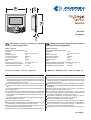
ML2062C
Italiano
English
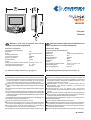
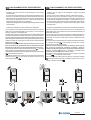
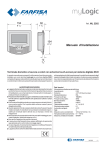
Videocitofono vivavoce a colori con schermo tattile per sistema digitale DUO
Hands Free Colour Video Intercom with touchscreen for DUO digital system
Dati tecnici
Technical characteristics
Alimentazione direttamente dalla linea
Assorbimento:
0,2A
Schermo:
4,3" LCD touch-screen
Standard televisivo:
PAL
Frequenza di riga:
15625Hz
Frequenza di quadro:
50Hz
Banda passante:
>5MHz
Relè:
1
Massimo carico contatti relè:
12Vca/12÷24Vcc - 1A
Temperatura di funzionamento: 0° ÷ +50°C
Massima umidità ammissibile: 90%RH
Power supply directly from the line
Operating current:
0.2A
Screen:
4.3" LCD touch-screen
Television standard:
PAL
Horizontal frequency:
15625Hz
Vertical frequency:
50Hz
Band width:
>5MHz
Relay:
1
Maximum load contacts relay: 12Vac / 12÷24Vdc - 1A
Operating temperature:
0° ÷ +50°C
Maximum admissible humidity: 90%RH
Il manuale d'uso inizia da pagina 16
The user’s manual begins on page 16
AVVERTENZE DI SICUREZZA
Leggere attentamente le avvertenze contenute nel presente manuale
perché forniscono importanti informazioni riguardanti la sicurezza
di installazione, uso e manutenzione. Conservarlo in modo appropriato per future consultazioni.
Posizionare il videocitofono myLogic in ambiente asciutto e lontano
da fonti di calore o apparecchiature che producono calore e campi
magnetici.
Per la pulizia del videocitofono non usare acqua o solventi chimici,
ma un panno pulito.
Questo apparecchio deve essere destinato solo all’uso per il quale
è stato concepito. Il costruttore non può essere considerato responsabile per eventuali danni derivati da usi impropri, erronei ed
irragionevoli.
Non lasciare alla portata dei bambini le parti dell’imballaggio (sacchetti di plastica, polistirolo espanso, ecc.).
Non aprire l’apparecchio quando è acceso.
L’esecuzione dell’impianto deve essere effettuato da personale
specializzato ed in conformità con le leggi vigenti.
In caso di guasto, funzionamento irregolare o modifica all’impianto
avvalersi di personale specializzato.
L’apparecchio è conforme alle direttive CEE (marchio europeo CE).
SAFETY NOTICES
Read the instructions contained in this manual carefully because
they provide important information about safe installation, use and
maintenance. Keep this manual appropriately for future reference.
Install your myLogic videointercom in a dry place away from heat
sources or devices that produce heat and magnetic fields.
Do not clean the videointercom with water or chemical solvents, use
a dry cloth for cleaning.
This device must be exclusively operated for its intended use. The
manufacturer cannot be held responsible for possible damage
caused by improper, erroneous and unreasonable use.
Keep packing parts away from children (i.e. plastic bags, expanded
polystyrene, etc.).
Do not open the device when it is on.
The installation must be made by specialized personnel in compliance with the regulations in force.
Always refer to specialized personnel in case of breakdown,
irregular operation or change in the installation.
The device complies with the EEC directives (CE European mark).
2435IGb
Mi Mi
2435IGb
-1-
Morsettiere
LM / LM
A1
GN
NO
NC
C
Ingressi di linea
Ingresso positivo chiamata di piano
Ingresso negativo chiamata di piano
Contatto normalmente aperto del relè
Contatto normalmente chiuso del relè
Comune del relè
Terminal boards
LM / LM
A1
GN
NO
NC
C
Line inputs
Floor call positive input
Floor call negative input
Relay normally open contact
Relay normally closed contact
Relay contact common
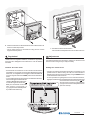
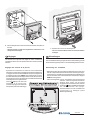
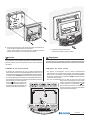
2 -Togliere le morsettiere dal videocitofono.
- Unplug the terminal blocks from the video
intercom.
3 -Effettuare i collegamenti sulle morsettiere
come da schema da realizzare.
- Make the connections as required by the
electric diagram to wire.
Installazione
Installation
4 -Reinserire le morsettiere sul videocitofono.
- Plug-in back the terminal blocks on the videointercom.
1 - Murare la scatola da incasso ML2083
ad un'altezza dalla pavimentazione di
circa 1,5 metri.
- Wall-up the back box ML2083 at an
height of about 1.5 meters above the
floor
5 -Sfilare la calotta frontale per accedere ai 4 punti di fissaggio del
videocitofono.
- Remove the frontal plastic frame to approach the four fixing
points of the video intercom.
Mi 2435IGb
-2-
6 -Fissare il videocitofono alla scatola da incasso utilizzando le 4 viti
fornite a corredo del prodotto.
- Fix the video intercom to the back-box using the four screws
supplied with the product.
Regolazioni
7 - Rimettere la calotta al videocitofono.
- Re-insert the frontal plastic frame to the video intercom.
Adjustments
I livelli fonici sono regolati in fabbrica; modificare le regolazioni
poste sul retro dell'apparecchio solamente in caso di effettiva
necessità.
The audio levels are set in the factory; settings on the back of the
device must be changed only if really necessary.
Taratura dei livelli fonici.
Setting the sound levels.
- Se durante la conversazione si ode un audio eccessivamente
intermittente o se durante una chiamata l'altoparlante tende a
distorcere, si consiglia di ritoccare leggermente la sensibilità del
microfono agendo sul trimmer SENS posto sul retro del videocitofono.
- In caso di difficoltà a prendere la linea in una delle due direzioni,
aumentare leggermente il livello del
canale in difficoltà e diminuire leggermente l’altro agendo sul trimmer
VOL per il volume del microfono e
sullo schermo touch-screen di
myLogic per il volume dell'altoparlante (vedere il manuale d'uso).
- If audio is excessively intermittent during the conversation or the
speaker tends to distort it during the call, it is recommended to
slightly change the microphone sensitivity using the SENS trimmer
on the back of the video-intercom.
- In case of problems in getting the line in one of the two directions,
slightly increase the level of the disturbed channel and decrease the
level of the other channel using the VOL
trimmer for the microphone volume and the
myLogic touch-screen for the speaker volume
(see user manual).
Mi 2435IGb
-3-
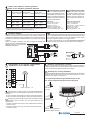
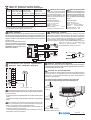
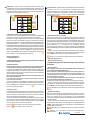
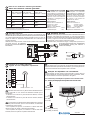
Tabella delle distanze massime garantite
Table of the maximum permitted distances
Tratta * Cavo Farfisa 2302 Cavo telefonico
Cavo CAT5
Section Farfisa 2302 cable Twisted cable
CAT5 cable
2x1mm² - AWG17 2x0,32mm² - AWG22 2x0,2mm² - AWG24
A
50 m - 164 ft
10 m - 33 ft
5 m - 17 ft
B
150 m - 328 ft
150 m - 328 ft
150 m - 328 ft
C
150 m - 328 ft
150 m - 328 ft
150 m - 328 ft
F
150 m - 328 ft
50 m - 164 ft
35 m - 115 ft
* Lettere di riferimento schematico (vedere gli schemi installativi a pagina 5).
Letters for reference on the diagrams (see page 5)
Art.2302 Farfisa cable
Twisted pair cable specified for
the digital installation with DUO
systems. The use of inappropriate
cables may have an adverse effect on the performance of the system.
Dati tecnici
Numero dei conduttori: 2
Colore: rosso e nero
Sezione: 2x1mm²
Materiale: rame stagnato
Passo di cordatura: 40mm
Impedenza caratteristica: 100Ω
Technical characteristics
Number of conductors: 2
Colour: red and black
Cross-section: 2x1mm² (AWG17)
Material: tinned copper
Twisting pitch: 40mm
Nominal impedance: 100Ω
Electrical door lock
Serratura elettrica
Il segnale video può essere disturbato durante l'azionamento della serratura
elettrica. Per evitare questo inconveniente o per azionare serrature con
caratteristiche differenti da quella consigliata (12Vca 1A max.) si suggerisce
di utilizzare un alimentatore supplementare come riportato nello schema
seguente.
Inoltre, si consiglia di collegare, il più vicino possibile ai terminali della
serratura elettrica, un soppressore di
disturbi (transil) per aumentare
l'affidabilità dell'impianto.
Collegamento di una soneria supplementare
Connection of one additional ringer
Cavo Farfisa art.2302
Cavo a 2 conduttori twistato consigliato per la realizzazione di impianti digitali DUO System. L'impiego di conduttori inadeguati potrebbe non garantire il corretto funzionamento del sistema.
The video signal may be disturbed during the operation of the electrical
lock. To avoid this problem or actuate locks with characteristics other
than recommended (12Vac 1A max.) an additional power supply
should be used as indicated in the diagram below.
It is also recommended to connect one interference suppressor
(transil) as close as possible to the terminals of the electrical lock.
Selezione impedenza di chiusura
Sul retro del videocitofono è posizionato il ponticello J12 che permette di
adattare il segnale video proveniente dalla montante e quindi consentire un
corretto funzionamento degli apparati ad esso collegati.
Selecting the closing impedance
The jumper J12 provided on the back of the videointercom can be used to
adjust the video signal coming from the riser and guarantee the correct
operation of the devices connected to it.
J12 Ponticello per adattare l'impedenza del segnale video
J12 Jumper to adjust the impedance of the video signal
12Vac; 12÷24Vdc - 1A
Applicando tra i morsetti C e NO una soneria autoalimentata è
possibile rilanciare in un altro ambiente le chiamate ricevute dal videocitofono.
- A riposo i contatti C e NO del relè sono aperti; chiusi quando attivato.
- A riposo i contatti C e NC del relè sono chiusi; aperti quando attivato.
By applying a self-powered ringer between terminals C and NO
it is possible to drive to another room the calls received by the
videointercom.
- Contacts C and NO of the relay are open in idle state and closed in
activation mode.
- Contacts C and NC of the relay are closed in idle state and open
in activation mode.
3-4
linea aperta
open line
2-3
Ω
chiusura 15Ω
termination 15Ω
1
2
3
4
1
2
3
4
C2 NC2 NO2 C1 NC1 NO1 A1 GN J12 LM LM J13
1
2
3
4
J12
1-2
Ω (di fabbrica)
chiusura 100Ω
Ω (default)
termination 100Ω
Mi 2435IGb
-4-
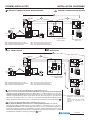
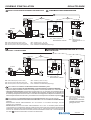
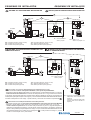
SCHEMI INSTALLATIVI
INSTALLATION DIAGRAMS
ONE-WAY VIDEOINTERCOM SYSTEM
IMPIANTO VIDEOCITOFONICO MONOFAMILIARE
C
B
CD2131PL
PL72
F
LP
LP
LP LP
EC
EM
S1
S2
art.2220S
A
110V÷
240VAC
PRI
art.2221S
PA
230V
127V
0
Relè
Relay
ML2062
ML2083
1
2
3
4
J1
FP
GN
A1
NO
NC
C
LM
LM
J12 = 1-2
SE
VD2120CPL
J1 = togliere ponticello
remove jumper
J12 =lasciare su 1-2
leave on 1-2
SE = Electric door lock (12VAC-1A max)
FP= Floor call push-button (optional)
PA = Door release push-button (optional)
SE = Serratura elettrica (12Vca-1A max.)
FP= Pulsante chiamata di piano (opzionale)
PA = Pulsante apriporta (opzionale)
IMPIANTO VIDEOCITOFONICO MONOFAMILIARE
CON 2 VIDEOCITOFONI
ONE-WAY VIDEOINTERCOM SYSTEM WITH 2 VIDEO-INTERCOMS
C
B
CD2131PL
PL72
VC1
LP
LP
LM
LM
LP LP
EC
EM
S1
S2
art.2220S
A
110V÷
240VAC
PRI
art.2221S
PA
230V
127V
0
SE
VD2120CPL
1
2
3
4
J1
F
J1 = togliere ponticello
remove jumper
To make a one-way installation with 2 videointercoms you must:
- add an additional ML2062C videointercom and another ML2083 back box to the videokit;
- move the jumper J12 of the videointercom VC1 from position 1-2 to 3-4; leave it on 1-2 in the VC2;
- change the room number of one of the two videointercoms from “0” to “1” (as indicated in section "How
to programme Address, User Name, Room Number" on page 9). The main videointercom is the one with
code “0” and will automatically switch ON upon an external call. The videointercom with code “1” can see
and talk with the external door station by pressing the
button.
Relè
Relay
ML2062
ML2083
VC2
SE = Electric door lock (12VAC-1A max)
FP= Floor call push-button (optional)
PA = Door release push-button (optional)
Per realizzare un impianto monofamiliare con 2 videocitofoni occorre:
- aggiungere al videokit un ulteriore videocitofono ML2062C ed un'altra scatola da incasso ML2083;
- spostare il ponticello J12 del videocitofono VC1 dalla posizione 1-2 alla 3-4; lasciarlo su 1-2 nel VC2;
- cambiare il numero di stanza di uno dei due videocitofoni da "0" a "1" (procedere come indicato nel
paragrafo "Programmazione Indirizzo, Nome utente, Numero stanza" di pagina 9). Si ricorda che il
videocitofono principale è quello con il codice "0" e si accenderà automaticamente alla chiamata da
esterno; mentre il videocitofono con il codice "1" può visionare e comunicare con l'esterno premendo
.
FP
J12 = 3-4
LM
LM
SE = Serratura elettrica (12Vca-1A max.)
FP= Pulsante chiamata di piano (opzionale)
PA = Pulsante apriporta (opzionale)
GN
A1
NO
NC
C
1
2
3
4
GN
A1
NO
NC
C
FP
Relè
Relay
ML2062
ML2083
J12 = 1-2
J12 = posizionare il ponticello di ogni videocitofono come indicato nello
schema.
set the jumper of each videointercom as indicated in the
diagram.
Mi 2435IGb
-5-
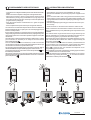
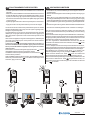
FUNZIONAMENTO VIDEOCITOFONICO
- Controllare che i collegamenti dell'impianto siano effettuati correttamente.
- Mettere in funzione l'impianto collegando a rete gli alimentatori.
- Alla prima accensione o dopo un lungo periodo di tempo senza
alimentazione (circa 2 giorni), il videocitofono myLogic, dopo una
breve fase di caricamento dati, avvia la procedura semplificata di
programmazione (vedi pag.9).
- Dopo la programmazione il videocitofono è in grado di operare
correttamente.
- Premere il pulsante sul posto esterno per eseguire la chiamata.
L'avvenuto invio è confermato sul posto esterno da un tono di libero se
la linea è disponibile o di occupato (con Led rosso lampeggiante) se
la linea non è disponibile.
Il posto interno squillerà con temporizzazioni e melodie definite da
un'apposita programmazione del videocitofono (vedi pagina 30); se in
questa fase si preme ancora lo stesso pulsante l'apparecchio squilla
nuovamente.
Sul videocitofono chiamato appare l'immagine dell'ingresso. L'utente
può conversare con l'esterno per un tempo di circa 90 secondi
premendo il pulsante
.
A 10 secondi dalla fine della conversazione, si udrà un tono di fine
conversazione; premere nuovamente il pulsante del posto esterno per
continuare la conversazione per altri 90 secondi.
. La
Per azionare l'apertura della serratura premere il pulsante
durata dell'abilitazione dipende dalla programmazione scelta.
o alla
L'impianto ritorna a riposo premendo nuovamente il pulsante
fine della temporizzazione.
Ad impianto videocitofonico a riposo è possibile visionare l'ingresso
premendo il pulsante ; qualora si desideri comunicare con l'esterno
.
premere il pulsante
VIDEOINTERCOM OPERATION
- Check that the connections of the installation are correct.
- Operate the installation by connecting the power supplies to the
mains.
- Upon first switch-ON or after a long period of time without power
supply (approx. 2 days), after a short data loading operation, the
myLogic videointercom starts the simplified programming procedure
(see page 9).
- After the simplified programming procedure the device can operate correctly.
- Press the button on the external door station to make the call.
Call is confirmed on the external door station with a free tone if the
line is available or a busy tone (with flashing red Led) if the line is not
available.
The internal station rings with the time and ringer defined by the
specific videointercom programming operation (see page 30); the
device will ring again if you press the same button again.
The image of the entrance appears on the called videointercom. The
user can talk with the external door station for approximately 90
.
seconds by pressing
10 seconds before the end of the conversation you will hear the end
of conversation tone; press the button on the external door station
again to continue the conversation for additional 90 seconds.
to open the lock. The activation time depends on the
Press
programming you have chosen.
The installation goes back to idle state by pressing again the button
or at the end of the conversation time.
When the videointercom installation is in idle state you can monitor
; to communicate with the
the entrance by pressing the button
.
external door station press the button
Mi 2435IGb
-6-
PROGRAMMAZIONI
Il videocitofono ML2062 deve essere programmato opportunamente
per definirne il modo di funzionamento. La maggior parte delle
programmazioni sono semplici e necessitano di essere modificate al
variare delle esigenze domestiche, sono quindi descritte nel manuale
d’uso e possono essere eseguite dall’utente. Altre invece sono più
complesse, in quanto devono rispecchiare l’impiantistica del sistema,
ed una loro errata impostazione può provocare malfunzionamenti gravi
del prodotto; esse sono descritte nel presente manuale e devono essere
eseguite dall’installatore o da personale esperto.
Al termine delle programmazioni è vivamente consigliato proteggerle
seguendo la procedura indicata nel capitolo "Procedura blocco/
sblocco delle programmazioni" (pagina 9).
PROGRAMMING
The ML2062 videointercom must be suitably programmed to define
the operation mode. Most programming operations are simple and
need to be changed in case of new domestic requirements. For this
reason, they are described in the user manual and can be carried out
by the user. Instead, other operations are more complicated because
they must respect the installation of the system. Incorrect settings
can cause severe malfunctioning. They are described in this manual
and must be carried out by the installer or expert users.
At the end of the programming operations it is strongly recommended
to protect them by following the procedure illustrated in section
“Procedure used to lock/unlock programming operations” (page 9).
Executable programming operations
Programmazioni eseguibili
indirizzo utente (obbligatorio); indirizzo di identificazione
dell’appartamento (indirizzi da 1 a 200). Permette di ricevere la
chiamata da esterno o da altro apparecchio presente nello stesso
palazzo, accendere il videocitofono, conversare ed aprire la serratura
del posto esterno chiamante. L’indirizzo dovrà essere lo stesso
memorizzato nel tasto di chiamata della pulsantiera del posto esterno
o nel tasto di chiamata di un altro apparecchio intercomunicante di
palazzo.
numero stanza (obbligatorio se vi sono più apparecchi nello stesso
appartamento); indirizzo di identificazione dell’apparecchio all’interno
dello stesso appartamento (indirizzi da 0 a 7). Il numero di stanza
stabilisce anche una gerarchia negli apparati interni in quanto
l’apparecchio che avrà l’indirizzo di stanza 0 (zero) sarà definito
principale, gli altri saranno tutti secondari. Eseguita questa
programmazione sarà possibile effettuare e ricevere chiamate
selettive con gli altri apparecchi all’interno dello stesso appartamento
cioè ogni apparecchio potrà chiamare singolarmente gli altri. Le
chiamate da esterno o da altro appartamento faranno invece squillare
tutti i dispositivi, il primo che risponderà attiverà la conversazione e
spegnerà le sonerie degli altri. All’arrivo di una chiamata da posto
esterno dotato di telecamera tutti gli apparecchi squillano, ma solo il
principale (indirizzo di stanza 0 -zero) mostra l’immagine della
telecamera. In questa fase è possibile, anche da un videocitofono
secondario, visualizzare l’immagine della telecamera senza rispondere
”. E’ possibile rispondere alla
premendo il tasto telecamera “
chiamata anche dai videocitofoni secondari premendo il tasto
; tale operazione spegne le sonerie di tutti i
videocitofonia
dispositivi e mostra l’immagine della telecamera sul display del
videocitofono utilizzato rimuovendola da quello del videocitofono
principale. La chiamata di piano fa squillare solo il videocitofono a cui
il pulsante di chiamata è fisicamente connesso. Volendo rilanciare
tale chiamata anche agli altri videocitofoni seguire le istruzioni del
paragrafo "rilancio campanello" a pag.14.
Creazione/eliminazione di nuovi ingressi videocitofonici
(obbligatorio se ci sono più ingressi videocitofonici nell’impianto);
si possono creare nuovi ingressi definendo il loro nome ed il loro
indirizzo oppure cancellarli.
Nome ingresso videocitofonico, mnemonico con il quale è
individuato un ingresso videocitofonico all’interno del sistema (es.
“INGRESSO VIA VERDI” o “INGRESSO PRINCIPALE”).
Indirizzi dei posti esterni per accensioni di controllo (obbligatorio
se vi sono più posti esterni); indirizzo che identifica univocamente
ciascun posto esterno presente nell’impianto (indirizzi da 231 a 250).
L’indirizzo dei posti esterni permette al videocitofono di collegarsi
singolarmente con essi, eseguire accensioni di controllo ed
eventualmente aprire la serratura.
Attenzione: gli indirizzi dei dispositivi memorizzati nel videocitofono
devono coincidere con quelli programmati negli ingressi videocitofonici.
user address (mandatory); apartment identification address
(addresses from 1 to 200). It allows to receive an external call or a
call from another device installed in the same building, switch-ON
the videointercom, have a conversation and open the door lock of
the calling external door station. The address must be the same
address saved in the call button of the push-button panel of the
external door station or in the call button of another intercom device
of the building.
room number (mandatory in case of multiple devices in the same
apartment); device identification address inside the same apartment
(addresses from 0 to 7). The room number establishes a hierarchy
in the internal devices since the device with room address 0 (zero)
will be the main device and all the other devices will be the
secondary devices. Once you have made this programming
operation, you will be able to make and receive selective calls with
the other devices inside the same apartment. In other words, each
device can individually call the other devices. The external calls or
calls from another apartment will make all devices ring, the first
device that answer the call will activate the conversation and switch
OFF the ringer of the other devices. When you receive a call from
an external door station equipped with camera, all the devices will
ring, but only the main device (room address 0 - zero) will display
the camera image. In this phase you can display the camera image
also from a secondary videointercom without answering by pressing
the camera button “
”. You can answer the call also from the
secondary videointercoms by pressing the videointercom button
. This operation will switch OFF the ringer of all the devices and
will display the camera image on the display of the used
videointercom. In case of floor call only the videointercom to which
the call button is physically connected will ring. To drive the call to
the other videointercoms you must follow the instructions contained
in the section “Floor call extension” on page 14.
Creation/deletion of new videointercom entrances (mandatory in
case of multiple videointercom entrances in the installation); you can
create new entrances, defining their name and addresses, or you
can delete them.
Videointercom entrance name, mnemonic name used to identify
the videointercom entrance in the system (i.e.”EDISON STREET
ENTRANCE” or “MAIN ENTRANCE”).
Addresses of external door stations for control switch-ON
(mandatory in case of multiple external door stations); address used
to univocally identify each station of the system (addresses from
231 to 250). The address of the external door stations allows the
videointercom to connect with them individually, use the control
monitor function and open the door lock.
Warning: the addresses of the devices saved in the videointercom
must coincide with the addresses programmed in the videointercom
entrances.
Mi 2435IGb
-7-
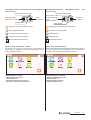
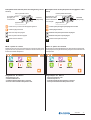
Principali tasti funzione (tasto di navigazione e touchscreen)
Main function buttons (navigation button and touchscreen)
menu or control panel
menu o pannello di controllo
accensione telecamere,
inizio e fine conversazione
serratura
(apriporta)
camera switch-ON,
start and end of
conversation
lock
(door open)
previous page
pagina precedente
conferma e passaggio alla pagina successiva
confirm and go to next page
ritorno alla pagina precedente
go back to previous page
scorrimento in basso della pagina
scroll page down
scorrimento in alto della pagina
scroll page up
gestione modifica dei dati
change data
Menu o pannello di controllo
Menu or control panel
Premendo sulle icone di questa pagina si può accedere alle
programmazioni, impostazioni ed inserimento informazioni per il
funzionamento del videocitofono.
Press the icons on this page to access the programming operations,
settings, and information entering functions to operate the
videointercom.
Programmazione di fabbrica
Default settings
-
-
indirizzo appartamento = 100
numero stanza = 0
nome ingresso videocitofonico = ingresso
indirizzo dell’ingresso videocitofonico = 231
apartment address = 100
room number = 0
videointercom entrance name = ingresso
videointercom entrance address = 231
Mi 2435IGb
-8-
Procedura di blocco/sblocco delle programmazioni
Per poter bloccare o sbloccare le programmazioni protette occorre
eseguire la procedura seguente:
serratura
"menu" "impostazioni" "avanzate" (videocitofonia
)
"varie"
selezionare "protezione attiva"
"modifica"
NO per sbloccare le programmazioni (o SI per bloccarle)
Procedure used to lock/unlock programming
operations
The following procedure must be carried out to block or unblock the
protected programming operations: “menu” “settings” “advanced”
lock release
(videointercom
“modify”
“protection activated”
) “others” select
NO to unblock programming
"menu". Per maggiori dettagli vedere il paragrafo "protezione attiva"
a pagina 14.
“menu”. For more details
operations (or YES to block them)
see the section “active protection” on page 14.
Modalità di programmazione
Programming modes
Programmazione alla prima accensione
Programming operations upon first switch-ON
Alla prima accensione il videocitofono, dopo una fase di caricamento
dati (circa 15 secondi), avvia una procedura semplificata che guida
l’installatore nella programmazione dei dati necessari per il corretto
funzionamento del dispositivo. In sequenza devono essere inseriti:
When you switch-ON the videointercom for the first time, after a data
loading operation (approximately 15 seconds), the videointercom
starts a simplified procedure that guides the installer during
programming of necessary data for the correct operation of the
device. In sequence you must enter:
- Lingua – selezionare con un tocco la lingua da un elenco (di fabbrica
è selezionata la lingua italiana) e premere
;
- Data – impostare la data corrente; dopo aver selezionato con un
tocco l’anno il mese e il giorno essi possono essere variati usando
;
le frecce su e giù (di fabbrica 01/01/2010) e premere
- Ora – impostare l’ora corrente; dopo aver selezionato con un tocco
le ore ed i minuti essi possono essere variati usando le frecce su e
.
giù (di fabbrica 00:00) e premere
- Nome Stazione – dopo aver selezionato con un tocco “modifica”
introdurre il nome che si desidera attribuire al videocitofono (di
fabbrica myLogic) e premere SALVA. Per l’uso della tastiera vedi
capitolo Sostituzione nominativo utente. Se il nome di fabbrica è
accettato non procedere con “modifica”, ma passare direttamente
alla programmazione dell’indirizzo.
- Indirizzo - dopo aver selezionato con un tocco “modifica” introdurre
l’indirizzo (di fabbrica 100) e premere SALVA. Per l’uso della tastiera
vedi capitolo Memorizzazione/Sostituzione indirizzo
appartamento. Se l’indirizzo di fabbrica è accettato non procedere
con “modifica”, ma passare direttamente alla programmazione del
numero di stanza.
- Numero stanza - dopo aver selezionato con un tocco “modifica”
introdurre il numero di stanza richiesto (di fabbrica 0) e premere
SALVA. Per l’uso della tastiera vedi capitolo Memorizzazione/
Sostituzione numero di stanza. Se il numero di stanza impostato
di fabbrica è accettato non procedere con “modifica”, ma passare
direttamente al punto successivo.
, sarà visualizzata la pagina principale (Home page).
Premere
Attenzione: questa procedura semplificata sarà avviata dal videocitofono
anche a tutte le accensioni del dispositivo dopo un lungo periodo di
tempo senza alimentazione, periodo nel quale il dispositivo perde i dati
correnti dell’ora e della data (circa 2 giorni).
Programmazione Indirizzo, Nome utente, Numero stanza
Oltre al metodo descritto in precedenza "Programmazione
alla prima accensione", è possibile variare i dati dell'utente
procedendo nel seguente modo:
"impostazioni "
"Indirizzo/Nome"
si
"menu"
accede ad una pagina dove compare il Nome, l’Indirizzo ed
il Numero di stanza del dispositivo; premere i tasti "modifica" per
cambiare nome ed indirizzi.
- Language – touch to select the language from the list (Italian by
default) and press
;
- Date – set the current date; after you have touched to select the
year, month and day, you can change them with the up and down
;
arrows (01/01/2010 by default) and press
- Time – set the current time; after you have touched to select the
hour and minutes, you can change them with the up and down
.
arrows (00:00 by default) and press
- Station Name – touch to select “modify” and enter the name you
want to give to the videointercom (myLogic by default) and press
SAVE. For info on how to use the keypad please refer to User Name
Replacement section. If the default name is accepted, do not
proceed with “modify”, and go to address programming directly.
- Address – after you have touched to select “modify” you can enter
the address (100 by default) and press SAVE. For info on how to
use the keypad please refer to Save/Replace Apartment Address.
If the default address is accepted, do not proceed with “modify”, and
go directly to programming room number.
- Room number – after you have touched to select “modify” you can
enter the room number (0 by default) and press SAVE. For info on
how to use the keypad please refer to Save/Replace Room
Number. If the default room number is accepted, do not proceed
with “modify”, and go to the next operation directly.
, the Home Page is displayed.
Press
Warning: this simplified procedure is started by the videointercom
also when the device is switched ON after a long power failure in which
the devices loses the current time and date settings (approx. 2 days).
How to program Address, User Name, Room Number
In addition to the method described about in “Programming
operations upon first switch-ON”, you can change the user
data as indicated below:
“settings”
“Address/Name”
you will
“menu”
access a page with the Name, Address and Room Number
of the device; press the “modify” buttons to change name and
addresses.
status bar
barra di stato
premere "modifica" per
cambiare le impostazioni
presenti
premere “OK” per confermare i dati visualizzati e
memorizzarli
press “modify” to change
the current settings
press “OK” to confirm and
save the displayed settings
Mi 2435IGb
-9-
Modalità di scrittura
Esistono due diverse modalità di immissione caratteri o numeri:
sovrapposizione (testo nero su fondo rosso): il nuovo carattere
cancella il precedente.
inserimento (testo nero su fondo bianco): il nuovo carattere si
aggiunge al precedente facendo scorrere i caratteri presenti verso
destra.
Per passare da una modalità all’altra occorre premere brevemente sulla
casella di testo.
Nella fase iniziale dell’immissione di un testo o di un numero il cursore
si posiziona automaticamente nella casella di testo ed apparirà in nero
su fondo rosso cioè in modalità sovrapposizione.
Sostituzione nominativo utente (massimo 15 caratteri).
Dopo aver premuto "modifica" in corrispondenza della voce "Nome
Stazione", appare una tastiera alfanumerica da utilizzare per scrivere
il nome identificativo dell'utente o dell'appartamento. Questo nome può
essere cambiato anche in seguito dall'utente; l'eventuale sostituzione
non pregiudica il funzionamento dell'impianto.
Entering modes
Two different modes can be used to enter characters or numbers:
overwriting (black text against red background): the new character
will overwrite the previous one.
insertion (black text against white background): the new character
is added to the previous one by making the existing characters move
to the right.
To switch between modes you must press the text box quickly.
At the beginning of the insertion of a text or a number the cursor is
automatically positioned in the text box and will be displayed in black
against red background, i.e. in overwriting mode.
How to replace the user name (max. 15 characters).
After pressing “modify” for “Station Name” the system will display an
alphanumeric keypad that can be used to write the user or apartment
identification name. This name can be changed by the user, at any
time because replacement does not affect the operation of the
installation.
write the user name with
the keypad (i.e. Smith)
tramite tastiera scrivere il
nome dell'utente (es. Rossi)
press “save” to save and go
back to the previous page
premere "salva" per memorizzare e ritornare alla pagina precedente
press “canc” to correct
typing mistakes
premere "canc" per correggere gli errori di battitura
space
spazio
premere per passare ai caratteri
minuscoli; ripremere per ritornare ai caratteri maiuscoli
usare le frecce per spostare il
cursore sul carattere da inserire o correggere
premere per passare ai caratteri di punteggiatura; ripremere per ritornare ai caratteri
alfabetici
premere per passare ai caratteri numerici;
ripremere per ritornare ai caratteri alfabetici
Memorizzazione/Sostituzione indirizzo appartamento (numeri
da 1 a 200)
Dopo aver premuto "modifica" in corrispondenza della voce "Indirizzo",
appare una tastiera numerica da utilizzare per scrivere il numero
identificativo dell'utente o dell'appartamento. L'indirizzo da inserire
deve corrispondere all'indirizzo di chiamata memorizzato nel posto
esterno (o posti esterni). Es. se sul posto esterno il sig. Rossi è
codificato con codice di chiamata 15, anche il videocitofono del signor
Rossi, per poter essere chiamato, deve avere l'indirizzo 15.
tramite tastiera inserire
l’indirizzo dell’utente (es. 15)
premere "salva" per memorizzare e ritornare alla pagina precedente
premere "canc" per correggere gli errori di battitura
usare le frecce per spostare il
cursore sul numero da inserire
o correggere
Memorizzazione/Sostituzione numero stanza (numeri da 0 a 7)
Dopo aver premuto "modifica" in corrispondenza della voce "Numero
Stanza", appare una tastiera numerica da utilizzare per inserire il
numero interno (numero stanza) del videocitofono (lasciare 0 se vi è
un solo videocitofono o se è il principale; numeri da 1 a 7 per gli eventuali
altri apparati). Attenzione. Variare questo numero può pregiudicare
il corretto funzionamento dell'impianto.
press to go to
lower
case
characters;
press again to
return to upper
case characters
use the arrows to move the
cursor to the character to be
inserted or corrected
press to go to special characters; press
again to return to alphanumeric characters
press to go to numeric characters; press again
to return to alphabetic characters
How to Save/Replace Apartment Address (numbers from 1 to 200)
After pressing “modify” for “Address” the system will display a
numeric keypad that can be used to write the user or apartment
identification number.
The address to be inserted must coincide with the call address stored
in the external door station (or external door stations).
For example if Mr. Smith is identified with call code 15 on the external
door station, in order to be called, also the videointercom of Mr. Smith
must have address 15.
use the keypad to enter the
user address (i.e. 15)
press “save” to save and go
back to the previous page
press “canc” to correct
typing mistakes
use the arrows to move the
cursor to the number to be
inserted or corrected
How to Save/Replace Room Number (numbers from 0 to 7)
After pressing “modify” for “Room Number” a numeric keypad is
displayed to write the internal address (room number) of the
videointercom (leave 0 in case of only one videointercom or if it is the
main videointercom; numbers from 1 to 7 for the other devices).
Warning: Changing this number can cause the malfunctioning of the
installation.
Mi 2435IGb
- 10 -
tramite tastiera inserire il numero della stanza (es. 0)
use the keypad to insert
the room number (i.e. 0)
premere "salva" per memorizzare e ritornare alla pagina precedente
press “save” to save and go
back to the previous page
premere "canc" per correggere gli errori di battitura
press “canc” to correct
typing mistakes
usare le frecce per spostare il
cursore sul numero da inserire
o correggere
use the arrows to move the
cursor to the number to be
inserted or corrected
Nota. Se in un appartamento vi sono più posti interni occorre
programmarli con lo stesso indirizzo di appartamento (esempio 15) e
variare il numero di stanza (inserire 0 per l’apparato principale, e poi
progressivamente 1, 2, ...7 per i secondari).
Note. If an apartment has multiple internal stations, they must be
programmed with the same apartment address (i.e. 15) and change
the room number (enter 0 for the main device, and then 1, 2, ... 7 for
the secondary devices).
Interfono/SMS
Intercom/SMS
"Menu"
Per poter comunicare od inviare messaggi tra utenti
condominiali o tra videocitofoni myLogic del proprio
appartamento occorre inserire nella rubrica i nomi degli
utenti e soprattutto gli indirizzi utente e stanza. Per
l'inserimento procedere nel seguente modo:
"Interfono/SMS" "Rubrica" "Opzioni" "Nuovo"
si accede ad una pagina dove compare il Nome, l’Indirizzo ed
il Numero di stanza del dispositivo (per la scrittura seguire la procedura
indicata nel capitolo "Programmazione Indirizzo, Nome utente,
Numero stanza"). Si ricorda che il nome è modificabile anche dal
cliente in un secondo momento in quanto una sua modifica non
pregiudica il funzionamento del sistema. Bisogna prestare molta
attenzione invece nel modificare l'indirizzo ed il numero di stanza in
quanto essi devono corrispondere a quelli memorizzati nel videocitofono
da chiamare. Codici errati non permettono le comunicazioni richieste
o abilitano comunicazioni con utenti estranei al servizio. Premere
per tornare alla rubrica e premere il pulsante a fianco di ogni nome per
effettuare le chiamate interfoniche.
“Menu”
In order to communicate or send messages between the
users in the building or between myLogic videointercoms
of your apartment, you must enter the user names and
most of all the user and room addresses in the agenda. For
insertion follow the procedure below:
“Intercom/SMS” “Directory” “Options” “New”
you go to a page with the Name, Address and Room Number
of the device (for entering please follow the procedure described in
section “How to programAddress, User Name and Room Number”).
The name can be modified by the customer at any time because its
modification does not affect the correct operation of the system. On
the contrary attention must be payed to modify user address and room
number , which must coincide with the ones saved in the videointercom
to be called. Incorrect codes will not allow communication or will
to go back to
cause communication with undesired users. Press
the agenda and press the button next to each name to make intercom
calls.
How to program videointercom entrances
Ingressi videocitofonici
Se nell’impianto sono installati più posti esterni, occorre
informare il videocitofono della loro presenza ed attribuire
loro indirizzi differenti (da 231 a 250). Non occorre effettuare
questa programmazione se nell'impianto è presente un
solo posto esterno.
Per programmare il nome o gli indirizzi degli ingressi videocitofonici
occorre seguire la procedura seguente:
"menu"
"nuovo"
"videocitofonia"
"elenco ingressi"
"opzioni"
premere "modifica" in corrispondenza della
casella nome tramite tastiera scrivere il nome dell'ingresso (es.
via Verdi) "salva" premere "modifica" in corrispondenza della
casella indirizzo tramite tastiera inserire l'indirizzo (se diverso da
quello proposto - es. 232)
"salva"
.
Per programmare il nome e l'indirizzo del secondo ingresso o di altri
eventualmente presenti nell'impianto, seguire la procedura precedente
da "opzioni" in poi.
Premere
per collegarsi con il nuovo ingresso e verificarne il
funzionamento.
Premere
o C per tornare alla pagina precedente.
Attenzione. Gli indirizzi memorizzati nel videocitofono devono
corrispondere a quelli programmati nei posti esterni.
If multiple external door stations are installed, you must
inform the videointercom of their presence, giving them
different addresses (from 231 to 250). This programming
operation is not necessary if the installation only has one
external door station.
To program the name and addresses of the videointercom entrances
you must follow the procedure below:
“menu”
“videointercom”
“monitor list”
“options”
“new”
press “modify” next to the name box use the keypad
to enter the entrance name (i.e.street Edison) “save” press
use the keypad to enter the
“modify” next to the address box
address (if different from the proposed one – i.e. 232) “save”
.
To program the second entrance or other entrances if present follow
the previous procedure from “options” onwards for the second
entrance and for any other entrances available in the installation, if
any.
Press
to connect with the new entrance and check its
functionality.
Press
or C to go back to the previous page.
NB. The addresses stored in the videointercom must correspond with
the addresses that are programmed in the external door stations.
Mi 2435IGb
- 11 -
Per modificare il nome o gli indirizzi degli ingressi videocitofonici già
memorizzati occorre seguire la procedura seguente:
To change the name and addresses of the videointercom entrances
that are already save you must follow the procedure below:
"menu"
“menu”
"videocitofonia"
"elenco ingressi"
casella dell'ingresso modificare
"opzioni"
selezionare la
"modifica"
premere "modifica" in corrispondenza della casella nome
tramite tastiera scrivere il nome dell'ingresso (es. entrata second.)
"salva" premere "modifica" in corrispondenza della casella
indirizzo tramite tastiera inserire l'indirizzo (se diverso da quello
proposto - es. 232)
"salva"
.
per collegarsi con il nuovo ingresso e verificarne il
Premere
funzionamento.
Premere più volte
“videointercom”
“monitor list”
select the box of the
press
entrance to be changed “options” “modify”
“modify” in the name box use the keypad to enter the entrance
name (i.e. secondary entrance) “save” press “modify” in the
use the keypad to enter the address (if different
address box
from the proposed one – i.e. 232)
“save”
.
Press
to connect with the new entrance and check its
functionality.
Press
or C repeatedly to go back to the main page.
o C per tornare alla pagina principale.
Push buttons
Pulsanti
If one or more actuators (art.2281) are installed in the
system, you must inform the videointercom of their
presence, giving them different addresses (from 211 to
230).
Se nell’impianto sono installati uno o più attuatori (art.2281),
occorre informare il videocitofono della loro presenza ed
attribuire loro indirizzi differenti (da 211 a 230).
Per programmare il nome e gli indirizzi degli attuatori occorre
seguire la procedura seguente:
"menu" "pulsanti" "gestione pulsanti" "nuovo pulsante"
tramite tastiera scrivere la funzione del pulsante (es. luce giardino)
"salva" tramite tastiera inserire l'indirizzo (se diverso da quello
proposto - es. 212)
"salva"
.
To program the name and addresses of the actuators you must
follow the procedure below:
“menu” “push buttons” “manage buttons” “new button”
use the keypad to enter the function of the button (i.e.light garden)
“save” use the keypad to enter the address (if different from
the proposed one – i.e. 212)
Attenzione. Gli indirizzi memorizzati nel videocitofono devono
corrispondere a quelli programmati negli attuatori.
“save”
.
Warning. The addresses stored in the videointercom must correspond
with the addresses that are programmed in the actuators.
Impostazioni avanzate
Advanced settings
Nelle pagine seguenti sono presenti informazioni ed
impostazioni utili per il funzionamento del sistema, le relative
programmazioni devono pertanto essere eseguite
dall’installatore o da personale esperto.
Per accedere al menu è necessario eseguire la seguente procedura:
The following pages contain information and settings that
are useful for the operation of the system. Programming
operations must be therefore carried out by the installer
or by expert users.
To access the menu you must carry out the following procedure:
"menu"
"impostazioni"
"avanzate"
"
"
"
"
.
Si accede ad una pagina dove sono elencate le seguenti funzioni:
Home page - si possono scegliere, selezionandole da un elenco, le
3 funzioni da associare ai 3 tasti che compaiono nella pagina
principale e loro posizione sullo schermo (in alto, al centro o in basso).
Le funzioni che possono essere selezionate sono le seguenti:
- Elenco note
- Rubrica
- Link a Postazione permette di visualizzare sulla Home Page il
pulsante di chiamata di un utente specifico della rubrica o quello di
un posto esterno videocitofonico.
- Telecamera permette di visualizzare sulla Home Page il pulsante
telecamera dell’ingresso videocitofonico.
- Elenco Ingressi
- Quadro Pulsanti
- Link a Pulsante permette di visualizzare sulla Home Page un
pulsante
- Nuovo nota/memo
- Invia Messaggio
- Silenzioso
- Chiamate
- Foto
- Rimuovi Memory Card
- Immagini
“menu”
“settings”
“advanced"
"
"
"
"
.
You go to a page where the following functions are listed:
Home page – you can select from a list the 3 functions to be
associated with the 3 buttons that are displayed in the main page,
together with their position on the screen (up, centre, down).
The following functions can be selected:
- Notes
- Directory
- Link to Station allows for displaying the call button of a specific
user from the agenda or the call button of an external videointercom
station on the Home Page.
- Monitor allows for displaying the monitor button of one of the
videointercom entrances on the Home Page.
- Monitor List
- Buttons Panel
- Link to Button allows for displaying a button on the Home Page
- New note/memo
- SMS sending
- Silent
- Calls
- Gallery
- Remove Memory Card
- Backgrounds
Mi 2435IGb
- 12 -
Inoltre si possono scegliere le funzioni da associare ai 6 tasti che si
possono far apparire durante il collegamento con il posto esterno.
- Link a Pulsante - Volume - Telecamera - Scatto manuale Apriporta - Impostazioni - Chiudi.
Besides can be selected the functions that can be displayed during
the connection with the entrance.
- Link to Button - Volume - Monitor - Manual photo - Door
opening - Settings - Exit.
Per scegliere una funzione eseguire la procedura seguente:
Premere “HomePage” scegliere la posizione che si vuole attribuire
ad una funzione (tasto in alto, al centro o in basso) premendo
"modifica" alla destra della casella della funzione attualmente
premere brevemente sulla casella testo della
programmata
funzione desiderata (spostarsi con le frecce per scorrere l'elenco);
Execute the following procedure to select a function:
Press “HomePage” ” select the position you want to give to the
function (up, centre or bottom) pressing “modify” on the right of the
box of the function that is currently programmed ” press the text
box of the desired function quickly (use the arrows to scroll the list);
una spunta di colore verde evidenzierà la scelta fatta
tornare alla pagina precedente.
Procedere in modo analogo per le altre posizioni.
Alla fine della programmazione premere
"impostazioni avanzate".
per
per tornare alla pagina
Indirizzi alternativi
È possibile impostare myLogic in modo tale che risponda alle
chiamate destinate ad altri utenti (indirizzi alternativi); per esempio
in una situazione di abitazione di un professionista e del proprio
studio professionale oppure di appartamento dei genitori e
appartamento dei figli; in questo modo il videocitofono di un
appartamento può comportarsi come se fosse un videocitofono, sia
principale che secondario, di un’altro appartamento; è importante
tener presente che, nel caso di un videocitofono con indirizzo
alternativo, esso si comporta a tutti gli effetti come un videocitofono
del proprio appartamento, ma anche come videocitofono
dell’appartamento alternativo per cui dovrà rispettare le regole e le
programmazioni anche di quest’ultimo.
Esempio. Se nell’appartamento alternativo c’è già il numero di stanza
2, il videocitofono alternativo non potrà essere programmato con il
numero di stanza 2, naturalmente potrà essere il numero di stanza
2 del proprio appartamento, oppure se nell’appartamento alternativo
c’è già un videocitofono principale, il videocitofono alternativo non
potrà essere programmato come principale, naturalmente potrà
essere il principale per il proprio appartamento.
Esempio: abitazione (a) e studio legale (b) di un avvocato con indirizzi
utente indipendenti ma con possibilità di ricevere le chiamate dei due
indirizzi in uno o entrambi gli appartamenti.
Impostazioni precedentemente programmate nei videocitofoni presenti
nei 2 appartamenti
- a) abitazione avvocato (solo 1 videocitofono) = myLogic = indirizzo
131; stanza 0
- b) ufficio avvocato (videocitofono 1) = myLogic principale = indirizzo
120; stanza 0
ufficio segretaria (videocitofono 2) = myLogic secondario =
indirizzo 120; stanza 1
Per programmare la funzione "indirizzi alternativi" occorre procedere
nel modo seguente (in parentesi si prenderà in considerazione la
programmazione del videocitofono presente nell'appartamento
dell'avvocato per rispondere anche alle chiamate dello studio):
"Indirizzi alternativi" "Nuovo" premere "modifica" per impostare
il nome (es. “Studio legale”), Indirizzo (es. “120” corrispondente
all’indirizzo dello studio legale) e numero stanza (es. “2” perché nello
studio sono già presenti i numeri di stanza 0 e 1)
.
Per l’immissione delle programmazioni deve essere usata la stessa
procedura del capitolo “Programmazione indirizzo, nome utente,
numero stanza”.
Per inserire ulteriori "indirizzi alternativi" seguire la stessa procedura
precedente.
Per eliminare un "indirizzo alternativo", selezionarlo toccando
brevemente la casella di testo dove è riportato il nome e premere
“Elimina”.
Premere
a green tick will identify your selection
to go back to the
previous page.
Repeat the same procedure for the other stations.
At the end of the programming operations press
the “advanced setting” page.
to go back to
Secondary address
You can set myLogic so that it answers the calls sent to other users
(secondary addresses); for example, the house of a professional
and his professional office, or parents’ apartment and sons’
apartment. In this way the videointercom of an apartment can
operate as a videointercom, either main or secondary, of another
apartment. It is important to remember that, in case of a videointercom
with alternative address, the videointercom operates as a
videointercom of its own apartment, but also as videointercom of
the alternative apartment so that it must respect also the rules and
programming operations of the latter.
Example. If the room number 2 is already used in the alternative
apartment, the alternative videointercom cannot be programmed
with room number 2. Of course, it can be room number 2 of its own
apartment, if available. If there is a main videointercom in the
alternative apartment, the alternative videointercom cannot be
programmed as main videointercom, it can be the main videointercom
for its own apartment if requested.
Example: home (a) and professional office (b) of a lawyer with
independent user addresses but with the possibility to receive the calls
of the two addresses in one or both apartments.
Settings that were previously programmed in the videointercoms of
the 2 apartments
- a) home (1 videointercom only) = myLogic = address 131; room 0
- b) lawyer’s office (videointercom 1) = main myLogic = address 120;
room 0
secretary office (videointercom 2) = secondary myLogic = address
120; room 1
To program the “secondary address” function you must proceed as
illustrated below (in the parenthesis the programming for the
videointercom in the lawyer’s apartment in order to answer also the calls
from the office):
“Secondary address” “New” press “modify” to set the name (i.e.
“Law office”), Address (i.e.”120" which corresponds to the address of
the law office) and room number (i.e. “2” because room numbers 0 and
1 are already present in the office)
.
To enter the programming settings you must follow the same procedure
illustrated in the section “How to program address, user name, and
room number”.
You must follow the same procedure to enter additional “secondary
addresses”.
To delete “secondary address”, select it by touching the text box with
the name quickly and press “delete”.
Press
or C to go back to the previous page.
o C per tornare alla pagina precedente.
Mi 2435IGb
- 13 -
Varie – In questo menu sono raccolte programmazioni avanzate che
riguardano aspetti specifici di funzionamento del videocitofono
myLogic. In particolare si potrà accedere alle seguenti funzioni
(l’elenco completo delle funzioni può essere visualizzato scorrendolo
con le frecce su e giù):
- Video off se non sono master (principale)
Questa funzione permette la visualizzazione su di un videocitofono
secondario dell’immagine della telecamera di un ingresso alla
ricezione di una chiamata.
A seguito di una chiamata da ingresso videocitofonico il videocitofono
principale (indirizzo di stanza=0) visualizza l’immagine proveniente
dalla telecamera, mentre gli altri videocitofoni presenti nello stesso
appartamento (indirizzi di stanza 1,2, ...) ricevono solo il segnale di
chiamata; è però possibile far visualizzare l’immagine proveniente
dalla telecamera anche ad un videocitofono secondario eseguendo
le programmazioni seguenti:
- premere "modifica" alla destra della casella testo che riporta il nome
della funzione, scegliere “SI” se si vuole che il video sia spento,
scegliere “NO” se si vuole che il video sia acceso. Premere
confermare e tornare alla pagina precedente.
Others – This menu contains advanced programming operations
that refer to specific operation aspects of the myLogic videointercom.
In particular, you can access the following functions (scroll with the
up and down arrows to see the complete function list):
- Only one monitor active
This function allows for displaying the camera image of an entrance
on a secondary videointercom upon receiving a call.
Upon a call from a videointercom entrance, the main videointercom
(room address=0) displays the image from the camera, The other
videointercoms in the same apartment (room addresses 1, 2, ...)
only receive the call signal. You can display the camera image also
on a secondary videointercom with the following procedure:
- press “modify” on the right of the text box with the function name,
select “YES” if you want to switch off the video, select “NO” if you
want to switch on the video. Press
the previous page.
to confirm and go back to
- Save DUO logs (*)
per
- Save system logs (*)
- Salva log DUO (*)
- Salva log sistema (*)
(*) To operate these functions the assistance of a Farfisa
technician is necessary.
(*) Per operare su queste funzioni è necessaria l’assistenza di
un tecnico Farfisa.
- Protection activated
This function protects against accidental changes of important
system data.
In order to prevent the user from involuntarily changing the
parameters that are crucial for the correct operation of the
installation, the myLogic videointercom is provided with a procedure
that blocks the change of these parameters.
It is recommended for the installer to activate the protection at
the end of the programming procedure.
To active the lock function follow the procedure below:
- press “modify” on the right of the text box with the function name,
select “YES” to lock programming, select “NO” to unlock it. Press
- Protezione attiva
Questa funzione assicura una protezione contro modifiche
accidentali di alcuni dati importanti del sistema
Per evitare che inavvertitamente l’utente modifichi i parametri di
sistema, essenziali per il corretto funzionamento dell’impianto, è stata
inserita nel videocitofono myLogic una procedura che blocca la
modifica di tali parametri.
Si consiglia l’installatore di attivare tale protezione al termine
della programmazione dell’impianto.
Per attivare la procedura di blocco delle programmazioni procedere
come riportato di seguito:
- premere "modifica" alla destra della casella testo che riporta il nome
della funzione, scegliere “SI” per bloccare la programmazione,
scegliere “NO” per sbloccarla. Premere
tornare alla pagina precedente.
per confermare e
- Rilancio campanello
La chiamata di piano fa suonare solo il videocitofono ai cui morsetti
(A1 e GN) sono collegati i fili del pulsante campanello; se si vuole
rilanciare la soneria anche su tutti gli altri videocitofoni presenti
nell’appartamento occorre procedere come riportato di seguito:
- premere "modifica" alla destra della casella testo che riporta il nome
della funzione, scegliere “SI” per rilanciare la soneria e far suonare
anche gli altri videocitofoni dell’appartamento, scegliere “NO” per
non rilanciarla agli altri videocitofoni.
Premere
per confermare e tornare alla pagina precedente.
Premere
per tornare al menu “Avanzate”
to confirm and go back to the previous page.
- Tx A1 (floor call extension)
Upon a floor call only the videointercom with terminals (A1 and GN)
connected to the chime button will ring. To drive the chime to all the
other videointercoms of the apartment you must carry out the
following procedure:
- press “modify” on the right of the text box with the function name,
select “YES” to drive the chime to the other videointercoms in the
apartment, select “NO” not to drive it.
Press
to confirm and go back to the previous page.
Press
to go back to the “Advanced” menu.
Mi 2435IGb
- 14 -
Riga di comando - questa funzione permette di variare i parametri
di base per il funzionamento del videocitofono myLogic. La
programmazione è stata inserita per rendere possibili interventi su
criticità severe del sistema e pertanto il comando è da usare solo con
il supporto di un tecnico Farfisa. Se inavvertitamente si entra in
questo menu, uscire premendo il pulsante C sul tasto di navigazione.
Attenzione: modifiche casuali di questo parametro possono
portare a malfunzionamenti gravi di tutto il sistema.
Command line – this function allows to change basic parameters
of the myLogic videointercom. Programming has been inserted to
make corrective action possible on severe criticalities of the
system and therefore the command must be used exclusively with
the assistance of a Farfisa technician. If you enter the menu
involuntarily, press button C on the navigation key to exit.
Warning: random changes of this parameter can case severe
malfunctioning of the entire system.
Info memoria - Informazioni relative all’occupazione della memoria
interna al videocitofono myLogic; sono visualizzate informazioni sulla
quantità di memoria disponibile e sull'organizzazione della memoria
Memory Info – Information on the memory of the myLogic
videointercom; information on available memory and memory
occupata. Premere
per tornare alla pagina precedente.
organization is displayed. Press
page.
to go back to the previous
Memory card - In questo menu sono raccolte funzioni che riguardano
aspetti specifici d'utilizzazione della memory card.
In particolare si potranno gestire le funzioni:
Memory card – This menu contains functions that refer to specific
use of the memory card.
In particular, the following functions are available:
- Importa immagini - permette di importare nel dispositivo immagini
presenti nella memory card.
- Import image – it imports images from the memory card into the
device.
- Aggiornamento - permette di aggiornare il software del dispositivo.
Attenzione. Un uso errato di questa funzione può portare a
malfunzionamenti anche gravi del dispositivo per cui deve
essere eseguita solo con il supporto di un tecnico Farfisa.
Se inavvertitamente si entra in questo menu premere subito il tasto
- Updating – it updates the device software. Warning. The
incorrect use of this function can cause severe malfunctioning
of the device. Therefore this function must be exclusively used
with the assistance of a Farfisa technician.
per uscire e tornare al menu Memory Card.
- Info Memory Card - informazioni relative all’occupazione della
memoria della memory card, sono visualizzate informazioni sulla
quantità di memoria disponibile e sull’organizzazione della memoria
occupata.
- Esporta impostazioni - permette di esportare le impostazioni del
videocitofono myLogic per motivi di supporto ed assistenza tecnica.
Per operare su questa funzione è necessaria l’assistenza di un
tecnico Farfisa.
- Importa impostazioni - permette di importare le impostazioni del
videocitofono myLogic per motivi di supporto ed assistenza tecnica.
Per operare su questa funzione è necessaria l’assistenza di un
tecnico Farfisa.
- Rimuovi memory card - permette di rimuovere in sicurezza la
memory card dal videocitofono.
Info di sistema - Informazione sulla versione software installata.
Default - Ritorno alla programmazione di fabbrica.
Attenzione: premendo questo tasto tutti i dati e le
programmazioni precedentemente memorizzate saranno
cancellate.
Calibrazione dello schermo touch screen
La calibrazione dello schermo è realizzata in azienda e non dovrebbe
essere effettuata dall'utente; qualora si notasse un'imprecisione nella
pressione dei tasti dello schermo è possibile calibrare lo schermo
" (serratura)
tenendo premuto per alcuni secondi il pulsante "
finché appariranno sullo schermo le indicazioni da seguire per la
corretta calibrazione dello schermo. Utilizzare lo stilo in dotazione per
toccare 3 volte il puntino che apparirà sugli angoli dello schermo. La
precisione del tocco consente di avere la migliore calibrazione dello
schermo.
Attenzione: durante la procedura di calibrazione toccare lo schermo
solo e quando richiesto. Per toccare i punti evidenziati non appoggiare
la mano sul display.
If involuntarily access this menu, press immediately
exit and go back to the Memory Card menu.
button to
- Memory Card Info – Information on available memory and
memory organization is displayed.
- Export settings – it exports the myLogic videointercom settings
for support and technical assistance activities. To operate this
function the assistance of a Farfisa technician is necessary.
- Import settings – it imports the myLogic videointercom settings
for support and technical assistance activities. To operate this
function the assistance of a Farfisa technician is necessary.
- Remove memory card – it allows for safe removal of memory card
from the videointercom.
System Info – Information on installed software version.
Default – it resets the default settings.
Warning: by pressing this button all data and settings that were
previously saved will be deleted.
Touch screen setting
The setting of the touch screen is made in the factory and should not
be made by the user. In case of inaccuracies in the pressure of the
screen buttons, you can set the display again by holding the button
" " (lock release) pressed for a few seconds until the screen
displays instructions for the correct setting. Use the pen to touch 3
times the small point that is displayed on the screen corners. The
touch accuracy allows for a better screen setting.
Warning: during the setting procedure the screen must be touched
only and when requested. Do not touch the display with your hand to
touch the highlighted points.
Mi 2435IGb
- 15 -
Manuale d'uso
User's manual
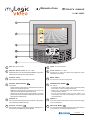
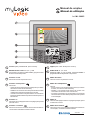
Art. ML 2062C
1
2
Stilo per touch screen
1
Schermo touch screen da 4,3" 16/9.
2
Pulsante menu.
3
Permette di accedere al pannello di controllo.
4
Pulsante Videocitofonia
.
Pulsante C.
4
Pulsante serratura
5
.
Permette di azionare la serratura elettrica dell'ingresso in
conversazione o dell'ultimo ingresso attivato.
Videointercom button
.
It is used to:
- monitor the door station of the system (or the last calling
door station in case of multiple entrances);
- enable voice communication after receiving a call or
monitoring a door station;
- end the communication with the door station. The
conversation ends also automatically at the end of the
conversation time.
Permette di tornare alla pagina precedente o alla pagina
principale dal pannello di controllo.
6
Menu button.
It is used to access the control panel.
Permette di:
- autoaccendere il posto esterno videocitofonico (o l'ultimo
attivato nel caso di più ingressi);
- abilitare la comunicazione fonica dopo aver ricevuto una
chiamata od aver effettuato l'autoaccensione;
- chiudere la comunicazione con il posto esterno. La conversazione termina anche alla fine della temporizzazione del
videocitofono o dell'impianto.
5
Touch screen 4,3" 16/9.
Use the pen or finger to activate and programme all the
videointercom functions.
Tramite lo stilo o un dito è possibile abilitare e programmare tutte le funzioni del videocitofono
3
Stilus for touch screen
Button C.
It is used to go back to the previous page or to the main page
of the control panel.
6
Door lock button
.
It is used to activate the electrical door lock of the entrance
in conversation or of the last calling entrance.
Mi 2435IGb
- 17 -
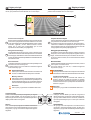
Home Page
Pagina principale
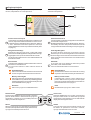
L’Home Page raccoglie le principali funzioni, quelle d’uso più
comune, a disposizione con un semplice tocco.
The Home Page contains the most popular functions that can be
used with a simple touch.
3
1
1
Funzioni ad accesso rapido
L’Home Page raccoglie le principali funzioni, quelle d’uso più
comune, che possono essere richiamate con un unico tocco.
Aci Farfisa propone di default le funzioni "Pulsanti", "Rubrica"
e "Foto". Tali funzioni ad accesso rapido sono comunque
configurabili attraverso il menu impostazioni avanzate (vedere a pag.12).
2
Navigazione Home Page
Strisciando lo stilo per touch screen o il dito nelle quattro
direzioni si accede alle applicazioni collegate all’Home Page,
raggiungibili comunque anche dal Pannello di Controllo.
Toccando al centro dello schermo si accede direttamente al
Pannello di Controllo.
3
Barra di Stato
La barra di stato nella parte superiore dello schermo fornisce
informazioni come data ed ora.
Le icone invece indicano lo stato di alcune funzioni di
myLogic:
2
1
Quick access functions
The Home Page contains the most popular functions that can
be used with a simple touch.
By default Aci Farfisa proposes the “Buttons panel”, “Directory”
and “Gallery” functions. The quick access functions can be
configured with the advanced settings menu (see page 12).
2
Home Page Navigation
By moving the touch screen pen or the finger in the four
directions you can access the applications connected with
the Home Page, which can be also reached from the Control
Panel. Touch the centre of the screen to access the Control
Panel directly.
3
Status Bar
In the upper part of the display the status bar provides
information, such as date and time.
The icons indicate the status of some functions:
Scatto Automatico
Indica che è attiva la memorizzazione automatica di
una foto ad ogni chiamata videocitofonica ricevuta.
Automatic Shoot
It indicates the activation of the automatic recording
of a photo for each call received by the videointercom.
Memory card collegata
Indica che una memory card è inserita nel prodotto. Per
mezzo della memory card è anche possibile aggiornare
il software del prodotto con eventuali versioni più recenti
scaricabili dal sito www.mylogic.it.
Memory card connected
It indicates that a memory card is inserted in the
product. With the memory card you can also update
the product software with the latest versions that can
be downloaded from www.mylogic.it.
Silenzioso
Indica che myLogic è in modalità “Silenzioso”.
Silent
It indicates that myLogic is in “Silent” mode.
Pulizia schermo
Premere il tasto menu per più di 5 secondi e di seguito
premere “Pulisci schermo”. Per 30 secondi myLogic non
accetta alcun comando per cui è possibile pulire sia il
display che il tasto di navigazione.
Clean screen
Press the menu button for more than 5 seconds and
then press “Clean screen”. For 30 seconds myLogic will
not accept any command and so you can clean both the
display and the navigation button.
Riavvio
Nel caso in cui myLogic non risponda più correttamente
ai comandi, tenere premuto il tasto “C” per più di 5 secondi;
myLogic si riavvierà dopo alcuni secondi.
Restart
If myLogic does not accept commands correctly, hold
the button “C” pressed for more than 5 seconds;
myLogic will restart after a few seconds.
Mi 2435IGb
- 18 -
Applications connected to the Home Page
To access the applications move the pen or
finger on the touch screen in the four
directions. The icon on the status bar
represents the position with respect to the
Home Page where you are.
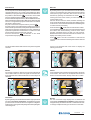
Applicazioni collegate all’Home Page
Si accede alle applicazioni strisciando lo
stilo o il dito sul touch screen nelle 4 direzioni. L’icona sulla barra di stato rappresenta
la posizione rispetto alla Home Page in cui
ci si trova.
Da sinistra verso destra:
Elenco ingressi
Da qui si accede all’elenco
degli ingressi videocitofonici.
From left to right:
Monitoring list
From here you can access
the list of videointercom
entrances.
Dal basso verso l’alto:
Blocco note
Da qui si accede direttamente all’applicazione Blocco note.
From down up:
Note Pad
From here you can directly
access the Note Pad
application.
Da destra verso sinistra:
Rubrica Interfono
Da qui si accede all’elenco
delle postazioni interne.
From right to left:
Intercom Directory
From here you can access
the list of internal stations.
Dall’alto verso il basso:
funzione non abilitata.
From up down:
function not activated.
Pannello di Controllo
Control panel
Da questa schermata si accede alle funzioni e alle impostazioni di
myLogic. Ogni settore è facilmente riconoscibile da un’icona e da
un colore identificativo.
From this page you can access myLogic functions and settings.
Each sector is easily identified by the icon and identification
colour.
Videocitofonia
Da questo menu possono essere gestiti gli ingressi videocitofonici
e controllare le chiamate (ricevute, effettuate e perse) con le
relative foto scattate in automatico o in manuale.
Videointercom
From this menu you can manage the videointercom entrances
and control the calls (received, made and lost calls) with
photos taken in automatic or manual mode.
Interfono / SMS
Entrando in questo menu si possono effettuare chiamate o
inviare SMS alle varie postazioni interne.
Intercom / SMS
From this menu you can make calls or send text messages to
the internal stations.
Blocco Note
Con l’applicazione Nuova nota / Memo si possono gestire
piccole note di appunti ed eventualmente attivarne la funzione
memo. Inoltre qui si trovano l’Elenco note e l’Elenco memo.
Notes
With the New Note / Memo application you can manage short
notes and activate the memo function. Here you can find the
Note List and the Memo List.
Pulsanti
Tramite questa sezione possono essere gestiti i pulsanti aggiuntivi per servizi vari.
Push buttons
From this menu it is possible to manage supplementary pushbuttons for different applications.
Immagini
Una galleria di immagini utilizzabili come sfondo per l’Home
Page di myLogic. Possono essere aggiunte anche proprie
immagini.
Background images
A series of images that can be used as screen for myLogic
Home Page. Personal images can also be added.
Impostazioni
Le impostazioni (audio, schermo, ecc.) sono gestibili con
semplici ed intuitivi passaggi.
Settings
Settings (voice, screen, etc.) are managed with simple intuitive
operations.
Mi 2435IGb
- 19 -
Videocitofonia
Videointercom
Da questo menu è possibile accedere alle funzioni tipiche della
videocitofonia come visualizzare l’immagine proveniente dalla
telecamera dell’ingresso, collegarsi all’audio degli stessi e
accedere all’archivio delle chiamate perse, effettuate e ricevute.
Il menu Foto è molto utile per avere un archivio delle visite
ricevute (insieme alla foto vengono salvati data, ora e ingresso
della chiamata).
Lo scatto delle foto può avvenire in due modalità: automatica o
manuale. La modalità automatica è particolarmente interessante per le occasioni in cui non si è in casa; in questo caso viene
scattata una foto dopo tre secondi dalla ricezione della chiamata. In modalità manuale, invece, durante la conversazione è
possibile scattare una o più foto premendo l’apposita icona sullo
schermo.
From this menu you can access the typical videointercom
functions, such as displaying the image from the door station
camera, make a voice connection and access the lists of lost,
made and received calls.
The Gallery menu is very useful in order to keep a file of
received visits (date, time and entrance of the call are saved
together with the photo).
The photo can be taken in two modes: automatic or manual.
The automatic mode is especially useful when you are not at
home; in this case a photo is taken three seconds after
receiving the call. In manual mode, during the conversation you
can take one or more photos by pressing the specific icon on
the screen.
Telecamera
Visualizza l’immagine proveniente dalla telecamera dell’ingresso con il quale è stata effettuata l’ultima chiamata.
Monitor
It displays the image from the door station camera from which
the last call was made.
Elenco ingressi
Da questo menu si visualizza l’immagine proveniente da ciascuna delle telecamere degli ingressi.
Monitor list
From this menu you can display the image coming from each
door station camera present in the system.
Foto
Qui possono essere gestite le foto scattate (in automatico o in
manuale) durante le chiamate videocitofoniche.
Gallery
Here you can manage the photos taken in automatic or manual
mode during the videointercom calls.
Elenchi chiamate
Qui possono essere gestite le chiamate perse, ricevute ed effettuate.
Scatto automatico o manuale
È possibile stabilire se alla ricezione delle chiamate le foto
vengono scattate automaticamente o manualmente.
L’icona bianca indica quale delle due opzioni è attiva.
Call lists
Here you can manage lost, received and made calls.
Automatic or manual shoot
You can decide whether photos are taken automatically or
manually upon receiving a call.
The white icon indicates the active option.
Mi 2435IGb
- 20 -
Telecamera
Monitor
Toccando quest'icona si attiva il collegamento con la telecamera
collegata all’ingresso con il quale è stata effettuata l’ultima
chiamata (con myLogic a riposo, questa funzione si attiva anche
). Toccando il centro dello
dal pulsante videocitofonia
schermo si attiva la visione dell’immagine a tutto schermo.
Anche la chiamata dal posto esterno, oltre ad abilitare la soneria,
attiva automaticamente l'immagine dell'ingresso chiamante sullo
schermo con apparizione per pochi secondi dei comandi del
lato sinistro (vedere sotto).
Per poter conversare con il posto esterno, premere
.
Per interrompere momentaneamente l'audio verso l'esterno,
rimanendo sempre in ascolto, tenere premuto il pulsante "menu";
sullo schermo appare per pochi istanti "mic OFF". Rilasciando
il pulsante si ripristina la conversazione con l'esterno e sullo
schermo appare momentaneamente "mic ON".
Premere nuovamente
od attendere la fine della
temporizzazione per spegnere la telecamera.
By touching this icon you can activate the connection with the
camera connected at the door station where the last call was
made (with myLogic in idle state, this function can also be
activated by pressing the videointercom button
). By
touching the centre of the screen you can activate the full
screen display mode.
Also the call from the door station, besides activating the
ringer, automatically displays the image of the calling entrance
on the screen. The commands of the left-hand side will appear
for a few seconds (see below).
Press the button
to talk with the external door station.
To momentarily interrupt the voice connection with the external
door station and remain listening, hold the menu button
pressed. The display shows “mic OFF” for a few seconds.
Release the button to restore the external conversation. The
display momentarily shows “mic ON”.
Press
again to end the conversation or wait until the
conversation time ends automatically and switches OFF the
camera.
Toccando sul lato sinistro dello schermo compaiono i seguenti
comandi:
Touch on the left-hand side of the screen to display the
following commands:
Volume
Toccandolo compaiono i tasti freccia e una barra di livello al
centro dello schermo. Il volume si regola con i tasti freccia o
agendo direttamente sulla barra di livello. Premere OK per la
conferma.
Volume
Touch to display the arrow buttons and a level bar in the centre
of the screen. The volume can be adjusted with the arrow
buttons or with the level bar directly. Press OK to confirm.
Telecamera
Si prolunga il tempo di visualizzazione dell’immagine per altri 30
secondi e, se presente nell'impianto, si visualizza l’immagine
proveniente da una telecamera di sorveglianza collegata a
quell'ingresso. Per la gestione di più ingressi vedere il paragrafo
"elenco ingressi".
Monitor
You can extend the image display time for additional 30
seconds and, if available in the installation, get the image from
a supplementary surveillance camera. For information on how
to manage multiple cameras go to the section “monitor list”.
Mi 2435IGb
- 21 -
Scatto manuale
Si scatta una foto dell'immagine inquadrata. Si possono memorizzare fino a circa 60 immagini; i successivi scatti cancellano
le immagini meno recenti.
Manual
You can take a photo of the framed image. You can save in the
system approximately 60 images; the next shooting will delete
the oldest images.
Toccando sul lato destro dello schermo compaiono i seguenti
comandi:
Touch on the right-hand side of the screen to display the
following commands:
Apri porta
Si apre la porta dell’ingresso in collegamento (attivabile anche
dal pulsante frontale
).
Door opening
To open the door of the connected entrance (it can also be
activated with the front button
).
Impostazioni
Toccandolo compaiono tre barre di livello al centro dello
schermo per la regolazione della luminosità, contrasto e colore.
Agire direttamente sulle barre con lo stilo o un dito per variare
le regolazioni. Premere OK per confermarle.
Settings
Touch to display three level bars in the centre of the screen to
adjust brightness, contrast and colour. Directly touch the bars
with the pen or finger to change settings. Press OK to confirm.
Chiudi
Si interrompe il collegamento e si torna alla schermata precedente.
Exit
To close the connection and go back to the previous screen.
Mi 2435IGb
- 22 -
Elenco ingressi
Monitor list
All’interno di questo menu si trova la lista degli ingressi collegati
all’impianto che è possibile scorrere con i tasti freccia su e giù.
Toccando l’icona alla destra del nome si visualizza l’immagine
proveniente dalla telecamera del relativo ingresso, con le stesse
funzionalità descritte nel capitolo "Telecamera".
This menu contains the list of door stations connected to the
installation. The list can be scrolled with the up and down
arrows. Touch the icon on the right of the name to display the
image from the camera of the corresponding entrance, with the
same functions described in the section “Monitor”.
Volendo modificare il nome di un ingresso (es.: da “Ingresso
Principale” a “Ingresso Via Verdi”) occorre:
- selezionarlo toccando la casella del nome e poi premere
"opzioni";
To change the name of the entrance (i.e.: from “Main Entrance”
to “Oxford street”) you must:
- select the entrance by touching the name box and press
“options”;
- premere "modifica" e poi
;
- premere "modifica" e, tramite la tastiera che apparirà sullo
schermo, comporre il nuovo nome seguendo le istruzioni di
pag.12; premere "salva" per confermare.
- press “modify” and then
;
- press “modify” and, using the keypad displayed on the
screen, enter the new name following the instructions on page
12; press “save” to confirm.
- premere
per tornare all'elenco degli ingressi.
- press
to go back to the entrance list.
Attenzione: se oltre alla funzione "modifica" appaiono anche
"nuovo" e "cancella" significa che, durante la fase di programmazione, non è stata attivata la protezione di sistema. E'
vivamente consigliato abilitare questa protezione per evitare che
inavvertitamente vengano modificate o cancellate funzioni che
possono pregiudicare il funzionamento dell’intero sistema.
Queste impostazioni possono essere cambiate solo da personale esperto ( vedi capitolo "programmazioni").
Warning: if the “new” and “delete” functions are displayed in
addition to “modify”, it means that the system protection
function was not activated during programming. It is strongly
recommended to activate the protection function in order to
avoid changing or deleting functions unintentionally and cause
the malfunctioning of the entire system. These settings can be
only changed by expert users (see chapter "programming").
Foto
Gallery
In questo menu sono archiviati gli scatti realizzati. Per ogni
scatto sono visualizzati data, ora e nome dell’ingresso. Con i tasti
freccia su e giù si scorrono le foto archiviate e con il tasto
Opzioni è possibile cancellarle, utilizzarle come sfondo della
Home Page o esportarle nella memory card (se presente).
This menu contains the photos you have taken. The date, time
and entrance name are displayed for each photo. Scroll the
photos with the up and down arrows. Use the Options button
to delete them, use them as Home Page screen or export them
to the memory card (if available).
Scatto automatico o manuale
Automatic or manual shoot
Selezionando l’icona automatico, 3 secondi dopo aver ricevuto
una chiamata, myLogic scatta una foto del visitatore; selezionando l’icona manuale, l’utente, durante la chiamata, può
scattare una foto premendo l’icona con la macchina fotografica.
L’icona su sfondo bianco indica quale delle due opzioni è attiva.
If you select the automatic icon, 3 seconds after receiving a
call, myLogic takes a photo of the visitor. If you select the
manual icon, the user can take a photo during the call by
pressing the photo camera icon. The icon against white
background indicates the active option.
Mi 2435IGb
- 23 -
Elenchi chiamate (effettuate, perse e ricevute)
Call lists (made, lost and received)
All’interno di questi menu si trova l’archivio delle chiamate perse,
effettuate e ricevute.
These menus contain the lists of lost, made and received calls.
Per ciascuna chiamata sono memorizzate data, ora e nome
dell’ingresso. Toccando la casella con il nome si accede alla foto
della chiamata; premere "opzioni" per effettuare la chiamata o
cancellarla dall'elenco. Cancellando la chiamata si elimina
anche la foto allegata. Toccando l’icona alla destra di questi dati
si attiva automaticamente il collegamento con il relativo ingresso.
Attraverso il tasto Opzioni si visualizza la foto associata alla
chiamata, ci si collega con il relativo ingresso o si elimina la
chiamata dall’elenco.
The date, time and entrance name are saved for each call.
Touch the box with the name to access the call photo. Press
“options” to make the call or delete it from the list. When you
delete the call, you will also delete the attached photo. Touch
the icon on the right-side of the information to automatically
activate the connection with the entrance. Use the Options
button to display the photo associated with the call, connect
with the entrance or delete the call from the list.
Immagini
Background images
Le immagini accessibili da questo menu possono essere
utilizzate per due scopi: come sfondo nell’Home Page o come
sequenza dello screensaver “Immagini”. Alla piccola galleria di
immagini in dotazione è possibile aggiungerne altre; grazie al
software di conversione gratuito scaricabile da www.mylogic.it,
è possibile adattare le vostre immagini personali nel formato
myLogic image (*.mli) e tramite la memory card inserirle nella
galleria. La memory card può essere usata anche come mezzo
per esportare immagini da myLogic, come le foto delle chiamate
videocitofoniche o le note. Tali immagini possono essere
visualizzate su un PC, utilizzando il software di conversione
gratuito.
The images contained in this menu can be used in two ways:
as Home Page screen or as sequence of the “Background
images” screensaver. The image collection supplied by default
can be integrated with additional images. Using the free-ofcharge software that can be downloaded from www.mylogic.it
you can adjust your personal images to the myLogic image
format (*.mli) and load them with the memory card. The
memory card can be also used to export images from myLogic,
such as the videointercom photos and notes. The images can
be displayed on a PC using the free-of-charge software.
Immagini
Toccando l’icona immagini nel Pannello di Controllo si accede
direttamente alla visualizzazione delle immagini presenti in
myLogic. Si potranno scorrere con le frecce su e giù.
Background images
Touch the image icon in the Control Panel to directly display
the images contained in myLogic. You can scroll the images
with the up and down arrows.
Attraverso il tasto Opzioni si può gestire l’importazione / esportazione delle immagini (tramite la memory card), si può impostare un’immagine come sfondo dell’Home Page e si possono
eliminare le singole immagini o la totalità di quelle contenute
all’interno di myLogic.
With the Options button you can import / export the images
(with the memory card), you can set the image as Home Page
screen and you can eliminate the individual images or all the
images contained in myLogic.
Mi 2435IGb
- 24 -
Interfono / SMS
Intercom / SMS
Menu dedicato alla comunicazione interna. Consente di effettuare
chiamate tra i vari ambienti dell’abitazione (per esempio appartamento e mansarda) o tra ambienti fisicamente separati (per
esempio tra casa e garage o tra il proprio appartamento e quello
dei vicini o degli altri condomini). Ad integrare le chiamate vocali,
myLogic mette a disposizione un pratico sistema di messaggistica
semplice ed efficace.
Menu dedicated to internal communication. It is used to make calls
between the different rooms (for example, apartment and attic) or
areas that are physically separated (for example, between house
and garage, or between your apartment and your neighbour’s
apartment). As integration to the voice calls, myLogic offers a very
handy text message system.
Rubrica
Dalla Rubrica, oltre ad effettuare chiamate, si possono gestire
le varie postazioni interne. Per l'inserimento dei nominativi e
relativi indirizzi vedere il capitolo "programmazione".
Directory
From the Agenda you can make calls and manage the internal
stations. See the chapter "programming" for information on
how to enter name and addresses.
Toccando la cornetta si attiva la comunicazione con la postazione corrispondente.
Touch the handset to activate the communication with the
station.
Attraverso il tasto Opzioni, è possibile modificare il nome
associato alla postazione interna selezionata (Es. modificarla
da “Ufficio” a “Studio”).
Use the Options button to change the name associated with the
selected internal station (i.e. change from “Office” to “Studio”).
Attenzione: il nome associato alla postazione interna può
essere modificato in modo semplice dall’utente mentre, per non
pregiudicare il funzionamento dell’intero sistema, l’indirizzo
della postazione interna deve essere cambiato solo da personale esperto. Il sistema di protezione del prodotto blocca quindi
tale modifica (vedi capitolo "programmazione").
Ordina rubrica
All’interno di questo menu si può variare l’ordine di visualizzazione
delle utenze: toccando l’icona “freccia” a lato di ciascun nome,
esso salirà di una posizione fino a raggiungere la prima.
Qualora l’elenco fosse composto da più di quattro utenze, si
potrà scorrere la lista con i tasti "su" e "giù" posti sulla destra dello
schermo.
Se non ci sono utenti nella rubrica la pagina risulta vuota.
Warning: the name associated with the internal station can be
changed by the user. On the contrary, in order to avoid
malfunctioning of the entire system, the address of the internal
station must be changed only by expert users. The protection
system will block such a change (see "programming" chapter).
Directory ordering
This menu allows you to change the order in which users are
displayed: touch the icon “arrow” next to each name to move
the name up by one position until it reaches the top of the list.
If the list contains more than four users, you can scroll the list
with the “up” and “down” buttons on the right-hand side of the
screen.
The page is empty if no users are contained in the agenda.
Mi 2435IGb
- 25 -
Chiama…
Permette di effettuare una chiamata digitando direttamente
l’indirizzo numerico della postazione.
Calling…
It is used to make a call by directly entering the numeric
address of the station.
Messaggi / SMS
Messages / SMS
Invia messaggio
Permette l’invio di un SMS ad una postazione interna.
SMS sending
It is used to send a text message to an internal station.
Toccando "Invia messaggio" si potrà digitare un SMS (massimo
100 caratteri). Premere
per la conferma.
Scegliere la postazione a cui inviare il messaggio e premere il
tasto
.
Questa schermata visualizza l’invio del messaggio in corso; se
l’invio termina con successo, comparirà la scritta “Messaggio
ricevuto dal destinatario”; nel caso in cui, invece, il messaggio
non arrivasse al destinatario, sullo schermo comparirà per
alcuni secondi la scritta “Invio messaggio fallito”. In tal caso il
messaggio viene salvato nelle “Bozze” e sarà necessario
inviarlo nuovamente.
Touch “Send Message” and text a message (max. 100
to confirm.
characters). Press
Choose the station to which you want to send the message and
press the button
.
This screen shows the sending of the message; if the message
is sent, the screen displays “Message has been received from
destination”; instead, if the message is not received, the screen
displays “Message sending failed” for a few seconds. In this
case the message is saved in “Drafts” and must be sent again.
Mi 2435IGb
- 26 -
Bozze
Qui si trovano memorizzati gli SMS il cui invio non è andato a
buon fine (Es. la linea era occupata).
È possibile ritentare l’invio del messaggio o eliminarlo
definitivamente. Se non ci sono messaggi in “Bozze” la pagina
risulta vuota.
Drafts
This menu contains the text messages that were not sent (i.e.
the line was busy).
You can send the message again or delete it permanently. The
page is empty if no messages are contained in “Drafts”.
SMS ricevuti
Permette di visualizzare, rispondere o eliminare gli SMS ricevuti.
Received SMS
It is used to display, answer or eliminate the text messages that
were received.
Toccando "Rispondi" si accederà alla finestra di invio degli SMS
per inviare un messaggio di risposta. Se non ci sono messaggi
ricevuti la pagina risulta vuota.
Toccando "Elimina" si cancella il messaggio selezionato.
Touch “Reply” to open the window used to send a reply
message. The page is empty if there are no received messages.
Touch “Delete” to delete the selected message.
Blocco note
Notes
Con questa applicazione si possono creare semplici note da
visualizzare sulla Home Page o da far apparire in sequenza
come Screensaver (vedi impostazioni Screensaver). Le note
possono essere, o diventare, dei veri e propri memo attribuendogli, al momento della creazione o successivamente, una data
ed un’ora di scadenza, raggiunta la quale myLogic emetterà un
segnale di avviso. In tal caso, l’icona memo apparirà in Home
Page: toccandola viene mostrato il contenuto e si può arrestare
il segnale di avviso (segna come completato), posticiparlo o
eliminarlo.
With this application you can create simple notes to be
displayed on the Home Page or in a sequence as Screensaver
(see Screensaver settings). The notes can be, or become,
reminders by associating them with a time and date. When the
time is reached, myLogic will send an audio signal. Reminder
icon will be displayed on the Home Page: touch it to display the
contents. You can stop the audio signal (ticking the reminder
cas completed), postpone or delete the reminder.
Mi 2435IGb
- 27 -
Nuovo nota/memo
Consente di realizzare una nuova nota o un nuovo memo.
New note/memo
It is used to make a new note or reminder.
L’applicazione si presenta come un foglietto per gli appunti dove
si può scrivere o disegnare utilizzando i seguenti strumenti:
The application is shown as a post-it note where you can write
notes or draw using the following tools:
Apre un nuovo foglietto.
Opens a new post-it note.
Esce senza salvare.
Exits without saving.
Attiva lo strumento scrittura.
Activates the writing tool.
Attiva lo strumento gomma.
Activates the eraser tool.
Aumenta la dimensione del tratto dello strumento di
scrittura.
Increase the thickness of the writing tool.
Varia il colore del tratto dello strumento scrittura.
Changes the colour of the writing tool.
Imposta una nuova memo.
Al tocco appare la data e l’ora, modificabile toccando le cifre e poi regolando con più e meno. Una
volta confermato (ok) l’icona memo diventa rossa.
Sets a new reminder.
Touch to display the date and time, which can be
changed by touching the numbers and adjusting
with plus and minus. Once you confirm (OK) the
reminder icon will become red.
Rimuove data ed ora da un memo facendolo
diventare una nota.
Deletes date and time from the reminder, converting
it into a simple note.
Mi 2435IGb
- 28 -
Elenco note
Da qui si può scorrere (con i tasti su e giù) tutte le note salvate.
Attraverso il tasto "Opzioni" è possibile eliminare la nota,
impostarla come sfondo in Home Page o convertirla in memo
(Nota>>Memo). Se non ci sono note la pagina risulta bianca.
Elenco memo
La gestione delle memo è identica e parallela a quella delle note,
in più, sulla barra di stato, viene mostrata data e ora in cui
scatterà l’avviso. In tal caso, l’icona memo apparirà in Home
Page; toccandola viene mostrato il contenuto e si può arrestare
il segnale di avviso (segna come completato), posticiparlo o
eliminarlo. Quando data ed ora vengono rimossi, il memo diventa
una nota. Se non ci sono memo la pagina risulta bianca.
Notes
From this page it is possible to scroll all the stored notes (with
the up and down buttons). Pressing the "Options" button it is
possible to erase the note, set it as background image for home
page or set it as a reminder (Note >>Memo). Page will be empty
if any note is present.
Memo (reminders)
Reminders are managed as notes, besides on the status bar
it is shown time and date at which the reminder is set. Icon is
displayed on the home page when setting time is reached; by
touching the reminder its content is shown and it would be
possible to stop the audio signal (ticking the reminder as
completed), to postpone or to delete it. If time and date are
removed from a reminder it becomes a simple note. Page will
be empty if any reminder is present.
Pulsanti
Push-buttons
Da questo menu è possibile accedere ai pulsanti attivati durante
fase di programmazione. Con questi pulsanti si possono accendere le luci delle scale, luci giardino, cancelli automatici, ecc.
From this menu it is possible to access the push-button panel
showing all the push-buttons which have been previously
programmed. With the buttons it is possible to operate lights,
garden lights, automatic gates, etc..
Quadro pulsanti
Premendolo si accede ai pulsanti che abilitano le funzioni di
servizio (se presenti nell'impianto videocitofonico).
Button panel
From this menu it is possible to access the push-buttons panel
from which specific functions can be enabled (if previously
programmed in the system).
Gestione pulsanti
Premendolo si accede all'elenco dei pulsanti con possibilità di
modificarne ogni singolo nome. Scorrere l'elenco toccando i
tasti freccia su e giù. Per cambiare nome al pulsante premere
"dettagli", "indirizzo/nome" e poi "modifica". Tramite la tastiera
che apparirà sullo schermo, comporre il nuovo nome e poi
Manage buttons
From this menu it is possible to access push-button list with
the possibility to modify them. Scroll the list by pressing up and
down arrows. To change the name of a button press in
sequence "details", "address/name" and then "modify"; using
the keypad which will appear on the screen, it would be
possible to enter the new name of the button and store it by
premere "salva". Premere
per tornare indietro.
pressing "save". To go back to the previous page press
Attenzione: se oltre alla funzione "modifica" appaiono anche
"nuovo" e "cancella" significa che, durante la fase di programmazione, non è stata attivata la protezione di sistema. E'
vivamente consigliato abilitare questa protezione per evitare che
inavvertitamente vengano modificate o cancellate funzioni che
possono pregiudicare il funzionamento dell’intero sistema.
Queste impostazioni possono essere cambiate solo da personale esperto (vedi capitolo "programmazioni").
.
Warning: if the “new” and “delete” functions are displayed in
addition to “modify”, it means that the system protection
function was not activated during programming. It is strongly
recommended to activate the protection function in order to
avoid changing or deleting functions unintentionally and cause
the malfunctioning of the entire system. These settings can be
only changed by expert users (see chapter "programming").
Mi 2435IGb
- 29 -
Impostazioni
Settings
Da questo menu è possibile personalizzare myLogic. Tra le
impostazioni rientrano: la gestione dell’audio, con i vari volumi,
sonerie e la loro durata; la gestione dello schermo, con lo sfondo
della Home Page e lo screensaver; la gestione dell’ora e della data;
la scelta della lingua; la possibilità di rinominare la postazione
myLogic etc. All’icona impostazioni rapide corrisponde una pratica
sequenza dove l’utente può verificare ed eventualmente correggere
le impostazioni base di myLogic; questo check-up risulta molto utile,
ad esempio, per un controllo dopo un black-out. Fra le impostazioni
avanzate si trovano funzioni che permettono il massimo sfruttamento di myLogic, a partire dalla configurazione personalizzata della
Home Page (scelta delle funzioni ad accesso rapido), fino ad un
pieno sfruttamento del potenziale della memory card.
This menu is used to personalise myLogic. Settings include: audio
with volumes, ringers and ringer time; screen with Home Page
screen and screensaver; time and date; languages; myLogic
station rename, etc. The "Default settings" icon corresponds to a
simple sequence where the user can check and correct the
myLogic basic settings; this function is very useful for a check
after a power failure. The advanced settings include functions for
best use of myLogic, from the personalized Home Page
configuration (selection of default access functions) to full memory
card use.
Audio
Permette di gestire i parametri riguardanti l’audio: volumi,
durata e tipi di sonerie.
Audio
It is used to manage audio parameters: volumes, ringer time
and type.
Schermo
Permette di scegliere un’immagine come sfondo per la Home
Page e di attivare uno screensaver.
Screen
It is used to choose an image as Home Page screen and
activate the screensaver.
Ora
Pannello per la regolazione dell’ora.
Time
It is used to set the time.
Data
Pannello per la regolazione di giorno, mese e anno.
Date
It is used to set day, month and year.
Lingua
Pannello del cambio lingua.
Language
It is used to change the language.
Attenzione: dopo la scelta della lingua myLogic si riavvia
automaticamente.
Warning: after you select the language myLogic restarts
automatically.
Indirizzo/Nome
Permette di rinominare il dispositivo myLogic e di modificare
l’indirizzo e il numero di stanza. È consigliato per queste due
ultime funzioni la modifica da parte dell’installatore.
Address/Name
It is used to rename myLogic device and change the address
and room number. The two last functions should be changed
by the installer.
Impostazioni rapide
Veloce sequenza di configurazione che include tutte le
impostazioni fondamentali:
- Lingua - Data - Ora - Indirizzo/Nome
Default settings
It is a quick configuration sequence that includes all the main
settings:
- Language - Date - Time - Address/Name
Mi 2435IGb
- 30 -
Avanzate
Questo menu, il cui accesso è protetto, permette una serie di
configurazioni e funzioni avanzate.
Advanced settings
This menu with protected access is used to make a series of
advanced configurations and functions.
Attenzione, l’accesso a queste funzioni è protetto in quanto la
modifica di alcuni parametri potrebbe pregiudicare gravemente
il funzionamento dell’intero sistema. Per eventuali modifiche,
rivolgersi all’installatore o a personale esperto e consultare il
capitolo "Programmazione" a pagina 7.
Warning: the access to these functions is protected because
the change of some parameters may cause severe
malfunctioning of the entire system. For any change, please
contact the installer or expert users and refer to the
"Programming" chapter to page 7.
Impostazioni Audio
Audio settings
Volumi
Qui si trova l’elenco dei volumi di:
- Posto esterno
- Intercomunicante
- Soneria
- Tasti
Volume levels
It contains the volume level of:
- ES audio level (communication with external door stations)
- IS audio level (communication with internal stations)
- Ringing level
- Keypad volume (pressed keys tone)
Toccando il tasto "modifica" a destra della descrizione si accede
alla barra del volume, modificabile sia con i tasti su e giù che
direttamente sulla barra.
Touch the “modify” button on the right next to the description
to access the volume bar. Use the up and down buttons or the
bar directly to change the setting.
Sonerie
Qui si possono scegliere le sonerie per:
- Chiamata da esterno
- Chiamata da utente (chiamata tra appartamenti)
- Chiamata intercomunicante (chiamata tra dispositivi dello
stesso appartamento)
- Campanello
Ringing tones
Here you can choose the ringer for:
- Call from external (door station)
- Call from internal (from other apartments)
- Intercom call (from other stations in the same apartment)
- Door bell call
Toccando il tasto "modifica" a destra della descrizione si può
scegliere tra una lista di sonerie.
Touch the “modify” button on the right next to the description
to select from a list of ringers.
Mi 2435IGb
- 31 -
Durata sonerie
Qui si possono scegliere le durate delle sonerie di:
- Chiamata da esterno
- Chiamata da utente (appartamento diverso)
- Chiamata intercomunicante (stesso appartamento)
- Campanello
Rings duration
Here you can choose the ringing time for:
- Call from external (door station)
- Call from internal (from other apartments)
- Intercom call (from other stations in the same apartment)
- Door bell call
Toccando il tasto "modifica" a destra della descrizione si accede
alla barra della durata, modificabile sia con i tasti su e giù che
direttamente sulla barra.
Touch the “modify” button on the right next to the description
to access the time bar. Use the up and down buttons or the bar
directly to change the setting.
Suoni tastiera
Si può scegliere l’effetto sonoro abbinato al tocco di tasti e di
icone.
Keypad tones
Here you can choose the sound effect that is generated when
you touch icons and buttons.
Suoni abilitati / Suoni non abilitati (silenzioso)
Si può scegliere la modalità audio desiderata toccando una delle
due icone.
Sound enabling / Sound disabling (silent)
You can choose the audio mode by touching one of the two
icons.
L’icona bianca indica quale delle due opzioni è attiva.
The white icon indicates the active option.
Mi 2435IGb
- 32 -
Schermo
Screen
Nessuno sfondo
Toccando l’icona si ripristina l’immagine di sfondo di default
nella Home Page. Quando l’icona è su sfondo bianco l’immagine
di sfondo nella Home Page è quella di default.
No background image
Touch the icon to restore the default screen image in the Home
Page. When the icon is against a white background the Home
Page screen image is the default image.
Seleziona sfondo
Toccando l’icona si accede direttamente alla visualizzazione di
tutte le immagini utilizzabili come sfondo per la Home Page
presenti in myLogic. Le immagini si possono scorrere con le
frecce su e giù.
Select background image
Touch the icon to directly display all the images that can be
used as screen for the Home Page that are available in
myLogic. You can scroll the images with the up and down
arrows.
Selezione salvaschermo
Si può scegliere fra vari screensaver da attivare sullo schermo
di myLogic in stand-by. È possibile scegliere fra:
• Nessuno
• Immagini (vengono visualizzate in sequenza casuale tutte le
immagini presenti)
• Foto (vengono visualizzate in sequenza casuale tutte le foto
scattate da myLogic)
• Info sul sistema (viene visualizzata una scritta con la versione
di myLogic)
• Pixels casuali (disegni casuali)
• Data e Ora (visualizza la data e l’ora attuali)
• Lascia appunto (consente di lasciare un messaggio /
disegno sullo schermo in modo da farlo leggere a chi passa
davanti a myLogic.
Premendo qualsiasi tasto si cancella l’appunto lasciato)
• Elenco note (sono visualizzate in sequenza ordinata le note
e i memo)
Screensaver select
You can select from different screensavers to be activated on
myLogic screen in stand-by mode. You can choose from:
• None
• Background images (all available images are displayed in
a random sequence)
• Gallery (all photos taken by myLogic are displayed in a
random sequence)
• About... (a text with myLogic version is displayed)
• Random Pixels (casual patterns)
• Date & Time (actual date and time are displayed)
• Leave message (it is used to leave a message / drawing on
the screen in order to have the people passing in front of
myLogic read it.
Press any button to delete the note you have left)
• Notes (notes and reminders are displayed in an ordered
sequence)
Mi 2435IGb
- 33 -
Avanzate
Advanced settings
Home Page
Lista per la configurazione delle nove funzioni ad accesso
rapido che compaiono nelle videate di mylogic. Toccando il tasto
"modifica" a destra della descrizione, si può scegliere la
funzione preferita.
Home Page settings
List for configuration of the nine quick functions that can be
accessed by myLogic. Touch the “modify” button on the right
next to the description and choose the preferred function.
È inoltre possibile aggiungere le funzioni ad accesso rapido
tenendo premuto un qualsiasi tasto sullo schermo di myLogic
per più di 10 secondi. Successivamente, occorre scegliere in
che posizione della Home Page inserire la funzione (in alto, al
centro o in basso).
Es. per aggiungere sul tasto in basso della Home Page la
chiamata diretta al vicino di casa, andare sul Pannello di
Controllo, Interfono/SMS, Rubrica e mantenere premuto il tasto
con la cornetta a fianco del nome per 10 secondi. Poi scegliere
“Aggiungi a Home Page (Sotto)”.
You can also add the quick access functions by holding any
button on myLogic screen pressed for more than 10 seconds.
Then you must choose the position on the Home Page where
to insert the function (top, centre, or bottom).
For example, in order to add the direct call to the neighbor on
the Home Page bottom key, go to Control Panel, Intercom/
SMS, and Directory and hold the handset button next to the
name pressed for 10 seconds. You can choose “Add to Home
Page (Down)”.
Per tutte le altre impostazioni avanzate, rivolgersi all’installatore
o al supporto tecnico Aci Farfisa e consultare il capitolo
"Programmazione" a pagina 7.
For information about the other advanced settings, please
contact the installer or to Aci Farfisa technical support and
refer to the "Programming" chapter to page 7.
Mi 2435IGb
- 34 -
ML2062C
Français
Deutsch
Moniteur vive voix à couleurs avec écran
tactile pour système digital DUO
Videohaustelefon mit Freisprechfunktion und
Farb-Touchscreen für DUO-Bussystem
Données techniques
Technische Daten
Alimentation directe de la ligne
Absorption:
0,2A
Écran:
4,3" LCD touch-screen
Standard de télévision:
PAL
Fréquence horizontale:
15625Hz
Fréquence verticale:
50Hz
Bande passante:
>5MHz
Relais:
1
Charge maximale des contacts du relais : 12Vca/12÷24Vcc - 1A
Température de fonctionnement:
0° ÷ +50°C
Humidité maximale admissible:
90% RH
Versorgung direkt über die Busleitung
0,2A
Verbrauch
Bildschirm:
10,16 cm (4,2") touchscreen
Bildstandard:
PAL
Horizontalfrequenz:
15625Hz
Vertikalfrequenz:
50Hz
Bandbreite:
>5MHz
Relais:
1
max. Belastung Relaiskontakte:
12Vac / 12÷24Vdc - 1A
Betriebstemperatur:
0° bis +50°C
Max. Luftfeuchtigkeit:
90% RH
Le manuel d’usage commence à la page 16
Die Bedienungsanleitung beginnt auf Seite 16
NOTICE DE SECURITÉ
Lire attentivement les instructions contenues dans le présent manuel
parce qu'ils fournissent d'importants renseignements concernant la
sécurité d’installation, d'usage et d'entretien. On recommande le
conserver de manière appropriée pour consultations futures.
Positionner le moniteur myLogic en milieu sec et loin de sources de
chaleur ou d'appareillages qui produisent chaleur ou champs magnétiques.
Pour la propreté du moniteur ne pas utiliser de l'eau mais qu'un tissu
propre.
Ce poste doit être destiné seulement à l’usage pour lequel il a été
conçu. Le constructeur ne peut pas être considéré comme responsable
pour dommages éventuels dérivés par l'utilisations impropres, erronés
et déraisonnables.
Ne pas laisser à la portée des enfants les parties de l’emballage, sac
en plastique, polystyrène expansé, etc..
Ne pas ouvrir l’appareil quand il est en marche.
L’exécution du montage et mise en œuvre doivent être effectuées
par personnel spécialisé et en conformité avec les lois en vigueur.
En cas de panne, fonctionnement irrégulier ou modification à
l’installation il faut se servir de personnel spécialisé.
L’appareil est conforme à la directive CEE, marque européenne CE.
SICHERHEITSHINWEISE
Hinweise im vorliegenden Handbuch aufmerksam durchlesen, da
sie wichtige Informationen zur sicheren Installation, Verwendung
und Wartung enthalten. Handbuch sorgfältig aufbewahren, um es
jederzeit wieder einsehen zu können.
Videohaustelefon myLogic in einem trockenen Raum, fern von
Wärmequellen oder Geräten aufstellen, die Wärme oder
Magnetfelder erzeugen.
Videohaustelefon nicht mit Wasser oder chemischen
Lösungsmitteln, sondern ausschließlich mit einem feuchten Tuch
reinigen.
Dieses Gerät darf nur für den vorgesehenen Verwendungszweck
benutzt werden. Der Hersteller haftet nicht für Schäden, die durch
unsachgemäße oder falsche Benutzung entstehen.
Verpackungsteile (Plastikbeutel, Styropor usw.) dürfen nicht in
Kinderhände gelangen.
Gerät im eingeschalteten Zustand nicht öffnen.
Die Installation der Anlage darf nur vom Fachmann entsprechend
den geltenden gesetzlichen Vorschriften vorgenommen werden.
Bei Defekten, Betriebsstörungen oder Änderungen der Anlage ist
ein Fachmann hinzuzuziehen.
Gerät entspricht den EG-Richtlinien (europäisches CE-Zeichen).
2435FD
MiMi
2435FD
-1-
Bornes
LM / LM
A1
GN
NO
NC
C
Entrées de ligne
Entrée appel positif d'étage
Entrée appel négatif d'étage
Échange normalement ouverte du relais
Échange normalement fermée du relais
Commun du relais
Anschlußklemmen
LM / LM
A1
GN
NO
NC
C
Busleitungseingänge
positiver Eingang Etagenruf
negativer Eingang Etagenruf
Schliesserkontakt Relais
Öffnerkontakt Relais
Eingang Relais
2 -Enlever les borniers du vidéophone.
-Anschlussklemmen vom Videohaustelefon
entfernen.
3 -Procéder aux branchements sur le bornier
tel que détaillé dans le schéma.
-Kabeln an den Anschlussklemmen entsprechend dem auszuführenden Schaltplan anschliessen.
Installation
Installation
4 -Réintroduire les borniers dans le vidéophone.
-Anschlussklemmen wieder am Videoaustelefon anbringen.
1 - Murer la boîte d’encastrement ML2083
à la hauteur d’environ 1,5 mètres du sol.
- Unterputzdose ML2083 auf einer Höhe
von circa 1,5 Meter über dem Boden
einbauen.
5 -Ôter le couvercle avant pour accéder aux quatre points de fixation
du vidéophone.
-Die Blende entfernen, um Zugang zu den Befestigungspunkten
des Videohaustelefons zu erhalten.
Mi 2435FD
-2-
6 -Fixer le vidéophone au boîtier d’encastrement à l’aide des quatre vis
fournies.
-Videohaustelefon mit Hilfe der mitgelieferten Schrauben an der
Unterputzdose befestigen.
Réglages
7 - Remettre le couvercle sur le vidéophone.
- Die zuvor entfernte Blende wieder am Videohaustelefon
anbringen.
Einstellungen
Les niveaux de la phonie sont réglés en usine; modifier les
régulations mises au verso du poste seulement en cas de nécessité
effective.
Die Lautstärkeeinstellung erfolgen ab Werk. Die Einstellung (auf der
Rückseite des Apparats) sollte nur im Bedarfsfall geändert werden.
Réglage des niveaux de la phonie
Einstellung der Lautstärke
- Si pendant la conversation on entend un son excessivement
intermittent ou si pendant un appel le haut-parleur tend à déformer,
on suggère de retoucher la sensibilité du microphone légèrement
en agissant sur le trimmer SENS mis sur le derrière du moniteur.
- En cas de difficulté à prendre la ligne dans une des deux directions,
augmenter le niveau du canal légèrement en difficulté et diminuer
l’autre légèrement en agissant sur le
VOL pour le volume du
trimmer
microphone et sur l’écran touchscreen de myLogic pour le volume du
haut-parleur (voir le manuel d’usage).
- Sollte während des Sprechverkehrs ein Störgeräusch zu hören sein
oder der Lautsprecher während des Anrufs zu Verzerrungen neigen,
empfiehlt es sich, die Mikrofonempfindlichkeit durch Betätigen des
auf der Rückseite des Videohaustelefons befindlichen Reglers
SENS nachzuregulieren.
- Falls Schwierigkeiten mit der Umschaltung der Sprechrichtung
auftreten, sollte der Pegel der betroffenen
Richtung leicht erhöht, und die andere
hingegen leicht vermindert werden; hierzu ist
der Regler VOL für die Mikrofonlautstärke
bzw. der Touchscreen des myLogicVideohaustelefons für die Lautstärke des
Lautsprechers zu betätigen (siehe
Bedienungsanleitung).
Mi 2435FD
-3-
Tableau des distances maximales garanties
Tabelle der garantierten maximale Kabellängen
Tronçon* Câble Farfisa 2302 Câble torsadé
Câble CAT5
Strecke Farfisa 2302 Kabel gedrilltes Kabel
Kabel CAT5
2x1mm² - AWG17 2x0,32mm² - AWG22 2x0,2mm² - AWG24
A
50 m
10 m
5m
B
150 m
150 m
150 m
C
150 m
150 m
150 m
F
150 m
50 m
35 m
* Lettres de référence schématique (voir à la page 5).
Schaltplan-Bezugsbuchstaben (siehe Seite 5).
Gâche électrique
Kabel Farfisa Art.2302
Verdrilltes Kabel speziell für den
Einsatz mit DUO Systeme. Bei
Verwendung anderer Kabelarten
kann die Funktion und die Leistung des Systems beeinträchtigt
werden.
Données techniques
Nombre de conducteurs: 2
Couleurs: rouge et noir
Section: 2x1mm²
Matériel: cuivre étamé
Pas du câblage:
40mm
Impédance caractéristique: 100Ω
Technische Daten
Anzahl der Adern: 2
Farben: rot und schwarz
Querschnitt: 2x1mm² (AWG17)
Material:
verzinntes Kupfer
Verdrillungsschritt: 40mm
Typische Impedanz: 100Ω
Elektrischer Türöffner
Le signal vidéo peut être perturbé pendant l’actionnement de la gâche
électrique. Pour éviter cet inconvénient ou pour actionner les gâches avec
des caractéristiques différentes de celles conseillées (12Vca 1A max.) on
suggère d’utiliser un alimentation supplémentaire comme reporté au
schéma suivant.
En outre on conseille de brancher, le
plus près possible aux bornes de la
gâche électrique, un suppresseur
des bruits (transil) pour augmenter la
fiabilité de l’installation.
Raccordement d’une sonnerie supplémentaire
Anschluss eines zusätzlichen Ruforgans
Câble Farfisa art.2302
Câble à 2 conducteurs torsadé
recommandé pour la réalisation
de systèmes DUO System. L’utilisation de câbles différents peut
influencer le fonctionnement correct du système.
Während der Betätigung des elektrischen Türöffners kann das
Videosignal gestört sein. Zur Vermeidung dieser Störung oder beim
Einsatzt von Türöffner mit anderen als den empfohlenen Merkmalen
(12V~ 1A max.) empfiehlt sich die Verwendung eines zusätzlichen
Transformators, wie im nachstehenden Schaltplan angegeben.
Darüber hinaus wird empfohlen, einen Funkenlöscher (Transil) so
dicht wie möglich an die Anschlüsse des
Türöffners anzuschließen, um die
Zuverlässigkeit der Anlage zu erhöhen.
Sélection impédance de fermeture
Sur l’arrière du moniteur le petit pont J12 est placé, il permet d’adapter
le signal vidéo provenant du montant et ensuite permettre un fonctionnement
correct des appareils à branchés.
Auswahl der Schlussimpedanz
Auf der Rückseite des Videohaustelefons befindet sich der Brückenstecker
J12, mit dem das von der Steigleitung kommende Videosignal angepasst
werden kann, um die Funktionstüchtigkeit der daran angeschlossenen
Apparate zu gewährleisten.
J12 Petit pont pour adapter l’impédance du signal vidéo
J12 Jumper zur Impedanzregulierung des Videosignals
12V~; 12÷24V= - 1A
En appliquant entre les bornes C et NO une sonnerie auto
alimentée il est possible de relancer dans un autre milieu les appels
reçus du moniteur.
- Au repos les contacts C et NO du relais sont ouverts; fermés quand
activé.
- Au repos les contacts C et NC du relais sont fermés; ouverts quand
activé.
Bei Anschluss eines selbstversorges Ruforgans zwischen den
Klemmen C und NO können die vom Videohaustelefon empfangenen
Anrufe in einen anderen Raum weitergeleitet werden.
- In der Ruhestellung sind die Relaiskontakte C und NO geöffnet, bei
Aktivierung werden sie geschlossen.
- In der Ruhestellung sind die Relaiskontakte C und NO geschlossen,
bei Aktivierung werden sie geöffnet.
3-4
ligne ouverte
offene Ltg.
2-3
Ω
fermeture 15Ω
Abschluss 15Ω
1
2
3
4
1
2
3
4
C2 NC2 NO2 C1 NC1 NO1 A1 GN J12 LM LM J13
1
2
3
4
J12
1-2
Ω (d'usine)
fermeture 100Ω
Ω (ab Werk)
Abschluss 100Ω
Mi 2435FD
-4-
SCHÉMAS D'INSTALLATION
SCHALTPLÄNEN
INSTALLATION VIDEOPHONIQUE A UNE DIRECTION
EINFAMILIEN-VIDEOSPRECHANLAGE
C
B
CD2131PL
PL72
F
LP
LP
LM
LM
LP LP
EC
EM
S1
S2
art.2220S
A
110V÷
240VAC
PRI
art.2221S
PA
230V
127V
0
1
2
3
4
J1
SE = Gâche électrique (12Vca-1A max)
FP= Bouton-poussoir de palier (optionnel)
PA = Bouton-poussoir ouvre porte (optionnel)
J1 = enlever petit pont
Brückenstecker entfernen
SE = Türöffner (12V~ -1A max)
FP= Etagenruftaste (Ergänzung)
PA = Zusätzliche Türöffnertaste (Ergänzung)
INSTALLATION VIDEOPHONIQUE A UNE DIRECTION AVEC 2 VIDÉOPHONES
Relais
ML2062
ML2083
J12 = 1-2
SE
VD2120CPL
FP
GN
A1
NO
NC
C
J12 = laisser sur 1-2
Brückenstecker bei 1-2
belassen
EINFAMILIEN-VIDEOSPRECHANLAGE MIT 2 VIDEOHAUSTELEFONE
C
B
CD2131PL
PL72
VC1
LP
LP
art.2220S
A
LM
LM
LP LP
EC
EM
S1
S2
110V÷
240VAC
SE
VD2120CPL
SE = Gâche électrique (12Vca-1A max)
FP= Bouton-poussoir de palier (optionnel)
PA = Bouton-poussoir ouvre porte (optionnel)
1
2
3
4
J1
art.2221S
PA
230V
127V
0
PRI
F
J1 = enlever petit pont
Brückenstecker entfernen
SE = Türöffner (12Vac-1A max)
FP= Etagenruftaste (Ergänzung)
PA = Zusätzliche Türöffnertaste (Ergänzung)
Pour réaliser une installation uni directionnelle avec 2 moniteurs, il faut:
- ajouter au vidéo kit un autre moniteur ML2062C et une autre boîte d’encastrement ML2083;
- déplacer le petit pont J12 du moniteur VC1 de la position 1-2 à la 3-4; le laisser sur 1-2 dans le VC2;
- changer le numéro de pièce d’un des deux moniteurs de “0” à “1” (procéder comme indiqué dans le
paragraphe “Programmation Adresse, Nom utilisateur, Numéro pièce” de la page 9). On rappelle que
le moniteur principal est celui avec le code “0” et il s’allumera à l’appel automatiquement d’extérieur; en
.
même temps le moniteur avec le code “1” peut visionner et communiquer avec l’extérieur en pressant
Zur Erstellung einer Einfamilienanlage mit 2 Videohaustelefonen wird folgendes benötigt:
- Videokit mit einem zusätzlichen Videohaustelefon ML2062C sowie einer zusätzlichen UP-Dose ML2083
ergänzen;
- Brückenstecker J12 des Videohaustelefons VC1 von Position 1-2 in Position 3-4 bringen; bei VC2
hingegen auf 1-2 belassen.
- Zimmernummer bei einem der beiden Videohaustelefone von “0” auf “1” einstellen (siehe Abschnitt
“Programmierung von Teilen immer Adresse, Teilnehmername, Zimmernummer” auf Seite 9). Es wird darauf
hingewiesen, dass das Haupt-Videohaustelefon mit dem Code “0” gekennzeichnet ist und sich bei einem
Anruf von der Türstation automatisch einschaltet; das Videohaustelefon mit dem Code “1” kann bei Drücken
der Taste
die Kamera einschalten und den Anruf beantworten.
GN
A1
NO
NC
C
FP
Relais
ML2062
ML2083
J12 = 3-4
VC2
LM
LM
1
2
3
4
GN
A1
NO
NC
C
FP
Relais
ML2062
ML2083
J12 = 1-2
J12 = positionner le petit pont de chaque moniteur comme indiqué
dans le schéma
Brückenstecker in allen Videohaustelefone wie im Schaltplan
gezeigt positionieren
Mi 2435FD
-5-
FONCTIONNEMENT VIDÉO PORTIER
- Contrôler que les branchements de l’installation sont correctement
effectués.
- Mettre en fonction l’installation en branchant l’alimentation au secteur.
- Au premier allumage ou après un long délai sans alimentation, environ
2 jours, le moniteur myLogic, après une brève phase de chargement
des données- il achemine la procédure simplifiée de programmation
(voir à la page 9).
- Après la programmation le moniteur est prêt à opérer correctement.
- Appuyer le bouton sur le poste extérieure pour exécuter l’appel.
L’arrivé de l’envoi est confirmé sur le poste extérieur par un ton de libre
si la ligne est disponible ou d’occupé, avec le voyant rouge clignotant,
si la ligne n’est pas disponible.
Le poste intérieure va sonner avec des temporisations et mélodies
définies par une programmation spéciale du moniteur (page 30); si
dans cette phase on presse encore le même bouton le poste sonne à
nouveau.
Si le moniteur est appelé, l’image de l’entrée apparaît. L’utilisateur peut
converser avec l’extérieur pour un temps d’environ 90 secondes en
.
pressant le bouton
Lorsqu’il ne manque que 10 secondes à la fin de la conversation, on
entend une tonalité de fin de conversation; appuyer de nouveau sur le
bouton-poussoir de l’utilisateur appelé pour prolonger la conversation
de 90 secondes.
Pour actionner l’ouverture de la gâche appuyer le bouton
. La duré
de l’habilitation dépend de la programmation choisie.
L’installation revient au repos en pressant de nouveau le bouton
ou
à la fin de la temporisation.
Quand l’installation vidéo portier est au repos, il est possible de visionner
l’entrée en pressant le bouton
; si on désire communiquer avec
l’extérieur, appuyer le bouton
.
VIDEOSPRECHBETRIEB
- Kontrollieren Sie, ob alle Verkabelungen der Anlage korrekt durchgeführt wurden.
- Nehmen Sie die Anlage durch Einschaltung der Stromversorgung in
Betrieb.
- Wenn das myLogic Videohaustelefon zum ersten Mal oder nach
einer längeren Betriebspause ohne Stromversorgung (circa 2 Tage)
wieder eingeschaltet wird, wird nach einer kurzen Datenladephase
das vereinfachte Programmierungsverfahren gestartet (siehe Seite
9).
- Nach der Programmierung ist das Videohaustelefon betriebsbereit.
- Zum Anrufen ist die Klingeltaste auf der Türstation zu betätigen.
Der Anruf wird mit einem Freizeichen quittiert, wenn die Leitung frei
ist, bzw. mit einem Besetzzeichen (rote LED blinkt), wenn die Leitung
nicht frei ist.
Das Videohaustelefon klingelt mit den Zeitabständen und Melodien,
die durch entsprechende Programmierung des Videohaustelefons
festgelegt wurden (siehe Seite 30); wenn in dieser Phase nochmals
dieselbe Taste gedrückt wird, klingelt der Apparat erneut.
Auf dem angerufenen Videohaustelefon erscheint das Bild der
mit der
Türstation. Der Teilnehmer kann durch Drücken der Taste
Türstation sprechen.
10 s vor Gesprächsende ist ein entsprechender Warnton zu hören;
wenn das Gespräch für weitere 90 s fortgesetzt werden soll, ist erneut
die Klingeltaste des angerufenen Videohaustelefons zu betätigen.
zu drücken. Die
Zur Betätigung des Türöffners ist die Taste
Aktivierungsdauer hängt von der jeweiligen Programmierung ab.
Nach erneutem Drücken der Taste
sowie nach Ablauf des
Sprechzeit kehrt die Anlage wieder in die Ruhestellung zurück.
Wenn sich die Videosprechanlage in Ruhestellung befindet, kann die
Kamera durch Drücken der Taste
eingeschaltet werden; zur
Herstellung einer Sprechverbindung mit der Türstation ist dann die
zu drücken.
Taste
Mi 2435FD
-6-
PROGRAMMATIONS
Le moniteur ML2062C doit être programmé pour en définir la manière
de fonctionnement opportune. La plus grande partie des
programmations sont simples et elles ont besoin d’être modifiées au
changement des exigences domestiques, elles sont décrites donc
dans le manuel d’usage et elles peuvent être exécutées par l’utilisateur.
Les autres sont par contre plus complexes, en tout ce qu’ils doivent
refléter la conception du système, et leur réglage erroné peut
provoquer des mauvais fonctionnements graves du produit; elles sont
décrites dans le présent manuel et elles doivent être exécutées par
l’installateur ou par un personnel spécialisé.
Au terme des programmations il est conseillé de protéger suivant
la procédure indiquée dans le chapitre “Procédure blocage / déblocage
des programmations” (page 9).
PROGRAMMIERUNG
Das Videohaustelefon ML2062C muss entsprechend programmiert
werden, um den gewünschten Betriebsmodus festzulegen. Die meisten
Programmierungen sind einfach und müssen an die jeweiligen häuslichen
Erfordernisse angepasst werden; sie sind in der Bedienungsanleitung
beschrieben und können vom Benutzer selbst ausgeführt werden.
Einige Programmierungen sind hingegen komplizierter, da hierbei die
gesamte Anlage berücksichtigt werden muss und fehlerhafte
Einstellungen zu schweren Betriebsstörungen des Systems führen
können. Diese sind in der Betriebsanleitung beschrieben, dürfen jedoch
nur vom Installateur bzw. von einem Fachmann vorgenommen werden.
Nach Beendigung der Programmierung wird dringend empfohlen,
diese zu schützen; hierzu sind die Anweisungen im Abschnitt “Verfahren
zur Sperrung/Entsperrung der Programmierungen” (Seite 9) zu befolgen.
Ausführbare Programmierungen
Programmations exécutables
adresse utilisateur (obligatoire); adresse d’identification de
l’appartement (adresses de 1 à 200). Il permet de recevoir l’appel
d’extérieur ou d’autre poste présent dans le même immeuble,
allumer le moniteur, converser et ouvrir la gâche du poste appelant
extérieur. L’adresse devra être le même mémorisé dans la touche
d’appel du clavier de la plaque de rue ou dans la touche d’appel d’un
autre poste inter communicant de l’immeuble.
numéro pièce (obligatoire s’il y a plusieurs postes dans le même
appartement); adresse d’identification du poste à l’intérieur du
même appartement (adresses de 0 à 7).
Le numéro de pièce établit une hiérarchie aussi dans les appareils
intérieurs ainsi que le poste qui aura l’adresse de pièce 0 (zéro)
il sera défini principal, les autres seront tous secondaires. Exécutée
cette programmation il sera possible d’effectuer et recevoir appels
sélectifs, c’est-à-dire avec les autres postes à l’intérieur du même
appartement chaque poste pourra appeler les autres singulièrement.
Les appels de l’extérieur ou d’autre appartement feront, par contre,
sonner tous les dispositifs, le premier qui répondra activera la
conversation et il éteindra les sonneries des autres.
À l’arrivée d’un appel du poste extérieure doué de caméra tous les
postes retentissent, mais seulement le principal (adresse de pièce
0 zéro), montre l’image de la caméra. Dans cette phase il est
possible, aussi d’un moniteur secondaire, visualiser l’image de la
caméra sans répondre en appuyant la touche caméra “
”. Il est
possible de répondre à l’appel aussi des moniteurs secondaires en
appuyant la touche vidéo portier " "; telle opération éteint les
sonneries de tous les dispositifs et montre l’image de la caméra sur
le display du moniteur utilisé en l’enlevant de du moniteur principal.
L’appel d’étage fait jouer seulement le moniteur auquel le bouton
d’appel est joint physiquement. En voulant relancer tel appel aux
autres moniteurs suivre les instructions du paragraphe “relais
sonnette” à la page 14.
Création / élimination de nouvelles entrées de vidéo portier
(obligatoire s’il y a plus d’entrées de vidéo portier dans l’installation);
on peut créer de nouvelles entrées en définissant leur nom et leur
adresse ou les effacer.
Nom entrée vidéo portier, mnémonique avec le quel est
déterminé une entrée vidéo portier à l’intérieur du système
(ex. “ENTRÉE RUE Napoléon” ou “ENTRÉE PRINCIPALE”).
Adresses des postes extérieures pour allumages de contrôle
(obligatoire s’il y a plusieurs postes extérieures); adresse qui
identifie de manière univoque chaque poste présent extérieur dans
l’installation (adresses de 231 à 250). L’adresse des postes
extérieures permet au moniteur de se mettre en communication
avec eux singulièrement, exécuter allumages de contrôle et
éventuellement ouvrir la gâche.
Attention: les adresses des dispositifs mémorisées dans le moniteur
doivent coïncider avec ceux-là programmés dans les entrées de vidéo
portier.
Teilnehmeradresse (obligatorisch); Adresse zur Identifizierung der
Wohneinheit (Adressen von 1 bis 200). Ermöglicht den Empfang von
Anrufen von der Türstation oder einem anderen Haustelefon im
selben Haus, Einschaltung des Videohaustelefons, Sprechen und
Öffnen des Türschlosses der anrufenden Türstation. Die Adresse
muss in der Klingeltaste an der Türstation oder in der Ruftaste eines
anderen Haustelefons im selben Haus gespeichert sein.
Zimmernummer (obligatorisch, wenn mehrere Haustelefone in der
selben Wohneinheit installiert sind). Adresse zur Identifizierung des
Haustelefons innerhalb der Wohneinheit (Adressen von 0 bis 7).
Durch die Zimmernummer wird auch die Hierarchie der internen
Haustelefone festgelegt. Das Haustelefon mit der Zimmeradresse 0
(Null) als Hauptgerät definiert, während die übrigen Nebengeräte sind.
Nach dieser Programmierung ist es möglich, interne Anrufe zwischen
den Haustelefonen innerhalb der selben Wohneinheit vorzunehmen
und zu empfangen, d.h., dass jedes Haustelefon die übrigen einzeln
anrufen kann. Bei Anrufen von der Türstation oder von einer anderen
Wohneinheit läuten hingegen sämtliche Haustelefone. Das erste der
den Anruf entgegen nimmt kann die Sprechverbindung aufnehmen
und beendet den Ruf in den übrigen Haustelefonen. Bei Eingang eines
Anrufs von einer Türstation mit Kamera läuten alle Haustelefone,
aber nur auf dem Haupt-Haustelefon (Zimmeradresse 0 - Null) ist das
von der Kamera gesendete Bild zu sehen. Jetzt ist es möglich, das
Bild der Kamera, ohne den Anruf zu beantworten, auch auf einem
Neben-Haustelefon zu sehen, wenn die Taste “
” gedrückt wird.
Durch Drücken der Taste " " ist es möglich, auch von den NebenHaustelefonen den Anruf zu antworten. Hiermit wird dann der Ruf an
allen anderen Geräte ausgeschaltet und das Bild der Kamera
erscheint auf dem Bildschirm des antwortenden Videohaustelefons.
Das Bildschirm des Haupt-Videohaustelefons wird dabei wieder
ausgeschaltet. Bei einem Etagenruf klingelt nur das Videohaustelefon,
an das die Ruftaste direkt angeschlossen wurde. Falls der Etagenruf
auch an die übrigen Videohaustelefone weitergeleitet werden soll,
sind die Anweisungen in Abschnitt “Rufweiterschaltung” auf Seite 14
zu befolgen.
Einstellen/Löschen von weiteren Türstationen (obligatorisch, wenn
die Anlage über mehrere Türstationen verfügt). Es ist möglich, neue
Eingänge durch Eingabe des Namens und der Adresse einzustellen
bzw. zu löschen.
Name der Türstation, Kurzbezeichnung, oder Name mit dem die
Türstation innerhalb des Systems erkannt wird (z.B.“EINGANG
MOZARTSTR.” oder “HAUPTEINGANG”).
Adressen der Türstationen für die Kontrolleinschaltungen
(obligatorisch bei mehreren Türstationen); Adresse zur eindeutigen
Zuordnung einer jeden Türstation in der Anlage (Adressen von 231
bis 250). Dank derAdresse der Türstationen kann das Videohaustelefon
einzeln die Türstationen anrufen, Kontrolleinschaltungen vornehmen
und eventuell den Türöffner betätigen.
Achtung: die Adressen der in den Videohaustelefonen gespeicherten
Geräte müssen mit jenen übereinstimmen, die in den Türstationen
programmiert wurden.
Mi 2435FD
-7-
Principales touches fonction (touche de navigation et
touch-screen)
(Navigationstaste
und
Menü oder Bedienungsfeld
menu ou panneau de contrôle
allumage caméras,
début et fin conversation
Hauptfunktionstasten
Touchscreen)
gâche
(ouvre porte)
page précédente
Einschaltung der
Kameras, Beginn und
Ende
der
Sprechverbindung
Schlüssel
(Türöffner)
vorherige Seite
confirmation et passage à la page suivante
Bestätigung und Übergang zur nächsten Seite
retour à la page précédente
Rückkehr zur vorherigen Seite
écoulement vers le bas de la page
Bildlauf abwärts
écoulement vers le haut de la page
Bildlauf aufwärts
gestion modification des données
Übernahme der Daten
Menu ou bien panneau de contrôle
Menü oder Bedienungsfeld
En cliquant sur les icônes de cette page on peut accéder aux
programmations, réglages et insertion renseignements pour le
fonctionnement du moniteur.
Durch Drücken der Ikonen auf dieser Seite hat der Benutzer Zugang
zu den Programmierungen, Einstellungen und zur Eingabe von
Informationen für den Betrieb des Videohaustelefons.
Programmation d’usine
Programmierung ab Werk
- adresse appartement = 100
- numéro pièce = 0
- nom entrée vidéo portier = ingresso
- adresse de l’entrée vidéo portier = 231
- Adresse der Wohneinheit = 100
- Zimmernummer = 0
- Name Türstation = Ingresso
- Adresse Türstation = 231
Mi 2435FD
-8-
Procédure de blocage/déblocage des programmations
Pour pouvoir bloquer ou débloquer les programmations protégés il faut
exécuter la procédure suivante:
serrure
“menu” “mises en trains” “avances” (vidéo portier
)
“différentes”
sélectionner “protection active”
“modification” NON pour débloquer les programmations ou bien OUI
“menu”. Pour plus de détails voir le
pour les bloquer
paragraphe “protection active” à la page 14.
Verfahren zur Sperrung/Entsperrung der Programmierungen
Zur Sperrung oder Entsperrung der geschützten Programmierungen
ist wie folgt vorzugehen:
“Einstellungen”
“Erweitert” (Lautsprecher
“Menü”
Schlüssel
)
“Verschiedenes”
Option “Schutz ist
“Ändern”
NEIN, um die Programmierungen zu
aktiv” wählen
“Menü”. Weitere
entsperren (oder JA, um sie zu sperren)
Details siehe Abschnitt “Schutz aktiviert” auf Seite 14.
Modalité de programmation
Programmierungsmodus
Programmation au premier allumage
Programmierung für die erste Einschaltung
Au première allumage le moniteur, après une phase de chargement des
données (environ 15 secondes) il achemine une procédure simplifiée
que l’installateur guide dans la programmation des données nécessaires
pour le fonctionnement correct du dispositif. En séquence ils doivent
être insérés:
- Langue - sélectionner avec une touche la langue d’une liste (d’usine
la langue italienne) est sélectionnée, et appuyer
;
- Date - insérer la date courante; après avoir sélectionné avec une
touche l’an, le mois et le jour ils peuvent être changés en utilisant les
;
flèches sur et en bas (d’usine 01/01/2010) et appuyer
- Heure- insérer l’heure courante; après avoir sélectionné avec une
touche les heures et les minutes ils peuvent être changés en utilisant
.
les flèches sur et en bas (d’usine 00:00) et appuyer
- Nom Poste - avoir sélectionné avec une touche "modification"
introduire le nom qu'on désire attribuer au moniteur (d’usine myLogic)
et appuyer "sauver". Pour l’usage du clavier voir chapitre Substitution
nom utilisateur. Si le nom d’usine est accepté ne pas procéder avec
“modification”, mais passer à la programmation de l’adresse
directement.
- Adresse - après avoir sélectionné avec une touche "modification"
introduire l’adresse( d’usine 100) et appuyer "sauver". Pour l’usage
du clavier voir chapitre Mémorisation / Remplacement adresse
appartement. Si l’adresse d’usine est accepté ne pas procéder avec
“modification”, mais passer à la programmation du numéro de pièce
directement.
- Numéro pièce - après avoir sélectionné avec une touche "modification"
introduire le numéro de la pièce demandé (d’usine 0) et appuyer
"sauver". Pour l’usage du clavier voir chapitre Mémorisation /
Remplacement numéro de la pièce. Si le numéro de la pièce réglé
d’usine est accepté ne pas procéder avec “modification”, mais
passer au point suivant directement.
, la page principale sera visualisée (Home page).
Appuyer
Attention: cette procédure simplifiée sera acheminée par le moniteur
à tous les allumages du dispositif après une longue période de temps
sans alimentation, période pendant laquelle il perd les données
courantes de l’heure et de la date (environ 2 jours).
Programmation d’Adresse, Nom utilisateur, Numéro
pièce
Au-delà à la méthode décrite avant “Programmation au
premier allumage”, il est possible de changer les données
de l’utilisateur en procédant de la manière suivante:
“réglage"
“Adresse/Nom”
on accède à
“menu”
une page où il paraît le Nom, l’adresse et le Numéro de pièce
du dispositif; appuyer les touches "modification" pour changer nom et
adresses.
barre d’état
Bei der ersten Einschaltung des Videohaustelefons wird nach dem
Laden der Daten (circa 15 Sekunden) ein vereinfachtes Verfahren
gestartet. Dabei müssen nach und nach folgende Daten eingegeben
werden:
- Sprache – die gewünschte Sprache in der Liste auswählen (werkseitig
ist italienisch eingestellt) und
drücken;
- Datum – aktuelles Datum einstellen; Jahre, Monats und Tag
antippen und dann mit den Auf-/Abwärtstasten verändern (ab Werk:
drücken;
01/01/2010);
- Zeit – aktuelle Uhrzeit einstellen; nach Antippen der gewünschten
Stunden und Minuten können diese mit den Aufwärts-/AbwärtsPfeiltasten verändert werden (werkseitige Einstellung 00:00);
drücken;
- Stationsname – nach Antippen der Option “Ändern” kann der Name
eingegeben werden, der dem Videohaustelefon zugewiesen werden
soll (ab Werk: myLogic); “Speichern” drücken. Zur Verwendung der
Tastatur siehe Abschnitt Änderung des Teilnehmernamens. Wenn
der werkseitige Name akzeptiert wird, ist nicht die Option “Ändern”
zu wählen, sondern direkt zur Adressenprogrammierung
überzugehen.
- Adresse – nach Antippen der Option “Ändern” kann die Adresse
eingegeben werden (werkseitige Einstellung: 100); anschließend
“Speichern” drücken. Zur Verwendung der Tastatur siehe Abschnitt
Speicherung/Änderung der Wohneinheitadresse. Wenn die
werkseitige Adresse akzeptiert wird, ist nicht die Option “Ändern” zu
wählen, sondern direkt zur Programmierung der Zimmernummer
überzugehen.
- Zimmernummer – nach Antippen der Option “Ändern” kann die
Zimmernummer eingegeben werden (werkseitige Einstellung: 0);
anschließend “Speichern” drücken. Zur Verwendung der Tastatur
siehe Abschnitt Speicherung/Änderung der Zimmernummer.Wenn
die werkseitige Zimmernummer akzeptiert wird, ist nicht die Option
“Ändern” zu wählen, sondern direkt zum nächsten Punkt überzugehen
drücken, woraufhin die Hauptseite erscheint .
.
Achtung: dieses vereinfachte Verfahren wird vom Videohaustelefon
auch nach jeder längeren Ausschaltung der Stromversorgung (circa
zwei Tage) vorgenommen, da hierbei die aktuellen Daten (Uhrzeit und
Datum) verloren gehen.
Programmierung vonAdresse, Teilnehmername, Zimmernummer
Neben der oben beschriebenen Programmierung, können
die Teilnehmerdaten auch wie nachstehend beschriebenen
“Einstellungen”
geändert werden: Über “Menü”
“Adresse/Name”
gelangt man auf eine Seite, auf der
Name, Adresse und Zimmernummer erscheinen. Taste “Ändern”
drücken, um Name und Adresse zu ändern.
Zustandleiste
appuyer “modification” pour
changer les positions
présentes
“Ändern” drücken, um die
aktuellen Einstellungen zu
ändern
appuyer “OK” pour confirmer
les données visualisées et
les mémoriser
“OK” drücken, um die
angezeigten Daten zu
2435FD
bestätigenMi
und
zu speichern
-9-
Modalité d’écriture
Deux différentes modalités d’introduction caractères ou numéros
existent:
- recouvrement (texte noir sur fonde rouge): le nouveau caractère
efface le précédent;
- insertion (texte noir sur fonde blanc): le nouveau caractère s’ajoute
au précédent en faisant couler les caractères présents vers la droite.
Pour passer d’une modalité à l’autre il faut brièvement appuyer sur le
compartiment de texte.
Dans la phase initiale de l’introduction d’un texte ou d’un numéro du
curseur, on positionne dans le compartiment de texte automatiquement
et il apparaîtra en noir c’est-à-dire sur fond rouge en modalité
recouvrement.
Substitution nom utilisateur (maximum 15 caractères).
Après avoir appuyé “modification” en correspondance de la voix “Nom
Poste”, un clavier alphanumérique apparaît à utiliser pour écrire le nom
identificateur de l’utilisateur ou de l’appartement par la suite Ce nom
peut être changé par l’utilisateur aussi; la substitution éventuelle ne
compromet pas le fonctionnement de l’installation.
Dateneingabe
Zur Dateneingabe gibt es zwei verschiedene Eingabemöglichkeiten:
- Überschreiben (schwarzer Text auf rotem Grund): die eingegebenen
Daten ersetzen die vorhandenen.
- Einfügen (schwarzer Text auf weißem Grund): die eingegebenen
Daten werden hinzugefügt, dabei werden die vorhandenen nach
rechts verschoben.
Um von der einen zur anderen Modalität überzugehen, ist kurz auf das
Textfeld zu tippen.
In der Anfangsphase der Dateneingabe geht der Cursor automatisch
in das Textfeld und die eingegebenen Zeichen erscheinen schwarz
auf rotem Grund, d.h. im Überschreibungsmodus.
Änderung des Teilnehmernamens (max. 15 Zeichen).
Nach Drücken von “Ändern” neben dem Feld “Stationsname” erscheint
eine alphanumerische Tastatur zum Schreiben des Teilnehmersnames
oder der Wohneinheit. Dieser Name kann jederzeit vom Teilnehmer
geändert werden; eine eventuelle Änderung beeinträchtigt nicht die
Funktionstüchtigkeit der Anlage.
Teilnehmername
(z.B.
Schmidt) auf der Tastatur
eingeben
par clavier écrire le nom de
l’utilisateur (ex. Dupont)
“Speichern” drücken, um
Eingabe zu bestätigen und
auf die vorherigen Seite
zurückzukehren.
appuyer “sauver” pour
mémoriser et revenir à la
page précédente
“Canc”
drücken,
um
Eingabefehler zu korrigieren.
appuyer “canc” pour corriger
les fautes d’écriture
Leertaste
espace
appuyer pour
passer aux caractères minuscules;
pour revenir aux
caractères
majuscules
utiliser les flèches pour déplacer
le curseur sur le caractère à
insérer ou corriger
appuyer pour passer aux caractères de
ponctuation; appuyer de nouveau pour revenir
aux caractères alphabétiques
appuyer pour passer aux caractères numériques;
appuyer de nouveau pour revenir aux caractères
alphabétiques
Mémorisation / Remplacement adresse appartement (numéros
de 1 à 200)
Après avoir appuyé “modification” en correspondance de la voix
“Adresse, un clavier numérique apparaît à utiliser pour écrire le numéro
identificateur de l’utilisateur ou de l’appartement. L’adresse à insérer
doit correspondre à l’adresse d’appel mémorisé dans le poste
extérieure (ou postes extérieures). Ex. si sur le poste apparaît Mr.
Dupont qui est codifié avec code d’appel 15, aussi le moniteur de
monsieur Dupont, pour pouvoir être appelé, doit avoir l’adresse 15.
par clavier insérer l’adresse
de l’utilisateur (ex. 15)
appuyer “sauver” pour
mémoriser et revenir à la
page précédente
appuyer “canc” pour corriger
les fautes d’écriture
utiliser les flèches pour
déplacer le curseur sur le
numéro à insérer ou corriger
Mémorisation / Remplacement numéro pièce (numéros de 0 à 7)
Après avoir appuyé “modification” en correspondance de la voix
“Numéro de la pièce”, un clavier numérique apparaît à utiliser pour
insérer le numéro intérieur, numéro pièce, du moniteur, laisser 0 s’il y
a seulement un moniteur ou si c’est le principal; numéros de 1 à 7 pour
les autres appareils éventuels. Attention: Changer ce numéro peut
compromettre le fonctionnement correct de l’installation.
Drücken, um
zwischen Klein- und
Grossschreibung
hin- und herzuschalten.
Pfeiltasten drücken, um den
Cursor auf den einzugebenden oder zu korrigierenden
Buchstaben zu stellen.
drücken, um Satzzeichen einzugeben; erneut
drücken, um wieder zu den Buchstaben
zurückzukehren
drücken, um numerische Zeichen
einzugeben; erneut drücken, um wieder zu
den Buchstaben zurückzukehren
Änderung der Wohneinheitadresse (Zahlen von 1 bis 200).
Nach Drücken von “Ändern” neben dem Feld “Adresse” erscheint eine
numerische Tastatur zur Eingaben der Adresse (Rufnummer) der
Wohneinheit. Die eingegebeneAdresse muss der in der entsprechende
Klingeltaste gespeichert Nummer entsprechen. Beispiel: Wenn Herr
Schmidt an der Türstation mit Klingeltaste mit der Rufnummer 15
gerufen werden soll, muss auch das Videohaustelefon von Herrn
Schmidt die Adresse 15 zugeordnet bekommen, damit er angerufen
werden kann.
Adresse der Wohneinheit
(z.B. 15) auf der Tastatur
eingeben.
“Speichern” drücken, um
Eingabe zu bestätigen und
auf die vorherigen Seite
zurückzukehren.
“Canc” drücken, um
Eingabefehler zu korrigieren.
Pfeiltasten drücken, um den Cursor auf die
einzugebende oder zu korrigierende Ziffer zu stellen.
Änderung der Zimmernummer (Zahlen von 0 bis 7)
Nach Drücken von “Ändern” in der Option “Zimmernummer” erscheint
eine numerische Tastatur zur Eingabe der internen Nummer
(Zimmernummer) des Videohaustelefons (0 belassen, falls es nur ein
Videohaustelefon gibt oder falls es sich um den Hauptapparat
handelt; die Ziffern 1 bis 7 sind für eventuell vorhandene weitere
Apparate vorgesehen). Achtung. Eine Änderung dieser Nummer
kann die Funktionstüchtigkeit der Anlage beeinträchtigen.
Mi 2435FD
- 10 -
par clavier insérer le numéro
de la pièce (ex. 0)
Zimmernummer (z.B. 0) auf
der Tastatur eingeben
appuyer “sauver” pour
mémoriser et revenir à la
page précédente
“Speichern” drücken, um
Eingabe zu bestätigen und
auf die vorherige Seite
zurückzukehren.
appuyer “canc” pour corriger
les fautes d’écriture
“Canc” drücken, um
Eingabefehler zu korrigieren.
utiliser les flèches pour
déplacer le curseur sur le
numéro à insérer ou corriger
Pfeiltasten drücken, um den Cursor auf die einzugebende
oder zu korrigierende Ziffer zu stellen.
Remarque: Si dans un appartement il y a plusieurs postes intérieures
il faut les programmer avec le même adresse d’appartement, exemple
15, et changer le numéro de pièce (insérer 0 pour l’appareil principal)
et puis progressivement 1, 2, ...7 pour les secondaires.
Hinweis. Falls es mehrere Haustelefone in einer Wohneinheit gibt,
müssen diese mit der Wohneinheitadresse (z.B.15) programmiert
und die Zimmernummer muss geändert werden (0 für den Hauptapparat
und anschließend 1, 2 ...7 für die Nebenapparate eingeben).
Interphone/Message
Interkom/SMS
“Menu”
Pour pouvoir communiquer ou envoyer messages entre
utilisateurs de copropriété ou entre moniteurs myLogic du
propre appartement il faut insérer dans l’agenda les noms
des utilisateurs et surtout les adresses utilisateur et pièce.
Pour l’insertion procéder de la manière suivante:
“Interphone/Message” “Agenda” “Options” “Nouveau”
on accède à une Page où il paraît le Nom, l’adresse et le
Numéro de pièce du dispositif (pour l’écriture suivre la procédure
indiquée dans le chapitre “ProgrammationAdresse, Nom utilisateur,
Numéro pièce”). On rappelle que le nom est modifiable aussi du client
dans un deuxième moment ainsi que sa modification ne compromet pas
le fonctionnement du système. Il faut prêter par contre beaucoup
d’attention en modifiant l’adresse et le numéro de pièce parce qu'ils
doivent correspondre à ceux-là mémorisés dans le moniteur à appeler.
Codes erronés ne permettent pas les communications demandées ou
ils qualifient communications avec des utilisateurs étrangers au service.
Appuyer
pour revenir à l’agenda et appuyer le bouton de côté de
chaque nom pour effectuer les appels inter communicant.
Entrées de vidéo portier
Videotürstationen
Si dans l’installation plus postes extérieures sont installés,
il faut informer le moniteur de leur présence et leur attribuer
des adresses différentes (de 231 à 250). Il ne faut pas
effectuer cette programmation si dans l’installation il est
présent un poste extérieur seul.
Pour programmer le nom ou les adresses des entrées de vidéo
portier il faut suivre la procédure suivante:
“vidéo portier”
“liste des entrées”
“options”
“menu”
“nouveau”
appuyer “modification” en correspondance du
compartiment nom par clavier écrire le nom de l’entrée (ex. rue
Zola) “sauver” appuyer “modification” en correspondance du
compartiment adresse par clavier insérer l’adresse (si différent
proposé par celui-là - ex. 232)
“sauver”
.
Pour programmer le nom et l’adresse de la seconde entrée ou d’autres
éventuellement présents dans l’installation, suivre la procédure
précédente de “options”.
pour se mettre en communication avec la nouvelle entrée
Appuyer
et en vérifier le fonctionnement.
Appuyer
Für die interne Kommunikation oder SMS Übertragung
zwischen den Hausbewohnern oder den
Videohaustelefonen innerhalb einer Wohneinheit müssen
in das Verzeichnis die Namen der Teilnehmer und vor
allem die Adressen und Zimmernummern eingegeben werden. Zur
Eingabe ist wie folgt vorzugehen:
Über “Menü” “Interkom/SMS” “Telefonbuch” “Optionen”
“Neu”
gelangt man auf eine Seite, auf der Name, Adresse
und Zimmernummer der Wohneinheit erscheinen (zur Eingabe siehe
Abschnitt “Programmierung von Adresse, Teilnehmername,
Zimmernummer”). Es wird daran erinnert, dass der Name jederzeit
vom Kunden geändert werden kann. Bei einer Änderung der Adresse
und der Zimmernummer ist hingegen große Vorsicht geboten. Diese
muss dem anzurufenden Videohaustelefon gespeicherten Daten
entsprechen. Bei falschen Eingaben werden nicht die gewünschten,
sondern möglicherweise Sprechverbindungen zu fremden Teilnehmern
drücken, um wieder zum Verzeichnis zurückzukehren
hergestellt.
und anschließend die Taste neben dem Namen drücken, um die
Gegensprechverbindung herzustellen.
ou C pour revenir à la page précédente.
Attention. Les adresses mémorisées dans le moniteur doivent
correspondre à ceux-là programmés dans les postes extérieures.
Wenn in einer Anlage mehrere Türstationen installiert
sind, müssen diese auch im Videohaustelefon eingestellt
werden. Dabei erhält jede Türstation eine einmalige
Adresse (von 231 bis 250). Diese Programmierung braucht
nicht vorgenommen zu werden, wenn die Anlage über nur
eine Türstation verfügt.
Zur Programmierung des Namens oder der Adressen der
Türstationen ist wie folgt vorzugehen:
“Videohaustelefon”
“Liste der Türstationen"
“Menü”
“Optionen” “Neu”
“Ändern” innerhalb des Namensfeldes
drücken auf der Tastatur Namen der Türstation (z.B. Mozartstr.)
eingeben “Speichern” “Ändern” drücken auf der Tastatur
Adresse eingeben (falls diese nicht der vorgeschlagenen Adresse
“Speichern”
.
entspricht - z.B. 232)
Zur Programmierung des Namens und der Adresse des zweiten oder
weiteren Türstationen der Anlage ist das zuvor beschriebene Verfahren,
angefangen von “Optionen” zu wiederholen.
drücken, um eine Verbindung zur neuen Türstation herzustellen
und die Funktionstüchtigkeit zu überprüfen.
oder C drücken, um auf die vorhergehende Seite zurückzukehren.
Achtung. Die im Videohaustelefon gespeicherten Adressen müssen
jenen entsprechen, die in den Türstationen programmiert wurden.
Mi 2435FD
- 11 -
Pour modifier le nom ou les adresses des entrées de vidéo portier
déjà mémorisés il faut suivre la procédure suivante:
Zur Änderung des Namens oder der Adressen der bereits
gespeicherten Videosprechanlageneingänge ist wie folgt vorzugehen:
“menu”
“vidéo portier”
“liste entrées”
compartiment de l’entrée modifier “options”
sélectionner le
“modification”
“Menü” “Videohaustelefon” “Liste der Türstationen” Feld
des zu ändernden Eingangs wählen “Optionen” “Ändern”
appuyer “modification” en correspondance du compartiment
“Ändern” innerhalb des Namensfeldes drücken
auf der
Tastatur Namen des Eingangs (z.B. Nebeneingang) eingeben
“Speichern” “Ändern” innerhalb des Adressenfeldes drücken
auf der Tastatur Adresse eingeben (falls diese nicht der
vorgeschlagenen Adresse entspricht - z.B. 232) “Speichern”
nom par clavier écrire le nom de l’entrée (ex. entrée secondaire)
“sauver”
appuyer “modification” en correspondance du
compartiment adresse par clavier insérer l’adresse (si différent
proposé par celui-là - ex. 232)
“sauver”
.
Appuyer
pour se mettre en communication avec la nouvelle entrée
et en vérifier le fonctionnement.
Appuyer plusieurs fois
ou C pour revenir à la page principale.
.
drücken, um einen Anschluss zum neuen Eingang herzustellen
und die Funktionstüchtigkeit zu überprüfen.
Mehrmals
Touches
Tasten
Si dans l’installation sont installés un ou plusieurs actionnaires
(art.2281), il faut informer le moniteur de leur présence et
leur attribuera des adresses différentes (de 211 à 230).
Pour programmer le nom et les adresses des actionnaires il faut
suivre la procédure suivante:
“menu” “touches” “gestion touches” “nouvelle touche”
par clavier écrire la fonction du bouton (ex. éclairage jardin)
“sauver”
par clavier insérer l’adresse (si différent proposé par
celui-là - ex. 212)
oder C drücken, um auf die Hauptseite zurückzukehren.
“sauver”
.
Wenn in der Anlage ein oder mehrere Relaisschalter
(Art.2281) installiert sind, müsse diese im Videohaustelefon
mit der jeweiligen Adresse (von 211 bis 230) programmiert
werden.
Zur Programmierung des Namens und der Adressen der
Relaisschalter ist wie folgt vorzugehen:
“Menü” “Tasten” “Tasten verwalten” “Neue Taste” auf
der Tastatur Funktion der Taste (z.B. Gartenbeleuchtung) eingeben
“Speichern” - auf der Tastatur Adresse eingeben (falls diese nicht
der vorgeschlagenenAdresse entspricht - z.B. 212) “Speichern”
Attention. Les adresses mémorisées dans le moniteur doivent
correspondre à ceux-là programmés dans les actionnaires.
.
Achtung. Die im Videohaustelefon gespeicherten Adressen müssen
jenen entsprechen, die in den Relaisschalter programmiert wurden.
Mises en trains
Erweiterte Einstellungen
Dans les pages suivantes sont présent les renseignements
utiles pour le fonctionnement du système, les programmations
relatifs d'être exécutée par l’installateur ou expert personnel
en conséquence.
Pour accéder au menu il est nécessaire d’exécuter la
procédure suivante:
Die folgenden Seiten enthalten nützliche Informationen
und Einstellungen für den Betrieb des Systems; diese
Programmierung dürfen nur vom Installateur oder vom
Fachmann vorgenommen werden.
Um Zugang zum Menü zu erhalten, ist wie folgt vorzugehen:
“menu”
“mises en trains”
“avances"
"
"
"
"
.
On accède à une page où les fonctions suivantes sont listées:
Home page - ils peuvent choisir, en les sélectionnant d’une liste, les
3 fonctions à associer aux 3 touches qui paraissent dans la page
principale et aux position sur l’écran, en haut, au centre ou en bas.
Les fonctions qui peuvent être sélectionnées sont les suivantes:
- Liste notes
- Agenda
- Link à poste permet de visualiser sur le Home Page le bouton
d’appel d’un utilisateur spécifique de l’agenda ou ce d’un poste
vidéo portier extérieur
- Caméra permet de visualiser sur le Home Page la touche caméra
de l’entrée vidéo portier
- Liste des entrées
- Cadre touches
- Link à la touche permet de visualiser sur le Home Page un bouton
- Nouveau note/mémo
- Envoi message
- Silencieux
- Appels
- Photo
- Enlèves Memory Card
- Images
“Menü”
“Einstellungen”
“Erweitert”
"
"
"
.
"
Hierdurch gelangt man auf eine Seite mit folgenden Funktionen:
Desktopeinstellungen - hier können aus einer Liste die 3 Funktionen,
die auf der Hauptseite angezeigten 3 Tasten zugewiesen werden,
sowie ihre Position auf dem Display (oben, Mitte, unten) ausgewählt
werden. Folgende Funktionen können ausgewählt werden:
- Notizliste
- Telefonbuch
- An Station zuordnen ermöglicht die Anzeige der Ruftaste eines
bestimmten Teilnehmers oder der Türstation auf der Homepage.
- Kontrolleinschaltung ermöglicht die Einschaltung der Kamera in
der Türstation.
- Liste der Türstationen
- Tastentafel
- An Taste zuordnen ermöglicht die Anzeige einer Taste auf der
Homepage
- Neue Notiz/Memo
- Nachricht senden
- Nicht stören
- Anrufe
- Fotos
- Memory Card entfernen
- Hintergrund
Mi 2435FD
- 12 -
En outre ils peuvent choisir les fonctions à associer aux 6 touches
qui peuvent faire apparaître pendant la liaison avec le poste extérieure.
- Link à la touche - Volume - Caméra - Déclic manuel - Ouvrir la
porte - Mises en trains - Ferme.
Pour choisir une fonction exécuter la procédure suivante:
Appuyer “Home Page” choisir la position qui veut les attribuer à
une fonction, touche en haut, au centre ou en bas, en pressant
“modification” à la droite du compartiment de la fonction actuellement
programmée brièvement appuyer sur le compartiment texte de la
fonction désirée (se déplacer avec les flèches pour couler la liste);
un petit signe de couleur verte soulignera le choix fait
revenir à la page précédente.
Démarche de manière analogue pour les autres positions.
À la fin de la programmation appuyer
“avances.”
pour
pour revenir à la page
Adresses alternatives
Il est possible d'insérer myLogic de manière telle qu'il réponde aux
appels destinés à d'autres utilisateurs (adresses alternatifs); par
exemple dans une situation d’habitation d’un professionnel et de
propre bureau professionnel ou d’appartement des parents et
appartement des fils; de cette manière le moniteur d’un appartement
peut se conduire comme si c’était un moniteur, principal ou secondaire,
d’un autre appartement; il est important tenir présent que, dans le cas
d’un moniteur avec adresse alternative, il se comporte à tous les effets
comme un moniteur du propre appartement, mais aussi comme
moniteur de l’appartement alternatif pour lequel il devra respecter les
règles et les programmations de ce dernier.
Exemple. Si dans l’appartement alternatif il y a déjà le numéro de
pièce 2, le moniteur alternatif peut avoir été programmé avec le
numéro de pièce 2, il pourra naturellement être le numéro de pièce
2 du propre appartement, ou si dans l’appartement alternatif il y a déjà
un moniteur principal, le moniteur alternatif peut être programmé
comme principal, il pourra naturellement être le patron pour le propre
appartement.
Exemple: habitation (a) et bureau (b) d’un avocat avec des adresses
utilisateur indépendant mais avec de la possibilité de recevoir les
appels des deux adresses en un ou les deux appartements.
Positions précédemment programmées dans les moniteurs présents
dans les 2 appartements
- a) habitation avocat (1 moniteur seul) = myLogic = adresse 131;
pièce 0
- b) bureau avocat (moniteur 1) = myLogic principal = adresse 120;
pièce 0
bureau secrétaire (moniteur 2) = myLogic secondaire = adresse
120; pièce 1
Pour programmer la fonction “adresses alternatives” il faut procéder de
la manière suivante (en parenthèse on prendra en considération la
programmation du moniteur présent dans l’appartement de l’avocat
pour répondre aux appels du bureau):
“Adresses alternatives” “Nouveau” appuyer “modification” pour
insérer le nom (ex. “Bureau avocat”), Adresse (ex. “120” adresse
correspondante à ce bureau de l’avocat) et numéro de pièce (ex. “2”
parce que dans le bureau ils sont déjà présent les numéros de pièce
0 et 1)
.
Pour l’introduction des programmations la même procédure du chapitre
“Programmation doit être utilisé adresse, nom utilisateur, numéro
pièce.”
Pour insérer autres “adresses alternatives” suivre la même procédure
précédente.
Pour éliminer une “adresse alternative”, sélectionner brièvement en
touchant le compartiment de texte “où il est reporté le nom et appuyer
"Éliminer".
Appuyer
ou C pour revenir à la page précédente.
Darüber hinaus können die den 6 Tasten zugewiesenen Funktionen
gewählt werden, die während der Verbindung mit der Türstation
erscheinen sollen.
- An Taste zuordnen - Lautstärke - Kontrolleinschaltung Auslöser - Türöffner - Einstellungen - Ende.
Zur Auswahl einer Funktion ist wie folgt vorzugehen:
“Desktopeinstellungen” drücken Position auswählen, die einer
Funktion zugewiesen werden soll (Taste oben, in der Mitte oder
unten), indem auf “Ändern” rechts von der aktuellen programmierten
anschließend kurz das Textfeld der
Funktion gedrückt wird
gewünschten Funktion antippen (Pfeiltasten zum Durchsuchen der
Liste benutzen); ein grünes Häkchen zeigt die vorgenommene Wahl
drücken, um auf die vorhergehende Seite zurückzukehren.
an;
Bei den übrigen Positionen ist auf dieselbe Weise vorzugehen.
Am Ende der Programmierung
drücken, um auf die Seite
“Erweiterte Einstellungen” zurückzukehren.
Zweitadresse
MyLogic kann so eingestellt werden, dass auch die für andere
Teilnehmer bestimmten Anrufe (alternative Adressen) beantwortet
werden können. Zum Beispiel die Wohnung und das Büro eines
Freiberuflers oder die Wohnung der Eltern und die der Kinder. Auf
diese Weise kann das Videohaustelefon einer Wohnung die Funktion
eines Haupt- und eines Nebenapparats einer anderen Wohnung
übernehmen; hierbei muss berücksichtigt werden, dass sich ein
Videohaustelefon mit Zweitadresse in jeder Hinsicht wie ein
Videohaustelefon in der eigenen Wohnung, aber auch wie ein
Videohaustelefon der alternativen Wohnung verhält, weshalb auch
die Regeln und Programmierungen dieses Apparats beachtet
werden müssen.
Beispiel. Wenn die alternative Wohnung bereits die Zimmernummer 2 besitzt, kann das alternative Videohaustelefon nicht
ebenfalls mit der Zimmernummer 2 programmiert werden, aber
selbstverständlich kann die Zimmernummer 2 in der eigenen
Wohnung gegeben sein; wenn es in der alternativen Wohnung
bereits ein Haupthaustelefon gibt, kann das alternative Videohaustelefon nicht als Hauptapparat programmiert werden, aber selbstverständlich kann es der Hauptapparat in der eigenen Wohnung
sein.
Beispiel: Wohnung (a) und Büro (b) eines Rechtsanwalts mit
unabhängigen Teilnehmeradressen, aber mit der Möglichkeit, die
Anrufe der beiden Adressen in einem oder in beiden Wohneinheiten
zu empfangen.
Zuvor programmierte Einstellungen in den Videohaustelefonen, die
sich in den beiden Wohneinheiten befinden:
- a) Wohnung des Rechtsanwalts (nur 1 Videohaustelefon) = myLogic
= Adresse 131; Zimmernummer 0
- b) Büro des Rechtsanwalts (Videohaustelefon 1) = myLogic
Hauptapparat = Adresse 120; Zimmernummer 0
Büro der Sekretärin (Videohaustelefon 2) = myLogic
Nebenapparat = Adresse 120; Zimmernummer 1
Zur Programmierung der Funktion “Zweitadresse” ist wie folgt
vorzugehen (in Klammern wird die Programmierung des
Videohaustelefons berücksichtigt, das sich in der Wohnung des
Rechtsanwalts befindet, um auch die Anrufe des Büros
entgegennehmen zu können): um auch die Anrufe des Büros
entgegennehmen zu können): “Zweitadresse” “Neu” “Ändern”
drücken, um den Namen (z.B. “Büro”), die Adresse (z.B. “120”
Adresse des Rechtsanwaltsbüros) und die Zimmernummer (z.B. “2”
da im Büro bereits die Zimmernummern 0 und 1 vorhanden sind)
einzustellen
.
Zur Programmierungen muss dasselbe Verfahren verwendet werden,
das im Abschnitt “Programmierung von Adresse, Teilnehmername,
Zimmernummer” beschrieben ist.
Zur Eingabe weiterer “Zeitadresse” ist das zuvor beschriebene
Verfahren anzuwenden.
Zur Löschung einer “Zeitadresse” ist kurz das Textfeld mit dem
Namen anzutippen und anschließend “Löschen” zu drücken.
oder C drücken, um auf die vorhergehende Seite zurückzukehren.
Mi 2435FD
- 13 -
Différentes - Dans ce menu les programmations avancés sont
recueillies qui concernent aspects spécifiques de fonctionnement du
moniteur myLogic. On pourra accéder aux fonctions suivantes en
particulier (la liste complète des fonctions peut être visualisée en le
coulant avec les flèches sur et en bas):
- OFF vidéo s'ils ne sont pas master (principal)
Cette fonction permet la visualisation sur un moniteur secondaire de
l’image de la caméra d’une entrée à la réception d’un appel.
À la suite d’un appel d’entrée vidéo portier le moniteur principal
(adresse de pièce=0) visualise l’image provenant de la caméra,
pendant que les autres moniteurs présents dans le même appartement
(adresses de pièce 1,2,...) ils reçoivent seulement le signal d’appel;
il est possible de faire visualiser l’image provenant aussi de la caméra
à un moniteur secondaire en exécutant les programmations suivants:
- appuyer “modification” à la droite du compartiment texte qui reporte
le nom de la fonction, les choisir “OUI" si on veut que l’écran soit
éteint, choisir “NON” si on veut que l’écran soit allumé. Appuyer
pour confirmer et revenir à la page précédente.
- Nur Hauptmonitor einschalten
Mit dieser Funktion kann bei Erhalt eines Anrufs das Bild der
Kamera auf einem Nebenvideohaustelefon angezeigt werden. Nach
einem Anruf von einer Videotürstation wird das Bild der Kamera am
Hauptvideohaustelefon (Zimmeradresse = 0) angezeigt. Die übrigen,
in der gleichen Wohneinheit vorhandenen Videohaustelefone
(Zimmeradresse 1,2 ...) erhalten nur ein Rufsignal. Mit der
nachstehend beschriebenen Programmierung kann das Bild der
Kamera allerdings auch auf einem Nebenvideohaustelefon angezeigt
werden.
- “Ändern” rechts vom Textfeld mit dem Funktionsnamen drücken,
anschließend “JA” wählen, wenn das Video ausgeschaltet sein soll,
oder “NEIN”, wenn das Video eingeschaltet sein soll.
drücken, um auf die vorhergehende Seite zurückzukehren.
- Sauver log DUO (*)
- Log sauf range (*)
(*) Pour opérer sur ces fonctions il est nécessaire l’assistance
d’un technicien Farfisa.
- Protection active
Cette fonction assure une protection contre modifications
accidentelles de quelques données importants du système
Pour éviter que l’utilisateur modifie les paramètres du système par
mégarde, essentiels pour le fonctionnement correct de l’installation,
dans le moniteur myLogic une procédure qui bloque la modification
de tels modèles a été insérée.
On recommande à l’installateur d’activer cette protection à la
fin de la programmation.
Pour activer la procédure de bloc des programmations procéder
comme reporté ci-dessous:
- appuyer “modification” à la droite du compartiment texte qui reporte
le nom de la fonction, choisir “OUI» pour bloquer la programmation,
choisir “NON” pour la débloquer. Appuyer
revenir à la page précédente.
Verschiedenes – In diesem Menü sind erweiterte Programmierungen
enthalten, die sich auf bestimmte Funktionsweisen des
Videohaustelefons myLogic beziehen. Insbesondere kann hier auf
folgende Funktionen zugegriffen werden (die vollständige
Funktionsliste kann mit den Aufwärts-/Abwärts-Pfeiltasten
durchblättert werden):
pour confirmer et
- Relais sonnette
L’appel d’étage fait toucher seulement le moniteur auxquels bornes,
A1 et GN sont raccordés les fils du bouton de la sonnette; si on veut
relancer aussi la sonnerie sur tous les autres moniteurs présents
dans l’appartement il faut procéder comme suite:
- appuyer “modification” à la droite du compartiment teste qui reporte
le nom de la fonction, les choisir “OUI” pour relancer la sonnerie et
faire sonner les autres moniteurs de l’appartement, choisir “NON”
pour ne la pas relancer aux autres moniteurs.
Appuyer
pour confirmer et revenir à la page précédente.
Appuyer
pour revenir au menu “Avances”
- Log DUO speichern (*)
- Systemlog speichern (*)
(*) Zur Benutzung dieser Funktionen ist ein geschulter Techniker
erforderlich.
- Schutz ist aktiv
Diese Funktion dient zum Schutz wichtiger Daten des Systems
gegen unbeabsichtigte Änderungen.
Um zu verhindern, dass der Benutzer bestimmte Systemparameter,
die für den einwandfreien Betrieb der Anlage unerlässlich sind,
versehentlich ändert, wurde das myLogic Videohaustelefon mit
einer Sperrfunktion versehen.
Es wird dringend empfohlen diesen Schutz, am Ende der
Programmierung der Anlage, zu aktivieren.
Zur Aktivierung der Programmiersperre ist wie folgt vorzugehen:
- “Ändern” rechts vom Textfeld mit dem Funktionsnamen drücken,
anschließend “JA” wählen, um die Programmierung zu schützen
oder “NEIN”, wenn die Programmierung entsperrt werden soll.
zur Bestätigung und Rückkehr auf die vorhergehende Seite
drücken.
- Rufweiterschaltung
Bei einem Etagenruf klingelt nur das Videohaustelefon, an dessen
Klemmen (A1 und GN) der Etagentaster angeschlossen wurde.
Wenn die Klingel auch an alle übrigen in der Wohneinheit
vorhandenen Videohaustelefone weitergeleitet werden soll, ist wie
folgt vorzugehen:
- “Ändern” rechts vom Textfeld mit dem Funktionsnamen drücken,
anschließend “JA” wählen, wenn der Etagenruf weitergeleitet oder
“NEIN”, wenn die Klingel nicht an die übrigen Videohaustelefone
weitergeleitet werden soll.
zur Bestätigung und Rückkehr auf die vorhergehende Seite
drücken.
drücken, um zum Menü “Erweiterte Einstellungen”
zurückzukehren.
Mi 2435FD
- 14 -
Ligne de commande - cette fonction permet de changer les modèles
de base pour le fonctionnement du moniteur myLogic.
La programmation a été inséré pour rendre interventions possibles
sur aspects critiques du système et donc l'utiliser seulement avec
le support d’un technicien Farfisa.
Si on entre dans ce menu par mégarde, sortir en pressant sur la
touche C sur le bouton de navigation.
Attention: modifications accidentales de ce paramètre peuvent
porter aux mauvais fonctionnements graves de tout le système.
Info mémoire - Renseignements relatifs à l’occupation de la mémoire
intérieure au moniteur myLogic; renseignements sont visualisés sur
la quantité de mémoire disponible et sur l’organisation de la mémoire
occupée. Appuyer
pour revenir à la page précédente.
Memory card - Dans ce menu fonctions sont recueillies qu’ils
concernent aspects spécifiques d’utilisation du memory card.
Ils pourront gérer les fonctions en particulier:
- Importe image - il permet d’importer dans les images présentes
dispositif dans le memory card.
- Mise à jour - il permet de mettre à jour le logiciel du dispositif.
Attention. Un usage erroné de cette fonction peut porter aux
mauvais fonctionnements graves du dispositif qui doit être
exécutée seulement avec le support d’un technique Farfisa.
Si on entre dans ce menu par mégarde tout de suite appuyer la touche
pour sortir et revenir au menu Memory Card.
- Info Memory Card - renseignements relatifs à l’occupation de la
mémoire du memory card, renseignements sont visualisés sur la
quantité de mémoire disponible et sur l’organisation de la mémoire
occupée.
- Exporte positions - il permet d’exporter les réglages du moniteur
myLogic pour des raisons de support et service après-vente. Pour
opérer sur cette fonction l’assistance est nécessaire d'un
technicien Farfisa.
- Importe positions- il permet d’importer les réglages du moniteur
myLogic pour raisons de support et service après-vente. Pour
opérer sur cette fonction il est nécessaire l'assistance d’un
technicien Farfisa.
- Enlèves memory card - il permet d’enlever en sécurité le memory
card du moniteur.
Info sur le système - Détails sur la version du logiciel installé.
Défault - Retour à la programmation d’origine de l’usine.
Attention: en pressant cette touche toutes les données et les
programmations précédemment mémorisées seront annullées.
Calibrage de l’écran touch screen
Le calibrage de l’écran est réalisé en usine et il ne devrait pas être
effectuée par l’utilisateur; si on remarque une imprécision dans la
pression des touches de l’écran il est possible de calibrer l’écran en
" (Serrure) tant
tenant pressé pour quelques second le bouton "
qu’ils apparaîtront sur l’écran les indications à suivre pour le calibrage
correct de l’écran. Utiliser le stylo en dotation pour toucher 3 fois le point
qui apparaîtra sur les angles de l’écran. La précision de la touche
permet d’avoir le meilleur calibrage de l’écran.
Attention: pendant la procédure de calibrage toucher l’écran seul et
quand demandé. Pour toucher que les points marqués ne pas appuyer
la main sur le display.
Befehlseingabe - mit dieser Funktion können Basisparameter für
den Betrieb des myLogic geändert werden.
Achtung:unbeabsichtigteÄnderungendiesesParameterskönnen
zu schweren Störungen des gesamten Systems führen. Daher
ausschließlich durch einen geschulten Techniker zu benutzen.
Falls dieses Menü versehentlich aufgerufen wird, mit der
Navigationstaste C schliessen.
Info Memory – Informationen bezüglich der Speicherkapazität des
Videohaustelefons myLogic; hier sind Informationen bezüglich des
noch verfügbaren Speichers und dessen Organisation enthalten.
drücken, um auf die vorhergehende Seite zurückzukehren.
Memory card – In diesem Menü sind Funktionen enthalten, die sich
auf der Verwendung der Speicherkarte beziehen.Folgende Funktionen
stehen zur Verfügung:
- Bildimport - Importiert Bilder, die auf der Speichertarte gespeichert sind, in das Videohaustelefon.
- Aktualisierung - Aktualisiert die Software des Apparats. Achtung:
unbeabsichtigte Änderungen dieses Parameters können zu
schweren Störungen des gesamten Systems führen. Daher
ausschließlich durch einen geschulten Techniker zu benutzen.
Falls dieses Menü versehentlich aufgerufen wird, ist sofort die
Taste
zum Verlassen des Menüs drücken.
- Info Memory Card - Informationen bezüglich der Speicherkapazität
der Memory-Karte; hier sind Informationen bezüglich des noch
verfügbaren Speichers und der Organisation der Speicherbelegung
enthalten.
- Einstellungen exportieren - Die Einstellungen des
Videohaustelefons myLogic können zu Wartungszwecke exportiert
werden. Zur Benutzung dieser Funktionen ist ein geschulter
Techniker erforderlich.
- Einstellungen importieren - Die Einstellungen des
Videohaustelefons myLogic können zu Wartungszwecke importiert
werden. Zur Benutzung dieser Funktionen ist ein geschulter
Techniker erforderlich.
- Memory Card entfernen - Hiermit kann die Speicherkarte
gesichert entfernt werden.
Info über... - Informationen über die installierte Software.
Werkeinstellungen - Rücksetzung zur werkseitigen
Programmierung. Achtung: Bei Drücken dieser Taste werden alle
zuvor gespeicherten Daten und Programmierungen gelöscht.
Kalibrierung des Touchscreen
Die Kalibrierung des Touchscreen wird ab Werk ausgeführt und sollte
nicht vom Benutzer vorgenommen werden. Falls eine Ungenauigkeit
beim Berühren des Bildschirms festgestellt werden sollte, ist eine
Nachkalibrierung möglich. Die Taste “ ” (Schlüssel) einige Sekunden
gedrückt halten, bis die Anweisungen zur Kalibrierung auf dem
Bildschirm erscheinen. Mit dem im Lieferumfang enthaltenen Stift in
den Ecken des Bildschirms erscheinende Punkt dreimal antippen.
Ein präzises Antippen verbessert die Kalibrierung des Bildschirms
Achtung: während der Kalibriervorganges darf der Bildschirm nur
dann berührt werden, wenn der Benutzer hierzu aufgefordert wird.
Beim Antippen der angezeigten Punkte darf das Display nicht mit der
Hand berührt werden.
Mi 2435FD
- 15 -
Manuel d'usage
Bedienungsanleitung
Art. ML 2062C
1
2
Stylo pour écran tactile
Écran tactile de 4,3" 16/9.
1
Stift für Touchscreen
2
Touchscreen mit 10,26cm (4,2") 16/9 Bilddiagonale
Par le stylo ou par un doigt il est possible de sélectionner et
programmer toutes les fonctions du moniteur
3
Touche Menu.
Alle Funktionen des Videohaustelefons können mit dem Stift
oder einem Finger aktiviert und programmiert werden.
3
Zugang zum Bedienungsfeld.
Il permet d’accéder au panneau de contrôle.
4
Touche Vidéo portier
.
4
Touche C.
5
Touche Serrure
.
Il permet d’actionner la gâche électrique de l’entrée en
conversation ou de la dernière entrée activée.
.
Taste C
Dient zur Rückkehr auf die vorhergehende Seite oder auf die
Hauptseite des Bedienungsfeldes.
Il permet de revenir à la Page précédente ou à la page principale
du panneau de contrôle.
6
Videohaustelefontaste
Dient zur:
- Kontrolleinschaltung der Videotürstation (oder der zuletzt
aktivierten Türstation bei mehreren Eingängen);
- Aktivierung der Sprechverbindung nach Eingang eines Anrufs oder nach Kontrolleinschaltung;
- Sprechverbindung mit der Türstation beenden. Die
Sprechverbindung wird auch nach Ablauf des Zeit automatisch beendet.
Il permet de:
- auto allumer le poste vidéo portier extérieur (ou le dernier
activé dans le cas de plusieurs entrées);
- sélectionner la communication phonique après avoir reçu un
appel ou avoir effectué l’auto-allumage;
- arrêter la communication avec le poste extérieure. La
conversation termine à la fin de temporisation du moniteur ou
du système
5
Menütaste
6
Türöffnertaste
.
Dient zur Betätigung des Türöffners des in Verbindung
stehenden oder der zuletzt aktivierten Türstation.
Mi 2435FD
- 17 -
Page principale
Hauptseite
Auf der Homepage sind die meist benutzten Funktionen enthalten,
die mit einmaligem Antippen aufgerufen werden können.
La Home Page recueille les fonctions principales, celles qui sont
d’usage plus commun, que peuvent être rappelées avec une touche
seule.
3
1
1
Fonctions accès rapide
La Home Page recueille les fonctions principales, celles qui
sont d’usage plus commun, que peuvent être rappelées avec
une seule touche. Aci Farfisa propose d’origine les fonctions
“Touches”, “Agenda “ et “Photo”. Telles fonctions à accès
rapide sont configurables de toute façon à travers le menu
mises en trains avancées (voir à la page 12).
2
Navigation Home Page
En rampant le stylo pour le touch screen ou le doigt dans les
quatre directions on accède aux applications connectées à la
Home Page, accessibles de toute façon au panneau de
contrôle. En les touchant au centre de l’écran on accède au
Panneau de Contrôle directement.
3
Barre d’État
La barre d’état dans la partie supérieure de l’écran fournit
renseignements comme date et heure.
Les icônes indiquent, par contre, l’état de quelques fonctions
de myLogic:
2
1
2
3
Schnellzugriff-Funktionen
Auf der Homepage sind die meist benutzten Funktionen enthalten,
die mit einmaligem Antippen aufgerufen werden können. Aci
Farfisa hat hier folgende Funktionen ab Werk eingerichtet: “Tasten”,
“Telefonbuch” und ”Fotos”. Diese Schnellzugriff-Funktionen können
im Menü “Erweiterte Einstellungen” neu konfiguriert werden (siehe
Seite 12).
Navigation auf der Homepage
Wenn der Stift oder der Finger über den Touchscreen geführt wird,
werden die auf der Homepage angezeigtenAnwendungen aufgerufen,
die auch vom Bedienungsfeld aus aufgerufen werden können.
Wenn die Mitte des Touchscreens angetippt wird, erhält der
Bediener direkten Zugang zum Bedienungsfeld.
Statusleiste
Die Statusleiste im oberen Teil des Bildschirms enthält die Datumund Uhrzeitangabe. Die Ikonen geben hingegen den Zustand
einiger myLogic-Funktionen an:
DéclicAutomatique
Il indique que la mémorisation automatique d’une photo
est active à chaque appel vidéo portier reçu.
Selbstauslöser
Zeigt an, dass ein Bild des Besucher automatisch gespeichert
wird wenn dieser an der Türstation klingelt.
Unité de Memory card
Il indique qu’un memory card est inséré dans le produit.
Au moyen du memory card est possible la mise à jour
du logiciel du produit avec versions éventuelles plus
récents téléchargeables du site www.mylogic.it aussi.
Memory-Karte eingesteckt
Zeigt an, dass eine Memory-Karte in den Apparat eingesteckt
ist. Mit der Memory-Karte kann auch die Software des
Apparats durch Herunterladen der neuesten Versionen von
der Webseite www.mylogic.it aktualisiert werden.
Silencieux
Il indique que myLogic est en modalité “Silencieuse”.
Stummgeschaltet
Zeigt an, dass myLogic stummgeschaltet wurde.
Propreté de l’écran
Appuyer la touche menu plus de 5 secondes et de suite
appuyer sur “Nettoyer l'écran”. Pour 30 second myLogic
n’accepte pas de commande pour lequel il est possible de
nettoyer soit le display que la touche de navigation.
Reinigung des Bildschirms
Menü-Taste länger als 5 Sekunden gedrückt halten und
anschließend die Funktion “Bildschirmreinigung” wählen.
Daraufhin werden 30 Sekunden lang keine Befehle
ausgeführt, so dass sowohl das Display als auch die
Navigationstaste gereinigt werden können.
Redémarrage
Dans le cas où myLogic ne réponde plus aux commandes
correctement, tenir pressé la touche “C” plus de 5
secondes; myLogic va à repartir après quelques second.
Neustarten
Falls myLogic die Befehle nicht mehr korrekt ausführt,
ist die Taste “C” mindestens 5 Sekunden gedrückt zu
halten; nach einigen Sekunden wird myLogic neu
gestartet.
Mi 2435FD
- 18 -
Anwendungen, die mit über die Homepage
erreicht werden können
Diese Anwendungen können aufgerufen
werden, indem der Stift oder der Finger in 4
Richtungen über den Bildschirm geführt
wird. Die Ikone auf der Statusleiste stellt die
Position bezogen auf die Homepage dar, auf
der der Benutzer sich befindet.
Applications connectées à la Home Page
On accède aux applications en rampant le
stylo ou le doigt sur le touch screen dans les
4 directions. L’icône sur la barre d’état
représente la position par rapport à la Home
Page dans lequel il se trouve.
De gauche vers la droite:
Liste des entrées
D’ici, il accède à la liste des
entrées de vidéo portier.
Von links nach rechts:
Liste der Türstationen
Hier kann die Liste der
Türstationen aufgerufen
werden.
Du bas vers le haut:
Bloc-notes
D’ici on accède à
l’application directement de
Bloc-notes.
Von unten nach oben:
Notiz
Hier kann die Anwendung”
Notiz” direkt aufgerufen
werden.
De droite vers la gauche:
Agenda
D’ici on accède à la liste
des postes intérieurs.
Von rechts nach links:
Telefonbuch
Hier kann die Liste der
Haustelefone aufgerufen
werden.
Du haut vers le bas:
fonction qui n’est pas
habilitée.
Von oben nach unten:
nicht aktiviert.
Panneau de Contrôle
Bedienungsfeld
De l’écran on accède aux fonctions et aux réglages de myLogic.
Chaque secteur est reconnaissable aisément d’un icône et d’une
couleur d'identification.
Auf dieser Bildschirmseite können die Funktionen und Einstellungen
von myLogic aufgerufen werden. Jeder Bereich ist zur besseren
Erkennung mit einer Ikone versehen und farblich gekennzeichnet.
Vidéo portier
De ce menu les entrées de vidéo portier peut être géré et
contrôler les appels ( reçu, effectués et perdus) avec les photos
relatives déclenchées en bouton-pression ou en manuel.
Videohaustelefon
In diesem Menü können die Türstation verwaltet und die Anrufe
(eingehende, ausgehende und nicht beantwortete Anrufe) sowie
der durch Selbstauslösung oder manuelle Auslösung erstellten
Fotos kontrolliert werden.
Interphone / Message
En les entrant dans ce menu ils peuvent effectuer appels ou
envoyer ENVOI MESSAGES aux postes intérieurs différents.
Interkom/SMS
In diesem Menü können intern Anrufe getätigt oder SMS an die
einzelnen Haustelefone geschickt werden.
Bloc-notes
Avec l’application Nouvelle note / Mémo ils peuvent gérer petites
notes et éventuellement en activer la fonction mémo. En outre
la liste des notes et la liste des mémos se trouvent ici.
Notiz
Mit der Anwendung Neue Notiz / Memo können kleine Notizen
angelegt und ggf. die Memo-Funktion aktiviert werden.
Ausserdem finden Sie hier eine Notizliste und Memoliste.
Touches
Par cette section les boutons additionnels peuvent être gérés
pour services différents.
Tasten
In diesem Bereich lassen sich Tasten für verschiedene
Zusatzfunktionen anlegen.
Images
Une galerie d’images utilisables comme fonds pour la Home
Page de myLogic. Images personnelles peuvent aussi être
ajoutées.
Hintergrund
Hier findet sich eine Galerie von Bildern, die als Hintergrund für
die myLogic-Homepage verwendet werden können. Es können
außerdem auch eigene Bilder hinzugefügt werden.
Mises en trains
Les réglages (son, phonie, écran, etc.), sont gérables avec des
simple et intuitifs passages.
Einstellungen
Die Einstellungen (Audio, Bildschirm usw.) können auf einfache,
intuitive Weise vorgenommen werden.
Mi 2435FD
- 19 -
Vidéo portier
Videosprechanlage
De ce menu il est possible d’accéder aux fonctions typiques du
vidéo portier comme visualiser l’image provenant de la caméra
de l’entrée, se mettre en communication avec le son des mêmes
et accéder à l’archives des appels perdus, effectués et reçus.
Le menu Photo est très utile pour avoir un archives des visites
reçues (avec la photo sont sauvés la date, heure et entrée de
l’appel).
Le déclenchement des photos peut être en deux modalités:
automatique ou manuel. La modalité automatique est
particulièrement intéressante pour les occasions dans lequel on
n’est pas dans la maison; dans ce cas elle tire une photo après
trois secondes de la réception de l’appel. En modalité manuelle,
par contre, pendant la conversation il est possible de faire une
ou plusieurs photos en pressant l’icône dédiée sur l’écran.
Diese Menü bietet Zugang zu den typischen
Videosprechanlagenfunktionen wie beispielsweise die Anzeige
des von der Kamera am Eingang erstellten Bilder, die Herstellung
der Audioverbindung sowie der Zugang zum Liste der nicht
beantworteten, eingehenden und ausgehenden Anrufe. Das
Fotomenü ist sehr nützlich, um eine Besucheliste anzulegen
(zusammen mit dem Foto werden Datum. Uhrzeit und die
Türstation des Anrufs gespeichert). Die Auslösung des Fotos
kann auf zwei verschiedene Weisen erfolgen: automatisch
oder manuell. Die automatische Auslösung ist besonders
interessant, wenn der Teilnehmer nicht zuhause ist. In diesem
Fall wird 3 Sekunden nach Erhalt des Anrufs ein Foto ausgelöst.
Bei der manuellen Auslösung hingegen können während des
Gesprächs durch Drücken der entsprechenden Ikone auf dem
Bildschirm ein oder mehrere Fotos ausgelöst werden.
Caméra
Il visualise l’image provenant de la caméra de l’entrée a laquelle
le dernier appel a été effectué.
Kontrolleinschaltung
Schaltet die Kamera der zuletzt anrufende Türstation ein.
Numéro entrées
De ce menu on visualise l’image provenant de chaque caméras
d'entrées.
Liste der Türstationen
In diesem Menü können die Kameras aller vorhandenen
Türstationen eingeschaltet werden.
Photo
Les photos déclenchées peuvent être gérées ici, en boutonpression ou en manuel, pendant les appels de vidéo portier.
Fotos
Hier können die Fotos verwaltet werden, die während der
Videorufe automatisch oder manuell gespeichert wurden.
Liste appels
Les appels perdus, reçue et effectués peuvent être
gérés ici.
Déclic automatique ou manuel
Il est possible d’établir à la réception des appels les photos
qui sont déclenchées automatiquement ou manuellement.
L’icône blanche indique parmi les deux options celle active.
Liste der Anrufe
Hier können die nicht beantworteten, eingehende
und ausgehende Anrufe angezeigt werden.
Automatische oder manuelle Auslösung
Es kann eingestellt werden, ob Fotos bei einem Anruf
automatisch oder manuell gespeichert werden sollen.
Die weiße Ikone zeigt an, welche der beiden Optionen
aktiviert ist.
Mi 2435FD
- 20 -
Caméra
Kontrolleinschaltung
En touchant cette icône on active la liaison avec la caméra
branchée à l’entrée par laquelle le dernier appel a été effectué
(avec myLogic au repos, cette fonction active la touche sur la
Beim Antippen dieser Ikone wird die Kamera der zuletzt
anrufende Türstation eingeschaltet (wenn sich das
Videohaustelefon myLogic in Ruhestellung befindet, kann
façade
). En touchant le centre de l’écran on active la vision
de l’image à tout écran.
Aussi l’appel du poste extérieur, outre à habiliter la sonnerie;
active automatiquement l’image de l’entrée appelant sur l’écran
avec apparition pour peu second des commandes du côté
gauche (voir dessous).
Pour pouvoir converser avec la poste extérieure, appuyer le
diese Funktion auch mit der Taste
aktiviert werden). Bei
Antippen der Bildschirmmitte erscheint das Bild auf dem
gesamten Bildschirm. Auch bei einem Anruf von der Türstation
wird zusätzlich zum Läutwerk automatisch das Bild des
anrufenden Eingangs angezeigt, wobei einige Sekunden lang
die Befehle auf der linken Seite erscheinen (siehe unten). Zur
bouton
.
Pour interrompre le son momentanément vers l’extérieur, en
restant toujours à l’écoute, tenir pressé la touche “menu”; sur
l’écran il apparaît pour quelques instants “mic OFF”. En
relâchant le bouton on rétablit la conversation avec l’extérieur et
sur l’écran “mic ON” apparaît momentanément.
Sprechverbindung mit der Türstation ist die Taste
zu
drücken. Wenn die Sprechverbindung nur kurz unterbrochen
werden soll, ohne aufzulegen, ist die Taste “Menü” gedrückt zu
halten, so dass auf dem Bildschirm einige Sekunden lang die
Meldung “mik AUS” erscheint. Nach Loslassen der Taste wird
die Sprechverbindung mit der Türstation wieder aufgenommen
und auf dem Bildschirm erscheint daraufhin die Anzeige “mik
Appuyer de nouveau
ou attendre la fin de la temporisation
pour éteindre la caméra.
EIN”. Erneut
drücken oder warten, bis die Verbundungszeit
abgelaufen ist, um die Kamera auszuschalten.
En touchant sur le côté gauche de l’écran les commandes
suivants paraissent:
Bei Antippen der linken Bildschirmseite erscheinen folgende
Steuerfunktionen:
Volume
En touchant la touche «volume» les touches flèche et une barre
de niveau paraissent au centre de l’écran. Le volume se règle
avec les touches flèche ou en agissant directement sur la barre
de niveau. Appuyer OK pour la confirmation.
Lautstärke
Bei Antippen erscheinen die Pfeiltasten und eine Pegelleiste
in der Mitte des Bildschirms. Die Lautstärke wird mit den
Pfeiltasten oder direkt über die Pegelleiste eingestellt. Zur
Bestätigung OK drücken.
Caméra
On prolonge le temps de visualisation de l’image pour 30
secondes et, si présent dans l’installation, l’image provenant
d’une caméra de surveillance branchée à la même entrée. Pour
la gestion de plusieurs entrées voir le paragraphe “liste des
entrées”.
Kontrolleinschaltung
Die Anzeigezeit eines Bildes kann um weitere 30 Sekunden
verlängert werden. Falls in der Anlage vorhanden kann über
die Taste auch eine zusätzlich Videokamera eingeschaltet
werden. Bei mehreren Türstationen siehe Abschnitt “Liste der
Türstationen”.
Mi 2435FD
- 21 -
Déclic manuel
On déclenche une photo de l’image encadrée. On peut mémoriser
jusqu’à environ 60 images. Les déclenchements suivants
effacent les images les moins récentes.
Auslöser
Speichert ein Foto der aktuellen Bildschirmanzeige Es können
bis zu ca. 60 Fotos gespeichert werden. Anschliessend werden
die jeweils ältesten Fotos durch die neueren gelöscht.
En touchant sur le côté droit de l’écran les commandes
suivante apparaissent:
Bei Antippen der rechten Bildschirmseite erscheinen folgende
Steuerfunktionen:
Ouvrir la porte
On ouvre la porte de l’entrée en liaison (activable aussi de la
touche sur la face avant
).
Türöffner
Öffnung der Eingangstür, zu der eine Verbindung hergestellt ist
(auch mit der Taste
aktivierbar).
Mises en train
En touchant ce bouton trois barres de niveau paraissent au
centre de l’écran pour le réglage de la luminosité, contraste et
couleur. Agir sur les barres directement avec le stylo ou un doigt
pour changer les réglage. Appuyer OK pour leur confirmer.
Ferme
Interrompe la liaison et on revient à la page précédente.
Einstellungen
Bei Berührung erscheinen in der Mitte des Bildschirms drei
Pegelleisten zur Einstellung von Helligkeit, Kontrast und Farbe.
Die Pegelleiste kann direkt mit dem Stift oder dem Finger
betätigt werden, um die Einstellungen zu ändern. Zur Bestätigung
OK drücken.
Ende
Dient zur Unterbrechung der Verbindung und Rückkehr auf den
Hauptbildschirm.
Mi 2435FD
- 22 -
Liste des entrées
Liste der Türstationen
À l’intérieur de ce menu se trouve la liste des entrées branché
à l’installation qui est possible de couler avec les touches flèche
sur et en bas. En touchant l’icône à la droite du nom on visualise
l’image provenant de la caméra de l’entrée relative, avec les
mêmes fonctionnalités décrites dans le chapitre “Caméra.”
In diesem Menü befindet sich die Liste der an die Anlage
angeschlossenen Türstationen. Die Liste kann mit den
Pfeiltasten nach oben und unten durchlaufen werden. Durch
Antippen der Ikone rechts vom Namen wird die Kamera der
entsprechenden Türstation eingeschaltet. Siehe auch Abschnitt
“Kontrolleinschaltung”.
En voulant modifier le nom d’une entrée (ex.: de “Entrée
principale” à la “Entrée rue Hugo”) il faut:
- sélectionner en le touchant le compartiment du nom et puis
appuyer “options”;
Um den Namen eines Eingangs zu ändern (z.B. von
“Haupteingang” in “Beethovenplatz”), ist wie folgt vorzugehen:
- Namen durch Antippen des Namensfeldes markieren und
anschließend auf “Optionen” drücken;
- appuyer “modification” et puis
;
- appuyer “modification” et, par le clavier qui apparaîtra sur
l’écran composer le nouveau nom en suivant les instructions
de page 12; appuyer “sauver” pour confirmer.
- “Ändern” gefolgt von
drücken;
- “Ändern” drücken und auf der Tastatur, die auf dem Bildschirm
erscheint, den neue Namen entsprechend den Anweisungen
auf Seite 12 eingeben; zur Bestätigung “Speichern” drücken.
- appuyer
pour revenir à la liste des entrées.
-
drücken, um zur Liste der Eingänge zurückzukehren.
Attention: si outre à la fonction “modification" apparaissent
aussi “nouveau” et “élimine" il signifie que, pendant la phase de
programmation, la protection du système n’a pas été activée. Il
est vivement conseillé d'habiliter cette protection pour éviter
qu’elles soient modifiées par mégarde ou effacées les fonctions
qui peuvent compromettre le fonctionnement du système entier.
Ces réglages peuvent être changés seulement par un personnel
expert (voir chapitre “programmations”).
Achtung: sollten abgesehen von der Funktion “Ändern” auch
die Optionen “Neu” und “Löschen” erscheinen, wurde während
der Programmierung die Datensperre nicht aktiviert. Es wird
dringend empfohlen, die Datensperre zu aktivieren, um zu
verhindern, dass Funktionen, die die Funktionstüchtigkeit der
gesamten Anlage beeinträchtigen können, versehentlich
geändert oder gelöscht werden. Diese Einstellungen dürfen
nur vom Fachmann geändert werden (siehe Abschnitt
“Programmierungen”).
Photo
Fotos
Dans ce menu les photos réalisées sont archivées. Pour chaque
déclenchement la date, l’heure et le nom de l’entrée sont
visualisés. Avec les touches flèche sur et en bas on coule les
photos archivées et avec la touche Options il est possible de les
effacer, les utiliser comme fond de la Home Page ou les exporter
dans la memory card (si présent).
In diesem Menü sind die gespeicherten Bilder abrufbar. Für
jedes Bild werden Datum, Uhrzeit und Name der Türstation
angezeigt. Mit den Auf-/Abwärtspfeiltasten können die
gespeicherten Fotos durchblättert und mit der Optionstaste
gelöscht werden. Weiterhin können sie auch als Hintergrund
der Homepage verwendet oder in die Speicherkarte exportiert
werden (sofern vorhanden).
Déclic automatique ou manuel
Automatische oder manuelle Auslösung
En sélectionnant l’icône "automatique", 3 secondes après avoir
reçu un appel, myLogic fait une photo du visiteur; en sélectionnant
l’icône manuelle, l’utilisateur, pendant l’appel, peut faire une
photo en pressant l’icône avec le symbole de la caméra.
L’icône sur fond blanc indique laquelle parmi les deux options
est active.
Bei Auswahl der Automatikfunktion wird von myLogic 3
Sekunden nach Empfang eines Anrufs automatisch ein Foto
des Besuchers gespeichert. Bei Auswahl der Manuellfunktion
kann der Benutzer während der Verbindung ein Foto manuell
speichern. Die weiße Ikone in der Statusleiste zeigt an, welche
der beiden Optionen aktiviert ist.
Mi 2435FD
- 23 -
Liste des appels (effectués, perdus et reçus)
À l’intérieur de ces menus se trouve l’archives des appels
perdus, effectués et reçus.
Liste der Anrufe (ausgehende, verlorene und
eingehende Anrufe)
In diesem Menü befindet sich eine Liste der verlorenen, ausund eingehenden Anrufe.
Pour chaque appel date, heure et nom de l’entrée sont mémorisés.
En touchant le compartiment avec le nom on accède à la photo
de l’appel; appuyer “options” pour effectuer l’appel ou l’effacer
de la liste. En effaçant l’appel on élimine aussi la photo jointe.
En touchant l’icône à la droite de ces données on active la liaison
automatiquement avec l’entrée relative. À travers la touche
Options, on visualise la photo associé à l’appel, on se met en
communication avec l’entrée relative ou on élimine l’appel de la
liste.
Für jeden Anruf werden Datum, Uhrzeit und Name der Türstation
angezeigt. Bei Antippen des Namensfeldes wird das Foto des
Anrufers angezeigt (sofern vorhanden). “Optionen” betätigen,
um eine Verbindung aufzubauen oder aus der Liste zu löschen.
Bei Löschen des Anrufs wird auch das dazugehörige Foto
gelöscht. Durch Antippen der Ikone rechts von diesen Daten
wird automatisch eine Verbindung mit dem entsprechenden
Eingang hergestellt.
Images
Hintergrund
Les images accessibles de ce menu peuvent être utilisées pour
deux buts: comme fond dans le Home Page ou “comme
séquence du screensaver". À la petite galerie d’images en
dotation il est possible d’en ajouter des autres; grâce au logiciel
de conversion téléchargeable gratuitement de www.mylogic.it
on peut adapter vos images personnelles dans le format myLogic
image (*.mli) et par le memory card pour les insérer dans la
galerie. La memory card peut être utilisée aussi pour exporter
images de myLogic, comme les photos des appels de vidéo
portier ou les notes. Telles images peuvent être visualisées sur
un PC en utilisant le logiciel de conversion gratuit.
Die hier abrufbaren Bilder können für zwei verschiedene
Zwecke benutzt werden: als Hintergrundbild der Homepage
oder als Bild für die elektronische Bilderrahmenfunktion
(Screensaver “Bilder”). Die im Videohaustelefon gespeicherte,
kleine Bildergalerie kann mit weiteren Bildern ergänzt werden.
Mit der Konversionssoftware, die kostenlos von der Webseite
www.mylogic.it heruntergeladen werden kann, können Ihre
persönlichen Bilder in das Format myLogic image (*.mli)
angepasst und mittels Speicherkarte in die Galerie übernommen
werden. Die Speicherkarte kann auch für den Export von
Bildern - z.B. Fotos der Videosprechanlage und Notizen - aus
dem myLogic verwendet werden. Diese Bilder können mit Hilfe
der kostenlosen Konversionssoftware auf einem PC angezeigt
werden.
Images
En touchant l’icône "images" dans le Panneau de Contrôle il
accède à la visualisation des images présentes directement en
myLogic. Ils pourront couler avec les flèches sur et en bas.
Hintergrund
Mit dieser Funktion können die in myLogic gespeicherten
Bilder direkt angezeigt werden. Zur Navigation innerhalb der
Bilder dienen die Auf—/Abwärtspfeiltasten.
À travers la touche "Options" on peut gérer l’importation /
exportation des images, par le memory card, on peut insérer une
image comme fond du Home Page et ils peuvent éliminer les
images uniques ou la totalité du contenu à l’intérieur de myLogic.
Mit der Taste Optionen kann der Import/Export der Bilder (von
der Speicherkarte) vorgenommen, ein Bild als Hintergrund der
Homepage gewählt und einzelne oder alle in myLogic
gespeicherten Bilder gelöscht werden.
Mi 2435FD
- 24 -
Interphone / Message
Interkom / SMS
Menu dédié à la communication intérieure. Il permet d’effectuer
appels entre les milieux différents de l’habitation, par exemple
appartement et mansarde, ou entre milieux séparés physiquement,
par exemple entre maison et garage ou entre l'appartement et celui
des voisins ou des autres copropriétés. À compléter les appels
vocaux, myLogic met à disposition un système pratique de messages
simple et efficace.
Dieses Menü ist für die internen Kommunikation. Hier können
Anrufe zwischen verschiedenen Räumen der Wohnung (z.B.
Wohnzimmer und Kinderzimmer) oder zwischen auseinander
liegenden Räumlichkeiten (z.B. zwischen Haus und Garage oder
zwischen den Hausmitbewohner) vorgenommen werden.
Zusätzlich zu den Telefonanrufen bietet myLogic die Möglichkeit,
eine praktische und einfache Kurznachrichtenfunktion zu nutzen.
Agenda
De l’agenda outre à effectuer des appels, on peut gérer les
postes intérieurs différents. Pour l’insertion des noms et adresses
relatives voir chapitre “programmation”.
Telefonbuch
Vom Telefonbuch aus können nicht nur Anrufe vorgenommen,
sondern auch die verschiedenen Haustelefone verwaltet
werden. Zur Eingabe der Namen und dazugehörigen Adressen
siehe auch “Programmierung”.
En touchant le récepteur on active la communication avec le
poste correspondant.
Bei Antippen des Hörers wird die Sprechverbindung mit dem
entsprechenden Haustelefon hergestellt.
Mit der Taste Optionen kann der Name geändert werden, der
dem jeweiligen Haustelefon zugewiesen ist (beispielsweise
von “Büro” in “Praxis” geändert werden).
À travers la touche "Options" il est possible de modifier le nom
associé à l’emplacement intérieur sélectionné (ex.: modifier de
“Bureau” à “Studio”).
Attention: le nom associé au poste intérieur peut être modifié
de manière simple de l’utilisateur mais, pour ne pas compromettre
le fonctionnement du système entier, l’adresse de poste intérieur
doit être changée seulement par un personnel expert. Le
système de protection du produit bloque donc telle modification
(voir chapitre “programmation”).
Ranger annuaire
À l’intérieur de ce menu on peut changer l’ordre de visualisation
des usagers: en touchant l’icône “flèche” à côté de chaque nom,
il montera d’une position jusqu’à atteindre la première.
Si la liste est composée par plus de quatre usagers on peut couler
la liste avec les touches “sur” et “en bas” places sur la droite de
l’écran.
S’il y n’a pas d'utilisateurs dans l’agenda la page résulte vide.
Achtung: der dem Haustelefon zugewiesene Name kann
problemlos vom Benutzer geändert werden, während die
Adresse des Haustelefons nur von einem Fachmann geändert
werden darf, um die Funktionstüchtigkeit des gesamten
Systems nicht zu beeinträchtigen. Die eingebauten Datensperre
verhindert die Änderung der Adresse (siehe Abschnitt
“Programmierung”).
Telefonbuch ordnen
In diesem Menü kann die Reihenfolge im Telefonbuch geändert
werden. Mit dem “Pfeil” neben jeden Namen wird dieser jeweils
um eine Position nach oben verschoben.
Wenn die Liste mehr als fünf Teilnehmer umfasst, kann sie mit
den auf der rechten Seite des Bildschirms befindlichen Auf-/
Abwärtspfeiltasten durchblättert werden.
Wenn keine Teilnehmer in der Liste enthalten sind, ist die Seite
leer.
Mi 2435FD
- 25 -
Appel…
Il permet d’effectuer un appel en numérisant directement
l’adresse numérique du poste.
Ruft…
Hiermit kann ein Anruf durch Eingabe der numerischen Adresse
des Haustelefons vorgenommen werden.
Messages / Envoi texte
Mitteilungen / SMS
Envoi message
Il permet l’envoi d’un message à un poste intérieur.
Nachricht senden
Hiermit kann eine SMS an ein Haustelefon gesendet werden.
En touchant "Envoi message” on pourra numériser un message,
pour la confirmation.
maximums 100 caractères. Appuyer
Nach Antippen von “Nachricht senden” kann eine Kurznachricht von höchstens 100 Zeichen geschrieben werden. Zur
drücken.
Bestätigung
Choisir le poste auquel vous voulez envoyer le message et
Haustelefon auswählen, an das die Nachricht geschickt werden
appuyer la touche
soll, und Taste
.
La page visualise l’envoi du message en cours; si l’envoi se
termine avec succès, il paraîtra l’inscription “Message reçu par
le destinataire”; dans ce cas où le message n’arrive pas par
contre, au destinataire, sur l’écran il paraîtra pour quelques
second l’inscription “Envoi message manqué”. En tel cas le
message est sauvé dans le “Épreuve” et il sera nécessaire de
l’envoyer de nouveau.
drücken.
Auf dieser Bildschirmseite wird der Versendevorgang der
Nachricht angezeigt. Wenn sie erfolgreich versandt wurde,
erscheint die Meldung “Nachricht wurde empfangen”. Falls sie
hingegen nicht beim Empfänger angekommen ist, erscheint
auf dem Bildschirm einige Sekunden lang die Meldung
“Nachrichtensendung fehlgeschlagen”. In diesem Fall wird die
Nachricht in den “Entwürfe” gespeichert und muss erneut
verschickt werden.
Mi 2435FD
- 26 -
Épreuve
Ici on trouve mémorisé les messages dont l’envoi n’a pas eu du
succès (ex: la ligne était occupée).
Il est possible de réessayer l’envoi du message ou l’éliminer
définitivement. S’il n’y a pas de messages en “Épreuve” la page
résulte vide.
Entwürfe
Hier werden die SMS gespeichert, bei denen Fehler während
des Versands aufgetreten sind (z.B. weil die Leitung besetzt
war). Es ist möglich, einen neuen Versuch zum Versenden der
Nachricht zu unternehmen oder sie endgültig zu löschen.
Wenn keine Nachrichten in den “Entwürfe” enthalten sind, ist
die Seite leer.
Envoi Message reçu
Il permet de visualiser, répondre ou éliminer les messages
reçus.
SMS empfangen
Hier können die empfangenen SMS angezeigt, beantwortet
oder gelöscht werden.
En touchant “Réponds" on accédera à la fenêtre d’envoi des
messages pour envoyer un message de réponse. S’il y n’a pas
de messages reçus, la page résulte vide.
En touchant "Élimine" le message sélectionné s’efface.
Bei Antippen von “Beantworte” öffnet sich erneut das SMSFenster, um eine Antwort auf die Nachricht zu senden.
Wenn keine Nachrichten empfangen wurden, ist die Seite
leer.
Durch Antippen von “Löschen” wird die markierte Nachricht
gelöscht.
Bloc-note
Notiz
Avec cette application on peut créer notes simples à visualiser
sur la Home Page ou à faire apparaître en séquence comme
Screensaver (voir réglage Screensaver). Les notes peuvent
être, ou devenir, des véritables mémos en lui attribuant, au
moment de la création ou successivement, une date et une heure
d’échéance, atteinte laquelle on émettra un signal d’avis. Dans
ce cas, l’icône mémo apparaîtra la Home Page: en la touchant
il est montré le contenu et on peut arrêter le signal d’avis (marqué
comme complété), le renvoyer ou l’éliminer.
Mit dieser Anwendung können einfache Notizen geschrieben
werden, die auf der Homepage angezeigt oder hintereinander
als Screensaver erscheinen (siehe ScreensaverEinstellungen). Diese Notizen können regelrechte Memos
werden, wenn man ihnen bei ihrer Eingabe oder auch
anschließend ein Datum und eine Uhrzeit für die Fälligkeit
zuweist. Bei dieser sendet myLogic ein akustisches Signal. In
diesem Fall erscheint die Memo-Ikone auf der Homepage: bei
Antippen wird der Inhalt der Notiz angezeigt und das Warnsignal
kann ausgeschaltet (als erledigt markiert), verschoben oder
gelöscht werden.
Mi 2435FD
- 27 -
Nouvelle nota/mémo
Il permet de réaliser une nouvelle note ou un nouveau mémo.
L’application se présente comme un feuille pour les notes où on
peut écrire ou dessiner en utilisant les instruments suivants:
Ouvre une nouvelle feuille.
Sort sans sauver.
Neue Notiz/Memo
Dient zum Schreiben einer neuen Notiz oder einem neuen
Memo.
Diese Anwendung sieht wie ein Notizzettel aus, den man mit
folgenden Instrumenten beschreiben kann:
neue Notiz öffnen
Anwendung verlassen, ohne zu speichern
Activer l’instrument écriture.
Radierwerkzeug aktivieren
Activer l’instrument effaceur.
Schreibwerkzeug aktivieren
Grandir la dimension du trait de l’instrument
d’écriture.
Strichbreite des Schreibwerkzeugs erhöhen
Changer la couleur du trait de l’instrument écriture.
Strichfarbe des Schreibwerkzeugs ändern
À la touche apparaît la date et l’heure, modifiable
en touchant les chiffres et puis en réglant avec plus
et moins. Une fois confirmée (ok) l’icône mémo
devient rouge.
neue Memo erstellen
Bei Antippen erscheinen Datum und Uhrzeit, die
nach Antippen der Ziffern mit + und - geändert
werden können. Nach Bestätigung (ok) wird die
Memo-Ikone rot.
Il enlève date et heure d’un mémo en lui faisant
devenir une note.
Hiermit können Datum und Uhrzeit gelöscht und
die Memo in eine Notiz verwandelt werden.
Mi 2435FD
- 28 -
Liste de notes
D’ici on peut couler, avec les touches sur et en bas, toutes les
notes sauvées. À travers la touche “Options" il est possible
d’éliminer la note, l'insérer comme fond en Home Page ou la
convertir en mémo, Note >> Mémo. S’il n'y a pas de notes la page
reste blanche.
Notizliste
Mit den Auf-/Abwärtstasten können alle gespeicherten Notizen
durchblättert werden. Mithilfe der Taste “Optionen” kann die
Notiz gelöscht, als Hintergrund der Homepage eingestellt oder
in eine Memo (Notiz>>Memo) verwandelt werden. Wenn keine
Notizen vorhandenen sind, ist die Seite leer.
Liste mémo
La gestion des mémos est identique et pareil à celle des notes,
en plus, sur la barre d’état, date et heure sont montrées quand
l’avis éclat. En tel cas, l’icône mémo apparaîtra en Home Page;
en la touchant on montre le contenu et on peut arrêter le signal
d’avis (marqué comme complété) le renvoyer ou l’éliminer.
Quand date et heure sont enlevées, le mémo devient une note.
S’il y n’a pas de mémo, la page reste blanche.
Memoliste
Die Memos werden so wie die Notizen verwaltet. Darüber
hinaus werden auf der Statusleiste auch Datum und Uhrzeit
des Warnsignals angezeigt. In diesem Fall erscheint die
Memo-Ikone auf der Homepage: bei Antippen wird der Inhalt
der Notiz angezeigt und das Warnsignal kann ausgeschaltet
(als erledigt markiert), verschoben oder gelöscht werden.
Wenn Datum und Uhrzeit gelöscht werden, wird die Memo in
eine Notiz verwandelt. Wenn keine Memos vorhanden sind,
ist die Seite leer.
Touches
Tasten
De ce menu, il est possible d’accéder aux boutons activés
pendant la phase de programmation. Avec ces boutons on peut
allumer l’éclairage des escaliers, éclairage du jardin, portail
automatiques, etc.
Dieses Menü bietet Zugang zu den Tasten, die während der
Programmierphase aktiviert wurden. Mit diesen Tasten können
die Treppenbeleuchtung, Gartenbeleuchtung, automatische
Tore usw. eingeschaltet werden.
Cadre touches
En l’appuyant on accède aux boutons qui qualifient les fonctions
de service (si présents dans l’installation vidéo portier).
Tastentafel
Hiermit hat der Benutzer Zugang zu den Tasten, mit denen die
Servicefunktionen (sofern in der Videosprechanlage vorhanden)
aktiviert werden können.
Gestion touches
En les appuyant on accède à la liste des boutons avec la
possibilité d’en modifier chaque nom individuel. Couler la liste
en touchant les touches flèche sur et en bas. Pour changer nom
au bouton appuyer “détails”, “adresse/nom” et puis “modification”.
Par le clavier qui apparaîtra sur l’écran, composer le nouveau
Tasten verwalten
Durch Drücken dieses Feldes kann die Liste der Tasten
aufgerufen und der Name jeder einzelnen Taste geändert
werden. Mit den Auf-/Abwärtstasten kann die Liste durchblättert werden. Um den Namen der Taste zu ändern, sind die
Optionen “Details”, “Adresse/Namen”, gefolgt von “Ändern” zu
wählen. Auf der Tastatur, die auf dem Bildschirm erscheint, den
neuen Namen eingeben und anschließend “Speichern” drü-
nom et puis appuyer “sauver”. Appuyer
arrière.
pour revenir en
Attention: si outre à la fonction “modification" “nouvelle touche”
et “éliminer" touche apparaissent cela signifie que, pendant la
phase de programmation, la protection de système n’a pas été
activée. Il est conseillé de qualifier cette protection pour éviter
vivement qu’elles soient modifiées par mégarde ou vous effacez
les fonctions qui peuvent compromettre le fonctionnement du
système entier. Ces réglages peuvent être changées seulement
par un expert personnel (voir chapitre “programmations”).
drücken, um auf die vorhergehende Seite zurückcken.
zukehren.
Achtung: sollten abgesehen von der Funktion “Ändern” auch
die Optionen “Neu” und “Löschen” erscheinen, wurde während
der Programmierung der Datenschutz nicht aktiviert. Es wird
dringend empfohlen, den Datenschutz zu aktivieren, um zu
verhindern, dass Funktionen, die die Funktionstüchtigkeit des
gesamten Systems beeinträchtigen können, versehentlich
geändert oder gelöscht werden. Diese Einstellungen dürfen
nur vom Fachmann geändert werden (siehe Abschnitt “Programmierungen”).
Mi 2435FD
- 29 -
Mises en trains
Einstellungen
De ce menu il est possible de personnaliser myLogic. Entre les
mises en train rentrent: la gestion du son, avec les volumes
différents, sonneries et leur durée; la gestion de l’écran, avec le fond
de l' Home Page et le screensaver; la gestion de l’heure et de la date;
le choix de la langue; la possibilité de renommer les postes du
myLogic etcetera. À l’icône programmations rapides correspond
une séquence pratique où l’utilisateur peut vérifier et éventuellement
corriger les réglages de base de myLogic: ce check-up résulte très
utile, par exemple, pour un contrôle après un black-out. Entre les
réglages avancées on trouve fonctions qui permettent la meilleure
exploitation de myLogic, à partir de la configuration personnalisée
de l' Home Page (choix des fonctions à l’accès rapide), jusqu’à
l'exploitation pleine du potentiel du memory card.
Mit diesem Menü kann myLogic den individuellen Bedürfnissen
angepasst werden. Unter diese Einstellungen fallen: die
Audioeinstellungen mit unterschiedlichen Lautstärken, Läutwerke
und Dauer derselben, die Einstellungen des Bildschirms mit dem
Hintergrund der Homepage und dem Screensaver, die Auswahl
der Sprache, die Möglichkeit einer neuen Benennung des
Videohaustelefons usw. Die Ikone “Werkeinstellungen” beinhaltet
eine Reihe praktischer Funktionen, mit denen der Benutzer die
Grundeinstellungen seines myLogic prüfen und eventuell ändern
kann. Beispielsweise zur Durchführung einer Kontrolle nach
einem Stromausfall ist dieser Check-up sehr nützlich. Zu den
erweiterten Einstellungen gehören auch die Funktionen zur
optimalen Nutzung des myLogic, angefangen von der individuellen
Konfiguration der Homepage (unter den Werkeinstellungen) bis
hin zur vollen Ausnutzung des Speicherpotenzials der
Speicherkarte.
Audio
Il permet de gérer les paramètres concernant le son: volumes,
durée et types de sonneries.
Audio
Dient zur Einstellung der Audioparameter wie Lautstärke
sowie Dauer und Art der Läutwerke.
Écran
Il permet de choisir une image comme fond pour la Home Page
et d’activer un screensaver.
Video
Dient zur Auswahl eines Bildes, das als Hintergrund für die
Homepage oder zur Aktivierung eines Screensavers benutzt
werden kann.
Horaire
Panneau pour la régulation de l’heure.
Zeit
Bedienungsfeld für die Einstellung der Uhrzeit.
Date
Panneau pour la régulation du jour, du mois et de l’an.
Datum
Bedienungsfeld für die Einstellung von Tag, Monat und Jahr.
Langue
Panneau de l’échange langue.
Sprache
Bedienungsfeld für die Änderung der Sprache.
Attention: après le choix de la langue myLogic, il redémarre
automatiquement.
Achtung: nach Einstellung der Sprache wird myLogic
automatisch neu gestartet.
Adresse/Nom
Il permet de renommer le myLogic dispositif et de modifier
l’adresse et le numéro de pièce. Il est conseillé pour cellesci deux dernières fonctions de modification de la part de
l’installateur.
Adresse/Namen
Hier kann der myLogic neu benannt und die Adresse sowie
Raumnummer geändert werden. Es empfiehlt sich, die
beiden letzten Funktionen nur durch einen Installateur ändern
zu lassen.
Mises en train rapides
Séquence rapide de configuration qu’il inclut tout les réglages
fondamentaux:
- Langue - Date - Heure - Adresse/Nom
Werkeinstellungen
Diese Reihenfolge von schnellen Konfigurationen umfasst
folgende Grundeinstellungen:
- Sprache - Datum - Uhrzeit - Adresse/Name
Mi 2435FD
- 30 -
Avances
Ce menu dont l'accès est protégé, permet une série de
configurations et fonctions avancées.
Erweitert
Dieses geschützte Menü umfasst eine Reihe von erweiterten
Konfigurationen und Funktionen.
Attention, l’accès à ces fonctions est protégé pour éviter la
modification de quelques paramètres qui pourrait compromettre
gravement le fonctionnement du système entier.
Pour modifications éventuelles, il faut se diriger à l’installateur
ou à expert personnel et consulter le chapitre “Programmation”
à la Page 7.
Achtung, der Zugang zu diesen Funktionen ist geschützt, da
die Änderung bestimmter Parameter die Funktionstüchtigkeit
des gesamten Systems schwer beeinträchtigen könnte. Für
eventuelle Änderungen ist ein Installateur oder ein Fachmann
zu Rate zu ziehen und der Abschnitt “Programmierung” auf
Seite 7 zu lesen.
Audioeistellungen
Audio
Volumes
Ici se trouve la liste des volumes de:
- Poste extérieur
- Intercommunicant
- Sonnerie
- Touches
Lautstärke
Die einstellbaren Lauststärken sind:
- Lautstärke extern
- Lautstärke intern
- Lautstärke Ruforgan
- Lautstärke Tasten
En touchant la touche "modification" à droite de la description
on accède à la barre du volume, modifiable soit avec les touches
sur et en bas que directement sur la barre.
Durch Antippen der Taste “Ändern” rechts neben der
Beschreibung wird die Lautstärkepegelleiste aufgerufen, die
mit den Auf-/Abwärtstasten eingestellt werden kann.
Sonneries
On peut ici choisir les sonneries pour:
- Appel par extérieur
- Appel par utilisateur (appel entre appartements)
- Appel intercommunicant (appel entre dispositifs du même
appartement)
- Sonnette
Ruforgan
Hier können die Ruftöne ausgewählt werden für:
- Anruf von Extern
- Anruf von Intern (Anruf zwischen verschiedenen
Wohneinheiten)
- Interkomanruf (Anruf innerhalb der gleichen Wohneinheit)
- Klingel
Durch Antippen der Taste “Ändern” rechts neben der
Beschreibung wird eine Ruforganeliste aufgerufen.
En touchant la touche "modification" à droite de la description
on peut choisir entre une liste de sonneries.
Mi 2435FD
- 31 -
Durée sonneries
On peut ici choisir les durées des sonneries de:
- Appel par extérieur
- Appel par utilisateur (appel entre appartements)
- Appel intercommunicant (appel entre dispositifs du même
appartement)
- Sonnette
Rufdauer
Hier kann die Dauer folgender Ruftöne ausgewählt werden:
- Anruf von Extern
- Anruf von Intern (zwischen den Wohneinheiten)
- Interkomanruf (in der gleichen Wohneinheit)
- Klingel
En touchant la touche "modification" à droite de la description
on accède à la barre de la durée, modifiable soit avec les touches
sur et en bas que directement sur la barre.
Durch Antippen der Taste “Ändern” rechts neben der
Beschreibung wird die Rufdauerjleiste aufgerufen, die mit den
Auf-/Abwärtstasten eingestellt werden kann.
Sons du clavier
On peut choisir l’effet sonore jumelé à la touche de bouton et
d’icônes.
Tastentöne
Es können verschiedene Klangeffekte eingestellt werden, die
beim Antippen der Tasten und Ikonen zu hören sind.
Valider sonneries / Silencieux
On peut choisir la modalité désirée sonores en touchant une des
deux icônes.
Ruf einschalten / nicht stören
Hier können bei Bedarf alle Ruforgan ein- oder ausgeschaltet werden.
L’icône blanche indique quel des deux options est active.
Die weiße Ikone zeigt an, welche der beiden Optionen
aktiviert ist.
Mi 2435FD
- 32 -
Écran
Aucun fond
En touchant l’icône on rétablit l’image de fond d’origine dans la
Home Page. Quand l’icône est sur fond blanc l’image de fond
à la Home Page est celle d’origine.
Sélectionne fond
En touchant l’icône on accède à la visualisation de toutes les
images utilisables directement comme fond pour la Home Page
présente en myLogic. Les images peuvent être coulées avec
les flèches sur et en bas.
Sélectionne savescreen
On peut choisir parmi différents screensaver à activer sur
l’écran de myLogic en stand-by. Il est possible de choisir parmi:
• Personne
• Images (toutes les images présentes sont visualisées en
séquence casuelle)
• Photo (toutes les photos déclenchées par myLogic sont
visualisées en séquence)
• Info sur le système (une inscription est visualisée avec la
version de myLogic)
• Pixels casuels (dessins casuels)
• Date et heure (il visualise la date et l’heure actuelle)
• Laisse note (il permet de laisser un message / dessin sur
l’écran de façon à le faire lire à qui passe devant myLogic).
En pressant n’importe quel touche on efface la note laissée
• Liste notes (elles sont visualisées en séquence ordonnée les
notes et les mémo)
Video
Kein Hintergrund
Bei Antippen wird wieder das standard Hintergrundbild auf der
Homepage eingestellt. Wenn die Ikone auf weißem Hintergrund
erscheint, ist das Standard-Hintergrundbild auf der Homepage
eingestellt.
Hintergrund auswählen
Durch Antippen der Ikone gelangt man direkt zur Anzeige aller
als Hintergrund für die Homepage verwendbaren Bilder, die in
myLogic gespeichert sind. Zur Navigation innerhalb der Bilder
dienen die Auf-/Abwärtstasten.
Bildschirmschoner auswählen
Hier können verschiedene Screensaver ausgewählt werden,
die auf dem Bildschirm des myLogic im Ruhezustand
erscheinen. Folgende Auswahlmöglichkeiten stehen zur
Verfügung:
• Kein
• Hintergrund (alle gespeicherten Bilder werden in zufälliger
Reihenfolge hintereinander angezeigt)
• Fotos (alle von myLogic erstellten Fotos werden in zufälliger
Reihenfolge hintereinander angezeigt)
• Info über... (Anzeige der aktuellen myLogic-Version)
• Zufallsbildpunkte (Zufallszeichnungen)
• Datum und Uhr (Anzeige der aktuellen Datums- und
Zeitangabe)
• Notiz hinterlegen (bietet die Möglichkeit, eine Nachricht/
Zeichnung auf dem Bildschirm zu hinterlassen.
Durch Drücken einer beliebigen Taste wird die Nachricht
gelöscht)
• Notizliste (Notizen und Memos werden in geordneter
Reihenfolge hintereinander angezeigt)
Mi 2435FD
- 33 -
Avances
Erweiterte Einstellungen
Home Page
Liste pour la configuration des 9 fonctions à accès rapide qui
paraissent dans les pages de mylogic. En touchant la touche
"modification" à droite de la description, on peut choisir la
fonction préférée.
Desktopeinstellunge
Liste für die Konfiguration der neun Schnellzugriff Funktionen,
die auf den myLogic Bildschirm erscheinen. Durch Antippen
der Taste “Ändern” rechts neben der Beschreibung kann die
gewünschte Funktion gewählt werden.
Il est possible d’ajouter les fonctions à l’accès rapide en tenant
pressé une touche quelconque sur l’écran de myLogic pendant
une période plus longue de 10 secondes. Il faut choisir
successivement, en quel position de la Home Page insérer la
fonction (en haut, au centre ou en bas).
Ex. pour ajouter sur la touche en bas de l' Home Page l’appel
direct au voisin, aller sur le Panneau de Contrôle, Interphone/
Message,Agenda et maintenir pressé la touche avec le récepteur
de côté du nom pendant 10 secondes. Puis choisir "Ajouter à
l'Home Page (sous) “.
Darüber hinaus können auch weitere Schnellzugriff Funktionen hinzugefügt werden, indem eine beliebige Taste auf dem
myLogic Bildschirm mindestens 10 Sekunden lang gedrückt
gehalten wird. Anschließend muss die Position auf der
Homepage gewählt werden, in die diese Funktion eingefügt
werden soll (oben, Mitte oder unten).
Beispiel: um im unteren Bereich der Homepage eine Taste für
den Direktruf des Nachbarn einzufügen, ist auf dem
Bedienungsfeld Interkom/SMS, Telefonbuch zu wählen und
anschließend die Taste mit dem Hörer neben dem Namen
mindestens 10 Sekunden gedrückt zu halten. Anschließend ist
die Funktion “In Homepage (unten) einfügen” zu wählen.
Pour tous les autres réglages avancées, se diriger à l’installateur
ou au support technique Aci Farfisa et consulter le chapitre
“Programmation” à la page 7.
Bezüglich aller sonstigen erweiterten Einstellungen ist der
Installateur oder ein Kundendiensttechniker von Aci Farfisa zu
Rate zu ziehen und der Abschnitt “Programmierung” auf Seite
7 zu lesen.
Mi 2435FD
- 34 -
ML2062C
Español
Português
Videoportero vivavoz a colores con pantalla
táctil por sistema digital DÚO
Vídeo porteiro mãos-livres, a cores, com ecrã
táctil para sistema digital DUO
Datos técnicos
Dados técnicos
Alimentación directa desde la línea
Consumo:
0,2A
Pantalla:
4,3" LCD touch-screen
Standard televisivo:
PAL
Frecuencia horizontal:
15625Hz
Frecuencia vertical:
50Hz
Banda pasante:
>5MHz
Relé:
1
Máxima carga contactos relé:
12Vca/12÷24Vcc - 1A
Temperatura de funcionamiento: 0° ÷ +50°C
Humedad máxima permitida:
90% RH
Alimentação directamente da linha
Absorção:
0,2A
Ecrã:
4,3" LCD touch-screen
Standard televisivo:
PAL
Frequência horizontal:
15625Hz
Frequência vertical:
50Hz
Banda passante:
>5MHz
Relé:
1
Carga máxima de contactos de relé: 12Vca / 12÷24Vcc- 1A
Temperatura de funcionamento:
0°÷+50°C
Humidade máxima admissivel:
90% RH
El manual de empleo inicia de la página 16
O Manual de Utilização inicia a partir da página 16
ADVERTENCIAS DE SEGURIDAD
Leer cuidadosamente las advertencias contenidas en el presente
manual porque fornecen importantes informaciones con respecto a
la seguridad de instalación, empleo y manutención. Conservarlo de
modo apropiado por futuras consultas.
Posicionar el videoportero myLogic en entornos secos y lejos de
fuentes de calor o aparatos que producen calor y campos magnéticos.
Por la limpieza del videoportero no usar agua o solventes químicos
sino un paño limpio.
Este aparato tiene que sólo ser destinado al empleo por el que ha sido
concebido. El constructor no puede ser considerado responsable
por eventuales daños derivados por empleos impropios, erróneos e
irrazonables.
No dejar al alcance de los niños las partes del embalaje, bolsitas de
plástico, poliestireno, etcétera.
No abrir el aparato cuando es encendido.
La ejecución de la instalación tiene que ser efectuada de personal
especializado y en conformidad con las leyes vigentes.
En caso de avería, funcionamiento irregular o modificación a la
instalación valerse de personal especializado.
El aparato está conforme a las directivas CEE (marca europea CE).
AVISOS DE SEGURANÇA
Leia atentamente os avisos contidos no presente manual porque
trazem importantes informações quanto à segurança em termos de
instalação, utilização e manutenção. Guarde-o num lugar seguro
para eventuais consultas.
Posicione o vídeo porteiro myLogic num ambiente seco e longe de
fontes de calor ou de equipamentos que produzam calor e campos
magnéticos.
Para a limpeza do vídeo porteiro, não use água nem solventes
químicos, mas somente um pano limpo.
Este aparelho é destinado somente ao uso para o qual foi
concebido. O fabricante não se responsabiliza por danos derivantes
de utilizações impróprias, erróneas ou irracionais.
Não deixe os elementos da embalagem (sacos de plástico,
polistirene expandido etc.) ao alcance das crianças.
Não abra o aparelho quando ele estiver ligado.
A instalação e o ensaio do equipamento devem ser feitos por
pessoal especializado e em conformidade com as leis vigentes.
Em caso de avaria, funcionamento irregular ou alteração no
equipamento, recorra a pessoal especializado.
O aparelho é conforme as directivas CEE (marca europeia CE).
2435EP
MiMi
2435EP
-1-
Terminales
LM / LM
A1
GN
NO
NC
C
Entradas de línea
Entrada positiva llamada de piso
Entrada negativa llamada de piso
Contacto normalmente abierto del relé
Contacto normalmente cerrado del relé
Común del relé
Terminais
LM / LM
A1
GN
NO
NC
C
Entradas de linha
Entrada positiva chamada de patamar
Entrada negativa chamada de patamar
Contato normalmente aberto do relé
Contato normalmente fechado relé
Comum do relé
2 -Extraer la caja de bornes del videoportero.
-Retirar a caixa de terminais do vídeoporteiro.
3 -Realizar las conexiones en la caja de
bornes como en el esquema de realización.
-Efectuar as ligações sobre a caixa de
terminais de acordo com o esquema a
ser realizado.
Instalación
Instalação
4 -Reintroducir la caja de bornes en el videoportero.
-Recolocar a caixa de terminais no vídeo-porteiro.
1 - Colocar en la pared la caja de empotrar ML2083 a una altitud del pavimento de aprox. 1,5 metros.
- Prender a caixa de encaixe ML2083 a
uma altura do chão de aproximadamente 1,5 metros.
5 -Extraer la chapa frontal para acceder a los cuatro puntos de
anclaje del videoportero.
-Desfiar a calota frontal para chegar aos quatro pontos de
fixação do vídeo-porteiro.
Mi 2435EP
-2-
6 -Asegurar el videoportero a la caja de empotrar por medio de los
cuatro tornillos suministrados con el producto.
-Fixar o vídeo-porteiro à caixa de encaixe, utilizando os quatro
parafusos fornecidos com a confecção do produto.
Ajustes
7 - Aplicar la chapa al videoportero.
- Recolocar a calota no vídeo-porteiro.
Regulações
Los niveles fónicos son regulados en la fábrica; modificar los ajustes
puestas sobre el reverso del aparato solo en caso de efectiva
necesidad.
Os níveis fónicos são regulados em fábrica; altere tais regulações
(situadas na parte traseira do aparelho) só se for realmente necessário.
Calibrado de los niveles fónicos
Calibragem dos níveis fónicos
- Si durante la conversación se oye un audio excesivamente
intermitente o si durante una llamada el altavoz tiende a torcer, se
aconseja retocar ligeramente la sensibilidad del micrófono actuando sobre el trimmer SENS puesto en el reverso del videoportero.
- En caso de dificultad a tomar la línea en una de las dos direcciones,
aumentar ligeramente el nivel del canal en dificultad y disminuir
ligeramente lo otro actuando sobre el
trimmer VOL por el volumen del
micrófono y sobre la pantalla touchscreen de myLogic por el volumen del
altavoz (ver el manual de empleo).
- Se, durante a conversação, ouvir um áudio excessivamente
intermitente ou se, durante uma chamada, o alto-falante tender a
distorcer o som, aconselha-se a retocar ligeiramente a sensibilidade
do microfone através do compensador SENS instalado na parte
traseira do vídeo porteiro.
- Em caso de dificuldade em se obter a linha numa das duas
direcções, aumente ligeiramente o nível do
canal com problema e diminua ligeiramente
VOL
o outro, agindo no compensador
para o volume do microfone, e no vídeo táctil
de myLogic para o volume do alto-falante
(veja o manual de utilização).
Mi 2435EP
-3-
Tabla de las distancias máximas garantizadas
Tabela das distâncias máximas garantidas
Tramo*
Trecho
Cable Farfisa 2302 Cable trenzado
Cable CAT5
Cabo Farfisa 2302 Cabo trançado
Cabo CAT5
2x1mm² - AWG17 2x0,32mm² - AWG22 2x0,2mm² - AWG24
A
50 m
10 m
5m
B
150 m
150 m
150 m
C
150 m
150 m
150 m
F
150 m
50 m
35 m
* Letras de referencia (véase la página 5).
Letras de referência esquemática (ver a página 5).
Cable Farfisa art.2302
Cabo Farfisa Art.2302
Cable trenzado a 2 conductores
encomendado por la realización de
instalaciones digitales DUO System.
El empleo de otros cables puede
afectar el correcto funcionamiento
del sistema y no asegura sus buenas prestaciones.
Cabo trançado a 2 condutores
recomendado por a realização de
instalações digitais DUO System.
O uso de outros cabos pode
influenciar o correto funcionamento
do sistema e não garante as
prestações do mesmo.
Datos técnicos
Número de los conductores: 2
Colores: rojo y negro
Sección: 2x1mm²
Material: cobre estañado
Diámetro exterior:
40mm
Impedancia típica:
100Ω
Dados técnicos
Número de condutores: 2
Cor:
vermelho e preto
Secção:
2x1mm² (AWG17)
Material:
cobre estagnado
Diâmetro externo: 40mm
Impedimento característica: 100Ω
Cerradura eléctrica
Fechadura eléctrica
La señal de video puede ser molestada durante el accionamiento de la
cerradura eléctrica. Para evitar este inconveniente o para accionar cerraduras
con características diferentes de aquél aconsejado (12Vca 1A max.) se
sugiere de utilizar un alimentador suplementario como indicado en el
esquema siguiente.
Además, se aconseja conectar, el más cercano posible a los bornes de la
cerradura eléctrica, un supresor
(transil) para aumentar la fiabilidad de
la instalación.
Conexion de un timbre adicional
Ligação de uma campainha suplementar
O sinal de vídeo pode ser perturbado durante a abertura da fechadura
eléctrica. Para evitar tal inconveniente, ou para abrir fechaduras
dotadas de características diferentes daquela aconselhada (12Vca
1A máx.), sugere-se o uso de uma unidade de alimentação eléctrica
suplementar, como consta do esquema a seguir.
Para além disso, aconselha-se a ligar, o mais próximo possível, aos
terminais da fechadura eléctrica, um supressor
de perturbações (transil) para aumentar a
eficácia da instalação.
Selección impedancia de cierre
Atrás del videoportero es posicionado el puentecillo J12 que permite de
adaptar la señal video procedente del montante y por lo tanto permitir un
correcto funcionamiento de los aparatos a ello conectado.
Selecção da impedância de encerramento
Na parte traseira do vídeo porteiro está posicionado o jumper J12, que
permite a adaptação do sinal ascendente de vídeo consentindo, assim,
um funcionamento correcto dos aparelhos a ele ligados.
J12 Puentecillo para adaptar la impedancia de la señal de video
J12 Jumper para adaptação da impedância do sinal de vídeo
12Vca; 12÷24Vcc - 1A
Aplicando entre los bornes C y NO un timbre autoalimentado es
posible reenvidar en otro entorno las llamadas recibidas por el
videoportero.
- A descanso los contactos C y NO del relé son abiertos; cerrados
cuando activado.
- A descanso los contactos C y NC del relé son cerrados; abiertos
cuando activado.
Ao se aplicar uma campainha auto-alimentada entre os grampos
C e NO, pode-se transferir, para um outro ambiente, as chamadas
recebidas pelo vídeo porteiro.
- Com o aparelho em repouso, os contactos C e NO do relé estão
abertos; fecham-se quando o aparelho está activado.
- Com o aparelho em repouso, os contactos C e NC do relé estão
fechados; abrem-se quando o aparelho está activado.
3-4
línea abierta
linha aberta
1
2
3
4
1
2
3
4
C2 NC2 NO2 C1 NC1 NO1 A1 GN J12 LM LM J13
2-3
Ω
cierre 15Ω
fechar 15Ω
1
2
3
4
J12
1-2
Ω (de fábrica)
cierre 100Ω
fechar 100Ω (de fábrica)
Mi 2435EP
-4-
ESQUEMAS DE INSTALAÇÃO
ESQUEMAS DE INSTALACIÓN
SISTEMA DE VIDEOPORTERO MONOFAMILIAR
INSTALAÇÃO DE VÍDEOPORTEIRO MONOFAMILIAR
C
B
CD2131PL
PL72
F
LP
LP
LP LP
EC
EM
S1
S2
art.2220S
A
110V÷
240VAC
PRI
art.2221S
PA
230V
127V
0
Relé
ML2062
ML2083
1
2
3
4
J1
FP
GN
A1
NO
NC
C
LM
LM
J12 = 1-2
SE
VD2120CPL
J1 = sacar puentecillo
retire o jumper
J12 = dejar en 1-2
deixe-o na posição 1-2
SE = Fechadura eléctrica (12Vca-1A max)
FP= Botão de patamar (opcional)
PA = Botão para abrir a porta (opcional)
SE = Cerradura eléctrica (12Vca-1A máx.)
FP= Pulsador de piso (opcional)
PA = Pulsador abrepuerta (opcional)
SISTEMA DE VIDEOPORTERO BIFAMILIAR CON
2 VIDEOPORTEROS
INSTALAÇÃO DE VÍDEOPORTEIRO BIFAMILIARES
COM 2 VÍDEOPORTEIROS
C
B
CD2131PL
PL72
VC1
LP
LP
LM
LM
LP LP
EC
EM
S1
S2
art.2220S
A
110V÷
240VAC
PRI
art.2221S
PA
230V
127V
0
SE
VD2120CPL
1
2
3
4
J1
F
J1 = sacar puentecillo
retire o jumper
Para efectuar uma instalação unifamiliar com 2 vídeo porteiros:
- acrescente ao kit de vídeo um outro vídeo porteiro ML2062C e uma outra caixa de encaixe ML2083;
- desloque o jumper J12 do vídeo porteiro VC1, da posição 1-2 para 3-4; deixe-o em 1-2 no VC2;
- mude o número de aposento de um dos dois vídeo porteiros de “0” para “1” (siga as indicações do
parágrafo “Programação do endereço, nome do utente, número do aposento”, na página 9). Lembre-se
de que o vídeo porteiro principal é aquele com código “0” e que se acenderá automaticamente em caso
de chamada vinda de fora, ao passo que, ao carregar em
, o vídeo porteiro com código “1” permite
a visão e a comunicação com o posto exterior.
Relé
ML2062
ML2083
VC2
SE = Fechadura eléctrica (12Vca-1A max)
FP= Botão de patamar (opcional)
PA = Botão para abrir a porta (opcional)
Para realizar una instalación monofamiliar con 2 videoporteros hace falta:
- añadir al videokit un ulterior videoportero ML2062C y otra caja de empotrar ML2083;
- desplazar el puentecillo J12 del videoportero VC1 de la posición 1-2 a las 3-4; dejarlo sobre 1-2 en el VC2;
- cambiar el número de habitación de uno de los dos videoporteros de “0” a “1” (proceder como indicado
en el párrafo “Programación dirección, Nombre usuario, Número habitación” de pág.9). Se recuerda que
el videoportero principal es aquel con el código “0” y se encenderá automáticamente a la llamada de exterior;
mientras el videoportero con el código “1” puede visionar y comunicar con el exterior comprimiendo
.
FP
J12 = 3-4
LM
LM
SE = Cerradura eléctrica (12Vca-1A máx.)
FP= Pulsador de piso (opcional)
PA = Pulsador abrepuerta (opcional)
GN
A1
NO
NC
C
1
2
3
4
GN
A1
NO
NC
C
FP
Relé
ML2062
ML2083
J12 = 1-2
J12 = posicionar el puentecillo de cada
videoportero como indicado en el
esquema.
posicione o jumper de cada vídeo
porteiro assim como indicado no
esquema
Mi 2435EP
-5-
FUNCIONAMIENTO DEL VIDEOPORTERO
FUNCIONAMENTO DO VÍDEO PORTEIRO
- Averiguar que las conexiones de la instalación se han hecho
correctamente.
- Poner en función la instalación conectando el alimentador a la red.
- Al primer encendido o después de un largo período de tiempo sin
alimentación (unos 2 días) el videoportero myLogic, después de una
breve fase de carga datos, pone en marcha el procedimiento
simplificado de programación (ver página 9).
- Después de la programación el videoportero está capaz de funcionar
correctamente.
- Verificar que as ligações da instalação estejam efetuadas
corretamente.
- Colocar em função a instalação, ligando o alimentador à rede.
- Na primeira vez que for acendido, ou após um certo período de
tempo sem alimentação eléctrica (cerca de 2 dias), depois de uma
breve fase de carregamento de dados, o vídeo porteiro myLogic
inicia o procedimento de programação simplificado (veja a pág.9).
- Ao cabo da programação, o vídeo porteiro estará apto a operar
correctamente.
- Pulsar la tecla del puesto exterior para ejecutar la llamada.
- Carregue no botão situado no lado externo para efectuar a chamada.
Lo ocurrido envío es confirmado sobre el puesto exterior por un tono
de libre si la línea está disponible o de ocupado, con Led roja que
relampa, si la línea no está disponible.
El puesto interior sonará con temporizaciones y melodías definidas por
una adecuada programación del videoportero (ver página 30); si en
esta fase todavía se pulsa el mismo pulsador el aparato toca de nuevo.
En el videoportero llamado aparece la imagen de la entrada. El usuario
puede conversar con el exterior por un tiempo de unos 90 segundos
.
pulsando la tecla
Faltando 10 segundos al término de la conversación se oye un tono de
fin de conversación; hay que presionar de nuevo el pulsador del usuario
llamado para continuar la conversación durante 90 segundos más.
Para accionar la abertura de la cerradura pulsar la tecla . La durada
de la capacitación depende de la programación elegida.
La instalación vuelve a descanso comprimiendo de nuevo el interruptor
o al final del temporización.
A instalación videoportero a descanso es posible visionar la entrada
; en caso de que se desee comunicar con el
pulsando la tecla
exterior pulsar la tecla
.
O envio é confirmado no lado externo por um tom de linha livre, se
estiver disponível, ou de ocupada (com Led vermelho lampejante), se
não estiver disponível.
O posto interno tocará com temporizações e melodias definidas por
uma programação específica do dispositivo (veja a página 30); se,
nesta fase, for premido o botão supra referido, o aparelho tocará
novamente.
No vídeo porteiro chamado aparece a imagem da entrada do prédio.
, o utente pode conversar com o posto
Ao carregar no botão
exterior por cerca de 90 segundos.
Faltando 10 segundos para o final da conversação, será ouvido um
som de fim de conversação; pressionar novamente o botão do
usuário chamado para continuar a conversação por mais 90 segundos.
Carregue no botão
para abrir a fechadura. A duração de tal
habilitação depende da programação escolhida.
A instalação volta à posição de repouso ao se carregar novamente
no botão
, ou ao cabo da temporização.
Com a instalação de vídeo porteiro em repouso, ao carregar no botão
aparece a entrada do prédio; se desejar comunicar com o posto
exterior, carregue no botão
.
Mi 2435EP
-6-
PROGRAMACIONES
PROGRAMAÇÕES
El videoportero ML2062 tiene que ser programado oportunamente para
definir el modo de funcionamiento. La mayor parte de las programaciones
son simples y necesitan ser modificadas al variar exigencias domésticas,
son descritas por lo tanto en el manual de empleo y pueden ser
ejecutadas por el usuario. Otras son más complejas, en cuánto tienen
que reflejar a la ingeniería industrial del sistema y una errada
impostación puede provocar funcionamientos defectuosos graves del
producto; ellas son descritas en el presente manual y tienen que ser
ejecutadas del instalador o de personal experto.
Al final de las programaciones es aconsejado protegerle siguiendo
el procedimiento indicado en el capítulo “Procedimiento bloqueo/
desbloqueo de las programaciones”, página 9.
O vídeo porteiro ML2062 deve ser devidamente programado para
definir o seu modo do funcionamento. Quase todas as programações
- que são simples e devem ser alteradas segundo as exigências
domésticas - estão descritas no manual de utilização e podem ser
feitas pelo próprio utente. Por outro lado, outras programações são
mais complexas, pois devem respeitar a instalação do sistema; uma
errónea configuração delas pode provocar graves malfuncionamentos
do produto; portanto, apesar de estarem descritas no presente
manual, devem ser feitas pelo instalador ou por pessoal especializado.
Ao cabo das programações, é absolutamente aconselhável protegêlas segundo as instrucções constantes do capítulo “Procedimento de
bloqueio e desbloqueio das programações” (página 9).
Programaciones ejecutables
Programações exequíveis
dirección usuario (obligatorio); dirección de identificación del piso
(direcciones de 1 a 200). Permite de recibir la llamada de exterior
o de otro aparato presente en el mismo edificio, encender el
videoportero, conversar y abrir la cerradura del puesto exterior
llamante. La dirección tendrá que ser el mismo memorizado en la
tecla de llamada del pulsador del puesto exterior o en la tecla de
llamada de otro aparato intercomunicador del edificio mismo.
número habitación (obligatorio si hay más aparatos en el mismo
piso); dirección de identificación del aparato dentro del mismo piso
(direcciones de 0 a 7). El número de habitación también establece
una jerarquía en los aparatos interiores en cuánto el aparato que
tendrá la dirección de habitación 0 (cero) será definido "principal",
los demás serán todo "secundarios". Ejecutada esta programación
será posible efectuar y recibir, es decir llamadas selectivas con los
demás aparatos dentro del mismo piso cada aparato podrá llamar
singularmente los otros. Las llamadas de exterior o de otro piso harán
al revés tocar todos los aparatos, lo primero que contestará activará
la conversación y apagará los timbres de los otros. A la llegada de
una llamada de la placa de calle dotada de cámara todos los aparatos
tocan, pero sólo lo principal (dirección de habitación 0 - cero),
muestran la imagen de la cámara. En esta fase es posible, también
de un videoportero secundario, visualizar la imagen de la cámara sin
”. Es posible también
contestar pulsando la tecla cámara “
contestar a la llamada de los videoporteros secundarios pulsando la
tecla videoportero
; tal operación apaga el toque de todos los
aparatos y muestran la imagen de la cámara sobre el display del
videoportero utilizado sacándola del videoportero principal. La
llamada de planta hace sólo sonar el videoportero a que el interruptor
de llamada es conectado físicamente. Queriendo también reenvidar
tal llamada a los otros videoporteros seguir las instrucciones del
párrafo “reenvido timbre” a página 14.
Creación / eliminación de nuevas entradas de videoportero
(obligatorio si hay más entradas videoporteros en la instalación);
se pueden crear nuevas entradas definiendo su nombre y su
dirección o bien borrarlos.
Nombre entrada videoportero, mnemónico con el que es localizado
una entrada videoportero dentro del sistema (ej. “ENTRADA CALLE
VERDI” o “ENTRADA PRINCIPAL”).
Direcciones de los puestos exteriores por autoencendidos de
control (obligatorio si hay más puestos exteriores); dirección que
identifica univocamente cada puesto externo presente en la instalación
(direcciones de 231 a 250). La dirección de los puestos exteriores
permite al videoportero de conectarse singularmente con ellos,
ejecutar encendidos de control y eventualmente abrir la cerradura.
endereço do utente (obrigatório): endereço de identificação do
apartamento (endereços de 1 a 200). Permite: receber chamadas
vindas do posto exterior ou de um outro aparelho dentro do mesmo
edifício; acender o vídeo porteiro; conversar e abrir a fechadura do
posto exterior. O endereço deverá ser o mesmo memorizado na
tecla de chamada da botoneria instalada no posto exterior, ou na
tecla de chamada de um outro aparelho intercomunicante do
prédio.
número do posto (obrigatório caso haja outros aparelhos no mesmo
apartamento): endereço de identificação do aparelho dentro do
mesmo apartamento (endereços de 0 a 7). O número do aposento
estabelece também uma hierarquia dos aparelhos internos, ou
seja, aquele com endereço de posto 0 (zero) será definido
“principal”, os outros serão todos “secundários”. Realizada tal
programação, será possível fazer e receber chamadas selectivas
dos outros aparelhos dentro do mesmo apartamento, isto é, de
cada aparelho poder-se-á chamar individualmente os outros. Nas
chamadas vindas do posto exterior, ou de outro apartamento,
tocarão todos os aparelhos; o primeiro a ser atendido activará a
conversação e desligará as campainhas dos demais. Na chegada
de uma chamada do posto exterior dotado de câmara de vídeo,
todos os aparelhos tocam, mas só o principal (endereço de posto
0 - zero) mostra a imagem vinda da câmara. Nesta fase é possível,
mesmo a partir de um vídeo porteiro secundário, ver a imagem da
câmara sem responder, carregando na tecla “
”. Pode-se
responder à chamada também a partir dos vídeo porteiros
secundários, carregando na tecla
; tal operação desliga as
campainhas de todos os dispositivos e mostra a imagem da câmara
no monitor do aparelho utilizado, apagando aquela do vídeo porteiro
principal. A chamada de andar faz com que toque somente o vídeo
porteiro ao qual o botão de chamada estiver fisicamente conectado.
Se desejar transferir tal chamada também para os outros vídeo
porteiros, siga as instrucções do parágrafo “Relançar campainha”
na página 14.
Criação/eliminação de novas entradas de vídeo porteiro
(obrigatório se houver várias entradas com tal dispositivo no edifício):
podem-se criar novas entradas definindo-lhes nome e endereço,
ou então cancelá-las.
Nome da entrada com vídeo porteiro: mnemónico através do qual
se identifica uma entrada com vídeo porteiro dentro do sistema (por
exemplo: “ENTRADA RUA CAMÕES” ou “ENTRADA PRINCIPAL”).
Endereços dos postos exteriores para acessos de controlo
(obrigatório se houver vários postos exteriores): endereço que
identifica, univocamente, cada posto exterior presente na instalação
(endereços de 231 a 250). O endereço dos postos exteriores
permite que o vídeo porteiro se ligue a cada um deles, efectue
acessos de controlo e, eventualmente, abra a fechadura da porta
do edifício.
Atención: las direcciones de los aparatos memorizadas en el
videoportero tienen que coincidir con aquellos programados en las
entradas videoportero.
Atenção: Os endereços dos dispositivos memorizados no vídeo
porteiro devem coincidir com aqueles programados nas entradas
dotadas de tal sistema.
Mi 2435EP
-7-
Principales teclas función (tecla de navegación y touchscreen)
Principais teclas de função (tecla de navegação e vídeo
táctil)
menu ou painel de controlo
menú o panel de control
encendido cámaras,
principio y fin
conversación
cerradura
(abrepuerta)
página anterior
acendimento da
câmara de vídeo,
início e término de
conversação
página anterior
fechadura
(abrir porta)
confirmación y continuación a la página siguiente
confirmação e passagem para a página sucessiva
vuelta a la página anterior
voltar à página anterior
fluencia en bajo de la página
deslizamento para a parte inferior da página
fluencia para arriba de la página
deslizamento para o topo da página
gestión cambio de datos
gestão de alteração dos dados
Menú o panel de control
Menu ou painel de controlo
Pulsando sobre los iconos de esta página se puede acceder a las
programaciones, impostaciones e inserción informaciones por el
funcionamiento del videoportero.
Ao carregar nos ícones desta página, tem-se acesso às programações,
configurações e inserção de informações para o funcionamento do
vídeo porteiro.
Programación de fábrica
Programação de fábrica
-
-
dirección piso = 100
número habitación = 0
nombre entrada videoportero = ingresso
dirección de la entrada videoportero = 231
endereço do utente = 100
número do posto = 0
nome da entrada do vídeo porteiro = ingresso
endereço da entrada do vídeo porteiro = 231
Mi 2435EP
-8-
Procedimiento de bloqueo / desbloqueo de las
programaciones
Procedimento de bloqueio e desbloqueio das
programações
Para poder parar o desbloquear las programaciones protegidas hace
falta ejecutar el procedimiento siguiente:
"menú" "configuración" "avanzar" (videoportero
cerradura
Para bloquear ou desbloquear as programações protegidas, siga o
seguinte procedimento:
“menu”
“configurações”
“avançado” (vídeo porteiro
)
"modificar"
"varias"
seleccionar "protección activa"
NO para desbloquear las programaciones (o SI para
abertura da porta
activada” “modificar”
) “Outros” seleccione “protecção
“NÃO” para desbloquear as programações
"menú". Por más detalles ver el párrafo “protección
pararle)
activa” a página 14.
“menu”. Para maiores
(ou “SIM” para as bloquear)
pormenores, veja o parágrafo “Protecção activada” na página 14.
Modalidad de programación
Modalidades de programação
Programación al primer encendido
Programação no primeiro acendimento
Al primer encendido el videoportero, después de una fase de carga
datos (unos 15 segundos), pone en marcha un procedimiento
simplificado que conduce el instalador en la programación de los datos
necesarios por el correcto funcionamiento del aparato. En secuencia
tienen que ser insertados:
Ao ser acendido pela primeira vez, após uma fase de carregamento
de dados (cerca de 15 segundos), o vídeo porteiro dá início a um
procedimento simplificado que orienta o instalador na programação
dos dados necessários para o funcionamento correcto do dispositivo.
Desse modo, devem ser inseridos:
- Idioma – seleccionar el idioma de una lista (de fábrica es seleccionado
;
el idioma italiano) y pulsar
- Fecha – programar la fecha corriente; después de haber seleccionado
con un toque el año el mes y el día ellos pueden ser variados usando
;
las flechas arriba y abajo (de fábrica 01/01/2010) y pulsar
- Hora – programar la hora corriente; después de haber seleccionado
con un toque las horas y los minutos ellos pueden ser variados usando
.
las flechas arriba y abajo (de fábrica 00:00) y pulsar
- Nombre Estación – después de haber seleccionado “modificar”
introducir el nombre que se desea atribuir al videoportero (de fábrica
myLogic) y pulsar "Guardar". Por el empleo del teclado ver el capítulo
Sustitución nombre usuario. Si el nombre de fábrica es aceptado
no proceder con “modificar”, pero pasar directamente a la
programación de la dirección.
- Dirección - después de haber seleccionado “modificar” introducir
la dirección (de fábrica 100) y pulsar "Guardar". Por el empleo del
teclado ves capítulo Memorización/sustitución dirección piso. Si
la dirección de fábrica es aceptada no proceder con “modificar”,
pero pasar directamente a la programación del número de habitación.
- Número habitación - después de haber seleccionado “modificar”
introducir el número de habitación solicitado (de fábrica 0) y pulsar
"Guardar". Por el empleo del teclado ves capítulo Memorización/
sustitución numero de habitación. Si el número de habitación
programado de fábrica es aceptado no proceder con “modificar”,
pero pasar directamente al punto siguiente.
, será visualizada la página principal (home page).
Pulsar
Atención: este procedimiento simplificado también será encaminado
por el videoportero a todos los encendidos del aparato después de un
largo plazo de tiempo sin alimentación, período en el que el aparato
pierde los datos corrientes de la hora y la fecha (unos 2 días).
- Idioma: seleccione o idioma preferido (em fábrica é seleccionado
;
o idioma italiano) e carregue em
- Data: seleccione o ano, o mês e o dia correntes; tais dados podem
ser mudados com as flechas “para cima” e “para baixo” (data de
;
fábrica: 01/01/2010); depois, carregue em
- Hora: seleccione as horas e os minutos correntes; tais dados
podem ser mudados com as flechas “para cima” e “para baixo” (hora
;
de fábrica: 00:00); depois, carregue em
- Nome do posto: seleccione “modificar”, depois insira o nome que
deseja atribuir ao vídeo porteiro (nome de fábrica: myLogic),
carregue em “GUARDAR”. Para o uso do teclado, veja o capítulo
“Substituição do nome do utente”. Se o nome de fábrica for
aceite, não carregue em “modificar”, mas passe directamente à
programação do endereço;
- Endereço: seleccione “modificar”, depois insira o endereço (de
fábrica: 100) e carregue em “GUARDAR”. Para o uso do teclado,
veja “Memorização/Substituição do endereço do apartamento”.
Se o endereço de fábrica for aceite, não carregue em “modificar”,
mas passe directamente à programação do número do aposento;
- Número do posto: seleccione “modificar”, depois insira o número
do posto (de fábrica: 0) e carregue em “GUARDAR”. Para o uso do
teclado, veja o capítulo “Memorização/Substituição do número
do posto”. Se o número do posto configurado em fábrica for aceite,
não carregue em “modificar”, mas passe directamente ao ponto
sucessivo.
, aparece a página principal (Home Page).
Ao carregar em
Atenção! Este procedimento simplificado será accionado pelo vídeo
porteiro todas as vezes que ele for aceso depois de um certo período
de tempo sem alimentação eléctrica (cerca de 2 dias), período esse
em que se perdem os dados correntes de data e hora.
Programación Dirección, Nombre usuario, Número
habitación
Programação do endereço, nome do utente, número
do posto
Además del método descrito en precedencia “Programación
al primer encendido”, es posible variar los datos del usuario
procediendo en el siguiente modo:
"menú" "Configuración" "Dirección/Nombre" se
accede a una página donde comparece el Nombre, la
Dirección y el Número de habitación del aparato; pulsar las teclas
“modificar” para cambiar nombre y direcciones.
Para além do método supra descrito (“Programação no
primeiro acendimento”), os dados do utente podem ser
mudados da seguinte maneira:
“Menu” “Configurações “ “Endereço/Nome” ; temse acesso a uma página onde aparecem o nome, o
endereço e o número do aposento do dispositivo; carregue na tecla
“modificar” para mudar tais dados.
barra de estado
barra de estado
pulsar “modificar” para
cambiar las impostaciones
presentes
carregue em “modificar”
para
mudar
as
configurações presentes
pulsar “OK” para confirmar
los datos visualizados y
memorizarlos
carregue em “OK” para
confirmar e memorizar os
dados visualizados
Mi 2435EP
-9-
Modalidad de escritura
Existen dos distintas modalidades de introducción de caracteres o
números:
- superposición (texto negro sobre hondo rojo): el nuevo carácter
borra el precedente.
- inserción (texto negro sobre fondo blanco): el nuevo carácter se
suma al precedente haciendo correr los caracteres presentes hacia
la derecha.
Para cambiar de una modalidad a lo otra hace falta pulsar brevemente
sobre el apartado de texto.
En la fase inicial de la introducción de un texto o un número, el cursor
se posiciona automáticamente en el apartado de texto y aparecerá en
negro sobre hondo rojo, es decir en modalidad superposición.
Sustitución nombre de usuario (máximos 15 caracteres).
Después de haber pulsado “modificar” en correspondencia de la voz
“Nombre Estación”, aparece un teclado alfanumérico a utilizar para
escribir el nombre identificativo del usuario o del piso. Este nombre
puede ser también cambiado sucesivamente por el usuario; la eventual
sustitución no perjudica el funcionamiento de la instalación.
Modalidades de escritura
Existem duas diferentes modalidades de inserção de caracteres ou
de números:
-sobreposição (texto preto sobre fundo vermelho): o novo carácter
cancela aquele anterior.
-inserção (texto preto sobre fundo branco): o novo carácter
acrescenta-se àquele anterior, fazendo com que os caracteres
presentes deslizem para a direita.
Para passar de uma modalidade a outra, carregue ligeiramente no
campo de texto. Na fase inicial de inserção de um texto ou de um
número, o cursor posiciona-se automaticamente no campo do texto
e torna-se de cor preta sobre fundo vermelho, ou seja, na modalidade
de sobreposição.
Substituição do nome do utente (15 caracteres no máximo).
Depois de carregar em “modificar”, em correspondência com “Nome
do Posto”, aparece um teclado alfanumérico a ser utilizado para
escrever o nome do utente ou do apartamento. Esse nome pode ser
mudado pelo utente também num outro momento; a sua eventual
substituição não prejudica o funcionamento da instalação.
Através do teclado, escreva
o nome do utente (por
exemplo: Martins)
por teclado escribir el nombre
del usuario (ej. Domingo)
Carregue em “guardar” para
memorizar e voltar à página
anterior
pulsar “guardar” para
memorizar y volver a la página
anterior
Carregue em “canc” para
corrigir os erros de
dactilografia
pulsar “canc” para corregir
los errores de escritura.
espacio
pulsar para pasar
a los caracteres
minúsculos; pulsar de nuevo para
volver a los
caracteres
mayúsculos
usar las flechas para desplazar
el cursor sobre el carácter de
insertar o corregir.
pulsar para pasar a los carácteres de
puntuación; pulsar de nuevo para volver a los
carácteres alfabéticos
pulsar para pasar a los carácteres numéricos; pulsar
de nuevo para volver a los carácteres alfabéticos
Memorización/sustitución dirección piso (números de 1 a 200)
Después de haber pulsado “modificar” en correspondencia de la voz
“Dirección”, aparece un teclado numérico a utilizar para escribir el
número identificativo del usuario o del piso. La dirección de insertar
tiene que corresponder a la dirección de llamada memorizada en el
puesto externo (o puestos exteriores). Ej. si en el puesto exterior el Sr.
Domingo es codificado con código de llamada 15, también el videoportero
del Sr. Domingo, para poder ser llamado, tiene que tener la dirección
15.
por teclado insertar la
dirección usuario (ej. 15)
pulsar “guardar” para
memorizar y volver a la
página anterior
pulsar “canc” para corregir
los errores de escritura.
usar las flechas para desplazar
el cursor sobre el número de
insertar o corregir
Memorización/sustitución número habitación (números de 0 a 7)
Después de haber pulsado “modificar” en correspondencia de la voz
“Número Habitación”, aparece un teclado numérico a utilizar para
insertar el número interior (número habitación) del videoportero (dejar
0 si sólo hay un videoportero o si es el principal; números de 1 a 7 por
los eventuales otros aparatos). Atención. Variar este número puede
perjudicar el correcto funcionamiento de la instalación.
Espaço
Carregue para
passar aos caracteres minúsculos;
carregue outra
vez para voltar
aos caracteres
maiúsculos
Use as flechas para deslocar
o cursor sobre o carácter a
inserir ou corrigir
Carregue para passar aos caracteres de
pontuação; carregue outra vez para voltar aos
caracteres alfabéticos
Carregue para passar aos caracteres numéricos;
carregue outra vez para voltar aos caracteres
alfabéticos
Memorização/Substituição do endereço do apartamento (números
de 1 a 200). Depois de carregar em “modificar”, em correspondência
com “Endereço”, aparece um teclado numérico a ser utilizado para
escrever o número identificativo do utente ou do apartamento. O
endereço a inserir deve corresponder ao endereço de chamada
memorizado no(s) posto(s) exterior(es). Por exemplo: se, no posto
exterior, ao Sr. Martins tiver sido atribuído o código de chamada 15,
o vídeo porteiro do referido senhor também deve ter o endereço 15,
para que ele possa ser chamado.
Através do teclado, insira o
endereço do utente (por
exemplo: 15)
Carregue em “guardar” para
memorizar e voltar à página
anterior
Carregue em “canc” para
corrigir os erros de
dactilografia
Use as flechas para deslocar
o cursor sobre o número a
inserir ou corrigir
Memorização/Substituição do número do posto (números de 0
a 7). Depois de carregar em “modificar”, em correspondência com
“Número do Posto”, aparece um teclado numérico a ser utilizado para
inserir o número interno (número do posto) do vídeo porteiro (deixe
0 se há somente um vídeo porteiro ou se este for o principal; atribua
os números de 1 a 7 para os outros eventuais aparelhos).
Atenção! A variação de tal número pode prejudicar o correcto
funcionamento da instalação.
Mi 2435EP
- 10 -
por teclado insertar el número de habitación (ej.0)
Através do teclado, insira o
número do posto (por
exemplo: 0)
pulsar “guardar” para
memorizar y volver a la
página anterior
Carregue em “guardar” para
memorizar e voltar à página
anterior
pulsar “canc” para corregir
los errores de escritura.
Carregue em “canc” para
corrigir os erros de
dactilografia
usar las flechas para desplazar
el cursor sobre el número de
insertar o corregir
Use as flechas para deslocar
o cursor sobre o número a
inserir ou corrigir
Nota. Si en un piso hay más puestos interiores hace falta programarlos
con la misma dirección de piso (ejemplo 15) y variar el número de
habitación (insertar 0 por el aparato principal y luego progresivamente
1, 2, ...7 por los secundarios).
Nota. Se num apartamento houver vários postos interiores, será
preciso programá-los com o mesmo endereço do apartamento (por
ex: 15) e variar o número do posto (insira 0 para o aparelho principal
e depois, progressivamente, 1,2,.7 para aqueles secundários)
Interfono/Mensaje
Interfone/SMS
"Menú"
Para poder comunicar o mandar mensajes entre usuarios
de la comunidad o entre videoporteros myLogic del propio
piso hace falta insertar en la agenda los nombres de los
usuarios y sobre todo las direcciones usuario y habitación.
Por la inserción proceder en el siguiente modo:
"Interfono/Mensaje"
"Agenda"
"Opciones"
"Nuevo"
se accede a una página dónde comparece el
Nombre, la dirección y el Número de habitación del aparato (por la
escritura seguir el procedimiento indicado en el capítulo “Programación
Dirección, Nombre usuario, Número habitación”). Se recuerda
que el nombre también es modificable por el cliente en un segúndo
momento, su modificación no perjudica el funcionamiento del sistema.
Por otro lado, es preciso prestar mucha atención en modificar la
dirección y el número de habitación en cuanto que tienen que
corresponder a aquéllos memorizados en el videoportero que llama.
Códigos erroneos no permiten las comunicaciones requeridas o
“Menu” ’
Para as comunicações ou envio de mensagens entre
utentes do condomínio, ou entre os vídeo porteiros myLogic
do próprio apartamento, é preciso inserir, na agenda, os
nomes dos utentes e, sobretudo, os endereços do utente
e o aposento. Para tanto, proceda desta maneira:
“Intercomunicador/SMS” “Directório” ’ “Opções” ’
“Novo”
tem-se acesso a uma página onde aparecem o
nome, o endereço e o número do aposento do dispositivo (para
escrever, siga o procedimento constante do capítulo “Programação
do endereço, nome do utente, número do posto”.
Lembre-se de que o nome pode ser mudado pelo utente também num
segundo momento, pois uma sua alteração não prejudica o
funcionamento do sistema. Por outro lado, é preciso prestar muita
atenção ao alterar o endereço e o número do posto, pois tais dados
devem corresponder àqueles memorizados no vídeo porteiro a ser
chamado. Códigos errados não permitem as comunicações requeridas
ou talvez as habilitem com utentes alheios ao serviço.
habilitan comunicaciones con usuarios extraños al servicio. Pulsar
para volver a la agenda y pulsar la tecla a lado de cada nombre para
efectuar las llamadas deseadas.
para voltar à agenda, depois carregue no botão ao
Carregue em
lado de cada nome para fazer as chamadas interfónicas desejadas.
Entradas de video portero
Entradas de video porteiro
Si en la instalación son instalados más puestos exteriores,
hace falta informar el videoportero de su presencia y
atribuirles direcciones diferentes (de 231 a 250). No hace
falta efectuar esta programación si en la instalación está
presente un solo puesto exterior.
Para programar el nombre o las direcciones de las entradas
videoporteros hace falta seguir el procedimiento siguiente:
"menú" "videoportero" "lista de entradas" "opciones"
"nuevo"
pulsar "modificar" en correspondencia del
apartado nombre por teclado escribir el nombre de la entrada (ej.
calle Verdi) "guardar" pulsar "modificar" en correspondencia
del apartado dirección en correspondencia del apartado dirección
- por teclado insertar la dirección (si diferente de aquél propuesto "guardar"
.
ej. 232)
Para programar el nombre y la dirección de la segunda entrada u otros
eventualmente presentes en la instalación, seguir el procedimiento
anterior de “opciones” en adelante.
para conectarse con la nueva entrada y averiguar el
Pulsar
funcionamiento.
Pulsar
o C para volver a la página anterior.
Atención. Las direcciones memorizadas en el videoportero tienen que
corresponder a aquellos programados en los puestos externos.
Se no edifício estiverem instalados vários postos exteriores,
será preciso informar o vídeoporteiro sobre tais presenças
e atribuir-lhes endereços diferentes (de 231 a 250). Não
é preciso efectuar esta programação se, na instalação,
houver somente um posto exterior.
Para programar o nome ou os endereços das entradas dotadas de
vídeo porteiro, siga o seguinte procedimento:
“videoporteiro”
“lista de monitor”
“opções”
“menu”
“novo”
carregue em “modificar” em correspondência com
o campo nome use o teclado para escrever o nome da entrada
(por exemplo: Rua Camões) “guardar” depois carregue em
“modificar” em correspondência com o campo endereço use o
teclado para inserir o endereço (se for diferente daquele proposto
“guardar”
.
- por exemplo: 232)
Para programar o nome e o endereço da segunda entrada ou de outras
eventualmente presentes no edifício, siga o procedimento anterior,
mas a partir de “opções” em diante.
para se conectar com a nova entrada e verificarCarregue em
lhe o funcionamento.
Carregue em
ou C para voltar à página anterior.
Atenção, pois os endereços memorizados no vídeo porteiro devem
corresponder àqueles programados nos postos exteriores.
Mi 2435EP
- 11 -
Para modificar el nombre o las direcciones de las entradas de
videoportero ya memorizado hace falta seguir el procedimiento
siguiente:
"videoportero"
"lista entradas"
"menú"
apartado de la entrada modificar "opciones"
seleccionar el
"modificar"
pulsar "modificar" en correspondencia del apartado nombre
por teclado escribir el nombre de la entrada (ej.entrada secundaria)
"guardar" pulsar "modificar" en correspondencia del apartado
dirección por teclado insertar la dirección (si mucho de aquél
propuesto - ej. 232)
"guardar"
.
para conectarse con la nueva entrada y averiguar el
Pulsar
funcionamiento.
Pulsar más veces
o C para volver a la página principal.
“menu”
“videoporteiro”
“lista de entradas”
seleccione o
campo da entrada a ser alterada “opções” “modificar”
carregue em “modificar” em correspondência com o campo
use o teclado para escrever o nome da entrada (por
nome
“guardar”
carregue em
exemplo: entrada secundária)
“modificar” em correspondência com o campo endereço use o
teclado para inserir o endereço (se for diferente daquele proposto
“guardar”
.
- por exemplo: 232)
para se conectar com a nova entrada e verificarCarregue em
lhe o funcionamento.
Carregue em
ou C quantas vezes forem necessárias para voltar
à página principal.
Botões
Teclas
Si en la instalación son instalados uno o más actuadores
(art.2281), hace falta informar el videoportero de su presencia
y atribuirles direcciones diferentes (de 211 a 230).
Para programar el nombre y las direcciones de los actuadores hace
falta seguir el procedimiento siguiente:
"teclas"
"gestión de teclas"
"nueva tecla" por
"menú"
teclado escribir la función del pulsador (ej. luz jardín) "guardar"
por teclado insertar la dirección (si mucho de aquél propuesto -
ej. 212)
Para alterar o nome ou os endereços das entradas com vídeo
porteiro já memorizadas, siga o seguinte procedimento:
"guardar"
.
Atención. Las direcciones memorizadas en el videoportero tienen que
corresponder a aquellos programados en los actuadores.
Se na instalação estiverem instalados um ou mais
actuadores (artigo 2281), será preciso informar o
videoporteiro sobre tais presença e atribuir-lhes endereços
diferentes (de 211 a 230).
Para programar o nome e os endereços dos actuadores, siga o
seguinte procedimento:
“botões”
“gerir botões”
“novo botão”
use o
“menu”
teclado para escrever a função do botão (por exemplo: luzes do
“guardar” use o teclado para inserir o endereço (se
jardim)
for diferente daquele proposto - exemplo: 212)
“guardar”
.
Atenção! Os endereços memorizados no vídeo porteiro devem
corresponder àqueles programados nos actuadores.
Configuraciones avanzadas
Configurações avançadas
En las páginas siguientes son presentes informaciones y
configuraciones útiles para el funcionamiento del sistema,
las relativas a programaciones tienen que ser ejecutadas
por el instalador o de personal experto.
Para acceder al menú es necesario ejecutar el siguiente procedimiento:
As páginas seguintes contêm informações e configurações
vitais para o funcionamento do sistema; por tal motivo, as
relativas programações devem ser feitas pelo instalador
ou por pessoal especializado.
Para aceder ao menu, siga o seguinte procedimento:
"configuración"
"avanzar"
" "
"
"
.
"menú"
Se accede a una página donde son enumeradas las siguientes
funciones:
Página principal - se pueden elegir, seleccionándolas de una lista,
las 3 funciones de asociar con las 3 teclas que comparecen en la
página principal y su posición en la pantalla (para arriba, al centro
o abajo). Las funciones que pueden ser seleccionadas son:
- Listas de notas
- Agenda
- Link a puesto interno/externo permite de visualizar en el Home
page la tecla de llamada de un usuario específico de la agenda o
aquel de un puesto exterior de videoportero.
- Cámara permite de visualizar en el Home page la tecla cámara de
la entrada videoportero.
- Lista de entradas
- Cuadro de teclas
- Link a tecla permite de visualizar en el Home page una tecla.
- Nota nueva/memo
- Envio mensaje
- Silencioso
- Llamadas
- Fotos
- Quitar la Memory Card
- Imágenes
.
“menu” “configurações” “avançado” " " " "
Tem-se acesso a uma página onde estão listadas as seguintes
funções:
Configurações da Home Page: a partir de uma lista, podem-se
escolher 3 funções a serem associadas às 3 teclas que aparecem
na página principal, assim como a posição delas no vídeo (no topo,
ao centro ou em baixo). As funções seleccionáveis são:
- Notas
- Directório
- Ligar: permite que se visualize, na Home Page, o botão de
chamada de um utente específico da directório ou o de um posto
de videoporteiro exterior.
- Câmara: permite que se visualize, na Home Page, o botão da
câmara da entrada.
- Lista de monitor
- Painel de botões
- Associar a botão: permite que se visualize um botão na Home
Page
- Nova nota/memo
- A enviar SMS
- Silencioso
- Chamadas
- Galeria
- Remover cartão memória
- Fundo
Mi 2435EP
- 12 -
Además se pueden elegir las funciones a asociar con las 6 teclas que
se pueden hacer aparecer durante la conexión con el puesto exterior.
- Link a tecla - Volumen - Cámara - Disparo manual - Abrir puerta
- Configuración- Cerrar.
Para além disso, podem-se escolher as funções a serem associadas
às 6 teclas visíveis durante a ligação com o posto exterior.
- Associar a botão - Volume - Câmara - Manual - Abertura da porta
- Configurações - Saída.
Para elegir una función ejecutar el procedimiento siguiente:
Pulsar “Página principal” elegir la posición que se quiere atribuir
a una función (tecla para arriba, al centro o abajo) pulsando
"modificar" a la derecha del apartado de la función actualmente
programada pulsar brevemente sobre el apartado pruebo función
deseada (desplazarse con las flechas para correr la lista); un marco
Para escolher uma função, siga o seguinte procedimento:
Carregue em “HomePage” escolha a posição que deseja atribuir
a uma tecla de função (no topo, ao centro ou em baixo) carregando
em “modificar” à direita do campo da função já programada
carregue ligeiramente no campo de texto da função desejada (use
as flechas para percorrer a lista): um sinal de cor verde evidenciará
de color verde evidenciará la elección hecha
la página anterior.
Proceder de modo igual por las otras posiciones.
para voltar à página anterior.
a escolha feita; carregue em
Proceda de modo análogo com as outras posições.
Al fin de la programación pulsar
“configuraciones avanzadas".
para volver a
para volver a la página
Ao cabo da programação, carregue em
“Avançado”.
para voltar à página
Direcciones alternativas
Es posible programar myLogic de modo tal que conteste a las
llamadas destinadas a otros usuarios (direcciones alternativas); por
ejemplo en una situación de vivienda de un profesional y el propio
estudio profesional o bien de piso de los padres y piso de los hijos;
de este modo el videoportero de un piso puede comportarse como
si fuera un videoportero, sea principal como secundario, de otro piso;
es importante tener presente que, en el caso de un videoportero con
dirección alternativa, ello se comporta a todos los efectos un
videoportero del propio piso, pero también como videoportero del
piso alternativo, per a que tendrá que respetar las reglas y las
programaciones de este último.
Ejemplo. Si en el piso alternativo ya hay el número de habitación 2,
el videoportero alternativo no podrá ser programado con el número
de habitación 2, naturalmente podrá ser el número de habitación 2
del propio piso, o bien si en el piso alternativo ya hay un videoportero
principal, el videoportero alternativo no podrá ser programado como
principal, naturalmente podrá ser el lo principal por el propio piso.
Ejemplo: vivienda, a) y estudio legal (b) de un abogado con direcciones
usuario independiente pero con posibilidad de recibir las llamadas de
las dos direcciones en uno o ambos los pisos.
- Impostaciones anteriormente programadas en los videoporteros
presentes en los 2 pisos
- a) - vivienda abogado (sólo 1 videoportero) = myLogic = dirección
131; habitación 0
- b) - despacho abogado (videoportero 1) = myLogic principal =
dirección 120; habitación 0
-despacho secretaria (videoportero 2) = myLogic secundario =
dirección 120; habitación 1
Endereço secundário
É possível configurar myLogic de modo tal para responder às
chamadas destinadas a outros utentes (endereços alternativos)
como, por exemplo, a habitação de um profissional e o seu próprio
escritório, ou o apartamento dos pais e aquele dos filhos; desse
modo, o vídeo porteiro de um apartamento pode ser usado como
um dispositivo tanto principal como secundário de um outro
apartamento; é importante saber que, em caso de um vídeo porteiro
com endereço alternativo, ele comporta-se, para todos os efeitos,
como um aparelho do próprio apartamento, mas também como
vídeo porteiro de um apartamento alternativo, motivo pelo qual
deverão ser respeitadas as regras e as programações também
deste último. De maneira que, se no apartamento alternativo já
existir o número de posto 2, o vídeo porteiro alternativo não poderá
ser programado com aquele mesmo número de posto; é claro que
ele poderá ser o número de posto 2 do próprio apartamento; ou se
no apartamento alternativo já houver um vídeo porteiro principal,
aquele alternativo não poderá ser programado como tal, mas, é
claro que ele poderá ser o principal do próprio apartamento.
Por exemplo: habitação (a) e escritório (b) de um advogado com
endereços de utente independentes, mas com possibilidade de receber
as chamadas dos dois endereços num ou em ambos os apartamentos.
Configurações pré-programadas nos vídeo porteiros presentes em 2
apartamentos:
- a) - habitação do advogado (um só vídeo porteiro) = myLogic =
endereço 131, posto 0
- b) - escritório do advogado (vídeo porteiro 1) = myLogic principal =
endereço 120, posto 0
- sala da secretária (vídeo porteiro 2) = myLogic secundário =
endereço 120, posto 1
Para programar la función “direcciones alternativas” hace falta proceder
en el modo siguiente (en paréntesis se cogerá en consideración la
programación del videoportero presente en el piso del abogado para
también contestar a las llamadas del despacho):
Para programar a função “endereço secundário”, proceda da seguinte
maneira (será considerada entre parênteses a programação do vídeo
porteiro instalado no apartamento do advogado apto a responder às
chamadas também do seu escritório):
"Direcciones alternativas"
"Nuevas"
pulsar “modificar” para
programar el nombre (ej. “Despacho legal”) Dirección (ej. “120”
correspondiente a la dirección del estudio legal) y numero habitación
(ej. “2” porque en el estudio ya están presentes los números de
“Endereço secundário” “Novo” carregue em “modificar” para
inserir o nome (por exemplo: “escritório”), Endereço (correspondente
ao endereço do escritório; por exemplo: “120”) e número do posto (por
exemplo: “2”, porque no escritório já existem os números de posto 0
habitación 0 y 1)
e 1)
.
Por la introducción de las programaciones tiene que ser usada el
mismo procedimiento del capítulo “Programación dirección, nombre
usuario, número habitación.”
Para insertar ulteriores “direcciones alternativas” seguir el mismo
procedimiento anterior.
Para eliminar una “dirección alternativa”, seleccionarlo tocando
brevemente el apartado de texto dónde es reconducido el nombre y
pulsar “Eliminar.”
Pulsar
o C para volver a la página anterior.
.
Para a inserção das programações, siga o mesmo procedimento do
capítulo “Programação do endereço, nome do utente, número do
posto”.
Para inserir outros “endereço secundário”, siga o mesmo procedimento
supra descrito.
Para eliminar um “endereço secundário”, seleccione-o tocando
ligeiramente no campo de texto onde consta o nome, depois carregue
em “Eliminar”.
Carregue em
ou em C para voltar à página anterior.
Mi 2435EP
- 13 -
Varias: En esta menú son recogidas programaciones avanzadas
que conciernen aspectos específicos de funcionamiento del
videoportero myLogic. En particular se podrá acceder a las siguientes
funciones, la lista completa de las funciones (puede ser visualizada
corriéndolo con las flechas sobre y abajo):
Outros: neste menu estão agrupadas programações avançadas
atinentes a aspectos específicos de funcionamento do vídeo
porteiro myLogic. Em particular, pode-se ter acesso às seguintes
funções (para visualizar a lista completa das funções, use as
flechas “para cima” ou “para baixo”):
- Video off si no es master (principal)
Esta función permite la visualización sobre de un videoportero
secundario de la imagen de la cámara de una entrada a la recepción
de una llamada.
A continuación de una llamada de placa de calle el videoportero
principal (dirección habitación=0) visualiza la imagen procedente de
la cámara, mientras los otros videoporteros presentes en el mismo
piso (direcciones de habitación 1,2,...) sólo reciben la señal de
llamada; es pero posible hacer también visualizar la imagen procedente
de la cámara a un videoportero secundario ejecutando las
programaciones siguientes:
- pulsar “modificar” a la derecha del apartado texto que reconduce
el nombre de la función, elegirse “SI “ se quiere que el vídeo sea
apagado, elegir “NO” si se quiere que el vídeo sea encendido. Pulsar
- Só um monitor activo (principal)
Esta função permite que se veja, num vídeo porteiro secundário,
a imagem da câmara de entrada aquando da recepção de uma
chamada.
Em caso de chamada vinda de uma entrada de videoporteiro, o
vídeo porteiro principal (endereço de posto = 0) mostra a imagem
transmitida pela câmara, ao passo que os outros vídeo porteiros
instalados no mesmo apartamento (endereços de posto 1, 2 etc.)
só recebem o sinal de chamada; mas, é possível fazer com que a
imagem vinda da câmara também seja vista num vídeo porteiro
secundário, de acordo com as seguintes programações:
- carregue em “modificar” à direita da campo texto que traz o nome
da função, escolha “SIM” se desejar que o vídeo seja desligado,
para confirmar y volver a la página anterior.
“NÃO” se desejar que o vídeo seja ligado. Carregue em
confirmar e voltar à página anterior.
para
- Guarda log DUO (*)
- Guarda log sistema (*)
- Guardar logs DUO (*)
- Guardar logs do sistema (*)
(*) Para obrar sobre estas funciones es necesaria la asistencia
de un técnico Farfisa.
(*) Para utilizar estas funções, é necessária a assistência de um
técnico Farfisa.
- Protección activa
Esta función asegura una protección contra modificaciones
accidentales de algunos datos importantes del sistema.
Para evitar que inadvertidamente el usuario modifique los parámetros
de sistema, esenciales por el correcto funcionamiento de la instalación,
ha sido insertada en el videoportero myLogic un procedimiento que
no permite la modificación de tales parámetros.
El instalador se aconseja activar tal protección al final de la
programación de la instalación.
Para activar el procedimiento de bloque de las programaciones
proceder como indicado siguiendo:
- pulsar “modificar” a la derecha del apartado texto que reconduce
el nombre de la función, elegir “SI” para bloquear la programación,
- Protecção activada
Esta função garante uma protecção contra alterações acidentais
de alguns dados importantes do sistema.
Para evitar que o utente altere, inadvertidamente, os parâmetros
de sistema essenciais para o funcionamento correcto da instalação,
no vídeo porteiro myLogic foi inserido um dispositivo que bloqueia
a alteração de tais parâmetros.
Aconselha-se o instalador a activar tal protecção ao cabo da
programação da instalação.
Para activar o procedimento de bloqueio das programações,
proceda desta maneira:
- carregue em “modificar” à direita do campo de texto que traz o
nome da função, escolha “SIM” para bloquear a programação,
para confirmar e voltar
“NÃO” para a desbloquear. Carregue em
à página anterior.
elegir “NO” para desbloquearla. Pulsar
a la página anterior.
para confirmar y volver
- Timbre
La llamada de planta hace sólo tocar el videoportero a cuyos bornes
( A1 y GN) son conectados los hilos del pulsador timbre; si se quiere
también reenviar el timbre sobre todos los otros videoporteros
presentes en el piso hace falta proceder como indicado siguiendo:
- pulsar “modificar” a la derecha del apartado texto que reconduce
el nombre de la función, elegir “SI” para reenviar el timbre y hacer
también tocar los otros videoporteros del piso, elegir “NO” para no
reenviarla a los otros videoporteros.
Pulsar
para confirmar y volver a la página anterior.
Pulsar
para volver al menú “Avanzar”.
- Relançar campainha
A chamada de mesmo andar faz tocar somente o vídeo porteiro a
cujos terminais (A1 e GN) estão ligados os fios do botão da
campainha; se desejar transferir o toque de campainha também
para todos os outros vídeo porteiros presentes no apartamento,
proceda da seguinte maneira: - carregue em “modificar” à direita do
campo de texto que traz o nome da função, escolha “SIM” para
transferir a campainha e fazer com que toquem também os outros
vídeo porteiros do apartamento, escolha “NÃO” para não transferir
o toque de campainha para os outros vídeo porteiros.
Carregue em
para confirmar e voltar à página anterior.
Carregue em
para voltar ao menu “Avançadas”.
Mi 2435EP
- 14 -
Mandos avanzados- esta función permite de variar los parámetros
de base por el funcionamiento del videoportero myLogic. La
programación ha sido insertada para hacer posibles intervenciones
sobre criticidades severas del sistema y por tanto la línea de mando
es sólo a usar con el soporte de un técnico Farfisa. Si se entra
inadvertidamente en esta menú, salir comprimiendo sobre C de la
tecla de navegación.
Atención! Modificaciones casuales de este parámetro pueden
llevar a funcionamientos defectuosos graves de todo el sistema.
Info memoria - Informaciones relativas a la ocupación de la memoria
interior al videoportero myLogic; son visualizadas informaciones
sobre la cantidad de memoria disponible y con respecto a la
organización de la memoria ocupada. Pulsar
página anterior.
Linha de comando: esta função permite que se variem os parâmetros
básicos de funcionamento do vídeo porteiro myLogic. Aprogramação
foi inserida para se poder intervir em situações críticas do sistema;
desse modo, o comando só poderá ser usado com o apoio de um
técnico Farfisa. Se entrar, inadvertidamente, neste menu, saia
imediatamente carregando no botão C da tecla de navegação.
Atenção! Alterações casuais deste parâmetro podem causar
graves malfuncionamentos de todo o sistema.
Info de EEprom: informações relativas à ocupação da memória
interna do vídeo porteiro myLogic; visualizam-se informações
sobre a quantidade de memória disponível e a organização da
memória ocupada. Carregue em
para voltar à página anterior.
para volver a la
Memory card - En esta menú son recogidas funciones que
conciernen aspectos específicos de empleo del memory card.
En particular se podrán administrar las funciones:
- Importación de imagines - permite de importar en las dispositivo
imágenes presentes en el memory card.
- Puesta al día - permite de poner al día el software del aparato.
Atención! Un empleo errado de esta función puede llevar a
funcionamientos defectuosos también graves del aparato para
que tiene que sólo ser ejecutada con el soporte de un técnico
Farfisa.
- Si se entra inadvertidamente en esta menú pulsar enseguida la tecla
para salir y volver a la menú Memory Card.
- Info Memory Card - informaciones relativas a la ocupación de la
memoria del memory card, es visualizado informaciones sobre la
cantidad de memoria disponible y sobre la organización de la
memoria ocupada.
- Exporta configuración - permite de exportar las impostaciones del
videoportero myLogic por motivos de soporte y asistencia técnica.
Para obrar sobre esta función es necesaria la asistencia de un
técnico Farfisa.
- Importa configuración - permite de importar las impostaciones del
videoportero myLogic por motivos de soporte y asistencia técnica.
Para obrar sobre esta función es necesaria la asistencia de un
técnico Farfisa.
- Quitar memory card - permite de remover en seguridad el memory
card del videoportero.
Info del sistema - Información sobre la versión software instalado.
Default - Vuelta a la programación de fábrica.
Atención! Pulsando esta tecla todos los datos y las
programaciones anteriormente memorizadas serán borradas.
Calibración de la pantalla táctil
La calibración de la pantalla es realizada en empresa y no debería ser
efectuada por el usuario; en caso de que se notara una imprecisión
en la presión de las teclas de la pantalla es posible calibrar la pantalla
"
teniendo comprimido por algunos segundos el pulsador "
(cerradura) hasta que aparecerán sobre la pantalla las indicaciones
de seguir por la correcta calibración de la pantalla. Utilizar el puntero
en dotación para tocar 3 veces el punto que aparecerá sobre los
rincones de la pantalla. La precisión del toque permite tener la mejor
calibración de la pantalla.
- Atención! Durante el procedimiento de calibración tocar la pantalla
solo y cuando requerido. Para tocar los puntos evidenciados no apoyar
la mano en el display.
Cartão de memória: neste menu estão agrupadas funções relativas
a aspectos específicos de utilização do cartão de memória.
Em particular, poderão ser geridas as seguintes funções:
- Importar imagem: permite a transferência, para o dispositivo, de
imagens armazenadas no cartão de memória.
- Actualização: permite a actualização do software do dispositivo.
Atenção! Um uso erróneo desta função pode causar
malfuncionamentos até mesmo graves do dispositivo, motivo
pelo qual ela deve ser efectuada somente com o apoio de um
técnico Farfisa.
Se entrar inadvertidamente neste menu, carregue imediatamente
na tecla
para sair e voltar ao menu do cartão de memória.
- Info de cartão memória: informações relativas à ocupação da
memória do cartão específico; visualizam-se informações sobre a
quantidade de memória disponível e a organização do espaço
ocupado.
- Exportar configurações: permite a exportação das configurações
do vídeo porteiro myLogic em casos de apoio e assistência técnica.
Para executar esta função é necessária a assistência de um
técnico Farfisa.
- Importar configurações: permite a importação das configurações
do vídeo porteiro myLogic em casos de apoio e assistência técnica.
Para executar esta função é necessária a assistência de um
técnico Farfisa.
- Remover cartão memória: permite que se retire, com segurança,
o cartão de memória do vídeo porteiro.
Sobre...: informação acerca da versão instalada de software.
Standard: reconfiguração segundo a programação de fábrica.
Atenção! Ao carregar nesta tecla, serão cancelados todos os
dados e programações pré-memorizadas.
Calibragem do monitor táctil (touch screen)
A calibragem do monitor é feita em fábrica e, a princípio, não deveria
ser alterada pelo utente; mas, se notar uma imprecisão na pressão
das teclas do vídeo, a sua calibragem pode ser feita mantendo
premido, por alguns segundos, o botão " " (fechadura) até
aparecerem no vídeo as indicações a seguir para a sua correcta
calibragem. Com o stilus fornecido, toque 3 vezes o pontinho que
aparecer nos ângulos do vídeo. A precisão do toque permite que se
obtenha uma melhor calibragem do vídeo.
Atenção! Durante o procedimento de calibragem, toque o vídeo
somente quando for requerido. Para tocar os pontos evidenciados,
não apoiar a mão sobre o vídeo.
Mi 2435EP
- 15 -
Manual de empleo
Manual de utilização
Art. ML 2062C
1
2
3
Puntero para pantalla táctil (touch screen)
Pantalla touch screen de 4,3" y 16/9
Por el puntero o un dedo es posible habilitar y programar todas
las funciones del videoportero.
Pulsador menú.
1
2
Pulsador Videoportero
.
Pulsador C.
4
Botão de videoporteiro
Pulsador cerradura
.
Permite de accionar la cerradura eléctrica de la entrada en
conversación o de la última entrada activada.
Permite o acesso ao painel de controlo.
Permite:
- auto-acender o posto de videoporteiro exterior (ou o último
activado, em caso de várias entradas);
- habilitar a comunicação áudio depois de receber uma
chamada ou de efectuar o auto-acendimento;
- encerrar a comunicação com o posto exterior. A conversação
termina também ao cabo da temporização do vídeo porteiro
ou da instalação.
5
Botão C.
6
Botão da fechadura
.
Permite que se accione a fechadura eléctrica da entrada em
conversação, ou da última entrada activada.
Permite de volver a la página anterior o a la página principal del
panel de control.
6
Através do stilus, ou com um dedo, é possível habilitar e
programar todas as funções do vídeo porteiro.
Botão do menu.
Permite de:
- autoencender el puesto exterior de videoportero (o lo último
activado en el caso de más entradas);
- habilitar la comunicación fónica después de haber recibido
una llamada o haber efectuado el autoencendido;
- cerrar la comunicación con la placa exterior. La conversación
también acaba al final del temporización del videoportero o
la instalación
5
Vídeo táctil de 4,3" 16/9.
3
Permite de acceder al panel de control.
4
Stylus para vídeo táctil (touch screen).
Permite voltar à página anterior ou à página principal, a partir
do Painel de Controlo.
Mi 2435EP
- 17 -
Página principal
El Home page recoge las principales funciones, las de empleo más
común, que pueden ser vueltas a llamar con un único toque.
Página principal
A Home Page traz as funções principais de uso mais comum, que
podem ser accionadas com um único toque.
3
1
1
Funciones acceso rápido
El Home page recoge las principales funciones, las de empleo
más común, que pueden ser vueltas a llamar con un único
toque.Aci Farfisa propone de estándard las funciones “Cuadro
de teclas”, “Agenda” y “Fotos”. Tales funciones a acceso
rápido son en todo caso configurables por el menú
impostaciones avanzadas (ver a página12).
2
Navigazione Home Page
Arrastrándose el puntero por touch screen o el dedo en las
cuatro direcciónes se accede a las aplicaciones connectadas
al Home page, alcanzables en todo caso también del Panel de
Control.Tocando al centro de la pantalla se accede directamente
al Panel de Control.
3
Barra de Estado
La barra de estado en la parte superior de la pantalla provee
informaciones como fecha y hora.
Al mismo tiempo los iconos indican el estado de algunas
funciones de myLogic:
2
1
Funções de acesso rápido
A Home Page traz as funções principais de uso mais comum,
que podem ser accionadas com um único toque.
Aci Farfisa propõe funções-padrão de “Painel de botões”,
“Directório” e “Galeria”. De qualquer modo, tais funções de
acesso rápido podem ser configuradas através do menu de
configurações avançadas (veja a página 12).
2
Navegação pela Home Page
Ao deslizar o stylus para vídeo táctil (ou o dedo) nas quatro
direcções, tem-se acesso às aplicações ligadas à Home
Page, acessíveis também a partir do Painel de Controlo.
Ao tocar no centro do vídeo, tem-se acesso directo ao Painel
de Controlo.
3
Barra de estado
A barra de estado situada na parte superior do vídeo, fornece
informações como data e hora.
Os ícones indicam, por sua vez, o estado de algumas
funções de myLogic:
Disparo Automático
Indica que es activa la memorización automática de
una foto a cada llamada de videoportero recibida.
Foto automática
Indica que está activada a memorização automática da
foto tirada em cada chamada videotelefónica recebida.
Memory card unit
Indica que un memory card es insertado en el producto.
A través del memory card también es posible poner al
día el software del producto con eventuales versiones
más recientes descargables del sito www.mylogic.it.
Cartão de memória ligado
Indica que um cartão de memória está inserido no
produto. Através do cartão de memória, é também
possível actualizar o software do produto com eventuais
versões mais recentes, as quais podem ser baixadas do
site www.mylogic.it.
Silencioso
Indica que myLogic está en modalidad “Silencioso”.
Silencioso
Indica que myLogic está na modalidade “Silencioso”.
Limpieza pantalla
Pulsar la tecla menú por más que 5 segundos y en seguida
pulsar “Limpiar pantalla”. Por 30 segundos myLogic no
acepta ningún mando asì que es posible limpiar sea el
display sea la tecla de navegación.
Limpeza do vídeo
Carregue na tecla “menu” por mais de 5 segundos e
depois carregue em “Limpar ecrã”. Durante 30 segundos,
myLogic não aceitará nenhum comando, ocasião em
que será possível limpar quer o vídeo quer a tecla de
navegação.
Reavivo
En el caso en cuyo myLogic ya no conteste correctamente
a los mandos, tener comprimida la tecla “C” por más que
5 segundos; myLogic se reavivará después de algunos
segundos.
Reinicialização
Se myLogic não mais responder correctamente aos
comandos, mantenha premida a tecla “C” além de 5
segundos; myLogic será reinicializado passados alguns
segundos.
Mi 2435EP
- 18 -
Aplicações ligadas à Home Page
Tem-se acesso às aplicações deslizando o
stilus (ou o dedo) sobre o vídeo táctil, nas
4 direcções. O ícone situado na barra de
estado, representa a posição em que se
encontra, em relação à Home Page.
Aplicaciones conectadas al Home page
Se accede a las aplicaciones arrastrándose
el alambique o el dedo sobre el touch screen
en las 4 direcciones. El icono sobre la barra
de estado representa la posición con
respecto del Home page en que se
encuentra.
De izquierda hacia
derecha: lista entradas
De aquí se accede a la lista
de los entradas de videoporteros.
Da esquerda para a direita:
Lista de monitor
Daqui se acede à lista das
entradas dotadas de vídeo
porteiro.
Del bajo hacia arriba:
Bloc de notas
De aquí se accede
directamente a la aplicación
Bloque de notas.
De baixo para cima:
Notas
Daqui se acede directamente à aplicação Notas.
De derecha hacia
izquierda:
Agenda Interfono
De aquí se accede a la lista
de los puntos interiores.
Da direita para a esquerda:
Directório
Daqui se acede à lista dos
postos interiores.
De alto hacia abajo:
función no habilitada.
De cima para baixo:
função não habilitada.
Panel de Control
Painel de controlo
De este escenario se accede a las funciones y a las impostaciones
de myLogic. Cada sector es fácilmente reconocible de un icono y
de un color de identificación.
A partir desta janela, tem-se acesso às funções e configurações
de myLogic. Cada sector é facilmente reconhecível por um ícone
e uma cor identificativa.
Video portero
De este menú pueden ser administradas las entradas de
videoportero y controlar las llamadas recibidas, efectuadas y
perdidas con las relativas fotos disparadas en automático o en
manual.
Interfono / Mensaje
Entrando en este menú se pueden efectuar llamadas o mandar
mensajes a las varias posiciones interiores.
Video porteiro
A partir deste menu, podem-se gerir as entradas dotadas de
video porteiro e controlar as chamadas (recebidas, efectuadas
e não atendidas), com as relativas fotos tiradas automática ou
manualmente.
Intercomunicador / SMS
Ao entrar neste menu, podem-se fazer chamadas ou enviar
SMS para os vários postos interiores.
Bloc de Notas
Con la aplicación Nueva nota / Memo se pueden administrar
pequeñas notas y eventualmente activar de estas la función
memo. Además aquí se encuentran la lista notas y la lista memo.
Notas
Através da aplicação Nova Nota/Memo, podem-se gerir
pequenas anotações e, eventualmente, activar-lhes a função
Memo. Aqui também se encontram a Lista de Notas e a Lista
de Memos.
Teclas
Por esta sección pueden ser administrados los pulsadores
adicionales por servicios varios.
Botões
Através desta secção, podem-se gerir os botões adicionais de
serviços diversos.
Imágenes
Una galería de imágenes utilizables como fondo por el Home
page de myLogic. Pueden ser también añadidas sus imágenes
propias.
Configuración
Las impostaciones (audio, pantalla, etcétera) son gestionables
con simples e intuitivos pasos.
Fundo
Uma galeria de imagens utilizáveis como fundo para a Home
Page de myLogic. Podem ser acrescentadas também imagens
pessoais.
Configurações
As configurações (áudio, vídeo etc.) são geridas através de
passagens simples e intuitivas.
Mi 2435EP
- 19 -
Videoportero
Videoporteiro
De este menú es posible acceder a las funciones típicas del
videoportero visualizar la imagen procedente de la cámara de
la entrada, enlazarse al audio de los mismos y acceder al archivo
de las llamadas perdidas, efectuadas y recibidas.
El menú Fotos es muy útil para tener un archivo de las visitas
recibidas, junto a la foto son guardadas fecha, hora y entrada
de la llamada.
El disparo de las fotos puede ocurrir en dos modalidades:
automática o manual. La modalidad automática es particularmente
interesante para las ocasiones de ausencia en la casa; en este
caso es sacada una foto después de tres segundos por la
recepción de la llamada. En modalidad manual y durante la
conversación es posible disparar a uno o más fotos pulsando
el adecuado icono sobre la pantalla.
A partir deste menu, tem-se acesso às funções típicas da
videoporteiro, tais como visualizar a imagem vinda da câmara
da entrada, conectar-se ao áudio da mesma e entrar no arquivo
das chamadas não atendidas, efectuadas e recebidas.
O menu Galeria é muito útil como arquivo das visitas recebidas
(junto com a foto são guardadas data, hora e entrada da
chamada).
As fotos podem ser tirada de duas maneiras: automática ou
manual. A modalidade automática será particularmente útil se
não houver ninguém em casa; neste caso, uma foto do
visitante é tirada três segundos após a recepção da chamada.
Na modalidade manual, por sua vez, durante a conversação
é possível tirar uma ou mais fotos ao se carregar no ícone
específico sobre o ecrã.
Cámara
Visualiza la imagen procedente de la cámara de la entrada con
la última llamada que ha sido efectuada.
Câmara
Visualiza a imagem vinda da câmara da entrada junto da qual
foi feita a última chamada.
Lista de entradas
De este menú se visualiza la imagen procedente de cada una
de las cámaras de las entradas.
Lista de monitor
Neste menu visualiza-se a imagem vinda da câmara de vídeo
de cada entrada do edifício.
Fotos
Aquí pueden estar administradas las fotos disparadas, en
automático o en manual, durante las llamadas de videoportero.
Galeria
Aqui se podem gerir as foto tiradas (automática ou manualmente)
durante as chamadas de videoporteiro.
Listas llamadas
Aquí pueden estar administradas las llamadas
perdidas, recibidas y efectuadas.
Disparo automático o manual
Es posible establecer si a la recepción de las llamadas las
fotos son sacadas automáticamente o manualmente.
El icono blanco indica cual entre las dos opciones es activa.
Lista das chamadas
Aqui se podem gerir as chamadas não atendidas,
recebidas e efectuadas.
Fotos tiradas de modo automático ou manual
É possível estabelecer se, na recepção das chamadas, as
fotos são tiradas de modo automático ou manual.
O ícone branco indica qual das duas opções está activada.
Mi 2435EP
- 20 -
Cámara
Câmara
Tocando este icono se activa el enlace con la cámara conectada
a la entrada con la que la última llamada ha sido efectuada (con
myLogic en reposo, esta función también se activa con el
Ao tocar este ícone, activa-se a ligação com a câmara de vídeo
ligada à entrada junto da qual foi feita a última chamada (com
myLogic em repouso, esta função activa-se também com o
pulsador frontal
). Tocando el centro de la pantalla se activa
la visión de la imagen en toda la pantalla.
También la llamada de la placa externa, además de habilitar la
alarma activa automáticamente la imagen de la entrada de la
llamada sobre la pantalla con aparición durante pocos segundo
de los mandos del lado izquierdo, ver bajo.
botão frontal
). Ao tocar o centro do vídeo, activa-se a
visão da imagem sobre todo o ecrã.
A chamada vinda do posto exterior, para além de fazer tocar
a campainha, também activa automaticamente a imagem da
entrada no vídeo, com a aparição, por poucos segundos, dos
comandos sobre o lado esquerdo (veja abaixo).
.
Para poder conversar con la placa externa, pulsar la tecla
Para interrumpir momentáneamente el audio hacia el exterior,
siempre quedando en escucha, tener pulsado el pulsador
“menú”; sobre la pantalla aparece por pocos instantes “mic
OFF”. Dejando el pulsador se restablece la conversación con el
exterior y sobre la pantalla aparece momentáneamente “mic
ON.”
.
Para poder conversar com o posto exterior, carregue no
Para interromper momentaneamente o áudio para o exterior,
mas ficando sempre à escuta, mantenha premido o botão
“menu”; no vídeo aparece, por poucos instantes, “mic OFF”.
Ao soltar o botão, reestabelece-se a conversação com o
exterior e no vídeo aparece, momentaneamente, “mic ON”.
o esperar el fin del temporización para
Carregue novamente em
ou espere o fim da temporização
para desligar a câmara de vídeo.
Tocando sobre el lado izquierdo de la pantalla comparecen los
siguientes mandos:
Ao tocar no lado esquerdo do ecrã, aparecem os seguintes
comandos:
Volumen
Tocándolo aparecen las teclas flecha y una barra de nivel en el
centro de la pantalla. El volumen se ajusta con las teclas flecha
o actuando directamente sobre la barra de nivel. Pulsar OK por
la confirmación.
Volume
Ao ser tocado, vêem-se as teclas com flechas e uma barra
de nível ao centro do vídeo. O volume pode ser regulado com
as flechas, ou directamente na barra de nível. Carregue em
“OK” para a confirmação.
Cámara
Se alarga el tiempo de visualización de la imagen por otros 30
segundos y, si esta presente en la instalación, se visualiza la
imagen procedente de una cámara de vigilancia conectada a
aquella entrada. Por la gestión de más entradas ver el párrafo
“lista de entradas".
Câmara
Prolonga o tempo de visualização da imagem por mais 30
segundos e, se estiver presente na instalação, vê-se a
imagem vinda de uma câmara de vigilância ligada àquela da
entrada. Para a gestão de várias entradas, veja o parágrafo
“Lista de entradas”.
Pulsar de nuevo
apagar la cámara.
Mi 2435EP
- 21 -
Disparo manual
Se saca una foto de la imagen encuadrada. Se pueden
memorizar hasta unas 60 imágenes. Los siguientes disparos
borran las imágenes mas antiguas.
Manual
Tira uma foto da imagem enquadrada. Podem ser memorizadas
cerca de 60 imagens. As fotos tiradas sucessivamente a tal
número, cancelam aquelas menos recentes.
Tocando sobre el lado derecho de la pantalla aparecen los
siguientes mandos:
Ao tocar no lado direito do vídeo, aparecem os seguintes
comandos:
Abrir puerta
Se abre la puerta de la entrada conectada, (activable también
del pulsador frontal
).
Abertura da porta
Abre-se a porta da entrada em comunicação videoporteiro
(activável também através do botão frontal
).
Configuración
Tocándolo aparecen tres barras de nivel en el centro de la
pantalla para la regulación de la luminosidad, contraste y color.
Actuar directamente sobre las barras con el puntero o un dedo
para variar las regulaciones. Pulsar "OK" para confirmarla.
Configurações
Ao ser tocado, aparecem três barras de nível ao centro do
vídeo, para a regulação de brilho, contraste e cor. Actue,
directamente sobre as barras, com o stilus (ou um dedo) para
variar as regulações. Carregue em “OK” para confirmar.
Cerrar
Se interrumpe el enlace y se vuelve a la pagina anterior.
Saída
A ligação interrompe-se e aparece a janela anterior.
Mi 2435EP
- 22 -
Lista de las entradas
Lista das entradas
Al interior de este menú se encuentra la lista de las entradas
connectadas a la instalación que es posible correr con las teclas
flecha sobre y abajo.
Tocando el icono a la derecha del nombre se visualiza la imagen
procedente por la cámara de la relativa entrada, con las mismas
funciones descritas en el capítulo “Cámara.”
Dentro deste menu encontra-se a lista das entradas ligadas
à instalação; o conteúdo de tal lista pode ser visto com as
flechas “para cima” e “para baixo”. Ao tocar o ícone à direita
do nome, visualiza-se a imagem vinda da câmara da relativa
entrada, com as mesmas funcionalidades descritas no capítulo
“Câmara de vídeo”.
Queriendo modificar el nombre de una entrada (ej.: de “Entrada
Principal” a “Calle Picasso”), hacen falta:
- seleccionar tocando el apartado del nombre y luego pulsar
“opciones”;
Para alterar o nome de uma entrada (por exemplo: de “Entrada
Principal” para “Entrada Rua Camões”), proceda desta maneira:
- seleccione-o tocando o campo do nome, depois carregue em
“opções”;
- pulsar “modificar” y luego
;
- pulsar “modificar” y, por el teclado que aparecerá sobre la
pantalla, componer el nuevo nombre siguiendo las instrucciones de página 12; pulsar “guardar” para confirmar.
- carregue em “alterar” e depois em
;
- carregue em “alterar” e, através do teclado que aparece no
vídeo, componha o novo nome segundo as instrucções da
página 12; carregue em “guardar” para confirmar.
- pulsar
para volver a la lista de las entradas.
- carregue em
para voltar à lista das entradas.
Atención: si además de la función “modificar” también aparecen
“nuevo” y “eliminar” significa que, durante la fase de
programación, no ha sido activada la protección de sistema. Es
aconsejado habilitar esta protección para evitar que
inadvertidamente sean modificadas o borradas funciones que
pueden perjudicar el funcionamiento del entero sistema. Estas
impostaciones pueden ser sólo mudadas del personal experto
(ves capítulo “programaciones”).
Atenção! Se além da função “alterar” aparecerem também
“novo” e “cancelar”, isto significa que durante a fase de
programação não foi activada a protecção do sistema.
É absolutamente aconselhável activar tal protecção a fim de
evitar que sejam inadvertidamente alteradas ou canceladas
funções vitais para o funcionamento de todo o sistema. Tais
configurações só podem ser alteradas por pessoal
especializado (veja o capítulo “Programações”).
Fotos
Galeria
En este menú son archivados los disparos realizados. Por cada
disparo son visualizados fecha, hora y nombre de la entrada.
Con las teclas flecha sobre y se corren abajo las fotos
archivadas y con la tecla Opciones es posible borrarle, utilizarle
como fondo del Home page o exportarla en el memory card (si
presiente).
Neste menu estão arquivadas as fotos tiradas. Para cada foto
estão atribuídos data, hora e nome da entrada. Através das
flechas “para cima” e “para baixo”, visualizam-se as fotos
arquivadas e, com a tecla “Opções” é possível cancelá-las,
utilizá-las como fundo da Home Page ou exportá-las para o
cartão de memória (se estiver inserido).
Disparo automático o manual
Foto tirada de modo automático ou manual
Seleccionando el icono disparo automático, 3 segundos después
de haber recibido una llamada, myLogic saca una foto del
visitador; seleccionando el icono manual, el usuario, durante la
llamada, puede sacar una foto comprimiendo el icono con la
cámara de foto. El icono sobre fondo blanco indica cual entre
las dos opciones es activa.
Ao seleccionar o ícone automático, myLogic tira uma foto do
visitante 3 segundos após a recepção de uma chamada; ao
seleccionar o ícone manual, o utente pode tirar uma foto
durante a chamada, carregando no ícone “máquina fotográfica”.
O ícone sobre fundo branco indica qual das duas opções está
activada.
Mi 2435EP
- 23 -
Listas llamadas efectuadas, perdidas y recibidas
Lista de chamadas (perdidas, recebidas, marcadas)
Al interior de estas menús se encuentra el archivo de las
llamadas perdidas, efectuadas y recibidas.
Dentro deste menu encontra-se o arquivo das chamadas,
feitas, recebidas e não atendidas.
Por cada llamada son memorizadas fecha, hora y nombre de
la entrada. Tocando el apartado con el nombre se accede a la
foto de la llamada; pulsar “opciones” para efectuar la llamada o
borrarla de la lista. Borrando la llamada también se elimina la foto
adjunta. Tocando el icono a la derecha de estos datos se activa
automáticamente el enlace con la relativa entrada. Por la tecla
"opciones" se visualiza la foto asociada a la llamada, se enlaza
con la relativa entrada o se elimina la llamada de la lista.
Para cada chamada são memorizados data, hora e nome da
entrada. Ao tocar o campo com o nome, tem-se acesso à foto
da chamada; carregue em “opções” para efectuar uma chamada
ou cancelá-la da lista. Ao cancelar a chamada, elimina-se
também a respectiva foto. Ao tocar o ícone à direita de tais
dados, activa-se automaticamente a ligação com a relativa
entrada. Com a tecla “Opções” visualiza-se a foto associada
à chamada, liga-se à relativa entrada ou elimina-se a chamada
da lista.
Imágenes
Fundo
Las imágenes accesibles de este menú pueden ser utilizadas
por dos objetivos: como fondo en el Home page o como
secuencia del screensaver “Imagines”. A la pequeña galería de
imágenes en dotación es posible añadir otras; gracias al
software de conversión gratuito descargable de www.mylogic.it,
es posible adaptar vuestras imágenes personales en el formato
myLogic image (*. mli) y por el memory card insertarle en la
galería. El memory card puede ser también usada como soporte
para exportar imágenes de myLogic como las fotos de las
llamadas de videoporteros o las notas. Tales imágenes pueden
ser visualizádas sobre un PC, utilizando el software de conversión
gratuita.
As imagens acessíveis a partir deste menu podem ser
utilizadas para dois objectivos: como fundo da Home Page ou
como sequência do screen-saver “Imagens”. É possível
acrescentar outras imagens à pequena galeria fornecida com
o equipamento; graças ao software de conversão gratuito que
se pode baixar do site www.mylogic.it, é possível adaptar
imagens pessoais ao formato myLogic image (*.mli) e, através
do cartão de memória, inseri-las na galeria. O cartão de
memória pode ser usado também para exportar imagens a
partir de myLogic, como as fotos das chamadas de videoporteiro
ou as notas. Através do software de conversão gratuito, tais
imagens poderão ser vistas num computador.
Imágenes
Tocando el icono imágenes en el Panel de Control se accede
directamente a la visualización de las imágenes presentes en
myLogic. Usted podrá correr con las flechas sobre y abajo.
Fundo
Ao tocar o ícone “Fundo” no Painel de Controlo, tem-se acesso
directo à visualização das imagens presentes em myLogic, as
quais poderão ser vistas através das flechas “para cima” e
“para baixo”.
Por la tecla "opciones" se puede administrar la importación /
exportación de las imágenes (por el memory card) se puede
programarles una imagen como fondo del Home page y pueden
eliminar las individuales imágenes o la totalidad de aquellas
contenidas dentro de myLogic.
Através da tecla “Opções”, pode-se gerir a importação e/ou
exportação das imagens (através do cartão de memória),
configurar uma imagem como fundo da Home Page e eliminar
uma ou todas as imagens contidas em myLogic.
Mi 2435EP
- 24 -
Interfono / Mensaje
Intercomunicador / SMS
Menú dedicada a la comunicación interior. Permite de efectuar
llamadas entre los distintos internos de la vivienda (por ejemplo piso
y desván) o entre internos físicamente separados (por ejemplo
entre casa y cochera o entre el propio piso y aquel de los vecinos
o de los otros condominios). A integrar las llamadas vocales,
myLogic pone a disposición un práctico sistema de envio mensajes
simple y eficaz.
Menu dedicado à comunicação interna. Consente as chamadas
entre os vários ambientes da habitação (por exemplo: apartamento
e sótão) ou entre ambientes separados fisicamente (por exemplo:
entre casa e garagem ou entre o próprio apartamento e o do vizinho
ou dos outros condomínios). Para integrar as chamadas vocais,
myLogic coloca à disposição um prático sistema de troca de
mensagens simples e eficaz.
Agenda
De la Agenda, además de efectuar llamadas, se pueden
administrar las varias puntos interiores. Por la inserción de los
nombres y relativas direcciones ver el capítulo “programaciones”.
Directório
Aqui, para além de se fazerem chamadas, podem ser geridos
vários postos interiores. Para a inserção dos nomes e relativos
endereços, veja o capítulo “Programações”.
Tocando el icono microteléfono se activa la comunicación con
la posición correspondiente.
Ao tocar a tecla “receptor”, activa-se a comunicação com o
posto correspondente.
Por la tecla "Opciones", es posible modificar el nombre asociado
a la posición interior seleccionada, Ej. modificarla de “Despacho”
a “Oficina”.
Através da tecla “Opções”, é possível alterar o nome associado
ao posto interior seleccionado (por exemplo: alterá-lo de
“Escritório” para “Oficina”).
Atención: el nombre asociado al punto interior puede ser
modificado de modo simple del usuario mientras, para no
perjudicar el funcionamiento del sistema entero, la dirección de
la posición interior tiene que sólo ser cambiado por personal
experto. El sistema de protección del producto para por lo tanto
tal modifica (ver capítulo “programación”).
Atenção!
O nome associado ao posto interior pode ser alterado pelo
utente sem nenhum problema, porém, para não prejudicar o
funcionamento de todo o sistema, o endereço do posto interior
deverá ser mudado somente por pessoal especializado.
Desse modo, tal função está bloqueada pelo sistema de
protecção do produto (veja o capítulo “Programação”).
Ordenar agenda
Al interior de este menú se puede variar el orden de visualización
de los usuarios: tocando el icono “flecha” a lado de cada
nombre, ello subirá de una posición hasta alcazar la mas
elevada. En caso de que la lista fuera compuesta por más que
cuatro usuarios, se podrá correr la lista con las teclas “arriba”
y “abajo” a la derecha de la pantalla. Si no hay usuarios en la
agenda la página resulta vacía.
Ordenação de directório
Dentro deste menu pode-se variar a ordem de visualização dos
utentes: ao tocar o ícone “seta” ao lado de cada nome, este
último será deslocado de uma posição, até se tornar a
primeira. Se a lista for composta por mais de quatro utentes,
ela poderá ser vista com as teclas “para cima” e “para baixo”
situadas à direita do vídeo. Se não houver utentes na agenda,
a página apresentar-se-á em branco.
Mi 2435EP
- 25 -
Llama…
Permite de efectuar una llamada escribiendo directamente la
dirección numérica de la posición.
A chamar...
Permite que se faça uma chamada digitando directamente o
endereço numérico do posto.
Mensaje / Envio texto
Mensagens / SMS
Envio mensaje
Permite el envío de un texto a una posición interior.
A enviar SMS
Permite o envio de um SMS a um posto interior.
Tocando “Envio mensaje” se podrá digitar un texto de mensaje,
Ao tocar “A enviar SMS”, pode-se digitar um mensagem (100
para
caracteres no máximo), ao cabo do qual, carregar em
confirmar.
máximos 100 caracteres. Pulsar
por la confirmación.
Elegir la posición a que mandar el mensaje y pulsar la tecla
.
Escolha o posto para onde enviar a mensagem e carregue na
tecla
Esta panorámica visualiza el envío del mensaje en curso; si el
envío acaba con éxito, comparecerá la inscripción “Mensaje
recebido del destinatario”; en el caso en que, al revés, el
mensaje no le llegaría al destinatario, sobre la pantalla
comparecerá por algunos segundo la inscripción “Envio mensaje
sin éxito”. En tal caso el mensaje es guardado en las “Borrador”
y será necesario mandarlo de nuevo.
.
Esta janela mostra o envio da mensagem em curso; se o envio
for completado com sucesso, aparecerá a escrita “Recebida
mensagem do destino”; mas, se a mensagem não chegar ao
destinatário, no vídeo aparecerá, por alguns segundos, a frase
“Falha no envio da mensagem”. Em tal caso, ela é guar-dada
em “Rascunhos” e será necessário enviá-la novamente.
Mi 2435EP
- 26 -
Borrador
Aquí se encuentran memorizados los textos cuyo envío no ha
ido a buen fin (ej. la línea fue ocupada).
Es posible intentar el envío del mensaje o eliminarlo
definitivamente. Si no hay mensajes en “Borrador” la página
resulta vacía.
Rascunhos
Aqui se encontram memorizados os SMS cujo envio falhou
(por exemplo: por motivo de linha ocupada).
Pode-se tentar enviar outra vez a mensagem ou eliminá-la
definitivamente. Se não houver mensagens em “Rascunhos”
a página apresentar-se-á em branco.
Mensajes recibidos
Permite de visualizar, contestar o eliminar los mensajes recibidos.
SMS recebida
Permite visualizar, responder ou eliminar os SMS recebidos.
Tocando “Contestar” se accederá a la ventana de envío de los
mensajes para mandar un mensaje de respuesta. Si no hay
mensajes recibidos la página resulta vacía.
Tocando “Eliminar” se borra el mensaje seleccionado.
Ao tocar “Resposta”, tem-se acesso à janela de envio dos SMS
para enviar uma mensagem de resposta. Se não houver
mensagens recebidas, a página apresentar-se-á em branco.
Ao tocar “Apagar”, cancela-se a mensagem seleccionada.
Bloc de notas
Notas
Con esta aplicación se pueden crear simples notas de visualizar
sobre el Home page o de hacer aparecerles en secuencia como
Screensaver (ver impostaciones Screensaver). Sus notas pueden
ser, o volverse, de los reales memo atribuyéndole, al momento
de la creación o sucesivamente, una fecha y una hora de
caducidad, al alcance de esta fecha myLogic emitirá una señal
de aviso. En tal caso, el icono memo aparecerá en Home page:
tocándola es enseñado el contenido y se puede parar la señal
de aviso (señala como completado), aplazarlo o eliminarlo.
Com esta aplicação podem-se criar notas simples a serem
vistas na Home Page ou a aparecerem, em sequência, como
screen-saver (veja “Configurações de screen-saver).
As notas podem se tornar verdadeiros memos se lhes forem
atribuídas, durante ou após a criação, uma data e uma hora
de prazo, ao cabo do qual myLogic emitirá um sinal de aviso.
Em tal caso, o ícone “memo” aparecerá na Home Page: ao ser
tocado, mostra-se o conteúdo e o sinal de aviso pode ser
detido (assinala como “completado”), prorrogado ou eliminado.
Mi 2435EP
- 27 -
Nota nueva / memo
Permite realizar una nueva nota o un nuevo memo.
Nova nota/memo
Consente a realização de uma nova nota ou memo.
La aplicación se presenta como un folleto por las notas donde
se puede escribir o dibujar utilizando los siguientes instrumentos:
A aplicação apresenta-se como um folheto de anotações,
onde se pode escrever ou desenhar através dos seguintes
instrumentos:
Abre un nuevo folleto.
Abrir um novo folheto.
Sale sin guardar.
Sair sem guardar.
Activa el instrumento escritura.
Activar o instrumento de escritura.
Activa el instrumento borrador.
Activar o instrumento de borracha.
Aumenta la dimensión del trazo del instrumento de
escritura.
Aumentar a dimensão do traço do instrumento de
escritura.
Varía el color del trazo del instrumento de escritura.
Variar a cor do traço do instrumento de escritura.
Impone un nuevo memo.
Al toque aparece la fecha y la hora, modificable
tocando las cifras y luego regulando con más y
menos. Una vez confirmado (ok) el icono memo se
pone rojo.
Configurar uma nova memo.
Se for tocado, aparecerão a data e a hora, que
poderão ser alteradas através de toques nas
cifras e, sucessivamente, reguladas com os
sinais de “mais” e “menos”. Uma vez confirmado
(ok), o ícone “memo” tornar-se-á de cor vermelha.
Remueve fecha y hora de un memo haciéndolo
convertirse en una nota.
Remover a data e a hora de um memo,
transformando-o numa nota.
Mi 2435EP
- 28 -
Lista de notas
De aquí se puede correr (con las teclas sobre y abajo) todas las
notas guardadas. Por la tecla “Opciones” es posible eliminar la
nota, programarla como fondo en Home page o convertirla en
memo (Nota >> Memo). Si no hay notas la página resulta blanca.
Notas
Aqui podem ser visualizadas (com as flechas “para cima” e
“para baixo”) todas as notas guardadas. Através da tecla
“Opções”, é possível eliminar ou configurar uma nota como
fundo da Home Page ou convertê-la em memo (Nota>>Memo).
Se não houver notas, a página apresentar-se-á em branco.
Lista de memoria
La gestión de los memo es idéntica y paralela a aquel de las
notas, en más, sobre la barra de estado, es enseñada fecha y
ahora en cuyo disparará el aviso. En tal caso, el icono memo
aparecerá en Home page; tocándola es enseñado el contenido
y se puede parar la señal de aviso, señala como completado,
aplazarlo o eliminarlo. Cuándo fecha y hora son removidos, el
memo se convierte en una nota. Si no hay memo la página
resulta blanca.
Memo
A gestão dos memos é idêntica e paralela à das notas; para
além disso, na barra de estado vêem-se a data e a hora em
que o aviso disparará. Em tal caso, o ícone “memo” aparecerá
na Home Page; ao ser tocado, o seu conteúdo é mostrado e
o sinal de aviso pode ser detido (assinala como “completado”),
prorrogado ou eliminado.
Ao se eliminarem a data e a hora, o memo transforma-se numa
nota. Se não houver memos, a página apresentar-se-á em
branco.
Teclas
Botões
De este menú es posible acceder a los pulsadores activados
durante fase de programación. Con estos pulsadores se pueden
encender las luces de las escaleras, luces jardín, portales
automáticas, etcétera.
A partir deste menu tem-se acesso aos botões activados
durante a fase de programação. Através de tais botões, temse acesso às luzes das escadas, do jardim, aos portões
automáticos etc.
Cuadro de teclas
Comprimiendo se accede a los pulsadores que habilitan las
funciones de servicio (si presentes en la instalación
videoportero).
Painel de botões
Ao ser carregado, tem-se acesso aos botões que habilitam as
funções de serviço (se estiverem presentes na instalação
videoporteiro).
Gestión de teclas
Comprimiéndolo se accede a la lista de los pulsadores con
posibilidad de modificar de ello cada individual nombre. Correr
la lista tocando las teclas flecha sobre y abajo. Para cambiar
nombre al pulsador pulsar “detalles”, “dirección / nombre” y
luego “modificar”. Por el teclado que aparecerá sobre la
pantalla, componer el nuevo nombre y luego pulsar “guarda”.
Gerir botões
Ao ser carregado, tem-se acesso à lista dos botões, onde se
pode alterar o nome de cada um deles. Faça deslizar a lista
com as flechas “para cima” e/ou “para baixo”. Para mudar o
nome do botão, carregue em “detalhes”, “endereço/nome”,
“modificar”. Através do teclado que aparecerá no vídeo,
componha o novo nome e depois carregue em “guardar”.
Pulsar
para volver atrás.
Atención: si además de la función “modificar” también aparecen
“nueva tecla” y “eliminación de tecla” significa que, durante la
fase de programación, no ha sido activada la protección de
sistema. Es aconsejado habilitar esta protección para evitar que
inadvertidamente sean modificadas o borradas funciones que
pueden perjudicar el funcionamiento del sistema entero. Estas
impostaciones pueden ser sólo mudada para personal experto
(ves capítulo “programaciones”).
Carregue em
para voltar.
Atenção! Se além da função “modificar” aparecerem também
“novo botão” e “apagar botão”, isto significa que durante a fase
de programação não foi activada a protecção de sistema. É
absolutamente aconselhável habilitar esta protecção a fim de
evitar que sejam inadvertidamente alteradas ou canceladas
funções vitais para o funcionamento de todo o sistema. Estas
configurações só podem ser alteradas por pessoal
especializado (veja o capítulo “Programações”).
Mi 2435EP
- 29 -
Configuraciones
Configurações
De este menú es posible personalizar myLogic. Entre las
impostaciones están: la gestión del audio, con los varios volúmenes,
toques y su duración; la gestión de la pantalla, con el fondo del Home
page y el screensaver; la gestión de la hora y la fecha; la elección
del idioma; la posibilidad de renombrar la posición myLogic etc. Al
icono impostaciones rápidas corresponde una práctica secuencia
donde el usuario puede averiguar y eventualmente corregir las
impostaciones base de myLogic: este chequeo resulta muy útil, por
ej., por un control después de un black-out. Entre las impostaciones
avanzadas se encuentran funciones que permiten la máxima
explotación de myLogic, a partir de la configuración personalizada
del Home page (elección de las funciones a acceso rápido), hasta
a una llena explotación del potencial del memory card.
Neste menu é possível personalizar myLogic. Entre as configurações comuns inserem-se: a gestão do áudio, com os vários
volumes, tons e duração da campainhas; a gestão do vídeo, com
o fundo da Home Page e o screen-saver; a gestão da hora e da
data; a escolha do idioma; a possibilidade de se renomear o posto
myLogic etc. Ao ícone de configurações rápidas corresponde uma
sequência prática através da qual o utente pode verificar, e
eventualmente corrigir , as configurações básicas de myLogic:
este controlo é muito útil, por exemplo, para um controlo depois
de um corte temporário de corrente eléctrica (black-out). Entre
as configurações avançadas, estão as funções que permitem o
máximo usufruto de myLogic, desde a configuração personalizada
da Home Page (escolha das funções de acesso rápido) até ao
aproveitamento total das potencialidades do cartão de memória.
Audio
Permite de administrar los parámetros que conciernen el
audio: volúmenes, duración y tipos de toques.
Áudio
Permite a gestão dos parâmetros relativos ao áudio: volumes,
tempo de duração e tipos de tons da campainha.
Pantalla
Permite de elegir una imagen como fondo por el Home page
y de activar un screensaver.
Ecran
Permite a escolha de uma imagem de fundo para a Home
Page e a activação de um screen-saver.
Hora
Panel por la regulación de la hora.
Hora
Painel para a regulação da hora.
Fecha
Panel por la regulación de día, mes y año.
Data
Painel para a regulação do dia, mês e ano.
Idioma
Panel del cambio idioma.
Idioma
Painel para a mudança de idioma.
Atención: después de la elección del idioma myLogic se
reinicia automáticamente.
Atenção! Depois da escolha do idioma, myLogic será
automaticamente reinicializado.
Dirección/Nombre
Permite de renombrar el dispositivo myLogic y de modificar
la dirección y el número de habitación. Es aconsejado por
estas dos últimas funciones la modificación de parte del
instalador.
Endereço/Nome
Permite a renomeação do dispositivo myLogic e a alteração
do endereço e do número do aposento. É aconselhável que
a alteração destas duas últimas funções seja feita
directamente pelo instalador.
Impostaciones rápidas
Veloz secuencia de configuración que incluye todas las
impostaciones fundamentales:
- Idioma - Fecha - Hora - Dirección/Nombre
Configurações de defeito
Sequência veloz de todas as configurações fundamentais:
- Idioma - Data - Hora - Endereço/Nome
Mi 2435EP
- 30 -
Avanzar
Este menú, cuyo acceso es protegido, permite una serie de
configuraciones y funciones avanzadas.
Avançado
Este menu, cujo acesso é protegido, permite uma série de
configurações e funções avançadas.
Atención, el acceso a estas funciones es protegido porqué la
modificación de algunos parámetros pudiera perjudicar
gravemente el funcionamiento del entero sistema. Por eventuales
modificaciones, dirigirse al instalador o a personal experto y
consultar el capítulo “Programación” a página 7.
Atenção! Como já foi dito, o acesso a estas funções é
protegido, uma vez que a alteração de alguns parâmetros
poderia prejudicar gravemente o funcionamento de todo o
sistema. Para eventuais alterações, dirija-se ao instalador ou
a pessoal especializado e consulte o capítulo “Programação”
na página 7.
Impostaciones Audio
Configurações de áudio
Volúmenes
Aquí se encuentra la lista de los volúmenes de:
- Puesto exterior
- Intercomunicante
- Sonido
- Teclas
Níveis de volume
Aqui se encontra a lista dos volumes de:
- Volume da chamada externa
- Volume de intercomunicação
- Volume do toque
- Volume de teclado
Tocando la tecla “modificar” a la derecha de la descripción se
accede a la barra del volumen, modificable sea con las teclas
sobre y abajo que directamente sobre la barra.
Com um toque na tecla “modificar” à direita da descrição, temse acesso à barra do volume, que pode ser alterado tanto
através das teclas “para cima” e “para baixo” como directamente
sobre a barra.
Sonidos
Aquí se pueden elegir los toques por:
- Llamada del exterior
- Llamada de usuario, (llamada entre pisos),
- Llamada intercomunicante (llamada entre aparatos del mismo
piso)
- Timbre
Tons de chamada
Aqui podem ser escolhidos os sons para:
- Chamada do exterior
- Chamada interna (chamada entre apartamentos)
- Chamada intercomunicante (chamada entre vídeo porteiros
do mesmo apartamento)
- Campainha
Tocando la tecla "modificar" a la derecha de la descripción se
puede elegir entre una lista de toques.
Ao tocar a tecla alterar à direita da descrição, pode-se
escolher entre uma lista de tons de campainha.
Mi 2435EP
- 31 -
Duración del sonido
Aquí se pueden elegir las duraciones de los toques de:
- Llamada de exterior
- Llamada de usuario (piso diferente)
- Llamada intercomunicante (mismo piso)
- Timbre
Duração de toque
Aqui pode ser escolhido o tempo de duração dos sons de:
- Chamada do exterior
- Chamada interna (chamada entre apartamentos)
- Chamada intercomunicante
- Campainha
Tocando la tecla "modificar" a la derecha de la descripción se
accede a la barra de la duración, modificable sea con las teclas
sobre y abajo que directamente sobre la barra.
Ao tocar a tecla "modificar" à direita da descrição, tem-se
acesso à barra do tempo de duração, que pode ser modificado
tanto com as teclas “para cima” e “para baixo” como
directamente sobre a barra.
Sonidos del teclado
Se puede elegir el efecto sonoro juntado al toque de teclas y de
iconos.
Tons do teclado
Pode-se escolher um efeito sonoro que se combine com o
toque das teclas e dos ícones.
Sonidos habilitados / Sonidos no habilitados (silencioso)
Se puede elegir la modalidad audio deseado tocando a uno de
los dos iconos.
Sons habilitados / Sons não habilitados (silencioso)
Pode-se escolher a modalidade de áudio desejada através do
toque num dos dois ícones.
El icono blanco indica cual entre las dos opciones es activa.
O ícone branco indica qual das duas opções está activada.
Mi 2435EP
- 32 -
Pantalla
Ecran
Ningún fondo
Tocando el icono se restablece la imagen de fondo de estándard
en el Home page. Cuando el icono está sobre fondo blanco la
imagen de fondo en el Home page es aquel de estándard.
Nenhum fundo
Ao tocar o ícone, reestabelece-se a imagem padrão de fundo
da Home Page. Se o ícone estiver sobre um fundo branco, isto
significa que a imagem de fundo da Home Page é aquela
padrão.
Selección fondo
Tocando el icono se accede directamente como a la visualización
de todas las imágenes utilizables fondo por el Home page
presente en myLogic. Las imágenes se pueden correr con las
flechas sobre y abajo.
Selecione fundo
Ao tocar o ícone, tem-se acesso directo à visualização de
todas as imagens presentes em myLogic e que podem ser
utilizadas como fundo para a Home Page. Para vê-las, utilize
as flechas “para cima” e “para baixo”.
Selección salvapantallas
Se puede elegir entre varios screensaver que activar sobre la
pantalla de myLogic en posición stand-by. Es posible elegir
entre:
• Ninguno
• Imágenes (son visualizadas en secuencia casual todas las
imágenes presentes)
• Fotos (es visualizada en secuencia casual todas las fotos
disparadas por myLogic)
• Info del sistema (es visualizada una inscripción con la
versión de myLogic)
• Pixels casuales (dibujos casuales)
• Fecha y Hora (visualiza la fecha y la hora actual)
• Dejar nota (permite dejar un mensaje / dibujo sobre la pantalla
de modo que hacerlo ligeras a quien pasa delante de myLogic.
Comprimiendo cualquier tecla se borra la nota escrita)
• Lista de notas (son visualizadas en secuencia ordenada las
notas y los memo)
Seleccione screen-saver
Pode-se escolher um screen-savers, entre vários, a ser
configurado no vídeo durante a posição stand-by de myLogic:
• Nenhum
• Fundo (visualizam-se, em sequência casual, todas as
imagens presentes)
• Galeria (visualizam-se, em sequência casual, todas as
fotos tiradas por myLogic)
• Sobre... (visualiza-se um texto sobre a versão de myLogic)
• Pixels fortuito (desenhos casuais)
• Data e hora (visualiza a data e a hora actuais)
• Deixe mensagem (consente que se deixe uma mensagem
ou desenho no vídeo, de modo que possa ser lido ou visto
por quem passar na frente de myLogic. Ao carregar em
qualquer tecla, cancela-se a anotação deixada).
• Notas (visualizam-se, em sequência ordenada, as notas e
os memos)
Mi 2435EP
- 33 -
Avanzar
Página principal
Lista por la configuración de las nuevas funciones de acceso
rápido que comparecen en las pantallas de mylogic. Tocando
la tecla “modificar” a la derecha descripción, se puede elegir la
función preferida.
Además es posible añadir las funciones de acceso rápido
teniendo pulsada cualquier tecla sobre la pantalla de myLogic
por más que 10 segundos. Sucesivamente, hace falta elegir en
que posición del Home page insertar la función, para arriba, al
centro o en bajo.
Ej. para añadir sobre la tecla en bajo del Home page la llamada
directa al vecino, ir sobre el Panel de Control, Interfono/
Mensaje, Agenda y mantener comprimido la tecla con la corneta
a lado del nombre por 10 segundos. Luego elegir “Añade a Home
page (Bajo) “.
Por todas las otras configuración avanzadas, diríjase al instalador
o al soporte técnico Aci Farfisa y consultar el capítulo
“Programación” a página 7.
Avançado
Home Page
Lista para a configuração das novas funções de acesso rápido
que aparecem nas janelas de myLogic. Ao tocar na tecla
“modificar” à direita da descrição, pode-se escolher a função
preferida.
Para poder também acrescentar as funções de acesso rápido,
mantenha premida uma tecla qualquer do vídeo de myLogic por
mais de 10 segundos. Depois, escolha em que posição da
Home Page inserir uma determinada função (no topo, ao
centro ou em baixo).
Por exemplo: para acrescentar a chamada feita ao vizinho de
casa, na tecla situada na parte de baixo da Home Page,
proceda desta maneira: Painel de Controlo, Intercomunicador/
SMS, Directório; mantenha premida, por 10 segundos, a tecla
com o desenho do receptor posta ao lado do nome. Depois,
escolha “Acrescentar à Home Page (em baixo)”.
Para todas as configurações avançadas, dirija-se ao instalador
ou ao apoio técnico Aci Farfisa e consulte o capítulo
“Programação”, na página 7.
Mi 2435EP
- 34 -
Smaltire il dispositivo secondo quanto prescritto dalle norme per la
tutela dell'ambiente.
Dispose of the device in accordance with environmental regulations.
Écouler le dispositif selon tout ce qu'a été prescrit par les règles pour la
tutelle du milieu.
Eliminar el aparato según cuánto prescrito por las normas por la tutela
del entorno.
Disponha do dispositivo conforme regulamentos ambientais.
Werden Sie das Gerät in Übereinstimmung mit Umweltregulierungen
los.
MATRICOLA - SET NUMBER - MATRICULE APPAREIL N° MATRICULA - N° DE MATRICULA - SERIENNUMMER
TIMBRO E FIRMA DEL RIVENDITORE
DEALER’S NAME AND ADDRESS
NOM ET ADRESSE DU REVENDEUR
NOMBRE Y DIRECCION DEL DISTRIBUIDOR
CARIMBO E ASSINATURA DO REVENDEDOR
STÄMPEL DES HÄNDLERS
DATA DI ACQUISTO - DATE OF PURCHASE - DATE D’ACHAT - FECHA
DE COMPRA - DATA DE COMPRA - EINKAUFSDATUM
ACI srl Farfisa Intercoms
Via E. Vanoni, 3 • 60027 Osimo (AN) • Italy
Tel: +39 071 7202038 (r.a.) • Fax: +39 071 7202037 • e-mail: [email protected] • www.acifarfisa.it
La ACI Srl Farfisa Intercoms si riserva il diritto di modificare in qualsiasi momento i prodotti qui illustrati.
ACI Srl Farfisa Intercoms reserves the right to modify the products illustrated at any time.
La ACI Srl Farfisa Intercoms se réserve le droit de modifier à tous moments les produits illustrés.
ACI Srl Farfisa intercoms se reserva el derecho de modificar en cualquier momento los productos ilustrados
aquí.
E’ reservada à ACI Srl Farfisa intercoms o direito de modificar a qualquer momento os produtos aqui ilustrados.
Änderungen vorbehalten.
LA GARANZIA NON E’ VALIDA SE NON DATATA E VIDIMATA CON TIMBRO E FIRMA DEL
RIVENDITORE ALL’ATTO DELL’ACQUISTO. CERTIFICATO UNICO ED INSOSTITUIBILE.
La garanzia ha la durata di 24 mesi dalla data di acquisto, accertata o accertabile, e viene
esercitata dalla Ditta rivenditrice e, tramite questa, dai Centri Assistenza Tecnica Autorizzati
FARFISA.
La garanzia deve essere esercitata, pena la decadenza, entro otto giorni dalla scoperta del
difetto.
CERTIFICATO DI GARANZIA
(condizioni valide solo per il Territorio Italiano)
Cod. 52704820
Mi 2435EP
Mi 2435EP
- 36 -