1
PeakTech® 4390
Bedienungsanleitung /
Operation manual
Digital-Multimeter
1. Sicherheitshinweise
Dieses Gerät erfüllt die EU-Bestimmungen 2004/108/EG
(elektromagnetische Kompatibilität) und 2006/95/EG (Niederspannung) entsprechend der Festlegung im Nachtrag
2004/22/EG (CE-Zeichen). Überspannungskategorie III 600 V.
Vor Inbetriebnahme des Gerätes Bedienungsanleitung sorgfältig
lesen. Beim Messen von Spannungen und Strömen sind die
einschlägigen
Sicherheitsbestimmungen
und
die
entsprechenden Warnhinweise in dieser Bedienungsanleitung
unbedingt zu beachten. Gerät nur ordnungsgemäß verwenden.
CAT I:
Signalebene,
Telekommunikation,
elektronische
Geräte mit geringen transienten Überspannungen
CAT II: Für Hausgeräte, Netzsteckdosen, portable Instrumente etc.
CAT III: Versorgung
durch
Festinstallierte
Schalter,
Steckdosen.
ein
unterirdisches
Sicherungsautomaten
Kabel;
oder
CAT IV: Geräte und Einrichtungen, welche z.B. über
Freileitungen versorgt werden und damit einer stärkeren
Blitzbeeinflussung ausgesetzt sind. Hierunter fallen z.B.
Hauptschalter am Stromeingang, Überspannungsableiter,
Stromverbrauchszähler und Rundsteuerempfänger.
-1-
WARNUNG! Dieses Gerät darf nicht in hochenergetischen
Schaltungen verwendet werden. Es ist geeignet für Messungen
in Anlagen der Überspannungskategorie III (600V AC/DC, 10A).
Zur Betriebssicherheit des Gerätes und zur Vermeidung von
schweren
Verletzungen
durch
Stromoder
Spannungsüberschlägen bzw. Kurzschlüssen sind nachfolgend
aufgeführte Sicherheitshinweise zum Betrieb des Gerätes
unbedingt zu beachten.
*
*
*
*
*
*
*
Maximal
zulässige
Eingangswerte
unter
keinen
Umständen überschreiten (schwere Verletzungsgefahr
und/oder Zerstörung des Gerätes)
Die angegebenen maximalen Eingangsspannungen dürfen
nicht überschritten werden. Falls nicht zweifelsfrei
ausgeschlossen
werden
kann,
dass
diese
Spannungsspitzen durch den Einfluss von transienten
Störungen oder aus anderen Gründen überschritten werden
muss die Messspannung entsprechend (10:1) vorgedämpft
werden.
Nehmen Sie das Gerät nie in Betrieb, wenn es nicht völlig
geschlossen ist.
Defekte Sicherungen nur mit einer dem Originalwert
entsprechenden Sicherung ersetzen. Sicherung oder
Sicherungshalter niemals kurzschließen.
Vor dem Umschalten auf eine andere Messfunktion
Prüfleitungen oder Tastkopf von der Messschaltung
abkoppeln.
Keine Spannungsquellen über die mA, A – und COMEingänge
anlegen.
Bei
Nichtbeachtung
droht
Verletzungsgefahr und/oder die Gefahr der Beschädigung
des Multimeters.
Bei der Widerstandsmessungen keine
Spannungen
anlegen!
-2-
*
*
*
*
*
*
*
*
*
*
*
*
*
*
Keine Strommessungen im Spannungsbereich (V/Ω)
vornehmen.
Gerät, Prüfleitungen und sonstiges Zubehör vor
Inbetriebnahme auf eventuelle Schäden bzw. blanke oder
geknickte Kabel und Drähte überprüfen. Im Zweifelsfalle
keine Messungen vornehmen.
Messarbeiten nur in trockener Kleidung und vorzugsweise in
Gummischuhen bzw. auf einer Isoliermatte durchführen.
Messspitzen der Prüfleitungen nicht berühren.
Warnhinweise am Gerät unbedingt beachten.
Bei unbekannten Messgrößen vor der Messung auf den
höchsten Messbereich umschalten.
Gerät keinen extremen Temperaturen, direkter Sonneneinstrahlung, extremer Luftfeuchtigkeit oder Nässe
aussetzen.
Starke Erschütterung vermeiden.
Gerät nicht in der Nähe starker magnetischer Felder
(Motoren, Transformatoren usw.) betreiben.
Heiße Lötpistolen aus der unmittelbaren Nähe des Gerätes
fernhalten.
Vor Aufnahme des Messbetriebes sollte das Gerät auf die
Umgebungstemperatur stabilisiert sein (wichtig beim
Transport von kalten in warme Räume und umgekehrt)
Überschreiten Sie bei keiner Messung den eingestellten
Messbereich. Sie vermeiden so Beschädigungen des
Gerätes.
Drehen Sie während einer Strom- oder Spannungsmessung
niemals am Messbereichswahlschalter, da hierdurch das
Gerät beschädigt wird.
Messungen von Spannungen über 35V DC oder 25V AC nur
in
Übereinstimmung
mit
den
relevanten
Sicherheitsbestimmungen
vornehmen.
Bei
höheren
Spannungen können besonders gefährliche Stromschläge
auftreten.
-3-
*
*
*
*
*
*
*
*
*
Ersetzen Sie die Batterie, sobald das Batteriesymbol „BAT“
aufleuchtet. Mangelnde Batterieleistung kann unpräzise
Messergebnisse hervorrufen. Stromschläge und körperliche
Schäden können die Folge sein.
Sollten Sie das Gerät für einen längeren Zeitraum nicht
benutzen, entnehmen Sie die Batterie aus dem Batteriefach.
Säubern Sie das Gehäuse regelmäßig mit einem feuchten
Stofftuch und einem milden Reinigungsmittel. Benutzen Sie
keine ätzenden Scheuermittel.
Das Multimeter ist ausschließlich für Innenanwendungen
geeignet.
Vermeiden Sie jegliche Nähe zu explosiven und
entflammbaren Stoffen.
Öffnen des Gerätes und Wartungs- und Reparaturarbeiten
dürfen
nur
von
qualifizierten
Service-Technikern
durchgeführt werden.
Gerät nicht mit der Vorderseite auf die Werkbank oder
Arbeitsfläche legen, um Beschädigung der Bedienelemente
zu vermeiden.
Keine technischen Veränderungen am Gerät vornehmen.
- Messgeräte gehören nicht in Kinderhände -
Reinigung des Gerätes
Gerät nur mit einem feuchten, fusselfreien Tuch reinigen. Nur
handelsübliche Spülmittel verwenden. Bei Reinigen unbedingt
darauf achten, dass keine Flüssigkeit in das Innere des Gerätes
gelangt. Dies könnte zu einem Kurzschluss und zur Zerstörung
des Gerätes führen.
-4-
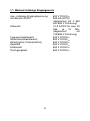
1.1. Maximal zulässige Eingangswerte
max. zulässige Eingangsspannung
mA-Bereich AC/DC
A-Bereich
Frequenzmessbereich
Widerstandsmessbereich
Arbeitszyklus (Tastverhältnis)
Kapazität
Diodentest
Durchgangstest
-5-
600 V DC/ACeff
600 mA AC/DC
(abgesichert mit F 630
mA/ 690 V Sicherung)
10 A AC/DC für max. 20
Sek.
je
15
Min.
(abgesichert
mit
10A/690 V Sicherung)
600 V DC/ACeff
600 V DC/ACeff
600 V DC/ACeff
600 V DC/ACeff
600 V DC/ACeff
600 V DC/ACeff
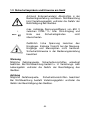
1.2. Sicherheitssymbole und Hinweise am Gerät
Achtung! Entsprechende(n) Abschnitt(e) in der
Bedienungsanleitung nachlesen. Nichtbeachtung
birgt Verletzungsgefahr und/oder die Gefahr der
Beschädigung des Gerätes.
600V
max. zulässige Spannungsdifferenz von 600 V
zwischen COM-/ V-/ bzw. Ohm-Eingang und
Erde
aus
Sicherheitsgründen
nicht
überschreiten.
Gefährlich hohe Spannung zwischen den
Eingängen. Extreme Vorsicht bei der Messung.
Eingänge und Messspitzen nicht berühren.
Sicherheitshinweise in der Bedienungsanleitung
beachten!
Warnung
Mögliche Gefahrenquelle. Sicherheitsvorschriften unbedingt
beachten. Bei Nichtbeachtung besteht u. U. Verletzungs- oder
Lebensgefahr und/oder die Gefahr der Beschädigung des
Gerätes.
Achtung
Mögliche Gefahrenquelle.
Sicherheitsvorschriften beachten!
Bei Nichtbeachtung besteht Verletzungsgefahr und/oder die
Gefahr der Beschädigung des Gerätes.
-6-
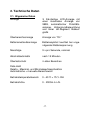
2. Technische Daten
2.1. Allgemeine Daten
Anzeige
3 5/6-stellige LCD-Anzeige mit
einer maximalen Anzeige von
5999, automatischer Polaritätsanzeige, Hintergrundbeleuchtung
und einer 62-Segment Balkengrafik
Überbereichsanzeige
Anzeige von "OL"
Batteriezustandsanzeige
Batteriesymbol leuchtet bei ungenügender Batteriespannung
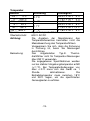
Messfolge
3 x pro Sekunde, nominal
Abschaltautomatik
nach 15 Minuten
Überlastschutz
in allen Bereichen
Data Hold
Relativ-, Maximal- und Minimalwertmessfunktion
Automatische + manuelle Bereichswahl
Betriebstemperaturbereich
0...40°C < 75 % RH
Betriebshöhe
0 - 2000m ü.n.N.
-7-
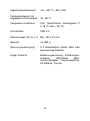
Lagertemperaturbereich
-30...+60° C < 85 % RH
Temperaturbereich für
angegebene Genauigkeit
18...28° C
Temperatur Koeffizient
0,2x (Spezifizierte Genauigkeit)/°C
(<18 °C oder > 28 °C)
Schnittstelle
USB 2.0
Abmessungen (B x H x T) 86 x 185 x 44 mm
Gewicht
ca. 380 g
Spannungsversorgung
9 V Blockbatterie (Neda 1604 oder
gleichwertige Batterie)
mitgel. Zubehör
Bedienungsanleitung, Prüfleitungen,
Software,
USB-Kabel,
Multifunktionsadapter, Temperaturfühler,
9V-Batterie, Tasche
-8-
2.2. Elektrische Daten
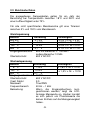
Die angegebenen Genauigkeiten gelten für ein Jahr der
Benutzung bei Temperaturen zwischen 18°C und 28°C und
einer Luftfeuchtigkeit unter 75%.
Für alle nicht spezifizierten Messbereiche gilt eine Toleranz
zwischen 5% und 100% vom Messbereich.
Gleichspannung
Bereich
Auflösung
Genauigkeit
600 mV
0,1 mV
± 0,8 % v.M. + 5 St.
6 V
1 mV
± 0,5 % v. M. + 5 St.
60 V
10 mV
± 0,8 % v. M. + 5 St.
600 V
0,1 V
± 1,0 % v. M. + 7 St.
Eingangswiderstand: 600 mV-Bereiche: > 100 MΩ /
andere Bereiche: 10 MΩ
Überlastschutz:
600 V AC/DC
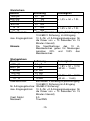
Wechselspannung
Bereich
Auflösung
Genauigkeit
6 V
1 mV
± 1,6% v. M. + 10 St.
60 V
10 mV
± 1,5% v. M. + 10 St.
600 V
0,1 V
Eingangswiderstand: 10 MΩ
Überlastschutz:
600 V AC/DC
Crest Faktor:
3,0
Messwert:
True RMS
Frequenzbereich:
40 Hz – 1 kHz
Bemerkung:
Wenn die Eingangsbuchsen kurzgeschlossen werden, zeigt die LCDAnzeige Messwerte an. Hierbei handelt
es sich jedoch um Phantomwerte die
keinen Einfluss auf die Messgenauigkeit
haben.
-9-
Gleichstrom
Bereich
600 µA
6000 µA
60 mA
600 mA
6 A
10 A
Überlastschutz:
Auflösung
Genauigkeit
0,1 µA
1
µA
± 1,0% v. M. + 7 St.
0,01 mA
0,1 mA
1
mA
± 1,5% v. M. + 7 St.
10
mA
630 mA/690 V Sicherung im µA/mA-Eingang
10 A/690 V Sicherung im A-Eingang
max. Eingangsstrom: 10 A (für >2 A-Eingangsmessungen für
die Dauer von < 10 Sekunden im 15
Minuten Intervall)
Hinweis
Die
Spezifikationen
des
10
AMessbereiches gelten für Messungen
zwischen
20%
und
100%
des
Messbereiches.
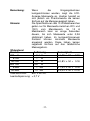
Wechselstrom
Bereich
600 µA
6000 µA
60 mA
600 mA
6 A
10 A
Überlastschutz:
Auflösung
Genauigkeit
0,1 µA
± 1,8% v. M. + 10 St.
1 µA
(40 Hz … 1 kHz)
0,01 mA
0,1 mA
1 mA
± 2,5% v. M. + 10 St.
(40 Hz … 1 kHz)
10 mA
630 mA/690 V Sicherung im µA/mA-Eingang
10 A/690 V Sicherung im A-Eingang
für A-Eingangsbuchse: 10A/690 V-Sicherung
max. Eingangsstrom: 10 A (für >2 A-Eingangsmessungen für
die Dauer von < 10 Sekunden im 15
Minuten Intervall)
Crest Faktor:
3,0
Messwert:
True RMS
-10-
Bemerkung:
Hinweis:
Wenn
die
Eingangsbuchsen
kurzgeschlossen werden, zeigt die LCDAnzeige Messwerte an. Hierbei handelt es
sich jedoch um Phantomwerte die keinen
Einfluss auf die Messgenauigkeit haben.
Die Spezifikationen des 10 A Messbereiches
gelten nur für Messwerte zwischen 20% und
100% vom Messbereich. Im 10 A
Messbereich kann es einige Sekunden
dauern, bis sich Messwerte unter 0,2A
stabilisiert haben. Im kurzgeschlossenem
Zustand können minimale Messwerte
angezeigt werden. Diese haben keinen
negativen Einfluss auf das tatsächliche
Messergebnis.
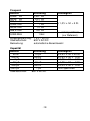
Widerstand
Bereich
Auflösung
600 Ω
0,1 Ω
6 kΩ
1 Ω
60 kΩ
10 Ω
600 kΩ
100 Ω
6 MΩ
1 kΩ
60 MΩ
10 kΩ
Überlastschutz:
600 V AC/DC
Leerlaufspannung: < 0,7 V
-11-
Genauigkeit
± 1,0% v. M. + 5 St.
± 0,8% v. M. + 5 St.
± 1,5% v. M. + 5 St.
± 3,0% v. M. + 10 St.
Frequenz
Bereich
9,999 Hz
99,99 Hz
999,9 Hz
9,999 kHz
99,99 kHz
999,9 kHz
9,999 MHz
Auflösung
0,001 Hz
0,01 Hz
0,1 Hz
1 Hz
10 Hz
100 Hz
1 kHz
Genauigkeit
± 1,0% v. M. + 5 St.
nicht spezifiziert
(nur Referenz)
Eingangsspannung: 1 Veff ~ 20 Veff
Überlastschutz:
600 V AC/DC
Bemerkung:
automatische Bereichswahl
Kapazität
Bereich
40 nF
400 nF
4 µF
40 µF
400 µF
1000 µF
Überlastschutz:
Auflösung
10 pF
100 pF
1 nF
10 nF
100 nF
1 µF
600 V AC/DC
-12-
Genauigkeit
± 3,5% v. M. + 20 St.
± 2,5% v. M. + 5 St.
± 3,5% v. M. + 5 St.
± 4,0% v. M. + 5 St.
± 5,0% v. M. + 5 St.
nicht spezifiziert
Temperatur
Bereich
-20 ...
0°C
0 ... 400°C
400 ... 1000°C
-4 ... 32°F
32 ... 752°F
752 ... 1832°F
Sensor:
Überlastschutz:
Achtung:
Bemerkung:
Auflösung
0,1°C
1 °C
0,1°F
Genauigkeit
± 6,0% v. M. + 5°C
± 1,5% v. M. + 4°C
± 1,8% v. M. + 5°C
± 6,0% v. M. + 9°F
± 1,5% v. M. + 7,2°F
± 1,8% v. M. + 9°F
1 °F
Typ-K Temperaturfühler
600 V AC/DC
Die Angaben der Messtoleranz des
Temperaturbereiches beinhalten nicht die
Messabweichung des Temperaturfühlers.
Vergewissern Sie sich, dass die Sicherung
in Ordnung ist, bevor Sie Messungen
durchführen.
Den
mitgelieferten
Typ-KThermodrahtfühler nicht für Temperatur-Messungen
über 230°C verwenden.
Die angegebenen Spezifikationen werden
nur bei stabiler Umgebungstemperatur erfüllt
(+/-1°C). Bei Temperaturänderungen von
über +/-5°C muss sich das Gerät ca. 1
Stunde
aklimatisieren.
Die
Betriebstemperatur muss zwischen 18°C
und 28°C liegen, um die spezifizierten
Genauigkeiten zu erfüllen.
-13-
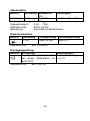
Arbeitszyklus
Bereich
Auflösung Bandbreite
Genauigkeit
(%)
Betriebsart 0,1%
5 ... 95%
± 2,0% v. M. + 7 St.
Eingangsspannung: 4 ~ 10 VSS
Frequenzbereich:
4 Hz ... 1 kHz
Überlastschutz:
600 V AC/DC
Bemerkung:
automatische Bereichswahl
Diodentestfunktion
Bereich
Auflösung
1 mV
Überlastschutz
Testspannung
über 0,8 mA
Leerlaufspannung
über 3 V
600 V DC/ACeff
Durchgangsprüfung
Bereich Einführung
Bemerkungen
der eingebaute Summer ertönt Leerlaufspannung:
))
bei einem Widerstand von < 0,7 V
unter 20 Ω.
Überlastschutz:
600 V AC/DC
. )
-14-
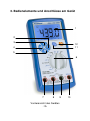
3. Bedienelemente und Anschlüsse am Gerät
1
2
3
12
4
11
5
6
7
8
Vorderansicht des Gerätes
-15-
9
10
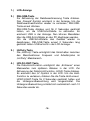
1.)
LCD-Anzeige
2.)
REL/USB-Taste
Zur Aktivierung der Relativwertmessung Taste drücken.
Das „Dreieck“-Symbol erscheint in der Anzeige. Um die
Relativwertmessfunktion wieder zu verlassen, REL/USBTaste erneut drücken.
REL/USB-Taste drücken und für 2 Sekunden gedrückt
halten, um die USB-Schnittstelle zu aktivieren. Es
erscheint USB in der Anzeige. Nun können Messdaten
über die USB-Schnittstelle an den PC übertragen werden.
Um die USB-Schnittstelle des Gerätes wieder zu
deaktivieren, REL/USB-Taste erneut 2 Sekunden lang
gedrückt halten. USB erlischt in der LCD-Anzeige.
3.)
Hz/Duty-Taste
Die „Hz/Duty“-Taste ermöglicht das Umschalten zwischen
den Messfunktionen Frequenz und Arbeitszyklus im
„Hz/Duty“-Messbereich.
4.)
HOLD/LIGHT-Taste
Die Data-Hold-Funktion ermöglicht das „Einfrieren“ eines
Messwertes zum späteren Ablesen in der LCD. Zur
Aktivierung der Data-Hold-Funktion, HOLD-Taste drücken.
Es erscheint das „H“-Symbol in der LCD. Um die HoldFunktion zu verlassen, drücken Sie die Taste-Hold erneut.
HOLD/LIGHT-Taste für 2 Sekunden gedrückt halten und
die Hintergrundbeleuchtung wird eingeschaltet. Die
Hintergrundbeleuchtung schaltet sich automatisch nach 10
Sekunden wieder ab.
-16-
5.)
Maximal– und Minimalwerthaltefunktion
Zum Ermitteln des maximalen bzw. des
minimalen
Messwertes wie beschrieben verfahren:
* Drücken Sie die Taste „MIN MAX“ um den maximalen
Messwert anzugeigen (MAX-Symbol erscheint in der
Anzeige)
* Drücken Sie „MAX MIN“ erneut um minimalen
Messwert anzuzeigen (MIN-Symbol erscheint in der
Anzeige)
* Drücken und halten Sie die Taste „MAX MIN“ für 2
Sekunden um den (MAX MIN-Modus zu verlassen).
6.)
Funktions-/Bereichswahlschalter
Zur Auswahl der gewünschten
Messbereiches.
7.)
8.)
9.)
Messfunktion
bzw.
10 A-Eingangsbuchse
Eingangsbuchse für AC/DC-Strommessungen von 600mA
bis 10A.
µA/mA-Eingangsbuchse
Eingangsbuchse für AC/DC-Strommessungen von
<
600mA
oder
für
den
positiven
Stecker
des
Temperaturfühlers.
COM-Eingangsbuchse
Eingangsbuchse für die schwarze Prüfleitung für alle
Messfunktionen einschließlich für den negativen Stecker
des Temperaturfühlers.
10.) „V/Ω/Hz /
“-Eingangsbuchse
Eingangsbuchse
für
rote
Prüfleitung
für
Messfunktionen, ausgenommen Strommessungen.
11.) RANGE-Taste
Taste zur Umschaltung auf manuelle Bereichswahl.
-17-
alle
12.) SELECT-Taste
Taste zur Umschaltung zwischen AC und
Strommessfunktionen bzw. Widerstand, Diode
Durchgangsprüfung oder °C und °F.
DC
und
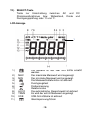
LCD-Anzeige
1
1.)
2.)
3.)
4.)
5.)
6.)
7.)
8.)
9.)
10.)
11.)
MAX
MIN
AUTO
TRMS
USB
Die Batterie ist fast leer und sollte ersetzt
werden.
Der maximale Messwert wird angezeigt.
Der minimale Messwert wird angezeigt.
Die Messwerthaltefunktion ist aktiviert.
Durchgangstest
Diodenmessung
Relativmodus
Die automatische Bereichswahl ist aktiviert
Es wird der echt-Effektivwert angezeigt
USB-Schnittstelle ist aktiviert
Gleichspannung/Strom
-18-
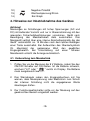
12.)
13.)
14.)
Negative Polarität
Wechselspannung/Strom
Bar Graph
4. Hinweise zur Inbetriebnahme des Gerätes
Achtung!
Messungen an Schaltungen mit hohen Spannungen (AC und
DC) mit äußerster Vorsicht und nur in Übereinstimmung mit den
relevanten Sicherheitsbestimmungen vornehmen. Gerät nach
Beendigung des Messbetriebes stets ausschalten. Das
Messgerät verfügt über eine interne Abschaltautomatik die das
Gerät automatisch ca. 15 Minuten nach dem letzten Betätigen
einer Taste ausschaltet. Bei Aufleuchten des Überlaufsymbols
OL übersteigt der gemessene Wert den gewählten
Eingangsbereich. Bei Umschaltung auf einen höheren
Messbereich erlischt die Anzeige automatisch.
4.1. Vorbereitung zum Messbetrieb
1. Prüfen Sie vor der Messung die 9 V Batterie, indem Sie den
ON/OFF-Schalter auf ON stellen. Ist die Batterie schwach,
erscheint "LO" oder "
" rechts im Display. Die Batterie
muss ausgetauscht werden.
2. Das Warndreieck neben den Eingangsbuchsen soll Sie
warnen, dass Messspannung oder Messstrom zum Schutz
der internen Schaltung nicht die angegebenen Werte
übersteigen dürfen.
3. Der Funktionswahlschalter sollte vor der Messung auf den
gewünschten Bereich eingestellt werden.
-19-
Hinweis:
In den niederen AC-/DC-Messbereichen erscheint bei nicht
angeschlossenen Prüfleitungen u.U. ein beliebig sich ändernder
Wert in der LCD-Anzeige. Dies ist bei Geräten mit hoher
Empfindlichkeit normal und für die Messgenauigkeit
bedeutungslos.
4.2. Umschaltung
Bereichswahl
von
automatischer
auf
manuelle
Beim Einschalten des Gerätes wird immer die automatische
Bereichswahl aktiviert. Die automatische Bereichswahl
erleichtert den Messbetrieb und garantiert optimale
Messergebnisse. Zur Umschaltung auf manuelle Bereichswahl
wie beschrieben verfahren:
1. Taste RANGE drücken. Beim Drücken der Taste erlischt die
Anzeige AUTO und der zuletzt gewählte Bereich bleibt
weiterhin aktiviert.
2. Taste RANGE ggf. mehrmals
gewünschten Bereiches drücken.
bis
zum
Erhalt
des
3. Zur Rückkehr zu automatischer Bereichswahl Taste RANGE
für ca. 2 Sekunden gedrückt halten. Die Anzeige für
automatische Bereichswahl AUTO leuchtet auf.
4.3. LCD-Hintergrundbeleuchtung
Die LCD-Hintergrundbeleuchtung erleichtert das Ablesen des
Messwertes unter ungünstigen Lichtverhältnissen. Zum
Einschalten der Hintergrundbeleuchtung wie beschrieben
verfahren:
-20-
1. Taste HOLD/LIGHT für 2 Sekunden
Hintergrundbeleuchtung wird eingeschaltet.
drücken.
Die
2. Die Hintergrundbeleuchtung schaltet sich automatisch nach
10 Sekunden ab.
5. Messbetrieb
5.1. Relativwertmessungen
Die Relativwert-Messfunktion ermöglicht die Messung und
Anzeige von Signalen bezogen auf einen definierten
Referenzwert.
1. Prüfleitungen an die zu messende Schaltung anklemmen
und dann Taste REL drücken.
2. Der angezeigte Messwert entspricht der Differenz zwischen
dem gespeicherten Referenzwert und dem aktuell
gemessenen Wert.
3. Um die REL-Funktion wieder zu verlassen, REL-Taste
erneut drücken.
Hinweis: Während der Relativwertmessung darf der Messwert
nicht den aktuellen Messbereich überschreiten. Nutzen Sie,
wenn notwendig, einen größeren Messbereich.
5.2. Messwert-Haltefunktion
Die Messwert-Haltefunktion ermöglicht das "Einfrieren" eines
Mess-wertes zur späteren Ablesung und Auswertung. Zur
Aktivierung der Funktion wie beschrieben verfahren:
-21-
1. Prüfleitungen über die zu messende Schaltung bzw. das zu
messende Bauteil anlegen.
2. Taste HOLD drücken. Der angezeigte Messwert wird
"eingefroren"
und die Messwert-Haltefunktionsanzeige
HOLD leuchtet in der LCD-Anzeige.
3. Zur Aufhebung der Funktion und Rückkehr zum normalen
Messbetrieb Taste HOLD erneut drücken.
5.3. Minimal-/Maximalwert-Haltefunktion
In dieser Funktion wird der minimal bzw. maximal gemessene
Wert in der Anzeige dargestellt. Zur Aktivierung der Funktion wie
beschrieben verfahren:
1. Taste RANGE drücken um in den entsprechenden
Messbereich zu gelangen und um sicherzustellen, dass der
gemessene MIN/MAX-Wert den Messbereich unter- bzw.
überschreitet.
2. Taste MIN/MAX drücken um die MIN- bzw. MAX-Funktion
auszuwählen.
3. Prüfleitungen über die zu messende Schaltung bzw. das zu
messende Bauteil anlegen.
4. Messwert in der LCD-Anzeige ablesen und auswerten.
5. Zum Verlassen der MIN/MAX-Funktion MIN/MAX-Taste
mindestens 2 Sekunden lang gedrückt halten.
-22-
5.4. Gleichspannungsmessungen
Achtung!
Vor dem Ein- bzw. Ausschalten der Messschaltung
Prüfleitungen von der Messschaltung abziehen. Hohe
Einschaltströme oder -spannungen könnten sonst u.U. das
Messgerät beschädigen bzw. zerstören.
1. Funktionswahlschalter in Stellung "VDC" drehen.
2. Rote Prüfleitung an den V-/Ohm-Eingang und schwarze
Prüfleitung an den COM-Eingang des Gerätes anschließen.
3. Prüfleitungen über die zu messende Spannungsquelle
anlegen und Messwert in der LCD-Anzeige des Gerätes
ablesen. Bei negativen Messwerten erscheint ein
Minussymbol (-) links vom Messwert.
5.5. Wechselspannungsmessungen
Achtung!
Bei Messungen an 600-V Steckdosen ist äußerste Vorsicht
geboten. Die Messspitzen der Prüfleitungen sind u.U. für einen
einwandfreien Kontakt mit den Innenkontakten der Steckdose
nicht lang genug und die LCD-Anzeige zeigt daher 0 V, obwohl
eine Spannung von 600 V an der Steckdose anliegt. Daher
immer sicherstellen, dass ein einwandfreier Kontakt zwischen
den Messspitzen den Prüfleitungen und den Innenkontakten der
Steckdose besteht und nicht blind der 0-V Anzeige vertrauen.
Wichtig!
Vor dem Ein- bzw. Abschalten der Messschaltung Prüfleitungen
von der Messschaltung abziehen. Hohe Einschaltströme oder spannungen könnten sonst u.U. das Messgerät beschädigen
bzw. zerstören.
Zur Messung von Wechselspannungen wie beschrieben
verfahren:
-23-
1. Funktionswahlschalter in Stellung "VAC" drehen.
2. Rote Prüfleitung an den V-/Ohm-Eingang und schwarze
Prüfleitung an den COM-Eingang des Gerätes anschließen.
3. Prüfleitungen über die zu messende Spannungsquelle
anlegen und Messwert in der LCD-Anzeige des Gerätes
ablesen.
5.6. Gleichstrommessungen
Achtung!
Aus Sicherheitsgründen keine Strommessungen in Schaltungen
mit Spannungen von mehr als 600 V vornehmen.
Achtung!
Gleichstrommessungen im 10 A-Bereich auf maximal 10
Sekunden beschränken. Längere Messzeiten in diesem Bereich
können zur Zerstörung des Messgerätes bzw. zu Verletzungen
führen.
1. Entsprechend der zu messenden Stromgröße Funktionswahlschalter entweder in Stellung µA, mA oder A drehen.
2. Gerät auf die Gleichstrommessfunktion durch Drücken der
Taste "SELECT" umschalten. In der LCD-Anzeige leuchtet
das Funktionssymbol DC auf.
-24-
3. Abhängig von der zu messenden Stromstärke rote
Prüfleitung an den µA/mA- oder den 10 A-Eingang und
schwarze Prüfleitung an den COM-Eingang des Gerätes
anschließen.
Bei
unbekannter
Stromgröße
aus
Sicherheitsgründen 10 A-Bereich wählen und bei
entsprechender Messwertanzeige ggf. auf einen mAMessbereich umschalten.
4. Zu messende Schaltung spannungslos schalten und am
gewünschten Messpunkt "öffnen". Prüfleitungen in Reihe
anschließen (auf korrekte Polarität achten!).
5. Spannung an die Messschaltung anlegen und Messwert in
der LCD-Anzeige des Gerätes ablesen. Beim Messen
negativer Gleichströme erscheint ein Minussymbol links von
der Messwertanzeige.
5.7. Wechselstrommessungen
Achtung!
Aus Sicherheitsgründen keine Strommessungen in Schaltungen
mit Spannungen von mehr als 600 V vornehmen.
Achtung!
Wechselstrommessungen im 10 A-Bereich auf maximal 10
Sekunden beschränken. Längere Messzeiten in diesem Bereich
können zur Zerstörung des Messgerätes bzw. zu Verletzungen
führen.
1. Entsprechend der zu messenden Stromgröße Funktionswahlschalter entweder in Stellung µA/mA oder A drehen.
2. Gerät auf die Wechselstrommessfunktion durch Drücken der
Taste "SELECT" umschalten. In der LCD-Anzeige leuchtet
das Funktionssymbol AC auf.
-25-
3. Abhängig von der zu messenden Stromstärke rote
Prüfleitung an den µA/mA- oder den 10 A-Eingang und
schwarze Prüfleitung an den COM - Eingang des Gerätes
anschließen.
Bei
unbekannter
Stromgröße
aus
Sicherheitsgründen 10 A-Bereich wählen und bei
entsprechender Messwertanzeige ggf. auf einen mAMessbereich umschalten.
4. Zu messende Schaltung spannungslos schalten und am
gewünschten Messpunkt öffnen. Prüfleitungen in Reihe
anschließen.
5. Spannung an die Messschaltung anlegen und Messwert in
der LCD-Anzeige des Gerätes ablesen.
Hinweis:
Wenn während der Messung automatisch von 6A
zum 10A Messbereich umgeschaltet wird, erscheint
kurzzeitig „OL“ im Display und der eingebaute
Summer ertönt mehrere Male.
5.8. Widerstandsmessungen
Achtung!
Nach
Umschaltung
des
Multimeters
auf
die
Widerstandmessfunktion angeschlossene Prüfleitungen nicht
über eine Spannungsquelle anlegen.
Widerstandsmessungen
nur
an
spannungsfreien
Schaltungen bzw. Bauteilen vornehmen und Netzstecker
aus der Steckdose ziehen. In der Schaltung befindliche
Kondensatoren vor der Messung unbedingt entladen.
-26-
Zur Messung wie beschrieben verfahren:
1. Funktionswahlschalter in Stellung „Ω " drehen.
2. Rote Prüfleitung an den V/Ohm-Eingang und schwarze
Prüfleitung an den COM - Eingang des Gerätes anschließen.
3. Prüfleitungen über den zu messenden Widerstand anlegen.
4. Messwert in der LCD-Anzeige ablesen.
Hinweis:
Der Eigenwiderstand der Prüfleitungen kann bei Messungen von
kleinen Widerständen (600 Ohm-Bereich) die Genauigkeit der
Messung negativ beeinträchtigen. Der Eigenwiderstand üblicher
Prüfleitungen liegt zwischen 0,2...1 Ohm.
Zur exakten Bestimmung des Eigenwiderstandes Prüfleitungen
an die Eingangsbuchsen des Multimeters anschließen und
Messspitzen kurzschließen. Der angezeigte Messwert entspricht
dem Eigenwiderstand der Prüfleitungen.
5.9. Frequenzmessungen
Zur Messung wie beschrieben verfahren:
1. Funktionswahlschalter in Stellung "Hz/Duty" drehen.
2. Rote Prüfleitung an den V-/Ohm-/Hz-Eingang und schwarze
Prüfleitung an den COM - Eingang des Gerätes anschließen.
3. Prüfleitungen über das zu messende Bauteil bzw. die zu
messende Schaltung anlegen.
4. Messwert in der LCD-Anzeige ablesen. Der Messwert wird
in der entsprechenden Messeinheit (Hz, kHz, MHz) angezeigt.
-27-
5.10. Kapazitätsmessungen
Achtung!
Kapazitätsmessungen nur in spannungslosen Schaltungen
durch-führen und Kondensator vor der Messung unbedingt
entladen. Kondensator zur Messung am besten aus der
Schaltung auslöten. Messung wie beschrieben durchführen:
1. Funktionswahlschalter in Stellung "
" drehen.
2. Rote Prüfleitung an den V-/Ohm/ -Eingang und schwarze
Prüfleitung an den COM - Eingang des Gerätes
anschließen.
3. Prüfleitungen über den zu messenden Kondensator anlegen
(Polarität beachten!).
4. Messwert in der LCD-Anzeige ablesen.
5.11. Temperaturmessungen
Achtung!
Temperaturmessungen nur an spannungslosen Schaltungen
bzw. Messobjekten vornehmen.
Temperaturmessung wie beschrieben durchführen:
1. Adapter für Temperaturmessungen in Eingangsbuchsen
einstecken (+ an µA/mA; - an COM - Eingang)
2. Temperaturfühler in den Adapter einstecken (auf korrekte
Polarität achten!).
3. Messfühler auf die Oberfläche des zu messenden Bauteils
aufsetzen und Kontakt bis zur Stabilisierung der
Messwertanzeige aufrechterhalten (ca. 30 Sekunden).
-28-
4. Temperaturwert nach erfolgter Stabilisierung in der LCDAnzeige ablesen.
Achtung!
Aus Sicherheitsgründen Temperaturfühler unbedingt vor dem
Um-schalten auf eine andere Messfunktion von der Temperaturmessbuchse des Multimeters abziehen
5.12. Diodentestfunktion
Die Diodentestfunktion ermöglicht die Bestimmung der
Verwendbarkeit von Dioden und anderen Halbleiter-Elementen
in definierten Schaltungen, sowie die Bestimmung der
Durchgängigkeit (Kurzschluss) und des Spannungsabfalls in
Durchlassrichtung.
Achtung!
Vor Überprüfung der Diode Bauteil bzw. Schaltung unbedingt
spannungslos schalten oder Diode aus der Schaltung auslöten.
Zur Durchführung des Diodentests wie beschrieben verfahren:
1. Funktionswahlschalter in Stellung
.))) /
drehen.
2. Gerät auf die Diodentestfunktion durch Drücken der Taste
"SELECT" umschalten. In der LCD-Anzeige leuchtet das
Symbol "
" auf.
3. Rote Prüfleitung an den V-/Ohm-Eingang und schwarze
Prüfleitung an den COM - Eingang des Gerätes anschließen.
4. Prüfleitungen über die zu messende Diode anlegen und
Messwert in der LCD-Anzeige ablesen.
5. Prüfleitungen über den Anschlüssen der Diode vertauschen
und Messwert ablesen.
-29-
6. Wird nach dem ersten Anlegen oder nach dem Vertauschen
der Prüfleitungen über dem zu messenden Bauteil einmal
ein Messwert und einmal das Überlaufsymbol OL
angezeigt, ist die Diode in Ordnung. Erscheint beim Anlegen
bzw. Vertauschen der Prüfleitungen in beiden Fällen das
Überlaufsymbol, ist die Diode offen. Wird in beiden Fällen
ein sehr geringer Wert oder "0" angezeigt, ist die Diode
kurzgeschlossen.
Hinweis:
Der angezeigte Wert entspricht dem Spannungsabfall der Diode
in Durchlassrichtung.
5.13. Durchgangsprüffunktion
Achtung!
Unter keinen Umständen Durchgangsprüfungen an spannungsführenden Bauteilen oder Schaltungen vornehmen.
Zur Messung der Durchgängigkeit von Bauteilen wie
beschrieben verfahren:
1. Funktionswahlschalter in Stellung "
.))) /
" drehen.
2. Rote Prüfleitung an den V-/Ohm-Eingang und schwarze
Prüfleitung an den COM - Eingang des Gerätes
anschließen.
3. Gerät auf die Durchgangsprüffunktion durch Drücken der
Taste "SELECT" umschalten. In der LCD-Anzeige leuchtet
das Symbol
.))) auf.
4. Prüfleitungen über das zu messende Bauteil anlegen.
-30-
5. Bei einem Widerstand von unter 20 Ohm ertönt ein
Summton (Bauteil durchgängig) und die LCD-Anzeige zeigt
überdies den genauen Widerstandswert.
6. Betrieb des Multimeters mit der USB-Schnittstelle
6.1 Systemanforderungen
Zum Ausführen dieses Programms sind folgende Systemanforderungen Voraussetzung:
Betriebssystem:
Speicher:
Monitor:
Microsoft Windows 98SE/2000/XP/VISTA
128MB RAM oder mehr
SuperVGA Monitor (oder besser), mit
einer Auflösung von 800 x 600 oder höher
Festplattenspeicher: 10MB (oder mehr) freier Speicher
CD-ROM-Laufwerk
USB-Port
Maus oder entsprechendes Gerät
Drucker (optional)
6.2. Installation
1.
2.
Legen Sie die mit dem Messgerät gelieferte CD in das CDROM-Laufwerk Ihres Computers ein.
Führen Sie die Anwendung drivers.exe auf der CD aus.
Das Dialogfeld Install Driver (Treiber installieren)
erscheint. Klicken Sie in diesem Dialogfeld zur Installation
des USB-Treibers auf die Schaltfläche Install (Installieren).
-31-
3.
4.
5.
Schließen Sie das mit dem Messgerät gelieferte USBDatenkabel an den Anschluss oben auf dem Messgerät und
das andere Ende an den USB-Port des Computers an. Der
Computer zeigt an, dass eine neue Hardware gefunden
wurde, und der USB-Treiber wird automatisch installiert.
Führen Sie die Anwendung Setup.exe auf der CD aus und
folgen Sie zur Fertigstellung der Programminstallation den
Aufforderungen auf dem Bildschirm.
Drücken Sie die Taste Rel des Messgeräts und halten Sie
USB
diese für etwa 2 Sekunden
gedrückt. Das Symbol
"USB" erscheint im LCD-Display des Messgeräts.
6.3. Bedienungsanleitung
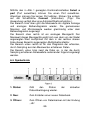
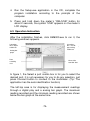
Klicken Sie nach Fertigstellung der Installation auf P 4390, um
die Anwendung auszuführen. Das folgende Fenster wird
angezeigt:
Funktioniert wie
ein digitales
Multimeter
Funktioniert wie
ein analoges
Nadel-Mutimeter
Analoges
Balkendiagramm
Datenerfassungsbereich
Diagramm der
erfassten Daten
-32-
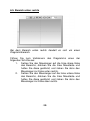
Mithilfe des in Abb. 1 gezeigten Kombinationsfeldes Select a
port (Port auswählen) können Sie einen Port auswählen.
Allerdings müssen Sie keinen Port wählen. Klicken Sie einfach
auf die Schaltfläche Connect (Verbinden). (Tipp: Die
Anwendung verfügt über eine Autoidentifikationsfunktion.)
Der Bereich links oben gibt die Messwerte als digitale Anzeige
und analoges Balkendiagramm wieder. Die gemessenen
Maximal- und Minimalwerte werden gleichzeitig unter dem
Balkendiagramm angezeigt.
Der Bereich oben rechts ist ein analoges Messgerät. Der
Messwert dieses Messgeräts ergibt sich aus dem von der Nadel
angezeigten Wert multipliziert mit dem in der rechten oberen
Ecke dieses Bereichs angezeigten Multiplikationsfaktor.
Der Bereich unten rechts ist für das Diagramm der erfassten,
durch Sampling aus den Messwerten erhaltenen Daten.
Der Bereich unten links zeigt die Datei an, in der die durch
Sampling erhaltenen Ablesewerte aufeinander folgend angezeigt
werden.
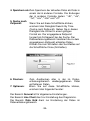
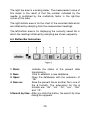
6.4. Symbolleiste
1. Status:
Gibt
den
Status
Datenübertragung wieder.
2. Neu:
Zum Erstellen einer neuen Datenbank.
3. Öffnen:
Zum Öffnen von Datenbanken mit der Endung
„.db“.
-33-
der
aktuellen
4. Speichern als:Zum Speichern der aktuellen Datei als Datei in
einem der 6 anderen Formate. Die Endungen
der 6 anderen Formate lauten: ".db", ".xls",
".txt", ".csv", ".htm" und ".rtf".
5. Suche nach
Zeitpunkt:
Wenn Sie auf diese Schaltfläche klicken,
erscheint das Dialogfeld Search By Time
(Suche nach Zeitpunkt). Geben Sie in dieses
Dialogfeld die Uhrzeit in einem gültigen
Format ein. Der eingegebene Zeitpunkt
fungiert als Schlagwort bei der Suche. Der
Datenerfassungsbereich lokalisiert die zu dem
angegebenen Zeitpunkt erfassten Daten.
Klicken Sie zum Schließen des Suchfeldes auf
die Schaltfläche Close (Schließen).
6. Drucken:
7. Optionen:
Zum Ausdrucken aller in der im Datenerfassungsbereich wiedergegebenen Datei
enthaltenen Daten.
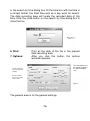
Wenn Sie auf diese Schaltfläche klicken,
erscheint das folgende Fenster:
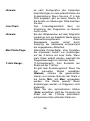
Der Bereich General ist für allgemeine Einstellungen.
Der Bereich Line Chart dient zur Einstellung des Diagramms.
Der Bereich Data Grid dient zur Einstellung der Daten im
Datenerfassungsbereich.
-34-
Der Bereich
Line Chart
dient zur
Einstellung des
Der Bereich
Diagramms
General ist für
allgemeine
Einstellungen
Der Bereich
Data Grid dient
zur Einstellung
der Daten im
Datenerfassung
sbereich.
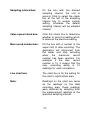
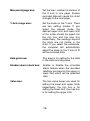
Sampling Interval:
(Abtastzeit). Geben Sie die gewünschte
Abtastzeit ein. Die Einheit ist Sekunde.
Klicken Sie zum Eingeben einer
benutzerdefinierten Einstellung auf das
Ankreuzfeld links neben dem Feld
Sampling Interval. Andernfalls wird die
standardmäßige Abtastzeit verwendet.
Value Repeat:
(Wertwiederholung). Klicken Sie auf das
Kästchen, wenn ein Ablesewert erfasst
werden soll, der dem vorherigen
entspricht.
Max Record Number: (Maximale Anzahl an Messungen).
Geben Sie die obere Grenze der
Datenerfassung ein. Die Anwendung
trennt sich vom Messgerät und stoppt
die Erfassung, wenn die maximale
Anzahl an Messungen erreicht wurde.
Lautet die maximale Anzahl an
Messungen z.B. 10, bedeutet dies, dass
die
max.
Erfassungsfähigkeit
10
Ablesungen für jede Verbindung beträgt.
-35-
Hinweis:
Line Chart:
Hinweis:
Max Points/Page:
Y-Axis Range:
Je nach Konfiguration des Computers
beeinträchtigen zu viele erfasste Daten die
Systemleistung. Wenn Sie eine „0“ in das
Feld eingeben, gibt es keine Grenze für
die Anzahl von Messungen. Bitte beachten
Sie das.
Das
Liniendiagrammfeld
dient
zur
Einstellung des Diagramms im Bereich
rechts unten.
Bei den Ablesewerten auf dem Diagramm
handelt es sich um dieselben Werte wie im
Datenerfassungsbereich.
Diese
Ablesewerte
wurden
erzielt
durch
Sampling der Messwerte entsprechend
der angegebenen Abtastzeit.
(Maximale Punkte/Seite). Zum Einstellen
der maximalen Anzahl von Einteilungen
auf der X-Achse auf einer Seite. Wenn
mehr Daten erfasst werden, wechselt die
Diagrammanzeige zur nächsten Seite.
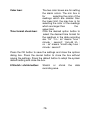
(Y-Achsenbereich). Zum Einstellen der
Skala auf der Y-Achse.
Es gibt zwei Einstellungsmodi: Wenn Sie
den
manuellen
Modus
auswählen
(Manual), müssen die gewünschten
oberen und unteren Grenzen der Skala in
die Felder Min: und Max: eingegeben
werden. Die Werte jenseits dieser
Einstellungen werden im Diagramm nicht
angezeigt.
Wenn Sie den automatischen Modus
(Auto) auswählen, stellt der Computer die
Skala auf der Y-Achse automatisch
entsprechend aller erfassten Daten ein.
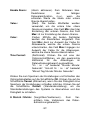
-36-
Enable Alarm:
Value:
Color:
Time Format:
(Alarm aktivieren). Zum Aktivieren bzw.
Deaktivieren
der
farbigen
Datenalarmfunktion
(s.u.),
wenn
die
erfassten Werte die obere oder untere
Grenze überschreiten.
(Wert). Die beiden Wertfelder werden
verwendet, um die untere bzw. obere
Grenze einzugeben. Das Feld Min: dient der
Einstellung des unteren Grenze, das Feld
Max: ist zur Einstellung der oberen Grenze.
(Farbe). Mithilfe der beiden Farbfelder
werden die Alarmfarben eingestellt. Das
Feld Min: dient zur Auswahl der Farbe für
Ablesewerte, welche die untere Grenze
unterschreiten, das Feld Max: hingegen zur
Auswahl der Farbe für die Ablesungen,
welche die obere Grenze überschreiten.
(Zeitformat). Klicken Sie auf eine der
Optionsschaltflächen, um das gewünschte
Zeitformat
für
die
Ablesungen
im
Datenerfassungsbereich auszuwählen.
"hh : nn : ss" bedeutet "Stunde: Minute:
Sekunde". "mm-dd hh : nn : ss" bedeutet
"Monat-Tag Stunde: Minute: Sekunde".
Klicken Sie zum Speichern der Einstellungen und Schließen des
Optionsdialogfeldes auf die Schaltfläche OK. Klicken Sie auf die
Schaltfläche Cancel (Abbrechen), wenn Sie das Dialogfeld ohne
Speichern der Einstellungen schließen möchten. Klicken Sie auf
die Schaltfläche Default (Standardeinstellung), um die
Standardeinstellungen des Systems zu übernehmen und das
Dialogfeld zu schließen.
8. Stretch / Shrink: (Vergrößern/Verkleinern).
Zum
Vergrößern bzw. Verkleinern des Datenaufzeichnungsbereichs.
-37-
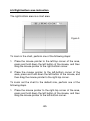
6.5. Bereich unten rechts
Bei dem Bereich unten rechts handelt es sich um einen
Diagrammbereich.
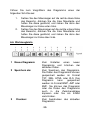
Führen Sie zum Verkleinern des Diagramms einen der
folgenden Schritte aus:
1. Setzen Sie den Mauszeiger auf die linke obere Ecke
des Bereichs, drücken Sie die linke Maustaste und
halten Sie diese gedrückt, und ziehen Sie dann den
Mauszeiger zur Ecke unten rechts.
2. Setzen Sie den Mauszeiger auf die linke untere Ecke
des Bereichs, drücken Sie die linke Maustaste und
halten Sie diese gedrückt, und ziehen Sie dann den
Mauszeiger zur Ecke oben rechts.
-38-
Führen Sie zum Vergrößern des Diagramms einen der
folgenden Schritte aus:
1.
2.
Setzen Sie den Mauszeiger auf die rechte obere Ecke
des Bereichs, drücken Sie die linke Maustaste und
halten Sie diese gedrückt, und ziehen Sie dann den
Mauszeiger zur Ecke unten links.
Setzen Sie den Mauszeiger auf die rechte untere Ecke
des Bereichs, drücken Sie die linke Maustaste und
halten Sie diese gedrückt, und ziehen Sie dann den
Mauszeiger zur Ecke oben links.
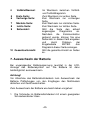
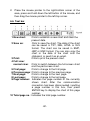
6.6. Werkzeugleiste
1 Neues Diagramm:
2 Speichern als:
3
Drucken:
Zum
Erstellen
eines
neuen
Diagramms und Löschen der
aktuellen Daten.
Zum Speichern des Diagramms.
Die Daten des Diagramms können
gespeichert werden im Format
TXT, XML, HTML oder XLS. Das
Diagramm
kann
gespeichert
werden im Format BMP, JMP oder
EMF. Sie können das Diagramm
oder die Daten des Diagramms
auch in die Zwischenablage
kopieren oder Sie als E-Mail
verschicken.
Zum Ausdrucken des aktuellen
Diagramms.
-39-
4
Vollbild/Normal:
5
6
Erste Seite:
Vorherige Seite:
7
8
9
Nächste Seite:
Letzte Seite:
Seitenzahl:
10 Gesamtseitenzahl:
Im Wechseln zwischen Vollbildund Teilbilddiagramm.
Zum Wechseln zur ersten Seite.
Zum Wechseln zur vorherigen
Seite.
Zum Wechseln zur nächsten Seite.
Zum Wechseln zur letzten Seite.
Gibt die Seite des aktuell
angezeigten
Diagramms
an.
Nachdem
die
Kommunikation
getrennt wurde, können Sie eine
Seitenzahl in dieses Feld eingeben
und
durch
Drücken
der
Eingabetaste
ENTER
das
Diagramm dieser Seite anzeigen.
Gibt die gesamte Anzahl an Seiten
an.
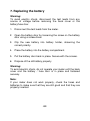
7. Auswechseln der Batterie
Bei ungenügender Batteriespannung leuchtet in der LCDAnzeige das Batteriesymbol auf. Die Batterie ist dann
baldmöglichst auszuwechseln.
Achtung!
Vor Abnahme des Batteriefachdeckels zum Auswechseln der
Batterie Prüfleitungen von den Eingängen des Multimeters
abziehen und Gerät ausschalten.
Zum Auswechseln der Batterie wie beschrieben vorgehen:
1. Die Schraube im Batteriefachdeckel mit einem geeigneten
Schraubendreher lösen.
-40-
2. Verbrauchte Batterie aus dem Batteriefach entnehmen und
vom Batteriekabel abziehen.
3. Neue Batterie an das Batteriekabel anschließen und Batterie
und Kabel wieder in das Batteriefach einlegen.
4. Batteriefachdeckel wieder auflegen und mit der Schraube
am Gehäuse befestigen.
5. Verbrauchte Batterien ordnungsgemäß entsorgen.
6. Verbrauchte Batterien sind Sondermüll und müssen in die
dafür vorgesehenen Sammelbehälter gegeben werden.
Gesetzlich
vorgeschriebene
Batterieverordnung
Hinweise
zur
Im Lieferumfang vieler Geräte befinden sich Batterien, die z. B.
zum Betrieb von Fernbedienungen dienen. Auch in den Geräten
selbst können Batterien oder Akkus fest eingebaut sein. Im
Zusammenhang mit dem Vertrieb dieser Batterien oder Akkus
sind wir als Importeur gemäß Batterieverordnung verpflichtet,
unsere Kunden auf folgendes hinzuweisen:
Bitte entsorgen Sie Altbatterien, wie vom Gesetzgeber
vorgeschrieben- die Entsorgung im Hausmüll ist laut
Batterieverordnung ausdrücklich verboten-,
an einer
kommunalen Sammelstelle oder geben Sie sie im Handel vor
Ort kostenlos ab. Von uns erhaltene Batterien können Sie nach
Gebrauch bei uns unter der auf der letzten Seite angegeben
Adresse unentgeltlich zurückgeben oder ausreichend frankiert
per Post an uns zurücksenden.
-41-
Batterien, die Schadstoffe enthalten,
sind
mit
dem
Symbol
einer
durchgekreuzten
Mülltonne
gekennzeichnet, ähnlich dem Symbol
in der Abbildung links. Unter dem
Mülltonnensymbol befindet sich die
chemische
Bezeichnung
des
Schadstoffes z. B. „CD“ für Cadmium,
„Pb“ steht für Blei und „Hg“ für
Quecksilber.
Weitere Hinweise zur Batterieverordnung finden Sie beim
Bundesministerium
für
Umwelt,
Naturschutz
und
Reaktorsicherheit.
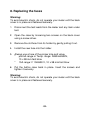
8. Auswechseln der Sicherung
Achtung!
Vor Abnahme des Gehäuseunterteils zum Auswechseln der
Sicherung, Prüfleitungen von den Eingängen des Multimeters
abziehen und Gerät ausschalten.
Defekte Sicherung nur durch eine dem Originalwert
entsprechende Sicherung ersetzen.
Zum Auswechseln der Sicherung wie beschrieben vorgehen:
1. Schutzholster vom Gerät abnehmen.
2. Die 2 Schrauben an der Gehäuserückseite mit einem
geeigneten Schraubendreher lösen.
3. Gehäuseteil abnehmen.
-42-
4. Defekte Sicherung vorsichtig aus dem Sicherungshalter
entfernen.
5. Neue - im Wert und den Abmessungen der
Originalsicherung entsprechende - Sicherung
* µA/mA-Bereich (Tem.-Bereich):
F630mA/690 V; 10x38 mm (flink ansprechend)
* 10A-Bereich:
F10A/690V; 10 x 38 mm flink ansprechend
in den Sicherungshalter einsetzen. Darauf achten dass die
Sicherung mittig im Halter sitzt.
6. Nach dem Auswechseln der entsprechenden Sicherung
Gehäuseunterteil wieder auflegen und mit den Schrauben
befestigen.
Alle Rechte, auch die der Übersetzung, des Nachdruckes und
der Vervielfältigung dieser Anleitung oder Teilen daraus,
vorbehalten.
Reproduktionen jeder Art (Fotokopie, Mikrofilm oder ein anderes
Verfahren) nur mit schriftlicher Genehmigung des Herausgebers
gestattet.
Letzter Stand bei Drucklegung. Technische Änderungen des
Gerätes, welche dem Fortschritt dienen, vorbehalten.
Hiermit bestätigen wir, dass alle Geräte, die in unseren
Unterlagen genannten Spezifikationen erfüllen und werkseitig
kalibriert geliefert werden. Eine Wiederholung der Kalibrierung
nach Ablauf von 1 Jahr wird empfohlen.
© PeakTech® 03/2013/Sch./Pt.
-43-
1. Safety Precautions
This product complies with the requirements of the following
European Community Directives: 2004/108/EC (Electromagnetic
Compatibility) and 2006/95/EC (Low Voltage) as amended by
2004/22/EC (CE-Marking). Overvoltage category III 600V;
pollution degree 2.
CAT I:
For signal level, telecommunication, electronic with
small transient over voltage
CAT II:
For local level, appliances, main wall outlets, portable
equipment
CAT III:
Supplied from a cable under earth; fixed installed
switches, automatic cut-off or main plugs.
CAT IV: Units and installations, which are supplied over aerial
line, which are stand in a risk of persuade of a
lightning, i.e. main-switches on current input, overvoltage-diverter, current use counter.
Warning! Do not use this instrument for high-energy industrial
installation measurement. This instrument is intended for use in
installation over-voltage category III (600V AC/DC, 10A). To
ensure safe operation of the equipment and eliminate the danger
of serious injury due to short-circuits (arcing), the following
safety precautions must be observed.
The meter is designed to withstand the stated max voltages. If it
is not possible to exclude without doubts that impulses,
transients, disturbance or for other reasons, these voltages are
exceeded a suitable prescale (10:1) must be used.
-44-
*
*
*
*
*
*
*
*
*
*
*
*
*
*
*
*
Do not exceed the maximum permissible input ratings
(danger of serious injury and/or destruction of the
equipment).
Replace a defective fuse only with a fuse of the original
rating. Never short-circuit fuse or fuse holding.
Disconnect test leads or probe from the measuring circuit
before switching modes or functions.
Do not conduct voltage measurements with the test leads
connected to the mA/A- and COM-terminal of the equipment.
To avoid electric shock, disconnect power to the unit under
test and discharge all capacitors before taking any
resistance measurements.
Do not conduct current measurements with the leads
connected to the V/Ω-terminals of the equipment.
Check test leads and probes for faulty insulation or bare
wires before connection to the equipment.
To avoid electric shock, do not operate this product in wet or
damp conditions. Conduct measuring works only in dry
clothing and rubber shoes, i. e. on isolating mats.
Never touch the tips of the test leads or probe.
Comply with the warning labels and other info on the
equipment.
Always start with the highest measuring range when
measuring unknown values.
Do not subject the equipment to direct sunlight or extreme
temperatures, humidity or dampness.
Do not subject the equipment to shocks or strong vibrations.
Do not operate the equipment near strong magnetic fields
(motors, transformers etc.).
Keep hot soldering irons or guns away from the equipment.
Allow the equipment to stabilize at room temperature before
taking up measurement (important for exact measurements).
-45-
*
*
*
*
*
*
*
*
*
*
Do not input values over the maximum range of each
measurement to avoid damages of the meter.
Do not turn the rotary function switch during voltage or
current measurement, otherwise the meter could be
damaged.
Use caution when working with voltages above 35V DC or
25V AC. These Voltages pose shock hazard.
Replace the battery as soon as the battery indicator “
”
appears. With a low battery, the meter might produce false
reading that can lead to electric shock and personal injury.
Fetch out the battery when the meter will not be used for
long period.
Periodically wipe the cabinet with a damp cloth and mid
detergent. Do not use abrasives or solvents.
The meter is suitable for indoor use only
Do not operate the meter before the cabinet has been
closed and screwed safely as terminal can carry voltage.
Do not store the meter in a place of explosive, inflammable
substances.
Measuring instruments don’t belong to children hands.
Cleaning the cabinet
Clean only with a damp, soft cloth and a commercially available
mild household cleanser. Ensure that no water gets inside the
equipment to prevent possible shorts and damage to the
equipment.
-46-
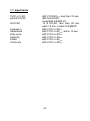
1.1. Input limits
V DC or V AC
µA/mA DC/AC
A DC/AC
Frequency
Resistance
Duty cycle
Capacity
Diode
Continuity
600 V DC/ACrms, less than 10 sec.
600 mA DC/AC,
fused 630 mA/690 VF
10 A DC/AC, less than 20 sec.
each 15 min., fused 10 A/690VF
600 V DC or ACrms
600 V DC or ACrms, within 10 sec.
600 V DC or ACrms
600 V DC or ACrms
600 V DC or ACrms
600 V DC or ACrms
-47-
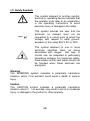
1.2. Safety Symbols
This symbol adjacent to another symbol,
terminal or operating device indicates that
the operator must refer to an explanation
in the operating instructions to avoid
personal injury or damage to the meter.
600V
This symbol advices the user that the
terminals so marked must not be
connected to a circuit point at which the
voltage, with respect to earth ground,
exceeds (in this case) 600 V AC or VDC
This symbol adjacent to one or more
terminals identifies them as being
associated with ranges that may, in
normal use, be subjected to particularly
hazardous voltages. For maximum safety,
thermometer and its test leads should not
be handled when these terminals are
energized
Warning
This WARNING symbol indicates a potentially hazardous
situation, which if not avoided, could result in death or serious
injury.
Caution
This CAUTION symbol indicates a potentially hazardous
situation, which if not avoided, may result in minor or moderate
injury, or damage to the product or other property.
-48-
2. Technical Data
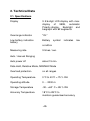
2.1. Specifications
Display
3 5/6-digit LCD-display with max.
display
of
5999,
automatic
Polarity-display, Backlight and
bargraph with 62 segments.
Overrange indicaton
"OL"
Low battery indication
battery
Battery
symbol
indicates
condition
Measuring rate
3 times / sec.
Auto / manual Ranging
Auto power off
about 15 min.
Data Hold, Relative Mode, MIN/MAX Mode
Overload protection
on all ranges
Operating Temperature
0°C to 40°C < 75 % RH
Operating altitude
0 … 2000 m
Storage Temperature
-30...+60° C < 85 % RH
Accuracy Temperature
18°C to 28°C to
maintain guaranteed accuracy
-49-
low
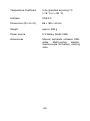
Temperature Coefficient
0,2x (specified accuracy)/°C
(<18 °C or > 28 °C)
Interface
USB 2.0
Dimensions (W x H x D)
86 x 185 x 44 mm
Weight
approx. 380 g
Power source
9 V battery (Neda 1604)
Accessories
Manual, test leads, software, USBcable,
Multi-function
adaptor,
thermocouple, 9V-battery, carrying
case
-50-
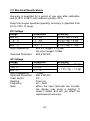
2.2. Electrical Specifications
Accuracy is specified for a period of one year after calibration
and at 18°C to 28°C, with relative humidity <75%.
Exept the ranges specified specially, accuracy is specified from
5% to 100% of range.
DC Voltage
Range
600 mV
6 V
60 V
600 V
Input Impedance:
Resolution
Accuracy
0,1 mV
± 0,8% rdg. + 5 dgt.
1 mV
± 0,5% rdg. + 5 dgt.
10 mV
± 0,8% rdg. + 5 dgt.
0,1 V
± 1,0% rdg. + 7 dgt.
600 mV ranges: >100 MΩ
the other ranges: 10 MΩ
Overload Protection: 600 V AC/DC
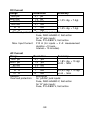
AC Voltage
Range
Resolution
Accuracy
6 V
1 mV
± 1,6% rdg. + 10 dgt.
60 V
10 mV
± 1,5% rdg. + 10 dgt
600 V
0,1 V
Input Impedance:
10 MΩ
Overload Protection: 600 V AC/DC
Crest Factor:
3.0
Reading:
True rms
Frequency
40 ~ 1kHz
Note:
When the input terminals are shorted,
the display may show a reading. It
doesn’t matter and will not affect the
measurement accuracy.
-51-
DC Current
Range
Resolution
Accuracy
600 µA
0,1 µA
6000 µA
1,0 µA
± 1,0% rdg. + 7 dgt.
60 mA
0,01 mA
600 mA
0,1 mA
6 A
1
mA
± 1,5% rdg. + 7 dgt.
10 A
10
mA
Overload protection: for “µA/ma” jack inputs:
Fuse, F630 mA/690 V, fast action
for “A” jack inputs:
Fuse, F10 A/690 V, fast action
Max. Input Current: F10 A (for inputs > 2 A: measurement
duration <10 secs.,
Interval > 15 minutes)
AC Current
Range
Resolution
Accuracy
600 µA
0,1 µA
± 1,8% rdg. + 10 dgt.
6000 µA
1,0 µA
at 40 ~ 1kHz
60 mA
0,01 mA
600 mA
0,1 mA
6 A
1
mA
± 2,5% rdg. + 10 dgt.
at 40 ~ 1kHz
10 A
10
mA
Remark:
autorange
Overload protection:
for “µA/ma” jack inputs:
Fuse, F630 mA/690 V, fast action
for “A” jack inputs:
Fuse, F10 A/690 V, fast action
-52-
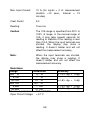
Max. Input Current:
10 A (for inputs > 2 A: measurement
duration <10 secs., Interval > 15
minutes)
Crest Factor:
3,0
Reading:
True rms
Caution
The 10A range is specified from 20% to
100% of range. In the manual range of
10A, it may take several seconds for
reading to stabilize if the reading is less
than 0,2 A. When the input terminals are
shorted, the display may show a
reading. It doesn’t matter and will not
affect the measurement accuracy.
Note:
When the input terminals are shorted,
the display may show a reading. It
doesn’t matter and will not affect the
measurement accuracy.
Resistance
Range
Resolution
600 Ω
0,1 Ω
6 kΩ
1 Ω
60 kΩ
10 Ω
600 kΩ
100 Ω
6 MΩ
1 kΩ
60 MΩ
10 kΩ
Overload protection:
600 V AC/DC
Open Circuit Voltage: < 0,7 V
-53-
Accuracy
± 1,0% rdg. + 5 dgt.
± 0,8% rdg. + 5 dgt.
± 1,5% rdg. + 5 dgt.
± 3,0% rdg. + 10 dgt.
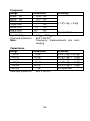
Frequency
Range
Resolution
Accuracy
9,999 Hz
0,001 Hz
99,99 Hz
0,01 Hz
999,9 Hz
0,1
Hz
± 1,0% rdg. + 5 dgt.
9,999 kHz
1
Hz
99,99 kHz
10
Hz
999,9 kHz
100
Hz
9,999 MHz
1K
Hz
Not specified
Input Voltage:
1 Vrms ~ 20 Vrms
Overload protection:
600 V AC/DC
Note:
Frequency measurements are autoranging.
Capacitance
Range
Resolution
40 nF
10 pF
400 nF
100 pF
4 µF
1 nF
40 µF
10 nF
400 µF
100 nF
1000 µF
1 µF
Overload protection:
600 V AC/DC
-54-
Accuracy
± 3,5% rdg. + 20 dgt.
± 2,5% rdg. + 5 dgt.
± 3,5% rdg. + 5 dgt.
± 4,0% rdg. + 5 dgt.
± 5,0% rdg. + 5 dgt.
Not specified
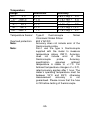
Temperature
Range
-20...
0°C
0 ... 400°C
400 ... 1000°C
-4....
32°F
32 ... 752°F
752 ... 1832°F
Temperature Sensor:
Overload protection:
Note:
Note:
Resolution
0,1°C
0,1°C
1°C
0,1°F
0,1°F
1°F
Accuracy
± 6,0% rdg. + 5°C
± 1,5% rdg. + 4°C
± 1,8% rdg. + 5°C
± 6,0% rdg. + 9°F
± 1,5% rdg. + 7,2°F
± 1,8% rdg. + 9°F
Type-K
thermocouple
Nickel
Chromium/ Nickel Silicon
600 V AC/DC
Accuracy does not include error of the
thermocouple probe.
Don´t use the type k thermocouple
supplied with the meter to measure
temperature above 230°C. Accuracy
does not include error of the
thermocouple
probe.
Accuracy
specification
assumes
ambient
temperature is stable to +/-1°C. For
Ambient temperature changes of +/-5°C,
rated accuracy applies after 1 hour. The
meter’s operating temperature must be
between 18°C and 28°C, otherwise
measurement
accuracy
is
not
guaranteed. Please insure that the fuse
is OK before testing of thermocouple
-55-
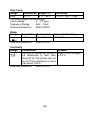
Duty Cycle
Range
Resolution Scope (%)
Duty
0,1%
5 % ~ 95%
The Duty range is an autorange
Input voltage
4 ~ 10 Vp-p
Frequency Range:
4Hz ~ 1kHz
Overload protection:
600V AC/DC
Diode
Range
Resolution
1 mV
Overload protection:
Test current
about 0,8 mA
Accuracy
± 2,0% rdg. + 7 dgt.
Open circuit voltage
about 3 V
600V AC/DC
Continuity
Range
Introduction
Remark
The built-in buzzer will sound if Open Circuit voltage:
))
the resistance is less than < 0,7 V
about 20 Ω. The buzzer will not
sound if the resistance is more
than about 150 Ω.
Overload protection:
600V AC/DC
. )
-56-
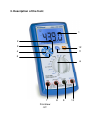
3. Description of the front
1
2
3
12
4
11
5
6
7
Frontview
-57-
8
9
10
1.) Display
2.) REL/USB-button
Press this button to set the meter to Relative Mode, and the
triangle symbol will appear as an indicator. To exit Relative
Mode, press the button again, and the triangle symbol will
disappear. Pressing and holding down this button for about
2 seconds set the meter to USB communication mode (In
this mode, you can transfer the readings of the meter to a
PC by the USB interface and the communication
application.), and “USB” appears as a indicator. To exit the
USB communication mode, press and hold down this button
for about 2 seconds, and “USB” disappears.
3.) Hz/Duty-button
In frequency or duty cycle measurement mode, you can
press this button to switch between frequency and duty
cycle measurements.
4.) HOLD/LIGHT-button
Press this button to hold the present reading on the display,
and “H” will appear as an indicator. Press this button again
to exit Data Hold mode, and “H” will disappear.
Press and hold down this button for about 2 seconds to
enable or disable the backlight. The backlight will turn of
automatically about 10 seconds later after it is turned.
-58-
5.) MAX/MIN-button
Press this button, the meter enters the MAX mode, and the
LCD shows “MAX” as an indicator, the present reading on
the LCD is the maximum reading of all readings taken since
the mode and the LCD shows “MIN” as an indicator, the
present reading on the LCD is the minimum reading of all
readings taken since the
mode was activated. Press and hold down this button for
about 2 seconds to exit MAX and MIN modes.
6.) Function/Range switch
It can be used to select the desired function and range as
will as to turn on or off the meter.
To preserve battery life, set this switch to the “OFF” position
if you don´t use the meter.
7.) “10 A” jack
Plug-in connector for the red test lead for current (600mA ~
10A) measurement.
8.) “µA/mA” jack
Plug-in connector for the red test lead for current (< 600 mA)
measurements. It is also a plug-in connector for the positive
plug of the thermocouple for temperature measurements.
9.) “COM” jack
Plug-in connector for the black test lead for all
measurements. It is also a plug-in connector for the negative
plug of the thermocouple for temperature measurements.
10.) “V/Ω/Hz/
” jack
Plug-in connector for the red test lead for all measurements
except
current
measurements
and
temperature
measurement modes.
-59-
11.) “Range” button
In voltage, current or resistance function, temperature
measurement modes pressing this button causes the
symbol “AUTO” on the display to disappear, it means that
the meter changes from autorange mode to manual range
mode. In manual range mode, press this button to select
desired range.
12.) “Select” button
This button can be used to switch the meter:
a.
between AC and DC current measurement functions.
b.
among resistance, diode and continuity measurement
functions.
c.
between Fahrenheit temperature measurement mode
and Celsius
-60-
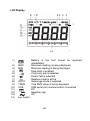
LCD Display
1
1.)
2.)
3.)
4.)
5.)
6.)
7.)
8.)
9.)
10.)
11.)
12.)
13.)
14.)
MAX
MIN
AUTO
TRMS
USB
Battery is low and should be replaced
immediately.
Maximum reading is being displayed.
Minimum reading is being displayed.
Data Hold is enabled.
Continuity test is selected
Diode Test is selected
Relative mode is active
Autorange mode is selected
True RMS value is being displayed
USB serial port communication is enabled
DC
Negative sign
AC
Bar Graph
-61-
4. Operating instructions
Warning!
Risk of electrocution. High-voltage circuits, both AC and DC are
very dangerous and should be measured with great care.
1. Always push the power switch to the OFF position when the
meter is not in use. This meter has Auto OFF that
automatically shuts the meter OFF if 15 minutes elapse
between uses.
2. If "OL" appears in the display during a measurement, that
value you are measuring exceeds the range you have
selected. Change to higher range.
4.1. Preliminary Note
1. Check the 9 V battery by setting the ON/OFF switch to ON.
If the battery is weak, a "
" sign will appear on the right
of display. If this does not appear on the display proceed as
below. See "Maintenance" if the battery has to be replaced.
2. The warning sign next to the test leads jack is for warning,
that the input voltage or current should not exceed the
indicated values. This is to prevent damage to the internal
circuitry.
3. The function switch should be set to the range, which you
want to test before operation.
Note:
On some low AC and DC voltage ranges, with the test leads not
connected to a device, the display may show a random,
changing reading. This is normal and is caused by the high-input
sensitivity. The reading will stabilize and give a proper
measurement when connected to a circuit.
-62-
4.2. Autoranging / manual range selection
When the meter is first turned on, it automatically goes into AutoRanging. This automatically selects the best range for the
measurements being made and is generally the best mode for
most measurements. For measurement situations requiring that
the range be manually held, perform the following:
1. Press the "RANGE" button. The "AUTO" indicator will
extinguish and the currently selected range will be held.
2. Press the "RANGE" button to step through the available
ranges until you select the range you want.
3. Press and hold the "RANGE" button for 2 seconds to exit the
manual ranging mode and return to "AUTO" mode.
4.3. Backlight
The backlight function is used to illuminate the display when the
meter is used at night or in dimly lighted area.
Press and hold down this button for about 2 seconds to turn on
or off the backlicht.
-63-
5. Measuring
5.1. Relative
The relative measurement feature allows you to make
measurements relative to a stored reference value. A reference
voltage, current, etc. can be stored and measurements made in
comparison to that value. The displayed value is the difference
between the reference and the measured value.
1. Press the "REL" button to store the reading in the display
and the "REL" indicator will appear on the display.
2. The display will now indicate the difference between the
stored value and the measured value.
3. To leave the REL-function, press the REL-key again.
Note:
When your use Relative mode, the actual value of the object
under test must not exceed the full-range reading of the selected
range. Use a higher measurement range if necessary.
5.2. Data Hold
The data hold function allows the meter to "freeze" a
measurement for later reference.
1. Press the "HOLD" button to freeze the display, the "HOLD"
indicator will appear in the display.
2. Press the "HOLD" button to return to normal operation.
-64-
5.3. Min./Max.-Hold
This function shows the min.- and max. value in the display.
Follow the described procedure to activate this function.
1. Press RANGE-button to reach the respective measuring
range, to make sure, that the measured MIN./MAX-value will
fall under or exceeds the measuring range.
2. Press MIN/MAX-button to reach the MIN/MAX-function.
3. Place the test leads to the circuit to be measured.
4. Readout and analyse the measured value in the LCDDisplay.
5. For leaving the MIN/MAX-function, press the MIN/MAXbutton for 2 seconds.
5.4. DC Voltage measurements
Caution:
Do not measure DC voltages if a motor on the circuit is being
switched ON or OFF. Large voltage surges may occur during the
ON or OFF operations that can damage the meter.
1. Set the function switch to the "V DC" position.
2. Insert the black test lead into the negative COM jack and the
red test lead into the positive V/Ohm-jack.
3. Touch the test probe tips to the circuit under test. Be sure to
observe the correct polarity (red lead to positive, black lead
to negative).
-65-
4. Read the voltage in the display. The display will indicate the
proper decimal point and value. If the polarity is reserved,
the display will show (-) minus before the value.
5.5. AC Voltage measurements
Warning:
Risk of Electrocution. The probe tips may not be long enough to
contact the live parts inside some 600 V outlets for appliances
because the contacts are recessed deep in the outlets. As a
result, the reading may show 0 volts when the outlet actually has
voltage on it. Make sure the probe tips are contacting the metal
contacts inside the outlet before assuming that no voltage is
present.
Caution:
Do not measure AC voltages if a motor on the circuit is being
switched ON or OFF. Large voltage surges may occur during the
ON or OFF operations that can damage the meter.
1. Set the function switch to the "V AC" position.
2. Insert the black test lead into the negative COM jack and the
red test lead into the positive V/Ohm jack.
3. Touch the test probe tips to the circuit under test.
4. Read the voltage in the display. The display will indicate the
proper decimal point, value and symbol.
-66-
5.6. DC Current measurement
Warning:
To avoid electric shock do not measure AC current on any circuit
whose voltage exceeds 600V AC/DC.
Caution:
Do not make current measurements on the 10 A scale for longer
than 10 sec. Exceeding 10 sec. may cause damage to the meter
and / or the test leads.
1. Insert the black test lead into the negative COM jack.
2. For current measurements up to 6 mA DC, set the function
switch to the "µA" position and insert the red test lead into
the µA/mA-jack.
3. For current measurements up to 600 mA DC, set the
function switch to the "mA" position and insert the red test
lead into the µA/mA-jack.
4. For current measurements up to 10 A DC, set the function
switch to the 10 A position and insert the red test lead into
the 10 A jack.
5. Press the SELECT button until "DC" appears in the display.
6. Remove power from the circuit under test and open the
circuit at the point where you wish to measure current.
7. Touch the black test probe tip to the negative side of the
circuit and touch the red test probe tip to the positive side of
the circuit.
8.
Apply power to the circuit.
-67-
9. Read the current in the display. The display will indicate the
proper decimal point, value and symbol.
5.7. AC Current measurements
Warning:
To avoid electric shock do not measure AC current on any circuit
whose voltage exceeds 600V AC/DC.
Caution:
Do not make current measurements on the 10 A scale for longer
than 10 sec. Exceeding 10 sec. may cause damage to the meter
and/or the test leads.
1. Insert the black test lead banana plug into the negative COM
jack.
2. For current measurements up to 6 mA AC, set the function
switch to the "µA" position and insert the red test lead into
the µA/mA-jack.
3. For current measurements up to 600 mA AC, set the
function switch to the "mA" position and insert the red test
lead banana plug into the µA/mA-jack.
4. For current measurements up to 10 A AC, set the function
switch to the A position and insert the red test lead banana
plug into the A jack.
5. Press the SELECT button until "AC" appears in the display.
6. Remove power from the circuit under test and open the
circuit at the point where you wish to measure current.
7. Touch the black test probe tip to the negative side of the
circuit and touch the red test probe tip to the positive side of
the circuit.
-68-
8.
Apply power to the circuit.
9. Read the current in the display. The display will indicate the
proper decimal point, value and symbol.
Note
If you perform AC current measurement in autorange mode,
“OL” will appear on the display momentarily and the built-in
buzzer will sounds several beeps when the meter changes from
6A range to 10 A range. It is normal and does not affect
measurement.
5.8. Resistance measurements
Warning:
To avoid electric shock, disconnect power to the unit under test
and discharge all capacitors before taking any resistance
measurements. Remove the batteries and unplug the line cords.
1. Set the function switch to the " Ω " position.
2. Insert the black test lead into the negative COM jack and the
red test lead into the positive Ω jack.
3. Touch the test probe tips across the circuit or part under
test. It is best to disconnect one side of the part under test
so the rest of the circuit will not interfere with the resistance
reading.
4. Read the resistance in the display. The display will indicate
the proper decimal point, value and symbol.
-69-
When you short the test leads in the 600 Ω range, your meter
display a small value (no more than 0.3 Ω). This value is due to
your meter´s and test leads internal resistance. Make a note of
this value and subtract it from small resistance measurements
for better accuracy.
5.9. Frequency measurement
1. Set the function switch to the "Hz/Duty" position.
2. Insert the black test lead banana jack into the negative COM
jack and the red test lead banana plug into the positive
V/Ω/Hz jack.
3. Touch the test probe tips to the circuit under test.
4. Read the frequency in the display. The digital reading
will
indicate the proper decimal point, symbols (Hz, kHz, MHz)
and value.
5.10. Capacitance measurements
Warning:
To avoid electric shock, disconnect power to the unit under test
and discharge all capacitors before taking any capacitance
measurements. Remove the batteries and unplug the line cords.
1. Set the function switch to the "
" position.
2. Insert the black test lead into the negative COM jack and the
red test lead into the positive V/Ohm/
-jack.
3. Touch the test leads to the capacitor to be tested. The
display will indicate the proper decimal point, value and
symbol.
-70-
5.11. Temperature measurements
Warning:
To avoid electric shock, disconnect both test probes from any
source of voltage before making a temperature measurement.
Insert the adapter in the input socket (+ to µA/mA and – to COMsocket) for temperature measurements.
Insert the temperature probe into the temperature adaptor,
making sure to observe the correct polarity. Touch the
temperature probe head to the part whose temperature you wish
to measure. Keep the probe touching the part under test until the
reading stabilize (about 30 seconds). Read the temperature in
the display. The digital reading will indicate the proper decimal
point and value.
Warning:
To avoid electric shock, be sure the thermocouple has been
removed before changing to any other measurement function.
5.12. Diode test
Warning:
To avoid electric shock, do not test any diode that has voltage
on it.
1. Set the function switch to " .)))
/
" position.
2. Press the "SELECT" button until the "
appears in the display.
" symbol
3. Insert the black test lead banana plug into the negative COM
jack and the red test lead banana plug into the positive V/Ω
jack.
-71-
4. Touch the test probe tips to the diode or semiconductor
unction you wish to test. Note the meter reading.
5. Reverse the probe polarity by switching probe position. Note
this reading.
6. The diode or junction can be evaluated as follows:
A:
B:
C:
If one reading shows a value and the other reading
shows OL, the diode is good.
If both readings are OL, the device is open.
If both readings are very small or 0, the device is
shorted.
Note: The value indicated in the display during the diode check
is the forward voltage.
5.13. Continuity check
Warning:
To avoid electric shock, never measure continuity on circuits or
wires that have voltage on them.
1. Set the function switch to the "
.))) /
" position.
2. Insert the black test lead into the negative COM jack and the
red test lead into the positive V/Ω jack.
3. Press the "SELECT" push button until the ".)))" symbol
appears in the display.
4. Touch the test probe tips to the circuit or wire you wish to
check.
-72-
5. If the resistance is less than 20 Ohms, the audible signal will
sound. The display will also show the actual resistance.
6. Data Transmittion Program
6.1. System Requirement
To run this application, there are some requirements for the
system as follows:
Operating system:
Microsoft
Windows
98SE/2000/XP/
VISTA
Memory:
128 MB RAM or more
Monitor:
SuperVGA monitor (or better), with the
resolution of 800 x 600 or higher
Harddisk space:
10 MB (or more) free space
CD-ROM drive
USB port
Mouse or equivalent device
Printer (optional)
6.2. Installation
1. Place the CD supplied with the meter to the CD-ROM of the
computer.
2. Run the drivers.exe application in the CD, the Install Driver
dialog box appears. In the Install Driver dialog box, click the
“Install” button to install the USB driver.
3. Connect the USB data cable supplied with the meter to the
terminal on the top of the meter, connect the other end of
this USB data cable to the USB port of the computer. The
computer will prompt that a new hardware has been found
and the USB driver will be installed automatically.
-73-
4. Run the Setup.exe application in the CD, complete the
program installation according to the prompts of the
computer.
5. Press and hold down the meter´s “REL/USB” button for
about 2 seconds, the symbol “USB” appears on the meter´s
LCD display.
6.3. Operation Instruction
After the installation finishes, click EM6000.exe to run it, the
following windows appears.
It functions
like a digital
multimeter
It functions
like a needle
type analog
multimeter
Analog bar
graph
Data
recording
area
Chart of the
recorded data
In figure 1, the Select a port combo box is for you to select the
desired port, it is not necessary for you to do any selection, just
press Connect button to connect to the multimeter. (Tip: The
application has the auto-identification function)
The left-top area is for displaying the measurement readings
through a digital play and a analog bar graph. The maximum
reading recorded and the minimum reading recorded are shown
below the bar graph at the same time.
-74-
The right-top area is a analog meter. The measurement value of
this meter is the result of that the number indicated by the
needle is multiplied by the multiplicity factor in the right-top
corner of this area.
The right-bottom area is for the chart of the recorded data which
are obtained by sampling from the measurement readings.
The left-bottom area is for displaying the currently saved file in
which the readings obtained by sampling are shown sequently.
6.4. Button Bar Instruction
1. State:
Indicate the status of the present data
transmission.
2. New:
Click to establish a new database.
3. Open:
Open the databases with the extension of
“.db”.
4. Save as:
Save the present file as another file in one of
the 6 formats. The extensions for the 6
formats are: “.db”, “.xls”, “.txt”, “.csv”, “.htm”
and “.rtf”.
5 Search by time: After you click this button, the search by time
dialog box appears.
-75-
In the search by time dialog box, fill the time box with the time in
a correct format. the filled time acts as a key word for search.
The data recording area will locate the recorded data of this
time. Click the close button on the search by time dialog box to
close the box.
6. Print:
7. Options:
Print all the data of the file in the present
data recording area.
After you click this button, the options
windows appears.
The Data Grid area is
for setting the data in
the data recording
area
The General area
is for the general
settings
The Line Chart
area is for setting
for the chart
The general area is for the general settings.
-76-
Sampling interval box:
Fill the box with the desired
sampling interval, the unit is
second. Click to select the check
box at the left of the sampling
interval box to enable custom
setting, otherwise the default
sampling interval will be adopted
instead.
Value repeat check box:
Click this check box to determine
whether to record a reading which
is same as the previous reading.
Max record number box:
Fill the box with a number of the
upper limit of data recording. The
application will disconnect from
the meter and stop recording
when the maximum record
number has been reached. For
example, if the max. record
number is 10, it means that the
max. recording ability is 10
readings for each connection.
Line chart box
The chart box is for the setting for
the chart in right-bottom area.
Note:
Readings on the chart are same
as the readings on the data
recording area. these readings
were obtained by sampling from
the measurement readings at the
specified sampling interval.
-77-
Max points/page box:
Set the max. number ob division of
the X axis in one page. Excess
recorded data will cause this chart
changes to the next page.
Y-Axis range area:
Set the scale on the Y axis. There
are two setting modes. If you
select the manual mode, the
desired upper limit and lower limit
of the scale should be typed into
the min box and the max box
respectively, the readings beyond
the limits are not visible in the
chart. If you select the automode,
the computer will automatically
adjust the scale on the Y axis to fit
all the recorded data.
Data grid area:
This area is for setting for the data
in the data recording area.
Enables alarm check box:
Enable or disable the colordata
alarm feature when the recorded
readings are beyond the upper or
lower limit which will be specified
later.
Value box:
The two value boxes are used for
setting the lower and upper limits
respectively: the min box is for
setting the lower limit, the max box
is for setting the upper limit.
-78-
Color box:
Time format check box:
The two color boxes are for setting
the alarm colors. The min box is
for
selecting the color of the
readings which are smaller than
the lower limit, the max box is for
selecting the color of the readings
which are larger than
the
upper limit.
Click the desired option button to
select the desired time format for
the readings in the data recording
are. “hh” : nn : ss” means “hour :
minute : second”. “mm-dd hh :
nn : ss” means “month-day hour :
minute : second”.
Press the OK button to save the settings and close the options
dialog box. Press the cancel button to close the box without
saving the settings. Press the default button to adopt the system
default setting and close the box.
8 Stretch / shrink button:
Stretch or shrink
recording area.
-79-
the
data
6.5. Right-bottom area instruction
The right-bottom area is a chart area.
To zoom in the chart, perform one of the following steps:
1. Place the mouse pointer to the left-top corner of the area,
press and hold down the left button of the mouse, and then
drag the mouse pointer to the right-bottom corner.
2. Place the mouse pointer to the left-bottom corner of the
area, press and hold down the left button of the mouse, and
then drag the mouse pointer to the right-top corner.
To zoom out the chart to the default size, perform one of the
following steps.
1. Place the mouse pointer to the right-top corner of the area,
press and hold down the left button of the mouse, and then
drag the mouse pointer to the left-bottom corner.
-80-
2. Place the mouse pointer to the right-bottom corner of the
area, press and hold down the left button of the mouse, and
then drag the mouse pointer to the left-top corner.
6.6. Tool bar
1 New chart:
2 Save as:
3 Print:
4 Full view/
normal view:
Click to establish a new chart and clear the
present data.
Click to save the chart. The data of the chart
can be saved in TXT, XML, HTML or XLS
format. The chart can be saved in BMP,
JMP or EMF format. You can also copy the
chart or the data of the chart onto the
clipboard, or send it as an email.
Click to print the present chart.
Click to switch between the full-screen chart
and the part-screen chart.
5 First page:
Click to change to the first page.
6 Previous page: Click to change to the previous page.
7 Next page:
Click to change to the next page.
8 Last page:
Click to change to the last page.
9 Page number: Indicates the page number of the currently
shown chart. After the communication
connection has been disconnected, inputting
a page number in this box, then press
ENTER key to display the chart of this page
number.
10 Total page no.: Indicates the total page number.
-81-
7. Replacing the battery
Warning:
To avoid electric shock, disconnect the test leads from any
source of voltage before removing the back cover or the
battery/fuse door.
1. Disconnect the test leads from the meter.
2.
Open the battery door by loosening the screw on the battery
door using a screw-driver.
3.
Clip the new battery into battery holder, observing the
correct polarity.
4.
Place the battery into the battery compartment.
5.
Put the battery door back in place. Secure with the screws.
6.
Dispose of the old battery properly
Warning:
To avoid electric shock, do not operate your meter until the back
cover and the battery / fuse door is in place and fastened
securely.
Note:
If your meter does not work properly, check the fuses and
batteries to make sure that they are still good and that they are
properly inserted.
-82-
Statutory Notification about the Battery Regulations
The delivery of many devices includes batteries, which for
example serve to operate the remote control. There also could
be batteries or accumulators built into the device itself. In
connection with the sale of these batteries or accumulators, we
are obliged under the Battery Regulations to notify our
customers of the following:
Please dispose of old batteries at a council collection point or
return them to a local shop at no cost. The disposal in domestic
refuse is strictly forbidden according to the Battery Regulations.
You can return used batteries obtained from us at no charge at
the address on the last side in this manual or by posting with
sufficient stamps.
Batteries,
which
contain
harmful
substances, are marked with the symbol
of a crossed-out waste bin, similar to the
illustration shown left. Under the waste
bin symbol is the chemical symbol for the
harmful substance, e.g. „Cd“ for
cadmium, „Pb“ stands for lead and „Hg“
for mercury.
You can obtain further information about the Battery Regulations
from the Bundesministerium für Umwelt, Naturschutz und
Reaktorsicherheit (Federal Ministry of Environment, Nature
Conservation and Reactor Safety).
Note:
If your meter does not work properly, check the fuses and
batteries to make sure that they are still good and that they are
properly inserted.
-83-
8. Replacing the fuses
Warning:
To avoid electric shock, do not operate your meter until the back
cover is in place and fastened securely.
1. Disconnect the test leads from the meter and any item under
test.
2.
Open the case by loosening two screws on the back cover
using a screw-driver.
3.
Remove the old fuse from its holder by gently pulling it out.
4.
Install the new fuse into the holder.
5.
Always use a fuse of the proper size and value
* µA/mA-range or Temp. range: F630mA/690V,
10 x 38 mm fast blow
* 10A-range: F 10A/690 V, 10 x 38 mm fast blow
6.
Put the button case back in place. Insert the screws and
tighten it securely.
Warning:
To avoid electric shock, do not operate your meter until the back
cover is in place and fastened securely.
-84-
All rights, also for translation, reprinting and copy of this manual
or parts are reserved.
Reproduction of all kinds (photocopy, microfilm or other) only by
written permission of the publisher.
This manual considers the latest technical knowing. Technical
changings which are in the interest of progress reserved.
We herewith confirm, that the units are calibrated by the factory
according to the specifications as per the technical
specifications. We recommend to calibrate the unit again, after 1
year.
®
© PeakTech 03/2013 / Sch./Pt.
PeakTech Prüf- und Messtechnik GmbH - Kornkamp 32 –
DE-22926 Ahrensburg / Germany
+49-(0) 4102-42343/44
+49-(0) 4102-434 16
[email protected]
www.peaktech.de