1
5 Using your refrigerator
Setting the operating
temperature
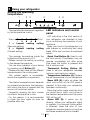
1
2 3
4
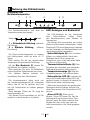
The operating temperature is regulated
by the temperature control.
Warm
1 = Lowest
(Warmest setting)
5 = Highest
(Coldest setting)
Cold
cooling
setting
cooling
setting
The average temperature inside the
fridge should be around +5°C.
Please choose the setting according
to the desired temperature.
You can stop operation of your device
by pressing on/off Button (1).
Please note that there will be different
temperatures in the cooling area.
The coldest region is immediately
above the vegetable compartment.
The interior temperature also depends
on ambient temperature, the frequency
with which the door is opened and the
amount of foods kept inside.
Frequently opening the door causes
the interior temperature to rise.
For this reason, it is recommended
to close the door again as soon as
possible after use.
14
5 6
LED indicators and control
panel
LED indicators in the front section of
your refrigerator are intended to help
you in monitoring the operation of your
appliance.
Keep your food in the refrigerator in a
safe manner by monitoring and using
these LEDs and controls as explained
below:
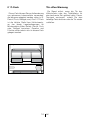
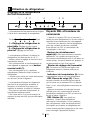
Quick Cool Button (6): Used to cool
the food quickly. Compressor may not
operate immediately but after some
time when the button is pressed and
this is quite normal.
Thermostat Setting Button (2):
Used to set your refrigerator between
minimum and maximum values.
Temperature Indicator (4): Displays
the set temperature of your refrigerator.
Snow LED (5): Lights up when the
quick cool button on the LED panel is
pressed. In this case, your refrigerator
operates continuously.
Press the button again when the food
you would like to quick cool comes to
the desired temperature and the snow
LED will turn off.
Alarm LED (3): It warns you by
blinking. When your refrigerator starts
to operate, if not enough cooling effect
is obtained, when the door of your
refrigerator remains open for a long time
and when excessive food is loaded.
EN