1
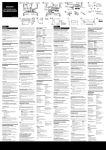
Top Panel
1
Touch-sensitive keys:
1.Power on/off - With your finger touching, or close to, the POWER
touch-sensitive key for more than 1.5 seconds, the power turns on and LED
brightens. Do this again and power turns off and the LED darkens.
2
3
2.Audio source inputs including AM, FM1, FM2, DVD, iPod, AUX
3.Volume up
4
4.Volume down
5.Play/Pause for DVD player and iPod modes
5
6.- DVD player: previous track
6
- iPod: same as previous/rewind key on your iPod.
- Radio: Previous station (touch and hold for 3 seconds to search for stations)
7
7.- DVD player: next track
- iPod: same as next/fast-forward key on your iPod.
- Radio: Next station (Touch and hold for 2 seconds to SEEK stations).
8.Eject: ejects and loads the discs
Front Panel
Satellite
Speaker
“When the
power of love
overcomes the
love of power the
world will know
peace”
Jimi Hendrix
Alfie iPod Audio System
LCD
Display
Subwoofer
Underneath
Slot-Feed
CD / DVD Drive
8