1
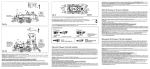
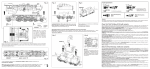
Reserve slipbandjes: 00544007. Elektrische stekkerverbinding volgens NEM 651 voor de montage van een digitale ontvangerbouwsteen (Fig. 3). Voor het inbouwen van de digitale decoder volgens NEM 651 de kleine stekker uit de houder halen en daarvoor de stekker van de decoder insteken. Bij het in-bouwen van de FLEISCHMANN-decoder op de markering letten die zowel op stekker als op de houder gelijk moet zijn. Op de gearceerde plek (Fig. 1) van het koelblik kan een DECODER worden bevestigd. Wij adviseren de inbouw van de DCC-DECODER 687403. Raadpleeg bij het inbouwen de bij de bouwsteen meegeleverde handleiding of vraag het uw dealer. Om de draden van de decoder te kunnen geleiden, is in de achterwand van het machinistenhuis een gemarkeerd kunststofdeel aangebracht dat met behulp van een pincet of een tangetje verwijderd kan worden (Fig. 4). Het vervangen van de motor: Schroef D losdraaien en koelblik verwijderen (Fig. 5). Met een kleine schroevendraaier de motorhouderklem links en rechts losduwen. Motor naar boven toe wegnemen en nieuwe motor monteren. Motorhouderklem over de motor plaatsen en vastklikken. Koelblik weer vastschroeven. Het vervangen van de koolborstels zie Fig. 6. Reserve koolborstels: 00006518 · Reservemotor: 00504081 Het verwisselen van de koppeling (Fig.7): 1. In de pijlrichting lostrekken. 2. Reservekoppeling in de pijlrichting insteken tot de klemmen pakken. Steek-Ruilkoppeling: 6511. FLEISCHMANN PROFI-Steekkoppeling: 6515. Serie 81 med variante Til den tunge rangertjeneste leverede Hanomag i 1928 en serie med 10 lokomotiver af serien 81, der i mange punkter stemte overens med de mindre maskiner af serien 80. Under DB-tiden blev lokomotiverne hovedsageligt indsat i Oldenburg-regionen. Et eksemplar er blevet vedligeholdt musealt for efterverdenen. Det 11 meter lange lokomotivs ydelse var på 830 hk, og den højeste hastighed var omkring 45 km / t. Bemærk: Nogle modeller er allerede fabrik udstyret med en DCC dekoder og en digital kobling. For disse modeller i denne vejledning sektioner for montering af en digital dekoder og udveksling kobling er ikke gyldig. Det anbefales til udskiftning af disse modeller, koblingen blot ved at Fleischmann servicepartnere. Åbning: Åbning af lokomotivet er kun nødvendig ved montering af et digitalt modtageelement eller til smøring af motor- og gearlejer. Skruerne A, B og C fjernes, lokomotivets kabinet hældes fremad og fjernes forsigtigt opefter (Fig. 1). Vær ved genmonteringen af lokomotivets især opmærksom på, at det hældes skråt fremefter og at de tilsvarende dele på lokomotivets front griber rigtigt ind i hinanden, før kabinettet definitivt sættes på. Smøring med olie: Motor og gear smøres kun på de med pile (→) markerede lejesøler (Fig. 2 og 5). Anvend kun FLEISCHMANN-olie 6599. En lille dråbe pr. smørested er tilstrækkelig, da der i modsat fald kan ske en oversmøring. Til dosering anvendes nålen, der er anbragt i olieflaskens låg. På det markerede punkt () kan koblingsmagneten 942701 klæbes ind. Reservedæk: 00544007. Elektrisk interface iht. NEM 621 til digitale modtageelementer (Fig. 3). Til montering af en digital decoder iht. NEM 651 trækkes det lille stik ud af soklen. Vær ved monteringen af FLEISCHMANN-decoderen opmærksom på markeringen "1", der skal stemme overens på sokkel og stik. På kølepladens skraverede flade (Fig.1) kan der klæbes en DECODER. Vi anbefaler montering af DCC-DECODER 687403. Følg ved monteringen brugsanvisningen, der er vedlagt modtageelementet, eller henvend Dem til Deres specialist. For at kunne udlægge kablet ved montering af decoderen skal den markerede plastdel, der er anbragt i førerhusets bagvæg, brækkes ud med en pincet eller tang (Fig. 4). Motorskift: Skruen D løsnes og kølepladen tages af (Fig. 5). Med en lille skruetrækker frigøres motorens holdebøjle på højre og venstre side. Motoren tages ud opefter og den nye motor sættes i. Holdebøjlen for motoren trykkes derover, indtil den kommer i indgreb på begge sider. Kølepladen skrues fast igen. Udskiftning af kulbørster se Fig. 6. Reservekulbørster: 00006518 · Udskiftningsmotor: 00504081 Udskiftning af kobling (Fig.7): 1. Trækkes ud i pilens retning. 2. Udskiftningskoblingen stikkes i til ”klik“. Stik-udskiftningskobling: 6511. FLEISCHMANN-PROFI-Stikkobling: 6515. Serie 81 con varianti Nel 1928 Hanomag consegnò per il pesante servizio di smistamento un lotto di 10 locomotive della Serie 81, che corrispondevano in molte parti alle più piccole macchine della Serie 80. Durante l’epoca della DB le locomotive vennero utilizzate soprattutto nella zona di Oldenburg. Un esemplare è conservato in un museo. Queste locomotive, lunghe 11 metri, avevano una potenza di 860 PSi e una velocità massima di 45 km / h. Nota: alcuni modelli sono già fabbrica dotati di un decoder DCC e una gancio digitale. Per questi modelli elencati in questa sezione guida per l‘installazione di un ricevitore digitale e l‘accoppiamento di gancio non è valido. Si consiglia per la sostituzione su questi modelli, la frizione semplicemente Fleischmann partner di servizio. Apertura: l'apertura della locomotiva si rende necessaria solo per il montaggio di un modulo di ricezione digitale o per la lubrificazione dei cuscinetti del motore e della trasmissione. Rimuovere le viti A, B e C, inclinare in avanti la cassa della locomotiva e sollevarla con cautela (Fig. 1). Rimontando la cassa assicurarsi di inclinarla in avanti e di far coincidere correttamente le parti corrispondenti sul lato anteriore della locomotiva prima di rimontare definitivamente la cassa. Lubrificazione: lubrificare il motore e la trasmissione solo nei punti dei cuscinetti indicati dalle frecce ( →) (Fig. 2 e 5). Utilizzare esclusivamente lubrificante FLEISCHMANN 6599. Per evitare eccessi è sufficiente applicare una piccola goccia in ogni punto indicato. Per il dosaggio utilizzare l'ago contenuto nel cappuccio della bottiglietta del lubrificante. L’elettromagnete di commutazione 942701 può essere incollato nel punto indicato (). Anelli di attrito di ricambio: 00544007 Interfaccia elettrica per moduli di ricezione digitale conforme alla norma NEM 651 (Fig. 3). Per installare un Decoder digitale conforme alla norma NEM 651 rimuovere il piccolo connettore dallo zoccolo e inserire al suo posto il connettore del Decoder. In sede di montaggio del Decoder FLEISCHMANN assicurarsi che le marcature "1” presenti sullo zoccolo e sul connettore corrispondano. Sulla superficie tratteggiata della piastra di raffreddamento (Fig.1) si può incollare un DECODER. Si consiglia l’installazione del DCC-DECODER 687403. Per l’installazione seguire scrupolosamente le istruzioni accluse al modulo di ricezione o rivolgersi al proprio rivenditore di fiducia. In sede di installazione del Decoder, per sistemare il cavo occorre rimuovere con una pinzetta o una pinza la parte in plastica indicata dall’apposita marcatura situata nella parte posteriore della cabina di guida (Fig. 4). Sostituzione del motore: allentare la vite D e rimuovere la piastra di raffreddamento (Fig. 5). Utilizzando un piccolo cacciavite aprire le staffe di sostegno del motore sinistra e destra. Rimuovere il motore e inserire il nuovo motore. Premere le staffe di sostegno del motore finché non scattano nella posizione finale da entrambe le parti. Serrare nuovamente la vite della piastra di raffreddamento. Sostituzione dei carboncini ved. Fig. 6. Carboncini di ricambio: 00006518 · Motor di ricambio: 00504081 Sostituzione gancio (Fig.7): 1. Estrarre in direzione della freccia. 2. Inserire il gancio di ricambio in direzione dell freccia fino all’entrata in presa dei morsetti di sostegno. Gancio di ricambio a innestro: 6511. FLEISCHMANN-PROFI-gancio a innestro: 6515. A 11/2014 21/4081- 0102 Kontaktgeber in Verbindung mit Schaltschiene 6432 zur Auslösung elektrischer Schaltfunktionen. Contacter and contact unit 6432 perform electrical switching functions. Frotteur fonctionnant e combinaison avec le contact universel 6432 pour effecteur des commandes d’appareils électromagnétiques. Het kontakt wordt gemaakt tesamen met schakelkontakt 6432 om de elektrische schakelfunctie buiten werking te stellen. Kontakt til udløsning af elektriske funktioner – il forbindelse med kontaktskinne 6432. BETRIEBSANLEITUNG 6432 Trasmettitore d’impulsi (in unione lamina di condatto 6432) per il comando di dispositivi elettrici. Operating Instructions • Instructions de service • Handleiding • Vejledning • Istruzione per la manutenzione Schienenreinigung: Bei ungleichmäßigem Lauf von Loks die Schienen mit Schienenreinigungsgummi 6595 säubern. Abrieb und Staub auf geeignete Weise entfernen (z. B. Tischstaubsauger). Schienen mit leicht öligem Lappen nachreiben. Dazu FLEISCHMANN-Öl 6599 verwenden. Track Cleaning: For smooth running of locos, the tracks must be kept clean using a track rubber block 6595. Dirt and dust can be removed in any suitable way (i.e. table vacuum cleaner). Afterwards rub a lightly oiled rag over the tracks. Use the FLEISCHMANN oil 6599. Nettoyage des voies : En cas de fonctionnement des locomotives par ”à coups“, nettoyez la voie au moyen de la gomme 6595 prévue à cet effet. Eliminez au maximum les poussières et autres corps étrangers (utilisez p. ex. un petit aspirateur ménager). Huilez très parcimonieuse ment la vois au moyen d’un chiffon légèrement imbibé d’huile spéciale FLEISCHMANN 6599. Rail-reiniging: Bij een ongelijkmatige loop van de locs moeten de rails met het railreinigingsrubber 6595 worden schoongemaakt. Vuil en stof daarvan op de bekende wijze wegwerken (bijv. met een stofzuigertje). De rails daarna lichtjes met een geolied lapje nabewerken. Daarvoor FLEISCHMANN-olie 6599 gebruiken. 6595 Skinnerengøring: Hvis toget kører ujævnt p.g.a. snavsede skinner, bruges gummiblokken 6595. Støv m.v. fjernes, – evt. med en let støvsugning. Skinnere gnides let over med en blød olieret klud. Brug FLEISCHMANN olie 6599. GEBR. FLEISCHMANN GMBH & CO. KG D-91560 Heilsbronn, Germany www.fleischmann.de Pulizia delle rotaie: Nel caso di un’andatura irregolare delle locomotive, pulire i binari con la gomma pulisci rotaia 6595. Eliminare segni di attrito e polvere in modo appropriato (es: con un aspirapolvere da tavolo). Strofinare le rotaie con un straccio leggermente unto. Allo scopo utilizzare olio FLEISCHMANN 6599. Reinigen der Lokräder: Bei Verschmutzung sind die Laufflächen der Räder mit sauberem Lappen oder Schienenreinigungsgummi 6595 zu reinigen. Niemals die angetriebenen Räder von Hand durchdrehen, sondern durch Anlegen einer Fahrspannung mittels Anschlussdrähten antreiben. Nichtangetriebene Räder können von Hand gedreht werden. Diese FLEISCHMANN-Modellok darf nur mit der vorgesehenen Fahrspannung (max. 14 V…) betrieben werden. Wir empfehlen die Verwen dung von FLEISCHMANN-Regeltrafos, die mit dem GS-Zeichen versehen sind. Cleaning the Loco Wheels: The running surfaces of the wheels can be cleaned with a clean rag or by using the track rubber block 6595. Never turn the driven wheels by hand, only by connecting two wires with the operating voltage to them. Wheels not driven can be turned by hand. FLEISCHMANN model railway should only be operated using the correct voltage (max. 14 V…). We recommend the use of FLEISCHMANN controller/transformers which are marked with the indication GS. Nettoyage des roues de locomotives : Des roues propres sont le garant d’un fonctionnement impeccable, éliminez donc les impuretés sur celles-ci avec un chiffon propre ou la gomme 6595. Ne jamais faire tourner l’ensemble moteur avec les roues, y appliquez une tension de service afin de les faire tourner et d’atteindre la cir conférence entière de la roue. Les roues non motrices peuvent être tournées à la main. Les réseaux FLEISCHMANN ne peuvent être alimentés qu’avec la tension de service prévue (max. 14 V… ). Nous recommandons les transformateurs FLEISCHMANN lequels portent la marque d’agréation GS. Schoonmaken van de loc-wielen: Als de wielen van de loc vuil zijn geworden moeten de loopvlakken met een schone doek of met railreinigingsrubber 6595 worden schoongemaakt. Nooit de aangedreven assen met de hand doordraaien, maar eventjes aan de trafo aansluiten met een rijspanning. De loopassen kunnen natuurlijk gewoon met de hand worden doorgedraaid. FLEISCHMANN-modelbanen mogen alleen worden gevoed met de voorgeschreven gelijkstroomspanning (max. 14 V…). Wij bevelen gebruik van FLEISCHMANN-transformatoren aan, want deze zijn voor zien van GS-keuringen. Hinweis zur elektromagnetischen Verträglichkeit: Durch einen guten Rad-Schiene-Kontakt vermeiden Sie mögliche elektromagnetische Störungen! • Advice about electromagnetic interferences: By having good contact between wheel and rail, any possible electromagnetic interferences can be avoided! • Conseil pour une parfaite compabilité électro-magnétique: Par un bon contact électrique ,roues/rails‘, vous éviterez d’éventuelles perturbations électro-magnétiques! • Tip voor elektromagnetische zekerheid: Door te zorken voor een goed wiel-rail-kontakt vermijdt u mogelijke elektromagnetische storingen! • Anvisning på en good elektromagnetisk funktion: Gennem en god hjul-skinne-kontakt undgås eventuelle elektromagnetiske forstyrrelser! • Consiglio sulla compatibilià elettromagnetica: Per un buon contatto ruota-rotaia evitare possibili interferenze elettromagnetiche! • Recomendacion para un mejor funcionamiento electromagnetico: Con un buen contacto entre las vias y las ruedas evitara usted irregularidades electromagneticas! Rengøring av lok-hjul.: Hvis kørefladerne på hjulene er snavsede, gøres de rene med en klud eller rummiblokken 6595. Forsøg ikke at dreje drivhjulene med håndkraft. Vend lok-et på hovedet og hold to ledninger fra trafoen på hjulene. Drej op for strømmen på transformatoren. Dette tog mu kun anvendes med en jævnstrømtransformator vi anbefaler FLEISCHMANNs regulerbare transformatorer (max. 14 V…). Pulizia delle ruote delle locomotive: In caso di sporcizia le superfici di attrito delle ruote vanno pulite con uno straccio di lino o con la gomma pulisci rotaia 6595. Non girare mai le ruote motrici a mano, ma collegarle a una corrente d’esercizio cavi di collegamento e metterle in movimento. Le ruote libere possono essere girate manualmente. I treni in miniatura FLEISCHMANN devono essere azionati soltanto alla tensione d’esercizio prevista (max. 14 V…). Raccomandiamo l’impiego di trasformatori di regolazione FLEISCHMANN, i quali sono forniti di marchi d qualità GS. Trafo/Fahrregler 14 V (bei Gleichstrombetrieb) Baureihe 81 mit Varianten Achtung: Einige Modellvarianten sind bereits werkseitig mit einem DCC-Decoder und einer Digitalkupplung ausgestattet. Für diese Modelle sind die in dieser Anleitung aufgeführten Abschnitte zum Einbau eines digitalen Empfängerbausteins und zum Kupplungstausch ungültig. Es wird empfohlen, bei diesen Modellen die Kupplung nur durch einen Fleischmann Service Partner austauschen zu lassen. 6725 · 6735 · 6755 6595 Für den schweren Verschubdienst lieferte Hanomag im Jahr 1928 eine Serie von 10 Lokomotiven der Baureihe 81, die in vielen Teilen mit den kleineren Maschinen der Baureihe 80 übereinstimmten. Während der DB-Zeit waren die Loks hauptsächlich im Raum Oldenburg eingesetzt. Ein Exemplar ist der Nachwelt museal erhalten geblieben. Die Leistung der 11 Meter langen Lokomotive betrug 860 PSi, die Höchstgeschwindigkeit lag bei 45 km / h. D Fig. 5 H Fig. 3 Elektrische Schnittstelle nach NEM 651 für digitale Empfängerbausteine (Fig. 3). Zum Einbau eines Digital-Decoders nach NEM 651 den kleinen Stecker aus dem Sockel ziehen und dafür den Stecker des Decoders einstecken. Beim Einbau des FLEISCHMANN-Decoders auf die Markierung „1“ achten, welche an Sockel und Stecker übereinstimmen muss. Auf die schraffierte Fläche (Fig.1) des Kühlbleches kann ein DECODER geklebt werden. Wir empfehlen den Einbau des DCC-DECODERS 687403. Beachten Sie beim Einbau die dem Empfängerbaustein beiliegende Gebrauchsanweisung oder wenden Sie sich an Ihren Fachhändler. NEM B Fig.1 C Motorwechsel: Schraube D lösen und Kühlbech abnehmen (Fig. 5). Mit einem kleinen Schraubendreher den Motor-Haltebügel H links und rechts aufschnappen. Motor nach oben herausnehmen und neuen Motor einsetzen. Motor-Haltebügel darüber drücken, bis er auf beiden Seiten einschnappt. Kühlblech wieder festschrauben. A Öffnen: Ein Öffnen der Lok ist nur zum Einbau eines digitalen Empfängerbausteins oder zum Ölen der Motor- und Getriebelager erforderlich. Die Schrauben A, B und C entfernen, Lokgehäuse nach vorn neigen und vorsichtig nach oben abnehmen (Fig.1). Beim Wiederaufsetzen des Lokgehäuses besonders darauf achten, dass es schräg nach vorn geneigt wird und dass die entsprechenden Teile an der Lokfront richtig ineinander greifen, bevor Sie das Gehäuse endgültig aufsetzen. Fig. 4 Zur Verlegung der Kabel beim Decoder-Einbau ist ein in der Führerhaus-Innenrückwand angebrachtes, markiertes Kunststoffteil mit einer Pinzette oder Zange herauszubrechen (Fig. 4). Fig. 6 Wechsel der Schleifkohlen: siehe Fig. 6. Ersatzschleifkohlen: 6518 Ersatzmotor: 00504081 Fig. 7 942701 Fig. 2 00544007 Ölen: Geölt werden Motor und Getriebe nur an den mit Pfeilen ( →) gekennzeichneten Lager stellen (Fig. 2 und 5). Nur FLEISCHMANN-ÖL 6599 verwenden. Ein kleiner Tropfen pro Schmierstelle genügt, sonst Überölung. Zur Dosierung die in der Verschlusskappe der Ölflasche angebrachte Nadel verwenden. An der markierten Stelle () kann der Schaltmagnet 942701 eingeklebt werden. Ersatzhaftreifen: 00544007 1. In Pfeilrichtung abziehen Steck-Tauschkupplung 6511 2. E rsatzkupplung in Pfeilrichtung einstecken, bis Halteklammern einrasten PROFI-Steckkupplung 6515 Class 81 with variants In 1928, the firm of Hanomag delivered a series of ten, class 81, locomotives designed for heavy banking duties, the details of which didn’t vary very much from the smaller class 80. During the DB period, these locos were mainly to be seen working the Oldenburg area. One example has been preserved for future generations. The power developed by these 11 metre long locos was 860 PSi, whilst their top speed was around 45 km / h. Note: Some models are already factory equipped with a DCC decoder and a digital clutch. For these models, this guide sections for installation of a digital receiver and the exchange of couplings is not valid. It is recommended to replace the clutch on these models only by Fleischmann service partners. Opening the loco: It is only necessary to open the loco to install a digital reciever module, or to oil the motor and gears. Undo the screws A, B and C, gently lift the loco body upwards and tilt it slightly forwards (Fig. 1). When replacing the body, please make sure that it tilts forwards and that the relevant parts on the loco front correctly locate with each other before the body is finally fixed in position. Oiling the loco: The motor and gears should only be lubricated in the places indicated with an arrow (→) (Fig. 2 and 5). Only use FLEISCHMANN oil 6599. One tiny drop in each place is sufficient, otherwise it will be overoiled. The applicator needle in the bottle cap can be used to lubricate each place. The switching magnet 942701 can be glued in the position indicated () in Fig. 2. Spare traction tyres: 00544007. NEM 651 standard connector socket for digital receiver module (Fig. 3). To install a standard NEM 651 digital decoder, pull out the tiny connector plug from the socket and simply plug in the decoder plug. If installing the FLEISCHMANN decoder, make sure that the marking "1" on the socket and decoder line up with each other. The DECODER can be glued onto the hatched surface of the cooling plate (Fig.1). We recommend the installation of the DCC-DECODER 687403. When installing the decoder, please take note of the accompanying instructions or consult your specialist dealer. To lay in the connecting wires when installing the decoder, the indicated plastic parts in the rear inner wall of the loco cab can be broken off using tweezers or pliers (Fig. 4). Motor exchange: Undo screw D and remove the cooling plate (Fig. 5). Using a small screwdriver, unclip the motor retaining clip on the motor's left and right side from its notches. Lift out the motor and insert the new motor. Replace the motor retaining clip and press into position until it clips into place over the notches on each side. Screw the cooling plate back into position. Exchange brushes: See Fig. 6. Spare brushes: 00006518 · Spare motor: 00504081 Exchange couplings (Fig. 7): 1. Pull of in direction of arrow. 2. Insert exchange coupling in direction of arrow until clipped into position. Clip exchange coupling: 6511. FLEISCHMANN PROFI-coupling: 6515. Série 81 et variantes En 1928, la maison Hanomag livra une série de 10 locomotives du type 81, destinées au service de triage lourd et en nombreux points identiques aux machines plus petites du type 80. Au temps de la DB, ces locomotives servaient essentiellement dans la région d'Oldenburg. Un exemplaire a survécu et est conservé aujourd'hui dans un musée. Cette locomotive de 11 m de longueur développait une puissance de 860 CV pour une vitesse de pointe de 45 km / h. Attention: Certains modèles sont déjà usine équipés d‘un décodeur DCC et d‘un attelage digital. Pour ces modèles, les sections de guidage pour l‘installation d‘un récepteur digital et l‘attelage d‘échange n‘est pas valide. Il est recommandé pour ces modèles, de remplacer l‘attelage juste par Fleischmann partenaires de service. Ouverture : l'ouverture de la locomotive ne s'impose que pour monter un module récepteur digital ou pour graisser les paliers du moteur et des engrenages. Enlever les vis A, B et C, incliner le boîtier de la locomotive vers l'avant et le soulever soigneusement (Fig.1). Lors de la repose du boîtier, veiller à l'inclinaison vers l'avant et à la prise correcte des éléments de tête avant de refermer le boîtier définitivement. Graissage : graisser le moteur et les engrenages uniquement au niveau des paliers (Fig. 2 et 5) indiqués par des flèches ( →). Utiliser exclusivement l'huile FLEISCHMANN 6599. Une petite goutte par point de graissage suffit (ne pas graisser par excès). Pour doser, utiliser l'aiguille logée dans le bouchon du flacon d'huile. L'aimant de commutation 942701 peut être collé à l'endroit indiqué () en Fig. 2. Bandages d'adhérence de rechange : 00544007. Connecteur électrique normalisé NEM 651 pour modules récepteurs digitaux (Fig. 3). Pour le montage d'un décodeur digital normalisé NEM 651, débrancher la petite fiche de pontage du socle et y brancher le connecteur du décodeur. Lors du montage du décodeur FLEISCHMANN, veiller au repère “1”, qui doit coïncider au niveau du socle et du connecteur. Un DECODER peut être collé sur la surface hachurée (Fig. 1) de l'ailette de refroidissement. Nous recommandons le montage du DCC-DECODER 687403. Lors du montage, veuillez consulter le mode d'emploi joint au module récepteur ou vous adresser à votre détaillant spécialisé. Pour poser le câble lors du montage du décodeur, il faut casser à l'aide d'une pincette ou d'une pince un élément de plastique repéré sur la paroi intérieure arrière du poste de conduite (Fig. 4). Remplacement du moteur : dévisser la vis D et ôter l'ailette de refroidissement (Fig. 5). A l'aide d'un petit tournevis, déboîter l'étrier de maintien du moteur à gauche et à droite. Retirer le moteur par le haut et mettre en place le moteur neuf. Remettre en place les étriers de maintien du moteur jusqu'à ce que ce dernier s'emboîte des deux côtés. Revisser l'ailette de refroidissement. Remplacement des balais voir Fig. 6. Balais de rechange : 00006518 · Moteur de remplacement: 00504081 Changement des attelages (Fig. 7) : 1. Retirer dans sens de la flèche. 2. Replacer le nouvel attelage jusqu’à enclanchement de la buttée. Attelage à emboîtement d’autres marques : 6511. FLEISCHMANN PROFI-attelage à emboîtement : 6515. Bouwserie 81 met varianten Hanomag leverde in 1928 speciaal voor zware rangeerdiensten een serie van 10 locomotieven van de bouwserie 81, die in veel opzichten op de kleinere machines van de bouwserie 80 leek. Gedurende de DB tijd werden deze locs hoofdzakelijk in de omgeving van Oldenburg ingezet. Een exemplaar is als museumloc voor het nageslacht bewaard gebleven. Het vermogen van de 11 meter lange locomotief bedroeg 860 PK, de maximale snelheid bedroeg zo’n 45 km / h. Opmerking: Sommige modellen zijn reeds fabriek voorzien van een DCC-decoder en een digitale koppeling. Voor deze modellen de geleidingsprofielen voor het installeren van een digitale decoder en de uitwisseling koppeling niet geldig is. Het wordt aanbevolen voor vervanging op deze modellen, de koppeling gewoon door Fleischmann servicepartners. Openen: het openen van de loc is uitsluitend voor het inbouwen van een digitale ontvangerbouwsteen, of voor het onderhoud van de motor en lagers noodzakelijk. De schroeven A, B en C verwijderen, lochuis naar voren duwen en voorzichtig naar boven toe wegnemen (Fig. 1). Bij de montage van het lochuis moet u er vooral op letten dat het lochuis schuin naar voren wordt gehouden, zodat de onderdelen aan de voorzijde van de loc in elkaar grijpen. Oliën: Alleen de motor en de aandrijving dienen van tijd tot tijd op de met pijlen (→) gekenmerkte plaatsen geolied te worden (Fig. 2 en 5). Uitsluitend Fleischmann olie 6599 gebruiken. Een klein druppeltje per smeerplaats is voldoende. Voor een juiste dosering is het dopje van het olieflesje van een doseernaald voorzien. Op de gekenmerkte plaats () kan een schakelmagneet 942701 worden gelijmd. – Überstromgeschützt –DIGITAL-Adresse 3 (DCC-Standard-Adresse) BETRIEBSANLEITUNG D Operating Instructions · Instructions de service · Handleiding · Istruzione per la manutenzione ANALOGBETRIEB Im „analogen“ Wechselstrom-System verhält sich der Decoder wie ein konventioneller Fahrtrichtungsumschalter. Betriebsanleitung für Lokomotiven mit Mittelleiter und Multiprotokoll-Decoder Fährt eine Lok mit diesem Decoder vom digitalen Bereich in einen analogen Bereich und ist der Trafo für diesen Bereich so eingestellt, dass die Lok in der gleichen Richtung weiterfahren soll, so tut die Lok dies auch. Die Geschwindigkeit ist dabei abhängig von der Einstellung am Trafo. So können sie also mit der Lok im digitalen Bereich rangieren und danach auf einer analogen Rundstrecke Ihrer Anlage fahren. Eigenschaften des Empfängerbausteins auf einen Blick: – Multiprotokollbetrieb möglich (Motorola Digital, AC Analog, DCC Digital, DC Analog) – Vollautomatischer, fliegender Wechsel aller 4 Betriebsarten –Motorregelung –Motorfrequenz 20/40 kHz –Unterstützung von Bremsstrecken –14 Fahrstufen bei Motorola*-Betrieb, 14, 28 oder 128 Fahrstufen bei DCC-Betrieb –Lokadressen programmierbar –NMRA-kompatibel –Komfortable Änderung der Betriebsparameter mög lich: die Lok muss nicht geöffnet werden –Richtungsabhängige Beleuchtung –Rangiergang (Halbierung aller Geschwindigkeiten) mit der Taste F3 schaltbar – Aus/Einschalten der Beschleunigungs- und Bremszeiten mit der Taste F4 MÄRKLIN2) DELTA-SYSTEM2)-BETRIEB Der Decoder ist werksseitig auf die Adresse 3 eingestellt, daher muss das Fahrzeug für den Betrieb mit dem DELTA-System2)-Steuergerät auf ein entsprechendes Fahrzeugsymbol der zugeordneten Adressen umprogrammiert werden. Diese Adressen sind: Dampflok: 78 Diesellok: 72 E-Lok: 24 Triebzug: 60 Delta Pilot: 80 Beim DELTA-System2) ist das Licht stets aus. 1 MOTOROLA3)-BETRIEB Das Fahrzeug kann mit allen Motorola3)-Systemen bzw. kompatiblen Systemen verwendet werden. Die Funktionen F1 bis F4 können allerdings nur mit dem sog. „Neuen Motorola3)-Format“ benutzt werden. Um dieses zu aktivieren, müssen an der Central Unit 6021 die DIPSchalter 1 und 2 auf die obere Position („On“) gestellt werden. DCC-BETRIEB Lokomotiven mit eingebautem DCC-DECODER können Sie z.B. mit den FLEISCH MANN-Steuergeräten LOKBOSS, PROFI-BOSS, multiMAUS, multiMAUSPRO, TWIN-CENTER und Z21 nach der NMRA-Norm betreiben. Welche DCC-De coder funk tionen Sie in welchem Umfang nutzen können, wird vom Leistungsumfang des jeweiligen Steuergerätes bestimmt. Die in den jeweiligen Betriebsanleitungen unserer Steuergeräte be schriebenen Funktionen sind mit dem DCC-DECODER voll nutzbar. Mit Steuergeräten nach der NMRA-Norm ist systembedingt der gleichzeitige, kompatible Fahrbetrieb mit mehreren Gleichstromfahr zeu gen auf demselben Gleisabschnitt nicht möglich (s. a. Anleitung der jeweiligen Steuerung). Programmierung bei Märklin2) „Mobile Station“ und „Central Station“ • Ausser der zu programmierenden Lokomotive darf sich keine weitere Lok auf den Gleisen befinden! 2 1. 2. 3. 4. 5. 6. 7. 8. ESC-Taste drücken Menüpunkt „Neue Lok“ auswählen Menüpunkt „Datenbank“ auswählen Mit dem Drehknopf die Artikelnummer „36330“ auswählen Noch einmal die ESC-Taste an der Mobile Station drücken Menüpunkt „Lok ändern“ auswählen Im Menüpunkt „Adresse“ kann die Märklin2)-Adresse ausgewählt werden Im Menüpunkt „Name“ kann der Name der Lok geändert werden Die Funktionen F1– F4 können mit den 4 linken Tasten der Mobile Station aufgerufen werden. Dabei entspricht die oberste Taste der Funktion F1. Die aktivierten Funktionen können aber nicht im Display angezeigt werden. Sollte die Programmierung ausnahmsweise auch nach einem zweiten Versuch nicht erfolgreich gewesen sein, führen Sie bitte einen Decoder-Reset durch (siehe CV8). Programmierung bei Märklin2) 6020/6021 Mit einer Märklin2) Zentrale 6020/6021 können alle CV’s programmiert, aber nicht ausgelesen werden. • Der Fahrregler muss auf „0“ stehen. • Ausser der zu programmierenden Lokomotive darf sich keine weitere Lok auf den Gleisen befinden! • Beachten Sie beim Programmieren die Blinksignale der Lokbeleuchtung. • Solange sich der Decoder im Programmiermodus befindet, können beliebig viele Änderungen/ Einstellungen vorgenommen werden. Digitalzentrale von Märklin2) nur Eingaben von 1 bis 80 möglich sind, muss der Wert „0“ über die Adresse als „80“ eingegeben werden. 1. STOP und GO Taste gleichzeitig drücken, bis ein Reset ausgeführt wird 2. STOP Taste zum Abschalten der Schienenspannung 3. Adresse 80 eingeben 4. Fahrtrichtungsumschalter drücken und gedrückt halten, dann zusätzlich GO für mind. 0,5 sek. drücken, um Schienenspannung wieder einzuschalten 5. Dekoder ist im Programmiermodus = Langsames Blinken 6. Eingabe des zu ändernden Registers (zweistellig im Adressfeld) 7. Zur Bestätigung Fahrtrichtungsumschalter drücken = Schnelles Blinken 8. Gewünschten Wert eingeben (zweistellig im Adressfeld) 9. Zur Bestätigung Fahrtrichtungsumschalter drücken = Langsames Blinken PROGRAMMIERUNG BEI DCC Der DCC-Decoder verfügt über eine Reihe weiterer Einstellmöglichkeiten und Informationen, die sein Verhalten bestimmen bzw. Rückschlüsse auf sein Verhalten zulassen. Diese Informationen sind bzw. werden in sogenannten CVs (CV = Configuration Variable) gespeichert. Es gibt CVs, die nur eine einzige Information (sog. „Byte“) speichern, aber auch solche, die 8 Informa tionseinheiten (Bits) beinhalten. Die Bits werden von 0 bis 7 durchnummeriert. Bei der Programmierung brauchen Sie diese Kenntnisse. Die benötigten CVs haben wir Ihnen in der Tabelle aufgelistet. Falls weitere CVs programmiert werden sollen, Punkt 5-9 wiederholen. Wenn die Programmierung beendet werden soll, die Zentrale auf „STOP“ schalten oder die Adresse „80“ eingeben und kurz die Fahrtrichtungsumschaltung betätigen. Da bei der Programmierung mit einer Motorola3) Die Programmierung der CVs erfolgt mit Geräten, die die Programmierung „CV-direkt“ byte- und bitweise beherrschen. Auch die Programmierung einiger CVs über die Register-Programmierung ist möglich. Ferner können alle CVs byte-weise auf dem Hauptgleis, unabhängig vom Programmiergleis, programmiert werden, soweit ihr Steuergerät diese Art der Programmierung (POM -Program on Main) beherrscht. Weitere Informationen zu diesem Thema erhalten Sie in den Gerätehandbüchern und Betriebsanleitungen der jeweiligen Digitalsteuergeräte. 3 Bremsstrecken Der Decoder beherrscht das automatische Abbremsen in Bremsabschnitten, die nicht digital, sondern entweder mit Gleichstrom oder mit Wechselstrom (Märklin2)Bremsabschnitt) versorgt werden. Um auf diese Abschnitte zu reagieren, ist der Decoder per CV-Programmierung einzustellen. RANGIERGANG Einige Betriebssituationen erfordern eine feinfühlige Anpassung der Geschwindigkeit, den sog. Rangiergang. Über die Funktionstaste F3 können Sie ihre DCC-Lok auf „halbe Geschwindigkeit“ setzen um bei gleichem Regelbereich feinfühliger rangieren zu können (siehe auch CV155). Zunächst ist in CV29 der normale Analog-Betrieb auszuschalten, d.h. Bit 2 wird auf Null (0) gesetzt bzw. vom Gesamtwert der CV der Wert 4 abgezogen. Weiterhin ist in CV124 Bit 5=1 (Wert 32) die Bremsstrecken-Erkennung (Gleichstrom) einzuschalten. Wird die Märklin2)-Bremsstrecke mit Wechselspannung verwendet, ist diese zusätzlich mittels CV112 Bit 6=1 (Wert 64) einzuschalten. RAILCOM1) Der Decoder in diesem Fahrzeug verfügt über „RailCom1)“, d.h. er empfängt nicht nur Daten von der Zentrale, sondern kann auch Daten an eine RailCom1) -fähige Zentrale zurücksenden. Mehr dazu entnehmen Sie bitte der Anleitung zu Ihrer RailCom1) -fähigen Zentrale. Standardmäßig ist RailCom1) eingeschaltet. Für den Betrieb an einer Zentrale, die nicht über RailCom1) verfügt, empfehlen wir RailCom1) im Decoder auszuschalten (CV29, Bit 3=0). Wird der Bremsabschnitt wieder von analog auf digital umgeschaltet, fährt die Lok wieder mit Ihren digitalen Befehlen weiter. MASSENSIMULATION Wir haben unseren DIGITAL-Loks Beschleunigungs- und Verzögerungswerte mitgegeben, die die Masse einer „echten“ Lok simulieren (siehe Tabelle). Oft ist es aber von Vorteil, einmal auf diese Simu lation verzichten zu können, z. B. beim Kuppeln. Über die Funktionstaste F4 kann dann die Beschleunigung/Verzögerung der Lok ein- und ausgeschaltet werden (siehe auch CV156). 4 HINWEIS ZUM AUSSCHALTEN DER DIGITAL-ANLAGE Zum Ausschalten ihrer Modellbahn-Steuerung aktivieren Sie bitte zuerst die Nothalt-Funktion des Steuergerätes (siehe hierzu die Betriebsanleitung des Steuergerätes). An schlie ßend kann der Netzstecker der Stromversorgung gezogen werden. Ausführliche Informationen finden Sie auch unter www.zimo.at unter anderem in der Betriebsanleitung „MX-KleineDecoder.pdf“, zu Decoder MX630. Technische Daten 20 x 11 x 3,5 mm Maße (Decoder): Belastbarkeit Motor HO 1,0 A Funktionsausgänge (einzeln und in Summe) 0,8 A Adresse E l e k t r o n i s c h codierbar SonderfunktionEin-/ausschaltbar, Licht Licht fahrtrichtungsabhängig Lastregelung Lastunabhängige Geschwindigkeit Anfahr- und In mehreren Bremsverzögerung Stufen einstellbar Motorsteuerkennlinien 2, einstellbar Motorausgang, Kurzschlussfest Lichtausgang durch Abschalten Übertemperatur Schaltet ab bei Überhitzung Senderfunktion Für RailCom1) bereits integriert 1) RailCom ist eingetragenes Warenzeichen der Lenz GmbH, Giessen 2) Märklin und Delta-System sind eingetragene Warenzeichen der Gebr. Märklin & Cie. GmbH, Göppingen 3) Motorola ist ein eingetragenes Warenzeichen der Motorola Inc., Tempe-Phoenix (Arizona/USA) 5 CV-WERTE BEIM Multiprotokoll DCC-DECODER CV Name Grundwert Bedeutung Motorola3): 1-80 1Lokadresse 3 DCC: 1–127 2 v min 5 Mindestgeschwindigkeit (Wertebereich: 1 - 255). 3 Anfahr-Verzögerung 3 Verzögerungswert beim Anfahren (Wertebereich: 0 - 255). 4 Brems-Verzögerung 3 Verzögerungswert beim Bremsen (Wertebereich: 0 - 255). 5 v max 220 6 v mid 1 7 Versions-Nr. Maximale Geschwindigkeit (Wertebereich: 1 - 255). Mittlere Geschwindigkeit (keine Verwendung bei Wert 0) für nichtlineare Kennlinie. Nur Lesen: Softwareversion des Decoders (siehe auch CV65). 8 Hersteller ID 145 Lesen: NMRA-Hersteller-Identifikationsnummer. Zimo hat 145 Schreiben: Durch Programmieren von CV8 = 8 ist ein Reset auf die Werkswerte möglich. 17 Erweiterte Adresse 192 (Oberer Teil) Oberer Anteil der erweiterten Adresse, Wert: 128 – 9999. Wird wirksam bei DCC mit CV29 Bit 5=1. 18 Erweiterte Adresse 0 (Unterer Teil) Unterer Anteil der erweiterten Adresse, Wert: 128 – 9999. Wird wirksam bei DCC mit CV29 Bit 5=1. 28 RailCom1) Bit 0=1: RailCom1) Kanal 1 (Broadcast) ist eingeschaltet. Bit 0=0: ausgeschaltet. Bit 1=1: RailCom1) Kanal 2 (Daten) ist eingeschaltet. Bit 1=0: ausgeschaltet. 3 Konfiguration 29 Konfigurationswerte Bit 0=0 Bit 0: Mit Bit 0=1 wird die Fahrtrichtung des Fahrzeugs umgedreht. Bit 1=1 Bit 1: Grundwert 1 gilt für Fahrgeräte mit 28/128 Fahrstufen. Für Fahrgeräte mit 14 Fahrstufen Bit 1=0 einstellen. Bit 2=1 Bit 2: Fahrstromerkennung: Bit 2=1: Fahren mit Gleichstrom („analog“) möglich. Bit 2=0: Fahren mit Gleichstrom ausgeschaltet. Bit 3=1 Bit 3: Mit Bit 3=1 ist RailCom1) eingeschaltet. Mit Bit 3=0 ausgeschaltet. Bit 4=0 Bit 4: Umschalten zw. 3-Punkt-Kennlinie (Bit4=0) und Fahrstufentabelle (Bit 4=1) in CV67-94. Bit 5=0 Bit 5: Zur Verwendung der erweiterten Adresse 128 – 9999 ist Bit 5=1 einzustellen. 60 Dimmen der 0 Funktions-Ausgänge 6 Reduktion der effektiven Spannung an den Funktions-Ausgängen. Alle Funktionsausgänge werden gemeinsam gedimmt (Wertebereich: 0 - 255). CV Name Grundwert 65Subversions-Nr. Bedeutung Nur Lesen: Softwaresubversion des Decoders (siehe auch CV7). 66 Vorwärts Trimm 0 Hier sind die Geschwindigkeitswerte in CV67 - 94 vom Grundwert 248=100% prozentual einstellbar, z. B. 124=50%, Wert gilt für Vorwärtsfahrt. 67 Veränderung der bis Regelcharakteristik 94 des Steuergeräts In jede der 28 CVs von 67 bis 94 kann ein Geschwindigkeitswert zwischen 0 und 255 eingegeben werden. In CV67 kommt die Mindest-, in CV94 die Höchstgeschwindigkeit. Mit den Zwischenwerten ergeben diese die Steuerkennlinie. Sie bestimmt, wie sich die Fahrzeuggeschwindigkeit mit der Reglerstellung ändert. 95 Rückwärts Trimm 0 Wie CV66, jedoch für Rückwärtsfahrt. 155 Rangiergang 3 Funktionstaste, die zum Rangieren die Lok-Geschwindigkeit halbiert. 156 Massensimulation 4 Funktionstaste, die die in CV3 und CV4 gespeicherten Verzögerungen ausschaltet. FUNCTION MAPPING Die Funktionstasten des Steuergerätes können den Funktionsausgängen des Decoders frei zugeordnet werden. Für die Zuordnung von Funktionstasten zu Funktionsausgängen sind in nachfolgenden CVs Werte entsprechend der Tabelle zu programmieren. CV Taste Aux 2 Aux 1 Licht rückwärts 2 2 2 2 Licht vorwärts 1 1 1 1 Wert 1 33 F0v 8 4 2 34 F0r 8 4 4 4 35 F1 8 8 8 36 F2 4 2 37 F3 1 4 38 F4 1 8 39 F5 1 16 40 F6 1 0 41 F7 1 0 42 F8 1 Achtung: in den grau markierten Bereichen lassen sich keine Zuordnungen vornehmen. Die in der Tabelle fett markierten Zahlen geben die Werkseinstellungen wieder, die Sie auch in der rechten Spalte wiederfinden. Durch Ändern der Werte in den CVs können Sie die Zuordnungen Ihren Wünschen entsprechend einstellen. Beispiel: Mit CV36 = 12 (also 8 + 4) werden Aux 2 und Aux 1 gemeinsam mit F2 geschaltet. 7 GB Operating instructions for loco with centre pick-up and multiprotocol-decoder Capabilities of the receiver module at a glance: –Multi-protocol operation possible (Motorola digital, AC Analog, DCC Digital, DC Analog) –Fully automatic, fluid changeover between all 4 types of operation –Motor control –Motor frequency 20/40 kHz –Support for braking sections –14 speed steps for Motorola* operation, 14, 28 or 128 speed steps for DCC operation –Programmable loco addresses –NMRA compatible –Easy alteration of the operational parameters: (loco does not need to be opened) –Directionally co-ordinated headlights –Key F3 switches on/off shunting mode (halving all speed settings) –Key F4 switches on/off braking and acceleration inertia settings –Protected against power overload –DIGITAL-address 3 (DCC-Standard-Address) Analog operation In analog AC systems, the decoder acts as a conventional direction of travel commutator. If a locomotive with this decoder runs from the digital layout into an analog layout and the transformer is set for this area that the locomotive will continue in the same direction, so the locomotive will do so. The speed is dependent on the setting of the transformer. You can then shunt the train in the digital layout and then go to run in an analog circuit of your model railway layout. MÄRKLIN2) DELTA-SYSTEM2) OPERATION The vehicle decoder has been preset to the address 3 by the manufacturer so that the address has to be reprogrammed to a corresponding vehicle symbol for the allocated addresses before a Delta-System2) operation is possible. These addresses are: Steam locomotive: 78 Diesel locomotive: 72 E-locomotive:24 Multiple unit: 60 Delta Pilot: 80 Using the Delta-System2), the lights are always switched off. MOTOROLA3) OPERATION The vehicle can be used with all Motorola3) and compatible systems. The functions F1 to F4 can only be used with the so-called “new Motorola3) format“ however. In order to acti- 8 vate these, the DIP switches 1 and 2 on the Central Unit 6021 have to be set to the top position (“On“). 7. Choose menu option (“Address”) 8. Choose menu option (“Name”) DCC OPERATION Locos with inbuilt DCC-DECODER can be used with the FLEISCHMANN-controllers LOK-BOSS, PROFI-BOSS, multiMAUS, multiMAUSPRO, TWIN-CENTER and Z21 conforming to the NMRA standard. Which DCC-decoder functions can be used within which parameters are fully described in the respective operating instructions of the respective controller. The prescribed functions shown in the instruction leaflets included with our controllers are fully useable with the DCC-decoder. The simultaneous, compatible running possibilities with D.C. vehicles on the same electrical circuit is not possible with DCC controllers conforming to NMRA standards (see also manual of the respective controller). Functions F1 - F4 are called up by pressing the 4 left buttons of the Märklin2)-Mobile Station. The top button matches function F1. The activatet functions cannot be displayed. If the programming is not successful even after a second attempt, perform a decoder reset (see CV8). Programming with Märklin2) “Mobile Station“ and “Central Station“ • No locomotives must be on the tracks except the one which is to be programmed! 1. 2. 3. 4. 5. 6. Press the ESC button Select the menu item “New Loco“ Select the menu item “Database“ Select the article number “36330“ with the rotary knob Press the ESC button Move to menu option “Change Locomotive” with the knob Programming with Märklin2) 6020/6021 A Märklin2) 6020/6021 controller can be used to program all of the CVs but they cannot be read out. • The controller has to be set to “0“. • No locomotives must be on the tracks except the one which is to be programmed! • Please observe the locomotive lighting flashing signals during programming. • Any number of changes/settings can be made as long as the decoder is in programming mode. 1. Press the STOP and GO buttons at the same time until a reset is carried out 2. STOP button until deactivation of the track voltage 3. Enter address 80 4. Press the direction of travel switch and keep it pressed in and then additionally press GO for at least 0.5 sec in order to reactivate the track voltage 5. The decoder is in programming mode = slow flashing 9 6. Enter the register which is to be changed (two-digit in the address field) 7. Confirm by pressing the direction of travel switch = rapid flashing 8. Enter the required value (two-digit in the address field) 9. Confirm by pressing the direction of travel switch = slow flashing If you wish to program additional CVs, repeat step 5.-9. To stop the programming, switch the centre to “STOP“ or enter the address “80“ and briefly activate the direction of travel change. As a Motorola3) Control Centre from Märklin2) can only be programmed by entering numbers between 1 and 80, the value “0“ has to be entered via the address as “80“. PROGRAMMING WITH DCC The DCC-decoder enables a range of further settable possibilities and information according to its characteristics. This information is stored in so-called CVs (CV = Configuration Variable). There are CVs which store only a single information, the so-called Byte, and others that contain 8 pieces of information (Bits). For FLEISCHMANN, the Bits are numbered from 0 to 7. When programming, you will need that knowledge. The CVs required we have listed for you (see CV table). The programming of the CVs can be done with any controller which is capable of the programming by bits and bytes 10 in mode ”CV direct“. The programming of some CVs by register-programming is also possible. Furthermore, all CVs can be programmed byte-wise on the main track, independently from the programming-track. However, this is possible only if your appliance is capable of this programmingmode (POM - program on main). Further information concerning that issue is given in the respective manuals and operating instructions of the digital controllers. Braking sections The decoder is able to automatically slowdown the locomotive in brake sections which are not digital, but which are either supplied with DC or with AC (Märklin2) braking section). The decoder is to be adjusted with CV programming before a reaction to these sections is possible. First of all, the normal analogue operation has to be deactivated in CV29, i.e. Bit 2 is set to zero (0) or the value 4 is deducted from the total value of the CV. The braking distances detection (DC) also needs to be activated in CV124 Bit 5=1 (value 32). If the Märklin2) braking sections with AC should be used, this must be additionally activated by using CV112 Bit 6=1 (value 64). If the brake section is switched back from analog to digital, the locomotive continues running with its digital commands. SIMULATION OF TRAIN WEIGHT In our decoders we have integrated acceleration and braking inertia values, that represent the weight of a ”real“ locomotive (see CV table). Often, however it is of advantage to be able to switch off this simulation, e.g. when coupling. The inertia can then be switched on and off using the function key F4 (see also CV156). the mains plug of the controller power supply; otherwise you might damage the appliance. If you ignore this critical advice, damage could be caused to the equipment. SHUNTING GEAR Some operational situations require delicate speed adaption, often called ‘shunting gear’. By using the F3 function key, you can set your DCC-loco to ”half speed“ with increased speed levels in order to make the shunting far more finely controllable (see also CV155). RAILCOM1) The decoder in this car has RailCom1) functionality, i.e. it does not only receive data from the control center, but can also return data to a RailCom1) capable control center. For more information please refer to the manual of your RailCom1) capable control center. By default RailCom1) is switched on. For operation with a control center that does not have RailCom1) capability, we recommend to switch off RailCom1) (CV29, Bit 3=0). ADVICE ON SWITCHING THE DIGITAL LAYOUT ON AND OFF To switch off your model railway controller, first of all activate the emergency stop function of the controller (see instructions with the controller). Then finally, pull out 11 Detailed information are also available at www.zimo.at amongst other in the operation manual “MX-KleineDecoder.pdf“, for decoder MX630. 1) RailCom is a registered trademark of Lenz GmbH, Giessen 2)Märklin and Delta-System are registered trademarks of Gebr. Märklin & Cie. GmbH, Göppingen 3)Motorola is a protected trademark of Motorola Inc., Tempe-Phoenix (Arizona/USA) 12 Technical data • Max. size (decoder): 20 x 11 x 3.5 mm • Load capacity: Motor H0 1.0 A, Function output (single and in summary) 0.8 A • Address: Electronically codeable • Special function light: Switchable on/off, coordinated with direction of travel • Power Control: Speed unaffected by load • Acceleration and Braking Inertia: Settable at several levels • Control Characteristics: 2, settable • Motor and light output: Protected against short circuit • Overheating: Switches off when overheated • Sender function: Already integrated for RailCom1). CV-VALUES OF THE MultiprotoColl DCC-DECODER CV Name 1 Loco address Basic Value 3 DCC: 1–127 2 v min 5 Minimum speed (range of values: 1-255). 3 Acceleration rate 3 Inertia value when accelerating (range of values: 0-255). 4 Deceleration rate 3 Inertia value when braking (range of values: 0-255). 5 v max 220 6 v mid 1 Medium speed (not in use when 0) for non-linear characteristic curve. 7 Version-no. Read only: Softwareversion of the decoder (see also CV65). Description Motorola3): 1-80 Maximum speed (range of values: 1 - 255). 8 Manufacturer ID 145 Read: NMRA identification no. of manufacturer. Zimo is 145 Write: By programming CV8 = 8 you can achieve a Reset to the factory default settings. 17 Extended address 192 (Upper section) Upper section of additional adresses, value: 128 – 9999. Effective for DCC with CV29 Bit 5=1. 18 Extended address 0 (Lower section) Lower section of additional adresses, value: 128 – 9999. Effective for DCC with CV29 Bit 5=1. 28 RailCom1) Bit 0=1: RailCom1) channel 1 (Broadcast) is switched on. Bit 0=0: switched off. Bit 1=1: RailCom1) channel 2 (Daten) is switched on. Bit 1=0: switched off. 3 Configuration 29 Configuration Bit 0=0 Bit 0: With Bit 0=1 the direction of travel is reversed. variable Bit 1=1 Bit 1: Basic value 1 is valid for controllers with 28/128 speed levels. For controllers with 14 speed levels use Bit 1=0. Bit 2=1 Bit 2: Feed current detection: Bit 2=1: DC travel (analog) possible. Bit 2=0: DC travel off. Bit 3=1 Bit 3: With Bit 3=1 RailCom1) is switched on. With Bit 3=0 it is switched off. Bit 4=0 Bit 4: Switching between 3-point-curve (Bit 4=0) and speed table (Bit 4=1) in CV67-94. Bit 5=0 Bit 5: for use of the additional addresses 128 – 9999 set Bit 5=1. 60 Dimming the 0 function output Reduction of the effective voltage to the function outputs. All function outputs will be dimmed simultaneously (range of values: 0 - 255). 13 CV Name Basic Value 65Subversion-no. Description Read only: Softwaresubversion of the decoder (see also CV7). 66 Forward trim 0 Here, the speed values contained in CV67 - 94 can be adjusted by a percentage from 248=100%. E.g. 124=50%. Value valid for running forward. 67 to 94 Adjustment of the control characteristic curve of the controller A speed between 0 and 255 can be given in each of the 28 CVs from 67 to 94. CV67 holds the minimum speed, and CV94 holds the top speed. The control characteristic curve is then determined by intermediate values. They decide how the speed of the vehicle alters with the controller setting. 95 Backwards trim 0 As CV66, but for running backwards. 155 Shunting gear 3 Function key which cut in half the locomotive speed for shunting. 156 Inertia simulation 4 Function key which deactivates the delay of acceleration and deceleration stored in CV3 und CV4. FUNCTION MAPPING The function keys of the controller can be assigned to the function outputs of the decoder freely. For the assignment of function keys to function outputs the subsequent CVs must be programmed with values according to the table. CV Key Aux 2 Aux 1 Light backward 2 2 2 2 Light forwards 1 1 1 1 Value 1 33 F0v 8 4 2 34 F0r 8 4 4 4 35 F1 8 8 8 36 F2 4 2 37 F3 1 4 38 F4 1 8 39 F5 1 16 40 F6 1 0 41 F7 1 0 42 F8 1 Note: no assignments can be made in the grey marked areas. The bold numbers in the table reflect the default settings that are found also in the right column. By changing the values in the CVs you can adjust the assignments to suit your requirements. Example: With CV36 = 12 (i.e. 8 + 4) Aux 2 and Aux 1 are switched together by key F2. 14 F Instructions de service pour locomotives à conducteur central et décodeur multi-protocole Aperçu des caractéristiques du module récepteur : –Possibilité de mode multi-protocoles (Motorola Digital, AC Analog, DCC Digital, DC Analog) –Commutation totalement automatique des 4 modes pen dant le fonctionnement –Réglage moteur –Fréquence moteur 20/40 kHz –Compatible avec distances de freinage –14 niveaux de traction en mode Motorola*, 14, 28 ou 128 niveaux en mode DCC –Adresses des locomotives programmables –Compatibilité NMRA –Possibilité de modification aisée des paramètres de trac tion sansouvrir la locomotive –Eclairage dépendant du sens de la marche –Vitesse de triage (toutes les vitesses divisées par deux) commutable via la touche F3 –Activation/désactivation des retards à l’accélération et au freinage via la touche F4 –Protection contre la surtension –Adresse DIGITALE 3 (Adresse standard DCC) OPÉRATION ANALOGUE En mode analogique, le décodeur opère comme un commutateur du sens de marche conventionnel. Si une locomotive avec ce décodeur à partir du domaine digital dans un domaine analogique et le transformateur est fixé pour ce domaine que la locomotive se poursuivra dans la même direction, il en va de la locomotive ainsi. La vitesse dépend de la mise du transformateur. Vous pouvez ensuite manœuvrer le train dans le domaine digital, puis aller dans une course circuit analogique de votre système. OPÉRATION MÄRKLIN2) DELTA-SYSTEM2) Le décodeur de véhicule est préconfiguré, côté usine, sur l’adresse 3, c‘est pourquoi le véhicule, pour l’opération avec un appareil de commande DELTASystem2), doit être commuté sur un symbole de véhicule correspondant de l’adresse afférente. Ces adresses sont : Locomotive à vapeur : 78 Locomotive diesel : 72 Locomotive électrique : 24 Train automoteur : 60 Pilote Delta : 80 Avec le DELTA-System2) les lumières sont toujours éteint. OPÉRATION MOTOROLA3) Le véhicule peut être utilisé avec tous les systèmes Motorola3) par extension avec tous les systèmes compatibles. Les fonctions F1 à F4 ne peuvent toutefois être 15 utilisées qu’avec le dénommé « nouveau format Motorola3) ». Pour activer ce dernier, les commutateurs DIP 1 et 2, sur l’unité centrale 6021, doivent être placés sur la position du haut (« On »). 6.Sélectionner, par le bouton régulateur, le menu ( = modifier les données de la machine) 7. Sélectionner le menu « Adresse » 8. Sélectionner le menu « Name » OPÉRATION DCC Le DÉCODEUR DCC fonctionne avec toutes les commandes centrale LOK-BOSS, PROFI-BOSS, multiMAUS, multiMAUSPRO, TWIN-CENTER et Z21. Les fonctions décrites dans les instructions de service de ces commandes sont toutes exploitables avec le Dècodeur DCC. Avec les centrales de commande DCC normalisées NMRA, le système lui-même n'autorise pas la traction simultanée compatible de plusieurs véhicules à courant continu sur le même tronçon de voie (voir instructions de service de la commande en question). Les fonctions F1- F4 peuvent être interrogées à l’aide des 4 touches gauches de la Mobile Station. Dans ce cadre, la touche supérieure correspond à la fonction F1. Les fonctions activées ne peuvent pas, toutefois, être affichées sur l’écran. Si la programmation, exceptionnellement, devait échouer après une seconde tentative, veuillez effectuer une réinitialisation du décodeur en programmant CV8 sur la valeur 8. Programmation avec Märklin2) “Mobile Station“ et “Central Station“ • Hormis la locomotive qui doit être programmée, aucune autre locomotive ne doit se trouver sur les rails ! 1. Appuyer sur la touche ESC 2. Sélectionner le point de menu « Nouvelle locomotive » 3. Sélectionner le point de menu « Banque de données » 4. Sélectionner, à l’aide du bouton rotatif, le numéro d’article « 36330 » 5. Presser la touche « Esc » 16 Programmation avec Märklin2) 6020/6021 Une centrale Märklin2) 6020/6021 permet de programmer mais pas de trier tous les CVs. • Le régulateur de marche doit être placé sur « 0 ». • Hormis la locomotive qui doit être programmée, aucune autre locomotive ne doit se trouver sur les rails ! • Observez, lors de la programmation, les clignotements de l’éclairage de la locomotive. • Tant que le décodeur se trouve en mode de programmation, vous pouvez entreprendre autant de modifications/réglages que vous le souhaitez. 1. Appuyer simultanément sur les touches STOP et GO jusqu’à ce qu’une réinitialisation soit effectuée 2. Touche STOP pour éteindre la tension des rails 3. Saisir l’adresse 80 4. Appuyer sur le commutateur du sens de la marche et le maintenir enfoncé, puis appuyer sur GO pendant au moins 0,5 secs pour rallumer la tension des rails 5. Le décodeur est en mode de programmation = Clignotement lent 6. Saisie du registre qui doit être modifié (à deux chiffres dans le champ d’adresse) 7. Pour confirmer, appuyer sur le commutateur du sens de la marche = Clignotement rapide 8. Saisir la valeur souhaitée (à deux chiffres dans le champ d’adresse) 9. Pour confirmer, appuyer sur le commutateur du sens de la marche = Clignotement lent Dans le cas où d’autres CV devraient être programmées, renouveler les opérations figurant dans les points 5-9. Si la programmation doit être terminée, commuter la centrale sur « STOP » ou saisir l’adresse « 80 » et actionner brièvement la commutation du sens de la marche. Etant donné que lors de la programmation avec une centrale digitale Motorola3) de Märklin2), les seules saisies possibles sont les saisies 1 à 80, la valeur « 0 » doit être saisie par le biais de l’adresse en tant que « 80 ». PROGRAMMATION DCC Le DÉCODEUR DCC dispose d’une série de possibilités de réglages et d’informations supplémentaires qui déterminent son comportement ou qui permettent d’en tirer des conclusions. Ces informations sont ou sont appelées à être mémori sées dans des dénommées CV (Configuration Variable). Il y a des CV qui ne mémorisent qu’une seule information (octet) comme il y en a d’autres qui en contiennent 8. Ces informations sont stockées dans des dénommés Bits. Ces Bits sont numérotés par FLEISCHMANN de 0 à 7. Pour la programmation, il vous faut ces renseignements. Nous vous avons listé les CV nécessaires (voir le tableau CV). Les valeurs assignées aux CV peuvent être reprogrammées avec des commandes DCC normalisées NMRA, cequi sont capables de la programmation en mode ”CV direct“ en bits et en octets. La programmation de quelques CV par la registre-programmation est aussi possible. De plus, tous les CV peuvent être programmés par octets sur la piste principale, d'une manière indépendante de la piste à programmation. Cependant, ceci est possible seulement si votre appareil est capable de ce mode de programmation POM (”Program on main“). Plusieurs information voir les manuels et les instructions de service au commandes numériques. Les sections de freinage Le décodeur maîtrise automatiquement le freinage automatique dans les sections de freinage qui ne sont pas alimentées numériquement mais approvisionnées en courant continu ou alternatif (zone de freinage Märklin2)). Pour réagir à ces sections, il faut régler le décodeur par 17 programmation CV. Tout d’abord désactiver le mode analogique normal CV29, c’est-à-dire mettre Bit 2 sur zéro (0) ou diminuer la valeur 4 de la valeur totale de CV. De plus, activer la détection des sections de freinage (courant continu) dans CV124 Bit 5=1 (valeur 32). Si la section de freinage Märklin2) fonctionne sous tension alternative, l’activer en plus au moyen de CV112 Bit 6=1 (valeur 64). Si la section de freinage passe encore de l'analogique au digitale, la locomotive roule avec sa commandes digitales. SIMULATION DE L’INERTIE Nous avons préprogrammé nos locos digitales avec des valeurs de retard à l’accélération et au freinage simulant l'inertie d'une ”véritable“ loco (voir tableau). Souvent, vous verrez qu’il est avantageux de pouvoir neutraliser cette simulation, par ex. pour atteler des véhicules. La touche de fonction F4 vous permet ensuite d’activer et de désactiver l’accélération/le freinage de la loco (voir aussi CV156). VITESSE DE TRIAGE Certaines situations de conduite exigent un ajustement en finesse de la vitesse avec la dénommée vitesse de triage. La touche de fonction F3 vous permet de faire passer votre loco DCC à la ”vitesse lente“ et de pouvoir réaliser des opérations de triage avec la même plage de réglage, mais plus fine de la vitesse (voir aussi CV155). 18 RAILCOM1) Le décodeur dans cette voiture disposes des fonctions RailCom1), c‘est-à-dire il ne reçoit pas seulement des données de l‘unité de commande , mais peus également renvoyer des données à une centrale qui permis RailCom1). Pour plus d‘informations, se référer sur le manuel de votre RailCom1) -capable l‘unité de commande, s‘il vous plaît. Par standard RailCom1) est activé. Pour un opération avec un centre qui n‘a pas RailCom1), nous vous recommandons d'éteint le fonction RailCom1) (CV29, Bit 3=0). CONSIGNES POUR METTRE L’INSTALLATION DIGITAL HORS CIRCUIT Avant d’éteindre l’installation, activer la fonction d’arrêt d’urgence de la commande (se référer pour cela aux instructions de service de la commande). Débrancher ensuite la prise secteur du transfo. La non-observation de cet avertissement de danger peut entraîner la détérioration de l'appareil. Des informations détaillées peuvent être trouvées à www.zimo.at parmi d'autres dans le mode d'emploi “MX-KleineDecoder.pdf“, pour décodeur MX630. caractéristiques techniques • Dimensions max. (décodeur) : 20 x 11 x 3,5 mm • Charge admissible : Moteur H0 1,0 A, Sorties de fonctions (seul et en total) 0,8 A • Adresse : Encodage électronique • Fonction spéciale éclairage : Commutable, éclairage en fonction du sens de la marche • Régulation en fonction de la charge : Vitesse indépendante de la charge • Accélération et freinage réglables : Réglage sur différents niveaux • Courbe caractéristique de commande: 2, réglables • Sortie moteur : Protégée contre les courts-circuits par coupure de l’alimentation • Decodeur : Protégér contre surchauffage par coupure de l’alimentation • Fonction d’émetteur de navigation RailCom1) intégré. 1) RailCom est une marque déposée de Lenz GmbH, Giessen 2)Märklin et Delta-System sont des marques déposées de Gebr. Märklin & Cie. GmbH, Göppingen 3)Motorola iest une marque déposée de Motorola Inc., Tempe-Phoenix (Arizona/EtatsUnis) 19 VALEURS CV DU DÈCODEUR DCC MULTIPROTOCOLE CV Nom 1 Adresse loco Valeur de base 3 DCC : 1–127 2 v min 5 Vitesse minimale (domaine des valeurs : 1-255). 3 Retard à l’accélération 3 Valeur de retard d’accélération (domaine des valeurs : 0-255). 4 Retard au freinage3 Valeur de retard de freinage (domaine des valeurs : 0-255). 5 v max 220 6 v mid 1 Vitesse moyen (aucun emploi par valeur 0) pour caractéristique non-linéaire. 7 Versions-no. Lire : No. de la software version (voir aussi CV65) Description Vitesse maximale (domaine des valeurs : 1-255). 8 ID du fabricant 145 Lire : NMRA numéro d'identification. 145 c'est Zimo Écrire : Par programmer CV8 = 8 le décodeur est Reset aux valeurs usine. 17 Adresse longue 192 (partie supérieure) Partie supérieure de l’adresse étendue, valeur : 128 – 9999. Est activée sur DCC avec CV29 Bit 5=1. 18 Adresse longue 0 (partie inférieur) Partie inférieure de l’adresse étendue, valeur : 128 – 9999. Est activée sur DCC avec CV29 Bit 5=1. 28 RailCom1) 3 configuration Bit 0=1 : RailCom1) canal 1 (Broadcast) est activé. Bit 0=0 : est éteint. Bit 1=1 : RailCom1) canal 2 (Data) est activé. Bit 1=0 : est éteint. 29 Valeurs de Bit 0=0 Bit 0 : configuration Bit 1=1 Bit 1 : Bit 2=1 Bit 2 : Bit 3=1 Bit 3 : Bit 4=0 Bit 4 : Bit 5=0 Bit 5 : 60 Foncer les 0 sorties de fonctions 20 Motorola3) : 1-80 avec Bit 0=1, inversion du sens de la marche du véhicule. la valeur par défaut 1 s’applique aux véhicules à 28/128 niveaux de conduite. Pour les véhicules à 14 niveaux de conduite, régler sur Bit 1=0. Caractéristique du courant de traction : Bit 2=1 : traction en courant continu (”analogique“) est possible. Bit 2=0 : traction en courant continu est désactivée. avec Bit 3=1 RailCom1) est activé. Avec Bit 3=0 il est éteint. Choisir la caract. à 3 points (Bit 4=0) ou tableau de vit. (Bit 4=1) entre les CV67-94. pour utiliser l’adresse étendu 128 – 9999 régler sur Bit 5=1. Réduction de la tension efficace aux sorties de fonctions. Toutes les sorties de fonctions sont foncées ensemble (domaine des valeurs : 0 - 255). CV Nom Valeur de base 65Subversions-no. 66 Description Lire : No. de la software subversion (voir aussi CV7) Adaptation de la 0 vitesse avant Ici, les valeurs des vitesses peuventt être modifieés par CV67-94 en pourcentage de valeur de base 248=100% a , p. ex. 124=50%, valeur être valable pour marche avant. 67 Modification de la à caractéristique de 94 commande (courbe caractéristique) Chaqune des 28 CV de 67 à 94 autorise l’entrée d’une vitesse comprise entre 0 et 255. La CV67 reçoit la vitesse minimum, la CV94 la vitesse maximale. Associées aux valeurs de reglage de la intermédiaires, ces vitesses constituent la courbe caractéristique de commande. Celle-ci détermine la manière dont change la vitesse du véhicule en fonction de la position du régleur. 95 Ajustage marcher arr. 0 Comme CV66, mais pour la marche arrière. 155 Vitesse de triage 3 Touche de fonction qui réduit de moitié la vitesse de triage de la locomotive. 156 Simulation de 4 Touche de fonction qui éteind les retards stockées données dans l'inertie CV3 et CV4. FUNCTION MAPPING Les touches de fonction du contrôleur peuvent être affectés librement aux sorties fonctionner. Pour l'affectation des touches de fonction pour sorties fonctionner, dans les CVs suivants doivent être programmés les valeurs correspondantes de la table. CV Touche Aux 2 Aux 1 Feu avant Feu arrière Valeur 1 1 33 F0v 8 4 2 2 2 34 F0r 8 4 1 4 4 35 F1 8 2 1 8 8 36 F2 4 2 1 2 37 F3 1 4 38 F4 1 8 39 F5 1 16 40 F6 1 0 41 F7 1 0 42 F8 1 Remarque: dans les zones marquées grises peuvent être faites aucune affectation. Les chiffres en gras dans le tableau reflètent les paramètres par défaut que l'on retrouve également dans la colonne de droite. En modifiant les valeurs dans les CV, vous pouvez ajuster les affectations en fonction de vos besoins. Exemple: Avec CV36 = 12 (soit 8 + 4) sont commutés Aux 2 et Aux 1 en commun avec la touche F2. 21 Notizen/notes 22 Notizen/notes 23 D Betriebsanleitung aufbewahren! GB Retain operating instructions! F Gardez l’instruction de service ! NL Gebruiksanwijzing bewaren! DK Gem vejledning! I Ritenere l’istruzione per l’uso! E ¡Conserve instrucciones de servicio! GEBR. FLEISCHMANN GMBH & CO. KG D-91560 Heilsbronn, Germany http://www.fleischmann.de 5 – 24 V~ 34.1 A 24 10/2013 21/ 1000-0105 D T abelle der individuellen Funktionen Ihres Fahrzeugs, Baureihe 81, mit digitaler Kupplung (Roco) (Hinweis: Wie Sie diese Funktionen mit ihrer jeweiligen Digitalsteuerung aufrufen, können Sie den jeweiligen Betriebsanleitungen entnehmen.) GB Es wird empfohlen, bei diesen Modellen die Kupplung nur durch einen Fleischmann Service Partner austauschen zu lassen! T able showing the individual functions of your engine, series 81, with digital coupling (Roco) (Advice: See the operating instructions of your digital controller on how to activate the functions.) T ableau des fonctions individuels de votre véhicule, type 81, avec accouplement digital (Roco) (Remarque : Pour activer les fonctions de votre commande réspective digital voir les instructions de service.) It is recommended to replace the coupling on these models only by Fleischmann service partners! FunktionMerkmal /Aktion Was ist zu sehen/was geschieht? F1 Kupplung vorne vordere digitale Kupplung öffnen/schliessen* F2 Kupplung hinten hintere digitale Kupplung öffnen/schliessen* F3 Rangiergang Rangiergang ein/aus F4 Fahrverzögerung ein/ausF4=1: Ohne Anfahr- und Bremsverzögerung (ein = 0/ aus =1) F4=0: Beschleunigen und Bremsen wie in CV gespeichert function (F0)Licht ein/aus Spitzenbeleuchtung (fahrtrichtungsabhängig) ein/aus Function Action What’s to see/what's happening? F1 Coupling front front digital coupling open/close* F2 Coupling rear rear digital coupling open/close* F3 Shunting gear Shunting gear on/off F4 Inertia on/off F4=1: no acceleration or braking inertia (as delivered: on=0/off=1)F4= 0: acceleration and braking inertia as set by CV function (F0)Lights on / off Headlights (depends on travel direction) switch on / off * Die Kupplung wird 0,2 sek. mit voller Spannung angehoben und dann mit verminderter Spannung gehalten um thermische Beschädigungen zu vermeiden. Die Lok kann jetzt vom Wagen wegfahren. Danach Kupplung wieder schliessen. * The coupling is lifted 0.2 sec. with full voltage and then is kept with reduced voltage to avoid thermal damage. The locomotive can now move away from the car. Now close the coupling again. Im Analog-Betrieb kann die Digitalkupplung nicht ferngesteuert werden. Entkuppeln (z.B. mit einem Entkupplungsgleis) ist aber möglich. F In analog mode, the digital coupling may be not controlled remotely. Uncoupling (e.g. with an uncoupler track) is still possible. List of CV basic values special to this loco see reverse side! Il est recommandé pour ces modèles, de remplacer l‘attelage juste par Fleischmann partenaires de service ! FonctionCaractéristique/action Que voit-on/ce qui se passe ? F1 Accouplement devant Accouplement digital devant ouvrir/fermer* F2 Accouplement derrière Accouplement digital derrière ouvrir/fermer* F3 Vitesse de triage Locomotive roule en vitesse "demi" marche/arrêt F4 Retard de traction m/a F4=1 : sans retard au démarrage et au freinage (à la livraison: marche=0/arrêt=1) F4=0 : accélération et freinage suivant enregistrement CV function (F0)Eclairage allumé / éteint Les feux avant (selon la direction) s'allument / s'éteignent * Le couplage est levé de 0,2 sec. avec tension complète puis maintenue à une tension réduite de telle sorte que l'endommagement thermique est évité. La locomotive peut maintenant s'éloigner de la voiture. Maintenant refermer le couplage. En mode analogique, l'accouplement digital pas être contrôlé à distance. Découplage (p. ex. avec un découpleur) mais est possible. Liste der bei dieser Lok abweichenden CV-Grundwerte siehe Rückseite! Valeurs de base CV divergent a cette locomotive voir au verso ! NL T abel met de individuele functies van uw voertuig, serie 81, met digitale koppeling (Roco) (Opmerking: als u deze functies met uw digitale besturing wilt oproepen kunt u deze uit de desbetreffende gebruiksaanwijzing halen.) Het wordt aanbevolen op deze modellen, voor vervanging de koppeling gewoon door Fleischmann servicepartners! FunctieKenmerk / actie F1 Koppeling vooraan F2 Koppeling achteraan F3 Rangeersnelheid F4 Rijvertraging aan/uit (levertoestand: aan =0/ uit =1) function (F0)Licht aan / uit Wat is te zien/wat gebeurt er? digitale koppeling vooraan openen/sluiten* digitale koppeling achteraan openen/sluiten* Loc rijdt met "halve" snelheid aan/uit F4=1: zonder optrek- en afremvertraging F4= 0: aanzetten en afremmen zoals in CV opgeslagen Frontseinen (afhankelijk van de rijrichting) aan /uit * De koppeling is 0,2 sec. opgeheven met volledige spanning en wordt daarna gehouden met gereduceerde spanning om thermische schade te vermijden. De locomotief kan nu af te stappen van de wagon. Sluit nu de koppeling weer. In de analoge modus, de digitale koppeling niet worden gecontroleerd. Ontkoppelen (bijvoorbeeld met een ontkoppelrails) is echter mogelijk. Lijst van de bij deze lok afwijkende CV basiswaarden zie keerzijde! E T abla de los funciónes individuales de su vehículo, tipo 81, con acoplo digital (Roco) (Aviso: la manera de como usted puede llamar respectivamente las funciones de su control digital, lo puede leer en los manuales de utilización respectivos.) I T abella delle funzione personalizzate del vostro veicolo, serie 81, con aggancio digitale (Roco) (Nota: Vedere le istruzioni di funzionamento del suo controllore digitale su come attivare le funzioni.) ¡Se recomienda para el reemplazo en estos modelos, el acoplo sólo por Fleischmann socios de servicio! Si consiglia per sui questi modelli, la sostituzione degli aggancio solo con l'aiuto di un Fleischmann partner di servizio! Función Caracteristicas/Acción ¿Qué se ve/qué pasa? F1 Acoplo adelante Acoplo digital adelante abrir/cerrar* F2 Acoplo atrás Acoplo digital atrás abrir/cerrar* Movimiento de maniobrasLocomotora roda con media velocidad encendido/apagado F3 F4 Deceleracion del rodamientoF4=1: Sin arranque y frenamiento (on=0 /off=1) F4=0: Acelerar y frenar como en CV function (F0)Luz encendida/apagada Illuminacion de punta (direcciones de viaje) se enciende / se apagada Funzione Caratteristica / azione F1 Aggancio davanti F2 Aggancio dietro F3 Velocità di manovra F4 Ritardo di marcia on/off (on = 0 / off=1) function (F0)Illuminazione on / off Cosa si vede /che cosa succede? Aggancio digitale davanti aprire/chiudere* Aggancio digitale dietro aprire/chiudere* La locomotiva corre con la "mezza" velocità on/off F4=1: Senza ritardo di avvio e di frenata F4= 0: Accelerazione e frenata secondo le impostazioni in CV l’illuminazione sulla testata (a seconda della direzione) si accendono / si spengono * El acoplo es levantado 0,2 seg. con el voltaje completo y luego se mantiene con tensión reducida a daños térmicos evitarse. La locomotora ahora puede alejarse de la vagón. Ahora cierra el acoplo de nuevo. * L'accoppiamento è sollevato di 0,2 sec. con tensione completo e quindi mantenuto ad una tensione ridotta in modo che danno termico è evitata. La locomotiva può allontanarsi dal vagone. Ora richiudere l'accoppiamento. En el modo analógico, no el acoplo digital se desea controlar. Desacoplamiento (por ejemplo, con un desacoplador) pero es posible. In modalità analogica, il aggancio digitale non può essere controllata a distanza. Disaccoppiamento (ad esempio con un disaccoppiatore) ma è possibile. Lista de los valores basicos retocados, vea a la vuelta de la pagina! Elenco dei valori di base CV differenti per questa locomotiva vedere il lato di retromarcia! Fleischmann Digital Komponenten sind komplexe elektronische Systeme. Die Kompatibilität und Funktionssicherheit kann daher nur bei Verwendung von Original Fleischmann Bauteilen und Komponenten gewährleistet werden. Bei Verwendung von nicht Original Fleischmann Bauteilen oder von uns nicht freigegebenen Komponenten erlischt die Garantieverpflichtung. Ebenso können wir dann die Einhaltung der EMV-Richtlinien nicht mehr garantieren. Important notes on the Guarantee: FLEISCHMANN Digital Components are complex electronic systems. Their compatability and functionality can only be guaranteed when used with original FLEISCHMANN parts and components. The conditions of the guarantee will be considered void if non-original FLEISCHMANN parts or other unauthorised parts have been used. Remarque importante sur la garantie : Les composants FLEISCHMANN Digital sont des systèmes électroniques complexes. Leur compatibilité et leur sécurité de fonctionnement ne peuvent donc être assurées qu’avec l’utilisation des modules et composants FLEISCHMANN d’origine. L’utilisation de modules non FLEISCHMANN et de composants non homologués par FLEISCHMANN entraîne l’extinction de toute prétention à garantie et de la garantie de conformité aux directives CEM. Liste der bei dieser Lok abweichenden CV-Grundwerte (gegenüber der Betriebsanleitung „Lokomotiven mit Mittelleiter“) List of CV basic values special to this loco (with respect to the ‘loco with centre pick-up’ operating instructions) Valeurs de base CV divergent a cette locomotive (voir instructions de service ‘locomotives à conducteur central’) Lijst van de bij deze lok afwijkende CV basiswaarden (tegenover de gebruiksaanwijzing ‘locomotieven met midden-geleider’) Lista de los valores basicos retocados (enfrente al manual del “locomotoras con conductor central”) Elenco dei valori di base CV differenti per questa locomotiva (rispetto nelle istruzioni ‘locomotive con filo del neutro’) CV 1 2 3 4 5 6 29 Grundwert/Basic value/Valeur de base/Basiswaarde/ Alternativ/or/autrement/of/ Valore base/Valores basicos altri/alternativas 3 4 6 2 252 85 14 A12/2014 21/408181-0201 Wichtige Hinweise! Important notice! Information important ! Belangrijke opmerking! Informazioni importanti! Betriebsanleitung • Operating Instructions • Instructions de service • Handleiding • Istruzione per la manutenzione GEBR. FLEISCHMANN GMBH & CO. KG D-91560 Heilsbronn, Germany www.fleischmann.de 16 V~ / 24 V~ Die Wechselstromversion der Baureihe 81 (mit Varianten) weist folgende Unterschiede zur Gleichstromversion auf: 00692024 00621002 38398181 hinten • rear • arrière • achter • bag • dietro 383981811 vorne • front • avant • vooraan • foran • davanti •Es wird empfohlen, bei diesen Modellen die Kupplung nur durch einen Fleischmann Service Partner austauschen zu lassen. •It is recommended to replace the coupling on these models only by Fleischmann service partners. •Il est recommandé pour ces modèles, de remplacer l‘attelage juste par Fleischmann partenaires de service. •Het wordt aanbevolen op deze modellen, voor vervanging de koppeling gewoon door Fleischmann servicepartners. •Det anbefales af disse modeller, til udskiftning koblingen blot ved at Fleischmann servicepartnere. •Si consiglia per sui questi modelli, la sostituzione della gancio solo con l'aiuto di un Fleischmann partner di servizio. Irrtum und techn. Änderungen vorbehalten - we reserve all rights to make any alterations and do not guarantee for printing errors - toute modification et tous droits réservés, charctéristiques et illustrations non contractuelles A 11/2014 21/398181-0101