1
Model: V-150
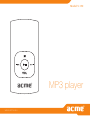
MP3 player
www.acme.eu
4
9
14
19
24
GB
LT
LV
EE
PL
User’s manual
Vartotojo gidas
Lietošanas instrukcija
Kasutusjuhend
Instrukcja obsługi
39 Warranty card
40 Garantinis lapas
41 Garantijas lapa
42Garantiileht
43 Karta gwarancyjna
29
DE Bedienungsanleitung
44Garantieblatt
34
RU
45
Инструкция пользователя
Гарантийный талон
3
GB
Thank You
Congratulations on your purchase of an MP3 player. This manual is designed to help you easily set up and begin
using your new player straight away. Please read this manual carefully and retain it for future reference. Please read
these instructions carefully before using your player.
Package Contents
Please make sure that the items shown below are included in the package. Should an item be missing, please
contact the local retailer from which you purchased this product.
•
•
•
•
•
MP3 player V-150
Stereo earphones
USB adapter
User manual
Warranty card
This package may contain plastic bags or other materials that pose a hazard to children. Please be sure to that you
safely dispose of all packing materials after opening.
Features
•
•
•
•
•
Integrated flash memory
Plays MP3 and WMA digital music files
Mobile data storage
USB 2.0 for fast file transfers
Integrated rechargeable battery
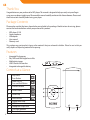
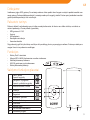
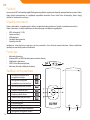
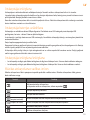
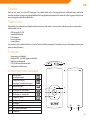
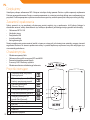
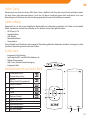
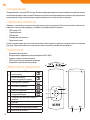
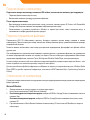
Controls at a Glance
4
1.
Play/Pause:
Press Button
Power On/Off:
Press and Hold Button
2.
Previous/Reverse
3.
Volume Down
4.
Volume Up
5.
6.
7.
8.
9.
10.
Next/Forward
Hole for Neck strap
USB Port
Headphone Output Jack
LED Status Indicator
Power Switch
GB
Powering Your Player
Your player has an integrated rechargeable battery. Typical music playtime is up to three hours.
Upon initial use, the battery should be charged fully (for four hours) to ensure the very best performance and a long
battery life.
Music play time is an estimated value. Actual play time may vary depending on the encoding method used and
upon other factors.
Charging Your Player
Your player can be charged through a PC’s USB connection. Plug one end of the USB cable into the player’s USB Port
and plug the other end into the USB port of a computer which has been switched on.
If the player is connected to a computer through a USB hub, the hub must be self-powered in order to charge the player’s
battery.
Carrying out file transfers will extend the charging time.
The battery used in this device may pose a risk of fire or chemical burn if mistreated. Do not disassemble, incinerate, or
heat the battery.
Do not connect the player to a power source other than that which is indicated here or on the label, as this may pose a risk
of fire or electric shock.
Turning Your Player On/Off
•
•
To turn your player on, slide the power switch to the left. The LED indicator will illuminate.
To turn your player off, slide the power switch to the right. The LED indicator will go dark.
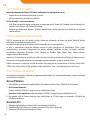
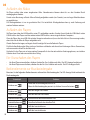
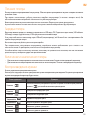
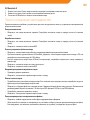
Music Playback Controls
Use the following controls during music playback. The LED indicator will flash during music playback.
Key Action
Function
Press
Start/Pause music playback. While playback is paused, press
Press
Play the previous track.
Press
Play the next track.
Hold
Rewind through the current track.
Hold
Fast-forward through the current track.
Press
Decrease the volume level.
Press
Increase the volume level.
to resume.
5
GB
Connecting to a Computer
Connect the player to a computer with the USB cable provided in order to:
• Transfer files to and from your player
• Perform basic file management procedures.
Once you have connected your player:
• Your computer will automatically recognize the player as a Removable Disk. An icon representing your player will
appear under “Devices with Removable Storage” when you open “My Computer”.
• It may take Windows several minutes to recognize and set up the device the first time it is connected, depending
upon your hardware configuration.
Transferring/Managing Files
The USB 2.0 connection makes it easy to transfer music quickly between the player and your computer. Simply use
the player as you would any removable disk using basic operating system commands.
You can also use your player to store video, photos, or any other type of files.
If you need further assistance with transferring and managing files, please refer to your operating system’s instruction
manual or on-screen help. If you are using media management software such as iTunes, WinAmp, or Windows Media
Player, please refer to their documentation for support.
Do not disconnect or otherwise interrupt the player during file transfer - this could damage or corrupt the player’s firmware
or your files.
For more information and support regarding music transfer and synchronization with Windows Media Player (WMP),
please see the help section included with WMP (click “Help > Synchronizing Content to Devices”).
Disconnecting from a Computer
Disconnect your player as instructed below to prevent data loss or file/firmware corruption.
Microsoft Windows
1. Double-click the green arrow in the taskbar located on the lower-right side of the computer screen (Safely
Remove Hardware).
2. Safely Remove Hardware: Select “USB Mass Storage Device” from the list that appears and then click on “Stop”.
Stop a Hardware Device: Select “USB Mass Storage Device” from the list that appears and then click on “OK”.
3. When the “Safe to Remove Hardware” window appears, click the OK button and disconnect the USB cable from
the player and your computer.
Macintosh OS X
1. On the left side of the Finder Window, identify the appropriate Removable Disk icon.
2. Click on the “Eject” arrow on the right of the Removable Disk icon.
3. Disconnect the USB cable from the player and your computer.
6
Troubleshooting
GB
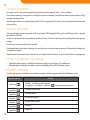
If you have a problem with this device, please read the troubleshooting guide below.
The player does not turn on.
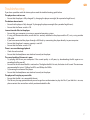
• Ensure that the player is fully charged. Try charging the player overnight (for a period of eight hours).
The buttons do not work.
• Ensure that the player is fully charged. Try charging the player overnight (for a period of eight hours).
• Ensure that the Power switch is ON.
I cannot transfer files to the player.
• Ensure that your computer is running a supported operating system.
• If using a USB extension cable, ensure that it is securely attached to the player and the PC, or try using another
USB cable.
• If you have connected the player through a USB hub, try connecting the player directly to your computer.
• Ensure that the player’s memory capacity is not full.
• Ensure that the Power switch is ON.
There is no sound during playback.
• Check the volume level.
• Ensure that the headphones are attached securely to the player.
The sound quality of the music is poor.
• Try playing the file on your computer. If the sound quality is still poor, try downloading the file again or reencoding the file yourself.
• Ensure that the bit rate of the file is not too low. The higher the file’s bit rate, the better it will sound. The minimum
recommended bit rate is 128kbps for MP3s and 96kbps for WMAs.
• Try lowering the volume of the player.
• Ensure that the headphones are attached securely to the player.
The player will not play my music file.
• Ensure that the file is in a compatible format.
• The file may be copy-protected and you no longer have authorization to play this file. If you feel this is in error,
please contact the service from which you downloaded the file.
7
GB
8
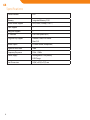
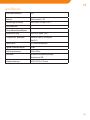
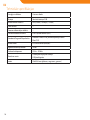
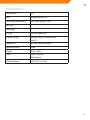
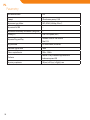
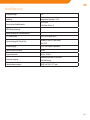
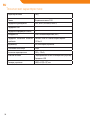
Specifications
Power indicator
LED
Memory
Integrated Memory 2 GB
Audio Format Support
MP3, WMA (>64kbps, Class 1)
DRM Support
--
Song Info Support
--
PC Interface
USB 2.0 Hi-Speed (MSC)
Plug and Play Support
Windows 2000/XP or newer
Mac OS X
Audio Output
Ø3.5mm Stereo (Headphone)
Signal-to-Noise Ratio
90dB
Frequency Response
20Hz – 20kHz
Power Supply
Rechargeable Li-Poly Battery
USB Charge
Unit Dimensions
30(W) x 62(H) x 9(D) mm
Dėkojame
LT
Sveikiname įsigijus MP3 grotuvą. Šis vartotojo vadovas skirtas padėti Jums lengvai nustatyti ir pradėti naudoti savo
naują grotuvą. Prašom atidžiai perskaityti šį vartotojo vadovą ir išsaugoti jį ateičiai. Prašom prieš pradedant naudoti
grotuvą atidžiai perskaityti šias instrukcijas.
Pakuotės turinys
Prašom įsitikinti, kad pakuotėje yra visi toliau nurodyti elementai. Jei kurios nors dalies trūksta, susisiekite su
vietiniu pardavėju, iš kurio pirkote šį produktą.
• MP3 grotuvas V-150
• Ausinės
• USB adapteris
• Naudojimo instrukcija
• Garantinė kortelė
Šioje pakuotėje gali būti plastikinių maišelių ar kitų medžiagų, kurios yra pavojingos vaikams. Prašom po atidarymo
saugiai išmesti visas pakavimo medžiagas.
Funkcijos
•
•
•
•
•
Vidinė „Flash“ atmintinė
Atkuria MP3 ir WMA skaitmenines muzikos rinkmenas
Mobilioji duomenų laikmena
USB 2.0 greitai persiųsti rinkmenoms
Vidinė įkraunamoji baterija
Valdymo funkcijos glaustai
1.
Leisti / pauzė
Spausti mygtuką
Įjungimas / išjungimas
Spausti ir palaikyti mygtuką
2.
Ankstesnė daina / atsukti
3.
Pritildyti
4.
Pagarsinti
5.
6.
7.
8.
9.
10.
Kita daina / prasukti
Hole for Neck strap
USB lizdas
Ausinių lizdas
LED būsenos indikatorius
Maitinimo jungiklis
9
LT
Grotuvo įjungimas
Jūsų grotuvas turi vidinę įkraunamąją bateriją. Įprastas muzikos grojimo laikas – iki trijų valandų.
Pirmą kartą naudojant, bateriją reikia visiškai įkrauti (keturias valandas), kad užtikrintumėte geriausią veikimą ir ilgą
baterijos naudojimo laiką.
Muzikos grojimo laikas yra apskaičiuojama reikšmė. Tikrasis grojimo laikas priklauso nuo naudojamo kodavimo būdo
ir kitų veiksnių.
Grotuvo įkrovimas
Grotuvą galima įkrauti per kompiuterio USB jungtį. Vieną USB laido galą įkiškite į grotuvo USB lizdą, o kitą – į įjungto
kompiuterio USB lizdą.
Jei grotuvas prie kompiuterio prijungiamas per USB skirstytuvą, šis turi turėti atskirą maitinimą, kad galėtų įkrauti grotuvo
bateriją.
Rinkmenų persiuntimas pailgins įkrovimo laiką.
Netinkamai grotuvą naudojant, jo baterija gali sukelti gaisro ar cheminio nudegimo pavojų. Neišmontuokite, nedeginkite
ir nekaitinkite baterijos.
Nejunkite grotuvo prie kitokio maitinimo šaltinio, nei nurodyta čia ar ant etiketės, nes galite sukelti elektros smūgio pavojų.
Grotuvo įjungimas / išjungimas
•
•
Norėdami grotuvą įjungti, stumtelkite maitinimo jungiklį į kairę. Užsidegs LED indikatorius.
Norėdami grotuvą išjungti, stumtelkite maitinimo jungiklį į dešinę. LED indikatorius užges.
Muzikos valdymas
Muzikos grojimo metu naudokite šiuos valdymo mygtukus. Muzikos grojimo metu LED indikatorius mirksi.
Mygtuko veiksmas
10
Funkcija
Spauskite
Pradėti / sustabdyti muzikos grojimą.
Kai grojimas sustabdytas, spauskite
Spauskite
Groti ankstesnę dainą.
Spauskite
Groti kitą dainą.
Laikykite
Atsukti dainą atgal.
Laikykite
Prasukti dainą į priekį.
Spauskite
Nutildyti.
Spauskite
Pagarsinti.
, kad grojimą pratęstumėte.
Prijungimas prie kompiuterio
LT
Prijunkite grotuvą prie kompiuterio naudodami pateikiamą USB laidą, kad:
• Perkeltumėte rinkmenas į grotuvą ar iš jo.
• Atliktumėte pagrindines rinkmenų tvarkymo procedūras.
Kai prijungsite grotuvą:
• Jūsų kompiuteris automatiškai atpažins grotuvą kaip keičiamąjį diską. Atidarius „My computer“, skyrelyje „Devices
with Removable Storage“ bus vaizduojama Jūsų grotuvo piktograma.
• Priklausomai nuo Jūsų įrangos konfigūracijos, pirmą kartą prijungus įrenginį, „Windows“ operacinei sistemai gali
prireikti kelių minučių, kad grotuvą atpažintų ir nustatytų.
Rinkmenų persiuntimas / tvarkymas
USB 2.0 jungtis leidžia lengvai persiųsti muziką iš kompiuterio į grotuvą ir atvirkščiai. Naudokite grotuvą taip, kaip
naudotumėte įprastą keičiamąjį diską, vykdydami paprasčiausias sistemines komandas.
Grotuve taip pat galite laikyti vaizdo rinkmenas, nuotraukas ar bet kurias kitas rinkmenas.
Jei Jums reikia papildomos pagalbos, kaip siųsti ir tvarkyti rinkmenas, skaitykite savo operacinės sistemos instrukciją
arba elektroninį pagalbos žinyną. Jei naudojate medijos tvarkymo programinę įrangą, pvz., „iTunes“, „WinAmp“ arba
„Windows Media Player“, skaitykite jų dokumentaciją.
Neatjunkite ar kitaip netrikdykite grotuvo rinkmenų persiuntimo metu – galite pažeisti ar panaikinti grotuvo
mikroprogramas ar rinkmenas.
Jei reikia išsamesnės informacijos ar pagalbos persiunčiant muziką ir sinchronizuojant su „Windows Media Player“ (WMP),
skaitykite su WMP pateikiamos pagalbos skyrių (spustelėkite „Help“ > „Synchronizing Content to Devices“).
Atjungimas nuo kompiuterio
Grotuvą atjunkite pagal toliau pateikiamas instrukcijas, kad išvengtumėte duomenų praradimo ar rinkmenos /
mikroprogramų sugadinimo.
Microsoft Windows
1.
2.
3.
Dukart spustelėkite užduočių juostos apačioje, dešinėje, esančią žalią rodyklę („Safely Remove Hardware“).
Saugiai pašalinti įrangą: iš sąrašo išsirinkite „USB Mass Storage Device “ ir spauskite „Stop “.
Sustabdyti įrenginį“: iš sąrašo išsirinkite „USB Mass Storage Device “ ir spauskite „OK“.
Atsidarius langui „Safe to Remove Hardware“, spustelėkite mygtuką „OK“ ir atjunkite USB laidą nuo grotuvo ir
kompiuterio.
Macintosh OS X
1. Paieškos lango kairėje pusėje raskite reikiamą disko pašalinimo piktogramą.
2. Spustelėkite disko pašalinimo piktogramos dešinėje esančią rodyklę „Eject“.
3. Nuo grotuvo ir kompiuterio atjunkite USB laidą.
11
LT
Trikčių šalinimas
Jei turite problemų dėl įrenginio, prašom perskaityti trikčių šalinimo instrukciją.
Grotuvas neįsijungia
• Įsitikinkite, kad grotuvas visiškai įkrautas. Bandykite įkrauti jį pernakt (aštuonias valandas).
Mygtukai neveikia
• Įsitikinkite, kad grotuvas visiškai įkrautas. Bandykite įkrauti jį pernakt (aštuonias valandas).
• Įsitikinkite, kad maitinimas ĮJUNGTAS.
Negalite perkelti rinkmenų į grotuvą
• Įsitikinkite, kad kompiuteris veikia su palaikoma operacine sistema.
• Jei naudojate USB prailginimo laidą įsitikinkite, kad jis saugiai prijungtas prie grotuvo ir kompiuterio, pabandykite
naudoti kitą USB laidą.
• Jei prijungėte grotuvą per USB šakotuvą, pabandykite prijungti jį teisiai prie kompiuterio.
• Įsitikinkite, kad grotuvo atmintis nėra užpildyta.
• Įsitikinkite, kad maitinimas ĮJUNGTAS.
Grojimo metu nieko nesigirdi
• Patikrinkite garso lygį.
• Įsitikinkite, kad ausinės gerai prijungtos prie grotuvo.
Muzikos garso kokybė labai prasta
• Pabandykite paleisti rinkmeną kompiuteryje. Jei garso kokybė bloga, pabandykite rinkmeną atsisiųsti dar kartą
arba ją perkoduoti.
• Įsitikinkite, kad rinkmenos sparta bitais nėra per žema. Kuo didesnė rinkmenos sparta bitais, tuo geresnis garsas.
Mažiausia rekomenduojama sparta bitais yra 128 kbps MP3 rinkmenoms ir 96 kbps WMA rinkmenoms.
• Pabandykite sumažinti grotuvo garsą.
• Įsitikinkite, kad ausinės gerai prijungtos prie grotuvo.
Grotuvas nepaleidžia muzikos rinkmenos
• Įsitikinkite, kad rinkmenų formatas tinkamas.
• Gali būti saugomos rinkmenos autoriaus teisės ir Jūs galite neturite leidimo jos groti. Jei manote, kad tai klaida,
susisiekite su paslaugos teikėju, iš kurio rinkmeną atsisiuntėte.
12
LT
Specifikacijos
Maitinimo indikatorius
LED
Atmintis
Vidinė atmintis 2 GB
Palaikomi garso formatai
MP3, WMA (> 64 kbps, Class 1)
DRM palaikymas
--
Dainų informacijos palaikymas
--
Kompiuterio sąsaja
USB 2.0 „Hi-Speed“ (MSC)
„Plug and Play“ palaikymas
Windows 2000/XP“ ar naujesnė
Mac OS X
Garso išvestis
Ø 3,5 mm stereoausinės
Signalo ir triukšmo santykis
90 dB
Dažnių atkuriamumas
20 Hz–20 kHz
Maitinimas
Įkraunama ličio polimerų baterija
Įkrovimas per USB
Įrenginio matmenys
30 (P) x 62 (A) x 9 (G) mm
13
LV
Paldies!
Apsveicam ar MP3 atskaņotāja iegādi! Rokasgrāmata palīdzēs sagatavot atskaņotāju pirmajai lietošanas reizei. Lūdzu,
rūpīgi izlasiet rokasgrāmatu un saglabājiet turpmākām atsaucēm. Pirms sākat lietot atskaņotāju, lūdzu, rūpīgi
izlasiet šīs lietošanas instrukcijas.
Iepakojuma saturs
Lūdzu, pārbaudiet, vai iepakojumā ir iekļauti turpmāk minētie piederumi. Ja kāds no piederumiem trūkst,
lūdzu, sazinieties ar vietējo izplatītāju, pie kura attiecīgo izstrādājumu iegādājāties:
•
•
•
•
•
MP3 atskaņotājs V-150;
Stereo austiņas;
USB adapteris;
Lietotāja rokasgrāmata;
Garantijas kartīte.
Iepakojums satur plastmasas maisiņus vai citus materiālus, kas ir bīstami maziem bērniem. Lūdzu, nodrošiniet
iepakojuma materiālu pareizu likvidēšanu.
Funkcijas
•
•
•
•
•
Iebūvēta zibatmiņa;
Atskaņo MP3 un WMA formāta ciparu mūzikas datnes;
Mobila datu glabātuve;
USB 2.0 ātrai datņu kopēšanai;
Iebūvēta atkārtoti uzlādējama baterija.
Vadības ierīču pārskats
1.
Atskaņošanai/pauzēšanai
nospiediet taustiņu:
Ieslēgšanai/izslēgšanai
nospiediet un turiet taustiņu:
2.
Iepriekšējā dziesma/attīšana:
3.
Skaļuma samazināšana:
4.
5.
6.
7.
8.
9.
10.
14
Skaļuma palielināšana:
Nākamā dziesma/pārtīšana:
Siksniņas pieslēgvieta
USB pieslēgvieta
Austiņu pieslēgvieta
Gaismas diožu statusa indikators
Ieslēgšanas/izslēgšanas slēdzis
LV
Atskaņotāja ieslēgšana
Atskaņotājam ir iebūvēta atkārtoti uzlādējama baterija. Normāls mūzikas atskaņošanas laiks ir trīs stundas.
Lai nodrošinātu atskaņotāja optimālu darbību un ilgu baterijas kalpošanas laiku, baterija pirms pirmās lietošanas reizes ir
pilnībā jāuzlādē. Baterija jāuzlādē vismaz četras stundas.
Normālais mūzikas atskaņošanas laiks ir teorētiski aprēķināts lielums. Faktiskais atskaņošanas laiks ir atkarīgs no mūzikas
datnes kodēšanas metodes un citiem faktoriem.
Atskaņotāja baterijas uzlādēšana
Atskaņotāju var uzlādēt no datora USB pieslēgvietas. Pieslēdziet vienu USB vada galu pie atskaņotāja USB
pieslēgvietas, bet otru – datora. Datoram jābūt ieslēgtam.
Ja atskaņotājs ir pieslēgts datoram caur USB centrmezglu, lai uzlādētu atskaņotāja bateriju, centrmezglam jānodrošina
autonoma barošana.
Datņu kopēšana pagarina baterijas uzlādes laiku.
Nepareizas lietošanas gadījumā šajā ierīcē izmantotā baterija var radīt ugunsgrēka vai ķīmisko apdegumu risku. Bateriju
nedrīkst izjaukt, pakļaut liesmu vai pārmērīga karstuma iedarbībai.
Atskaņotāju drīkst pieslēgt tikai pie šajā rokasgrāmatā vai uz uzlīmes aprakstītā barošanas avota. Pretējā gadījumā
radīsiet ugunsgrēka vai elektriskās strāvas trieciena risku!
Atskaņotāja ieslēgšana/izslēgšana
•
•
Lai atskaņotāju ieslēgtu, pārslēdziet ieslēgšanas/izslēgšanas slēdzi pa kreisi. Gaismas diožu indikators iedegsies.
Lai atskaņotāju izslēgtu, pārslēdziet ieslēgšanas/izslēgšanas slēdzi pa labi. Gaismas diožu indikators nodzisīs.
Mūzikas atskaņošanas vadības ierīces
Mūzikas atskaņošanas laikā ir pieejamas turpmāk aprakstītās vadības ierīces. Mūzikas atskaņošanas laikā gaismas
diožu indikators mirgo.
Taustiņš
Funkcija
Sāk/pauzē mūzikas atskaņošanu.
Lai turpinātu mūzikas atskaņošanu, vēlreiz nospiediet
Atskaņot iepriekšējo dziesmu.
Atskaņot nākamo dziesmu.
(nospiest un turēt)
(nospiest un turēt)
Pašreiz atskaņotā dziesma tiek paātrināti atskaņota atpakaļ.
Pašreiz atskaņotā dziesma tiek paātrināti atskaņota uz priekšu.
Samazina atskaņošanas skaļumu.
Palielina atskaņošanas skaļumu.
15
LV
Savienošana ar datoru
Izmantojot komplektā iekļauto USB kabeli, atskaņotāju var pieslēgt datoram, lai:
• Kopētu datnes no datora uz atskaņotāju un otrādi;
• Veiktu pamata datņu pārvaldīšanas darbības.
Kad atskaņotājs ir savienots ar datoru:
• Jūsu dators automātiski atpazīs atskaņotāju kā noņemamo disku. Atverot My Computer logu, atskaņotājs būs
redzams sadaļā Devices with Removable Storage;
• Pirmoreiz pieslēdzot ierīci datoram, Windows operētājsistēmā ierīces atpazīšana un iestatīšana var aizņemt
vairākas minūtes.
Datņu kopēšana/pārvaldīšana
USB 2.0 savienojums ļauj ātri pārsūtīt mūzikas datnes no atskaņotāja uz datoru un otrādi. Vienkārši lietojiet
atskaņotāju kā standarta noņemamo disku.
Jūs varat lietot atskaņotāju arī kā video materiālu, fotoattēlu un citu datņu glabātuvi.
Ja jums ir nepieciešama turpmāka palīdzība saistībā ar datņu pārsūtīšanu un pārvaldīšanu, lūdzu, skatiet
operētājsistēmas instrukciju rokasgrāmatu un ekrānā redzamās palīdzības norādes. Ja lietojat multivides
pārvaldīšanas programmu (piemēram, iTunes, WinAmp vai Windows Media Player), lūdzu, skatiet attiecīgās
programmatūras dokumentāciju.
Ņemiet vērā, ka datņu kopēšanas laikā ierīci nedrīkst atvienot no datora vai jebkādā citā veidā pārtraukt datora un ierīces
savienojumu, pretējā gadījumā pakļausiet atskaņotāja programmaparatūru vai datnes bojājumu riskam.
Papildu informācijai un atbalstam saistībā ar mūzikas datņu kopēšanu un sinhronizēšanu ar Windows Media Player
(WMP), lūdzu, skatiet atbilstošo WMP palīdzības sadaļu (noklikšķiniet “Help > Synchronizing Content to Devices”).
Atvienošana no datora
Lai nepieļautu datu zudumu vai datnes/programmaparatūras bojājumus, atvienojiet atskaņotāju saskaņā ar turpmāk
aprakstītajām instrukcijām.
Microsoft Windows
1. Dubultklikšķis uz datora ekrāna apakšējā labajā stūrī redzamās zaļās bultiņas (Safely Remove Hardware).
2. Droši noņemt aparatūru:
sarakstā izvēlieties USB Mass Storage Device un noklikšķiniet uz Stop.
Aparatūras ierīces apturēšana: sarakstā izvēlieties USB Mass Storage Device un noklikšķiniet uz OK.
3. Kad parādās Safe to Remove Hardware logs, noklikšķiniet uz OK (labi) pogas un atvienojiet USB kabeli no
atskaņotāja un datora.
Macintosh OS X
1. Meklētāja logs kreisajā pusē atlasiet atbilstošo noņemamā diska ikonu.
2. Noklikšķiniet uz Eject bultiņas, kas atrodas noņemamā diska ikonas labajā pusē.
3. Atvienojiet USB kabeli no atskaņotāja un datora.
16
Traucējummeklēšana
LV
Ja ierīces ekspluatācijas laikā gadās problēmas, lūdzu, skatiet turpmāk aprakstītās traucējummeklēšanas instrukcijas.
Atskaņotājs neieslēdzas:
• Pārbaudiet, vai baterija nav izlādējusies. Uzlādējiet bateriju vismaz astoņas stundas.
Atskaņotāja taustiņi nedarbojas:
• Pārbaudiet, vai baterija nav izlādējusies. Uzlādējiet bateriju vismaz astoņas stundas;
• Pārbaudiet, vai ieslēgšanas/izslēgšanas slēdzis ir ON (ieslēgts) pozīcijā.
Datnes nekopējas uz atskaņotāju:
• Pārbaudiet, vai datoram ir uzstādīta atbilstošā operētājsistēma;
• Ja lietojat USB pagarinājuma vadu, pārbaudiet, vai tas ir stingri pieslēgts atskaņotājam un datoram, nomainiet
USB kabeli;
• Ja atskaņotājs ir pieslēgts caur USB centrmezglu, mēģiniet atskaņotāju pieslēgt tieši datoram;
• Pārbaudiet, vai atskaņotāja atmiņā ir pietiekami daudz brīvas vietas;
• Pārbaudiet, vai ieslēgšanas/izslēgšanas slēdzis ir ON (ieslēgts) pozīcijā.
Atskaņošanas laikā nav dzirdama skaņa:
• Pārbaudiet atskaņošanas skaļumu;
• Pārbaudiet, vai austiņas ir pareizi savienotas ar atskaņotāju.
Zema mūzikas atskaņošanas kvalitāte:
• Mēģiniet datni atskaņot datorā. Ja skaņas kvalitāte joprojām ir zema, mēģiniet lejupielādēt datni vēlreiz vai
atkārtojiet kodēšanu;
• Pārbaudiet, vai datnes bitu ātrums nav pārāk zems. Jo augstāks ir datnes bitu ātrums, jo augstāka ir skaņas
kvalitāte. Minimālais ieteicamais bitu ātrums ir 128 kbps MP3s formāta gadījumā un 96 kbps WMA formāta
gadījumā;
• Samaziniet atskaņošanas skaļumu;
• Pārbaudiet, vai austiņas ir pareizi savienotas ar atskaņotāju.
Atskaņotājs neatskaņo mūzikas datni:
• Pārbaudiet, vai datne ir savietojamā formātā;
• Iespējams, datnei ir pretkopēšanas aizsardzība, un jums vairs nav datnes atskaņošanai nepieciešamo pilnvaru.
Ja uzskatāt, ka tā ir kļūda, lūdzu, sazinieties ar pakalpojumu sniedzēju, no kura attiecīgo datni lejupielādējāt.
17
LV
18
Tehniskās specifikācijas
Enerģijas indikators
Gaismas diode
Atmiņa
Iebūvētā atmiņa 2 GB
Audio formātu atbalsts
MP3, WMA (> 64 kbps, 1. klase)
DRM atbalsts
--
Dziesmu informācijas atbalsts
--
Personālā datora saskarne
USB 2.0, liela ātruma (MSC)
Standarta Plug and Play atbalsts
Windows 2000/XP vai jaunāka operētājsistēma
Mac OS X
Audio izvads
Ø3.5 mm stereo (austiņas)
Signāla un trokšņa robeža
90 dB
Frekvenču diapazons
20 Hz – 20 kHz
Barošanas avots
Uzlādējama litija jona baterija
USB pieslēgvieta
Izmēri
30x62x9 mm (platums, augstums, garums)
Täname
EE
Meil on hea meel, et ostsite MP3-mängija. See juhend aitab teil uut mängijat lihtsalt seadistada ning seda kohe
kasutama hakata. Lugege see juhend hoolikalt läbi ning hoidke edaspidiseks kasutamiseks alles. Lugege need juhised
enne mängija kasutamist hoolikalt läbi.
Pakendi sisu
Kontrollige, kas pakendis on allpool loetletud esemed. Kui mõni ese on puudu, pöörduge edasimüüja poole,
kellelt toote ostsite.
• MP3-mängija V-150
• Stereokõrvaklapid
• USB-adapter
• Kasutusjuhend
• Garantiikaart
See pakend võib sisaldada kilekotte ja muid lastele ohtlikke materjale. Kõrvaldage ohutult kõik pakendimaterjalid
pärast pakendi avamist.
Funkcijas
•
•
•
•
•
Integreeritud välkmälu
Mängib MP3- ja WMA-digimuusikafaile
Mobiilne andmemälu
USB 2.0 kiireks failiedastuseks
Integreeritud laetav aku
Juhtelementide ülevaade
1.
Mängi/paus:
vajutage nuppu
Toide sees/väljas:
vajutage ja hoidke all nuppu
2.
Eelmine/tagasi
3.
Helitugevus väiksemaks
4.
5.
6.
7.
8.
9.
10.
Helitugevus suuremaks
Järgmine/edasi
Kaelapaela ava
USB-port
Kõrvaklapiväljund
LED-olekuindikaator
Toitelüliti
19
EE
Mängija toide
Teie mängijal on integreeritud laetav aku. Tavaline muusika mängimise aeg on kuni kolm tundi.
Enne esimest kasutamist tuleks aku selle suurima võimsuse ja pika kasutusea tagamiseks täiesti täis laadida (neli tundi).
Muusika esitamise aeg on hinnanguline. Tegelik mänguaeg võib sõltuvalt kasutatavast kodeerimisajast ja muudest
teguritest erineda.
Mängija laadimine
Teie mängijat saab laadida arvuti USB-liidese kaudu. Ühendage USB-kaabli üks ots mängija USB-porti ja teine ots
sisselülitatud arvuti USB-porti.
Kui mängija on ühendatud arvutiga USB-jaoturi kaudu, peab jaotur olema pingestatud, et mängija akut oleks võimalik
laadida.
Failiedastus pikendab laadimisaega.
Selles seadmes kasutatav aku võib valel käitlemisel kujutada tulekahju- või keemilise söövituse ohtu. Ärge lammutage,
põletage ega kuumutage akut.
Ärge ühendage mängijat elektrikontakti, mis ei vasta seadme sildil olevatele andmetele, vastasel korral võib tekkida
tulekahju või elektrilöögi oht.
Mängija sisse- ja väljalülitamine
•
•
Mängija sisselülitamiseks lükake toitelüliti vasakule. LED-indikaator süttib.
Mängija väljalülitamiseks lükake toitelüliti paremale. LED-indikaator kustub.
Muusika taasesituse juhtelemendid
Kasutage muusika taasesitamise ajal järgmisi juhtelemente. LED-indikaator vilgub muusika taasesituse ajal.
Nupp
20
Funktsioon
Vajutage nuppu
Muusika taasesitamise alustamine/peatamine.
Kui taasesitus on peatatud, vajutage jätkamiseks nuppu
Vajutage nuppu
Mängib eelmist lugu.
Vajutage nuppu
Mängib järgmist lugu.
Hoidke all nuppu
Praeguse loo kerimine.
Hoidke all nuppu
Kerib praegust lugu kiiresti edasi.
Vajutage nuppu
Helitugevuse vähendamine.
Vajutage nuppu
Helitugevuse suurendamine.
Arvutiga ühendamine
EE
Ühendage mängija arvutiga kaasasoleva USB-kaabli abil. Nüüd saate:
• Teisaldada mängijasse ja mängijast faile;
• Kasutada peamisi failihalduse funktsioone.
Pärast mängija ühendamist:
• Tuvastab arvuti mängija automaatselt eemaldatava plaadina. Pärast jaotise „My Computer“ avamist on suvandi
„Devices with Removable Storage” all näha mängijat kujutav ikoon.
• Esimesel korral võib Windowsil kuluda seadme tuvastamiseks ja seadistamiseks mitu minutit sõltuvalt teie
riistvara konfiguratsioonist.
Failide teisaldamine/haldamine
USB 2.0 ühendus lihtsustab muusika kiiret teisaldamist mängija ja arvuti vahel. Kasutage mängijat nii nagu
eemaldatavat plaati, rakendades operatsioonisüsteemi põhifunktsioone.
Samuti võib mängijat kasutada videote, fotode ja muud tüüpi failide salvestamiseks.
Kui vajate failide teisaldamisel ja haldamisel täiendavat abi, lugege oma operatsioonisüsteemi kasutusjuhendit
või ekraanispikrit. Kui kasutate meediahaldustarkvara, nt iTunes, WinAmp ja Windows Media Player, lugege abi
saamiseks nende juhendeid.
Ärge lahutage ega katkestage mängijat failiteisalduse ajal muul viisil – mängija püsivara või failid võivad saada
kahjustada või muutuda kasutuskõlbmatuks.
Lisateavet ja tuge muusika teisaldamise ning Windows Media Playeriga (WMP) sünkroonimise kohta saate WMP-d
käsitlevast jaotisest (klõpsake menüüs „Help > Synchronizing Content to Devices”).
Arvutist lahutamine
Andmekao ning failide/püsivara kahjustumise vältimiseks lahutage mängija arvutist allpool kirjeldatud viisil.
Microsoft Windows
1. Tehke topeltklõps arvutiekraani paremas alumises nurgas tegumiribal asuval rohelisel noolel (Safely Remove
Hardware).
2. Riistvara ohutu eemaldamine: Valige kuvatavast loendist suvand „USB Mass Storage Device” ja klõpsake
seejärel nuppu „Stop”.
Riistvaraseadme seiskamine: Valige kuvatavast loendist suvand „USB Mass Storage Device” ja klõpsake seejärel
nuppu „OK”.
3. Pärast akna „Safe to Remove Hardware” kuvamist klõpsake nuppu „OK“ ja lahutage USB-kaabel mängijast ja
arvutist.
Macintosh OS X
1. Finderi akna vasakpoolsel küljel on vastav eemaldatava plaadi ikoon.
2. Klõpsake eemaldatava plaadi ikooni paremal pool olevat noolt „Eject”.
3. Lahutage USB-kaabel mängijast ja arvutist.
21
EE
Tõrkeotsing
Kui teil tekib seadmega probleeme, lugege allolevaid tõrkeotsingu juhiseid.
Mängija ei lülitu sisse.
• Mängija peab olema täielikult laetud. Püüdke laadida mängijat öösel (kaheksa tundi).
Nupud ei tööta.
• Mängija peab olema täielikult laetud. Püüdke laadida mängijat öösel (kaheksa tundi).
• Jälgige, et toitelüliti oleks sees (ON).
Faile ei saa mängijasse teisaldada.
• Jälgige, et arvuti töötaks toetatava operatsioonisüsteemiga.
• USB-pikenduskaabli kasutamisel tuleb veenduda, et see oleks kindlalt mängija ja arvutiga ühendatud. Võite
proovida ka mõnda teist USB-kaablit.
• Kui olete ühendanud mängija USB-jaoturi kaudu, proovige ühendada mängija otse arvutiga.
• Jälgige, et mängija mälu ei oleks täis.
• Jälgige, et toitelüliti oleks sees (ON).
Taasesituse ajal ei ole heli.
• Kontrollige helitugevuse taset.
• Kontrollige, et kõrvaklapid oleksid kindlalt mängijaga ühendatud.
Muusika helikvaliteet on halb.
• Proovige mängida faili arvutis. Kui helikvaliteet on ikka kehv, proovige fail uuesti alla laadida või kodeerige fail
ise ümber.
• Jälgige, et faili bitikiirus ei oleks liiga madal. Mida suurem on bitikiirus, seda parem on heli. Minimaalne soovituslik
bitikiirus on 128 kbps MP3-del ja 96 kbps WMA-del.
• Proovige vähendada mängija helitugevust.
• Kontrollige, et kõrvaklapid oleksid kindlalt mängijaga ühendatud.
Mängija ei mängi mu muusikafaile.
• Jälgige, et fail oleks ühilduvas vormingus.
• Fail võib olla kopeerimiskaitsega ning teil pole õigust faili mängida. Kui arvate, et tegemist on veaga, pöörduge
pakkuja poole, kellelt faili alla laadisite.
22
EE
Spetsifikatsioon
Toiteindikaator
LED
Mälu
Integreeritud mälu 2 GB
Toetatavad audiovormingud
MP3, WMA (>64 kbps, 1. klass)
DRM-tugi
--
Looinfo tugi
--
PC-liides
USB 2.0 Hi-speed (MSC)
Plug and Play tugi
Windows 2000/XP või uuem versioon
Mac OS X
Audioväljund
Ø 3,5 mm stereo (kõrvaklapid)
Signaali-müra suhe
90 dB
Sagedus
20 Hz – 20 kHz
Toide
Laetav Li-Poly aku
USB-laadimine
Seadme mõõtmed
30 (l) x 62 (k) x 9 (s) mm
23
PL
Dziękujemy
Gratulujemy zakupu odtwarzacza MP3. Niniejsza instrukcja obsługi pomoże Państwu szybko rozpocząć użytkowanie
Państwa nowego odtwarzacza. Prosimy o uważne zapoznanie się z niniejszą instrukcją obsługi oraz o zachowanie jej na
przyszłość. Przed rozpoczęciem użytkowania odtwarzacza, prosimy uważnie przeczytać niniejszą instrukcję obsługi.
Zawartość opakowania
Należy upewnić się, że przedmioty zilustrowane poniżej znajdują się w opakowaniu. Jeśli brakuje któregoś z
elementów zestawu, należy skontaktować się z lokalnym sprzedawcą, od którego niniejszy produkt został nabyty.
• Odtwarzacz MP3 V-150
• Słuchawki stereo
• Przejściówka USB
• Instrukcja obsługi
• Karta gwarancyjna
Niniejsze opakowanie może zawierać torebki z tworzyw sztucznych, jak również inne materiały, mogące stanowić
zagrożenie dla dzieci. Po otwarciu opakowania należy w sposób bezpieczny zutylizować wszystkie znajdujące się w
nim materiały pakunkowe.
Charakterystyka
•
•
•
•
•
Wbudowana pamięć flash
Odtwarza cyfrowe pliki muzyczne MP3 oraz WMA
Przenośne przechowywanie danych
Transmisja USB 2.0 o dużej szybkości
Wbudowana bateria wielokrotnego ładowania
Przyciski sterujące
1.
2.
3.
Zmniejszanie poziomu głośności
4.
Zwiększanie poziomu głośności
5.
24
Odtwarzaj/Pauza (Play/Pause):
Naciśnij przycisk
Włączanie/wyłączanie (On/Off ):
Naciśnij i przytrzymaj przycisk
Poprzedni/przewijanie
(Previous/Reverse)
6.
7.
8.
9.
10.
Następny/przewijanie do
przodu (Next/Forward)
Otwór na pasek na szyję
Port USB
Wyjście słuchawkowe
Dioda LED
Włącznik/wyłącznik
PL
Zasilanie odtwarzacza
Niniejszy odtwarzacz wyposażony jest we wbudowaną baterię wielokrotnego ładowania. Standardowy czas
odtwarzania wynosi do trzech godzin.
Aby zmaksymalizować wydajność i czas życia baterii, przy pierwszym użyciu baterię należy w pełni naładować (przez
cztery godziny).
Czas odtwarzania muzyki jest wartością szacunkową. Rzeczywisty czas odtwarzania muzyki może być inny, w zależności
od zastosowanej metody kodowania oraz innych czynników.
Ładowanie odtwarzacza
Odtwarzacz może zostać naładowany poprzez łącze komputerowe USB. Należy podłączyć jeden koniec kabla USB do
portu USB odtwarzacza, a drugi koniec do portu USB włączonego komputera.
Jeśli odtwarzacz został podłączony do komputera przez koncentrator (hub) USB, należy upewnić się, że
koncentrator posiada własne zasilanie, w przeciwnym wypadku naładowanie odtwarzacza nie będzie możliwe.
Transfer plików spowoduje zwiększenie czasu ładowania.
Bateria, w którą wyposażony jest niniejszy odtwarzacz może, w razie nieodpowiedniego postępowania, stanowić
zagrożenie pożarem lub oparzeniem chemicznym. Baterii nie należy demontować, palić ani podgrzewać.
Podłączanie odtwarzacza do źródeł zasilania innych niż to, które jest dołączone do urządzenia lub wskazane na plakietce,
grozi pożarem lub porażeniem elektrycznym.
Włączanie/wyłączanie odtwarzacza.
•
•
Aby włączyć odtwarzacz należy przesunąć przełącznik zasilania w lewo. Zaświeci się dioda LED sygnalizująca
zasilanie.
Aby wyłączyć odtwarzacz należy przesunąć przełącznik zasilania w prawo. Zgaśnie dioda LED.
Kontrola odtwarzania muzyki
Odtwarzanie muzyki można kontrolować w następujący sposób. Dioda LED będzie mrugać w czasie odtwarzania
muzyki.
Działanie przycisku
Funkcja
Naciśnij
Rozpocznij/Zatrzymaj odtwarzanie muzyki. Gdy odtwarzanie muzyki jest
aby je wznowić.
zatrzymane, należy nacisnąć przycisk
Naciśnij
Odtwórz poprzedni utwór.
Naciśnij
Odtwórz kolejny utwór.
Przytrzymaj
Przewiń obecnie odtwarzane nagranie do tyłu.
Przytrzymaj
Przewiń obecnie odtwarzane nagranie do przodu.
Naciśnij
Zmniejsz poziom głośności.
Naciśnij
Zwiększ poziom głośności.
25
PL
Łączenie z komputerem
Należy użyć kabla USB, dołączonego do niniejszego zestawu, aby połączyć odtwarzacz z komputerem w celu:
• Transferu plików do i z odtwarzacza
• Wykonywania podstawowych funkcji zarządzania plikami.
Po podłączeniu odtwarzacza:
• Komputer automatycznie rozpozna odtwarzacz jako zewnętrzny nośnik danych. W oknie „My Computer”, pośród
„Devices with Removable Storage” pojawi się ikona przedstawiająca odtwarzacz.
• Przy pierwszym podłączeniu do komputera system Windows może potrzebować kilku minut, aby rozpoznać i
skonfigurować odtwarzacz, w zależności od konfiguracji sprzętowej komputera.
Przesyłanie plików oraz zarządzanie nimi
Połączenie USB 2.0 pozwala na łatwy transfer muzyki pomiędzy odtwarzaczem a komputerem. Należy po prostu
używać odtwarzacza tak, jak dowolnego innego, przenośnego dysku, przy pomocy podstawowych komend systemu
operacyjnego.
Odtwarzacz może być również wykorzystywany do przechowywania filmów wideo, zdjęć oraz plików dowolnego
typu.
Jeśli potrzebują Państwo dodatkowej pomocy w zakresie przesyłania plików i zarządzania nimi, prosimy zapoznać się
z instrukcją użytkowania Państwa systemu operacyjnego lub z pomocą dostępną na ekranie komputera. Jeśli używacie
Państwo oprogramowania do zarządzania multimediami, takiego jak iTunes, WinAmp lub Windows Media Player,
prosimy zapoznać się z dokumentacją tego oprogramowania.
W czasie przesyłania plików nie należy odłączać odtwarzacza od komputera lub w inny sposób zakłócać pracy
odtwarzacza, gdyż może to spowodować uszkodzenie oprogramowania odtwarzacza lub uszkodzenie przesyłanych
plików.
Więcej informacji oraz wsparcie techniczne na temat przesyłania plików muzycznych oraz synchronizacji za pomocą
Windows Media Player (WMP) dostępne jest w sekcji pomocy programu WMP (należy kliknąć „Help > Synchronizing
Content to Devices”).
Odłączanie od komputera
Aby uniknąć utraty danych lub uszkodzenia plików/oprogramowania odtwarzacz należy odłączać zgodnie z
poniższymi instrukcjami.
Microsoft Windows
1. Należy dwukrotnie kliknąć na zielonej strzałce znajdującej się po prawej stronie pasku zadań (Safely Remove
Hardware).
2. Bezpieczne usuwanie sprzętu: Z listy, która się pojawi, należy wybrać „USB Mass Storage Device”, a następnie
wybrać „Stop”.
Zatrzymywanie pracy urządzenia sprzętowego: Z listy, która się pojawi, należy wybrać „USB Mass Storage
Device”, a następnie kliknąć „OK”.
3. Kiedy pojawi się komunikat „Safe to Remove Hardware” należy kliknąć „OK”, a następnie odłączyć kabel USB od
odtwarzacza oraz od komputera.
26
Macintosh OS X
PL
1. Należy zlokalizować odpowiednie, odłączalne urządzenie po lewej stronie okna wyszukiwania.
2. Należy kliknąć na strzałce „Eject”, znajdującej się po prawej stronie ikony symbolizującej odłączalne urządzenie.
3. Należy odłączyć kabel USB od odtwarzacza oraz od komputera.
Rozwiązywanie problemów
W przypadku problemów z urządzeniem należy zastosować się do poniższych instrukcji.
Odtwarzacz się nie włącza.
• Należy upewnić się, że odtwarzacz jest w pełni naładowany. Należy naładować odtwarzacz (przez 8 godzin).
Przyciski nie działają.
• Należy upewnić się, że odtwarzacz jest w pełni naładowany. Należy naładować odtwarzacz (przez 8 godzin).
• Należy upewnić się, że przełącznik zasilania jest w pozycji WŁĄCZONY.
Transfer plików do odtwarzacza nie jest możliwy.
• Należy upewnić się, że komputer pracuje pod kontrolą odpowiedniego systemu operacyjnego.
• W przypadku używania przedłużającego kabla USB należy upewnić się, że kabel jest odpowiednio podłączony do
odtwarzacza oraz do komputera lub spróbować użyć innego kabla.
• Jeśli odtwarzacz został podłączony przez koncentrator (hub) USB, należy spróbować podłączyć odtwarzacz
bezpośrednio do komputera.
• Należy upewnić się, że pamięć odtwarzacza nie jest pełna.
• Należy upewnić się, że przełącznik zasilania jest w pozycji WŁĄCZONY.
W czasie odtwarzania muzyki brak jest dźwięku.
• Należy sprawdzić poziom głośności.
• Należy upewnić się, że słuchawki zostały odpowiednio podłączone do odtwarzacza.
Jakość dźwięku jest niska.
• Należy spróbować odtworzyć plik na komputerze. Jeśli jakość dźwięku nadal jest niska, należy ponownie pobrać
plik lub nagrać go samodzielnie.
• Należy upewnić się, że liczba bitów na sekundę nie jest zbyt niska. Im wyższa jest liczba bitów na sekundę w pliku,
tym lepsza jest jakość dźwięku. Najniższa zalecana liczba bitów na sekundę w przypadku plików MP3 to 128kbps,
a w przypadku plików WMA 96kbps.
• Należy spróbować obniżyć poziom głośności odtwarzacza.
• Należy upewnić się, że słuchawki zostały odpowiednio podłączone do odtwarzacza.
Odtwarzacz nie odtwarza pliku muzycznego.
• Należy upewnić się, że format pliku jest wspierany przez odtwarzacz.
• Plik może być chroniony przed kopiowaniem, a Państwo możecie nie mieć autoryzacji, aby go odtworzyć. W
przypadku, gdzy sądzicie Państwo, że problem tkwi w prawach autorskich (ochrona przed kopiowaniem), należy
skontaktować się z usługodawcą, od którego plik został pobrany.
27
PL
28
Parametry
Wskaźnik zasilania
LED
Pamięć
Wbudowana pamięć 2 GB
Wspierane typy plików
MP3, WMA (>64kbps, Klasa 1)
Wsparcie dla DRM
--
Wsparcie dla informacji o utworach (Song Info)
--
Interfejs PC
USB 2.0 Hi-Speed (MSC)
Wsparcie Plug and Play
Windows 2000/XP lub nowsze
Mac OS X
Wyjście audio
Ø3.5mm Stereo (słuchawki)
Stosunek sygnał/szum
90dB
Zakres częstotliwości
20Hz – 20kHz
Zasilanie
Bateria Li-Poly wielokrotnego ładowania
Ładowanie przez USB
Wymiary urządzenia
30(szer.) x 62(wys.) x9(głęb.) mm
Vielen Dank
DE
Glückwunsch zum Kauf von diesem MP3 Player. Dieses Handbuch soll Ihnen die ersten Schritte erleichtern, damit
Sie Ihren Player sofort benutzen können. Lesen Sie sich dieses Handbuch genau durch und heben Sie es zum
Nachschlagen auf. Bitte lesen Sie diese Anleitung genau durch, bevor Sie Ihren Player verwenden.
Lieferumfang
Überprüfen Sie, ob alle unten aufgeführten Bestandteile im Lieferumfang enthalten sind. Sollte ein Bestandteil
fehlen, kontaktieren Sie bitte Ihren Händler vor Ort, bei dem Sie das Gerät gekauft haben.
• MP3 Player V-150
• Stereokopfhörer
• USB-Adapter
• Benutzerhandbuch
• Garantiekarte
Dieses Produkt kann Plastiktüten oder andere für Kleinkinder gefährliche Materialien enthalten. Entsorgen Sie bitte
sämtliches Verpackungsmaterial nach dem Öffnen.
Funktionen
•
•
•
•
•
Integrierter Flash-Speicher
Spielt digitale MP3- und WMA-Musikdateien ab
Mobiler Datenspeicher
USB 2.0 zur schnellen Dateiübertragung
Integrierter Akku
Bedienelemente auf einen Blick
1.
Wiedergabe/Pause:
Drücken Sie die Taste
Ein/Aus:
Halten Sie die Taste gedrückt
2.
Voriges/Rücklauf
3.
Leiser
4.
Lauter
5.
6.
7.
8.
9.
10.
Nächstes/Vorlauf
Loch für Halsband
USB-Anschluss
Kopfhöreranschluss
LED-Statusanzeige
Ein-/Aus-Schalter
29
DE
Aufladen des Akkus
Ihr Player verfügt über einen eingebauten Akku. Normalerweise können damit bis zu drei Stunden Musik
wiedergegeben werden.
Vor der ersten Benutzung sollte der Akku vollständig aufgeladen werden (vier Stunden), um eine lange Akkulebensdauer
zu gewährleisten.
Die Wiedergabedauer ist nur ein geschätzter Wert. Die tatsächliche Wiedergabedauer kann je nach Kodierung und
anderen Faktoren variieren.
Aufladen des Players
Ihr Player kann über den USB-Anschluss eines PCs aufgeladen werden. Stecken Sie ein Ende des USB-Kabels in den
USB-Anschluss des Players und das andere in den USB-Anschluss eines eingeschalteten Computers.
Wenn der Player über einen USB-Hub mit dem Computer verbunden wird, muss der Hub selbst mit Strom versorgt werden,
damit über ihn der Akku des Players aufgeladen wird.
Werden Dateien übertragen, verlängert dies die benötigte Zeit zum Aufladen des Players.
Die falsche Handhabung des Akkus in diesem Gerät kann zu Bränden und chemischen Verätzungen führen. Demontieren,
verbrennen oder erhitzen Sie den Akku nicht.
Verbinden Sie den Player nie mit einer anderen Stromquelle als den hier oder auf dem Gerät angegebenen, sonst drohen
Gefahren durch Feuer oder einen elektrischen Schlag.
Ein-/Ausschalten des Players
•
•
Um Ihren Player einzuschalten, schieben Sie den Ein-/Aus-Schalter nach links. Die LED-Anzeige leuchtet auf.
Um Ihren Player auszuschalten, schieben Sie den Ein-/Aus-Schalter nach rechts. Die LED-Anzeige erlischt.
Bedienelemente zur Musikwiedergabe
Benutzen Sie die folgenden Bedienelemente während der Musikwiedergabe. Die LED-Anzeige blinkt während der
Musikwiedergabe.
Tastendruck
30
Funktion
Drücken von
Startet die Musikwiedergabe/hält sie an.
Wenn die Musikwiedergabe pausiert ist, drücken Sie zum Fortsetzen
Drücken von
Gibt den vorigen Titel wieder.
Drücken von
Gibt den nächsten Titel wieder.
Gedrückthalten von
Schnellrücklauf durch den aktuellen Titel.
Gedrückthalten von
Schnellvorlauf durch den aktuellen Titel.
Drücken von
Stellt die Lautstärke leiser.
Drücken von
Stellt die Lautstärke lauter.
Verbindung mit einem Computer
DE
Verbinden Sie den Player über das mitgelieferte USB-Kabel mit einem Computer:
• Zum Übertragen von Dateien auf und von Ihrem Player und
• Zur generellen Dateiverwaltung.
Sobald Sie Ihren Player verbunden haben:
• Erkennt Ihr Computer automatisch den Player als Wechseldatenträger und es erscheint ein Symbol für Ihren
Player im Arbeitsplatz unter „Devices with Removable Storage“.
• Je nach Hardwarekonfiguration benötigt Windows eventuell einige Minuten, um das Gerät zu erkennen und
einzurichten, wenn es zum ersten Mal angeschlossen wird.
Übertragung/Verwaltung von Dateien
Die USB-2.0-Verbindung vereinfacht die Übertragung von Musik zwischen Ihrem Player und Ihrem Computer.
Verwenden Sie den Player genauso, wie Sie auch andere Wechseldatenträger verwenden.
Auf Ihrem Player können Sie auch Videos, Fotos und andere Dateitypen speichern.
Weitere Hinweise und Tipps zur Übertragung und Verwaltung von Dateien finden Sie im Handbuch Ihres
Betriebssystems oder in der Bildschirmhilfe. Falls Sie Software zur Musikverwaltung nutzen, z.B. iTunes, WinAmp oder
Windows Media Player, lesen Sie bei Problemen bitte die zugehörigen Handbücher.
Trennen Sie den Player nie während der Dateiübertragung vom PC. Dies kann die Firmware des Players oder Ihre Dateien
beschädigen.
Weitere Informationen und Hilfe zur Musikübertragung und Synchronisierung mit Windows Media Player (WMP) finden
Sie über die Hilfe des WMP. Klicken Sie dazu im WMP auf „Help > Synchronizing Content to Devices“.
Trennen der Verbindung mit einem Computer
Trennen Sie Ihren Player wie nachfolgend beschrieben vom Computer, um Schäden an der Datei oder Firmware zu
vermeiden.
Microsoft Windows
1. Doppelklicken Sie den grünen Pfeil in der Taskleiste unten rechts auf dem Computerbildschirm (Safely Remove
Hardware).
2. Hardware sicher entfernen: Wählen Sie „USB Mass Storage Device“ aus der sich öffnenden Liste und klicken Sie
auf „Stop“.
Beenden eines Hardware-Geräts: Wählen Sie „USB Mass Storage Device“ aus der sich öffnenden Liste und
klicken Sie auf „OK“.
3. Wenn der Hinweis „Safe to Remove Hardware“ erscheint, klicken Sie auf OK und trennen Sie das USB-Kabel vom
Player und Computer.
Macintosh OS X
1. Wählen Sie links im Finder das entsprechende Symbol für den Wechseldatenträger.
2. Klicken Sie auf den „Eject“-Pfeil rechts neben dem Symbol für den Wechseldatenträger.
3. Trennen Sie das USB-Kabel vom Player und vom Computer.
31
DE
Fehlersuche
Falls ein Problem mit diesem Gerät auftritt, lesen Sie bitte folgenden Ratgeber zur Fehlersuche.
Der Player lässt sich nicht einschalten.
• Überprüfen Sie, ob der Player vollständig aufgeladen ist. Laden Sie den Player über Nacht vollständig auf (für
ca. 8 Stunden).
Die Tasten reagieren nicht.
• Überprüfen Sie, ob der Player vollständig aufgeladen ist. Laden Sie den Player über Nacht vollständig auf (für
ca. 8 Stunden).
• Vergewissern Sie sich, dass der Player eingeschaltet ist.
Ich kann keine Dateien auf den Player übertragen.
• Überprüfen Sie, ob Ihr Computer mit einem unterstützten Betriebssystem läuft.
• Achten Sie bei Verwendung eines USB-Kabels darauf, dass dieses korrekt an den Player und den PC angeschlossen
ist, oder versuchen Sie es mit einem anderen Kabel.
• Falls Sie den Player über einen USB-Hub mit dem Computer verbunden haben, versuchen Sie, ob der Fehler sich
beheben lässt, wenn Sie den Player direkt mit dem PC verbinden.
• Vergewissern Sie sich, dass der Speicher des Players nicht voll ist.
• Vergewissern Sie sich, dass der Player eingeschaltet ist.
Bei der Wiedergabe höre ich keinen Ton.
• Überprüfen Sie den Lautstärkepegel.
• Vergewissern Sie sich, dass die Kopfhörer korrekt an den Player angeschlossen sind.
Die Klangqualität der Musik ist schlecht.
• Testen Sie die Datei auf Ihrem Computer. Wenn die Klangqualität immer noch schlecht ist, laden Sie die Datei
erneut herunter bzw. kodieren Sie sie erneut.
• Achten Sie darauf, dass die Bitrate der Datei nicht zu niedrig ist. Je höher die Bitrate der Datei, desto besser wird
die Klangqualität. Als Mindestbitrate wird 128 kbps für MP3s und 96 kbps für WMAs empfohlen.
• Drehen Sie die Lautstärke leiser.
• Vergewissern Sie sich, dass die Kopfhörer korrekt an den Player angeschlossen sind.
Der Player spielt meine Musikdatei nicht ab.
• Vergewissern Sie sich, dass die Datei in einem kompatiblen Format vorliegt.
• Die Datei ist unter Umständen kopiergeschützt und Sie haben nicht die Berechtigung zur Wiedergabe dieser
Datei. Falls dies Ihrer Meinung nach ein Fehler ist, kontaktieren Sie bitte den Anbieter, bei dem Sie die Datei
heruntergeladen haben.
32
DE
Spezifikationen
Energieanzeige
LED
Speicher
Integrierter Speicher 2 GB
Unterstützte Audioformate
MP3, WMA
(>64 kbps, Klasse 1)
DRM-Unterstützung
--
Unterstützung für Titelinformation
--
PC-Schnittstelle
USB 2.0 Hi-Speed (MSC)
Unterstützung für Plug & Play
Windows 2000/XP oder höher
Mac OS X
Audioausgang
Ø 3,5 mm Stereo (Kopfhörer)
Signal-Rausch-Abstand
90 dB
Frequenzbereich
20 Hz – 20 kHz
Stromversorgung
Wiederaufladbarer LiPoly-Akku
USB-Aufladung
Geräte-abmessungen
30 (B) x 62 (H) x 9 (T) mm
33
RU
Благодарим вас
Поздравляем вас с покупкой MP3-плеера. Данное руководство предназначено для помощи в настройке и начале
использования вашего нового плеера. Внимательно прочтите данное руководство и сохраните для дальнейшего
использования. Перед использованием плеера внимательно прочтите данные инструкции.
Содержимое комплекта
Убедитесь, что в комплект включены все представленные ниже предметы. При отсутствии какого-либо из них,
обратитесь к розничному продавцу, у которого вы приобрели данный продукт.
• MP3-плеер V-150
• Стереонаушники
• USB-адаптер
• Руководство пользователя
• Гарантийный талон
Данная упаковка может включать полиэтиленовые пакеты и другие материалы, которые являются опасными
для детей. Просим вас обеспечить надлежащую утилизацию всех упаковочных материалов.
Особенности
•
•
•
•
•
Встроенная флеш-память
Воспроизводит цифровые музыкальные файлы MP3 и WMA
Функция съемного носителя данных
USB 2.0 для быстрого перемещения файлов
Встроенный заряжаемый аккумулятор
Обзор кнопок управления
1.
Воспроизведение/Пауза:
Нажать кнопку
Питание вкл./выкл.:
Нажать и удерживать кнопку
2.
Предыдущий/Перемотка
3.
Уменьшить громкость
4.
Увеличить громкость
5.
Следующий/Вперед
Отверстие под крепление шейного
ремешка
USB-порт
Разъем для наушников
Светодиодный индикатор состояния
Выключатель питания
6.
7.
8.
9.
10.
34
RU
Питание плеера
В плеер встроен перезаряжаемый аккумулятор. Обычное время проигрывания музыки плеером составляет
до восьми часов.
При первом использовании следует полностью зарядить аккумулятор (в течение четырех часов) для
обеспечения оптимальной работы и длительной службы аккумулятора.
Время проигрывания музыки является расчетным значением. Фактическое время проигрывания
музыки может меняться в зависимости от используемого метода кодирования и других факторов.
Зарядка плеера
Ваш плеер можно зарядить с помощью подключения к USB-порту ПК. Подключите один конец USB-кабеля к
USB-порту плеера, а другой конец к USB-порту включенного компьютера.
Если плеер подключен к компьютеру через USB-хаб (концентратор), хаб должен быть самозаряжаемым для
зарядки аккумулятора плеера.
Выполнение переноса файлов увеличит время зарядки.
При неправильном использовании аккумулятор устройства может представлять риск огневого или
химического ожога. Не разбирайте, не жгите или не нагревайте аккумулятор.
Не подключайте плеер к источнику питания, отличному от указанного на этикетке, так как это может
привести к риску пожара или удара электрическим током.
Включение и выключение плеера
•
•
Для включения плеера переместите выключатель питания влево. Загорится светодиодный индикатор.
Для выключения плеера переместите выключатель питания вправо. Погаснет светодиодный индикатор.
Воспроизведение музыки
Кнопки управления проигрыванием музыки
Используйте следующие кнопки проигрывания музыки во время воспроизведения. Во время проигрывания
музыки светодиодный индикатор будет мигать.
Кнопка действия
Функция
Нажмите
Начало/остановка проигрывания музыки. Во время остановки проигрывания
для возобновления воспроизведения.
нажмите
Нажмите
Проигрывать предыдущий трек.
Нажмите
Проигрывать следующий трек.
Удерживайте
Перемотка текущего трека.
Удерживайте
Быстрая перемотка текущего трека.
Нажмите
Уменьшить уровень громкости.
Нажмите
Увеличить уровень громкости.
35
RU
Подключение к компьютеру
Подключите плеер к компьютеру с помощью USB-кабеля, включенного в комплект, для следующего:
• переноса фалов на ваш плеер и с него;
• выполнения основных процедур управления файлами.
После подключение плеера:
• Ваш компьютер автоматически распознает плеер в качестве съемного диска. В Devices with Removable
Storage в My Computer появится пиктограмма, отображающая ваш плеер.
• Распознавание и установка устройства в Windows в первый раз может занять несколько минут в
зависимости от конфигурации аппаратных средств.
Перенос/управление файлами
Подключение USB 2.0 обеспечивает простоту быстрого переноса музыки между плеером и вашим
компьютером. Просто используйте плеер аналогично любому съемному диску, применяя основные команды
операционной системы.
Также вы можете использовать свой плеер для хранения видеороликов, фотографий или файлов любого
другого типа.
При необходимости в дополнительной помощи в переносе данных и управлении файлами, см. руководство
по вашей операционной системе или справку на экране. Если вы используете программное обеспечение
управления медиафайлами, такое как iTunes, WinAmp или Windows Media Player, см. их документацию.
Не отключайте или каким-либо иным образом не прерывайте работу плеера во время переноса данных – это
может повредить или изменить прошивку плеера или ваши файлы.
Для получения более подробной информации и поддержки по переносу и синхронизации музыки в Windows Media
Player (WMP) см. раздел справочной информации, включенный в WMP (нажмите Help > Synchronizing Content to
Devices).
Отключение от компьютера
Отключите плеер в соответствии с инструкциями ниже для предотвращения потери данных или повреждения
файла/прошивки.
Microsoft Windows
1. Дважды нажмите на зеленую стрелку на панели задач справа внизу экрана компьютера (Safely Remove Hardware).
2. Безопасное удаление аппаратных средств: выберите USB Mass Storage Device в появившемся списке и
нажмите Stop.
Остановить аппаратное средство: выберите USB Mass StorageDevice из появившегося списка, затем
нажмите ОК.
3. При появлении окна Safe to Remove Hardware нажмите кнопку OK и отключите USB-кабель от плеера и
компьютера.
36
RU
ОС Macintosh X
1. В левой части окна Поиск найдите соответствующую пиктограмму съемного диска.
2. Нажмите на стрелку Eject справа от пиктограммы съемного диска.
3. Отключите USB-кабель от плеера и своего компьютера.
Поиск и устранение неисправностей
При возникновении проблем с устройством, прочтите инструкции по поиску и устранению неисправностей,
представленные ниже.
Плеер не включается.
• Убедитесь, что плеер полностью заряжен. Попробуйте поставить плеер на зарядку на ночь (на восемь
часов).
Не работают кнопки.
• Убедитесь, что плеер полностью заряжен. Попробуйте поставить плеер на зарядку на ночь (на восемь
часов).
• Убедитесь, что выключатель питания ВКЛ.
Я не могу перенести файлы на плеер.
• Убедитесь, что ваш компьютер работает с поддерживаемой операционной системой.
• При использовании удлинительного USB-кабеля, убедитесь, что он надежно подключен к плееру и ПК, или
попробуйте использовать другой USB-кабель.
• Если вы подключили плеер через USB-хаб (концентратор), попробуйте подключить плеер напрямую к
компьютеру.
• Убедитесь, что память плеера не занята полностью.
• Убедитесь, что выключатель питания ВКЛ.
Во время проигрывания музыки нет звука.
• Проверьте уровень громкости.
• Убедитесь, что наушники надежно подключены к плееру.
Плохое качество звука.
• Попробуйте прослушать файл на компьютере. Если качество звука все равно плохое, попробуйте загрузить
файл еще раз или перекодируйте файл сами.
• Убедитесь, что битрейт файла не слишком низкий. Чем выше битрейт файла, тем лучше звук. Минимальный
рекомендуемый битрейт составляет 128 кбит/с для MP3-файлов и 96 Кбит/с для WMA-файлов.
• Попробуйте уменьшить громкость плеера.
• Убедитесь, что наушники надежно подключены к плееру.
Плеер не проигрывает мои музыкальные файлы.
• Убедитесь, что файл представляет собой файл поддерживаемого формата.
• Файл может быть защищен от копирования, и у вас может не быть прав для проигрывания данного файла.
Если вы думаете, что именно в этом ошибка, свяжитесь со службой, у которой вы загрузили файл.
37
RU
38
Технические характеристики
Индикатор питания
СИД
Память
Встроенная память 2 GB
Поддержка аудиоформата
MP3, WMA (>64 Кбит/с, класс 1)
Поддержка DRM
--
Поддержка информации о песне
--
Интерфейс ПК
USB 2.0 высокоскоростной (MSC)
Поддержка технологии «включил
и работай»
Windows 2000/XP и более поздние версии
ОС Mac X
Аудиовыход
Ø3,5 мм стерео (наушники)
Отношение сигнал/шум
90 дБ
Частотная характеристика
20 Гц – 20 кГц
Источник питания
Перезаряжаемый литий-полимерный аккумулятор
Зарядка от USB
Размеры устройства
30(Ш) x 62(В) x 9(Г) мм
GB
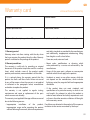
Warranty card
www.acme.eu/warranty
Product
Product model
Product purchase date
Seller name, address
Failures (date, description, position of the person who accepts the product, first name, last name and signature)
1. Warranty period
and safety standards as provided by the manufacturer,
and additionally, inappropriate warehousing, falling
Warranty enters into force starting with the day when
from heights as well as hard strikes.
the buyer acquires the product from the seller. Warranty
• Corrosion, mud, water and sand.
period is indicated on the package of the product.
2. Warranty conditions
• Repair works, modifications or cleaning, which
were performed by a service not authorised by the
The warranty is valid only by providing an original
manufacturer.
document of the product acquisition and this warranty
sheet, which includes name of the product model, • Usage of the spare parts, software or consumptive
materials which do not apply to the product.
product purchase date, name and address of the seller.
If it is noticed during the warranty period that the • Accidents or events or any other reasons which do
not depend on the manufacturer, which includes
product has faults and these faults where not caused
lightning, water, fire, magnetic field and inappropriate
by any of the reasons when the warranty is not applied
ventilation.
as indicated in the paragraphs below, manufacturer
undertakes to replace the product.
• If the product does not meet standards and
specifications of a particular country, in which it was
The warranty is not applied to regular testing,
not bought. Any attempt to adjust the product in
maintenance and repair or replacement of the parts
order to meet technical and safety requirements such
which are worn out naturally.
as those in the other countries withdraws all the rights
The warranty is not applied if damage or failures occurred
to the warranty service.
due to the following reasons:
• Inappropriate
installation
of
the
product, If no failures are detected in the product, all the expenses
inappropriate usage and/or operating the product in relation to the service are covered by the buyer.
without following the manual, technical requirements
39
LT
Garantinis lapas
www.acme.eu/warranty
Gaminys
Gaminio modelis
Gaminio pirkimo data
Pardavėjo pavadinimas, adresas
Gedimai (data, aprašymas, gaminį priėmusio asmens pareigos, vardas, pavardė ir parašas)
1. Garantinis laikotarpis
Garantija galioja nuo tos dienos, kada pirkėjas nusipirko
šį gaminį iš pardavėjo. Garantijos laikotarpis nurodyats
ant gaminio pakuotės.
2. Garantijos sąlygos
Garantija galioja tik pateikus gaminio pirkimo dokumento
originalą ir šį garantijos lapą, kuriame nurodyta gaminio
modelio pavadinimas, gaminio pirkimo data, pardavėjo
pavadinimas ir adresas.
Jei garantiniu laikotarpiu bus aptikta gaminio defektų,
kurie neatsirado dėl priežaščių, išvardintų pastraipose
garantija netaikoma, gamintojas įsipareigoja gaminį
sutaisyti arba pakeisti.
Garantija netaikoma reguliariam tikrinimui, priežiūrai
ir įprastiniu būdu nusidėvėjusių dalių remontui arba
keitimui.
Garantinija netaikoma, jei žala arba gedimai atsirado dėl:
• netinkamo
gaminio
instaliavimo,
netinkamo
naudojimo ir/arba darbo su gaminiu nesilaikant
gamintojo pateiktų naudojimo instrukcijų, techninių
reikalavimų ar saugumo standartų, be kita ko ir dėl
netinkamo sandėliavimo, kritimo ant žemės ir stiprių
smūgių.
40
• korozijos, purvo, vandens arba smėlio.
• remonto, modifikacijų arba valymo, atlikto ne
gamintojo įgaliotame serviso centre.
• gaminiui netinkamų atsarginių dalių, programinės
įrangos arba sąnaudinių medžiagų naudojimo.
• nelaimingų atsitikimų arba įvykių arba bet kokių
priežasčių, kurioms gamintojas neturi įtakos, be kita
ko ir dėl žaibo, vandens, ugnies, magnetinių laukų ir
netinkamo vėdinimo.
• jei gaminys neatitinka konkrečios šalies, kuri nėra
pirkimo šalis, standartų arba specifikacijų. Bet koks
bandymas pritaikyti gaminį kitų valstybių techniniams
ar saugumo reikalavimams panaikina visas teises į
garantinį aptarnavimą.
Gaminyje neaptikus gedimų visas su aptarnavimu
susijusias išlaidas apmoka pirkėjas.
LV
Garantijas lapa
www.acme.eu/warranty
Izstrādājums
Izstrādājuma modelis
Izstrādājuma pirkšanas datums
Pārdevēja nosaukums, adrese
Bojājumi (datums, apraksts, izstrādājumu pieņēmušās personas amats, vārds, uzvārds un paraksts)
1. Garantijas laiks
jas, tehniskās prasības vai drošības standarti, tostarp
nepiemērota uzglabāšana, krišana zemē un stipri
Garantija ir spēkā no tās dienas, kad pircējs ir nopircis šo
triecieni;
izstrādājumu no pārdevēja. Garantijas laiks ir norādīts uz
izstrādājuma iepakojuma.
• korozija, dubļi, ūdens vai smiltis;
2. Garantijas noteikumi
• tāds remonts, modifikācijas vai tīrīšana, kas nav veikta
ražotāja pilnvarotā servisa centrā;
Garantiju var izmantot tikai tad, ja iesniedz izstrādājuma
pirkšanas dokumenta oriģinālu un šo garantijas lapu, • izstrādājumam
nepiemērotu
rezerves
daļu,
kurā ir norādīts modeļa nosaukums, izstrādājuma
programmatūras vai izlietojamo materiālu lietošana;
pirkšanas datums, pārdevēja nosaukums un adrese.
• nelaimes gadījumi vai citi notikumi, vai jebkādi citi
Ja garantijas laikā tiek konstatēti tādi izstrādājuma
iemesli, ko ražotājs nespēj ietekmēt, tostarp zibens,
defekti, kas nav radušies tādu cēloņu dēļ, kuri uzskaitīti
ūdens, uguns, magnētiskā lauka un nepiemērotas
sarakstā “Garantija zaudē spēku...”, tad ražotājs apņemas
vēdināšanas ietekme;
izstrādājumu salabot vai apmainīt pret citu.
• ja izstrādājums neatbilst tās valsts standartiem vai
Garantija neattiecas uz regulāru pārbaudīšanu, apskati
specifikācijām, kurā tas nav ticis pirkts. Jebkāds
un parastā veidā nolietojušos daļu remontu un nomaiņu.
mēģinājums piemērot izstrādājumu citu valstu
tehniskajām vai drošības prasībām anulē tiesības uz
Garantija zaudē spēku, ja kaitējums vai bojājumi ir
garantijas apkalpošanu.
radušies šādu iemeslu dēļ:
• izstrādājuma nepareiza uzstādīšana, nepareiza Ja izstrādājumā netiek atrasti bojājumi, tad visas izmaksas
lietošana un/vai darbs ar izstrādājumu, kura laikā par apkalpošanu sedz pircējs.
tiek pārkāptas ražotāja sniegtās lietošanas instrukci41
EE
Garantiileht
www.acme.eu/warranty
Toote nimetus
Toote mudel
Toote ostmise kuupäev
Müüja ärinimi, aadress
Puudused (kuupäev, kirjeldus, toote vastuvõtnud isiku amet, ees- ja perekonnanimi ning allkiri)
1. Müügigarantii tähtaeg
Müügigarantii kehtib alates päevast, mil ostja käesoleva
toote müüjalt ostis. Müügigarantii tähtaeg on märgitud
toote pakendile.
2. Garantiitingimused
tehniliste nõuete või ohutusstandardite eiramine
tootega töötamisel, samuti juhul, kui puudused
põhjustas
ebakorrektne
ladustamine,
toote
mahakukkumine või tugevad löögid;
• korrosioon, muda, vesi või liiv;
• tootja poolt volitamata teeninduskeskuses sooritatud
Garantii kehtib ainult toote ostudokumendi originaali
remont, parandamine või puhastamine;
ja käesoleva garantiilehe esitamisel. Garantiilehele
peab olema märgitud toote mudeli nimetus, toote • tootele ebasobivate varuosade, tarkvara või
müügikuupäev, müüja ärinimi ja aadress.
kulumaterjalide paigaldamine;
Kui garantiiaja vältel avastatakse tootel defekt ning kui • õnnetusjuhtumid või juhtumid või mis tahes muud
seda ei põhjustanud allpool toodud garantii kehtetuks
asjaolud, mis toimusid mitte tootja süül, sh ka äikese,
tunnistamise sätetes märgitud asjaolud, siis kohustub
vee, tulekahju või magnetvälja toime ja ebaõige
tootja toote parandama või välja vahetama.
ventilatsioon;
Garantiid ei kohaldata regulaarse kontrolli, hoolduse • juhul kui toode ei vasta konkreetse riigi, mis ei ole ostu
ja loomulikul teel kulunud osade remondi või
sooritamise riik, standardite või spetsifikatsioonide
väljavahetamise suhtes.
nõuetele. Mis tahes katse kohandada toodet teiste
riikide tehnilistele nõuetele või ohutusnõuetele
Garantiid ei kohaldata juhul, kui kahju või rikked on
tühistab kõik õigused garantiiteenindusele.
põhjustanud
Juhul kui tootel riket ei leita, tasub ostja kõik
• toote ebaõige installeerimine, ebaõige kasutamine
teeninduskulud.
ja/või tootja esitatud toote kasutamisjuhendite,
42
PL
Karta gwarancyjna
www.acme.eu/warranty
Nazwa wyrobu
Model wyrobu
Data nabycia wyrobu
Nazwa i adres sprzedawcy
Awarie (data, opis, imię, nazwisko, nazwa stanowiska i podpis osoby odbierającej wyrób)
1. Okres gwarancyjny
bezpieczeństwa, niewłaściwym magazynowaniem,
silnym uderzeniem lub upadkiem na ziemię;
Gwarancja jest ważna od dnia nabycia wyrobu przez
kupującego. Okres gwarancyjny jest wskazany na opak- • korozją, zabrudzeniem, działaniem wody lub piasku;
owaniu.
• interwencją użytkownika, naprawami, modyfikacjami
lub czyszczeniem, wykonywanym poza warsztatem
2. Warunki gwarancji
autoryzowanym producenta;
Gwarancja jest ważna jedynie w przypadku okazania
oryginału dokumentu potwierdzającego zakup wyrobu • stosowaniem nieodpowiednich dla danego wyrobu
części zamiennych, oprogramowania lub materiałów
i tej karty gwarancyjnej, na której jest wskazana nazwa
eksploatacyjnych;
modelu i data nabycia wyrobu oraz nazwa i adres
sprzedającego.
• nieszczęśliwym przypadkiem lub innym wydarzeW przypadku awarii wyrobu w okresie gwarancyjnym,
o ile nie jest ona spowodowana przyczynami wymienionymi w punkcie Gwarancji nie udziela się, na wytwórcy
leży obowiązek naprawy lub zamiany wyrobu.
niem, na które producent nie ma żadnego wpływu,
między innymi, błyskawicą, wodą, ogniem, polem
magnetycznym lub niewłaściwą wentylacją;
• niezgodnością wyrobu z normami i specyfikacjami konkretnego państwa, które nie jest państwem
nabywcy. Każda próba dostosowania wyrobu do
wymogów technicznych i zasad bezpieczeństwa innego państwa anuluje wszelkie prawa na obsługę
Gwarancji nie udziela się w przypadku, gdy wady wyrobu
gwarancyjną wyrobu.
były spowodowane:
W przypadku, gdy badanie nie wykazuje żadnych wad
• niewłaściwą instalacją, użytkowaniem i/lub obsługą
zgłoszonego wyrobu, wszelkie koszty związane z obsługą
wyrobu, opartą na nieprzestrzeganiu wskazówek
obciążają kupującego.
producenta, wymogów technicznych lub zasad
Gwarancja nie obejmuje okresowych przeglądów, prac
konserwacyjnych oraz naturalnego zużycia poszczególnych części wyrobu.
43
DE
Garantieblatt
www.acme.eu/warranty
Produkt
Modell des Produktes
Kaufdatum des Produktes
Benennung, Adresse des Verkäufers
Defekte (Datum, Beschreibung, Funktion der Person, die das Produkt angenommen hat, Vorname, Name und
Unterschrift)
1. Garantiezeit
Sicherheitsbestimmungen
sowie
ungeeignete
Lagerung, Sturz auf den Boden und harte Schläge.
Die Garantie ist ab dem Tag gültig, an dem der Käufer dieses Produkt vom Verkäufer gekauft hat. Die Garantiezeit • Korrosion, Schlamm, Wasser oder Sand.
ist auf der Verpackung des Produkts angegeben.
• Reparatur, Modifikationen oder Reinigung in einem,
vom Hersteller nicht bevollmächtigten Service2. Garantiebedingungen
Zentrum.
Die Garantie gilt nur im Zusammenhang mit der Originalkaufurkunde des Produktes und mit diesem Garan- • Verwendung von für das Produkt ungeeigneten
Ersatzteilen, Software oder Betriebsmaterialien.
tieblatt, in dem die Benennung des Produktmodells, das
Kaufdatum des Produktes, die Benennung und Adresse • Unfälle oder Ereignisse sowie jegliche andere
des Verkäufers stehen.
Ursachen, auf die der Hersteller keinen Einfluss hat,
wie Blitzeinschlag, Wasser, Feuer, Magnetfelder und
Wenn in der Garantiezeit solche Defekte des Produktes
nicht ausreichende Lüftung.
festgestellt werden, deren Ursachen nicht in den erwähnten Absätzen stehen, wird keine Garantie erteilt. • Wenn das Produkt nicht den Standards oder
Der Hersteller verpflichtet sich das Produkt zu reparieren
Spezifikationen des konkreten Landes entspricht,
oder auszutauschen.
in dem das Produkt gekauft wurde. Ein beliebiger
Die Garantieleistungen schließen die regelmäßige Kontrolle, Wartung und Reparatur sowie den Ersatz von
gewöhnlich verschleißten Teilen nicht ein.
Versuch, das Produkt den technischen oder
Sicherheitsanforderungen
anderer
Länder
anzupassen, führt zum Verlust aller Rechte auf die
Garantieleistungen.
Es wird keine Garantie erteilt, wenn die Ursache des
Wenn keine Defekte beim Produkt festgestellt werden,
Schadens oder der Defekte wie folgt war:
• Fehlerhafte Installation des Produktes, falsche sind die mit der Bedienung verbundenen Kosten dem
Bedienung und/oder Arbeit mit dem Produkt ohne Käufer in Rechnung zu stellen.
die Bedienungsanleitungen des Herstellers, fehlende
Einhaltung von technische Anforderungen oder
44
RU
Гарантийный талон
www.acme.eu/warranty
Изделие
Модель изделия
Дата покупки изделия
Наименование продавца, адрес
Неисправности (дата, описание, должность, имя, фамилия и подпись лица, принявшего изделие)
1. Гарантийный срок
Гарантия действует со дня приобретения
покупателем данного изделия у продавца.
Гарантийный срок указан на упаковке изделия.
2. Условия гарантии
Гарантия действует лишь при предъявлении
подлинника документа, подтверждающего покупку
изделия, и насто-ящего гарантийного талона,
содержащего наименование модели изделия, дату
покупки изделия, наименование и адрес продавца.
В случае установления в течение действия гарантийных обязательств дефектов изделия, следствием
возник-новения которых не явились причины,
перечисленные выше, гарантия не действует,
производитель обязуется изделие отремонтировать
либо заменить.
Действие гарантии не распространяется на
регулярные проверки, обслуживание и ремонт
естественно изнаши-вающихся частей либо их
замену.
Гарантия не распространяется на случаи, при
которых вред или неисправности возникли
вследствие:
• ненадлежащей
установки,
эксплуатации
изделия и/или несоблюдения представленных
производителем инструкций по эксплуатации
изделия и работе с ним, технических
•
•
•
•
•
требований или стандартов безопасности, а также
ненадлежащего складирования, падения на землю
или сильных ударов;
действия коррозии, попадания грязи, воды или
песка;
ремонта, модификации или чистки, выполненных
не в авторизированном сервисном центре
производителя;
использования
неподходящих
для
изделия
запасных частей, программного обеспечения или
расходных материалов;
несчастных случаев или происшествий или
любых причин, на которые производитель не в
состоянии оказывать влияние, а также вследствие
воздействия молнии, воды, огня, магнитных полей и
ненадлежащей вентиляции;
несоответствия
изделия
стандартам
и
спецификациям конкретной страны, в которой
изделие не было при-обретено. Любая попытка
привести в соответствие из-делия с техническими
требованиями или требованиями безопасности
другой страны лишает покупателя всех прав на
гарантийное обслуживание.
В случае необнаружения в изделии неисправностей,
все
связанные
с
обслуживанием
расходы
оплачиваются покупателем.
45
Model: V-150
MP3 player
www.acme.eu