1
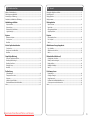
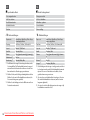
Menu List
EN
FR
Liste des menus
C Memory Card Mode
C Mode Carte mém.
Menüliste
View and Print Photos
Aff. et impr.
Menu’s
Print All Photos
Impr tts photos
Print by Date
Impr par date
Print Index Sheet
Imp feuille index
Slide Show
Animation
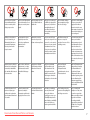
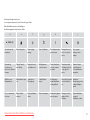
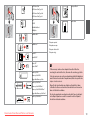
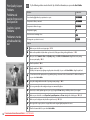
x Print settings
Paper Type
EN
FR
DE
NL
R & 35
R & 35
R & 36
R & 36
x Paramètres d’impression
Prem.Glossy, Ultra Glossy, Photo Paper,
Plain Paper, Matte
Type pap
Glacé Prem, Ultra-glacé, Papier ph, Pap
ordi, Mat
Paper Size
10 × 15 cm, 13 × 18 cm, 16:9 wide, A4
Taille pap
10 x 15 cm, 13 x 18 cm, Larg. 16:9, A4
Layout
Borderless *¹, With Border
Dispo
Ss marges *¹, Marge
Quality
Standard, Best
Qualité
Standard, Supérieur
Date
None, yyyy.mm.dd, mmm.dd.yyyy, dd.
mmm.yyyy
Date
Aucun, aaaa.mm.jj, mmm.jj.aaaa, jj.mmm.
aaaa
Bidirectional *²
On, Off
Bidirect. *²
Oui, Non
Expansion *³
Standard, Mid, Min
Extension *³
Standard, Moy, Min
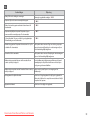
*1 Your image is slightly enlarged and cropped to fill the sheet
of paper. Print quality may decline in the top and bottom
areas of the printout, or the area may be smeared when
printing.
*2 Select On to increase the print speed. Select Off to improve
the print quality (but your photos print more slowly).
*3 Select the amount the image is expanded when printing
Borderless photos.
Downloaded from ManualsPrinter.com Manuals
*1 L’image est légèrement agrandie et rognée de manière à
remplir la feuille de papier. La qualité d’impression peut être
amoindrie dans le haut et le bas de la page imprimée. Ces
zones peuvent également être tachées lors de l’impression.
*2 Sélectionnez Oui pour accroître la vitesse d’impression.
Sélectionnez Non pour améliorer la qualité d’impression (et
réduire la vitesse d’impression des photos).
*3 Déterminez le degré d’agrandissement de l’image lors de
l’impression de photos sans marges.
35