Transcript
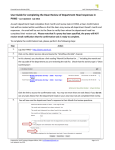
User Guide for Completing Statement of Financial Accountability Form in PAWS
Last Updated: May 2015
As part of the university’s commitment to enhancing financial stewardship and accountability, an annual
Statement of Financial Accountability is required to be completed by all financial managers and deans,
directors and department heads. To complete the form, please perform the following steps:
Step Action
1.
Log into PAWS> Admin Services> Workflow Worklist
2
On Workflow Worklist page, you should see a link reading “Year End Review for ....”.
Click this link to access your workflow task. You may see more than one task listed. If you do not
see any tasks listed, you are not required to complete a statement at this time.
3
You will now see a series of yes/no questions.
Please answer ALL questions by clicking the appropriate radio buttons (required) and enter any
additional information pertaining to items requiring further review in the Notes area provided.
**Notes are mandatory, if you do not have any additional information for review, please enter
“N/A” in the notes area.**
4
To submit your answers click the Complete button. No further changes can be made and your
answers will be recorded. This will remove the task from your Workflow Worklist as it is now
complete.
To save any work in progress for completion at a later time, click the Save & Close button.
To quit the task, click the Cancel button. Your work will not be saved.
5.
Log out of PAWS if desired.
Questions? (e) [email protected] or (p) 306-966 1221