1
Operating Instructions
Gas Cooktop
KM 360
®
To prevent accidents and
machine damage,
read the Operating Manual
before installation or use.
®
UV
M.-Nr. 06 389 900
WARNING:
If the information in this manual is not followed
exactly, a fire or explosion may result causing
property damage, personal injury or death.
– Do not store or use gasoline or other flammable
vapors and liquids in the vicinity of this or any
other appliance.
– WHAT TO DO IF YOU SMELL GAS
ß Do not try to light any appliance.
ß Do not touch any electrical switch.
ß Do not use any phone in your building.
ß Immediately call your gas supplier from a
neighbor’s phone. Follow the gas supplier’s
instructions.
ß If you cannot reach your gas supplier, call the
fire department.
– Installation and service must be performed by a
qualified installer, service agency or the gas
supplier.
(In Massachusetts a licensed plumber / gas fitter)
– Note to the installer:
Please leave this instruction book with the
consumer for the local electrical / gas inspector’s
use.
2
Contents
IMPORTANT SAFETY INSTRUCTIONS
Guide to the cooktop
Before using the cooktop
Cleaning the cooktop. . . . . . . . . . . . . . . . . . . . . . . . . . . . . . . . . . . . . . . . . . . . . . . 10
Using the cooktop
Turning on and off . . . . . . . . . . . . . . . . . . . . . . . . . . . . . . . . . . . . . . . . . . . . . . . . . 11
Pan size . . . . . . . . . . . . . . . . . . . . . . . . . . . . . . . . . . . . . . . . . . . . . . . . . . . . . . . . . 12
Suitable pans . . . . . . . . . . . . . . . . . . . . . . . . . . . . . . . . . . . . . . . . . . . . . . . . . . . . . 12
Safety feature . . . . . . . . . . . . . . . . . . . . . . . . . . . . . . . . . . . . . . . . . . . . . . . . . . . . . 13
Using the cooktop during a power failure . . . . . . . . . . . . . . . . . . . . . . . . . . . . . . . 13
Cleaning and Care
Burners . . . . . . . . . . . . . . . . . . . . . . . . . . . . . . . . . . . . . . . . . . . . . . . . . . . . . . . . . 15
Frequently asked questions
After sales service
Help protect our environment
3
IMPORTANT SAFETY INSTRUCTIONS
Installation and connection
When using your gas appliance
follow basic safety precautions
including the following:
Read all instructions before using
for the first time.
Be certain your appliance is
properly installed and grounded by
a qualified technician.
To guarantee the electrical safety
of this appliance, continuity must
exist between the appliance and an
effective grounding system. It is
imperative that this basic safety
requirement be met. If there is any
doubt, have the electrical system of the
house checked by a qualified
electrician. The manufacturer cannot be
held responsible for damages caused
by the lack, or inadequacy, of an
effective grounding system.
Install the appliance so that the
power cord or gas piping does not
come in contact with any portion of the
cooktop which may become hot during
use.
Do not connect the appliance to
the main electrical supply using an
extension cord. Extension cords do not
meet the safety requirements of this
appliance.
4
Before servicing, turn off the gas
valve and disconnect the power
supply by either removing the fuse,
unplugging the unit or manually
"tripping" the circuit breaker.
This equipment has not been
designed for maritime use or for
use in mobile installations such as
aircraft or recreational vehicles.
However, under certain circumstances
it may be possible for installation in
these applications. Please contact
Miele Technical Service with specific
requirements.
After connecting the appliance test
for leaks according to the
installation instructions.
If there is any doubt concerning
installation contact Miele’s
Technical Service Department.
U 1-800-999-1360
[email protected]
l 1-800-565-6435
[email protected]
IMPORTANT SAFETY INSTRUCTIONS
Correct usage
Do not operate the cooktop until it
is properly installed in the
countertop.
This appliance is intended for
residential cooking only.
Use the appliance only for its
intended purpose. The
manufacturer cannot be held
responsible for damages caused by
improper use of the cooktop.
Take care that drafts do not blow
flammable material toward the
flames or push the flames so that they
extend beyond the edges of the pan.
Never use the cooktop to warm the
room.
Install the cooktop in a room that
has sufficient ventilation.
This appliance must not be
operated outdoors.
Do not use aluminum foil to line any
part of the cooktop.
For proper lighting and
performance of the burners, keep
the igniters clean and dry.
Make sure all components of the
gas burners are assembled
correctly before using the cooktop.
Ensure that any burners in use are
always covered with a pan.
Do not use pans that extend past
the burner grate. Using larger pans
may cause the flames to spread out
and damage the surrounding
countertop or other countertop
appliances. The proper pan size will
also improve efficiency.
For safety and stability, do not use
pans with a bottom diameter
smaller than the burner grate.
Only certain types of glass /
ceramic or other glazed cookware
are suitable for use on a cooktop
without breaking due to a sudden
temperature change. Verify with
cookware manufacturer.
Do not store aerosols, gasoline,
combustibles or any other
flammable materials underneath or
adjacent to the cooktop.
Protection from damage
Do not use a steam cleaner to
clean the appliance. Steam could
penetrate electrical components and
cause a short circuit.
Spills containing salt or sugar
should be removed immediately.
Do not drop anything on the
ceramic surface of the appliance.
Although the ceramic glass is shock
and scratch resistant, it is not shock or
scratch proof.
5
IMPORTANT SAFETY INSTRUCTIONS
Personal safety
The burners become very hot
when in use. Make sure that no one
comes in contact with the burners.
Do not store toys or items of
interest to children in cabinets
above or behind the cooktop. Children
climbing onto the cooktop to reach
these items may become seriously
injured.
Do not leave children unattended
in an area where the appliance is in
use.
Do not allow children to operate or
play with the cooktop. Keep all
pans out of reach.
Use only dry, heat resistant
potholders. Moist or damp
potholders used on hot surfaces can
result in steam burns. Do not let
potholders touch the hot burners. Do
not use towels or other bulky items near
the appliance.
Be aware of loose fitting or hanging
garments while operating the
cooktop, they may present a fire
hazard.
Do not heat unopened food
containers. Built-up pressure may
cause the container to burst and result
in injury.
Do not store items on the cooktop
when not in use.
Do not let cooking grease or other
flammable materials accumulate
on the appliance.
6
Do not leave the cooktop
unattended while in use.
Overheated food can ignite.
Do not use water on grease fires.
Smother any fire or flame, or use a
dry chemical or foam-type extinguisher.
Do not flambé under an exhaust
hood. Flames could be drawn up
into the hood by the suction or the
grease filters may ignite.
The flame should be the same size
as the bottom of the pan. Do not
use small pans with high flame settings
as the flames can climb the sides of the
pan.
Only use cooking utensils suitable
for cooktop use.
Pan handles and utensils should
be turned inward and not extend
over the countertop to reduce the risk
of burns and the ignition of flammable
materials and spills.
If there is a drawer directly
underneath the appliance without
any wooden base in between, ensure
that no aerosols, combustible liquids or
other easily flammable materials are
kept in it. If cutlery inserts are to be
placed in the drawer, these must be
made of heat-resistant material.
IMPORTANT SAFETY INSTRUCTIONS
Damage to the appliance
Further safety notes
In the event of damage or a defect,
turn off the appliance immediately.
Turn off the gas shut off valve, and
disconnect completely from the
electrical supply. Contact the Miele
Technical Service Department.
Do not use the appliance until it has
been repaired.
Ensure power is not supplied to the
appliance while repair work is carried
out.
When using a portable appliance
near the cooktop, make sure that
the power cord does not come in
contact with the cooktop.
Any breakages or cracks in the
ceramic surface of the appliance
are defects and must be treated as
such. Do not use the appliance until it
has been repaired.
Repairs should only be performed
by qualified technicians to ensure
safety. Repairs and other work by
unqualified persons could be
dangerous. Under no circumstance
open the outer casing of the appliance.
Do not use containers made of
plastic or aluminum. They melt at
high temperatures.
Do not heat empty pots or pans,
this may cause damage.
Before discarding an old
appliance, disconnect it from the
gas and electrical supply and cut off
the power cord to prevent it from
becoming a hazard.
SAVE THESE INSTRUCTIONS
While the appliance is under
warranty, repairs should only be
performed by a Miele authorized
service technician. Otherwise the
warranty is void.
7
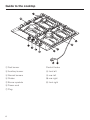
Guide to the cooktop
a Fast burner
Control Knobs
b Auxiliary burner
h front left
c Normal burners
i rear left
d Grates
j rear right
e Burner symbols
k front right
f Power cord
g Plug
8
Guide to the cooktop
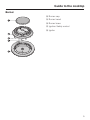
Burner
l Burner cap
m Burner head
n Burner base
o Ignition Safety control
p Ignitor
9
Before using the cooktop
Cleaning the cooktop
Before using for the first time clean the
appliance as follows:
^ Wash the removable parts of the gas
burner in a mild solution of warm
water and liquid dish soap.
^ Wipe dry and reassemble them in the
proper order (see the "Cleaning and
Care" section).
^ Wipe the cooktop surface with a
damp cloth and dry thoroughly.
10
Metal components have a protective
coating which may give off a slight odor
the first time your new appliance is
heated.
The harmless odor will dissipate after a
short time and does not indicate a
faulty connection or appliance defect.
Using the cooktop
Turning on and off
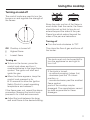
The control knobs are used to turn the
burners on and regulate the strength of
the flames.
Since the outer portion of the flame is
much hotter than the center, the flame
should be set so that its tips do not
extend beyond the sides of the pan.
Flame tips which extend beyond the
sides of the pan are hazardous.
Turning off
^ Turn the knob clockwise to "Off".
Off Cooktop is turned off
&
Highest flame
/
Lowest flame
Turning on
^ To turn on the burner, press the
control knob down and turn it
counterclockwise to the large flame
symbol. The ignitor will click and
ignite the gas.
^ When the flame appears, keep the
control knob pressed in for
8-10 seconds to allow the Ignition
Safety Control to reach operating
temperature and release it.
If the flame goes out, repeat the above
procedure, keeping the control knob
pressed in for a few extra seconds.
This stops the flow of gas and turns off
the burner.
The knob must only be turned left to
turn the appliance on and right to
turn it off.
If the knob is turned,
- on without pressing it down first,
- clockwise past the 12 o’clock
position, or
- counterclockwise past the smallest
flame symbol,
parts of the cooktop may be
damaged. The manufacturer cannot
be held responsible for these
damages.
^ Adjust the knob between the large
and small flame to the desired setting.
11
Using the cooktop
Pan size
Suitable pans
– Set the cooktop to a high flame when
using a large diameter pan and low
flame when using a small diameter
pan.
Any heat resistant pan can be used on
a gas burner.
Unlike pans used on an electric
cooktop, the bases do not need to be
even for good results.
Thick pan bases will give more even
results, hot spots are reduced due to
better heat distribution.
– Generally, wide / shallow pans will
heat up quicker and cook more
evenly than narrow / tall ones.
– Using oversized pans may cause the
flames to spread out and damage
the surrounding countertop or other
countertop appliances.
– Do not use small pans with high
flame settings, the flame can climb
the sides of the pan.
– Pots with a smaller diameter than the
pan support and pots that do not sit
securely (without wobbling) are
hazardous and should not be used.
12
Thin pan bases will conduct the heat
faster but not as evenly as thick pan
bases. Stir the food frequently to
prevent burning.
Using the cooktop
Safety feature
This gas cooktop incorporates an
Ignition Safety Control which stops the
supply of gas if the flame goes out.
^ To reignite the burners, turn the
control knob clockwise to "Off", then
follow the procedures outlined in
"Turning on and off".
This safety feature is not operated by
electricity, it will be active even if the
appliance is in use during a power
failure.
Using the cooktop during a
power failure
If there is an interruption to the
electrical supply, the gas can be
ignited using a match.
^ Press down on the desired control
knob and turn it counterclockwise to
the large flame symbol.
^ While holding down the knob, light
the gas at the burner with a match.
^ When the flame appears, keep the
control knob pressed in for
8 - 10 seconds to allow the Ignition
Safety Control to reach operating
temperature.
13
Cleaning and Care
Cooktop
Do not use a steam cleaner to clean
this cooktop. Pressurized steam
could cause permanent damage to
the surface and to components for
which the manufacturer cannot
accept responsibility.
Do not use any sharp pointed
objects which could damage the
seal between the frame and the
countertop.
Never use scouring agents, pads,
abrasive cleaning agents, or strong
cleaners e.g. oven sprays, stain or
rust removers, as these could
damage the surface of the
appliance.
^ Let the appliance cool to a safe
temperature and remove the grates.
^ Clean the grates, cooktop and knobs
with a sponge and a mild solution of
warm water and liquid dish soap.
^ Soak baked or hardened spills.
^ Dry the cooktop and grates
thoroughly after cleaning.
^ Use a non-abrasive cleaner for the
stainless steel surface of the cooktop.
Apply with even pressure following
the direction of the "grain".
^ To help prevent re-soiling, a
conditioner for stainless steel can
also be used. Apply sparingly with
even pressure.
Keep the ignitor in the burner dry. If
it gets wet it will not spark.
Dry your cooktop thoroughly after
cleaning it to prevent lime deposits.
Spills of liquids or food containing
salt or sugar should be removed
immediately.
14
Stainless steel colored knobs
These controls may become
discolored or damaged if not
cleaned regularly.
Do not use a stainless steel cleaner
on the knobs.
Cleaning and Care
Burners
Reassembling the burner
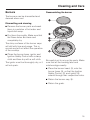
The burners can be dismantled and
cleaned when cool.
Dismantling and cleaning
^ Remove the burner parts and wash
them in a solution of hot water and
liquid dish soap.
^ Dry them thoroughly. Make sure that
the flame holes are clean and
completely dry.
The shiny surfaces of the burner caps
will dull with time and usage. This is
normal and will not affect the operation
of the cooktop.
^ Clean the burner base, ignitor and
Ignition Safety Control with a damp
cloth and then dry with a soft cloth.
The ignitor must be thoroughly dry, or it
will not spark.
Be careful not to mix up the parts. Make
sure that all the locating tabs and
notches align exactly.
^ Place the burner head, m, onto the
burner base, n, so that the Ignition
Safety Control, o, and ignitor, p,
extend through their respective holes.
^ Return the burner cap, l.
^ Return the grate.
15
Frequently asked questions
... the flame goes out after being lit?
All repairs should be performed by a
trained technician in strict
accordance with national and local
codes. Any repairs or maintenance
performed by unqualified personnel
could be dangerous.
^ Check whether the burners are
assembled correctly.
^ Make sure the gas holes in the
burner ring are clean and open.
... the igniters no longer work?
Some minor problems can be fixed
without a service call.
What if ...
... the burners do not ignite after
several attempts?
Check if:
^ the burners are assembled correctly.
^ the gas valve is open.
^ the burners are dry and clean.
^ the flame holes in the burners are
clean and unblocked.
^ the igniters are wet.
^ the cooktop is plugged in and that
the circuit breaker has not tripped. If
lack of power is the problem, the
cooktop can be lit with a match. See
"Using the cooktop during a power
failure".
16
^ Check that there is no residue
between the ignitor and the burner.
^ Make sure the ignitor is dry.
... the flame appears different than
usual?
^ Check whether the burners are
assembled correctly.
After sales service
In the event of a fault which you cannot
correct, contact the Miele Technical
Service Department:
U 1-800-999-1360
[email protected]
V 1-800-565-6435
[email protected]
When contacting the Technical Service
Department, please quote the model
and serial number of your appliance.
These are shown on the data plate.
Adhere data plate sticker here:
17
Help protect our environment
Disposal of packing materials
Disposal of an old appliance
The cardboard box and packing
materials are environmentally friendly
for disposal. Please recycle.
Old appliances contain materials that
can be recycled. Please contact your
local recycling center about the
possibility of recycling these materials.
Before discarding an old appliance,
disconnect it from the gas and
electrical supply and cut off the
power cord to prevent it from
becoming a hazard.
18
19
Alterations rights reserved / 0405
M.-Nr. 06 389 900 / 01
en - US