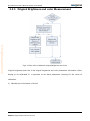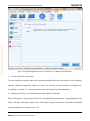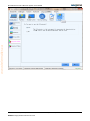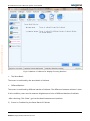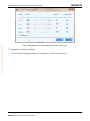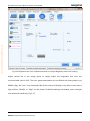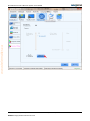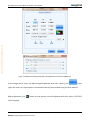
1
www.telematics.ca
NovaCLB-Screen Full-screen Calibration
System User Manual
Xi'an NovaStar Tech Co.,Ltd
Ver:3.3.1
www.telematics.ca
Nova M3 Pixel Level Calibration System User Manual
Content
1
INTRODUCTION .................................................................................................................................................... 5
1.1
WHY PIXEL LEVEL CALIBRATION ................................................................................................................................... 5
1.2
CORE ADVANTAGES OF NOVACLB-SCREEN ..................................................................................................................... 6
1.3
SYSTEM STRUCTURE ................................................................................................................................................... 8
2
AUTHOR MANAGE ................................................................................................................................................ 8
3
FULL-SCREEN CALIBRATION .................................................................................................................................. 9
3.1
OPERATION PROCESS.................................................................................................................................................. 9
3.2
CALIBRATION INITIALIZATION ..................................................................................................................................... 11
3.2.1
Calibration Mode ........................................................................................................................................... 11
3.2.2
Network Settings ............................................................................................................................................ 12
3.2.3
Database ........................................................................................................................................................ 13
3.2.4
Screen Information......................................................................................................................................... 14
3.2.5
Original Brightness and color Measurement ................................................................................................. 18
3.2.6
Target Brightness and Color ........................................................................................................................... 24
3.3
PARTITION CALIBRATION ........................................................................................................................................... 34
3.3.1
Partitions ........................................................................................................................................................ 34
3.3.2
Connect To Camera ........................................................................................................................................ 40
3.3.3
Camera Parameters ....................................................................................................................................... 41
3.3.4
Partition Calibration ....................................................................................................................................... 43
3.3.5
Partition Boundary ......................................................................................................................................... 51
3.4
MODIFY SCREEN ..................................................................................................................................................... 53
3.4.1
Sub Screen ...................................................................................................................................................... 54
3.4.2
Check The Database ....................................................................................................................................... 55
3.4.3
New Revise Database ..................................................................................................................................... 56
3.4.4
Connect To Camera ........................................................................................................................................ 57
3.4.5
Camera Parameters ....................................................................................................................................... 57
3.4.6
Full-screen Revise ........................................................................................................................................... 57
Phone:NovaStar(Xi’an)86-29-84507048
Website: Http://www.novastar-led.com2
NovaStar(Shenzhen)86-755-33592492
www.telematics.ca
Nova M3 Pixel Level Calibration System User Manual
4
MODULE CALIBRATION ........................................................................................................................................58
4.1
INITIALIZATION ........................................................................................................................................................ 59
4.1.1
Network setting.............................................................................................................................................. 60
4.1.2
Database ........................................................................................................................................................ 62
4.1.3
Screen Info ..................................................................................................................................................... 63
4.2
MODULE ............................................................................................................................................................... 64
4.2.1
Module location ............................................................................................................................................. 64
4.2.2
Connect to Camera......................................................................................................................................... 68
4.2.3
Camera Parameters ....................................................................................................................................... 69
4.2.4
Module calibration ......................................................................................................................................... 70
5
CALIBRATION INTERRUPTION (SEARCHING LED POSITION FAILED) ......................................................................80
6
FULL SCREEN DATA MERGING ..............................................................................................................................86
7
SCREEN UPDATE TARGETS ....................................................................................................................................89
8
FULL-SCREEN CONVERTING CABINET ...................................................................................................................91
9
8.1
OPERATION PROCEDURE ........................................................................................................................................... 91
8.2
OPERATION INSTRUCTION ......................................................................................................................................... 92
8.2.1
Import database............................................................................................................................................. 92
8.2.2
Draw topological graph ................................................................................................................................. 93
8.2.3
Set resolution of each cabinet ........................................................................................................................ 94
8.2.4
Number the cabinet ....................................................................................................................................... 99
8.2.5
Set target database...................................................................................................................................... 104
8.2.6
File path ....................................................................................................................................................... 104
8.2.7
Switch ........................................................................................................................................................... 104
NOVACLB-SCREEN HELP .....................................................................................................................................105
9.1
NETWORK SETTINGS .............................................................................................................................................. 105
9.2
LCT MONITOR SETTINGS ........................................................................................................................................ 107
9.3
PRINCIPLE OF BRIGHTNESS AND COLOR CALIBRATION ................................................................................................... 108
9.4
CAMERA OPERATING SKILLS .................................................................................................................................... 110
Phone:NovaStar(Xi’an)86-29-84507048
Website: Http://www.novastar-led.com3
NovaStar(Shenzhen)86-755-33592492
Nova M3 Pixel Level Calibration System User Manual
SUBAREA IMAGING OPERATING SKILLS ...................................................................................................................... 111
9.6
LARGE PARTITION OPERATING TECHNIQUE .................................................................................................................. 113
9.7
STEPS TO CHECK CALIBRATION EFFECTS ..................................................................................................................... 113
9.8
WATER RIPPLE IN FULL-SCREEN CALIBRATION ............................................................................................................. 115
EDITION STATEMENT .........................................................................................................................................116
www.telematics.ca
10
9.5
Phone:NovaStar(Xi’an)86-29-84507048
Website: Http://www.novastar-led.com4
NovaStar(Shenzhen)86-755-33592492
www.telematics.ca
Nova M3 Pixel Level Calibration System User Manual
1 Introduction
1.1 Why Pixel Level Calibration
Brightness / Color uniformity is of the most important factors that affect the image quality of a full
color LED display. Because of the limitations of the manufacturing process, including system
structure design, LED lights selection, electronic components welting, system cooling, LED
brightness decaying and many others, LED displays suffer the brightness / color uniformity loss,
which is also the most serious problem of this field.
Facing this fact, Nova pixel level calibration system does not intervene the manufacturing
processing of a LED display to reduce its brightness / color uniformity. Instead, it performs
brightness / color adjustment to the display after it has been completely produced. By adjusting
the brightness / color of each LED light according to the software analytical results from the
measured brightness / color values of the LED lights, Nova pixel level calibration system can help
the LED display acquiring perfect uniformity.
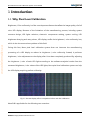
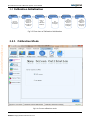
Fig.1-1 The LED display effects comparison before and after calibration
NovaCLB is applicable for the following two occasions:
Phone:NovaStar(Xi’an)86-29-84507048
Website: Http://www.novastar-led.com5
NovaStar(Shenzhen)86-755-33592492
www.telematics.ca
Nova M3 Pixel Level Calibration System User Manual
Factory single cabinet pixel level calibration (Factory calibration). Correct each cabinet on the
production line to ensure good brightness / color uniformity of the cabinets when produced.
Field LED display pixel level calibration (Full-screen calibration). Perform calibration for a LED
display at where it locates to improve its brightness / color uniformity.
Factory calibration is more efficient and lower in cost than Full-screen calibration. But for cabinets
of which the LED lights optical axis directions consistency is not well managed, results of factory
calibration will not be as good as that of filed calibration. When doing factory calibration, the
matching NovaCLB-Cabinet 2012 is needed.
Full-screen calibration requires engineers to be presence and Full-screen installation of calibration
instruments. And what’s more, Full-screen calibration can only be performed only at night when
it’s dark. Despite its complexity and low efficiency (compared with factory calibration),
Full-screen calibration can greatly improve the brightness / color uniformity of a LED display and
thus results in amazing image quality of the display. When doing Full-screen calibration, the
matching NovaCLB-Screen 2012 is needed.
1.2 Core Advantages of NovaCLB-Screen
Camera calibration technology enabling accurate brightness / color measurement;
Precise calibration coefficients up to 16bits resulting in outstanding calibration
performance with brightness variation less than 1% and color variation less than 0.003;
Be capable of eliminating color diversity of LED lights from different manufacturing
batches;
Be capable of eliminating brightness / color diversity between subareas or cabinets;
Phone:NovaStar(Xi’an)86-29-84507048
Website: Http://www.novastar-led.com6
NovaStar(Shenzhen)86-755-33592492
www.telematics.ca
Nova M3 Pixel Level Calibration System User Manual
Arc shape and irregular shape LED display calibration supported;
Oblique cabinet calibration on production lines supported;
Supporting automatic calibration for the replaced module;
Perfect compatible with LED control systems;
Specific calibration algorithm enabling perfect calibration for low gray level range;
Close loop intelligent calibration resulting in easy and high efficiency calibration. One LED
display, one person; 25 minutes,600K pixels;
Adopt RGB to begin the collection mechanism and collection-processing mechanism at
the same time during the calibration process so as to improve the efficiency;
Support correction to the boundary difference between partitions so as to enable smooth
transition between partitions;
No extra power supply required.
Phone:NovaStar(Xi’an)86-29-84507048
Website: Http://www.novastar-led.com7
NovaStar(Shenzhen)86-755-33592492
www.telematics.ca
Nova M3 Pixel Level Calibration System User Manual
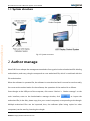
1.3 System structure
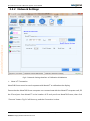
Fig.1-2 System structure
2 Author manage
NovaCLB-Screen adopts the management methods of encryption lock and authorized file binding
authorization; and every dongle corresponds to one authorized file, which is combined with the
file authorization.
When the software is operated fist, the software is not authorized and it cannot be used normally.
You must set the authorization for the software, the operation of the method is as follows.
Insert dongle to the USB port of the computer; click menus "Author"→“Author manage”on the
main interface; enter to the Authorization manage window, click
to import the
authorized file (in the disk, please copy it to your control computer) corresponding to the dongle.
Multiple authorized files can be imported, thus, the software (after being copied to other
computers) can be used by inserting the dongle.
Phone:NovaStar(Xi’an)86-29-84507048
Website: Http://www.novastar-led.com8
NovaStar(Shenzhen)86-755-33592492
www.telematics.ca
Nova M3 Pixel Level Calibration System User Manual
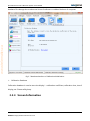
Fig.2-1 Authorization management
3 Full-Screen Calibration
3.1 Operation process
If normal partition mode is selected during partition calibration, the following procedure may be
adopted to perform calibration (wherein, ”Eliminate the boundaries of the partitions“is optional.
In case of partition correction with good results, modify screen may be omitted):
Initialization
Cablibration(Normal partition)
“Partition Boundary”is not the
required option
This step can be omitted if the
effect is good after partition
calibration
Modify
Screen
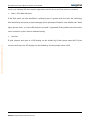
Fig.3-1 Software Operation Process (One)
If large partition mode is selected during partition correction, the following process should be
Phone:NovaStar(Xi’an)86-29-84507048
Website: Http://www.novastar-led.com9
NovaStar(Shenzhen)86-755-33592492
www.telematics.ca
Nova M3 Pixel Level Calibration System User Manual
adopted to perform calibration:
Initialization
Cablibration(Large partition)
The software defaults to
eliminate the boundary
This step can be omitted if the
effect is good after partition
calibration
Modify
Screen
Fig.3-2 Software Operation Process (Two)
Initialization
This interface is designed to initialize a series of calibration parameters, including the
communication settings, databases, display information, the original brightness / color
parameters and the expected brightness / color, etc.
Partitions Calibration
This interface is committed to guide customers to perform pixel level calibration on each LED light,
which signally improve the display uniformity.
Partition Calibration can be divided into normal partition and large partition. Calibrated area of
the large partition is several times of the normal partition, thus the large partition is applicable for
calibration of large display screen.
Partition Boundary
Eliminate the differences among partitions.
Modify screen
When the partition calibrations totally completed, then it comes to the modify screen. modify
screen perfectly eliminate the differences among the partitions, which can make the screen be a
flawless whole.
Phone:NovaStar(Xi’an)86-29-84507048
Website: Http://www.novastar-led.com10
NovaStar(Shenzhen)86-755-33592492
Nova M3 Pixel Level Calibration System User Manual
3.2 Calibration Initialization
Calibration
Mode
Choose
Full-screen
or Module
Network
Setting
Database
Connect
NovaCLBScreen and
NovaLCT
through the
network
New or
load
calibration
database
Screen info
Set
parameters
of display
Original Value
Set
expected
brightness/
chroma
parameters
of display
Fig.3-3 Flow chart of Calibration Initialization
www.telematics.ca
3.2.1 Calibration Mode
Fig.3-4 Choose calibration mode
Phone:NovaStar(Xi’an)86-29-84507048
Website: Http://www.novastar-led.com11
NovaStar(Shenzhen)86-755-33592492
Targeted Value
Set
expected
brightness/
chroma
parameters
of display
Nova M3 Pixel Level Calibration System User Manual
www.telematics.ca
3.2.2 Network Settings
Fig.3-5 Network Settings Interface of Calibration Initialization
Nova LCT Connection
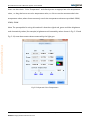
NovaCLB-Screen must be used cooperate with NovaLCT to calibration the display.
Ensure that the NovaCLB-Screen computer can communicate with the NovaLCT computer well, fill
the IP and port from NovaLCT in the location of IP and port from NovaCLB-Screen, then click
"Connect" button. Fig.3-6 will show up, and the Connection is done.
Phone:NovaStar(Xi’an)86-29-84507048
Website: Http://www.novastar-led.com12
NovaStar(Shenzhen)86-755-33592492
www.telematics.ca
Nova M3 Pixel Level Calibration System User Manual
Fig.3-6 Prompt message from NovaLCT when connection is successful
If connection is failed, users could click "guide of network connection" showed in fig.3-5.
Screen Resolution
The resolution of display is the width and height in the pixel level.
After NovaCLB-Screen is connected with NovaLCT successfully, the bottom of interface will show
display count and the corresponding resolution of connected NovaLCT. Users could choose
display number as needed, the default value is the first one.
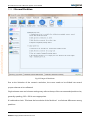
3.2.3 Database
A new database or the existing database can be used; and the database is used for saving
information of calibration coefficient, calibration time, screen size, etc. it shall be kept properly.
"Backup Database" defaults to be checked, and enabling backup data can effectively prevent
Phone:NovaStar(Xi’an)86-29-84507048
Website: Http://www.novastar-led.com13
NovaStar(Shenzhen)86-755-33592492
Nova M3 Pixel Level Calibration System User Manual
www.telematics.ca
database file damage due to abnormal close of software or sudden blackout of computer.
Fig.3-7 Database Interface of Calibration Initialization
Calibration Database
Calibration database is used to store the display’s calibration coefficient, calibration time, size of
display, etc. Please safely keep.
3.2.4 Screen Information
Phone:NovaStar(Xi’an)86-29-84507048
Website: Http://www.novastar-led.com14
NovaStar(Shenzhen)86-755-33592492
www.telematics.ca
Nova M3 Pixel Level Calibration System User Manual
Fig.3-8 Display Information Interface of Calibration Initialization
Ambient Brightness
Ambient Brightness is the brightness of surrounding environment when calibrating. In general,
the brightness is "low" at night, it’s "medium" at nightfall or cloudy day. It is unsuited to calibrate
in sunny day.
Screen Type
The type of Screen can be divided as "Regular", "Arc", "Irregular". "Regular" means it is a common
rectangular lane display. "Arc" means a rectangular arc display, including inner arc and outer arc.
The else are "Irregular".
Phone:NovaStar(Xi’an)86-29-84507048
Website: Http://www.novastar-led.com15
NovaStar(Shenzhen)86-755-33592492
Nova M3 Pixel Level Calibration System User Manual
Pixel Arrangement
Pixel Arrangement is the count of every pixel, the common ones are three LEDs arrangement,
Virtual pixel of 3 leds, four LEDs ,Four LEDs, Virtual pixel of three LEDs, One or two leds, and other
arrangement, etc.
Advanced settings
The above four terms are the basic parameters information of display. Click "Advanced Settings"
www.telematics.ca
button to get in advanced settings interface.
Fig.3-9 Advanced Settings Interface of Display Information
Width and Height Ratio of Template
Identify template for LED, default values are suggested.
Direction To Identify Led
The Direction can be divided into four diagonal directions which are from four angles of rectangle.
It is used when identify LED, the default direction is the diagonal from top left to bottom right.
When the LED of top left angle can not display normally, please change the direction. For example,
Phone:NovaStar(Xi’an)86-29-84507048
Website: Http://www.novastar-led.com16
NovaStar(Shenzhen)86-755-33592492
www.telematics.ca
Nova M3 Pixel Level Calibration System User Manual
users try to identify LED from bottom right when the first line or the first column is covered.
Dead LEDs Ratio Allowed
If the LEDs which can't be identified in calibrating zone is greater than the ratio, the calibrating
flow would stop and some prompt messages will be presented. Please be sure whether the "dead
lights are too much" or "some LED pixels are covered" is appeared. If the problem can't be solved,
users could turn up this ratio to calibrate forcibly.
Unit size
If pixel columns and rows of a LED display can be divided by 8, then please select 8*8. If pixel
columns and rows of a LED display can be divided by 10, then please select 10*10.
Phone:NovaStar(Xi’an)86-29-84507048
Website: Http://www.novastar-led.com17
NovaStar(Shenzhen)86-755-33592492
www.telematics.ca
Nova M3 Pixel Level Calibration System User Manual
3.2.5 Original Brightness and color Measurement
Fig.3-10 Flow chart of Measure Original Brightness and Color
Original brightness and color is the original brightness and color parameters information of the
display to be calibrated. It’s important to set these parameters correctly for the result of
calibration.
1)
Whether the Colorimeter is Carried
Phone:NovaStar(Xi’an)86-29-84507048
Website: Http://www.novastar-led.com18
NovaStar(Shenzhen)86-755-33592492
www.telematics.ca
Nova M3 Pixel Level Calibration System User Manual
Fig.3-11 Original Brightness and Color Interface of Calibration Initialization
Do You Have The Colorimeter
The colorimeter here means instruments that can measure LED color, like: light gun, color analyzer,
Spectral radiation brightness meter, etc. Users can choose as the condition of whether the
colorimeter is carried. It’s recommended to use colorimeter the when calibration.
2)
Whether the Screen is Combined by the Same Batch of Cabinets
If the colorimeter is not carried, choose "No", the software would get into "Target Brightness and
Color" interface, otherwise, choose "Yes", Click "Next" to get into batches of cabinets for display
choosing interface, as shown in Fig 3-12
Phone:NovaStar(Xi’an)86-29-84507048
Website: Http://www.novastar-led.com19
NovaStar(Shenzhen)86-755-33592492
www.telematics.ca
Nova M3 Pixel Level Calibration System User Manual
Phone:NovaStar(Xi’an)86-29-84507048
Website: Http://www.novastar-led.com20
NovaStar(Shenzhen)86-755-33592492
www.telematics.ca
Nova M3 Pixel Level Calibration System User Manual
Fig.3-12 Batches of Cabinets for Display Choosing Interface
The Same Batch
The screen is combined by the same batch of cabinets.
Different Batches
The screen is combined by different batches of cabinets. The difference between cabinets is clear.
In this condition, users need to measure brightness and color of different batches of cabinets.
After choosing, Click "Next", get into the detail measurement interface.
3)
Screen is Combined by the Same Batch of Cabinets
Phone:NovaStar(Xi’an)86-29-84507048
Website: Http://www.novastar-led.com21
NovaStar(Shenzhen)86-755-33592492
www.telematics.ca
Nova M3 Pixel Level Calibration System User Manual
Fig.3-13 Measure Brightness and Color of the Screen Combined by the Same Batch of Cabinets
Measuring Area Choosing
This measuring zone means the alight zone when measuring the brightness and color. It’s aiming
at locating measuring zone problem when the screen is combined by different kind of cabinets.
Users can change the size and location of measuring zone by click the four direction buttons and
the middle button in the interface.
Brightness and Color Information
After Adjusting the measuring zone, users can click "Red", "Green", "Blue" buttons left to the table
to control the display color. Then, users can measure brightness, Cx, and Cy to complete
Phone:NovaStar(Xi’an)86-29-84507048
Website: Http://www.novastar-led.com22
NovaStar(Shenzhen)86-755-33592492
Nova M3 Pixel Level Calibration System User Manual
measurement.
Screen is Combined by different Batches of Cabinets
www.telematics.ca
4)
Fig.3-14 Measure Brightness and Color of the Screen Combined by Different Batches of Cabinets
Measuring Zone Adjustment
It's same as the screen combined by the same batch of cabinets.
Batch Adding
In the software, the screen is combined by two batches cabinets by default, users can click "Add
Batch" "button to add Batches.
Get Common Color Gamut
Phone:NovaStar(Xi’an)86-29-84507048
Website: Http://www.novastar-led.com23
NovaStar(Shenzhen)86-755-33592492
Nova M3 Pixel Level Calibration System User Manual
"Get Common Color Gamut" is the common part of measuring color gamut of different batches, is
the key to achieve consistent uniformity. After complete measuring brightness and color of
different batches of cabinets, users should click "Get Common Color Gamut" button.
Thus far, original brightness and color information of display is completed. Click "Next" to get into
"Target Brightness and Color" settings.
www.telematics.ca
3.2.6 Target Brightness and Color
Fig.3-15 Flow chart of Original Brightness and Color Settings
1)
Calibration Mode Choosing
Phone:NovaStar(Xi’an)86-29-84507048
Website: Http://www.novastar-led.com24
NovaStar(Shenzhen)86-755-33592492
www.telematics.ca
Nova M3 Pixel Level Calibration System User Manual
Fig.3-16 Calibration Mode Choosing Interface of Target Brightness and Color Settings
Brightness Calibration
Brightness calibration can only change the brightness of R, G, B, and it will not attenuate the color
gamut. But it can't eliminate the difference in color between LEDs.
Brightness and Color Calibration
Brightness and Color calibration can change the brightness of R, G, B, and attenuate the color
gamut. But it can uniform brightness and color between LEDs.
Users can click hyperlink "The difference of the Brightness and Color Calibration" in bottom left of
interface for detail differences between these two calibrations.
Phone:NovaStar(Xi’an)86-29-84507048
Website: Http://www.novastar-led.com25
NovaStar(Shenzhen)86-755-33592492
Nova M3 Pixel Level Calibration System User Manual
After choosing, click "Next" button.
2)
Brightness Calibration
www.telematics.ca
If users choose "brightness calibration", it will show as Fig.3-17.
Fig.3-17 Brightness Calibration Interface of Target Brightness and Color Settings
Adjust vertical bar in the image above, choose an appropriate brightness attenuation value, the
recommended value is 92%. This adjustment is the common attenuation of R, G, B. If the
separated adjustment is needed, check "Enable Advance" and click "Advanced Adjustment"
button. Then, it gets into advanced settings interface Fig.3-18 and Fig.3-19.
Phone:NovaStar(Xi’an)86-29-84507048
Website: Http://www.novastar-led.com26
NovaStar(Shenzhen)86-755-33592492
www.telematics.ca
Nova M3 Pixel Level Calibration System User Manual
Fig.3-18 Brightness Attenuation Adjustment without Colorimeter
Phone:NovaStar(Xi’an)86-29-84507048
Website: Http://www.novastar-led.com27
NovaStar(Shenzhen)86-755-33592492
www.telematics.ca
Nova M3 Pixel Level Calibration System User Manual
Fig.3-19 Brightness Attenuation Adjustment with Colorimeter
3)
Brightness and Color Calibration
If users choose "brightness and color calibration", it will show as Fig.3-20.
Phone:NovaStar(Xi’an)86-29-84507048
Website: Http://www.novastar-led.com28
NovaStar(Shenzhen)86-755-33592492
www.telematics.ca
Nova M3 Pixel Level Calibration System User Manual
Fig.3-20 Brightness and Color Calibration Interface of Target Brightness and Color Settings
Adjust vertical bar in the image above to simply adjust the brightness and color, the
recommended value is 90%. The color gamut attenuation can be divided into three grades: Low,
Middle, High, the "Low" is recommended. But if the uniform of display is very bad or users want a
high uniform, "Middle" or "High" can be chosen. If detailed settings are needed, users could get
into advanced interface as Fig.3-21.
Phone:NovaStar(Xi’an)86-29-84507048
Website: Http://www.novastar-led.com29
NovaStar(Shenzhen)86-755-33592492
www.telematics.ca
Nova M3 Pixel Level Calibration System User Manual
Phone:NovaStar(Xi’an)86-29-84507048
Website: Http://www.novastar-led.com30
NovaStar(Shenzhen)86-755-33592492
www.telematics.ca
Nova M3 Pixel Level Calibration System User Manual
Fig.3-21 Advanced Settings Interface of Brightness and Color Calibration
In the image above, users can adjust target brightness and color value by the
on the
right, also users can input values in the textbox directly. Recommend using the first method
After adjustment, click
button to look up the current brightness and color value in CIE 1931
Color Diagram.
Phone:NovaStar(Xi’an)86-29-84507048
Website: Http://www.novastar-led.com31
NovaStar(Shenzhen)86-755-33592492
www.telematics.ca
Nova M3 Pixel Level Calibration System User Manual
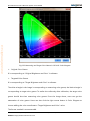
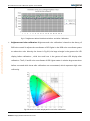
Fig.3-22 Measuring and Target Color Gamut in CIE 1931 Color Diagram
Original Color Gamut
It is corresponding to "Original Brightness and Color" in software.
Targeted Color Gamut
It is corresponding to "Target Brightness and Color" in software.
The white triangle in the image is corresponding to measuring color gamut, the black triangle is
corresponding to target color gamut. To realize the uniformity after calibration, the target color
gamut should less than measuring color gamut. From the image above, users can get the
attenuation of color gamut. Users can also click the right mouse button in Color Diagram to
choose adding the color coordinate to "Target Brightness and Color" value.
The former method is recommended.
Phone:NovaStar(Xi’an)86-29-84507048
Website: Http://www.novastar-led.com32
NovaStar(Shenzhen)86-755-33592492
Nova M3 Pixel Level Calibration System User Manual
Users can also check“Color Temperature”and directly enter an appropriate color temperature
value,or drag the bar to set color temperature value, or click to use the recommended color
temperature value, where three commonly used color temperature values are provided: 5000K,
6500K, 9300K.
Note: The prerequisite for using this method is that the original red, green and blue brightness
and chromaticity values (for example, brightness and chromaticity values shown in Fig. 3-13 and
www.telematics.ca
Fig. 3-14) must be accurate values measured by the light gun.
Fig.3-23 Expected Color Temperature
Phone:NovaStar(Xi’an)86-29-84507048
Website: Http://www.novastar-led.com33
NovaStar(Shenzhen)86-755-33592492
Nova M3 Pixel Level Calibration System User Manual
www.telematics.ca
3.3 Partition calibration
Fig.3-24 Partition calibration Flow Diagram
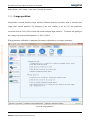
Partition calibration is the process of realizing screen calibration when calibration parameter
settings are finished.
3.3.1 Partitions
"Partitions" here is regarded as a verb-divide. Consider the constraint of the size of camera lens,
the screen need to divide into several proper subareas to calibrate.
Phone:NovaStar(Xi’an)86-29-84507048
Website: Http://www.novastar-led.com34
NovaStar(Shenzhen)86-755-33592492
Nova M3 Pixel Level Calibration System User Manual
www.telematics.ca
3.3.1.1 Normal Partition
Fig.3-25 Page Of Partitions
Due to the limitation of the camera's resolution, the screen needs to be divided into several
proper subareas to be calibrated.
Single subarea rows and columns settings may refer to the top of the recommended partition size,
generally speaking, 192 x 128 is more appropriate.
It is advised to check“Eliminate the boundaries of the Partitions”to eliminate differences among
partitions.
Phone:NovaStar(Xi’an)86-29-84507048
Website: Http://www.novastar-led.com35
NovaStar(Shenzhen)86-755-33592492
www.telematics.ca
Nova M3 Pixel Level Calibration System User Manual
Fig.3-26 Parameter Setting of Normal partitions
When finished, click "Create Partition", then you can see the result as shown in fig 3-27.
Phone:NovaStar(Xi’an)86-29-84507048
Website: Http://www.novastar-led.com36
NovaStar(Shenzhen)86-755-33592492
www.telematics.ca
Nova M3 Pixel Level Calibration System User Manual
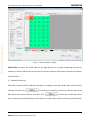
Fig.3-27 Topography Graph And Screen Control Window
Topography Graph
It is composed of divided subareas, and number these subareas from left to right, from top to
bottom.
Screen Control
It is used to realize the control of screen color, brightness and division switch.
The right window can move together with the main window, and can shut down when
unnecessary. Click "Topological Graph And Screen Control" on the right page, it will popup.
Phone:NovaStar(Xi’an)86-29-84507048
Website: Http://www.novastar-led.com37
NovaStar(Shenzhen)86-755-33592492
Nova M3 Pixel Level Calibration System User Manual
After division, click "Next", enter into "Connect to camera".
3.3.1.2 Large partition
Compared to normal partition, large partition features that the correction area is several times
larger than normal partition. For example, if the unit number is set as 5×5, the maximum
correction area is 224×5,150×5 when the camera adopts large partition. To ensure the quality of
the image, the recommended partition is 192×5,128×5.
www.telematics.ca
If large partition calibration is adopted, full-screen calibration is no longer necessary.
Fig.3-28 Large partition
Phone:NovaStar(Xi’an)86-29-84507048
Website: Http://www.novastar-led.com38
NovaStar(Shenzhen)86-755-33592492
www.telematics.ca
Nova M3 Pixel Level Calibration System User Manual
Fig.3-29 Parameter Setting of Large Partition Calibration
Click
, where the software calculates the pixel size of a properly single
partition according to the screen size. Then click
If the recommended partition is not adopted, click
.
to set the size of the unit, where
columns and rows collected by the camera cannot exceed the default value "224×150", and the
partition size (unit columns and rows ×columns and rows collected by the camera) is displayed at
the bottom of the interface. After setting is finished, click
Phone:NovaStar(Xi’an)86-29-84507048
Website: Http://www.novastar-led.com39
, and then click
NovaStar(Shenzhen)86-755-33592492
.
Nova M3 Pixel Level Calibration System User Manual
Fig.3-30 Advanced setting for basic unit
www.telematics.ca
3.3.2 Connect To Camera
Fig.3-31Connect To Camera
When succeed in connecting to camera, the interface appears as fig 3-31show. You can click help
Phone:NovaStar(Xi’an)86-29-84507048
Website: Http://www.novastar-led.com40
NovaStar(Shenzhen)86-755-33592492
Nova M3 Pixel Level Calibration System User Manual
documents on the left to obtain some camera operating skills and partition imaging techniques.
3.3.3 Camera Parameters
No matter manual mode or automatic mode is adopted, adjust the saturation till the result
reaches "Normal", and adjust the image size to "Fit", make sure the adjusting result of the
saturation to be normal, and during this process, make sure that the camera faces to the partition.
www.telematics.ca
Large partition.
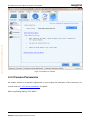
Fig.3-32 Camera Parameters
Automatic Mode
This mode is the default mode. Under this mode, users just need to click on "Auto All" button,
Phone:NovaStar(Xi’an)86-29-84507048
Website: Http://www.novastar-led.com41
NovaStar(Shenzhen)86-755-33592492
Nova M3 Pixel Level Calibration System User Manual
then the software will automatically analysis and adjust the saturation, finally achieve "normal". If
failed, please check the calibration environment and parameters, then try again.
If it is offline mode, the below dialog would be shown when clicking ‘Auto’ or ‘Auto All’
www.telematics.ca
button. Please go to LCT offline calibration interface according to the tips.
Fig.3-33 Set display parameters
Manual Mode
Under this mode, users should adjust calibrate brightness, exposure time and aperture size. When
adjusting, give priority to "aperture", followed by "exposure", and finally "brightness".
Phone:NovaStar(Xi’an)86-29-84507048
Website: Http://www.novastar-led.com42
NovaStar(Shenzhen)86-755-33592492
Nova M3 Pixel Level Calibration System User Manual
Attention: The default brightness under large partition mode is 50, and the routine partition
is 30. Automatic analysis is advisable. Manual adjustment can be carried out if experienced.
Next step can be taken only if the analysis result is normal. Saturation between 30 and 100 is
normal,it is proper to adjust the image size to 50.
You can click
to view the image obtained after saturation adjustment, in order to help find
problems. When red, green, blue analyses are all completed, click "next" to enter into the page
"Partition calibration".
www.telematics.ca
3.3.4 Partition Calibration
Phone:NovaStar(Xi’an)86-29-84507048
Website: Http://www.novastar-led.com43
NovaStar(Shenzhen)86-755-33592492
www.telematics.ca
Nova M3 Pixel Level Calibration System User Manual
Fig.3-34 The Calibration Page
Normal partition supports gap calibration and coefficients uploading stably; Large partition
supports enabling gap calibration, system uploading stably and background off. And the
operating method is as follows:
Before enabling automatic calibration, click "Normal Settings" at the main interface to pop out the
following window (the setting interface for the big partition), tick the corresponding option, click
"OK”.
Phone:NovaStar(Xi’an)86-29-84507048
Website: Http://www.novastar-led.com44
NovaStar(Shenzhen)86-755-33592492
www.telematics.ca
Nova M3 Pixel Level Calibration System User Manual
Fig.3-35 Normal settings for large partition
Enable gap calibration
This is an option enabled when Normal partition calibration.. Gap calibration is mainly used for
small pixel pitch LED displays calibration, to solve the bright and dim line caused by cabinet
assembly. Note: bright and dim line must be inside Partitions.
Click “Normal setting” on the main menu to pop up the window below, and then check
“Enable gap calibration”.
Coefficient uploading stably
Coefficient uploading stably means to upload calibration coefficient via serial cable, the speed is
slower but stable. Default calibration coefficient uploading route is via DVI cable, the speed is
faster. If there’s something wrong with DVI cable, serial cable can be used as alternative by
selecting coefficient uploading stably.
Background off
Background removal is to remove background light, which is an option enabled when large
partition calibration. Generally, calibration is required only to be conducted under relatively dark
environment, but if background removal is enabled, calibration can be conducted even if the
Phone:NovaStar(Xi’an)86-29-84507048
Website: Http://www.novastar-led.com45
NovaStar(Shenzhen)86-755-33592492
Nova M3 Pixel Level Calibration System User Manual
environment is not dark enough.
After "Enable background off" is selected, the interface shown in Fig.3-36 is displayed. Users can
use the mouse to drag the four vertexes of the quadrangle to select the valid area to be calibrated.
www.telematics.ca
The unwanted light around the screen to be calibrated is removed.
Fig.3-36 Screen Area Determination
Automatic calibration Mode
Users just need to click "Start" button, the software can do the following things automatically:
analyze red, green and blue led, generate coefficients, upload coefficients, save to hardware and
Phone:NovaStar(Xi’an)86-29-84507048
Website: Http://www.novastar-led.com46
NovaStar(Shenzhen)86-755-33592492
www.telematics.ca
Nova M3 Pixel Level Calibration System User Manual
to database. It will make calibration more convenient and efficient. Users may also manage this
flow according to their own requirements. Click "Customize" ,you can see fig. 3-37.
Fig.3-37 Customize Window
Manual Calibration Mode
Users can separately operate every step of the calibration process.
For the partition is completed, users can test whether the calibration effect is good through
"pictures control" on the right side of this window. If bad, click "Calibration effect is not good?" on
the bottom left corner, check the help documents to help solve the problem. As shown in fig 3-38
Phone:NovaStar(Xi’an)86-29-84507048
Website: Http://www.novastar-led.com47
NovaStar(Shenzhen)86-755-33592492
www.telematics.ca
Nova M3 Pixel Level Calibration System User Manual
Fig.3-38 Steps to Check Calibration Effects
LED Identification Failure(This function is available only in the large partition mode)
Some emergency situations may happen during the calibration process, such as sudden
appearance of obstruction; user can click
When user clicks
to stop calibration under such condition.
to continue calibration, the camera will start shooting from the last
picture.
Phone:NovaStar(Xi’an)86-29-84507048
Website: Http://www.novastar-led.com48
NovaStar(Shenzhen)86-755-33592492
www.telematics.ca
Nova M3 Pixel Level Calibration System User Manual
Phone:NovaStar(Xi’an)86-29-84507048
Website: Http://www.novastar-led.com49
NovaStar(Shenzhen)86-755-33592492
www.telematics.ca
Nova M3 Pixel Level Calibration System User Manual
Phone:NovaStar(Xi’an)86-29-84507048
Website: Http://www.novastar-led.com50
NovaStar(Shenzhen)86-755-33592492
www.telematics.ca
Nova M3 Pixel Level Calibration System User Manual
Fig. 3-39 Pause Calibration
Click "Next Partition" to enter into the next partition calibration, and one by one complete all
partitions of the screen. When all finished, if still exist difference among these partitions, then start
"Full-screen Calibration" to eliminate it.
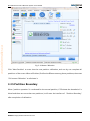
3.3.5 Partition Boundary
When "partition operation" is conducted for the normal partition, if "Eliminate the boundaries" is
ticked and there are more than two partitions, it will enter the interface of “Partition Boundary"
after completion of calibration.
Phone:NovaStar(Xi’an)86-29-84507048
Website: Http://www.novastar-led.com51
NovaStar(Shenzhen)86-755-33592492
www.telematics.ca
Nova M3 Pixel Level Calibration System User Manual
Fig.3-40 Partition Boundary
Eliminate the boundaries: To eliminate the boundaries of all present partitions.
Save To Hardware: Coefficients of partition calibration are saved to hardware, they will not be lost
in case of blackout.
Save to Database: Coefficients of partition calibration will be saved to database.
Phone:NovaStar(Xi’an)86-29-84507048
Website: Http://www.novastar-led.com52
NovaStar(Shenzhen)86-755-33592492
www.telematics.ca
Nova M3 Pixel Level Calibration System User Manual
3.4 Modify screen
No
Fig.3-41 Modify screen Calibration Flow Diagram
Full-screen calibration is used to eliminating the differences among partitions, improve uniformity
of the display screen. But users must notice that the precondition is the database created by
Partition calibration must be all saved.
Phone:NovaStar(Xi’an)86-29-84507048
Website: Http://www.novastar-led.com53
NovaStar(Shenzhen)86-755-33592492
Nova M3 Pixel Level Calibration System User Manual
www.telematics.ca
3.4.1 Sub Screen
Fig.3-42 Sub screen
Sub screen
Divide display screen into several sub screens, it’s size is generally recommended 1*1, if the
screen is vertical strip or horizontal strip, you may set 2*1 or 1*2 to let camera obtain more
clear images.
Phone:NovaStar(Xi’an)86-29-84507048
Website: Http://www.novastar-led.com54
NovaStar(Shenzhen)86-755-33592492
Nova M3 Pixel Level Calibration System User Manual
www.telematics.ca
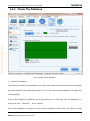
3.4.2 Check The Database
Fig.3-43 New Revise Database
Check The Database
The software will check if the database is all right, check results will show in the white rectangular,
the green stands for yes while gray stands for no. To the screen whose database is all right, click
"Re-Uploading".
If the screen calibration coefficient has already been not in conformity with the database, it is
required to click “Select All”, and re-upload.
Only whose database is all right can do full-screen calibration. After check, click "Next" to enter
Phone:NovaStar(Xi’an)86-29-84507048
Website: Http://www.novastar-led.com55
NovaStar(Shenzhen)86-755-33592492
Nova M3 Pixel Level Calibration System User Manual
into "Backup Database".
www.telematics.ca
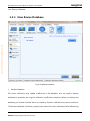
3.4.3 New Revise Database
Fig.3-44 Backup Database
Backup Database
Full-screen calibration may update coefficients in the database, thus we need to backup
database to guarantee the original calibration coefficients unbroken. When you backup the
database you'd better indicate that it is created by Partition calibration to prevent confusion.
The backup database should be properly kept, when full-screen calibration failed affected by
Phone:NovaStar(Xi’an)86-29-84507048
Website: Http://www.novastar-led.com56
NovaStar(Shenzhen)86-755-33592492
www.telematics.ca
Nova M3 Pixel Level Calibration System User Manual
the surroundings, you can use the backup database to do full-screen calibration again.
When completed, click "Next", enter into "Connect to camera".
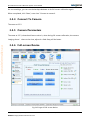
3.4.4 Connect To Camera
The same as 3.3.2.
3.4.5 Camera Parameters
The same as 3.3.3, what should users notice is, when doing full-screen calibration, the camera
imaging doesn’t have to be clear, adjust it a little fuzzy will be better.
3.4.6 Full-screen Revise
Fig.3-45 Page Of Full-screen Revise
Phone:NovaStar(Xi’an)86-29-84507048
Website: Http://www.novastar-led.com57
NovaStar(Shenzhen)86-755-33592492
www.telematics.ca
Nova M3 Pixel Level Calibration System User Manual
Full-screen Revise
Be sure to aim the camera lens at the selected sub-screen, and then click “Start” to
automatically fulfill such functions as “Cancel sub-screen coefficients” and “Analyze Red,
green, blue LED”. “Cancel sub-screen coefficients” is to cancel the coefficients that are not
saved, and “Analyze Red, green, blue LED” requires partition effect;
then the software will do the following things automatically: Control screen display colors,
manage camera gain pictures and analysis intelligently. And the corresponding process can be
seen on the right of the page.
If the sub-screen effect is good, click “Upload sub-screen Coefs” to automatically fulfill such
functions as “Revise Coefs”, “Upload Coefs” and “Save to Database”.
Make calibration for the sub-screens one by one. After the calibration, please keep the calibration
database with due care; when calibration to all sub-screens is completed, click “screen
coefficients integrating and uploading” to upload the screen coefficients; if the full-screen
calibration effect is good, click “save full-screen coefficients” and “save to database”.
So far, that’s all for all calibrations.
Attention: please be sure to confirm the full-screen calibration effect before save to database, or
partition database shall be loaded to do full-screen calibration again.
4 Module Calibration
There are two modes for the replaced module, one is off-line mode, while another is connecting
with LCT for online calibration.
It is required to read the average calibration coefficient of the area to be calibrated when
conducting calibration to the module under off-line mode, and this coefficient shall be acquired
Phone:NovaStar(Xi’an)86-29-84507048
Website: Http://www.novastar-led.com58
NovaStar(Shenzhen)86-755-33592492
www.telematics.ca
Nova M3 Pixel Level Calibration System User Manual
from LCT; after completion of module calibration, the calibration coefficient will be uploaded to
the screen through LCT.
The calibration procedure of the off-line mode is basically the same as connecting to LCT mode,
which shall be stated together below, and the difference of part of the interface shall be paid
attention to.
4.1 Initialization
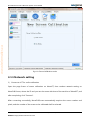
Start the software, directly enter the calibration mode sub-interface of calibration initialization,
Choose "New module" of calibration mode, and click "Next", and enter the network setting
interface.
Phone:NovaStar(Xi’an)86-29-84507048
Website: Http://www.novastar-led.com59
NovaStar(Shenzhen)86-755-33592492
www.telematics.ca
Nova M3 Pixel Level Calibration System User Manual
Fig.4-1 Choose Calibration mode
4.1.1 Network setting
1)
Connect to LCT for online calibration
Open the page frame of screen calibration on NovaLCT, then conduct network setting on
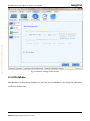
NovaCLB-Screen, where the IP and port are the same with that of the machine of NovalLCT, and
after completing, click "Connect".
After connecting successfully, NovaCLB-Screen automatically acquires the screen number and
pixels, and the number of the screen to be calibrated shall be selected.
Phone:NovaStar(Xi’an)86-29-84507048
Website: Http://www.novastar-led.com60
NovaStar(Shenzhen)86-755-33592492
www.telematics.ca
Nova M3 Pixel Level Calibration System User Manual
Fig.4-2 Network setting(on-line mode)
2)
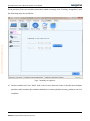
Off-line mode
Tick "Off-line mode", and click "Next".
Phone:NovaStar(Xi’an)86-29-84507048
Website: Http://www.novastar-led.com61
NovaStar(Shenzhen)86-755-33592492
www.telematics.ca
Nova M3 Pixel Level Calibration System User Manual
Fig.4-3 Network setting(off-line mode)
4.1.2 Database
New database or the existing database can be used, and the database is for saving the calibration
coefficient of the screen.
Phone:NovaStar(Xi’an)86-29-84507048
Website: Http://www.novastar-led.com62
NovaStar(Shenzhen)86-755-33592492
www.telematics.ca
Nova M3 Pixel Level Calibration System User Manual
Fig.4-4 Database
4.1.3 Screen Info
Fill the screen information based on actual situation, refer to 3.2.4 Screen Information in the
Chapter of full-screen calibration for details. Click "Next" after completion to enter the subpage of
"Module position" in "Module replacement".
Phone:NovaStar(Xi’an)86-29-84507048
Website: Http://www.novastar-led.com63
NovaStar(Shenzhen)86-755-33592492
www.telematics.ca
Nova M3 Pixel Level Calibration System User Manual
Fig.4-5 Screen information
4.2 Module
Procedures for module replacement is: module Location → camera connection → camera
parameters→ module calibration.
For these procedures, the procedures of online calibration connected with LCT and off-line mode
have some differences in module position and module calibration.
4.2.1 Module location
The position of the new module shall be located accurately so as to perform accurate calibration
Phone:NovaStar(Xi’an)86-29-84507048
Website: Http://www.novastar-led.com64
NovaStar(Shenzhen)86-755-33592492
Nova M3 Pixel Level Calibration System User Manual
for the new module.
4.2.1.1 Online calibration(Connect to LCT)
1)
Manual setting
If the calibration personnel knows clearly about the coordinate position of the new module,
manual setting can be used to quickly set the coordinate and the module size, and click "Next" to
www.telematics.ca
connect to the camera.
Fig.4-6 Manually set the module position
2)
Auxiliary recognition
Phone:NovaStar(Xi’an)86-29-84507048
Website: Http://www.novastar-led.com65
NovaStar(Shenzhen)86-755-33592492
Nova M3 Pixel Level Calibration System User Manual
If the position of the new module cannot be located accurately, click "Auxiliary recognition"; and
www.telematics.ca
the following steps are as follows:
Fig.4-7 Auxiliary recognition
a)
Set the module size, click "Next", and it can be seen that the screen is divided into multiple
partitions with numbers (the software defaults to conduct partition as every partition has 4×4
modules).
Phone:NovaStar(Xi’an)86-29-84507048
Website: Http://www.novastar-led.com66
NovaStar(Shenzhen)86-755-33592492
Nova M3 Pixel Level Calibration System User Manual
Fig.4-8 Module Size information
b)
Select number of the area where the new module is, then click "Next", and the screen displays
the partition separately as well as the module number.
User can click "Reset the area size" to reset the amount of the module in every area, as shown
www.telematics.ca
in the following figure; after setting, click "Reposition", and click "OK", and the screen will
display the area division after repositioning.
Fig.4-9 Select Region
Fig.4-10 Re-divide the area
c)
Confirm the number of the new module, and click "OK".
Fig.4-11 Confirm Module location
Phone:NovaStar(Xi’an)86-29-84507048
Website: Http://www.novastar-led.com67
NovaStar(Shenzhen)86-755-33592492
Nova M3 Pixel Level Calibration System User Manual
4.2.1.2 Offline Calibration
Set pixel columns and rows of the screen, starting coordinate of the new module, and module size.
www.telematics.ca
Click "Next".
Fig.4-12 Module location(off-line)
4.2.2 Connect to Camera
During calibration, the camera must be connected to the calibration computer normally, kept as
aligning to partition and can photograph normally. If the camera is connected successfully, the
state of the camera is shown as follows, click "Next" to enter camera setting.
Phone:NovaStar(Xi’an)86-29-84507048
Website: Http://www.novastar-led.com68
NovaStar(Shenzhen)86-755-33592492
www.telematics.ca
Nova M3 Pixel Level Calibration System User Manual
Fig.4-13 Connect to Camera
4.2.3 Camera Parameters
No matter manual or automatic adjustment is used, adjust the saturation of the camera to be
normal, refer to 3.3.3 Camera parameters for details.
After completing setting, click "Next".
Phone:NovaStar(Xi’an)86-29-84507048
Website: Http://www.novastar-led.com69
NovaStar(Shenzhen)86-755-33592492
www.telematics.ca
Nova M3 Pixel Level Calibration System User Manual
Fig.4-14 Camera Parameter Settings
4.2.4 Module calibration
4.2.4.1 Online calibration (Connect to LCT)
The software defaults to tick "Automatic mode" and click "Enable automatic calibration", and the
software will finish the calibration to the module automatically.
User can cancel ticking "Automatic mode", and manually complete the module calibration
according to the calibration procedures on the right.
Phone:NovaStar(Xi’an)86-29-84507048
Website: Http://www.novastar-led.com70
NovaStar(Shenzhen)86-755-33592492
www.telematics.ca
Nova M3 Pixel Level Calibration System User Manual
Fig.4-15 Module calibration (online calibration)
4.2.4.2 Off-line mode
When you start calibration under the offline mode, some dialog would be shown. Please read the
tips on them carefully, and follow the tips to do certain operation, or the offline calibration cannot
finish successfully.
1)
Upload the module database to the new module
Phone:NovaStar(Xi’an)86-29-84507048
Website: Http://www.novastar-led.com71
NovaStar(Shenzhen)86-755-33592492
www.telematics.ca
Nova M3 Pixel Level Calibration System User Manual
Phone:NovaStar(Xi’an)86-29-84507048
Website: Http://www.novastar-led.com72
NovaStar(Shenzhen)86-755-33592492
www.telematics.ca
Nova M3 Pixel Level Calibration System User Manual
Fig.4-16 Offline calibration-Upload the module coefficient
2)
Make sure the coefficients have been uploaded to new module, and then click ‘OK’.
Phone:NovaStar(Xi’an)86-29-84507048
Website: Http://www.novastar-led.com73
NovaStar(Shenzhen)86-755-33592492
www.telematics.ca
Nova M3 Pixel Level Calibration System User Manual
Fig.4-17 Make sure the coefficients in the database
3)
Get the average coefficient of calibration area on offline calibration interface of LCT and input
them.
Respectively fill the coordinate, width and height (X, Y, W and H) of the new module area and the
collecting area of the Fig. 4-18 into the display area of Fig. 4-19, and then click "Get average
coefficient" to get the average coefficients of the new module area and the area to be collected.
Fig.4-18 Average calibration coefficient of the area
Phone:NovaStar(Xi’an)86-29-84507048
Website: Http://www.novastar-led.com74
NovaStar(Shenzhen)86-755-33592492
www.telematics.ca
Nova M3 Pixel Level Calibration System User Manual
Fig.4-19 Offline-Get Average coefficient
4)
Input the average coefficient of the collecting area at the average coefficient to be calibrated
window of NovaCLB-Screen (as shown in Fig. 4-18).
Phone:NovaStar(Xi’an)86-29-84507048
Website: Http://www.novastar-led.com75
NovaStar(Shenzhen)86-755-33592492
www.telematics.ca
Nova M3 Pixel Level Calibration System User Manual
Fig.4-20 Input average calibration coefficient
5)
Check if the brightness calibration is enabled on the offline calibration interface of LCT, if it is
not, please enable it.
Phone:NovaStar(Xi’an)86-29-84507048
Website: Http://www.novastar-led.com76
NovaStar(Shenzhen)86-755-33592492
www.telematics.ca
Nova M3 Pixel Level Calibration System User Manual
Fig.4-21 Enable brightness calibration
6)
Set display parameters for offline calibration on NovaLCT.
Phone:NovaStar(Xi’an)86-29-84507048
Website: Http://www.novastar-led.com77
NovaStar(Shenzhen)86-755-33592492
www.telematics.ca
Nova M3 Pixel Level Calibration System User Manual
Fig.4-22 Set display parameters in offline calibrationmode
7)
After completing setting, click "OK" to enable calibration, where the calibration procedure is
the same as the online mode.
Phone:NovaStar(Xi’an)86-29-84507048
Website: Http://www.novastar-led.com78
NovaStar(Shenzhen)86-755-33592492
www.telematics.ca
Nova M3 Pixel Level Calibration System User Manual
Fig.4-23 Module calibration(off-line)
Phone:NovaStar(Xi’an)86-29-84507048
Website: Http://www.novastar-led.com79
NovaStar(Shenzhen)86-755-33592492
www.telematics.ca
Nova M3 Pixel Level Calibration System User Manual
5 Calibration interruption (Searching LED
position failed)
No matter full-screen calibration or module calibration, after the calibration is enabled, various of
problems at the site may cause led position failed leading to calibration interruption, such as
screen binding, Dead LED or interference light. Generally, artificial location is adopted to help
solve these problems, and this section will introduce solutions for several common situation.
1)
Normal binding
Normal binding means that the whole column or row at the edge of the screen is wrapped
regularly, and the error of search appears as not enough detected columns and rows, as shown in
the following figure:
Solution:
a)
Tick "Binding existed, need detection", and click "Next".
b)
The software detects four sides of the screen respectively, and the software defaults "Auto
switch"; user needs to pay attention to the state of the software (namely at which row or
column) while observing the lights lighting up at which stage of the screen, then record
which state so as to select state at the "result" and click "Next".
c)
After the four sides of the screen are detected, the software continues for calibration.
Phone:NovaStar(Xi’an)86-29-84507048
Website: Http://www.novastar-led.com80
NovaStar(Shenzhen)86-755-33592492
www.telematics.ca
Nova M3 Pixel Level Calibration System User Manual
Fig.5-1Solution for Normal binding
2)
User considers the binding to be normal, calibration can be forced to continue sometimes,
user considers the binding to have little effect, then ticks "The error does not effect the
calibration, continue", then click "Next" to continue calibration.
Phone:NovaStar(Xi’an)86-29-84507048
Website: Http://www.novastar-led.com81
NovaStar(Shenzhen)86-755-33592492
www.telematics.ca
Nova M3 Pixel Level Calibration System User Manual
3)
Dead LED is reasonable, continue calibration
The number and location of the Dead LED detected match the actual situation, which means that
the screen actually has these Dead LEDs at these positions, and this situation is called normal
Dead LED.
Solution:
Method 1. Check "Dead LED is reasonable, continue calibration", and click "Next" to continue
calibration.
Method2. Check“Modify the dead led radio allowed ”to adjust the proportion of dead lamp
higher.
Fig.5-2 Dead LED is reasonable
4)
Dead LED increased by failure of searching
Phone:NovaStar(Xi’an)86-29-84507048
Website: Http://www.novastar-led.com82
NovaStar(Shenzhen)86-755-33592492
Nova M3 Pixel Level Calibration System User Manual
The detected Dead LEDs are most fake Dead LEDs, which means that the actual screen does not
have so many Dead LEDs.
Solution:
a)
Tick "There does not exist so many Dead LED because of the LED searching failure", and click
www.telematics.ca
"Next";
Fig.5-3 Death light rate is more than the normal range
b)
Adjust the first wrong LED point on the searching direction to right position, then click
"search again".
Phone:NovaStar(Xi’an)86-29-84507048
Website: Http://www.novastar-led.com83
NovaStar(Shenzhen)86-755-33592492
www.telematics.ca
Nova M3 Pixel Level Calibration System User Manual
Fig.5-4 Search Again
Restore: Restore to the state of the last search;
Search again: Conduct search again according to the current location direction and initial point;
c)
5)
After the searching is successful, continue calibration.
Dead LED at the location initial position causes searching inconsistent rows and columns
If the location initial point has Dead LEDs, part of the lights may be bypassed during location
monitoring, which will cause inconsistence between detected rows and columns and the actual
situation.
Phone:NovaStar(Xi’an)86-29-84507048
Website: Http://www.novastar-led.com84
NovaStar(Shenzhen)86-755-33592492
www.telematics.ca
Nova M3 Pixel Level Calibration System User Manual
Fig.5-5 Dead LED at the location initial position
Solution: Tick "Searching LED position failed, manually adjust the position", and re-select the
location direction, switch to a start direction without Dead LED so as to conduct search again.
6)
Search result differs a lot with actual situations, calibration abandoned
If the result of search differs a lot with the actual situation, for example, Searching result is that
there are Dead LEDs at the up side and down side of the screen, but actually, there are Dead LEDs
at left and right sides, under this situation, it is suggested to abandon calibration.
7)
The number of rows and columns increases in the detection result
The result of search failed is that the number of rows or columns is greater than actual situation.
Solution: This result is caused by two possibilities: one is interference light which is eliminated as
the solution; the other is that the resolution of sending card is inconsistent with that of graphics
card, then the resolution of the sending card shall be set on LCT.
Phone:NovaStar(Xi’an)86-29-84507048
Website: Http://www.novastar-led.com85
NovaStar(Shenzhen)86-755-33592492
www.telematics.ca
Nova M3 Pixel Level Calibration System User Manual
6 Full Screen Data Merging
Spot calibration often encounters such situation: a large screen is applied with multiple sending
cards for loading, and a video processor and a video stitching device are used between the
graphics card and the sending card to connect the frames; at this moment, the display and the
large screen are not in point-to-point display, and during calibration, the video process equipment
needs to be skipped, and the large screen shall be divided into multiple split screen for respective
calibration; and after calibration, unsmooth transition may appear at the adjacent area of the split
screens, which is commonly known as layering. The full screen date merging tool is for solving this
problem.
At the main interface of the software, click "Tools"→"Screen Data Merging"; after opening the tool,
assume that the full screen has been divided into four regions for calibration, set 2 rows and 2
columns of split screen.
Phone:NovaStar(Xi’an)86-29-84507048
Website: Http://www.novastar-led.com86
NovaStar(Shenzhen)86-755-33592492
www.telematics.ca
Nova M3 Pixel Level Calibration System User Manual
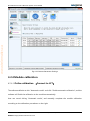
Fig.6-1 Full screen region data merging
Phone:NovaStar(Xi’an)86-29-84507048
Website: Http://www.novastar-led.com87
NovaStar(Shenzhen)86-755-33592492
Nova M3 Pixel Level Calibration System User Manual
Select one of the regions, click right button of the mouse → "Select database", load the
corresponding full screen database; after loading successfully, see the information related to the
database; and load the full screen database corresponding to all regions according to the same
www.telematics.ca
procedures, as shown in the figure below.
Fig.6-2 Loading the database
Click "Select" to set the storage directory for the database generated after merging.
Pay attention to whether current resolution ratio of all regions are match to the full
screen resolution or not; after confirming they are matched, click "Area merger".
If the option "Split-screen databases" is checked, four databases after merging will be
generated; if the option "Entire-screen databases" is checked, one database will be
generated after merging.
Phone:NovaStar(Xi’an)86-29-84507048
Website: Http://www.novastar-led.com88
NovaStar(Shenzhen)86-755-33592492
Nova M3 Pixel Level Calibration System User Manual
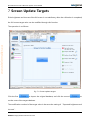
7 Screen Update Targets
If the brightness and chroma of the full screen is not satisfactory after the calibration is completed,
the full-screen target value can be modified through this function.
www.telematics.ca
The operation is as follows:
Fig. 7-1 Screen update targets
Click the first
to import the original database, and click the second
to
set the route of the target database.
The modification method of the target value is the same the setting of “Expected brightness and
chroma”.
Phone:NovaStar(Xi’an)86-29-84507048
Website: Http://www.novastar-led.com89
NovaStar(Shenzhen)86-755-33592492
Nova M3 Pixel Level Calibration System User Manual
After the modification is completed, click
Click the first
to save and apply the target value.
to import the original database, then click the second
to
set the path of the target database.
The target value can be changed in the same way as the setting of "expected brightness and
chroma".
to save the target value and apply.
www.telematics.ca
After the change, click
Fig.7-2 Screen Update Targets
Phone:NovaStar(Xi’an)86-29-84507048
Website: Http://www.novastar-led.com90
NovaStar(Shenzhen)86-755-33592492
Nova M3 Pixel Level Calibration System User Manual
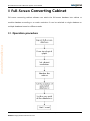
8 Full-Screen Converting Cabinet
Full-screen converting cabinet software can switch the full-screen database into cabinet or
module database according to a certain resolution. It can be switched to single database or
multiple databases based on different needs.
www.telematics.ca
8.1 Operation procedure
Phone:NovaStar(Xi’an)86-29-84507048
Website: Http://www.novastar-led.com91
NovaStar(Shenzhen)86-755-33592492
Nova M3 Pixel Level Calibration System User Manual
8.2 Operation instruction
This chapter will illustrate operation steps of all procedures for users in detail.
www.telematics.ca
8.2.1 Import database
Phone:NovaStar(Xi’an)86-29-84507048
Website: Http://www.novastar-led.com92
NovaStar(Shenzhen)86-755-33592492
www.telematics.ca
Nova M3 Pixel Level Calibration System User Manual
Fig. 8-1 Import Full-Screen database
8.2.2 Draw topological graph
Set the number of row and column of the cabinet, and then click
to generate a
topological graph in the right window of the software.
Note that the sum of the resolution of all rows and all columns of the cabinet shall be equal to the
resolution of the screen; therefore, under the premise that resolution of each cabinet is known,
number of rows and columns of the cabinet shall be calculated accurately.
Phone:NovaStar(Xi’an)86-29-84507048
Website: Http://www.novastar-led.com93
NovaStar(Shenzhen)86-755-33592492
www.telematics.ca
Nova M3 Pixel Level Calibration System User Manual
Fig. 8-2 Draw topological
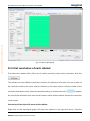
8.2.3 Set resolution of each cabinet
First, select the cabinet which will be set in certain resolution, then set the resolution, and click
.
The cabinets can have different resolution; however, for cabinets on the same row, row number of
the resolution shall be the same, and for cabinets on the same column, column number of the
resolution shall be the same; when the resolution setting is irrational, the color
will appear;
the sum of the resolution of all rows and all columns of the cabinet shall be equal to the resolution
of the screen.
Instruction of the right-click menu of the cabinet:
Right-click on the topological graph will show two options in the right-click menu, "Partition
Phone:NovaStar(Xi’an)86-29-84507048
Website: Http://www.novastar-led.com94
NovaStar(Shenzhen)86-755-33592492
Nova M3 Pixel Level Calibration System User Manual
averagely" and "Clear settings". " Partition averagely": partition the resolution of the display
averagely on the drawn topological graph of the cabinet with resolution of each cabinet being the
same. "Clear settings": clear the resolution and cabinet name set on the topological graph.
The following methods can be used to select the cabinet:
a)
Select the first cabinet, hold down the mouse and drag according to the direction of arrow in
www.telematics.ca
the figure; the result is as follows:
b)
Press the "Ctrl" key to conduct multiple selections; the result is as follows:
Phone:NovaStar(Xi’an)86-29-84507048
Website: Http://www.novastar-led.com95
NovaStar(Shenzhen)86-755-33592492
www.telematics.ca
Nova M3 Pixel Level Calibration System User Manual
c)
Select one cabinet as the start, press the "Shift" key, and then select another cabinet as the
end; in this way, the rectangular area from the start cabinet to the end cabinet can be selected;
the result is as follows:
Phone:NovaStar(Xi’an)86-29-84507048
Website: Http://www.novastar-led.com96
NovaStar(Shenzhen)86-755-33592492
www.telematics.ca
Nova M3 Pixel Level Calibration System User Manual
d)
Press "Ctrl+A" to select all cabinets; the result is as follows:
Phone:NovaStar(Xi’an)86-29-84507048
Website: Http://www.novastar-led.com97
NovaStar(Shenzhen)86-755-33592492
www.telematics.ca
Nova M3 Pixel Level Calibration System User Manual
The topological graph with set resolution is shown as follows:
Phone:NovaStar(Xi’an)86-29-84507048
Website: Http://www.novastar-led.com98
NovaStar(Shenzhen)86-755-33592492
www.telematics.ca
Nova M3 Pixel Level Calibration System User Manual
Fig. 8-3 Set resolution of cabinet
8.2.4 Number the cabinet
Numbering can be automatic or manual.
1)
Automatic numbering
Check "Auto", select numbering method, row/column number, number of digit, and set fixed digit
and initial value, and then click
Phone:NovaStar(Xi’an)86-29-84507048
Website: Http://www.novastar-led.com99
.
NovaStar(Shenzhen)86-755-33592492
www.telematics.ca
Nova M3 Pixel Level Calibration System User Manual
Fig. 8-4 Select Auto numbering mode
Numbering method: column direction, row direction, Z-shaped.
Row/column number: When selecting column direction and row direction, it needs to select the
first row/column, the second row/column, the third row/column,……, the nth row/column, and
number them respectively; the following figure is the topological graph after being numbered.
Phone:NovaStar(Xi’an)86-29-84507048
Website: Http://www.novastar-led.com100
NovaStar(Shenzhen)86-755-33592492
www.telematics.ca
Nova M3 Pixel Level Calibration System User Manual
Fig. 8-5 Row/column number method
If Z-shap is selected, there is no need to select row/column number every time; the software will
number all the cabinets according to the Z-shap, as shown in the following figure:
Phone:NovaStar(Xi’an)86-29-84507048
Website: Http://www.novastar-led.com101
NovaStar(Shenzhen)86-755-33592492
www.telematics.ca
Nova M3 Pixel Level Calibration System User Manual
Fig. 8-6 Select Z-shap numbering method
Fixed digit: fixed numbering character at the beginning of the number which can be set by the
user; it can be any character, for example, A-, B-, number-, etc.
Number of digit: number of digit for the number, 1-4 digits; as shown in the following figure, the
numbers of the first and second column have 2 digits; the number of the second column has one
digit; the fourth column has 4 digits; and the fifth column has 3 digits.
Phone:NovaStar(Xi’an)86-29-84507048
Website: Http://www.novastar-led.com102
NovaStar(Shenzhen)86-755-33592492
www.telematics.ca
Nova M3 Pixel Level Calibration System User Manual
Fig. 8-7 Set the number of digit
Initial value: it means the initial value of the digit position in a single numbering process; for
example, A-01 to A-08 can be used for the first column, and the initial value of the second column
can be set as 9.
2)
Manual numbering
Each time, number shall be entered manually; for example, enter the number A01, select the first
cabinet, and then click
to finish the numbering of the first cabinet; then enter
A02, select the second cabinet, and then click
to finish the numbering of the
second cabinet; and the following can be done in a similar way to finish numbering of all cabinets.
Phone:NovaStar(Xi’an)86-29-84507048
Website: Http://www.novastar-led.com103
NovaStar(Shenzhen)86-755-33592492
www.telematics.ca
Nova M3 Pixel Level Calibration System User Manual
Fig. 8-8 Select Manual numbering mode
8.2.5 Set target database
There can be single target database or multiple target databases. For single target database, all
cabinets or modules will be saved to one database and one database will be generated. For
multiple target databases, single cabinet or module will be saved as one database, and multiple
databases will be generated which are named after the number of each cabinet or module.
8.2.6 File path
In the case of saving as one single database, there are two situations. One is to save the cabinet
data to the existing database which requires clicking
to open the existing database.
The other is to save the cabinet data to a new database, which requires clicking
to
create a new database on some path of the computer.
In the case of saving as multiple databases, click
to select the saving path of the
cabinet database.
8.2.7 Switch
After completion of settings of all the options above, Check the cabinets that to be converted on
Phone:NovaStar(Xi’an)86-29-84507048
Website: Http://www.novastar-led.com104
NovaStar(Shenzhen)86-755-33592492
Nova M3 Pixel Level Calibration System User Manual
www.telematics.ca
the topological , And then ,click
.
Fig. 8-9 Converting completed
9 NovaCLB-Screen Help
9.1 Network Settings
If the distance between the calibration computer and the NovaLCT control computer is within
100m when performing calibration, Ethernet cables can be used to connect the two computers.
Otherwise, wireless routers should be used.
Here TP-LINK WR941N will be taken as an example for illustrating how to configure a wireless
router for calibration application:
Phone:NovaStar(Xi’an)86-29-84507048
Website: Http://www.novastar-led.com105
NovaStar(Shenzhen)86-755-33592492
www.telematics.ca
Nova M3 Pixel Level Calibration System User Manual
Fig.9-1 The Wireless router TP-LINK WR941N
1)
Connect the wireless router with the control computer through the network cable
into the yellow interface.
Fig.9-2 Ports for Connection
2)
Enable the wireless networking capabilities of calibration computer to connect to wireless
router.
Pay attention, whether use network cable or wireless router, you need to set the IP of the two
computers and the default IP of wireless router to be within the network segment.
Fig.9-3 IP Configurations
Phone:NovaStar(Xi’an)86-29-84507048
Website: Http://www.novastar-led.com106
NovaStar(Shenzhen)86-755-33592492
www.telematics.ca
Nova M3 Pixel Level Calibration System User Manual
9.2 LCT Monitor Settings
Ensure that network is normal, then users need to open NovaLCT-Mars, and choose advanced
users, the initial pass word is "admin", as shown in fig.9-4
Fig.9-4 LCT Main Interface
After loading by advanced user, NovaLCT-Mars toolbar will appear calibration options, click into
the calibration page.
Fig.9-5 Calibration Page
After getting into the calibration page, please check the network settings to make sure network
Phone:NovaStar(Xi’an)86-29-84507048
Website: Http://www.novastar-led.com107
NovaStar(Shenzhen)86-755-33592492
www.telematics.ca
Nova M3 Pixel Level Calibration System User Manual
normal, then click "Reconnect". The message of "Listening succeed" shown in the following
message window indicates that calibration service has been activated, if not, please check the
network.
Fig.9-6 Enter into Calibration Mode
9.3 Principle of Brightness and Color Calibration
Generally speaking, it is recommended that users select brightness and color calibration mode,
they can obtain higher uniformity. For some customers demanding more colorful and brighter,
they can choose brightness calibration only.
Brightness calibration: Brightness calibration is to adjust the brightness of LED lights to
improve the brightness uniformity. In the brightness calibration, brightness of most lights will
be properly lowered. Fig.9-7 shows an example of brightness adjustment of green LED lights,
in which there are two brightness distribution curves corresponding to before and after
calibration (adjustment) respectively. Before calibration, the brightness values of green LED
lights are scattered between 2400 – 3300 cd/m2, but after calibration those are concentrated
almost at2500 cd/m2, representing high brightness uniformity.
Phone:NovaStar(Xi’an)86-29-84507048
Website: Http://www.novastar-led.com108
NovaStar(Shenzhen)86-755-33592492
www.telematics.ca
Nova M3 Pixel Level Calibration System User Manual
Fig.9-7 Brightness Values Distribution Before and After Calibration
Brightness and color calibration: Brightness and color calibration is based on the theory of
RGB color match. It adjusts the coordinates of LED lights in the RGB color coordinate system
to reduce the color diversity. As shown in Fig.9-8, the large triangle is the gamut of a LED
display before calibration , while the small one is the gamut of same LED display after
calibration. The R, G and B color coordinates of LED lights scatter in relative large areas when
before corrected while those after calibration are concentrated, which represents high color
uniformity.
Fig.9-8 Gamut of A LED Display Before and After Calibration
Phone:NovaStar(Xi’an)86-29-84507048
Website: Http://www.novastar-led.com109
NovaStar(Shenzhen)86-755-33592492
Nova M3 Pixel Level Calibration System User Manual
Note that when performing the brightness and color calibration, proper coordinates for R, G and
B should be chosen in order to avoid color distortion.
9.4 Camera Operating Skills
Camera Preparation:
A.
Use a USB cable to connect the camera to the computer. Set the camera to "ON." Click
"Connect to camera." After "Connected" is displayed, users can automatically control the
www.telematics.ca
camera using the software.
B.
Set the mode dial
to "M" (manually) and lens focus
to "M"
(manually). If the lens supports the anti-shake function ("OS" on Sigma cameras), set
to "OFF."
C.
Switchover between eyepiece framing and LCD framing: Enable "Live view shoot" in
"MENU" of the camera and press
to switch between eyepiece framing and LCD
framing.
Tip: When LCD framing is enabled, users can press
to switch among original
size, five times the original size and ten times the original size for images.
Adjustment of the Camera Saturation:
Click "Analyze." The software automatically calculates the saturation. Adjust the aperture size,
time of exposure and calibration brightness value to enable the saturation to be normal. The
saturation value ranging from 30 to 100 is normal. The adjustment principle is as follows: the
Phone:NovaStar(Xi’an)86-29-84507048
Website: Http://www.novastar-led.com110
NovaStar(Shenzhen)86-755-33592492
Nova M3 Pixel Level Calibration System User Manual
adjustment must be conducted in the following order: aperture size > time of exposure >
calibration brightness value. Generally, the aperture value is inversely proportional to the
saturation, and the time of exposure and brightness are directly proportional to the saturation.
After the red (R) saturation, green (G) saturation and blue (B) saturation are normal, click
www.telematics.ca
"Confirm configuration."
Fig.9-9 Camera Parameters Adjustment
9.5 Subarea Imaging Operating Skills
Manage the camera aim at the subarea to be calibrated and adjust lens focus length, so that the
Phone:NovaStar(Xi’an)86-29-84507048
Website: Http://www.novastar-led.com111
NovaStar(Shenzhen)86-755-33592492
www.telematics.ca
Nova M3 Pixel Level Calibration System User Manual
image of the subarea has a proper view.
Because of the outer part of the lens decreases in imaging quality, the direction of the camera
should be adjusted to ensure the subarea image is at the center part of the whole image. And the
size of the subarea image should be about 4/5 of the whole image size. That is to leave 1/10 of the
whole image at sides, as shown in Fig 9-10.
(a) Subarea Image Too Small
(b) Subarea Image Too Large
(c) Suitable Subarea Image Size
Fig.9-10 Imaging of A Subarea
Adjust focus length for clear image, as shown in Fig 9-11
(a) Blur Image
(b) Clear Image
Fig.9-11 Focus for Clear Image
Phone:NovaStar(Xi’an)86-29-84507048
Website: Http://www.novastar-led.com112
NovaStar(Shenzhen)86-755-33592492
www.telematics.ca
Nova M3 Pixel Level Calibration System User Manual
For factory calibration, it is not recommended to use the maximum lens focus length . Because the
pixel size is less than the supported maximum subarea size, the suitable focus length is that makes
the cabinet view centre is at the center of the whole view.
9.6 Large partition operating technique
When selecting large partition calibration, the camera can calibrate maximum partition of
960X640 at one time, while the single partition pixel is the partition calibrated at one time with the
camera, so that it is better to set the single partition pixel to be less than 960X640.
The partition photographed at one time with the camera is equivalent to the value of columns of
single partition pixel dividing unit columns multiplying the value of rows of single partition pixel
dividing unit rows, due to camera limitation, the unit number and single partition pixel set shall
better satisfy the following conditions:
The value of columns of single partition pixel dividing unit columns shall be less than 192;
The value of rows of single partition pixel dividing unit rows shall be less than 128;
9.7 Steps to Check Calibration Effects
It may occur unsatisfactory calibration effects in some areas of screen after calibration, then
troubleshoot according to calibration effect is needed. Before checking, users should know how
to check "Camera Image Collection".
Click magnifying glass icon
in Partition calibration page, then measurement image page
appears. First, observe the image resolution and integrity, second, observe whether all led points
have been selected. As shown in Fig.9-12:
Phone:NovaStar(Xi’an)86-29-84507048
Website: Http://www.novastar-led.com113
NovaStar(Shenzhen)86-755-33592492
www.telematics.ca
Nova M3 Pixel Level Calibration System User Manual
Fig.9-12 View of Collection Images
Screen fuzzy phenomenon1: there appears some bright or dark wirings in vertical
direction between subareas.
Analysis: Generally speaking, it is because of poor quality of imaging, users may check whether
LED image clear or not on "Camera Image Collection". Generally both Oversize resolution when
partition setting and not clear focus when the imaging may lead poor quality of imaging.
Screen fuzzy phenomenon2: there appears water ripples in subareas
Analysis: Generally speaking, it is because of inadequate sampling. Show red, green and blue
image on LED screen after calibration to find out undesirables color. Slightly adjust the focus or
re-focus, then repeat the calibration of the color, you can solve the problem.
Moreover, some scene reasons may also lead unsatisfactory, for example, outside light
interference, lens jitter by site windy and imaging fuzzy by rain and snow. In order to reach the
most ideal effect, engineers need to avoid these influences of external environment.
Phone:NovaStar(Xi’an)86-29-84507048
Website: Http://www.novastar-led.com114
NovaStar(Shenzhen)86-755-33592492
www.telematics.ca
Nova M3 Pixel Level Calibration System User Manual
9.8 Water Ripple in Full-Screen Calibration
Full-screen calibration may appear full screen of a color rendering water ripple, blue share the
highest frequency. This is due to that the display resolution is too large, and the relative lack of
camera resolution leads the low sampling frequency. It is known as moiré patterns phenomenon
in optical imaging.
Try below resolutions to solve this problem, and then collect R/G/B again.
1)
Change camera angle. Rotate camera lightly to change its angle to eliminate or reduce the
existing moiré patterns.
2)
Change camera position. Move camera up or down or left or right to reduce moiré patterns.
3)
Change camera focusing. Too clear focus and details may cause moiré patterns, please adjust
camera aperture to reduce camera focus Clarity, furthermore to reduce moiré patterns.
4)
Change camera lens. Try different focus length to reduce or eliminate moiré patterns.
5)
Try to divide the full screen into several parts to perform calibration when performing full
screen correction. The reduction of imaging points can help eliminate Moiré Effect.
Phone:NovaStar(Xi’an)86-29-84507048
Website: Http://www.novastar-led.com115
NovaStar(Shenzhen)86-755-33592492
Nova M3 Pixel Level Calibration System User Manual
10 Edition Statement
Issuing Date
Corresponded Software Version
User Manual of NovaCLB-Screen Full Screen System-V1.0
25/09/2012
First Release
User Manual of NovaCLB-Screen Full Screen System -V2.0
19/12/2012
NovaCLB-ScreenV1.9.0
User Manual of NovaCLB-Screen Full Screen System -V2.2
06/09/2013
NovaCLB-ScreenV2.0.0
User Manual of NovaCLB-Screen Full Screen System -V3.1.0
07/03/2014
NovaCLB-ScreenV3.1.0
User Manual of NovaCLB-Screen Full Screen System -V3.2.0
08/04/2014
NovaCLB-ScreenV3.2.0
User Manual of NovaCLB-Screen Full Screen System -V3.3.1
01/26/2015
NovaCLB-ScreenV3.3.1
www.telematics.ca
Edition
Phone:NovaStar(Xi’an)86-29-84507048
Website: Http://www.novastar-led.com116
NovaStar(Shenzhen)86-755-33592492