1
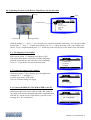
2.3. The BRICON UNIVES-BOX connection (optional).
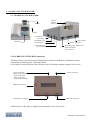
A Bricon Unives-box is connected to the Bricon Club-Master using the cable (male/male) provided.
This cable will provide the Unives-box with power, therefore it is not normally necessary to connect
the Unives-box with a power supply. Under some circumstances however it may be necessary to
connect a power supply to the Unives-box due to the high power consumption of some brands of ETS.
2.4. Connecting the ETS clock.
You can connect other brands of ETS clock to the Bricon Unives-box, using the necessary cables as
supplied by each particular brand of ETS. For Bricon clocks all cables are provided and the Speedy
clock also has its own docking station on the Bricon Club-Master.
2.5. The Printer.
A printer is necessary to print the basketing and clocking lists. You can use any DOS-compatible
printer (with a language of PCL5 or 6) but please note that Windows/USB printers are not compatible.
Use a standard parallel printer cable to connect the printer to the Bricon Club-Master.
2.6. The PC.
You can use any PC equipped with Windows XP or higher to communicate with the Club-Master.
The PC is connected with the Bricon Club-Master by a serial RS-232 null-modem cable.
The null-modem cable can be recognised by the 9-pins female connection on both sides.
It is also possible to connect the Bricon Club-Master to the PC using the USB cable provided.
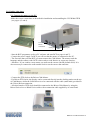
2.7. The BRICON radio-frequency mother clock.
The Bricon mother clock is a radio-frequency controlled clock that automatically synchronises with the
radio-frequency time signal transmitted by the National Physical Laboratories in Cumbria.
The master checks that the mother clock is synchronised with the time signal and if the clock has no
reception from the time signal (no antenna mast showing on the display) it will not synchronise.
Enclosed spaces such as armoured concrete and metal will disturb the signal. For this reason the mother
clock should always be kept in a place where you can receive the signal, the most suitable being near to
a window. By inserting an object into the reset button on the back of the mother clock, the clock will
search for the time signal once again. You will see 3 or 4 lines and after a period 5 minutes the mother
clock should have reset. Do not hold the mother clock in your hand during the synchronisation because
this will cause disturbance to the signal. If possible it is recommended to check that a signal is being
received by the mother clock, a number of hours before both the basketing and race checking..
The mother clock is provided with 2 AAA batteries. Open the clock with a small screwdriver
(2 screws) and place the batteries. Depending on the type of batteries, the life span is approximately 2y.
2.8. The Gender.
The gender cable is used to change a 9-pin female connector to a 9-pin male.
There are three gender cables provided.
3.0. PC-SOFTWARE.
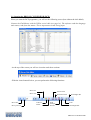
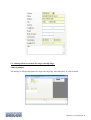
You must provide the clocks with a link table (a list of the association ring numbers of the pigeons that
are to be raced, each linked to a chip ring) before you can basket a pigeon. You can make a link table
with the Club-Master using the PC-software. This software is free provided on a CD, but can also be
obtained free on the Bricon website at www.bricon.be.
Install the BRICON CLUB EDITOR (BCE) link program, and the CD will start automatically after
which the instructions should be followed. The program will operate under Windows 98/ME, but is
designed for use with XP and Vista. If your computer is connected to the internet, you will automatically
receive the latest version, but when operating under Windows 98/ME you must download the updates
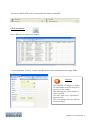
manually. After the installation a BCE icon will appear on the desktop of your computer. You can start
the Bricon Club Editor software by double clicking on the icon.
BRICON CLUB-MASTER 6