1
SAVING SETTINGS
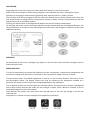
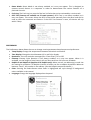
The Time-of-Day screen is a simple, editable screen that illustrates a feature of the control that applies
to all other editable screens as well.
When changes are made, the icon to go “Back” changes to “Save” and a new icon for “Cancel” appears
under the Save icon. Navigating to the left will highlight the Save icon, and navigating down from there
will allow the user to cancel the pending change. Pressing the “Select” button will save or cancel the
changes and go back to the previous screen.
Note: If power is interrupted to the system, Time-of-Day will be maintained for several days.
MAIN FILTRATION
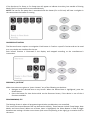
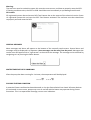
Using the same navigation and adjustment as Setting the Time, Filter Cycles are set using a start time
and a duration. Each setting can be adjusted in 15-minute increments. The panel calculates the end time
and displays it automatically.
FILTER CYCLE 2 – OPTIONAL FILTRATION
Filter Cycle 2 is OFF by default.
Simply navigate to the Filter Cycle 2 line by pressing the Right Navigation Button, and when “NO” is
highlighted, press Up or Down to toggle Filter Cycle 2 on and off. When Filter Cycle 2 is ON, it can be
adjusted in the same manner as Filter Cycle 1 by navigating to the right.
It is possible to overlap Filter Cycle 1 and Filter Cycle 2, which will shorten overall fi ltration by the
overlap amount.