1
The Rockbox Manual
for
Iriver H10 20 GB
rockbox.org
March 28, 2012
2
Rockbox
http://www.rockbox.org/
Open Source Jukebox Firmware
Rockbox and this manual is the collaborative effort of the Rockbox team and
its contributors. See the appendix for a complete list of contributors.
c 2003-2011 The Rockbox Team and its contributors, c 2004 Christi Alice
c 2003 José Maria Garcia-Valdecasas Bernal & Peter Schlenker.
Scarborough, Version 3.11RC. Built using pdfLATEX.
Permission is granted to copy, distribute and/or modify this document under
the terms of the GNU Free Documentation License, Version 1.2 or any later
version published by the Free Software Foundation; with no Invariant Sections, no Front-Cover Texts, and no Back-Cover Texts. A copy of the license
is included in the section entitled “GNU Free Documentation License”.
The Rockbox manual
(version 3.11RC)
Iriver H10
3
Contents
Contents
1. Introduction
1.1. Welcome . . . . . . . . . . . . . . . . . . . . . . . . . . . . . . . . . . . . .
1.2. Getting more help . . . . . . . . . . . . . . . . . . . . . . . . . . . . . . .
1.3. Naming conventions and marks . . . . . . . . . . . . . . . . . . . . . . . .
11
11
11
12
2. Installation
2.1. Before Starting . . . . . . . . . . . . . . . .
2.2. Installing Rockbox . . . . . . . . . . . . . .
2.2.1. Automated Installation . . . . . . .
2.2.2. Manual Installation . . . . . . . . .
2.2.3. Finishing the install . . . . . . . . .
2.2.4. Enabling Speech Support (optional)
2.3. Running Rockbox . . . . . . . . . . . . . . .
2.4. Updating Rockbox . . . . . . . . . . . . . .
2.5. Uninstalling Rockbox . . . . . . . . . . . .
2.5.1. Automatic Uninstallation . . . . . .
2.5.2. Manual Uninstallation . . . . . . . .
2.6. Troubleshooting . . . . . . . . . . . . . . . .
.
.
.
.
.
.
.
.
.
.
.
.
.
.
.
.
.
.
.
.
.
.
.
.
.
.
.
.
.
.
.
.
.
.
.
.
.
.
.
.
.
.
.
.
.
.
.
.
.
.
.
.
.
.
.
.
.
.
.
.
.
.
.
.
.
.
.
.
.
.
.
.
.
.
.
.
.
.
.
.
.
.
.
.
.
.
.
.
.
.
.
.
.
.
.
.
.
.
.
.
.
.
.
.
.
.
.
.
.
.
.
.
.
.
.
.
.
.
.
.
.
.
.
.
.
.
.
.
.
.
.
.
.
.
.
.
.
.
.
.
.
.
.
.
.
.
.
.
.
.
.
.
.
.
.
.
.
.
.
.
.
.
.
.
.
.
.
.
.
.
.
.
.
.
.
.
.
.
.
.
.
.
.
.
.
.
.
.
.
.
.
.
.
.
.
.
.
.
.
.
.
.
.
.
13
13
13
14
15
16
16
17
17
17
17
17
18
3. Quick Start
3.1. Basic Overview . . . . . . . . . . . .
3.1.1. The player’s controls . . . . .
3.1.2. Turning the player on and off
3.1.3. Starting the original firmware
3.1.4. Putting music on your player
3.1.5. The first contact . . . . . . .
3.1.6. Basic controls . . . . . . . . .
3.1.7. Basic concepts . . . . . . . .
3.2. Customising Rockbox . . . . . . . .
3.3. USB Charging . . . . . . . . . . . .
.
.
.
.
.
.
.
.
.
.
.
.
.
.
.
.
.
.
.
.
.
.
.
.
.
.
.
.
.
.
.
.
.
.
.
.
.
.
.
.
.
.
.
.
.
.
.
.
.
.
.
.
.
.
.
.
.
.
.
.
.
.
.
.
.
.
.
.
.
.
.
.
.
.
.
.
.
.
.
.
.
.
.
.
.
.
.
.
.
.
.
.
.
.
.
.
.
.
.
.
.
.
.
.
.
.
.
.
.
.
.
.
.
.
.
.
.
.
.
.
.
.
.
.
.
.
.
.
.
.
.
.
.
.
.
.
.
.
.
.
.
.
.
.
.
.
.
.
.
.
.
.
.
.
.
.
.
.
.
.
.
.
.
.
.
.
.
.
.
.
.
.
.
.
.
.
.
.
.
.
.
.
.
.
.
.
.
.
.
.
.
.
.
.
.
.
.
.
.
.
.
.
.
.
.
.
.
.
.
.
19
19
19
20
20
20
21
21
21
22
22
4. Browsing and playing
4.1. File Browser . . . . . . . . . .
4.1.1. File Browser Controls
4.1.2. Context Menu . . . .
4.1.3. Virtual Keyboard . . .
.
.
.
.
.
.
.
.
.
.
.
.
.
.
.
.
.
.
.
.
.
.
.
.
.
.
.
.
.
.
.
.
.
.
.
.
.
.
.
.
.
.
.
.
.
.
.
.
.
.
.
.
.
.
.
.
.
.
.
.
.
.
.
.
.
.
.
.
.
.
.
.
.
.
.
.
.
.
.
.
.
.
.
.
23
23
24
24
26
The Rockbox manual
(version 3.11RC)
.
.
.
.
.
.
.
.
.
.
.
.
.
.
.
.
Iriver H10
4
Contents
4.2. Database . . . . . . . . . . . . .
4.2.1. Introduction . . . . . . .
4.2.2. Initializing the Database .
4.2.3. The Database Menu . . .
4.2.4. Using the Database . . .
4.3. While Playing Screen . . . . . . .
4.3.1. WPS Key Controls . . . .
4.3.2. Peak Meter . . . . . . . .
4.3.3. The WPS Context Menu
4.4. Working with Playlists . . . . . .
4.4.1. Playlist terminology . . .
4.4.2. Creating playlists . . . . .
4.4.3. Adding music to playlists
4.4.4. Modifying playlists . . . .
4.4.5. Saving playlists . . . . . .
4.4.6. Loading saved playlists .
4.5. Hotkeys . . . . . . . . . . . . . .
5. The
5.1.
5.2.
5.3.
5.4.
5.5.
5.6.
5.7.
Main Menu
Introducing the Main Menu . .
Navigating the Main Menu . .
Recent Bookmarks . . . . . . .
Files . . . . . . . . . . . . . . .
Database . . . . . . . . . . . .
Now Playing/Resume Playback
Settings . . . . . . . . . . . . .
5.7.1. Sound Settings . . . . .
5.7.2. Playback Settings . . .
5.7.3. General Settings . . . .
5.7.4. Theme Settings . . . . .
5.7.5. Recording Settings . . .
5.7.6. Manage Settings . . . .
5.8. Recording . . . . . . . . . . . .
5.8.1. While Recording Screen
5.9. FM Radio . . . . . . . . . . . .
5.10. Playlists . . . . . . . . . . . . .
5.11. Plugins . . . . . . . . . . . . .
5.12. System . . . . . . . . . . . . . .
5.13. Quick Screen . . . . . . . . . .
5.14. Shortcuts . . . . . . . . . . . .
.
.
.
.
.
.
.
.
.
.
.
.
.
.
.
.
.
.
.
.
.
.
.
.
.
.
.
.
.
.
.
.
.
.
.
.
.
.
.
.
.
.
.
.
.
.
.
.
.
.
.
.
.
.
.
.
.
.
.
.
.
.
.
.
.
.
.
.
.
.
.
.
.
.
.
.
.
.
.
.
.
.
.
.
.
.
.
.
.
.
.
.
.
.
.
.
.
.
.
.
.
.
.
.
.
.
.
.
.
.
.
.
.
.
.
.
.
.
.
.
.
.
.
.
.
.
.
.
.
.
.
.
.
.
.
.
.
.
.
.
.
.
.
.
.
.
.
.
.
.
.
.
.
.
.
.
.
.
.
.
.
.
.
.
.
.
.
.
.
.
.
.
.
.
.
.
.
.
.
.
.
.
.
.
.
.
.
.
.
.
.
.
.
.
.
.
.
.
.
.
.
.
.
.
.
.
.
.
.
.
.
.
.
.
.
.
.
.
.
.
.
.
.
.
.
.
.
.
.
.
.
.
.
.
.
.
.
.
.
.
.
.
.
.
.
.
.
.
.
.
.
.
.
.
.
.
.
.
.
.
.
.
.
.
.
.
.
.
.
.
.
.
.
.
.
.
.
.
.
.
.
.
.
.
.
.
.
.
.
.
.
.
.
.
.
.
.
.
.
.
.
.
.
.
.
.
.
.
.
.
.
.
.
.
.
.
.
.
.
.
.
.
.
.
.
.
.
.
.
.
.
.
.
.
.
.
.
.
.
.
.
.
.
.
.
.
.
.
.
.
.
.
.
.
.
.
.
.
.
.
.
.
.
.
.
.
.
.
.
.
.
.
.
.
.
.
.
.
.
.
.
.
.
.
.
.
.
.
.
.
.
.
.
.
.
.
.
.
.
.
.
.
.
.
.
.
.
.
.
.
.
.
27
27
27
28
29
30
31
32
32
35
35
35
37
38
38
39
39
.
.
.
.
.
.
.
.
.
.
.
.
.
.
.
.
.
.
.
.
.
.
.
.
.
.
.
.
.
.
.
.
.
.
.
.
.
.
.
.
.
.
.
.
.
.
.
.
.
.
.
.
.
.
.
.
.
.
.
.
.
.
.
.
.
.
.
.
.
.
.
.
.
.
.
.
.
.
.
.
.
.
.
.
.
.
.
.
.
.
.
.
.
.
.
.
.
.
.
.
.
.
.
.
.
.
.
.
.
.
.
.
.
.
.
.
.
.
.
.
.
.
.
.
.
.
.
.
.
.
.
.
.
.
.
.
.
.
.
.
.
.
.
.
.
.
.
.
.
.
.
.
.
.
.
.
.
.
.
.
.
.
.
.
.
.
.
.
.
.
.
.
.
.
.
.
.
.
.
.
.
.
.
.
.
.
.
.
.
.
.
.
.
.
.
.
.
.
.
.
.
.
.
.
.
.
.
.
.
.
.
.
.
.
.
.
.
.
.
.
.
.
.
.
.
.
.
.
.
.
.
.
.
.
.
.
.
.
.
.
.
.
.
.
.
.
.
.
.
.
.
.
.
.
.
.
.
.
.
.
.
.
.
.
.
.
.
.
.
.
.
.
.
.
.
.
.
.
.
.
.
.
.
.
.
.
.
.
.
.
.
.
.
.
.
.
.
.
.
.
.
.
.
.
.
.
.
.
.
.
.
.
.
.
.
.
.
.
.
.
.
.
.
.
.
.
.
.
.
.
.
.
.
.
.
.
.
.
.
.
.
.
.
.
.
.
.
.
.
.
.
.
.
.
.
.
.
.
.
.
.
.
.
.
.
.
.
.
.
.
.
.
.
.
.
.
.
.
.
.
.
.
.
.
.
.
.
.
.
.
.
.
.
.
.
.
.
.
.
.
.
.
.
.
.
.
.
.
.
.
.
.
.
.
.
.
.
.
.
.
.
.
.
.
.
.
.
.
.
.
.
.
.
.
.
.
.
.
.
.
.
.
.
.
.
.
.
.
.
.
.
.
.
.
.
.
.
.
.
.
.
.
.
.
.
.
.
.
.
.
.
.
.
.
.
.
.
.
.
.
.
.
.
40
40
40
41
41
42
42
42
42
42
42
42
42
43
43
43
44
45
46
46
47
47
6. Sound Settings
49
6.1. Volume . . . . . . . . . . . . . . . . . . . . . . . . . . . . . . . . . . . . . 49
6.2. Bass . . . . . . . . . . . . . . . . . . . . . . . . . . . . . . . . . . . . . . . 49
The Rockbox manual
(version 3.11RC)
Iriver H10
5
Contents
6.3. Treble . . . .
6.4. Balance . . .
6.5. Channels . .
6.6. Stereo Width
6.7. Crossfeed . .
6.8. Equalizer . .
6.9. Dithering . .
6.10. Timestretch .
6.11. Compressor .
.
.
.
.
.
.
.
.
.
.
.
.
.
.
.
.
.
.
.
.
.
.
.
.
.
.
.
.
.
.
.
.
.
.
.
.
.
.
.
.
.
.
.
.
.
.
.
.
.
.
.
.
.
.
.
.
.
.
.
.
.
.
.
.
.
.
.
.
.
.
.
.
.
.
.
.
.
.
.
.
.
.
.
.
.
.
.
.
.
.
.
.
.
.
.
.
.
.
.
.
.
.
.
.
.
.
.
.
.
.
.
.
.
.
.
.
.
.
.
.
.
.
.
.
.
.
.
.
.
.
.
.
.
.
.
.
.
.
.
.
.
.
.
.
.
.
.
.
.
.
.
.
.
.
.
.
.
.
.
.
.
.
.
.
.
.
.
.
.
.
.
.
.
.
.
.
.
.
.
.
.
.
.
.
.
.
.
.
.
.
.
.
.
.
.
.
.
.
.
.
.
.
.
.
.
.
.
.
.
.
.
.
.
.
.
.
.
.
.
.
.
.
.
.
.
.
.
.
.
.
.
.
.
.
.
.
.
.
.
.
.
.
.
.
.
.
.
.
.
.
.
.
.
.
.
.
.
.
.
.
.
.
.
.
.
.
.
.
.
.
49
50
50
50
51
52
54
54
54
7. Playback Settings
7.1. Shuffle . . . . . . . . . .
7.2. Repeat . . . . . . . . . .
7.3. Play Selected First . . .
7.4. Fast-Forward/Rewind .
7.5. Anti-Skip Buffer . . . .
7.6. Fade on Stop/Pause . .
7.7. Party Mode . . . . . . .
7.8. Crossfade . . . . . . . .
7.9. Replaygain . . . . . . .
7.10. Track Skip Beep . . . .
7.11. Auto-Change Directory
7.12. Last.fm Log . . . . . . .
7.13. Cuesheet Support . . . .
7.14. Skip Length . . . . . . .
7.15. Prevent Track Skipping
7.16. Rewind Before Resume .
7.17. Rewind on Pause . . . .
.
.
.
.
.
.
.
.
.
.
.
.
.
.
.
.
.
.
.
.
.
.
.
.
.
.
.
.
.
.
.
.
.
.
.
.
.
.
.
.
.
.
.
.
.
.
.
.
.
.
.
.
.
.
.
.
.
.
.
.
.
.
.
.
.
.
.
.
.
.
.
.
.
.
.
.
.
.
.
.
.
.
.
.
.
.
.
.
.
.
.
.
.
.
.
.
.
.
.
.
.
.
.
.
.
.
.
.
.
.
.
.
.
.
.
.
.
.
.
.
.
.
.
.
.
.
.
.
.
.
.
.
.
.
.
.
.
.
.
.
.
.
.
.
.
.
.
.
.
.
.
.
.
.
.
.
.
.
.
.
.
.
.
.
.
.
.
.
.
.
.
.
.
.
.
.
.
.
.
.
.
.
.
.
.
.
.
.
.
.
.
.
.
.
.
.
.
.
.
.
.
.
.
.
.
.
.
.
.
.
.
.
.
.
.
.
.
.
.
.
.
.
.
.
.
.
.
.
.
.
.
.
.
.
.
.
.
.
.
.
.
.
.
.
.
.
.
.
.
.
.
.
.
.
.
.
.
.
.
.
.
.
.
.
.
.
.
.
.
.
.
.
.
.
.
.
.
.
.
.
.
.
.
.
.
.
.
.
.
.
.
.
.
.
.
.
.
.
.
.
.
.
.
.
.
.
.
.
.
.
.
.
.
.
.
.
.
.
.
.
.
.
.
.
.
.
.
.
.
.
.
.
.
.
.
.
.
.
.
.
.
.
.
.
.
.
.
.
.
.
.
.
.
.
.
.
.
.
.
.
.
.
.
.
.
.
.
.
.
.
.
.
.
.
.
.
.
.
.
.
.
.
.
.
.
.
.
.
.
.
.
.
.
.
.
.
.
.
.
.
.
.
.
.
.
.
.
.
.
.
.
.
.
.
.
.
.
.
.
.
.
.
.
.
.
.
.
.
.
.
.
.
.
.
.
.
.
.
.
.
.
.
.
.
.
.
.
.
.
.
.
.
.
.
.
.
.
.
.
.
.
.
.
.
.
.
.
.
.
.
.
.
.
.
.
.
56
56
56
57
57
57
57
57
57
59
60
60
60
60
61
61
61
61
8. General Settings
8.1. Playlist . . . . . . . . . .
8.2. File View . . . . . . . . .
8.3. Database . . . . . . . . .
8.4. Display . . . . . . . . . .
8.5. System . . . . . . . . . . .
8.5.1. Battery . . . . . .
8.5.2. Disk . . . . . . . .
8.5.3. Limits . . . . . . .
8.5.4. Car Adapter Mode
8.5.5. Keyclick . . . . . .
8.5.6. USB HID . . . . .
8.5.7. USB Keypad Mode
8.6. Startup/Shutdown . . . .
8.6.1. Start Screen . . . .
.
.
.
.
.
.
.
.
.
.
.
.
.
.
.
.
.
.
.
.
.
.
.
.
.
.
.
.
.
.
.
.
.
.
.
.
.
.
.
.
.
.
.
.
.
.
.
.
.
.
.
.
.
.
.
.
.
.
.
.
.
.
.
.
.
.
.
.
.
.
.
.
.
.
.
.
.
.
.
.
.
.
.
.
.
.
.
.
.
.
.
.
.
.
.
.
.
.
.
.
.
.
.
.
.
.
.
.
.
.
.
.
.
.
.
.
.
.
.
.
.
.
.
.
.
.
.
.
.
.
.
.
.
.
.
.
.
.
.
.
.
.
.
.
.
.
.
.
.
.
.
.
.
.
.
.
.
.
.
.
.
.
.
.
.
.
.
.
.
.
.
.
.
.
.
.
.
.
.
.
.
.
.
.
.
.
.
.
.
.
.
.
.
.
.
.
.
.
.
.
.
.
.
.
.
.
.
.
.
.
.
.
.
.
.
.
.
.
.
.
.
.
.
.
.
.
.
.
.
.
.
.
.
.
.
.
.
.
.
.
.
.
.
.
.
.
.
.
.
.
.
.
.
.
.
.
.
.
.
.
.
.
.
.
.
.
.
.
.
.
.
.
.
.
.
.
.
.
.
.
.
.
.
.
.
.
.
.
.
.
.
.
.
.
.
.
.
.
.
.
.
.
.
.
.
.
.
.
.
.
.
.
.
.
.
.
.
.
.
.
.
.
.
.
.
.
.
.
.
.
.
.
.
.
.
.
.
.
.
.
.
.
.
.
.
.
.
.
.
.
.
.
.
.
.
.
.
.
.
.
.
.
.
.
.
.
.
.
.
.
.
.
.
.
.
.
.
.
62
62
62
64
64
67
67
67
67
68
68
68
69
70
70
The Rockbox manual
.
.
.
.
.
.
.
.
.
.
.
.
.
.
.
.
.
.
.
.
.
.
.
.
.
.
.
.
.
.
.
.
.
.
.
.
(version 3.11RC)
Iriver H10
6
Contents
8.6.2. Idle Poweroff
8.6.3. Sleep Timer .
8.7. Bookmarking . . . .
8.8. Automatic resume .
8.9. Language . . . . . .
8.10. Voice . . . . . . . . .
8.11. Hotkey . . . . . . . .
.
.
.
.
.
.
.
.
.
.
.
.
.
.
.
.
.
.
.
.
.
.
.
.
.
.
.
.
.
.
.
.
.
.
.
.
.
.
.
.
.
.
.
.
.
.
.
.
.
.
.
.
.
.
.
.
.
.
.
.
.
.
.
.
.
.
.
.
.
.
.
.
.
.
.
.
.
.
.
.
.
.
.
.
.
.
.
.
.
.
.
.
.
.
.
.
.
.
.
.
.
.
.
.
.
.
.
.
.
.
.
.
.
.
.
.
.
.
.
.
.
.
.
.
.
.
.
.
.
.
.
.
.
.
.
.
.
.
.
.
.
.
.
.
.
.
.
.
.
.
.
.
.
.
.
.
.
.
.
.
.
.
.
.
.
.
.
.
.
.
.
.
.
.
.
.
.
.
.
.
.
.
.
.
.
.
.
.
.
.
.
.
.
.
.
.
.
.
.
.
.
.
.
.
.
.
.
.
.
.
71
71
72
73
74
74
76
9. Theme Settings
77
10.Recording Settings
10.1. Format . . . . . . . . . . . . .
10.2. Encoder Settings (MP3 only)
10.3. Frequency . . . . . . . . . . .
10.4. Source . . . . . . . . . . . . .
10.5. Channels . . . . . . . . . . .
10.6. Mono Mode . . . . . . . . . .
10.7. File Split Options . . . . . . .
10.8. Prerecord Time . . . . . . . .
10.9. Clear Recording Directory . .
10.10.Clipping Light . . . . . . . .
10.11.Trigger . . . . . . . . . . . . .
79
79
79
79
80
80
80
80
80
81
81
81
.
.
.
.
.
.
.
.
.
.
.
.
.
.
.
.
.
.
.
.
.
.
.
.
.
.
.
.
.
.
.
.
.
.
.
.
.
.
.
.
.
.
.
.
.
.
.
.
.
.
.
.
.
.
.
.
.
.
.
.
.
.
.
.
.
.
.
.
.
.
.
.
.
.
.
.
.
.
.
.
.
.
.
.
.
.
.
.
.
.
.
.
.
.
.
.
.
.
.
.
.
.
.
.
.
.
.
.
.
.
.
.
.
.
.
.
.
.
.
.
.
.
.
.
.
.
.
.
.
.
.
.
.
.
.
.
.
.
.
.
.
.
.
.
.
.
.
.
.
.
.
.
.
.
.
.
.
.
.
.
.
.
.
.
.
.
.
.
.
.
.
.
.
.
.
.
.
.
.
.
.
.
.
.
.
.
.
.
.
.
.
.
.
.
.
.
.
.
.
.
.
.
.
.
.
.
.
.
.
.
.
.
.
.
.
.
.
.
.
.
.
.
.
.
.
.
.
.
.
.
.
.
.
.
.
.
.
.
.
.
.
.
.
.
.
.
.
.
.
.
.
.
.
.
.
.
.
.
.
.
.
.
.
.
.
.
.
.
.
.
.
.
.
.
.
11.Time and Date
83
12.Plugins
12.1. Games . . . . . . . .
12.1.1. Blackjack . .
12.1.2. BrickMania .
12.1.3. Bubbles . . .
12.1.4. Chessbox . .
12.1.5. Clix . . . . .
12.1.6. Chopper . . .
12.1.7. Codebuster .
12.1.8. Dice . . . . .
12.1.9. Doom . . . .
12.1.10.Flipit . . . .
12.1.11.Goban . . . .
12.1.12.Invadrox . . .
12.1.13.Jackpot . . .
12.1.14.Jewels . . . .
12.1.15.MazezaM . .
12.1.16.Minesweeper
12.1.17.Pacbox . . .
The Rockbox manual
.
.
.
.
.
.
.
.
.
.
.
.
.
.
.
.
.
.
.
.
.
.
.
.
.
.
.
.
.
.
.
.
.
.
.
.
.
.
.
.
.
.
.
.
.
.
.
.
.
.
.
.
.
.
.
.
.
.
.
.
.
.
.
.
.
.
.
.
.
.
.
.
.
.
.
.
.
.
.
.
.
.
.
.
.
.
.
.
.
.
(version 3.11RC)
.
.
.
.
.
.
.
.
.
.
.
.
.
.
.
.
.
.
.
.
.
.
.
.
.
.
.
.
.
.
.
.
.
.
.
.
.
.
.
.
.
.
.
.
.
.
.
.
.
.
.
.
.
.
.
.
.
.
.
.
.
.
.
.
.
.
.
.
.
.
.
.
.
.
.
.
.
.
.
.
.
.
.
.
.
.
.
.
.
.
.
.
.
.
.
.
.
.
.
.
.
.
.
.
.
.
.
.
.
.
.
.
.
.
.
.
.
.
.
.
.
.
.
.
.
.
.
.
.
.
.
.
.
.
.
.
.
.
.
.
.
.
.
.
.
.
.
.
.
.
.
.
.
.
.
.
.
.
.
.
.
.
.
.
.
.
.
.
.
.
.
.
.
.
.
.
.
.
.
.
.
.
.
.
.
.
.
.
.
.
.
.
.
.
.
.
.
.
.
.
.
.
.
.
.
.
.
.
.
.
.
.
.
.
.
.
.
.
.
.
.
.
.
.
.
.
.
.
.
.
.
.
.
.
.
.
.
.
.
.
.
.
.
.
.
.
.
.
.
.
.
.
.
.
.
.
.
.
.
.
.
.
.
.
.
.
.
.
.
.
.
.
.
.
.
.
.
.
.
.
.
.
.
.
.
.
.
.
.
.
.
.
.
.
.
.
.
.
.
.
.
.
.
.
.
.
.
.
.
.
.
.
.
.
.
.
.
.
.
.
.
.
.
.
.
.
.
.
.
.
.
.
.
.
.
.
.
.
.
.
.
.
.
.
.
.
.
.
.
.
.
.
.
.
.
.
.
.
.
.
.
.
.
.
.
.
.
.
.
.
.
.
.
.
.
.
.
.
.
.
.
.
.
.
.
.
.
.
.
.
.
.
.
.
.
.
.
.
.
.
.
.
.
.
.
.
.
.
.
.
.
.
.
.
.
.
.
.
.
.
.
.
.
.
.
.
.
.
.
.
.
.
.
.
.
.
.
.
.
.
.
.
.
.
.
.
.
.
.
.
84
84
84
85
86
87
88
88
89
89
90
92
93
97
97
98
99
99
100
Iriver H10
7
Contents
12.1.18.Pegbox . . . . . . . .
12.1.19.Pong . . . . . . . . . .
12.1.20.Reversi . . . . . . . .
12.1.21.Robotfindskitten . . .
12.1.22.Rockblox . . . . . . .
12.1.23.Rockblox1d . . . . . .
12.1.24.Sliding Puzzle . . . . .
12.1.25.Snake . . . . . . . . .
12.1.26.Snake 2 . . . . . . . .
12.1.27.Sokoban . . . . . . . .
12.1.28.Solitaire . . . . . . . .
12.1.29.Spacerocks . . . . . .
12.1.30.Star . . . . . . . . . .
12.1.31.Sudoku . . . . . . . .
12.1.32.Wormlet . . . . . . . .
12.1.33.Xobox . . . . . . . . .
12.2. Demos . . . . . . . . . . . . .
12.2.1. Bounce . . . . . . . .
12.2.2. Credits . . . . . . . .
12.2.3. Cube . . . . . . . . . .
12.2.4. Demystify . . . . . . .
12.2.5. Fire . . . . . . . . . .
12.2.6. Fractals . . . . . . . .
12.2.7. Logo . . . . . . . . . .
12.2.8. Mosaique . . . . . . .
12.2.9. Oscilloscope . . . . . .
12.2.10.PictureFlow . . . . . .
12.2.11.Plasma . . . . . . . .
12.2.12.Rocklife . . . . . . . .
12.2.13.Snow . . . . . . . . . .
12.2.14.Starfield . . . . . . . .
12.2.15.VU meter . . . . . . .
12.3. Viewers . . . . . . . . . . . .
12.3.1. Shortcuts . . . . . . .
12.3.2. Chip-8 Emulator . . .
12.3.3. Frotz . . . . . . . . . .
12.3.4. Image Viewer . . . . .
12.3.5. Lua scripting language
12.3.6. Midiplay . . . . . . . .
12.3.7. MPEG Player . . . . .
12.3.8. MP3 Encoder . . . . .
12.3.9. Rockboy . . . . . . . .
12.3.10.Search . . . . . . . . .
12.3.11.Shopper . . . . . . . .
The Rockbox manual
(version 3.11RC)
.
.
.
.
.
.
.
.
.
.
.
.
.
.
.
.
.
.
.
.
.
.
.
.
.
.
.
.
.
.
.
.
.
.
.
.
.
.
.
.
.
.
.
.
.
.
.
.
.
.
.
.
.
.
.
.
.
.
.
.
.
.
.
.
.
.
.
.
.
.
.
.
.
.
.
.
.
.
.
.
.
.
.
.
.
.
.
.
.
.
.
.
.
.
.
.
.
.
.
.
.
.
.
.
.
.
.
.
.
.
.
.
.
.
.
.
.
.
.
.
.
.
.
.
.
.
.
.
.
.
.
.
.
.
.
.
.
.
.
.
.
.
.
.
.
.
.
.
.
.
.
.
.
.
.
.
.
.
.
.
.
.
.
.
.
.
.
.
.
.
.
.
.
.
.
.
.
.
.
.
.
.
.
.
.
.
.
.
.
.
.
.
.
.
.
.
.
.
.
.
.
.
.
.
.
.
.
.
.
.
.
.
.
.
.
.
.
.
.
.
.
.
.
.
.
.
.
.
.
.
.
.
.
.
.
.
.
.
.
.
.
.
.
.
.
.
.
.
.
.
.
.
.
.
.
.
.
.
.
.
.
.
.
.
.
.
.
.
.
.
.
.
.
.
.
.
.
.
.
.
.
.
.
.
.
.
.
.
.
.
.
.
.
.
.
.
.
.
.
.
.
.
.
.
.
.
.
.
.
.
.
.
.
.
.
.
.
.
.
.
.
.
.
.
.
.
.
.
.
.
.
.
.
.
.
.
.
.
.
.
.
.
.
.
.
.
.
.
.
.
.
.
.
.
.
.
.
.
.
.
.
.
.
.
.
.
.
.
.
.
.
.
.
.
.
.
.
.
.
.
.
.
.
.
.
.
.
.
.
.
.
.
.
.
.
.
.
.
.
.
.
.
.
.
.
.
.
.
.
.
.
.
.
.
.
.
.
.
.
.
.
.
.
.
.
.
.
.
.
.
.
.
.
.
.
.
.
.
.
.
.
.
.
.
.
.
.
.
.
.
.
.
.
.
.
.
.
.
.
.
.
.
.
.
.
.
.
.
.
.
.
.
.
.
.
.
.
.
.
.
.
.
.
.
.
.
.
.
.
.
.
.
.
.
.
.
.
.
.
.
.
.
.
.
.
.
.
.
.
.
.
.
.
.
.
.
.
.
.
.
.
.
.
.
.
.
.
.
.
.
.
.
.
.
.
.
.
.
.
.
.
.
.
.
.
.
.
.
.
.
.
.
.
.
.
.
.
.
.
.
.
.
.
.
.
.
.
.
.
.
.
.
.
.
.
.
.
.
.
.
.
.
.
.
.
.
.
.
.
.
.
.
.
.
.
.
.
.
.
.
.
.
.
.
.
.
.
.
.
.
.
.
.
.
.
.
.
.
.
.
.
.
.
.
.
.
.
.
.
.
.
.
.
.
.
.
.
.
.
.
.
.
.
.
.
.
.
.
.
.
.
.
.
.
.
.
.
.
.
.
.
.
.
.
.
.
.
.
.
.
.
.
.
.
.
.
.
.
.
.
.
.
.
.
.
.
.
.
.
.
.
.
.
.
.
.
.
.
.
.
.
.
.
.
.
.
.
.
.
.
.
.
.
.
.
.
.
.
.
.
.
.
.
.
.
.
.
.
.
.
.
.
.
.
.
.
.
.
.
.
.
.
.
.
.
.
.
.
.
.
.
.
.
.
.
.
.
.
.
.
.
.
.
.
.
.
.
.
.
.
.
.
.
.
.
.
.
.
.
.
.
.
.
.
.
.
.
.
.
.
.
.
.
.
.
.
.
.
.
.
.
.
.
.
.
.
.
.
.
.
.
.
.
.
.
.
.
.
.
.
.
.
.
.
.
.
.
.
.
.
.
.
.
.
.
.
.
.
.
.
.
.
.
.
.
.
.
.
.
.
.
.
.
.
.
.
.
.
.
.
.
.
.
.
.
.
.
.
.
.
.
.
.
.
.
.
.
.
.
.
.
.
.
.
.
.
.
.
.
.
.
.
.
.
.
.
.
.
.
.
.
.
.
.
.
.
.
.
.
.
.
.
.
.
.
.
.
.
.
.
.
.
.
.
.
.
.
.
.
.
.
.
.
.
.
.
.
.
.
.
.
.
.
.
.
.
.
.
.
.
.
.
.
.
.
.
.
.
.
.
.
.
.
.
.
.
.
.
.
.
.
.
.
.
.
.
.
.
.
.
.
.
.
.
.
.
.
.
.
.
.
.
.
.
.
.
.
.
.
.
.
.
.
.
.
.
.
.
.
.
.
.
.
.
.
.
.
.
.
.
.
.
.
.
.
.
.
.
.
.
.
.
.
.
.
.
.
.
.
.
.
.
.
.
.
.
.
.
.
.
.
.
.
.
.
.
.
.
.
.
.
.
.
.
.
.
.
.
.
.
.
.
.
.
.
.
.
.
.
.
.
.
.
.
.
.
.
.
.
.
.
.
.
.
.
.
.
.
.
.
101
102
103
103
104
104
105
106
106
107
108
109
110
111
112
115
115
115
116
116
117
118
118
119
119
120
120
122
123
123
124
124
125
125
126
127
128
129
130
130
132
133
134
134
Iriver H10
8
Contents
12.3.12.Sort . . . . . . . . . . .
12.3.13.Text Viewer . . . . . . .
12.3.14.Theme Remove . . . . .
12.3.15.VBRfix . . . . . . . . .
12.3.16.ZXBox . . . . . . . . . .
12.4. Applications . . . . . . . . . . .
12.4.1. Alarm Clock . . . . . .
12.4.2. Battery Benchmark . .
12.4.3. Calculator . . . . . . . .
12.4.4. Calendar . . . . . . . .
12.4.5. Chess Clock . . . . . . .
12.4.6. Clock . . . . . . . . . .
12.4.7. Disk Tidy . . . . . . . .
12.4.8. Keybox . . . . . . . . .
12.4.9. Lamp . . . . . . . . . .
12.4.10.Lrcplayer . . . . . . . .
12.4.11.md5sum . . . . . . . . .
12.4.12.Metronome . . . . . . .
12.4.13.Pitch Detector . . . . .
12.4.14.Random Folder Advance
12.4.15.Resistor Calculator . . .
12.4.16.Rockpaint . . . . . . . .
12.4.17.Stats . . . . . . . . . . .
12.4.18.Stopwatch . . . . . . . .
12.4.19.Text Editor . . . . . . .
. . . . . . . . .
. . . . . . . . .
. . . . . . . . .
. . . . . . . . .
. . . . . . . . .
. . . . . . . . .
. . . . . . . . .
. . . . . . . . .
. . . . . . . . .
. . . . . . . . .
. . . . . . . . .
. . . . . . . . .
. . . . . . . . .
. . . . . . . . .
. . . . . . . . .
. . . . . . . . .
. . . . . . . . .
. . . . . . . . .
. . . . . . . . .
Configuration
. . . . . . . . .
. . . . . . . . .
. . . . . . . . .
. . . . . . . . .
. . . . . . . . .
13.Advanced Topics
13.1. Customising the User Interface . . . .
13.1.1. Customising The Main Menu .
13.1.2. Getting Extras . . . . . . . . .
13.1.3. Loading Fonts . . . . . . . . .
13.1.4. Loading Languages . . . . . . .
13.1.5. Changing Filetype Colours . .
13.1.6. Loading Backdrops . . . . . . .
13.1.7. UI Viewport . . . . . . . . . .
13.2. Configuring the Theme . . . . . . . . .
13.2.1. Themeing – General Info . . .
13.2.2. Themes – Create Your Own . .
13.2.3. Info Viewport (SBS only) . . .
13.2.4. Additional Fonts . . . . . . . .
13.3. Managing Rockbox Settings . . . . . .
13.3.1. Introduction to .cfg Files . . .
13.3.2. Specifications for .cfg Files . .
13.3.3. The Manage Settings menu
The Rockbox manual
(version 3.11RC)
.
.
.
.
.
.
.
.
.
.
.
.
.
.
.
.
.
.
.
.
.
.
.
.
.
.
.
.
.
.
.
.
.
.
.
.
.
.
.
.
.
.
.
.
.
.
.
.
.
.
.
.
.
.
.
.
.
.
.
.
.
.
.
.
.
.
.
.
.
.
.
.
.
.
.
.
.
.
.
.
.
.
.
.
.
.
.
.
.
.
.
.
.
.
.
.
.
.
.
.
.
.
.
.
.
.
.
.
.
.
.
.
.
.
.
.
.
.
.
.
.
.
.
.
.
.
.
.
.
.
.
.
.
.
.
.
.
.
.
.
.
.
.
.
.
.
.
.
.
.
.
.
.
.
.
.
.
.
.
.
.
.
.
.
.
.
.
.
.
.
.
.
.
.
.
.
.
.
.
.
.
.
.
.
.
.
.
.
.
.
.
.
.
.
.
.
.
.
.
.
.
.
.
.
.
.
.
.
.
.
.
.
.
.
.
.
.
.
.
.
.
.
.
.
.
.
.
.
.
.
.
.
.
.
.
.
.
.
.
.
.
.
.
.
.
.
.
.
.
.
.
.
.
.
.
.
.
.
.
.
.
.
.
.
.
.
.
.
.
.
.
.
.
.
.
.
.
.
.
.
.
.
.
.
.
.
.
.
.
.
.
.
.
.
.
.
.
.
.
.
.
.
.
.
.
.
.
.
.
.
.
.
.
.
.
.
.
.
.
.
.
.
.
.
.
.
.
.
.
.
.
.
.
.
.
.
.
.
.
.
.
.
.
.
.
.
.
.
.
.
.
.
.
.
.
.
.
.
.
.
.
.
.
.
.
.
.
.
.
.
.
.
.
.
.
.
.
.
.
.
.
.
.
.
.
.
.
.
.
.
.
.
.
.
.
.
.
.
.
.
.
.
.
.
.
.
.
.
.
.
.
.
.
.
.
.
.
.
.
.
.
.
.
.
.
.
.
.
.
.
.
.
.
.
.
.
.
.
.
.
.
.
.
.
.
.
.
.
.
.
.
.
.
.
.
.
.
.
.
.
134
135
138
139
140
141
141
142
144
144
145
146
148
149
150
150
153
153
153
154
155
156
158
159
159
.
.
.
.
.
.
.
.
.
.
.
.
.
.
.
.
.
.
.
.
.
.
.
.
.
.
.
.
.
.
.
.
.
.
.
.
.
.
.
.
.
.
.
.
.
.
.
.
.
.
.
.
.
.
.
.
.
.
.
.
.
.
.
.
.
.
.
.
.
.
.
.
.
.
.
.
.
.
.
.
.
.
.
.
.
.
.
.
.
.
.
.
.
.
.
.
.
.
.
.
.
.
.
.
.
.
.
.
.
.
.
.
.
.
.
.
.
.
.
.
.
.
.
.
.
.
.
.
.
.
.
.
.
.
.
.
.
.
.
.
.
.
.
.
.
.
.
.
.
.
.
.
.
.
.
.
.
.
.
.
.
.
.
.
.
.
.
.
.
.
.
.
.
.
.
.
.
.
.
.
.
.
.
.
.
.
.
.
.
.
.
.
.
.
.
.
.
.
.
.
.
.
.
.
.
.
.
.
.
.
.
.
.
.
.
.
.
.
.
.
.
.
.
.
.
.
.
.
.
.
.
.
.
.
.
.
.
.
.
.
.
.
.
.
.
.
.
.
.
.
.
.
.
.
.
161
161
161
161
161
162
162
163
164
164
164
164
167
168
170
170
171
172
Iriver H10
9
Contents
13.4. Firmware Loading . . . . . . . . . . . .
13.4.1. Using ROLO (Rockbox Loader) .
13.5. Optimising battery runtime . . . . . . .
13.5.1. Display backlight . . . . . . . . .
13.5.2. Display power-off . . . . . . . . .
13.5.3. Anti-Skip Buffer . . . . . . . . .
13.5.4. Replaygain . . . . . . . . . . . .
13.5.5. Peak Meter . . . . . . . . . . . .
13.5.6. Audio format and bitrate . . . .
13.5.7. Sound settings . . . . . . . . . .
.
.
.
.
.
.
.
.
.
.
.
.
.
.
.
.
.
.
.
.
.
.
.
.
.
.
.
.
.
.
.
.
.
.
.
.
.
.
.
.
.
.
.
.
.
.
.
.
.
.
.
.
.
.
.
.
.
.
.
.
.
.
.
.
.
.
.
.
.
.
.
.
.
.
.
.
.
.
.
.
.
.
.
.
.
.
.
.
.
.
.
.
.
.
.
.
.
.
.
.
.
.
.
.
.
.
.
.
.
.
.
.
.
.
.
.
.
.
.
.
.
.
.
.
.
.
.
.
.
.
.
.
.
.
.
.
.
.
.
.
.
.
.
.
.
.
.
.
.
.
.
.
.
.
.
.
.
.
.
.
.
.
.
.
.
.
.
.
.
.
.
.
.
.
.
.
.
.
.
.
.
.
.
.
.
.
.
.
.
.
172
172
172
173
173
173
173
173
173
174
A. File formats
175
A.1. Supported file formats . . . . . . . . . . . . . . . . . . . . . . . . . . . . . 176
B. Audio and metadata formats
B.1. Supported audio formats . . . . . . . . . . . .
B.1.1. Lossy Codecs . . . . . . . . . . . . . .
B.1.2. Lossless Codecs . . . . . . . . . . . . .
B.1.3. Other Codecs . . . . . . . . . . . . . .
B.1.4. Codec featureset . . . . . . . . . . . .
B.2. Supported metadata tags . . . . . . . . . . .
B.2.1. Featureset for generic metadata tags .
B.2.2. Featureset for codec specific metadata
B.2.3. Limitations of metadata handling . . .
C. Theme Tags
C.1. Status Bar . . . . . . . . . . . .
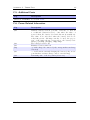
C.2. Hardware Capabilities . . . . .
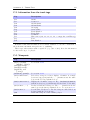
C.3. Information from the track tags
C.4. Viewports . . . . . . . . . . . .
C.5. Additional Fonts . . . . . . . .
C.6. Power Related Information . .
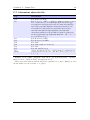
C.7. Information about the file . . .
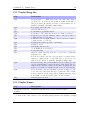
C.8. Playlist/Song Info . . . . . . .
C.9. Playlist Viewer . . . . . . . . .
C.10.Runtime Database . . . . . . .
C.11.Sound (DSP) settings . . . . .
C.12.Hold . . . . . . . . . . . . . . .
C.13.Virtual LED . . . . . . . . . .
C.14.Repeat Mode . . . . . . . . . .
C.15.Playback Mode . . . . . . . . .
C.16.Current Screen . . . . . . . . .
C.17.List Title (.sbs only) . . . . .
C.18.Changing Volume . . . . . . . .
The Rockbox manual
(version 3.11RC)
.
.
.
.
.
.
.
.
.
.
.
.
.
.
.
.
.
.
.
.
.
.
.
.
.
.
.
.
.
.
.
.
.
.
.
.
.
.
.
.
.
.
.
.
.
.
.
.
.
.
.
.
.
.
.
.
.
.
.
.
.
.
.
.
.
.
.
.
.
.
.
.
.
.
.
.
.
.
.
.
.
.
.
.
.
.
.
.
.
.
.
.
.
.
.
.
.
.
.
.
.
.
.
.
.
.
.
.
.
.
.
.
.
.
.
.
.
.
.
.
.
.
.
.
.
.
.
.
.
.
.
.
.
.
.
.
.
.
.
.
.
.
.
.
.
.
.
.
.
.
.
.
.
.
.
.
.
.
.
.
.
.
.
.
.
.
.
.
.
.
.
.
.
.
.
.
.
.
.
.
.
.
.
.
.
.
.
.
.
.
.
.
.
.
.
.
.
.
.
.
.
.
.
.
.
.
.
.
.
.
.
.
.
.
.
.
.
.
.
.
.
.
.
.
.
.
.
.
.
.
.
.
.
.
.
.
.
.
.
.
.
.
.
.
.
.
.
.
.
.
.
.
.
.
.
.
.
.
.
.
.
.
.
.
.
.
.
.
.
.
.
.
.
.
.
.
.
.
.
.
.
.
.
.
.
.
.
.
.
.
.
.
.
.
.
.
.
.
.
.
.
.
.
.
.
.
.
.
.
.
.
.
.
.
.
.
.
.
.
.
.
.
.
.
.
.
.
.
.
.
.
.
.
.
.
.
.
.
.
.
.
.
.
.
.
.
.
.
.
.
.
.
.
.
.
.
.
.
.
.
.
.
.
.
.
.
.
.
.
.
.
.
.
.
.
.
.
.
.
.
.
.
.
.
.
.
.
.
.
.
.
.
.
.
.
.
.
.
.
.
.
.
.
.
.
.
.
.
.
.
.
.
.
.
.
.
.
.
.
.
.
.
.
.
.
.
.
.
.
.
.
.
.
.
.
.
.
.
.
.
.
.
.
.
.
.
.
.
.
.
.
.
.
.
.
.
.
.
.
.
.
.
.
.
.
.
.
.
.
.
.
.
.
.
.
.
.
.
.
.
.
.
.
.
.
.
.
.
.
.
.
.
.
.
.
.
.
.
.
.
.
.
.
.
.
.
.
.
.
.
.
.
.
.
.
.
.
.
.
.
.
.
177
177
177
178
179
180
181
181
182
182
.
.
.
.
.
.
.
.
.
.
.
.
.
.
.
.
.
.
.
.
.
.
.
.
.
.
.
.
.
.
.
.
.
.
.
.
183
. 183
. 183
. 184
. 184
. 185
. 185
. 186
. 187
. 187
. 188
. 188
. 188
. 189
. 189
. 189
. 189
. 190
. 191
Iriver H10
10
Contents
C.19.Settings . . . . . . . . . . . . . . . .
C.20.Images . . . . . . . . . . . . . . . . .
C.21.Album Art . . . . . . . . . . . . . .
C.21.1. Limitations . . . . . . . . . .
C.21.2. Where to put album art . . .
C.21.3. How to display the album art
C.22.FM Radio . . . . . . . . . . . . . . .
C.23.Alignment and language direction . .
C.24.Conditional Tags . . . . . . . . . . .
C.25.Subline Tags . . . . . . . . . . . . .
C.26.Time and Date . . . . . . . . . . . .
C.27.Text Translation . . . . . . . . . . .
C.28.Bar Tags . . . . . . . . . . . . . . . .
C.28.1. Options . . . . . . . . . . . .
C.29.Other Tags . . . . . . . . . . . . . .
.
.
.
.
.
.
.
.
.
.
.
.
.
.
.
.
.
.
.
.
.
.
.
.
.
.
.
.
.
.
.
.
.
.
.
.
.
.
.
.
.
.
.
.
.
.
.
.
.
.
.
.
.
.
.
.
.
.
.
.
.
.
.
.
.
.
.
.
.
.
.
.
.
.
.
.
.
.
.
.
.
.
.
.
.
.
.
.
.
.
.
.
.
.
.
.
.
.
.
.
.
.
.
.
.
.
.
.
.
.
.
.
.
.
.
.
.
.
.
.
.
.
.
.
.
.
.
.
.
.
.
.
.
.
.
.
.
.
.
.
.
.
.
.
.
.
.
.
.
.
.
.
.
.
.
.
.
.
.
.
.
.
.
.
.
.
.
.
.
.
.
.
.
.
.
.
.
.
.
.
.
.
.
.
.
.
.
.
.
.
.
.
.
.
.
.
.
.
.
.
.
.
.
.
.
.
.
.
.
.
.
.
.
.
.
.
.
.
.
.
.
.
.
.
.
.
.
.
.
.
.
.
.
.
.
.
.
.
.
.
.
.
.
.
.
.
.
.
.
.
.
.
.
.
.
.
.
.
.
.
.
.
.
.
.
.
.
.
.
.
.
.
.
.
.
.
.
.
.
.
.
.
.
.
.
.
.
.
.
.
.
.
.
.
.
.
.
.
.
.
.
.
.
.
.
.
.
.
.
.
.
.
.
.
.
191
192
193
193
193
194
195
195
196
196
197
197
197
198
198
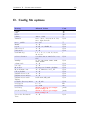
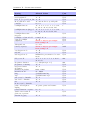
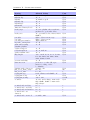
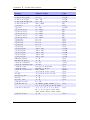
D. Config file options
200
E. Menu Overview
206
F. User feedback
F.1. Bug reports . . . . . . . . . . . . . . . . . . . .
F.1.1. Rules for submitting new bug reports .
F.2. Feature ideas . . . . . . . . . . . . . . . . . . .
F.2.1. Rules for submitting a new feature idea
F.2.2. Features we will not implement . . . . .
G. Credits
.
.
.
.
.
.
.
.
.
.
.
.
.
.
.
.
.
.
.
.
.
.
.
.
.
.
.
.
.
.
.
.
.
.
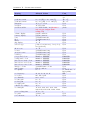
.
.
.
.
.
.
.
.
.
.
.
.
.
.
.
.
.
.
.
.
.
.
.
.
.
.
.
.
.
.
.
.
.
.
.
.
207
. 207
. 207
. 207
. 207
. 208
209
H. Licenses
213
H.1. GNU Free Documentation License . . . . . . . . . . . . . . . . . . . . . . 213
H.2. The GNU General Public License . . . . . . . . . . . . . . . . . . . . . . . 221
The Rockbox manual
(version 3.11RC)
Iriver H10
Chapter 1. Introduction
11
1. Introduction
1.1. Welcome
This is the manual for Rockbox. Rockbox is an open source firmware replacement
for a growing number of digital audio players. Rockbox aims to be considerably more
functional and efficient than your device’s stock firmware while remaining easy to use
and customisable. Rockbox is written by users, for users. Not only is it free to use, it
is also released under the GNU General Public License (GPL), which means that it will
always remain free both to use and to change.
Rockbox has been in development since 2001, and receives new features, tweaks and
fixes each day to provide you with the best possible experience on your digital audio
player. A major goal of Rockbox is to be simple and easy to use, yet remain very
customisable and configurable. We believe that you should never need to go through a
series of menus for an action you perform frequently. We also believe that you should
be able to configure almost anything about Rockbox you could want, pertaining to
functionality. Another top priority of Rockbox is audio playback quality – Rockbox,
for most models, includes a wider range of sound settings than the device’s original
firmware. A lot of work has been put into making Rockbox sound the best it can, and
improvements are constantly being made. All models have access to a large number
of plugins, including many games, applications, and graphical “demos”. You can load
different configurations quickly for different purposes (e.g. a large font for in your car,
different sound settings for at home). Rockbox features a very wide range of languages,
and all supported models also have the ability to talk to you – menus can be voiced and
filenames spelled out or spoken.
1.2. Getting more help
This manual is intended to be a comprehensive introduction to the Rockbox firmware.
There is, however, more help available. The Rockbox website at http://www.rockbox.org/
contains very extensive documentation and guides written by members of the Rockbox
community and this should be your first port of call when looking for further help.
If you cannot find the information you are searching for on the Rockbox website there
are a number of support channels you should have a look at. You can try the Rockbox
forums located at http://forums.rockbox.org/. The mailing lists are another option, and
can be found at http://www.rockbox.org/mail/. From that page you can subscribe to
the lists and browse the archives. To search the list archives simply use the search field
that is located on the left side of the website. Furthermore, you can ask on IRC. The
The Rockbox manual
(version 3.11RC)
Iriver H10
Chapter 1. Introduction
12
main channel for Rockbox is #rockbox on irc://irc.freenode.net. Many helpful developers
and users are usually around. Just join and ask your question (don’t ask to ask!) – if
someone knows the answer you’ll usually get an answer pretty quickly. More information
including IRC logs can be found at http://www.rockbox.org/irc/. We also have a web
client so that you can join the Rockbox IRC channel without needing to install additional
software onto your computer.
If you think you have found a bug please make sure it actually is a bug and is still
present in the most recent version of Rockbox. You should try to confirm that by using
the above mentioned support channels first. After that you can submit that issue to our
tracker. Refer to section F (page 207) for details on how to use the tracker.
1.3. Naming conventions and marks
We have some conventions (especially for naming) that are intended to be consistent
throughout this manual.
Manufacturer and product names are formatted in accordance with the standard rules
of English grammar, e.g. “Iriver playback is currently unsupported”. Manufacturer and
model names are proper nouns, and thus are written beginning with a capital letter.
This manual has some parts that are marked with icons on the margin to help you
finding important parts or parts you could skip. The following icons are used:
Note: This indicates a note. A note starts always with the text “Note”. In order to
make finding notes easier each one is accompanied by an icon in the margin as here.
Notes are used to mark useful information that may help you to get the most out of
Rockbox.
b
Warning: This is a warning. In contrast to notes mentioned above, a warning should
be taken more seriously. Whereas ignoring notes will not cause any serious damage,
ignoring warnings could cause serious damage to your player. You really should read the
warnings, especially if you are new to Rockbox.
!
This icon marks a section that is intended especially for the blind and visually impaired. As they cannot read the manual in the same way sighted people do we have
added some additional descriptions. If you are not blind or visually impaired you can
probably completely skip these blocks. To make this easier, there is an icon shown in
the margin on the right.
Links to the wiki are abbreviated by the name of the wiki page. Those names are still
linked so you can simply follow them like any other link in this manual. If you want to
access a wiki page manually go to Z http://www.rockbox.org/wiki/ and type the page
name in the “Go” box at the top of the page. Links to wiki pages are also indicated by
the symbol Z in front of the page name.
The Rockbox manual
(version 3.11RC)
Iriver H10
¸
13
Chapter 2. Installation
2. Installation
Installing Rockbox is generally a quick and easy procedure. However before beginning
there are a few important things to know.
2.1. Before Starting
USB connection. To transfer Rockbox to your player you need to connect it to your
computer. For manual installation/uninstallation, or should autodetection fail
during automatic installation, you need to know where to access the player. On
Windows this means you need to know the drive letter associated with the player.
On Linux you need to know the mount point of your player. On Mac OS X you
need to know the volume name of your player.
The installation requires you to use UMS mode and so may require use of the
UMS trick, whereby it is possible to force a MTP H10 to start up in UMS mode
as follows:
1. Ensure the player is fully powered off by using a pin to push the small reset
button inside the hole between the Hold switch and remote control connector.
2. Connect your H10 to the computer using the data cable.
3. Hold Select and push Power to turn the player on.
4. Continue holding Select until the USB Connected screen appears.
5. The player will now appear as a regular disk on your computer.
Note: Once Rockbox has been installed, when you shut down your player from
Rockbox it will totally power the player off so step 1 is no longer necessary.
2.2. Installing Rockbox
There are two ways to install Rockbox: automated and manual. The automated way is
the preferred method of installing Rockbox for the majority of people. Rockbox Utility
is a graphical application that does almost everything for you. However, should you
encounter a problem, then the manual way is still available to you.
There are three separate components, two of which need to be installed in order to
run Rockbox:
The Rockbox manual
(version 3.11RC)
Iriver H10
b
14
Chapter 2. Installation
The Iriver bootloader. The Iriver bootloader is the program that tells your player how
to load and start the original firmware. It is also responsible for any emergency,
recovery, or disk modes on your player. This bootloader is stored in special flash
memory in your Iriver and comes factory-installed. It is not necessary to modify
this in order to install Rockbox.
The Rockbox bootloader. The Rockbox bootloader is loaded from disk by the Iriver
bootloader. It is responsible for loading the Rockbox firmware and for providing
the dual boot function. It directly replaces the Iriver firmware in the player’s boot
sequence.
The Rockbox firmware. Similar to the Iriver firmware, most of the Rockbox code is
contained in a “build” that resides on your player’s drive. This makes it easy to
update Rockbox. The build consists of a directory called .rockbox which contains
all of the Rockbox files, and is located in the root of your player’s drive.
Apart from the required parts there are some addons you might be interested in
installing.
Fonts. Rockbox can load custom fonts. The fonts are distributed as a separate package
and thus need to be installed separately. They are not required to run Rockbox
itself but a lot of themes require the fonts package to be installed.
Themes. The appearance of Rockbox can be customised by themes. Depending on your
taste you might want to install additional themes to change the look of Rockbox.
2.2.1. Automated Installation
To automatically install Rockbox, download the official installer and housekeeping tool
Rockbox Utility. It allows you to:
• Automatically install all needed components for using Rockbox (“Minimal Installation”).
• Automatically install all suggested components (“Complete Installation”).
• Selectively install optional components.
• Install additional fonts and themes.
• Install voice files and generate talk clips.
• Uninstall all components you installed using Rockbox Utility.
Prebuilt binaries for Windows, Linux and Mac OS X are available at the ZRockboxUtility
wiki page.
The Rockbox manual
(version 3.11RC)
Iriver H10
15
Chapter 2. Installation
When first starting Rockbox Utility run “Autodetect”, found in the configuration
dialog (File → Configure). Autodetection can detect most player types. If autodetection
fails or is unable to detect the mountpoint, make sure to enter the correct values. The
mountpoint indicates the location of the player in your filesystem. On Windows, this is
the drive letter the player gets assigned, on other systems this is a path in the filesystem.
Choosing a Rockbox version
There are three different versions of Rockbox available from the Rockbox website: Release version, current build and archived daily build. You need to decide which one you
want to install and get the appropriate version for your player. If you select either “Minimal Installation” or “Complete Installation” from the “Quick Start” tab, then Rockbox
Utility will automatically install the release version of Rockbox. Using the “Installation”
tab will allow you to select which version you wish to install.
Release. The release version is the latest stable release, free of known critical bugs.
For a manual install, the current stable release of Rockbox is available at http:
//www.rockbox.org/download/.
Current Build. The current build is built at each source code change to the Rockbox
SVN repository and represents the current state of Rockbox development. This
means that the build could contain bugs but most of the time is safe to use. For a
manual install, you can download the current build from http://build.rockbox.org/.
Archived Build. In addition to the release version and the current build, there is also an
archive of daily builds available for download. These are built once a day from the
latest source code in the SVN repository. For a manual install, you can download
archived builds from http://www.rockbox.org/daily.shtml.
Note: Because current and archived builds are development versions that change frequently, they may behave differently than described in this manual, or they may introduce new (and potentially annoying) bugs. Unless you wish to try the latest and
greatest features at the price of possibly greater instability, or you wish to help with
development, you should stick with the release.
Please now go to section 2.2.3 (page 16) to complete the installation procedure.
2.2.2. Manual Installation
The manual installation method is still available to you, should you need or desire it by
following the instructions below. If you have used Rockbox Utility to install Rockbox,
then you do not need to follow the next section and can skip straight to section 2.2.3
(page 16)
The Rockbox manual
(version 3.11RC)
Iriver H10
b
16
Chapter 2. Installation
Installing the firmware
1. Download your chosen version of Rockbox from the links in the previous section.
2. Connect your player to the computer via USB in MSC mode as described in the
manual that came with your player.
3. Take the .zip file that you downloaded and use the “Extract all” command of
your unzip program to extract the files onto your player.
Note: The entire contents of the .zip file should be extracted directly to the root of
your player’s drive. Do not try to create a separate directory on your player for the
Rockbox files! The .zip file already contains the internal structure that Rockbox needs.
b
If the contents of the .zip file are extracted correctly, you will have a directory called
.rockbox, which contains all the files needed by Rockbox, in the main directory of your
player’s drive.
Installing the bootloader
Installation
1. Download http://download.rockbox.org/bootloader/iriver/H10_20GC.mi4
2. Connect your H10 to the computer using UMS mode and the UMS trick.
3. Rename the H10_20GC.mi4 file to OF.mi4 in the System directory on your H10.
Note: You should keep a safe backup of this file for use if you ever wish to switch
back to the Iriver firmware.
b
Note: If you cannot see the System directory, you will need to make sure your
operating system is configured to show hidden files and directories.
b
4. Copy the H10_20GC.mi4 file you downloaded to the System directory on your
player.
2.2.3. Finishing the install
Safely eject / unmount the USB drive, unplug the cable and restart.
2.2.4. Enabling Speech Support (optional)
If you wish to use speech support you will also need a voice file. Voice files allow Rockbox
to speak the user interface to you. Rockbox Utility can install an English voice file, or
you can download it from http://www.rockbox.org/daily.shtml and unzip it to the root
of your player. Rockbox Utility can also aid you in the creation of voice files with
The Rockbox manual
(version 3.11RC)
Iriver H10
17
Chapter 2. Installation
different voices or in other languages if you have a suitable speech engine installed on
your computer. Voice menus are enabled by default and will come into effect after a
reboot. See section 8.10 (page 74) for details on voice settings. Rockbox Utility can also
aid in the production of talk files, which allow Rockbox to speak file and folder names.
2.3. Running Rockbox
When you turn the unit on, Rockbox should load.
2.4. Updating Rockbox
Rockbox can be easily updated with Rockbox Utility. You can also update Rockbox
manually – download a Rockbox build as detailed above, and unzip the build to the root
directory of your player as in the manual installation stage. If your unzip program asks
you whether to overwrite files, choose the “Yes to all” option. The new build will be
installed over your current build.
The bootloader only changes rarely, and should not normally need to be updated.
Note: If you use Rockbox Utility be aware that it cannot detect manually installed
components.
b
2.5. Uninstalling Rockbox
Note: The Rockbox bootloader allows you to choose between Rockbox and the original
firmware. (See section 3.1.3 (page 20) for more information.)
2.5.1. Automatic Uninstallation
You can uninstall Rockbox automatically by using Rockbox Utility. If you installed
Rockbox manually you can still use Rockbox Utility for uninstallation but will not be
able to do this selectively.
2.5.2. Manual Uninstallation
If you would like to go back to using the original Iriver software, connect the player to
your computer, and delete the H10_20GC.mi4 file and rename OF.mi4 to H10_20GC.mi4
in the System directory on your H10. As in the installation, it may be necessary to first
put your device into UMS mode.
If you wish to clean up your disk, you may also wish to delete the .rockbox directory
and its contents. Turn the Iriver off. Turn the player back on and the original Iriver
software will load.
The Rockbox manual
(version 3.11RC)
Iriver H10
b
Chapter 2. Installation
18
2.6. Troubleshooting
“File Not Found” If you receive a “File Not Found” from the bootloader, then the
bootloader cannot find the Rockbox firmware. This is usually a result of not
extracting the contents of the .zip file to the proper location, and should not
happen when Rockbox has been installed with Rockbox Utility.
To fix this, either install Rockbox with the Rockbox Utility which will take care
of this for you, or recheck the Manual Install section to see where the files need to
be located.
The Rockbox manual
(version 3.11RC)
Iriver H10
Chapter 3. Quick Start
19
3. Quick Start
3.1. Basic Overview
3.1.1. The player’s controls
Throughout this manual, the buttons on the player are labelled according to the
picture above. Whenever a button name is prefixed by “Long”, a long press of approximately one second should be performed on that button. The buttons are described in
detail in the following paragraph. Additional information for blind users is available on
the Rockbox website at ZBlindFAQ.
Hold or lay the player so that the side with the scroll pad and LCD is facing towards
you. In the centre below the lcd is the scroll pad. It is oriented vertically. Touching the
top and bottom half of it acts as the Scroll Up and Scroll Down buttons respectively.
On the left of the scroll pad is the Cancel button and on the right is the Select button.
There are three buttons on the right hand side of the player. From top to bottom,
they are: Prev, Play and Next. On the left hand side is the Power button.
On the top panel of the player, from left to right, you can find the following: Hold
switch, reset pin hole, remote port and headphone mini jack plug.
On the bottom panel of the player is the data cable port.
The Rockbox manual
(version 3.11RC)
Iriver H10
¸
20
Chapter 3. Quick Start
3.1.2. Turning the player on and off
To turn on and off your Rockbox enabled player use the following keys:
Key
Action
Power
Long Power
Start Rockbox
Shutdown Rockbox
On shutdown, Rockbox automatically saves its settings.
If you have problems with your settings, such as accidentally having set the colours to
black on black, they can be reset at boot time. See the Reset Settings in section 13.3.3
(page 172) for details.
In the unlikely event of a software failure, a hardware reset can be performed by
inserting a paperclip gently into the Reset hole.
3.1.3. Starting the original firmware
Rockbox has a dual-boot feature. It loads the original firmware from the file /System/OF.mi4.
To boot into the original firmware, press and hold the Cancel button while turning on
the player.
Note: The iriver firmware does not shut down properly when you turn it off, it only
goes to sleep. To get back into Rockbox when exiting from the iriver firmware, you will
need to reset the player by inserting a pin in the reset hole.
b
3.1.4. Putting music on your player
Note: Due to a bug in some OS X versions, the player can not be mounted, unless the
USB HID feature is disabled. See section 8.5.6 (page 68) for more information.
With the player connected to the computer as an MSC/UMS device (like a USB
Drive), music files can be put on the player via any standard file transfer method that
you would use to copy files between drives (e.g. Drag-and-Drop). Files may be placed
wherever you like on the player, but it is strongly suggested NOT to put them in the
/.rockbox folder and instead put them in any other folder, e.g. /, /music or /audio.
The default directory structure that is assumed by some parts of Rockbox (album art
searching, and missing-tag fallback in some WPSes) uses the parent directory of a song
as the Album name, and the parent directory of that folder as the Artist name. WPSes
may display information incorrectly if your files are not properly tagged, and you have
your music organized in a way different than they assume when attempting to guess
the Artist and Album names from your filetree. See section C.21 (page 193) for the
requirements for Album Art to work properly. See section B.1 (page 177) for a list of
supported audio formats.
The Rockbox manual
(version 3.11RC)
Iriver H10
b
Chapter 3. Quick Start
21
3.1.5. The first contact
After you have first started the player, you’ll be presented by the Main Menu. From
this menu you can reach every function of Rockbox, for more information (see section 5.1
(page 40)). To browse the files on your player, select Files (see section 4.1 (page 23)),
and to browse in a view that is based on the meta-data1 of your audio files, select
Database (see section 4.2 (page 27)).
3.1.6. Basic controls
When browsing files and moving through menus you usually get a list view presented.
The navigation in these lists are usually the same and should be pretty intuitive. In the
tree view use Scroll Down and Scroll Up to move around the selection. Use Select to
select an item. When browsing the file system selecting an audio file plays it. The view
switches to the “While playing screen”, usually abbreviated as “WPS” (see section 4.3
(page 30). The dynamic playlist gets replaced with the contents of the current directory.
This way you can easily treat directories as playlists. The created dynamic playlist can
be extended or modified while playing. This is also known as “on-the-fly playlist”. To
go back to the File Browser stop the playback with the Long Play button or return
to the file browser while keeping playback running using Cancel. In list views you can
go back one step with Cancel.
3.1.7. Basic concepts
Playlists
Rockbox is playlist oriented. This means that every time you play an audio file, a socalled “dynamic playlist” is generated, unless you play a saved playlist. You can modify
the dynamic playlist while playing and also save it to a file. If you do not want to use
playlists you can simply play your files directory based. Playlists are covered in detail
in section 4.4 (page 35).
Menu
From the menu you can customise Rockbox. Rockbox itself is very customisable. Also
there are some special menus for quick access to frequently used functions.
Context Menu
Some views, especially the file browser and the WPS have a context menu. From the file
browser this can be accessed with Long Select. The contents of the context menu vary,
depending on the situation it gets called. The context menu itself presents you with
some operations you can perform with the currently highlighted file. In the file browser
this is the file (or directory) that is highlighted by the cursor. From the WPS this is
1
ID3 Tags, Vorbis comments, etc.
The Rockbox manual
(version 3.11RC)
Iriver H10
Chapter 3. Quick Start
22
the currently playing file. Also there are some actions that do not apply to the current
file but refer to the screen from which the context menu gets called. One example is the
playback menu, which can be called using the context menu from within the WPS.
3.2. Customising Rockbox
Rockbox’ User Interface can be customised using “Themes”. Themes usually only affect
the visual appearance, but an advanced user can create a theme that also changes various
other settings like file view, LCD settings and all other settings that can be modified
using .cfg files. This topic is discussed in more detail in section 13.3 (page 170). The
Rockbox distribution comes with some themes that should look nice on your player.
Note: Some of the themes shipped with Rockbox need additional fonts from the fonts
package, so make sure you installed them. Also, if you downloaded additional themes
from the Internet make sure you have the needed fonts installed as otherwise the theme
may not display properly.
b
3.3. USB Charging
To charge your player over USB, hold any button while plugging it in. This will prevent
it from connecting to your computer and let you continue to use it normally. Your player
must already be in Rockbox for this to function.
Note: Be aware that this button may still perform its normal function, so it is recommended to use a button without harmful side effects, such as Select.
The Rockbox manual
(version 3.11RC)
Iriver H10
b
Chapter 4. Browsing and playing
23
4. Browsing and playing
4.1. File Browser
Figure 4.1.: The file browser
Rockbox lets you browse your music in either of two ways. The File Browser lets
you navigate through the files and directories on your player, entering directories and
executing the default action on each file. To help differentiate files, each file format is
displayed with an icon.
The Database Browser, on the other hand, allows you to navigate through the
music on your player using categories like album, artist, genre, etc.
You can select whether to browse using the File Browser or the Database Browser
by selecting either Files or Database in the Main Menu. If you choose the File
Browser, the Show Files setting lets you select what types of files you wish to view.
See section 8.2 (page 63) for more information on the Show Files setting.
Note: The File Browser allows you to manipulate your files in ways that are not
available within the Database Browser. Read more about Database in section 4.2
(page 27). The remainder of this section deals with the File Browser.
b
Note: If your player is a MTP model, the Music directory where all your music is
stored may be hidden in the File Browser. This may be fixed by either changing its
properties (on a computer) to not hidden, or by changing the Show Files setting to
all.
b
The Rockbox manual
(version 3.11RC)
Iriver H10
24
Chapter 4. Browsing and playing
4.1.1. File Browser Controls
Key
Action
Scroll Up/Scroll
Down
Go to previous/next item in list. If you
are on the first/last entry, the cursor will
wrap to the last/first entry.
Move one page up/down in the list.
Go to the parent directory.
Execute the default action on the selected
file or enter a directory.
If there is an audio file playing, return
to the While Playing Screen (WPS)
without stopping playback.
Stop audio playback.
Enter the Context Menu.
Enter the Main Menu.
Switch to the Quick Screen (see section 5.13 (page 47)).
Activate the Hotkey function (see section 4.5 (page 39)).
Prev/ Next
Cancel
Select
Play
Long Play
Long Select
Power
Long Cancel
Power+ Play
4.1.2. Context Menu
Figure 4.2.: The Context Menu
The Context Menu allows you to perform certain operations on files or directories.
To access the Context Menu, position the selector over a file or directory and access
the context menu with Long Select.
Note: The Context Menu is a context sensitive menu. If the Context Menu is
invoked on a file, it will display options available for files. If the Context Menu is
The Rockbox manual
(version 3.11RC)
Iriver H10
b
25
Chapter 4. Browsing and playing
invoked on a directory, it will display options for directories.
The Context Menu contains the following options (unless otherwise noted, each
option pertains both to files and directories):
Playlist. Enters the Playlist Submenu (see section 4.4.3 (page 37)).
Playlist Catalogue. Enters the Playlist Catalogue Submenu (see section 4.4.2 (page 36)).
Rename. This function lets the user modify the name of a file or directory.
Cut. Copies the name of the currently selected file or directory to the clipboard and
marks it to be ‘cut’.
Copy. Copies the name of the currently selected file or directory to the clipboard and
marks it to be ‘copied’.
Paste. Only visible if a file or directory name is on the clipboard. When selected it will
move or copy the clipboard to the current directory.
Delete. Deletes the currently selected file. This option applies only to files, and not to
directories. Rockbox will ask for confirmation before deleting a file. Press Select
to confirm deletion or any other key to cancel.
Delete Directory. Deletes the currently selected directory and all of the files and subdirectories it may contain. Deleted directories cannot be recovered. Use this feature
with caution!
Set As Backdrop. Set the selected bmp file as background image. The bitmaps need to
meet the conditions explained in section 13.1.6 (page 163).
Open with. Runs a viewer plugin on the file. Normally, when a file is selected in Rockbox, Rockbox automatically detects the file type and runs the appropriate plugin.
The Open With function can be used to override the default action and select a
viewer by hand. For example, this function can be used to view a text file even if
the file has a non-standard extension (i.e., the file has an extension of something
other than .txt). See section 12.3 (page 125) for more details on viewers.
Create Directory. Create a new directory in the current directory on the disk.
Properties. Shows properties such as size and the time and date of the last modification
for the selected file. If used on a directory, the number of files and subdirectories
will be shown, as well as the total size.
Set As Recording Directory. Save recordings in the selected directory.
Start File Browser Here. This option allows users to set the currently selected directory
as the default start directory for the file browser. This option is not available for
files.
The Rockbox manual
(version 3.11RC)
Iriver H10
26
Chapter 4. Browsing and playing
Add to Shortcuts. Adds a link to the selected item in the shortcuts.link file. If the
file does not already exist it will be created in the root directory. Note that if you
create a shortcut to a file, Rockbox will not open it upon selecting, but simply
bring you to its location in the File Browser.
4.1.3. Virtual Keyboard
Figure 4.3.: The virtual keyboard
This is the virtual keyboard that is used when entering text in Rockbox, for example
when renaming a file or creating a new directory. The virtual keyboard can be easily
changed by making a text file with the required layout. More information on how to
achieve this can be found on the Rockbox website at ZLoadableKeyboardLayouts.
Also you can switch to Morse code input mode by changing the Use Morse Code
Input setting or by pressing Play+Prev in the virtual keyboard.
Note: When the cursor is on the input line, Prev deletes the preceding character
The Rockbox manual
(version 3.11RC)
Iriver H10
b
27
Chapter 4. Browsing and playing
Key
Action
Cancel / Select
Move the cursor on the virtual keyboard.
If you move out of the picker area, you
get the previous/next page of characters
(if there is more than one).
Move the cursor on the virtual keyboard.
If you move out of the picker area you get
to the line edit mode.
Insert the selected keyboard letter at the
current line cursor position.
Exit the virtual keyboard and save any
changes.
Exit the virtual keyboard without saving
any changes.
Toggle keyboard input mode and Morse
code input mode.
Tap to select a character in Morse code
input mode.
Scroll Up /
Scroll Down
Prev
Play
Next
Play+Prev
Prev
4.2. Database
4.2.1. Introduction
This chapter describes the Rockbox music database system. Using the information
contained in the tags (ID3v1, ID3v2, Vorbis Comments, Apev2, etc.) in your audio
files, Rockbox builds and maintains a database of the music files on your player and
allows you to browse them by Artist, Album, Genre, Song Name, etc. The criteria the
database uses to sort the songs can be completely customised. More information on how
to achieve this can be found on the Rockbox website at ZDataBase.
4.2.2. Initializing the Database
The first time you use the database, Rockbox will scan your disk for audio files. This can
take quite a while depending on the number of files on your player. This scan happens
in the background, so you can choose to return to the Main Menu and continue to listen
to music. If you shut down your player, the scan will continue next time you turn it on.
After the scan is finished you may be prompted to restart your player before you can
use the database.
Ignoring Directories During Database Initialization
You may have directories on your player whose contents should not be added to the
database. Placing a file named database.ignore in a directory will exclude the files in
The Rockbox manual
(version 3.11RC)
Iriver H10
28
Chapter 4. Browsing and playing
that directory and all its subdirectories from scanning their tags and adding them to the
database. This will speed up the database initialization.
If a subdirectory of an ‘ignored’ directory should still be scanned, place a file named
database.unignore in it. The files in that directory and its subdirectories will be
scanned and added to the database.
4.2.3. The Database Menu
Load To RAM The database can either be kept on hard disk (to save memory), or
loaded into RAM (for fast browsing). Setting this to Yes loads the database to
RAM, allowing faster browsing and searching. Setting this option to No keeps
the database on the hard disk, meaning slower browsing but it does not use extra
RAM and saves some battery on boot up.
Note: If you browse your music frequently using the database, you should load
to RAM, as this will reduce the overall battery consumption because the disk will
not need to spin on each search.
b
Auto Update If Auto update is set to on, each time the player boots, the database
will automatically be updated.
Initialize Now You can force Rockbox to rescan your disk for tagged files by using the
Initialize Now function in the Database Menu.
Warning: Initialize Now removes all database files (removing runtimedb data
also) and rebuilds the database from scratch.
!
Update Now Update now causes the database to detect new and deleted files
Note: Unlike the Auto Update function, Update Now will update the database
regardless of whether the Directory Cache is enabled. Thus, an update using
Update now may take a long time.
Unlike Initialize Now, the Update Now function does not remove runtime
database information.
Gather Runtime Data When enabled, rockbox will record how often and how long a
track is being played, when it was last played and its rating. This information can
be displayed in the WPS and is used in the database browser to, for example, show
the most played, unplayed and most recently played tracks.
Export Modifications This allows for the runtime data to be exported to the file
/.rockbox/database_changelog.txt, which backs up the runtime data in ASCII
format. This is needed when database structures change, because new code cannot
read old database code. But, all modifications exported to ASCII format should
be readable by all database versions.
The Rockbox manual
(version 3.11RC)
Iriver H10
b
Chapter 4. Browsing and playing
29
Import Modifications. Allows the /.rockbox/database_changelog.txt backup to be
conveniently loaded into the database. If Auto Update is enabled this is performed automatically when the database is initialized.
4.2.4. Using the Database
Once the database has been initialized, you can browse your music by Artist, Album, Genre, Song Name, etc. To use the database, go to the Main Menu and select
Database.
Note: You may need to increase the value of the Max files in dir browser setting
(Settings → General Settings → System → Limits) in order to view long lists
of tracks in the ID3 database browser.
There is no option to turn off database completely. If you do not want to use it just
do not do the initial build of the database and do not load it to RAM.
The Rockbox manual
(version 3.11RC)
Iriver H10
b
30
Chapter 4. Browsing and playing
Tag
Type
Origin
filename
album
albumartist
artist
comment
composer
genre
grouping
title
bitrate
discnum
year
tracknum
autoscore
lastplayed
playcount
Pm (play time min)
Ps (play time - sec)
rating
commitid
entryage
length
Lm (track len min)
Ls (track len - sec)
string
string
string
string
string
string
string
string
string
numeric
numeric
numeric
numeric
numeric
numeric
numeric
numeric
system
id tag
id tag
id tag
id tag
id tag
id tag
id tag
id tag
id tag
id tag
id tag
id tag/filename
runtime db
runtime db
runtime db
runtime db
numeric
numeric
numeric
numeric
numeric
numeric
runtime db
runtime db
system
system
system
system
numeric
system
4.3. While Playing Screen
The While Playing Screen (WPS) displays various pieces of information about the currently playing audio file. The appearance of the WPS can be configured using WPS
configuration files. The items shown depend on your configuration – all items can be
turned on or off independently. Refer to section C (page 183) for details on how to
change the display of the WPS.
• Status bar: The Status bar shows Battery level, charger status, volume, play mode,
repeat mode, shuffle mode and clock. In contrast to all other items, the status bar
is always at the top of the screen.
• (Scrolling) path and filename of the current song.
• The ID3 track name.
The Rockbox manual
(version 3.11RC)
Iriver H10
31
Chapter 4. Browsing and playing
• The ID3 album name.
• The ID3 artist name.
• Bit rate. VBR files display average bitrate and “(avg)”
• Elapsed and total time.
• A slidebar progress meter representing where in the song you are.
• Peak meter.
See section 13.2 (page 164) for details of customising your WPS (While Playing
Screen).
4.3.1. WPS Key Controls
Key
Action
Scroll Up /
Scroll Down
Prev
Volume up/down.
Long Prev
Next
Long Next
Play
Long Play
Cancel
Long Select
Power
Long Cancel
Play+Cancel
Play+Select
Power+ Play
Power + Next or
Short Next +
Long Next
Power + Prev or
Short Prev +
Long Prev
The Rockbox manual
Go to beginning of track, or if pressed
while in the first seconds of a track, go
to the previous track.
Rewind in track.
Go to the next track.
Fast forward in track.
Toggle play/pause.
Stop playback.
Return to the File Browser /
Database.
Enter WPS Context Menu.
Enter Main Menu.
Switch to the Quick Screen (see section 5.13 (page 47)).
Show Pitch Screen (see section 4.3.3
(page 34)).
Enter ID3 Viewer.
Activate the Hotkey function (see section 4.5 (page 39)).
Skip to the next directory.
Skip to the previous directory.
(version 3.11RC)
Iriver H10
32
Chapter 4. Browsing and playing
4.3.2. Peak Meter
The peak meter can be displayed on the While Playing Screen and consists of several
indicators. For a picture of the peak meter, please see the While Recording Screen in
section 5.8.1 (page 43).
The bar: This is the wide horizontal bar. It represents the current volume value.
The peak indicator: This is a little vertical line at the right end of the bar. It indicates
the peak volume value that occurred recently.
The clip indicator: This is a little black block that is displayed at the very right of the
scale when an overflow occurs. It usually does not show up during normal playback
unless you play an audio file that is distorted heavily. If you encounter clipping
while recording, your recording will sound distorted. You should lower the gain.
Note: Note that the clip detection is not very precise. Clipping might occur
without being indicated.
The scale: Between the indicators of the right and left channel there are little dots.
These dots represent important volume values. In linear mode each dot is a 10%
mark. In dBFS mode the dots represent the following values (from right to left):
0 dB, -3 dB, -6 dB, -9 dB, -12 dB, -18 dB, -24 dB, -30 dB, -40 dB, -50 dB, -60 dB.
4.3.3. The WPS Context Menu
Like the context menu for the File Browser, the WPS Context Menu allows you
quick access to some often used functions.
Playlist
The Playlist submenu allows you to view, save, search and reshuffle the current playlist.
To change settings for the Playlist Viewer press Long Select while viewing the
current playlist to bring up the Playlist Viewer Menu. In this menu, you can find
the Playlist Viewer Settings.
Playlist Viewer Settings
Show Icons. This toggles display of the icon for the currently selected playlist entry and
the icon for moving a playlist entry
Show Indices. This toggles display of the line numbering for the playlist
Track Display. This toggles between filename only and full path for playlist entries
Save Current Playlist. Allows the current playlist to be saved as a .m3u8 playlist file
The Rockbox manual
(version 3.11RC)
Iriver H10
b
Chapter 4. Browsing and playing
33
Playlist catalogue
View catalogue. This lists all playlists that are part of the Playlist catalogue. You can
load a new playlist directly from this list.
Add to playlist. Adds the currently playing file to a playlist. Select the playlist you
want the file to be added to and it will get appended to that playlist.
Add to new playlist. Similar to the previous entry this will add the currently playing
track to a playlist. You need to enter a name for the new playlist first.
Sound Settings
This is a shortcut to the Sound Settings Menu, where you can configure volume, bass,
treble, and other settings affecting the sound of your music. See section 6 (page 49) for
more information.
Playback Settings
This is a shortcut to the Playback Settings Menu, where you can configure shuffle,
repeat, party mode, skip length and other settings affecting the playback of your music.
Rating
The menu entry is only shown if Gather Runtime Information is enabled. It allows
the assignment of a personal rating value (0 – 10) to a track which can be displayed in
the WPS and used in the Database browser. The value wraps at 10.
Bookmarks
This allows you to create a bookmark in the currently-playing track.
Show Track Info
Figure 4.4.: The track info viewer
This screen is accessible from the WPS screen, and provides a detailed view of all the
identity information about the current track. This info is known as meta data and is
The Rockbox manual
(version 3.11RC)
Iriver H10
Chapter 4. Browsing and playing
34
stored in audio file formats to keep information on artist, album etc. To access this
screen, press Play+Select.
Open With...
This Open With function is the same as the Open With function in the file browser’s
Context Menu.
Delete
Delete the currently playing file. The file will be deleted but the playback of the file will
not stop immediately. Instead, the part of the file that has already been buffered (i.e.
read into the player’s memory) will be played. This may even be the whole track.
Pitch
The Pitch Screen allows you to change the rate of playback (i.e. the playback speed
and at the same time the pitch) of your player. The rate value can be adjusted between
50% and 200%. 50% means half the normal playback speed and a pitch that is an octave
lower than the normal pitch. 200% means double playback speed and a pitch that is an
octave higher than the normal pitch.
The rate can be changed in two modes: procentual and semitone. Initially, procentual
mode is active.
If you’ve enabled the Timestretch option in Sound Settings and have since rebooted, you can also use timestretch mode. This allows you to change the playback
speed without affecting the pitch, and vice versa.
In timestretch mode there are separate displays for pitch and speed, and each can be
altered independently. Due to the limitations of the algorithm, speed is limited to be
between 35% and 250% of the current pitch value. Pitch must maintain the same ratio
as well as remain between 50% and 200%.
The value of the rate, pitch and speed is not persistent, i.e. after the player is turned
on it will always be set to 100%. However, the rate, pitch and speed information will be
stored in any bookmarks you may create (see section 8.7 (page 72)) and will be restored
upon playing back those bookmarks.
The Rockbox manual
(version 3.11RC)
Iriver H10
35
Chapter 4. Browsing and playing
Key
Action
Power
Toggle pitch changing mode (cycle
through all available modes).
Increase / Decrease pitch by 0.1% (in procentual mode) or 0.1 semitone (in semitone mode).
Increase / Decrease pitch by 1% (in procentual mode) or a semitone (in semitone
mode).
Temporarily change pitch by 2% (beatmatch), or modify speed (in timestretch
mode).
Reset pitch and speed to 100%.
Leave the Pitch Screen.
Scroll Up /
Scroll Down
Long Scroll Up /
Long Scroll
Down
Prev / Next
Play
Cancel
4.4. Working with Playlists
4.4.1. Playlist terminology
Some common terms that are used in Rockbox when referring to playlists:
Directory. A playlist! One of the keys to getting the most out of Rockbox is understanding that Rockbox always considers the song that it is playing to be part of a
playlist, and in some situations, Rockbox will create a playlist automatically. For
example, if you are playing the contents of a directory, Rockbox will automatically
create a playlist containing all songs in it. This means that just about anything
that is described in this chapter with respect to playlists also applies to directories.
Dynamic playlist. A dynamic playlist is a playlist that is created “On the fly.” Any
time you insert or queue tracks using the Playlist submenu (see section 4.4.3
(page 37)), you are creating (or adding to) a dynamic playlist.
Insert. In Rockbox, to Insert an item into a playlist means putting an item into a
playlist and leaving it there, even after it is played. As you will see later in this
chapter, Rockbox can Insert into a playlist in several places.
Queue. In Rockbox, to Queue a song means to put the song into a playlist and then
to remove the song from the playlist once it has been played. The only difference
between Insert and Queue is that the Queue option removes the song from the
playlist once it has been played, and the Insert option does not.
4.4.2. Creating playlists
Rockbox can create playlists in four different ways.
The Rockbox manual
(version 3.11RC)
Iriver H10
Chapter 4. Browsing and playing
36
By selecting (“playing”) a song from the File Browser
Whenever a song is selected from the File Browser with Select, Rockbox will automatically create a playlist containing all of the songs in that directory and start playback
with the selected song.
Note: If you already have created a dynamic playlist, playing a new song will erase the
current dynamic playlist and create a new one. If you want to add a song to the current
playlist rather than erasing the current playlist, see the section below on how to add
music to a playlist.
b
By using Insert and Queue functions
If playback is stopped, the Insert and Queue functions can be used as described in
4.4.3 to create a new playlist instead of adding to an existing one. This will erase any
dynamic playlist.
By using the Playlist catalogue
The Playlist catalogue makes it possible to modify and create playlists that are
not currently playing. To do this select Playlist catalogue in the Context Menu.
There you will have two choices, Add to playlist adds the selected track or directory
to an existing playlist and Add to a new playlist creates a new playlist containing
the selected track or directory.
Note: All playlists in the Playlist catalogue are stored by default in the /Playlists
directory in the root of your player’s disk and playlists stored in other locations are not
included in the catalogue. It is however possible to move existing playlists there (see
section 4.1.2 (page 24)).
By using the Main Menu
To create a playlist containing all music on your player, you can use the Create
Playlist command in the Playlists menu found in the Main Menu. The created
playlist will be named root.m3u8 and saved in the root of your player’s disk.
The Rockbox manual
(version 3.11RC)
Iriver H10
b
37
Chapter 4. Browsing and playing
4.4.3. Adding music to playlists
Adding music to a dynamic playlist
Figure 4.5.: The Playlist Submenu
The Playlist Submenu is a submenu in the Context Menu (see section 4.1.2 (page 24)),
it allows you to put tracks into a “dynamic playlist”. If there is no music currently playing, Rockbox will create a new dynamic playlist and put the selected track(s) into it.
If there is music currently playing, Rockbox will put the selected track(s) into the current playlist. The place in which the newly selected tracks are added to the playlist is
determined by the following options:
Insert. Add track(s) immediately after any tracks added via the most recent Insert
operation. If no tracks have yet been added via an Insert, new tracks will be
added immediately after the current playing track. If playback is stopped a new
dynamic playlist will get created with the selected tracks.
Insert Next. Add track(s) immediately after current playing track, no matter what else
has been inserted.
Insert Last. Add track(s) to end of playlist.
Insert Shuffled. Add track(s) to the playlist in a random order.
Insert Last Shuffled. Add tracks in a random order to the end of the playlist.
Queue. Queue is the same as Insert except queued tracks are deleted immediately from
the playlist after they have been played. Also, queued tracks are not saved to the
playlist file (see section 5.10 (page 45)).
Queue Next. Queue track(s) immediately after current playing track.
Queue Last. Queue track(s) at end of playlist.
Queue Shuffled. Queue track(s) in a random order.
Queue Last Shuffled. Queue tracks in a random order at the end of the playlist.
The Rockbox manual
(version 3.11RC)
Iriver H10
Chapter 4. Browsing and playing
38
Play Next. Replaces all but the current playing track with track(s). Current playing
track is queued.
The Playlist Submenu can be used to add either single tracks or entire directories
to a playlist. If the Playlist Submenu is invoked on a single track, it will put only
that track into the playlist. On the other hand, if the Playlist Submenu is invoked
on a directory, Rockbox adds all of the tracks in that directory to the playlist.
Note: You can control whether or not Rockbox includes the contents of subdirectories
when adding an entire directory to a playlist. Set the Settings → General Settings
→ Playlist → Recursively Insert Directories setting to Yes if you would like
Rockbox to include tracks in subdirectories as well as tracks in the currently-selected
directory.
b
Dynamic playlists are saved so resume will restore them exactly as they were before
shutdown.
Note: To view, save or reshuffle the current dynamic playlist use the Playlist sub
menu in the WPS context menu or in the Main Menu.
4.4.4. Modifying playlists
Reshuffling
Reshuffling the current playlist is easily done from the Playlist sub menu in the WPS,
just select Reshuffle.
Moving and removing tracks
To move or remove a track from the current playlist enter the Playlist Viewer by
selecting View Current Playlist in the Playlist submenu in the WPS context
menu or the Main Menu. Once in the Playlist Viewer open the context menu on
the track you want to move or remove. If you want to move the track, select Move in
the context menu and then move the blinking cursor to the place where you want the
track to be moved and confirm with Select. To remove a track, simply select Remove
in the context menu.
4.4.5. Saving playlists
To save the current playlist either enter the Playlist submenu in the WPS Context
Menu (see section 4.3.3 (page 32)) and select Save Current Playlist or enter the
Playlist Options menu in the Main Menu and select Save Current Playlist.
Either method will bring you to the Virtual Keyboard (see section 4.1.3 (page 26)),
enter a filename for your playlist and accept it and you are done.
The Rockbox manual
(version 3.11RC)
Iriver H10
b
Chapter 4. Browsing and playing
39
4.4.6. Loading saved playlists
Through the File Browser
Playlist files, like regular music tracks, can be selected through the File Browser.
When loading a playlist from disk it will replace the current dynamic playlist.
Through the Playlist catalogue
The Playlist catalogue offers a shortcut to all playlists in your player’s specified
playlist directory. It can be used like the File Browser.
4.5. Hotkeys
Hotkeys are shortcut keys for use in the File Browser and WPS screen. To use one,
press Power+ Play within the File Browser or Power+ Play within the WPS
screen. The assigned function will launch with reference to the current file or directory,
if applicable. Each screen has its own assignment. If there is no assignment for a given
screen, the hotkey is ignored.
The default assignment for the File Browser hotkey is Off, while the default for the
WPS hotkey is View Playlist.
The hotkey assignments are changed in the Hotkey menu (see section 8.11 (page 76))
under General Settings.
The Rockbox manual
(version 3.11RC)
Iriver H10
40
Chapter 5. The Main Menu
5. The Main Menu
5.1. Introducing the Main Menu
Figure 5.1.: The main menu
The Main Menu is the screen from which all of the Rockbox functions can be accessed.
This is the first screen you will see when starting Rockbox. To return to the Main
Menu, press the Power button.
All settings are stored on the unit. However, Rockbox does not access the hard disk
solely for the purpose of saving settings. Instead, Rockbox will save settings when it
accesses the hard disk the next time, for example when refilling the music buffer or
navigating through the File Browser. Changes to settings may therefore not be saved
unless the player is shut down safely (see section 3.1.2 (page 20)).
5.2. Navigating the Main Menu
Key
Action
Scroll Down
Select the next option in the menu.
Inside a setting, increase the value or
choose next option.
Select the previous option in the menu.
Inside a setting,decrease the value or
choose previous option.
Select option.
Exit menu or setting, or move to parent
menu.
Scroll Up
Select
Cancel
The Rockbox manual
(version 3.11RC)
Iriver H10
41
Chapter 5. The Main Menu
5.3. Recent Bookmarks
Figure 5.2.: The list bookmarks screen
If the Save a list of recently created bookmarks option is enabled then you can
view a list of several recent bookmarks here and select one to jump straight to that track.
Note: Bookmarking only works when tracks are launched from the file browser, and
does not currently work for tracks launched via the database. In addition, they do not
currently work with dynamic playlists.
Key
Action
Scroll Down
Scroll Up
Select
Cancel
Long Prev
Long Select
Select the next bookmark.
Select the previous bookmark.
Resume from the selected bookmark.
Exit Recent Bookmark menu.
Delete the currently selected bookmark.
Enter the context menu for the selected
bookmark.
There are two options in the context menu:
Resume will commence playback of the currently selected bookmark entry.
Delete will remove the currently selected bookmark entry from the list.
This entry is not shown in the Main Menu when the option is off (the default setting).
See section 8.7 (page 72) for more details on configuring bookmarking in Rockbox.
5.4. Files
Browse the files on your player (see section 4.1 (page 23)).
The Rockbox manual
(version 3.11RC)
Iriver H10
b
Chapter 5. The Main Menu
42
5.5. Database
Browse by the meta-data in your audio files (see section 4.2 (page 27)).
5.6. Now Playing/Resume Playback
Go to the While Playing Screen and resume if music playback is stopped or paused
and there is something to resume (see section 4.3 (page 30)).
5.7. Settings
The Settings menu allows you to set or adjust many parameters that affect the way
your player works. There are many submenus for different parameter areas. Every time
you are setting a value of a parameter, and that value is selected from a list of some
predefined available values, you can press Long Select, and the selection cursor will
jump to the default value for the parameter. You can then confirm or cancel the value.
This is useful if you have changed the value of the parameter from the default to some
other value and would like to restore the default value.
5.7.1. Sound Settings
The Sound Settings menu offers a selection of sound properties you may change to
customise your listening experience. The details of this menu are covered in section 6
(page 49).
5.7.2. Playback Settings
The Playback Settings menu allows you to configure settings related to audio playback. The details of this menu are covered in section 7 (page 56).
5.7.3. General Settings
The General Settings menu allows you to customise the way Rockbox looks and the
way it plays music. The details of this menu are covered in section 8 (page 62).
5.7.4. Theme Settings
The Theme Settings menu contains options that control the visual appearance of
Rockbox. The details of this menu are covered in section 9 (page 77).
5.7.5. Recording Settings
The Recording Settings menu allows you to configure settings related to recording.
The details of this menu are covered in detail in section 10 (page 79).
The Rockbox manual
(version 3.11RC)
Iriver H10
Chapter 5. The Main Menu
43
5.7.6. Manage Settings
The Manage Settings option allows the saving and re-loading of user configuration
settings, browsing the hard drive for alternate firmwares, and finally resetting your
player back to initial configuration. The details of this menu are covered in section 13.3
(page 170).
5.8. Recording
5.8.1. While Recording Screen
Figure 5.3.: The while recording screen
Selecting the Recording option in the Main Menu enters the Recording Screen,
whilst pressing Long Select enters the Recording Settings (see section 10 (page 79)).
The Recording Screen shows the time elapsed and the size of the file being recorded.
A peak meter is present to allow you set gain correctly. There is also a volume setting,
this will only affect the output level of the player and does not affect the recorded sound.
If enabled in the peak meter settings, a counter in front of the peak meters shows the
number of times the clip indicator was activated during recording. The counter is reset
to zero when starting a new recording.
Note: When you start a recording, the hard disk will spin up. This will cause the peak
meters to freeze in the process. This is expected behaviour, and nothing to worry about.
The recording continues during the spin up.
The frequency and channels settings are shown in the status bar.
The controls for this screen are:
The Rockbox manual
(version 3.11RC)
Iriver H10
b
44
Chapter 5. The Main Menu
Key
Action
Prev / Next
Scroll Down /
Scroll Up
Play
Select setting.
Adjust selected setting.
Cancel
Select
Power
Start recording.
While recording: pause recording (press
again to continue).
Exit Recording Screen.
While recording: Stop recording.
Start recording.
While recording: close the current file and
open a new one.
Open Recording Settings (see section 10 (page 79)).
5.9. FM Radio
Figure 5.4.: The FM radio screen
This menu option switches to the radio screen. The FM radio has the ability to remember
station frequency settings (presets). Since stations and their frequencies vary depending
on location, it is possible to load these settings from a file. Such files should have the
filename extension .fmr and reside in the directory /.rockbox/fmpresets (note that
this directory does not exist after the initial Rockbox installation; you should create it
manually). To load the settings, i.e. a set of FM stations, from a preset file, just “play”
it from the file browser. Rockbox will “remember” and use it in PRESET mode until
another file has been selected. Some preset files are available here: ZFmPresets.
It is also possible to record the FM radio while listening. To start recording, enter the
FM radio settings menu with Long Select and then select Recording. At this point,
you will be switched to the Recording Screen. Further information on Recording
can be found in section 5.8 (page 43).
The Rockbox manual
(version 3.11RC)
Iriver H10
45
Chapter 5. The Main Menu
Key
Action
Prev, Next
Change frequency in SCAN mode or
jump to next/previous station in PRESET mode.
Seek to next station in SCAN mode.
Long Prev, Long
Next
Scroll Up, Scroll
Down
Power
Long Play
Play
Cancel
Select
Long Select
Change volume.
Leave the radio screen with the radio
playing.
Stop the radio and return to Main Menu.
Mute radio playback.
Switch between SCAN and PRESET
mode.
Open a list of radio presets. You can view
all the presets that you have, and switch
to the station.
Display the FM radio settings menu.
Saving a preset: Up to 64 of your favourite stations can be saved as presets. Long
Select to go to the menu, then select Add preset. Enter the name (maximum
number of characters is 32). Press Play to save.
Selecting a preset: Select to go to the presets list. Use Scroll Up and Scroll Down
to move the cursor and then press Select to select. Use Cancel to leave the preset
list without selecting anything.
Removing a preset: Select to go to the presets list. Use Scroll Up and Scroll Down
to move the cursor and then press Long Select on the preset that you wish to
remove, then select Remove Preset.
b
Note: The radio will turn off when starting playback of an audio file.
5.10. Playlists
This menu allows you to work with playlists. Playlists can be created in three ways.
Playing a file in a directory causes all the files in it to be placed in a playlist. Playlists can
be created manually by either using the Context Menu (see section 4.1.2 (page 24))
or using the Playlist menu. Both automatically and manually created playlists can be
edited using this menu.
The Rockbox manual
(version 3.11RC)
Iriver H10
46
Chapter 5. The Main Menu
Create Playlist: Rockbox will create a playlist with all tracks in the current directory
and all sub-directories. The playlist will be created one directory level “up” from
where you currently are.
View Current Playlist: Displays the contents of the playlist currently stored in memory.
Save Current Playlist: Saves the current dynamic playlist, excluding queued tracks, to
the specified file. If no path is provided then playlist is saved to the current
directory.
View Catalogue: Provides a simple interface to maintain several playlists (see section 4.4 (page 35)).
5.11. Plugins
With this option you can load and run various plugins that have been written for Rockbox. There are a wide variety of these supplied with Rockbox, including several games,
some impressive demos and a number of utilities. A detailed description of the different
plugins is to be found in section 12 (page 84).
5.12. System
Rockbox Info: Displays some basic system information. This is, from top to bottom,
the amount of memory Rockbox has available for storing music (the buffer). The
battery status. Hard disk size and the amount of free space on the disk.
Credits: Display the list of contributors.
Running Time: Shows the runtime of your player in hours, minutes and seconds.
Running Time: This item shows the cumulative overall runtime of your player
since you either disconnected it from charging (in Rockbox) or manually reset
this item. A manual reset is done through pressing any button, followed by
pressing Select.
Top Time: This item shows the cumulative overall runtime of your player since
you last manually reset this item. A manual reset is done through pressing
any button, followed by pressing Select.
Debug (Keep Out!): This sub menu is intended to be used only by Rockbox developers.
It shows hardware, disk, battery status and other technical information.
Warning: It is not recommended that users access this menu unless instructed
to do so in the course of fixing a problem with Rockbox. If you think you have
messed up your settings by use of this menu please try to reset all settings before
asking for help.
The Rockbox manual
(version 3.11RC)
Iriver H10
!
47
Chapter 5. The Main Menu
5.13. Quick Screen
Although the Quick Screen is accessible from nearly everywhere, not just the Main
Menu, it is worth mentioning here. It allows rapid access to your four favourite settings.
The default settings are Shuffle (section 7 (page 56)), Repeat (section 7 (page 56))
and the Show Files (section 8.2 (page 63)) options, but almost all configurable options
in Rockbox can be placed on this screen. To change the options, navigate through the
menus to the setting you want to add and press Long Select. In the menu which appears
you will be given options to place the setting on the Quick Screen.
Press Long Cancel to access it and Cancel to exit. The direction buttons will modify
the individual setting values as indicated by the arrow icons. Please note that the settings
at opposite sides of the screen cycle through the available options in opposite directions.
Therefore if you select the same setting at e.g. the top and bottom of the quickscreen,
then pressing up and down will cycle through this setting in opposite directions.
5.14. Shortcuts
This menu item is a container for user defined shortcuts to files, folders or settings. With
a shortcut,
• A file can be “run” (i.e. a music file played, plugin started or a .cfg loaded)
• The file browser can be opened with the cursor positioned at a specified file or
folder
• A file’s or folder’s “Current Playlist” context menu item can be displayed
• A setting can be configured (any which can be added to the Quick Screen)
• A debug menu item can be displayed (useful for developers mostly)
• The current time can be spoken
• The sleep timer can be configured
• The player can be turned off
Note: Shortcuts into the database are not possible
Shortcuts are loaded from the file /.rockbox/shortcuts.txt which lists each item
to be displayed. Each shortcut looks like the following:
Example
[shortcut]
type: <shortcut type>
data: <what the shortcut actually links to>
name: <what the shortcut should be displayed as>
icon: <number of the theme icon to use (see ZCustomIcons)>
talkclip: <filename of a talk clip to speak when voice menus are enabled>
The Rockbox manual
(version 3.11RC)
Iriver H10
b
Chapter 5. The Main Menu
48
Only “type” and “data” are required (except if type is “separator” in which case “data”
is also not required).
Available types are:
file data is the name of the file to “run”
browse data is the file or the folder to open the file browser at
playlist menu data is the file or the folder to open the “Current Playlist” context menu
item on
setting data is the config name of the setting you want to change (see section D
(page 200) for the list of the possible settings)
debug data is the name of the debug menu item to display
separator data is ignored; name can be used to display text, or left blank to make the
list more accessible with visual gaps
time data needs to be either “talk” to talk the time, or “sleep X” where X is the
number of minutes to run the sleep timer for (0 to disable). name is required for
this shortcut type.
shutdown data is ignored; name can be used to display text
If the name/icon items are not specified, a sensible default will be used.
Note: For the “browse” type, if you want the file browser to start inside a folder, make
sure the data has the trailing slash (i.e /Music/ instead of /Music). Without the trailing
slash, it will cause the file broser to open with /Music selected instead.
The file shortcuts.txt can be edited with any text editor. Most items can also be
added to it through their context menu item “Add to shortcuts”. A reboot is needed for
manual changes to shortcuts.txt to be applied.
The Rockbox manual
(version 3.11RC)
Iriver H10
b
Chapter 6. Sound Settings
49
6. Sound Settings
Figure 6.1.: The sound settings screen
The sound settings menu offers a selection of sound settings you may change to customise
your listening experience.
6.1. Volume
This setting adjusts the volume of your music. Like most professional audio gear and
many consumer audio products, Rockbox uses a decibel scale where 0 dB is a reference that indicates the maximum volume that the player can produce without possible
distortion (clipping). All values lower than this reference will be negative and yield a
progressively softer volume. Values higher than 0 dB are available and can be used to
raise the volume more than would otherwise be possible. These volume levels will ordinarily lead to distorted sound, but might work nicely for music that has an otherwise low
volume level. The volume can be adjusted from a minimum of -74 dB to a maximum
of +6 dB.
6.2. Bass
This setting emphasises or suppresses the lower (bass) frequencies in the sound. A value
of 0 dB means that bass sounds are unaltered (flat response). The minimum setting is
-24 dB and the maximum is 24 dB.
6.3. Treble
This setting emphasises or suppresses the higher (treble) frequencies in the sound. A
value of 0 dB means that treble sounds are unaltered (flat response). The minimum
The Rockbox manual
(version 3.11RC)
Iriver H10
Chapter 6. Sound Settings
50
setting is -24 dB and the maximum is 24 dB.
6.4. Balance
This setting controls the balance between the left and right channels. The default, 0,
means that the left and right outputs are equal in volume. Negative numbers increase
the volume of the left channel relative to the right, positive numbers increase the volume
of the right channel relative to the left.
6.5. Channels
A stereo audio signal consists of two channels, left and right. The Channels setting
determines if these channels are to be combined in any way, and if so, in what manner
they will be combined. Available options are:
Stereo. Leave the audio signal unmodified.
Mono. Combine both channels and send the resulting signal to both stereo channels,
resulting in a monophonic output.
Custom. Allows you to manually specify a stereo width with the Stereo Width setting
described later in this chapter.
Mono Left. Plays the left channel in both stereo channels.
Mono Right. Plays the right channel in both stereo channels.
Karaoke. Removes all sound that is common to both channels. Since most music is
recorded with vocals being equally present in both channels to make the singer
sound centrally placed, this often (but not always) has the effect of removing the
voice track from a song. This setting also very often has other undesirable effects
on the sound.
6.6. Stereo Width
Stereo width allows you to manually specify the effect that is applied when the Channels setting is set to “custom”. All values below 100% will progressively mix the contents
of one channel into the other. This has the effect of gradually centering the stereo image, until you have monophonic sound at 0%. Values above 100% will progressively
remove components in one channel that is also present in the other. This has the effect
of widening the stereo field. A value of 100% will leave the stereo field unaltered.
The Rockbox manual
(version 3.11RC)
Iriver H10
Chapter 6. Sound Settings
51
6.7. Crossfeed
Crossfeed attempts to make the experience of listening to music on headphones more
similar to listening to music with stereo speakers. When you listen to music through
speakers, each ear will hear sound originating from both speakers. However, the sound
from the left speaker reaches your right ear slightly later than it does your left ear, and
vice versa.
The human ear and brain together are very good at interpreting the time differences
between direct sounds and reflected sounds and using that information to identify the
direction that the sound is coming from. On the other hand, when listening to headphones, each ear hears only the stereo channel corresponding to it. The left ear hears
only the left channel and the right ear hears only the right channel. The result is that
sound from headphones does not provide the same spatial cues to your ear and brain as
speakers, and might for that reason sound unnatural to some listeners.
The crossfeed function uses an algorithm to feed a delayed and filtered portion of the
signal from the right channel into the left channel and vice versa in order to simulate the
spatial cues that the ear and brain receive when listening to a set of loudspeakers placed
in front of the listener. The result is a more natural stereo image that can be especially
appreciated in older rock and jazz records, where one instrument is often hard-panned
to just one of the speakers. Many people will find such records tiring to listen to using
earphones and no crossfeed effect.
Crossfeed has the following settings:
Crossfeed. Selects whether the crossfeed effect is to be enabled or not.
Direct Gain. How much the level of the audio that travels the direct path from a speaker
to the corresponding ear is supposed to be decreased.
Cross Gain. How much the level of the audio that travels the cross path from a speaker
to the opposite ear is to be decreased.
High-Frequency Attenuation. How much the upper frequencies of the cross path audio
will be dampened. Note that the total level of the higher frequencies will be a
combination of both this setting and the Cross Gain setting.
High-Frequency Cutoff. Decides at which frequency the cross path audio will start to
be cut by the amount described by the High-Frequency Attenuation setting.
Most users will find the default settings to yield satisfactory results, but for the more
adventurous user the settings can be fine-tuned to provide a virtual speaker placement
suited to ones preference. Beware that the crossfeed function is capable of making the
audio distort if you choose settings which result in a too high output level.
The Rockbox manual
(version 3.11RC)
Iriver H10
Chapter 6. Sound Settings
52
6.8. Equalizer
Figure 6.2.: The graphical equalizer
Rockbox features a parametric equalizer (EQ). As the name suggests, a parametric EQ
lets you control several different parameters for each band of the EQ. In some ways the
EQ is similar to the Bass and Treble settings described earlier, but the EQ allows you
to control the sound much more carefully.
Rockbox’s parametric EQ is composed of five different bands:
Band 0: Low shelf filter. The low shelf filter boosts or lowers all frequencies below a
certain frequency limit, much as the “bass” control found on ordinary stereo systems does. Adjust the “cutoff” frequency parameter to decide where the shelving
starts to take effect. For example, a cutoff frequency of 50 Hz will adjust only very
low frequencies. A cutoff frequency of 200 Hz, on the other hand, will adjust a
much wider range of bass frequencies. The “gain” parameter controls how much
the loudness of the band is adjusted. Positive numbers make the EQ band louder,
while negative numbers make that EQ band quieter. The “Q” parameter should
always be set to 0.7 for the shelving filters. Higher values will add a small boost
around the cutoff frequency that is almost always undesirable.
Bands 1-3: Peaking filters. Peaking EQ filters boost or lower a frequency range centered at the centre frequency chosen. Graphic equalizers in home stereos are usually
peaking filters. The peaking filters in Rockbox’s EQ lets you adjust three different
parameters for EQ bands 1 through 3. The “centre” parameter controls the centre
frequency of the frequency range that is affected as described above. The “gain”
parameter controls how much each band is adjusted, and works as for the low shelf
filter. Finally, the “Q” parameter controls how wide or narrow the affected frequency range is. Higher Q values will affect a narrower band of frequencies, while
lower Q values will affect a wider band of frequencies.
Band 4: High shelf filter. A high shelf filter boosts or lowers all frequencies above a
certain frequency limit, much as the “treble” control found on ordinary stereo
systems does. The high shelf filter is adjusted the same way as the low shelf filter,
The Rockbox manual
(version 3.11RC)
Iriver H10
53
Chapter 6. Sound Settings
except that it works on the high end of the frequency spectrum rather than the
low end.
As a general guide, EQ band 0 should be used for low frequencies, EQ bands 1 through
3 should be used for mids, and EQ band 4 should be used for highs.
Enable EQ. This option controls whether the EQ is on or off.
Graphical EQ. This option brings up a graphic EQ screen, which allows adjustment of
each of the three parameters described above (gain, centre frequency, and Q) for
each of the five EQ bands.
Key
Action
Scroll Up
Scroll Down
Prev
Next
Select
Raises the highlighted parameter.
Lowers the highlighted parameter.
Moves to the previous EQ band.
Moves to the next EQ band.
Toggles the cursor among the three parameters (gain, centre frequency, Q) for
the selected EQ band
Exits the graphic EQ screen.
Cancel
Pre-cut. If too much positive gain is added through the graphical EQ, your music may
distort. The Precut setting allows you to apply a global negative gain to decoded
audio, cancelling out positive gain from the EQ. This will prevent distortion when
boosting certain frequency ranges, at the expense of making audio quieter.
Alternatively, precut can be used with a flat EQ curve to implement a volume cap.
For example, on a player that allows overdriving the headphone output to +6dB,
maximum volume can be capped to +0dB by applying 6dB of precut. Note that
precut is not applied if EQ is disabled.
Simple EQ. This option provides an easier alternative for those who are daunted by all
of the parameters that can be adjusted using the graphical EQ. With the Simple
EQ, the only parameter that can be adjusted is the gain.
Advanced EQ. This sub menu provides options for adjusting the same parameters as the
Graphical EQ. The only difference is that the parameters are adjusted through
textual menus rather than through a graphic interface.
Save EQ Preset. This option saves the current EQ configuration in a .cfg file.
Browse EQ Presets. This menu displays a list of EQ presets, as well as any EQ configurations saved using the Save EQ Preset option. Users unfamiliar with the
operation of a parametric EQ may wish to use the presets instead of trying to
configure the EQ, or use the presets for designing their own custom EQ settings.
The Rockbox manual
(version 3.11RC)
Iriver H10
Chapter 6. Sound Settings
54
6.9. Dithering
This setting controls the dithering and noise shaping functionality of Rockbox.
Most of Rockbox’ audio file decoders work at a higher bit depth than the 16 bits used
for output on the player’s audio connectors. The simplest way to convert from one bit
depth to another is simply discarding all the surplus bits. This is the default behaviour,
and adds distortion to the signal that will vary in character along with the desired sound.
Dithering adds low-level noise to the signal prior to throwing away the surplus bits,
which gives the resulting signal a uniform noise floor which is independent of the signal. Most people find this noise preferable to the time-varying noise heard when not
performing dithering.
After dithering, noise shaping is performed. This basically just pushes the dithering
noise to the parts of the frequency spectrum humans cannot hear so easily. In Rockbox’
case, some of the noise is pushed up to above 10 kHz.
This setting will be put to its best use when listening to dynamic music with frequently
occuring quiet parts, classical music being a typical example. It is worth noting that the
effects of dithering and noise shaping are very subtle, and not easily noticable.
Rockbox uses highpass triangular distribution noise as the dithering noise source, and
a third order noise shaper.
6.10. Timestretch
Enabling Timestretch allows you to change the playback speed without it affecting
the pitch of the recording. After enabling this feature and rebooting, you can access
this via the Pitch Screen. This function is intended for speech playback and may
significantly dilute your listening experience with more complex audio. See section 4.3.3
(page 34) for more details about how to use the feature.
6.11. Compressor
The Compressor reduces, or compresses, the dynamic range of the audio signal. This
makes the quieter and louder sections closer to the same volume level by progressively
reducing the gain of louder signals. When subsequently amplified, this has the effect of
making the quieter sections louder while keeping the louder sections from clipping. This
allows listening to the quiet sections of dynamic material in noisy environments while
preventing sudden loud sections from being overbearing.
There are several settings associated with the compressor. The first, and most important, is the Threshold. The threshold is the audio input level at which the compressor
begins to act. Any level louder than the threshold will be compressed to some extent.
The maximum amount of compression, or the quietest level at which the compressor will
operate, is -24 dB. The default of Off disables the compressor.
The Makeup Gain setting has two options: Off and Auto. Off means that the
compressed audio will not be amplified after compression. The default of Auto will
The Rockbox manual
(version 3.11RC)
Iriver H10
Chapter 6. Sound Settings
55
amplify the signal so that the loudest possible signal after compression will be just
under the clipping limit. This is desirable because the compressed signal without makeup
gain is quieter than the input signal. Makeup Gain in Auto restores the signal to the
maximum possible level and brings the quieter audio up with it. This is what makes it
possible to hear the quieter audio in noisy environments.
The Ratio setting determines how aggressively the compressor reduces gain above
the threshold. For example, the 2:1 setting means that for each two decibels of input
signal above the threshold, the compressor will only allow the output to appear as one
decibel. The higher the ratio, the harder the signal is compressed. The ratio setting of
Limit means essentially a ratio of infinity to one. In this case, the output signal is not
allowed to exceed the threshold at all.
The Knee setting determines how abrupt the transition is from a non-compressed
signal to a compressed signal. Hard Knee means that the transition occurs precisely at
the threshold. The Soft Knee setting smoothes the transition from plus or minus three
decibels around the threshold.
The Release Time setting sets the recovery time after the signal is compressed. Once
the compressor determines that compression is necessary, the input signal is reduced
appropriately, but the gain isn’t allowed to immediately return to normal levels. This is
necessary to reduce artifacts such as “pumping.” Instead, the gain is allowed to return
to normal at the chosen rate. Release Time is the time for the gain to recover by 10 dB.
The Rockbox manual
(version 3.11RC)
Iriver H10
Chapter 7. Playback Settings
56
7. Playback Settings
The Playback Settings menu allows you to configure settings related to audio playback.
7.1. Shuffle
Turning shuffle on will cause Rockbox to randomly re-order the playlist. Thus, to shuffle
all of the audio files on the player, you first need to create a playlist containing all of
them. For more information on creating playlists refer to section 4.4 (page 35).
Options: Yes/No.
7.2. Repeat
Configures settings related to repeating of directories or playlists.
Options: Off / All / One / Shuffle / A-B:
Off. The current playlist will not repeat when it is finished.
Note: If you have the Auto-Change Directory option set to Yes, Rockbox
will move on to the next directory on your hard drive. If the Auto-Change
Directory option is set to No, playback will stop when the current directory or
playlist is finished.
All. The current playlist will repeat when it is finished.
One. Repeat one track over and over.
Shuffle. When the current playlist has finished playing, it will be shuffled and then
repeated.
A-B. Repeats between two user defined points within a track, typically used by musicians when attempting to learn a piece of music. This option is more complicated
to use than the others as the player must first be placed into A-B repeat mode and
then the start and end points defined.
To set the Start Point (A) press Power + Prev. Setting the End Point (B) is
done accordingly using Power + Next. To reset the markers press Power +
Play.
The Rockbox manual
(version 3.11RC)
Iriver H10
b
Chapter 7. Playback Settings
57
7.3. Play Selected First
This setting controls what happens when you select a file for playback while shuffle mode
is on. If the Play Selected First setting is Yes, the file you selected will be played
first. If this setting is No, a random file in the directory will be played first.
7.4. Fast-Forward/Rewind
These settings control the speed and acceleration during fast forward and rewind. The
setting FF/RW Min Step controls the initial speed and FF/RW Accel controls the
acceleration.
7.5. Anti-Skip Buffer
This setting controls how early Rockbox starts refilling the music buffer from the hard
drive when playing. A longer Anti-Skip Buffer helps prevent skips in music playback if
Rockbox has trouble reading from the disk. This can happen if the player is knocked,
shaken or jogged heavily while Rockbox is trying to read the hard drive.
The anti-skip buffer can be set to various values between 5 seconds and 10 minutes.
Note: Having a large anti-skip buffer tends to use more power, and may reduce your
battery life. It is recommended to always use the lowest possible setting that allows
correct and continuous playback.
7.6. Fade on Stop/Pause
Enables and disables a fade effect when you pause or stop playing a song. If the Fade
on Stop/Pause option is set to Yes, your music will fade out when you stop or pause
playback, and fade in when you resume playback.
7.7. Party Mode
Enables unstoppable music playback. When new songs are selected, they are queued at
the end of the current dynamic playlist instead of being played immediately. Pausing
and stopping playback is disabled as well as skipping songs and launching plugins.
7.8. Crossfade
This section controls the behavior of the crossfader. The crossfader, when enabled,
smoothly fades one track into the next. This can occur in two situations: an automatic
track change or a manual track skip. An automatic track change occurs at the end of
The Rockbox manual
(version 3.11RC)
Iriver H10
b
58
Chapter 7. Playback Settings
the track, moving to the next track in the playlist without user intervention. A manual track skip goes to the next track immediately when the appropriate button is pressed.
Options for crossfade settings are:
Enable Crossfade. If set to Off, crossfade is disabled and all track changes are gapless.
If set to Automatic Track Change Only, crossfade occurs for automatic track
changes, but not for manual track skips. The next setting, Manual Track Skip
Only, is the opposite: tracks will only crossfade when manually skipped. If set to
Shuffle, crossfade is enabled for all track changes, automatic or manual, when
the shuffle feature is set to Yes, but disabled otherwise. If set to Shuffle or
Manual Track Skip then crossfade will be active either when shuffle is set to
Yes or the track is manually skipped. If set to Always, tracks will always crossfade
into one another.
Fade In Delay. The “fade in delay” is the length of time between when the crossfade
process begins and when the new track begins to fade in.
Fade In Duration. The length of time, in seconds, that it takes your music to fade in
once the Fade In Delay has ended.
Fade Out Delay. The “fade out delay” is the length of time between when the crossfade
process begins and when the old track begins to fade out.
Fade Out Duration. The length of time, in seconds, that it takes your music to fade
out once the Fade Out Delay has ended.
Fade Out Mode. If set to Crossfade, one song will fade out and the next song will
simultaneously fade in. If set to Mix, the ending song will not fade out at all, and
will continue to play as normal until its end with the starting song fading in from
under it. Mix mode is not used for manual track skips, even if it is selected here.
Note: The rules above apply except in the instance where Fade Out Delay plus Fade
Out Duration is less then Fade In Delay (which would create a gap in the audio).
In this case, the Fade In Delay is reduced to eliminate the gap.
The graphic below illustrates how the different settings work in practice.
The Rockbox manual
(version 3.11RC)
Iriver H10
b
Chapter 7. Playback Settings
59
7.9. Replaygain
This allows you to control the replaygain function. The purpose of replaygain is to
adjust the volume of the music played so that all songs (or albums, depending on your
settings) have the same apparent volume. This prevents sudden changes in volume when
changing between songs recorded at different volume levels. For replaygain to work, the
songs must have been processed by a program that adds replaygain information to the
ID3 tags (or Vorbis tags).
Options for replaygain are:
Replaygain Type. Choose the type of replaygain to apply:
Album Gain. Maintain a constant volume level between albums, but keep any
intentional volume variations between songs in an album. (If album gain
value is not available, uses track gain information).
Track Gain. Maintain a constant volume level between tracks. If track gain value
is not available, no replaygain is applied.
Track Gain If Shuffling. Maintains a constant volume between tracks if Shuffle
is set to Yes. Reverts to album mode if Shuffle is set to No.
Off. Do not process replaygain information, i.e. turn off the replaygain function.
Prevent Clipping. Avoid clipping of a song’s waveform. If a song would clip during
playback, the volume is lowered for that song. Replaygain information is needed
for this to work.
The Rockbox manual
(version 3.11RC)
Iriver H10
Chapter 7. Playback Settings
60
Pre-amp. This allows you to adjust the volume when replaygain is applied. Replaygain
often lowers the volume, sometimes quite much, so here you can compensate for
that. Please note that a (large) positive pre-amp setting can cause clipping, unless
prevent clipping is enabled. The pre-amp can be set to any decibel (dB) value
between -12 dB and +12 dB, in increments of 0.5 dB.
7.10. Track Skip Beep
Controls the volume of the beep that is heard when skipping forward or backward between tracks. The beep is disabled when set to Off.
7.11. Auto-Change Directory
Control what Rockbox does when it reaches the end of a directory. If Auto-Change Directory is set to Yes, Rockbox will continue to the next directory. If Auto-Change
Directory is set to No, playback will stop at the end of the current playlist. Using
the Random feature requires you to first generate a folder list via the Random Folder
Advance Configuration plugin (see section 12.4.14 (page 154)).
Note: You must have the Repeat option set to No for Auto-Change Directory to
function properly.
b
Note: This feature only works when songs have been played from the file browser. Using
it with the database may cause unexpected behaviour.
b
7.12. Last.fm Log
Enables logging of your played tracks for submittal to http://www.last.fm. This service
was formerly known as Audioscrobbler. When you enable this option, you’ll have to
reboot to start the logging. The log-file is called .scrobbler.log,and is to be found in
the root directory of your player.
Note: See ZLastFMLog for a further description, and for tools you can use to submit
your Last.fm log.
7.13. Cuesheet Support
Enables reading of cuesheet files for played tracks. If a cuesheet is found for a track,
track markers are displayed on the progressbar and it is possible to skip between the
tracks within the cuesheet. Also the information found in the cuesheet file will replace
The Rockbox manual
(version 3.11RC)
Iriver H10
b
Chapter 7. Playback Settings
61
the information from the ID3 tags. When you enable this option, you’ll have to reboot
for it to come into effect.
Cuesheet files should have the same file name as the audio file they reference, except
with the extension .cue. This file can either reside in the same directory as the audio
file (checked first), or within the .rockbox/cue directory.
The contents of a cuesheet file can also be embedded within the metadata of an audio
file. There is currently support for the FLAC tag/ Vorbis comment CUESHEET or the
ID3v2 TXXX CUESHEET tag.
7.14. Skip Length
Designed to speed up navigation when listening to long audio tracks, Skip Length
changes the behaviour of the Prev and Next buttons so that they skip by a given time
instead of skipping to a new track. The Skip to Outro option changes the behaviour
so that the buttons skip to just before the end of the track, so that the last few seconds
are played before the next track.
7.15. Prevent Track Skipping
If this option is enabled, the ability to manually skip tracks is disabled in order to avoid
accidental track skips. It does not prevent changing tracks if a track ends, which can be
achieved by combining this option with Repeat set to One
7.16. Rewind Before Resume
When restarting a track or a bookmark, a short rewind can be done before the playback
is started. This can be useful when listening to speech material, to help remember what
was being said just before playback was stopped. The size of the rewind can be set to
various values between 0 (off) and 60 seconds.
Note: This option does not apply to resuming a paused track. Use the next option for
rewinding on pause.
Note: The actual rewind distance may differ a little from the requested value, depending
on the file in question.
7.17. Rewind on Pause
This option rewinds the current track by a small amount whenever it is paused (not
stopped). The amount to rewind can be set between 0 and 15 seconds.
The Rockbox manual
(version 3.11RC)
Iriver H10
b
b
62
Chapter 8. General Settings
8. General Settings
Figure 8.1.: The general settings screen
8.1. Playlist
The Playlist sub menu allows you to configure settings related to playlists.
Recursively Insert Directories. If set to On, then when a directory is inserted or queued
into a dynamic playlist, all subdirectories will also be inserted. If set to Ask,
Rockbox will prompt the user about whether to include sub-directories.
Warn When Erasing Dynamic Playlist. If set to Yes, Rockbox will provide a warning
if the user attempts to take an action that will cause Rockbox to erase the current
dynamic playlist.
8.2. File View
The File View menu deals with options relating to how the File Browser displays files.
Sort Case Sensitive. If this option is set to Yes, all files that start with upper case
letters will be listed first, followed by all files that begin with lower case letters. If
this option is set to NO, then case will be ignored when sorting files.
Sort Directories. This option controls how Rockbox sorts directories. The default is to
sort them alphabetically. By date sorts them with the oldest directory first. By
newest date sorts them with the newest directory first.
Sort Files. This option controls how Rockbox sorts files. All of the options for Sort
Directories are available in this option. In addition, there is a By type option
which sorts files alphabetically by their type (such as .mp3) then alphabetically
within each type.
The Rockbox manual
(version 3.11RC)
Iriver H10
63
Chapter 8. General Settings
Interpret numbers when sorting. As whole numbers enables a sorting algorithm which
is similar to the default sorting of, for example, Windows Explorer, Mac OS X’s
Finder or Nautilus, with regards to numbers at the beginning or within filenames.
It combines consecutive digits to a number used for sorting, taking leading zeros
into account.
As digits disables this algorithm, and causes every digit to be compared separately. The following table demonstrates the two sorting methods.
As whole numbers
As digits
03 Jackson.mp3
1 Ring Of Fire.mp3
2 I Walk The Line.mp3
10 A Thing Called Love.mp3
Episode 1.ogg
Episode 57.ogg
Episode 233.ogg
03 Jackson.mp3
1 Ring Of Fire.mp3
10 A Thing Called Love.mp3
2 I Walk The Line.mp3
Episode 1.ogg
Episode 233.ogg
Episode 57.ogg
Show Files. This option controls which files are displayed in the File Browser.
All. The File Browser displays all files and directories. Extensions are shown.
No files or directories are hidden.
Supported. The File Browser displays all directories and files supported by
Rockbox (see section A.1 (page 176)). Files and directories starting with .
(dot) or with the hidden flag set are hidden.
Music. The File Browser displays only directories, playlists and the supported
audio file formats. Extensions are stripped. Files and directories starting
with . or with the “hidden” flag set are hidden.
Playlists. The File Browser displays only directories and playlists, for simplified
navigation.
Show Filename Extensions. This option controls how file extensions are shown in the
File Browser.
Off. The file extensions are never shown.
On. The file extensions are always shown.
Only unknown types. Only the extensions of unknown filetypes are shown.
Only when viewing all types. Only show file extensions when Show Files is set
to All.
Follow Playlist. This option determines what directory the File Browser displays
first. If Follow Playlist is set to Yes, when you enter the File Browser from
the WPS, you will find yourself in the same directory as the currently playing file.
The Rockbox manual
(version 3.11RC)
Iriver H10
Chapter 8. General Settings
64
If Follow Playlist is set to No, when you enter the File Browser from the
WPS, you will find yourself in the directory you were in when you last left the
File Browser.
Show Path. If this setting is set to Full Path the full path to the current directory
will be displayed on the first line in the File Browser. If set to Current
Directory Only only the name of the current directory will be displayed.
This has a similar effect on the Database browser. If set to Current Directory
Only or Full Path, then the title of each menu will be displayed on the first line
in the Database Browser.
8.3. Database
This sub menu allows you to configure the database. See section 4.2 (page 27) for more
information about using the database.
8.4. Display
LCD Settings. This sub menu contains settings that relate to the display of the player.
Backlight. The amount of time the backlight shines after a key press. If set to
Off, the backlight will not light when a button is pressed. If set to On, the
backlight will never shut off. If set to a time (1 to 90 seconds), the backlight
will stay lit for that amount of time after a button press.
Backlight (While Plugged In). This setting is equivalent to the Backlight setting except it applies when the player is plugged into the charger.
Backlight on Hold. This setting controls the behavior of the backlight when the
Hold switch is toggled. If set to Normal the backlight will behave as usual.
If set to Off the backlight will be turned off immediately when the Hold
switch is engaged and if set to On the backlight will be turned on and stay
on while the Hold switch is engaged.
Caption Backlight. This option turns on the backlight a number of seconds before
the start of a new track, and keeps it on for the same number of seconds after
the beginning so that the display can be read to see song information. The
amount of time is determined by the value of the backlight timeout setting,
but is no less than 5 seconds.
First Keypress Enables Backlight Only. With this option enabled the first keypress while the backlight is turned off will only turn the backlight on without
having any other effect. When disabled the first keypress will also perform
its appropriate action.
Sleep (After Backlight Off). This setting controls how long rockbox will wait before turning off the display after the backlight is turned off. Turning off the
The Rockbox manual
(version 3.11RC)
Iriver H10
Chapter 8. General Settings
65
display saves battery power but turning on the display takes noticeably longer
than just turning on the backlight.
Contrast. Changes the contrast of your LCD display.
Warning: Setting the contrast too dark or too light can make it hard to find
this menu option again!
LCD Mode. This setting lets you invert the colours of the display.
Upside Down. Displays the screen so that the top of the display is nearest the
buttons. This is sometimes useful when carrying the player in a pocket for
easy access to the headphone socket.
Scrolling. This feature controls how text will scroll in Rockbox. You can configure the
following parameters:
Scroll Speed. Sets how many times per second the automatic horizontal scrolling
text will move a step.
Scroll Start Delay. Controls how many milliseconds Rockbox should wait before
a new text begins automatically scrolling.
Scroll Step Size. Defines the number of pixels the text should move for each step,
as used by the Scroll Speed setting.
Bidirectional Scroll Limit. Rockbox has two different automatic horizontal scrolling
methods: 1) always scrolling the text to the left until the line has ended and
then beginning again at the start, and 2) moving to the left until you can
read the end of the line and then scrolling right until you see the beginning
again. Rockbox chooses which method it should use depending of how much
it has to scroll to the left. This setting lets you tell Rockbox where that limit
is, expressed in percentage of the line length.
Screen Scrolls Out of View. Screens can be manually scrolled horizontally by
pressing Long Prev/Next. Setting this option to Yes will keep the list
entries at their fixed positions and allow them to be scrolled out of view,
whereas No will only scroll those entries which surpass the right margin.
Screen Scroll Step Size. Defines the number of pixels the horizontal manual screen
scroll should move for each step.
Paged Scrolling. When set to Yes scrolling vertically on pages that surpass the
screen size will page up/down instead of simply changing lines. This can be
useful on slow displays.
List Acceleration Start Delay. This setting enables the acceleration of scroll speed
in lists when holding Scroll Up or Scroll Down. When set to Off the
acceleration is disabled. When any other value is set the acceleration will
start to accelerate after holding Scroll Up or Scroll Down for the chosen
time (in seconds).
The Rockbox manual
(version 3.11RC)
Iriver H10
!
66
Chapter 8. General Settings
List Acceleration Speed. This setting controls how fast the scroll speed accelerates. The scroll speed will increase every N seconds. For example, selecting
Speed up every 3s will increase the scroll speed every 3 seconds while Scroll
Up or Scroll Down is held.
Peak Meter. The peak meter can be configured with a number of parameters.
Peak Release. This determines how fast the bar shrinks when the music becomes
softer. Lower values make the peak meter look smoother. Expressed in scale
units per 10 ms.
Peak Hold Time. Specifies the time after which the peak indicator will reset. For
example, if you set this value to 5 s, the peak indicator displays the loudest
volume value that occurred within the last 5 seconds. Larger values are useful
if you want to find the peak level of a song, which might be of interest when
copying music from the player via the analogue output to some other recording
device.
Clip Hold Time. The number of seconds that the clipping indicator will be visible
after clipping is detected.
Clip Counter. Show the number of times the clip indicator went active during
recording in front of the peak meters.
Scale. Select whether the peak meter displays linear or logarithmic values. The
human ear perceives loudness on a logarithmic scale. If the Scale setting is
set to Logarithmic (dB) scale, the volume values are scaled logarithmically.
The volume meters of digital audio devices usually are scaled this way. On
the other hand, if you are interested in the power level that is applied to
your headphones you should choose Linear display. This setting cannot
be displayed in units like volts or watts because such units depend on your
headphones.
Minimum and maximum range. These two options define the full value range
that the peak meter displays. Recommended values for the Logarithmic
(dB) setting are -40 dB for minimum and 0 dB for maximum. Recommended
values for Linear display are 0 and 100%. Note that -40 dB is approximately 1% in linear value, but if you change the minimum setting in linear
mode slightly and then change to the dB scale, there will be a large change.
You can use these values for ‘zooming’ into the peak meter.
Default Codepage. A codepage describes the way extended characters that are not
available within the ASCII character set are encoded. ID3v1 tags do not have a
codepage encoding contained so Rockbox needs to know what encoding has been
used when generating these tags. This should be “ISO-8859-1” but to support languages outside Western Europe most applications use the setting of your operating
system instead. If your operating system uses a different codepage and you are
getting garbled extended characters you should adjust this settings. In most cases
sticking to “ISO-8859-1” would be sufficient.
The Rockbox manual
(version 3.11RC)
Iriver H10
Chapter 8. General Settings
67
8.5. System
8.5.1. Battery
Options relating to the battery in the player.
Battery Capacity. This setting can be used to tell Rockbox what capacity (in mAh)
the battery being used has. The default is , which is the capacity value for the
standard battery shipped with the player. Rockbox uses this value for runtime
estimation, not battery percentage calculation. Changing this setting has no effect
whatsoever on actual battery life. This setting only affects the accuracy of the
runtime estimation as shown on screen.
8.5.2. Disk
Options relating to the hard disk.
Disk Spindown. Rockbox has a timer that makes it spin down the hard disk after it is
idle for a certain amount of time. This setting controls the amount of time between
the last user activity and the time that the disk spins down. This idle time is only
affected by user activity, like navigating through the File Browser. When the
hard disk spins up to fill the audio buffer, it automatically spins down afterwards.
Directory Cache. Rockbox has the ability to cache the contents of your drive in RAM.
The Directory Cache takes a small amount of memory away from Rockbox
that would otherwise be used to buffer music, but it speeds up navigation in the
file browser by eliminating the slight pause between the time a navigation button
is pressed and the time Rockbox responds. Turning this setting on activates the
directory cache, and turning it off deactivates the directory cache.
Note: The first time you enable the directory cache, Rockbox will request a reboot
of the player and upon restarting take a few minutes to scan the drive. After this,
the directory cache will work in the background.
8.5.3. Limits
This sub menu relates to limits in the Rockbox operating system.
Max Entries in File Browser. This setting controls the limit on the number of files that
you can see in any particular directory in the file browser. You can configure the
size to be between 50 and 10,000 files in steps of 50. The default is 400. Higher
values will shorten the music buffer, so you should increase this setting only if you
have directories with a large number of files.
Max Playlist Size. This setting controls the maximum size of a playlist. The playlist
size can be between 1,000 and 32,000 files, in steps of 1,000 (default is 10,000).
Higher values will shorten the music buffer, so you should increase this setting only
if you have very large playlists.
The Rockbox manual
(version 3.11RC)
Iriver H10
b
Chapter 8. General Settings
68
Glyphs To Cache. This sets the default memory allocation size for fonts in unique
glyphs. This should be set to the number of unique language glyphs and punctuation marks that are frequently displayed. The default is 250.
Note: You will need to restart your player for changes to Max Entries in File
Browser or Max Playlist Size to take effect while Glyphs To Cache will affect
the next font load.
8.5.4. Car Adapter Mode
This option turns On and Off the car ignition auto stop function.
Car Adapter Mode. When using the player in a car, Car Adapter Mode automatically stops playback on the player when power (i.e. from cigarette lighter power
adapter) to the external DC in jack is turned off. If the Car Adapter Mode is
set to On, Rockbox will pause playback when the external power off condition is
detected. Rockbox will then shutdown the player after the length of time set in
the Idle Poweroff setting (see section 8.6.2 (page 71)). If power to the DC in
jack is turned back on before the Idle Poweroff function has shut the player off,
playback will be resumed 5 seconds after the power is applied. This delay is to
allow for the time while the car engine is being started.
Once the player is shut off either manually, or automatically with the Idle Poweroff
function, it must be powered up manually to resume playback.
8.5.5. Keyclick
This menu controls key clicks on button presses.
Keyclick. This setting controls how strong the keyclicks are. If set to Off, the keyclicks
will be disabled.
Keyclick repeats. This setting turns keyclick repeats On and Off. If set to On, the
keyclicks will be repeated when you hold down a button. If set to Off, you will
hear only one click.
8.5.6. USB HID
This option turns the USB HID feature On and Off. When this feature is enabled, the
player enumerates as a Human Interface Device (HID), composed of several HID sub
devices. Since the player also enumerates as a Mass Storage Device, it becomes a USB
Composite Device, which contains both these devices.
The Rockbox manual
(version 3.11RC)
Iriver H10
b
69
Chapter 8. General Settings
8.5.7. USB Keypad Mode
This setting control the keypad mode when the player is attached to a computer through
USB. Pressing a key on the player sends a keystroke the computer the player is attached
to, according to the mapping set by the keypad mode. There are different modes which
provide different functionality. Switching modes back and forth is done by pressing the
Power and Long Power keys, respectively.
The following modes are available:
Multimedia. This mode lets you control the volume, playback, and skips tracks on the
host computer. It is equivalent for the multimedia keys found on top of some
multimedia keyboards.
Key
Action
Scroll Up/ Scroll
Down
Next
Play
Prev; Long Play
Cancel
Select
Volume up / down, respectively
Volume mute
Play / Pause
Stop
Scan previous track
Scan next track
Presentation. This mode lets you control a presentation program (e.g. OpenOffice
Impress, and some other popular application), making the player a wired remote
control device. This mode is can be useful for lecturers who does not have a wireless
remote control for this purpose.
Key
Action
Play
Long Play
Prev
Next
Long Prev
Long Next
Cancel
Long Cancel
Scroll Up/ Scroll
Down
Select
Long Select
Slideshow start
Slideshow leave
Slide previous
Slide next
Slide first
Slide last
Black screen
White screen
Previous / next link in slide, respectively
The Rockbox manual
Perform a ‘mouse click’ over a link
Perform a ‘mouse over’ over a link
(version 3.11RC)
Iriver H10
70
Chapter 8. General Settings
Browser. This mode lets you control a web browser (e.g. Firefox). It uses the player’s
keys to navigate through the web page and different tabs, navigate through history,
and to control zoom.
Key
Action
Scroll Up/ Scroll
Down
Prev/ Next
Long Prev/ Long
Next
Long Prev+Next
Scroll up / down, respectively
Cancel/ Select
Long
Cancel+Select
Long Cancel/
Long Select
Play
Tab previous / next, respectively
Tab close
Scroll page up / page down, respectively
Zoom in / out, respectively
Zoom reset
History back / forward
View full-screen toggle
Mouse. This mode emulates a mouse. Features supported: Mouse movement; left and
right button clicking; and dragging and dropping.
Key
Action
Scroll Up/ Scroll
Down/ Cancel/
Select
Play
Prev/ Next
Cursor move up / down / left / right, respectively
Left mouse button click
Mouse wheel scroll up / down, respectively
8.6. Startup/Shutdown
The Startup/Shutdown sub menu allows you to configure items which are run at
startup, or initiate a shutdown when conditions are met.
8.6.1. Start Screen
Set the screen that Rockbox will start in. The default is the main menu but the following
options are available:
Previous Screen. Start Rockbox in the same screen as when it was shut off.
The Rockbox manual
(version 3.11RC)
Iriver H10
71
Chapter 8. General Settings
Main Menu. Show the main menu.
Files. Display the file browser, starting in the root directory of your player.
Database. Show the default database view.
Resume Playback. Go to the WPS and and resume playback from where it was before
turning off (if there is a playlist to resume).
Settings. Display the main settings menu.
Recording. Start the player in the recording screen (recording does not start automatically).
FM Radio. Go to the radio screen and start playing.
Recent Bookmarks. Show the list of recent bookmarks as described in section 8.7
(page 72). Bookmarking needs to be enabled.
8.6.2. Idle Poweroff
Rockbox can be configured to turn off power after the unit has been idle for a defined
number of minutes. The player is idle when playback is stopped or paused. It is not idle
while the USB or charger is connected , or while recording. Settings are either Off or
1 to 10 minutes in 1 minute steps. Then 15, 30, 45 or 60 minutes are available.
8.6.3. Sleep Timer
The Sleep Timer powers off your player after a given time, whether playing or not.
Sleep Timer: Shown when the Sleep Timer is inactive, it can be set from Off to
5 hours in 5 minute steps. While the Sleep Timer is reset on boot, the value
selected is retained and will be used as the default from then on.
Cancel Sleep Timer (h:mm): Shown when the Sleep Timer is active, this option disables the current Sleep Timer.
Start Sleep Timer On Boot: If set, a Sleep Timer will be initiated when the device
starts.
Restart Sleep Timer On Keypress: If set, when a Sleep Timer is active and a key is
pressed, the Sleep Timer will be restarted with the initial duration.
The Rockbox manual
(version 3.11RC)
Iriver H10
Chapter 8. General Settings
72
8.7. Bookmarking
Bookmarks allow you to save your current position within a track so that you can return
to it at a later time. Bookmarks also store rate, pitch and speed information from the
Pitch Screen (see section 4.3.3 (page 34)). Bookmarks are saved on a per directory
basis or for individual (saved) playlists. You can store multiple bookmarks, even for the
same track. When there’s already a bookmark for a directory or playlist, new bookmarks
are added before existing ones.
Bookmarks are stored next to the directory or playlist they reference, in a file with the
same name as the directory or playlist and a “.bmark” extension. To load a bookmark,
select the bookmark file and then select the bookmark to load. There are other ways to
load a bookmarks mentioned below.
Note: Bookmarking only works when tracks are launched from the file browser, and
does not work for tracks launched via the database. In addition, they do not work with
dynamic playlists.
b
Bookmark on Stop. This option controls whether Rockbox creates a bookmark when
playback is stopped manually.
No. Do not create bookmarks.
Yes. Always create bookmarks.
Ask. Ask if a bookmark should be created.
Yes – Recent Only. Always create a bookmark, but only in the recent bookmarks
list.
Ask – Recent Only. Ask if a bookmark should be created, but only add it to the
recent bookmarks list.
When either Yes – Recent Only or Ask – Recent Only is selected, bookmarks
are only created if the Maintain a List of Recent Bookmarks is enabled.
Note: The Resume function remembers your position in the most recently accessed track regardless of how the Bookmark on Stop option is set.
Update on Stop. If set to “No”, this setting has no effect and does not affect any other
settings. If set to “Yes”, and the file to which a new bookmark would be added
already exists, this option overrides the previous setting (Bookmark on Stop)
and unconditionally creates a bookmark. This is useful if you don’t generally want
to create bookmarks but only want to add them to already existing bookmark
files. In this case you should set the setting Bookmark on Stop to “No” and
the setting Update on Stop to “Yes”.
Load Last Bookmark. This option controls if Rockbox should automatically load a
bookmark for a file, when that file is played.
No Always start from the beginning of the track or playlist.
The Rockbox manual
(version 3.11RC)
Iriver H10
b
73
Chapter 8. General Settings
Yes Automatically return to the position of the last bookmark. Start from the
beginning if there are no bookmarks.
Ask Ask if playback should start from the beginning of the track or from one of
the bookmarks.
Maintain a list of Recent Bookmarks. If this option is enabled, a list of the most recently created bookmarks may be accessed through the Recent Bookmarks
option in the Main Menu. This list contains up to ten entries.
No Do not keep a list of recently used bookmarks. This also removes the Recent
Bookmarks from the Main Menu.
Yes Keep a list of recently used bookmarks. Each new bookmark is added to the
list of recent bookmarks.
Unique Only Add each new bookmark to the list of recently used bookmarks, but
only keep one bookmark from the current directory or playlist; any previous
entries are removed.
The following keys can be used to navigate in any bookmark list.
Key
Action
Scroll Down
Scroll Up
Select
Cancel
Long Prev
Long Select
Selects the next bookmark.
Selects the previous bookmark.
Resumes from the selected bookmark.
Exits Recent Bookmark menu
Deletes the currently selected bookmark
Enters the context menu for the selected
bookmark.
There are two options in the context menu:
• Resume will commence playback of the currently selected bookmark entry.
• Delete will remove the currently selected bookmark entry from the list.
8.8. Automatic resume
The automatic resume feature stores and recalls resume positions for all tracks without
user intervention. These resume points are stored in the database, and thus automatic
resume only works when the database has been initialized.
When automatic resume is enabled, manually selected tracks resume playback at their
last playback position. It does not matter in which way you start the track; tracks are
resumed whether they are navigated to through the database browser or file browser,
The Rockbox manual
(version 3.11RC)
Iriver H10
Chapter 8. General Settings
74
by starting a playlist, or by skipping through tracks in the current playlist. (As an
exception, when a track is resumed by loading a bookmark, the playback position saved
in the bookmark takes precedence.)
Optionally, you can also enable automatic resume for automatic track transitions.
In this case, the next track will be resumed as well instead of starting playback at its
beginning. This is most useful for podcasts, and can be enabled on a per-directory basis.
A track’s resume position is updated whenever playback of that track stops, including
when explicitly stopping the track, powering off the player, or starting playback of
another track.
If you intend to start a track from its beginning but notice that it was resumed, you
can press Prev in the WPS to skip back to its beginning. When pressing Prev again
in the first few seconds of a track to go to the previous track, the previously (on first
button press) saved resume position is retained. Therefore, you can also use Prev and
Next to skip across tracks in a playlist without losing their resume position.
Automatic resume. This option enables or disables automatic resume globally. When
Rockbox detects that the database (which is needed for this feature) has not been
initialized yet, it asks whether it should be initialized right away.
Resume on automatic track change. Controls whether the next track in an automatic
track transition should be resumed at its last playback position as well.
No. Automatic resume works only for manual track selection.
Yes. Always attempt to resume – for both manual and automatic track changes.
In custom directories only. Configure directories in which to enable resume on
automatic track change. Selecting this option starts the text editor, in which
you can enter the (absolute, case-insensitive) directory names separated by
colons (“:”).
A typical value is “/podcast”, which matches all files in directories /PODCAST,
/Podcast or /podcast and their subdirectories, but not in directories /podcasts
(mind the trailing “s”) or /audio/podcast.
8.9. Language
This setting controls the language of the Rockbox user interface. Selecting a language
will activate it. The language files must be in the /.rockbox/langs/ directory. See
section 13.1.4 (page 162) for further details about languages.
8.10. Voice
Voice Menus. This option controls the voicing of menus/settings as they are selected
by the cursor. In order for this to work, a voice file must be present in the
/.rockbox/langs/ directory on the player. Voice files are large and are not
The Rockbox manual
(version 3.11RC)
Iriver H10
75
Chapter 8. General Settings
shipped with Rockbox by default. The voice file is the name of the language
for which it is made, followed by the extension .voice. So for English, the file
name would be english.voice. This option is on by default, but will do nothing
unless the appropriate voice file is installed in the correct place on the player. The
Voice Menus have several limitations:
• Setting the Sound Option Channels to Karaoke may disable voice menus.
• Plugins and the wake up alarm do not support voice features.
Voice Directories. This option controls voicing of directory names. A voice file must be
present for this to work. Several options are available.
Spell. Speak the directory name by spelling it out letter by letter. Support is
provided only for the most common letters, numbers and punctuation.
Numbers. Each directory is assigned a number based upon its position in the file
list. They are then announced as “Directory 1”, “Directory 2” etc.
Off. No attempt will be made to speak directory names.
You can use pre-generated .talk clips to have directory names spoken properly, but
you must enable this explicitly (see below).
Use Directory .talk Clips. This option turns on the use of .talk clips for directories.
On. Use special pre-recorded files (_dirname.talk) in each directory. These must
be generated in advance, and are typically produced synthetically using a
text-to-speech engine on a PC.
Off. No checking is made for directory .talk clips; they are not used even if present.
This can reduce disk activity.
Use of a .talk clip takes precedence over other directory name voicing. Otherwise
(e.g. if a .talk clip is not available), voicing uses the method set under Voice
Directories above.
Voice Filenames. This option controls voicing of filenames. Again, a voice file must be
present for this to work. The options provided are Spell, Numbers, and Off
which function the same as for Voice Directories. You can use pre-generated
.talk clips to have filenames spoken properly, but you must enable this explicitly
(see below).
Use File .talk Clips. This option turns on the use of .talk clips for files.
On. Use special pre-recorded files for each file. This functions the same as for
directories except that the .talk clip file must have the same name as the
described file with an extra .talk extension (e.g. Punkadiddle.mp3 would
require a file called Punkadiddle.mp3.talk).
Off. No checking is made for file .talk clips; they are not used even if present. This
can reduce disk activity.
The Rockbox manual
(version 3.11RC)
Iriver H10
76
Chapter 8. General Settings
Use of a .talk clip takes precedence over other filename voicing. Otherwise (e.g. if
a .talk clip is not available), voicing uses the method set under Voice Filenames
above.
Say File Type. This option turns on voicing of file types when Voice Filenames is set
to Spell or Numbers. When Voice Directories is set to Spell, “Directory”
will be voiced after each spelled out directory.
Announce Battery Level. When this option is enabled the battery level is announced
when it falls under 50%, 30% and 15%.
See ZVoiceHowto for more details on configuring speech support in Rockbox.
8.11. Hotkey
WPS Hotkey.
File Browser Hotkey.
These options set the hotkey function for their respective screens (see section 4.5
(page 39)). The default for the WPS is View Playlist. The File Browser default is
Off.
The Rockbox manual
(version 3.11RC)
Iriver H10
77
Chapter 9. Theme Settings
9. Theme Settings
The Theme Settings menu offers options that you can change to customize the visual
appearance of Rockbox.
Browse Theme Files. This option will display all the currently installed themes on the
player, press Select to load the chosen theme and apply it.
A theme is a configuration file, stored in a specific directory, that typically changes
the WPS , font used and on some platforms additional information such as background image and text colours.
There are a number of themes that ship with Rockbox. If none of these suit your
needs, many more can be downloaded from http://themes.rockbox.org/index.php?
target=h10.
Note: Themes do not have to be purely visual. It is quite possible to create a theme
that switches between audio configurations for use in the car, with headphones and
when connected to an external amplifier. See section 13.2.2 (page 164) for more
details.
Font. Browse the installed fonts on your player. Selecting one will activate it. See
section 13.1.3 (page 161) for further details about fonts.
While Playing Screen. Opens the File Browser in the /.rockbox/wps directory and
displays all .wps files. Selecting one will activate it, Cancel will exit back to the
menu. For further information about the WPS see section 4.3 (page 30). For
information about editing a .wps file see section 13.2 (page 164).
Show Icons. Rockbox has the ability to display an icon to the left of the file in the File
Browser. For details of these icons, see section A.1 (page 176). These icons can
also be customised. See the ZIconSets and ZCustomIcons Wiki pages for details.
Clear Backdrop. Rockbox allows you to select bitmap pictures to use as backdrops, see
section 13.1.6 (page 163) for further information. This option allows you to clear
the backdrops that you set.
Status/Scrollbar. Settings related to on screen status display and the scrollbar.
Scroll Bar. Allows you to choose where the vertical scroll bar should appear.
Scroll Bar Width. Allows you to choose the width of the scroll bar (in pixels).
Default value is 6.
The Rockbox manual
(version 3.11RC)
Iriver H10
b
78
Chapter 9. Theme Settings
Status Bar. Allows you to choose where to display the statusbar.
Volume Display. Controls whether the volume is displayed as a graphic or a numeric value on the Status Bar. If you select a numeric display, volume is
displayed in decibels. See section 6.1 (page 49) for more on the volume setting.
Battery Display. Controls whether the battery charge status is displayed as a
graphic or numerical percentage value on the Status Bar.
Line Selector Type. This option allows you to select which type of line selector to use.
Pointer. A small arrow to the left of the menu text.
Bar (inverse). A bar with inverted foreground and background colour.
Bar (Solid Colour). A bar with a solid colour, the colour is set in the Colours
submenu.
Bar (Gradient Colour). A bar with a colour gradient, the colours are set in the
Colours submenu.
Colours. The options in this menu sets the colours for visual elements in Rockbox.
Line Selector Colours. These options sets the colours for the line selector bars.
Primary Colour. Set the primary colour used for the gradient line selector
bar and the colour used for the solid color line selector bar.
Secondary Colour. Set the secondary colour used for the gradient line selector bar.
Text Colour. Set the colour of the selected text when using the solid colour
or the gradient colour line selection bars.
Background Colour. Sets the background colour for the display.
Foreground Colour. Sets the colour used for text and icons.
Reset Colours. Resets the LCD display to Rockbox’s default colours.
The Rockbox manual
(version 3.11RC)
Iriver H10
79
Chapter 10. Recording Settings
10. Recording Settings
Figure 10.1.: The recording settings screen
Note: To change the location where recordings are stored open the Context Menu
(see section 4.1.2 (page 24)) on the directory where you want to store them in the File
Browser and select Set As Recording Directory.
b
10.1. Format
Choose which format to save your recording in. The available choices are the two uncompressed formats PCM Wave and AIFF, the losslessly compressed WavPack and
the lossy MPEG Layer 3.
10.2. Encoder Settings (MP3 only)
This sets the bitrate when using the MPEG Layer 3 format.
10.3. Frequency
Choose the recording frequency (sample rate).
96 kHz, 88.2 kHz, 48 kHz, 44.1 kHz,
32 kHz and 8 kHz are available. Higher sample rates use up more disk space, but give
better sound quality.
Note: The 11.025 kHz setting is not available when using MPEG Layer 3 format.
The Rockbox manual
(version 3.11RC)
Iriver H10
b
Chapter 10. Recording Settings
80
10.4. Source
Choose the source of the recording. The options are: Microphone, Line In and
FM Radio. For more information on recording from the radio see section 5.9 (page 44).
10.5. Channels
This allows you to select mono or stereo recording. Please note that for mono recording,
only the left channel is recorded. Mono recordings are usually somewhat smaller than
stereo.
10.6. Mono Mode
When configured to record to mono and the source is a stereo signal, use this setting to
configure how the mono signal is created. Options are L, R and L+R.
10.7. File Split Options
This sub menu contains options for file splitting, which can be used to split up long
recordings into manageable pieces. The splits are seamless (frame accurate), no audio is
lost at the split point. The break between recordings is only the time required to stop
and restart the recording, on the order of 2 – 4 seconds.
Split Measure. This option controls whether to split the recording when the Split
Filesize is reached or when the Split Time has elapsed.
What to do when Splitting. This controls what will happen when the splitting condition is fulfilled the two available options here are Start a new file or Stop
recording.
Split Time. Set the time to record between each split, if time is used as Split Measure.
Options (hours:minutes between splits): Off, 00:05, 00:10, 00:15, 00:30, 1:00, 1:14
(74 minute CD), 1:20 (80 minute CD), 2:00, 4:00, 8:00, 10:00, 12:00, 18:00, 24:00.
Split Filesize. Set the filesize to record between each split, if filesize is used as Split
Measure.
10.8. Prerecord Time
This setting buffers a small amount of audio so that when the record button is pressed,
the recording will begin from that number of seconds earlier. This is useful for ensuring
that a recording begins before a cue that is being waited for.
The Rockbox manual
(version 3.11RC)
Iriver H10
81
Chapter 10. Recording Settings
10.9. Clear Recording Directory
Resets the location where the recorded files are saved to the root of your player’s drive.
10.10. Clipping Light
Causes the backlight to flash on when clipping has been detected.
Options: Off, Main unit only, Main and remote unit, Remote unit only.
10.11. Trigger
When you record a source you often are only interested in the sound and not the silence
in between. The recording trigger provides you with a tool to automatically distinguish
between sound and silence and record the sound only. Unfortunately it is not very easy
to make this distinction between silence and sound because you hardly ever encounter
real silence. There always are background noises. What is considered as background
noise depends on the situation. For example during a lecture the very low noise of
rustling paper might be considered as background noise. During a rock concert the
murmur of the audience might be considered background noise which is much louder
compared to rustling paper. Also the duration of the signal matters. When you record
speech you want to record every syllable. When you record live music you may not be
interested in that chord the guitarist plays for two minutes before the show to verify his
amp is turned on. The trigger features numerous parameters to adapt its behaviour to
the desired situation.
Trigger. This parameter specifies the trigger mode. When set to Off the recording must
be started manually and apart from the Prerecord time no other parameter has
any effect. Once will have the trigger start one recording only; after the recording
has finished the input signal will not start another recording. Repeat will have
the trigger start multiple recordings.
Trigtype. Add description of Trigtype Options: Stop, Pause, New File.
Prerecord Time. This specifies the time that is included into the recording before the
trigger event occurs. This is very useful if you record a signal that fades in. Usually
you want to set the prerecord time greater than or equal to the start duration. That
ensures that you record the entire sound. Strictly speaking the prerecord time is
not a special parameter of the trigger. It is available during normal recordings too.
Start Above. The start threshold defines the minimal volume a sound must have to start
the recording. It is displayed numerically in the line “Start Above”. Note that the
unit of the threshold depends on the settings of the peak meter. (i.e. When the
peak meter displays dB you can adjust the level in dB and when the peak meter
is set to linear the threshold is displayed as percentage.) In the peak meter at the
bottom of the screen the start threshold is displayed graphically by a little triangle
The Rockbox manual
(version 3.11RC)
Iriver H10
Chapter 10. Recording Settings
82
pointing to the right. There are two special values. The value Off turns the start
condition off. With this setting you have to start the recording manually and the
trigger only stops the recording according to the stop condition. The setting -inf
sets the trigger to the absolute minimum. This setting only makes sense when you
record via a digital input as even the noise of the device itself would exceed this
threshold immediately.
for at least. The start duration defines the minimal duration that a signal must exceed the start threshold to start the recording. Depending on your situation you
may want to set this setting to 0 (e.g. when copying a song from a commercial
medium) or to quite big values. Because sound is not continuous by nature (think
of percussion) negligible dropouts are tolerated during this start duration.
Stop Below. When the sound level drops below the stop threshold the recording is
stopped. It is displayed numerically in the line “Stop Below”. Just like the start
threshold the unit of the stop threshold depends on the settings of the peak meter.
There’s also a small triangular marker in the peak meter at the bottom of the
screen. In contrast to the start threshold marker it points to the left. The value
Off turns the stop condition off. With this setting you have to stop the recording
manually.
for at least. This time specifies the duration the signal must drop below the stop threshold to stop the recording. By selecting high values you can ensure that, for example,
trailing fade-outs are recorded entirely.
Presplit Gap. When the signal drops below the stop threshold for the time specified by
the presplit gap a new recording may be started when the signal raises above the
start threshold. Thus the value of the presplit gap should be smaller than the stop
hold time. Otherwise the recording would stop anyway and the presplit gap has
no effect. For most uses I recommend to set this parameter equal to the stop hold
time. Sometimes you may encounter a sound source (e.g. a CD) where the songs
have fade outs and hardly any gaps between the tracks. Here you can set the stop
hold time to long values to ensure that all fade outs are recorded completely. By
specifying a short presplit gap you still can split the recording into separate tracks
whenever the trigger start condition is met.
More information can be found at ZVolumeTriggeredRecording.
The Rockbox manual
(version 3.11RC)
Iriver H10
Chapter 11. Time and Date
83
11. Time and Date
Time related menu options. Pressing Long Select will voice the current time if voice
support is enabled.
Set Time/Date: Set current time and date.
Wake-Up Alarm: This option will make the player start up at the specified time. Use
Scroll Up and Scroll Down to adjust the minutes setting, Next and Prev to
adjust the hours. Select confirms the alarm, and Cancel cancels setting an alarm.
If the player is turned on again before the alarm occurs, the alarm will be cancelled.
Alarm Wake Up Screen: This option controls what the player does when it is woken
up by the alarm.
Time Format: Choose 12 or 24 hour clock.
The Rockbox manual
(version 3.11RC)
Iriver H10
84
Chapter 12. Plugins
12. Plugins
Plugins are programs that Rockbox can load and run. Only one plugin can be loaded at
a time. Plugins have exclusive control over the user interface. This means you cannot
switch back and forth between a plugin and Rockbox. When a plugin is loaded, you need
to exit it to return to the Rockbox interface. Most plugins will not interfere with music
playback but some of them will stop playback while running. Plugins have the file extension .rock. Most of them can be started from Browse Plugins in the Main Menu.
Viewer plugins get started automatically by opening an associated file (i.e. text files,
chip8 games), or from the Open with option on the Context Menu.
12.1. Games
See also the Chip-8 emulator in section 12.3.2 (page 126) and Rockboy in section 12.3.9
(page 133).
12.1.1. Blackjack
Figure 12.1.: Blackjack
Blackjack, a game played in casinos around the world, is now available in the palm of
your hand! The rules are simple: try to get as close to 21 without going over or simply
beat out the dealer for the best hand. Although this may not seem difficult, blackjack
is a game renowned for the strategy involved. This version includes the ability to split,
buy insurance, and double down.
For the full set of rules to the game, and other fascinating information visit
http://www.blackjackinfo.com/blackjack-rules.php
The Rockbox manual
(version 3.11RC)
Iriver H10
85
Chapter 12. Plugins
Key
Action
Cancel / Select /
Scroll Up /
Scroll Down
Play
Next
Prev
Power
Enter betting amount
Hit (Draw new card) / Select
Stay (End hand)
Double down
Pause game and go to menu / Cancel
12.1.2. BrickMania
Figure 12.2.: BrickMania
BrickMania is a clone of the classic game Breakout. The aim of the game is to destroy
all the bricks by hitting them with the ball once or more. Sometimes a special item falls
down when you destroy a brick. For a special item to take effect, you must catch it with
the paddle. Look out for the bad ones.
Special items
Displayed
Name
Description
N
D
L
F
G
B
FL
Normal
Die
Life
Fire
Glue
Ball
Flip
Returns paddle to normal.
Ball dies; lose a life.
Gain a life.
Allows you to shoot bricks with paddle.
Ball sticks to paddle each time it hits.
Immediately fires another ball.
Flip left / right movement.
The Rockbox manual
(version 3.11RC)
Iriver H10
86
Chapter 12. Plugins
Key
Action
Cancel / Select
Moves the paddle
Play / Scroll Up
Release the ball / Fire
Power
Open menu / Quit
12.1.3. Bubbles
Figure 12.3.: Bubbles
The goal of the game is to beat each level as quickly as possible by clearing the board of
all bubbles. Bubbles are removed from the board when a cluster of three of more of the
same type is formed. The game is over when any bubbles on the board extend below
the bottom line. To make things more difficult, the entire board is shifted down every
time a certain number of shots have been fired. Points are awarded depending on how
quickly the level was completed.
Key
Action
Play
Cancel / Select
Scroll Up
Prev or Power
Pause game
Aim the bubble
Fire bubble
Exit to menu
The Rockbox manual
(version 3.11RC)
Iriver H10
87
Chapter 12. Plugins
12.1.4. Chessbox
Figure 12.4.: Chessbox
Chessbox is a one-person chess game with computer artificial intelligence. The chess
engine is a port of GNU Chess 2 by John Stanback.
It also works as a PGN file viewer. Instead of executing the game from the plugin
menu, look for any file with .pgn extension in the file browser and execute it. Chessbox
will show the list of matches included in the file and allow you to select the one you want
to watch. After that, you can scroll back and forth through the moves of the game. If
the menu is invoked while in the viewer, the user is allowed to select a new match from
the same file or quit the game.
“Force play” while the computer is thinking will cause it to make its move immediately.
If done while it’s your turn, the computer will move for you and flip the board so that
you are playing from the other side. If you want, you can force play an entire game and
watch the artificial intelligence fight against itself.
When you quit the game the current state will be saved and restored when you resume
the game. The menu also allows the user to reload the last game saved, save the current
position and start a new game without having to quit the game.
Keys
Key
Action
Direction keys
Prev
Next
Play
Power
Move the cursor
Pick up / Drop piece
Change level
Force play
Show the menu
The Rockbox manual
(version 3.11RC)
Iriver H10
88
Chapter 12. Plugins
12.1.5. Clix
Figure 12.5.: Clix
The aim is to remove all blocks from the board. You can only remove blocks, if at least
two blocks with the same color have a direct connection. The more blocks you remove
per turn, the more points you get.
Key
Action
Cancel/Select/
Scroll Up/Scroll
Down
Play
Power
Move the cursor around the blocks
Remove a block
Exit
12.1.6. Chopper
Figure 12.6.: Chopper
Navigate a cavernous maze without banging into walls, the ceiling, or the floor. How
long can you fly your chopper?
The Rockbox manual
(version 3.11RC)
Iriver H10
89
Chapter 12. Plugins
Key
Action
Select
Power
Make chopper fly
Enter menu
12.1.7. Codebuster
Figure 12.7.: Codebuster
Codebuster is a clone of the classic mastermind game. The computer selects a random
combination of coloured pegs and the aim is to guess the correct combination in the
smallest number of moves. After each attempt to guess the combination the results are
displayed in the form of red and white pegs. A red peg signifies a correct peg in the
correct position, and a white peg signifies a correct peg in the wrong position.
Key
Action
Prev
Play
Cancel / Select
Scroll Up /
Scroll Down
Show menu
Check suggestion and move to next line
Select a peg
Change current peg
12.1.8. Dice
Dice is a simple dice rolling simulator. Select number and type of dice to roll in a menu
and start by choosing “Roll Dice”. The result is shown as individual numbers as well as
the total of the rolled dice.
Key
Action
Play
Prev
Roll dice again
Quit
The Rockbox manual
(version 3.11RC)
Iriver H10
90
Chapter 12. Plugins
12.1.9. Doom
Figure 12.8.: Doom
This is the famous Doom game.
Getting started
For the game to run you need .wad game files located in /.rockbox/doom/ on your
player. Create the directory and save the following files there:
rockdoom.wad. The Rockbox .wad, based on prboom.wad from prboom-2.2.6
Your wad files. Copy all Doom wads you wish to play into that directory.
The needed files can be found at ZPluginDoom
To play addon wads create the addons directory within the doom directory. Place wad
files in this directory. Currently doom only supports a maximum number of 10 addons.
A free alternative for Doom 2 is FreeDoom (http://freedoom.sourceforge.net). This
can be used in place of doom2.wad, or it may be used as an addon in Doom, by placing
it in the addons directory.
Menus
Rockdoom Menu. The Rockdoom menu is shown when Doom is first launched. This is
the only time it can be accessed (before starting the game). To re-adjust Rockdoom
options, you will need to quit your current game and restart the plugin.
Main Menu. The Doom plugin has a main menu, which is brought up before a game
is started. It has the following entries:
Game. Select which (official) wad to launch
Addon. Select which unofficial addon wad to launch (From /.rockbox/doom/addons
directory)
Demos. Select which demo file to play on game start
Options. Configure low-level Doom options
Play Game. Launch the wad/addon/Demo chosen
The Rockbox manual
(version 3.11RC)
Iriver H10
91
Chapter 12. Plugins
Options Menu. This menu has the following options:
Sound. Enable or Disable sound in Doom
Set Keys. Change the game key configuration
Time Demo. Run a timed demo, to test game speed on a player (Only runs on
Doom Shareware)
Player Bobbing. Enable or Disable player up/Down movement
Translucency. Enable or Disable sprite translucency (Fireballs, Plasma...)
Fake Contrast. Enable or Disable modified game lighting
Always Run. Make the player always run
Headsup Display. Show the player status when in fullscreen
Statusbar Always Red. Disable colour response statusbar
InGame Main Menu. This menu can only be accessed from within a running game,
and is displayed by pressing Power
New Game. Start a new game
Options. In game options
Load Game. Load a saved game
Save Game. Save the current game
Quit. Quit the game
InGame Options Menu. This menu has the following options:
End Game. Ends the current game
Messages. Enable or Disable in game messages
Screen Size. Shrink or Enlarge the displayed portion of the game
Gamma. Change the brightness (Gamma) of the game
Sound Volume. Change the sound, music and system volume
b
Note: In game music is not currently supported
Keys
Key
Action
Scroll Up
Scroll Down
Cancel
Select
Prev
Play
Power
Prev
Next
Move Forward
Down
Turn Left
Turn Right
Shoot
Open
InGame Menu
Enter
Change Weapon
The Rockbox manual
(version 3.11RC)
Iriver H10
92
Chapter 12. Plugins
Playing the game
After installation of the wad files is complete you can start the game. more description
is needed
12.1.10. Flipit
Figure 12.9.: Flipit
Flipping the colour of the token under the cursor also flips the tokens above, below, left
and right of the cursor. The aim is to end up with a screen containing tokens of only
one colour.
Key
Action
Scroll Up /
Scroll Down /
Cancel / Select
Prev
Play+Cancel
Play+Select
Play+Scroll Up
Move the cursor
Power
Quit the game
The Rockbox manual
Flip
Shuffle
Solve
Solve step by step
(version 3.11RC)
Iriver H10
93
Chapter 12. Plugins
12.1.11. Goban
Figure 12.10.: Goban
Goban is a a plugin for playing, viewing and recording games of Go (also known as
Weiqi, Baduk, Igo and Goe). It uses standard Smart Game Format (SGF) files for saving and loading games. You can find a short introduction to Go at http://senseis.xmp.
net/?WhatIsGo and more information about SGF files can be read at http://senseis.xmp.
net/?SmartGameFormat or the SGF specification at http://www.red-bean.com/sgf/.
This plugin can load all modern SGF files (file format 3 or 4) with few problems. It
attempts to preserve SGF properties which it doesn’t understand, and most common
SGF properties are handled fully. It is possible to view (and edit if you like) Kogo’s
Joseki Dictionary (http://waterfire.us/joseki.htm) with this plugin, although the load
and save times can be on the order of a minute or two on particularly slow devices.
Large SGF files may stop audio playback for the duration of the plugin’s run in order to
free up more memory and some very large SGF files will not even load on devices with
little available memory.
Note: The plugin does NOT support SGF files with multiple games in one file. These
are rare, but if you have one don’t even try it (the file will most likely be corrupted if
you save over it). You have been warned.
The file /sgf/gbn_def.sgf is used by the plugin to store any unsaved changes in
the most recently loaded game. This means that if you forget to save your changes, you
should load /sgf/gbn_def.sgf immediately to offload the changes to another file. If you
load another file first then your changes will be lost permanently. The /sgf/gbn_def.sgf
file is also the file loaded if another is not selected.
The information panel which displays the current move number may also contain these
markers:
The Rockbox manual
(version 3.11RC)
Iriver H10
b
94
Chapter 12. Plugins
Mark
Meaning
+
*
There are nodes after the current node in the SGF tree.
There are sibling variations which can be navigated to using the Next Variation menu option of the Context Menu.
There is a comment at the current node. It can be viewed/edited using the
Add/Edit Comment menu option of the Context Menu.
C
Controls
Key
Action
Scroll Up
Scroll Down
Cancel
Select
Play
Move cursor up
Move cursor down
Move cursor left
Move cursor right
Play a move (or use a tool if play-mode
has been changed).
Retreat one node in the game tree
Advance one node in the game tree
Main Menu
Context Menu
Next
Prev
Power
Long Play
Menus
Main Menu. The main menu for game setup and access to other menus.
New. Create a new game with your choice of board size and handicaps.
Save. Save the current state of the game. It will be saved to /sgf/gbn_def.sgf
unless otherwise set.
Save As. Save to a specified file.
Game Info. View and modify the metadata of the current game.
Playback Control. Control the playback of the current playlist and modify the
volume of your player.
Zoom Level. Zoom in or out on the board. If you set the zoom level, it will be
saved and used again the next time you open this plugin.
Options. Open the Options Menu.
Context Menu. Open the Context Menu which allows you to set play modes and
other tools.
Quit. Leave the plugin. Any unsaved changes are saved to /sgf/gbn_def.sgf.
The Rockbox manual
(version 3.11RC)
Iriver H10
95
Chapter 12. Plugins
Game Info. The menu for modifying game info (metadata) of the current game. This
information will be saved to the SGF file and can be viewed in almost all SGF
readers.
Basic Info. Shows a quick view of the basic game metadata, if any has been set
(otherwise does nothing). This option does not allow editing.
Time Limit. The time limit of the current game.
Overtime. The overtime settings of the current game.
Result. The result of the current game. This text must follow the format specified
at http://www.red-bean.com/sgf/properties.html#RE to be read by other SGF
readers. Some examples are B+R (Black wins by resignation), B+5.5 (Black
wins by 5.5 points), W+T (White wins on Time).
Handicap. The handicap of the current game.
Komi. The komi of the current game (compensation to the white player for black
having the first move).
Ruleset. The name of the ruleset in use for this game. The NZ and GOE rulesets
include suicide as a legal move (for multi-stone suicide only); the rest do not.
Black Player. The name of the black player.
Black Rank. Black’s rank, in dan or kyu.
Black Team. The name of black’s team, if any.
White Player. The name of the white player.
White Rank. White’s rank, in dan or kyu.
White Team. The name of white’s team, if any.
Date. The date that this game took place. This text must follow the format
specified at http://www.red-bean.com/sgf/properties.html#DT to be read by
other SGF readers.
Event. The name of the event which this game was a part of, if any.
Place. The place that this game took place.
Round. If part of a tournament, the round number for this game.
Done. Return to the previous menu.
Options. Customize the behavior of the plugin in certain ways.
Show Child Variations? Enable this to mark child variations on he board if there
are more than one. Note: variations which don’t start with a move are not
visible in this way.
Disable Idle Poweroff? Enable this if you do not want the player to turn off after
a certain period of inactivity (depends on your global Rockbox settings).
The Rockbox manual
(version 3.11RC)
Iriver H10
96
Chapter 12. Plugins
Idle Autosave Time. Set the amount of idle time to wait before automatically
saving any unsaved changes. These autosaves go to the file /sgf/gbn_def.sgf
regardless of if you have loaded a game or used Save As to save the game
before or not. Set to Off to disable this functionality completely.
Automatically Show Comments? If this is enabled and you navigate to a node
containing game comments, they will automatically be displayed.
Context Menu. The menu for choosing different play modes and tools, adding or editing comments, adding pass moves, or switching between sibling variations.
Play Mode. Play moves normally on the board. If there are child moves from the
current node, this mode will let you follow variations by simply playing the
first move in the sequence. Unless it is following a variation, this mode will
not allow you to play illegal moves. This is the default mode before another
is set after loading a game or creating a new one.
Add Black Mode. Add black stones to the board as desired. These stones are not
moves and do not perform captures or count as ko threats.
Add White Mode. Add white stones to the board as desired. These stones are
not moves and do not perform captures or count as ko threats.
Erase Stone Mode. Remove stones from the board as desired. These removed
stones are not counted as captured, they are simply removed.
Pass. Play a single pass move. This does not change the mode of play.
Next Variation. If the game is at the first move in a variation, this will navigate
to the next variation after the current one. This is the only way to reach
variations which start with adding or removing stones, as you cannot follow
them by “playing” the same move.
Force Play Mode. The same as Play Mode except that this mode will allow you
to play illegal moves such as retaking a ko immediately without a ko threat,
suicide on rulesets which don’t allow it (including single stone suicide), and
playing a move where there is already a stone.
Mark Mode. Add generic marks to the board, or remove them.
Circle Mode. Add circle marks to the board, or remove them.
Square Mode. Add square marks to the board, or remove them.
Triangle Mode. Add triangle marks to the board, or remove them.
Label Mode. Add one character labels to the board. Each label starts at the
letter ‘a’ and each subsequent application of a label will increment the letter.
To remove a label, click on it until it cycles through the allowed letters and
disappears.
Add/Edit Comment. Add or edit a comment at the current node.
Done. Go back to the previous screen.
The Rockbox manual
(version 3.11RC)
Iriver H10
97
Chapter 12. Plugins
12.1.12. Invadrox
Figure 12.11.: Invadrox
Invadrox is a clone of the classic arcade game Space Invaders. Kill those pesky aliens
before they get to you. Remember, they increase speed, drop down and reverse direction
after every pass!
Key
Action
Cancel
Select
Play
Power
Move left
Move right
Fire
Quit
12.1.13. Jackpot
Figure 12.12.: Jackpot
This is a jackpot slot machine game. At the beginning of the game you have 20$. Payouts
are given when three matching symbols come up.
The Rockbox manual
(version 3.11RC)
Iriver H10
98
Chapter 12. Plugins
Key
Action
Play
Prev
Play
Exit the game
12.1.14. Jewels
Figure 12.13.: Jewels
Jewels is a simple yet addicting game which involves swapping pairs of jewels in order
to form connected segments of three or more of the same type.
The goal of the game is to score as many points as possible before running out of
available moves. Higher points are awarded to larger combos. The game advances to
the next level after every one hundred points and randomly clears several jewels.
In puzzle mode the aim of the game is to connect the puzzles, by skilful swapping
pairs of jewels.
Key
Action
Cancel/Select/
Scroll Up/Scroll
Down
Play
Power
Move the cursor around the jewels
The Rockbox manual
Select a jewel
Menu
(version 3.11RC)
Iriver H10
99
Chapter 12. Plugins
12.1.15. MazezaM
Figure 12.14.: MazezaM
The goal of this puzzle game is to escape a dungeon consisting of ten “mazezams”. These
are rooms containing rows of blocks which can be shifted left or right. You can move
the rows only by pushing them and if you move the rows carelessly, you will get stuck.
You can have another go by selecting “retry level” from the menu, but this will cost you
a life. You start the game with three lives. Luckily, there are checkpoints at levels four
and eight.
Key
Action
Scroll Up, Scroll
Down, Cancel,
Select
Prev
Move Character
Menu
12.1.16. Minesweeper
Figure 12.15.: Minesweeper plugin
The classic game of minesweeper. The aim of the game is to uncover all of the squares
on the board. If a mine is uncovered then the game is over. If a mine is not uncovered,
The Rockbox manual
(version 3.11RC)
Iriver H10
100
Chapter 12. Plugins
then the number of mines adjacent to the current square is revealed. The aim is to use
the information you are given to work out where the mines are and avoid them. When
the player is certain that they know the location of a mine, it can be tagged to avoid
accidentally “stepping” on it.
Key
Action
Scroll Up /
Scroll Down /
Cancel / Select
Play
Prev
Prev+Play
Power
Move the cursor across the minefield
Toggle flag on / off
Reveal the contents of the current square
Display the current game status
Exit the game
12.1.17. Pacbox
Figure 12.16.: Pacbox
Pacbox is an emulator of the Pacman arcade machine hardware. It is a port of PIE –
Pacman Instructional Emulator (http://www.ascotti.org/programming/pie/pie.htm).
ROMs
To use the emulator to play Pacman, you need a copy of ROMs for “Midway Pacman”.
The Rockbox manual
(version 3.11RC)
Iriver H10
101
Chapter 12. Plugins
Filename
MD5 checksum
pacman.5e
pacman.5f
pacman.6e
pacman.6f
pacman.6h
pacman.6j
2791455babaf26e0b396c78d2b45f8f6
9240f35d1d2beee0ff17195653b5e405
290aa5eae9e2f63587b5dd5a7da932da
19a886fcd8b5e88b0ed1b97f9d8659c0
d7cce8bffd9563b133ec17ebbb6373d4
33c0e197be4c787142af6c3be0d8f6b0
These need to be stored in the /.rockbox/pacman/ directory on your player. In the
MAME ROMs collection the necessary files can be found in pacman.zip and puckman.zip.
The MAME project itself can be found at http://www.mame.net.
Keys
Key
Action
Select
Cancel
Scroll Up
Scroll Down
Next
Prev
Power
Play
Move Up
Move Down
Move Left
Move Right
Insert Coin
1-Player Start
2-Player Start
Menu
12.1.18. Pegbox
Figure 12.17.: pegbox
To beat each level, you must destroy all of the pegs. If two like pegs are pushed into
each other they disappear except for triangles which form a solid block and crosses which
allow you to choose a replacement block.
The Rockbox manual
(version 3.11RC)
Iriver H10
102
Chapter 12. Plugins
Key
Action
Scroll Up, Scroll
Down, Cancel,
Select
Play
Long Next
Next + Scroll
Up
Next + Scroll
Down
Power
to move around
to choose peg
to restart level
to go up a level
to go down a level
to quit
12.1.19. Pong
Figure 12.18.: Pong
Pong is a simple one or two player “tennis game”. Whenever a player misses the ball the
other scores.
The game starts in demo mode, with the CPU controlling both sides.
As soon as a button to control one of the paddles is pressed, control of that paddle
passes to the player, so for a single player game, just press the appropriate buttons to
control the side you want to play. For a two player game, both players should just press
the appropriate buttons for their side.
Key
Action
Scroll Up
Scroll Down
Prev
Next
Power
Left player up
Left player down
Right player up
Right player down
Quit
The Rockbox manual
(version 3.11RC)
Iriver H10
103
Chapter 12. Plugins
12.1.20. Reversi
This is a simple implementation of the Reversi game. The objective of the game is to
have a majority of own coloured pieces showing at the end of the game. The game rules
can be found in the internet.
You can choose to play manually (you place both the white and dark pieces) or to
play against a (not very smart) robot.
12.1.21. Robotfindskitten
Figure 12.19.: Robotfindskitten
In this game, you are robot (#). Your job is to find kitten. This task is complicated
by the existence of various things which are not kitten. Robot must touch items to
determine if they are kitten or not. The game ends when robotfindskitten.
Key
Action
Scroll Up, Scroll
Down, Cancel,
Select
Prev
Move robot
The Rockbox manual
Quit
(version 3.11RC)
Iriver H10
104
Chapter 12. Plugins
12.1.22. Rockblox
Figure 12.20.: Rockblox
Rockblox is a Rockbox version of the classic falling blocks game from Russia. The aim
of the game is to make the falling blocks of different shapes form full rows. Whenever
a row is completed, it will be cleared away, and you gain points. For every ten lines
completed, the game level increases, making the blocks fall faster. If the pile of blocks
reaches the ceiling, the game is over.
Key
Action
Play
Cancel
Select
Scroll Down
Prev
Scroll Up
+
Next
Hold switch
Power
Restart game
Move left
Move right
Move down
Rotate anticlockwise
Rotate clockwise
Drop
Pause
Quit
12.1.23. Rockblox1d
Rockblox1d is a game for people who find rockblox too hard. In this version the second
dimension is missing so the user only has to move the bricks down. No horizontal moving
anymore and no need to rotate the brick!
Key
Action
Scroll Down
Prev or Power
Move down faster
Quit
The Rockbox manual
(version 3.11RC)
Iriver H10
105
Chapter 12. Plugins
12.1.24. Sliding Puzzle
Figure 12.21.: Sliding puzzle
The classic sliding puzzle game. Rearrange the pieces so that you can see the whole
picture, or switch to number tiles if you like it a little easier Includes one picture puzzle,
but you can switch the puzzle picture to be the album art of the currently playing music
track, if one exists (see section C.21 (page 193)). You can also use the sliding puzzle
plugin as a viewer for supported image types, to turn your own pictures into a puzzle.
Key controls:
Key
Action
Cancel / Select /
Scroll Up /
Scroll Down
Prev
Play
Move Tile
Power
The Rockbox manual
Shuffle
Switch between pictures (default puzzle, album art, and your own image if
launched via Open With), and numbered
tiles
Stop the game
(version 3.11RC)
Iriver H10
106
Chapter 12. Plugins
12.1.25. Snake
Figure 12.22.: Snake
This is the popular snake game. The aim is to grow your snake as large as possible by
eating the dots that appear on the screen. The game will end when the snake touches
either the borders of the screen or itself.
Key
Action
Scroll Up/Scroll
Down
Play
Change levels (1 is slowest, 9 is fastest)
Toggle Play/Pause
12.1.26. Snake 2
Figure 12.23.: Snake 2 – The Snake Strikes Back
Another version of the Snake game. Move the snake around, and eat the apples that
pop up on the screen. Each time an apple is eaten, the snake gets longer. The game
ends when the snake hits a wall, or runs into itself.
The Rockbox manual
(version 3.11RC)
Iriver H10
107
Chapter 12. Plugins
Key
Action
Scroll Up /
Scroll Down
Select / Cancel
Play
Next
Scroll Up /
Scroll Down /
Cancel / Select
Next
Power
In menu
Set game speed
Select starting maze
Select game type (A or B)
Start the game
In game
Steer the snake
Pause and resume the game
Quit
In game A, the maze stays the same, in game B after an increasing number of apples
eaten the maze is replaced by a new one.
12.1.27. Sokoban
Figure 12.24.: Sokoban
The object of the game is to push boxes into their correct position in a crowded warehouse
with a minimal number of pushes and moves. The boxes can only be pushed, never
pulled, and only one can be pushed at a time.
Sokoban may be used as a viewer for viewing saved solutions and playing external
level sets with the .sok extension. Level sets should be in the standard Sokoban text
format or RLE (Run Length Encoded). For more information about the level format,
see http://sokobano.de/wiki/index.php?title=Level_format
The Rockbox manual
(version 3.11RC)
Iriver H10
108
Chapter 12. Plugins
Key
Action
Scroll Up, Scroll
Down, Cancel,
Select
Power
Play+Scroll
Down
Play+Select
Play+Scroll Up
Prev
Next
Play
Scroll Up/Scroll
Down
Cancel/Select
Power
In game
Move the “sokoban” up, down, left, or
right
Menu
Back to previous level
Restart level
Go to next level
Undo last movement
Redo previously undone move
Solution playback
Pause/resume
Increase/decrease playback speed
Go backward/forward (while paused)
Quit
Some places where can you can find level sets:
• http://www.sourcecode.se/sokoban/levels.php
• http://sokobano.de/en/levels.php
Note that some level sets may contain levels that are too large for this version of Sokoban
and are unplayable as a result.
12.1.28. Solitaire
Figure 12.25.: Klondike solitaire
This is the classic Klondike solitaire game for Rockbox. This is probably the best-known
solitaire in the world. Many people do not even realize that other games exist. Though
The Rockbox manual
(version 3.11RC)
Iriver H10
109
Chapter 12. Plugins
the name may not be familiar, the game itself certainly is. This is due in no small part
to Microsoft’s inclusion of the the game in every version of Windows. Though popular,
the odds of winning are rather low, perhaps one in thirty hands.
For the full set of rules to the game, and other interesting information visit http:
//www.solitairecentral.com/rules/klondike.html
Key
Action
Scroll Up /
Scroll Down /
Cancel / Select
Play
Move Cursor around.
Long Cancel
Next
Prev
Long Select
Power
Select cards, move cards, reveal hidden
cards...
If a card was selected – unselect it, else
Draw 3 new cards from the remains stack
Put the card from the top of the remains
stack on top of the cursor
Put the card under the cursor on one of
the 4 final colour stacks.
Put the card on top of the remains stack
on one of the final colour stacks.
Show menu
12.1.29. Spacerocks
Figure 12.26.: Spacerocks
Spacerocks is a clone of the old arcade game Asteroids. The goal of the game is to blow
up the asteroids and avoid being hit by them. Once in a while, a UFO will appear –
shoot this for extra points.
The Rockbox manual
(version 3.11RC)
Iriver H10
110
Chapter 12. Plugins
Key
Action
Prev
Scroll Up
Cancel/ Select
Scroll Down
Play
Power
Shoot
Thrust
Turn left/right
Teleport
Pause game
Quit
12.1.30. Star
Figure 12.27.: Star game
This is a puzzle game. It is actually a rewrite of Star, a game written by CDK designed
for the hp48 calculator.
Rules: Take all of the “o”s to go to the next level. You can switch control between the
filled circle, which can take “o”s, and the filled square, which is used as a mobile wall to
allow your filled circle to get to places on the screen it could not otherwise reach. The
block cannot take “o”s.
Key
Action
Cancel
Select
Scroll Up
Scroll Down
Prev
Play+Scroll
Down
Play+Select
Play+Scroll Up
Move Left
Move Right
Move Up
Move Down
Switch between circle and square
Previous level
Power
Exit the game
The Rockbox manual
Reset level
Next level
(version 3.11RC)
Iriver H10
111
Chapter 12. Plugins
12.1.31. Sudoku
Figure 12.28.: Sudoku
Sudoku in Rockbox can act as both a plugin and a viewer. When starting Sudoku from
the Browse Plugins menu, a random game will be generated automatically, and an
estimate of its difficulty (very easy, easy, medium, hard or fiendish) will be displayed
on the screen. New games can be generated from the Generate menu option. When
“playing” an existing Sudoku game file from Rockbox’ file browser the plugin is invoked
as viewer. The selected Sudoku will get loaded and you can start solving it. The sudoku
games need to be stored as text files with the extension .ss as single file per game.
You can create and save your own grids under the New menu option. Enter the menu
(as described in the key table below) when you have finished and enter the full path to
save to including the .ss extension (e.g. /sudoku/new.ss).
The scratchpad
When you play Sudoku on paper most people like to mark numbers in cells that are
possible candidates for the cells. This can be done with the scratchpad, shown as separate
column. Change the number under the cursor to the number you want to put on the
scratchpad and press the scratchpad button, the number will then be added. If the
number was already on the scratchpad it will get removed again. The column is stored
separately for every cell on the board. The stored values can be displayed inline as small
dots by enabling the Show Markings settings.
b
Note: The scratchpad is not saved when saving the game.
The Rockbox manual
(version 3.11RC)
Iriver H10
112
Chapter 12. Plugins
Key
Action
Scroll Up /
Scroll Down /
Cancel / Select
Prev
Long Prev
Move the cursor
Play
Next
Power
Change number under the cursor
Constantly changing the number under
the cursor
Open Menu
Add/Remove number to scratchpad
Quit
Some places where can you can find .ss files:
• Simple Sudoku (Advanced Puzzle Packs 1 and 2 located near the bottom of that
page): http://www.angusj.com/sudoku/
• Kjell’s Sudoku generator/solver: http://kjell.haxx.se/sudoku/
12.1.32. Wormlet
Figure 12.29.: Wormlet game
Wormlet is a multi-worm game on a multi-threaded multi-functional Rockbox console.
You navigate a hungry little worm. Help your worm to find food and to avoid poisoned
argh-tiles. The goal is to turn your tiny worm into a big worm for as long as possible.
Game controls:
Key
Action
Cancel
Select
Scroll Up
Scroll Down
Turn
Turn
Turn
Turn
The Rockbox manual
(version 3.11RC)
left
right
Up
Down
Iriver H10
113
Chapter 12. Plugins
The game
Use the control keys of your worm to navigate around obstacles and find food. Worms
do not stop moving except when dead. Dead worms are no fun. Be careful as your worm
will try to eat anything that you steer it across. It won’t distinguish whether it is edible
or not.
Food. The small square hollow pieces are food. Move the worm over a food tile to eat
it. After eating the worm grows. Each time a piece of food has been eaten a new
piece of food will pop up somewhere. Unfortunately for each new piece of food
that appears two new “argh” pieces will appear, too.
Argh. An “argh” is a black square poisoned piece - slightly bigger than food - that
makes a worm say “Argh!” when run into. A worm that eats an “argh” is dead.
Thus eating an “argh” must be avoided under any circumstances. “Arghs” have
the annoying tendency to accumulate.
Worms. Thou shall not eat worms. Neither other worms nor thyself. Eating worms is
blasphemous cannibalism, not healthy and causes instant death. And it doesn’t
help anyway: the other worm isn’t hurt by the bite. It will go on creeping happily
and eat all the food you left on the table.
Walls. Don’t crash into the walls. Walls are not edible. Crashing a worm against a wall
causes it a headache it doesn’t survive.
Game over. The game is over when all worms are dead. The longest worm wins the
game.
Pause the game. Press
to pause the game. Press it again to resume the game.
Stop the game. There are two ways to stop a running game.
• If you want to quit Wormlet entirely simply hit . The game will stop immediately and you will return to the game menu.
• If you want to stop the game and still see the screen hit . This freezes the
game. If you hit button again a new game starts with the same configuration.
To return to the games menu you can hit . A stopped game can not be
resumed.
The scoreboard
On the right side of the game field is the score board. For each worm it displays its
status and its length. The top most entry displays the state of worm 1, the second worm
2 and the third worm 3. When a worm dies its entry on the score board turns black.
Len: Here the current length of the worm is displayed. When a worm is eating food it
grows by one pixel for each step it moves.
The Rockbox manual
(version 3.11RC)
Iriver H10
114
Chapter 12. Plugins
Hungry: That’s the normal state of a worm. Worms are always hungry and want to eat.
It is good to have a hungry worm since it means that your worm is alive. But it is
better to get your worm growing.
Growing: When a worm has eaten a piece of food it starts growing. For each step it
moves over food it can grow by one pixel. One piece of food lasts for 7 steps. After
your worm has moved 7 steps the food is used up. If another piece of food is eaten
while growing it will increase the size of the worm for another 7 steps.
Crashed: This indicates that a worm has crashed against a wall.
Argh: If the score board entry displays “Argh!” it means the worm is dead because it
tried to eat an “argh”. Until we can make the worm say “Argh!” it is your job to
say “Argh!” aloud.
Wormed: The worm tried to eat another worm or even itself. That’s why it is dead
now. Making traps for other players with a worm is a good way to get them out
of the game.
Hints
• Initially you will be busy with controlling your worm. Try to avoid other worms
and crawl far away from them. Wait until they curl up themselves and collect the
food afterwards. Don’t worry if the other worms grow longer than yours - you can
catch up after they’ve died.
• When you are more experienced watch the tactics of other worms. Those worms
controlled by artificial stupidity head straight for the nearest piece of food. Let
the other worm have its next piece of food and head for the food it would probably
want next. Try to put yourself between the opponent and that food. From now
on you can ‘control’ the other worm by blocking it. You could trap it by making
a 1 pixel wide U-turn. You also could move from food to food and make sure you
keep between your opponent and the food. So you can always reach it before your
opponent.
The Rockbox manual
(version 3.11RC)
Iriver H10
115
Chapter 12. Plugins
12.1.33. Xobox
Figure 12.30.: Xobox
Xobox is a simple clone of the well known arcade game Qix. The aim of the game is to
section off parts of the arena with your trail in order to remove that section from the
game. Be careful not to get in the way of enemy balls because, if they hit you or your
trail, you lose a life. To finish a level you have to section off more than 75%.
Key
Action
Scroll Up, Scroll
Down, Cancel,
Select
Play
Power
Move around the arena
Pause
Open menu
12.2. Demos
12.2.1. Bounce
Figure 12.31.: Bounce
The Rockbox manual
(version 3.11RC)
Iriver H10
116
Chapter 12. Plugins
This demo is of the word “Rockbox” bouncing across the screen. There is also an
analogue clock in the background. In Scroll mode the bouncing text is replaced by a
different one scrolling from right to left.
Key
Action
Scroll Up/ Scroll
Down
Select / Cancel
Play
Prev or Power
Moves to next/previous option
Increases/decreases option value
Toggles Scroll mode
Exits bounce demo
Available options are:
Xdist/Ydist. The distance to X axis and Y axis respectively
Xadd/Yadd. How fast the code moves on the sine curve on each axis
Xsane/Ysane. Changes the appearance of the bouncing.
12.2.2. Credits
The credits plugin scrolls the entire list of the names of all the Rockbox contributors
after displaying the Rockbox logo and version. This plugin is called when selecting
Version from the System section of the Rockbox main menu. Exit at any time by
pressing Cancel.
12.2.3. Cube
Figure 12.32.: Cube
This is a rotating cube screen saver in 3D.
The Rockbox manual
(version 3.11RC)
Iriver H10
117
Chapter 12. Plugins
Key
Action
Next
Play
Prev
Select / Cancel
Scroll Up /
Scroll Down
Power
Display at maximum frame rate
Pause
Cycle draw mode
Select axis to adjust
Change speed/angle (speed can not be
changed while paused)
Quit
12.2.4. Demystify
Figure 12.33.: Demystify
Demystify is a screen saver like demo.
Key
Action
Cancel / Select
Scroll Up /
Scroll Down
Prev
Increase / decrease speed
Add / remove polygon
The Rockbox manual
Quit
(version 3.11RC)
Iriver H10
118
Chapter 12. Plugins
12.2.5. Fire
Figure 12.34.: Fire
Fire is a demo displaying a fire effect.
Key
Action
Scroll Up /
Scroll Down
Cancel
Select
Prev
Increase / decrease number of flames
Toggle flame type
Toggle moving flames
Quit
12.2.6. Fractals
Figure 12.35.: Fractals: Mandelbrot set
This demonstration draws fractal images from the Mandelbrot set.
The Rockbox manual
(version 3.11RC)
Iriver H10
119
Chapter 12. Plugins
Key
Action
Direction keys
Play
Long Play
Prev
Next
Play+ Prev
Power
Move about the image
Zoom in
Zoom out
Decrease iteration depth (less detail)
Increase iteration depth (more detail)
Reset and return to the default image
Quit
12.2.7. Logo
Demo showing the Rockbox logo bouncing around the screen.
Key
Action
Select / Cancel
Scroll Up /
Scroll Down
Prev or Power
Increase / decrease speed on the x-axis
Increase / decrease speed on the y-axis
Quit
12.2.8. Mosaique
Figure 12.36.: Mosaique
This simple graphics demo draws a mosaic picture on the screen of the player.
Key
Action
Scroll Up
Change the gap between the drawing
lines.
Restart the drawing process.
Exits Mosaique demo
Play
Prev or Power
The Rockbox manual
(version 3.11RC)
Iriver H10
120
Chapter 12. Plugins
12.2.9. Oscilloscope
Figure 12.37.: Oscilloscope
This demo shows the shape of the sound samples that make up the music being played.
At faster speed rates, the player is less responsive to user input and music may start to
skip.
Keys
Key
Action
Prev
Next
Long Prev
Play
Scroll Up /
Scroll Down
Select / Cancel
Power
Toggle filled / curve / plot
Toggle whether to scroll or not
Toggle drawing orientation
Pause the demo
Increase / decrease volume
Increase / decrease speed
Exit demo
12.2.10. PictureFlow
Figure 12.38.: PictureFlow
The Rockbox manual
(version 3.11RC)
Iriver H10
121
Chapter 12. Plugins
PictureFlow provides a visualisation of your albums with their associated cover art. It is
possible to start playback of the selected album from PictureFlow. Playback will start
from the selected track. The PictureFlow plugin will continue to run while your tracks
are played.
Requirements
PictureFlow uses both the album art (see section C.21 (page 193)) and database (see
section 4.2 (page 27)) features of Rockbox. It is therefore important that these are
working correctly before attempting to use PictureFlow. In addition, there are some
other points of which to be aware:
• PictureFlow will accept album art larger than the dimensions of the screen, but
the larger the dimensions, the longer they will take to scale.
Keys
Key
Action
Scroll Up /
Scroll Down
Select
Scroll through albums / track list
Cancel
Power
Long Power
Enter track list / Play album from selected track
Exit track list
Enter menu
Exit PictureFlow
Main Menu
Go to WPS. Leave PictureFlow and enter the while playing screen.
Playback Control. Control music playback from within the plugin.
Settings. Enter the settings menu.
Return. Exit menu.
Quit. Exit PictureFlow plugin.
Settings Menu
Show FPS. Displays frames per second on screen.
Spacing. The distance between the front edges of the side slides, i.e. changes the degree
of overlap of the side slides. A larger number means less overlap. Scales with
zoom.
The Rockbox manual
(version 3.11RC)
Iriver H10
122
Chapter 12. Plugins
Centre margin. The distance, in screen pixels, with zoom at 100, between the centre
and side slides. Scales with zoom.
Number of slides. Sets the number of slides at each side, including the centre slide.
Therefore if set to 4, there will be 3 slides on the left, the centre slide, and then 3
slides on the right.
Zoom. Changes the distance at which slides are rendered from the “camera”.
Show album title. Allows setting the album title to be shown above or below the cover
art, or not at all.
Resize Covers. Set whether to automatically resize the covers or to leave them at their
original size.
Rebuild cache. Rebuild the PictureFlow cache. This is needed in order for PictureFlow
to pick up new albums, and may occasionally be needed if albums are removed.
12.2.11. Plasma
Figure 12.39.: Plasma
Plasma is a demo displaying a 80’s style retro plasma effect.
Key
Action
Scroll Up /
Scroll Down
Play
Prev / Power
Increase / decrease Frequency
The Rockbox manual
Change Color
Exit
(version 3.11RC)
Iriver H10
123
Chapter 12. Plugins
12.2.12. Rocklife
This an implementation of J. H. Conway’s Game of Life (see http://en.wikipedia.org/
wiki/Conway%27s_Game_of_Life for a detailed description).
Rockbox can open files with a configuration description (.cells files). Just “play”
such file and the game configuration stored in it will be loaded into this plugin.
A .cells file is a text file. A capital ‘O’ marks a live cell, a dot marks a dead cell,
all other characters are ignored. Everything on a line starting with an exclamation sign
(and including it) is a comment and is ignored.
Key
Action
Play
Scroll Down
Select
Cancel
Prev
Play/pause
Change growth mode
Next generation
Status (only when paused)
Exit
12.2.13. Snow
Figure 12.40.: Have you ever seen snow falling?
This demo replicates snow falling on your screen. If you love winter, you will love this
demo. Or maybe not. Press Prev or Power to quit.
The Rockbox manual
(version 3.11RC)
Iriver H10
124
Chapter 12. Plugins
12.2.14. Starfield
Figure 12.41.: Starfield
Starfield simulation (like the classic screensaver).
Key
Action
Select / Cancel
Scroll Up /
Scroll Down
Play
Prev or Power
Increase / decrease number of stars
Increase / decrease speed
Change colours
Quit
12.2.15. VU meter
Figure 12.42.: VU-Meter
This is a VU meter, which displays the volume of the left and right audio channels.
There are 3 types of meter selectable. The analogue meter is a classic needle style. The
digital meter is modelled after LED volume displays, and the mini-meter option allows
for the display of small meters in addition to the main display (as above). From the
settings menu the decay time for the meter (its memory), the meter type and the meter
scale can be changed.
The Rockbox manual
(version 3.11RC)
Iriver H10
125
Chapter 12. Plugins
Key
Action
Power
Play
Prev
Scroll Up
Scroll Down
Save settings and quit
Help
Settings
Raise Volume
Lower Volume
12.3. Viewers
Viewers are plugins which are associated with specific file extensions. They cannot be
run directly but are started by “playing” the associated file. Viewers are stored in the
/.rockbox/rocks/viewers/ directory.
Note: Some viewer plugins can only be used by selecting the Open With... option
from the Context Menu (see section 4.1.2 (page 24)).
Viewer
gin
Plu-
Shortcuts
Chip-8 Emulator
Frotz
Image Viewer
Lua scripting
language
Midiplay
MPEG Player
MP3 Encoder
Rockboy
Search
Sort
Text Viewer
VBRfix
ZXBox
Shopping list
Associated filetype(s)
Context Menu only
.link
.ch8
.z1 - .z8
.bmp, .jpg, .jpeg, .png, .ppm
.lua
.mid, .midi
.mpg, .mpeg, .mpv, .m2v
.wav
.gb, .gbc
.m3u, .m3u8
.*
.txt,.nfo, .*
.mp3
.tap, .tax, .sna, .z80
.shopper
x
x
x
x
12.3.1. Shortcuts
The Shortcuts Plugin allows you to jump to places within the file browser without having
to navigate there manually. The plugin works with .link files. A .link file is just a
The Rockbox manual
(version 3.11RC)
Iriver H10
b
126
Chapter 12. Plugins
text file with every line containing the name of the file or the directory you want to
quickly jump to. All names should be full absolute names, i.e. they should start with a
/. Directory names should also end with a /.
How to create .link files
You can use your favourite text editor to create a .link file on the PC an then copy
the file to the player. Or you can use the context menu on either a file or a directory in
the file browser tree, and use the “Add to shortcuts” menu option. This will append a
line with the full name of the file or the directory to the shortcuts.link file in the root
directory of the player. (The file will be created if it does not exist yet.) You can later
rename the automatically created shortcuts.link file or move it to another directory
if you wish. Subsequent calls of the context menu will create it again.
How to use .link files, i.e. jump to desired places
To use a .link file just “play” it from the file browser. This will show you a list with the
entries in the file. Selecting one of them will then exit the plugin and leave you within
the directory selected, or with the file selected in the file browser. You can then play
the file or do with it whatever you want. The file will not be “played” automatically.
If the .link file contains only one entry no list will be shown, you will directly jump
to that location. The file shortcuts.link in the root directory is an exception. After
“playing” it, the list will be shown even if the file contains just one entry.
If the list you are seeing is from shortcuts.link in the root directory, you can delete
the selected entry by pressing Power. Deleting entries from other .link files is not
possible.
Advanced Usage
Placing the line “#Display last path segments=n” (where n is a number) in the beginning
of a .link file will leave just the last n segments of the entries when they are shown. For
example, if n is chosen to be 1, then the entry /MyMusic/collection/song.mp3 will be
shown as song.mp3. This allows you to hide common path prefixes.
You can also provide a custom display name for each entry individually. To do so,
append a tabulator character after the entry’s path followed by your custom name. That
name will then be used for showing the entry. For example:
Example
/MyMusic/collection/song.mp3<TAB>My favourite song!
12.3.2. Chip-8 Emulator
Chip8 is a kind of assembly language for a long-gone architecture. This plugin runs
games written using the chip8 instructions. To start a game open a .ch8 file in the File
Browser
The Rockbox manual
(version 3.11RC)
Iriver H10
127
Chapter 12. Plugins
There are lots of tiny Chip8 games (usually only about 256 bytes to a couple of KB)
which were made popular by the HP48 calculator’s emulator for them. The original
Chip8 had 64×32 pixel graphics, and the new superchip emulator supports 128×64
graphics.
The only problem is that they are based on a 4×4 keyboard, but since most games do
not use all of the buttons, this can easily be worked around.
To do this, one may put a .c8k file with the same name as the original program
which contains new key mappings (for BLINKY.ch8, one writes a BLINKY.c8k file). That
.c8k file contains 16 characters describing the mapping from the Chip8 keyboard to
the default key mapping (that way, several Chip8 keys can be pressed using only one
Rockbox key). For example, a file containing the single line:
Code
0122458469ABCDEF
3
4
5
6
7
8
9
A
B
C
D
E
F
Scroll Down
2
Select
1
Play
Power
0
Cancel
Off
Scroll Up
Chip8
Key
would correspond to the following non-default mappings:
3 → 2, 6 → 8, 7 →4, 8 → 6.
The default keymappings are:
Some places where can you can find .ch8 files:
• The PluginChip8 page on www.rockbox.org has several attached: ZPluginChip8
• Check out the HP48 chip games section: http://www.hpcalc.org/hp48/games/chip/
• PC emulator by the guy who wrote the HP48 emulator: http://www.pdc.kth.se/
~lfo/chip8/CHIP8.htm
• Links to other chip8 emulators: http://www.zophar.net/chip8.html
12.3.3. Frotz
Frotz is a Z-Machine interpreter for playing Infocom’s interactive fiction games, and
newer games using the same format. To start a game open a .z1 - .z8 file in the File
Browser. Most modern games are in the .z5 or .z8 format but the older formats used
by Infocom are supported.
The Rockbox manual
(version 3.11RC)
Iriver H10
128
Chapter 12. Plugins
Z-Machine games are text based and most depend heavily on typed commands. The
virtual keyboard is used for text entry, both for typing entire lines and for typing single
characters when the game requires single character input.
Sounds, pictures, colour and Unicode are not currently supported, but the interpreter
informs the game of this and almost all games will adapt so that they are still playable.
This port of Frotz attempts to be compliant with the Z-Machine Specification version
1.0.
Some places where you can find Z-Machine games, and information about interactive
fiction:
• The Interactive Fiction Archive, where many free modern works can be downloaded: http://www.ifarchive.org/
• The specific folder on the if-archive containing Z-Machine games: http://www.
ifarchive.org/indexes/if-archiveXgamesXzcode.html
• The Infocom homepage, with information about how to get the classic commercial
Infocom games: http://www.csd.uwo.ca/Infocom/
• The Frotz homepage (for the original Unix port): http://frotz.sourceforge.net/
• A Beginner’s Guide to Playing Interactive Fiction: http://www.microheaven.com/
IFGuide/
Key
Action
Scroll Up
Play
Prev
Display keyboard to enter text
Press enter
Open Frotz menu (not available at MORE
prompts)
Quit
Power
12.3.4. Image Viewer
This plugin opens image files from the File Browser to display them. Supported
formats are as follows.
Format
File-extension(s)
BMP
JPEG
PNG
PPM
.bmp
.jpg, .jpe, .jpeg
.png
.ppm
The Rockbox manual
(version 3.11RC)
Iriver H10
129
Chapter 12. Plugins
Note: When an audio file is playing the size of the image is limited as the decoding
process needs to share memory with audio tracks. To be able to view a bigger file you
may need to stop playback.
Key
Action
Scroll Up /
Scroll Down /
Cancel / Select
Play
Long Play
Next
Prev
Power
Move around in zoomed in image
b
Zoom in
Zoom out
Next image in directory
Previous image in directory
Show menu / Abort
The menu has the following entries.
Return. Returns you to the image
Toggle Slideshow Mode. Enables or disables the slideshow mode.
Change Slideshow Timeout. You can set the timeout for the slideshow between 1 second and 20 seconds.
Show Playback Menu. From the playback menu you can control the playback of the
currently loaded playlist and change the volume of your player.
Display Options. From this menu you can force the viewer to render the image in
greyscale using the Greyscale option or set the method of dithering used in
the Dithering submenu. These settings only take effect for JPEG images.
Quit. Quits the viewer and returns to the File Browser.
Note: Progressive scan and other unusual JPEG files are not supported, and will result
in various “unsupported xx” messages. Processing could also fail if the image is too big
to decode which will be explained by a respective message.
Supported PPM files are both ASCII PPM (P3) and raw PPM (P6). For more information about PPM files, see http://netpbm.sourceforge.net/doc/ppm.html
12.3.5. Lua scripting language
To quote from the Lua website (http://www.lua.org), Lua is a “powerful, fast, lightweight,
embeddable scripting language”. Select a .lua file in the File Browser to run it. For
more information on programming in Lua, please see http://www.lua.org/manual/5.1/
and http://www.lua.org/pil/.
There are a few exceptions/additions to the Lua support in Rockbox:
The Rockbox manual
(version 3.11RC)
Iriver H10
b
130
Chapter 12. Plugins
No floating point support. The number type in Lua is usually float, however in the
Rockbox implementation it is integer.
Non-supported libraries. The coroutine, debug and math libraries are not supported.
Partially-supported libraries. The os and package libraries are only partially supported.
Additional libraries. The bitlib library is integrated to support bitwise operators. See
http://luaforge.net/projects/bitlib and http://lua-users.org/wiki/BitwiseOperators.
Documentation of the API is still a work in progress, and the API itself is not finalised.
For the latest information, see ZPluginLua.
Note: Please note that if a script does not provide a way to exit, then the only way to
exit will be to reset the player.
b
12.3.6. Midiplay
To get MIDI file playback, a patchset is required. This file contains the instruments
required to synthesize the music. A sample patchset is available through the wiki at
ZPluginMidiPlay, and needs to be extracted to the .rockbox directory in the root of
your player. There should now be a /.rockbox/patchset/ directory, with the patchset
directory containing several .pat files and two .cfg files. Just select a MIDI file with
either the .mid or .midi extension in the file browser to start playback.
Note: Currently playing MIDI files is still in its early stages and you might experience
“Buffer miss!” with many files, except simple ones.
Key
Action
Scroll Up/ Scroll
Down
Select/ Cancel
Play
Power
Volume up/ Volume down
Skip 3 seconds forward/ backward
Pause/Resume playback
Stop playback and quit
12.3.7. MPEG Player
The Mpeg Player is a video player plugin capable of playing back MPEG-1 and MPEG-2
video streams with MPEG audio multiplexed into .mpg files.
To play a video file, you just select it in the Rockbox File Browser. If your file
does not have the .mpg extension but is encoded in the supported format, you will need
to use the Open With... context menu option and choose mpegplayer.
The Rockbox manual
(version 3.11RC)
Iriver H10
b
131
Chapter 12. Plugins
Key
Action
Play
Long Play
Scroll Up /
Scroll Down
Prev / Next
Prev
Pause / Resume
Stop
Adjust volume up / down
Rewind / Fast Forward
Open the MPEG Player menu
When a video file is selected, the Start Menu will be displayed, unless it is disabled
via the Resume Options (see below). In the latter case the video will start playing
immediately.
Start Menu
Play from beginning Resume information is discarded and the video plays from the
start.
Resume at: mm:ss Resume video playback at stored resume time mm:ss (start of the
video if no resume time is found).
Set start time A preview screen is presented consisting of a thumbnail preview and a
progress bar where the user can select a start time by ‘seeking’ through the video.
The video playback is started by pressing the select button.
Settings Open Settings submenu – see below.
Quit mpegplayer Exit the plugin.
Main Menu
Settings Open Settings submenu – see below.
Resume playback Return to playback screen.
Quit mpegplayer Exit the plugin.
Settings Menu
Display Options Open Display Options submenu – see below.
Audio Options Open Audio Options submenu – see below.
Resume Options (default: Start menu) Enable/disable the start menu.
Play Mode (default: Single) Set to All to play multiple .mpg files in the directory
continuously.
Clear all resumes: x Discard all x resume points.
The Rockbox manual
(version 3.11RC)
Iriver H10
132
Chapter 12. Plugins
Display Options Menu
Dithering (default: off) Prevent banding effects in gradients by blending of colours.
(only available on Sansa e200, Sansa c200 and Gigabeat F/X)
Display FPS (default: off) This option displays (once a second - if your video is fullscreen this means it will get overwritten by the video and appear to flash once
per second) the average number of frames decoded per second, the total number
of frames skipped (see the Skip Frames option), the current time (in 100 Hz ticks)
and the time the current frame is due to be displayed.
Limit FPS (default: on) With this option disabled, mpegplayer will display the video
as fast as it can. Useful for benchmarking.
Skip frames (default: on) This option causes mpegplayer to attempt to maintain realtime playback by skipping the display of frames - but these frames are still decoded.
Disabling this option can cause loss of A/V sync.
Audio Options Menu
Tone Controls (default: force off) Use the bass and treble control settings or force them
off.
Channel Modes (default: force off) Use the channel configuration setting or force Stereo
mode.
Crossfeed (default: force off) Use the Crossfeed setting or force crossfeed off.
Equalizer (default: force off) Use the Equalizer setting or force the equalizer off.
Dithering (default: force off) Use the Dithering setting or force audio dithering off.
See this page in the Rockbox wiki for information on how to encode your videos to
the supported format. ZPluginMpegplayer
12.3.8. MP3 Encoder
This plugin encodes a .wav file to MP3 format. The supported input format is uncompressed, linear PCM with 16 bit per sample and a maximum of 2 channels. Allowed
sample rates are 16, 22.05, 24, 32, 44.1 and 48 kHz. The user will be asked to select the
desired output bitrate of the compressed MP3 file.
Select Bitrate The following bitrates can be selected: 64, 80, 96, 112, 128, 160, 192,
224, 256, 320 kbps.
Remark: Bitrates above 160 kbps cannot be used in MPEG 2 Layer 3 bitstreams.
The encoder plugin automatically limits the output bitrate to 160 kbps for input
files with a sample rate of 16, 22.05 or 24 kHz. The same limitation is valid for
mono files.
The Rockbox manual
(version 3.11RC)
Iriver H10
133
Chapter 12. Plugins
The output .mp3 file is written to the same path as the .wav file using the same
filename. To use this plugin, open the Context Menu (see section 4.1.2 (page 24)) on
a .wav file and select Open With. . . → mp3_encoder.
Note: The encoder will choose the appropriate bitstream format from the sample rate of
the input file. The output bitstream format is MPEG 1 Layer 3 for 32, 44.1 and 48 kHz,
and MPEG 2 Layer 3 for 16, 22.05 and 24 kHz. MPEG 2.5 Layer 3 is not supported.
12.3.9. Rockboy
Figure 12.43.: Rockboy
Rockboy is a Nintendo Game Boy and Game Boy Color emulator for Rockbox based on
the gnuboy emulator. To start a game, open a ROM file saved as .gb or .gbc in the file
browser.
Default keys
Key
Action
Scroll Up /
Scroll Down
Cancel / Select
Play
Next
Prev
Power
Direction keys
A button
B button
Start
Open Rockboy menu
Rockboy menu
Load Game. . . Loads a previously saved game.
Save Game. . . Saves your current state.
The Rockbox manual
(version 3.11RC)
Iriver H10
b
134
Chapter 12. Plugins
Options. . . Max Frameskip. Change frameskip setting to improve speed.
Sound. Toggle sound on or off.
Stats. Toggle showing fps and current frameskip.
Set Keys (BUGGY) Select this option to set a new keymapping.
Note: The direction keys are set for the normal screen orientation, not the
rotated orientation.
Screen Size. Choose whether the original aspect ratio should be kept when scaling
the picture to the screen.
Screen Rotate. Rotate the displayed picture and direction keys by 90 degrees.
Set Palette. Pick one of a few predefined colour palettes.
Reset. Resets the Emulator.
Quit RockBoy. Quits the Rockboy plugin.
12.3.10. Search
This plugin can be used on playlists. It searches through the playlist that it opened on
looking for any occurrences of the string entered by the user. The results of this search
are saved to a new playlist, search_results.m3u, within the same directory as the
original playlist.
12.3.11. Shopper
Shopper is a shopping list plugin which allows you to maintain reusable shopping lists.
12.3.12. Sort
This plugin takes a file and sorts it in ascending alphabetical order. Case is ignored.
This is useful for ordering playlists generated by the Create Playlist menu option
(see section 5.10 (page 45)).
The Rockbox manual
(version 3.11RC)
Iriver H10
b
135
Chapter 12. Plugins
12.3.13. Text Viewer
Figure 12.44.: Text Viewer
This is a Viewer for text files with word wrap. Just open a .txt or .nfo file to display
it. The text viewer features controls to handle various styles of text formatting and
has top-of-file and bottom-of-file buttons. You can view files without a .txt or .nfo
extension by using Open with from the Context Menu (see section 4.1.2 (page 24)). You
can also bookmark pages.
Default keys
Key
Action
Scroll Up
Scroll Down
Cancel
Scroll-up
Scroll-down
Top of file (Narrow mode) / One screen
left (Wide mode)
Bottom of file (Narrow mode) / One
screen right (Wide mode)
Toggle autoscroll
Set/Reset bookmarks
Enter menu
Exit text viewer
Select
Play
Next
Prev
Power
Menu
Return Return to the file being viewed.
Viewer Options Change settings for the current file.
Encoding Set the codepage in the text viewer. Available settings: ISO-8859-1
(Latin 1). ISO-8859-7 (Greek), ISO-8859-8 (Hebrew), CP1251 (Cyrillic),
The Rockbox manual
(version 3.11RC)
Iriver H10
136
Chapter 12. Plugins
ISO-8859-11 (Thai), CP1256 (Arabic), ISO-8859-9 (Turkish), ISO-88592 (Latin Extended), CP1250 (Central European), SJIS (Japanese), GB2312 (Simple Chinese), KSX-1001 (Korean), BIG5 (Traditional Chinese),
UTF-8 (Unicode), This setting only applies to the plugin and is independent
from the Default Codepage setting (see section 8.4 (page 66)).
Word Wrap Toggle word wrap mode.
On Break lines at the maximum column limit.
Off (Chop Words) Break lines at white space or hyphen.
Line Mode Change how lines are displayed.
Normal Break lines at newline characters.
Join Join lines together.
Expand Add a blank line at newlines. Useful for making paragraphs clearer
in some book style text files.
Reflow Lines Justify the text.
Screens Per Page Set the number of screens per page. Available options are 1 to
5 screens per page.
Alignment Set the text alignment.
Right Set the text alignment to the right. (Useful for displaying right-to-left
languages, such as Arabic or Hebrew)
Left Set the text alignment to the left.
Show Header Select whether to show the header. The header displays the file
path.
No Do not display the header.
Yes Display the header.
Show Footer Select whether to show the footer. The footer dispays the page
number.
No Do not display the footer.
Yes Display the footer.
Font Select the font to be used by the Text Viewer.
Show Statusbar Select whether to show the status bar. If you select a theme
settings that the status bar does not display (see section 9 (page 77)), the
status bar is not displayed even if you select Yes.
No Do not display the status bar.
Yes Display the status bar.
Scroll Settings The scrolling settings submenu.
Horizontal Submenu for horizontal scrolling settings.
The Rockbox manual
(version 3.11RC)
Iriver H10
137
Chapter 12. Plugins
Scrollbar Toggle the horizontal scrollbar for the current mode. If the file
fits on one screen, there is no scrollbar and this setting has no effect.
No Do not display the horizontal scroll bar.
Yes Display the horizontal scroll bar.
Scroll Mode Change the function of the “Left” and “Right” buttons.
Scroll by Screen Move to the previous/next screen.
Scroll by Column Move to the previous/next column.
Vertical Submenu for vertical scrolling settings.
Scrollbar Toggle the vertical scrollbar for the current mode. If the file
fits on one screen, there is no scrollbar and this setting has no effect.
No Do not display the vertical scroll bar.
Yes Display the vertical scroll bar.
Scroll Mode Change the function of the “Scroll-up” and “Scroll-down”
buttons.
Scroll by Page Scroll up or down one full screen.
Scroll by Line Scroll up or down one line.
Overlap Pages Set whether the last line from the previous screen is retained when scrolling pages.
No Do not retain previous line.
Yes Retain previous line.
Auto-scroll Speed Control the speed of auto-scrolling in number of lines
per second. Available options are 1 to 10 lines per second. As an
example, 4 will scroll the text at four lines per second.
Left/Right Key (Narrow mode) Change the function of the “Left” and
“Right” buttons when the screen is in narrow mode (i.e. one screen
per page).
Previous/Next Page Scroll up or down one full screen.
Top/Bottom Page Move to the top or bottom page.
Indent Spaces Set the number of spaces to indent the text when line mode is set
to Reflow Lines. Available options are 0 to 5 spaces. If you select 0, a
blank line is displayed as an indent.
Show Playback Menu Display the playback menu to allow control of the currently playing music without leaving the plugin.
Select Bookmark Select a saved bookmark. In the screenshot below, the “*” denotes
the current page.
The Rockbox manual
(version 3.11RC)
Iriver H10
138
Chapter 12. Plugins
Figure 12.45.: The select bookmark menu
Global Settings Set the default settings for the text viewer. The setting items are the
same as Viewer Options. The global settings are stored in .rockbox/rocks/viewers/viewer.dat.
Quit Exits the plugin. The text viewer automatically stores its settings, the current
position and bookmarks in .rockbox/rocks/viewers/viewer_file.dat.
Bookmarks
To add a bookmark, press Next. The bookmark will be displayed as shown below. To
delete the bookmark press the same button again.
Figure 12.46.: A bookmark
12.3.14. Theme Remove
This plugin offers a way to remove a theme. Open the Context Menu (see section 4.1.2
(page 24)) upon a theme.cfg file and select Open With... → theme_remove. Some
files are not removed regardless of the Remove Options such as rockbox_default.wps
and the font file currently in use.
Theme Remove menu
Remove Theme. Selecting this will delete the files specified in the Remove Options.
After a theme has been successfully removed, a log message is displayed listing
which items have been deleted and which are being kept. Exit this screen by
The Rockbox manual
(version 3.11RC)
Iriver H10
139
Chapter 12. Plugins
pressing any key. A file called theme_remove_log.txt is created in the root directory of your player listing all the changes.
Remove Options. This menu specifies which items are removed if Remove Theme is
selected in the menu.
One of the following options can be chosen for each setting.
Ask for Removal. Selecting this option brings up a dialogue with two options:
press Select to confirm deletion or any other key to cancel.
Remove if not Used. Selecting this option will remove the file automatically, if it
is not used by another theme in the theme directory and not currently used.
Never Remove. Selecting this option will always skip deleting the file.
Always Remove. Selecting this option will remove the file with no regard to whether
it’s used by another theme or not.
Font. Specifies how the .fnt file belonging to a theme .cfg file is handled. If this
option is set to Remove if not Used, the fonts came from rockbox-fonts.zip
will not be removed as themes may depend on those fonts.
WPS. Specifies how the .wps file belonging to a theme .cfg file is handled.
Statusbar Skin. Specifies how the .sbs file belonging to a theme .cfg file is handled.
Backdrop. Specifies how the backdrop .bmp file belonging to a theme .cfg file is
handled.
Iconset. Specifies how the iconset .bmp file belonging to a theme .cfg file is handled.
Viewers Iconset. Specifies how the viewers iconset .bmp file belonging to a theme
.cfg file is handled.
Filetype Colours. Specifies how the colours .colours file belonging to a theme
.cfg file is handled.
Create Log File. Setting this to No prevents the log file from being created.
Quit. Exits this plugin.
12.3.15. VBRfix
This function scans a VBR (Variable Bitrate) MP3 file and updates/creates the Xing
VBR header. The Xing header contains information about the VBR stream used to
calculate average bit rate, time information and to more accurately fwd/rew in the
stream. This function is especially useful when the playback of a file skips, fwd/rew does
not work correctly or the time display is incorrect. To use this plugin, open the Context
Menu (see section 4.1.2 (page 24)) upon a .mp3 file and select Open With. . . → vbrfix.
Note: VBRfix can only run when music is turned off (since it uses the same memory as
The Rockbox manual
(version 3.11RC)
Iriver H10
b
140
Chapter 12. Plugins
the player) and can take a while to complete if run on big files.
12.3.16. ZXBox
Figure 12.47.: ZXBox
ZXBox is a port of the “Spectemu” ZX Spectrum 48k emulator for Rockbox (Zproject’s
homepage). To start a game open a tape file or snapshot saved as .tap, .tzx, .z80 or
.sna in the file browser.
Note: As ZXBox is a 48k emulator only loading of 48k z80 snapshots is possible.
Default keys
The emulator is set up for 5 different buttons: Up, Down, Left, Right and Jump/Fire.
Each one of these can be mapped to one key of the Spectrum Keyboard or they can be
used like a “Kempston” joystick. Per default the buttons, including an additional but
fixed menu button, are assigned as follows:
Key
Action
Scroll Up/Scroll
Down/
Cancel/Select
Prev
Next
Directional movement
Jump/Fire
Open ZXBox menu
ZXBox menu
Vkeyboard. This is a virtual keyboard representing the Spectrum keyboard. Controls
are the same as in standard Rockbox, but you just press one key instead of entering
a phrase.
The Rockbox manual
(version 3.11RC)
Iriver H10
b
141
Chapter 12. Plugins
Play/Pause Tape. Toggles playing of the tape (if it is loaded).
Save Quick Snapshot. Saves snapshot into /.rockbox/zxboxq.z80.
Load Quick Snapshot. Loads snapshot from /.rockbox/zxboxq.z80.
Save Snapshot. Saves a snapshot of the current state. You would enter the full path and
desired name - for example /games/zx/snapshots/chuckie.sna. The snapshot
format will be chosen after the extension you specified, per default .z80 will be
taken in case you leave it open.
Toggle Fast Mode. Toggles fastest possible emulation speed (no sound, maximum frameskip
etc.). This is Useful when loading tapes with some specific loaders.
Options. Map Keys To Kempston. Controls whether the player’s buttons should simulate a “Kempston” joystick or some assigned keys of the Spectrum keyboard.
Display Speed. Toggle displaying the emulation speed (in percent).
Invert Colours. Inverts the Spectrum colour palette, sometimes helps visibility.
Frameskip Sets the number of frames to skip before displaying one. With zero
frameskip ZXBox tries to display 50 frames per second.
Sound. Turns sound on or off.
Volume. Controls volume of sound output.
Predefined Keymap Select one of the predefined keymaps. For example 2w90z
means: map ZXBox’s Up to 2, Down to w, Left to 9, Right to 0 and
Jump/Fire to z. This example keymap is used in the “Chuckie Egg” game.
Custom Keymap This menu allows you to map one of the Spectrum keys accessible through the plugin’s virtual keyboard to each one of the buttons.
Quit. Quits the emulator..
Hacking graphics
Due to ZXBox’s simple (but fast) scaling to the screen by dropping lines and columns
some games can become unplayable. It is possible to hack graphics to make them better
visible with the help of an utility such as the “Spectrum Graphics Editor”. Useful tools
can be found at the “World of Spectrum” site (http://www.worldofspectrum.org/utilities.
html).
12.4. Applications
12.4.1. Alarm Clock
This plugin is an alarm clock, which resumes a paused song at a given time.
The Rockbox manual
(version 3.11RC)
Iriver H10
142
Chapter 12. Plugins
Key configuration
Key
Action
Cancel / Select
Scroll Up /
Scroll Down
Play
Prev
Switch between hours/minutes selection
Increase/Decrease hours/minutes
Set the alarm
Exit
Setting an alarm
First select a track and play it, then launch the “alarmclock” plugin. The plugin pauses
the playback. Enter a 24h-time (e.g. 13:58) and set the alarm. Music playback will
resume when the set time is reached.
12.4.2. Battery Benchmark
The Battery Benchmark plugin enables you to test your battery’s performance whilst
using your player normally. Results can be submitted to the ZBatteryRuntime wiki
page.
How it works
Once loaded, Battery Benchmark runs in the background recording various information about your battery to memory. A new point is written to memory every minute.
Every time the disk is accessed for any reason (such as refilling the audio buffer, opening a directory or entering USB mode etc.) then the information in memory is written
to disk. Once the memory becomes full (after many hours), then the data are written
to disk anyway. This is done so that the data are not biased by excessive additional
disk accesses. The file is written to the root directory of your player and is called
battery_bench.txt. The plugin will continue to log info until:
• Another plugin is loaded.
• The player is shut down.
• The battery is empty.
Benchmarks can be resumed if you accidentally load a plugin, or turn off your player,
so long as the log file battery_bench.txt is not deleted.
The Rockbox manual
(version 3.11RC)
Iriver H10
143
Chapter 12. Plugins
Information explained
At the top of the battery_bench.txt file is various information on how to use the
plugin, followed by the data themselves.
Time This column reports the total time of operation of the player. It is not the time
that you started the plug-in. If you have your player on for 5 minutes and then
start the plugin, it will start measuring from 5 minutes.
Seconds The same as Time, except measured in seconds.
Level The percent level of the battery estimated by Rockbox, and not the actual battery
level. The actual battery level can be seen from the Voltage column
Time Left This shows the time remaining until the battery is empty, again as estimated
by Rockbox.
Voltage The battery voltage in mV at the moment the measurement was taken.
C This stands for Charger. An “A” in that column shows if the power adapter was
attached to the unit at the time of the measurement.
U USB powered. Only for targets that support this. A “U” will indicate if the unit was
using the USB port for power at the time of the measurement.
Usage
The log file can be used to tell you how long the battery lasted (with some limitations, see
below), but it is most useful for graphing discharge curves in order to improve Rockbox’s
estimation of battery level and time remaining. The battery log (battery_bench.txt)
is in CSV format (comma separated variables) and thus can be easily imported into a
spreadsheet or similar program.
Limitations
As Battery Benchmark needs to write the data held in memory to disk in order to
save them, it is possible that should Rockbox shut down due to low battery then there
will not be enough power remaining to write the data to disk. Therefore all measurements
since the previous save will be lost.
The Rockbox manual
(version 3.11RC)
Iriver H10
144
Chapter 12. Plugins
12.4.3. Calculator
Figure 12.48.: Calculator
This is a simple scientific calculator for use on the player. It works like a standard
calculator. Pressing the “1st” and “2nd” buttons will toggle between other available
math functions.
Key
Action
Cancel / Select /
Scroll Up /
Scroll Down
Play
Prev
Move around the keypad
Play
Power
Select a button
Delete last entered digit or clear after calculation
Calculate
Quit
12.4.4. Calendar
Figure 12.49.: Calendar
The Rockbox manual
(version 3.11RC)
Iriver H10
145
Chapter 12. Plugins
This is a small and simple calendar application with memo saving function. Dots indicate
dates with memos. The available memo types are: one off, yearly, monthly, and weekly
memos.
You can select what day is first day of week by the setting First Day of Week in
the menu.
Key
Action
Cancel / Select /
Scroll Up /
Scroll Down
Play
Move the selector
Next / Prev
Power
Show memos for the selected day
Previous / Next week
Previous / Next month
Quit
12.4.5. Chess Clock
Figure 12.50.: Chess Clock
The chess clock plugin is designed to simulate a chess clock, but it can be used in any
kind of game with up to ten players.
Setup
Key
Action
Select / Cancel
Increase / decrease displayed Value
Play
Power
Move to next screen
Move to previous screen
The Rockbox manual
(version 3.11RC)
Iriver H10
146
Chapter 12. Plugins
• First enter the number of players (1–10)
• Then set the total game time in mm:ss
• Then the maximum round time is entered. For example, this could be used to play
Scrabble for a maximum of 15 minutes each, with each round taking no longer
than one minute.
• Done. Player 1 starts in paused mode.
While playing
The number of the current player is displayed on the top line. The time below is the
time remaining for that round (and possibly also the total time left if different).
Keys are as follows:
Key
Action
Power
Next
Play
Select
Cancel
Prev
Exit plugin
Restart round for the current player
Pause the time (press again to continue)
Switch to next player
Switch to previous player
Open menu (Play to select.)
From the menu it is possible to delete a player, modify the round time for the current
player or set the total time for the game. When the round time is up for a player the
message “ROUND UP!” is shown (press NEXT to continue). When the total time is up
for a player the message “TIME UP!”is shown. The player will then be removed from
the timer.
12.4.6. Clock
Figure 12.51.: Clock
This is a fully featured analogue and digital clock plugin.
The Rockbox manual
(version 3.11RC)
Iriver H10
147
Chapter 12. Plugins
Key configuration
Key
Action
Cancel / Select
Scroll Up /
Scroll Down
Prev
Play
Long Play
Cycle through modes
Cycle through skins
Main Menu
Start / Stop Counter
Reset Counter
Clock Menu
View Clock Exits the menu and returns to the current clock mode display.
Mode Selector Opens a menu from which you can select a clock mode to view.
Counter Settings Opens a menu from which you can adjust settings pertaining to the
counter.
Mode Settings Opens a menu from which you can adjust settings pertaining to the
current clock mode (analog, digital, binary).
General Settings Reset Settings Reset all settings to their default values.
Save Settings Save all settings to disk.
Show Counter Toggle Counter display.
Save Choose whether to disable automatic saving, saving to disk on exit, or saving
to disk every settings change.
Backlight Choose whether to disable the backlight, use the user’s timeout setting,
or keep the backlight on.
Idle Poweroff Toggle Idle Poweroff.
b
Note: This setting is not saved to disk.
Help Opens a brief help screen with key mappings and functionality.
Credits Displays a credits roll.
Analog mode
Small, round, analog clock is displayed in the middle of the LCD. Time readout, if
enabled, is displayed at the upper left. If Time readout is in 12-hour (“12h”) mode, AM
or PM will be displayed at the upper right. The Date readout, if enabled, is displayed
at the lower left. The Counter, if enabled, is displayed at the lower right. The second
The Rockbox manual
(version 3.11RC)
Iriver H10
148
Chapter 12. Plugins
hand, if enabled, is displayed along with the hour and minute hands. Digit display, if
enabled, places “12”, “3”, “6”, and “9” around the face of the clock in their respective
positions.
Digital mode
An imitation of an LCD, this mode shows a Clock comprised of digital “segments”. The
Date readout, if enabled, is displayed at the bottom, center. The Second readout, if in
“Text” mode, is displayed at the top, center; if in “Bar” mode, is displayed as a progress
bar at the top of the LCD; if in “Invert” mode, will invert the LCD left-to-right as the
seconds pass (a fully-inverted LCD means the entire minute has passed). The Counter,
if displayed, is shown at the upper left. The Blinking Colon, if enabled, blinks the colon
once every second. 12-hour mode, if enabled, will display the time in a 12-hour format.
LCD mode
Based on the Digital Mode, the LCD mode is another imitation of an LCD. The settings
available in this mode are exactly the same as Digital Mode, but they are independent
of Digital Mode. For example, you can have the Date Readout enabled in Digital Mode
and disabled in LCD Mode.
Fullscreen
A Fullscreen clock is displayed. Show Border, if enabled, will draw a small box at every
hour position (1 to 12 inclusive). Invert Seconds, if enabled, will invert the LCD as the
seconds pass. Second Hand, if enabled, will draw a second hand among the hour and
minute hands.
Binary mode
This mode shows a Binary clock. The hour is displayed on the top line, the minute
is displayed on the middle line, and the seconds are on the last line. Circle mode, if
enabled, draws empty and full circles, instead of zeros and ones. For help on reading
binary, please visit: http://en.wikipedia.org/wiki/Binary_numeral_system
Plain mode
This mode shows a “plain” clock in large text that takes up nearly the whole LCD.
12.4.7. Disk Tidy
Disk Tidy deletes junk files commonly left behind by Windows, Linux and OS X after
connecting your player over USB. Select the files you want to delete in the “Files to
Clean” menu and select “Start Cleaning” to begin the process. The settings are stored
in the plain text file .rockbox/rocks/apps/disktidy.config that is user-modifiable
to allow custom entries to be added.
The Rockbox manual
(version 3.11RC)
Iriver H10
149
Chapter 12. Plugins
The asterisk character (“*”) can be used as a wild-card which will match any string;
however only the first asterisk will be recognised as a wild-card with any additional uses
being taken as literal.
Warning: Be careful when you use custom entries as you could accidentally delete
important files.
!
Available Options
All selects all Linux, OS X, and Windows files.
None deselects all file options.
Linux selects Linux files. Default files are .dolphinview, .d3lphinview, and .Trash-*/.
Windows selects Windows files. Default files are Thumbs.db, $RECYCLE.BIN/, Desktop.ini,
Recycled/ and System Volume Information/.
Mac selects OS X files.
.Trashes/.
Default files are ._*, .DS_Store, .Spotlight-V100/ and
Other selects additional files added to the configuration file by the user.
Key
Action
Cancel
Exit / Abort
12.4.8. Keybox
Keybox is an encrypted password storage using the “Tiny Encryption Algorithm” with
a key derived using md5.
Using Keybox
To get started, start up the plugin and select Enter Keybox. The first time you enter
Keybox you will be prompted for a master password and for confirmation of the master
password. The master password is the password that you must use to access your stored
passwords.
Once inside, enter the context menu by pressing Long Select. From the context menu
you can create new entries, delete entries and edit entries. Each entry has a “title”, a
“user name” and a “password”.
Selecting Reset Keybox from the main menu will delete the current list of passwords
and a new, empty list will be created the next time you select Enter Keybox after
prompting for a new master password. Entries are automatically saved when the plugin
is exited.
The Rockbox manual
(version 3.11RC)
Iriver H10
150
Chapter 12. Plugins
12.4.9. Lamp
Lamp is a simple plugin to use your player as a lamp (flashlight, torch). You get an
empty screen with maximum brightness.
Key
Action
Cancel / Select
Prev or Power
Toggle between colours
Exit to menu
12.4.10. Lrcplayer
This plugin displays lyrics in .lrc files (and some other formats) synchronized with the
song being played.
Supported file types
1. .lrc
2. .lrc8
3. .snc
4. .txt
5. id3v2 SYLT or USLT tags in mp3 files
.lrc8 files are the same as .lrc files except that they are UTF8 encoded. The Lyrics3
tag is not supported.
Supported tags and formats for .lrc files
The following tags are supported:
[ti:title]
[ar:artist]
[offset:offset (msec)]
Each line should resemble one of the following:
[time tag]line
[time tag]...[time tag]line
[time tag]<word time tag>word<word time tag>...<word time tag>
The time tag must be in the form [mm:ss], [mm:ss.xx], or [mm:ss.xxx] where mm is
minutes, ss is seconds, xx is tenth of milliseconds, and xxx is milliseconds. Any other
tags and lines without time tags are ignored.
The Rockbox manual
(version 3.11RC)
Iriver H10
151
Chapter 12. Plugins
Location of lyrics files
The plugin checks the following directories for lyrics files. If no lyrics file is found and
the audio file is a .mp3, it also checks for SYLT and USLT tags in the id3v2 tags.
1. The directory containing the audio file and its parent directories.
2. For each of the above directories, the plugin searches for a subdirectory named
“Lyrics”.
3. Finally, the plugin will search as above, but within a directory called “/Lyrics”.
The name of this directory can be customized, see below.
If the audio file currently playing is /Music/Artist/Album/Title.mp3, then the following files will be searched for, in this order. .ext is one of the supported extensions
from the list above, and will be searched for in the same order as in that list.
/Music/Artist/Album/Title.ext
/Music/Artist/Title.ext
/Music/Title.ext
/Title.ext
/Music/Artist/Album/Lyrics/Title.ext
/Music/Artist/Lyrics/Title.ext
/Music/Lyrics/Title.ext
/Lyrics/Title.ext
/Lyrics/Musics/Artist/Album/Title.ext
/Lyrics/Musics/Artist/Title.ext
/Lyrics/Musics/Title.ext
/Lyrics/Title.ext
The Rockbox manual
(version 3.11RC)
Iriver H10
152
Chapter 12. Plugins
Controls
Key
Action
Scroll Up /
Scroll Down
Prev
Volume up/down.
Long Prev
Next
Long Next
Play
Long Play or
Cancel
Long Select
Power
Go to beginning of track, or if pressed
while in the first seconds of a track, go
to the previous track.
Rewind in track.
Go to the next track.
Fast forward in track.
Toggle play/pause.
Exit the plugin.
Enter timetag editor.
Enter Lrcplayer Menu.
Lrcplayer Menu
Theme settings. Change theme related settings.
Show Statusbar. Show / hide the statusbar.
Display Title. Show / hide the track title.
Display Time. Show / hide the current time.
Inactive Colour. Set the colour of the inactive part of the lyrics.
Backlight Force On. Do not turn off the backlight while displaying the lyrics.
Display Settings. Change how the lyrics are displayed.
Wrap. Breaks lines at white space.
Wipe. Wipes the text.
Alignment. Align text to the left, centre, or right.
Activate Only Current Line. Activate only the current line, or the current and
previous lines.
Lyrics Settings. Change how the lyrics files are loaded.
Encoding. Sets the codepage used in the plugin.
Read ID3 tag. Read lyrics from id3 tags in mp3 files.
Lrc Directory. Set the directory where lyrics files are stored, must be a maximum
of 63 bytes.
The Rockbox manual
(version 3.11RC)
Iriver H10
153
Chapter 12. Plugins
Playback Control. Show the playback control menu.
Time Offset. Set an offset for the time tags for the lyrics currently in use.
Timetag Editor. Enter the timetag editor.
Quit. Exit the plugin.
Editing the time tags
The display time for each line can be changed with the timetag editor. Selecting a line
changes its time to the current position of the track. To set a specific time or to adjust
the time, press Long Select to bring up a screen to adjust the time. Changes will be
saved automatically when the song is changed. Editing words in lyrics is not supported.
12.4.11. md5sum
Open a file, a directory or just launch it from the plugin menu to create an md5sum of
the file, the directory’s contents or the whole filesystem. If the file’s extension is .md5 or
.md5sum, it will check the md5 sums in the file instead. If the file’s extension is .md5list
it will compute md5 sums for all the files listed.
12.4.12. Metronome
This plugin can be used as a metronome to keep time during music practice. Adjust the
tempo through the interface or by tapping it out on the appropriate button.
Key
Action
Power
Prev
Long Play
Play
Cancel / Select
Scroll Up /
Scroll Down
Exit plugin
Stop
Start
Tap tempo
Adjust tempo
Adjust volume
12.4.13. Pitch Detector
With the Pitch Detector, you can play a note on a musical instrument, and the plugin
will tell you what note it is (e.g. A, A#, B, etc.) The frequency will also be displayed.
This may be a great assistance when tuning a musical instrument.
The Rockbox manual
(version 3.11RC)
Iriver H10
154
Chapter 12. Plugins
Key
Action
Prev
Power
Open menu
Exit
12.4.14. Random Folder Advance Configuration
This plugin is used to configure the folders which will be considered when the AutoChange Directory feature is set to Random.
Menu
Generate Folder List Generates a list of all folders found on the player. You can filter
the directories which are scanned by creating a file called
/.rockbox/folder_advance_dir.txt. Only the directories in this file and any
contained directories will be scanned. You can have up to 10 directories ignored
by the scan by placing a minus sign before them in the list (i.e. -/CDs will cause
everything in the /CDs directory to be ignored.). If you just want /CDs to be
ignored but want to include the folders within it you need to have both -/CDs and
CDs as entries.
Edit Folder List Enter the folder list editor
Export List To Textfile Exports the list to /.rockbox/folder_advance_list.txt
Import List From Textfile Imports the list from /.rockbox/folder_advance_list.txt
Play Shuffled Starts playback with the selected directories in random order. Tracks
within a directory will be played in normal order. The plugin will exit after starting
playback.
Quit
Folder List Editor Keys
Key
Action
Select
Long Select
Delete selected folder
Bring up the context menu which allows
you to remove the selected folder or its
entire folder tree
Exit
Cancel
The Rockbox manual
(version 3.11RC)
Iriver H10
155
Chapter 12. Plugins
12.4.15. Resistor Calculator
Figure 12.52.: Resistor calculator
The resistor calculator is a plugin that works in 3 modes:
Colour to Resistance
In Colour to Resistance mode, use the menus to select the colours of the bands of a
resistor which you would like to know the resistance of.
Resistance to Colour
In Resistance to Colour mode, use the menus to select the unit that you would like to
use (choose from Ohms, Kiloohms, Megaohms), and use the on-screen keyboard to input
the value of the resistor that you would like to know the colour code of. The colour codes
are presented graphically and textually.
LED resistance
LED resistance calculator is used to determine the resistor necessary to light an LED
safely at a given voltage. First, select the voltage that the LED will use (the first
option is the most common and a safe bet), and the current that it will draw (likewise
with the first option). Then, use the onscreen keyboard to type in the supply voltage
and, if selected, the custom forward current. This function produces safe estimates, but
use your own judgement when using these output values. Power rating and displayed
resistance are rounded up to the nearest common value.
The Rockbox manual
(version 3.11RC)
Iriver H10
156
Chapter 12. Plugins
12.4.16. Rockpaint
Figure 12.53.: Rockpaint
Rockpaint is a bitmap (.bmp) editor for Rockbox. It can open any .bmp file whose dimensions are the same size as your device’s screen or smaller; it can also create empty
bitmaps for you to work with.
Opening A File
To open a file, you may use either the context menu option “Open With” in the File
Browser, or you may enter Rockpaint first using the Plugins menu and open a file from
there. To perform the latter, simply press Rockpaint’s Menu button or move the cursor
beyond the bottom of the screen; then move the cursor onto “Menu” and select it. Finally, select “Load” and navigate to the image you wish to open.
Tools
Rockpaint offers several tools to aid you in editing; you can view them by either pressing
Rockpaint’s “Menu” key or by attempting to move the cursor beyond the bottom of the
screen. From top to bottom and left to right, and by section, they are as follows:
Colour Picker The top left tool shows your colours that are at the ready. To swap them,
“click” on the background colour. To edit the foreground colour, click on it.
Preset Palette Several preset colours are available. Clicking on one changes the foreground of the Colour Picker to the selected colour.
Pencil Draws as you move the cursor. You can change the brush size with the Menu
option “Brush Size”. Use the Select key to toggle the tool while editing the image.
Selection tool Allows you to select a rectangular region; once you do, you will be shown
a menu of options (including “cancel” if you make a mistake).
Line tool Draws a straight line.
The Rockbox manual
(version 3.11RC)
Iriver H10
157
Chapter 12. Plugins
Curve tool Allows you to draw a line and curve it.
Rectangle tool Draws an unfilled rectangle.
Circle tool Draws an unfilled circle.
Gradient fill To use this tool, click at the starting and ending points. Starting with the
background and going to the foreground colour, Rockpaint will fill the region with
a gradual colour change.
Bucket fill Fills an same-colour or empty region with a colour.
Dropper Click on a colour in the image to change the foreground colour to it.
Eraser The opposite of the pencil; it changes painted pixels to white.
Text tool “Draws” text on the image.
Filled rectangle Same as the Rectangle tool, but fills it with colour.
Filled circle Same as the Circle tool, but fills it with colour.
Curved Gradient Fill Same as Gradient fill, but you must draw two lines. Rockpaint
will draw a curved, gradual change of colour in the region.
Menu This opens the Main Menu. You can also press the Menu key to open it.
Main Menu
The main menu consists of the following:
Resume Closes the Main Menu.
New Creates a new canvas and discards the current file. BE CAREFUL. You will lose
any unsaved changes in the file that is currently open.
Load Loads a bitmap file. Simply navigate to the file as you would in the file browser.
Save Saves the current file. If it has not been saved before, you will be given a chance
to name it and choose the saving location.
Set Width Allows you to change the width of the image. Border to indicate the width
will be shown but it doesn’t affect drawing.
Set Height Allows you to change the height of the image. Border to indicate the height
will be shown but it doesn’t affect drawing.
Brush speed Changes the speed at which the selection cursor moves when you hold
down a movement button.
Brush size Allows you to adjust the drawing size of the pencil tool.
The Rockbox manual
(version 3.11RC)
Iriver H10
158
Chapter 12. Plugins
Choose colour Allows you to manually edit the foreground colour. You can edit the
RBG and/or the HSV values.
Grid size Allows you to show or hide a grid over the canvas, and to specify its size.
Exit Exits Rockpaint.
Warning: BE CAREFUL. Rockpaint will NOT prompt you to save if you select Exit,
so any unsaved changes will be lost.
Key
Action
Power
Cancel / Select /
Scroll Up /
Scroll Down
Play
Prev
Next
Quits Rockpaint immediately.
Moves the cursor around.
Displays the Main Menu.
Displays the toolbar.
Toggles the brush and selects objects.
12.4.17. Stats
Figure 12.54.: The stats-plugin
The stats plugin counts the directories and files (the total number as well as the number
of audio, playlist, image and video files) on your player. Press Prev or Power to abort
counting and exit the plugin. Press it again to quit after counting has finished.
The Rockbox manual
(version 3.11RC)
Iriver H10
!
159
Chapter 12. Plugins
12.4.18. Stopwatch
Figure 12.55.: Stopwatch
A simple stopwatch program with support for saving times.
Key
Action
Power
Play
Prev
Next
Scroll Up /
Scroll Down
Quit Plugin
Start / stop
Reset timer (only when timer is stopped)
Take lap time
Scroll through lap times
12.4.19. Text Editor
This plugin allows you to view and edit simple text documents on your DAP. You can
view files by using Open with from the Context Menu (see section 4.1.2 (page 24)).
Usage
If you start the Text Editor from the plugin browser you will be greeted with a blank
screen. When started from the Open with menu item your file should be shown on the
screen. You can now edit the file. The Text Editor is line based. This means you can
edit one line at a time using the Virtual Keyboard (see section 4.1.3 (page 26)).
• Move the selection bar to the line you want to edit.
• Edit the highlighted text line or insert a new one using the Item Menu.
• When finished editing exit the Text Editor. You’ll be shown a list of save options.
Note: When you have not changed the file the Text Editor will quit immediately.
The Rockbox manual
(version 3.11RC)
Iriver H10
b
160
Chapter 12. Plugins
Key
Action
Select
Cancel
Power
Long Select
Edit Line / Select Character
Exit / Abort Editing
Show Item Menu
Delete Line
The Rockbox manual
(version 3.11RC)
Iriver H10
161
Chapter 13. Advanced Topics
13. Advanced Topics
13.1. Customising the User Interface
13.1.1. Customising The Main Menu
It is possible to customise the main menu, i.e. to reorder or to hide some of its items
(only the main menu can be customised, submenus can not). To accomplish this,
load a .cfg file (as described in section 13.3 (page 170)) containing the following line:
root menu order:items, where “items” is a comma separated list (no spaces around
the commas!) of the following words: bookmarks, files, database, wps, settings,
recording, radio, playlists, plugins, system_menu, shortcuts. Each of the words,
if it occurs in the list, activates the appropriate item in the main menu. The order of
the items is given by the order of the words in the list. The items whose words do not
occur in the list will be hidden, with one exception: the menu item Settings will be
shown even if its word is not in the list (it is added as the last item then).
The following configuration example will change the main menu so that it will contain
only the items for the file browser, for resuming the playback, and for changing the
settings (the latter will be added automatically).
Example
root menu order:files,wps
To reset the menu items to the default, use root menu order:- (i.e. use a hyphen
instead of “items”).
This configuration entry can only be created and edited with a text editor. It is not
possible to change this setting via the settings menu.
13.1.2. Getting Extras
Rockbox supports custom fonts. A collection of fonts is available for download in the
font package at http://www.rockbox.org/daily.shtml.
13.1.3. Loading Fonts
Rockbox can load fonts dynamically. Simply copy the .fnt file to the player and “play”
it in the File Browser. If you want a font to be loaded automatically every time you
start up, it must be located in the /.rockbox/fonts directory and the filename must
be at most 24 characters long. You can browse the fonts in /.rockbox/fonts under
Settings → Theme Settings → Font in the Main Menu.
The Rockbox manual
(version 3.11RC)
Iriver H10
Chapter 13. Advanced Topics
162
Note: Advanced Users Only: Any BDF font should be usable with Rockbox. To convert
from .bdf to .fnt, use the convbdf tool. This tool can be found in the tools directory
of the Rockbox source code. See ZCreateFonts#ConvBdf for more details. Or just run
convbdf without any parameters to see the possible options.
b
13.1.4. Loading Languages
Rockbox can load language files at runtime. Simply copy the .lng file (do not use the
.lang file) to the player and “play” it in the Rockbox directory browser or select Settings → General Settings → Language from the Main Menu.
Note: If you want a language to be loaded automatically every time you start up, it
must be located in the /.rockbox/langs directory and the filename must be a maximum
of 24 characters long.
b
If your language is not yet supported and you want to write your own language file
find the instructions on the Rockbox website: ZLangFiles
13.1.5. Changing Filetype Colours
Rockbox has the capability to modify the File Browser to show files of different types
in different colours, depending on the file extension.
Set-up
There are two steps to changing the filetype colours – creating a file with the extension
.colours and then activating it using a config file. The .colours files must be stored
in the /.rockbox/themes/ directory. The .colours file is just a text file, and can be
edited with your text editor of choice.
Creating the .colours file
The .colours file consists of the file extension (or folder) followed by a colon and then
the colour desired as an RGB value in hexadecimal, as in the following example:
folder:808080
mp3:00FF00
ogg:00FF00
txt:FF0000
???:FFFFFF
The permissible extensions are as follows:
folder, m3u, m3u8, cfg, wps, lng, rock, bmark, cue, colours, mpa, mi4, mp1,
The Rockbox manual
(version 3.11RC)
Iriver H10
Chapter 13. Advanced Topics
163
mp2, mp3, ogg, oga, wma, wmv, asf, wav, flac, ac3, a52, mpc, wv, m4a, m4b,
mp4, mod, shn, aif, aiff, spx, sid, adx, nsf, nsfe, spc, ape, mac, sap, mpg,
mpeg, bmp, fmr, fnt, kbd
All file extensions that are not either specifically listed in the .colours files or are
not in the list above will be set to the colour given by ???. Extensions that are in the
above list but not in the .colours file will be set to the foreground colour as normal.
Activating
To activate the filetype colours, the .colours file needs to be invoked from a .cfg configuration file. The easiest way to do this is to create a new text file containing the
following single line:
filetype colours:
/.rockbox/themes/filename.colours
where filename is replaced by the filename you used when creating the .colours file.
Save this file as e.g. colours.cfg in the /.rockbox/themes directory and then activate
the config file from the menu as normal (Settings → Theme Settings→ Browse
Theme Files).
Editing
The built-in Text Editor (see section 12.4.19 (page 159)) automatically understands
the .colours file format, but an external text editor can also be used. To edit the
.colours file using Rockbox, “play” it in the File Browser. The file will open in the
Text Editor. Upon selecting a line, the following choices will appear:
Extension
Colour
If Extension is selected, the virtual keyboard (see section 4.1.3 (page 26)) appears,
allowing the file extension to be modified. If Colour is selected, the colour selector screen
appears. Choose the desired colour, then save the .colours file using the standard Text
Editor controls.
13.1.6. Loading Backdrops
Rockbox supports showing an image as a backdrop in the File Browser and the menus.
The backdrop image must be a .bmp file of the exact same dimensions as the display
in your player (160×128×16 with the last number giving the colour depth in bits). To
use an image as a backdrop browse to it in the File Browser and open the Context
Menu (see section 4.1.2 (page 24)) on it and select the option Set As Backdrop. If
you want rockbox to remember your backdrop the next time you start your player the
backdrop must be placed in the /.rockbox/backdrops directory.
The Rockbox manual
(version 3.11RC)
Iriver H10
164
Chapter 13. Advanced Topics
13.1.7. UI Viewport
By default, the UI is drawn on the whole screen. This can be changed so that the UI is
confined to a specific area of the screen, by use of a UI viewport. This is done by adding
the following line to the .cfg file for a theme:
ui viewport:
X,Y,[width],[height],[font],[fgcolour],[bgcolour]
Only the first two parameters have to be specified, the others can be omitted using
‘-’ as a placeholder. The syntax is very similar to WPS viewports (see section 13.2.2
(page 165)). Briefly:
• ‘fgcolour’ and ‘bgcolour’ are 6-digit RGB888 colours, e.g. FF00FF.
• ‘font’ is a number: 0 is the built-in system font, 1 is the user-selected font.
Example
ui viewport: 15,20,100,150,-,-,-
This displays the menu starting at 15px from the left of the screen and 20px from the top
of the screen. It is 100px wide and 150px high. The font and the foreground/background
colours are defined in the theme .cfg file or in the Theme Settings menu.
13.2. Configuring the Theme
13.2.1. Themeing – General Info
There are various different aspects of the Rockbox interface that can be themed – the
WPS or While Playing Screen, the FMS or FM Screen (if the player has a tuner),
and the SBS or Base Skin. The WPS is the name used to describe the information
displayed on the player’s screen whilst an audio track is being played, the FMS is the
screen shown while listening to the radio, and the SBS lets you specify a base skin that is
shown in the menus and browsers, as well as the WPS and FMS. The SBS also allows you
to control certain aspects of the appearance of the menus/browsers. There are a number
of themes included in Rockbox, and you can load one of these at any time by selecting
it in Settings → Theme Settings → Browse Theme Files. It is also possible to
set individual items of a theme from within the Settings → Theme Settings menu.
13.2.2. Themes – Create Your Own
The theme files are simple text files, and can be created (or edited) in your favourite
text editor. To make sure non-English characters display correctly in your theme you
must save the theme files with UTF-8 character encoding. This can be done in most
editors, for example Notepad in Windows 2000 or XP (but not in 9x/ME) can do this.
The Rockbox manual
(version 3.11RC)
Iriver H10
165
Chapter 13. Advanced Topics
Files Locations: Each different “themeable” aspect requires its own file – WPS files
have the extension .wps, FM screen files have the extension .fms, and SBS files
have the extension .sbs. The main theme file has the extension .cfg. All files
should have the same name.
The theme .cfg file should be placed in the /.rockbox/themes directory, while the
.wps, .fms and .sbs files should be placed in the /.rockbox/wps directory. Any
images used by the theme should be placed in a subdirectory of /.rockbox/wps
with the same name as the theme, e.g. if the theme files are named mytheme.wps,
mytheme.sbs etc., then the images should be placed in /.rockbox/wps/mytheme.
All full list of the available tags are given in appendix section C (page 183); some of
the more powerful concepts in theme design are discussed below.
• All characters not preceded by % are displayed as typed.
• Lines beginning with # are comments and will be ignored.
Note: Keep in mind that your player’s resolution is 160×128×16 (with the last number
giving the colour depth in bits) when designing your own WPS, or if you use a WPS
designed for another target.
Viewports
By default, a viewport filling the whole screen contains all the elements defined in each
theme file. The elements in this viewport are displayed with the same background/
foreground colours and the text is rendered in the same font as in the main menu. To
change this behaviour a custom viewport can be defined. A viewport is a rectangular
window on the screen with its own foreground/background colours. This window also
has variable dimensions. To define a viewport a line starting %V(... has to be present
in the theme file. The full syntax will be explained later in this section. All elements
placed before the line defining a viewport are displayed in the default viewport. Elements
defined after a viewport declaration are drawn within that viewport. Loading images
(see Appendix section C.20 (page 192)) should be done within the default viewport.
A viewport ends either with the end of the file, or with the next viewport declaration
line. Viewports sharing the same coordinates and dimensions cannot be displayed at the
same time. Viewports cannot be layered transparently over one another. Subsequent
viewports will be drawn over any other viewports already drawn onto that area of the
screen.
Viewport Declaration Syntax
%V(x,y,[width],[height],[font]) %Vf([fgcolour]) %Vb([bgcolour]) %Vg(start,
end [,text])
• %Vf and %Vb set the foreground and background colours respectively.
The Rockbox manual
(version 3.11RC)
Iriver H10
b
166
Chapter 13. Advanced Topics
• ‘fgcolour’ and ‘bgcolour’ are 6-digit RGB888 colours, e.g. FF00FF.
• %Vg defines a gradient fill that can then be used with the %Vs tag. ‘start’ and
‘end’ set the initial and final colours, and the optional ‘text’ sets the text colour.
Colours are 6-digit RGB888, e.g. FF00FF.
• ‘font’ is a number: 0 is the built-in system font, 1 is the current menu font, and
2-9 are additional skin loaded fonts (see section 13.2.4 (page 168)).
• Only the coordinates have to be specified. Leaving the other definitions blank will
set them to their default values.
Note: The correct number of commas with hyphens in blank fields are still needed.
Example
%V(12,20,-,-,1) %Vf(000000) %Vb(FFFFFF) %Vg(FFC0CB, FF0000, FFFF00)
%sThis viewport is displayed permanently. It starts 12px from the left and
%s20px from the top of the screen, and fills the rest of the screen from
%sthat point. The lines will scroll if this text does not fit in the viewport.
%sThe user font is used, and the foreground and background are set to black
%sand white respectively. The line gradient is set to pink to red with yellow
%text.
Viewport definition
Default value
width/height
font
foreground/background
colours
remaining part of screen
user defined
defined by theme
Viewport Line Text Styles
Tag
Description
%Vs(mode[,param])
Set the viewport text style to ‘mode’ from this point forward
Mode can be the following:
Mode
Description
clear
invert
color
Restore the default style
Draw lines inverted
Draw the text coloured by the value given in ‘param’.
Functionally equivalent to using the %Vf() tag
Draw the next ‘param’ lines using a gradient as defined by %Vg. By default the gradient is drawn over
1 line. %Vs(gradient,2) will use 2 lines to fully change
from the start colour to the end colour
gradient
The Rockbox manual
(version 3.11RC)
Iriver H10
b
Chapter 13. Advanced Topics
167
Conditional Viewports
Any viewport can be displayed either permanently or conditionally. Defining a viewport
as %V(... will display it permanently.
• %Vl(’identifier’,...) This tag preloads a viewport for later display. ‘identifier’
is a single lowercase letter (a-z) and the ‘. . . ’ parameters use the same logic as the
%V tag explained above.
• %Vd(’identifier’) Display the ‘identifier’ viewport.
Viewports can share identifiers so that you can display multiple viewports with one
%Vd line.
Example
%?C<%Vd(a)|%Vd(b)>
%Vl(a,10,10,50,50,-)
%Cl(0,0,50,50,c,c)
%Cd
%Vl(a,0,70,70,14,1)
%s%acThere you have it: Album art.
%Vl(b,20,14,50,14,1) %Vf(ff0000) %Vb(ffffff)
%t(1)%acWarning:;%t(.1)
%Vl(b,20,30,50,50,1) %Vf(000000) %Vb(ffffff)
%sNo album art found
%scheck your filenames.
This example checks for album art. Album art will be displayed in viewport ‘a’, if it is
found. Otherwise a red flashing warning will be displayed in viewport ‘b’.
Note: The tag to display conditional viewports must come before the tag to preload the
viewport in the .wps file.
13.2.3. Info Viewport (SBS only)
As mentioned above, it is possible to set a UI viewport via the theme .cfg file. It is also
possible to set the UI viewport through the SBS file, and to conditionally select different
UI viewports.
• %Vi(’label’,...) This viewport is used as Custom UI Viewport in the case that
the theme doesn’t have a ui viewport set in the theme .cfg file. Having this is
strongly recommended since it makes you able to use the SBS with other themes.
If label is set this viewport can be selectivly used as the Info Viewport using the
%VI tag. The ‘. . . ’ parameters use the same logic as the %V tag explained above.
• %VI(’label’) Set the Info Viewport to use the viewport called label, as declared
with the previous tag.
The Rockbox manual
(version 3.11RC)
Iriver H10
b
168
Chapter 13. Advanced Topics
13.2.4. Additional Fonts
Additional fonts can be loaded within each screen file to be used in that screen. In this
way not only can you have different fonts between e.g. the menu and the WPS, but you
can use multiple fonts in each of the individual screens.
%Fl(’id’,filename,glyphs)
• ‘id’ is the number you want to use in viewport declarations, 0 and 1 are reserved
and so can’t be used.
• ‘filename’ is the font filename to load. Fonts should be stored in /.rockbox/fonts/
• ‘glyphs’ is an optional specification of how many unique glyphs to store in memory.
Default is from the system setting Glyphs To Load.
An example would be: %Fl(2,12-Nimbus.fnt,100)
Conditional Tags
If/else: Syntax: %?xx<true|false>
If the tag specified by “xx” has a value, the text between the “<” and the “|” is
displayed (the true part), else the text between the “|” and the “>” is displayed
(the false part). The else part is optional, so the “|” does not have to be specified
if no else part is desired. The conditionals nest, so the text in the if and else part
can contain all % commands, including conditionals.
Enumerations: Syntax: %?xx<alt1|alt2|alt3|...|else>
For tags with multiple values, like Play status, the conditional can hold a list of
alternatives, one for each value the tag can have. Example enumeration:
Example
%?mp<Stop|%Play|Pause|Ffwd|Rew>
The last else part is optional, and will be displayed if the tag has no value. The
WPS parser will always display the last part if the tag has no value, or if the list
of alternatives is too short.
Next Song Info
You can display information about the next song – the song that is about to play after
the one currently playing (unless you change the plan).
If you use the upper-case versions of the three tags: F, I and D, they will instead refer
to the next song instead of the current one. Example: %Ig is the genre name used in
the next song and %Ff is the mp3 frequency.
Note: The next song information will not be available at all times, but will most likely
The Rockbox manual
(version 3.11RC)
Iriver H10
b
Chapter 13. Advanced Topics
169
be available at the end of a song. We suggest you use the conditional display tag a lot
when displaying information about the next song!
Alternating Sublines
It is possible to group items on each line into 2 or more groups or “sublines”. Each subline
will be displayed in succession on the line for a specified time, alternating continuously
through each defined subline.
Items on a line are broken into sublines with the semicolon ‘;’ character. The display
time for each subline defaults to 2 seconds unless modified by using the ‘%t’ tag to
specify an alternate time (in seconds and optional tenths of a second) for the subline to
be displayed.
Subline related special characters and tags:
; Split items on a line into separate sublines
%t Set the subline display time. The ‘%t’ is followed by either integer seconds (%t5),
or seconds and tenths of a second within () e.g. (%t(3.5)).
Each alternating subline can still be optionally scrolled while it is being displayed, and
scrollable formats can be displayed on the same line with non-scrollable formats (such
as track elapsed time) as long as they are separated into different sublines. Example
subline definition:
Example
%s%t(4)%ia;%s%it;%t(3)%pc %pr : Display id3 artist for 4 seconds,
Display id3 title for 2 seconds,
Display current and remaining track time
for 3 seconds,
repeat...
Conditionals can be used with sublines to display a different set and/or number of
sublines on the line depending on the evaluation of the conditional. Example subline
with conditionals:
Example
%?it<%t(8)%s%it|%s%fn>;%?ia<%t(3)%s%ia|%t(0)>
The format above will do two different things depending if ID3 tags are present. If
the ID3 artist and title are present:
• Display id3 title for 8 seconds,
• Display id3 artist for 3 seconds,
• repeat. . .
If the ID3 artist and title are not present:
• Display the filename continuously.
Note that by using a subline display time of 0 in one branch of a conditional, a subline
can be skipped (not displayed) when that condition is met.
The Rockbox manual
(version 3.11RC)
Iriver H10
170
Chapter 13. Advanced Topics
Using Images
You can have as many as 52 images in your WPS. There are various ways of displaying
images:
1. Load and always show the image, using the %x tag
2. Preload the image with %xl and show it with %xd. This way you can have your
images displayed conditionally.
3. Load an image and show as backdrop using the %X tag. The image must be of the
same exact dimensions as your display.
Example on background image use:
Example
%X(background.bmp)
The image with filename background.bmp is loaded and used in the WPS.
Example on bitmap preloading and use:
Example
%x(a,static_icon.bmp,50,50)
%xl(b,rep_off.bmp,16,64)
%xl(c,rep_all.bmp,16,64)
%xl(d,rep_one.bmp,16,64)
%xl(e,rep_shuffle.bmp,16,64)
%?mm<%xd(b)|%xd(c)|%xd(d)|%xd(e)>
Four images at the same x and y position are preloaded in the example. Which image
to display is determined by the %mm tag (the repeat mode).
Example File
Example
%s%?in<%in - >%?it<%it|%fn> %?ia<[%ia%?id<, %id>]>
%pb%pc/%pt
That is, “tracknum – title [artist, album]”, where most fields are only displayed if available. Could also be rendered as “filename” or “tracknum – title [artist]”.
13.3. Managing Rockbox Settings
13.3.1. Introduction to .cfg Files
Rockbox allows users to store and load multiple settings through the use of configuration
files. A configuration file is simply a text file with the extension .cfg.
A configuration file may reside anywhere on the disk. Multiple configuration files are
permitted. So, for example, you could have a car.cfg file for the settings that you use
The Rockbox manual
(version 3.11RC)
Iriver H10
171
Chapter 13. Advanced Topics
while playing your jukebox in your car, and a headphones.cfg file to store the settings
that you use while listening to your player through headphones.
See section 13.3.2 (page 171) below for an explanation of the format for configuration
files. See section 13.3.3 (page 172) for an explanation of how to create, edit and load
configuration files.
13.3.2. Specifications for .cfg Files
The Rockbox configuration file is a plain text file, so once you use the Save .cfg file
option to create the file, you can edit the file on your computer using any text editor
program. See Appendix section D (page 200) for available settings. Configuration files
use the following formatting rules:
1. Each setting must be on a separate line.
2. Each line has the format “setting: value”.
3. Values must be within the ranges specified in this manual for each setting.
4. Lines starting with # are ignored. This lets you write comments into your configuration files.
Example of a configuration file:
Example
volume: 70
bass: 11
treble: 12
balance: 0
time format: 12hour
volume display: numeric
show files: supported
wps: /.rockbox/car.wps
lang: /.rockbox/afrikaans.lng
Note: As you can see from the example, configuration files do not need to contain all
of the Rockbox options. You can create configuration files that change only certain settings. So, for example, suppose you typically use the player at one volume in the car,
and another when using headphones. Further, suppose you like to use an inverse LCD
when you are in the car, and a regular LCD setting when you are using headphones. You
could create configuration files that control only the volume and LCD settings. Create a
few different files with different settings, give each file a different name (such as car.cfg,
headphones.cfg, etc.), and you can then use the Browse .cfg files option to quickly
change settings.
A special case configuration file can be used to force a particular setting or settings
every time Rockbox starts up (e.g. to set the volume to a safe level). Format a new
configuration file as above with the required setting(s) and save it into the /.rockbox
directory with the filename fixed.cfg.
The Rockbox manual
(version 3.11RC)
Iriver H10
b
Chapter 13. Advanced Topics
172
13.3.3. The Manage Settings menu
The Manage Settings menu can be found in the Main Menu. The Manage Settings menu allows you to save and load .cfg files.
Browse .cfg Files Opens the File Browser in the /.rockbox directory and displays
all .cfg (configuration) files. Selecting a .cfg file will cause Rockbox to load the
settings contained in that file. Pressing Cancel will exit back to the Manage
Settings menu. See the Write .cfg files option on the Manage Settings
menu for details of how to save and edit a configuration file.
Reset Settings This wipes the saved settings in the player and resets all settings to
their default values.
Note: You can also reset all settings to their default values by turning off the
player, and turning it back on with the Hold button on.
Save .cfg File This option writes a .cfg file to your player’s disk. The configuration
file has the .cfg extension and is used to store all of the user settings that are
described throughout this manual.
Hint: Use the Save .cfg File feature (Main Menu → Manage Settings) to
save the current settings, then use a text editor to customize the settings file. See
Appendix section D (page 200) for the full reference of available options.
Save Sound Settings This option writes a .cfg file to your player’s disk. The configuration file has the .cfg extension and is used to store all of the sound related
settings.
Save Theme Settings This option writes a .cfg file to your player’s disk. The configuration file has the .cfg extension and is used to store all of the theme related
settings.
13.4. Firmware Loading
13.4.1. Using ROLO (Rockbox Loader)
Rockbox is able to load and start another firmware file without rebooting. You just
“play” a file with the extension
.mi4.
This can be used to test new firmware
versions without deleting your current version.
13.5. Optimising battery runtime
Rockbox offers a lot of settings that have high impact on the battery runtime of your
player. The largest power savings can be achieved through disabling unneeded hardware
components – for some of those there are settings available. Another area of savings is
The Rockbox manual
(version 3.11RC)
Iriver H10
b
Chapter 13. Advanced Topics
173
avoiding or reducing CPU boosting through disabling computing intense features (e.g.
sound processing) or using effective audio codecs.
The following provides a short
overview of the most relevant settings and rules of thumb.
13.5.1. Display backlight
The active backlight consumes a lot of power. Therefore choose a setting that disables
the backlight after timeout (for setting Backlight see section 8.4 (page 64)). Avoid to
have the backlight enabled all the time.
13.5.2. Display power-off
Shutting down the display and the display controller saves a reasonable amount of power.
Choose a setting that will put the display to sleep after timeout (for setting Sleep see
section 8.4 (page 64)). Avoid to have the display enabled all the time – even, if the
display is transflective and is readable without backlight. Depending on your player
it might be significantly more efficient to re-enable the display and its backlight for a
glimpse a few times per hour than to keep the display enabled.
13.5.3. Anti-Skip Buffer
Having a large anti-skip buffer tends to use more power, and may reduce your battery
life. It is recommended to always use the lowest possible setting that allows correct and
continuous playback (see section 7.5 (page 57)).
13.5.4. Replaygain
Replaygain is a post processing that equalises the playback volume of audio files to
the same perceived loudness. This post processing applies a factor to each single PCM
sample and is therefore consuming additional CPU time. If you want to achieve some
(minor) savings in runtime, switch this feature off (see section 7.9 (page 59)).
13.5.5. Peak Meter
The peak meter is a feature of the While Playing Screen and will be updated with a
high framerate. Depending on your player this might result in a high CPU load. To
save battery runtime you should switch this feature off (see section 4.3.2 (page 32)).
13.5.6. Audio format and bitrate
In general the fastest decoding audio format will be the best in terms of battery runtime
on your player. An overview of different codec’s performance on different players can be
found at ZCodecPerformanceComparison.
Your target uses a hard disk which consumes a large amount of power while spinning
– up to several hundred mA. The less often the hard disk needs to spin up for buffering
and the shorter the buffering duration is, the lower is the power consumption. Therefore
The Rockbox manual
(version 3.11RC)
Iriver H10
Chapter 13. Advanced Topics
174
the bitrate of the audio files does have an impact on the battery runtime as well. Lower
bitrate audio files will result in longer battery runtime.
Please do not re-encode any existing audio files from one lossy format to another based
upon the above mentioned. This will reduce the audio quality. If you have the choice,
select the best suiting codec when encoding the original source material.
13.5.7. Sound settings
In general all kinds of sound processing will need more CPU time and therefore consume
more power. The less sound processing you use, the better it is for the battery runtime
(for options see section 6 (page 49)).
The Rockbox manual
(version 3.11RC)
Iriver H10
Appendix A. File formats
The Rockbox manual
(version 3.11RC)
175
Iriver H10
176
Appendix A. File formats
A. File formats
A.1. Supported file formats
Icon
File Type
Extension
Action when selected
Directory
Audio file
Bookmark
none
various
(see B.1)
.bmark
Game of Life
.cells
Configuration File
.cfg
Enter the directory
Start playing the file and show the
WPS
Display all bookmarks for an audio
file
Show the configuration with the
“Rocklife” plugin
Load the settings file
Chip8 game
Colours
.ch8
.colours
Cuesheet
FM Presets
.cue
.fmr
Font
.fnt
Image
Link
.jpg
.link
Language File
Playlist
.lng
.m3u, .m3u8
Rockbox firmware
.mi4
Video
.mpg, .mpeg,
.mpv, .m2v
Play the MPEG1/2 video
Plugin
Text File
.rock
.txt
Voice file
While Playing Screen
.voice
.wps
Start the plugin
Display the text file using the text
viewer plugin
Allow Rockbox to speak menus
Load the new WPS display configuration
Iriver H10
The Rockbox manual
(version 3.11RC)
Play the Chip8 game
Open the colours file for editing.
See section 13.1.5 (page 162).
View the cuesheet file
Load the FM Presets (previous are
discarded)
Change the user interface font to
this one
View the JPEG image
Display list of target files and directories; selecting one jumps to
the target.
See section 12.3.1
(page 125).
Load the language file
Load the playlist and start playing
the first file
Load the new firmware with ROLO
177
Appendix B. Audio and metadata formats
B. Audio and metadata formats
B.1. Supported audio formats
B.1.1. Lossy Codecs
Format
Extension
Notes
ATSC A/52 (AC3)
.a52, .ac3,
.rm, .ra,
.rmvb
.adx
Supports downmixing for playback of 5.1 streams in stereo
ADX
Advanced Audio Coding
Musepack
.m4a, .m4b,
.mp4, .rm,
.ra, .rmvb
.mpa, .mp1,
.mp2, .mp3
.mpc
OGG/Vorbis
.ogg, .oga
Sony Audio
.oma, .aa3,
.rm, .ra,
.rmvb
.rm, .ra,
.rmvb
.spx
.vox
.wma, .wmv,
.asf
.wma, .wmv,
.asf
MPEG audio
RealAudio
Speex
Dialogic telephony type
Windows Media Audio Standard
Windows Media Audio Professional
Encrypted ADX is not supported.
Supports AAC-LC, -HEv1,
and -HEv2 profiles
MPEG 1/2/2.5 Layer 1/2/3
Supports SV7 and SV8 in
mono/stereo
Playback of some old “floor 0”
files may fail on low memory
targets. Files with album art
larger than available RAM will
be skipped. Chained Ogg files
are not supported.
Supports ATRAC3
Supports
(Cook)
RealAudio
G2
Note: AAC-HE profiles might not play in realtime on all devices due to CPU perfor-
The Rockbox manual
(version 3.11RC)
Iriver H10
b
178
Appendix B. Audio and metadata formats
mance requirements.
B.1.2. Lossless Codecs
Format
Extension
Notes
Audio Interchange File Format
.aif, .aiff
Monkey’s Audio
.ape, .mac
Sun Audio
.au, .snd
Free Lossless Audio
.flac
Linear PCM 8/16/24/32 bit, IEEE
float 32/64 bit, ITU-T G.711 alaw/µ-law, QuickTime IMA ADPCM
Only -c1000 files decode fast enough
to be useful.
Linear PCM 8/16/24/32 bit, IEEE
float 32/64 bit, ITU-T G.711 alaw/µ-law
Supports multichannel playback including downmixing to stereo.
Apple Lossless
Shorten
True Audio
Wave64
.m4a, .mp4
.shn
.tta
.w64
Waveform audio format
.wav
Wavpack
.wv
Seeking not supported.
Supports same formats as Waveform audio format.
Linear PCM 8/16/24/32 bit, IEEE
float 32/64 bit, ITU-T G.711 alaw/µ-law, Microsoft ADPCM, Intel DVI ADPCM (IMA ADPCM)
2/3/4/5 bit, Dialogic OKI ADPCM, YAMAHA ADPCM, Adobe
SWF ADPCM
Note: Free Lossless Audio multichannel tracks may not play in realtime on all devices
due to CPU performance requirements.
The Rockbox manual
(version 3.11RC)
Iriver H10
b
179
Appendix B. Audio and metadata formats
B.1.3. Other Codecs
Format
Extension
Atari Sound Format
Synthetic music Mobile Application Format
Game Boy Sound Format
.cmc,
.cmr,
.dmc,
.mpt,
.mmf
.gbs
AY Sound Chip Music
.ay
Hudson Entertainment System Sound Format
.hes
MSX Konami Sound System
.kss
SMS/GG/CV Sound Format
.sgc
Video Game Music Format
Gzipped Video Game Music Format
MOD
NES Sound Format
.vgm
.vgz
.mod
.nsf, .nsfe
Atari SAP
Sound Interface Device
.sap
.sid
SPC700
.spc
Notes
.cm3,
.cms,
.dlt,
.mpd
PCM/ADPCM only
Progress bar and
seek use subtracks
instead of seconds.
Progress bar and
seek use subtracks
instead of seconds
for multitrack files.
Progress bar and
seek use subtracks
instead of seconds.
Progress bar and
seek use subtracks
instead of seconds.
Supports Sega Master System and
Game Gear Sound
Format.
Progress
bar and seek use
subtracks instead of
seconds.
Progress bar and
seek use subtracks
instead of seconds.
Progress bar and
seek use subtracks
instead of seconds.
Note: NSF and VGM might not play in realtime on all devices due to CPU performance
requirements.
The Rockbox manual
(version 3.11RC)
Iriver H10
b
180
Appendix B. Audio and metadata formats
B.1.4. Codec featureset
Format
Seek
Resume
ATSC A/52 (AC3)
ADX
Advanced Audio Coding
MPEG audio
Musepack
OGG/Vorbis
Sony Audio
RealAudio
Dialogic telephony type
Windows Media Audio Standard
Windows Media Audio Professional
Audio Interchange File Format
Monkey’s Audio
Sun Audio
Free Lossless Audio
Apple Lossless
Shorten
True Audio
Wave64
Waveform audio format
Wavpack
Atari Sound Format
Synthetic music Mobile Application Format
Game Boy Sound Format
AY Sound Chip Music
Hudson Entertainment System Sound Format
MSX Konami Sound System
SMS/GG/CV Sound Format
Video Game Music Format
Gzipped Video Game Music Format
MOD
NES Sound Format
Atari SAP
Sound Interface Device
SPC700
x
x
x
x
x
x
x
x
x
x
x
x
x
x
x
x
x
x
x
x
x
x
x
x
x
x
x
x
x
x
x
x
x
x
x
x
x
x
x
x
x
x
x
x
x
x
x
x
x
x
x
x
x
Gapless
x
x
x
x
x
x
x
x
x
x
x
x
x
x
x
x
x
Note: The seek implementations of NES Sound Format, Sound Interface Device, Game
Boy Sound Format, AY Sound Chip Music, Hudson Entertainment System Sound, Format, MSX Konami Sound System and SMS/GG/CV Sound Format use subtracks instead
of seconds, whereas each subtrack equals a second.
The Rockbox manual
(version 3.11RC)
Iriver H10
b
181
Appendix B. Audio and metadata formats
B.2. Supported metadata tags
Rockbox supports different metadata formats. In general those tag formats are ID3
(v1.0, v1.1, v2.2, v2.3 and v2.4), APE (v1 and v2), Vorbis, MP4 and ASF. Few codecs
use codec specific tags, several codecs do not use any tags yet. The following table gives
an overview about what tag types rockbox supports for which audio file extension.
b
Note: There is always only one tag type supported for each file extension.
Tag type
File extension
ID3
APE
Vorbis
MP4
ASF
Codec specific
.mp1,
.mpc,
.ogg,
.m4a,
.wma,
.mmf,
.vgm
.a52,
.w64,
.vgz
None
.mpa, .mp2, .mp3, .rm, .ra, .rmvb, .tta
.ape, .mac, .wv
.oga, .spx, .flac
.m4b, .mp4
.wmv, .asf
.mod, .nsf, .nsfe, .sap, .sid, .spc, .gbs, .ay, .kss, .sgc,
.ac3, .adx, .oma, .aa3, .aif, .aiff, .au, .snd, .shn, .vox,
.wav, .cmc, .cm3, .cmr, .cms, .dmc, .dlt, .mpt, .mpd, .hes,
B.2.1. Featureset for generic metadata tags
Feature
Embedded albumart .bmp
Embedded albumart .jpg
Embedded albumart .png
Embedded cuesheet
Replaygain information
Title (string)
Artist (string)
Album (string)
Genre (string)
Disc (string or number)
Track (string or number)
Year (string or number)
Composer (string)
Comment (string)
Albumartist (string)
Grouping (string)
ID3
APE
x
x
x
x
x
x
x
x
x
x
x
x
x
x
x
x
x
x
x
x
x
x
x
x
x
Vorbis
x
x
x
x
x
x
x
x
x
x
x
x
x
MP4
ASF
x
x
x
x
x
x
x
x
x
x
x
x
x
x
x
x
x
x
x
x
x
x
x
x
Note: Embedded album art for ASF is limited to pictures of maximum 64 KB size.
The Rockbox manual
(version 3.11RC)
Iriver H10
b
Appendix B. Audio and metadata formats
182
B.2.2. Featureset for codec specific metadata
Feature
Codec specific metadata (file extension)
Embedded .bmp
Embedded .jpg
Embedded .png
Replaygain
Title
None
None
None
.mpc
.tta, .spc, .mmf, .sid, .rm, .ra, .rmvb, .nsf, .nsfe, .mod, .sap,
.gbs, .ay, .sgc, .vgm
.tta, .spc, .mmf, .sid, .rm, .ra, .rmvb, .nsf, .nsfe, .sap, .gbs,
.ay, .sgc, .vgm
.spc, .sid, .nsf, .nsfe, .gbs, .ay, .sgc, .vgm
.tta, .spc, .sap
.tta
.tta
.spc, .sid, .sap
.mmf
.spc, .rm, .ra, .rmvb, .vgm
None
None
Artist
Album
Genre
Disc
Track
Year
Composer
Comment
Albumartist
Grouping
B.2.3. Limitations of metadata handling
1. Multiple tags (e.g. for Genre) are not supported. The first tag item of a set of
multiple tags is used.
2. Only one tag type is supported for each audio format.
3. Overall there are 900 bytes available to load metadata strings.
4. The maximum size of each metadata item (e.g. Artists) is limited to 240 bytes.
The Rockbox manual
(version 3.11RC)
Iriver H10
183
Appendix C. Theme Tags
C. Theme Tags
Themeing is discussed in detail in section section 13.2 (page 164), what follows is a list
of the available tags.
Note: The “bar-type tags” (such as %pb, %pv, %bl etc.) can be further themed – see
section C.28 (page 197).
C.1. Status Bar
Tag
Description
%we
%wd
%wi
Display Status Bar
Hide Status Bar
Display the inbuilt Status Bar in the current viewport
These tags override the player setting for the display of the status bar. They must be
noted on their own line (which will not be shown in the WPS).
C.2. Hardware Capabilities
Tag
Description
%cc
Check for presence of a real time clock, returns “c” when used
unconditionally
Does this target have a radio?
Indicates that the target has a touchscreen
%tp
%Tp
With the above tags it is possible to find out about the presence of certain hardware
and make the theme adapt to it. This can be very useful for designing a theme that
works on multiple targets with differing hardware capabilities, e.g. targets that do and
do not have a clock. When used conditionally, the “true” branch is completely ignored
if it does not apply.
Example: %?cc<%cH:%cM|No clock detected>
The Rockbox manual
(version 3.11RC)
Iriver H10
b
Appendix C. Theme Tags
184
C.3. Information from the track tags
Tag
Description
%ia
%ic
%iA
%id
%iG
%ig
%in
%it
%iC
%iv
%iy
%ik
Artist
Composer
Album Artist
Album Name
Grouping
Genre Name
Track Number
Track Title
Comment
ID3 version (1.0, 1.1, 2.2, 2.3, 2.4, or empty if not an ID3 tag)
Year
Disc Number
Remember that this information is not always available, so use the conditionals to
show alternate information in preference to assuming.
These tags, when written with a capital “I” (e.g. %Ia or %Ic), show the information
for the next song to be played.
C.4. Viewports
Tag
Description
%V(x,y,[width],
[height],[font])
%Vf([fgcolour])
%Vb([bgcolour])
%Vg(start,end
[,text])
%Vs(mode[,param])
%Vl(’identifier’,
...)
See section 13.2.2
%Vd(’identifier’)
%Vi(’label’,...)
%VI(’label’)
%VB
The Rockbox manual
See section 13.2.2
Preloads a viewport for later display. ‘identifier’ is a single
lowercase letter (a-z) and the ‘. . . ’ parameters use the same
logic as the %V tag explained above.
Display the ‘identifier’ viewport. E.g. %?C<%Vd(a)|%Vd(b)>
will show viewport ‘a’ if album art is found, and ‘b’ if it isn’t.
Declare a Custom UI Viewport. The ‘. . . ’ parameters use the
same logic as the %V tag explained above. See section 13.2.2.
Set the Info Viewport to use the viewport called label, as
declared with the previous tag.
Draw this viewport on the backdrop layer.
(version 3.11RC)
Iriver H10
Appendix C. Theme Tags
185
C.5. Additional Fonts
Tag
Description
%Fl(’id’,filename) See section 13.2.4.
C.6. Power Related Information
Tag
Description
%bl
Numeric battery level in percents. Can also be used in
a conditional: %?bl<-1|0|1|2|...|N>, where the value −1
is used when the battery level isn’t known (it usually is).
The value N is only used when the battery level is exactly 100 percent. An image can also be used, the proportion of the image shown corresponds to the battery level:
%bl(x,y,[width],[height],image.bmp)
The battery level in volts
Estimated battery time left
“p” if the charger is connected (only on targets that can charge
batteries)
“c” if the unit is currently charging the battery (only on targets that have software charge control or monitoring)
Remaining time of the sleep timer (if it is set)
%bv
%bt
%bp
%bc
%bs
The Rockbox manual
(version 3.11RC)
Iriver H10
Appendix C. Theme Tags
186
C.7. Information about the file
Tag
Description
%fb
%fc
File Bitrate (in kbps)
File Codec (e.g. “MP3” or “FLAC”). This tag can also be used
in a conditional tag: %?fc<mp1|mp2|mp3|aiff|wav|ogg|
flac|mpcsv7|a52|wavpack|alac|aac|shn|sid|adx|nsf|
speex|spc|ape|wma|wmpapro|mod|sap|realaudiocook|
realaudioaac|realaudioac3|realaudioatrac3|cmc|
cm3|cmr|cms|dmc|dlt|mpt|mpd|rmt|tmc|tm8|tm2|
omaatrac3|smaf|au|vox|wave64|tta|wmavoice|mpcsv8|
aache|ay|gbs|hes|sgc|vgm|kss|unknown>. The codec order is as shown above.
File Frequency (in Hz)
File Frequency (in kHz)
File Name
File Name (without extension)
File Path
File Size (in Kilobytes)
“(avg)” if variable bit rate or empty string if constant bit rate
N-th segment from the end of the file’s directory (N can be 1,
2, 3, . . . )
%ff
%fk
%fm
%fn
%fp
%fs
%fv
%d(N)
Example for the %d(N) commands: If the file is “/Rock/Kent/Isola/11 - 747.mp3”,
%d(1) is “Isola”, %d(2) is “Kent” and %d(3) is “Rock”.
These tags, when written with the first letter capitalized (e.g. %Fn or %D(2)), produce
the information for the next file to be played.
The Rockbox manual
(version 3.11RC)
Iriver H10
187
Appendix C. Theme Tags
C.8. Playlist/Song Info
Tag
Description
%pb
Progress Bar.
This will replace the entire line with a
progress bar. You can set the position, width and height of
the progressbar (in pixels) and load a custom image for it:
%pb(x,y,[width],[height],image.bmp)
Percentage played in song
Current time in song
Total number of playlist entries
Peak Meter. The entire line is used as volume peak meter.
Peak meter for the left channel. Can be used as a value, a
conditional tag or a bar tag.
Peak meter for the right channel. Can be used as a value, a
conditional tag or a bar tag.
Playlist name (without path or extension)
Playlist position
Remaining time in song
“s” if shuffle mode is enabled
Total track time
Current volume (in dB). Can also be used in a conditional:
%?pv<0|1|2|...|N>
0 is used for mute, the last option is used for values greater
than zero. This can also be used like %pb to provide a continuous scale: %pv(x,y,[width],[height],image.bmp)
Track is starting. An optional number gives how many seconds
the tag remains true for after the start of the track. The default is 10 seconds if no number is specified. %?pS(7)<in the
first 7 seconds of track|in the rest of the track>
Track is ending. An optional number gives how many seconds
before the end of the track the tag becomes true. The default
is 10 seconds if no number is specified. %?pE(7)<in the last
7 seconds of track|in the rest of the track>
Current playback pitch
%px
%pc
%pe
%pm
%pL
%pR
%pn
%pp
%pr
%ps
%pt
%pv
%pS
%pE
%Sp
C.9. Playlist Viewer
Tag
Description
%Vp(start,code to
render)
Display the playlist viewer in the current viewport.
• ‘start’ is the offset relative to the currently playing track for the playlist to display
The Rockbox manual
(version 3.11RC)
Iriver H10
Appendix C. Theme Tags
188
from (0 the current track, 1 is the next track, etc.).
• ‘code to render’ is a line of skin code which will be displayed for each line in the
viewer. All text tags are supported (including conditionals and sublines)
The entire viewport will be used, so don’t expect other tags in the same viewport to
work well. Supported tags are %pp, all tags starting with %i, most tags starting with
%f, %pt and %s.
Example: %Vp(1,%pp - %it,%pp - %fn) – Display the playlist position, then either
the track title (from the tags) or the filename. The viewer will display as many tracks
as will fit in the viewport.
C.10. Runtime Database
Tag
Description
%rp
%rr
Song playcount
Song rating (0-10). This tag can also be used in a conditional
tag: %?rr<0|1|2|3|4|5|6|7|8|9|10>
Autoscore for the song
%ra
C.11. Sound (DSP) settings
Tag
Description
%Sp
%xf
Current playback pitch
Crossfade setting, in the order: Off, Auto Skip, Man Skip,
Shuffle, Shuffle and Man Skip, Always
ReplayGain
value
in
use
(x.y
dB).
If
used
as
a
conditional,
Replaygain
type
in
use:
%?rg<Off|Track|Album|TrackShuffle|AlbumShuffle|No
tag>
%rg
C.12. Hold
Tag
Description
%mh
%mr
“h” if the main unit keys are locked
“r” if the remote keys are locked
The Rockbox manual
(version 3.11RC)
Iriver H10
189
Appendix C. Theme Tags
C.13. Virtual LED
Tag
Description
%lh
“h” if the hard disk is accessed
C.14. Repeat Mode
Tag
Description
%mm
Repeat mode, 0-4, in the order: Off, All, One, Shuffle, A-B
Example: %?mm<Off|All|One|Shuffle|A-B>
C.15. Playback Mode
Tag
Description
%mp
Play status, 0-4, in the order: Stop, Play, Pause, Fast Forward, Rewind, Recording, Recording paused, FM Radio playing, FM Radio muted
Example: %?mp<Stop|Play|Pause|Ffwd|Rew|Rec|Rec pause|FM|FM pause>
C.16. Current Screen
Tag
Description
%cs
The current screen, 1-18, in the order shown below
The Rockbox manual
(version 3.11RC)
Iriver H10
Appendix C. Theme Tags
Number
Screen
1
2
3
4
5
6
7
8
9
10
11
12
13
14
15
16
17
18
19
Menus
WPS
Recording screen
FM Radio screen
Current Playlist screen
Settings menus
File browser
Database browser
Plugin browser
Quickscreen
Pitchscreen
Setting chooser
Playlist Catalogue Viewer
Plugin
Context menu
System Info screen
Time and Date Screen
Bookmark browser
Shortcuts menu
190
The tag can also be used as the switch in a conditional tag. For players without
certain capabilities (e.g. no FM radio) some values will never be returned.
Examples:
You are in the %?cs<Main menu|WPS|Recording screen|FM Radio screen>
%?if(%cs, =, 2)<This is the WPS>
C.17. List Title (.sbs only)
Tag
Description
%Lt
Title text. Should be used in a conditional so that non-list
screens don’t show a title when they shouldn’t
Title icon. This uses the same order as custom icons (see
ZCustomIcons in the wiki) except that here 0 is “no icon”
%Li
This tag can be used to give custom formatting to list titles. Define a viewport with
the font and formatting desired, and then use %?Lt<%Lt> to display the title within the
viewport. If %Lt is present anywhere in the .sbs, then the %Vi viewport will not show
the title.
The Rockbox manual
(version 3.11RC)
Iriver H10
191
Appendix C. Theme Tags
C.18. Changing Volume
Tag
Description
%mv(t)
“v” if the volume is being changed
The tag produces the letter “v” while the volume is being changed and some amount of
time after that, i.e. after the volume button has been released. The optional parameter
t specifies that amount of time, in seconds. If it is not specified, 1 second is assumed.
The tag can be used as the switch in a conditional tag to display different things
depending on whether the volume is being changed. It can produce neat effects when
used with conditional viewports.
Example: %?mv(2.5)<Volume changing|%pv>
The example above will display the text “Volume changing” if the volume is being
changed and 2.5 seconds after the volume button has been released. After that, it will
display the volume value.
C.19. Settings
Tag
Description
%St(<setting
name>)
The value of the Rockbox setting with the specified name. See
section D (page 200) for the list of the available settings.
Examples:
1. As a simple tag: %St(skip length)
2. As a conditional: %?St(eq enabled)<Eq is enabled|Eq is disabled>
The Rockbox manual
(version 3.11RC)
Iriver H10
192
Appendix C. Theme Tags
C.20. Images
Tag
Description
Load and set a backdrop image for the WPS. This image must
be exactly the same size as your LCD.
%x(n,filename[,x,y])Load and display an image
n: image ID (a-z and A-Z) for later referencing in %xd
filename: file name relative to /.rockbox/ and including
“.bmp”
x: x coordinate (defaults to 0 if both x and y are not specified)
y: y coordinate. (defaults to 0 if both x and y are not specified)
%xl(n,filename,[x,y],
Preload an image for later display (useful for when your im[nimages])
ages are displayed conditionally).
n: image ID (a-z and A-Z) for later referencing in %xd
filename: file name relative to /.rockbox/ and including
“.bmp”
If the filename is “__list_icons__” the list icon bitmap will
be used instead
x: x coordinate (defaults to 0 if both x and y are not specified)
y: y coordinate. (defaults to 0 if both x and y are not specified)
nimages: (optional) number of sub-images (tiled vertically, of
the same height) contained in the bitmap. Default is 1.
%xd(n[i] [,tag]
Display a preloaded image. n: image ID (a-z and A-Z) as it
[,offset])
was specified in %x or %xl
i: (optional) number of the sub-image to display (a-z for 1-26
and A-Z for 27-52). (ignored when tag is used) By default
the first (i.e. top most) sub-image will be used.
tag: (optional) Another tag to calculate the subimage from
e.g %xd(A, %mh) would use the first subimage when %mh is on
and the second when it is off
offset: (optional) Add this number to the value from the
tag when chosing the subimage (may be negative)
%X(filename.bmp)
Examples:
1. Load and display the image /.rockbox/bg.bmp with ID “a” at 37, 109:
%x(a,bg.bmp,37,109)
2. Load a bitmap strip containing 5 volume icon images (all the same size) with image
ID “M”, and then reference the individual sub-images in a conditional:
%xl(M,volume.bmp,134,153,5)
%?pv<%xd(Ma)|%xd(Mb)|%xd(Mc)|%xd(Md)|%xd(Me)>
The Rockbox manual
(version 3.11RC)
Iriver H10
Appendix C. Theme Tags
193
b
Note:
• The images must be in BMP format
• The image tag must be on its own line
• The ID is case sensitive, giving 52 different ID’s
• The size of the LCD screen for each player varies. See table below for appropriate
sizes of each device. The x and y coordinates must respect each of the player’s
limits.
C.21. Album Art
Rockbox allows you to put the album art, or another image related to the music on your
player to display it in the PictureFlow plugin or in the theme. For this feature to work,
there are a few requirements.
C.21.1. Limitations
Rockbox supports embedded album art only for some specific formats, see section B.2.1
(page 181) for full details. It additionally supports loading images located on the hard
disk. The image files must be in either BMP or JPEG format, while embedded album art
is currently limited to JPEG. Rockbox does not support RLE-compressed BMP files,
nor does it support progressive and multi-scan JPEG files. Embedded JPEG images
must not be unsynchronized. JPEG files must consist of a single scan with interleaved
components, as progessive and multi-scan images require much more memory to decode.
Pictureflow does not currently support embedded album art.
C.21.2. Where to put album art
The pictures can be named a number of different ways, and placed to a number of
different locations. You can have pictures specific to the file or the album or use a
generic picture. You can place the picture in the same directory as the file, in the parent
directory or in a fixed directory named /.rockbox/albumart/. The order Rockbox uses
when looking for a picture is as follows (a list in braces means that those file extensions
are tried in that order):
1. embedded (JPEG images in ID3v2 or MP4 tags only)
2. ./filename.{jpeg,jpg,bmp}
3. ./albumtitle.{jpeg,jpg,bmp}
4. ./cover.{jpeg,jpg,bmp}
The Rockbox manual
(version 3.11RC)
Iriver H10
Appendix C. Theme Tags
194
5. ./folder.jpg
6. /.rockbox/albumart/albumartist-albumtitle.{jpeg,jpg,bmp}
7. ../albumtitle.{jpeg,jpg,bmp}
8. ../cover.{jpeg,jpg,bmp}
The following characters will be replaced with an underscore (_) when looking for
albumtitle.bmp or albumartist-albumtitle.bmp: \ / : < > ? * |. Doublequotes will be
replaced by single quotes. If no album artist is set, artist will be used instead. See
ZAlbumArt in the wiki for programs that will help you automate the process of putting
album art on your player.
C.21.3. How to display the album art
Once the album art files are present on your player, they can be displayed as follows.
Tag
Description
%Cl(x,y,[maxwidth],
[maxheight],
hor_align,
vert_align)
Define the settings for album art
x: x coordinate
y: y coordinate
maxwidth: Maximum height
maxheight: Maximum width
hor_align: Horizontal alignment, enter as ‘l’, ‘c’ or ‘r’ for
left, centre or right. Centre is default
vert_align: Vertical alignment, enter as ‘t’, ‘c’ or ‘b’ for top,
centre or bottom. Centre is default
Display the album art as configured.
Use in a conditional to determine if an image is available.
%Cd
%C
The picture will be rescaled, preserving aspect ratio to fit the given maxwidth and
maxheight. If the aspect ratio doesn’t match the configured values, the picture will be
placed according to the alignment flags.
Examples:
1. Load albumart at position 20,40 and display it without resizing:
%Cl(20,40„)
2. Load albumart at position 0,20 and resize it to be at most 100×100 pixels. If the
image isn’t square, align it to the bottom-right corner:
%Cl(0,20,100,100,r,b)
The Rockbox manual
(version 3.11RC)
Iriver H10
Appendix C. Theme Tags
195
C.22. FM Radio
Tag
Description
%tt
%tm
%ts
%ta
%tb
%tf
%Ti
Is the tuner tuned?
Scan or preset mode? Scan is “true”, preset is “false”.
Is the station in stereo?
Minimum frequency (region specific) in MHz.
Maximum frequency (region specific) in MHz.
Current frequency in MHz.
Current preset id, i.e. 1-based number of the preset within
the presets list (usable in playlist viewer).
Current preset name (usable in playlist viewer).
Current preset frequency (usable in playlist viewer).
Preset count, i.e. the number of stations in the current preset
list.
Is RDS available?
RDS name.
RDS text.
Signal strength (RSSI). Can be used in a conditional or as a
bar.
%Tn
%Tf
%Tc
%tx
%ty
%tz
%tr
It is also possible to show “Radio Art” which can be used to display images associated
with presets. The tags are exactly the same as for album art, described above. Images
need to be placed in /.rockbox/fmpresets/, and must have the same name as the
preset. They need to be in either .bmp or .jpg format, and the radio must be in preset
mode and tuned to a preset (and not recording) in order for them to be shown.
C.23. Alignment and language direction
Tag
Description
%al
%aL
%ac
%ar
%aR
%ax
Align the text left
Align the text left, or to the right if RTL language is in use
Centre the text
Align the text right
Align the text right, or to the left if RTL language is in use
The next tag should follow the set language direction. When
prepended to a viewport declaration, the viewport will be
horizontally mirrored if the user language is set to a RTL
language. Currently the %Cl, %V and %Vl tags support this.
Use as a conditional to define options for left to right, or right
to left languages. %?Sr<RTL|LTR>
%Sr
The Rockbox manual
(version 3.11RC)
Iriver H10
Appendix C. Theme Tags
196
All alignment tags may be present in one line, but they need to be in the order left –
centre – right. If the aligned texts overlap, they are merged.
Example: %ax%V(...)
C.24. Conditional Tags
Tag
Description
%?xx<true|false>
%?xx<alt1|alt2|
alt3|...|else>
%if(tag,
operator,
operand, [option
count])
%and(tag1, tag2,
..., tagN)
If / Else: Evaluate for true or false case
Enumerations: Evaluate for first / second / third / . . . / last
condition
Allows very simple comparisons with other tags.
tag: the tag to check against.
operator: the comparison to perform - possible options are
=, !=, >, >=, <, <=
operand: either a second tag, a number, or text.
[option count]: optional parameter used to select which parameter of a tag to use when the tag has multiple options, e.g.
%?pv<a|b|c|d>
Logical “and” operator. Will be evaluate to true if all the tag
parameters are true.
%or(tag1, tag2,
..., tagN)
Logical “or” operator. Will be evaluate to true if any of the
tag parameters are true.
Examples of the %if tag:
%?if(%pv, >=, 0)<Clipping possible|Volume OK> will display “Clipping possible”
if the volume is higher than or equal to 0 dB, “Volume OK” if it is lower.
%?if(%ia, =, %Ia)<same artist> – this artist and the next artist are the same.
Note: When performing a comparison against a string tag such as %ia, only = and !=
work, and the comparison is not case sensitive.
C.25. Subline Tags
Tag
Description
%t(time)
;
Set the subline display cycle time (%t(5) or %t(3.4) formats)
Split items on a line into separate sublines
The Rockbox manual
(version 3.11RC)
Iriver H10
b
Appendix C. Theme Tags
197
Allows grouping of several items (sublines) onto one line, with the display cycling
round the defined sublines. See section 13.2.4 (page 169) for details.
C.26. Time and Date
Tag
Description
%cd
%ce
%cf
Day of month from 01 to 31
Zero padded day of month from 1 to 31
A conditional for 12/24 hour format.
%?cf<24 hour stuff|12 hour stuff>
Zero padded hour from 00 to 23 (24 hour format)
Hour from 0 to 23 (24 hour format)
Zero padded hour from 01 to 12 (am/pm format)
Hour from 1 to 12 (am/pm format)
Month from 01 to 12
Minutes
Seconds
2-digit year
4-digit year
Capital AM/PM
Lowercase am/pm
Weekday name
Month name
Day of week from 1 to 7, 1 is Monday
Day of week from 0 to 6, 0 is Sunday
%cH
%ck
%cI
%cl
%cm
%cM
%cS
%cy
%cY
%cP
%cp
%ca
%cb
%cu
%cw
C.27. Text Translation
Tag
Description
%Sx(English)
Display the translation of “English” in the current language
• “English” must be a phrase used in the language file.
• It should match the Source: line in the language file.
Note: checkwps cannot verify that the string is correct, so please check on either the
simulator or on target.
C.28. Bar Tags
Some tags can be used to display a bar which draws according to the value of the tag.
To use these tags like a bar you need to use the following parameters (%XX should be
replaced with the actual tag).
The Rockbox manual
(version 3.11RC)
Iriver H10
b
198
Appendix C. Theme Tags
Tag
Description
%XX(x, y,
width, height,
[options])
Draw the specified tag as a bar
x: x co-ordinate at which to start drawing the bar.
y: y co-ordinate at which to start drawing the bar.
width: width of the bar (- for the full viewport width).
height: height of the bar (- to set to the font height for
horizontal bars and to the viewport height for vertical bars).
options: any of the options set out below.
C.28.1. Options
image – the next option is either the filename or image label to use for the fill image.
horizontal – force the bar to be drawn horizontally.
vertical – force the bar to be drawn vertically.
invert – invert the draw direction (i.e. right to left, or top to bottom).
slider – draw a preloaded image over the top of the bar so that the centre of the image
matches the current position. This must be followed by the label of the desired
image.
backdrop – draw a preloaded image under the bar. The full image will be displayed
and must be the same size as the bar. This must be followed by the label of the
desired image.
nofill – don’t draw the bar, only its frame (for use with the “slider” option).
nobar – don’t draw the bar or its frame (for use with the “slider” option).
Example: %pb(0,0,-,-,-,nofill, slider, slider_image, invert) – draw a horizontal progressbar which doesn’t fill and draws the image “slider_image” which moves
right to left.
Note: If the slider option is used, the bar will be shrunk so that the slider fits inside
the specified width and height.
C.29. Other Tags
Tag
Description
%ss(start,
length, tag
[,number]
Get a substring from another tag.
Use this tag to get a substring from another tag.
The Rockbox manual
(version 3.11RC)
Iriver H10
b
Appendix C. Theme Tags
199
start – first character to take (0 being the start of the string)
length – length of the substring to return (- for the rest of the string)
tag – tag to get
number – OPTIONAL. if this is present it will assume the substring is a number so it
can be used with conditionals. (i.e %cM). 0 is the first conditional option
Tag
Description
%(
%)
%,
%%
%<
%|
%>
%;
%#
%s
The character ‘(’
The character ‘)’
The character ‘,’
The character ‘%’
The character ‘<’
The character ‘|’
The character ‘>’
The character ‘;’
The character ‘#’
Indicate that the line should scroll. Can occur anywhere in a
line (given that the text is displayed; see conditionals above).
You can specify up to ten scrolling lines. Scrolling lines can
not contain dynamic content such as timers, peak meters or
progress bars.
The Rockbox manual
(version 3.11RC)
Iriver H10
200
Appendix D. Config file options
D. Config file options
Setting
Allowed Values
volume
bass
treble
balance
channels
stereo_width
shuffle
repeat
play selected
party mode
scan min step
seek acceleration
antiskip
volume fade
sort case
show files
show filename exts
follow playlist
playlist viewer icons
playlist viewer indices
playlist viewer track
display
recursive directory insert
scroll speed
scroll delay
scroll step
screen scroll step
Screen Scrolls Out Of
View
The Rockbox manual
-100 to +100
stereo, mono, custom, mono left,
mono right, karaoke
0 to 250
on, off
off, all, one, shuffle, ab
on, off
on, off
1, 2, 3, 4, 5, 6, 8, 10, 15, 20, 25,
30, 45, 60
very fast, fast, normal, slow, very
slow
5s, 15s, 30s, 1min, 2min, 3min,
5min, 10min
on, off
on, off
all, supported, music, playlists
off, on, unknown, view_all
on, off
on, off
on, off
track name,full path
on, off, ask
1 to 25
0 to 2500
devise a way to get ranges
from config-*.h
devise a way to get ranges
from config-*.h
on, off
(version 3.11RC)
Unit
dB
dB
dB
%
N/A
%
N/A
N/A
N/A
N/A
s
N/A
N/A
N/A
N/A
N/A
N/A
N/A
N/A
N/A
N/A
N/A
Hz
ms
pixels
pixels
N/A
Iriver H10
201
Appendix D. Config file options
Setting
Allowed Values
Unit
bidir limit
scroll paginated
hold_lr_for_scroll_in_list
show path in browser
contrast
backlight timeout
0 to 200
on, off
on, off
off, current directory, full path
0 to 63
off, on, 1, 2, 3, 4, 5, 6, 7, 8, 9, 10,
15, 20, 25, 30, 45, 60, 90, 120
off, on, 1, 2, 3, 4, 5, 6, 7, 8, 9, 10,
15, 20, 25, 30, 45, 60, 90, 120
on, off
% screen
N/A
N/A
N/A
N/A
s
normal, off, on
on, off
devise a way to get ranges
from config-*.h
3 to 254
devise a way to get ranges
from config-*.h
on, off
on, off
multimedia, presentation, browser,
mouse
off, 1, 2, 3, 4, 5, 6, 7, 8, 9, 10, 15,
30, 45, 60
5 to 300 (in steps of 5)
off, on
off, on
N/A
N/A
N/A
1000 - 32000
50 - 10000
/path/filename.lng
/path/filename.wps
off, on
off, on
off, on
N/A
N/A
N/A
N/A
N/A
N/A
N/A
off, pause, pause and resume
N/A
0 to 15
off, on
s
N/A
off, on
N/A
backlight timeout plugged
backlight filters first
keypress
backlight on button hold
caption backlight
brightness
disk spindown
battery capacity
car adapter mode
usb hid
usb keypad mode
idle poweroff
sleeptimer duration
sleeptimer on startup
keypress restarts
sleeptimer
max files in playlist
max files in dir
lang
wps
autocreate bookmarks
autoload bookmarks
use
most-recent-bookmarks
pause on headphone
unplug
rewind duration on pause
disable autoresume if
phones not present
Last.fm Logging
The Rockbox manual
(version 3.11RC)
s
N/A
s
mAh
N/A
N/A
N/A
min
min
N/A
N/A
Iriver H10
202
Appendix D. Config file options
Setting
Allowed Values
Unit
talk dir
talk dir clip
talk file
talk file clip
talk filetype
talk menu
Announce Battery Level
hotkey wps
off, number, spell
off, on
off, number, spell
off, on
off, on
off, on
off, on
off, view playlist, show track info,
pitchscreen, open with, delete
off, open with, delete, insert, insert
shuffled
alpha, oldest, newest, type
alpha, oldest, newest
digits, numbers
on, off
on, off
N/A
N/A
N/A
N/A
N/A
N/A
N/A
N/A
on, off
off, on, random
off, on
outro, track, 1s, 2s, 3s, 5s, 7s, 10s,
15s, 20s, 1min, 90s, 2min, 3min,
5min, 10min, 15min
on, off
previous, root, files, dB, wps,
menu, recording, radio,
bookmarks
/path/to/dir
0 to 10
1 to 10
track, album, track shuffle, off
on, off
-120 to 120
off, auto track change, man track
skip, shuffle, shuffle or man track
skip, always
0 to 7
0 to 7
0 to 15
0 to 15
N/A
N/A
N/A
N/A
crossfade, mix
N/A
hotkey tree
sort files
sort dirs
sort interpret number
tagcache_autoupdate
warn when erasing
dynamic playlist
cuesheet support
folder navigation
gather runtime data
skip length
prevent track skip
start in screen
playlist catalog directory
list_accel_start_delay
list_accel_wait
replaygain type
replaygain noclip
replaygain preamp
crossfade
crossfade
crossfade
crossfade
crossfade
duration
crossfade
fade
fade
fade
fade
in delay
out delay
in duration
out
fade out mode
The Rockbox manual
(version 3.11RC)
N/A
N/A
N/A
N/A
N/A
N/A
N/A
N/A
N/A
ms
s
N/A
N/A
0.1 dB
N/A
s
s
s
s
Iriver H10
203
Appendix D. Config file options
Setting
Allowed Values
Unit
crossfeed
crossfeed direct gain
crossfeed cross gain
crossfeed hf attenuation
crossfeed hf cutoff
eq enabled
eq precut
eq band 0 cutoff
eq band 1 cutoff
eq band 2 cutoff
eq band 3 cutoff
eq band 4 cutoff
eq band 0 q
eq band 1 q
eq band 2 q
eq band 3 q
eq band 4 q
eq band 0 gain
eq band 1 gain
eq band 2 gain
eq band 3 gain
eq band 4 gain
dithering enabled
timestretch enabled
compressor threshold
compressor makeup gain
compressor ratio
compressor knee
compressor release time
beep
keyclick
keyclick repeats
dircache
tagcache_ram
peak meter release
peak meter hold
on, off
0 to 60
30 to 120
60 to 240
500 to 2000
on, off
0 to 240
0 to 32768
0 to 32768
0 to 32768
0 to 32768
0 to 32768
0 to 64
0 to 64
0 to 64
0 to 64
0 to 64
-240 to 240
-240 to 240
-240 to 240
-240 to 240
-240 to 240
on, off
on, off
0 to -24
off, auto
2:1, 4:1, 6:1, 10:1, limit
hard knee, soft knee
100 to 1000
off, weak, moderate, strong
off, weak, moderate, strong
on, off
on, off
on, off
1 to 126
off, 200ms, 300ms, 500ms, 1, 2, 3,
4, 5, 6, 7, 8, 9, 10, 15, 20, 30, 1min
on, 1, 2, 3, 4, 5, 6, 7, 8, 9, 10, 15,
20, 25, 30, 45, 60, 90, 2min, 3min,
5min, 10min, 20min, 45min, 90min
on, off
N/A
0.1 dB
0.1 dB
0.1 dB
Hz
N/A
0.1 dB
Hz
Hz
Hz
Hz
Hz
N/A
N/A
N/A
N/A
N/A
0.1 dB
0.1 dB
0.1 dB
0.1 dB
0.1 dB
N/A
N/A
-3 dB
N/A
N/A
N/A
100 ms
N/A
N/A
N/A
N/A
N/A
?
N/A
peak meter clip hold
peak meter busy
The Rockbox manual
(version 3.11RC)
N/A
N/A
Iriver H10
204
Appendix D. Config file options
Setting
Allowed Values
Unit
peak meter dbfs
on, off
peak meter min
peak meter max
statusbar
scrollbar
scrollbar width
0 to 89 (dB) or 0 to 100 (%)
0 to 89 /(dB) or 0 to 100 (%)
off, top, bottom
off, left, right
3 to LCD width / 10 (devise a
way to get ranges from
config-*.h)
graphic, numeric
graphic, numeric
/path/filename.fnt
/path/filename.kbd
on, off
on, off
pointer, bar (inverse) , bar (color),
bar (gradient)
on, off
/path/filename.bmp
/path/filename.bmp
/path/filename.bmp
000000 to FFFFFF
000000 to FFFFFF
000000 to FFFFFF
000000 to FFFFFF
000000 to FFFFFF
/path/filename.colours
12hour, 24hour
0 to 7
on: dbfs, off: linear
dB or %
dB or %
N/A
N/A
pixels
volume display
battery display
font
kbd
invert
flip display
selector type
show icons
iconset
viewers iconset
backdrop
foreground colour
background colour
line selector start colour
line selector end colour
line selector text colour
filetype colours
time format
rec quality
rec frequency
rec source
rec channels
rec mic gain
rec left gain
rec right gain
editable recordings
rec timesplit
pre-recording time
rec path
force fm mono
The Rockbox manual
48, 44, 32, 24, 22, 16
mic, line, spdif
mono, stereo
0 to 15
0 to 15
0 to 15
off,on
off, 0:05, 0:10, 0:15, 0:30, 1:00,
2:00, 4:00, 6:00, 8:00, 16:00, 24:00
off, 1 to 30
/path/to/dir
off, on
(version 3.11RC)
N/A
N/A
N/A
N/A
N/A
N/A
N/A
N/A
N/A
N/A
N/A
RRGGBB
RRGGBB
RRGGBB
RRGGBB
RRGGBB
N/A
N/A
0: small size, 7:
high quality
kHz
N/A
N/A
N/A
N/A
N/A
N/A
h:mm
s
N/A
N/A
Iriver H10
205
Appendix D. Config file options
Setting
The Rockbox manual
Allowed Values
(version 3.11RC)
Unit
Iriver H10
Appendix E. Menu Overview
206
E. Menu Overview
include an overview of the menu structure here
The Rockbox manual
(version 3.11RC)
Iriver H10
Appendix F. User feedback
207
F. User feedback
F.1. Bug reports
If you experience inappropriate performance from any supported feature, please file a
bug report on our web page. Do not report missing features as bugs, instead file them
as feature ideas (see below).
For open bug reports refer to http://www.rockbox.org/tracker/index.php?type=2
F.1.1. Rules for submitting new bug reports
1. Check that the bug has not already been reported
2. Always include the following information in your bug report:
• Which exact player you have.
• Which exact Rockbox version you are using (Menu → System → Rockbox
Info → Version)
• A step-by-step description of what you did and what happened
• Whether the problem is repeatable or a one-time occurrence
• All relevant data regarding the problem, such as playlists, MP3 files etc.
(IMPORTANT!)
F.2. Feature ideas
To suggest an idea for a feature or to read those made by others, see http://forums.
rockbox.org/index.php?board=49.0. Please keep in mind that this forum is for the discussion of feature ideas - they are not requests and there is no guarantee they will be
acted upon.
F.2.1. Rules for submitting a new feature idea
1. Check that the feature has not already been suggested. Duplicates are really
boring!
2. Check that the feature has not already been implemented. Download the latest
current/daily build and/or search the mail list archive.
3. Check that the feature is possible to implement (see section F.2.2 (page 208)).
The Rockbox manual
(version 3.11RC)
Iriver H10
Appendix F. User feedback
208
F.2.2. Features we will not implement
This is a list of Feature Requests we get repeatedly that we simply cannot do. View it
as the opposite of a TODO!
• Interfacing with other USB devices (like cameras) or 2 player games over USB.
The USB system demands that there is a master that talks to a slave. The player
can only serve as a slave, as most other USB devices such as cameras can. Thus,
without a master no communication between the slaves can take place. If that is
not enough, we have no way of actually controlling the communication performed
over USB since the USB circuit in the player is strictly made for disk-access and
does not allow us to play with it the way we’d need for any good communication
to work.
• Support other file systems than FAT32 (like NTFS or ext2 etc.).
No. support for more file systems will just take away valuable ram for unnecessary
features. You can partition your player fine, just make sure the first one is FAT32
and then make the other ones whatever file system you want. Just do not expect
Rockbox to understand them.
• Add scandisk-like features.
It would be a very slow operation that would drain the batteries and take a lot of
useful ram for something that is much better and faster done when connected to
a host computer.
• Alphabetical list skipping.
Skipping around the lists by jumping letters (i.e skip all C’s and go straight to the
first D). This isn’t feasible with the current list implementation, if you really want
this you can get similar effects using the database (see section 4.2 (page 27)).
• Add support for non standard tag formats.
APE tags in MP3 files has been rejected a few times already. Its not something
we want.
• Implementing the ability to playback DRM files.
Firstly, this would be extremely difficult to implement legally - Rockbox is not
legal entity as such, and therefore is unable to enter into license agreements with
providers of DRM technology. Secondly, Rockbox is open source, which would
mean that any DRM technology we incorporated into our codebase would suddenly become visible to the whole world, completely defeating its purpose. Remember, DRM achieves part of its security through obscurity, and publishing the
keys necessary to decrypt DRM’d media would essentially render it useless.
The Rockbox manual
(version 3.11RC)
Iriver H10
209
Appendix G. Credits
G. Credits
People that have contributed to the project, one way or another. Friends!
· Björn Stenberg · Linus Nielsen Feltzing · Andy Choi · Andrew Jamieson
· Paul Suade · Joachim Schiffer
· Daniel Stenberg · Alan Korr · Gary
Czvitkovicz · Stuart Martin · Felix Arends · Ulf Ralberg · David
Härdeman · Thomas Saeys · Grant
Wier · Julien Labruyére · Nicolas
Sauzede · Robert Hak · Dave Chapman · Stefan Meyer · Eric Linenberg
· Tom Cvitan · Magnus Öman · Jerome
Kuptz · Julien Boissinot · Nuutti Kotivuori · Heikki Hannikainen · Hardeep Sidhu · Markus Braun · Justin
Heiner · Magnus Holmgren · Bill
Napier · George Styles · Mats Lidell
· Lee Marlow · Nate Nystrom · Nick
Robinson · Chad Lockwood · John
Pybus · Uwe Freese · Randy Wood
· Gregory Haerr · Philipp Pertermann · Gilles Roux · Mark Hillebrand
· Damien Teney · Andreas Zwirtes
· Kjell Ericson · Jim Hagani · Ludovic Lange · Mike Holden · Simon
Elén · Matthew P. OReilly · Christian
Schönberger · Henrik Backe · Craig
Sather · José Maria Garcia-Valdecasas
Bernal · Stevie Oh · Jörg Hohensohn
· Dave Jones · Thomas Paul Diffenbach · Roland Kletzing · Itai Shaked
· Keith Hubbard · Benjamin Metzler
· Frederic Dang Ngoc · Pierre Delore · Huw Smith · Garrett Derner
· Barry McIntosh · Leslie Donaldson · Lee Pilgrim · Zakk Roberts
The Rockbox manual
(version 3.11RC)
· Francois Boucher · Matthias Wientapper · Brent Coutts · Jens Arnold
· Gerald Vanbaren · Christi Scarborough · Steve Cundari · Mat Holton
· Jan Gajdos · Antoine Cellerier
· Brian King · Jiri Jurecek · Jacob Erlbeck · Jean-Philippe Bernardy · Dave
Hooper · Jonas Häggqvist · Thom
Johansen · Rinat Zakirov · Manuel
Dejonghe
·
Marcoen
Hirschberg
· Michiel van der Kolk · Tony Motakis
· Andy Young · Alexandre Bourget
· Richard S. La Charité III · Christian Gmeiner · Tomas Salfischberger
· Miika Pekkarinen · Tapio Karppinen
· Richard Ottó O’Brien · Luca Burelli · Alessio Lenzi · David Bryant
· Martin Arver · Alexander Spyridakis
· Pedro Baltazar Vasconcelos · Ray
Lambert · Dave Wiard · Pieter Bos
· Konstantin Isakov · Bryan Vandyke
· Hristo Kovachev · Sander Sweers
· Antonius Hellman · Ryan Jackson
· Per Holmäng · Frederic Devernay
· José M. Fandiño · Gadi Cohen · Naftali Goldstein · David Dent · Frank
Dischner · Liberman Shachar · Stephan
Wezel · Alyssa Milburn · Kevin Ferrare · Anton Oleynikov · Mark Arigo
· Magnus Westerlund · Jake Owen
· Mustapha Senhaji · Adam Boot
· Jonathan Gordon · Tat Tang · Toshihiko Itoh · David J. Song · Jeong Taek
In · Anders Kagerin · Peter D’Hoye
· Ben Basha · Brandon Low · Nathan
Iriver H10
210
Appendix G. Credits
Hand · Nick Lanham · Sebastian Henriksen · Martin Scarratt · Karl
Kurbjun · Tomasz Malesinski · Andrew Pilley · Matt v.d. Westhuizen
· Tim Crist · Jvo Studer · Dan Everton · Imre Herceg · Seven Le Mesle
· Craig Bachelor · Nikolaj Christensen · Mikael Magnusson · Dominik
Wenger · Henrico Witvliet · Andrew
Scott · Miguel A. Arévalo · Aaron
F. Gonzalez · Aleksey Kozyulin · Jani
Kinnunen · Rui Marinho · Alun Thomas
· Nils Wallménius · Naoaki Okazaki
· Will Dyson · Matthias Mohr · Christian Marg · Eli Sherer · Fredrik
Öhrn · Nicolas Pennequin · Ralf Herz
· Michael DiFebbo · David Rothenberger · Robert Keevil · Mark Bright
· Dominik Riebeling · Alexander Bondar · Peter Cawley · Rani Hod · Tom
Ross · Anton Romanov · Jean-Luc
Ohl · Steve Bavin · Marianne Arnold
· Gaetano Vocca · Frederik Vestre
· Wenbin Leo · Tom Evans · Ewan
Davies · Frédéric François · MarcAndré Moreau · Ioannis Koutoulakis
· Alistair Marshall · Karl Ove
Hufthammer · Víctor Zabalza · Ulrich
Pegelow · Andreas Mattsson · Daniel
Ankers · Paul Louden · Rainer Sinsch · Plácido Revilla · Michael Sevakis · Lukas Sabota · Emanuel Zephir
· Alexander Levin · Barry Wardell
· Lars van de Klomp · Philippe Miossec
· Jochen Kemnade · Corry Lazarowitz
· Tom Meyer · Laurent Baum · James
Teh · Liam Nattrass · Christian
Hack · Wade Brown · Vadim Chekan
· Christopher Borcsok · Victor Cardenas · Andrew Melville · Pengxuan Liu
· Andrew Cupper · Thilo-Alexander
Ginkel · Adam Gashlin · Robert Kukla
· David Quesada · Jared Stafford
· Martin Hensel · Stéphane Doyon
The Rockbox manual
(version 3.11RC)
· Austin Appel · Andre Smith · Travis
Hyyppa · Ian Webber · Pavel Gnelitsa
· Lutz Böhne · Will Robertson
· Robert Carboneau · Ye Wei · Bryan
Childs · Mike Schmitt · Chris Taylor
· Tobias Langhoff · Steve Gotthardt
· Greg White · Mattieu Favréaux
· Malcolm Tyrrell · Piotr Jafiszow · Gary Allen · John BouAntoun
· Tomasz Mon · Jakub Matoušek · Albert Veli · Chris Dohan · Takashi
Obara · Rene Peinthor · Roan Horning
· Ben Keroack · Sean Morrisey · Shay
Green · Nick Vanderweit · Simon Menzel · Timo Horstschäfer · Jacco Koning · Chris Ham · Jose Ramon Garcia · Simon Descarpentries · Douglas
Valentine · Jacob Gardner · Pascal
Briehl · Denis Stanishevskiy · Eddy
Coman · Luke Blaney · Mark Reiche
· Michal Jevjak · Philippe Latulippe
· Mauricio Peccorini · Nathan Hepting · Akio Idehara · Dagni McPhee
· Alex Gerchanovsky · Gerhard
Dirschl · Ivan Zupan · Alexander Papst
· Christoph Reiter · Rhino Banga
· Paul Jones · Michael Giacomelli
· Alex Wenger · Andree Buschmann
· Johnathon Mihalop · Rene Allkivi
· Tobias Schladt · John Zhou · Charles
Voelger · Gerritt Gonzales · Dieter Pellkofer · Evgeniy Kachalin
· Lenny Koepsell · Harry Tu · Pawel
Wysocki · Xinlu Huang · Daniel Dalton · Boris Gjenero · Sylvain Fourmanoit · Alex Parker · Mario Lang
· Justin Foell · Igor Kuzmin · Adilson Vicente Xavier · Jesse Lockwood
· Jonathan Backer · Sofian Babai
· Costas Calamvokis · Catalin Patulea · Peter Harley · Max Kelley · Alexander Eickhoff · Ken Fazzone · David Bishop · Hein-Pieter
van Braam · Przemysław Hołubowski
Iriver H10
211
Appendix G. Credits
· Stepan Moskovchenko · John S.
Gwynne · Brian J. Morey · Stijn Hisken
· Bertrik Sikken · Karim Boucher
· James Espinoza · Franz Rühmland
· Jordan Anderson · Maurus Cuelenaere · Chris Allegretta · Alastair
S · Martin Crkovský · Ariya Hidayat
· Jonas Hurrelmann · Lee Kang Hyuk
· Clemens Werther · Robert Menes
· Henri Valta · Melba Sitjar · Mehmet
Ş. Çatalbaş · Scott Tinman · Alexander Kuzmenkov · Thomas Martitz
· Prakarn Sahasoontornvute · George
Tamplaru · Apoorva Mahajan · Vuong
Minh Hiep · Mateusz Kubica · Frank
Gevaerts · Chelo Sacristán · Sascha
Wolf · Nickolay Jordanov · Johannes
Voggenthaler · Marc Guay · Alex
Vanderpol · Jerry Lange · Yohann
Misquitta · Keith Perri · Mark Fawcus · Ivan Pesic · Marcel Barbulescu
· Phil Light · Rob Purchase · Andreas
Müller · Christopher Williams · Martin Ritter · Justin Hannigan · Tomasz
Wasilczyk · Kenjiro Arai · John Kaminar · Joris Goosen · Mark Ganson
· Davide Gentile · James Vasile · Mohamed Tarek · Mike Burke · Michael
Chicoine · Maciej Adamczak · Tomer
Shalev · Thibaut Girka · Rasmus Ry
· William Poetra Yoga Hadisoeseno
· Adrian Osoianu · Martin Pahl · Ori
Avtalion · Thomas Schott · Dennis
Ivanov · Takumi Suzuki · Shunsuke
Shimizu · Tadayuki Nishizono · Jun
Gu · Daniel Weck · Clément PitClaudel · Jelle Geerts · Tadeusz Pyś
· Rostislav Chekan · Florin Popescu
· Volker Mische · Vitja Makarov
· Francisco Vila · Christian Lees
· Rafaël Carré · Denes Balatoni · Roy
Wallace · Eric Lassauge · François
Dinel · Francesco Rigoni · Joël Puik
· Klaas Bosteels · Teruaki Kawashima
The Rockbox manual
(version 3.11RC)
· Marcin Łukasik · Le Jin · Alex Bennee · Stéphane Quertinmont · Bartosz
Fabianowski · Adam Hogan · Andrew
Mahone · Anton Veretenenko · Vicente Ibarra · Rui Araújo · Brian
Cloutier · Olivier Barbut · Yoshihisa Uchida · Sanggon Lee · Kaspar
Rothenfußer · Ryan Press · Craig Elliott · Kenderes Tamas · Eric Shattow · Joshua Simmons · Sei Aoyumi
· Martin Pool · Gareth Schakel
· Brian Sutherland · Sam Bouwer · Johannes Linke · Michaël Burtin · Sasha
Khamkov · Kai Posadowsky · Jack
Halpin · Johannes Schwarz · Dustin
Skoracki · Torne Wuff · Wookey
· Nick Sant · Michael Carr · Eric
Clayton · Marko Pahlke · Vytenis
Sabelka · Nicolas Pitre · Benedikt
Goos · Frederick Full · Jeffrey Goode
· Raafat Akkad · Davide Quarta · Andre Lupa · Hilton Shumway · Matthew
Bonnett · Nick Tryon · David Johnston
· Ralph Soto · Mykhailo Radzievskyi
· Christophe Gouiran · Asael Reiter · Jens Erdmann · Rosso Maltese
· Amaury Pouly · Laurent Papier · Johannes Boy · Jason Yu · Aaron DeMille · Tomasz Kowalczyk · Michael
Lechner · Peter Schlenker · Dan
Davison · David Kauffmann · Carsten
Schreiter · Michael Sparmann · Seth
Opgenorth · Jonas Aaberg · Junio C
Hamano · Bob Cousins · Christophe
Nicolas · Yann Muller · Sascha Wilde
· Fred Bauer · Simon Rothen · Pavel
Rzehák · Diego Herranz · Viktor
Varga · Juliusz Chroboczek · Christian Beier · Giovanni Zilli · Shiloh
Hawley · Peter Lecký · Wilfred
Hughes · Laurent Gautier · Simon
Zhukovsky · Daniel Kluz · Phinitnun Chanasabaeng · Tse-Hsien Chiang
· Szymon Dziok · Domenico Di Misa
Iriver H10
212
Appendix G. Credits
· Delyan Kratunov · Purling Nayuki
· Marek Salaba · Altay Oz · Mark
Borgerding · Tobias Diedrich · Andrew
Engelbrecht · Kevin Schoedel · Jens
Theeß · Alexey Nemtsev · Pascal Below · Danny Attar · Philipp Stephani
· Tore Johnny Bråtveit · Marcin
Bukat · Andrew Rodland · Luca
Leonardo Scorcia · Gerhard Zintel
· Adrián Cereto Massagué · Chris Savery · Raphaël Jakse · Wincent Balin
· Aaron Rothbaum · Nejc Lotric · Hinrik Örn Sigurðsson · Stephen Carroll
· Joe Balough · Jérôme Heil · Tim
Graf · Martin Sägmüller · Joshua
Hulst · Pierre-Yves Roosens · Hayden
Pearce · Rodrigo Barretto · Daniel
Rigby · Alexey Polkhirev · István
Nagy · Wojciech Leśniak · Tuomas
Airaksinen · Calvin Walden · Michael
Gentry · David Fowle · Fabian Vogel
· Michael Stummvoll · Franz-Josef
Haider · Michael Hohmuth · Sergio
Vera · Michael Leslie · Craig Mann
· William Peters · Li Jie · Cristina
Talpiga · Alexander Meshcheryakov
· Ryan Sawhill · Thomas Jarosch
· Will Sowerbutts · Gabriel Maia
· Robert Horn · Ante Maretic · Benjamin Brown · Uwe Wiebach · Mikhail
Titov · Dave Slusher · Jean-Marie
Moraux · Ismael Castiñeira Álvarez
¯ rtin
· Ma
¸ š Šimis · Huan Zhang · Leif An-
The Rockbox manual
(version 3.11RC)
dersen · Sergiu Rotaru · Noé Lojkine
· Ophir Lojkine · Stephan Grossklass
· John Morris · Sean Bartell · Seheon Ryu · Asier Arsuaga · Vencislav
Atanasov · Mauricio Garrido · Nick
Peskett · Michael Goerner · Richard
Brittain · Andrew Ryabinin · Maksim
Postolati · Stanislav Chizhik · Desu
Rozen · Olivier Kaloudoff · Kessia
Pinheiro · Jean-Louis Biasini · Lorenzo
Miori · James Hunt · Artur Juraszek
· Wieland Hoffmann · Nathan Korth
· Igor Petelin · Cástor Muñoz · Albert Barca · Fukuda Takafumi · Dimitar Dimitrov · Osborne Jacobs · The
libmad team · The wavpack team · The
FFmpeg team · The Ogg Vorbis team
· The liba52 team · The Speex team
· The libfaad team · The Doom team
· The gnuchess team · The gnuboy
team · The Pacman Instructional Emulator team · The Spectemu team · The
libmpeg2 team · The Game_Music_Emu
team · The OpenSPC DSP emulator
team · The ALAC decoder team · The
UCL team · The iPod Linux team
· The Vision-8 Emulator team · The
robotfindskitten team · The libmtp
team · The asap team · The libpng
team · The Pure Data team (Miller
Puckette and others) · The MikMod
team · Michael McTernan (The ARM
unwinder author)
Iriver H10
213
Appendix H. Licenses
H. Licenses
H.1. GNU Free Documentation License
Version 1.2, November 2002
c
Copyright 2000,2001,2002
Free Software Foundation, Inc.
51 Franklin St, Fifth Floor, Boston, MA 02110-1301 USA
Everyone is permitted to copy and distribute verbatim copies of this license document,
but changing it is not allowed.
Preamble
The purpose of this License is to make a manual, textbook, or other functional and
useful document “free” in the sense of freedom: to assure everyone the effective freedom
to copy and redistribute it, with or without modifying it, either commercially or noncommercially. Secondarily, this License preserves for the author and publisher a way to
get credit for their work, while not being considered responsible for modifications made
by others.
This License is a kind of “copyleft”, which means that derivative works of the document
must themselves be free in the same sense. It complements the GNU General Public
License, which is a copyleft license designed for free software.
We have designed this License in order to use it for manuals for free software, because free software needs free documentation: a free program should come with manuals
providing the same freedoms that the software does. But this License is not limited to
software manuals; it can be used for any textual work, regardless of subject matter or
whether it is published as a printed book. We recommend this License principally for
works whose purpose is instruction or reference.
1. APPLICABILITY AND DEFINITIONS
This License applies to any manual or other work, in any medium, that contains a notice
placed by the copyright holder saying it can be distributed under the terms of this
License. Such a notice grants a world-wide, royalty-free license, unlimited in duration,
to use that work under the conditions stated herein. The “Document”, below, refers
to any such manual or work. Any member of the public is a licensee, and is addressed
as “you”. You accept the license if you copy, modify or distribute the work in a way
requiring permission under copyright law.
The Rockbox manual
(version 3.11RC)
Iriver H10
214
Appendix H. Licenses
A “Modified Version” of the Document means any work containing the Document
or a portion of it, either copied verbatim, or with modifications and/or translated into
another language.
A “Secondary Section” is a named appendix or a front-matter section of the Document that deals exclusively with the relationship of the publishers or authors of the
Document to the Document’s overall subject (or to related matters) and contains nothing
that could fall directly within that overall subject. (Thus, if the Document is in part a
textbook of mathematics, a Secondary Section may not explain any mathematics.) The
relationship could be a matter of historical connection with the subject or with related
matters, or of legal, commercial, philosophical, ethical or political position regarding
them.
The “Invariant Sections” are certain Secondary Sections whose titles are designated,
as being those of Invariant Sections, in the notice that says that the Document is released
under this License. If a section does not fit the above definition of Secondary then it is
not allowed to be designated as Invariant. The Document may contain zero Invariant
Sections. If the Document does not identify any Invariant Sections then there are none.
The “Cover Texts” are certain short passages of text that are listed, as Front-Cover
Texts or Back-Cover Texts, in the notice that says that the Document is released under
this License. A Front-Cover Text may be at most 5 words, and a Back-Cover Text may
be at most 25 words.
A “Transparent” copy of the Document means a machine-readable copy, represented
in a format whose specification is available to the general public, that is suitable for revising the document straightforwardly with generic text editors or (for images composed
of pixels) generic paint programs or (for drawings) some widely available drawing editor, and that is suitable for input to text formatters or for automatic translation to a
variety of formats suitable for input to text formatters. A copy made in an otherwise
Transparent file format whose markup, or absence of markup, has been arranged to
thwart or discourage subsequent modification by readers is not Transparent. An image
format is not Transparent if used for any substantial amount of text. A copy that is not
“Transparent” is called “Opaque”.
Examples of suitable formats for Transparent copies include plain ASCII without
markup, Texinfo input format, LaTeX input format, SGML or XML using a publicly
available DTD, and standard-conforming simple HTML, PostScript or PDF designed
for human modification. Examples of transparent image formats include PNG, XCF
and JPG. Opaque formats include proprietary formats that can be read and edited only
by proprietary word processors, SGML or XML for which the DTD and/or processing
tools are not generally available, and the machine-generated HTML, PostScript or PDF
produced by some word processors for output purposes only.
The “Title Page” means, for a printed book, the title page itself, plus such following
pages as are needed to hold, legibly, the material this License requires to appear in the
title page. For works in formats which do not have any title page as such, “Title Page”
means the text near the most prominent appearance of the work’s title, preceding the
beginning of the body of the text.
A section “Entitled XYZ” means a named subunit of the Document whose title ei-
The Rockbox manual
(version 3.11RC)
Iriver H10
215
Appendix H. Licenses
ther is precisely XYZ or contains XYZ in parentheses following text that translates XYZ
in another language. (Here XYZ stands for a specific section name mentioned below,
such as “Acknowledgements”, “Dedications”, “Endorsements”, or “History”.)
To “Preserve the Title” of such a section when you modify the Document means that
it remains a section “Entitled XYZ” according to this definition.
The Document may include Warranty Disclaimers next to the notice which states that
this License applies to the Document. These Warranty Disclaimers are considered to be
included by reference in this License, but only as regards disclaiming warranties: any
other implication that these Warranty Disclaimers may have is void and has no effect
on the meaning of this License.
2. VERBATIM COPYING
You may copy and distribute the Document in any medium, either commercially or
noncommercially, provided that this License, the copyright notices, and the license notice
saying this License applies to the Document are reproduced in all copies, and that you
add no other conditions whatsoever to those of this License. You may not use technical
measures to obstruct or control the reading or further copying of the copies you make
or distribute. However, you may accept compensation in exchange for copies. If you
distribute a large enough number of copies you must also follow the conditions in section
3.
You may also lend copies, under the same conditions stated above, and you may
publicly display copies.
3. COPYING IN QUANTITY
If you publish printed copies (or copies in media that commonly have printed covers) of
the Document, numbering more than 100, and the Document’s license notice requires
Cover Texts, you must enclose the copies in covers that carry, clearly and legibly, all
these Cover Texts: Front-Cover Texts on the front cover, and Back-Cover Texts on the
back cover. Both covers must also clearly and legibly identify you as the publisher of
these copies. The front cover must present the full title with all words of the title equally
prominent and visible. You may add other material on the covers in addition. Copying
with changes limited to the covers, as long as they preserve the title of the Document
and satisfy these conditions, can be treated as verbatim copying in other respects.
If the required texts for either cover are too voluminous to fit legibly, you should put
the first ones listed (as many as fit reasonably) on the actual cover, and continue the
rest onto adjacent pages.
If you publish or distribute Opaque copies of the Document numbering more than 100,
you must either include a machine-readable Transparent copy along with each Opaque
copy, or state in or with each Opaque copy a computer-network location from which
the general network-using public has access to download using public-standard network
protocols a complete Transparent copy of the Document, free of added material. If
you use the latter option, you must take reasonably prudent steps, when you begin
The Rockbox manual
(version 3.11RC)
Iriver H10
216
Appendix H. Licenses
distribution of Opaque copies in quantity, to ensure that this Transparent copy will
remain thus accessible at the stated location until at least one year after the last time
you distribute an Opaque copy (directly or through your agents or retailers) of that
edition to the public.
It is requested, but not required, that you contact the authors of the Document well
before redistributing any large number of copies, to give them a chance to provide you
with an updated version of the Document.
4. MODIFICATIONS
You may copy and distribute a Modified Version of the Document under the conditions
of sections 2 and 3 above, provided that you release the Modified Version under precisely
this License, with the Modified Version filling the role of the Document, thus licensing
distribution and modification of the Modified Version to whoever possesses a copy of it.
In addition, you must do these things in the Modified Version:
A. Use in the Title Page (and on the covers, if any) a title distinct from that of the
Document, and from those of previous versions (which should, if there were any,
be listed in the History section of the Document). You may use the same title as
a previous version if the original publisher of that version gives permission.
B. List on the Title Page, as authors, one or more persons or entities responsible for
authorship of the modifications in the Modified Version, together with at least five
of the principal authors of the Document (all of its principal authors, if it has fewer
than five), unless they release you from this requirement.
C. State on the Title page the name of the publisher of the Modified Version, as the
publisher.
D. Preserve all the copyright notices of the Document.
E. Add an appropriate copyright notice for your modifications adjacent to the other
copyright notices.
F. Include, immediately after the copyright notices, a license notice giving the public
permission to use the Modified Version under the terms of this License, in the form
shown in the Addendum below.
G. Preserve in that license notice the full lists of Invariant Sections and required Cover
Texts given in the Document’s license notice.
H. Include an unaltered copy of this License.
I. Preserve the section Entitled “History”, Preserve its Title, and add to it an item
stating at least the title, year, new authors, and publisher of the Modified Version as
given on the Title Page. If there is no section Entitled “History” in the Document,
create one stating the title, year, authors, and publisher of the Document as given
The Rockbox manual
(version 3.11RC)
Iriver H10
217
Appendix H. Licenses
on its Title Page, then add an item describing the Modified Version as stated in
the previous sentence.
J. Preserve the network location, if any, given in the Document for public access to
a Transparent copy of the Document, and likewise the network locations given in
the Document for previous versions it was based on. These may be placed in the
“History” section. You may omit a network location for a work that was published
at least four years before the Document itself, or if the original publisher of the
version it refers to gives permission.
K. For any section Entitled “Acknowledgements” or “Dedications”, Preserve the Title
of the section, and preserve in the section all the substance and tone of each of the
contributor acknowledgements and/or dedications given therein.
L. Preserve all the Invariant Sections of the Document, unaltered in their text and
in their titles. Section numbers or the equivalent are not considered part of the
section titles.
M. Delete any section Entitled “Endorsements”. Such a section may not be included
in the Modified Version.
N. Do not retitle any existing section to be Entitled “Endorsements” or to conflict in
title with any Invariant Section.
O. Preserve any Warranty Disclaimers.
If the Modified Version includes new front-matter sections or appendices that qualify
as Secondary Sections and contain no material copied from the Document, you may at
your option designate some or all of these sections as invariant. To do this, add their
titles to the list of Invariant Sections in the Modified Version’s license notice. These
titles must be distinct from any other section titles.
You may add a section Entitled “Endorsements”, provided it contains nothing but
endorsements of your Modified Version by various parties–for example, statements of
peer review or that the text has been approved by an organization as the authoritative
definition of a standard.
You may add a passage of up to five words as a Front-Cover Text, and a passage of up
to 25 words as a Back-Cover Text, to the end of the list of Cover Texts in the Modified
Version. Only one passage of Front-Cover Text and one of Back-Cover Text may be
added by (or through arrangements made by) any one entity. If the Document already
includes a cover text for the same cover, previously added by you or by arrangement
made by the same entity you are acting on behalf of, you may not add another; but you
may replace the old one, on explicit permission from the previous publisher that added
the old one.
The author(s) and publisher(s) of the Document do not by this License give permission
to use their names for publicity for or to assert or imply endorsement of any Modified
Version.
The Rockbox manual
(version 3.11RC)
Iriver H10
218
Appendix H. Licenses
5. COMBINING DOCUMENTS
You may combine the Document with other documents released under this License,
under the terms defined in section 4 above for modified versions, provided that you
include in the combination all of the Invariant Sections of all of the original documents,
unmodified, and list them all as Invariant Sections of your combined work in its license
notice, and that you preserve all their Warranty Disclaimers.
The combined work need only contain one copy of this License, and multiple identical
Invariant Sections may be replaced with a single copy. If there are multiple Invariant
Sections with the same name but different contents, make the title of each such section
unique by adding at the end of it, in parentheses, the name of the original author or
publisher of that section if known, or else a unique number. Make the same adjustment
to the section titles in the list of Invariant Sections in the license notice of the combined
work.
In the combination, you must combine any sections Entitled “History” in the various
original documents, forming one section Entitled “History”; likewise combine any sections Entitled “Acknowledgements”, and any sections Entitled “Dedications”. You must
delete all sections Entitled “Endorsements”.
6. COLLECTIONS OF DOCUMENTS
You may make a collection consisting of the Document and other documents released
under this License, and replace the individual copies of this License in the various documents with a single copy that is included in the collection, provided that you follow the
rules of this License for verbatim copying of each of the documents in all other respects.
You may extract a single document from such a collection, and distribute it individually under this License, provided you insert a copy of this License into the extracted
document, and follow this License in all other respects regarding verbatim copying of
that document.
7. AGGREGATION WITH INDEPENDENT WORKS
A compilation of the Document or its derivatives with other separate and independent
documents or works, in or on a volume of a storage or distribution medium, is called an
“aggregate” if the copyright resulting from the compilation is not used to limit the legal
rights of the compilation’s users beyond what the individual works permit. When the
Document is included in an aggregate, this License does not apply to the other works in
the aggregate which are not themselves derivative works of the Document.
If the Cover Text requirement of section 3 is applicable to these copies of the Document, then if the Document is less than one half of the entire aggregate, the Document’s
Cover Texts may be placed on covers that bracket the Document within the aggregate,
or the electronic equivalent of covers if the Document is in electronic form. Otherwise
they must appear on printed covers that bracket the whole aggregate.
The Rockbox manual
(version 3.11RC)
Iriver H10
219
Appendix H. Licenses
8. TRANSLATION
Translation is considered a kind of modification, so you may distribute translations of the
Document under the terms of section 4. Replacing Invariant Sections with translations
requires special permission from their copyright holders, but you may include translations
of some or all Invariant Sections in addition to the original versions of these Invariant
Sections. You may include a translation of this License, and all the license notices in the
Document, and any Warranty Disclaimers, provided that you also include the original
English version of this License and the original versions of those notices and disclaimers.
In case of a disagreement between the translation and the original version of this License
or a notice or disclaimer, the original version will prevail.
If a section in the Document is Entitled “Acknowledgements”, “Dedications”, or “History”, the requirement (section 4) to Preserve its Title (section 1) will typically require
changing the actual title.
9. TERMINATION
You may not copy, modify, sublicense, or distribute the Document except as expressly
provided for under this License. Any other attempt to copy, modify, sublicense or
distribute the Document is void, and will automatically terminate your rights under
this License. However, parties who have received copies, or rights, from you under this
License will not have their licenses terminated so long as such parties remain in full
compliance.
10. FUTURE REVISIONS OF THIS LICENSE
The Free Software Foundation may publish new, revised versions of the GNU Free Documentation License from time to time. Such new versions will be similar in spirit to
the present version, but may differ in detail to address new problems or concerns. See
http://www.gnu.org/copyleft/.
Each version of the License is given a distinguishing version number. If the Document specifies that a particular numbered version of this License “or any later version”
applies to it, you have the option of following the terms and conditions either of that
specified version or of any later version that has been published (not as a draft) by the
Free Software Foundation. If the Document does not specify a version number of this
License, you may choose any version ever published (not as a draft) by the Free Software
Foundation.
ADDENDUM: How to use this License for your documents
To use this License in a document you have written, include a copy of the License in the
document and put the following copyright and license notices just after the title page:
The Rockbox manual
(version 3.11RC)
Iriver H10
220
Appendix H. Licenses
c
Copyright YEAR
YOUR NAME. Permission is granted to copy, distribute
and/or modify this document under the terms of the GNU Free Documentation License, Version 1.2 or any later version published by the Free Software
Foundation; with no Invariant Sections, no Front-Cover Texts, and no BackCover Texts. A copy of the license is included in the section entitled “GNU
Free Documentation License”.
If you have Invariant Sections, Front-Cover Texts and Back-Cover Texts, replace the
“with...Texts.” line with this:
with the Invariant Sections being LIST THEIR TITLES, with the FrontCover Texts being LIST, and with the Back-Cover Texts being LIST.
If you have Invariant Sections without Cover Texts, or some other combination of the
three, merge those two alternatives to suit the situation.
If your document contains nontrivial examples of program code, we recommend releasing these examples in parallel under your choice of free software license, such as the
GNU General Public License, to permit their use in free software.
The Rockbox manual
(version 3.11RC)
Iriver H10
221
Appendix H. Licenses
H.2. The GNU General Public License
Version 2, June 1991
c 1989, 1991 Free Software Foundation, Inc.
Copyright 51 Franklin Street, Fifth Floor, Boston, MA 02110-1301, USA
Everyone is permitted to copy and distribute verbatim copies of this license document,
but changing it is not allowed.
Preamble
The licenses for most software are designed to take away your freedom to share and
change it. By contrast, the GNU General Public License is intended to guarantee your
freedom to share and change free software—to make sure the software is free for all its
users. This General Public License applies to most of the Free Software Foundation’s
software and to any other program whose authors commit to using it. (Some other Free
Software Foundation software is covered by the GNU Library General Public License
instead.) You can apply it to your programs, too.
When we speak of free software, we are referring to freedom, not price. Our General
Public Licenses are designed to make sure that you have the freedom to distribute copies
of free software (and charge for this service if you wish), that you receive source code or
can get it if you want it, that you can change the software or use pieces of it in new free
programs; and that you know you can do these things.
To protect your rights, we need to make restrictions that forbid anyone to deny you
these rights or to ask you to surrender the rights. These restrictions translate to certain
responsibilities for you if you distribute copies of the software, or if you modify it.
For example, if you distribute copies of such a program, whether gratis or for a fee,
you must give the recipients all the rights that you have. You must make sure that they,
too, receive or can get the source code. And you must show them these terms so they
know their rights.
We protect your rights with two steps: (1) copyright the software, and (2) offer you this
license which gives you legal permission to copy, distribute and/or modify the software.
Also, for each author’s protection and ours, we want to make certain that everyone
understands that there is no warranty for this free software. If the software is modified
by someone else and passed on, we want its recipients to know that what they have is not
the original, so that any problems introduced by others will not reflect on the original
authors’ reputations.
Finally, any free program is threatened constantly by software patents. We wish to
avoid the danger that redistributors of a free program will individually obtain patent
licenses, in effect making the program proprietary. To prevent this, we have made it
clear that any patent must be licensed for everyone’s free use or not licensed at all.
The precise terms and conditions for copying, distribution and modification follow.
GNU General Public License
The Rockbox manual
(version 3.11RC)
Iriver H10
222
Appendix H. Licenses
Terms and Conditions For Copying, Distribution and
Modification
0. This License applies to any program or other work which contains a notice placed
by the copyright holder saying it may be distributed under the terms of this General
Public License. The “Program”, below, refers to any such program or work, and
a “work based on the Program” means either the Program or any derivative work
under copyright law: that is to say, a work containing the Program or a portion of
it, either verbatim or with modifications and/or translated into another language.
(Hereinafter, translation is included without limitation in the term “modification”.)
Each licensee is addressed as “you”.
Activities other than copying, distribution and modification are not covered by
this License; they are outside its scope. The act of running the Program is not
restricted, and the output from the Program is covered only if its contents constitute a work based on the Program (independent of having been made by running
the Program). Whether that is true depends on what the Program does.
1. You may copy and distribute verbatim copies of the Program’s source code as
you receive it, in any medium, provided that you conspicuously and appropriately
publish on each copy an appropriate copyright notice and disclaimer of warranty;
keep intact all the notices that refer to this License and to the absence of any
warranty; and give any other recipients of the Program a copy of this License
along with the Program.
You may charge a fee for the physical act of transferring a copy, and you may at
your option offer warranty protection in exchange for a fee.
2. You may modify your copy or copies of the Program or any portion of it, thus
forming a work based on the Program, and copy and distribute such modifications
or work under the terms of Section 1 above, provided that you also meet all of
these conditions:
a) You must cause the modified files to carry prominent notices stating that you
changed the files and the date of any change.
b) You must cause any work that you distribute or publish, that in whole or
in part contains or is derived from the Program or any part thereof, to be
licensed as a whole at no charge to all third parties under the terms of this
License.
c) If the modified program normally reads commands interactively when run,
you must cause it, when started running for such interactive use in the most
ordinary way, to print or display an announcement including an appropriate
copyright notice and a notice that there is no warranty (or else, saying that
you provide a warranty) and that users may redistribute the program under
these conditions, and telling the user how to view a copy of this License.
(Exception: if the Program itself is interactive but does not normally print
The Rockbox manual
(version 3.11RC)
Iriver H10
223
Appendix H. Licenses
such an announcement, your work based on the Program is not required to
print an announcement.)
These requirements apply to the modified work as a whole. If identifiable sections
of that work are not derived from the Program, and can be reasonably considered
independent and separate works in themselves, then this License, and its terms,
do not apply to those sections when you distribute them as separate works. But
when you distribute the same sections as part of a whole which is a work based on
the Program, the distribution of the whole must be on the terms of this License,
whose permissions for other licensees extend to the entire whole, and thus to each
and every part regardless of who wrote it.
Thus, it is not the intent of this section to claim rights or contest your rights to
work written entirely by you; rather, the intent is to exercise the right to control
the distribution of derivative or collective works based on the Program.
In addition, mere aggregation of another work not based on the Program with
the Program (or with a work based on the Program) on a volume of a storage or
distribution medium does not bring the other work under the scope of this License.
3. You may copy and distribute the Program (or a work based on it, under Section
2) in object code or executable form under the terms of Sections 1 and 2 above
provided that you also do one of the following:
a) Accompany it with the complete corresponding machine-readable source code,
which must be distributed under the terms of Sections 1 and 2 above on a
medium customarily used for software interchange; or,
b) Accompany it with a written offer, valid for at least three years, to give any
third party, for a charge no more than your cost of physically performing
source distribution, a complete machine-readable copy of the corresponding
source code, to be distributed under the terms of Sections 1 and 2 above on
a medium customarily used for software interchange; or,
c) Accompany it with the information you received as to the offer to distribute
corresponding source code. (This alternative is allowed only for noncommercial distribution and only if you received the program in object code or
executable form with such an offer, in accord with Subsection b above.)
The source code for a work means the preferred form of the work for making
modifications to it. For an executable work, complete source code means all the
source code for all modules it contains, plus any associated interface definition files,
plus the scripts used to control compilation and installation of the executable.
However, as a special exception, the source code distributed need not include
anything that is normally distributed (in either source or binary form) with the
major components (compiler, kernel, and so on) of the operating system on which
the executable runs, unless that component itself accompanies the executable.
The Rockbox manual
(version 3.11RC)
Iriver H10
224
Appendix H. Licenses
If distribution of executable or object code is made by offering access to copy from
a designated place, then offering equivalent access to copy the source code from
the same place counts as distribution of the source code, even though third parties
are not compelled to copy the source along with the object code.
4. You may not copy, modify, sublicense, or distribute the Program except as expressly provided under this License. Any attempt otherwise to copy, modify, sublicense or distribute the Program is void, and will automatically terminate your
rights under this License. However, parties who have received copies, or rights,
from you under this License will not have their licenses terminated so long as such
parties remain in full compliance.
5. You are not required to accept this License, since you have not signed it. However,
nothing else grants you permission to modify or distribute the Program or its
derivative works. These actions are prohibited by law if you do not accept this
License. Therefore, by modifying or distributing the Program (or any work based
on the Program), you indicate your acceptance of this License to do so, and all its
terms and conditions for copying, distributing or modifying the Program or works
based on it.
6. Each time you redistribute the Program (or any work based on the Program),
the recipient automatically receives a license from the original licensor to copy,
distribute or modify the Program subject to these terms and conditions. You may
not impose any further restrictions on the recipients’ exercise of the rights granted
herein. You are not responsible for enforcing compliance by third parties to this
License.
7. If, as a consequence of a court judgment or allegation of patent infringement or
for any other reason (not limited to patent issues), conditions are imposed on you
(whether by court order, agreement or otherwise) that contradict the conditions
of this License, they do not excuse you from the conditions of this License. If
you cannot distribute so as to satisfy simultaneously your obligations under this
License and any other pertinent obligations, then as a consequence you may not
distribute the Program at all. For example, if a patent license would not permit
royalty-free redistribution of the Program by all those who receive copies directly
or indirectly through you, then the only way you could satisfy both it and this
License would be to refrain entirely from distribution of the Program.
If any portion of this section is held invalid or unenforceable under any particular
circumstance, the balance of the section is intended to apply and the section as a
whole is intended to apply in other circumstances.
It is not the purpose of this section to induce you to infringe any patents or other
property right claims or to contest validity of any such claims; this section has the
sole purpose of protecting the integrity of the free software distribution system,
which is implemented by public license practices. Many people have made generous
contributions to the wide range of software distributed through that system in
The Rockbox manual
(version 3.11RC)
Iriver H10
225
Appendix H. Licenses
reliance on consistent application of that system; it is up to the author/donor to
decide if he or she is willing to distribute software through any other system and
a licensee cannot impose that choice.
This section is intended to make thoroughly clear what is believed to be a consequence of the rest of this License.
8. If the distribution and/or use of the Program is restricted in certain countries either
by patents or by copyrighted interfaces, the original copyright holder who places
the Program under this License may add an explicit geographical distribution
limitation excluding those countries, so that distribution is permitted only in or
among countries not thus excluded. In such case, this License incorporates the
limitation as if written in the body of this License.
9. The Free Software Foundation may publish revised and/or new versions of the
General Public License from time to time. Such new versions will be similar in
spirit to the present version, but may differ in detail to address new problems or
concerns.
Each version is given a distinguishing version number. If the Program specifies
a version number of this License which applies to it and “any later version”, you
have the option of following the terms and conditions either of that version or of
any later version published by the Free Software Foundation. If the Program does
not specify a version number of this License, you may choose any version ever
published by the Free Software Foundation.
10. If you wish to incorporate parts of the Program into other free programs whose
distribution conditions are different, write to the author to ask for permission. For
software which is copyrighted by the Free Software Foundation, write to the Free
Software Foundation; we sometimes make exceptions for this. Our decision will be
guided by the two goals of preserving the free status of all derivatives of our free
software and of promoting the sharing and reuse of software generally.
No Warranty
11. Because the program is licensed free of charge, there is no warranty
for the program, to the extent permitted by applicable law. Except
when otherwise stated in writing the copyright holders and/or other
parties provide the program “as is” without warranty of any kind,
either expressed or implied, including, but not limited to, the implied
warranties of merchantability and fitness for a particular purpose.
The entire risk as to the quality and performance of the program is
with you. Should the program prove defective, you assume the cost
of all necessary servicing, repair or correction.
12. In no event unless required by applicable law or agreed to in writing will any copyright holder, or any other party who may modify
The Rockbox manual
(version 3.11RC)
Iriver H10
226
Appendix H. Licenses
and/or redistribute the program as permitted above, be liable to
you for damages, including any general, special, incidental or consequential damages arising out of the use or inability to use the
program (including but not limited to loss of data or data being
rendered inaccurate or losses sustained by you or third parties or a
failure of the program to operate with any other programs), even
if such holder or other party has been advised of the possibility of
such damages.
End of Terms and Conditions
Appendix: How to Apply These Terms to Your New Programs
If you develop a new program, and you want it to be of the greatest possible use to
the public, the best way to achieve this is to make it free software which everyone can
redistribute and change under these terms.
To do so, attach the following notices to the program. It is safest to attach them to
the start of each source file to most effectively convey the exclusion of warranty; and
each file should have at least the “copyright” line and a pointer to where the full notice
is found.
<one line to give the program’s name and a brief idea of what it does.>
Copyright (C) <year> <name of author>
This program is free software; you can redistribute it and/or modify it under the terms of the GNU General Public License as published by the Free
Software Foundation; either version 2 of the License, or (at your option) any
later version.
This program is distributed in the hope that it will be useful, but WITHOUT
ANY WARRANTY; without even the implied warranty of MERCHANTABILITY or FITNESS FOR A PARTICULAR PURPOSE. See the GNU General
Public License for more details.
You should have received a copy of the GNU General Public License along
with this program; if not, write to the Free Software Foundation, Inc., 51
Franklin Street, Fifth Floor, Boston, MA 02110-1301, USA
Also add information on how to contact you by electronic and paper mail.
If the program is interactive, make it output a short notice like this when it starts in
an interactive mode:
Gnomovision version 69, Copyright (C) <year> <name of author>
Gnomovision comes with ABSOLUTELY NO WARRANTY; for details type
The Rockbox manual
(version 3.11RC)
Iriver H10
227
Appendix H. Licenses
‘show w’.
This is free software, and you are welcome to redistribute it under certain
conditions; type ‘show c’ for details.
The hypothetical commands show w and show c should show the appropriate parts
of the General Public License. Of course, the commands you use may be called something other than show w and show c; they could even be mouse-clicks or menu items—
whatever suits your program.
You should also get your employer (if you work as a programmer) or your school, if
any, to sign a “copyright disclaimer” for the program, if necessary. Here is a sample;
alter the names:
Yoyodyne, Inc., hereby disclaims all copyright interest in the program
‘Gnomovision’ (which makes passes at compilers) written by James Hacker.
<signature of Ty Coon>, 1 April 1989
Ty Coon, President of Vice
This General Public License does not permit incorporating your program into proprietary programs. If your program is a subroutine library, you may consider it more useful
to permit linking proprietary applications with the library. If this is what you want to
do, use the GNU Library General Public License instead of this License.
The Rockbox manual
(version 3.11RC)
Iriver H10