Transcript
Smart Card Reader User’s manual
Introduction
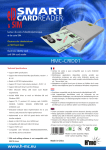
Smart Card Reader is very easy to install and use. This condensed card reader is
designed to use in a computer environment with USB sort. The PC user needs no technological
background. If you need online bank transaction, online shopping w/credit card, the smart card
reader is the elegant answer.
It’s powered from USB port, and compatible with Win Windows 2000/XP/VISTA/7 /LINUX
systems. Smart card reader is compliant with all common smart card standards. The Smart
card reader is a CCID and EMV certified plug & play reader for PCs with USB2.0 interface.
Specification
․
․
․
․
․
․
․
․
․
․
․
․
․
․
․
Based on ISO7816 implementation, T=0 and T=1 asynchronous card,
EMV2000 (EMV 4.1) compatible
Support PC Smart Card industry standard: PC/SC1.0; PC/SC 2.0
Support 2-wire, 3-wire or I2C Interface synchronous card
Atmel: AT88sc1608, AT88sc153, AT24c128, AT24c256
ST: M14C16, M14C04
Siemens 2-wire link protocol: sle4432/42. 3-wire bus: sle4418/28
Configurable hardware auto error detection
Card Voltage: 5V, 3V, 1.8V
Support CCID Linux driver working on Kernel 2.4.x and 2.6.x
Redhat: Fedora Core (1 ~ 6), Redhat 9, Redhat Enterprise Edition (3, 4)
Novell: SuSE 10, SuSE 10.1, Open SUSE 10.2
Ubuntu: Ubuntu 6.06, Ubuntu 6.10
Mandriva: Mandrake 10.2, Mandriva 2006, Mandriva 2007
Debian: Debian 3.1
Features
․Person identification ․Online banking facilities․Online coupons/loyalty ․E-commerce
System requirements
1. Computer with USB2.0/1.1 port *1
2. Windows 2000/XP/VISTA/7 /LINUX
Hardware installation
1) Installation the smart card driver.
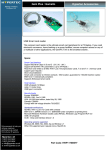
2) Plug in the reader to PC and insert the SMART card to the card reader.
Attention:
For Smart Card function, please install the CD driver.