1
TPG58M2 User Manual
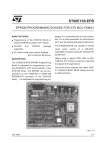
TPG58M2 Outline (as below):
TPG58M2 Operation:
TPG58M2 must work with TPG58
Input Voltage : DC 12V/500mA
TPG58M2 can program 8 kinds IC:
1. TM58P11COB8
2. TM58P11S14C
3. TM58PR10S20C
4. TM58PR10S24C
5. TM58PE10COB8
6. TM58PE10D14C
7. TM58PE10D18C
8. TM58PE10SS20C
Remark:TM58PC10 and TM58PC20 can’t be programmed。
(Fig 1.)
Use SWITCH to select program IC type。
Other Three SWITCH to select:
SOUND
:The SWITCH is for Turn ON/Turn OFF buffer.
PROTECT :The SWITCH is for Turn ON/Turn OFF Protect status of IC.
LOCKET :The SWITCH is for Reading IC data , the READ can process only SWITCH is
OFF.
Operation procedure:
1. From SWITCH to select the correct IC number to program. (Fig.1)
2. Put on the IC which is not Protected but have been program.
3. Press yellow READ key and the orange LED of TPG58M2will turn on; when TPG58M2
orange LED turn off and TPG58 green LED turn on , Buzzer beep one time , READ OK.
4. Press the green VERIFY key again, to identify the content of Memory RAM and IC code data.
5. When identification of the data of Memory RAM is finished, to prevent mistake to press
READ key, it must set Locket key to ON position due to the READ process will not be
proceeding.
6. Put on IC of not programmed (If IC need set to Protect status after programmed, before
programmed must let Protect key of SWITCH set to ON position , due to IC is OTP type , it
can’t set to Protect status after programmed).
7. Press the green BLANK key to verify the IC is not been programmed before (The step can be
omit if the IC content is empty).
8. Press red PROGRAM key to process the programming, On programming TPG58M2 orange
LED will turn on , when programming is finished, TPG58 green LED will turn on , TPG58M2
orange LED will turn off.
9. Take out the IC of programmed OK, at this moment TPG58 green LED will turn off, put on a
new IC and repeat the step 6 to program IC.
Remark1 Speak sound have four kinds.
Beep One time-READ、BLANK、VERIFY、PROGRAM OK.
Beep Two times-Print port connect fail、IC is not to put correct、Not read mother chip.
Beep Three times-FPGA Download fail、Frequency is out of range.
Beep Six times-READ ERROR、BLANK ERROR、VERIFY ERROR、PROGRAM
ERROR.
Remark2 TPG58 LED have three kinds of different color.
Orange LED:execute READ、BLANK、VERIFY、PROGRAM.
Green LED:READ、BLANK、VERIFY、PROGRAM execution is completed.
Read LED:READ ERROR、BLANK ERROR、VERIFY ERROR、PROGRAM ERROR.
Remark3
READ error conditions have 4 kinds.
1. IC put on wrong position or put reversed.
2. SWITCH select the wrong IC number.
3. IC have been programmed.
4. IC data is set on Protect status.