1
Basic Connection
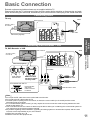
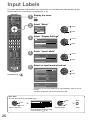
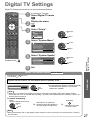
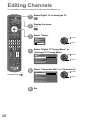
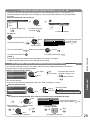
External equipment and cables shown are not supplied with this TV.
Please ensure that the TV is disconnected from the mains socket before attaching or disconnecting any leads.
When disconnecting the mains lead, be absolutely sure to disconnect the mains plug at the socket outlet first.
Connecting aerial
TV only
Aerial
Rear of the TV
AC 220 - 240 V,
50 / 60 Hz
RF cable
Connecting DVD Recorder / VCR
TV, DVD Recorder or VCR
Aerial
Rear of the TV
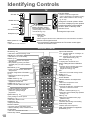
Identifying Controls
Basic Connection
AC 220 - 240 V,
50 / 60 Hz
Mains lead (supplied)
RCA cable
Push until both
side tabs click
Make sure that
the mains lead is
securely fixed.
●To remove from the TV:
tabs
RF OUT
VIDEO AUDIO
OUT
OUT
Press both tabs
and pull on
mains connector
to release
Quick Start
Guide
Mains lead (supplied)
RF IN
RF cable
RF cable
DVD Recorder or VCR
Note
●Do not put the RF cable close to the mains lead to avoid noise.
●Do not place the RF cable under the TV.
●To obtain optimum quality picture and sound, an Aerial, the correct cable (75 Ω coaxial) and the correct
terminating plug are required.
●If a communal Aerial system is used, you may require the correct connection cable and plug between the wall
Aerial socket and the TV.
●Your local Television Service Centre or dealer may be able to assist you in obtaining the correct Aerial system for
your particular area and the accessories required.
●Any matters regarding Aerial installation, upgrading of existing systems or accessories required, and the costs
incurred, are the responsibility of you, the Customer.
●VIERA Link connection p. 38
●Read the manual of the equipment too.
11