1
User’s Manual
Copyright
The contents of this publication may not be reproduced in any part or as a whole, stored,
transcribed in an information retrieval system, translated into any language, or transmitted
in any form or by any means, mechanical, magnetic, electronic, optical, photocopying,
manual, or otherwise, without the prior written permission.
Trademarks
All product, company, brand names are trademarks or registered trademarks of their
respective companies. They are used for identification purpose only. Specifications are
subject to be changed without prior notice.
-1-
FCC Interference Statement
This equipment has been tested and found to comply with the limits for a Class B digital
device pursuant to Part 15 of the FCC Rules. These limits are designed to provide
reasonable protection against radio interference in a commercial environment. This
equipment can generate, use and radiate radio frequency energy and, if not installed and
used in accordance with the instructions in this manual, may cause harmful interference to
radio communications. Operation of this equipment in a residential area is likely to cause
interference, in which case the user, at his own expense, will be required to take whatever
measures are necessary to correct the interference.
CE Declaration of Conformity
This equipment complies with the requirements relating to electromagnetic compatibility,
EN 55022/A1 Class B, and EN 50082-1. This meets the essential protection requirements
of the European Council Directive 89/336/EEC on the approximation of the laws of the
member states relation to electromagnetic compatibility.
-2-
Table of Contents
Chapter 1 Introduction...............................................................................5
1.1 Functions and Features...................................................................5
1.2 Packing List....................................................................................7
Chapter 2 Hardware Installation................................................................8
2.1 Panel Layout...................................................................................8
2.2 Procedure for Hardware Installation ............................................10
Chapter 3 Network Settings and Software Installation ...........................13
3.1 Make Correct Network Settings of Your Computer .....................13
3.2 Install the Software into Your Computers ....................................14
Chapter 4 Configuring Wireless Broadband Router................................17
4.1 Start-up and Log in.......................................................................17
4.2 Status ............................................................................................19
4.3 Toolbox.........................................................................................20
4.4 Primary Setup ...............................................................................21
4.5 DHCP Server ................................................................................24
4.6 Virtual Server................................................................................26
4.7 Special AP ....................................................................................28
4.8 Access Control..............................................................................29
4.9 Misc. Items ...................................................................................31
4.10 Wireless Setting..........................................................................33
4.11 MAC Address Control................................................................35
Chapter 5 Print Server .............................................................................38
5.1 Configuring on Windows 95/98 Platforms ...................................38
5.2 Configuring on Windows NT Platforms .......................................40
5.3 Configuring on Windows 2000 Platforms ....................................41
-3-
5.4 Configuring on Unix based Platforms ..........................................42
Appendix A TCP/IP Configuration for Windows 95/98..........................43
A.1 Install TCP/IP Protocol into Your PC ..........................................43
A.2 Set TCP/IP Protocol for Working with NAT Router ...................44
-4-
Chapter 1
Introduction
Congratulations on your purchase of this outstanding Wireless Broadband Router. This
product is specifically designed for Small Office and Home Office needs. It provides a
complete SOHO solution for Internet surfing, and is easy to configure and operate even
for non-technical users. Instructions for installing and configuring this product can be
found in this manual. Before you install and use this product, please read this manual
carefully for fully exploiting the functions of this product.
1.1 Functions and Features
l
High speed for wireless LAN connection
11Mbps data rate by incorporating Direct Sequence Spread Spectrum (DSSS).
l
Roaming
Provides seamless roaming within the IEEE 802.11b WLAN infrastructure.
l
IEEE 802.11b compatible
Allowing inter-operation among multiple vendors.
l
Auto fallback
11M, 5M, 2M, 1M data rate with auto fallback.
l
Broadband modem and NAT Router
Connects multiple computers to a broadband (cable or DSL) modem or an
Ethernet router to surf the Internet.
l
Auto-sensing Ethernet Switch
Equipped with a 4-port auto-sensing Ethernet switch.
l
VPN supported
Supports multiple PPTP sessions and allows you to setup VPN server and VPN
clients.
-5-
l
Printer sharing (Optional )
Embeds a print server to allow all of the networked computers to share one
printer.
l
Firewall
All unwanted packets from outside intruders are blocked to protect your
Intranet.
l
DHCP server supported
All of the networked computers can retrieve TCP/IP settings automatically from
this product.
l
Web-based configuring
Configurable through any networked computer’s web browser using Netscape
or Internet Explorer.
l
MAC Address Access Control supported
Allows you to assign different access right for different users.
l
Virtual Server supported
Enables you to expose WWW, FTP and other services on your LAN to be
accessible to Internet users.
l
User-Definable Application Sensing Tunnel
User can define the attributes to support the special applications requiring
multiple connections, like Internet gaming, video conferencing, Internet
telephony and so on, then this product can sense the application type and open
multi-port tunnel for it.
l
DMZ Host supported
Lets a networked computer be fully exposed to the Internet; this function is used
when special application sensing tunnel feature is insufficient to allow an
application to function correctly.
l
Firmware Upgradable
-6-
Provides firmware upgrade via Web Browser or Windows Application.
1.2 Packing List
l
l
Wireless broadband router unit
Installation CD-ROM
l
Power adapter
l
CAT-5 UTP Fast Ethernet cable
-7-
Chapter 2 Hardware Installation
2.1 Panel Layout
2.1.1. Front Panel
The front panel features four 10/100 Mbps Ethernet ports, one Wide Area network
(WAN) port and diagnostic LED indicators. The WAN port connects your DSL or cable
modem to the router. The LAN ports are used to connect to your computers or other
network devices. LEDs monitor the status of each port.
Figure 2-1 Front Panel
Port:
WAN: the port where you will connect your cable (or DSL) modem or Ethernet router.
Port 1-4: the ports where you will connect networked computers and other devices.
UPLINK: the port where you will connect another hub to expand your Intranet.
-8-
LED:
LED
Function
Color
Status
POWER Power indication Green
M1
System status 1
Orange
M2
System status 2
Orange
On
Blinking
On
Blinking
LAN
WLAN
LAN port
activity
On
Green
Wireless activity Green
Blinking
Blinking
On
Link/Act.
1~4
Link status
10/100
1~4
Data Rate
Green
Blinking
Green
On
-9-
Description
Power is being applied to this
product.
This product is functioning
properly.
This product is working for some
service.
This product is being configured
or upgraded. Don’t turn it off !
The LAN port is linked.
The LAN port is sending or
receiving data.
Sending or receiving data via
wireless
An active station is connected to
the corresponding LAN port.
The corresponding LAN port is
sending or receiving data.
Data is transmitting in 100Mbps
on the corresponding LAN port.
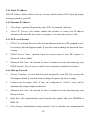
2.1.2. Rear Panel
Figure 2-2 Rear Panel
Ports:
Port
RESET
12VDC
PRINTER
COM
Description
To reset system settings to factory defaults, please follow the steps:
1. Power off the device,
2. Press the reset button and hold,
3. Power on the device,
4. Keep the button pressed about 5 seconds,
5. Release the button,
6. Watch the M1 and M2 LEDs, they will flash 8 times and then M1
flash once per second.
Power inlet: DC 12V, 1.2A (minimum)
Printer Port (Optional)
Serial port (connect analog modem or console cable)
2.2 Procedure for Hardware Installation
1. Decide where to place your Wireless Broadband Router:
You can place your Wireless Broadband Router on a desk or other flat surface, or you
can mount it on a wall. For optimal performance, place your Wireless Broadband
Router in the center of your office (or your home) in a location that is away from any
potential source of interference, such as a metal wall or microwave oven.
-10-
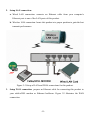
2. Setup LAN connection:
a. Wired LAN connection: connects an Ethernet cable from your computer’s
Ethernet port to one of the LAN ports of this product.
b. Wireless LAN connection: locate this product at a proper position to gain the best
transmit performance.
Figure 2-3 Setup of LAN and WAN connections for this product.
3. Setup WAN connection: prepare an Ethernet cable for connecting this product to
your cable/xDSL modem or Ethernet backbone. Figure 2-3 illustrates the WAN
connection.
-11-
4. Connecting this product with your printer: use the printer cable to connect your
printer to the printer port of this product. (Optional)
5. Power on:
Connecting the power cord to power inlet and turning the power switch on, this
product will automatically enter the self-test phase. When it is in the self-test phase,
the indicators M1 and M2 will be lighted ON for about 10 seconds, and then M1 and
M2 will be flashed 3 times to indicate that the self-test operation has finished. Finally,
the M1 will be continuously flashed once per second to indicate that this product is in
normal operation.
-12-
Chapter 3
Network Settings and Software Installation
To use this product correctly, you have to properly configure the network settings of your
computers and install the attached setup program into your MS Windows platform
(Windows 95/98/NT/2000).
3.1 Make Correct Network Settings of Your Computer
The default IP address of this product is 192.168.123.254, and the default subnet mask is
255.255.255.0. These addresses can be changed on your need, but the default values are
used in this manual. If the TCP/IP environment of your computer has not yet been
configured, you can refer to Appendix A to configure it. For example,
1. configure IP as 192.168.123.1, subnet mask as 255.255.255.0 and gateway as
192.168.123.254, or more easier,
2. configure your computers to load TCP/IP setting automatically, that is, via DHCP
server of this product.
After installing the TCP/IP communication protocol, you can use the ping command to
check if your computer has successfully connected to this product. The following example
shows the ping procedure for Windows 95 platforms. First, execute the ping command
ping 192.168.123.254
If the following messages appear:
Pinging 192.168.123.254 with 32 bytes of data:
Reply from 192.168.123.254: bytes=32 time=2ms TTL=64
a communication link between your computer and this product has been successfully
established. Otherwise, if you get the following messages,
Pinging 192.168.123.254 with 32 bytes of data:
Request timed out.
-13-
there must be something wrong in your installation procedure. You have to check the
following items in sequence:
1.
Is the Ethernet cable correctly connected between this product and your computer?
Tip: The LAN LED of this product and the link LED of network card on your
computer must be lighted.
2.
Is the TCP/IP environment of your computers properly configured?
Tip: If the IP address of this product is 192.168.123.254, the IP address of your
computer must be 192.168.123.X and default gateway must be 192.168.123.254.
3.2 Install the Software into Your Computers
Skip this section if you do not want to use the print server function of this product.
Step 1: Insert the installation CD-ROM into the CD-ROM drive. The following window
will be shown automatically. If it isn’t, please run “install.exe” on the CD-ROM.
-14-
Step 2: Click on the INSTALL button. Wait until the following Welcome dialog to appear,
and click on the Next button.
Step 3: Select the destination folder and click on the Next button. Then, the setup program
will begin to install the programs into the destination folder.
-15-
Step 4: When the following window is displayed, click on the Finish button.
Step 5: Select the item to restart the computer and then click the OK button to reboot your
computer.
Step 6: After rebooting your computer, the software installation procedure is finished.
Now, you can configure the NAT Router (refer to Chapter 4) and setup the Print Server
(refer to Chapter 5).
-16-
Chapter 4
Configuring Wireless Broadband Router
This product provides Web based configuration scheme, that is, configuring by your Web
browser, such as Netscape Communicator or Internet Explorer. This approach can be
adopted in any MS Windows, Macintosh or UNIX based platforms.
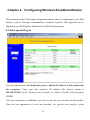
4.1 Start-up and Log in
Activate your browser, and disable the proxy or add the IP address of this product into
the exceptions. Then, type this product’s IP address (the factory setting is
192.168.123.254) in the Location (for Netscape) or Address (for IE) field and press
ENTER.
After the connection is established, you will see the web user interface of this product.
There are two appearances of web user interface: for general users and for system
-17-
administrator.
To log in as an administrator, enter the system password (the factory setting is ”admin”) in
the System Password field and click on the Log in button. If the password is correct, the
web appearance will be changed into administrator configure mode. As listed in its main
menu, there are several options for system administration.
-18-
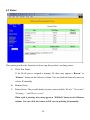
4.2 Status
This option provides the function for observing this product’s working status:
A. WAN Port Status.
If the WAN port is assigned a dynamic IP, there may appear a “Renew” or
“Release” button on the Sidenote column. You can click this button to renew or
release IP manually.
B. Modem Status.
C. Printer Status. The possible kinds of printer status include “Ready”, “Not ready”,
“Printing… ”, and “Device error”.
When a job is printing, there may appear a “Kill Job” button on the Sidenote
column. You can click this button to kill current printing job manually.
-19-
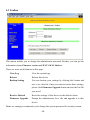
4.3 Toolbox
This option enables you to change the administrator password. Besides, you can get the
information about Firmware version and WAN's MAC Address.
There are some useful buttons in this page:
View Log
View the system logs
Reboot
Reboot this device
Backup Setting
You can backup your settings by clicking this button and
save it as a bin file. Once you want to restore these settings,
please click Firmware Upgrade button and use the bin file
you saved.
Reset to Default
Reset the settings of this device to the default values
Firmware Upgrade
Prompt the administrator for a file and upgrade it to this
device
Note: we strongly recommend you to change the system password for security reason.
-20-
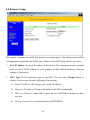
4.4 Primary Setup
This option is primary to enable this product to work properly. The setting items and the
web appearance depend on the WAN type. Choose correct WAN type before you start.
1. LAN IP Address: the local IP address of this device. The computers on your network
must use the LAN IP address of your product as their Default Gateway. You can
change it if necessary.
2. WAN Type: WAN connection type of your ISP. You can click Change button to
choose a correct one from the following four options:
A. Static IP Address: ISP assigns you a static IP address.
B. Dynamic IP Address: Obtain an IP address from ISP automatically.
C. PPP over Ethernet: Some ISPs require the use of PPPoE to connect to their
services.
D. Dial-up Network: To surf the Internet via PSTN/ISDN.
-21-
4.4.1 Static IP Address
WAN IP Address, Subnet Mask, Gateway, Primary and Secondary DNS: enter the proper
setting provided by your ISP.
4.4.2 Dynamic IP Address
1.
Host Name: optional. Required by some ISPs, for example, @Home.
2.
Renew IP Forever: this feature enables this product to renew your IP address
automatically when the lease time is expiring-- even when the system is idle.
4.4.3 PPP over Ethernet
1.
PPPoE Account and Password: the account and password your ISP assigned to you.
For security, this field appears blank. If you don't want to change the password, leave
it empty.
2.
PPPoE Service Name : optional. Input the service name if your ISP requires it.
Otherwise, leave it blank.
3.
Maximum Idle Time : the amount of time of inactivity before disconnecting your
PPPoE session. Set it to zero or enable Auto-reconnect to disable this feature.
4.4.4 Dial -up Network
1.
Dial-up Telephone, Account and Password: assigned by your ISP. For security, this
field appears blank. If you don't want to change the password, leave it empty.
2.
Primary and Secondary DNS: If they are configured as "0.0.0.0.", they will be
automatically assigned upon connection.
3.
Maximum Idle Time : the amount of time of inactivity before disconnecting your
dial-up session.
4.
Baud Rate: the communication speed between this product and your MODEM or
ISDN TA.
5.
Extra Setting: (initialization string) optional. Used to optimize the communication
-22-
quality between the ISP and your MODEM or ISDN TA
-23-
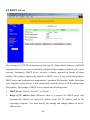
4.5 DHCP Server
The settings of a TCP/IP environment include host IP, Subnet Mask, Gateway, and DNS
configurations. It is not easy to manually configure all the computers and devices in your
network. Fortunately, DHCP Server provides a simple approach to handle all these
settings. This product supports the function of DHCP server. If you enable this product’s
DHCP server and configure your computers as “automatic IP allocation” mode, then when
your computer is powered on, it will automatically load the proper TCP/IP settings from
this product. The settings of DHCP server include the following items:
1. DHCP Server: Choose “Disable” or “Enable.”
2. Range of IP Address Pool: Whenever there is a request, the DHCP server will
automatically allocate an unused IP address from the IP address pool to the
requesting computer. You must specify the starting and ending address of the IP
address pool.
-24-
3. Domain Name: Optional, this information will be passed to the client.
Clients List
List the current mapping of the IP and MAC address for
each DHCP client.
Fixed Mapping
In general, DHCP server assigns an IP address chosen from
the IP addresses pool randomly. Fixed Mapping allows you
to assign a specific IP address to the specified MAC
address.
-25-
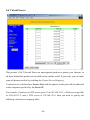
4.6 Virtual Server
This product’s NAT firewall filters out unrecognized packets to protect your Intranet, so
all hosts behind this product are invisible to the outside world. If you wish, you can make
some of them accessible by enabling the Virtual Server Mapping.
A virtual server is defined as a Service Port, and all requests to this port will be redirected
to the computer specified by the Server IP.
For example, if you have an FTP server (port 21) at 192.168.123.1, a Web server (port 80)
at 192.168.123.2, and a VPN server at 192.168.123.6, then you need to specify the
following virtual server mapping table:
-26-
Service Port
21
80
1723
Server IP
192.168.123.1
192.168.123.2
192.168.123.6
-27-
Enable
V
V
V
4.7 Special AP
Some applications require multiple connections, like Internet games, Video conferencing,
Internet telephony, etc. Because of the firewall function, these applications cannot work
with a pure NAT router. The Special Applications feature allows some of these
applications to work with this product. If the mechanism of Special Applications fails to
make an application work, try setting your computer as the DMZ host instead.
1.
Trigger: the outbound port number issued by the application.
2.
Incoming Ports: when the trigger packet is detected, inbound packets sent to the
specified port numbers are allowed to pass through the firewall.
This product provides some predefined settings. Select your application and click Copy to
to add the predefined setting to your list.
Note: At any given time, only one PC can use each Special Application.
-28-
4.8 Access Control
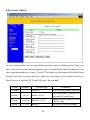
Access Control allows you to assign different access right for different users. First, you
have to divide users into different groups. Users are identified by their IP addresses. You
can assign the members of Group 1, 2 and 3. The others are all members of Default Group.
Second, you have to assign the access right for each group. Access right can allow or
block for access specified TCP and UDP ports. For example:
Group
Default
Group 1
Group 2
Group 3
Members
Access Right
Allow ()
50-99
Allow (25,53)
100-199 Block (21,119)
1-9,20
Block ()
-29-
Comments
No access right (allow nothing)
Can browse(80), receive(110)
and send(25) email only
Cannot read net news(119) and
FTP(21) only
Fully access (block nothing)
MAC Level
The basic Access Control is based on the IP address only. If a user is
able to change his IP address, the user will be out of control. The MAC
level access control allows you to control the mapping of MAC
addresses and IP addresses. You can also control which MAC address is
allowed to connect to this device.
-30-
4.9 Misc. Items
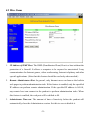
1. IP Address of DMZ Host: The DMZ (Demilitarized Zone) Host is a host without the
protection of a firewall. It allows a computer to be exposed to unrestricted 2-way
communication for Internet games, video conferencing, Internet telephony and other
special applications. (Note that this feature should be used only when needed.)
2. Remote Administrator Host: In general, only Intranet users can browse the built-in
web pages to perform administration task. If this feature is enabled, only the specified
IP address can perform remote administration. If the specified IP address is 0.0.0.0,
any remote host can connect to the product to perform administration tasks. When
this feature is enabled, the web port will be shifted to 88.
3. Administrator Time-out: The amount of time of inactivity before the product will
automatically close the Administrator session. Set this to zero to disable it.
-31-
4. Discard PING from WAN side: When this feature is enabled, hosts on the WAN
cannot ping this product.
5. Non-standard FTP port: You have to configure this item if you want to access an
FTP server whose port number is not 21. This setting will be lost after rebooting.
-32-
4.10 Wireless Setting
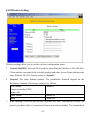
Wireless settings allow you to set the wireless configuration items.
1. Network ID(SSID): Network ID is used for identifying the Wireless LAN (WLAN).
Client stations can roam freely over this product and other Access Points that have the
same Network ID. (The factory setting is “default”)
2. Channel: The radio channel number. The permissible channels depend on the
Regulatory Domain. The factory setting is as follows:
USA/Canada
Europe/Australia (ETSI)
Japan (All)
Spain, France
Japan
Channel 6
Channel 10
Channel 14
3. WEP Security: Select the data privacy algorithm you want. Enabling the security can
protect your data while it is transferred from one station to another. The standardized
-33-
IEEE 802.11 WEP (64-bit or 128-bit) is used here.
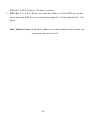
4. WEP Key 1, 2, 3 & 4: When you enable the 64-bit or 128-bit WEP key security,
please select one WEP key to be used and then input 10 or 26 hex-decimal (0-9, A-F)
digits.
MAC Address Control Setup MAC addresses to control which wireless clients can
associate to the wireless LAN.
-34-
4.11 MAC Address Control
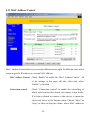
MAC Address Control allows you to assign different access right for different users and to
assign a specific IP address to a certain MAC address.
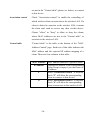
MAC Address Control Check “Enable” to enable the “MAC Address Control”. All
of the settings in this page will take effect only when
“Enable” is checked.
Connection control
Check "Connection control" to enable the controlling of
which wired and wireless clients can connect to this device.
If a client is denied to connect to this device, it means the
client can't access to the Internet either. Choose "allow" or
"deny" to allow or deny the clients, whose MAC addresses
-35-
are not in the "Control table" (please see below), to connect
to this device.
Association control
Check "Association control" to enable the controlling of
which wireless client can associate to the wireless LAN. If a
client is denied to associate to the wireless LAN, it means
the client can't send or receive any data via this device.
Choose "allow" or "deny" to allow or deny the clients,
whose MAC addresses are not in the "Control table", to
associate to the wireless LAN.
Control table
"Control table" is the table at the bottom of the "MAC
Address Control" page. Each row of this table indicates the
MAC address and the expected IP address mapping of a
client. There are four columns in this table:
MAC Address MAC address indicates a specific client.
IP Address
Expected IP address of the corresponding
client. Keep it empty if you don't care its
IP address.
C
When "Connection control" is checked,
check "C" will allow the corresponding
client to connect to this device.
A
When "Association control" is checked,
check "A" will allow the corresponding
client to associate to the wireless LAN.
-36-
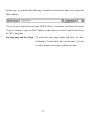
In this page, we provides the following Combobox and button to help you to input the
MAC address.
You can select a specific client in the “DHCP clients” Combobox, and then click on the
“Copy to” button to copy the MAC address of the client you select to the ID selected in
the “ID” Combobox.
Previous page and Next Page
To make this setup page simple and clear, we have
divided the “Control table” into several pages. You can
use these buttons to navigate to different pages.
-37-
Chapter 5 Print Server
This product provides the function of network print server for MS Windows
95/98/NT/2000 and Unix based platforms. (If the product you purchased doesn’t have
printer port, please skip this chapter.)
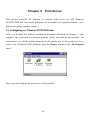
5.1 Configuring on Windows 95/98 Platforms
After you finished the software installation procedure described in Chapter 3, your
computer has possessed the network printing facility provided by this product. For
convenience, we call the printer connected to the printer port of this product as server
printer. On a Windows 95/98 platform, open the Printers window in the My Computer
menu:
Now, yon can configure the print server of this product:
-38-
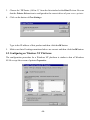
1. Find out the corresponding icon of your server printer, for example, the HP LaserJet
6L. Click the mouse’s right button on that icon, and then select the Properties item:
2. Click the Details item:
-39-
3. Choose the “PRTmate: (All-in-1)” from the list attached at the Print To item. Be sure
that the Printer Driver item is configured to the correct driver of your server printer.
4. Click on the button of Port Settings:
Type in the IP address of this product and then click the OK button.
5. Make sure that all settings mentioned above are correct and then click the OK button.
5.2 Configuring on Windows NT Platforms
The configuration procedure for a Windows NT platform is similar to that of Windows
95/98 except the screen of printer Properties:
-40-
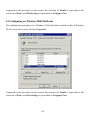
Compared to the procedure in last section, the selection of Details is equivalent to the
selection of Ports, and Port Settings is equivalent to Configure Port.
5.3 Configuring on Windows 2000 Platforms
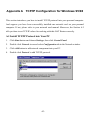
The configuration procedure for a Windows 2000 platform is similar to that of Windows
95/98 except the screen of printer Properties:
Compared to the procedure in last section, the selection of Details is equivalent to the
selection of Ports, and Port Settings is equivalent to Configure Port.
-41-
5.4 Configuring on Unix based Platforms
Please follow the traditional configuration procedure on Unix platforms to setup the print
server of this product. The printer name is “lp.”
-42-
Appendix A TCP/IP Configuration for Windows 95/98
This section introduces you how to install TCP/IP protocol into your personal computer.
And suppose you have been successfully installed one network card on your personal
computer. If not, please refer to your network card manual. Moreover, the Section A.2
tells you how to set TCP/IP values for working with this NAT Router correctly.
A.1 Install TCP/IP Protocol into Your PC
1. Click Start button and choose Settings, then click Control Panel.
2. Double click Network icon and select Configuration tab in the Network window.
3. Click Add button to add network component into your PC.
4. Double click Protocol to add TCP/IP protocol.
-43-
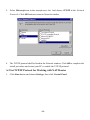
5. Select Microsoft item in the manufactures list. And choose TCP/IP in the Network
Protocols. Click OK button to return to Network window.
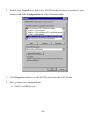
6. The TCP/IP protocol shall be listed in the Network window. Click OK to complete the
install procedure and restart your PC to enable the TCP/IP protocol.
A.2 Set TCP/IP Protocol for Working with NAT Router
1. Click Start button and choose Settings, then click Control Panel.
-44-
2. Double click Network icon. Select the TCP/IP line that has been associated to your
network card in the Configuration tab of the Network window.
3. Click Properties button to set the TCP/IP protocol for this NAT Router.
4. Now, you have two setting methods:
A. Get IP via DHCP server
-45-
a.
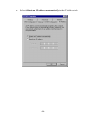
Select Obtain an IP address automatically in the IP Address tab.
-46-
b.
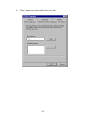
Don’t input any value in the Gateway tab.
-47-
c.
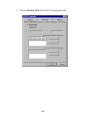
Choose Disable DNS in the DNS Configuration tab.
-48-
B. Configure IP manually
a.
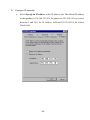
Select Specify an IP address in the IP Address tab. The default IP address
of this product is 192.168.123.254. So please use 192.168.123.xxx (xxx is
between 1 and 253) for IP Address field and 255.255.255.0 for Subnet
Mask field.
-49-
b.
In the Gateway tab, add the IP address of this product (default IP is
192.168.123.254) in the New gateway field and click Add button.
-50-
c.
In the DNS Configuration tab, add the DNS values which are provided by
the ISP into DNS Server Search Order field and click Add button.
-51-