1
CS-20
Speed & Cadence Sensor
User’s Guide
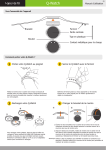
Device Overview
Cadence Sensor
Sensing Point
Cadence Magnet Set
Speed Sensor
Sensing Point
for crankarm
Wheel Magnet Set
Rubber Bracket Set
Cadence
Magnet
Zip Tie
Zip Tie
Rubber
Bracket
Test Key
Extension
Rubber
Battery Cover
INSTALLATION
1
Install Cadence Magnet Set
Top View
Cadence Sensor
Sensing Point
IMPORTANT NOTE
Install Cadence Magnet on left crankarm near pedal
as shown. Do not tighten zip ties completely to
allow magnet placement. Use Extension Rubber for
proper distance adjustment
2
Cadence
Magnet
Align Cadence Magnet with Cadence Sensor
Sensing Point as shown. Proper distance between
sensor and magnet should be less than 10 mm
Install Sensor
Pre-fit Sensor and Rubber Bracket on left rear
chainstay (non-drive side) and trim excessive
rubber from bracket. Ensure the battery cover is
facing up. Install zip ties loosely to allow sensor
placement.
3
Install Wheel Magnet Set
Top View
For Round Spokes
For Bladed Spokes
Unscrew the wheel magnet
to install on spoke.
IMPORTANT NOTE
Align Wheel Magnet with Speed Sensor Sensing
Point as shown. Proper distance between sensor
and magnet should be less than 10 mm. Use screw
driver for proper distance adjustment.
CS-20
4
Speed & Cadence Sensor
User’s Guide
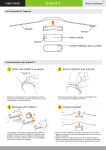
Adjust Sensor and Magnet Sets
GAP < 10 mm
After entering Test Mode and tested
successfully, use the needle nose plier
to help tighten the zip tie and make sure
the Sensor is securely installed on the
left rear chainstay. Then use the plier
to trim off excessive zip tie.
GAP < 10 mm
Adjust angle and position of sensor to achieve recommended
gap distance range and align sensing points.
5
Test Speed and Cadence Sensor with Magnet Sets
Press the Test Key on the Sensor to enter Test
Mode for 60 seconds.
6
Turn the crankarm clockwise to pass the Cadence
Sensor Sensing Point. The Test Key LED should start
flashing if the device is installed properly.
Spin the wheel counterclockwise to pass the Speed
Sensor Sensing Point. The Test Key LED should start
flashing if the device is installed properly.
Assemble and Change Battery
Use a coin to unclinch the Battery Cover.
Lithium Battery ( CR2032 )
O-ring : waterproof component
Remove the battery inside with a
new one, then close the battery
cover onto the device.
Supported Devices & Software
This device is a Bluetooth® 4.0 device, compatible and applicable with
many iOS devices, including:
IMPORTANT NOTE
Please make sure the Battery Cover is
securely sealed to prevent unexpected
water leakage
Caution
1. The device can be used in rain but should not be used underwater.
2. The position of Sensor and gaps between Sensor and magnets
should be checked periodically.
• iPhone 4S / iPhone 5
3. Do not use corrosive chemicals to clean the device.
• The New iPad / iPad 4 / iPad mini
4. Do not disassemble the device.
• iPod Touch 5
Connect to Speed & Cadence Sensor
In addition, this device has been tested to work with various Apps,
listed in the following link:
http://global.mobileaction.com/SCS-support.jsp
Supported Apps can be downloaded at iTunes App Store. After
installing the downloaded App, follow the instructions in App to
complete Bluetooth connection to the Speed and Cadence Sensor.
Note: The Bluetooth interface is disabled by default. Bluetooth
connection will be established when the Bike is moving and
Speed or Cadence data is detected.