1
Getting Started
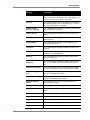
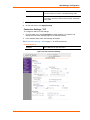
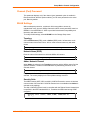
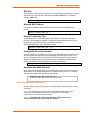
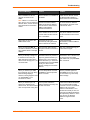
Change Telnet Configuration Password: Change the Telnet configuration
password to prevent unauthorized access to the Change Setup menu and WebManager.
Change telnet config password (N) ? _
Change DHCP Device Name: Change the DHCP name if the network is DHCPenabled.
Change DHCP device name (not set) ? (N) N
Enter new DHCP device name :
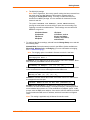
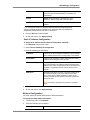
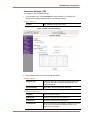
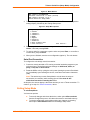
2. To modify WLAN settings, select 4 WLAN from the Change Setup menu and edit
the following fields:
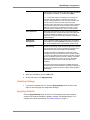
Topology: Select Infrastructure (ESS) mode or AdHoc (IBSS). Infrastructure
mode communicates with Access Points. Ad Hoc mode communicates only with
other clients.
Topology 0=Infrastructure, 1=AdHoc (0) ?
Network Name (SSID): Enter the name of the network to which the WiBox will
connect.
Network name (SSID) (LTRX_IBSS) ? _
Ad Hoc Network Channel: When Ad Hoc mode is selected, and the WiBox
cannot find the specified network, it creates one with that name by transmitting a
beacon on the selected channel.
Channel (11) ?
Only channels allowed in the country for which the WiBox is designated can
be selected. The country displays in the Setup Mode settings overview.
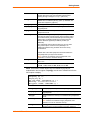
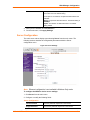
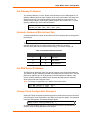
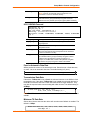
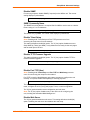
Security Suite: The WiBox features WEP, WPA, and WPA2/802.11i to secure
all wireless communication. WPA and WPA2/802.11i are not available when
Adhoc is selected as the topology.
Security 0=none, 1=WEP, 2=WPA, 3=WPA2/802.11i (0) ? _
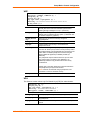
WEP:
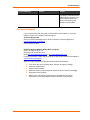
Security suite: 0=none, 1=WEP, 2=WPA, 3=WPA2/802.11i (1) ? 1
Authentication: 0=open/none, 1=shared (1) ?
Encryption: 1=WEP64, 2=WEP128 (2) ?
Change Key (N) ? Y
Display key (N) ?
Key type 0=hex, 1=passphrase (0) ?
Enter Key: **-**-**-**-**-**-**-**-**-**-**-**-**
TX Key index (1) ? 1
TX Data rate: 0=fixed, 1=auto fallback (1) ?
WiBox2100E User Guide
21