1
GCR100 - GSM Controlled Relay - User Manual
ENG
ENG-rev1-120427
GCR100 is an easy to use remote control switch, suitable to remote control trough GSM network, so virtually from everywhere, a 115
or 230V load, such as garage door, alarm system, lighting, boiler, surveillance system, etc. The intelligent system, gives the
possibility perform the control without any cost charge.
This manual describes how to install and use the GCR100. Please read carefully this manual before installation and use.
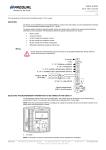
Green LED - GSM
Red LED - Relay
SWITCH&TEST button
SIM release button
SIM holder
CONNECT THE LOAD
Before connecting the load, check if the consumed power is below the GCR100 switching capability (about 3200W). After, simply
connect the load you need to control remotely, to the female socket of the GCR100.
REMOTE CONTROL
Remote control can be performed by any active cell phone. Relay can be switched ON or OFF remotely by an SMS command (see
SMS COMANDS LIST chapter) or by a call. Call will be hanged up without charging any cost. The only condition is to program
previously the phone number(s) of the phones from which you want to control GCR100. The cell phone numbers must be not hidden.
Three different phone numbers can be programmed.
1.
1’st number – this is used as master number, from this GCR100 can be fully controlled by SMS commands and call
commands, and the notification and test SMS messages will be send to this number
2.
2’nd number – can control GCR100 only by call command
3.
3’rd number – can control GCR100 only by SMS commands
GCR100 controls the incoming SMS or call number, and accept commands only from the programmed numbers. All other calls or
SMS with no command content received from other numbers, will be ignored and deleted.
Warning: the phone numbers saved in the SIM card will be erased at first power up of GCR100!
Relay status is saved. If power interruption occurs, after powering ON again, the relay previous status is recovered (see also
notification SMS).
SMS COMMANDS LIST & NOTIFICATION SMS
SIM CARD INSTALLATION
To use the GCR100 a valid SIM card is needed. Before installation take care:
check if your SIM card has enough credit, and is not expired
disable PIN code by using a common cell-phone, the GCR100 swill not operate if the installed SIM card has PIN code
enabled. How to disable PIN code, read your mobile phone users manual
GCR100 is not compatible with USIM (e.g. H3G)
To install the SIM card:
1.
unplug GCR100 from the wall socket, wait about 15 s
2.
using a pen or a similar object, push the SIM card holder till the holder is released
3.
pull out the SIM holder, install the SIM in the holder, follow the shape
4.
reinstall the SIM holder by pushing back
2.
3.
4.
WALL SOCKET INSTALLATION
Simply connect the GCR100 to the wall socket. The device is self-powered from the socket. The 2 LED’s provides status of the
operation.
LED’s & SWITCH & TEST BUTTON
Red LED gives the Relay status:
LED ON RELAY ON (closed)
LED OFF RELAY OFF (open)
Green LED gives functional information on the GSM network status and operation:
continuously ON during device power ON
very fast blinking (about 2 flash / s) no valid SIM or PIN enabled
fast blinking (about 1 flash / s) no GSM network coverage (searching)
slow blink (about 1 flash / 3s) GSM network OK
1 long flash (about 2s) when call is received or SMS is received/sent
After installation, local test can be performed by pressing the TEST button. This button has two functions:
short press Relay ON/OFF: press the button and keep pressing for about 1 s till the red LED goes OFF or ON, this
switches the relay
long press Relay ON/OFF and test SMS sending to phone number 1: press the button and keep pressed till the red
LED changes status (relay ON or OFF) and the green LED makes a long flash (about 2s), means that test SMS was
send also to the programmed phone number 1.
Note: for test SMS sending feature, the phone numbers must be programmed previously, see SMS COMMANDS LIST chapter.
SMS commands can be send easily by sending a text message to GCR100 by writing one of the strings in the Command column
listed below.
Command
Description
Response
Phn1=+393401234567
Setup phone no. 1 (master)
Call back
Phn2=+393401234567
Setup phone no. 2 (only call switch)
Call back
Phn3=+393401234567
Setup phone no. 3 (only SMS switch)
Call back
Rphn
Read programmed phone numbers
SMS - programmed numbers list
Notif=en,dis
Notification SMS enable/disable
Call back
Notif?
Read notification’s enable setup
SMS - notifications setup
Relon
Switch relay ON
Call back
Reloff
Switch relay OFF
Call back
Rstat?
Read relay actual status
SMS - Relay actual status
GSMRelay powered ON, Relay is ON
Power ON notification
GSMRelay was sitched ON
Switch notification
GMSRelay Test SMS
Test SMS (by pressing the key)
Notes:
setup commands are not accepted from phone numbers 2 and 3
from phone no.3 are accepted only the Relon, Reloff and Rstat? commands
phone numbers in the Phn commands are only example
phone numbers within Phn commands must be always in international format (<+><country code><operator
code><phone number>)
call back response: short call = OK, long call = error (e.g. bad command)
for notification setup Notif command, first field regards the Power ON notification, second field is for any Relay Status
change
in Notif command to enable “en” must be written, to disable “dis” must be written
commands are not case sensitive (Relon = RELON = relon)
If power ON notification is enabled, each time when the GCR100 is powered ON, will send an SMS message to phone no. 1
containing also the relay actual status. Switch notification, if enabled, is sent even in case of switching the relay by button. The switch
notification is not sent, if the switch is performed from phone number 1.
TECHNICAL CHARACTERISTICS
Power Supply Voltage: 85-265VAC / 50Hz
Switching Capacity:
max. 14A / 265VAC
Maximum Switching Power:
max. 3200VA
Self Power Consumption:
max. 3.5W in Standby, max. 8.5W during GSM communication (SMS, call)
GSM Module:
Quad Band (850/900/1800/1900 MHz)
Antenna:
Internal
SIM Slot:
Externally accessible, 1.8/3.3V SIM (no USIM)
Control:
Relay LED, GSM LED, TEST button
Housing:
polycarbonate/ABS
[email protected]
GCR100 – Telecontrollo GSM – manuale d’uso
ITA
ITA-rev1-120427
Nota: per poter inviare il SMS di test, prima bisogna programmare i numeri telefonici, vedere il capitolo COMANDI SMS e SMS DI
NOTIFICA.
COLLEGAMENTO DELLO CARICO
GCR100 è un dispositivo di telecontrollo via rete GSM, estremamente facile da usare, in grado di accendere o spegnere a distanza
qualsiasi dispositivo alimentato dalla rete da 115 o 230V, come cancello, caldaia, serranda, illuminazione, irrigazione, ecc. Il sistema
intelligente permette il controllo virtualmente da ovunque, senza alcun addebito di costi.
Prima di collegare il carico, verificare che la potenza massima non supera la capacità di commutazione del GCR100, di cca. 3200W.
Dopo semplicemente collegare la spina dello carico nella presa femmina del GCR100.
Questo manuale descrive come installare e usare il dispositivo per telecontrollo GSM - GCR100. Prima di qualsiasi operazione,
leggere attentamente il manuale.
CONTROLLO A DISTANZA (TELECONTROLLO)
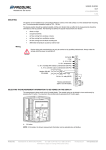
LED verde - GSM
Tasto COMM/ TEST
LED rosso - Relè
Pulsante rilascio SIM
Supporto SIM
GCR100 può essere controllato a distanza da qualsiasi telefono cellulare o fisso. L’accensione/spegnimento dello carico può essere
fatta tramite delle chiamate voce oppure comandi SMS. La chiamata viene interpretata come un commando, è chiusa subito senza
alcun addebito di costo. La condizione per il corretto funzionamento è di non aver coperto (nascosto) i numeri dai quali sono ricevuti i
comandi. 3 diversi numeri di controllo possono essere impostati:
1.
numero 1 – numero telefonico amministratore, da questo numero sono accettati i comandi di chiamata, comandi SMS,
verranno inviati i messaggi SMS di notifica e test
2.
numero 2 – controlla la commutazione del GCR100 solo con chiamate
3.
numero 3 – controlla la commutazione del GCR100 solo con comandi SMS
Le chiamate ricevute da altri numeri, gli SMS con contenuto diverso dai comandi, saranno ignorati.
Attenzione: al primo avvio i numeri salvati nella scheda SIM verranno cancellate!
Ad ogni commutazione, lo stato viene salvato in modo che a una interruzione temporanea di alimentazione, lo stato precedente viene
ripristinato (vedi anche SMS di notifica).
COMANDI SMS e SMS DI NOTIFICA
INSTALLARE IL SIM CARD
Per usare il GCR100 serve una scheda SIM attiva. Prima d’installare la scheda SIM, bisogna effettuare i seguenti operazioni:
verificare se il SIM dispone di abbastanza credito e non è scaduto
usando un comune telefono cellulare, disabilitare il codice PIN sulla scheda. Per sapere come effettuare questa
operazione, consultare il manuale d’uso del vostro cellulare. GCR100 non funziona con schede SIM con codice PIN
abilitato
GCR100 non è compatibile con schede USIM (es. H3G)
Per installare la scheda SIM:
1.
rimuovere il GCR100 dalla presa di corrente ed aspettare circa 15 s
2.
con una penna o un oggetto simile, premere il pulsante vicino al cassettino della scheda SIM fino quando il supporto
fuoriesce
3.
estrarre il supporto SIM, posizionare la scheda nel supporto
4.
inserire il supporto, e premere fino in fondo (non forzare)
2.
3.
4.
INSTALLAZIONE NELLA PRESA DI CORRENTE
Semplicemente inserire GCR100 nella presa di corrente, se serve usare un adattatore per spina SHUKO. Il dispositivo è
autoalimentato dalla presa, i 2 LED informano l’utilizzatore sullo stato del dispositivo. Se serve un adattatore, tener conto dalla
potenza assorbita dal carico che verrà commutato, preferibilmente usare una presa da 16A.
INDICATORI LED e TASTO COMMUTAZIONE/TEST
Il LED rosso segna lo stato del relè come segue:
LED ACCESO RELE’ CHIUSO
LED SPENTO RELE’ APERTO
Il LED verde fornisce informazioni sullo stato della rete GSM:
acceso continuo, durante l’avvio del dispositivo
lampeggio molto veloce (cca. 2 lampeggi / s) scheda SIM non valida o PIN abilitato
lampeggio veloce (cca. 1 lampeggi / s) mancanza rete GSM (ricerca rete)
lampeggio lento (cca. 1 lampeggi / 3s) segnale GSM OK
1 lampeggio lungo (cca. 2s) quando il GCR100 riceve chiamate o SMS, oppure invia SMS.
Dopo l’installazione è possibile verificare il funzionamento tramite il tasto TEST. Il tasto dispone di 2 funzioni:
pressione corta commutazione relè: premere il tasto per cca. 1s fino quando il LED rosso cambia stato, con questa
operazione è possibile chiudere/aprire il relè per verificare la corretta commutazione
pressione lunga commutazione relè e invio SMS di test: premere il tasto per cca. 3s fino quando il LED rosso cambia
stato e il LED verde fa un lampeggio lungo di cca. 2s. Questa operazione invierà un SMS di test al Phn1 (numero
telefonico 1)
La programmazione del GCR100 avviene tramite alcuni comandi SMS. Oltre è possibile abilitare anche dei messaggi SMS di notifica.
Comando
Descrizione
Risposta
Phn1=+393401234567
Imposta numero 1 (amministratore)
Richiamata
Phn2=+393401234567
Imposta numero 2 (solo chiamata)
Richiamata
Phn3=+393401234567
Imposta numero 3 (solo SMS)
Richiamata
Rphn
Leggi numeri impostati
SMS – elenco numeri tel.
Notif=en,dis
Abilita/disabilita notifiche
Richiamata
Notif?
Leggi impostazioni notifiche
SMS – impostazioni notifiche
Relon
Commuta relè in chiuso
Richiamata
Reloff
Co,muta relè in aperto
Richiamata
Rstat?
Leggi stato relè
SMS – stato attuale relè
GSMRelay powered ON, Relay is ON
Notifica di accensione
GSMRelay was sitched ON
Notifica di commutazione
GMSRelay Test SMS
SMS di test (premendo il tasto)
Note:
i comandi SMS d’impostazioni non sono accettati dai numeri 2 e 3
dal numero 3 sono accettai solo il comandi Relon, Reloff e Rstat?
i numeri di telefono nei comandi Phn sono solo esempi
i numeri di telefono nei comandi Phn devono essere inseriti in formato internazionale (<+><codice paese><codice
operatore><numero telefonico>)
riposte con richiamata: squillo corto = OK, squillo lungo = errore (es. commando errato)
nel commando d’impostazione per le notifiche Notif, il primo campo riguarda la notifica ad ogni accensione, il secondo
campo riguarda la notifica ad ogni commutazione
nel comando Notif, per abilitare scrivere en, per disabilitare scrivere dis
i comandi non sono case sensitive (Relon = RELON = relon)
Se la notifica di accensione è abilitata, ad ogni accensione GCR100 invia un SMS di avviso al numero 1, informando anche con lo
stato del relè dopo la riaccensione. La notifica di commutazione, viene inviata anche se lo stato viene cambiato dal tasto TEST. La
notifica di commutazione, invece non viene spedita se il controllo viene fatto dal numero telefonico 1.
CARACTERISTICHE TECNICE
Alimentazione:
Capacità di commutazione:
Potenza massima commutata:
Consumo proprio
:
Tecnologia GSM:
Antenna:
Cassetto SIM:
Controlli:
Contenitore:
85-265VAC / 50Hz
mass. 14A / 265VAC
mass. 3200VA
max. 3.5W in standby, max. 8.5W durante la comunicazione in rete GSM
Quad Band (850/900/1800/1900 MHz)
integrata
accessibile dal esterno, SIM 1.8/3.3V (no USIM)
LED relè, LED GSM, tasto TEST
policarbonato/ABS
[email protected]