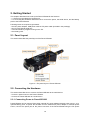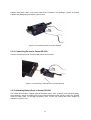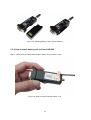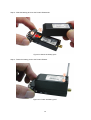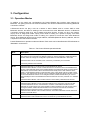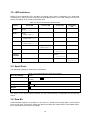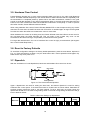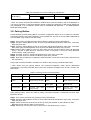
1
Parani-SD1000 User Guide Version 2.0.0 2009-11-19 User Guide for the Parani-SD1000 Version 2.0.0 Firmware version 2.0.X Printed in Korea Copyright Copyright 2009, Sena Technologies, Inc. All rights reserved. Sena Technologies reserves the right to make changes and improvements to its product without providing notice. Trademark Parani™ is a trademark of Sena Technologies, Inc. Windows® is a registered trademark of Microsoft Corporation. Ethernet® is a registered trademark of XEROX Corporation. Notice to Users When a system failure may cause serious consequences, protecting life and property against such consequences with a backup system or safety device is essential. The user agrees that protection against consequences resulting from system failure is the user's responsibility. This device is not approved for life-support or medical systems. Changes or modifications to this device not explicitly approved by Sena Technologies will void the user's authority to operate this device. Precautions and Safety Electricity Use only the supplied AC adapter. Use of unauthorized power adapter is not recommended. Electrical shock may result. Do not kink or crease the power cable or place heavy objects on the power cable. Fire can result from damaged power cables. Do not handle power plug and adapter with wet hands. Electrical shock may result. Immediately power off the product and unplug the AC adapter if smoke or odors emit from the product and adapter. Fire can result from improper use. Immediately power off the product and unplug the AC adapter if water or other liquids are present. Fire can result from improper use. Product Parani-SD meets the RS-232 standards. Do not wire with non-standard products. Damage to your products may result from improper use. Do not drop or subject the device to impact. Damage to your products may result from improper use. Keep away from harsh environments including humid, dusty, and smoky areas. Damage to your products may result from improper use. Do not use excessive force on the buttons or attempt to disassemble the device. Damage to your products may result from improper use. Do not place heavy objects on the product. Damage to your products may result from improper use. Technical Support Sena Technologies, Inc. 210 Yangjae-dong, Seocho-gu Seoul 137-130, Korea Tel: (+82-2) 573-5422 Fax: (+82-2) 573-7710 E-Mail: [email protected] Website: http://www.sena.com 2 Revision History Revision V1.0.0 V1.0.1 V1.0.2 Date 2008-09-25 2008-10-24 2009-01-21 Name Cp Moon Marc Woo WJ Kim V1.0.3 2009-03-24 Cp Moon V1.0.4 2009-06-01 WJ Kim V2.0.0 2009-11-19 Yh Moon Description Initial Writing 2 nd Revision 3 rd Revision Update pairing button Modify S-Register 12 Modify package Info. Update attaching battery pack info. Multiple connection mode 3 Contents 1. Introduction 7 1.1. Overview...............................................................................................................................7 1.2. Package Check List ..............................................................................................................7 1.2.1. Single Unit Package .................................................................................................... 7 1.2.2. Bulk-Pack Package .....................................................................................................7 1.3. Product Specification............................................................................................................. 8 2. Getting Started 10 2.1. Panel Layout....................................................................................................................... 10 2.2. Connecting the Hardware.................................................................................................... 10 2.2.1. Connecting Power to Parani-SD1000 ........................................................................ 10 2.2.2. Connecting Device to Parani-SD1000........................................................................ 11 2.2.3. Attaching Battery Pack to Parani-SD1000.................................................................. 11 2.2.4. How to attach battery pack to Parani-SD1000............................................................ 12 3. Configuration 14 3.1. Operation Modes................................................................................................................. 14 3.2. LED Indicators .................................................................................................................... 15 3.3. Serial Ports ......................................................................................................................... 15 3.4. Data Bit............................................................................................................................... 15 3.5. Hardware Flow Control........................................................................................................ 16 3.6. Reset to Factory Defaults.................................................................................................... 16 3.7. Dipswitch ............................................................................................................................ 16 3.8. Pairing Button ..................................................................................................................... 17 3.9. Software and Utility ............................................................................................................. 18 3.10. ParaniWIN ........................................................................................................................ 18 3.11. ParaniUpdater ................................................................................................................... 23 3.12. Terminal Program.............................................................................................................. 24 4. Multiple Connection Mode 26 4.1. Overview............................................................................................................................. 26 4.2. Configuration ...................................................................................................................... 27 4.3. AT Commands..................................................................................................................... 28 4.3.1. AT+MULTI,n.............................................................................................................. 28 4.3.2. AT+MLIST?............................................................................................................... 28 4.3.3. ATHx, ATHbdaddr ..................................................................................................... 28 4.3.4. ATOx, ATObdaddr..................................................................................................... 28 4.4. Notes .................................................................................................................................. 29 5. Approval Information 30 5.1. FCC.................................................................................................................................... 30 5.1.1. FCC Compliance Statement ...................................................................................... 30 5.1.2. RF Exposure Statement ............................................................................................ 30 5.1.3. Do not ....................................................................................................................... 30 5.2. CE...................................................................................................................................... 30 5.3. MIC..................................................................................................................................... 30 5.4. TELEC ................................................................................................................................ 30 5.5. SIG..................................................................................................................................... 30 5.6. IC........................................................................................................................................ 30 6. RF Information 31 6.1. Radio Frequency Range...................................................................................................... 31 6.2. Number of Frequency Channel............................................................................................ 31 6.3. Transmission Method .......................................................................................................... 31 6.4. Modulation Method.............................................................................................................. 31 6.5. Radio Output Power............................................................................................................ 31 6.6. Receiving Sensitivity ........................................................................................................... 31 4 6.7. Power Supply...................................................................................................................... 31 Appendix A: Connections 32 A.1. Serial Port Pin Outs ............................................................................................................ 32 A.2. Serial Wiring Diagram......................................................................................................... 33 A.2.1. To Host with DTE Interface........................................................................................ 33 A.2.2. To Host with DCE Interface ....................................................................................... 33 Appendix B: AT Commands 34 B.1. Terminology ........................................................................................................................ 34 B.1.1. AT Command ............................................................................................................ 34 B.1.2. AT Response............................................................................................................. 34 B.1.3. Operation Mode ........................................................................................................ 34 B.1.4. Operation Status ....................................................................................................... 34 B.1.5. Security .................................................................................................................... 34 B.1.6. Symbols .................................................................................................................... 35 B.2. Command Category............................................................................................................ 35 B.3. Command Description ........................................................................................................ 36 B.3.1. ATZ......................................................................................................................... 36 B.3.2. AT&F....................................................................................................................... 36 B.3.3. AT........................................................................................................................... 36 B.3.4. AT+UARTCONFIG,Baudrate,Parity,Stopbit.............................................................. 36 B.3.5. AT+USEDIP?.......................................................................................................... 36 B.3.6. AT+BTINFO?.......................................................................................................... 37 B.3.7. AT+BTINQ?............................................................................................................. 37 B.3.8. AT+BTLAST?.......................................................................................................... 37 B.3.9. AT+BTVER?............................................................................................................ 37 B.3.10. AT+MLIST?........................................................................................................... 37 B.3.11. AT+BTMODE,n...................................................................................................... 38 B.3.12. AT+MULTI,n.......................................................................................................... 38 B.3.13. +++....................................................................................................................... 38 B.3.14. AT+SETESC,nn.................................................................................................... 38 B.3.15. ATO(ATOx, ATObdaddr) ....................................................................................... 39 B.3.16. AT+BTCANCEL..................................................................................................... 39 B.3.17. AT+BTSCAN......................................................................................................... 39 B.3.18. AT+BTSCAN,n,to.................................................................................................. 39 B.3.19. AT+BTSCAN112233445566,to.............................................................................. 40 B.3.20. ATD....................................................................................................................... 40 B.3.21. ATD112233445566................................................................................................ 40 B.3.22. ATH(ATHx, ATHbdaddr) ........................................................................................ 40 B.3.23. AT+BTKEY=$string............................................................................................... 41 B.3.24. AT+BTSD? ........................................................................................................... 41 B.3.25. AT+BTCSD........................................................................................................... 41 B.3.26. AT+BTFP,n............................................................................................................ 41 B.3.27. AT+BTSEC,Authentication,Encryption................................................................... 41 B.3.28. AT+BTNAME=$string............................................................................................ 42 B.3.29. AT+BTLPM,n......................................................................................................... 42 B.3.30. AT+BTRSSI,n(Single Connection Mode Only) ...................................................... 42 B.3.31. AT&V..................................................................................................................... 42 B.3.32. ATSnn? ................................................................................................................ 43 B.3.33. ATSnn=mm........................................................................................................... 43 B.4. Command Validity............................................................................................................... 43 Appendix C: S-Register 45 C.1. S1: Force to Reconnect (default 1) ..................................................................................... 45 C.2. S3: Stream UART Policy (default 0) .................................................................................... 45 C.3. S4: Enable Remote Name Query (default 1) ....................................................................... 45 C.4. S6: Enable Low Power Mode (default 0)............................................................................. 45 C.5. S10: Enable Response Message (default 1) ....................................................................... 45 5 C.6. S11: Enable Escape (default 1)........................................................................................... 45 C.7. S12: Clear Data Buffer When Disconnected (default 1) ....................................................... 46 C.8. S13: Enable DCD Signal (default 1).................................................................................... 46 C.9. S14: Enable DTR Transfer (default 1) ................................................................................. 46 C.10. S15: Enable Disconnect by DTR (default 0) ...................................................................... 46 C.11. S22: Faster Connection (default 0).................................................................................... 46 C.12. S23: Intercharacter Timeout Setting (default 0) ................................................................. 46 C.13. S24: Maximum Number of Inquiry Result (default 15)........................................................ 46 C.14. S26: Intercharacter Timeout (default 0) ............................................................................. 46 C.15. S28: Escape Sequence Character (default 43).................................................................. 47 C.16. S31: Page Timeout (default 20)......................................................................................... 47 C.17. S33: Inquiry Timeout (default 30) ...................................................................................... 47 C.18. S37: Supervision Timeout (default 5) ................................................................................ 47 C.19. S43: COD (default 001F00) .............................................................................................. 47 C.20. S44: COD Filter (default 0)................................................................................................ 47 C.21. S45: Inquiry Access Code (default 0x9E8B33) .................................................................. 47 C.22. S46: BD Address of Last Connected Device ..................................................................... 47 C.23. S48: Low Power Max Interval (default 5000)..................................................................... 48 C.24. S49: Low Power Min Interval (default 4500) ...................................................................... 48 C.25. S52: Low Power Timeout (default 5) ................................................................................. 48 C.26. S54: BD Address of Last Connected Device ..................................................................... 48 C.27. S55: BD Address of Last Connected Device ..................................................................... 48 C.28. S56: BD Address of Last Connected Device ..................................................................... 48 C.29. S57: Slave Disconnect Timeout (default 3)........................................................................ 48 C.30. S58: MAX TX POWER (default 0)..................................................................................... 48 C.31. S59: Current Slave in Communication (default 0).............................................................. 49 C.32. S60: Reconnet Time Interval (default 5)............................................................................ 49 Appendix D: Trouble Shooting 50 D.1. No Data Transmission ........................................................................................................ 50 D.1.1. COM Port Settings .................................................................................................... 50 D.1.2. Pin Assignment ......................................................................................................... 50 D.2. Data Loss or Malfunctioning................................................................................................ 50 D.2.1. Hardware Flow Control ............................................................................................. 50 D.2.2. Response Message .................................................................................................. 50 D.3. Transmission Delay ............................................................................................................ 50 D.3.1. RF Processing Delay ................................................................................................ 50 D.3.2. RF Transmission Environment .................................................................................. 50 Appendix E: Parani-SD1000 mechanical drawing 51 E.1. Parani-SD1000 mechanical drawing (mm) .......................................................................... 51 E.2. Battery pack mechanical drawing (mm) ............................................................................... 52 Appendix F: Warranty 53 F.1. GENERAL WARRANTY POLICY......................................................................................... 53 F.2. LIMITATION OF LIABILITY.................................................................................................. 53 F.3. HARDWARE PRODUCT WARRANTY DETAILS ................................................................. 53 F.4. SOFTWARE PRODUCT WARRANTY DETAILS.................................................................. 54 F.5. THIRD-PARTY SOFTWARE PRODUCT WARRANTY DETAILS .......................................... 54 6 1. Introduction 1.1. Overview Parani-SD1000 is a terminal device for wireless serial communication using Bluetooth 2.0+EDR technology that is an international standard of short range wireless communications. Parani-SD1000 can communicate with other Bluetooth devices; user may connect other Bluetooth devices that support the Serial Port Profile. The working distance of Parani-SD1000 with default antenna is 100m Parani-SD1000 has a compact design, which allows it to be placed conveniently into various devices or equipment. Its detachable antenna has the ability to optimize the quality and distance of wireless communications. Parani-SD1000 supports FHSS (Frequency Hopping Spread Spectrum), which is a technique, native to Bluetooth that allows the Parani-SD1000 minimize radio interference while decreasing the likelihood of over-air hijacking. Parani-SD1000 also supports authentication and Bluetooth data encryption. Parani-SD1000 can be configured and controlled by a set of AT commands. Users can easily configure Parani-SD1000 on a terminal program, such as HyperTerminal, and configure for wireless communication without modifying user’s existing serial communication program. User friendly ParaniWIN can also be used for easy setup on Microsoft Windows. 1.2. Package Check List 1.2.1. Single Unit Package SD1000-A1 (Stub antenna NOT included) - Parani-SD1000 SD1000-00 - Parani-SD1000 - Stub Antenna - DC 5V Power Cable - USB Power Cable - DB9 Female to DB9 Male Gender - CD-ROM including Configuration SW and User Guide SD1000-01 - Parani-SD1000 - Stub Antenna - DC 5V Power Cable - USB Power Cable - DC Power Adapter - DB9 Female to DB9 Male Gender - CD-ROM including Configuration SW and User Guide 1.2.2. Bulk-Pack Package SD1000-B10 - Parani-SD1000 x 10 EA - Stub Antenna x 10 EA - DC Power Cable x 10EA 7 1.3. Product Specification Parani-SD1000 Serial Interface One female DB9 serial port for data communication Serial UART speed up to 921.6kbps CTS/RTS flow control, DTR/DSR for loop-back & full transfer Bluetooth Interface Bluetooth v2.0 + EDR Profile: Serial Port Profile Class 1 Working distance: Stub Antenna Stub Antenna Dipole Antenna Dipole Antenna Dipole Antenna Dipole Antenna Dipole Antenna Patch Antenna - Stub Antenna Dipole Antenna Dipole Antenna Dipole Antenna Patch Antenna Dipole Antenna Patch Antenna Patch Antenna 100 meters 150 meters 200 meters 300 meters 500 meters 400 meters 600 meters 1,000 meters Configuration ParaniWIN, Modem AT command set Firmware Update ParaniUpdater Diagnostic LED Mode, Connect, Serial Rx/Tx, Charge, Low battery Power Supply voltage: 5V ~ 12V DC Power consumption: 80mA@5VD Max Battery - Capacity 240 mAh(standard) 900 mAh(extended) - Charging Power Minium 5V/200mA - Charging Time Approximately 2 hours (standard) Approximately 5 hours (extended) - Battery life (Test based on 9600 bps data loopback. Actual battery life varies by configuration, operating conditions and other factors) Approximately 4.5 hours (standard) Approximately 16.5 hours (extended) 8 Environmental Operating temperature: -20 ~ 70 oC Storage temperature: -40 ~ 85 oC Humidity : 90% (Non-condensing) Physical properties - Dimension (L x W x H) 76 x 31 x 16 (mm) (No battery pack) 76 x 31 x 19.5 (mm) (with standard battery pack) 76 x 31 x 31.4 (mm) (with extended battery pack) - Weight 24g (No battery pack) 30g (with standard battery pack) 42g (with extended battery pack) Approvals FCC(A), CE, MIC, TELEC, SIG, IC Warranty 3-year limited warranty * Note : Bluetooth v2.0 supports improved AFH function. AFH function is to mitigate the interference between WiFi and Bluetooth radios by automatically avoiding the active WiFi channel from Bluetooth link. However, AFH does not provide a complete solution making WiFi and Bluetooth work together in harmony. It is highly recommended for users to test their wireless system enough before deployment since the overall system performance is affected by various environmental factors such as distance between them. 9 2. Getting Started This chapter describes how to set up the Parani-SD1000 for the first time. - 2.1 Panel Layout explains the panel layout. - 2.2 connecting the Hardware describes how to connect the power, the serial device, and the battery pack to the Parani-SD1000. Following items are required to get started: - One DC power adapter, USB power cable or DC power cable (included in the package). - One PC with RS232 serial port. - Terminal emulation program running on the PC. - One battery pack. 2.1. Panel Layout This section describes the panel layout of the Parani-SD1000. Figure 2-1 The panel layout of Parani-SD1000 2.2. Connecting the Hardware This section describes how to connect the Parani-SD1000 to the serial device. - Connect a power source to the Parani-SD1000. - Connect the Parani-SD1000 to a serial device. 2.2.1. Connecting Power to Parani-SD1000 Parani-SD1000 can be powered from either external DC power adaptor/external power source, or by optional battery pack. To power the SD1000 from the external DC power adaptor or external power source, connect the power jack to the power connector of the Parani-SD1000 using the DC power 10 adapter, USB power cable or DC power cable that is included in the package. If power is properly supplied, the [Mode] lamp will display a green color. Figure 2-2 Connecting Power to Parani-SD1000 2.2.2. Connecting Device to Parani-SD1000 Connect the serial device to the Parani-SD1000 as shown below. Figure 2-3 Connecting a Serial Device to Parani-SD1000 2.2.3. Attaching Battery Pack to Parani-SD1000 The Parani-SD1000 also supports optional standard battery pack (240mAh) and extended battery pack (900mAh). Attach the battery pack to the Parani-SD1000 as shown below to power the SD1000 using the battery pack. To recharge the battery pack, connect the external DC power adaptor as described in Section 2.2.1. 11 Figure 2-4 Attaching Battery Pack to Parani-SD1000 2.2.4. How to attach battery pack to Parani-SD1000 Step 1 : Remove two screws of SD1000 at the bottom and remove the cover. Figure 2-5 Remove Parani-SD1000 bottom cover 12 Step 2 : Slide the battery pack into the Parani-SD1000 slot. Figure 2-6 Attach the battery pack Step 3 : Fasten the battery pack to the Parani-SD1000. Figure 2-7 Fasten the battery pack 13 3. Configuration 3.1. Operation Modes In addition to the serial port configurations the Parani-SD1000 also requires some settings for Bluetooth. For getting the most out of Parani-SD1000, user should understand the following Bluetooth connection schemes. A Bluetooth device can play a role as a master or slave. Master tries to connect itself to other Bluetooth devices, and slave is waiting to be connected from other Bluetooth devices. A Bluetooth connection is always made by a pair of master and slave devices. A slave can be in two modes, Inquiry Scan or Page Scan mode. Inquiry Scan mode is waiting for a packet of inquiry from other Bluetooth device and Page Scan mode is waiting for a packet of connection from other Bluetooth device. Every Bluetooth device has its unique address, called BD (Bluetooth Device) address, which is composed of 12 hexa-decimal numbers. Parani-SD1000 has 4 operation modes as follows. Each mode can be identified with LED indicators as illustrated in next section. Table 3-1 The Parani-SD1000 Operation Modes Mode Description Mode0 In this mode, there is no response when power on or software reset, and Parani-SD1000 is just waiting for AT command input. Neither master nor slave is assigned to Parani-SD1000 in mode0. User can change the configuration parameters of Parani-SD1000 in this mode. Parani-SD1000 must be in Mode0, when it is directly controlled by AT commands. The factory default is set to Mode0. Mode1 Parani-SD1000 tries to connect the last connected Bluetooth device. Parani-SD1000 in Mode1 is to be a master and tries to connect the last connected Bluetooth device. Parani-SD1000 always stores the BD address of the Bluetooth device to which ParaniSD1000 has connected last. When Parani-SD1000 is initially used or after hardware reset, there is no BD address stored in Parani-SD1000. In this case, Mode1 will not be able to work properly. The mode change to Mode1 can be made after Parani-SD1000 succeeds to connect to one other Bluetooth device. Once changed to Mode1, Parani-SD1000 will try to connect automatically the last connected Bluetooth device whenever the unit is powered on or software reset. Parani-SD1000 in Mode1 cannot be discovered or connected by other Bluetooth devices. Mode2 Parani-SD1000 is waits for a connection from the last connected Bluetooth device. Parani-SD1000 in Mode2 is to be a slave and waiting for the connection only from the last connected Bluetooth device. Just like Mode1, if there is no BD address stored in ParaniSD1000, the mode change from other operation modes to Mode2 is not work properly. Once changed to Mode2, Parani-SD1000 will wait for the connection from the last connected Bluetooth device whenever the unit is powered on or software reset. Parani-SD1000 in Mode2 cannot be discovered or connected to Bluetooth devices other than the last connected device. Mode3 Parani-SD1000 is waiting for the connection from any other Bluetooth devices. In Mode 3 the Parani-SD1000 is discoverable and can be connected to by other Bluetooth devices. 14 3.2. LED Indicators RS232-Tx and RS232-Rx LED will flash accordingly when data is transmitted. For small data transmissions, it may be hard to recognize the quick flashing action of the LED. Charge Led and Low battery LED will be off, if you don’t use battery pack. Table 3-2 The Parani-SD1000 LED Indicators Indicator Mode LED Mode 0 Green ┏━━━━━ Mode 1 Green (every 1 sec) ┏┓ Mode 2 Green (every 3 sec) ┏┰┓ Mode 3 Green (every 3 sec) ┏┰┰┓ Connected Connect LED Charge LED Low battery LED Green (every 1 sec) ┏┓ Charging Red ┏━━━━━ Charging Complete Green ┏━━━━━ Low battery Red ┏━━━━━ 3.3. Serial Ports The applicable settings for serial ports are as follows. Table 3-3 The Parani-SD1000 Serial Port Settings Serial Port Settings Values Baud rate 1200, 2400, 4800, 9600 , 14400, 19200, 38400, 57600, 115200, 230400, 460800, 921600 Data bite 8 Parity No parity , Even parity, Odd parity Stop bit 1, 2 Hardware Flow Control Use, No Use The values in box are the factory defaults. The flow control setting is configurable only through dip switch. 3.4. Data Bit Parani-SD1000 supports only 8 data bit. In the case of 7 data bit and even/odd parity, use SD 8 data bit and none parity. At this time, master and slave are Parani-SD, Parani-ESD or Parani-MSP series. But 7 data bit and none parity is not support. 15 3.5. Hardware Flow Control Parani-SD1000 plugged into its host system transmits data from host to the other side Bluetooth device. This data is saved temporarily in the internal buffer of Parani-SD1000 and sent repeatedly until the transmission is completed packet by packet. When the radio transmission condition is not good enough to send data promptly, it can cause a transmission delay. If the host sends more data when the buffer is full, buffer overflow will make Parani-SD1000 malfunction consequently. In order to prevent this buffer overflow, Parani-SD1000 works as follows. When using hardware flow control, Parani-SD1000 disables RTS so that it stops receiving any further data from the host when the buffer becomes full. RTS will be re-enabled again to begin receiving data from the host when the buffer has created more room for more data. When hardware flow control is not being used, the Parani-SD1000 clears the buffer to secure room for the next data when the buffer becomes full. This can mean a loss of data may occur. As the transmission data becomes large, the possibility of data loss becomes greater. For large data transmissions, the use of hardware flow control is highly recommended. (Not support flow control in Multi-Drop Mode.) 3.6. Reset to Factory Defaults To set all the configuration settings to its factory default parameters, press the reset button, depicted in Fig. 3-1. Press and hold (for at least 1 sec) the reset button with a narrow pointed tool like paper clip. Reset works only when power is on. 3.7. Dipswitch With the combination of 4 slot dipswitches, baud rate and hardware flow control can be set. Reset Dip switch Pairing Button Figure 3-1 The Parani-SD1000 Dipswitch Upper 3 dipswitches are used for setting the baud rate, and bottom dipswitch is used for setting hardware flow control option. If the baud rate needs to a baud rate not shown below, ParaniWIN or terminal program should be used to set these speeds. To set a baud rate not shown below the dipswitches should be in the S/W Config setting. When in the S/W Config setting the baud rate will go back to 9600 as default. Table 3-4 Baud rate Settings by Dipswitches 2400 4800 9600 19.2K Baud rate 16 38.4K 57.6K 115.2K S/W Config Table 3-5 Hardware Flow Control Settings by Dipswitches No Use Hardware Flow Control Handshaking Use * Note: You cannot set the Parani-SD1000 to a Baud rate of 1200 and 230K by way of the Dipswitch. If you want to use them, to set these speeds, please configure the dipswitch to S/W Config setting and use ParaniWIN or AT commands. Please refer to ParaniWIN and Appendix 0 AT+UARTCONFIG, Baud rate,Paraty,Stopbit. 3.8. Pairing Button Parani-SD1000 provides Pairing Button for instant configuration without a PC to make an automatic connection between two Parani-SD1000s. In this example we will refer to the two Parani-SD1000s as SD1 and SD2. (Only single connection mode) Step 1. Turn on SD1 and SD2 and reset both of them by pressing Factory Reset Button. Step 2. Press the Pairing Button of SD1 for 2 seconds until Mode LED blinks 3 times every 3 seconds. Keep the power ON. Step 3. Press the Pairing Button of SD2 for 2 seconds until Mode LED blinks 3 times every 3 seconds. Now press again the Pairing Button for 2 seconds until Mode LED blinks every second. Step 4. Wait for SD1 & SD2 to connect to each other until the Connect LED’s of SD1 and SD2 blink every 1 second. It takes about 10 seconds to make a connection. If there are many Bluetooth devices nearby, it may take longer. Step 5. Turn SD1 off and on. Mode LED blinks twice in green every 3 seconds. Step 6. Turn SD2 off and on. Mode LED blinks in green every second. Step 7. Now SD1 and SD2 are configured to make automatic connection to each other, whenever they are powered on. Using a pair of Parani-SD1000 in this fashion is similar to that of using a wireless serial cable. * Note: When using the pairing buttons, the Command Response option will be deactivated automatically. The Parani-SD1000 will not send the response messages such as OK, Connect and Disconnect. Table 3-6 Pairing Process by Pairing Button SD1 Status LED SD2 Status LED 1. Factory reset Mode0 Mode LED turns on 1. Factory reset Mode0 Mode LED turns on 2. Push pairing button Mode3 Mode LED blinks 3 2. Push pairing times every 3 seconds button Mode3 Mode LED blinks 3 times every 3 seconds 3. Push pairing button again Mode1 Mode LED every second 4. Connected Master Connect LED blinks every second 4. Connected Slave Connect LED every second blinks blinks Using pairing button, users can make a pairing connection between a Parani-SD unit and other Bluetooth devices. Step 1. Turn on SD1 and reset it by pressing Factory Reset Button. Step 2. Press the Pairing Button of SD1 for 2 seconds until Mode LED blinks 3 times every 3 seconds. Keep the power ON. Step 3. Users can discover and connect to SD1 by using the software or user interface of other Bluetooth device that they want to connect from. Step 4. When they are connected, the Connect LED of SD1 blinks every 1 second. 17 Step 5. Turn off and on. Mode LED blinks twice in green every 3 seconds. Step 6. Now SD1 is waiting for a connection from the last connected Bluetooth device. The last connected Bluetooth device can connect to SD1. Table 3-7 Pairing Process with other Bluetooth devic e by Pairing Button SD1 Status LED Other Bluetooth Device 1. Factory reset Mode0 Mode LED turns on 2. Push pairing button Mode3 Mode LED blinks 3 times every 3 seconds Status 3. Inquiry and connect to SD1 4. Connected Slave Connect LED every second blinks 4. Connected Master 3.9. Software and Utility This configuration software and utility for firmware update is included with the product, which also can be downloaded from http://www.sena.com Table 3-8 Configuration Software Software Purpose Operating System ParaniWIN Configuration MS Windows 98SE or Higher ParaniUpdater Firmware Update MS Windows 98SE or Higher 3.10. ParaniWIN ParaniWIN is a program that runs on Microsoft Windows for the configuration of Parani-SD1000. Install ParaniWIN on your computer. Plug a Parani-SD1000 into the serial port of the computer and turn on the power. Run ParaniWIN. Figure 3-2 Serial Port Setting Set each option properly and click [Confirm]. If the settings of the Parani-SD1000 are different from the ParaniWin, an error message will pop up. If the Parani-SD1000 is in the status of connection, warning message will pop up. Then the current connection can be cancelled by [Disconnect] button on the main window. 18 Figure 3-3 Main Window Figure 3-4 Information Window Serial port settings can be changed by <Start Configuration> and <ParaniWIN Configuration> of ParaniWIN in the menu bar at upper left corner of the window without re-running the ParaniWIN program. 19 Figure 3-5 Menu Bar at Upper Left corner of ParaniWIN When the ParaniWin software is able to access the Parani-SD1000 properly, the icons in the left side window come will become available for use. In device configuration window, hardware reset can be executed or operation mode and RS232 can be configured as well. Security option also can be configured in this window. Figure 3-6 Device Setting Window Parani-SD1000 supports two security options, Authentication and Encryption. If you enable the Authentication option, you must also enter a Pin Code value. If the authentication is enabled, the connection, between the Master and Slave device must share the same Pin Code. In case that ParaniSD1000 connects to another Bluetooth device, that requires authentication, you must know the other device’s Pin Code. In general, most Bluetooth devices have a pincode of 1234 or 0000. If you check Encryption option, the Parani-SD1000 will encrypt packets and sent to the device. The Encryption options works well in case that only one of the devices between Master and Slave use the Encryption option. 20 Parani-SD1000 has 4 response messages, ‘OK’, ‘ERROR’, ‘CONNECT’, and ‘DISCONNECT’. In some cases, these responses can affect the host system unexpectedly. To prevent this, user can set the Command response to ON or OFF. For Parani-SD1000, hardware flow control can be configured only by dip switch. And parity, stop bit can be configured only SW config mode. Thus H/W Flow Control option will not work in this case. When the dipswitch value isn’t ATcommand mode, the Baud Rate menu will be disabled. Click [Apply] button to apply any changes made to the Parani-SD1000. Connection(out) icon will show the following window to search and connect other Bluetooth devices. Figure 3-7 Connection (out) Window Click [Search] button to search nearby Bluetooth devices. Once several Bluetooth devices has been found, select one of the devices and click the [Connect] button. The selected Bluetooth device must be discoverable and connectable. Click [Disconnect] button to cancel the connection. After the connection has been established, you will be able to test signal strength by pushing the START button. 21 Figure 3-8 Signal Strength Test The signal strength test shows LInkQuality and RSSI values. The closer LinkQuality is to 255 and RSSI is to 0, this means the Parani-SD1000 has a good connection to the connected Bluetooth device. In general, the wireless connectivity is at its best within 10 meters. You can push the STOP button at anytime in order to terminate the signal strength test. The signal strength test will continue until the STOP button is pushed. If you close the ParaniWIN Window without pushing the STOP button, you must restart Parani-SD1000 to terminate the test. Connection(in) icon will show the following window, which enables the Parani-SD1000 to wait for a connection from another Bluetooth device. If the waiting time is set to 0, Parani-SD1000 will continually wait for connection until [Cancel] button is clicked. Figure 3-9 Connection (in) Window 22 If the Connection Wizard icon is clicked, an easy to use pairing menu will appear: Figure 3-10 Connection Wizard Window In this example we will refer to the two Parani-SD1000s as SD1 and SD2 respectively. To use this menu, please do the following: Step 1. Connect SD1 and then push the START button. Step 2. Disconnect SD1, connect SD2 and then push the Next button after setting up Slave configuration. At this time, the dip switch value should be ATcmd mode. The flow control setting can be changed only through dip switch. Step 3. Disconnect SD2, once again connect SD1 and then push the Finish button. The pairing configuration should be completed. Make sure that each Parani-SD1000’s connect LED is on. At this point, when both Parani-SD1000’s restart the connection will be established automatically. 3.11. ParaniUpdater Parani-SD1000 supports firmware updates. You can download new firmware images for the ParaniSD1000 at http://www.sena.com. With the ParaniUpdater, you can update the firmware of ParaniSD1000 by selecting the firmware image file and pushing Start button. * Note: DO NOT power off Parani-SD1000 while the firmware update is progressing, this may damage the Parani-SD1000. 23 Figure 3-11 ParaniUpdater Window 3.12. Terminal Program A terminal program is typically an application that will enable a PC to communicate directly with a modem. If you are using Windows 98SE or higher version of Windows, HyperTerminal program is included as part of the operating system. Parani-SD1000 provides some extended AT commands for configuration of the Parani-SD1000. This manual will explain the method using HyperTerminal. If you need to install HyperTerminal, click start>setting>control panel>add/remove programs. For more precise details on HyperTerminal installations, please refer to Microsoft Windows Help section. . Figure 3-12 HyperTerminal Attach Parani-SD1000 to serial port of host computer and power on the Parani-SD1000. Check Mode LED. (See 3.2) 24 Make sure that the Connect LED is turned off and the Stanby LED is turned on before attempting to send any kind of AT commands to the Parani-SD1000. Then launch HyperTerminal, it can usually be found in start >programs >accessories >communication >HyperTerminal. Select the Serial port that Parani-SD1000 is connected to. Select the Serial port setting in the window displayed, please make sure the serial settings in Hyperterminal are set to the same settings as the Parani-SD1000’s serial settings. To view the AT commands that are being typed, you will need to enable the local echo option. Go to File->Properties->Settings->ASCII setup and select the “Echo typed characters locally” option. For expanded AT commands, please refer to Appendix A. AT commands. Example of AT commands: at+btinfo? 00015B446655,SD1000v2.0.0-446655,MODE0,STANDBY,0,0,NoFC OK atd 000195000001 OK CONNECT 000195000001 25 4. Multiple Connection Mode 4.1. Overview Parani-SD1000 supports multiple connections up to 4 slave units. There are two types of multiple connection modes: Multi-Drop Mode and Node Switching Mode. Figure 4-1 Multi-Drop Mode In Multi-Drop Mode a master unit can connect to maximum 4 slave units at the same time and they transfer data bi-directionally as in Figure 4-1. Figure 4-2 Node Switching Mode In Node Switching Mode, the master unit maintains multiple connections with maximum 4 slave units but only one connection with one slave unit is active and data is transferred as shown in Figure 4-2. Active slave is selected by AT commands. On communication after connecting +++ OK ATO1 – Communicating with #1 Slave +++ OK ATO000195000003 – Communicating with slave of BD 000195000003 26 4.2. Configuration All the slaves should be in the status of waiting for connection either in Mode 2 or Mode 3 and the master unit tries to connect to the slave units. The master unit needs to be configured to work in a multiple connection mode using AT+MULTI,x command, which makes master reboots after execution. Table 4-1 AT+MULTI,x AT+MULTI,0 Single Connection Mode AT+MULTI,1 Multi-Drop Mode AT+MULTI,2 Node Switching Mode Table 4-2 Configuration of a Multiple Connection Mode Manual Connection Automatic Connection ATD000195000001 CONNECT000195000001 +++ OK ATD000195000002 CONNECT000195000002 +++ OK ATD000195000003 CONNECT000195000003 +++ OK ATD000195000004 CONNECT000195000004 ATS46=000195000001 OK ATS54=000195000002 OK ATS55=000195000003 OK ATS56=000195000004 OK AT+MULTI,1 or AT+MULTI,2 OK AT+BTMODE,1 After rebooted automatically master tries to connect to slaves +++ After input the BD addresses of the slave units into 4 S-registers S46, S54, S55 and S56 and then set operation mode as MODE1, users can use multiple connection function. If S-registers have available slaves’address, AUTO CONNECT message will be displayed following corresponding TASK. TASK1 OK – AUTO CONNECT TASK2 OK TASK3 OK – AUTO CONNECT TASK4 OK 27 4.3. AT Commands 4.3.1. AT+MULTI,n Select a multiple connection mode. Refer to Table 4-1 for descriptions. 4.3.2. AT+MLIST? It shows the current mode, the connection status and the BD addresses of slaves. at+mlist? CURRENT MODE: MULTI DROP TASK1 – 000195000001 TASK2 – 000195000002 TASK3 – DISCONNECT TASK4 - 000195000004 OK 4.3.3. ATHx, ATHbdaddr Using the ATH command, connections with all slaves or only connections with specific slaves can be disconnected selectively Table 4-3 ATH ATH Disconnect all the slaves. ATHx (ATH1, ATH2, ATH3, ATH4) Disconnect the slave which belongs to the TASK x. ATHbdaddr (ATH000195000001) Disconnect the slave with specified BD address. 4.3.4. ATOx, ATObdaddr Using the ATO command, the communication status with the last active slave or a specific slave can be set to online (only in Node Switching Mode). Table 4-4 ATO ATO Communicate with the slave recently communicated. ATOx (ATO1, ATO2, ATO3, ATO4) Communicate with the slave which belongs to the TASK x. ATObdaddr (ATO000195000001) Communicate with the slave with specified BDaddress. 28 4.4. Notes When large data exchange occurs in Multi-drop mode without flow-control enabled, the master unit may experience data loss. It may also experience occasional disconnections and/or system rebooting especially when bi-directional communication happens. It is strongly recommended to perform extensive performance test before any real world field applications. The master unit would try to connect all slave units specified by S-register 46, 54, 55 and 56. If nonexisting or inactive slave addresses are entered in these S-registers, the overall performance will degrade due to frequent connection trials to non-existing/inactive slaves. It may also force disconnections for overall performance and outputs disconnect messages repeatedly. Node-switching mode provides nearly equivalent performance as single connection mode. It is always recommended to use flow-control for both of Multi-Drop Mode and Node Switching Mode. 29 5. Approval Information 5.1. FCC FCC Part 15 Subpart C Section 15.247 FCC ID: S7APARANISD1000 5.1.1. FCC Compliance Statement This device complies with part 15 of the FCC Rules. Operation is subject to the following two conditions: (1) This device may not cause harmful interference, and (2) This device must accept any interference received, Including interference that may cause undesired operation 5.1.2. RF Exposure Statement The equipment complies with FCC RF radiation exposure limits set forth for an uncontrolled environment. This device and its antenna must not be co-located or operation in conjunction with any other antenna or transmitter. 5.1.3. Do not Any changes or modifications to the equipment not expressly approved by the party responsible for compliance could void user’s authority to operate the equipment. 5.2. CE CE1177 EN 60950-1: 2001 ETSI EN 301 489-1 V1.6.1 ETSI EN 301 489-17 V1.2.1 ETSI EN 300 328 V1.6.1 5.3. MIC Type Registration Certification No: SNA-Parani-SD1000 5.4. TELEC Type Registration Certification No: 010WWBT0002 5.5. SIG Specification Version: 2.0/2.0 + EDR QDID: B014291 5.6. IC Radio Cert. No.: IC: 8154A-SD1000 30 6. RF Information 6.1. Radio Frequency Range 2.402~2.480GHz 6.2. Number of Frequency Channel 79 channels 6.3. Transmission Method FHSS (Frequency Hopping Spread Spectrum) 6.4. Modulation Method GFSK (Gaussian-filtered Frequency Shift Keying) Pi/4 DQPSK (pi/4 rotated Differential Quaternary Phase Shift Keying) 8DPSK (8 phase Differential Phase Shift Keying) 6.5. Radio Output Power Products Radio Output Power Parani-SD1000 +18dBm 6.6. Receiving Sensitivity Products Radio Output Power Parani-SD1000 -88dBm 6.7. Power Supply Products Radio Output Power Parani-SD1000 DC5.0 ~ 12V 31 Appendix A: Connections A.1. Serial Port Pin Outs Parani-SD is a DCE device compatible with the RS232 standard, a DB9 female interface. Figure A-1 Pin layout of the DB-9 female connector Table A-1. Pin assignment of the DB-9 female connector Pin # Signal Direction Description 1 DCD Output Bluetooth Connect Detect 2 TxD Output Transmitted Data 3 RxD Input Received Data 4 DSR Input Data set ready 5 GND - Signal Ground 6 DTR Output 7 CTS Input Clear to Send 8 RTS Output Ready to send 9 Vcc Input Data terminal ready (5V ~ 12V) 32 A.2. Serial Wiring Diagram A.2.1. To Host with DTE Interface A.2.2. To Host with DCE Interface 33 Appendix B: AT Commands B.1. Terminology B.1.1. AT Command AT command set is the in fact standard language for controlling modems . The AT command set was developed by Hayes and is recognized by virtually all personal computer modems. Parani-SD provides the extended AT command set to control and configure the serial parameters and Bluetooth connection. HT HT TH HT TH TH HT TH HT TH B.1.2. AT Response Parani-SD replies to AT commands with 4 kinds of message, ‘OK’, ‘ERROR’, ‘CONNECT’ and ‘DISCONNECT’. B.1.3. Operation Mode Mode Description Mode0 Waiting for AT commands Mode1 Attempting to connect the last connected Bluetooth device Mode2 Waiting for the connection from the last connected Bluetooth device Mode3 Waiting for the connection from any other Bluetooth device B.1.4. Operation Status Status Description Standby Waiting for AT commands Pending Executing tasks Connect Transmitting data B.1.5. Security Security Description Authentication Pin Code (or Pass key) Encryption Data encryption 34 B.1.6. Symbols The symbols are used for the description of command syntax as follows: Symbols Meaning ASCII Code Carriage return 0x0D Line feed 0x0A Carriage return + Line feed 112233445566 Bluetooth device address N or m One digit decimal number to Timeout in seconds B.2. Command Category Command Category Index AT Commands RESET 1 2 ATZ AT&F SERIAL PORT 3 4 AT AT+UARTCONFIG,b,p,s Information 5 6 7 8 9 10 AT+USEDIP? AT+BTINFO? AT+BTINQ? AT+BTLAST? AT+BTVER? AT+MLIST? Mode 11 12 AT+BTMODE,n AT+MULTI,n Status 13 14 15 16 17 18 19 +++ AT+SETESC,nn ATO AT+BTCANCEL AT+BTSCAN AT+BTSCAN,n,to AT+BTSCAN112233445566,to Connection 20 21 22 ATD ATD112233445566 ATH Security 23 24 25 26 27 AT+BTKEY=$string AT+BTSD? AT+BTCSD AT+BTFP,n AT+BTSEC,a,e Miscellaneous 28 29 30 AT+BTNAME=$string AT+BTLPM,n AT+BTRSSI,n 31 32 33 AT&V ATSnn? ATSnn=mm BLUETOOTH S-REGISTER 35 B.3. Command Description B.3.1. ATZ Response OK Purpose Software Reset Description This has the same effects as Powercycling the unit. This command disconnects any connected Bluetooth device, and stops ongoing tasks. After rebooting, the status will be decided by the preset operation mode. Some AT commands require the ATZ command be run so that the commands can take effect. B.3.2. AT&F Response OK Purpose Hardware reset Description This has the same effect as initialization by pressing the factory reset button. All parameters are initialized to factory defaults. B.3.3. AT Response OK Purpose Check the connection status with host equipment Description Check if the connection to host equipment is operating normally. The serial parameters of Parani-SD must be same as those of host equipment. If not, the Parani-SD will not respond or ‘ERROR’message will appear or an abnormal sequence of strings will appear. B.3.4. AT+UARTCONFIG,Baudrate,Parity,Stopbit Response OK Purpose Set Serial parameters Parameters Baudrate = 1200/2400/9600/14400/19200/38400/57600/115200/230400/460800/ 921600 (Default=9600) Parity=N/E/O (Default=N) Stopbit=1/2 (Default=1) Description The Serial parameters can be set or changed only if SW config mode is selected in dip switch. The factory default is 9600, N, 1. To take effect the ATZ command must be used or Powercycle the unit. Example AT+UARTCONFIG,115200,N,1 B.3.5. AT+USEDIP? Response m Purpose Check the Baud rate set by the dip switch Description m=0: Dip switches are set to ‘S/W Config’ m=1: Please view the dipswitches to view your baud rate. 36 B.3.6. AT+BTINFO? Response 112233445566,DeviceName,Mode,Status,Auth,Encryp,FlowControl OK Purpose Display Bluetooth settings Description The current Bluetooth settings are displayed including BD address, Device name, Operation mode, Operation status, Authentication, Data Encryption, and Hardware Flow Control. The initial value of Device name is ‘PSD1000v2.0.0 -445566’. PSD stands for Parani-SD, v2.0.0 for the version of firmware, and 445566 for the last 6 digits of BD address. Mode=MODE0/MODE1/MODE2/MODE3 Status=STANDBY/PENDING/CONNECT Auth=0/1 (Authentication is not activated when 0) Encrypt=0/1 (Encryption is not activated when 0) FlowControl=HWFC/NoFC Example 000B530011FF,SENA,MODE0,PENDING,1,1,HWFC B.3.7. AT+BTINQ? Response 112233445566,FriendlyName,CoD 112233445566,FriendlyName,CoD 112233445566,FriendlyName,CoD OK Purpose Search Bluetooth devices nearby Description The Bluetooth devices in Inquiry scan mode nearby are displayed with their BD addresses, Device names, and Class of device. Maximum 15 devices are scanned for 30 seconds. (Default 15 value in S-register 24) B.3.8. AT+BTLAST? Response 112233445566 Purpose Display the BD address of the last connected device Description The Bluetooth device last connected to this Parani-SD is displayed with its BD address. B.3.9. AT+BTVER? Response SD1000v2 .0.0 OK Purpose Display device firmware version Description Display device firmware version B.3.10. AT+MLIST? Response CURRENT MODE:SINGLE CONNECTION MODE OK Purpose Display the current multiple connection mode and connected slave’s Bluetooth addresses. Description Display current mode(SINGLE CONNECTION MODE, MULTI-DROP MODE, NODE SWITCHING MODE) and connected slave Bluetooth address. Example AT+MLIST? 37 CURRENT MODE: MULTI-DROP MODE TASK1 – 000195000001 TASK2 – DISCONNECT TASK3 – DISCONNECT TASK4 – 000195000004 B.3.11. AT+BTMODE,n Response OK Purpose Set operation mode Parameters n=0: MODE0 (Default) n=1: MODE1 n=2: MODE2 n=3: MODE3 Description When the operation status is ‘Pending’currently, change the status to ‘Standby’with AT+BTCANCEL prior to this command. To take effect the ATZ must be executed or Powercycle the unit Example AT+BTMODE,2 OK ATZ B.3.12. AT+MULTI,n Response OK Purpose Set multiple connection mode Parameters n=0: Single Connection Mode (Default) n=1: Multi-Drop Mode n=2: Node Switching Mode Description Set single connection mode, multi-drop mode or node switching mode. B.3.13. +++ Response OK Purpose Convert the operation status of ‘Connect’to ‘Standby’ Description In ‘Connect’status, data from host is transmitted to the other side Bluetooth device, and any AT command is not accepted but this command, which is not echoed on the screen. When Parani-SD encounters a character ‘+’from host, it stops the data transmission and waits for next 2 characters. If the next 2 characters aren’t both ‘+’, it restart to transmit data including the first ‘+’as well. If not, it converts the operation status to ‘Standby’. If the data from host includes ‘+++’, it will convert the operation status to ‘Standby’. Notice that Parani-SD holds data transmission when it encounters ‘+’, until receiving next character. ‘+’is an escape sequence character by default, which is changeable by AT+SETESC. B.3.14. AT+SETESC,nn Response OK Purpose Change the escape sequence character Description Escape sequence character set to ‘+’by default is changeable. The parameter nn must be a printable character. 38 Example AT+SETESC,42 B.3.15. ATO(ATOx, ATObdaddr) Response None Purpose Convert the operation status of ‘Standby’to ‘Connect’ Description You can convert the operation status of ‘Standby’to ‘Connect’ready to transmit data. In Node Switching mode, a specific slave can be specified to become an active connection by specifying the connection number or the Bluetooth address. Example ATO ATO3 ATO000195000001 B.3.16. AT+BTCANCEL Response OK Purpose Terminate the current task Description This terminates a current executing task, such as Inquiry scan and Page scan, then converts the operation status to ‘Standby’ B.3.17. AT+BTSCAN Response OK CONNECT 112233445566 Purpose Wait for inquiry and connection from other Bluetooth devices Description This allows the inquiry and connection from the other Bluetooth devices. The operation status will be in ‘Pending’after this command. When connection is made and released, the operation status is back to ‘Pending’. To convert the operation status to ‘Standby’ AT+BTCANCEL must be used. This has the same effect as AT+BTSCAN, 3, 0. When connection is made with other Bluetooth device, response will be ‘CONNECT’with its BD address. B.3.18. AT+BTSCAN,n,to Response OK CONNECT 112233445566 or OK ERROR Purpose Wait for inquiry and connection from other Bluetooth devices for a given duration Parameters n=1: Allows Inquiry scan n=2: Allows Page scan n=3: Allows both of Inquiry scan and Page scan to= Time duration in seconds Description For the given to, Parani-SD is waiting for the inquiry and connection from other Bluetooth devices. If the parameter of to is 0, it will wait forever. When connection is made with other Bluetooth device, response will be ‘CONNECT’with its BD address. If there is no connection made within this time duration, response is ‘ERROR’and the operation status becomes to ‘Standby’. 39 Example AT+BTSCAN,2,30 B.3.19. AT+BTSCAN112233445566,to Response OK CONNECT 112233445566 or OK ERROR Purpose Wait for connection by a Bluetooth device with a given BD address Parameters 112233445566=BD address to= time duration in seconds Description Parani-SD will wait to be connected to by the Bluetooth device with the given BD address. If the parameter of to is 0, it will wait forever. When connection is made with the Bluetooth device, response will be ‘CONNECT’with its BD address. If there is no connection made within this time duration, response is ‘ERROR’ and the operation status becomes ‘Standby’. Example AT+BTSCAN000B530011FF,30 B.3.20. ATD Response OK CONNECT 112233445566 or OK ERROR Purpose Connect to the last connected Bluetooth device Description Parani-SD saves the BD address of the Bluetooth device most recently connected to. If it fails to make a connection, response will display an ‘ERROR’. B.3.21. ATD112233445566 Response OK CONNECT 112233445566 or OK ERROR Purpose Connect to a specific Bluetooth device with a given BD address Parameters 112233445566 = BD address Description Parani-SD attempts to connect to the Bluetooth device with the given BD address. To make successful connection, the Bluetooth device must be in Page scan mode. This attempt continues for 5 minutes. If it fails to make connection, response is ‘ERROR ’. Example ATD000B530011FF B.3.22. ATH(ATHx, ATHbdaddr) Response OK DISCONNECT Purpose Release the current connection 40 Description The current Bluetooth connection will be disconnected. It takes about Supervision Timeout(S37) to detect an abnormal disconnection such as power off and moving out of service range. In multiple connection modes, a specific connection can be specified to be disconnected by specifying the connection number or the Bluetooth address The response message of ‘DISCONNECT’may be displayed on disconnection depending on the disconnection condition. You can make it not displayed using S10 register. Example ATH ATH3 ATH000195000001 B.3.23. AT+BTKEY=$string Response OK Purpose Change pin code Parameters $string= New pin code (Default=”1234”) Description Pin code is a string, which allows up to 16 alpha-numeric characters. Based on this pin code, Parani-SD generates a link key which is used in actual authentication process Example AT+BTKEY=”apple” B.3.24. AT+BTSD? Response 112233445566 OK Purpose Display a list of Bluetooth devices sharing the same pin code Description Once a connection is made with a pin code, Parani-SD saves the Bluetooth device with its link key, generated by the pin code. The connection to a device listed in Parani-SD can be made automatically without the authentication process. The maximum number kept on the list is 7. B.3.25. AT+BTCSD Response OK Purpose Clear the list of Bluetooth devices sharing the same pin code Description This clears the list of Bluetooth devices linked with the same key in flash memory. To take effect the ATZ command must be used or Powercycle the unit. B.3.26. AT+BTFP,n Response OK Purpose Set generation of link key every time of connection Parameters n=0: Inactivate (Default) n=1: Activate Description If n is set to 1, Parani-SD asks for the pin code every time a connection is made. This can be used to increase security. B.3.27. AT+BTSEC,Authentication,Encryption Response OK 41 Purpose Set authentication and data encryption Parameters Authentication=0: Inactivate (Default) Authentication=1: Activate Encryption=0: Inactivate (Default) Encryption=1: Activate Description If the authentication is activated, the pin code must be set by AT+BTKEY command. Data encryption cannot be used when authentication is not enabled, i.e. Authentication=0 and Encryption=1 will not work properly. B.3.28. AT+BTNAME=$string Response OK Purpose Change device name Parameters $string= New device name (Default=”PSDv2 .0.0 -445566 ”) Description Parani-SD can have a user friendly name for easy identification. The name allows up to 30 alpha-numeric characters. Example AT+BTNAME=”My-Parani-SD” B.3.29. AT+BTLPM,n Response OK Purpose Set low power mode Parameters n=0: Inactivate (Default) n=1: Activate Description During no data transmission, Parani-SD can be in low power mode to save the power. It takes a few seconds to wake the Parani-SD out of low power mode. B.3.30. AT+BTRSSI,n(Single Connection Mode Only) Response OK 0,255,0,0(repeatedly) Purpose Test signal strength Parameters n=0: Stop signal strength test n=1: Start signal strength test Description When Bluetooth connection is established, you can use this command in Standby status. The signal strength will be displayed repeatedly in order of Status, LinkQuality, Status, RSSI. If the LinkQuality is close to 255 and RSSI is close to 0, the signal strength is in good standing. Example +++ AT+BTRSSI,1 OK 0,255,0,0 B.3.31. AT&V Response S0:m0;S1:m1; …Sn:mn OK Purpose Display all the S-registers 42 Description All parameters are stored at S-register in flash memory. These values are sustained until hardware reset. B.3.32. ATSnn? Response value OK Purpose Display a given S-register Parameters nn= Address of S-register Description A specific S-register will be displayed. B.3.33. ATSnn=mm Response OK Purpose Change S-register value Parameters nn= Address of S-register mm= New value of S-register Description Some S-registers are optimized for the overall performance and protected and cannot be changed. When users try to change these S-registers, response is ‘ERROR’. For details of S-register, refer Appendix. B. Example ATS10=0 B.4. Command Validity AT Command Operation Status Standby Pending AT ○ ○ ATZ ○ ○ AT&F ○ ○ AT+BINQ? ◎ ATD112233445566 ◎ ATD ◎ AT+BTSCAN ◎ AT+BTSCAN,n,to ◎ AT+BTSCAN112233445566,to ◎ Connect ○ AT+BTCANCEL ○ +++ AT+SETESC ◎ ATO ● ATH ● 43 AT+BTSEC,Auth,Encr ◎ AT+BTLAST? ○ AT+BTMODEn ◎ AT+BTNAME=”Name” ◎ AT+BTKEY=”nnnn” ◎ AT+BTINFO? ○ AT+BTLPM,n ◎ AT+BTSD? ○ AT+BTCSD ◎ AT+BTFP,n ◎ AT+UARTCONFIG,b,p,s ◎ AT+USEDIP? ○ ○ AT+BTVER? ○ ○ AT+BTRSSI,n ● ○ ○ ◎ Valid only when Parani-SD is not connected to other Bluetooth device. ● Valid only when Parani-SD is connected to other Bluetooth device. 44 Appendix C: S-Register S-registers contain 52 parameters for the Parani-SD Series. These are stored in flash memory and the values will be saved unless hardware reset is executed. The value of S-register can be accessed and changed with ATS command. Some S-registers not shown below are set to maximize the performance of Parani-SD Series. Thus it is not recommended to change these S-registers. Changing the values of S-register can only be done in the Standby mode. Turn Parani-SD off and on. C.1. S1: Force to Reconnect (default 1) S1=0, Parani-SD in Mode1 does not try to reconnect when disconnected. S1=1, Parani-SD in Mode1 keeps trying to reconnect when disconnected. C.2. S3: Stream UART Policy (default 0) S3=0, the priority of UART streaming is throughput. S3=1, the priority is latency, which minimizes the delay of data transmission. This is useful in case of transmitting very small data quickly. When this value is 1, in order to minimize latency, Parani-SD sends the received data immediately. When this value is 0, the Parani-SD maximizes throughput, the Parani-SD stores received data for a short time and sends a large data packet. If the packet length is less than 100 bytes, having latency being the priority is recommended. If the packet length is more than 100 bytes, having throughput as the priority is recommended. Also, if you want to use high baud rate, throughput priority will be more effective. Just for reference, the buffer length for receiving data is 2 Kbytes. C.3. S4: Enable Remote Name Query (default 1) S4=0, Parani-SD will query only the BD address. This speeds up the inquiry process. S4=1, Parani-SD will query the BD address, device name and class of device. When this value is 1, Parani-SD finds not only BD address but also friendly name. When this value is 0, Parani-SD finds only BD address. When set to 0 this will make queries much faster. When using the pairing button, finding friendly name will be omitted automatically. C.4. S6: Enable Low Power Mode (default 0) S6=0, deactivate Low Power Mode. S6=1, activate Low Power Mode. This value decides whether Parani-SD works in Low Power Mode or not. When this value is 0, ParaniSD works only in active power mode. When Parani-SD works in Low Power mode, delay in transferring data may occur. C.5. S10: Enable Response Message (default 1) S10=0, Parani-SD does not send response messages to the host system. S10=1, Parani-SD sends response messages to host system. This value decides whether Parani-SD sends response messages such as OK, ERROR, CONNECT, DISCONNECT or not. When this value is 0, Parani-SD will not send any response messages. If the response messages conflicts with your host programs or devices that is connected to Parani-SD, change this value to 0. C.6. S11: Enable Escape (default 1) S11=0, Parani-SD does not allow escape sequence characters. The operation status of Connect cannot be changed to Standby. Since the Parani-SD skips the process of detecting escape sequence characters, more efficient data transmission can be had. 45 S11=1, Parani-SD allows for the escape sequence character. Whenever it is needed, the Connect status can be changed to Standby. C.7. S12: Clear Data Buffer When Disconnected (default 1) S12=0, Parani-SD does not clear the data buffer received from host system when disconnected. S12=1, Parani-SD clears the data buffer when disconnected. C.8. S13: Enable DCD Signal (default 1) S13=0, DCD signal off S13=1, DCD signal on C.9. S14: Enable DTR Transfer (default 1) S14=0, DTR/DSR signal is transferred in a loop-back fashion. S14=1, DTR signal is transferred to DSR of remote device. C.10. S15: Enable Disconnect by DTR (default 0) S15=0, DTR signal cannot release the connection. S15=1, The Bluetooth connection can be released when DTR signal is off. This value decides whether Bluetooth connection is released when DTR signal drops or not. If this value is 1, you can use DTR signal in order to disconnect Bluetooth connection. C.11. S22: Faster Connection (default 0) S22=0, none S22=1, page scan S22=2, inquiry scan S22=3, page/inquiry scan Connecting time is average 1.5sec faster than normal mode. C.12. S23: Intercharacter Timeout Setting (default 0) S23=0 : Not used S23=1 : 1 x S26 S23=2 : 10 x S26 S23=3 : 100 x S26 C.13. S24: Maximum Number of Inquiry Result (default 15) The maximum number of inquiry list can be controlled. This value is up to 15. C.14. S26: Intercharacter Timeout (default 0) This value describes time interval between characters used to separate the data from serial port. If there is no more data coming from serial port in this value, data is sent to client. S23=1 x S26=50 : Timeout-> 50msec S23=2 x S26=50 : Timeout-> 500msec S23=3 x S26=3 : Timeout-> 300msec 46 Intercharacter Timeout 50ms 100ms 200ms * Optimal Value(S23 x S26) 180 235 340 * When 10 bytes data are sent every intercharacter timeout, they are sent separately by 10 bytes at the optimal value. If the intercharater timeout is set below the optimal value, the date will be put together and sent by 20, 30, 40 bytes or more. C.15. S28: Escape Sequence Character (default 43) The decimal number of the ASCII code of escape sequence character can be controlled. The initial value is 43, the ASCII code of ‘+’. C.16. S31: Page Timeout (default 20) This is the timeout in seconds to attempt connection with the ATD command. After this timeout expires, the Parani-SD will restart automatically. If this value is 0, Parani-SD will attempt to connect without restarting C.17. S33: Inquiry Timeout (default 30) This is the timeout in seconds to execute inquiry scan. C.18. S37: Supervision Timeout (default 5) This is the timeout to presume disconnection, which is set to 5 seconds initially. The smaller the value becomes, the more quickly Parani-SD can detect an abnormal disconnection. But when the communication is suspended, it may be regarded as disconnection. This value should be greater than the Slave Disconnect Timeout(S57). (Slave unit depends on the value of master unit.) C.19. S43: COD (default 001F00) This value describes the sort of the bluetooth device and is editable. C.20. S44: COD Filter (default 0) This value is used to filter the sort of the bluetooth devices on inquiring. All the bluetooth devices are inquired in case of 0. In case of 3E0100, bluetooth devices with COD 3E0100 are inquired. C.21. S45: Inquiry Access Code (default 0x9E8B33) Inquiry access code is used during inquiry state. The reserved IAC addresses are 0x9E8B00 ~ 0x9E8B3F. The general inquiry IAC is 0x9E8B33. Parani-SD is able to find the Bluetooth devices that are configured as the same IAC C.22. S46: BD Address of Last Connected Device This saves the BD address of the Bluetooth device connected most recently in single connection mode. This saves the Task1 BD address of the Bluetooth device connected most recently in a multiple connection mode. 47 C.23. S48: Low Power Max Interval (default 5000) This is the max interval value to use low power mode, which is set to 5000 initially. (5000 x 625μsec = 3125msec) C.24. S49: Low Power Min Interval (default 4500) This is the min interval value to use low power mode, which is set to 4500 initially. (4500 x 625μsec = 2812msec) A small interval increases power consumption, a large interval increases latency. C.25. S52: Low Power Timeout (default 5) This is the low power timeout value, which is set to 5 initially. (5sec) During no data transmission in the timeout, Parani-SD will be in low power mode to save the power. Therefore, it takes a few seconds to wake the Parani-SD out of low power mode. C.26. S54: BD Address of Last Connected Device This saves the Task2 BD address of the Bluetooth device connected most recently in a multiple connection mode. C.27. S55: BD Address of Last Connected Device This saves the Task3 BD address of the Bluetooth device connected most recently in a multiple connection mode. C.28. S56: BD Address of Last Connected Device This saves the Task4 BD address of the Bluetooth device connected most recently in a multiple connection mode. C.29. S57: Slave Disconnect Timeout (default 3) This S57 register value defines the time period in seconds that a master unit waits in case a slave unit does not receive the data sent from the master. For this time period, the master unit will not send data to all slave units if any slave unit does not receive the data. If the slave unit does not receive the data after this time period elapses, the master unit will disconnect the connection with the problematic slave unit. The value should be greater than 0 and smaller than the Supervision Timeout(S37). C.30. S58: MAX TX POWER (default 0) This value describes the peak output power. Setting this causes rebooting and applying. (There can be a little deviation depending on the each device.) Parameter dBm 0 Use chip setting. 1 -12 2 -8 3 -4 4 0 5 4 6 8 7 12 8 16 48 C.31. S59: Current Slave in Communication (default 0) This value shows the current slave number in communication. The value is automatically stored when the slave is selected for communication. This value can also be set by user so the master unit connects to a specific slave to connect first in case the master unit reboots. The value range is 0~4. 0 means the maser unit never connected to a slave. The master will connect to a slave whatever responses first. C.32. S60: Reconnect Time Interval (default 5) This value defines reconnect time interval in case a slave is disconnected in multiple connection mode. The actual reconnect time interval will be the value multiplied by two in seconds. For example, if the value is set to 5, the reconnect time interval will be 10 seconds. The value should be greater than or equal to 5. The master unit will only try to reconnect when its mode is set to Mode1. 49 Appendix D: Trouble Shooting D.1. No Data Transmission D.1.1. COM Port Settings Check whether the Baud rate of Parani-SD matches that of its host equipment. Check whether the host equipment has a Data bit setting of 8. Parani-SD supports only 8 Data bit settings. If your host equipment uses 7 Data bit and even or odd parity, it may work with a 8 Data bit and No parity setting. This is valid only when both DCE devices are the Parani-SD. In this case, set both Parani-SDs to 8 Data bit and No parity. If one of DCE devices is another Bluetooth device such as Bluetooth USB dongle,7 bit data configurations will not work. Check whether the Parity and Stop bit of Parani-SD match those of your host equipment. Parani-SD supports No parity, Even parity and Odd parity, 1 and 2 Stop bit configurations. Check whether the host equipment of Parani-SD uses Hardware Flow Control. Parani-SD is initially set to Use of Hardware Flow Control. If your host equipment does not use Hardware Flow Control, please disable the Hardware flow control option by way of the dipswitch. Parani-SD does not support RS-232 break signal. D.1.2. Pin Assignment Parani-SD is a DCE device. If your host equipment is DTE, plug Parani-SD directly to the host equipment or use straight RS-232 cable. If your host equipment is DCE, use will need to use a cross over RS-232 cable (Null modem cable) or a Male to Male DB9 Null Modem adapter. D.2. Data Loss or Malfunctioning D.2.1. Hardware Flow Control When transmitting large amounts of data with No Hardware Flow Control, Parani-SD may clear the data buffer unexpectedly. The possibility becomes greater as the RF transmission environment becomes worse. D.2.2. Response Message AT response messages from the Parani-SD may affect the host system unexpectedly. Do not use Parani-SD If your applications cannot allow for this wireless time delay. D.3. Transmission Delay D.3.1. RF Processing Delay It takes 30msec approximately for a Parani-SD to complete a data transmission to the other Bluetooth device. This time delay cannot be reduced and may enlarge as the RF transmission environment becomes worse. Do not use Parani-SD If your applications cannot allow for this time delay. D.3.2. RF Transmission Environment If there are many Bluetooth devices working in a small area and/or the RF communication distance is too great and/or there are some obstacles affecting RF performance, the Parani-SD repeats the transmission packet by packet due to interferences and/or low RF performance. This may lead to increased data transmission time delays. 50 Appendix E: Parani-SD1000 mechanical drawing E.1. Parani-SD1000 mechanical drawing (mm) 101 with stub antenna 76 without antenna 15 16 14 31 51 E.2. Battery pack mechanical drawing (mm) Standard Battery Pack Extended Battery Pack 52 Appendix F: Warranty F.1. GENERAL WARR ANTY POLICY Sena Technologies, Inc. (hereinafter referred to as SENA) warrants that the Product shall conform to and perform in accordance with published technical specifications and the accompanying written materials, and shall be free of defects in materials and workmanship, for the period of time herein indicated, such warranty period commencing upon receipt of the Product. This warranty is limited to the repair and/or replacement, at SENA’s discretion, of defective or nonconforming Product, and SENA shall not be responsible for the failure of the Product to perform specified functions, or any other non- conformance caused by or attributable to: (a) any misapplication or misuse of the Product; (b) failure of Customer to adhere to any of SENA’s specifications or instructions; (c) neglect of, abuse of, or accident to, the Product; or (d) any associated or complementary equipment or software not furnished by SENA. Limited warranty service may be obtained by delivering the Product to SENA or to the international distributor it was purchased through and providing proof of purchase or receipt date. Customer agrees to insure the Product or assume the risk of loss or damage in transit, to prepay shipping charges to SENA, and to use the original shipping container or equivalent. F.2. LIMITATION OF LIABILITY EXCEPT AS EXPRESSLY PROVIDED HEREIN, SENA MAKES NO WARRANTY OF ANY KIND, EXPRESSED OR IMPLIED, WITH RESPECT TO ANY EQUIPMENT, PARTS OR SERVICES PROVIDED PURSUANT TO THIS AGREEMENT, INCLUDING BUT NOT LIMITED TO THE IMPLIED WARRANTIES OF MERCHANTABILITY AND FITNESS FOR A PARTICULAR PURPOSE. NEITHER SENA NOR ITS DEALER SHALL BE LIABLE FOR ANY OTHER DAMAGES, INCLUDING BUT NOT LIMITED TO DIRECT, INDIRECT, INCIDENTAL, SPECIAL OR CONSEQUENTIAL DAMAGES, WHETHER IN AN ACTION IN CONTRACT OR TORT (INCLUDING NEGLIGENCE AND STRICT LIABILITY), SUCH AS, BUT NOT LIMITED TO, LOSS OF ANTICIPATED PROFITS OR BENEFITS RESULTING FROM, OR ARISING OUT OF, OR IN CONNECTION WITH THE USE OF FURNISHING OF EQUIPMENT, PARTS OR SERVICES HEREUNDER OR THE PERFORMANCE, USE OR INABILITY TO USE THE SAME, EVEN IF SENA OR ITS DEALER HAS BEEN ADVISED OF THE POSSIBILITY OF SUCH DAMAGES. IN NO EVENT WILL SENA OR ITS DEALERS TOTAL LIABILITY EXCEED THE PRICE PAID FOR THE PRODUCT. F.3. HARDWARE PRODUCT WARRANTY DETAILS WARRANTY PERIOD: SENA warranties embedded hardware Product for a period of one (1) year, and external hardware Product for a period of three (3) or five (5) years according to the Product type. WARRANTY PROCEDURE: Upon return of the hardware Product SENA will, at its option, repair or replace Product at no additional charge, freight prepaid, except as set forth below. Repair parts and replacement Product will be furnished on an exchange basis and will be either reconditioned or new. All replaced Product and parts become the property of SENA. If SENA determines that the Product is not under warranty, it will, at the Customers option, repair the Product using current SENA standard rates for parts and labor, and return the Product at no charge in or out of warranty. WARRANTY EXCLUSIONS: Damages caused by - Accidents, falls, objects striking the SENA product, - Operating the Product in environments that exceed SENA's temperature and humidity specifications, - Power fluctuations, high voltage discharges, - Improper grounding, incorrect cabling, - Misuse, negligence by the customer or any other third party, - Failure to install or operate the product (s) in accordance to their SENA User Manual, - Failure caused by improper or inadequate maintenance by the customer or any other third party, 53 - Floods, lightning, earthquakes, - Water spills, - Replacement of parts due to normal wear and tear, - Hardware has been altered in any way, - Product that has been exposed to repair attempts by a third party without SENA’s written consent, - Hardware hosting modified SENA Software, or non-SENA Software, unless modifications have been approved by SENA. - Battery component capacity degradation due to usage, aging, and with some chemistry, lack of maintenance. F.4. SOFTWARE PRODUCT WARRANTY DETAILS WARRANTY PERIOD: SENA warranties software Product for a period of one (1) year. WARRANTY COVERAGE: SENA warranty will be limited to providing a software bug fix or a software patch, at a reasonable time after the user notifies SENA of software non-conformance. F.5. THIRD-PARTY SOFTWARE PRODUCT WARRANTY DETAILS The warranty policy of the third-party software is conformed to the policy of the corresponding vendor 54