1
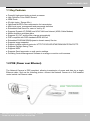
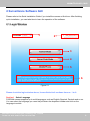
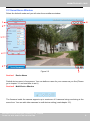
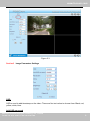
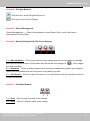
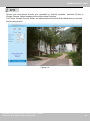
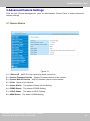
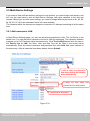
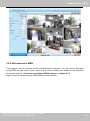
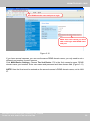
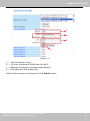
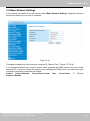
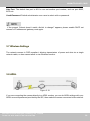
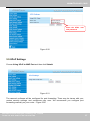
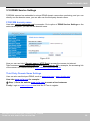
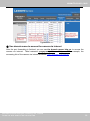
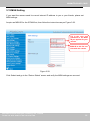
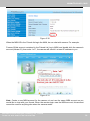
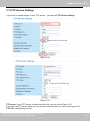
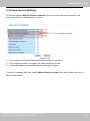
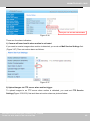
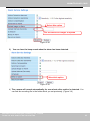
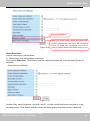
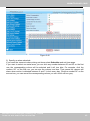
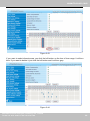
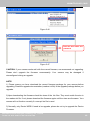
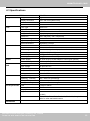
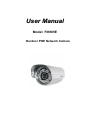
User Manual Model: FI8905E Ourdoor POE Network Camera www.foscam.com Table of Contents 1 Overviews .......................................................................................................................................................... 2 1.1 Key Features .............................................................................................................................................. 3 1.2 POE (Power over Ethernet)........................................................................................................................ 3 1.3 Read Before Use ........................................................................................................................................ 4 1.4 Packing Contents ....................................................................................................................................... 4 1.5 Physical Description ................................................................................................................................... 4 2 Surveillance Software GUI ................................................................................................................................ 6 2.1 Login Window ............................................................................................................................................. 6 2.2 Surveillance Window .................................................................................................................................. 8 3 Advanced Camera Settings ............................................................................................................................ 13 3.1 Device Status ............................................................................................................................................ 13 3.2 Alias Settings ............................................................................................................................................ 15 3.3 Date & Time Settings ................................................................................................................................ 15 3.4 User Settings ............................................................................................................................................. 16 3.5 Multi-Device Settings ................................................................................................................................ 17 3.6 Basic Network Settings ............................................................................................................................ 23 3.7 Wireless Settings ...................................................................................................................................... 26 3.8 ADSL......................................................................................................................................................... 26 3.9 UPnP Settings .......................................................................................................................................... 27 3.10 DDNS Service Settings .......................................................................................................................... 28 3.11 Mail Service Settings .............................................................................................................................. 33 3.12 MSN Setting ........................................................................................................................................... 35 3.13 FTP Service Settings .............................................................................................................................. 37 3.14 Alarm Service Settings ........................................................................................................................... 39 3.15 Upgrade Device Firmware...................................................................................................................... 45 3.16 Backup & Restore Settings .................................................................................................................... 47 3.17 Restore Factory Settings ........................................................................................................................ 47 3.18 Reboot Device ........................................................................................................................................ 48 3.19 Log .......................................................................................................................................................... 48 3.20 Back ........................................................................................................................................................ 48 Shenzhen Foscam Intelligent Technology Co., Limited Tel: 86 755 2674 5668 Fax: 86 755 2674 5168 1 1 www.foscam.com 4 APPENDIX ...................................................................................................................................................... 49 4.1 Frequently Asked Questions .................................................................................................................... 49 4.2 Default Parameters................................................................................................................................... 52 4.3 Specifications............................................................................................................................................ 53 5 OBTAINING TECHNICAL SUPPORT ............................................................................................................ 54 1 Overviews IPCAM is an integrated POE Network Camera solution. It combines a high quality digital video Camera with network connectivity and a powerful web server to bring clear to your desktop from anywhere on your local network or over the Internet. The basic function of IPCAM is transmitting remote video on the IP network. The high quality video image can be transmitted with 30fps speed on the LAN/WAN by using MJPEG hardware compression technology. The IPCAM is based on the TCP/IP standard. There is a WEB server inside which could support Internet Explore. Therefore the management and maintenance of your device is simplified by using the network to achieve the remote configuration, start-up and to upgrade the firmware. You can use this IPCAM to monitor special places such as your home and your office. Also controlling the IPCAM and managing image are simple by clicking the website through the network. Shenzhen Foscam Intelligent Technology Co., Limited Tel: 86 755 2674 5668 Fax: 86 755 2674 5168 2 2 www.foscam.com 1.1 Key Features ● Powerful high-speed video protocol processor ● High Definition Color CMOS Sensor ● 300K Pixels ● IR night vision ( Range:30m;) ● Optimized MJPEG video compression for transmission ● Multi-level users’ management and passwords definition ● Embedded Web Server for users to visit by IE ● Supports Dynamic IP (DDNS) and UPnP LAN and Internet (ADSL,Cable Modem) ● Motion detection activates alarm ● Supports IR_CUT and the filter change automatically ● POE compliant with POE standards IEEE 802.3af ● Embedded FOSCAM DDNS(dynamic domain name) Service ● Supports image snapshot ● Support multiple network protocols: HTTP/TCP/IP/UDP/STMP/DDNS/SNTP/DHCP/FTP ● Supports Daylight Saving Time ● Supports MSN ● Supports Gmail as sender on mail service settings ● Providing Central Management Software to manage or monitor multi-cameras 1.2 POE (Power over Ethernet) The Network Camera is POE-compliant, allowing transmission of power and data via a single Ethernet cable. Such as the following picture: connect the Network Camera to a PoE-enabled router/ switch via Ethernet cable. Shenzhen Foscam Intelligent Technology Co., Limited Tel: 86 755 2674 5668 Fax: 86 755 2674 5168 3 3 www.foscam.com 1.3 Read Before Use Please first verify that all contents received are complete according to the Package Contents listed below. Before the Network Camera is installed, please carefully read and follow the instructions in the Quick Installation Guide to avoid damage due to faulty assembly and installation. This also ensures the product is used properly as intended. 1.4 Packing Contents ● IPCAM×1 ● CD×1 ● DC Power Supply×1 ● Quick Installation Guide×1 ● Mounting bracket×1(option) ● Warranty Card×1 ● Network Cable×1 1.5 Physical Description Front Panel Figure 1.1 1 LENS: CMOS sensor with fixed focus lens 2 Infrared LED: 60 IR LEDs Shenzhen Foscam Intelligent Technology Co., Limited Tel: 86 755 2674 5668 Fax: 86 755 2674 5168 4 4 www.foscam.com Back View Figure 1.2 1 LAN: RJ-45/10-100 Base T 2 RESET BUTTON: Press and hold down the RESET BUTTON for 10 seconds. Release the power button and IP camera will be reset back to the factory default parameter. 3 Power: DC 5V/2A Power supply Bottom View There are up to three labels located on the body of the camera; this is an important feature of original Foscam cameras. If your camera does not have labels as shown in Figure 1.3 ,it may be a clone one. Cloned Foscam cameras can not use original firmware and are not eligible for warranty or technical services. FOSCAM domain name Figure 1.3 Shenzhen Foscam Intelligent Technology Co., Limited Tel: 86 755 2674 5668 Fax: 86 755 2674 5168 5 5 www.foscam.com 2 Surveillance Software GUI Please refer to the Quick Installation Guide if you install the camera at first time. After finishing quick installation, you can take time to learn the operation of the software. 2.1 Login Window 1 2 3 4 5 6 Figure 2.1 Please check the login window above, it was divided to 6 sections from no. 1 to 6. Section1 Select Language FOSCAM camera supports up to multi-languages, such as English, Spanish, Deutsch and so on. You can select the language you need via pull down the dropdown toolbar and click on the language to switch. Shenzhen Foscam Intelligent Technology Co., Limited Tel: 86 755 2674 5668 Fax: 86 755 2674 5168 6 6 www.foscam.com Section2 FOSCAM Website Link There is an access link to Foscam website homepage, if you need tech support you can contact Foscam directly. Section3 ActiveX Mode If your PC is windows based OS, such as Windows XP, Windows7, Windows Vista and you are using IE-based browsers like IE6, IE7, IE8, please choose IE ActiveX Mode login mode. . Section4 Server Push Mode If you are using non-IE based browser, like Firefox, Safari, Google Chrome please choose Server Push Mode mode. Section5 Mobile Phone If you are using the Mobile to access the camera, here you need to select Mobile Phone login mode. Section6 Note Note that when you login the camera, please select the corresponding login mode. Shenzhen Foscam Intelligent Technology Co., Limited Tel: 86 755 2674 5668 Fax: 86 755 2674 5168 7 7 www.foscam.com 2.2 Surveillance Window Select the ActiveX mode and you will enter the surveillance window. 1 6 2 3 4 5 Figure 2.2 Section1 7 Device Name Default device name is Anonymous. You can define a name for your camera as you like (Please go to chapter 3.1 and read how to set it) Section2 Multi-Device Window The firmware inside the camera supports up to maximum of 9 cameras being monitoring at the same time. You can add other cameras in multi-device setting (read chapter 3.5). Shenzhen Foscam Intelligent Technology Co., Limited Tel: 86 755 2674 5668 Fax: 86 755 2674 5168 8 8 www.foscam.com . Figure 2.3 Section3 Image Parameters Settings OSD OSD is used to add timestamp on the video. There are five text colors to choose from: Black, red, yellow, white, blue. Add OSD on record Shenzhen Foscam Intelligent Technology Co., Limited Tel: 86 755 2674 5668 Fax: 86 755 2674 5168 9 9 www.foscam.com Select this option if you want to add a timestamp to recordings. Resolution 1) 320x240-------QVGA 2) 640x480-------VGA There are two resolutions, the bigger one (VGA) is 640x480 pixels, and the smaller one (QVGA) is 320x240 pixels. The bigger the resolution, the better of the image quality is, but the lower the frame rate is. If you are accessing the camera via internet and want to get more fluent video streaming, please select resolution QVGA 320x240. Mode 1) 50HZ ---------Indoor surveillance (Region: Europe, China) 2) 60HZ ---------Indoor surveillance (Region: USA, Canada) 3) Outdoor-------Outdoor surveillance (Region: All over the world) There are three options within the menu of Mode: 50HZ, 60HZ and Outdoor. It depends on the frequency of the electricity and surveillance model (indoors & outdoor). Please choose outdoor mode, when the camera was installed outside. Fps 1) Max---------- Maximum frame rate 2) 20fps, 15fps, 10fps, 5fps,4fps,3fps,2fps,1fps, 5fps, 1fps ,1/2fps,1/3fps,1/4fps,1/5fps------customized frame rate You can choose option within the menu of Fps to adjust the frame rate. It is often used in LAN network when you want to lower the frame rate, so that you can save more bandwidth. Brightness Default parameter is 6, you can adjust the brightness of the image by clicking plus or minus button. Contrast Default parameter is 4, you can adjust the contrast of the image by clicking plus or minus button. Flip & Mirror You can flip the image by enabling Flip button, or mirror the image by enabling Mirror button. Shenzhen Foscam Intelligent Technology Co., Limited Tel: 86 755 2674 5668 Fax: 86 755 2674 5168 10 10 www.foscam.com Section4 IR Lights Buttons : Click this icon, all the IR lights will turn on. : Click this icon to turn off IR lights. Section5 Device Management Device Management ------Path to Administrator Control Panel, Click it, and it will lead to Administrator Control Panel. Section6 Record & Snapshot & Full Screen Buttons 1 1------Record Button 2 3 Click it and it pop-up a path-setting window, you can select the storage path and the record file name. At the same time the record icon changes to ,, Click it again and stop recording. 2------Snapshot Click it to make snapshot and it pop-up a window which picture you snapshot, right click in the window and save the picture to anywhere you want. 3------Full Screen Click it to make full-screen, or you can double click the surveillance screen to make full-screen. Section7 Play/Stop Buttons 1 2 1------Play Click it to play the video of the camera 2------Stop Click it to stop the video of the camera Shenzhen Foscam Intelligent Technology Co., Limited Tel: 86 755 2674 5668 Fax: 86 755 2674 5168 11 11 www.foscam.com Record and multi-device function are controlled by ActiveX controller, therefore Firefox or Google Chrome, Safari browsers will not allow these functions. For Firefox, Google Chrome, Safari, you should select the Server Push Mode and you can see the following screen: Figure 2.4 Shenzhen Foscam Intelligent Technology Co., Limited Tel: 86 755 2674 5668 Fax: 86 755 2674 5168 12 12 www.foscam.com 3 Advanced Camera Settings Click the bar “Device Management”, goes to Administrator Control Panel to make advanced camera settings. 3.1 Device Status Figure 3.1 1------Device ID MAC ID of the camera by wired connection 2-----Device Firmware Version System Firmware version of the camera 3-----Device Web UI Version Web UI firmware version of the camera 4-----Alias Name of the camera 5-----Alarm Status The status of Alarm Service Setting 6-----DDNS Status The status of DDNS Setting 7-----UPnP Status The status of UPnP Setting 8-----MSN Status The status of MSN Setting Shenzhen Foscam Intelligent Technology Co., Limited Tel: 86 755 2674 5668 Fax: 86 755 2674 5168 13 13 www.foscam.com Another Way: Double click the the icon “IP Camera.exe” , select the camera IP, right click and select the Basic Properties, you can also see the Firmware Version and MAC Address, such as the following screen: Figure 3.2 Figure 3.3 Shenzhen Foscam Intelligent Technology Co., Limited Tel: 86 755 2674 5668 Fax: 86 755 2674 5168 14 14 www.foscam.com 3.2 Alias Settings Default alias is Anonymous. You can define a name for your camera here such as apple. Click Submit to save your changes. The alias name supports special characters. Click the option here to modify the device name Enter the device name as you like. Use different names to identify multi-cameras Figure 3.4 3.3 Date & Time Settings Choose the time zone of your country. You can choose Sync with NTP Server or Sync with PC Time. If your country implements the Daylight Saving Time, that option can also be selected. Go to Data &Time Settings Figure 3.5 Shenzhen Foscam Intelligent Technology Co., Limited Tel: 86 755 2674 5668 Fax: 86 755 2674 5168 Select the time zone belong to your region 15 15 www.foscam.com 3.4 User Settings Here you can create users and set permission levels, visitor, operator or administrator. Click Submit to save these settings. The camera will reboot. You can set different permission levels, but at least one administrator Figure 3.6 Here you can also set one important file locations for the camera, the Alarm Record Path. Simply click Browse and choose the path to the required folder. The Alarm Record Path location is used to store automatically recorded files when the camera is activated by motion. (See set motion alarm. Figure 3.35) The default path for Alarm Record Path is C:\Documents and Settings\All Users\Documents. NOTE: In Windows7 or Vista, if you cannot set the paths.: Windows7 or Vista's security level is higher than Windows XP/2000.For "set record path" function, user should add the Device IP address to the Internet Explorer's 'Trusted sites' first. The step is: IE browserToolInternet ProperSecurityTrusted sitesSitesAdd Shenzhen Foscam Intelligent Technology Co., Limited Tel: 86 755 2674 5668 Fax: 86 755 2674 5168 16 16 www.foscam.com 3.5 Multi-Device Settings If you want to view multi-surveillance screens on one window, you need to login one camera, and set it as the main device, and do Multi-Device Settings, add other cameras to the first one camera. Before you do multi-cams settings, you need to assign different port such as 81, 82, 83, 84, 85, 86, 87, 88 to the cameras if there is 8 cams installed. The firmware within the camera can support a maximum of 9 devices monitoring all at the same time. 3.5.1 Add cameras in LAN In Multi-Device Settings page, you can see all devices searched in LAN. The 1st Device is the default one. You can add more cameras in the list in LAN for monitoring. The camera’s software supports up to 9 IP Cameras online simultaneously. Click The 2nd Device and click the item in the Device List in LAN, the Alias, Host and Http Port will be filled in the boxes below automatically. Enter the correct username and password then click Add. Add more cameras in the same way. After all cameras have been added, choose Submit. 1 Click it, alias, host and HTTP Port will be filled in the following boxes automatically 2 Enter the User name and password of the 2nd camera 3 Click Add to take effect Figure 3.7a Shenzhen Foscam Intelligent Technology Co., Limited Tel: 86 755 2674 5668 Fax: 86 755 2674 5168 17 17 www.foscam.com Click Submit after add all cameras Figure 3.7b Back to Surveillance Windows, and click Four Windows option, you will see four cameras you added. Figure 3.8 Shenzhen Foscam Intelligent Technology Co., Limited Tel: 86 755 2674 5668 Fax: 86 755 2674 5168 18 18 www.foscam.com Figure 3.9 3.5.2 Add cameras in WAN If you want to view all cameras via the internet(remote computer), you will need to add them using DDNS domain name. Firstly, make sure all of the cameras you added can be accessed through the internet. (Read How to configure DDNS settings in chapter 3.10) Login to the first camera using a DDNS domain name and port. Shenzhen Foscam Intelligent Technology Co., Limited Tel: 86 755 2674 5668 Fax: 86 755 2674 5168 19 19 www.foscam.com Use DDNS domain name and port to login Make sure each camera you need add could login with DDNS name and port Figure 3.10 If you have several cameras, you can use the same DDNS domain name; you only need to set a different port number for each camera. Click Multi-Device Settings. Choose The 2nd Device. Fill in the 2nd camera’s name, DDNS domain name, port number. Enter user name and password and then choose Add. (Figure 3.11) NOTE: Here the Host must be entered as the second camera’s DDNS domain name, not its LAN IP. Shenzhen Foscam Intelligent Technology Co., Limited Tel: 86 755 2674 5668 Fax: 86 755 2674 5168 20 20 www.foscam.com 1 2 3 4 Figure 3.11 1----- The 2nd camera’s name 2----- Fill in the 2nd camera’s DDNS host not LAN IP 3 ---- Enter the 2nd camera’s user name and password 4---- Click Add button and to take effect Add the other cameras in the same way. Click Submit to save. Shenzhen Foscam Intelligent Technology Co., Limited Tel: 86 755 2674 5668 Fax: 86 755 2674 5168 21 21 www.foscam.com Click submit after finishing all settings Figure 3.12 Return to video window. You will see all of the cameras accessible through the internet. When you are away from home, you can use the first camera’s DDNS domain name and port to view all the cameras via internet. Figure 3.13 Shenzhen Foscam Intelligent Technology Co., Limited Tel: 86 755 2674 5668 Fax: 86 755 2674 5168 22 22 www.foscam.com 3.6 Basic Network Settings If you want to set a static IP for the camera, select Basic Network Settings. Keep the camera in the same subnet of your router or computer. Figure 3.14 Changing settings here is the same as using the IP Camera Tool. (Figure 3.17/3.18) It is recommended that you use the subnet mask, gateway and DNS server from your locally attached PC. If you don’t know the subnet mask, gateway and DNS server, you can check your computer’s local area connection as follows: Control PanelNetwork ConnectionsLocal Area Connections Choose SupportDetails. Shenzhen Foscam Intelligent Technology Co., Limited Tel: 86 755 2674 5668 Fax: 86 755 2674 5168 23 23 www.foscam.com Figure 3.15 Figure 3.16 If you don’t know the DNS server, you can use the same settings as the Default Gateway. Shenzhen Foscam Intelligent Technology Co., Limited Tel: 86 755 2674 5668 Fax: 86 755 2674 5168 24 24 www.foscam.com Another way to change the camera’s LAN IP and HTTP Port no. Open the IP Camera Tool, select the camera you want to change the port no, right click on the IP address link, and goes to Option ”Network Configuration”, it pops up another dialogue showed as the following screen Select the camera you want to change the LAN IP or port no, right click Figure 3.17 Figure 3.18 IP Address: Fill in the IP address assigned and make sure it is in the same subnet as your computer or router. (I.e. the first three sections are the same) Subnet Mask: The default subnet mask of the equipment in our LAN is: 255.255.255.0.You can find the subnet mask in the basic information of your router or the locally-attached of your PC. Gateway: Make sure it is in the same subnet with PC’s IP address. The gateway is your router’s LAN IP. DNS Server: IP address of your ISP network provider. You can find the DNS server in your router or check the locally-attached address of your computer. Your PC contains your PC’s IP address, gateway and DNS server. Normally, there are two DNS servers. Here you can also set the DNS server the same with gateway. Shenzhen Foscam Intelligent Technology Co., Limited Tel: 86 755 2674 5668 Fax: 86 755 2674 5168 25 25 www.foscam.com Http Port: The default Lan port is 80.You can set another port number, such as port 8005, 8100.etc. User&Password: Default administrator user name is admin with no password. If the prompt “Subnet doesn’t match, dbclick to change!” appears, please enable DHCP set camera’s IP address and gateway once again. 3.7 Wireless Settings The network camera is POE-compliant, allowing transmission of power and data via a single network cable, so here cannot allow to use Wireless function. 3.8 ADSL Figure 3.19 If you are connecting the camera directly to a ADSL modem, you can do ADSL settings with your ADSL account &password provided by the ISP, then make the camera connected to the network. Shenzhen Foscam Intelligent Technology Co., Limited Tel: 86 755 2674 5668 Fax: 86 755 2674 5168 26 26 www.foscam.com Enter the ADSL user and password Figure 3.20 3.9 UPnP Settings Choose Using UPnP to MAP Port and then click Submit. Figure 3.21 The camera’s software will be configured for port forwarding. There may be issues with your routers security settings, and sometimes may error. We recommend you configure port forwarding manually on your router(Figure 3.26). Shenzhen Foscam Intelligent Technology Co., Limited Tel: 86 755 2674 5668 Fax: 86 755 2674 5168 27 27 www.foscam.com 3.10 DDNS Service Settings FOSCAM camera has embedded a unique DDNS domain name when producing, and you can directly use the domain name, you can also use the third party domain name. FOSCAM domain name Here take camera.myfoscam.org for example. Go to option of DDNS Service Settings on the administrator panel, you can see the domain name. Figure 3.22 Now you can use http:// Domain name + HTTP Port to access the camera via internet. Take hostname camera.myfoscam.org and HTTP Port no. 88 for example, the accessing link of the camera via internet would be http:// camera.myfoscam.org:88 Third Party Domain Name Settings User can also use third part DDNS, such as www.no-ip.com. ,www. dyndns.com Here take www.no-ip.com for example: ① Step 1, Go to the website www.no-ip.com to create a free hostname Firstly: Login on www.no-ip.com and click No-IP Free to register. Shenzhen Foscam Intelligent Technology Co., Limited Tel: 86 755 2674 5668 Fax: 86 755 2674 5168 28 28 www.foscam.com Click here to register Figure 3.23 Please register an account step by step according to instructions on www.no-ip.com After registration, please login your email which used to register. You will receive an email from website, please click the link to activate your ACCOUNT as indicated in email. Secondly: Login the link with the registered username and password to create your domain name. Shenzhen Foscam Intelligent Technology Co., Limited Tel: 86 755 2674 5668 Fax: 86 755 2674 5168 29 29 www.foscam.com Figure 3.24 Figure 3.25 Please create the domain name step by step according to instructions on www.no-ip.com Step 2, DO DDNS Service Settings within the Camera Please set DDNS Service Settings within the camera by hostname, a user name and password you’ve got from www.no-ip.com Shenzhen Foscam Intelligent Technology Co., Limited Tel: 86 755 2674 5668 Fax: 86 755 2674 5168 30 30 www.foscam.com Take hostname ycxgwp.no-ip.info, user name foscam, password foscam2012 for example. Firstly, goes to option of DDNS Service Settings on the administrator panel. Secondly, select No-Ip as a server in the Third Party DDNS.. Thirdly, fill foscam as DDNS user, fill password foscam2012 as DDNS password, fill ycxgwp.no-ip.info as DDNS domain and server URL, Then click save to make effect. The camera will restart and to take the DDNS settings effective. Fourthly, after the restart, login the camera, and go to option of Device Status on the administrator panel, and check if the DDNS status is successful. If failed, please double check if you have input the correct hostname, user name, and password, and try to redo the settings. Note If you have set Third Party DDNS successfully ,the Foscam Domain Name will be invalid. The Third Party DDNS and the Foscam Domain Name cannot work at the same time, the last time you configured will take effect. ② Do port forwarding within the router Example: The camera’s LAN IP address is http://192.168.1.35:88 , Firstly, login the router, goes to the menu of Port Forwarding or Port Trigger (or named Virtue Server on some brands of router). Take Linksys brand router as an example, Login the router, and goes to Applications & Gaming->Single Port Forwarding. Secondly, Create a new column by LAN IP address & HTTP Port No. of the camera within the router showed as below. Shenzhen Foscam Intelligent Technology Co., Limited Tel: 86 755 2674 5668 Fax: 86 755 2674 5168 31 31 www.foscam.com Figure 3.26 ③ Use domain name to access the camera via internet After the port forwarding is finished, you can use the domain name+ http no. to access the camera via internet. Take hostname ycxgwp.no-ip.info and http no. 88for example, the accessing link of the camera via internet would be http:// ycxgwp.no-ip.info:88 Shenzhen Foscam Intelligent Technology Co., Limited Tel: 86 755 2674 5668 Fax: 86 755 2674 5168 32 32 www.foscam.com 3.11 Mail Service Settings If you want the camera to send emails when motion has been detected, Mail Service Settings will need to be configured. 1 2 3 4 6 Figure 3.27 1----- Sender 5 Mailbox for sender must support SMTP 2----- Receiver Mailbox for receiver need not support SMTP,you can set 4 receivers 3----- SMTP Server/ Port Enter SMTP server for sender. SMTP port is usually set as 25. Some SMTP servers have their own port, such as 587 or 465 and Transport Layer Security usually is None. If you use Gmail, Transport Layer Security must be set to TLS or STARTTLS and SMTP Port must be set to 465 or 25 or 587, which port you choose should be decided by which Transport Layer Security you select. 4---- SMTP user ID account of the sender email address 5----Submit Click Submit to take effect 6----Test Click Test to see if SMTP has been successfully configured. NOTE: Click Submit first before choosing Test. Click Test to see if SMTP has been successfully configured. Shenzhen Foscam Intelligent Technology Co., Limited Tel: 86 755 2674 5668 Fax: 86 755 2674 5168 33 33 www.foscam.com . Figure 3.28 If the test fails with one of the following errors after clicking Test, verify that the information you entered is correct and again select Test . 1) Cannot connect to the server 2) Network Error. Please try later 3) Server Error 4) Incorrect user or password 5) The sender is denied by the server. Maybe the server need to authenticate the user, please check it and try again 6) The receiver is denied by the server. Maybe because of the anti-spam privacy of the server 7) The message is denied by the server. Maybe because of the anti-spam privacy of the server 8) The server does not support the authentication mode used by the device Report Internet IP by Mail—If selected, you will receive emails which contains internet IP information such as When the camera is powered or the Internet IP has changed. (For example: IPCAM's urls is http://119.123.207.96:8068). Make sure the port is mapped to the router correctly. Shenzhen Foscam Intelligent Technology Co., Limited Tel: 86 755 2674 5668 Fax: 86 755 2674 5168 34 34 www.foscam.com 3.12 MSN Setting If you want the camera send its current internet IP address to you or your friends, please set MSN settings. Acquire an MSN ID for the IPCAM first, then follow the instructions as per Figure 3.29. Fill in the user and password of the MSN ID you applied for your camera MSN ID in this list can chat with the camera Figure 3.29 Click Submit and go to the “Device Status” screen and verify the MSN settings are succeed. Shenzhen Foscam Intelligent Technology Co., Limited Tel: 86 755 2674 5668 Fax: 86 755 2674 5168 35 35 www.foscam.com Figure 3.30 When the MSN ID in the Friends list login the MAN, he can chat with camera. For example: Foscam13(this account contained in the Friends list) log in MSN, and double click the camera’s account (foscam31), then enter “url?”, the camera will send it’s current IP address to you. Figure 3.31 Note: Create a new MSN account for the camera, do not use the same MSN account as you would like to chat with your friends. When the camera login uses the MSN account, this account cannot be used for anything else when the camera works. Shenzhen Foscam Intelligent Technology Co., Limited Tel: 86 755 2674 5668 Fax: 86 755 2674 5168 36 36 www.foscam.com 3.13 FTP Service Settings If you want to upload images to your FTP server,you can set FTP Service Settings. Figure 3.32 Figure 3.33 FTP server: If your FTP server is located on the LAN, you can set as Figure 3.32. If you have an FTP server which you can access on the internet, you can set as Figure 3.33. FTP Port: Usually the port is 21. Shenzhen Foscam Intelligent Technology Co., Limited Tel: 86 755 2674 5668 Fax: 86 755 2674 5168 37 37 www.foscam.com FTP Upload Folder: Make sure that the folder you plan to store images exists as the camera can’t create the folder itself. Also, the folder must be read/writable. FTP Mode: The camera supports standard (POST) mode and passive (PASV) mode Upload Image Now: This option will upload images continuously when you enable the checkbox Enable Set Filename: When you enable this option the uploaded image will be named according to the filename you enter. The next image will overwrite the filename of the previous image. Hence there will only be one image, the last uploaded. Filename: See the above option. Note: You cannot change the name of the alarm image. Upload Interval refers to the time between the current image and the next image being uploaded. Click Submit to save these settings. Click Test, the following screen displays if successful. Figure 3.34 The following errors may occur: 1) Can not connect to the server. Check if the FTP Server is correct. 2) Network Error. Please try later. 3) Server Error. 4) Incorrect user or password. Check the username and password. 5) Cannot access the folder. Verify the folder exists and your account is authorized 6) Error in PASV mode. Verify the server supports PASV mode. 7) Error in PORT mode. PASV mode should be selected if the device is behind a NAT. 8) Cannot upload file. Verify your account is authorized If an error occurs check the parameters you entered are correct. The filename format of the image is similar to 00606E8C1930(sarah)_0_20100728114350_25.jpg Check if your FTP server supports this file name format. Shenzhen Foscam Intelligent Technology Co., Limited Tel: 86 755 2674 5668 Fax: 86 755 2674 5168 38 38 www.foscam.com 3.14 Alarm Service Settings IP Camera supports Motion Detection Alarmed, when the motion has been detected, it will send email alerts or upload images or record. 1 2 3 Figure 3.35 1---- If you want to set Motion Detection Alarmed ,select the checkbox 2---- The larger the number, the higher the motion sensitivity will be 3---- Select this option to reduce false alarms when light changes If motion is detected after you enable Motion Detection Armed, the Alarm Status will turn to Motion Detect Alarm. Shenzhen Foscam Intelligent Technology Co., Limited Tel: 86 755 2674 5668 Fax: 86 755 2674 5168 39 39 www.foscam.com Here you can see the alarm status Figure 3.36 There are four alarm indicators: 1) Camera will send emails when motion is activated. If you want to receive images when motion is detected, you must set Mail Service Settings first. (Figure 3.27) Then set motion alarm as follows: Figure 3.37 2) Upload images via FTP server when motion trigger. To upload images to an FTP server when motion is detected, you must set FTP Service Settings(Figure 3.32/3.33) first and then set motion alarm as pictured below Shenzhen Foscam Intelligent Technology Co., Limited Tel: 86 755 2674 5668 Fax: 86 755 2674 5168 40 40 www.foscam.com Select this option Set an interval for images to upload Figure 3.38 3) You can hear the beep sound when the alarm has been detected. Select this option Figure 3.39 4) The camera will record automatically for one minute after motion is detected. You can find the recording file in the folder which you set previously. (Figure 3.6) Shenzhen Foscam Intelligent Technology Co., Limited Tel: 86 755 2674 5668 Fax: 86 755 2674 5168 41 41 www.foscam.com Select the checkbox Figure 3.40 When you enable motion alarm, the camera will record automatically and store the recording file to the folder you configured. This icon is used to control whether the folder opens or not. Alarm Scheduler: Here are two ways to set the alarm. 1) Alarm at any time when motion is detected. Don’t select Scheduler. Click Submit and the camera will alarm at any time when motion is detected. Figure 3.41 Another Way: select Scheduler, and click “set All”, you will see all time boxes turn blue as in the following picture. Click Submit and the camera will alarm at any time when motion is detected. Shenzhen Foscam Intelligent Technology Co., Limited Tel: 86 755 2674 5668 Fax: 86 755 2674 5168 42 42 www.foscam.com Figure 3.42 2) Specify an alarm schedule. If you want the camera to alarm during set times select Scheduler and set time range. If you want to select one serial area, you can click any number between 00 and 23 on the first row, the corresponding column will be selected and it will turn blue. For example, click the number “06” on the first row, you can see the column turn blue. That means the camera will alarm when motion is detected between 6 and 7 o’clock every day. Click the number“06” on the second row, you can cancel the corresponding column you set. And it will turn grey. Shenzhen Foscam Intelligent Technology Co., Limited Tel: 86 755 2674 5668 Fax: 86 755 2674 5168 43 43 www.foscam.com Figure 3.43 If you want to select discrete area, you click the left button on the box of time range. It will turn blue. If you want to delete it, just click the left button and it will turn grey. Figure 3.44 Shenzhen Foscam Intelligent Technology Co., Limited Tel: 86 755 2674 5668 Fax: 86 755 2674 5168 44 44 www.foscam.com 3.15 Upgrade Device Firmware When you upgrade the camera, please upgrade system firmware first and then upgrade the Web UI. Upgrade firmware system Upgrade Web UI Figure 3.45 Click Browse, choose the correct bin file and then click Submit to upgrade. Don’t shut down the power during upgrade until the IP camera tool finds the camera again. Upgrade Firmware by IP Camera Tool Double click the IP Camera Tool shot icon , select the Camera IP that you want to upgrade the firmware. Then select Upgrade Firmware and enter the username and password, choose the firmware file, and upgrade. Shenzhen Foscam Intelligent Technology Co., Limited Tel: 86 755 2674 5668 Fax: 86 755 2674 5168 45 45 www.foscam.com Figure 3.46 Enter the User name and password Figure 3.47 CAUTION: If your camera works well with the current firmware, we recommend not upgrading. Please don’t upgrade the firmware unnecessarily. Your camera may be damaged if misconfigured during an upgrade. NOTE: 1) Please ensure you have download the correct firmware package for your camera before upgrading. Read the upgrade documentation (readme.txt file) in the upgrade package before you upgrade. 2)Upon downloading the firmware check the sizes of the .bin files. They must match the size in the readme.txt file. If not, please download the firmware again until the sizes are the same. Your camera will not function correctly if a corrupt .bin file is used. 3) Normally, only Device WEB UI need to be upgrade, please do not try to upgrade the Device Firmware. Shenzhen Foscam Intelligent Technology Co., Limited Tel: 86 755 2674 5668 Fax: 86 755 2674 5168 46 46 www.foscam.com 4) Never shut down the power of the camera during upgrade until the IP camera restart and get connected. 3.16 Backup & Restore Settings Click Submit to save all the parameters you have set. These parameters will be stored in a bin file for future use. The bin file can be reloaded to restore the parameters that were set. Click Submit to store parameters Load the parameters bin file Figure 3.48 3.17 Restore Factory Settings All parameters will return to factory settings if selected. Figure 3.49 Shenzhen Foscam Intelligent Technology Co., Limited Tel: 86 755 2674 5668 Fax: 86 755 2674 5168 47 47 www.foscam.com 3.18 Reboot Device Click Reboot Device to reboot the camera. This is similar to unplugging the power to the camera. 3.19 Log The log record shows who accessed the camera and when. (Figure 3.50). Figure 3.50 3.20 Back This will take you back to the surveillance window. Shenzhen Foscam Intelligent Technology Co., Limited Tel: 86 755 2674 5668 Fax: 86 755 2674 5168 48 48 www.foscam.com 4 APPENDIX 4.1 Frequently Asked Questions NOTE: Always verify network connections are working by checking the status of the indicators on the network server, hub, exchange and network card. 4.1.1 I have forgotten the administrator username and/or password To reset the administrator username and password, press and hold down the RESET BUTTON for 10 seconds. Releasing the reset button, username and password will turn to the factory default administrator username and password. Please power on the camera before reset Default administrator username: admin Default administrator password: No password 4.1.2 Subnet doesn’t match, dbclick to change If IP Camera Tool shows the error information “Subnet doesn’t match, dbclick to change!” select Obtain IP from DHCP server. If this error still exists after obtain IP from DHCP server, check your local area connection of your computer and verify the, subnet, gateway of the camera which should be the same subnet of your computer. 4.1.3 No Pictures Problems The video streaming is transmitted by the ActiveX controller. If ActiveX controller isn’t installed correctly you will see no video image. There are two ways to resolve this problem: 1) Re-install “IP Camera Tool” and activeX control(recommendable). Shenzhen Foscam Intelligent Technology Co., Limited Tel: 86 755 2674 5668 Fax: 86 755 2674 5168 49 49 www.foscam.com 2) Download ActiveX controller and set security setting of IE: IE browserToolInternet ProperSecurityCustom LevelActiveX control and Plug-ins. The first three options should be set to be “Enable”, The ActiveX programs read by the computer will be stored. As follows: Enable: Download unsigned ActiveX controls Enable: Initialize and script ActiveX controls not marked as safe Enable: Run ActiveX controls and plu-ins Figure 4.1 If you allow the activeX to run, but still can not see living video, only a red cross in the center of the video.. Please change another port number to try. Don’t use port 80, use port 85, 8005.etc. Figure 4.2 Shenzhen Foscam Intelligent Technology Co., Limited Tel: 86 755 2674 5668 Fax: 86 755 2674 5168 50 50 www.foscam.com NOTE: Make sure that your firewall or anti-virus software does not block the camera or ActiveX. If you can not see live video, try shutting down the firewall or anti-virus software and try again. 4.1.4 Can’t access IP camera on internet Possible reasons why camera is not accessible on the internet: 1 ActiveX controller is not installed correctly 2 The port which the camera uses is blocked by a Firewall or Anti-virus software, try changing to another port number. (Figure 4.2) 3 Port forwarding is not successful (Figure 3.26) Double check these settings and make sure they are correct. 4.1.5 IP Camera Tool could not find camera’s IP Verify that the network cable securely fastened to the camera. Make sure DHCP is enabled on your router, don’t enable MAC address filter. Make sure that the firewall or anti-virus software does not block the camera. You can add the camera as a trusted site on your firewall or anti-virus software. 4.1.6 UPnP always failed UPnP only contains port forwarding in our recent software. Sometimes, it may fail to port forwarding automatically because of the firewall or anti-virus software. It may also be due to the router’s security settings. We recommend manually configuring port forwarding. You can view your camera on internet successfully after you do port forwarding manually in your router. 4.1.7 Couldn’t find the shortcut on the desktop after install IP camera tool If you use Windows7 or Vista and the shortcut is missing after installing the IP camera tool, check the path of the IP Camera program. For example, as it was pointing to C:\Windows\System32\IPCamera.exe. Please fix this by pointing the shortcut to the correct path C:\Windows\SysWOW64\IPCamera.exe. After this you could use the shortcut without any problems. 4.1.8 I can’t change the record path When you use Windows7 or Vista, you may be not able to change the record path for the security settings of computer. Please add the camera as a trusted site to resolve this issue. The step are IE browserToolInternet ProperSecurityTrusted sitesSitesAdd Shenzhen Foscam Intelligent Technology Co., Limited Tel: 86 755 2674 5668 Fax: 86 755 2674 5168 51 51 www.foscam.com 4.1.9 I can’t find multi-device settings and record icon Record and multi-device function are controlled by ActiveX controller. These functions are not available in Firefox, Google Chrome and Safari. 4.1.10 I can’t see other cameras which in multi-device when remote access If you want to view all the cameras on the WAN, please verify that each camera added in the multi-device settings can be accessed by using the DDNS name and port number.Use the DDNS domain name to fill in the host checkbox, not camera’s LAN IP. (for more details: How to add cameras in WAN) 4.1.11 Only see black screen or undefined characters when using remote login If you could access the login page remotely, this indicates that your DDNS settings are correct. If you are unable to see live video but only some undefined characters, this may be due to internet speed issues. 4.2 Default Parameters Default network Parameters IP address: obtain dynamically Subnet mask: 255.255.255.0 Gateway: obtain dynamically DHCP: Disabled DDNS: Embedded FOSCAM domain name Username and password Default administrator username: admin Default administrator password: No password Shenzhen Foscam Intelligent Technology Co., Limited Tel: 86 755 2674 5668 Fax: 86 755 2674 5168 52 52 www.foscam.com 4.3 Specifications ITEMS Image Sensor Lens Video Communication Power POE Environment PC Requirements Certification FI8905E Image Sensor High Definition Color CMOS Sensor Display Resolution 640 x 480 Pixels(300k Pixels) Lens f:4mm Mini. Illumination 0.5Lux Lens Type Glass Lens IR_CUT Filter can switch automatically Image Compression MJPEG Image Frame Rate 15fps(VGA),30fps(QVGA) Resolution 640 x 480(VGA), 320 x 240(QVGA) Flip Mirror Images Vertical / Horizontal Light Frequency 50Hz, 60Hz or Outdoor Video Parameters Brightness, Contrast Ethernet One 10/100Mbps RJ-45 Supported Protocol HTTP,FTP,TCP/IP,UDP,SMTP,DHCP,PPPoE,DDNS,UPnP,GPRS Infrared Light 60 IR LEDs, Night visibility up to 30 meters Dimension 245(L)X196(W)X112(H)mm. Gross Weight 1150 g(carton box package) Net Weight 900g (accessories included) Power Supply DC 5V/2.0A (EU,US,AU adapter or other types optional) Power Consumption 5.5 Watts (Max.) POE Standard IEEE 802.3af Input Voltage DC 36V~DC 57V Output Voltage DC 5V Output Power 15.4W (Max.) Wiring standards 100M BASE-T Operate Temper. 0°~ 55°C (32°F ~ 131°F) Operating Humidity 20% ~ 85% non-condensing Storage Temper. -10°C ~ 60°(14°F ~ 140°F) Storage Humidity 0% ~ 90% non-condensing CPU 2.0GHZ or above Memory Size 256MB or above Display Card 64M or above Supported OS Microsoft Windows 2000/XP/Vista/Windows7-32bit/ Windows7-64 bit/ MAC Browser IE6.0, IE7.0, IE8.0, IE9.0, Firefox1.0, Firefox2.0, Google Chrome, Safari or other standard browsers CE,FCC Shenzhen Foscam Intelligent Technology Co., Limited Tel: 86 755 2674 5668 Fax: 86 755 2674 5168 53 53 www.foscam.com 5 OBTAINING TECHNICAL SUPPORT While we hope your experience with the IPCAM network camera is enjoyable and easy to use, you may experience some issues or have questions that this User’s Guide has not answered. If you have problem with FOSCAM IP camera, please first contact FOSCAM reseller for solving the problems. If our reseller cannot provide service, pls contact our service department: [email protected] . Shenzhen Foscam Intelligent Technology Co., Limited Tel: 86 755 2674 5668 Fax: 86 755 2674 5168 54 54