1
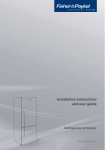
Installation instructions
and user guide
Ice & Water refrigerator
E402B, E442B, E522B, RF610A, RF540A, RF201A models
NZ AU GB AE HK SG IE
Contents
Introduction
Safety and warnings
Installation instructions
Before you start using your Ice & Water refrigerator
All about the display
Using your water dispenser
Using your ice maker
Using the display options
Bottle Chill
Fast Freeze
The temperature of your refrigerator and freezer
Settings
User warnings
Active Smart™ special features
Water filter
Active Smart™ maintenance
Cleaning and caring for your refrigerator
On vacation/holiday
Refrigerator sounds
Storing food in your refrigerator
Storing food in your freezer
Troubleshooting
Manufacturers warranty
Customer care
Filter performance data sheet
Important!
SAVE THESE INSTRUCTIONS
The models shown in this User Guide may not be available in all markets and are
subject to change at any time. For current details about model and specification
availability in your country, please visit our local website listed on the back cover
or contact your local Fisher & Paykel dealer.
1
2
3
5
15
16
18
19
21
21
22
22
23
24
25
27
29
30
33
34
35
36
38
42
43
45
2
Introduction
Thank you for buying a Fisher & Paykel Active Smart™ refrigerator with automatic ice dispensing
and chilled water through the door.
At Fisher & Paykel we are very proud of this refrigerator. We feel we have achieved water
dispensing through the door without compromising storage space or access in the refrigerator.
During our testing we have enjoyed the health benefits of having cool filtered water so
accessible, while minimising the number of door openings.
Thousands of hours of food care research and 70 years of refrigeration experience has been
programmed into your refrigerator to give you the best possible performance.
We hope you enjoy your new refrigerator.
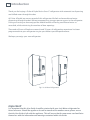
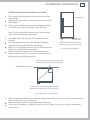
Fig.1 Ice & Water Refrigerators
Important!
It is important that this User Guide should be retained with your Ice & Water refrigerator for
future reference. Should the appliance be sold or transferred to another owner, please ensure
that the User Guide is left with the appliance. This will ensure that the new owner can familiarise
themselves with the information and warnings contained within the Guide.
Safety and warnings
3
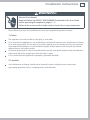
WARNING!
Electric Shock Hazard
Read and follow the SAFETY AND WARNINGS outlined in this User Guide
before operating this appliance.
Failure to do so can result in death, electric shock, fire or injury to persons.
Use this appliance only for its intended purpose as described in this User Guide.
Important safety precautions
Warning
When using this appliance always exercise basic safety precautions including the following:
Danger
This appliance is not intended for use by children or infirmed persons without supervision. This
is especially important when using the freezer drawer compartment. Young children should be
supervised to ensure they do not play with the appliance.
Risk of child entrapment. Before you throw away your old refrigerator or freezer:
– Take off the doors
– Leave the shelves in place so that children may not easily climb inside.
Disposal
Extreme care must be taken when disposing of your old appliance to avoid hazards. The
refrigerant gas must be safely removed and for the safety of young children, remove doors.
Your Fisher & Paykel Appliances Authorised Service Centre will be able to give advice on
environmentally friendly methods of disposing of your old refrigerator or freezer.
Electrical
This appliance must be properly installed in accordance with the installation instructions before
it is used.
Never unplug your refrigerator or freezer by pulling on the power cord.
Always grip the plug firmly and pull straight out from the outlet.
Do not plug in any other appliance at the same power point as your refrigerator or freezer or use
extension cords or double adapters.
Repair or replace immediately all electric service cords that have become frayed or otherwise
damaged. Do not use a cord that shows cracks or abrasion along its length or at either the plug
or appliance end.
If the power supply cord is damaged, it must only be replaced by your Fisher & Paykel Appliances
Authorised Service Centre because special purpose tools are required.
4
Safety and warnings
When moving your appliance away from the wall, be careful not to roll over or damage the
power cord.
Unplug your refrigerator or freezer before cleaning or replacing the lightbulb.
Storing food and drinks
Never store volatile or flammable materials in your refrigerator or freezer as they may explode.
Never freeze liquids in glass containers. Liquid expands during freezing, which may cause the
container to explode.
Never freeze carbonated drinks. They may explode.
Do not consume food if it is too cold. Food removed from the freezer compartment may be cold
enough to cause damage when brought into contact with bare skin, eg frozen ice cubes.
Power failure – food safety
Do not refreeze frozen foods that have thawed completely. Follow the recommendations below if
you discover food in your freezer has thawed:
1) Ice crystals still visible – food may be refrozen but should be stored for a shorter period than
recommended.
2) Thawed but refrigerator cold – refreezing generally not recommended. Fruits and some
cooked food can be refrozen but use as soon as possible. Meat, fish, poultry – use immediately or
cook then refreeze. Vegetables – discard as they usually go limp and soggy.
3) Thawed and warmer than 5°C. Discard all food.
Do not refreeze frozen foods that have thawed completely. The food may be dangerous to eat.
Cleaning
Many commercially available cleaning products contain solvents which may attack plastic
components of your refrigerator or freezer and cause them to crack. Please refer to the cleaning
care section of this booklet for further advice.
Installation instructions
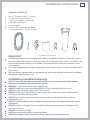
Contents of filter kit
1
2
3
4
5
6
7
4 m (13 ft) white 6 mm (¼”) tubing
1 x 200 mm (8”) blue tubing
1 x pressure reducing valve (PRV)
1 x double sided foam
2 x locking keys
1 x water filter cartridge and head
1 x tap connection – 15 mm (½”) BSP
1
Important!
2
3
4
5
6
7
Fig.2 Water connection kit
It is imperative the pressure reducing valve (PRV) is fitted prior to the filter. This valve ensures
the water will not flow back into the mains from the refrigerator water system. If the PRV is not
fitted to the connection line your Ice & Water refrigerator features may not function in some
circumstances.
It is recommended that an authorised plumber in your state or town is used to install the water
connection.
The new tubings supplied with the refrigerator are to be used, old tubings from old Ice & Water
connections should not be used.
Installation precautions/warning
DO NOT use with water that is microbiologically unsafe or of unknown quality without
adequate disinfection before or after the system.
WARNING – connect to potable water supply only.
DO NOT install on line pressure above 900 kPa (130 psi) or below 150 kPa (22 psi).
DO NOT use on hot water supply (38°C [100°F max.]).
DO NOT install near electrical wires or water pipes that will be in the path of drilling when
selecting the location of filter system.
DO NOT mount filter in such a position so that it will be struck by other items, such as
wastebaskets, etc.
DO NOT install the filter in direct sunlight as prolonged exposure to light can weaken plastic
components.
DO NOT install in a location that is susceptible to freezing temperatures as damage to the
housing could occur.
DO NOT screw filter to fridge.
AVOID contamination of pipes during installation.
DO NOT use copper tubing. The plastic tubing supplied should always be used.
5
6
Installation instructions
Installation instructions:
Ensure that refrigerator is not plugged into a power supply.
Locate isolation tap for water connection – cold water feed
only (dishwasher or sink mixer taps) – if you can’t find the
connection tap, contact an authorised plumber in your state
or town to fit your water connection. Tee and tap fitting not
supplied.
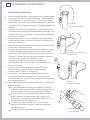
3 Connect the 200 mm (8”) blue tubing to the outlet of the
PRV (blue collet) and the inlet connection of the water filter
cartridge as shown in Diagram 1. Gently pull on both ends
to ensure it is locked.
4 Connect the white 6 mm (¼”) tubing to the outlet of the
water filter cartridge as shown in Diagram 2. Gently pull to
ensure it is locked.
5 Measure the required length of tubing to run from the PRV
to the water connection point.
6 Cut the tubing making sure the ends are square and clean.
7 Connect the tubing to the tap connection and the base
of the PRV (white collet) and then to the tap as shown in
Diagram 3. Please note that the tap connection supplied
should fit most installation situations. If your
tap requires a different fitting, please contact an
authorised plumber in your state or town to purchase
the correct fitting.
8 Connect one locking key to each side of the water
filter cartridge in between the cartridge and the
locking collet as shown in Diagram 4.
9 To flush the water filter and check for leaks, aim the
end of the tubing into a bucket, turn isolating tap on
and run at least 3 L (3 qt) of water through. Once complete,
turn isolating tap off.
10 Locate desired position for water filter noting carefully the
following points:
It is recommended to fit the water filter in a vertical
orientation with the water filter head at the top. This will
minimise water leakage when replacing cartridge.
Ensure the filter is in a convenient location to access
every 6 months for replacement. We suggest that
this location is beside the water filter supply tap in a
cupboard beside the refrigerator.
A minimum clearance of 64 mm (2 ½”) from the
bottom of the filter cartridge is required to perform
cartridge removal.
Do not screw the water filter to refrigerator.
1
2
Diagram 1
Fig.3 PRV connection
Diagram 2
Fig.4 Waterline connection
to refrigerator
Diagram 3
INL
ET
Fig.5 Tap connection
Diagram 4
Fig.6 Locking key
Installation instructions
7
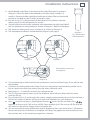
11 Attach double sided foam to the back of the water filter head as shown in
12
13
14
15
Diagram 5. Write the date to be replaced on the filter (date installed + 6
months). Remove double sided foam backing and attach filter to the desired
position as located in step 10 (refer to previous page).
Run the 6 mm (¼”) tubing to back of the fridge ensuring there is enough
tubing to pull out the refrigerator for service.
Connect tubing into the water (solenoid) valve located on the right hand side of
the unit (compressor) compartment as shown in Diagram 7. Beware of hot pipes.
Pull gently on tubing to ensure it is locked in as shown in Diagram 8.
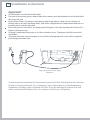
The completed installation should look like Diagram 9 on page 8.
Diagram 5
Fig.7 Double sided
foam attachment
Diagram 7
Diagram 8
Fig.8 Waterline connection
to refrigerator
Diagram 6
16 Turn isolating tap on and check that all connections are dry and free of drips. If not, please alert
the plumber.
17 Coil water line tubing behind the fridge. Push your refrigerator into place being careful not to
kink or squash the water line running into the water (solenoid) valve.
18 Read pages 9 – 14 carefully, and then turn refrigerator on.
19 The first time you require water out of the dispenser, there will be a delay while the water
reservoir fills up.
20 Run a further 3 litres (3 qt) through the system, stopping intermittently to ensure the reservoir is
flushed out. Failure to do this will result in excessive dripping from your dispenser.
until the Ice menu is highlighted then press to turn on the ice maker. Press
together to force a cycle. The ice tray will flip. Force another cycle. The ice tray will flip and spill
the water into the ice bin. Empty water and replace bin.
22 You are now ready to enjoy chilled water and ice dispensing from your Active Smart™ refrigerator.
Please note that once installation is complete a few drips may appear out of the dispenser over
the next few days as the remaining trapped air is cleared.
21 Press
8
Installation instructions
Important!
All connections must be checked for leaks.
If unsure of connection process and/or leaks then contact your local plumber to install and check
the system for you.
Ensure white 6 mm (¼”) tubing is routed away from sharp objects, sharp corners (beware of
kinking tube as this will stop water flow), clear of the refrigerator unit compartment and not in a
location where it can be squashed.
Ensure all push-fit connections are firmly pushed into place. The tube should push in 20 mm (¾”)
before reaching the stop.
If tubing is removed at any point, re-cut the end and re-insert. Tubing must be fully inserted to
avoid leaks.
To remove tube from connection points, turn off the isolating tap, push in the collet and gently
pull tubing at the same time.
Fig.9 Connection to water supply
Diagram 9
System tested and certified by NSF International against NSF/ANSI Standard 53 for the reduction
of Asbestos, Atrazine, Benzene, Cyst, Carbofuran, Lead, Lindane, Mercury, P-Dichlorobenzene,
Toxaphene & Turbidity; against Standard NSF/ANSI 42 for the reduction of Chlorine Taste and
Odour and Nominal Particulate Class I to a capacity of 2,838 Litres (750 gallons).
Installation instructions
9
WARNING!
Electric Shock Hazard
Read and follow the SAFETY AND WARNINGS outlined in this User Guide
before operating this appliance, pages 3 – 4.
Failure to do so can result in death, electric shock, fire or injury to persons.
Please follow the steps for installation to ensure your appliance operates correctly.
1. Power
The appliance must be installed so the plug is accessible.
To ensure that the appliance is not accidentally switched off, connect your refrigerator or freezer
to its own power point. Do not plug in any other appliance at this power point or use extension
cords and double adaptors, as the combined weight of both power cords can pull the double
adaptor from a wall outlet socket.
For power requirements, refer to the information on the serial plate located at the front bottom
right-hand side of the refrigerator when the door is open.
It is essential that the appliance be properly grounded (earthed).
2. Location
Your refrigerator or freezer should not be located in direct sunlight or next to any heat
generating appliance such as a cooktop, oven or dishwasher.
10
Installation instructions
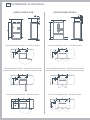
E402B, E442B, E522B
RF610A/RF540A/RF201A
Flush with refrigerator chassis – full door rotation
Flush with refrigerator chassis – full door rotation
Flush with refrigerator door – 90˚ door rotation (for full
drawer/shelf access, the doors need to be open past 90˚)
Flush with refrigerator door – 90˚ door rotation (for full
drawer/shelf access, the doors need to be open past 90˚)
Flush with refrigerator door – full door rotation
Flush with refrigerator door – full door rotation
Installation instructions
11
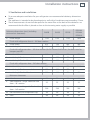
3. Ventilation and installation
To ensure adequate ventilation for your refrigerator see recommended cabinetry dimensions
below.
The appliance is intended to be placed against a wall with a free distance not exceeding 75 mm.
These measurements do not include space for the water filter at the back of the cabinet as we
recommend that the filter is placed as close to the incoming water supply as possible
Cabinetry dimensions (mm) (including
minimum air clearances)
E402B
E442B
E522B
RF610A
RF540A
RF201A
A
1745
1745
1745
1810
inside height
Flush with refrigerator chassis – full door rotation
B
inside width
675
720
830
940
C
inside depth
620
620
620
620
Flush with refrigerator door – 90° door rotation (for full drawer/shelf access, the doors need to
be open past 90˚)
D
inside width
E
inside depth flush to curved door
F
inside depth flush to flat door
680
725
835
950
–
675
675
–
690
690
690
690
Flush with refrigerator door – full door rotation
G
inside width
795
840
950
1180
H
inside depth flush to curved door
675
675
675
–
I
inside depth flush to flat door
690
690
690
690
J
side clearance
20
20
20
20
K
side clearance – hinge side flush with
door – 90° rotation
25
25
25
25
L
side clearance – hinge side flush with
door – full rotation
230
230
230
230
M
rear clearance (incl. evaporator tray)
30
30
30
30
N
vent
50
50
50
50
Minimum clearances
12
Installation instructions
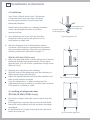
4. Installation
Your Fisher & Paykel Active Smart™ refrigerator
is fitted with front and rear rollers, designed
for moving the product in the forwards and
backwards direction.
Avoid moving the product in a sideways direction
as this may damage the rollers or the floor
covering/surface.
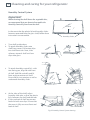
A
Your refrigerator will arrive with the front feet
wound up making moving the product into its
final location a simple task.
B
Roll the refrigerator into its final position making
sure there is the correct air gap between the product
and surrounding cabinetry. See minimum clearance in
cabinetry dimensions table (refer to page 11).
C
D
Lower the front
of the refrigerator
Raise the front of
the refrigerator
Fig.10 Refrigerator feet
(RF610A, RF540A, RF201A only)
Adjust the front feet down until the refrigerator is leaning
backward with the front approximately 10 mm higher
than the back. This will ensure a good door closing action.
(Refer to Fig.10).
Aligning your refrigerator with cabinetry.
Align the sides of the refrigerator with the cabinetry by
adjusting the hinge side front foot.
Adjust the handle side foot until it touches the floor and
takes a small amount of weight.
Once the refrigerator is in place and aligned with
cupboards/alcove push gently on the front top and check
if the product is rocking or stable.
Fig.11 Uneven door alignment
5. Levelling of refrigerator door
(RF610A, RF540A, RF201A only)
For uneven surfaces, front feet can be used to align the
2 doors.
If left hand door is too low, then unscrew the left hand
foot to lift up the cabinet until the two doors top edges
are aligned.
If right hand door is higher, then adjust the right hand
foot in the same way.
Fig.12 Even door alignment
Installation instructions
13
6. What to do if your product is unstable
E
Gently push the refrigerator back until the rear rollers
contact floor.
Measure the gap under the front foot, which has come
off the floor.
Obtain some solid packing material (hardwood, plastic
etc) which fits firmly into the gap under the foot.
Example only
Note: Do not use metallic materials that may corrode,
stain and/or damage floor coverings.
F
Wind both front feet up and roll the product out of
position.
Place the packing material in the location diagonally
opposite the front roller that lifts off the floor.
Make sure the packing material stays in place when the
product is pushed back into position.
Ideally, the packing material is large enough to rest
against the back wall so as to prevent it moving when
the cabinet is pushed into position.
Un-level floor
This foot lifts off the floor when
top front is gently pushed back
Fig 13.Unstable refrigerator
Packing material goes under rear roller
diagonally opposite front foot that lifts
Wall behind refrigerator
This foot lifts off the floor when pushing
gently on the top front of the refrigerator
Fig.14 Stabilizing your refrigerator
G
Roll the refrigerator back into position and adjust front feet as per step D. (Check alignment and
door closing action are satisfactory).
Make small adjustments to front feet where necessary.
Check that the product is stable (all 4 feet are on the floor). If not return to step E and repeat
steps F and G.
14
Installation instructions
Before placing food in the fresh food or freezer compartments
Remove all packaging. Ensure that all transit clips are removed from the refrigerator. These are
small rubber stops located at the back of the shelves.
Allow the refrigerator and freezer to run empty for 2 – 3 hours to allow each compartment to
cool to the appropriate temperature.
Clean the inside of the appliance with a mix of warm water and a little liquid detergent, and a
soft cloth to remove manufacturing and transportation dust.
The appliance may have an odour on its initial operation, but this will go when the refrigerator
and freezer have cooled sufficiently.
Energy efficiency
Do not cover your appliances with any material that will prevent air from flowing around the
cabinet sides.
Do not leave the door open for any longer than is necessary.
Allow good clearances in front of the air ducts within the cabinet for maximum cold air
distribution.
Moving or storing your refrigerator
If your refrigerator or freezer is turned off for any reason, wait 10 minutes before turning it back
on. This will allow the refrigeration system pressures to equalise before restarting.
Moving your refrigerator
Turn off the appliance and unplug from the power point. Remove all food.
Turn the adjustable feet to the right as far as they will turn (refer to page 12).
Ease the refrigerator out of its position. Tuck the power cord away and tape the doors closed.
Tape the shelves in place. If the cabinet needs to be placed at an angle or laid down, carefully
lay it on its side (the right hand side when viewed from the front).
Relocate and install. If the appliance has been left on its side for any length of time, leave it
standing upright for at least 10 minutes before turning on.
Storing your refrigerator or freezer
When storing your cleaned appliance, leave the doors open. This allows air to circulate and
prevents the build up of bacteria and moulds.
Before using again, clean well using a mixture of warm water and baking soda (add 1 teaspoon
of baking soda to each 500 ml of water). Rinse with clean water.
Holiday time
We recommend you leave your refrigerator or freezer operating while you are on holiday.
Before you start using your Ice & Water refrigerator
15
Check refrigerator is switched on and has cooled for at least 2 hours before use (refer to
page 22 – The temperature of your refrigerator and freezer).
Check that the water filter has been connected and turned on.
Turn on the ice maker (refer to page 19).
At first use allow approximately 1 minute from when the dispensing pad is pushed until water is
dispensed. This will allow the tank to fill.
Run through and discard the first 3 L (3 qt) of water from the dispenser, stopping intermittently
(refer to page 18 – First use). Failure to do this will result in excessive dripping from your
dispenser.
Discard the first bin of ice (refer to page 19 – First use).
You are now ready to enjoy ice and water from your Active Smart™ refrigerator.
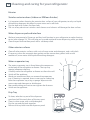
Fig.15 Water dispenser
Please note that once installation is complete a few drips may appear out of the dispenser over
the next few days as the remaining trapped air is cleared.
16
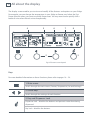
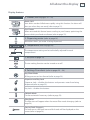
All about the display
The display screen enables you to view and modify all the features and options on your fridge.
For example, you can change the temperature in your fridge or freezer, and select the Fast
Freeze function when you want to quickly freeze meat. You may want to also quickly chill a
bottle of wine when friends arrive unexpectedly.
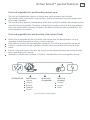
4
1
5
6
7
2
8
3
Fig.16 Electronic control panel
Keys
For more detailed information on these functions please refer to pages 18 – 24.
1. Main menu
Scrolls through the main menu. (Freezer, Temperature, Ice and Settings).
2. Arrow keys
Scrolls through the settings of each function.
3. Key and Dispenser Lock
Dispenser Lock – disables the buttons and prevents water from being
dispensed.
Key Lock – disables the buttons.
All about the display
17
Display features
4. Freezer (refer to pages 21 – 22)
Bottle Chill
Your drinks can be chilled more rapidly using this function. An alarm will
alert you when they are ready (refer to page 21).
Fast Freeze
When activated this feature boosts cooling in your freezer, optimising the
rate at which your foods are frozen (refer to page 22).
5. Dispensing water (refer to page 18)
Animation shows you water is being dispensed.
6. Temperature (refer to page 22)
The temperature setting can be individually adjusted for each
compartment.
7. Ice (refer to page 19)
The ice making function can be turned on or off.
8. Settings/User alerts (refer to pages 23 – 24)
Key Silent Mode
All key presses can be silenced (refer to page 23).
Dispenser and Key Lock
Dispenser Lock – disables the buttons and prevents water from being
dispensed (refer to page 23).
Key Lock – disables the buttons.
Sabbath Mode
Can be activated if necessary (refer to page 23).
Filter Reset
The filter icon will appear when the water filter needs changing (refer to
page 24).
Service/Fault Diagnosis
If a fault occurs, the fault icon and fault code will be displayed on the
screen (refer to page 24).
18
Using your water dispenser
Dispensing pad
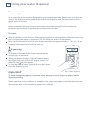
Your water dispenser has been designed for one handed operation. Simply push your glass up
against the dispenser pad located at the back of the dispenser area. This pad requires only a
gentle press to activate.
Please remember that pressing very hard against the dispensing pad will not make the
dispenser operate faster or produce greater quantities of water.
First use
After installation, on the first use, allow approximately a one minute delay while the dispensing
pad is pushed until water is dispensed. This will allow the tank to fill completely.
After you fill the tank for the first time, dispense and discard approximately 8 – 10 L (8 – 10 qt)
stopping intermittently to flush the tank out.
Dispensing
To dispense water push the dispensing pad gently,
using a glass or container.
When you dispense water, a light will appear above
the dispensing area, and on the display screen. The
water fill icon will also appear.
To stop the flow of water, simply pull your glass away
from the dispensing pad.
Important!
Fig.17 Water dispenser
To avoid damage to property or personal injury do not put hands, fingers or objects up the
dispenser opening.
Please note that once installation is complete a few drips may appear out of the dispenser over
the next few days as the remaining trapped air is cleared.
Using your ice maker
19
Ice maker
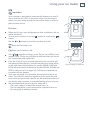
Your ice maker is designed to automatically dispense ice until it
senses that the bin is full. So the more ice you use, the more it
makes. It is even clever enough to sense when there is no bin in
place to catch the ice.
First use
When you first turn your refrigerator on after installation, the ice
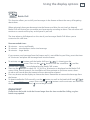
maker will be off.
button to scroll to the
To turn your ice maker on use the
screen.
Use the or button to turn the ice maker on or off.
Shows the ice maker is on.
Shows the ice maker is off.
together to force a cycle. The ice tray will flip. Force
Press
another cycle. The ice tray will flip and spill the water into the ice
bin. Empty water and replace bin.
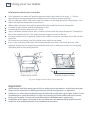
If the bin is full of ice, or inserted incorrectly, the ice maker will
not operate. When the bin is inserted correctly the scoop will be
on the right hand side of the bin for models E402B, E442B and
E522B and at the front of the bin for models RF610A, RF540A and
RF201A (refer to Fig.19 on page 20). If all bins are removed the
ice maker will not operate.
Once your ice maker is in operation, discard the first bin of ice
cubes. This will flush away any impurities in the water line and
ensure that you get the best quality ice. We recommend that you
also do this after vacations or extended periods of not using ice.
We recommend that you turn the ice maker off if:
– The water supply is to be off for several hours, or
– The ice storage bin is to be removed for a period of time, or
– You are going on holiday/vacation.
Fig.18 Turning ice maker on
20
Using your ice maker
Information about your ice maker
Your automatic ice maker will produce approximately eight cubes of ice every 2 – 3 hours,
depending on freezer compartment temperature and number of door openings.
The ice cube tray will fill with water once the freezer has reached the correct temperature. First
cubes will normally freeze after several hours.
When cubes are frozen, they will be ejected from the mould into the ice storage bin.
Ice making will continue until the storage bin is full.
Ice making will resume when the ice is used.
Your Ice & Water product comes with a smaller ice bin inside the larger freezer bin. Attached to
this is the scoop for the ice. This scoop provides hygienic access to the ice.
If a large amount of ice is required, remove the smaller storage bin and allow ice to fall into the
larger bin.
For maximum ice storage, level the stored cubes with the ice scoop.
If ice is not used often, old cubes will become cloudy, taste stale, will shrink and may stick
together. Empty the ice storage bin periodically and wash in lukewarm water. Dry thoroughly
and place back in the correct position.
E402B, E442B, E522B
RF610A, RF540A, RF201A
Fig.19 Ice storage bin and scoop in correct position
Important!
Avoid contact with the moving parts of the ice maker ejector mechanism, and do not place your
fingers on the automatic ice making mechanism while the refrigerator is in operation.
Do not use ice cubes that may have become discoloured, usually with a green-blue colour. If such
discolouration is noted, discard the ice cubes and contact your local authorised service centre.
Ensure the ice maker is connected to the filter and to a drinkable water supply only.
Installation of the water connection to the ice maker must be completed by a qualified service
technician or a qualified plumber (see installation instructions).
Using the display options
21
Bottle Chill
This function allows you to chill your beverages in the freezer without the worry of forgetting
about them.
When activated, place your beverage into the freezer and after the set time has elapsed,
Bottle Chill will remind you to remove your beverage by sounding an alarm. The user alarm will
continue to sound until any key on the panel is pressed.
The time taken to chill depends on the size of your beverage. Bottle Chill allows you to
customise this chill time.
Recommended times:
20 minutes – can or small bottle
25 minutes – wine bottle or similar size beverage
30 minutes – larger bottle
If you remove your beverage from the freezer and it is not chilled to your liking, reset the timer
to 10 minutes and place the beverage back into the freezer.
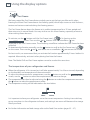
button until the bottle chill icon (
) is showing on the
screen. Then use the or buttons until the snowflakes ( ) and the
minute timer (
) are displayed on the Bottle Chill screen.
Then use the button to select 10, 15, 20, 25 or 30 minutes as displayed on the Bottle Chill
screen. After several seconds, the snowflakes will then animate as the timer counts down.
An alarm will sound after the amount of time selected has elapsed.
Press any button on the display to silence the alarm. Remember to remove the beverage from
the freezer.
button to scroll to the bottle chill icon (
)
To deactivate Bottle Chill manually, use the
on the
screen, then use the and buttons until no minutes are shown on
the screen and the snowflakes ( ) are no longer visible.
To activate, use
Important!
Do not leave the bottle inside the freezer longer than the time needed for chilling, as glass
bottles may explode.
22
Using the display options
Fast Freeze
We have created the Fast Freeze feature to help you to get the best possible results when
freezing fresh food. Fast Freeze boosts the freezing speed, which helps to ensure vital freshness,
texture and taste are retained during the freezing process.
The Fast Freeze feature drops the freezer to its coldest temperature for a 12 hour period and
then returns to its normal mode. You may wish to use this when freezing a quantity of meat or
when making frozen desserts.
button until the Fast Freeze icon (
) is showing on the
screen. Then use the or buttons until the snowflakes ( ) are
displayed on the Fast Freeze screen. The animating snowflakes indicate that Fast Freeze has been
activated.
button to scroll to the Fast Freeze icon (
)
To deactivate the function manually, use the
on the screen. Then use the and until there are no snowflakes ( ) present on the screen.
To activate, use the
For best results, we recommend that you activate the function approximately 2 hours before it is
required. Alternatively, activate it when placing food into the freezer.
Note: The Bottle Chill and Fast Freeze option cannot be used at the same time.
The temperature of your refrigerator and freezer
When the refrigerator is first turned on it will take approximately 2 to 3 hours to cool, depending
on the humidity and temperature of the environment.
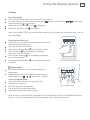
button to scroll to the
To adjust the temperature of a compartment, use the
screen, use the
button to select the compartment you want to change.
The temperature can then be adjusted using the button to make the compartment warmer or
the button to make the compartment colder.
The temperature setting will be indicated on the icon below.
It is important to have your refrigerator set to the correct temperature. Setting it too cold may
cause some items in the refrigerator to freeze, and setting it too warm will decrease the storage
life of your food.
For further information on food storage refer to the Food Care section (pages 35 – 37).
Using the display options
23
Settings
Key Silent Mode
The Key Silent Mode allows you to silence all key presses.
button to scroll to the
It can be activated or deactivated by using the
then pressing the or buttons.
will appear.
When the Key Silent Mode is on
will appear.
When this function is off
screen and
Note: Faults, Bottle Chill timer and the door alarm will still sound when the refrigerator is set on
Key Silent Mode.
Dispenser and Key Lock
The Dispenser Lock disables the buttons and prevents
water from being dispensed.
Key Lock disables the buttons.
Activate by holding down on the display panel.
After 2 seconds icon will appear indicating
Dispenser Lock is activated.
After 2 more seconds icon will appear indicating
Key Lock is activated.
To de-activate, hold down on the display panel for
2 seconds.
Fig.20 Dispenser and Key Lock
Sabbath Mode
In Sabbath Mode alarms, lights and displays are
deactivated.
Sabbath Mode can be activated or deactivated by
, , buttons for 4 seconds.
holding down the
Once in Sabbath Mode:
The interior light will not turn on when the
refrigerator is opened.
The door alarm will not operate.
The display will not be illuminated.
Electronic control panel will not work.
Fig.21 Sabbath Mode
Note: If power is turned off the refrigerator will automatically continue in Sabbath Mode once
power is restored. Sabbath Mode will automatically de-activate after 80 hours.
24
Using the display options
User warnings
Your refrigerator is clever enough to diagnose it’s own problems. It will alert you when there is
a fault.
Filter reset
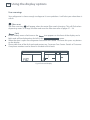
The filter reset icon
will appear when the water filter needs changing. This will flash when
dispensing water. To change the filter and reset the filter icon refer to pages 27 – 28.
Fault
icon appears on the front of the display and a
In the unlikely event a fault occurs the
fault code will be displayed on the left in the
screen.
When the door is open the refrigerator fault alarm will sound. To silence this press any button
on the display.
Please take note of the fault code and contact our Customer Care Centre. Details of Customer
Care phone numbers can be found in the back of this book.
Fig.22 Fault code display
Active Smart™ special features
25
Fruit and vegetable bins and humidity control cover
The fruit and vegetable bins feature a unique cover which provides two functions:
The humidity cover seals the bins and provides a humid microclimate to extend storage times
of fruit and vegetables.
The humidity cover prevents condensation, which forms at high humidities, from dripping down
onto the fruit and vegetables. The ability to retain high humidity in the fruit and vegetable bins
may mean small amounts of water will pool in the bottom of the fruit and vegetable bins. This
can be wiped out as required.
Fruit and vegetable bins and humidity slide (where fitted)
Each fruit and vegetable bin has a humidity slide control that can be adjusted to a fruit or
vegetable setting depending on what is stored in the bins.
If possible try to store fruit and vegetables separately. This will help extend their storage life.
If there is a mixture of fruit and vegetables in the bin adjust the position of the control to the
centre.
If there is too much water in the bins the control can be adjusted towards the setting showing
fewer water drops (fruit setting).
Remember a small amount of water in the bins is beneficial for fruit and vegetable storage.
SUITABLE FOR:
Salad Greens
Lettuce
Spinach
Broccoli
Cabbage
Carrots
Mixed fruit
& vegetables
Fig.23 Humidity Control graphic
Fruit with
skin/peel
Oranges
Lemons
Limes
26
Active Smart™ special features
Slim storage drawer (where fitted)
The bins at the bottom of the refrigerator provide
storage space for items that you may want to keep
separate from the rest of the refrigerator. These
slim storage bins can be used for deli item storage,
beverages or for defrosting foods.
Door alarms
Fig.24 Slim storage drawer
If the fresh food compartment door is left open the alarm will beep after 90 seconds and if the
freezer door is left open the alarm will beep after 60 seconds.
While either door remains open, subsequent beeps will sound every 30 seconds for 5 minutes.
A continuous alarm will sound if either door has been left open for 5 minutes or longer and the
light will also turn off. The alarm will stop when the opened door is closed.
Bottle rack (where fitted)
The bottle rack can be used to store a variety of bottles and can be positioned anywhere you
would a shelf. To re-position, lift the rear of the rack and pull forward. Bottles are best stored
with the neck of the beverage facing the front of the refrigerator.
Drip Tray
The drip tray is designed to fit into the bottom of the water dispenser panel.
To insert the tray always ensure that the rounded sides are fitted into the dispenser panel first.
The purpose of the tray is to capture any odd drips of water that may fall after dispensing.
The tray can be easily removed for cleaning (see page 30).
Glass Shelves
Glass shelves can be repositioned in the cabinet as desired.
Remove by lifting up at the back and pulling forward.
Water filter
27
All the water to your fridge is filtered to remove impurities through a cartridge located
in a position of your choice outside the refrigerator. Of course, this will need changing
approximately every 6 months or once 2800 L (740 gallons) of water has been dispensed,
depending on the quality of the incoming water and how much you use the dispenser.
on the control panel which will appear when the filter
There is a replacement indicator icon
needs replacing. It will flash, as a reminder, when water is dispensed.
Replacement cartridges are available from your authorised Fisher & Paykel Dealer. The details of
the replacement cartridge are on the label on the cartridge.
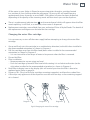
Changing the water filter cartridge
It is not necessary to turn off the water supply before attempting to change the water filter
cartridge.
1
2
3
4
5
6
7
Grasp and firmly twist the cartridge in an anticlockwise direction (to the left when installed in
the recommended orientation) as shown in Diagram 1.
Pull the cartridge away from the filter head (down when installed in the recommended
orientation) as shown in Diagram 2.
– It is not unusual for a few drops of water to be present when the filter is removed.
Discard old filter.
Filter installation:
– Remove protective cap on spigot on head.
– Push the cartridge up towards filter head while rotating it in a clockwise direction (to the
right when installed in the recommended orientation) as shown in Diagram 3.
Reset filter indicator icon on the display (this will remind you when the filter is due to be
replaced again). Refer to page 28.
Dispense 10 L (10 qt) to flush the cartridge, removing trapped air and harmless carbon fines.
A few drips may appear out of the dispenser over the next few days as the remaining trapped
air is cleared.
Diagram 1
Diagram 2
Diagram 3
Fig.25 Changing the water filter cartridge
28
Water filter
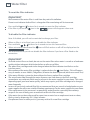
To reset the filter indicator
Important!
We recommend the water filter is used from the point of installation.
Do not reset indicator before filter is changed or filter monitoring will be inaccurate.
Press and hold and buttons for 4 seconds to reset the filter indicator.
icon in the
screen will disappear when reset.
If the filter is present the
To disable the filter indicator
Note: if disabled, you will not be reminded to change your filter.
When no filter is to be fitted, you can disable the filter indicator.
, , buttons for 4 seconds to turn this feature off/on.
Press and hold
icon will flash and on or off will be displayed on the
When activated or deactivated the
screen.
We recommend that you do not disable the filter indicator if you have a filter fitted to the
connection.
Important!
To avoid serious illness or death, do not use the water filter where water is unsafe or of unknown
quality without adequate disinfection before or after use of filter.
The water filter cartridge needs to be changed when the filter indicator icon flashes on the
interface panel.
icon flashes. This will happen
We recommend the water filter cartridge is replaced when the
every 6 months or once 2800 L (740 gallons) of water has been dispensed (whichever comes first).
If the water filtration system has been allowed to freeze, replace filter cartridge.
The rate of water flow through the water dispenser can slow down as the filter cartridge
accumulates any sediment which may be present in the water supplied to your home. This varies
depending upon your local water quality, which may require your filter cartridge to be changed
more frequently.
In cases of excessively reduced filter life we recommend that you consult a local plumber or your
water supplier for advice on suitable filtration requirements for the water supplied to your home.
Filter replacement is the consumer’s responsibility and will not be covered by the warranty
except in the case of faulty parts or materials within the filter cartridge.
If the water has not been dispensed for some time or water has an unpleasant taste or odour,
flush system by dispensing 10 L (10 qt) of water.
If unpleasant taste or odour persists, you may wish to fit a new filter cartridge.
Active Smart™ maintenance
29
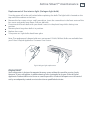
Replacement of the interior light (Halogen light bulb)
Turn the power off at the wall socket before replacing the bulb. The light bulb is located on the
top roof of the cabinet at the front.
Remove the lens cover using a small screwdriver. Insert the screwdriver in the front centre of the
lens cover and gently lever down. Pull out old bulb.
Do not touch the new bulb with your hand. Leave it in the plastic bag whilst slotting into
position.
Remove plastic bag when bulb is in position.
Replace lens cover.
Turn power on. Light bulb should now glow.
Note: The replacement halogen bulb must not exceed 12 Volt/10 Watt. Bulbs are available from
your Fisher & Paykel Appliances Customer Care Centre.
Fig.26 Halogen light replacement
Important!
Your refrigerator is designed to operate for many years without the need for service checks.
However, if your refrigerator is malfunctioning, have it attended to by your Fisher & Paykel
Appliances Authorised Service Centre as soon as possible. All electrical repairs must be carried
out by an adequately trained service technician or qualified electrician.
30
Cleaning and caring for your refrigerator
Exterior
Stainless exterior doors (Iridium or EZKleen finishes)
It is important when cleaning the exterior door surface of your refrigerator, to only use liquid
dishwashing detergent dissolved in warm water and a soft cloth.
Dry the door with a clean, lint free cloth.
The use of any abrasive or stainless steel cleaners and solvents will damage the door surface.
Water dispenser pad and interface
We have incorporated a Dispenser and Key Lock function in your refrigerator to make cleaning
easier (refer to page 23). This will help you to avoid accidental water dispensing while you clean.
Clean the pad and interface panel with a soft damp cloth.
Other exterior surfaces
Clean all other exterior surfaces with a mix of warm water and detergent, and a soft cloth.
If necessary, clean the magnetic door gasket and the centre door gaskets with an old
toothbrush, warm water and liquid dishwashing detergent.
Water evaporator tray
The water evaporator tray is found above the compressor
at the back of the refrigerator or freezer. The tray may
require infrequent cleaning.
Carefully move the refrigerator or freezer out from the wall.
Switch off the appliance.
We do not recommend that you remove the evaporator
tray. If cleaning is required, excess water can be soaked up
from the evaporator tray using a sponge. Wipe out with
warm water and detergent or disinfectant.
Reassemble taking care not to over-tighten the fasteners.
Switch on the appliance.
Drip Tray
To clean, take the tray out of the dispenser
panel and pull the two halves of the tray apart.
Clean in warm water with a mild detergent.
Dry the tray and clip back together.
Reinsert the tray back into the dispenser panel.
Cleaning and caring for your refrigerator
31
Interior
It is important to keep the interior of the refrigerator and freezer clean to help prevent food
from becoming contaminated during storage.
The amount and types of food stored determines how often cleaning should be carried out in
the refrigerator (ideally once every 1 to 2 weeks).
Remove the shelves from cabinet and door. Wash shelves and storage bins in warm water and
detergent; rinse in clean water and dry before replacing.
Wipe over the interior surfaces with warm water and detergent or baking soda dissolved in warm
water (add 1 teaspoon of baking soda to each 500 ml (½ qt) of water). Rinse with clean water.
To help remove “old stale refrigerator” smells add a few drops of vanilla essence or vinegar to
the water before cleaning.
Clean exterior surfaces with warm water and detergent. Use a toothbrush for the magnetic
door gasket.
Do not use harsh, abrasive cloths or cleaners or highly perfumed, strong smelling cleaners or
solvents on any part of the refrigerator or freezer.
Glass shelves
Clean with warm water and detergent or a glass cleaner. If cleaning the shelves without
removing from the cabinet, use only warm water and detergent as a glass cleaner can damage
the plastic components of your refrigerator.
Bottle rack
Clean with warm water and detergent. The use of abrasive cleaners and solvents may cause
damage.
Automatic ice dispenser
We do not recommend you clean the ice maker componentry, but it is important to clean the
bins occasionally.
The storage bin should be cleaned regularly and the old ice in the bottom of the bin discarded.
Wash bin in lukewarm water. Dry thoroughly and replace.
When replacing the bin ensure that the scoop is on the right hand side or at the front of the bin
(model dependent, refer to page 19).
Important!
Many commercially available cleaning products contain solvents that may attack the plastic
components of your refrigerator and cause them to crack. It is important to use only warm
water and a small amount of liquid dishwashing detergent on any plastic components inside
and outside your refrigerator. Avoid using anti-bacterial cleaning products on either the
interior or exterior of the cabinet as they may cause rusting of metal components and cracking
of plastic components.
32
Cleaning and caring for your refrigerator
Humidity Control System
Important!
When cleaning the shelf above the vegetable bins,
we recommend that you do not disassemble the
Humidity Control System from the shelf.
Retainer
In the event that the plastic lid and humidity slides
become separated from the glass shelf, follow these
instructions to reassemble.
1
2
Turn shelf upside down
To attach humidity slides onto
shelf front corners, fit bottom clips
into shelf front trim. Next, slide
sideways towards shelf until arm
clips onto glass.
3
To attach humidity control lid – with
text facing you, align lid with front
of shelf. Hold lid vertically and fit
front end into retainer on shelf.
Ensure lid fits into retainer as well as
underneath humidity slides.
4
At the sides of the shelf, adjust
humidity slide tabs so that the plastic
lid is between the shelf and the tabs.
If clips on back of shelf are present,
fasten lid with rear clips. Ensure that
the cover is fully secure at front and
back of shelf.
5
Humidity Slides
Fig.27 Humidity Control System cleaning
Cleaning and caring for your refrigerator
33
To remove trays or fixed bins
For ease of removal, empty food from tray/bin first.
Hold the centre front of the tray/bin handle.
Lift vertically to unclip from the runners and pull
tray/bin towards you to remove.
Push both runners back into refrigerator.
To replace trays or fixed bins:
Fig.28 Tray removal
With the runners pushed back into the refrigerator, place the tray/bin on top of the runners.
Push the tray/bin back slowly until you feel it clip back onto the runners.
Important!
Ensure that trays and bins are securely clipped onto the runners before use.
Bin and tray runners are pre-lubricated, and will not need to be re-lubricated during their life. Do
not attempt to clean grease from the runners, as this will affect their ability to function. Do not
immerse runners in water.
Permanently fixed bins and trays (model RF610A/RF540A/RF201A only)
The freezer bins and trays in this model are permanently fixed. They cannot be removed from
the freezer compartment. To clean simply wipe with a soft, damp cloth.
On vacation/holiday
Switch the ice maker to OFF on the interface panel (refer to page 19).
Shut off the water supply to the refrigerator.
On your return, turn on the water supply to the refrigerator.
Dispense 10 L (10 qt) of water and discard to ensure the tank is refilled with fresh water.
Turn on the ice maker (refer to page 19).
Throw away the first bin of ice cubes.
34
Refrigerator sounds
Normal refrigerator sounds
Active Smart™ refrigerators, with their excellent energy ratings and cooling performance, can
produce sounds somewhat different to your old refrigerator.
Normal operational sounds include:
Fan air flow sound. Active Smart™ refrigerators have fans which change speed depending on
demand. During cooling periods, such as after frequent door openings, fans circulate the cold
air in the refrigerator and freezer compartments producing some air flow sounds. This is quite
normal.
Cracking or popping which may sound like ice coming off the evaporator. This occurs when the
defrost function is operating.
Running water sound. This is the liquid refrigerant in the system and can be heard as a boiling
or gurgling noise.
An audible hissing sound after closing the freezer door. This is due to the pressure difference
between the warm air that has entered the cabinet and suddenly cooled, and the outside air
pressure.
Other strange sounds may be heard for the following reasons:
– Cabinet not level
– Floor uneven or weak
– Bottles or jars rattling on shelves
If this is your first refrigerator with an ice maker, you will hear occasional sounds that may be
unfamiliar. They are normal ice making sounds and are not cause for concern.
The following sounds are normal with the operation of an ice maker:
– Motor operation (low humming).
– Running water as the ice maker and/or water tank fills.
– Water valve opening and closing (hissing sound).
– Ice being loosened from the ice moulding tray (cracking).
– Ice dropping into bin (clunking).
Storing food in your refrigerator
Red meat
Place fresh red meat on a plate and loosely cover with waxed paper,
plastic wrap or foil.
Store cooked and raw meat on separate plates. This will prevent any
juices lost from the raw meat contaminating the cooked product.
Delicatessan meats should be used within the recommended storage time.
Poultry
Fresh whole birds should be rinsed inside and out with cold running
water. Dry and place on a plate. Cover loosely with plastic wrap or foil.
Poultry pieces should also be stored this way. Whole poultry should never
be stuffed until just before cooking, otherwise food poisoning may result.
Cool and refrigerate cooked poultry quickly. Remove stuffing from
poultry and store separately.
Fish and seafood
Whole fish and fillets should be used on the day of purchase. Until
required, refrigerate on a plate loosely covered with plastic wrap, waxed
paper or foil.
If storing overnight or longer, take particular care to select very fresh fish.
Whole fish should be rinsed in cold water to remove loose scales and
dirt and then patted dry with paper towels. Place whole fish or fillets in a
sealed plastic bag.
Keep shellfish chilled at all times. Use within 1 – 2 days.
Precooked foods and leftovers
These should be stored in suitable covered containers so that the food
will not dry out.
Keep for only 1 – 2 days.
Reheat leftovers only once and until steaming hot.
Fruit and vegetable bins
Although most fruit and vegetables keep best at low temperatures, take
care not to store the following at temperatures of less than 7°C for long
periods: citrus fruit, tropical fruit, tomatoes, cucumbers.
Undesirable changes will occur at low temperatures such as softening of
the flesh, browning, accelerated decaying and/or loss of flavour.
Do not refrigerate avocados (until they are ripe), bananas, mangoes
or pepinos.
If possible store fruit and vegetables separately, ie fruit in one bin and
vegetables in the other.
Each fruit and vegetable bin has a humidity control slide that can be
adjusted depending on what is stored in the bins. For more information
on using the Humidity Control refer to page 25.
35
36
Storing food in your freezer
The use of temperatures of -18˚C or colder to store food means that the food can be kept for
longer periods than when refrigeration temperatures are used. This is because the growth of
bacteria, moulds and yeasts are stopped, and chemical and physical reactions are severely
restricted at such low temperatures.
Frozen food care
For best results:
Choose only high quality foods that freeze well.
Store at -18˚C or colder. Take care to maintain this low storage
temperature, eg try to avoid opening the freezer door unnecessarily.
If your ice cream is soft you are running your freezer too warm.
Leave space at the top of containers, glass jars or plastic bags containing liquids or semi-solid
foods. These expand as they freeze. Usually 20 – 50 mm head space is recommended. Seal.
Ideally, remove all the air from the package after food is frozen.
Packages or containers of solid foods should have the air removed from them and be sealed
tightly before freezing.
Use the Fast Freeze function when freezing fresh food. This helps to speed up the freezing
process, giving optimum freezing results. It is recommended that the function is activated
approximately 2 hours before required. For more information refer to page 22.
Freeze immediately or as quickly as possible. Freeze only small quantities of food at any one
time. For best results we recommend that only 1 kg of food be frozen per 25 L of freezer storage
volume at any one time. (About 3 kg in small freezers and 4 kg in larger freezers). For faster
freezing in Active Smart™ models, we recommend that fresh food is placed at the top of the freezer
compartment close to the air vent.
Do not pile frozen food around the fan cover. It can prevent adequate air circulation.
Thaw foods preferably in a refrigerator, or using a microwave oven or multifunction oven.
Keep a constant turnover of food. Use older items of food first. Do not exceed recommended
storage times.
Use good quality freezer proof packaging to maintain food quality.
If food is only covered in plastic film place inside a freezer-proof plastic bag.
Recommended freezer storage times
M o n t h s
These times should not be exceeded.
1
Bacon, casseroles, milk
2
Bread, ice-cream, sausages, pies – (meat and fruit), prepared
shellfish, oily fish
3
Non oily fish, shellfish, pizza, scones and muffins
4
Ham, cakes, biscuits, beef and lamb chops, poultry pieces
6
Butter, vegetables (blanched), eggs whole and yolks, cooked
crayfish, minced meat (raw), pork (raw)
12
Fruit (dry or in syrup), egg whites, beef (raw), whole chicken,
lamb (raw), fruit cakes
Storing food in your freezer
Meat, poultry and game
Do not try to freeze more than 1 kg meat per 25 L of freezer storage volume
at any one time. Meat must be frozen quickly in order to maintain its texture.
Do not stuff poultry before freezing.
Red meat can be cooked from frozen, or from the partly or completely
thawed states. Remember to allow extra cooking time if cooking from frozen.
Always thaw poultry completely before cooking.
Fish
Fish is best frozen commercially. If however you do want to freeze fish
at home, make sure the fish is very fresh and of high quality.
Clean, scale and preferably leave whole. All fish should be wrapped in
two layers of packaging as depending on the type of fish, odours and
flavours can be readily transferred either to or from it. Seal well.
For best results, cook from either the frozen or partly thawed state.
Vegetables
Most vegetables freeze well, although ‘salad’ vegetables lose their crispness.
Other vegetables eg celery, onion and tomatoes should only be used in
cooked dishes as they soften on freezing.
Freeze only high quality, mature, ready-to-eat vegetables.
Sort and discard any vegetables that are damaged.
It is necessary to blanch most raw vegetables prior to freezing.
Blanching involves a short cooking period during which vegetable
enzymes are destroyed. If these enzymes are not destroyed they cause
undesirable physical and chemical changes during freezer storage.
Vegetables can be blanched in boiling water, steam or microwave oven.
If using boiling water, boil vegetables for 2 – 4 minutes and cool quickly.
In general, frozen vegetables are best cooked from their frozen state.
Prepared and cooked foods
Most cooked foods can be frozen but it is not recommended to freeze
the following:
Cooked egg white, custards, cream fillings and milk puddings, gelatine
or jelly-like dishes, mayonnaise and similar salad dressings, meringue
toppings. These tend to separate on thawing.
Fruit
Choose high quality, mature, and ready to eat fruit. Preferably select
varieties recommended for freezing.
Avoid unripe and over-ripe fruit.
The way fruit is packed depends on how it is to be used. Fruits packed
in syrup are ideal for desserts, whereas fruits packed without sugar are
better used for cooking. Most fruits can be stored for 8 – 12 months.
37
38
Troubleshooting
If there is a problem with your appliance, please check the following points before contacting
your local Fisher & Paykel Appliances Authorised Service Centre Dealer or the Customer Care Centre.
Problem
Possible causes
What to do
Appliance does
not operate.
No electricity at power outlet.
Check that the plug is correctly
connected and power switched on.
Check another appliance at the same
outlet.
Check house fuse.
Light not working. Blown light bulb(s).
Refrigerator not working.
Change light bulb(s) (refer to page 29).
Check refrigerator is turned on at wall.
If problem continues refer to page 42.
Light and display
not working.
Product in Sabbath Mode.
Refer to Sabbath Mode page 23.
Motor operates
for long periods.
Hot weather.
Minimise door openings to allow
temperature to stabilise.
Frequent door openings.
Large amount of food recently
added.
Temperature control set too low. See Temperature control section (page 22).
Doors not sealing properly.
Check that cabinet is level and gasket
seals are clean.
Storage
compartments
too warm.
Temperature setting not correct.
See Temperature control section (page 22).
Frequent door openings.
Minimise door openings to allow
temperature to stabilise.
Food freezing in
the refrigerator.
Temperature setting not correct.
See Temperature control section (page 22).
Food placed directly in front of
air outlets.
Move chill sensitive foods away from the
centre back of the shelves.
Large amount of food recently
added.
Unfamiliar noises. Cabinet not stable or level.
Freezer is defrosting.
Water in the
vegetable bins.
Condensation is formed by the
water produced by fruit and
vegetables.
See Installation section (pages 12 – 13) or
refer to Sounds (page 34).
A small amount of condensation is
beneficial for fruit and vegetable storage.
If there is too much water, store fruit and
vegetables loosely in plastic bags.
Wipe out water with a cloth.
Set humidity slide to
low humidity setting
Troubleshooting
Problem
Possible causes
Sides of cabinet
are warm.
This is normal.
Warm area on
central door seal.
This is normal.
Condensation
on outside of
refrigerator/
freezer.
Not unusual during periods of
high humidity.
Condensation
inside fresh food
compartment.
Frequent or long door openings. Minimise door openings.
39
What to do
Wipe dry.
Door gasket leaking.
Check that gasket is sitting flat and
sealing tightly.
Not unusual during periods of
high humidity.
Wipe dry.
Ice buildup
inside freezer
compartment.
Freezer door not closing tightly.
Move items in freezer so door can close
tightly.
Taste or odour in
ice cubes.
Transfer of odour/taste from
strong smelling foods.
Wrap or cover strong smelling foods.
Door handles out
of alignment.
With time and usage, movement See Installation instructions – Stability
may occur.
instructions (pages 12 – 13).
Tray/bin does not
slide in and out
evenly.
Packaging trapped.
Check to ensure no food or packaging is
trapped behind the tray/bin.
Runners not extending fully.
Holding onto sides of tray/bin, extend the
runners fully by using a firm pull – this
will reset the runner.
Check and clean door gasket seal.
40
Troubleshooting
Problem
Possible causes
What to do
Ice maker makes
unfamiliar sounds
or seems too loud.
Normal ice maker operation.
Refer to refrigerator sounds (refer to
page 34).
Automatic ice
maker does not
work.
Ice maker has not been switched
on.
Switch on ice maker (refer to page 19).
Bin is in the wrong way or there
is no bin in place.
Place bin so scoop is on the right side.
Water supply turned off or not
connected.
Connect water supply.
Freezer compartment not
working.
Contact Customer Care.
Water pressure too low.
Check water pressure.
Water line kinked/squashed.
Check water line for kinks/squashing.
Filter clogged.
Water filter may need replacing.
Unsealed packages may be
transmitting odour/taste.
Old cubes need to be discarded.
Ice cubes have
odour/taste.
Ice bin sits directly under ice maker on
top left side of freezer.
Ensure food packaging is sealed.
Interior of freezer needs cleaning. Ice storage bin needs to be emptied
and washed.
Clean refrigerator (refer to pages 31 – 33).
Poor taste from incoming water.
Filter may need changing.
A new filter may need to be installed.
Force 2 – 3 ice tray flips (refer to page 19).
Slow ice cube
freezing.
Door may have been left ajar.
Close door.
Freezer compartment too warm.
Turn temperature to a colder setting
(refer to page 22).
Warm spot on
central door seal.
You may feel a warm spot at times This is perfectly normal and is part of
on the central seal between the
the normal refrigerator operation.
two refrigerator doors.
Wet ice/ice
clumping.
Low water pressure.
Check water pressure.
Filter blocked.
Replace filter (refer to pages 27 – 28).
Long freezer door openings
Gently tap ice with scoop to unstick
or, if large clumps occur, empty ice bin
and make new ice.
High ambient temperature
Ice bin left out of freezer
compartment for a length
of time
Ice will stick together over time.
Troubleshooting
41
Problem
Possible causes
What to do
Water has poor
taste/odour.
Refrigerator not used for an
extended period.
Dispense 10 L (10 qt) water so fresh
water supply is replenished.
Water dispenser
does not work.
Water supply turned off or not
connected.
Turn water on.
Supply line may be blocked.
Check supply for kinks or leaks.
On first installation there may be
air in water system.
To remove air, run a litre or a quart of
water through the dispenser.
Filter may be blocked and need
replacing.
Replace filter (see back of this booklet
for Customer Care contact details).
Dispenser Lock activated.
Hold down the
Water frozen in tank.
Increase temperature to a warmer
setting in fresh food compartment and
freezer.
Water in first glass
is warm.
Water dispenser not used for
extended period.
Discard first glass of water dispensed.
Tank capacity used recently.
Allow water time to cool.
Filter warning light
is flashing.
Filter needs replacing.
Replace filter as soon as possible (refer
to pages 27 – 28).
Drips overflow
drip-shelf.
Air trapped in tank.
Flush 3 L (3 qt) water through
dispenser, stopping intermittently.
New filter installed.
Flush 3 L (3 qt) water through filter and
then 3 L (3 qt) through dispenser.
Filter cartridge is restricted.
Replace filter as soon as possible (see
pages 27 – 28).
Water flow rate has
slowed down.
Press dispenser for 1 minute to remove
trapped air from water line and to fill
the water system.
button for 2 seconds.
42
Manufacturers warranty
You will receive a 2 year Manufacturer’s Warranty with the purchase of this Product covering
parts and labour for servicing within the countries: New Zealand, Australia, Singapore, Ireland
and United Kingdom. All other countries are excluded.
Fisher & Paykel undertake to:
Repair or, at its option, replace without cost to the owner either for material or labour any part of
the Product, the serial number of which appears on the Product, which is found to be defective
within TWO YEARS of the date of purchase.
This warranty DOES NOT cover
A
Service calls to which are not related to any defect in the Product. The cost of a service call will
be charged if the problem is not found to be a Product fault. For example:
1. Correcting the installation of the product.
2. Instructing you how to use the product.
3. Replacing house fuses or correct house wiring or plumbing.
4. Correcting fault(s) caused by the user.
5. Noise or vibration that is considered normal, eg drain/fan sounds, refrigeration noises
or user warning beeps.
6. Correcting damage caused by pests, eg rats, cockroaches etc.
B
Defects caused by factors other than:
1. Normal domestic use or
2. Use in accordance with the Product’s User Guide.
C
Defects to the Product caused by accident, neglect, misuse or Act of God.
D
The cost of repairs carried out by non-authorised repairers or the cost of correcting such
unauthorised repairs.
E
Normal recommended maintenance as set out in the Product’s User Guide.
F
Repairs when the appliance has been dismantled, repaired or serviced by other than an
AUTHORISED CUSTOMER SERVICE CENTRE or the selling dealer.
G
Pick-up and delivery.
H
Transportation or travelling costs involved in the repair when the product is installed outside the
AUTHORISED CUSTOMER SERVICE CENTRE’S normal service area.
I
Filter replacement except in the case of faulty parts or materials within the filter cartridge.
This product has been designed for use in a normal domestic environment. It is not intended for
commercial use. Doing so may affect product warranty.
Service under this manufacturer’s warranty must be provided by an Authorised Service Agent
(refer to the Service Contacts section at the start of this book). Such service shall be provided
during normal business hours. This warranty certificate should be shown when making any claim.
Note
This Warranty is an extra benefit and does not affect your legal rights.
Please keep this User Guide in a safe place.
Customer care
Before you call for service or assistance ...
Check the things you can do yourself. Refer to the
installation instructions and your user guide and check that:
1
2
Your product is correctly installed.
You are familiar with its normal operation.
If after checking these points you still need assistance please refer to the following...
In New Zealand if you need assistance...*
Call your Fisher & Paykel retailer who is trained to provide information on your appliance, or if
we can be of any further help, please contact our Customer Care Centre,
Toll Free: 0800 FP CARE or 0800 37 2273
Fax: (09) 273 0656
Email: [email protected]
Postal Address: Fisher & Paykel Appliances Limited, PO Box 58732 Greenmount, Auckland
If you need service...*
Fisher & Paykel has a network of independent Fisher & Paykel AUTHORISED SERVICE CENTRES
whose fully trained technicians can carry out any service necessary on your appliance. Your
dealer or our Customer Care Centre can recommend an AUTHORISED SERVICE CENTRE in
your area.
In Australia if you need assistance...*
Please call our Fisher & Paykel Customer Care Centre.
Toll Free: 1300 650 590
Fax: (07) 3826 9298
Email: [email protected]
Postal Address: Fisher & Paykel Appliances Limited, PO Box 798, Cleveland, QLD4163
If you need service...*
Fisher & Paykel Australia Pty Ltd has a network of independent Fisher & Paykel AUTHORISED
CUSTOMER SERVICE CENTRES whose fully trained technicians can carry out any service
necessary on your appliance. Our Customer Care Centre can recommend an AUTHORISED
SERVICE CENTRE in your area.
In United Kingdom if you need assistance...*
Phone: (0845) 066 2200
Fax: (0845) 331 2360
Email: [email protected]
Postal Address: Fisher & Paykel Appliances Limited, Pheasant Oak Barn, Hob Lane,
Balsall Common, CV7 7GX
43
44
Customer care
In Ireland if you need assistance...*
Phone: 01800 625 174
Fax: 01800 635 012
Email: [email protected]
Postal Address: Fisher & Paykel Appliances Limited, Unit 3, North Park, North Road, Dublin 11
In Singapore if you need assistance...*
Phone: 6741 0777
Fax: 6547 0123
Email: [email protected]
Postal Address: Fisher & Paykel Appliances Limited, 150 Ubi Avenue 4, Ubi Biz-Hub #02-00,
Singapore 408825
For the rest of the world…*
Call your Fisher & Paykel retailer/dealer from whom you purchased the product. They are trained
to provide information on your appliance. If we can be of any further help, please contact us on:
Phone: +64 9 273 0660
Fax: +64 9 273 0580
Email: [email protected]
Postal Address: Fisher & Paykel Appliances Limited, PO Box 58550, Greenmount, Auckland,
New Zealand
Feel free to contact us at our website on
www.fisherpaykel.com
*If you call or write, please provide: name, address, model number, serial number, date of
purchase and a description of the problem. This information is needed in order to better respond
to your request for assistance.
Product details
Fisher & Paykel Appliances Ltd
Model/Serial No.
Date of Purchase
Purchaser
Dealer
Suburb
Town
Country
45
Copyright © Fisher & Paykel 2009. All rights reserved.
The product specifications in this booklet apply to
the specific products and models described at the
date of issue. Under our policy of continuous product
improvement, these specifications may change at any
time. You should therefore check with your Customer
Care Centre to ensure this booklet correctly describes
the product currently available.
www.fisherpaykel.co.nz
www.fp.com.au
www.fisherpaykel.co.uk
www.fisherpaykel.com.sg
www.fisherpaykel.ie
NZ AU GB AE HK SG IE
Ice & Water refrigerator
Installation instructions and user guide
Published: 01/2009
Part No. 819258