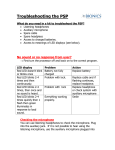
Transcript
Basic Troubleshooting for cochlear implants
Check batteries
Have they been put in properly?
Have they got usable charge?
Is there corrosion on the contacts?
Once the batteries have been changed, even if it does not rectify the
problem, leave the new batteries in the device as there may be two
problems.
Visual inspection
Check the leads and plugs to make sure they are properly
connected and there is no fraying or damage.
Check coil to ensure it is not cracked or broken.
Check processor for visual damage.
Check the settings
Make sure it is switched on.
Make sure it is set to the right program.
Make sure the volume or sensitivity controls are correctly
set.
Check the headpiece and cable
Check that this is working using a wand or Sensor System or by
checking the LED/LCD displays.
Replace the cable and then the headpiece if they are not one unit.
Check the microphone
Use listening headphones to listen to the signal or check the
LED/LCD displays
LED or LCD displays
If available, check the LED or LCD displays for more information.