1
BWL-0690 | Pixel
04/2013
100% - 1%
3200ºK
90-250VAC
Two Years
Lamp Care
95º-115º
www.limelite.uk.com
/limelitevideo
operating instructions
BWL0690-2-Pixel-User-Guide.indd 2-3
22/08/2013 08:26
legal notice
safety notes
All Bowens products are certified by
the CE mark. The CE certified mark
is a declaration of conformity to the
required EMC directives 2004/108/EC
‘Electromagnetic Compatibility’ and
2006/95/EC ‘Low Voltage Directive’.
warranty
02 - Pixel | legal notice & warranty
All Bowens products are covered by a two-year
warranty against any faulty design, materials and
workmanship.
If a product does not work on arrival, or up to a
maximum period of four weeks from the date of
dispatch of the product, it should be returned to the
dealer/retail outlet from where it was purchased for
exchange (subject to stock availability). If the faulty unit
was part of a kit, the dealer/retailer may choose to only
replace the unit and not the entire kit.
Alternatively the dealer may offer to repair the unit as
soon as possible at no charge.
If neither an exchange nor repair is possible for the
faulty unit, then a full refund may be made.
If a warranty fault occurs after the initial four week
period (and within the maximum two year warranty
period), then the unit should be returned to the dealer,
who will arrange to repair the unit as soon as possible,
at no charge.
This warranty does not apply to consumable items such
as flash tubes, modelling lamps, fuses or consumable
type batteries.
Should a unit be returned at any time within the two year
warranty period, and it is judged to have experienced
any of the following;
Failure to follow working instructions correctly,
accidental or wilful damage, misuse, alteration or repair
by a non-authorised Bowens service/repair centre,
then the warranty will be deemed invalid and any
repairs required will be payable by the owner.
always...
never...
• Avoid placing cables where they can be tripped
over. Protect from heavy, sharp or hot objects,
which may cause damage & replace damaged
cables immediately.
• All servicing must be carried out by a Bowens
authorised service centre.
• Always remove the power cord by gripping the
plug. NEVER pull the cord.
• Ensure that any extension cord used has a
suitable current rating to prevent overheating
and never use coiled extension cords.
• Use in an environment where moisture or
flammable vapour is likely to come into contact
with the unit.
• Restrict air vents while in use.
• Use a unit with damaged housing, mouldings or
lamps. If a unit is dropped or damaged in
anyway, always have it checked before using.
• Operate the unit without a safe grounded AC
supply.
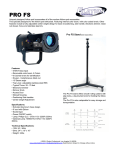
the pixel
Accessory Mount
Reflector Lug Sockets
Variable DImmer
On/Off Indicator*
Positional Thumb Lock
The dealer, in advance of undertaking any work that
may be required, should notify the cost of any repairs
to the owner.
No warranty repairs can be undertaken to any units
without proof of purchase.
All warranty repairs or returns must be conducted with
the dealer from where the product was purchased.
Other terms and conditions may be applicable in
specific countries, if stated at the time of purchase.
Reflector
Zoom Slider
On/Off Switch
03 - Pixel | safety notes and pixel overview
Limelite®, Bowens® and ‘the power behind the picture’® are
registered trademarks of Bowens International Ltd.
Due to our policy of continual product improvement, Bowens
International Ltd reserves the right to change equipment
specifications at any time and without notice.
The information contained in this user guide should not
be relied on solely before making a purchase, seek further
information from your retailer.
© 2013 Bowens International Ltd.
On/Off indicator also used to highlight when unit is in overheat; when unit has gone into overheat mode the On/Off indicator will turn red.
BWL0690-2-Pixel-User-Guide.indd 4-5
22/08/2013 08:26
start up
attaching barn-doors
replacing lamps
04 - Pixel | start up, replacing lamps and using zoom function
B
1. Turn the reflector in an anti-clockwise direction [A] to
align the three lugs on the reflector [B], with the lug
socketslocated on the body of the Pixel [C].
2. Once the lug sockets and the lugs are aligned simply
pull the reflector away from the body.
3. Remove lamp (make sure sufficient time has passed to
allow the lamp to cool down) and replace with an
approved replacement bulb.
C
To attach the 4-Leaf barn-door to
the Pixel, first, place the spring
inside the lip of the accessory
mount [1], ensuring the ‘side
catches’ on the barn-door
attachment also fit inside the lip
of the accessory mount [2]. Once
the spring and side catches
are in place, pull the barn-door
attachment downwards [3] in
order to make sure the catch on
the under side of the barn-doors
is clear of the accessory mount
[4], then simply place the catch
inside the lip of the accessory
mount [5] to secure.
For a smaller spot/flood move the ‘zoom slider’
towards the back of the unit; and for a larger
diameter spot/flood move the slider towards the
front of the unit.
BWL0690-2-Pixel-User-Guide.indd 6-7
1
5
4
attaching filters
A
using zoom function
To use the zoom feature simply move the
‘zoom slider’ back and forth until the desired
effect is reached.
2
1
There are two different filters available for the Pixel,
a frosted filter (VB1235), which is used to soften the
output, and a daylight filter (VB1230), which is used to
correct the colour temperature to 5600ºK.
3
In order to fit the filters to the Pixel, simply slide the
filter [1] between the accessory mount [2] and the
reflector [3].
2
05 - Pixel | attaching barn-doors and filters
3
1. Ensure the mains power is switched off.
2. Connect the Pixel to mains AC power.
3. Switch on the mains AC power supply, then switch on the Pixel.
22/08/2013 08:26
the specifications
Pixel Barn-Door Set
Pixel Filters
Four-leaf barn-door
set for controlling
the spread of light.
Attaches easily to the
front of the Pixel with
a spring mount.
Slot-in glass filter
discs to change the
characteristics of the
light output.
Lux @ 1m
Colour Temperature
Beam Angle
Part Code: VB1205
Daylight Filter: VB1230
Frosted Filter: VB1235
Multi-Voltage Dimmer
Pixel 3-Head Kit Bag
Spare or replacement
multi-voltage
in-line
dimmer for use with
Pixel or similar lights.
Padded case designed
to accomadate three
Pixel
heads
with
accessories & stands.
Part Code: VB1245
Part Code: VB1205
lamps
Power Variation
Operating Voltage
Width
300W Lamps
150W Lamps
VB1210 - 3400ºK 300W Lamp (230V)
VB1215 - 3200ºK 300W Lamp (230V)
VB1220 - 3400ºK 300W Lamp (120V)
VB1221 - 3200ºK 300W Lamp (120V)
VB1225 - 3400ºK 150W Lamp (230V)
VB1226 - 3200ºK 150W Lamp (230V)
VB1227 - 3400ºK 150W Lamp (120V)
VB1228 - 3200ºK 150W Lamp (120V)
BWL0690-2-Pixel-User-Guide.indd 8-9
3200Kº or 3400Kº
95º (Spot) or 115º (Flood)
100% - 1%
90-130V AC 50Hz / 190V AC 50HZ
160mm (inc bracket)
Height
100mm
Body Length
180mm
Weight
Pixel lamps are available in 300W and 150W in 120V and 230V versions.
5700 (Spot) - 2100 (Flood)
1.7Kg
Part Code (230V)
VB1200
Part Code (117V)
VB1201US
07 - Pixel | the specifications
06 - Pixel | the accessories
accessories
22/08/2013 08:27




![Di28.manual_eng [更新済み]](http://vs1.manualzilla.com/store/data/006248510_1-4715480d32b4655833aa4eb8b5d462bc-150x150.png)