Transcript
CPP100SPE_MANL_ENG.pdf
1
7/3/14
12:09 PM
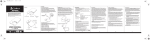
Solar USB Charger
Portable Power – Anytime Anywhere!
Operation:
Check Battery Capacity:
Recharging the Solar USB Charger:
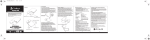
To check the remaining battery capacity of the CPP 100 SP E press the
power/capacity button on the front of the unit with no devices connected.
The top of the CPP 100 SP E has 4 LEDs to show the remaining battery
capacity:
The CPP 100 SP E can be recharged by connecting it to a USB port
or by putting it face up in the sun. When connecting to a USB port
connect the micro USB input from the CPP 100 SP E to the standard
USB port on a computer, a USB wall charger, or any 5V USB
charging port.
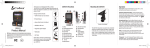
Product:
High Efficiency
Solar Panel
Thank you for purchasing the Cobra CPP 100 SP E Solar USB
Charger. Before using this product, please read these instructions
carefully to learn about the features and capabilities of the solar
charger and how you can get the best out of it.
Battery Status
LED
USB input
Note: Please charge your CPP 100 SP E Solar USB Charger
completely prior to using it for the first time.
Power switch
USB output
When recharging the CPP 100 SP E via USB the LEDs will show the
current battery life according to the chart on page 3 of this manual.
The last LED that is lit will blink to show that the CPP 100 SP E is
charging. When the CPP 100 SP E is fully charged the 4th LED will
stop blinking and all 4 LEDs will be on.
When charging with the solar panel the first LED will illuminate red to
indicate that it is charging via solar power. The charging speed is
fastest when placed in direct sunlight on a clear day. The LEDs will
not show the current battery capacity. To check the battery capacity
follow the steps on page 3 of this manual.
1 LED on: 10%-40% charge
2 LEDs on: 40%-65% charge
3 LEDs on: 65%-85% charge
4 LEDs on: 85%-100% charge
Note: When charging a device the number of lit LEDs may decrease
while you are charging a rapid charge device like a smartphone or
tablet. The battery capacity indicators cannot accurately measure
the capacity during rapid charging. To confirm the real battery capacity
disconnect the device being charged and press the power/capacity
button.
Charging a device:
To charge a device, connect the device to the CPP 100 SP E USB
output and press the power button on the CPP 100 SP E. The LEDs
will turn blue to show that the device is charging. You can use the
included micro USB cable to charge a device with a micro USB input
or you can use the cable that came with your device.
Accessories:
CUSTOMER SUPPORT & TRADEMARKS
Product Features:
Red
• 6,000mAh Li-polymer rechargeable battery
• Fully charge most smartphones three times.
Charge an iPad over 70%
• 5V/2.1A USB output for rapid charging of an iPhone, iPad, & other
fast charge devices
• High efficency solar panel for a rapid charge
WEEE
For European Community Users
Product Specification:
• Li-polymer rechargeable 3.7V/6,000mAh
battery:
• High efficiency
solar panel:
5.5V/250mA
• Micro USB input:
5V/1A
• Size:
5.0” x 3.1” x 0.6” (127mm x 80mm x 15mm)
• Weight:
6.6oz. (188g)
• Recharging time:
15 hrs by 5V/0.5A USB
8 hrs by 5V/1A USB charger (not included)
26-28 hrs by solar panel under full sunlight
• Power/Capacity button:
press to start charging or to check the
battery capacity
• Capacity display:
4 LED indicators show the battery capacity
• Do not puncture, throw, drop, bend, disassemble, or attempt to repair
your CPP 100 SP E.
• Keep your CPP 100 SP E dry and away from moisture and corrosive
materials.
• Do not wash your CPP 100 SP E with chemicals or soaps. Instead wipe the
top and bottom with a soft, water dampened cloth. Wipe the inputs and
outputs with gently with a soft dry cloth.
USB Connection Cable
• Fully recharge your CPP 100 SP E once every 3 months when not in use.
Charge the CPP 100 SP E fully prior to putting it away for extended storage.
USER MANUAL
Model: CPP
Cobra Electronics Corporation complies with Directive 2012/19/EU OF
THE EUROPEAN PARLIAMENT AND OF THE COUNCIL 4 JULY 2012 on
waste electrical and electronic equipment (WEEE).
Waste Electrical and Electronic Equipment Information
This product has required the extraction and use of natural resources for
its production. It may contain hazardous substances that could impact
health and the environment, if not properly disposed. In order to avoid
the dissemination of those substances in our environment and to
diminish the pressure on the natural resources, we encourage you to use
the appropriate take-back systems for product disposal. Those systems
will reuse or recycle most of the materials of the product you are disposing
in a sound way.
The crossed out wheeled bin symbol informs you that the product
should not be disposed of along with municipal waste and invites you
to use the appropriate separate take-back systems for product disposal.
If you need more information on the collection, reuse and recycling
systems, please contact your local or regional waste administration.
Warnings and Cautions:
Charging the battery
using the solar panel
Customer Support
Should there be any problems with this product or further information
needed on its features please visit www.cobra.com for support, frequently
asked questions, Declarations of Conformity, and the electronic manual.
For warranty and customer service information please contact the seller.
You may also contact your supplier for more information on the
environmental performances of this product.
Trademark Statement
©2014 Cobra Electronics Corporation, 6500 West Cortland Street,
Chicago, Illinois 60707 U.S.A.
Cobra, the snake design is a proprietary trademark of Cobra Electronics
Corporation, USA.
• Do not expose the unit to fire or excessive heat.
• Do not short-circuit the connectors with any metal objects.
• Do not transport or store the unit with metal objects that may
short-circuit the connectors.
100 SP E
• Avoid static electricity, strong magnetic fields and radiation.
Charging the battery via PC USB
port/wall charger (not included):
©2014 Cobra Electronics Corp. Part No. 480-980-P Printed in China
.1.
.2.
• Stop using the unit if it generates an unusual smell, is excessively hot,
is deformed, or demonstrating any other abnormalities.
.3.
• Never throw away electronic devices in the garbage.
Recycle according to local recycling and environmental regulations.
.4.
.5.