1
Installation and Operation
Unpacking
Carefully open the shipping carton and check for any noticeable damage. Every Powersoft amplifier
is completely tested and inspected before leaving the factory and should arrive in perfect condition. If
you find any damage, notify the shipping company immediately. Be sure to save the carton and all
packing materials for the carrier’s inspection.
Mounting
All DIGAM amplifiers will mount in a standard 19” rack. Four front panel mounting holes are provided.
Your DIGAM amplifier uses a forced-air cooling system to maintain a low, even operating
temperature. Drawn by an internal fan, air enters through the slots in the front panel and courses over
and through components. The DIGAM series amplifiers feature an “intelligent” variable-speed DC fan
which is controlled by heat sink temperature sensing circuits: the fan speed will increase only when
the temperature of either heat sink requires it, which keeps fan noise to a minimum and helps cut
dust accumulation inside. Under extreme thermal load, the fan will force a very large volume of air
through the heat sinks. If either heat sink gets too hot, its sensing circuit will reduce the output gain. If
the amplifier overheats, another sensing circuit shuts down its circuit to cut off power until it cools to a
safe temperature.
The exhaust cooling air is forced out through the rear of the chassis, so make sure there is enough
space around the sides of the amplifier to allow the air to escape. If it is rack mounted, make sure the
exhaust air can flow without resistance. If you are using a rack with closed backs, there must be at
least one standard rack space of opening in the front of the rack for every four amplifiers. Amplifiers
may be stacked directly on top of each other (no space needed between units), starting from the
bottom of the rack.
Operating Precautions
Make sure the AC main voltage is correct and is the same as that printed on the rear of the amplifier.
Damage caused by connecting the amplifier to improper AC voltage is not covered by the warranty.
Make sure the power switch is off before making any input or output connections.
It is always a good idea to have the gain controls turned down during power-up to prevent speaker
damage if there is a high signal level at the inputs.
Whether you buy them or make them, use good-quality input and speaker cables: faulty cables cause
most intermittent problems. Use good-quality connectors and wire, along with good soldering
technique, to ensure trouble free reliability.
Connecting Inputs
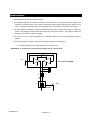
Input connections are made via the 3-pin XLR-type connectors on the rear side of the amplifier. The
inputs are actively balanced, with polarity as shown in figure.
(+)
Male and female XLR connectors are in parallel for each channel.
1
2
(-)
ground
Connecting Outputs
3
Output connectors are made via Neutric Speakon connectors. Consult the wire gauge chart to find a
suitable wire gauge to minimize power and damping factor losses in the speaker cables. Both outputs
are to be considered “hot” because the amplifier is always working on bridge mode. The 1+ and 2+
pins of speakon connector are paralleled and have to be considered the positive output; the 1- and 2pins of speakon connector are paralleled and have to be considered the negative output.
Never try to bridge the outputs on DIGAM series amplifiers.
POWERSOFT
ENGLISH -6