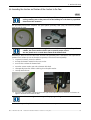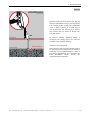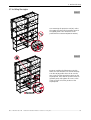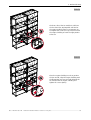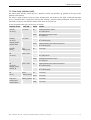
1
Installation manual
OVERVIEW CD 67-DL
R5976624
R5976624 Current Version
Title:
ID-no.:
Revision:
Date:
OVERVIEW CDG67-DL– Installation Manual
R5976624
04
May 2006
main issue
update
chapter 1
chapter 2
chapter 3
chapter 4
Proper grounding, cable fixation to profile
chapter 5
chapter 6
chapter 7
chapter 8
chapter 9
new:
corr.:
add.:
The corresponding chapters are new or completely revised.
Passages of the corresponding chapter were corrected; see modification bars.
Passages of the corresponding chapter were added; see modification bars.
Document History
Modifications, which result in a new version, are indicated by a vertical bar.
Barco – OverView cD 67-DL – R5976624– installation manual – Revision 04 – May-2006
____________________________________________________________________
iii
Trademarks
Brand and product names mentioned in this manual might be trademarks, registered trademarks or copyrights of
their respective holders. All brand and product names mentioned in this manual serve as comments or examples
and are not to be understood as advertising for the products or their manufacturers.
Copyright © 2004 by BARCO
Die Weitergabe sowie die Vervielfältigung aller Unterlagen, die von uns überlassen werden, deren Verwertung
und Mitteilung ihres Inhaltes an Dritte ist nicht gestattet, soweit dies nicht ausdrücklich zugestanden ist.
Urheberrechte, insbesondere auch solche an Software, werden nur insoweit übertragen, als es für die Erreichung
des speziellen Vertragszwecks erforderlich ist. Zuwiderhandlungen können zu Schadensersatz verpflichten. Alle
Rechte aus der Erteilung eines Patents oder der Eintragung eines Gebrauchsmusters verbleiben bei uns.
Copyright © 2004 by BARCO
All rights reserved. No part of this document may be copied, reproduced or translated. It shall not otherwise be
recorded, transmitted or stored in a retrieval system without the prior written consent of BARCO.
Guarantee and Compensation
BARCO provides a guarantee relating to perfect manufacturing as part of the legally stipulated terms of
guarantee. On receipt, the purchaser must immediately inspect all delivered goods for damage incurred during
transport, as well as for material and manufacturing faults. BARCO must be informed immediately in writing of
any complaints.
The period of guarantee begins on the date of transfer of risks, in the case of special systems and software on
the date of commissioning, at the latest 30 days after the transfer of risks. In the event of justified notice of
complaint, BARCO can repair the fault or provide a replacement at its own discretion within an appropriate
period. If this measure proves to be impossible or unsuccessful, the purchaser can demand a reduction in the
purchase price or cancellation of the contract (redhibition). All other claims, in particular those relating to
compensation for direct or indirect damage, and also damage attributed to the operation of software as well as
to other services provided by BARCO, being a component of the system or independent services, will be deemed
invalid provided the damage is not proven to be attributed to the absence of properties guaranteed in writing or
due to the intent or gross negligence on the part of BARCO.
If the purchaser or a third party carries out modifications or repairs on good delivered by BARCO, or if the goods
are handled incorrectly, in particular if the systems are commissioned or operated incorrectly or if, after the
transfer of risks, the goods are subject to influences not agreed upon in the contract, all guarantee claims of the
purchaser will be rendered invalid. Not included in the guarantee coverage are system failures which are
attributed to programs or special electronic circuitry provided by the purchaser, e. g. interfaces. Normal wear as
well as normal maintenance are not subject to the guarantee provided by BARCO either.
The environmental conditions as well as the servicing and maintenance regulations specified in this manual must
be complied with by the customer.
Barco – OverView cD 67-DL – R5976624– installation manual – Revision 04 – May-2006
____________________________________________________________________
iv
Revision sheet
To:
•
BARCO Control Rooms GmbH
An der Rossweid 5, D-76229 Karlsruhe
Phone: +49-721-6201-0, Fax: +49-721-6201-298
E-mail: [email protected], Web: www.barcocontrolrooms.com
From:
Date:
Please correct the following points in this documentation (R5976624):
page
wrong
correct
Barco – OverView cD 67-DL – R5976624– installation manual – Revision 04 – May-2006
_____________________________________________________________________
v
Contents
1 Introduction........................................................................................................................................ 1-1
1.1 Styles and Symbols .....................................................................................................................................1-2
1.2 Safety Instruction.........................................................................................................................................1-3
1.2.1 Standards ............................................................................................................................................1-3
1.2.2 General safety instructions.................................................................................................................1-3
1.2.3 Installation ..........................................................................................................................................1-3
1.2.4 Placement ...........................................................................................................................................1-4
1.2.5 Operation ............................................................................................................................................1-4
1.2.6 Servicing..............................................................................................................................................1-5
1.2.7 Unpacking of devices..........................................................................................................................1-5
1.2.8 Modification of devices ......................................................................................................................1-5
1.2.9 Cleaning instructions screens and mirrors.........................................................................................1-6
2 Pre-Installation requirements ........................................................................................................... 2-1
2.1 Power and grounding..................................................................................................................................2-1
2.2 Environmental conditions ...........................................................................................................................2-1
2.2.1 General conditions..............................................................................................................................2-1
2.3 Floor requirements ......................................................................................................................................2-2
2.4 Luminance ...................................................................................................................................................2-2
2.5 Access...........................................................................................................................................................2-3
2.6 Installation and room requirements...........................................................................................................2-3
2.7 Footprint.......................................................................................................................................................2-3
2.8 Overall dimensions......................................................................................................................................2-4
2.9 Maintenance area........................................................................................................................................2-5
2.10 Built-in configuration ................................................................................................................................2-6
3 Mechanical setup ............................................................................................................................... 3-1
3.1 Tools needed for installation ......................................................................................................................3-1
3.2 Preassemblies..............................................................................................................................................3-2
3.3 Assembling the structure ............................................................................................................................3-5
3.4 Stitching the screens ...................................................................................................................................3-8
3.5 Installing the mirrors ................................................................................................................................ 3-11
3.6 Grounding the structure and fixation of the structure to the floor ........................................................ 3-15
3.7 Installing the engine ................................................................................................................................ 3-18
3.8 Cabling of the engine............................................................................................................................... 3-21
Barco – OverView cD 67-DL – R5976624– installation manual – Revision 04 – May-2006
____________________________________________________________________
vi
4 Taking into operation ...................................................................................................................... 4-22
4.1 Running the fans ...................................................................................................................................... 4-22
4.2 Inserting the Lamp Modules .................................................................................................................... 4-22
4.3 Selecting the correct lamp driver ............................................................................................................ 4-24
5 Geometric adjustment ....................................................................................................................... 5-1
5.1 Adjustment Overview .................................................................................................................................5-1
5.2 The projection lens for SXGA+ systems ......................................................................................................5-3
5.3 The projection lens for XGA systems ..........................................................................................................5-4
5.4 Strictly prohibited devices...........................................................................................................................5-5
5.5 Adjustment devices.....................................................................................................................................5-6
5.6 First steps.....................................................................................................................................................5-7
5.7 Focus adjustment ........................................................................................................................................5-7
5.8 Picture size...................................................................................................................................................5-8
5.9 Vertical Trapezoid ........................................................................................................................................5-9
5.10 Horizontal trapezoid ............................................................................................................................... 5-10
5.11 Rotation .................................................................................................................................................. 5-11
5.12 Horizontal picture shift........................................................................................................................... 5-12
5.13 Vertical picture shift ............................................................................................................................... 5-13
5.14 Locking the Projection Unit .................................................................................................................... 5-13
5.15 Installing the shielding..............................................................................................................................5-1
5.16 Installing the standard and design trim ...................................................................................................5-3
6 Final Adjustment and Configuration ................................................................................................. 6-1
6.1 Data cables ..................................................................................................................................................6-1
6.2 The IR Remote-Control Unit ........................................................................................................................6-1
6.2.1 Terminology of RCU controls ..............................................................................................................6-2
6.3 General.........................................................................................................................................................6-3
6.4 Menu Layout ................................................................................................................................................6-3
6.4.1 Navigating...........................................................................................................................................6-3
6.5 Activating the Menu Bar .............................................................................................................................6-3
6.5.1 Reset Runtime ....................................................................................................................................6-3
6.5.2 Lamp Optimization .............................................................................................................................6-4
6.6 Access to the service menu ........................................................................................................................6-6
6.6.1 Projector Address................................................................................................................................6-7
6.6.2 RS232 baudrate ..................................................................................................................................6-9
6.6.3 Internal patterns .............................................................................................................................. 6-10
6.6.4 Color/Brightness.............................................................................................................................. 6-12
Barco – OverView cD 67-DL – R5976624– installation manual – Revision 04 – May-2006
____________________________________________________________________
vii
6.6.5 Orientation ....................................................................................................................................... 6-26
6.6.6 Maintenance .................................................................................................................................... 6-27
6.6.7 No Source Counter ........................................................................................................................... 6-32
6.6.8 I2C Diagnostics ................................................................................................................................. 6-33
6.6.9 Dimmer Sensor Power..................................................................................................................... 6-34
6.6.10 Save................................................................................................................................................ 6-35
6.6.11 Freeze............................................................................................................................................. 6-36
6.6.12 Disable IR ....................................................................................................................................... 6-37
6.6.13 Lamps ............................................................................................................................................. 6-38
6.6.14 Version ........................................................................................................................................... 6-42
6.6.15 More ............................................................................................................................................... 6-43
7 Manual User Interface........................................................................................................................ 7-1
7.1 Power Switch...............................................................................................................................................7-1
7.2 Standby Switch ............................................................................................................................................7-2
7.3 Active Lamp Selection Switch .....................................................................................................................7-3
7.4 Indication of Power LED ..............................................................................................................................7-4
7.5 Indication of Lamp Door LED .......................................................................................................................7-4
7.6 Indication of the Status LEDs.......................................................................................................................7-5
8 Hot Line .............................................................................................................................................. 8-1
8.1 Address ........................................................................................................................................................8-1
Barco – OverView cD 67-DL – R5976624– installation manual – Revision 04 – May-2006
___________________________________________________________________
viii
1. Introduction
1 Introduction
This chapter explains the used typographic styles and symbols. Safety information is provided concerning the
operation of control room solutions from BARCO.
Barco – OverView cD 67-DL – R5976624– installation manual – Revision 04 – May-2006
___________________________________________________________________
1-1
1. Introduction
1.1 Styles and Symbols
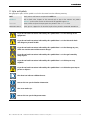
The typographic styles and the symbols used in this document have the following meaning:
Bold
Labels, menus and buttons are printed in Bold font.
Condensed
Links to both other chapters of this manual and to sites in the Internet are printed
condensed. In the on-line version of this manual all hyperlinks appear teal.
Courier
Names of files and parts from programs are printed in the Courier font.
Courier bold
Inputs you are supposed to do from the keyboard are printed in Courier bold font.
If you do not heed instructions indicated by this symbol there is a risk of damage to the
equipment!
If you do not heed instructions indicated by this symbol there is a risk of electrical shock
and danger to personal health!
If you do not heed instructions indicated by this symbol there is a risk of damage to parts,
which are sensitive towared electrostatic charge!
If you do not heed instructions indicated by this symbol there is a risk to get harmed by
sharp objects!
If you do not heed instructions indicated by this symbol there is a risk that parts may
explode!
If you do not heed instructions indicated by this symbol there is a risk that hot parts impact
persons or objects!
The sheet icon indicates additional notes.
Next to this icon you find further information.
This arrow marks tips.
Next to this icon you find important notes.
Barco – OverView cD 67-DL – R5976624– installation manual – Revision 04 – May-2006
___________________________________________________________________
1-2
1. Introduction
1.2 Safety Instruction
This section describes safety precautions, which must be observed when installing and operating a product from
BARCO.
1.2.1 Standards
Safety Regulations
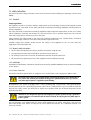
The equipment is built in accordance with the requirements of the international safety standard IEC950, UL1950
and CSA C22.2 No. 950, which are the safety standards of information technology equipment including electrical
business equipment.
The safety standards of information technology equipment impose important requirements on the use of safety
critical components, materials and isolation, in order to protect the user or operator against the risk of electric
shock and energy hazard, and having access to live parts.
Safety standards also impose limits to the internal and external temperature rises, radiation levels, mechanical
stability and strength, enclosure construction and protection against risk of fire.
Simulated single fault condition testing ensures the safety of the equipment to the use even when the
equipment’s normal operation fails.
1.2.2 General safety instructions
•
All the safety and operating instructions should be read before using this unit.
•
The operating instruction manual should be retained for future reference.
•
All warnings on the device and in the documentation manuals should be adhered to.
•
All instructions for operating and use of this equipment must be followed precisely.
1.2.3 Installation
Installation and preliminary adjustments should be performed by qualified BARCO personnel or authorized BARCO
service dealers.
1.2.3.1 Power Connection
This product should be operated from an AC power source. Power input is auto ranging from 100V to 240V.
Check the power rating on your outlet before connecting the devices to the wall outlet or
to a power strip. Contact your facilities manager or a qualified electrician if you are not
sure what type of power is supplied to your building.
All equipment in the system is equipped with a 3-wire grounding plug, a plug having a third (grounding) pin.
This plug will only fit into a grounding-type power outlet. This is a safety feature. If you are unable to insert the
plug into the outlet, contact your electrician to replace your obsolete outlet. Do not defeat the purpose of the
grounding-type plug.
The devices are designed to operate with single-phase power systems having a grounded
neutral conductor. To reduce the risk of electrical shock, do not plug into any other type of
power system.
Use only the power cord supplied with your device. While appearing to be similar, other power cords have not
been safety tested at the factory and may not be used to power the projector. For a replacement power cord,
contact your dealer.
Barco – OverView cD 67-DL – R5976624– installation manual – Revision 04 – May-2006
___________________________________________________________________
1-3
1. Introduction
If an extension cord is used with this product, make sure that the total of the ampere ratings on the products
plugged into the extension cord does not exceed the extension cord ampere rating.
Also make sure that the total of all products plugged into the wall outlet does not exceed 15 amperes.
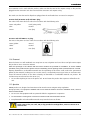
A. Mains lead (AC Power cord) with CEE 7 plug:
The colors of the mains lead are colored in accordance with the following code:
Green-and-yellow:
Earth (safety earth)
Blue:
Neutral
Brown:
Line (live)
B. Power cord with ANSI 73.11 plug:
The wires of the power cord are colored in accordance with the following code:
Green/yellow:
Ground
White:
Neutral
Black:
Line (live)
1.2.4 Placement
Place the device in a well-ventilated area away from sources of ignition and out of direct sun light. Never expose
this product to rain or excessive moisture
Slots and openings in the cabinet and the back or bottom are provided for ventilation; to ensure reliable
operation of the product and to protect it from overheating, these openings must not be blocked or covered.
Exposing flammable or combustible materials into close proximity of this device could result in the spontaneous
ignition of that material, resulting in a fire. For this reason, it is absolutely necessary to leave an "exclusion zone"
around all external surfaces of the device whereby no flammable or combustible materials are present. The
exclusion zone must be not less than 10 cm (4").
•
Do not allow anything to rest on the power cord. Do not locate this product where persons will walk on the
cord.
1.2.5 Operation
BARCO products are designed and manufactured to meet the most stringent safety regulations.
During operation, the equipment radiates heat on its external surfaces and from ventilation ducts, which is
both normal and safe.
•
Do not cover the equipment with any material while the equipment is in operation.
•
Do not block the cooling fans or free air movement under and around the device.
•
Keep flammable and combustible materials away from the device at all time.
In the event of fire, use sand, CO2, or dry powder fire extinguishers; never use water on an
electrical fire.
Barco – OverView cD 67-DL – R5976624– installation manual – Revision 04 – May-2006
___________________________________________________________________
1-4
1. Introduction
Do not allow anything to rest on the power cord. Do not locate this product where people will walk on the cord.
To disconnect the cord, pull it out by the plug. Never pull the cord itself.
•
Never push objects of any kind into this product through cabinet slots as they may touch dangerous voltage
points or short cut parts that could result in a risk of fire or electrical shock.
•
Never spill liquid of any kind on the product. Should any liquid or solid object fall into the cabinet, unplug the
set and have it checked by qualified service personnel before resuming operations.
Adjust only those controls that are covered by the operating instructions since improper adjustment of the other
controls may result in damage and will often require extensive work by a qualified technician to restore the
product to normal operation
Lightning - For extra protection for this video product during a lightning storm or when it is left unattended and
unused for a long period of time, unplug it from the wall outlet. This will prevent damage to the unit due to
lightning and AC power-line surges.
1.2.6 Servicing
Never open the case of a device without first disconnecting the power supply cord!
Measurements and tests with an opened device may be carried out only in the factory or
by specially trained personnel, due to the dangers of electrical shock.
Do not attempt to service this device yourself, as opening or removing covers may expose you to dangerous
voltage potential and risk of electric shock! Refer all service to a qualified BARCO service center.
Always have service performed on this product by authorized BARCO service personnel. Always insist on genuine
BARCO replacement parts. Never use non-BARCO replacement parts as they may degrade the safety of this
device.
Call for service in the following conditions:
•
When the power cord or plug is damaged or frayed.
•
If liquid has been spilled into the device.
•
If the product has been exposed to rain or water.
•
If the product does not operate normally when the operating instructions are followed.
•
If the product has been dropped or the cabinet has been damaged;
•
If the product exhibits a distinct change in performance, indicating a need for service.
When replacement parts are required, be sure the service technician has used original BARCO replacement parts
or authorized replacement parts, which have the same characteristics as the BARCO original part. Unauthorized
substitutions may result in degraded performance and reliability, fire, electric shock or other hazards.
Unauthorized substitutions may void warranty.
Upon completion of any service or repairs to this unit, ask the service technician to perform safety checks to
determine that the unit is in proper operating condition.
1.2.7 Unpacking of devices
Note advises on the packaging for unpacking!
1.2.8 Modification of devices
Mechanical or electrical modifications must not be made to the devices. BARCO is not liable for damages
resulting from modified devices.
Barco – OverView cD 67-DL – R5976624– installation manual – Revision 04 – May-2006
___________________________________________________________________
1-5
1. Introduction
Introduction
1.2.9 Cleaning instructions screens and mirrors
Wash with a solution of mild soap or detergent and lukewarm water. Use a clean lint-free soft cloth applying
only light pressure. Rinse with clean water and dry by blotting with a damp lint-free cloth or chamois.
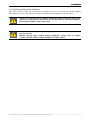
Always use a clean,new, lint-free cloth for cleaning the screens’s front side. Do not clean
with the same cloth used for the beaded side. The used cloth ma contain bead particles,
which could scratch the screen’s front surface
Do not use the following cleaning cleaning agents, since these can scratch or detoriate
the screen surface:
Window cleaning sprays, kitchen scouring compounds, sovlents such as acetone,
gasoline, benzene, alcohol, carbon tetrachloride or lacquer thinner.
Barco – OverView cD 67-DL – R5976624– installation manual – Revision 04 – May-2006
___________________________________________________________________
1-6
2. Pre-Installation requirements
2 Pre-Installation requirements
2.1 Power and grounding
Attention has to be paid to the electrical installation. Earth current loops in the installation must be avoided. The
neutral power conductor of the electrical net and the grounding conductor must be separated.
All circuits have to use the same ground level (also indirectly connected equipment). If possible all circuits should
come from the same phase.
Each projector has specific power requirements. (see technical specification projectors) Enough circuits have to be
available. These circuits have to be fused (16A typical for 220V). The number of projectors starting up
concurrently must be limited. One could for instance install an automatic circuit that starts up all the projectors in
batches per circuit, leaving 3 second between the different batches. (Not standard delivered)
The projectors should be kept away from strong sources of magnetic fields.
Fused circuits for the graphic generator equipment have to be installed. The number depends on the amount of
installed equipment.
Some of the graphic generator equipment functions as a Unix workstation. It must not be powered off without
carefully closing all the applications. If these units are switched off during normal operation without this
precaution, there is a risk that the file system gets corrupted and it becomes unusable. Therefore it is strongly
suggested to provide a non-interruptible Power Supply (UPS) to power these units.
Additional grounding points must be foreseen for the display wall construction, racks and other mechanics.
Power outlets for installation purposes are required as well.
All connections, power, network should be available and functional before start of the installation.
2.2 Environmental conditions
2.2.1 General conditions
The temperature and the humidity in the control room have to be controlled on the both sides of the wall.
The screens require a temperature between 17 and 27 dgc and humidity between 40 – 60 % RH. The maximum
temperature fluctuations have to be limited up to 5dgc per hr.
The projector units operate between 10 and 40 dgc. The thermal dissipation of the projector units has to be
taken in consideration. The projector units have built-in temperature detection and will switch off automatically
when the temperature limits are exceeded.
The graphical generator equipment operates between 10 and 40 dgc. In case these products are mounted in a
rack the max room ambient temperature has to be limited to max 25 dgc or additional forced cooling has to be
foreseen in the rack.
The materials and products can be stored between -30 and 65 dgc and humidity below 95 % RH, noncondensing. Screens have to be stored below 40dgc.
24hrs prior to installation the screens have to acclimatize to the control room conditions. They can stay in their
protective packaging during this acclimatize period.
The temperature and humidity conditions in the control room must be within specification during installation and
maintained afterwards.
The room has to be dust-free during the installation and maintained afterwards. The control room must have an
acceptable dust class of 100000 or better. (100000 particles of 0.5µm or larger per cubic feet, comparable with
clean desk room).
All construction, reconstruction, decoration activities must be completed before the installation of the system.
However the trim around an integrated wall can only be mounted after completion of the wall. All precaution
should be taken to avoid any damage during the mounting of the final trim. The purchaser bears the
responsibility for any damage or degeneration during this operation.
Barco – OverView cD 67-DL – R5976624– installation manual – Revision 04 – May-2006
___________________________________________________________________
2-1
2. Pre-Installation requirements
The air pressure within the control room has to be the same on the both sides of the wall
Important remark: the total height of a wall is limited and specified per product. The height (Y-directions)
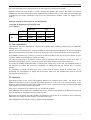
mentioned in the tables below are based on environmental conditions only. In some cases, the max height will
be limited by the product specification and not by the environmental condition. (same can happen for the
width!)
Maximum number of stitch screens in wall configuration
in function of temperature and humidity range
X or Y direction
Temperature
humidity
% RH
DGC
67" UXGA
20-24
17-27
12-32
40-60
20-80
0-100
23 screens
7 screens
4 screens
16 screens
6 screens
3 screens
11 screens
5 screens
2 screens
2.3 Floor requirements
Sufficient floor space and maintenance area must be available when installing a display wall. (see applicable
drawing and Access)
The floor must have sufficient load carrying capability to withstand weight distribution for all feet (see technical
specifications mechanical construction). It must not sag by more than 1 mm under the load of the display wall.
No installation (venting ducts, sockets etc.) must be present in the floor in the area of the feet. (Advice: An area
of at least 150mm must be kept free around each foot.)
The total construction has to be fixed to the floor. Typical, M10 plugs will be mounted in holes in the floor. If
raised floor (false floor) is used, it’s advised to put the construction on the concrete floor underneath.
To increase the stability additional fixation is advised to the ceiling and or to the wall. This additional fixation is
not delivered by standard. The customer is responsible for drilling holes into the concrete floor or concrete
columns.
For installations on wheels the floor must have a certain level of flatness. Carpet or ‘wasting floor’ is not
permissible. The max difference in height must be less than 3mm across the complete floor space of the wall
including the movement area.
2.4 Luminance
Light falling directly on the screen will negatively influence the resulting contrast level. The design of the
lighting should avoid as much as possible light falling directly on to the screen. The real performance of the
projectors will be determined by the light condition on the screen. A good contrast ratio is guaranteed with light
input directly on the screen not more than 50 lux.
There are no constraints on the luminance on e.g. the operator positions.
Light behind the wall is required for installation and service. During normal operations all lights behind the wall
must be switched off. All daylight must be avoided as well.
Bright colors for the ceiling, the walls and floor surrounding the screen have to be avoided. Do not use reflecting
materials for the ceiling, the walls and floor surrounding the screen.
Sufficient lighting in the projection-room is required during installation.
Barco – OverView cD 67-DL – R5976624– installation manual – Revision 04 – May-2006
___________________________________________________________________
2-2
2. Pre-Installation requirements
2.5 Access
The buildings have to be accessible during extended straight time, 6AM – 12PM, 7 days per week.
From the delivery point to the installation site, the doors and passages require a minimum width of 1500mm
and height of 2000mm for an installation.
In case the projection-room is located on the ground floor the room need to be accessible with any trolley.
In case the projection-room is located on a floor level an elevator is required.
The elevator needs a minimum entrance and cabin size of 1500 x 1800 x 1200mm (width x height x depth). The
support power must be 1000 kg minimum. The elevator must be available during the installation period.
2.6 Installation and room requirements.
Behind the wall a minimum distance is required of 750mm. For the use of a HOIST 1000mm is required. At the
left or right side of the wall a passage is required of 750mm.
For walls with a height more than 2500 mm, a scaffold or tower wagon will be required. This equipment must be
able to reach the top of the wall. In case no HOIST is ordered and wall is more than 2500 mm high, equipment
must be foreseen to load the projectors into the wall. This equipment must be able to lift up the projector in a
stable way. The support must be able to hold the complete projector in a flat plane. Minimum load of 80kg. Take
care of the available distance behind the wall! The provided equipment and auxiliaries must be in line with the
international safety regulations.
In case the display wall is integrated in a wall, the gap between screen and wall must be constructed as detailed
in the mechanical drawings (front, top, and side view). Typical 100mm before mounting of the trim.
The installation room must be sufficiently high. Sufficient space (recommended > 200mm) must be provided
above the display wall.
A system responsible must be available during the installation for practical arrangements and safety reasons.
Free telephone access needs to be available for local communication.
2.7 Footprint
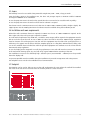
This footprint can be used to help you set out the wall configuration the room where the wall will be installed.
The circles at the side of the screen front are the rotation points for curved structures.
Barco – OverView cD 67-DL – R5976624– installation manual – Revision 04 – May-2006
___________________________________________________________________
2-3
2. Pre-Installation requirements
2.8 Overall dimensions
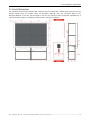
The installation room must be sufficient high. Sufficient space (recommended = 350mm from top of the screen to
finished ceiling) must be provided above the OverView cDG67-DL units. The functional depth of the
OverView cDG67-DL is 814 mm, the total depth is 954 mm. The standard screen height with adjustable feet is
1287.5mm. Other heights are available on request with a minimum of 622mm.
Barco – OverView cD 67-DL – R5976624– installation manual – Revision 04 – May-2006
___________________________________________________________________
2-4
2. Pre-Installation requirements
2.9 Maintenance area
A maintenance area of about 700mm must be provided behind each OverView cDG67-DL unit over the complete
width. This area must be permanently accessible. The exact regulations for such a maintenance area can be
obtained from the specifications for working premises.
SERVICE AREA
750mm
SERVICE AREA
750mm
The OverView cDG67-DL units can have linear or curved arrangements. With a curved design, the modular
aluminum structure is built with angled connection plates. The angle between two columns can vary between 0°
and 8°.
Barco – OverView cD 67-DL – R5976624– installation manual – Revision 04 – May-2006
___________________________________________________________________
2-5
2. Pre-Installation requirements
2.10 Built-in configuration
1026
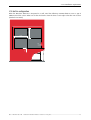
When the OverView cDG67-DL is integrated in a wall, mind the following recommendations: Leave a gap of
100mm around the screen. Make sure to take the distance from the lower screen edge to the floor into account
(standard 1287.5mm)
1368
1287,5
100
100
Barco – OverView cD 67-DL – R5976624– installation manual – Revision 04 – May-2006
___________________________________________________________________
2-6
3 Mechanical setup
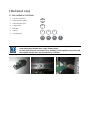
3.1 Tools needed for installation
•
1 set of screwdrivers
•
1 tape measure (10m)
•
1 tape measure (2m)
•
1 water level
•
cord 50m
•
1 pencil
•
1 stanley knife
10
mm
30
5
4
2
13
10
8
7
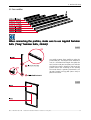
All connections between plain metal (e.g. corner brackets) and the profiles have to be
made with nippled hammer bolts ("long" hammer bolts).
All connections between coated metal (e.g. shielding) and the profiles have to be made
with nippled hammer bolts and spring washers, see below.
3. Mechanical setup
3.2 Preassemblies
When connecting the profiles, make sure to use nippled hammer
bolts ("long" hammer bolts, 25mm)!
PA01
Use profile r810237 (feet profile) to make the
preassembly 01, *the length can be different in
case of a customized feet height. First place the
two brackets with JP01 and JP02, end with the
third bracket which is aligned to the top of the
profile. Notice that according to the drawing
the inside thread is pointing downwards. Use
jig JP01 (45mm) and jig JP02 (456.7 mm) to
place the brackets.
PA02
Barco – OverView cD 67-DL – R5976624– installation manual – Revision 04 – May-2006
___________________________________________________________________
3-2
3. Mechanical setup
PA03L/PA03R
Notice to make both a left and right
preassembly (PA03L and PA03R).
Use jig JP01 to place the brackets (45mm).
PA04
When attaching the KaKu-brackets, pay special
attention to the orientation of the 60/30
profile (r840378). Use B362667 (M8x10) to
connect r840381 and r840383 to r840378, be
sure to tighten the screws.
Barco – OverView cD 67-DL – R5976624– installation manual – Revision 04 – May-2006
___________________________________________________________________
3-3
3. Mechanical setup
PA05
Use jig JP01 to place the brackets (45mm)
PA06L/PA06R
When assembling PA06, notice that there is
a right and a left assembly!
Barco – OverView cD 67-DL – R5976624– installation manual – Revision 04 – May-2006
___________________________________________________________________
3-4
3. Mechanical setup
3.3 Assembling the structure
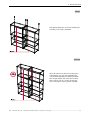
ASM01
When assembling PA05 (left and right) start
with PA04 to make the first cross-connection.
When this connection has been made it’s
easier to assemble the r840380-profiles
ASM02
When step 01 is finished and the first unit of
the wall is positioned in place then start
mounting the first connection brackets. The
bracket is aligned to the corner bracket. The
type of bracket is defined by the curvature
definition of the wall (see figure above).
Connection-brackets for 0°, 3°, 5° and 8° are
standard; other angles are possible when
customized. Notice that you then level the
structure!
Make sure to use nippled hammer bolts to
fix the connection brackets!
Barco – OverView cD 67-DL – R5976624– installation manual – Revision 04 – May-2006
___________________________________________________________________
3-5
3. Mechanical setup
ASM03
After leveling the first column connect the next
step 02 structure by means of the respective
connection-brackets. Level this column and
repeat this step for the remaining number of
columns
ASM04
When all columns are placed according to the
wall footprint, you can start assembling the
rows by mounting PA06 and PA04 onto PA09.
Don’t forget to place the connection brackets.
Notice that in case of a curved structure the
front connection bracket is placed with JP03!
Barco – OverView cD 67-DL – R5976624– installation manual – Revision 04 – May-2006
___________________________________________________________________
3-6
3. Mechanical setup
ASM05
After placing PA04 you can start assembling all
x-profiles, l=1278 mm, (r840380).
ASM06
When all columns are placed according to the
wall footprint, you can start assembling the
rows by mounting PA06 and PA04 onto PA09.
Don’t forget to place the connection brackets.
Notice that in case of a curved structure the
front connection bracket is placed with JP03.
Barco – OverView cD 67-DL – R5976624– installation manual – Revision 04 – May-2006
___________________________________________________________________
3-7
3. Mechanical setup
3.4 Stitching the screens
SCR01
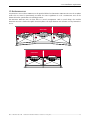
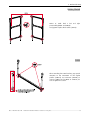
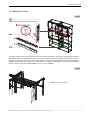
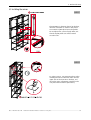
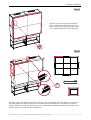
The stitch facilities consist of two horizontal and two vertical stitch plates. Start with assembling the horizontal
stitch plates. Hook the horizontal stitch plates R814267 and R814270 into each other and attach them to the
structure (on top of the horizontal screen frame profiles: l=1278mm, R840380). Mount all vertical stitch plates
R840065 on to the structure; make sure to align them to the vertical screen profiles with the arrow pointing to
the floor. Hook vertical stitch plate R840066 in to the slots of R840065.
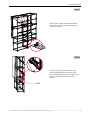
SCR02
Detailed view: stitch borders
Barco – OverView cD 67-DL – R5976624– installation manual – Revision 04 – May-2006
___________________________________________________________________
3-8
3. Mechanical setup
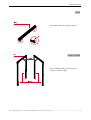
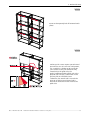
SCR03
Center and temporarily lock all horizontal stitch
plates
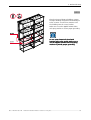
SCR03
Stitching of the screen requires special trained
personnel! In case of a two-row configuration,
use a scaffold or a height worker! Lenticular
(=the darkest screen): the somehow shiny
smooth side is the public side. The
pearly/sandblasted looking/black side is the
projector side. Fresnel (=screen with circular
grooves): like for all double screen
sandwiches, the smooth side is towards the
projector and the grooved fresnel side is
towards the lenticular and thus towards the
public side.
Barco – OverView cD 67-DL – R5976624– installation manual – Revision 04 – May-2006
___________________________________________________________________
3-9
3. Mechanical setup
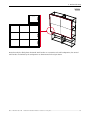
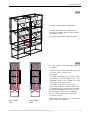
SCR04
Notice that only the black plastic horizontal stitch borders are constant in each wall-configuration, the vertical
stitch borders are defined by the configuration as demonstrated in the figure above.
Barco – OverView cD 67-DL – R5976624– installation manual – Revision 04 – May-2006
_________________________________________________________________
3-10
3. Mechanical setup
3.5 Installing the mirrors
MIR01
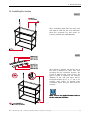
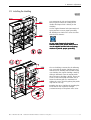
Place R840379 in between the Ka/Ku brackets,
mind the orientation as shown in the picture.
User B263667 (M8x10) to fasten the profiles.
Do not tighten the screws already. Make sure
that the 30/30 profile can still be rotated
around its axis.
MIR02
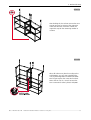
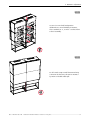
For safety reasons, use protective gloves when
installing the mirrors! Hook the mirror into the
upper slots of the front mirror brackets, and
mount the mirror adjustment assembly on the
rear plate with two M6x16 (B3631669)
Barco – OverView cD 67-DL – R5976624– installation manual – Revision 04 – May-2006
_________________________________________________________________
3-11
3. Mechanical setup
MIR02
Pull the mirror against the horizontal profile
and bolt it onto the inside of the structure, as
shown on the right.
MIR03
Use the mirror jig to place the mirror in its
nominal angular position by means of the
mirror-adjustment bracket. Don’t forget to put
all mirror adjustment-brackets into zero
position
Barco – OverView cD 67-DL – R5976624– installation manual – Revision 04 – May-2006
_________________________________________________________________
3-12
3. Mechanical setup
MIR04
Place the front and bottom shielding, remove
the tape shielding and position the shielding on
to the structure. Use the drive fastener to fix
the shielding onto the corner brackets.
Make sure to use the nippled hammer bolts
and spring washers to assure proper grounding.
In case coated material is fixed with
ham
ha m mer bolts to the profile: Make sure to
use the nippled hammer
hamme r bolts and spring
wash
washers to provide proper ground
groun ding.
ing
Barco – OverView cD 67-DL – R5976624– installation manual – Revision 04 – May-2006
_________________________________________________________________
3-13
3. Mechanical setup
PCL01
Install the multiple power strip B365010.
Since the illumination unit is located at the
right side, the power strip is best to be placed
on the right z profile.
This power strip includes 6xIEC 320 sockets.
PCL02
Powerstrip
For later cabling of the illumination unit, see
schematics:
The power strip includes 6xIEC 320 sockets and
is rated for a max. current of 10A.
This means:
In countries using 220V, up to six power cables
of OverView D could be plugged in (i. e. the
illumination units of one column can all be
connected into one power strip).
Powerstrip
Powerstrip
In countries using 110 V, only up to three
power cables of OverView D illumination units
can be plugged into one power strip. Therefore
for display walls higher than 3 rows, a second
power strip per column has to be installed.
Of course the two power strips may not be
connected in series!
mains voltage:
220V
mains voltage:
110V
Always take care that the max. rating of the
power strip is not exceeded!
Barco – OverView cD 67-DL – R5976624– installation manual – Revision 04 – May-2006
_________________________________________________________________
3-14
3. Mechanical setup
3.6 Grounding the structure and fixation of the structure to the floor
GRD01
At least every second column of a display wall has to be grounded! The connection
of the grounding wire to the power net of the building has to be done by a qualified
electrician of the customer!
The grounding kit R764734 comprises the green-yellow grounding cable (5m), the necessary fixation
material and the label.
The grounding kit includes a nippled hammer bolt which digs into the profile. In
addtion, the contact washer also has pins to provide proper contact.
The zinc plated nut is screwed about 10mm to the hammer bolt.
Grounding is done on the rear side of the structure. The grounding wire is mounted to the right vertical
profile of each column (in case of the Atlas C4 systems, on the shared vertical profile).
•
To ground a column, proceed as follows:
•
Arrange the fixation material in the correct order.
•
Unscrew the nut from the hammer bolt.
•
Insert the contact washer, pin side to hammer bolt head.
•
Subsequently insert the annular cable lug, then the plain washer.
•
Loosely attach the nut.
•
Insert the pre-assembled hammer bolt into the right vertical profile, turn it, and fix it in a distance of
approx. 13cm measured from the floor.
Make sure to tighten it fast to provide proper grounding!
•
Attach the grounding label about 20mm above the connection point.
Barco – OverView cD 67-DL – R5976624– installation manual – Revision 04 – May-2006
_________________________________________________________________
3-15
3. Mechanical setup
Checklist for proper grounding
The fixation of the green-yellow grounding cable is not sufficient to ensure proper grounding of the structure. It
must also be ensured that all metal parts of the structure are connected in a conductive way!
To ensure proper grounding, all metal parts of the system have to be connected in a
conductive way!
Therefore the corner brackets have to be fixed with nippled hammer bolts!
The same applies for the shielding; due to the coating, in addition spring washers have
to be used!
Check the following items. In case the result is negative, corrective measurements have to be taken!
•
At least one of the hammer bolts to fix the corner brackets for connecting the profiles is a nippled hammer
bolt!
•
The connection brackets between two columns are fixed with nippled hammer bolts!
•
The shieldings are fixed with nippled hammer bolts and spring washers.
•
All coated metal parts mounted into the structure apply at least one nippled hammer bolt and a spring
washer (e.g. support tray switch box (OverView cPU67-DL))!
In case no spring washers have been applied, use the spring washers included in the
grounding kit
The following pictures show some of the details to be checked:
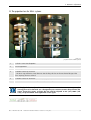
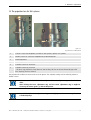
All connections between plain metal (e.g. corner brackets) and the profiles have to be
made with nippled hammer bolts ("long" hammer bolts) (see pictures above, first row).
All connections between coated metal (e.g. shielding) and the profiles have to be made
with nippled hammer bolts and spring washers (see pictures above, second row).
If the structure does not comply with these rules, there is no proper grounding!!
Barco – OverView cD 67-DL – R5976624– installation manual – Revision 04 – May-2006
_________________________________________________________________
3-16
3. Mechanical setup
GRD02
raised floor construction
principle drawing
OverView cD80 has to be fixed to the floor by
means of stabilization corners, one attached on
each vertical profile. Usually the stabilization
corner is fixed by means of an M10 plug. In
case of false floor, the wall has to be fixed to
the concrete floor by means of thread rods,
nuts and anchors.
M10
raised floor
concrete floor
To increase stability, additional fixation is
advised to the ceiling and/or the wall (not
provided in the standard delivery).
chemical anchor
Fixation to the ceiling/wall:
Every two rows and every two columns have to
be connected to the ceiling/wall. The design of
connection and its implementation is part of
the project management and customized for
each
installation.
Please
contact
the
responsible project manager!
Barco – OverView cD 67-DL – R5976624– installation manual – Revision 04 – May-2006
_________________________________________________________________
3-17
3. Mechanical setup
3.7 Installing the engine
ENG01
Start mounting the projection unit (PU). Place
the support bracket onto the position points of
the 30/60 profile. Then fix the PU on the
profile with three B361320 (DIN912 M6x35).
ENG02
Continue installing the illumination unit (IU)
Make sure that two M6x7 are mounted loosely
onto the 30/30 profile. Place the IU over the
two screws and the two position points on the
30/60 profile. Then shift the IU towards the PU
(position point) and tighten all screws. In this
stage you have to lock the position of the
30/30 profile.
Barco – OverView cD 67-DL – R5976624– installation manual – Revision 04 – May-2006
_________________________________________________________________
3-18
3. Mechanical setup
ENG03
The lower side of the fan module is sided into
the first slot of the 30/30 profile and fixed to
the engine profile by M6x7. Pay attention not
too tighten the screws since you need to install
the engine shielding to know the right position
of the fan.
ENG04
Place the engine shielding in order to position
the fan module, align the engine shielding with
the illumination unit. Proceed with aligning the
fan module with the engine shielding and
tighten the screws (M6x7)
Barco – OverView cD 67-DL – R5976624– installation manual – Revision 04 – May-2006
_________________________________________________________________
3-19
3. Mechanical setup
ENG05
For final adjustment of the projection unit you
need to remove the engine shielding.
Barco – OverView cD 67-DL – R5976624– installation manual – Revision 04 – May-2006
_________________________________________________________________
3-20
3. Mechanical setup
3.8 Cabling of the engine
CBL01
Look at the above general connection diagram to connect all cables and air tubes.
When using optical(fibre) data cables, please note that they may not be bent to a
curvature with a bend radius less than 15.4cm!
As soon as the illumination unit and the projection unit are connected by the signal cable
and/or the power cable, DO NOT disconnect either of these cables under operation or in
standby!
Disconnect only when the system is completely powered off (all LEDs are off)!
Otherwise the trinamic board of the IU will be damaged.
Barco – OverView cD 67-DL – R5976624– installation manual – Revision 04 – May-2006
_________________________________________________________________
3-21
4. Taking into operation
4 Taking into operation
4.1 Running the fans
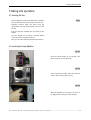
OP01
Before taking the system into operation it must be
ensured that the fans and the hoses are dust free.
Therefore remove again the hoses from the
illumination unit and the projection unit and start
the fan.
Run the system in standby! Do not switch on the
lamps!
The fans should run for about 5 minutes before
continuing. Then re-attach the hoses.
Now you can start with the adjustment procedure.
4.2 Inserting the Lamp Modules
OP02
Fetch the lamp module on its housing. The
power socket is on the right side.
OP03
Insert the lamp carefully. Take care that the
"tubes" slide on the guide rods [2].
OP04
Mind the position of the fingers: the force is
to apply on the outer part of the module
Barco – OverView cD 67-DL – R5976624– installation manual – Revision 04 – May-2006
_________________________________________________________________
4-22
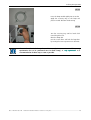
4. Taking into operation
OP05
Press the lamp module tightly into its socket
Apply the securing ring on the lamp and
press it in axial direction while turning
OP06
Turn the securing ring until its hooks click
round the guide rods.
Close the lamp door
Use the screw driver and lock the lamp door
by turning the screw a quarter turn clockwise.
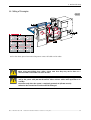
The Serial Number of the lamps have to be entered, cf. Reset Runtime.
Runtime In addition, Lamp
Optimization has to be performed once for both lamps, cf. Lamp Optimization.
Optimization It is
recommended to do these step as soon as possible.
Barco – OverView cD 67-DL – R5976624– installation manual – Revision 04 – May-2006
_________________________________________________________________
4-23
4. Taking into operation
4.3 Selecting the correct lamp driver
There are three kind of lamp drivers for the illumination unit of OverView D. it is mandatory that you check if the
default lamp driver (Compact) is the correct one for your system!
Select Service | Maintenance | Lamp driver.
A list with the lamp drivers of the different versions of the illumination unit is displayed:
The following table lists the article number of the illumination unit and the required lamp driver:
R764226
Compact
R764581
Powerpack 100W
R764582
Powerpack 120W
For 80", the illumination unit with 200W (Osram Lamp driver) ist NOT an option!!
Barco – OverView cD 67-DL – R5976624– installation manual – Revision 04 – May-2006
_________________________________________________________________
4-24
5 Geometric adjustment
SXGA+ and XGA use different lenses!
5.1 Adjustment Overview
ADJ01
After setting up the system, optical adjustment
must be done. In the following chapter a
description of the adjustment principles is
given as well as some hints to carry out this
procedure.
Switch on main power by pressing ON (power
switch). Wait at least half a minute while the
fan is blowing. Switch on the lamp by pressing
START (lamp switch). The last 3 steps have to
be repeated for each module.
ADJ02
The sharpness of the image is adjusted by
turning the focus ring. The picture size can be
adjusted by turning the picture size ring. For
further adjustment procedures do first the
following steps: loosen lightly the lens securing
screws and turn the lock ring clockwise to
unlock the engines.
5. Geometric adjustment
ADJ03
Turn the adjustment screw V1 counterclockwise and V2 clockwise/V1 clockwise and V2 counterclockwise until
the vertical lines get parallel to the borders of the screen. Turn the adjustment screw H1 counterclockwise and
H2 clockwise/H1 clockwise and H2 counterclockwise until the vertical lines get parallel to the border of the
screen. Turn the adjustment screw rotation clockwise/counterclockwise until the horizontal lines gets parallel
to the border of the screen. Turn the adjustment screws for horizontal/vertical lens shift [C/D]. tighten and
loosen the opposite screws to shift horizontal/vertical.
Turn the adjustment screw until the vertical lines gets parallel to the border of the screen. After the
adjustment procedures the DLP engine must be locked. Turn the lock ring counterclockwise until it does not
move any more (don't tighten this ring too strong). Tighten carefully the four securing screws of the lenses.
Check if the position of the picture did not change while locking the DLP engine.
Barco – OverView cD 67-DL – R5976624– installation manual – Revision 04 – May-2006
___________________________________________________________________
5-2
5. Geometric adjustment
5.2 The projection lens for SXGA+ systems
Figure 5-1
projection lens for SXGA+ systems
1
Scale for screen size adaptation
2
Focus adjustment
3
Zoom adjustment
4
2 fixation screws for focus lock
- the focus ring still shows some clearance after locking. This due to the mechanical design of the
lens. Anyway, the focus is fixed.
5
2 fixation screws for zoom lock
6
Fixation screws for screen size adaptation lock, filled with paint
As default, the lens is adjusted for 50" SXGA systems. In case of an 80" SXGA+ system, the
screws[6] have to be loosened: use a hexagon key size 1.5mm to remove the paint from the
screws, loosen the screws, and turn the lens until its adjusted to 80" (84") SXGA+ (red
scale), see picture below. Then tighten the screws again.
Barco – OverView cD 67-DL – R5976624– installation manual – Revision 04 – May-2006
___________________________________________________________________
5-3
5. Geometric adjustment
5.3 The projection lens for XGA systems
Figure 5-2
projection lens for XGA systems
1
Scale for screen size adaptation, turn left for 50" systems, right for 67" systems
2
Fixation screws for screen size adaptation lock, filled with paint
3
Zoom adjustment
4
Focus adjustment
5
3 fixation screws for zoom lock
6
2 fixation screws for focus lock
- the focus ring still shows some clearance after locking. This due to the mechanical design of the
lens. Anyway, the focus is fixed.
The projection lens allows to zoom and to focus the picture. The adjusted settings can be locked by means of
fixation screws.
It is recommended to lock the lens only after the entire adjustment procedure has been
done.
After locking the focus adjustment ring and the zoom adjustment ring it might be
necessary to correct again x, y shift of the picture.
Even if locked, the focus adjustment ring can be slightly turned. Do not worry! The focus
is locked anyway!
Barco – OverView cD 67-DL – R5976624– installation manual – Revision 04 – May-2006
___________________________________________________________________
5-4
5. Geometric adjustment
5.4 Strictly prohibited devices
Have a careful look on the following picture and remember:
These screws shall NEVER be touched!!!
The projection lens is mounted on the housing of the projection engine.
All screws mounted on the level indicated by a black arrow are NOT to be touched. These
screws are fixation screws for the entire projection lens or screws required for the
Scheimpflug adjustment which has already be done in the factory!
Figure 5-3
restricted area
For better recognition, these screws are locked with paint. The following picture shows the respective screws in
detail:
Figure 5-4
Never touch these screws!
Screws
Function
1, 2 (and 3, not visible)
Scheimpflug adjustment
4, 5, 6
Mounting and fixation screws
Barco – OverView cD 67-DL – R5976624– installation manual – Revision 04 – May-2006
___________________________________________________________________
5-5
5. Geometric adjustment
5.5 Adjustment devices
Besides the adjustment rings on the projection lens to adjust focus and size, there are adjustment screws to
correct distortions.
The following picture gives an overview about the position and the function of the adjustment screws.
Figure 5-5
top view of lens
F
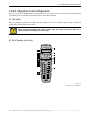
Figure 5-6
side view (lens and adjustment devices)
A Lens
H1, H2 Horizontal tapezoid
B Lens securing screws
V1, V2 Vertical trapezoid
C Horizontal lens shift
E Mounting angle
D Vertical lens shift
F Rotation
Table 1
Barco – OverView cD 67-DL – R5976624– installation manual – Revision 04 – May-2006
___________________________________________________________________
5-6
5. Geometric adjustment
5.6 First steps
The entire projection unit is locked via the lock ring:
Figure 5-7
Lock ring
•
Unlock the system (loosen the lock ring)
•
Loosen the screen size adaptation lock screws and the zoom lock screws on the projection lens.
•
Loosen slightly the securing screws of the projection lens [B].
Without unlocking the system, no adjustment is possible!
5.7 Focus adjustment
The sharpness of the outlines of the squares (test pattern) is adjusted by turning the focus adjustment ring.
Barco – OverView cD 67-DL – R5976624– installation manual – Revision 04 – May-2006
___________________________________________________________________
5-7
5. Geometric adjustment
5.8 Picture size
The wrong picture size looks like this or similar:
Figure 5-8
Rear view picture size too big
Turn the zoom adjustment ring at the lens ( Figure 5-1 ) counterclockwise to decrease the size of the picture.
Figure 5-9
Rear view picture size too small
Turn the zoom adjustment ring at the lens ( Figure 5-1 ) clockwise to increase the size of the picture.
Figure 5-10
Rear view picture size o.k.
Barco – OverView cD 67-DL – R5976624– installation manual – Revision 04 – May-2006
___________________________________________________________________
5-8
5. Geometric adjustment
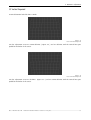
5.9 Vertical Trapezoid
A vertical distortion looks like this or similar.
Figure 5-11
Rear view vertical trapezoid
Turn the adjustment screw V1 counterclockwise ( Figure 5-5 ) and V2 clockwise until the vertical lines gets
parallel to the border of the screen.
Figure 5-12
Rear view vertical trapezoid
Turn the adjustment screw V1 clockwise (Figure 5-5 ) and V2 counterclockwise until the vertical lines gets
parallel to the border of the screen.
Barco – OverView cD 67-DL – R5976624– installation manual – Revision 04 – May-2006
___________________________________________________________________
5-9
5. Geometric adjustment
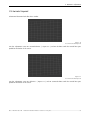
5.10 Horizontal trapezoid
A horizontal distortion looks like this or similar.
Figure 5-13
Rear view horizontal trapezoid
Turn the adjustment screw H1 counterclockwise ( Figure 5-5 ) and H2 clockwise until the vertical lines gets
parallel to the border of the screen.
Figure 5-14
Rear view horizontal trapezoid
Turn the adjustment screw H1 clockwise ( Figure 5-5 ) and H2 counterclockwise until the vertical lines gets
parallel to the border of the screen.
Barco – OverView cD 67-DL – R5976624– installation manual – Revision 04 – May-2006
_________________________________________________________________
5-10
5. Geometric adjustment
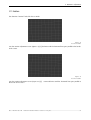
5.11 Rotation
The distortion “rotation” looks like this or similar:
Figure 5-15
Rear view rotation
Turn the rotation adjustment screw (Figure 5-6) [F] clockwise until the horizontal lines gets parallel to the border
of the screen.
Figure 5-16
Rear view rotation
Turn the rotation adjustment screw (Figure 5-6) [F]
the border of the screen.
counterclockwise until the horizontal lines gets parallel to
Barco – OverView cD 67-DL – R5976624– installation manual – Revision 04 – May-2006
_________________________________________________________________
5-11
5. Geometric adjustment
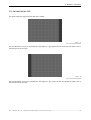
5.12 Horizontal picture shift
The horizontal picture shift may looks like this or similar:
Figure 5-17
Rear view horizontal position
Use the adjustment screws for horizontal lens shift Figure 5-5 [C]. Tighten the left and loosen the right screw to
move the picture to the right.
Figure 5-18
Rear view horizontal position
Use the adjustment screws for horizontal lens shift Figure 5-5 [C]. Loosen the left and tighten the right screw to
move the picture to the right.
Barco – OverView cD 67-DL – R5976624– installation manual – Revision 04 – May-2006
_________________________________________________________________
5-12
5. Geometric adjustment
5.13 Vertical picture shift
The vertical picture shift may look like this or similar:
Figure 5-19
Rear view vertical picture shift
Use the adjustment screws for vertical lens shift Figure 5-5 [D]. Tighten the top and loosen the lower screw to
move the picture downwards
Figure 5-20
Use the adjustment screws for vertical lens shift Figure 5-5 [D]. Loosen the top and tighten the lower screw to
move the picture upwards
5.14 Locking the Projection Unit
After the adjustment procedures the projection unit must be locked.
•
Turn the lock ring counterclockwise until it does not move any more. ( don’t tighten this ring too strong)
•
Lock the zoom and the focus adjustment by means of the fixation screws.
•
Tighten carefully the four securing screws of the lens.
•
Check if the position of the picture didn’t change while locking the projection unit.
Barco – OverView cD 67-DL – R5976624– installation manual – Revision 04 – May-2006
_________________________________________________________________
5-13
5. Geometric adjustment
5.15 Installing the shielding
SLD01
Start mounting the side and top shielding.
Don't forget to remove the sealing of the
double sided tape which is already on the
shielding
Use the nippled hammer bolts (B361304) and
spring washers to assure proper grounding.
All shieldings are fixed on the corner brackets
with the drive fastener.
In case coated material is fixed with
ham
ha m mer bolts to the profile: Make sure to
use the nippled hammer bolts and spring
wash
washers to provide
pr ovide proper ground
groun ding.
ing
SLD02
The rear shielding is mounted in the following
way: start with the engine shielding, proceed
with the mirror shielding and end with the top
rear shielding. The engine shielding is fixed by
sliding it downwards onto the 30/60 profile.
When the mirror shielding is placed, loosen the
screws of the exhaust pipe and make sure to
lower the exhaust pipe to a maximum and
tighten the screws. Finish by placing the profile
caps and the nut caps.
Complete the mirror shielding by attaching the
Barco label on the respective rectangle
(125mmx125mm) on the plastic mirror cover.
Barco – OverView cD 67-DL – R5976624– installation manual – Revision 04 – May-2006
___________________________________________________________________
5-1
5. Geometric adjustment
SLD03
In case of a curved wall configuration
additional rear curved shielding is foreseen,
this is standard for 3°, 5°and 8°. Use the shown
order of assembly.
SLD04
For all curved setups a small sheet metal strip
is foreseen for the front, this part is mounted
by means of double-sided tape.
Barco – OverView cD 67-DL – R5976624– installation manual – Revision 04 – May-2006
___________________________________________________________________
5-2
5. Geometric adjustment
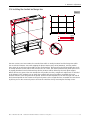
5.16 Installing the standard and design trim
TRM01
The trim consists out of two entities: the standard trim which is merely functional and the design trim which
has an esthetical function. Start with snapping the plastic fixation parts, ID-fix (R822012), onto the profiles.
These parts do not only fit on the profiles but also on themselves. Click 4 ID-fix in the horizontal direction and 3
in vertical direction on both sides of the structure for each screen. The distance between the plastic parts has to
be equally distributed. On the horizontal top side the positions will be defined by the stitch plate-support.
Collect all necessary parts of the trim. Besides the trim profiles, brackets, straight and angled ones are included
in the delivery of the standard trim. To attach the standard trim proceed as follows: Assemble the corner
brackets with the screws integrated in the profile. Connect all vertical profiles for the left and right side and all
the horizontal profiles for the bottom and top side by means of the straight brackets. Assemble the vertical trim
by clicking it on to the structure by means of the ID-fix. Finish the trim by mounting the finishing corners.
Barco – OverView cD 67-DL – R5976624– installation manual – Revision 04 – May-2006
___________________________________________________________________
5-3
5. Geometric adjustment
TRM02
After this step you can put the self adhesive
Velcro on the front of the standard trim. This
Velcro is found on the design trim parts. Make
sure to put the right pieces in the right place
TRM03
The design trim is basically mounted in the same way as the standard-trim. The main difference is the way to
attach the profiles; this is done by means of self-adhesive Velcro fastening tape. To attach the design trim
proceed as follows: Arrange the required parts, pre-assemble the trim profiles by means of the brackets. Then
push the design trim firmly onto the standard-trim.
Barco – OverView cD 67-DL – R5976624– installation manual – Revision 04 – May-2006
___________________________________________________________________
5-4
6. Final Adjustment and Configuration
6 Final Adjustment and Configuration
After the set up of the Display Wall, the system has to be fine adjusted. This is done via the IR Remote-Control
and the OSD (or the respective commands via the RS 232 Remote-Control).
6.1 Data cables
When connecting the projection modules with the graphical card of the controller, please keep in mind that
optical cables shall not be bent too much!
When using optical(fibre) data cables, please note that they may not be bent to a
curvature with a bend radius less than 11cm!
6.2 The IR Remote-Control Unit
Figure 6-1
IR Remote Control Unit (RCU)
Barco – OverView cD 67-DL – R5976624– installation manual – Revision 04 – May-2006
___________________________________________________________________
6-1
6. Final Adjustment and Configuration
6.2.1 Terminology of RCU controls
1
Function keys
have no function for this projector
2
ADJ
ADJUST key, to enter or exit the adjustment mode.
3
Address key
(recessed key), to enter the address of the projector (between 0 and 9). Press the
recessed address key with a pencil, followed by pressing one digit button
between 0 and 9.
4
Selection key
has no function for this projector
5
PAUSE
has no function for this projector
6
Standby
stand by button, to start projector when the power switch is switched on and to
switch off the projector without switching off the power switch.
7
Mute
has no function for this projector
8
Help
has no function for this projector
9
Digit buttons
To enter the remote control address
10
Audio controls
have no function for this projector
11
Picture controls
Except for brightness and contrast, these keys have no function for this projector.
The controls of brightness and contrast are only enabled in case the optical
dimmer is disabled, cf. Error! Reference
Reference source not found.
12
PHASE
has no function for this projector
13
Freeze
has no function for this projector
14
TEXT
has no function for this projector
15
ENTER
to start up the adjustment mode or to confirm an adjustment or selection in the
adjustment mode.
16
Cursor Keys
to make menu selections when in the adjustment mode.
RCU
cursor key up
cursor key down
cursor key right
cursor key left
Use the cursor keys up or right for increasing a value.
Use the cursor keys down or left for decreasing a value.
17
EXIT
to leave the adjustment mode or to scroll upwards when in the adjustment mode.
18
RC operating
indication
lights up when a button on the remote control is pressed. (This is a visual indicator
to check the operation of the remote control)
Barco – OverView cD 67-DL – R5976624– installation manual – Revision 04 – May-2006
___________________________________________________________________
6-2
6. Final Adjustment and Configuration
6.3 General
OVERVIEW D has a build in "PC like" toolbar menu which allows easy access to different parameters for setting up
the projector.
The toolbar menu is activated by pressing ADJ
Menu items which are not applicable are grayed out.
6.4 Menu Layout
The existence of a submenu is indicated by a white arrow
Three suspension points indicate that the menu item hides a dialog box or a text box.
A dot indicates which option is selected.
Grayed out menus or items are not available in this software version.
6.4.1 Navigating
Use the cursor keys on the RCU to navigate within a menu or a submenu.
Press Enter to select a menu item
Press Enter to open the submenu.
Press Exit to exit a submenu or menu
6.5 Activating the Menu Bar
Press the ADJ key on the RCU to display the menu bar.
Figure 6-2
menu bar
Use the cursor key on the RCU to select a menu. Press Enter to activate it.
6.5.1 Reset Runtime
After insertion of a new the lamp, its serial number has to be entered.
The command Reset runtime displays the dialog to enter the serial number.
Figure 6-3
Reset runtime
Barco – OverView cD 67-DL – R5976624– installation manual – Revision 04 – May-2006
___________________________________________________________________
6-3
6. Final Adjustment and Configuration
To enter the serial number of the new lamp, proceed as follows:
•
Use the cursor key to highlight Reset runtime.
•
Press Enter to select.
The following dialog is displayed:
Figure 6-4
dialog to enter the serial number of a new lamp
•
Use the cursor keys to highlight the input field.
•
Use the numeric keys on the RCU to enter the serial number of the new lamp.
•
Click Accept to activate the serial number.
These steps have to be performed for both lamps. Then Lamp Optimization should be done.
6.5.2 Lamp Optimization
Since the light is coupled into the light rod by means of a mirror, the position of the mirror together with the
actual lamp properties determine the light yield.
During the Lamp Optimization procedure, the light output of the active lamp in dependence of the tilting angle
of the mirror is measured, and the optimized mirror position for the lamp is determined.
sensitivity of tilt mirror adjustment
1.2
1
intensity [ a.u. ]
0.8
0.6
0.4
0.2
0
0
0.5
1
1.5
2
2.5
3
3.5
4
angle [ deg ]
Figure 6-5
influence of tilt mirror adjustment on light intensity
The procedure should be performed subsequently for both lamps. The optimized positions are stored
independently for both lamps, so that after setting the lamp lift in motion and thus changing the active lamp,
the mirror position is adjusted accordingly.
Barco – OverView cD 67-DL – R5976624– installation manual – Revision 04 – May-2006
___________________________________________________________________
6-4
6. Final Adjustment and Configuration
Figure 6-6
Lamps menu, Lamp optimization
This procedure optimizes the coupling of the active lamp into the optical system of the
projector and is immediately triggered by selecting the command Lamp Optimization.
During this procedure, the display gets dark for about 30seconds.
•
Use the cursor keys to highlight Lamp Optimization
•
Press ENTER to select.
If Operation|Message Box is enabled, the following message box is displayed:
Figure 6-7
Lamp optimization in progress
The procedure should be performed subsequently for both lamps.
All other steps to configure the system have to be done in the service menu.
Barco – OverView cD 67-DL – R5976624– installation manual – Revision 04 – May-2006
___________________________________________________________________
6-5
6. Final Adjustment and Configuration
6.6 Access to the service menu
To access the service menu of the OSD, proceed as follows:
Start the OSD
Move the cursor to Brightness
Figure 6-8
first step to activate the Service Menu
Enter the access code via the numeric keys on the IR Remote-Control. Press Enter to complete!
The Service menu entry is shown.
Move the cursor to highlight Service. Press Enter to select. The following menu items are displayed:
Figure 6-9
Service Menu
Barco – OverView cD 67-DL – R5976624– installation manual – Revision 04 – May-2006
___________________________________________________________________
6-6
6. Final Adjustment and Configuration
6.6.1 Projector Address
Projectors leaving production are all set to a projector address "255". When installed in a Display Wall, every
projector has to get a unique address via it can be controlled. This address can be set between 0 and 9 (IR
Remote-Control) or between 0 and 255 (RS232 Remote-Control). CAST as well as the RS232 command
interface and the IR Remote-Control Unit will talk to a specific projector by means of this address.
By means of the common RC5 address the IR Remote-Control can talk simultaneously to all projectors of a
Display Wall.
The common RC5 address can be set either to 0 or to 1.
Please note that CAST (Color Adjustment Service Tools) requires that the projector
addresses are assigned as indicated in the picture below.
It is highly recommended to follow this instruction in case for the future use of CAST!
Figure 6-10
projector addresses as required by CAST,
Display Wall seen from front, A: top row
To modify the projector address:
•
Move the cursor to Projector Address.
•
Press Enter to select.
Barco – OverView cD 67-DL – R5976624– installation manual – Revision 04 – May-2006
___________________________________________________________________
6-7
6. Final Adjustment and Configuration
Figure 6-11
Service Menu, Projector Address
The projector address and the common RC5 address is displayed.
Figure 6-12
Projector Address and common address
The projector address is set to five, and the common RC5 address is zero. Therefore the projector will listen to
commands received from an IR Remote-Control unit with the address “5” and with the address “0”.
To change a value:
•
Move the cursor key to the respective field.
•
Enter the new value by means of the numeric keys of the IR Remote-Control.
For an application it might be useful to have the Display Wall split into two parts, one
with the common RC5 address “0” and one with the common RC5 address “1”.
6.6.1.1 Displaying a Projector Address by means of the Remote-Control Unit
Press the ADDRESS key (recessed key on the RCU) with a pencil. The projector's address will be displayed in a
'Text box'. This text box disappears after a few seconds.
To continue using the RCU with that specific address, it is necessary to enter the same address with the digit
buttons (address between 0 and 9) within 5 seconds after pushing the address key. For example if the Address
key displays projector address 005, then press "5" digit button on the RCU to set the RCU's address to match the
projector's address. Do not press 005 digits. This will address the remote control to '0' and control all projectors in
the room.
If the address is not entered within 5 seconds, the RCU returns to its default address (zero address) and control
all projectors in the room.
Barco – OverView cD 67-DL – R5976624– installation manual – Revision 04 – May-2006
___________________________________________________________________
6-8
6. Final Adjustment and Configuration
6.6.1.2 How to Program an Address into the RCU?
Press the ADDRESS key (recessed key on the RCU) with a pencil and enter the address with the digit buttons
within 5 seconds after pushing the address key. That address can be any digit between 0 and 9.
6.6.2 RS232 baudrate
Figure 6-13
Service Menu, RS232 baud rate
For servicing reasons, higher baud rates can be selected.
Please keep in mind that with firmware 2.x 115200 should only be selected in a single projector
connection.
Standard baud rate which is supported by wall management software is still 9600!
However, projectors with Firmware 3.x might be operated with the OverView Control Manager at
115200.
Barco – OverView cD 67-DL – R5976624– installation manual – Revision 04 – May-2006
___________________________________________________________________
6-9
6. Final Adjustment and Configuration
6.6.3 Internal patterns
Use Internal Patterns to check some properties of the system.
Figure 6-14
Service Menu, Internal Patterns
•
Move the cursor to Internal Patterns
•
Press enter to select
A list of available patterns is displayed.
•
Move the cursor key to select the desired pattern.
•
Press Enter to select.
The test pattern is applied.
The following table gives some recommendations what the various test pattern can be used for:
Pattern
use
Outline/Hatch
for geometry adjustment
Color bars
to check primaries and secondaries
Checkerboard
to check for straylight
Pixel On/Off
to check electronics and projection lens performance
Lens Adjustment
to check the projection lens adjustment
RGB
arbitrary colors, explanation see below
Barco – OverView cD 67-DL – R5976624– installation manual – Revision 04 – May-2006
_________________________________________________________________
6-10
6. Final Adjustment and Configuration
6.6.3.1 The RGB test pattern
By means of the RGB test pattern menue, any desired colorc can be applied.
Selecting Service|Internal Patterns|RGB displays the following dialog box:
Figure 6-15
dialog box to define the desired color
On this dialog box, the values for red, green, blue can be entered by means of the arrow buttons.
Arrows pointing to the left decrease a value, arrows pointing to the right increase a value.
4) /decreases(3) the value per 1.
Clicking on the double arrows increases (
44) /decreases (33) the values per 64.
Clicking on a single arrow increases (
Clicking on the right most / left most arrow sets the value to the maximum (1023) or minimum (0).
Using the All button will manipulate all individual RGB settings to be equally increased or decreased,
respectively.
Besides the dialog box to enter the RGB values, a square frame is displayed to indicate the center of the screen.
Both, the RGB value dialog box and the square frame can be switched on/off by pressing
the text button on the IR Remote-Control Unit.
6.6.3.2 Understanding the color values
Since the ASIC• allows 10 bit input per color, on this dialog box the values are in the range from 0 to 1023.
The relationship to 8-bit input DVI RGB-Data is given by:
(R, G, B )intern = (4 ∗ R − 1,
4 ∗ G − 1, 4 ∗ B − 1)extern
for example :
(511, 439, 1019)intern = (128, 110, 255)extern
•
ASIC: application specific integrated circuit
Barco – OverView cD 67-DL – R5976624– installation manual – Revision 04 – May-2006
_________________________________________________________________
6-11
6. Final Adjustment and Configuration
6.6.4 Color/Brightness
Figure 6-16
Service Menu, Color/Brightness
6.6.4.1 Color Coordinate Adjustment
Color Adjustment has to be done by CAST!
Only very experienced personnel in possession of a spectrometer should access this
menu!
In case there is an urgent need to use this menu item, make sure that White Peaking is
set first.
Color adjustment is only valid for one White Peaking value.
This menu provides some essential information for the ASIC: the factory colors of the DLP engine and the desired
target colors.
The color locations for DLP are indicated in coordinates of the x, y color space (CIE 1931).
Barco – OverView cD 67-DL – R5976624– installation manual – Revision 04 – May-2006
_________________________________________________________________
6-12
6. Final Adjustment and Configuration
Figure 6-17
Chromaticity diagram, CIE 1931
The ASIC needs to know the uncorrected color coordinates for red, green, blue and white as well as the relative lumens of
each color.
On the Color Coordinate Adjustment dialog this information is related to Measured.
(CAST provides this information by measuring the factory colors).
The ASIC then needs to know the target color coordinates for all primary colors, for all secondary colors, and for
white (R, G, B, C, M, Y, W: "7 primary colors processing")
On the Color Coordinate Adjustment dialog this information is related to Desired
(CAST provides this information by determining the Target)
Barco – OverView cD 67-DL – R5976624– installation manual – Revision 04 – May-2006
_________________________________________________________________
6-13
6. Final Adjustment and Configuration
Selecting Service | Color/Brightness | Color Coordinate Adjustment displays the following dialog box:
Figure 6-18
dialog box Color Coordinate Adjustment
The dialog box refers to the active lamp!
The data need to be set individually for each lamp!
The Enable/Disable selection always refers to both lamps!
Click on the arrow next to the respective text field to get a list of the available options:
Parameter
Possible value
Parameter 1
Measured
Desired
Parameter 2
X coordinate (should be within the measured triangle of the factory colors)
Y coordinate (should be within the measured triangle of the factory colors)
Luminance (if Parameter 1 == Measured), otherwise grayed out
The relative luminance of a color is defined as the ratio of the luminance of this color to the
luminance of white
(which – per definition – equals 1).
Gain (if Parameter 1 == Desired), otherwise grayed out.
Gain should be set to 1 to prevent clipping!
Colour
Red
Green
Blue
Cyan
Yellow
Magenta
White
Value
Value of coordinate in the x, y chromaticity diagram, CIE 1931
Barco – OverView cD 67-DL – R5976624– installation manual – Revision 04 – May-2006
_________________________________________________________________
6-14
6. Final Adjustment and Configuration
There are transformation algorithms between the different color spaces. CAST allows to
switch between the presentation of the coordinates in the u', v' color space (CIE 1976)
and the x, y color space (CIE 1931).
The DLP Engine itself only "knows" the x, y color space, and requires that the values are
entered as x, y coordinates.
Only experienced personnel should edit this dialog! There is a risk of severe damages!
Use CAST to do the color adjustment.
Due to the influence of the dimmer the values indicated by CAST and those listed on this
dialog might slightly differ.
Changes become only active if Enabled is checked and if the menu is left by pressing the Exit button on the IR
Remote-Control Unit.
6.6.4.2 White Peaking
After changing the White Peaking Value, the color adjustment has to be repeated!
The color correction model is only valid for one White Peaking Value setting!
Before setting the White Peaking value, some background information on the generation of white is required.
The color wheel incorporated in the DLP projection engine has 4 sectors: red ( R), green (G), white (W) and blue
(B)
"White" is generated by the primary colors, via the addition of full red, full green, and full blue. W1 = R + G + B
"White" is also generated by the white segment: W2 = W
"White" is also generated by the so-called spoke light recapture: If the DMD is left ON while the color segments
change, there are additional contributions of adjacent segments:
R+G
G+W
W+B
B+R
Spoke light
recapture
R
G
W
B
R
Time
Spoke Light Recapture (SLR) = (R+G) + (G+W) + (W+B) + (B+R) = 2*(R+G+B) + 2*W = W3
In case the white segment and spoke light recapture are activated, the white output is boosted.
The White Peaking Factor is defined as the relation of "all whites" to the RGB-White:
Barco – OverView cD 67-DL – R5976624– installation manual – Revision 04 – May-2006
_________________________________________________________________
6-15
6. Final Adjustment and Configuration
White Peaking Factor =
W1 + W2 + W3 RGB + W + SLR
=
W1
RGB
It's obvious that the minimum of the White Peaking Factor equals 1 (no white segment, no spoke light
recapture).
The maximum of the White Peaking Factor (all three contributions) is about 1.8. It varies slightly with different
lamps.
The White Peaking Factor can be linear scaled between its minimum and its maximum by
means of thw White Peaking Value.
The White Peaking Value can be set by means of the command Service|Color/Brightness|White Peaking.
A dialog box is opened where the desired White Peaking Value can be entered.
Figure 6-19
Adjusting the White Peaking Value
A White Peaking Value of 10 is related to the max. White Peaking Factor (1.8; incl. white segment, spoke
light recapture).
A White Peaking Value of 0 is related to the min. White Peaking Factor (0, no white segment, no spoke light
recapture).
The intermediate values are set by means of the corresponding White Peak Value, which are listed in the
following table. Please note that the table lists approximate values:
White Peaking Value
White Peaking Factor
0
1
1
1.08
2
1.16
3
1.24
4
1.32
5
1.4
6
1.48
7
1.56
8
1.64
9
1.72
10
1.8
The White Peaking Value must not be changed after color adjustment!
The color correction model is only valid for one White Peaking Value setting!
The White Peaking Value has also impacts on the gamma valu, cf. Degamma
Barco – OverView cD 67-DL – R5976624– installation manual – Revision 04 – May-2006
_________________________________________________________________
6-16
6. Final Adjustment and Configuration
6.6.4.3 Degamma
Use Service | Color/Brightness | Degamma to change the gamma value.
A list of the available gamma values pop up. The current setting is indicated by a white dot.
Figure 6-20
list of available gamma values
Disable applies a gamma value of “1”
For OverView D series, do NOT use any of the TI gamma values.
gamma = 2.7 should be used with utmost care!
Influence of White Peaking on Gamma
For DLP projection engines which use the white segment and spoke light recapture, the influence of the gamma
value on white and on gray levels is much higher. The primary colors and secondary colors are not affected. The
following table shows the selected gamma value and its effective equivalent:
gamma value (White Peaking value = 0)
effective gamma value (White Peaking value = 10)
1.0
1.6
2.0
3.2
2.2
3.4
2.3
3.6
2.7
4.0
Due to the White Peaking, for white and gray (R=G=B) even a gamma value of “1”
(disabled) results in a non-linear effective gamma curve and thus in a non-linear
response.
Barco – OverView cD 67-DL – R5976624– installation manual – Revision 04 – May-2006
_________________________________________________________________
6-17
6. Final Adjustment and Configuration
It is recommended to set the White Peaking value first and then adjust the gamma
accordingly!
A subsequent change of the White Peaking value will influence the gamma response.
The following diagrams show the gamma curves for the gamma values 1 and 2.3 for an operation without white
segment and without spoke light recapture (White Peaking =0) and for an operation with full white segment and
full spoke light recapture (White Peaking = 1). These diagrams clearly show the influence of the White Peaking
value on the gamma curve.
100
Relative Brightness in [%]
White Peaking = 0
80
γ = 1.0
60
40
γ = 2.3
20
0
0
32
64
96
128
160
192
224
RGB Input Value
Figure 6-21
gamma curves, no White Peaking
100
White Peaking = 10
Relative Brightness in [%]
80
60
γ = 1.0
40
γ = 2.3
20
0
0.0
32.0
64.0
96.0
128.0 160.0 192.0 224.0
RGB Input Value
Figure 6-22
gamma curves, full white peaking
Since the effective gamma values are enlarged due to White Peaking, the default setting
for OverView D is 2.0
Please note that this effect only applies for white and gray (R=G=B). The primary colors
and secondary colors are not affected, for those the set gamma value is exactly the
effective gamma value.
Barco – OverView cD 67-DL – R5976624– installation manual – Revision 04 – May-2006
_________________________________________________________________
6-18
6. Final Adjustment and Configuration
6.6.4.4 Set Brightness
Before setting brightness, it is recommended that Lamp Optimization, (cf. Lamp
Optimization) has been performed at least once per lamp!
Use this menu to switch between a relative brightness setting and an absolute brightness setting.
Per factory default, in new systems the value is set to relative (no brightness
information about the used lamp is available).
In running system, the correct setting is absolute brightness (measured by means of the
DIS sensor, and the target value should be the same for all projection modules of the
configuration in order to ensure a homogeneous brightness distribution.
Changing the brightness setting, requires the following steps:
•
Move to Service | Color/Brightnes | Set Brightness
•
Press Enter to select.
The following dialog box is displayed to show/to select the brightness setting and to see/change the
corresponding values.
Set Brightness, Relative (uncontrolled mode)
Figure 6-23
dialog box Set Brightness, relative mode activated
In this mode, Value refers to a percentage of the maximum brightness. This value corresponds to a specific
position of the Optical Dimmer (the position is determined by means of a look up table, cf. Error! Reference
source not found.).
found. As mentioned above, per factory default brightness is set to Relative, and the dimmer is set
to allow maximum brightness (100%).
In this operation mode, the entries of the Brightness menu are grayed out, since these refer to absolute values!
Figure 6-24
Brightness menu entries are grayed out
Barco – OverView cD 67-DL – R5976624– installation manual – Revision 04 – May-2006
_________________________________________________________________
6-19
6. Final Adjustment and Configuration
The dimmer will be positioned immediately after entering a new target value, and the related DIS value is
adjusted accordingly.
Due to the fact that the lamps show tolerances in burner position and arc length, multiple lamps with the
identical relative brightness value will show differences in emitted brightness. This can be checked by reading
out the value of the direct illumination sensor (DIS).
In relative mode, values can be entered in the range from 50 to 100 (50% to 100%).
To modify the light level:
•
Use the cursor keys to set the focus to the Value text field.
•
Press Enter to activate.
•
Use the left/right cursor key to decrease/increase the value, or set a new value by means of the numeric
keys on the Remote-Control unit.
Since it is the result of the measurement, the DIS value cannot be modified, it is read-only.
Set Brightness, Absolute (controlled mode)
Figure 6-25
Dialog box Set Brightness, absolute mode activated
It is recommended first to run DIS calibration, cf. Error! Reference source not found.!
found.
In this operation mode, the dimmer is positioned by the brightness control algorithm utilizing the readout level
of the direct illumination sensor DIS as feedback signal.
The control loop is triggered each time a new target value is entered. It also becomes active after change of
mode from relative to absolute. The control loop stops once the target value is reached within an accuracy limit
of ± 1%. Typically this takes about 10 sec.
The target value is in same units as the DIS value. If the DIS is calibrated to lux by appropriate setting of the DIS
calibration factor, then the target value is to be entered in lux.
If the dimmer fails to reach the target brightness because it is operated at it’s upper or
lower limits an error message will show up.
Barco – OverView cD 67-DL – R5976624– installation manual – Revision 04 – May-2006
_________________________________________________________________
6-20
6. Final Adjustment and Configuration
Figure 6-26
message at dimmer range limit
Please note: this error message does not indicate a dimmer failure!
This message indicates that the dimmer cannot achieve the desired value but operates
at his limits (100%, or 50% respectively).
In this operation mode, the commands of the Brightness menu are available:
Figure 6-27
Brightness menu commands are available
6.6.4.5 Optical Dimmer
OverView D uses a dimmer wheel with a variable slit. The slit defines the light aperture of the light pipe entry.
Figure 6-28
Dimmer Wheel, variable slit
The amount of light emitted into the projection unit depends on the position (i.e. slit width) of the dimmer
wheel.
Barco – OverView cD 67-DL – R5976624– installation manual – Revision 04 – May-2006
_________________________________________________________________
6-21
6. Final Adjustment and Configuration
1
normalized DIS value
0,9
0,8
0,7
0,6
0,5
0,4
0,3
0,2
0,1
0
1400
1600
1800
2000
2200
2400
2600
2800
3000
dimmer position [ steps ]
Figure 6-29
intensity of emitted light depends on the position of the dimmer wheel
Only dimmer positions between (approx.) 1600 (minimum brightness) and (approx.)
2600 (maximum brightness) can be addressed.
The dimmer wheel can be enabled or disabled by means of the menu
Service | Color/Brightnes |Optical Dimmer.
If Optical Dimmer is selected, a dialog box pops up where the current status is indicated and where this status
can be changed:
Figure 6-30
Dialog Box to enable/disable the optical dimmer
The correct setting is Enabled!
Disabled should only be selected in case the dimmer is defective (stuck)!
Barco – OverView cD 67-DL – R5976624– installation manual – Revision 04 – May-2006
_________________________________________________________________
6-22
6. Final Adjustment and Configuration
Optical Dimmer, enabled
This is the default setting. which allows automated brightness control and the lumens lock mode. At reboot the
home position of the dimmer is searched.
Since in this operation mode brightness is automatically controlled, the electronic control
of brightness and contrast of the IR Remote-Control unit is not available! (No manual
interference in the automated operation mode).
Optical Dimmer, disabled
The correct setting is Enabled!
Disabled should only be selected in case the dimmer is defective (stuck)! This mode
should only be used by advanced support engineers!
If disabled is selected, the dimmer will stay at its current position, and even at reboot no search for the home
position of the dimmer is performed.
In this mode the addressing of reference slits on the dimmer wheel will not be available to the lamp
optimization algorithm. In consequence it will be less powerful.
A non-uniformity in brightness might appear.
To provide a workaround, brightness and contrast can be adjusted by means of the respective buttons on the IR
Remote-Control unit.
Brightness adjusts the offset applied to the RGB input data.
Contrast changes the gain applied to the RGB input data.
The Brightness and Contrast dialog boxes show up after pressing the Brightness/Contrast button on the IR
Remote-Control unit.
Figure 6-31
Brightness setting, only available if Optical Dimmer is disabled
Figure 6-32
Contrast setting, only available if Optical Dimmer is disabled
Only the settings for the active lamp can be modified. The active lamp is indicated in the
caption of the settings dialog.
The values are stored for both lamps individually.
Barco – OverView cD 67-DL – R5976624– installation manual – Revision 04 – May-2006
_________________________________________________________________
6-23
6. Final Adjustment and Configuration
To change the values
•
Increase
4or decrease 3the value by means of the arrow keys.
The menus vanish by pressing Exit on the IR Remote-Control unit or if there is no change
within 5 seconds.
Please note:
These settings are only valid for the optical dimmer being disabled. In case the optical
dimmer is enabled again, these settings are set back to their neutral positions (50)!
6.6.4.6 DIS Calibration Factor
The DIS Calibration Factor is determined by CAST.
Only experienced user equiped with a lux meter should change the value!
All DIS values that are displayed and used in the projector are composed by the raw data of the DIS multiplied by
a calibration factor.
DIS value = DIS Calibratin Factor *( 1-correction factor)*DIS raw data
This calibration factor can be set by means of the menu Service | Color/Brightness | DIS calibration factor.To
change the calibration factor:
•
Use the cursor key to highlight DIS Calibration Factor.
•
Press Enter to select.
The current DIS Calibration Factor is displayed.
Figure 6-33
DIS calibration factor
The DIS Calibration Factor can only be changed for the active lamp!
The DIS Calibration Factor can be changed between 1.000 and 9.999
The DIS Calibration Factor is set for both lamps individually.
Barco – OverView cD 67-DL – R5976624– installation manual – Revision 04 – May-2006
_________________________________________________________________
6-24
6. Final Adjustment and Configuration
How to determine the DIS Calibration Factor
The DIS Calibration Factor is determined by CAST.
The following description applies if there is urgent need to define the DIS Calibration Factor, and if no CAST is
available.
To determine the DIS Calibratin Factor, it is mandatory to set the DIS correction factor to
0.0.
This has to be done in the menu Color/Brightness| Set Brightness
To calibrate the DIS, a lux meter is required.
Press the sensor of the lux meter on the screen.
Read the value of the lux meter
Select Service | Color/Brightness | Set Brightness
Figure 6-34
DIS value
Make sure that Absolute is enabled
Read the DIS value.
Now the DIS Calibration Factor can be calculated:
DIS Calibration Factor =
Brightness Luxmeter
Brightness DIS Value
Barco – OverView cD 67-DL – R5976624– installation manual – Revision 04 – May-2006
_________________________________________________________________
6-25
6. Final Adjustment and Configuration
6.6.5 Orientation
Figure 6-35
Service menu: Orientation
For DLP projection engines incorporated in OverView D systems, this menu entry is irrelavant: The orientation of
the projection engine is fixed and defined as Front/Ceiling. However, in case your picture is displayed upside
down, it might be recommended to check the orientation set on this menu.
(The other orientations are required for test situations with the engine NOT installed in the structure.)
•
To check the set orientation, proceed as follows:
•
Move the cursor keys to highlight Orientation.
Press Enter to select.
The possible orientations are displayed. The actual orientation is indicated by a white dot:
For OverView D series, the only correct orientation is Front/Ceiling!
Barco – OverView cD 67-DL – R5976624– installation manual – Revision 04 – May-2006
_________________________________________________________________
6-26
6. Final Adjustment and Configuration
6.6.6 Maintenance
Figure 6-36
Service menu: Maintenance
6.6.6.1 Color Wheel Alignment
This setting specifies the delay value between the color wheel index signal and the DLP electronics. Each step
equals 100 ns.
The value is specific for each color wheel cassette and will be programmed in production.
Do not change/alter this value!
In case of color wheel exchange a new delay value has to be entered by the support
engineer. This specific delay value will be shipped together with the spare color wheel
To enter a new delay value, proceed as follows:
• On the service menu entries, move the cursor to Color Wheel Alignment
• Press Enter to select.
A dialog box pops up to enter the new value:
Figure 6-37
Index Delay
Arrows pointing to the left decrease a value, arrows pointing to the right increase a value.
4) /decreases(3) the value per 1.
Clicking on the double arrows increases (
44) /decreases (33) the values per 10.
Clicking on a single arrow increases (
Clicking on the right most / left most arrow sets the value to the maximum or minimum (0).
Barco – OverView cD 67-DL – R5976624– installation manual – Revision 04 – May-2006
_________________________________________________________________
6-27
6. Final Adjustment and Configuration
6.6.6.2 Restore Default Settings
By means of this command, the settings stored in production can be applied again.
Restoring can be done for the projection unit and for the illumination unit.
After the Restore command for the respective device, all adjustments will be lost!
To restore the parameters set in production:
•
Move the cursor key to highlight Restore Default Settings.
•
Press Enter to select.
A selection box shows up to select the device which settings should be restored:
Figure 6-38
select the device to restore its default production settings.
•
Move the cursor key to highlight the desired device.
•
Press Enter to select.
Barco – OverView cD 67-DL – R5976624– installation manual – Revision 04 – May-2006
_________________________________________________________________
6-28
6. Final Adjustment and Configuration
A warning pops up to inform that the user settings will be lost.
•
Select Yes to restore the production settings, select No to abort the procedure.
Figure 6-39
warning about the loss of the user settings
6.6.6.3 Program Inputboard
Figure 6-40
Servic|Maintenance|Porgram Input Board
Use this command to program the input board. This procedure is recommended e.g. when replacing the Pico2+
board!
Barco – OverView cD 67-DL – R5976624– installation manual – Revision 04 – May-2006
_________________________________________________________________
6-29
6. Final Adjustment and Configuration
6.6.6.4 Restart Projector
Selecting this command does a switch off – cool down – switch on sequence.
Figure 6-41
Service|Maintenance|Restart Projector
Selecting this comand requires confirmation due to the risk of data loss:
Figure 6-42
warning about the loss of the user settings
Barco – OverView cD 67-DL – R5976624– installation manual – Revision 04 – May-2006
_________________________________________________________________
6-30
6. Final Adjustment and Configuration
6.6.6.5 Lamp Driver
Selecting this entry, displays a list with the lamp drivers of the different versions of the illumination unit:
Figure 6-43
Service |Maintenance|Lamp driver
Selecting this command opens a dialog to select the correct lamp driver. Default setting (factory setting) is
PowerPack 120W. This selection has to be adjusted according the actual lamp driver employed in the system.
Figure 6-44
select the correct lamp driver
Barco – OverView cD 67-DL – R5976624– installation manual – Revision 04 – May-2006
_________________________________________________________________
6-31
6. Final Adjustment and Configuration
The following table lists the article number of the illumination unit and the required lamp driver:
R764226
Compact
R764581
Powerpack 100W
R764582
Powerpack 120W
Make sure to have the correct settings! Otherwise color artifact and wrong control parameters
will affect the performance of the projector! SXGA+ projectors ONLY run with Power Pack
lamp driver!
Please keep in mind:
In case of the Powerpack lamp drivers, the following feature is normal and cannot be avoided: During ignition of
the lamp some color alternation on the screen will show up for about one second. This behavior can be observed
•
•
•
When the projector is in cold standby and is switched to hot standby
When the projector is in cold standby and the active lamp is changed by the operator
When the projector is in Auto Switch Mode, and the projector initiates the change of the active lamp.
The alternation speed depends on the current projector timing.
6.6.7 No Source Counter
Figure 6-45
Service|Maintenance|No Source Counter
In case of color bar problems (the projector suffers from loss of signal although the sources are connected, this
command can be selected to check how often the signal has been lost.
A dialog opens which shows the actual value:
igure 6-46
No Source Counter to check how often the signals has been lost
Barco – OverView cD 67-DL – R5976624– installation manual – Revision 04 – May-2006
_________________________________________________________________
6-32
6. Final Adjustment and Configuration
6.6.8 I2C Diagnostics
igure 6-47
Service|Maintenance|I2C Diagnostics
This command displays the I2C Diagnositc table of the devices, including their addres and their status. Consult
this table in case an error occurs!:
igure 6-48
I2C Diagnostics information
Barco – OverView cD 67-DL – R5976624– installation manual – Revision 04 – May-2006
_________________________________________________________________
6-33
6. Final Adjustment and Configuration
6.6.9 Dimmer Sensor Power
The dimmer sensors requires to be powered only when performing a reference search. Thus during normal
operation the life time of the dimmer sensor could be enhanced by shutting off the power. However, the effects
of this have not yet been investigated thouroughly, therefore it is recommended NOT to change the default
setting which is enabled.
igure 6-49
Service|Maintenance|Dimmer Sensor Power
Disable Dimmer Sensor Power only on special request/special advise.
igure 6-50
enable/disable the dimmer sensor power
Barco – OverView cD 67-DL – R5976624– installation manual – Revision 04 – May-2006
_________________________________________________________________
6-34
6. Final Adjustment and Configuration
6.6.10 Save
igure 6-51
Service|Save
This entry opens a sub menu with the items Save now and Auto save:
Per default, every 15 minutes the projector saves all parameters. During this process, which lasts about 7
seconds, the projector is blocked for communication.
Since this might be annoying in some cases, the new functionalities Save now and Auto Save have been
introduced.
Auto Save allows to disable or enable the regularly saving procedure. If disabled, the projector only stores back
a very small subset of the available data, a fast procedure which is hardly noticed. However, changes of
parameters like color coordinates will not be stored regularly. To store them, the Save now command has to be
given.
igure 6-52
enable/diasbale Auto Save
When the projector is switched to standby, it will store all data. No extra "Save now"
command has to be given.
Barco – OverView cD 67-DL – R5976624– installation manual – Revision 04 – May-2006
_________________________________________________________________
6-35
6. Final Adjustment and Configuration
6.6.11 Freeze
Figure 6-53
Service menu: Freeze
This new function allows to freeze the current picture. The picture will be stored in the formatter board at the
end of the data treatement chain. Thus dithering properties which are introduced earlier in the processing chain
cannot be observed dynamically. Also the dithering noise is frozen in that case.
Barco – OverView cD 67-DL – R5976624– installation manual – Revision 04 – May-2006
_________________________________________________________________
6-36
6. Final Adjustment and Configuration
6.6.12 Disable IR
Figure 6-54
Service menu: Disable IR
By selecting this command, all OSD content will disappear and the IR will be disabled. This function is intended to
be used to close a service/maintenance session. It goes without saying, that it is impossible to re-enable IR
control by using the IR remote control unit.
IR can be enabled using the RS232 remote control, or by pressing the On/Reset button on the rear side for about
10 seconds. After this time the IR will be available again.
Press the On/Reset button for about 10 seconds to enable the IR remote control again!
Barco – OverView cD 67-DL – R5976624– installation manual – Revision 04 – May-2006
_________________________________________________________________
6-37
6. Final Adjustment and Configuration
6.6.13 Lamps
Figure 6-55
Service Menu: Lamps
6.6.13.1 Clear Lamp History
Clear Lamp History will erase all former data of all lamps ever used with the system. Be carefully when
selecting this command!
igure 6-56
confirmation dialog
Barco – OverView cD 67-DL – R5976624– installation manual – Revision 04 – May-2006
_________________________________________________________________
6-38
6. Final Adjustment and Configuration
6.6.13.2 Write Lamp Runtime
This command opens a sub menu where the runtimes of lamp top and lamp bottom can be changed. This
function is intended to be used together with the function Lamp Top Serial Number and Lamp Bottom Serial
number. These two commands together allow exchanging lamps within a Display Wall and keep tracking of their
runtimes.
Figure 6-57
Service|Lamps|Write Lamp Runtime
6.6.13.3 Read Lamp Voltage
This new function allows the estimation of the burner voltage. Pressing this button will open a sub menu which
shows the voltage value after a few seconds measurement time. This measurement is based on some optical
properties which are measured and used for voltage determination.
Make sure to select the correct lamp driver! Otherwise the displayed values are invalid!
Figure 6-58
Service|Lamps|Read Lamp Voltage
Barco – OverView cD 67-DL – R5976624– installation manual – Revision 04 – May-2006
_________________________________________________________________
6-39
6. Final Adjustment and Configuration
6.6.13.4 Runtime Warning
Figure 6-59
Service|Lamps|Runtime Warning
In this menu the limit for a Lamp Runtime Warning can be set in the range 0 hours to 15000 hours. Default
value is 6000 hours (nominal operation time of the 120W UHP lamps).
•
Move the cursor key to Runtime Warning
•
Press Enter to select.
A dialog pops up where the current lamp runtime is indicated.
Figure 6-60
Lamp Runtime Warning set to 6000 hours
After the specified runtime time a warning message will appear on the screen.
Figure 6-61
Lamp Runtime Warning
Barco – OverView cD 67-DL – R5976624– installation manual – Revision 04 – May-2006
_________________________________________________________________
6-40
6. Final Adjustment and Configuration
To change the specified runtime:
•
Move the cursor key to the respective field.
•
Enter the new value by means of the numeric keys of the IR Remote-Control.
in Hot Standby mode. the warning pops up if the operation time of one of the lamps
exceed the specified value.
In Cold Standby mode: the warning pops up if the operation time of the active lamp
exceeds the specified value.
6.6.13.5 Lamp Top Serial Number / Lamp Bottom Serial Number
This menu allows to change the serial number of the currently used lamp, and should be used in conjunction
with the menu Write Lamp Runtime as mentioned above.
Figure 6-62
Enter serial number (after lamp exhange)
Use these commands when exchanging lamps within a Display Wall.
Barco – OverView cD 67-DL – R5976624– installation manual – Revision 04 – May-2006
_________________________________________________________________
6-41
6. Final Adjustment and Configuration
6.6.14 Version
Figure 6-63
Service menu: Version
Select this command to see the release status of different modules of the firmware.
Figure 6-64
Service|Version
Barco – OverView cD 67-DL – R5976624– installation manual – Revision 04 – May-2006
_________________________________________________________________
6-42
6. Final Adjustment and Configuration
6.6.15 More
The More menu gives access to activate the Hot Standby mode, which is only accessible with an authorization
code.
Figure 6-65
Service menu: More
To access the Hot Standby option:
•
Use the cursor key to highlight More
•
Press Enter to select.
A dialog box opens to enter the Authorization Code:
Figure 6-66
Access requires Authorization Code
Contact Bernard Geitz to receive the projector-specific Authorization Code
(email: [email protected]; phone +49 721 6201 110)
•
Use the numeric keys of the IR Remote-Control unit to enter the Authorization Code.
Barco – OverView cD 67-DL – R5976624– installation manual – Revision 04 – May-2006
_________________________________________________________________
6-43
6. Final Adjustment and Configuration
The correct Authorization Code opens a dialog box to enable (On)/disable (Off) Hot Standby Mode:
Figure 6-67
dialog box to switch on/off Hot Standby functionality
In case Hot Standby is enabled, it is mandatory to inform Project Management. Hot
Standby requires special actions, e.g. with service contracts.
Barco – OverView cD 67-DL – R5976624– installation manual – Revision 04 – May-2006
_________________________________________________________________
6-44
7. Manual User Interface
7 Manual User Interface
The manual user interface located at the rear of OverView D includes the switches of the illumination unit [A],
[B], [C], the LED’s of the illumination unit, and the LED’s of the lamp doors.
The manual user interface is intended to operate the projection module when servicing. The trained Barco
support technicians can analyze errors by evaluating the status of the LEDs.
Figure 7-1
detail of rear view OverView mD
7.1 Power Switch
The power switch [A] connects/disconnects the projector from the mains. Once switched on, the projector should
be disconnected from the mains only for servicing.
Do not press the power switch while the projector is running. The projector has to be
switched to Standby first!
Barco – OverView cD 67-DL – R5976624– installation manual – Revision 04 – May-2006
___________________________________________________________________
7-1
7. Manual User Interface
7.2 Standby Switch
The Standby Switch [B] has 3 positions: neutral (not pushed), up (pushed to the top), down (pushed to the
bottom).
The switch is slope sensitive and reacts when changing from one position to the other. To prevent operation
errors, a minimum time is required for pushing. After sending a command (after pushing the switch), the next
command can only be sent after the release of the switch for at lease 0.5s.
In case the power switch [A] is off, there is no reaction.
Projector status
Power LED
Action Push
time
Function
Standby
(no error)
red, static
Up
switching on the projector
Down
only in combination with active lamp selection switch
[3], for servicing only
Standby
(error)
red,
blinking fast
Up
Down
no function
On
(no error)
green, static
Up
only in combination with active lamp selection switch
[3]
3sec
reset of error after servicing
Down
3sec
switching off the projector (standby)
On
(error)
Up
green,
blinking slowly
down
6sec
reset of non critical error
3sec
switching off the projector (standby),
reset of non critical error
Projector is
starting up or
shutting down
blinking yellow Up
Down
no function
no function
Barco – OverView cD 67-DL – R5976624– installation manual – Revision 04 – May-2006
___________________________________________________________________
7-2
7. Manual User Interface
7.3 Active Lamp Selection Switch
The Active Lamp Selection Switch [C] has 3 positions: neutral (not pushed), up (pushed to the top), down
(pushed to the bottom).
The switch is slope sensitive and reacts when changing from one position to the other. To prevent operation
errors, a minimum time is required for pushing. After sending a command (after pushing the switch), the next
command can only be sent after the release of the switch for at lease 0.5s.
In case the power switch [A] is off, there is no reaction.
Projector status
Power LED
Action Function
Standby
(no error)
red, static
Up
Lamp Top becomes active,
lift is going down
Down
Lamp bottom becomes active,
lift is going up
Up
Toggling between the status level modes
(for servicing only)
Down
Toggling between the status level modes
(for servicing only)
Standby
(no error)
Standby switch
pushed down
red, static
Standby
(error)
red,
blinking fast
Up
no function
Down
no function
On
(no error)
green, static
Up
Lamp Top becomes active,
lift is going down
Down
Lamp bottom becomes active,
lift is going up
Up
Toggling between the status level modes
(for servicing only)
Down
Toggling between the status level modes
(for servicing only)
On
(no error)
Standby switch
pushed up
green, static
On
(error)
Up
green,
blinking slowly
down
no function
Projector is
starting up or
shutting down
blinking yellow Up
no function
Down
no function
no function
Barco – OverView cD 67-DL – R5976624– installation manual – Revision 04 – May-2006
___________________________________________________________________
7-3
7. Manual User Interface
7.4 Indication of Power LED
Color
Blink Mode
Meaning
Red
Static
Projector is in Standby-Mode (=Off)
Green
Static
Projector is in Operation-Mode (=On)
Yellow
Blinking/Fast
Projector is starting up
Yellow
Blinking/Slowly
Projector is switching off
Green
Blinking/Slowly
Projector is in Operation-Mode (=On);
a Non Critical Error occurred;
Check status for more information;
then press Standby Switch/On for acknowledge
Red
Blinking/Fast
Projector off (Standby) because of a Critical Error;
Service required;
after service press Standby Switch/On for acknowledge
Green
Blinking/Fast
Projector is in Operation-Mode (=On);
a Critical Error occurred;
Check status for more information.
7.5 Indication of Lamp Door LED
Color
Blink Mode
Meaning
Red
Static
lamp is switched off,
lamp door can be opened for servicing
Green
Static
lamp is switched on,
DON’T open the lamp door!
(in case the door is opened, the lamp is switched off automatically)
Yellow
Static
lamp is switched on for Hot Standby mode or Auto Switch mode (17
minutes changeover time),
DON’T open the lamp door!
(in case the door is opened, an error occurs)
Only open the lamp door in case the lamp door LED shines red.
Barco – OverView cD 67-DL – R5976624– installation manual – Revision 04 – May-2006
___________________________________________________________________
7-4
7. Manual User Interface
7.6 Indication of the Status LEDs
Color
Blink Mode
Meaning
Static
lamp is switched off,
cooled down
Green
Static
lamp is switched on,
Yellow
blinking fast
lamp is starting (15 minutes)
Yellow
blinking slowly
lamp is cooling down
Red
blinking slowly
lamp is switched off, cooled down
an error occurred, service required!
Red
Static
lamp is switched off,
cooled down
Green
Static
lamp is switched on,
Yellow
blinking fast
lamp is starting (15 minutes)
Yellow
blinking slowly
lamp is cooling down
Red
blinking slowly
lamp is switched off, cooled down
an error occurred, service required!
Red
Static
Fans are off
Green
Static
Fans are on
Red
blinking slowly
Fan error, at least one fan failed
service required!
Red
Top LED (status
LED of Lamp Top)
Mid LED (status
LED of Lamp
Bottom)
Bottom LED
(status LED of
Fan)
Barco – OverView cD 67-DL – R5976624– installation manual – Revision 04 – May-2006
___________________________________________________________________
7-5
8. Hot Line
8 Hot Line
8.1 Address
Feel free to contact us if you have any further questions!
•
BARCO N.V. Projection Systems - Europe
Noordlaan 5, B-8520 Kuurne
Phone: +32-56-36 8282, Fax: +32-56-368-251
E-mail: [email protected], Web: www.barcocontrolrooms.com
Barco – OverView cD 67-DL – R5976624– installation manual – Revision 04 – May-2006
___________________________________________________________________
8-1