1
SERIAL No:
AVIS: RISQUE DE CHOC ELECTRIQUE - NE PAS OUVRIR.
100 - 240V~
47-63Hz ~ 30W MAX
P
6
R
O
T U R N T A B L I S T
DJ
M
I
X
E
R
XONE:02 User Guide
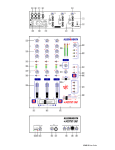
Connectors and Panel Controls
1 MIC input 2x XLR. Plug in one or two microphones for the DJ and/or MC. Use a rugged cardioid
dynamic type intended for vocals. Do not use phantom powered microphones. Make sure you connect
using good quality balanced microphone cables.
2 INPUT A Dual RCA phono. Plug in your stereo music sources. This input can be switched for
RIAA equalised turntable or non-equalised sources such as CD.
3 INPUT B Dual RCA phono. Plug in additional line level stereo sources such as CD, MD, DAT,
drum machines, keyboards or other instruments. Do not connect turntables which require RIAA
equalisation.
4 INPUT SELECT switch Selects either PHONO or LINE input source. Press for LINE, release for
PHONO. For turntables with magnetic cartridges requiring RIAA equalisation select PHONO. For nonRIAA turntables select LINE instead. For other non-RIAA sources such as CD select LINE. These
switches are positioned on the rear panel to prevent accidental operation during performance.
Do not plug in line level sources with PHONO selected as these will overload the preamp and
cause severe high level distortion.
5 CHASSIS earth A screw terminal is provided for connecting the earth straps from turntables. This
connection earths (grounds) the metal parts of the turntable to reduce hum, buzz or similar audible
noise getting into the system. Make sure the terminal is fully tightened once the strap is in place.
6
EFFECT send and return 2x dual TRS jack. Selecting a channel EFFECT LOOP ON switch
routes its signal out of the EFFECT SEND sockets to an external effects processor such as delay or
sampler unit instead of direct to the mix. The processed signal is returned to the mix through the
EFFECT RETURN sockets. Plug in your favourite line level effects processor. With nothing plugged in
the channel send is automatically routed through switching contacts in the return sockets back to the
mix.
7 LEFT and RIGHT MIX output 2x XLR. This is the main stereo output that feeds the house PA.
The output is electronically balanced so it can drive long cable runs to balanced equipment without
interference pickup. It can also be wired to connect to unbalanced equipment.
8 LINK (BOOTH) output Dual RCA phono. This additional stereo output is derived from the main
mix and can be used in several different ways. You can link consoles together, for example when battle
mixing by connecting it to the LINK input on the next XONE:02. You can record your performance by
connecting to a 2-track recorder such as MD or DAT. You can feed an independent DJ’s local monitor
by connecting it to a booth amplifier input. You can provide a separately controlled zone output.
9 LINK input Dual RCA phono. Stereo line input that connects directly to the main mix. It is not
affected by the VCA MASTER LEVEL or any other control. Use this input when linking another console
to the XONE:02.
10 POWER ON switch This rear panel push switch turns the console on or off.
To avoid loud thumps or damage to your speakers always turn amplifiers off before turning the
console or other equipment in the signal chain on or off. Turn amplifiers on last and off first.
11 MAINS input IEC socket. Plug the AC mains supply in here. A country dependent mains lead
with moulded plug is provided with the console.
Ensure the local mains voltage is within the range specified on the panel and that the connection
is correctly grounded.
12 FUSE This is the mains input protection fuse for the internal power supply. In the unlikely event
of it failing make sure you replace it with the same type and rating. If the replacement fails get the
console checked by your service agent.
13 MIC level controls Trims the gain of each input preamp to match the connected microphone to
the operating level of the console. Turn back the level control If the PEAK indicator flashes. The two
mic inputs have independent level control and sum together into the equaliser.
14 MIC EQ The equaliser provides three controls to let the DJ adjust the tone of the microphone
either to enhance the sound or to deal with problems such as acoustic feedback. HI and LO have a
shelving response that boosts or cuts the high (treble) or low (bass) frequencies. Use HI boost to add
vocal ‘bite’ around 6.5kHz, cut to reduce harshness or high frequency feedback. It is best to use the
120Hz LO cut to reduce the popping effect when speaking close to a dynamic mic. MID has a bell
shaped response that boosts and cuts frequencies around 2.5kHz which helps to enhance vocal
intelligibility or control feedback.
XONE:02 User Guide
7
15 EFFECT switch Press this switch to route the mic signal through the effects loop instead of direct
to the mix. This lets you send the signal to an external processing device such as a sampler or echo
unit before returning it to the mix.
16 MIC ON switch Use this to turn the mic signal on or off. The green indicator lights when the mic
is on.
17 MIC PEAK indicator Lights to warn you when the mic signal is within 6dB of clipping. Turn back
the MIC LEVEL control if it lights.
18 CHANNEL INPUT level controls Independently adjusts the level of the INPUT A and INPUT B
signals for each stereo channel. Adjust these so that the CUE meters read around ‘0’ with loudest
moments around ‘+6’. If the red ‘PEAK’ indicators light then turn back the level control.
19 REVERSE switch Reverse the CH1 and CH2 inputs to move the signal to the opposite channel
controls. This effectively puts the crossfader into hamster mode and gives the DJ even greater
performance flexibility.
20 EFFECT LOOP switch Use this during performance to toggle the effect in or out for the channel.
This routes the music signal to an external signal processor to add effects such as sampler or echo
before returning it to the mix.
21 Channel EQ The equaliser has three controls to let the DJ creatively alter and shape the sound
during live performance. The music frequency spectrum is divided into 3 bands. HI (10kHZ) has a
shelving response and affects the high frequency (treble) sounds, MID (1kHz) has a peak/dip bell
shaped response and affects mid range (presence) sounds, and LO (100Hz) has a peak/dip bell shaped
response and affects low (bass) sounds. The HI and LO bands feature sharp 12dB/octave response
which enhances their effect on the music. This type of equaliser is known as ‘asymmetric’ because the
amount of boost and cut is not the same. Boost is restricted to a safe +6dB to highlight selected sounds
while preventing system overload through heavy use. Cut on the other hand, is increased to a huge –
26dB to completely suck out affected frequencies dramatically changing the effect. Use cut rather than
boost to create your dramatic performance effects.
22 VCA PAN slider Adjusts the balance between the channel left and right stereo signals. Each
side ranges from fully off to fully on. The control has unity gain in the centre equal and extreme full on
positions. At the extreme ends the opposite signal is fully off. This slider can be used to create
dramatic panning effects during performance.
23 TRANSFORM switch This hard wearing control lets you create cut effects by instantly muting the
music signal. Flick the switch lightly with the fingers in time to the beat to create the popular ‘transform’
or ‘stutter’ effects. The switches can be repositioned upside down or sideways to suit the preference of
the DJ.
24 Channel FADER Also known as the ‘up fader’ this controls the music level from fully off to on. It
is used by the DJ to select the channel to the crossfader and as a performance control to create exciting
finger operated effects. Long life is assured as the XONE:02 uses high quality dual rail gold contact
faders together with VCA circuitry which means that no audio is passed through the fader itself. Its
response can be finely tuned to the mixing style of the DJ using the CONTOUR and REVERSE
functions 36 . It can be easily replaced if it becomes damaged or worn through exceptional mechanical
operation.
25 Channel METER When the CUE switch 30 is in its up position these meters display the CH1
and CH2 signal levels. The left and right signals are summed to display the channels in mono. When
pressed the meters display the left and right main mix outputs instead. Each meter has 12 LEDs to
indicate signal levels from a low –30dB. Green and yellow LEDs indicate normal operating levels. The
top red PEAK led lights at +15dB giving you plenty of warning that you are within 7dB of clipping. Meter
‘0’ represents +4dBu at the XLR outputs. The meters are peak responding with a fast attack and are
therefore able to display fast transients accurately. This makes it easier to keep track of the highest
levels and transient peaks.
Do not operate the console with these meters lighting red more than the occasional flash.
Failure to observe this can result in severe signal distortion which may damage equipment.
26 CROSSFADER The crossfader lets you smoothly fade from one track into another using a single
fader. It is also used as a creative performance tool to layer or interact between two sounds when cut
or scratch mixing. It can be easily replaced if it becomes damaged or worn through exceptional
mechanical operation. Long life is assured as the XONE:02 uses a high quality dual rail gold contact
crossfade type together with VCA circuitry which means that no audio is passed through the fader itself.
The response of the crossfader can be adjusted to match your mixing style using the CONTOUR and
REVERSE controls 37 .
8
XONE:02 User Guide
27 VCA MASTER level A rotary master control adjusts the output level feeding the house PA. This
is a stereo control which adjusts the left and right signals at the same time. It affects the stereo MIX and
booth / link outputs. Note that it does not affect the cue signal feeding the headphones. The maximum
position represents unity (0dB) gain. If you find yourself normally setting the control in the lower part of
its travel then the connected equipment may be too sensitive for the operating level of the console.
With the control set to its maximum position adjust the input level trim of connected equipment for the
loudest level allowed.
In a club or similar installation strict sound level and noise regulations may apply. Check that
your system levels are set up to comply.
28 BOOTH / LINK OUT level Adjusts the level of the signal to the stereo booth monitor or level
feeding another console when linking. It is affected by the VCA MASTER level control. It does not
affect the level in the headphones.
29 Power indicator The cool blue LED lights when the console is powered.
30 CUE / MIX switch In its normal up position the output of the CUE fader is sent to the stereo
headphones. The meters display the CH1 and CH2 signals summed in mono. When pressed the MIX
output signal is sent to the headphones and the stereo signal displayed on the meters. Use the
CUE/MIX switch and CUE fader to check and preview your mix before going live.
31 PHONES MUTE switch Turns off the signal to the headphones. Use this when you want to
check the sound of the house or booth system without distraction from the headphones. The red LED
lights when the signal is muted.
32 PHONES LEVEL control Adjusts the level of the signal in the stereo headphones. This does not
affect the level of the booth monitor.
WARNING: Some headphones are more sensitive than others and can produce higher output
levels. To avoid damage to your hearing start with the level control at minimum and turn up only
as much as is needed to maintain comfortable listening level. Do not drive headphones at high
listening levels for long periods of time.
33 CUE slider This affects what you hear in the headphones when the CUE/MIX switch is in its up
position. When fully left only the CH1 signal is routed. When fully right only the CH2 signal is routed.
Move the slider to hear the effect of mixing or cross fading the signals. This lets you preview the mix in
your headphones before going live. It does not affect the booth or house mix.
34
Top panel The top panel can be removed to allow fader access and repositioning of the
TRANSFORM switches. This is done by removing fader knobs and the 8 fixing screws.
35 Mounting holes Use these to fix the XONE:02 into a plinth, rack or other equipment furniture.
Note the dimensions in the specification section later in this user guide. M6 pan head screws with
protective plastic cups are recommended.
36 CROSSFADE REVERSE and CONTOUR controls The REVERSE switch swaps the X and Y
sides of the crossfader so that CH1 feeds the right side and CH2 feeds the left side. It is also known as
the ‘hamster’ effect. The CONTOUR control varies the law of the crossfader from a gentle fade with
6dB dip at centre position to a very sharp fade where full level is achieved just a few millimetres from
the end stop. These controls can be adjusted to suit the DJ’s preference or mixing style and further
enhance the creative performance flexibility of the XONE:02.
37 CHANNEL FADER REVERSE and CONTOUR controls These provide the same function as the
crossfade controls described above. The advanced VCA circuitry enables long life reliability and the
ability to fine tune the response of the performance controls to your exact needs.
38 PHONES socket This output is positioned on the front panel so that the DJ can plug favourite
headphones in without needing access to the rear. Headphones are available in many different styles,
impedances and volume ratings. To get the best from your system we recommend that you use high
quality closed-ear headphones around 70 ohms impedance, although 30 to 600 ohms will work. 8 Ohm
headphones are not recommended. Avoid using mini-jack to ¼” jack adapters as these may quickly
prove unreliable.
XONE:02 User Guide
9