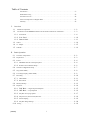
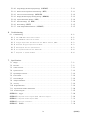
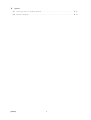
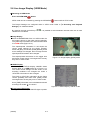
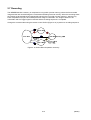
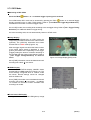
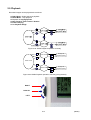
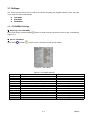
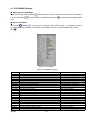
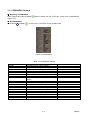
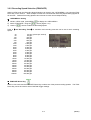
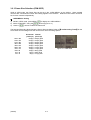
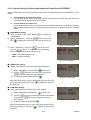
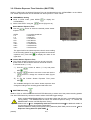
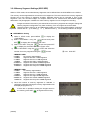
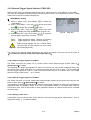
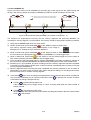
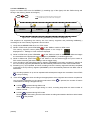
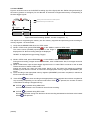
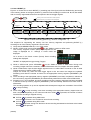
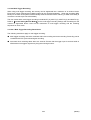
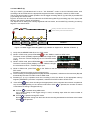
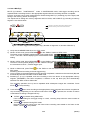
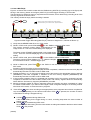
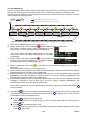
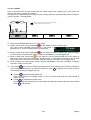
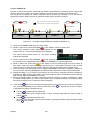
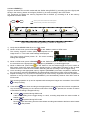
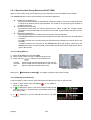
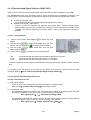
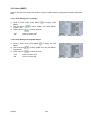
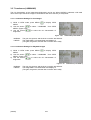
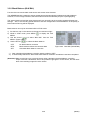
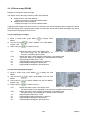
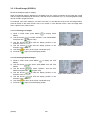
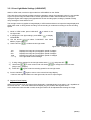
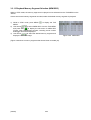
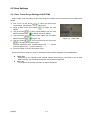
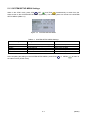
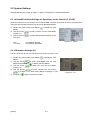
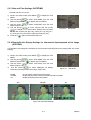
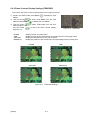
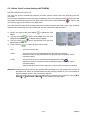
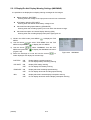
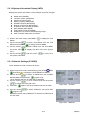
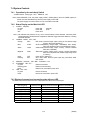
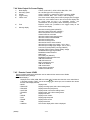
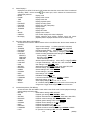
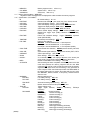
1
800200 User's Manual High Speed Digital Camera System GX-5 Model ST-769 June 2009 nac Image Technology, Inc. (00200) -1- -2- (00150) Introduction The MEMRECAM GX-5 is designed to analyze images moving at speeds not visible to the naked eye. The MEMRECAM GX-5 has an unitized configuration with an IC memory as the storage medium and the camera head structure that it divided and so is a high speed digital camera that possesses the identical compact nature of a high speed film camera, the same immediate playback function of a high speed video camera, and can handle the digital data from all of the images after recording. The MEMRECAM GX-5 easily performs the high speed photography necessary for high speed techniques. Photography and analysis without the use of a computer is possible with the included software containing the functions of remote operation from a computer with the simple operation of the included remote controller, image storage to a USB compatible external storage medium using the USB port and live image display using the viewfinder or monitor. The MEMRECAM GX-5 is designed for high speed and superior image quality requirements. Photography at a resolution of 640 x 480 pixels is possible with a photographic speed of 1,000 frames per second. High speed photography is possible up to 100,000 frames per second (32(H) x 16(V)) using a split frame. Also, high speed image transmission to the control computer can be performed according to the high speed network (10BASE-T, 100BASE-TX, 1000BASE-T). The MEMRECAM GX-5 performs high speed photography in demanding test environments, and is compact, durable, vibration and shock resistant, as well as possessing properties resistant to magnetism. This user's manual provides the specifications, operating methods, interface with peripheral equipment and system expandability information to use the MEMRECAM GX-5 with these features. Trademark MEMRECAM is a registered trademark of nac Image Technologies, Inc. (00200) -1- (00200) Read Before Using Safety Precautions To ensure safe use of this device, please completely read all of these following precautions before use. When using this device, the following symbols and warnings are displayed for areas where particular caution is necessary for safety. If there is a safety alert symbol within the description, please read the warning carefully before beginning operation. There may be unexpected problems due to conditions and circumstances of use of the device that are not listed below. Please carefully read all of the user's manual for the device. Directly contact the retail outlet if there are questions about this device. DANGER This indicates the existence of an imminently dangerous situation that could result in death or serious bodily injury to the user if the precaution is not observed. WARNING This indicates the existence of a potentially dangerous situation that could result in death or serious bodily injury to the user if the precaution is not observed. CAUTION This indicates the existence of a potentially dangerous situation that could result in slight bodily injury or moderate damage to the user if the precaution is not observed. This warning sign indicates a warning relating to faulty operation and the existence of areas where there is concern of damage to this device or connected devices. (00200) -2- Handling Precautions Safety alert symbol This is a「Safety Alert Symbol」. This symbol is intended to alert the user of items or operations that could be dangerous to oneself or others during the use of this device. Carefully read the messages accompanying this symbol and follow the instructions to safely use this device. Grounding terminal symbol This symbol is displayed in areas with grounding terminals. If not grounded, electrical shock may occur when metal or other parts of the device are contacted. Do not ground, due to the dangers involved. If a 3P-2P conversion plug is used to connect to the power outlet, connect the grounding wire of the conversion plug to the grounding terminal. High voltage warning symbol This symbol is displayed in areas of dangerously high voltage. Remove the power cable from the outlet when replacing fuses. Do not remove the cover of this device. Electrical shock could occur if this device is handled with the cover removed even if the power switch is OFF. -3- (00200) Precautions for Use Caution Verify Power Input Power input to the system should be AC 100~240V/47~63Hz when using the AC adapter enclosed, and DC20~32V when using DC power or batteries. Please verify power voltage, frequency and polarity prior to connecting to power. Caution Operating Environment ・Use in locations where the ambient temperature is 0~+40°C and the RH is 30~80%. Use where there is no condensation. ・Store where the ambient temperature is -10~+60°C and the RH is 20~80%. Store where there is no condensation. ・Avoid using in locations with smoke, corrosive gases or strong magnetism. ・Do not store in locations subject to direct sunlight, rain or salt water. ・Do not use in locations with excessive dirt, dust, sand or moisture. Caution Vibration and Shock The MEMRECAM GX-5 is a model designed and manufactured to withstand strong vibration and shock, and may be installed in vehicles. However, please take the following precautions. ・The vibration and shock resistant properties are only present in the DRP unit and the camera head unit. There are no vibration and shock resistant properties present in the AC adapter or JPAD3. Please visit your retail outlet to purchase power sources and lenses with vibration and shock resistant properties. ・If connecting a cable to the connector of the main camera unit, all of the connectors will have shock and vibration resistant properties. ・There are ten M10 screw openings on the back of the camera for use when installing attachments with vibration and shock resistant properties to the main camera unit. (00200) -4- Caution Handling the DRP Unit The inside of the DRP unit contains parts that are precisely manufactured and installed. Please keep the screws in the DRP cover tightened and do not open the cover under any circumstances (even if the DRP unit does not operate properly). It may not be possible to recover the functions of the camera. Caution Generation of Heat Heat will be generated during operation of the system but it will not interfere with operation. If an abnormal amount of heat is generated, turn off the power and unplug from the outlet. Directly contact the retail outlet or this company. Caution Handling the Lens Mount Remove the lens or cap on the lens mount of the camera to view the camera contents. Do not touch or place items inside. This could damage the optical system, and any dust could adversely affect the image. Caution Handling Cables Turn the power off while connecting or removing cables. With the power still on, connecting or removing cables could result in a malfunction, or electrical shock. Do not put metal parts into the connectors. Caution Handling the Battery The MEMRECAM GX-5 is equipped with a standard memory backup battery so do not place in direct sunlight in vehicles, near fire, on the stove or any location with high temperatures. The battery could leak and adversely affect performance of the battery of its life. Do not use the memory backup batteries for any other purpose. The battery could leak, generate heat or malfunction. Contact a retail outlet for replacement memory backup batteries. Caution Handling When Moving or Transporting Use the special carrying case for this product when moving or transporting. -5- (00200) Caution Amplification of Sensor Noise The temperature of the image sensor used in this product alters the screen noise. This noise has a pattern that differs from the stationery pattern noise for each sensor. In this product, noise reduction is performed by correcting the temperature changes as well as the stationery pattern noise for the sensor. If a finer image quality is desired, adjust the black balance immediately prior to photographing. (Cf. 3-48 3.3.8 black balance) Depending on the conditions and circumstances of use of the device, there may be malfunctions other than those listed above. Please carefully read all of the user's manual for the device. Directly contact the retail outlet if there are questions about this device. Parts to be Replaced on a Regular Basis ・Clock Battery The clock battery will last for approximately 8 years. Replacement cannot be made by the user so please contact the retail outlet or this company. ・Memory Backup Battery Please replace the memory backup battery approximately one year after purchase. If the discharge rate accelerates or if there are differences in amount of use, please replace immediately. Replacement cannot be made by the user so please contact the retail outlet or this company. Warranty The warranty period for the MEMRECAM GX-5 is for one year after delivery. For details, refer to the attached warranty. (00200) -6- Table of Contents Introduction ····························································· -1Read Before Using ······················································· -2Precautions for Use ······················································· -4Parts to be Replaced on a Regular Basis ········································ -6Warranty ······························································· -6- 1.Overview 1.1 Standard Components ························································· 1‐2 1.2 The Exterior of the MEMRECAM GX-5 & the Name and Function of Each Part ············· 1‐3 1.2.1 Front Panel ······························································ 1‐4 1.2.2 Side Panel ····························································· 1‐10 1.2.3 Camera Head ···························································· 1‐11 1.3 Cables······································································ 1‐14 1.4 AC Adapter ·································································· 1‐15 1.5 GXLink ···································································· 1‐16 2.Basic Operation 2.1 The Flow of Operations ························································· 2‐2 2.2 Preparations ································································· 2‐3 2.3 Power······································································ 2‐4 2.3.1 MEMRECAM GX-5 Startup Sequence ········································· 2‐4 2.3.2 Remote Control JPAD3 Startup ··············································· 2‐6 2.4 Camera Configuration Setup ···················································· 2‐7 2.5 Stop (STOP Mode) ···························································· 2‐8 2.6 Live Image Display (VIEW Mode) ················································ 2‐9 2.7 Recording ··································································· 2‐10 2.7.1 ARM Mode ······························································ 2‐11 2.7.2 REC Mode ······························································ 2‐12 2.8 Memory Backup ······························································ 2‐13 2.9 Playback ···································································· 2‐14 2.9.1 PLAY Mode - Single Sequence Playback ······································ 2‐15 2.9.2 LOOP Mode - Loop Playback ··············································· 2‐16 2.9.3 Playback at Varying Speeds ·················································· 2‐17 2.9.4 Skip Forward, Fast Forward, Rewind ··········································· 2‐18 2.9.5 Frame Jumping ··························································· 2‐19 2.9.6 Playback Range Settings ···················································· 2‐20 2.10 (00200) Saving ···································································· 2‐22 i 3.Recording and Playback Settings 3.1 Settings····································································· 3‐2 3.1.1 TOP MENU Settings ························································ 3‐2 3.1.2 SYS MENU Settings ························································ 3‐3 3.1.3 VIEW MENU Settings ······················································· 3‐4 3.2 Recording Settings ···························································· 3‐5 3.2.1 Trigger Timing Selection (TRIGGER) ··········································· 3‐5 3.2.1.1 Start Trigger ······················································· 3‐6 3.2.1.2 Center Trigger ······················································ 3‐6 3.2.1.3 End Trigger ························································ 3‐6 3.2.1.4 Custom Trigger ····················································· 3‐7 3.2.2 Recording Speed Selection (FRM RATE) ········································· 3‐8 3.2.3 Frame Size Selection (FRM SIZE) ············································· 3‐9 3.2.4 Custom Settings for Recording Speed and Frame Size (CUSTOM F) ···················· 3‐10 3.2.5 Shutter Exposure Time Selection (SHUTTER) ····································· 3‐11 3.2.6 Recording Bit Length Settings(DEPTH) ········································· 3‐12 3.2.7 Initial Value Settings for the Recorded Scene Number (SCENE) ······················· 3‐12 3.2.8 Memory Segment Settings (SEG SIZE) ········································· 3‐13 3.2.9 External Trigger Signal Selection (TRIG SEL) ···································· 3‐14 3.2.9.1 External Trigger Signals from TRIG1 ································ 3‐14 3.2.9.2 External Trigger Signals from TRIG2 ································ 3‐14 3.2.9.3 Setting Of The Filter Value ··········································· 3‐14 3.2.10 Recording Method Selection (REC MODE) ······································ 3‐15 3.2.10.1 AUTO Mode ······················································· 3‐15 3.2.10.2 LOOP Mode ······················································· 3‐16 3.2.10.3 Setting Record Mode ················································ 3‐16 3.2.10.4 Normal Recording ·················································· 3‐17 3.2.10.5 Burst Recording ···················································· 3‐20 3.2.10.6 Multi Trigger Recording ············································· 3‐24 3.2.10.7 Event Recording ··················································· 3‐29 3.2.11 Synchronized Timing Selection (SYNC TIME) ··································· 3‐33 3.2.11.1 Setting Method ···················································· 3‐33 3.2.11.2 IRIG Synchronized Time ············································ 3‐33 3.2.12 Synchronized Signal Selection (SYNC SEL) ····································· 3‐34 3.2.12.1 Setting Method ···················································· 3‐34 3.2.12.2 Synchronized EST Signal Recording ···································· 3‐34 3.2.13 External Input/Output Signal Polarity Selection (SIG SET) ························· 3‐36 3.2.14 Setting Of The Trigger Filter (TRIGFLT) ····································· 3‐37 3.2.15 Setting Of The EST Filter (EST FLT) ········································ 3‐38 3.2.16 Setting Of The Time Stamp Record(TIMSTAMP) ································ 3‐39 ii (00200) 3.2.17 Exposure Time Selection (EXP TIME) ········································· 3‐40 3.3 Live Image ・Playback Image Settings············································· 3‐41 3.3.1 Gain (GAIN) ····························································· 3‐41 3.3.2 Enhance (ENHANCE)························································ 3‐42 3.3.3 Gamma (GAMMA) ·························································· 3‐43 3.3.4 Chroma (CHROMA) ························································· 3‐44 3.3.5 Knee (KNEE) ····························································· 3‐45 3.3.6 RGB Matrix (RGB COR.)··················································· 3‐46 3.3.7 Luminance (LUMINANC) ··················································· 3‐47 3.3.8 Black Balance (BLK BAL) ··················································· 3‐48 3.3.9 White Balance (WHT BAL) ·················································· 3‐49 3.3.10 Zoom Image (ZOOM) ····················································· 3‐50 3.3.11 Scroll Image (SCROLL) ··················································· 3‐51 3.3.12 Low Light Mode Settings (LOWLIGHT)········································ 3‐52 3.3.13 Playback Memory Segment Selection (MEM SEG)································ 3‐53 4.Save Settings 4.1 Items That Can Be Set ·························································· 4‐2 4.1.1 SAVE MENU Settings ······················································· 4‐2 4.2 Save Settings ································································ 4‐3 4.2.1 Save Frame Range Settings (SAVE FRM) ········································ 4‐3 4.2.2 Save Method Settings (SAVE SET)············································· 4‐4 4.2.3 Saving Video Files (MCFF) ·················································· 4‐5 4.2.4 Saving Still Image Files (YC TIFF) ············································ 4‐5 5.System Settings 5.1 Items That Can Be Set ·························································· 5‐2 5.1.1 TOP MENU Settings ························································ 5‐2 5.1.2 SYS MENU Settings ························································ 5‐3 5.1.3 SYSTEM SETUP MENU Settings ················································ 5‐4 5.2 System Settings······························································· 5‐5 5.2.1 Allowed/Prohibited Settings for Operations on the Control PC (LOCK) ·················· 5‐5 5.2.2 ID Number Settings (ID) ··················································· 5‐5 5.2.3 Date and Time Settings (DATETIME) ··········································· 5‐6 5.2.4 Display/Do Not Display Settings for Information Superimposed on the Image (OSD DISP)··· 5‐6 5.2.5 Display/Do Not Display Settings for Information Superimposed on the Image (OSD MODE)·· 5‐7 5.2.6 Display/Do Not Display Settings for trigger time on the Image (OSD TIME) ·········· 5‐7 5.2.7 Display/Do Not Display Settings for the Center Mark of the Image (CAFM DIS) ·········· 5‐8 5.2.8 Frame Counter Display Settings (FRM DISP) ···································· 5‐9 5.2.9 Selection of the Frame Time Standard (FRM TIME) ······························· 5‐10 (00200) iii 5.2.10 Image Display/Do Not Display Settings (VIDEOOUT) ····························· 5‐11 5.2.11 Remote Control Operation Sound Settings (BEEP) ······························· 5‐11 5.2.12 Auto View Function Settings (AUTOVIEW) ····································· 5‐12 5.2.13 Display/Do Not Display Warning Settings (WARNING) ···························· 5‐13 5.2.14 System Information Display (INFO)·········································· 5‐14 5.2.15 Network Settings (IP ADDR) ··············································· 5‐14 5.2.16 Reset Settings (RESET) ··················································· 5‐15 5.2.17 Video Output Method Selection (VIDEOOUT) ··································· 5‐15 6.Troubleshooting 6.1 Troubleshooting ······························································ 6‐2 6.1.1 The VIEW Mode Cannot Be Accessed ········································· 6‐2 6.1.2 The ARM Mode Cannot Be Accessed ·········································· 6‐2 6.1.3 Trigger Input Does Not Work with the Remote Control JPAD3 ················· 6‐3 6.1.4 External Trigger Input Does Not Work ····································· 6‐3 6.1.5 EST Signals Are Not Synchronized ········································· 6‐3 6.1.6 Not Synchronized with the IRIG Time ······································ 6‐4 6.1.7 Response to System Crashes ·············································· 6‐4 7.Specifications 7.1 Imager ····································································· 7‐2 7.2 Recorder ···································································· 7‐6 7.3 Video Converter ······························································ 7‐11 7.4 System Control ······························································· 7‐12 7.5 Input/Output Connector························································· 7‐19 7.6 Environment ································································· 7‐23 7.7 Size and Weight ······························································ 7‐23 7.8 Adaptive Standards ···························································· 7‐23 7.9 Accuracy ··································································· 7‐23 7.10 Replaceable Parts ···························································· 7‐23 7.11 Specifications of Main Attachments ·············································· 7‐24 7.12 Exterior Diagram ···························································· 7‐25 APPENDIX A Trigger ······························································ 7‐28 APPENDIX B Exposure Start Signal (EST) and Event Signal ·························· 7‐29 APPENDIX C Exposure Pulse Output (EPO) ·········································· 7‐31 APPENDIX D Discrete Interface ··················································· 7‐33 APPENDIX E IRIG-B······························································ 7‐36 iv (00200) 8.Options 8.1 Specifications of the Main Options ··········································· 8‐2 8.2 Exterior Diagram ···························································· 8‐4 (00200) v (Blank Page) vi (00200) 1 Overview (00200) 1-1 1.1 MEMRECAM GX-5 Components The MEMRECAM-GX-5 high speed digital camera system is comprised of the following components. Table1-1a Standard Components Name of Part Model Quantity MEMRECAM GX-5 DRP (Digital Recording Processor) V-338 1 Simple J1 Cable (TRIG 1 only) 584592 1 Simple J2 Cable (Viewfinder, J-Pad 3, USB only) 584258 1 Simple J3 Cable (Ethernet only) 584260 1 Video BNC Conversion Cable (0.2m) 584254-2 1 Table1-1b Optional Components Name of Part Model Full Wired J1 Cable (GX1 Power, TRIG 1, EST, ARM & FAULT) 584353 Full Wired J2 Cable (Viewfinder, J-Pad 3, USB & ARM Command in) 584355 Full Wired J3 Cable (Ethernet, EST, IRIG, TRIG 2 (Photo-isolation & EPO) 584357 Viewfinder Monitor 584367 AC Adapter for GX-5 (with or without American type AC plug) 584541-1 MEMRECAM GX5 Micro Camera Head w/ 5m Cable (see photo below) 584543 MEMRECAM GX5 Micro Camera Head w/ 60cm Cable (see photo below) 584759 MEMRECAM GX5 4m Camera Extension Cable 584621 Mounting Bracket for Micro Head, SS 4H2207-1 Mounting Bracket for Micro Head, SA & AS 4H2207-2 Mounting Bracket for Micro Head, AA, AR 4H2207-3 Hi-G Battery, 24VDC, 7.5Ah for GX-5 3H1058 MEMRECAM GX J-Pad 3 Remote Control Unit 584028 584541-2 MEMRECAM GX-5 Micro Camera Heads SS – Straight Head, Straight Connector AS – Angled Head, Straight Connector SA – Straight Head, Angled Connector AA – Angled Head, Angled Connector AR – Angled Head, Return-angled Connector 1-2 (00200) 1.2 Exterior The exterior of the MEMRECAM GX-5 DRP is shown below (Figure 1-1). Figure 1-1 MEMRECAM GX-5 DRP exterior (00200) 1-3 1.2.1 Front Panel The front panel of the MEMRECAM GX-5 DRP is shown below (Figure 1-2). The current status for each port and the camera head connected to it is displayed on the front panel by eight PORT LED. In addition the status for the DRP is displayed by the STATUS LED. A maximum of eight cameras can be connected to the GX-5. STATUS LED CAMERA PORT & PORT LED POWER SWITCH I/O CONNECTOR Figure1-2 MEMRECAM GX-5(Front Panel) 1-4 (00200) 1) Input/Output Connector There are four input/output connectors on the front panel. The input/output signals and cable connections for each connector are shown below (Table 1-2). Table1-2 Input/Output Signals and Cable Connections Name of Connector Name of Branch Connector J1 (TRIG&STATUS) TRIG1 EST1 (※1) ARM-O (※1) FAULT (※1) ID color: Yellow VF J2 (VF&J-PAD) JPAD ID color: Green J3 (REMOTE) ID color: Blue PWR Input/Output Signal Falling trigger input – Contact Closure / TTL External(TRIG1) Start Exposure signal input(EST1) ARM Status output FAULT Status output Video signal output DC24V output (VF power) RS232C(Remote Control JPAD3 connection) USB ARM-I (※2) DC24V output (JPAD3 power) USB (USB compatible storage media connection) ARM Command input (ARM-I) ETHER TRIG2 (※3) EST2 (※3) IRIG-B (※3) EPO (※3) PWRCNT (※3) Ethernet (control PC connection) External trigger input (TRIG2) Start Exposure signal input / event input (EST2) IRIG-B time code input (IRIG-B) Exposure panel output (EPO) Remote Power Control signal input (PWRCNT) Power Input (DC 24V) (※1) (※2) (※3) Full Wired J1 cable (optional) required. Full Wired J2 cable (optional) required. Full Wired J3 cable (optional) required. 1. EST1 Input When the MEMRECAM GX-5 is set to EST1 mode, the Exposure Start Signal is synchronized to the input signal received on the Full Wired J1 cable, branch P11 (EST1) from an external pulse generator. Please refer to / 7 / Specifications / APPENDIX B - Exposure Start Signal (EST) and Event Signal / for additional details. 2. EST2 Input When the MEMRECAM GX-5 is set to EST2 mode, the Exposure Start Signal is synchronized to the input signal received on the Full Wired J3 cable, branch P32 (EST2) from an external pulse generator. Please refer to / 7 / Specifications / APPENDIX B - Exposure Start Signal (EST) and Event Signal / for additional details. 3. ARM Command Input The MEMRECAM GX-5 will enter ARM mode when a signal is supplied to the Full Wired J2 cable, branch P20 (ARM-I). Please refer to / 7 / Specifications / APPENDIX D - Discrete Interface/ for additional details. 4. IRIG-B Input When the MEMRECAM GX-5 is set to IRIG-B Synchronous mode, the camera is synchronized to the input signal received on the Full Wired J3 cable, branch P33 (IRIG-B) from an IRIG time clock generator. Please refer to / 7 / Specifications / APPENDIX E IRIG-B / for additional details. 5. Power Control Signal Input When the power switch on the MEMRECAM GX-5 front panel is set to REMOTE the camera can be turned ON and OFF remotely via the Full Wired J3 branch cable, branch P36 (PWRCNT). With the circuit open (HI) the power is ON. When there is a short or LOW signal the power is turned OFF. Please refer to / 7 / Specifications / APPENDIX D - Discrete Interface/ for additional details. (00200) 1-5 2) Status LED There are five status LEDs on the front panel showing the status of the MEMRECAM GX-5. The color displayed for each LED and the flashing status changes according to the change in status. (Table 1-3). Table 1-3 LED Status Display LED Name Color and Flashing Status MEMRECAM GX-5 Status UB (USB) Lit green ET (ETHERNET) Lit green Flashing green Not lit Lit blue Lit white Connected to USB compatible storage media Not connected to USB compatible storage media, or Power OFF Connected to network Communicating with network Not connected to network or Power OFF STOP mode VIEW mode VIEW mode (during EST synchronized signal recording) ARM mode ARM mode (during EST synchronized signal recording) REC mode REC mode (during EST synchronized signal recording) Power OFF Power ON (normal status) Power ON (fail status (※1) ) Power OFF Valid memory backup, Charge: High (backing up with external power) Valid memory backup, Charge: High (backing up with battery) Valid memory backup, Charge: Medium (backing up with external power) Valid memory backup, Charge: Medium (backing up with battery) Valid memory backup, Charge: Low (backing up with external power) Valid memory backup, Charge: Low (backing up with battery) No memory backup data Not lit flashing white CM (CAMERA MODE) Lit magenta flashing magenta Lit orange flashing orange PW (POWER) Not lit Lit green Lit red Not lit Lit green Flashing green MB (MEMORY BACKUP) Lit orange Flashing orange (※2) Lit red Flashing red Not lit (※1) Fail status: During MEMRECAM GX-5 operation it indicates that a malfunction detected (i.e. abnormal power voltage, increase in the sensor temperature, abnormal trigger signal, etc.) (※2) The charge amount is impacted by differences in batteries and the ambient temperature, and is not precisely displayed. Use only as a guide. 1-6 (00200) 3) Power Switch Operation of the power switch is shown below. It is assumed that the power supply is energized and connected to the MEMRECAM GX-5. 1. When the power switch on the front panel is set to「○」the MEMRECAM GX-5 is turned OFF. 2. When the power switch on the front panel is set to「|」the MEMRECAM GX-5 is turned ON. 3. The「REMOTE」setting on the power switch is used when operating with the GX-HUB (optional) or when controlling remotely via the Full Wired J3 branch cable, branch P36 (PWRCNT). With the GX-Hub connected the power switch on the GX-HUB controls the power setting of the MEMRECAM GX-5 DRP. With an open circuit (HI) on the J3 (PWRCNT) connector the power is ON. When there is a short or LOW signal the power is turned OFF. When not connected to a GX-HUB and the MEMRECAM GX-5 power switch is set to「REMOTE」the DRP turns ON. (00200) 1-7 4) Camera Port , Port LED Always turn the power OFF when connecting and disconnecting camera heads. It is possible to damage the electronics and/or electric shock. Warning The camera heads connect to PORT1-PORT8 respectively and an LED shows the connection status for each port. Each LED lights up and changes color according to changes in status (Table 1-4). Table 1-4 Description of the port LED ① ② ③ ④ ⑤ ⑥ ⑦ ⑧ Display Color and Flashing Status Not lit Flashing green(quick) Flashing yellow(slow) Flashing yellow(quick) Lit yellow Lit green Flashing red(quick) Lit red Readiness to take a picture △ × × ○ × × Connected status of camera head Before Startup During Startup Startup Successful Not Connected Not Connected Startup Successful Startup Failure Startup Failure Status of port Disabled Enabled Disabled Enabled Enabled Disabled NOTE: If the correct camera configuration is set, it is possible to operate a camera connected to a port with the LED Flashing yellow (slowly) “△”. Do not connect the camera with the power turned on. LED - OFF When the MEMRECAM GX-5 is first turned on, all the port LED remain off while the DRP starts up. PORT1 LED : Turn off LED – Flashing YELLOW (Quick) After the DRP completes its initial boot sequence, all the port LED flashes green (quick) when the DRP attempts to start up the camera heads. PORT1 LED : Flashing green(quickly) LED – Flashing YELLOW (Slow) The port LED flashes yellow (slowly) when a camera head is connected to a disabled (invalid) port. It is necessary to perform one of the following. PORT1 ・Change the camera configuration to enable the port. Please refer to / 2 / Basic Operation LED : Flashing yellow(slowly) / 2.4 / Camera Configuration Setup / for additional details. ・Turn off the power and move the camera head to an enabled (valid) port. ・ Turn off the power and disconnect the camera head from the disabled (invalid) port. 1-8 (00200) LED – Flashing YELLOW (Quick) The port LED flashes yellow (quick) when a camera head is not connected to the enabled (valid) port. It is necessary to perform one of the following. PORT1 ・Change the camera configuration to disable the port. Please refer to / 2 / Basic Operation LED : Flashing yellow(quickly) / 2.4 / Camera Configuration Setup / for additional details. ・Turn off the power and connect a camera head to the enabled (valid) port. LED – Lit YELLOW (Solid) When the port is disabled (invalid) and there is no camera head connected to it, the LED remains solid yellow. PORT1 LED : Light yellow LED – Lit GREEN (Solid) When the port is enabled (valid) and there is a camera head connected to it, the LED remains solid green. The port has successfully connected to the camera head and is ready to record. PORT1 LED : light green LED – Flashing RED (Quick) When the port is enabled (valid) but there is a problem communicating with the camera head connected to it, the LED flashes red (quick). PORT1 LED : Flashing red(quickly) LED – Solid When the port is disabled (invalid) and there is a problem communicating with the camera head connected to it, the LED remains solid red. PORT1 Moreover, when the camera configuration setting is done in the state of , LED of the port lights red. (00200) LED : Light red 1-9 1.2.2 Side Panel The MEMRECAM GX-5 side panel (left) is shown below (Figure 1-3). Battery Box (Memory Backup) Figure 1-3 MEMRECAM GX-5 DRP(Side Panel) Battery Box (Memory Backup) The memory backup battery is stored in the battery box on the left side panel. Please refer to / 7 / Specifications / 7.4.6 – Memory Backup/ for additional details. 1-10 (00200) 1.2.3 Camera Head Configurations MEMRECAM GX-5 Micro Camera Heads SS – Straight Head, Straight Connector AS – Angled Head, Straight Connector SA – Straight Head, Angled Connector AA – Angled Head, Angled Connector AR – Angled Head, Return-angled Connector Figure 1-4 Camera Head Type SS Figure 1-5 Camera Head Type SA (00200) 1-11 Figure 1-6 Camera Head Type AS Figure 1-7 Camera Head Type AA Figure 1-8 Camera Head Type AR 1-12 (00200) 1.2.3 Camera Head Sensor The sensor is shown below. (Figure 1-9) Figure 1-9 Sensor Always replace the cap to protect the sensor when the camera head is not in use. Take care to avoid dirt or other contaminants from entering in contact with the Warning sensor. 1.2.3 Camera Head LED There is an LED on the cable end of the camera head that shows its status. LED Not Lit – Power Off (00200) LED RED – Abnormality (Signal: UNLOCK) 1-13 LED GREEN – Normal (Signal: LOCK) 1.3 Cables The Simple Cable Set J1, J2, J3 (Standard) which connects to the front panel is shown below. Please refer to / 7 / Specifications / 7.5 – Input Output/Connector/ for additional details. (J1) Simple Cable (Standard) - TRIG & STATUS TRIG1 (J2) Simple Cable (Standard) - VF & J-PAD ViewFinder (VF) JPAD USB (J3) Simple Cable (Standard) - REMOTE Ethernet 1-14 (00200) 1.4 AC Adapter(Optional) The exterior of the AC Adapter is shown below (Figure 1-13). The output terminal of the AC Adapter has a special plug which connects to the PWR DC 20-32V/4.7-7.5A power connector on the front panel of the MEMRECAM GX-5. The AC input terminal has a 3P plug and connects to an AC100V~240V power source. Figure 1-13 AC Adapter HIGH VOLTAGE. DO NOT OPEN THE COVER. Warning When using a 3P-2P conversion plug to connect to a power outlet that lacks a frame ground, ensure that the grounding wire is connected to an external Warning ground. If not grounded, electrical shock may occur from metal surfaces or other areas of this unit. This AC Adapter is a special part for the MEMRECAM GX-5 and should NOT be used with other devices. Warning (00200) 1-15 1.5 GXLink The control software GXLink is provided on a CD-ROM (Figure 1-14). Please refer to the GXLink User's Manual for additional details. Figure 1-14 Control Software GXLink 1-16 (00200) 2 Basic Operations (00200) 2-1 2.1 The Flow of Operations There are three methods to operate the MEMRECAM GX-5 are as follows. JPAD3 Remote Control GXLink Control Software External Input/Output signals This user's manual describes operation using the JPAD3 Remote Control and the External Input/Output signals are covered in the Specifications section. Fugure 2-1 shows the flow of operations for basic recording, playback and storage. Settings using the JPAD3 are described in Chapters 3, 4 and 5. Please refer to the GXLink User's Manual for additional details in using the GXLink control software. Please refer to / 1 / Overview / 1.2.1 – Front Panel/ Input Ourput Connector/ for additional details on the external input/output signals. Figure 2-1 Flow of operations 2-2 (00200) 2.2 Preparations Always turn the power OFF when connecting and disconnecting camera heads. Warning It is possible to damage the electronics and/or electric shock. Prepare the devices shown in Table 2-1 and connect as shown in Figure 2-2. Table 2-1 Devices to Prepare Part MEMRECAM GX-5 DRP J1 simple cable J2 simple cable J3 simple cable AC adapter Viewfinder Monitor Remote control JPAD3 USB2.0 compatible storage media Control PC Model V-338 584592 584258 584260 584541-1 584541-2 584367 584028 Notes Standard Standard (Used ONLY with MEMRECAM GX-5) Standard Standard Optional (with American type AC Plug ) Optional (without American type AC Plug) Optional Optional Required when using the control software GXLink. MEMRECAM GX-5 (FRONT VIEW) JPAD3 Viewfinder USB2.0 compatible storage media USB P1V1 Camera Head ※ Control PC ETHERNET ※ TRIG1 AC adapter Figure 2-2 Connections for Each Device (00200) Required when saving the recorded image. 2-3 Required when using the control software GXLink. 2.3 Power 1. 2. 3. 4. Connect all the devices to the MEMRECAM GX-5 DRP before turning the power ON. Turn on the AC Adapter (power supply) or connect to a battery if used. Turn the ON/OFF power switch ON The MEMRECAM GX-5 starts up and enters STOP mode. Power OFF Power ON Figure 2-3 ON/OFF SWITCH 2.3.1 MEMRECAM GX-5 Startup Sequence ■Viewfinder Image Display 1. 2. Turn the ON/OFF power switch ON. Ensure that the Viewfinder power switch is turned ON to display the Initial Screen (Figure 2-4). Figure 2-4 Initial Screen 3. After a few moments, the System Information Screen is shown (Figure 2-5). The yellow progress bar shows the camera’s diagnostics sequence status. Figure 2-5 System Information Screen It may take some time to complete the startup sequence and diagnostics. DO NOT turn the power OFF while the progress bar is displayed (Figure 2-5). It is possible for the nonvolatile Warning memory in DRP to be destroyed. 2-4 (00200) 4. After the diagnostics sequence is complete, the MEMRECAM GX-5 enters STOP mode. Nine information areas are superimposed at the top and bottom of the screen (Figure 2-6). Camera Trigger Number Timing Trigger Frame Time Counter Warning Message Memory Camera Playback Recording Segment Number Mode Speed Speed Shutter Exposure Time Figure 2-6 STOP Mode Important If there is an image in memory being protected by the Memory Backup unit during startup, the previously recorded image is displayed. When an image has not been recorded, the image appears as in Figure 2-6 When the camera configuration is correct the system is ready to be used immediately after start up. If the configuration is different than the cameras connected to the DRP, a Warning message is shown. If a warning message appears set the correct camera configuration using the JPAD3 or GXLink. Please refer to / 2 / Basic Operation / 2.4 – Camera Configuration Setting/ for additional details on using the JPAD3 to set the camera configuration. Please refer to the GXLink manual on using GXLink to set the camera configuration. (00200) 2-5 ■DRP Front Panel LED Display 1) After turning the power ON to the MEMRECAM GX-5, the DRP front panel LED will display as shown in Figure 2-7 ① and ② until the automatic diagnostics have been completed. 2) Once the MEMRECAM GX-5 starts up normally and enters the STOP mode, the DRP front panel LED will display that shown in Figure 2-7 ③. Figure 2-7 The DRP Front Panel LED Display at Startup 2.3.2 Remote Control JPAD3 Startup 1) After the MEMRECAM GX-5 power has been turned on, power is supplied to the remote control JPAD3. There is no power switch on the JPAD3 unit. The version information screen is shown on the JPAD3 LCD display. (Figure2-8) Figure 2-8 JPAD3 version information 2) After a few moments, it will switch to the status screen for the STOP mode and the 12 parameters are displayed. (Figure 2-9). Figure 2-9 Status screen (STOP mode) 2-6 (00200) 2.4 Camera Configuration Setup In order to efficiently allocate system memory to each camera connected to the DRP, a camera configuration setup is required every time a camera is added or removed from use with the DRP. The port where the camera head is connected now becomes effective if the setting of the camera configuration is executed, and other ports become invalid. Setup process for the camera configuration is shown in the following (Figure 2-10). MENU to JPAD3, and TOP MENU is opened. 1. Press the MENU key 2. Select the SYS MENU in TOP MENU, press the SET key SET SET 3. Select the SYS SET in SYS MENU, press the SET key 4. Select the CAMCFG in SYS SET, press the SET key confirmation is displayed. Please push the SET key SET , and SYS MENU is opened. , and SYS SET is opened. SET . At this time, the message for the again. After the procedure mentioned above, JPAD3 is rebooted, and the camera constitution of the system is set again. Figure 2-10 Camera Configuration Setup (JPAD3 Display) Important (00200) The image recorded in the memory is destroyed by changing the camera configuration setup. Change the camera configuration only after confirming if it is an image that can be erased. Save the image in memory to an USB storage media or to a PC using GXLink before continuing. Please refer to 【2.10 Saving 】 or 【 GXLink manual 】 for the saving method of an image. 2-7 2.5 Stop (STOP Mode) ■Switching to STOP Mode Press the STOP button. The MEMRECAM GX-5 normally starts up in the STOP mode. If operating in any modes other than STOP press the STOP button to stop operation and return to STOP mode. Recording, playback and storage settings are configured while in STOP mode. Refer to【3 Recording and Playback Settings】and【4 Save Settings】for additional details. By pressing the right and left keys cameras are connected. it is possible to switch between cameras when two or more ■Image Display When the MEMRECAM GX-5 is first turned on the DRP enters STOP mode automatically after the startup sequence is complete. Nine information areas are superimposed at the top and bottom of the screen. The [Status] information box shows that the DRP is in STOP mode. The superimposed information displayed in blue is information related to the image saved in the memory or playback information. “*" are shown when the memory is empty. The memory segment number [SEG] and the playback speed [Play] are shown whether or not there is an image recorded in memory. Important Figure 2-11 Image Display [STOP] mode If there is an image in memory being protected by the Memory Backup unit during startup, the previously recorded image is displayed after start up. ■JPAD3 Display In the JPAD 3 <STATUS> display, <MODE> shows that the DRP is in STOP mode as in Figure 2-12. After startup, if the memory is empty, the factory default settings are shown on the <STATUS> screen. Since [TIME] information cannot be determined until recording has ended “ * " are shown. In addition the range bar is empty because there because there is no image in memory. ■Front Panel LED Display During the STOP mode, the CM LED lights up blue. 2-8 Figure 2-12 JPAD3 Display <STOP> mode (00200) 2.6 Live Image Display (VIEW Mode) ■Switching to VIEW mode Press the VIEW/ARM button. VIEW mode can be accessed by pressing the VIEW/ARM button while in STOP mode. The Record Settings are configured while in VIEW mode. Refer to【3 Recording and Playback Settings】for additional details. By pressing the right and left keys cameras are connected. it is possible to switch between cameras when two or more ■Image Display When the MEMRECAM GX-5 is in VIEW mode, the live image is shown on the video monitor (optional). The [STATUS] information box shows that the DRP is in VIEW mode (Figure 2-13). The superimposed information in red shows the current record settings for the trigger [Trigger], frame rate [Rec] and shutter speed [Shutter]. If the record settings are changed, the live image and the superimposed information also changed. The superimposed information for the trigger time and frame counter remain unchanged from the way they were in STOP mode. Figure 2-13 Image Display [VIEW] mode ■JPAD3 Display In the JPAD 3 <STATUS> display, <MODE> shows that the DRP is in VIEW mode as in Figure 2-14. The current record settings are also shown. If the recording conditions are changed the JPAD 3 <STATUS> information is also changed. The JPAD 3 <STATUS> information for the frame counter [FRAME] and frame time [TIME] remain unchanged from the way they were in STOP mode. Since [TIME] information cannot be determined until recording has ended “*" are shown. Figure 2-14 JPAD3 Display <VIEW> mode ■Front Panel LED Display During the VIEW mode, the CM LED lights up white. (00200) 2-9 2.7 Recording The MEMRECAM GX-5 memory is comprised of a ring buffer (circular memory) where the first recorded image and the last recorded image are connected while being stored to memory. When the recording starts the images are photographed and sequentially stored in the ring buffer (circular memory). After the ring buffer completes one cycle, each subsequent new image is overwritten. The images continue to be overwritten until the Trigger signal is received and the recording sequence is completed. Change the camera modes using the remote control JPAD3 (Figure 2-15) to perform a recording sequence. Figure 2-15 JPAD3 Record operation summary 2-10 (00200) 2.7.1 ARM Mode Warning Before switching to ARM mode verify that the image stored in memory can be erased. Immediately upon switching to ARM mode the image stored in memory is overwritten by the new image being captured. Save the image in memory to an USB storage media or to a PC using GXLink before continuing. Please refer to 【2.10 Saving 】 or 【 GXLink manual 】 for additional information on saving images. ■Switching to ARM Mode Press the VIEW/ARM button. From VIEW mode, ARM mode can be accessed by pressing the VIEW/ARM button on the JPAD3. While in ARM mode the Record Settings cannot be changed. By pressing and the right and left key cameras are connected. it is possible to switch between cameras when two or more ■Image Display When the MEMRECAM GX-5 is in ARM mode, the image being recorded is shown on the video monitor (optional). The [STATUS] information box shows that the DRP is in ARM mode (Figure 2-16). Once recording starts, all of the superimposed information are shown in red. After the trigger signal is received the frame number of the frame being saved is displayed in frame [Frame] information box. Depending on the trigger [Trigger] setting the amount of frames remaining to be recorded after the trigger signal change. Refer to 【3.2.1 Trigger Timing Selection】for additional details. Figure 2-16 Image Display [ARM] mode Since [TIME] information cannot be determined until recording has ended “*" are shown. ■JPAD3 Display In the JPAD 3 <STATUS> display, <MODE> shows that the DRP is in ARM mode as in Figure 2-17. The record settings configured while in <VIEW> mode are shown. Record settings cannot be changed while in ARM mode. Since [TIME] information cannot be determined until recording has ended “*" are shown. In addition "0" is shown for the frame counter <FRAME> until recording has ended. ■Front Panel LED Display During the ARM mode, the CM LED lights up magenta. (00200) 2-11 Figure 2-17 JPAD3 Display <ARM> mode 2.7.2 REC Mode ■Switching to REC Mode Press the TRIG button - or - an external trigger input signal is received From ARM mode, REC mode can be accessed by pressing the TRIG button or an external trigger signal is received on the J1 cable, TRIG1 branch. Refer to【3.2.12 External Trigger Signal Selection】 for additional information on external trigger inputs. Once in REC mode, the recording ends according to the set trigger timing. Refer to【3.2.1 Trigger Timing Selection】for additional details on trigger timing. Once the recording ends, the unit automatically returns to STOP mode. ■Image Display When the MEMRECAM GX-5 is in REC mode, the image being recorded is shown on the video monitor (optional). The [STATUS] information box shows that the DRP is in REC mode (Figure 2-18). After the trigger signal is received the frame number of the frame being saved is displayed in frame [Frame] information box. Depending on the trigger [Trigger] setting the amount of frames remaining to be recorded after the trigger signal change. Refer to 【3.2.1 Trigger Timing Selection】for additional details. Figure 2-18 Image Display [REC] mode Since [TIME] information cannot be determined until recording has ended “*" are shown. ■JPAD3 Display In the JPAD 3 <STATUS> display, <MODE> shows that the DRP is in REC mode as in Figure 2-19. The record settings configured while in <VIEW> mode are shown. Record settings cannot be changed while in ARM mode. Since [TIME] information cannot be determined until recording has ended “*" are shown. In addition "0" is shown for the frame counter <FRAME> until recording has ended. Figure 2-19 JPAD3 Display <REC> mode ■Front Panel LED Display During the REC mode, the CM LED lights up orange. 2-12 (00200) 2.8 Memory Backup Once recording ends, the unit automatically returns to STOP mode. At the same time, the memory backup function activates (Figure 2-20). The status of the memory backup can be verified by the rear panel LED display (Table 2-2). Therefore, in the event that the external power is cut off after the recording is complete, the images saved in the memory are preserved (Figure 2-21). The memory backup function does not operate the camera while recording. CM:Lit blue(STOP mode) PW:Lit green MB:Lit green,orange or red (Valid memory backup) Figure 2-20 Memory Backup with External Power CM:Not lit(Power OFF) PW:Not lit(Power OFF) MB:Flashing green,orange or red (Valid memory backup) Figure 2-21 Memory Backup without External Power Table 2-2 Memory Backup Status Display with MB LED GREEN (Lit) with External Power GREEN (Flashing) with Battery Power GREEN (Lit) with External Power MB LED GREEN (Flashing) (Memory Backup) with Battery Power GREEN (Lit) with External Power GREEN (Flashing) with Battery Power Not lit Valid memory backup, Charge: High Valid memory backup, Charge: High Valid memory backup, Charge: Medium Valid memory backup, Charge: Medium Valid memory backup, Charge: Low (backing up with External Power) Valid memory backup, Charge: Low (backing up with Battery) No memory backup data The amount of charge is impacted by differences in the batteries and ambient temperature. Use the LED indications only as a guide since it may not be precise. Important Warning If the LED color turns from Flashing ORANGE to Flashing RED during battery backup, charge the battery as soon as possible! If the battery is not charge, the battery backup function will de-activate and the images will be lost! Connect the MEMRECAM GX-5 DRP to a reliable external power source (e.g. AC adapter). Do no rely on an external battery power source. (00200) 2-13 2.9 Playback Recorded images can be played back as follows: PLAY Mode - Single sequence playback LOOP Mode - Loop playback Playback at Varying Speeds Skip Forward / Fast Forward / Rewind Frame Jumping Set Playback Range Figure 2-22 JPAD3 Playback operation summary PLAY mode Change the playback speed LOOP mode Change the playback speed STOP mode Continually press Figure 2-23 JPAD3 Playback operation summary (using the dial) RIGHT PUSH IN LEFT 2-14 (00200) 2.9.1 PLAY Mode - Single Sequence Playback ■Switching to PLAY mode Press the PLAY button - or - push the Dial in From STOP mode, PLAY mode can be accessed by pressing the PLAY button or pushing the dial in. Recorded images are played back sequentially. With Single Sequence Playback mode the images within a range are shown one time. When it reaches the end of the range the unit automatically returns to STOP mode. To exit PLAY mode press the STOP button or wait until the image sequence reached the end. ■Image Display While in PLAY mode, the recorded image is played back sequentially. The [STATUS] information box shows that the DRP is in PLAY mode (Figure 2-24). The [Frame] information box shows the frame number for each image. Figure 2-24 Image Display [PLAY] mode ■JPAD3 Display In the JPAD 3 <STATUS> display, <MODE> shows that the DRP is in PLAY mode as in Figure 2-25. The record settings used while recording the image are shown. <FRAME> shows the frame number for each image. <TIME> shows the recording time for each image. While in PLAY mode the playback range bar is shown at the bottom of the <STATUS> display. A mark shows the position of the current frame in relation to the playback range. 1st frame position Current playback frame position Last frame position Figure 2-25 JPAD3 Display <PLAY> mode (00200) 2-15 2.9.2 LOOP Mode - Loop Playback ■ Switching to LOOP mode Hold down the PLAY button – or – press the PLAY button twice From STOP mode, LOOP mode can be accessed by holding down the PLAY button or pressing the button twice. The Recorded images are played back continuously in a loop. If a playback PLAY range has been set, only the portion of the image within the range is played back continuously in a loop. To stop loop playback, press the STOP button or push the dial in. ■Image Display While in LOOP mode, the recorded image is played back in a loop. The [STATUS] information box shows that the DRP is in LOOP mode (Figure 2-26). The [Frame] information box shows the frame number for each image. Figure 2-26 Image Display [LOOP] mode ■JPAD3 Display In the JPAD 3 <STATUS> display, <MODE> shows that the DRP is in LOOP mode as in Figure 2-27. The record settings used while recording the image are shown. <FRAME> shows the frame number for each image. <TIME> shows the recording time for each image. While in PLAY mode the playback range bar is shown at the bottom of the <STATUS> display. A mark shows the position of the current frame in relation to the playback range. When the mark reaches the end of the range it jumps to the beginning of the range. 1st frame position Current playback frame position Last frame position Figure 2-27 JPAD3 Display <LOOP> mode 2-16 (00200) 2.9.3 Playback at Varying Speeds While in PLAY or LOOP mode, press the REV - or - FWD (Figure 2-22, 23). Each operation is shown in Table 2-3. buttons to change the playback speed Table 2-3 Changing Playback Speeds Playback Speed Change (Forward) Slow Down (Reverse) Speed Up JPAD3 Button Operation While in Forward playback press REV While in Reverse playback press REV (Forward) go in Reverse While in Forward playback press REV backwards (Reverse) While in Reverse playback press FWD While in Forward playback press FWD several times to play the image While in Reverse playback press FWD backwards (Reverse) several times to play the image (Reverse) Slow Down (Forward) Speed Up (Reverse) go Forward to slowdown the image playback to speedup the image playback to slowdown the image playback to speedup the image playback The available playback speeds can vary depending on the video output. Table 2-4 shows the playback speeds for NTSC and PAL video outputs. Refer to【5 System Setting】for additional details on setting the video output. Table 2-4 Playback Speeds that can be Set (NTSC/PAL) Video Output Method NTSC PAL (00200) Playback Speed (pps) -1920, -960, -480, -240, -120, -60, -30, -15, -10, -5, -2, -1, 1, 2, 5, 10, 15, 30, 60, 120, 240, 480, 960, 1920 -2000, -1000, -800, -400, -200, -100, -50, -25, -10, -5, -2, -1, 1, 2, 5, 10, 25, 50, 100, 200, 400, 800, 1000, 2000 2-17 2.9.4 Skip Forward, Fast Forward, Skip Backward and Rewind While in STOP mode press the REV - or – FWD buttons or turn the dial to the RIGHT or to Skip Forward, Fast Forward, Skip Backward and Rewind. Table 2-5 shows each operation. LEFT Table 2-5 Skip Forward, Fast Forward, Skip Backward and Rewind Operation JPAD 3 Button Operation JPAD3 Dial Operation Skip Forwards Press the FWD button once. Turn dial to the RIGHT Skip Backwards Press the REV button once. Turn dial to the LEFT Fast Forward Hold down the FWD Release to stop. button Push the dial while turning to the RIGHT Release to stop. Rewind Hold down the REV Release to stop. button Push the dial while turning to the LEFT Release to stop. + + Fast Forward Continually press Skip Forwards STOP mode Skip Backwards Rewind Continually press Figure 2-28 Skip Forward, Fast Forward, Skip Backwards and Rewind using the JPAD3 Fast Forward Skip Forwards STOP mode Skip Backwards Rewind Figure 2-29 Skip Forward, Fast Forward, Skip Backwards and Rewind using the JPAD3 dial 2-18 (00200) 2.9.5 Frame Jumping While in STOP mode press the TRIG , REV , FWD buttons or turn the dial to the RIGHT or turn the dial to the LEFT to jump to a particular frame. The operation to Jump to a Frame is shown in Table 2-6. Table 2-6 Frame Jumping Jump to 1st frame JPAD3 Button Operation while pressing REV Press TRIG Trigger frame Press TRIG Last frame Press TRIG Event frame Press TRIG JPAD3 Dial Operation Press TRIG while turning the dial to the LEFT while pressing FWD Press TRIG while turning the dial to the RIGHT to sequentially jump to the top frame where the burst ● With burst recorded images, press TRIG trigger was input. to sequentially jump to the trigger frame for each ● With multi trigger recorded images, press TRIG block. Jump to the 1st frame Jump to the trigger or event frame STOP mode Jump to the last frame Figure 2-30 Frame Jumping Using the JPAD3 Jump to the 1st frame Jump to the trigger or event frame STOP mode Jump to the last frame Figure 2-31 Frame Jumping Using the JPAD3 (Using the Dial) (00200) 2-19 2.9.6 Setting the Playback Range While in STOP mode press the S.STEP , E.SET buttons to set the Starting and Ending playback and turn the dial to the RIGHT or LEFT to set the range. As an alternative press the STOP playback range. The operations to set the Starting and Ending playback range are shown in Table 2-7. Table 2-7 Playback Range Settings Jump to JPAD3 Button Operation Set starting playback frame Press S.SET Set ending playback frame Press E.SET Delete starting playback frame Delete ending playback frame JPAD3 Dial Operation Press STOP while turning the dial to the LEFT Press STOP while turning the dial to the RIGHT Press and hold down S.SET Press and hold down E.SET Press STOP Delete playback range dial while pushing the in. Set starting playback frame Set ending playback frame STOP mode Delete starting playback frame Continually press Continually press Delete ending playback frame Figure 2-32 Playback Range Settings Using the JPAD3 Set starting playback frame Set ending playback frame STOP mode Delete playback range Figure 2-33 Playback Range Settings Using the JPAD3 (Using the Dial) 2-20 (00200) ■ Playback Range – Video Display Below is the procedure for setting the playback starting and ending frame. 1) While in STOP mode, search for the start frame by pressing the FWD or REV buttons. button. As an alternative press the STOP 2) To set the starting frame, press the S.SET and turn . The video display will show [ Frame to indicate that the starting frame has the dial to the LEFT been set. Press and hold down the S.SET button to delete the playback range setting. 3) While in STOP mode, search for the end frame by pressing the FWD 4) To set the end frame, press the E.SET or REV buttons. button. As an alternative press the STOP and turn the . The video display will show [ Frame ] to indicate that the starting frame has dial to the RIGHT been set. Press and hold down the E.SET button to delete the playback range setting. ■ Playback Range – JPAD3 Display The playback range that has been set appears as a black region within the playback range bar on the JPAD3 <STATUS> screen (Figure 2-34). 1st frame position Current playback frame position Starting playback frame position Last frame position Ending playback frame position Figure 2-34 JPAD3 Display (During Playback Range Loop Playback) ※ The frame jumping function is not available for the set playback beginning and ending frames. ■ Playback of Frames outside of the Playback Range After setting the playback range it is possible to view the frames outside the Set Playback Range by or REV while in STOP mode. pressing the FWD If viewing an image before the set Start frame the frame counter shows < Frame ] indicating that the image is beyond the beginning of the range. If viewing an image after the set Start frame the frame counter shows [ Frame > indicating that the image is beyond the end of the range. (00200) 2-21 2.10 Saving When saving images directly from the camera to an USB compatible storage media, connect it to the USB connector on the J2 cable and follow this procedure. Use the direct download key on the JPAD3. All of the recorded frames are saved as a MEMRECAM video file (MCFF). For additional details on saving settings refer to【4 Save Settings】. Important When saving with the JPAD3, only the image of the camera head that has been selected is saved. When downloading the images from several camera heads, select the desired camera first and then download to the USB device. Use GXLink to perform batch downloads. Please refer to the【 GXLink manual 】for additional details. 1) After recording the DRP returns to STOP mode. 2) While in STOP mode, connect the USB2.0 compatible storage media device to the J2 cable. Once the storage device is connected, the UB LED on the front panel lights up green. 3) Press JPAD3 DOWNLOAD button to display the Transmit mode screen.(Figure 2-35) Important The start frame (START) and end frame (END) of the range to be saved will be displayed but cannot be changed. Refer to【4 Save Settings】for additional details on setting the save range. Figure 2-35 Transmit mode screen 4) The SAVE? question will be flashing “SET”. SET Press the button to acknowledge and start saving. The file name "MCFF0000.MCF" is automatically assigned (Figure 2-36). When saving multiple images, the next file name will be incremented +1 (i.e. "MCFF0001.MCF") and so on. A progress bar is shown at the bottom of the screen indicating the saving status. Important Figure 2-36 Start Download If there is insufficient space in the storage media for the range of frames to be saved, the images will not be saved. Refer to【4 Save Settings】to verify the number of frames that can be saved. 5) Once the download is complete, "COMPLETE" will be shown, as in Figure 2-37. "SET" will be flashing again. Press JPAD3 SET to finish saving the images. 6) Before removing the storage media ensure that the BU LED is not lit. Figure 2-37 Finish Download Important Saved video files (MCFF) cannot be reloaded on the MEMRECAM GX-5. Saved files can be verified using the GXLink control software. Refer to 【GXLink User's Manual】for the method to verify saved files. 2-22 (00200) 3 Recording and Playback Settings (00200) 3-1 3.1 Settings The JPAD3 remote control can be used to set various recording and playback settings. There are three menu groups to enter these settings. TOP MENU SYS MENU VIEW MENU 3.1.1 TOP MENU Settings ■ Switching to the TOP MENU From STOP mode, press the MENU (Figure 3-1). button to switch from the <STATUS> screen to the <TOP MENU> ■ Exit the TOP MENU Press STOP or MENU to return to the <STATUS> screen (STOP mode). Figure 3-1 TOP MENU Table 3-1 TOP MENU Settings Settings BLK BAL GAIN WHT BAL ENHANCE GAMMA CHROMA KNEE RGB COR. LUMINANC LOCK MEM SEG SYS MENU SAVE MENU Setting Details Black balance Gain adjustment of playback image White balance of playback image Enhance correction of playback image Gamma correction of playback image Chroma adjustment of playback image Knee adjustment of playback image RGB matrix adjustment of playback image Brightness characteristics settings of playback image PC operation lock setting Select the playback memory segment number Jump to the SYS MENU Jump to the SAVE MENU 3-2 Refer to this Chapter Refer to this Chapter Refer to this Chapter Refer to this Chapter Refer to this Chapter Refer to this Chapter Refer to this Chapter Refer to this Chapter Refer to this Chapter Refer to Chapter 【5 System Settings】 Refer to this Chapter Refer to this Chapter Refer to Chapter 【4 Save Settings】 (00200) 3.1.2 SYS MENU Settings ■ Switching to the SYS MENU From STOP mode, press the MENU Use the UP/DOWN 3-2). button to switch from the <STATUS> screen to the <TOP MENU>. arrows to select <SYS MENU> press SET to display the SYS MENU (Figure ■ Exit the SYS MENU Press STOP or MENU to return to the <STATUS> screen (STOP mode). It is possible to return to the <TOP MENU> by selecting <TOP MENU > SYS MEN> at the top of the SYS MENU and pressing SET . Figure 3-2 SYS MENU Table 3-2 SYS MENU Settings Settings ID DATETIME OSD DISP OSD MODE OSD TIME CAFM DIS FRM DISP FRM TIME TIMSTAMP EXP TIME SYNC TIME SYNC SEL VIDEOOUT ZOOM SCROOL BEEP AUTOVIEW WARNING TRIG SET SIG SET SYS SET INFO (00200) Setting Details ID number setting Date and time setting Display/do not display superimposed information Display/do not display superimposed information by camera Trigger time display setting Display/do not display mark for center of image Frame counter display setting Frame time standard setting Time stamp record setting Exposture timing setting Synchronized time setting Synchronized signal setting Display/do not display image Zoom playback image Scroll playback image Remote control operation sound ON/OFF Automatic switch to VIEW mode Display/do not display warnings External trigger setting, recording method setting External input/output signal polarity setting Segment memory setting, reboot System information display (cannot be set) 3-3 Refer to Chapter 【5 System Refer to Chapter 【5 System Refer to Chapter 【5 System Refer to Chapter 【5 System Refer to Chapter 【5 System Refer to Chapter 【5 System Refer to Chapter 【5 System Refer to Chapter 【5 System Refer to this Chapter Refer to this Chapter Refer to this Chapter Refer to this Chapter Refer to Chapter 【5 System Refer to this Chapter Refer to this Chapter Refer to Chapter 【5 System Refer to Chapter 【5 System Refer to Chapter 【5 System Refer to this Chapter Refer to this Chapter Refer to this Chapter Refer to Chapter 【5 System 3.1.3 VIEW MENU Settings ■ Switching to VIEW MENU From VIEW mode, press the MENU (Figure 3-3). ■ Exit VIEW MENU Press STOP or MENU button to switch from the <STATUS> screen to the <VIEW MENU> to return to the <STATUS> screen (VIEW mode). Figure 3-3 VIEW MENU Table 3-3 VIEW MENU Settings Settings SCENE TRIGGER FRM RATE FRM SIZE CUSTOM F SHUTTER AE AE AREA DRES LOWLIGHT GAIN WHT BAL ENHANCE GAMMA CHROMA KNEE DEPTH ZOOM SCROOL Setting Details Recording scene number setting Trigger timing setting Recording speed setting Frame size setting Recording speed, frame size custom setting Shutter exposure time setting Automatic exposure setting Automatic exposure area measurement setting DRES mode setting Low light mode setting Gain adjustment of live image White balance of live image Enhance correction of live image Gamma correction of live image Chroma adjustment of live image Knee adjustment of live image Recorded bit length setting Zoom live image Scroll live image 3-4 Can be set with the direct key Can be set with the direct key Can be set with the direct key (00200) 3.2 Recording Settings Record Settings are described below are shown on Table 3-2 and Table 3-3. 3.2.1 Trigger Timing Selection (TRIGGER) While in VIEW mode, the Trigger Timing Selection can be set in the <VIEW MENU> or by using the TRIG Direct Key on the JPAD 3. The Trigger Timing Selection sets the number of frames from the beginning of the recording to the Trigger input frame and to the end of the recording. 図 3-4 <VEW MENU> TRIGGER ■ <VIEW MENU> Setting 1) While in VIEW mode, press MENU to display the <VIEW MENU> arrows (Figure 3-4) 2) Select "TRIGGER:" using the 3) Use the arrows to select the Trigger Timing Selection START CENTER END +000% Start Trigger Center Trigger End Trigger Custom Trigger Custom Trigger Setting -ⅰ) Press the SET after selecting CUSTOM to edit the Custom Trigger setting -ⅱ) Use the LEFT/RIGHT Use the UP/DOWN -ⅲ) Press SET arrows to move the cursor arrows to change the value (-100~+100) again to exit Custom Trigger edit mode ■ TRIG Direct Key While in view mode use the TRIG Direct Key to select one of the preset trigger settings. The TRIG Direct Key cannot be used to select CUSTOM Trigger settings. (00200) 3-5 3.2.1.1 Start Trigger When START Trigger is selected 95% of the available recording time is allocated after the trigger frame. As a default 5% of the available recording time is allocated at before the trigger frame (Figure 3-5). Start Trigger Recording time <0%> <5%> <100%> Memory 1st frame Trigger frame Last frame Figure 3-5 Recording with the Start Trigger 3.2.1.2 Center Trigger When CENTER Trigger is selected the same number of frames (50/50) is allocated before and after the trigger frame (Figure 3-6). Center Trigger <0%> Recording time <50%> <100%> Trigger frame Last frame Memory 1st frame Figure 3-6 Recording with the Center Trigger 3.2.1.3 End Trigger When END Trigger is selected 95% of the available recording time is allocated before the trigger frame. As a default 5% of the available recording time is allocated after the trigger frame (Figure 3-7). End Trigger <0%> Recording time <95%> <100%> Memory 1st frame Trigger frame Last frame Figure 3-7 Recording with the End Trigger 3-6 (00200) 3.2.1.4 Custom Trigger In CUSTOM TRIGGER a positive percentage value corresponds to the percentage of available recording time from the beginning of the recording to the trigger frame. The percentage value can be set in 1% intervals. Figure 3-8 shows the Trigger Timing set at +25%. Custom Trigger <0%> <25%> Recording time <100%> Memory 1st frame Trigger frame Last frame Figure 3-8 Recording with the Custom Trigger(+25%) In CUSTOM TRIGGER a negative percentage value corresponds to a delay before the recording starts. The percentage value can be set in 1% intervals. Figure 3-9 shows the Trigger Timing set at -100% where the delay corresponds to the same amount of time as the record time. For example if there is 1 second of record time available, the recording will start after 1 second delay has passed. Custom Trigger <-100%> <0%> Recording time <100%> Memory 1st frame Figure3-9 Recording with the Custom Trigger(-100%) (00200) 3-7 Last frame 3.2.2 Recording Speed Selection (FRM RATE) While in VIEW mode, the Recording Speed Selection can be set in the <VIEW MENU> or by using the TRIG Direct Key on the JPAD 3. When multiple cameras are connected the Recording Speed setting applies to all cameras. Different Recording Speeds cannot be set for each camera independently. ■ <VIEW MENU> Setting 1) While in VIEW mode, press MENU to display the <VIEW MENU> arrows (Figure 3-10) 2) Select "FRM RATE:" using the 3) Use the arrows to select the Recording Speed Refer to【7.2.3 Recording Times】for resolution and recording time that can be set for each recording speed. 50 60 100 250 500 750 1000 1500 2000 2500 3000 4000 5000 6000 8000 10000 15000 20000 25000 30000 40000 50000 60000 80000 100000 50 pps (picture per second) 60 pps 100 pps 250 pps 500 pps 750 pps 1,000 pps 1,500 pps 2,000 pps 2,500 pps 3,000 pps 4,000 pps 5,000 pps 6,000 pps 8,000 pps 10,000 pps 15,000 pps 20,000 pps 25,000 pps 30,000 pps 40,000 pps 50,000 pps 60,000 pps 80,000 pps 100,000 pps 図 3-10 FRM RATE ■ FRM RATE Direct Key While in view mode use the FRM RATE Direct Key to select one of the preset recording speeds. The TRIG Direct Key cannot be used to select CUSTOM Trigger settings. 3-8 (00200) 3.2.3 Frame Size Selection (FRM SIZE) While in VIEW mode, the Frame Size can be set in the <VIEW MENU> on the JPAD3. When multiple cameras are connected the Frame Size setting applies to all cameras. Different Frame Sizes cannot be set for each camera independently. ■ <VIEW MENU> Setting 1) While in VIEW mode, press MENU to display the <VIEW MENU> arrows (Figure 3-11) 2) Select "FRM SIZE:" using the 3) Use the arrows to select the frame size The selected Recording Speed limits the Frame Sizes available. Refer to【7.2.3 Recording Times】for the frame sizes and recording times that can be set for each recording speed. Horizontal pixels (H) 640 x 480 576 x 432 512 x 384 384 x 288 320 x 240 256 x 192 192 x 144 128 x 96 64 x 48 32 x 16 (00200) Vertical pixels (V) 640(H) x 480(V) pixel 576(H) x 432(V) pixel 512(H) x 384(V) pixel 384(H) x 288(V) pixel 320(H) x 240(V) pixel 256(H) x 192(V) pixel 192(H) x 144(V) pixel 128(H) x 96(V) pixel 64(H) x 48(V) pixel 32(H) x 16 (V) pixel Figure 3-11 FRM SIZE 3-9 3.2.4 Custom Settings for Recording Speed and Frame Size (CUSTOM F) While in VIEW mode, the recording speed and frame size can be selected from the <VIEW MENU> on the JPAD3. Custom Settings for Recording Speed The recording speed can be set at 1pps intervals. With frame size priority, the upper limit of the recording speed is determined by the frame size. Custom Settings for Frame Size Horizontal pixels can be set in 4 pixel intervals while vertical pixels can be set in 16 pixel intervals. With recording speed priority, the upper limit of the frame size is determined by the recording speed ■ <VIEW MENU> Setting 1) While in VIEW mode, press MENU <VIEW MENU> 2) Select "CUSTOM F:" using the SET to display the arrows and press to display the CUSTOM F sub-menu (Figure 3-12) Figure 3-12 CUSTOM F arrows and then 3) Select "PRIORITY:" using the use the arrows to select either the Recording Speed or Frame Size as priority (Figure 3-13) RATE = Recording speed priority SIZE = Frame size priority Figure 3-13 PRIORITY ■ <FRM RATE> Setting 4) Select "FRM RATE" for recording speed custom settings. -ⅰ) Select "FRM RATE" and press SET (Figure 3-14). -ⅱ) Use the arrows to move the cursor and use the arrows to change the numerical value -ⅲ) To set the recording speed press SET Figure 3-14 FRM RATE With frame size priority, to set a value larger than the upper limit for the recording speed, press SET to display the value for the upper limit. ■ <FRM SIZE> Setting 5) Select "FRM SIZE" for the frame size custom settings. -ⅰ) Select "FRM SIZE" and press SET (Figure 3-15). -ⅱ) Use the arrows to change the number of horizontal pixels and the arrows to change the number of vertical pixels. -ⅲ) To set the Frame Size press SET Figure 3-15 FRM SIZE With recording speed priority, to set a value larger than the upper limit for the frame size, press SET to display the value of the upper limit. 3-10 (00200) 3.2.5 Shutter Exposure Time Selection (SHUTTER) While in VIEW mode, the Shutter Exposure Time can be selected from the <VIEW MENU> on the JPAD3. The shutter exposure time can be selected from either preset or custom values. ■ <VIEW MENU> Setting 1) While in VIEW mode, press MENU to display the <VIEW MENU> 2) Select "SHUTTER:" using the arrows (Figure 3-16). ■ Preset Shutter Exposure Time arrows to select the desired preset shutter 3) Use the exposure time. 1/ recording speed sec 1/ 2000 sec 1/ 5000 sec 1/ 10,000 sec 1/ 20,000 sec 1/ 50,000 sec 1/ 100,000 sec 1/ 200,000 sec 1/ 333,333 sec OPEN 2k 5k 10 k 20 k 50 k 100 k 200 k 333 k Figure 3-16 SHUTTER The upper limit for the shutter exposure time is set according to the recording speed. To set a value greater than the shutter to display the value of the exposure time, press SET upper limit. ■ Custom Shutter Exposure Time The Custom Shutter Exposure Time can be set in the last preset value to the left which shows 6 numerical columns in microseconds (******us) -ⅰ) Use the SET arrows to select (******us) and press . -ⅱ) Use the arrows to move the cursor and use the arrows to change the numerical value (Figure 3-17) -ⅲ) To set the Custom Shutter Exposure Time press SET Figure 3-17 SHUTTER (Custom) The available settings for the custom shutter exposure time change according to the recording speed and frame size. ■ SHUTTER Direct Key While in STOP or VIEW modes use the SHUTTER Direct Key to select one of the preset recording speeds. The SHUTTER Direct Key cannot be used to select CUSTOM Trigger settings. When multiple MEMRECAM DRPs are connected ensure that all have a compatible Exposure Timing setting. The MEMRECAM GX series use START Exposure Timing. In contrast, the MEMRECAM fx series use END Exposure Timing. Important Please refer to【7.1.7 Compatibility with the conventional series】for additional details on synchronizing mixed multi camera configurations. Additional details for setting the Exposure Timing Selection (EXP TIME) can be found at 【3.2.17 Exposure Timing Selection (EXP TIME) 】 (00200) 3-11 3.2.6 Recording Bit Length Settings (DEPTH) While in VIEW mode, the recording bit length can be set from the <VIEW MENU> on the JPAD3. It is possible to alter the number of bits per pixel for the recorded image. With a high bit rate, the gradation of the image (the amount of change in brightness) of the image is finer and results in better image quality. With a low bit rate, the gradation of the image is rougher and it is possible to economize on the recording memory, and extend the recording time. ■ <VIEW MENU> Setting to display the 1) While in VIEW mode, press MENU <VIEW MENU> 2) Select "DEPTH:" using the arrows (Figure 3-18) 3) Use the arrows to select the recording bit length 8 10 Important 8 bit 10 bit Figure 3-18 DEPTH (standard image setting) Only 8 & 10 bits can be selected in the MEMRECAM GX-5. Althought the JPAD3 shows 12 bits is shown it cannot be selected. 3.2.73.2.10 Initial Value Settings for the Recorded Scene Number (SCENE) While in VIEW mode, the initial value for the Recorded Scene Number (SCENE) can be set in the <VIEW MENU> on the JPAD3. The initial value for the recorded scene can be set from 0~65535. The recorded scene number adds +1 each time recording is completed. ■ <VIEW MENU> Setting to display the <VIEW 1) While in VIEW mode, press MENU MENU> 2) Select "SCENE:" using the arrows and press SET . (Figure 3-19). 3) Use the arrows to move cursor and then use the arrows to change the numerical value (0~65535) 4) Press SET scene number. Figure 3-19 SCENE again to set the initial value for the recorded 3-12 (00200) 3.2.8 Memory Segment Settings (SEG SIZE) While in STOP mode, the number Memory Segments can be defined from the SYS MENU on the JPAD3. The memory can be segmented into a maximum of 64 segments. The record time for the memory segments shortens as to the number of segments increase. Separate scenes can be recorded in each of the segments. Also, the recorded images for multiple scenes can be retained and downloaded together afterwards. The photographic conditions for each memory segment can be changed for recording. Images recorded in the memory are erased when the memory segments are chaged. Change the Memory Segment configuration only after confirming if it is an image that can be erased. Save the image in memory to an USB storage media or to a PC using GXLink before continuing. Important Please refer to 【2.10 Saving 】 or 【 GXLink manual 】 for the saving method of an image. ■ <VIEW MENU> Setting 1) While in STOP mode, press MENU <TOP MENU> 2) Select "SYS MENU:" using the SET to display the arrows and press to display the SYS MENU sub-menu 3) Select "SYS SET" using the arrows and press SET to display the SYS SET sub-menu (Figure 3-20) arrows and select the 4) Select "SEG SIZE" using the number of memory segments using the arrows 図 3-20 SYS SET <MEMORY 8GB> 8.5GBX1 No memory segmentation 4.2GBX2 Segment into two 4.2GB segments 2.1GBX4 Segment into four 2.1GB segments 1.0GBX8 Segment into eight 1.0GB segments 533MBX16 Segment into sixteen 533MB segments 266MBX32 Segment into thirty two 266MB segments 133MBX64 Segment into sixty four 133MB segments <MEMORY 4GB> 4.2GBX1 No memory segmentation 2.1GBX2 Segment into two 2.1GB segments 1.0GBX4 Segment into four 1.0GB segments 533MBX8 Segment into eight 533MB segments 266MBX16 Segment into sixteen 266MB segments 133MBX32 Segment into thirty two 133MB segments 5) Once the number of memory segments is selected, a verification message verifying the memory segmentation will be displayed (Figure 3-21). Important If there are no problems erasing the images saved in the memory press SET to segment the memory. Figure 3-21 Verification message (00200) 3-13 3.2.9 External Trigger Signal Selection (TRIG SEL) While in STOP mode, the external trigger signals can be selected from the <SYS MENU> on the JPAD3. The GX5 can be triggered manually using the JPAD3 remote control or from signal inputs on the J1 Cable TRIG1 branch and the J3 Cable TRIG2 branch. ■ <VIEW MENU> Setting 1) While in STOP mode, press MENU <TOP MENU> 2) Select "SYS MENU:" using the SET arrows and press to display the SYS MENU sub-menu 3) Select "TRIG SET" using the SET to display the arrows and press to display the TRIG SET sub-menu (Figure 3-22). 4) Select "TRIG SEL" and use the arrows external trigger signal input connector. to select the TRIG1 TRIG2 Trigger signal from TRIG1 connector (TTL Falling) Trigger signal from TRIG2 connector (Rising) Important External trigger signals from the J1 Cable TRIG1 connector and J3 Cable TRIG2 connector cannot be used simultaneously. 図 3-22 TRIG SET The polarity of the external trigger signals from the TRIG1 and TRIG2 connectors can be set. Refer to 【3.2.13 Selecting Polarity for External Input/Output Signals】. 3.2.9.1 External Trigger Signals from TRIG1 The TRIG1 connector can accept TTL or contact contact closure External trigger signals. Refer to【7 Specifications】for details. The advantage for using trigger signals from TRIG1 is its ease of use. The camera is triggered when using the contact closure input when there is a connection between the two wires or switch. It is recommended that this trigger method be used in a clean environment where there is no external noise. The voltage tolerance range is quite narrow (-0.5~5.5Vdc). 3.2.9.2 External Trigger Signals from TRIG2 The TRIG2 connector can accept voltage pulse External trigger signals via the current loop input from the photo coupler. Refer to【7 Specifications】for details. The advantage for using trigger signals from TRIG2 is the excellent resistance to noise and is well suited for applications with long distance cables. This is the recommended method to use where there might be environment noise, such as where static is often generated. However, an external power source is needed to use this input. 3.2.9.3 Setting of filter value A Noise Filter value can be set when noise is present in the external trigger signal. Please refer to 【3.2.14 trigger filter setting 】 for additional details. 3-14 (00200) 3.2.10 Recording Method Selection (REC MODE) While in STOP mode, the Recording Method can be selected from the <SYS MENU> on the JPAD3. There are four recording methods available: Normal Recording Burst Recording Multi Trigger Recording Event Recording [ NORMAL / NORMAL(A) / NORMAL(L) ] [ BURST / BURST(A) / BURST(L) ] [ MULTI(A) / MULTI(C) / MULTIS(A) / MULTIS(L) ] [ EVENT / EVENT(A) / EVENT(L) ] Depending on the recording method, there may be cases when the trigger input from the JPAD3 does not function. Trigger input from external trigger signals work on all recording methods (Table Important 3-4). Table 3-4 Valid Trigger Input by Recording Method Recording Method Normal Recording Burst Recording Multi Trigger Recording Event Recording Trigger Input JPAD3 operation External Trigger Signals ○ ○ × ○ ○ ○ △ ○ ×:Trigger input from the JPAD3 does not work with burst recording. △:With event recording, the initial trigger input does not work from the JPAD3 and the external trigger input only works with the second and subsequent event trigger input. 3.2.10.1 AUTO Mode The AUTO mode automatically switches between memory segments when recording (REC mode) ends returning to ARM mode on the next segment. This allows for continuous recording for each memory segment. The DRP returns to STOP mode once recording of all of memory segments has been completed. The image in memory is protected once the recording has been completed thus overwritting is prohibited in AUTO mode. When attempting to switch to ARM mode, a warning message will be displayed (Figure 3-23). Figure 3-23 Memory Protected Press STOP to stop recording even if recording to all of the memory segments has not been completed. Depending on the camera mode when STOP is stopped will vary. is pressed, the number of frames saved before recording is pressed during ARM mode ● If STOP If the custom setting for the trigger timing is +100%, recording stops when the same number of frames is saved. is pressed during REC mode ● If STOP Recording stops after saving from the frame where recording was started to the frame at the instant STOP was pressed. (00200) 3-15 3.2.10.2 LOOP Mode While in LOOP mode the memory segments are automatically switched when recording (REC mode). Once the recording ends for the particular memory segment the camera returns to ARM mode on the next segment. It is different from AUTO mode since there is no memory protection upon the completion of recording. Images are overwritten allowing for repeated recording can be performed. Recording is repeated until STOP is pressed. It takes about 4.5 seconds each time there is a switch between memory segments. Ensure that the trigger input is received while in ARM mode since triggers signals may be ignored during Important this time. 3.2.10.3 Setting Record Modes 1) While in STOP mode, press MENU to display the TOP MENU. 2) Select "TRIG SET" from TOP MENU using the arrows and press SET to display the TRIG SET sub-menu (Figure3-24). 3) Select "REC MODE" and use the arrows to select the recording method. NORMAL NORMAL (A) NORMAL (L) EVENT EVENT (A) EVENT (L) BURST BURST (A) BURST (L) MULTI (A) MULTI (C) MULTIS (A) MULTIS (L) Normal recording Normal recording in AUTO mode Normal recording in LOOP mode Event recording Event recording in AUTO mode Event recording in LOOP mode Burst recording Burst recording in AUTO mode Burst recording in LOOP mode Multi trigger recording in ALL BLOCKS mode Multi trigger recording in CONTINUOUS mode Multi trigger recording in AUTO mode Multi trigger recording in LOOP mode Figure 3-24 TRIG SET 4) When selecting multi trigger recording, select "BLOCKS" to set the number of memory block segments. -ⅰ) Select "BLOCKS" and press SET -ⅱ) Use arrows 16). -ⅲ) Press SET . to move columns and use arrows to change the numerical value (1~ again to set the number of blocks for multi trigger recording. 3-16 (00200) 3.2.10.4 Normal Recording Normal recording saves images to the appropriate memory segment for a single trigger input. The three modes within normal recording include NORMAL, NORMAL (A) and NORMAL (L). Refer to【3.2.10.3 Setting Record Modes】for the method of setting normal recording. 3.2.10.4.1 NORMAL Figure 3-25 shows how to set for NORMAL recording (top of the figure) with the JPAD3 during and saving in the memory (bottom of the figure). VIEW STOP switching of the Camera mode with the JPAD3 operation automatic switching of the Camera mode ARM REC SEGMENT 1 SEGMENT 2 SEGMENT 3 SEGMENT 4 Figure 3-25 Normal Recording (NORMAL, number of segments:4) The procedure for segmenting the memory into four memory segments and performing normal recording for memory segment 1 is shown below. 1) Verify that the MEMRECAM GX-5 is in STOP mode. on the JPAD3 to switch to VIEW mode. 2) While in STOP mode, press VIEW/ARM on the JPAD3 to switch to ARM mode. While the images 3) While in VIEW mode, press VIEW/ARM are overwritten to the appropriate memory segment (SEGMENT1), it awaits trigger input. 4) While in ARM mode, press TRIG on the JPAD3 or use the external trigger for input to switch to REC mode. Recording will end according to the set trigger timing. 5) Once recording to the appropriate memory segment (SEGMENT1) has been completed, it switches from REC mode to STOP mode. even when recording to the appropriate memory segment has not been completed to ※ Press STOP is pressed, the number of frames stop recording. Depending on the camera mode when STOP saved before recording is stopped will vary. is pressed during ARM mode ● If STOP If the custom setting for the trigger timing is +100%, recording stops when the same number of frames is saved. is pressed during REC mode ● If STOP Recording stops after saving from the frame where recording was started to the frame at the instant STOP was pressed. (00200) 3-17 3.2.10.4.2 NORMAL (A) Figure 3-26 shows how to set for NORMAL (A) recording (top of the figure) with the JPAD3 during and saving in the memory (bottom of the figure). NORMAL (A) refers to normal recording in AUTO mode. VIEW STOP switching of the Camera mode with the JPAD3 operation VIEW STOP automatic switching of the Camera mode and Segment Memory Protected ARM REC ARM REC SEGMENT 1 ARM REC SEGMENT 2 ARM REC SEGMENT 3 SEGMENT 4 Figure 3-26 Normal Recording (NORMAL (A), Number of Segments:4) The sequence for segmenting the memory into four memory segments and performing NORMAL (A) recording for memory segment 1 is shown below. The memory should be empty before recording is started. 1) Verify that the MEMRECAM GX-5 is in STOP mode. on the JPAD3 to switch to VIEW mode. 2) While in STOP mode, press VIEW/ARM The memory segment number (SEG) superimposed on the image is displayed as "A". Settings in AUTO mode are displayed. on the JPAD3 to switch to ARM mode. While the images 3) While in VIEW mode, press VIEW/ARM are overwritten to the appropriate memory segment (SEGMENT1), it awaits trigger input. 4) While in ARM mode, press TRIG on the JPAD3 or use the external trigger for input to switch to REC mode. Recording will end according to the set trigger timing. 5) Once recording to the appropriate memory segment (SEGMENT1) has been completed, it switches to the next memory segment (SEGMENT2) and automatically switches from REC mode to ARM mode. 6) Recording in 4)~5) is repeated, and once recording to all of the memory segments has been completed, it switches from REC mode to STOP mode. It does not switch automatically after recording on the last memory segment (SEGMENT4). 7) Memory segments where recording has been completed are memory protected so will not switch to ARM mode. If you wish to start recording again, either change the setting to a recording method other than the AUTO mode, or erase a memory segment. even when recording to the appropriate memory segment has not been completed to ※ Press STOP is pressed, the number of frames stop recording. Depending on the camera mode when STOP saved before recording is stopped will vary. is pressed during ARM mode ● If STOP If the custom setting for the trigger timing is +100%, recording stops when the same number of frames is saved. is pressed during REC mode ● If STOP Recording stops after saving from the frame where recording was started to the frame at the instant STOP was pressed. 3-18 (00200) 3.2.10.4.3 NORMAL (L) Figure 3-27 shows how to set for NORMAL (L) recording (top of the figure) with the JPAD3 during and saving in the memory (bottom of the figure). VIEW STOP switching of the Camera mode with the JPAD3 operation automatic switching of the Camera mode and Segment ARM REC ARM REC SEGMENT 1 ARM REC SEGMENT 2 ARM REC SEGMENT 3 SEGMENT 4 Figure 3-27 Normal Recording (NORMAL(L), Number of Segments:4) The sequence for segmenting the memory into four memory segments and performing NORMAL(L) recording for all of the memory segments is shown below. 1) Verify that the MEMRECAM GX-5 is in STOP mode. 2) While in STOP mode, press VIEW/ARM on the JPAD3 to switch to VIEW mode. The memory segment number (SEG) superimposed on the image is displayed as "L". Settings in LOOP mode are displayed. 3) While in VIEW mode, press VIEW/ARM on the JPAD3 to switch to ARM mode. While the images are overwritten to the appropriate memory segment (SEGMENT1), it awaits trigger input. 4) While in ARM mode, press TRIG on the JPAD3 or use the external trigger for input to switch to REC mode. Recording will end according to the set trigger timing. 5) Once recording to the appropriate memory segment (SEGMENT1) has been completed, it switches to the next memory segment (SEGMENT2) and automatically switches from REC mode to ARM mode. 6) Recording in 4)~5) is repeated, and once recording to all of the memory segments has been completed, it switches to the top memory segment (SEGMENT1) and it automatically switches from REC mode to ARM mode. The recording operation in 6) can be repeated while subsequent images are overwritten. Press STOP to stop recording. even when recording to the appropriate memory segment has not been completed to ※ Press STOP is pressed, the number of frames stop recording. Depending on the camera mode when STOP saved before recording is stopped will vary. is pressed during ARM mode ● If STOP If the custom setting for the trigger timing is +100%, recording stops when the same number of frames is saved. is pressed during REC mode ● If STOP Recording stops after saving from the frame where recording was started to the frame at the instant STOP was pressed. (00200) 3-19 3.2.10.5 Burst Recording While in Burst Recording mode, images are recorded as long as there is a burst trigger signal present. Burst trigger signals allow for only the desired frames within the time frame the signal is present to be saved to memory s shown in (Figure 3-28). Also, the memory is automatically segmented into blocks according to the number of frames taken by each burst recording. Recording stops when the total of all the frames saved reached the maximum capacity of the memory. Figure 3-28 shows the number of frames for each recording time saved with three burst trigger signal inputs. Recoding time = Burst trigger signal input time(①+②+③) OFF Burst trigger signal Burst trigger signal Burst trigger signal input time① input time② input time③ ON OFF ON Block① Block② OFF ON OFF Block③ Memory = Block(①+②+③) Figure 3-28 Burst Recording The three modes within burst recording include BURST, BURST (A) and BURST (L). Refer to【3.2.10.3 Setting Record Modes】for the method of setting burst recording. Next are the restrictions on burst recording and the recording sequence for each mode. 3.2.10.5.1 Burst Recording Restrictions The following restrictions apply to burst recording. ● Burst recording cannot be combined with multi trigger recording and event recording. Recording can be combined with EST synchronized signal recording. ● Trigger input does not work with the JPAD3 during burst recording. Input burst recording signals from the J1 cable TRIG1 connector or the J3 cable TRIG2 connector. ● Burst recording signals can be input 16 times in the appropriate memory segment. If the time stamp is ON and the frame time standard is set to the exposure time, the restrictions on the number of burst recording signals is eliminated but during playback, it can jump to the top frame of each block up to 16 times. Please refer to the 【3.2.16 Time stamp recording settings】 for the time stamp settings and to 【5 System settings】 for the frame time standard settings. 3-20 (00200) 3.2.10.5.2 BURST Figure 3-29 shows how to set for BURST recording (top of the figure) with the JPAD3 during and saving in the memory (bottom of the figure). B1 and B2 refer to the blocks of segmented memory corresponding to the burst trigger signals. VIEW STOP switching of the Camera mode with the JPAD3 operation automatic switching of the Camera mode ARM burst trigger on REC B1 B2 SEGMENT 2 SEGMENT 3 SEGMENT 4 SEGMENT 1 Figure 3-29 Burst Recording (BURST, number of segments:4) The sequence for segmenting the memory into four memory segments and performing burst recording for memory segment 1 is shown below. 1) Verify that the MEMRECAM GX-5 is in STOP mode. on the JPAD3 to switch to VIEW mode. 2) While in STOP mode, press VIEW/ARM The frame counter (FRAME) superimposed on the image is displayed as "B". Burst recording settings are displayed. "BURST" is displayed for trigger timing (Trigger). 3) While in VIEW mode, press VIEW/ARM on the JPAD3 to switch to ARM mode. During burst recording, images cannot be overwritten, even in ARM mode. Also, live images cannot be updated. 4) While in ARM mode, input the burst trigger signals from the J1 cable TRIG1 connector or the J3 cable TRIG2 connector to switch to REC mode. Images are saved only when the burst trigger signal is ON, and when live images are updated. Recording ends after the number of frames for the appropriate memory segment (SEGMENT1) are saved. 5) Once recording to the appropriate memory segment (SEGMENT1) has been completed, it switches to STOP mode from REC mode. ※ Press STOP even when recording to the appropriate memory segment has not been completed to stop recording. Depending on the camera mode when STOP saved before recording is stopped will vary. is pressed, the number of frames is pressed during ARM mode ● If STOP As much as one frame is not recorded in case of burst recording. is pressed during REC mode ● If STOP Recording stops after saving from the frame where recording was started to the frame at the instant STOP was pressed. (00200) 3-21 3.2.10.5.3 BURST (A) Figure 3-30 shows how to set for BURST (A) recording (top of the figure) with the JPAD3 during and saving in the memory (bottom of the figure). BURST (A) refers to burst recording during the AUTO recording. B1, B2, B3 and B4 refer to the blocks of segmented memory corresponding to the burst trigger signals. VIEW switching of the Camera mode with the JPAD3 operation STOP VIEW STOP automatic switching of the Camera mode and Segment Memory Protected ARM ARM ARM ARM burst trigger on REC REC B1 B2 SEGMENT 1 REC B1 B2 B3 REC B1 SEGMENT 2 B2 SEGMENT 3 B1 B2 B3 B4 SEGMENT 4 Figure 3-30 Burst Recording (BURST(A), Number of Segments:4) The sequence for segmenting the memory into four memory segments and performing BURST (A) recording for all of the memory segments is shown below. The memory should be empty before recording is started. 1) Verify that the MEMRECAM GX-5 is in STOP mode. on the JPAD3 to switch to VIEW mode. 2) While in STOP mode, press VIEW/ARM The memory segment number (SEG) superimposed on the image is displayed as "A". Settings in AUTO mode are displayed. "B" is shown in the frame counter (Frame). Burst recording settings are displayed. "BURST" is displayed for trigger timing (Trigger). 3) While in VIEW mode, press VIEW/ARM on the JPAD3 to switch to ARM mode. During burst recording, images cannot be overwritten, even in ARM mode. Also, live images cannot be updated. 4) While in ARM mode, input the burst trigger signals from the J1 cable TRIG1 connector or the J3 cable TRIG2 connector to switch to REC mode. Images are saved only when the burst trigger signal is ON, and when live images are updated. Recording ends after the number of frames for the appropriate memory segment (SEGMENT1) are saved. 5) Once recording to the appropriate memory segment (SEGMENT1) has been completed, it switches to the next memory segment (SEGMENT2) and automatically switches from REC mode to ARM mode. 6) Recording in 4)~5) is repeated, and once recording to all of the memory segments has been completed, it switches from REC mode to STOP mode. It does not switch automatically after recording on the last memory segment (SEGMENT4). 7) Memory segments where recording has been completed are memory protected so will not switch to ARM mode. If you wish to start recording again, either change the setting to a recording method other than the AUTO mode, or erase a memory segment. even when recording to the appropriate memory segment has not been completed to ※ Press STOP stop recording. Depending on the camera mode when STOP saved before recording is stopped will vary. is pressed, the number of frames is pressed during ARM mode ● If STOP As much as one frame is not recorded in case of burst recording. is pressed during REC mode ● If STOP Recording stops after saving from the frame where recording was started to the frame at the instant was pressed. STOP 3-22 (00200) 3.2.10.5.4 BURST (L) Figure 3-31 shows how to set for BURST (L) recording (top of the figure) with the JPAD3 during and saving in the memory (bottom of the figure). BURST (L) refers to burst recording in LOOP mode. B1, B2, B3 and B4 refer to memory segmented blocks that correspond to the burst trigger signals. VIEW STOP switching of the Camera mode with the JPAD3 operation automatic switching of the Camera mode and Segment ARM ARM ARM ARM burst trigger on REC REC B1 B2 SEGMENT 1 REC B1 B2 B3 REC B1 SEGMENT 2 B2 B1 SEGMENT 3 B2 B3 B4 SEGMENT 4 Figure3-31 Burst Recording (BURST (L), Number of Segments:4) The sequence for segmenting the memory into four memory segments and performing BURST (L) recording for all of the memory segments is shown below. 1) Verify that the MEMRECAM GX-1 is in STOP mode. on the JPAD3 to switch to VIEW mode. 2) While in STOP mode, press VIEW/ARM The memory segment number (SEG) superimposed on the image is displayed as "L". Settings in LOOP mode are displayed. "B" is shown in the frame counter (Frame). Burst recording settings are displayed. "BURST" is displayed for trigger timing (Trigger). 3) While in VIEW mode, press VIEW/ARM on the JPAD3 to switch to ARM mode. During burst recording, images cannot be overwritten, even in ARM mode. Also, live images cannot be updated. 4) While in ARM mode, input the burst trigger signals from the J1 cable TRIG1 connector or the J3 cable TRIG2 connector to switch to REC mode. Images are saved only when the burst trigger signal is ON, and when live images are updated. Recording ends after the number of frames for the appropriate memory segment (SEGMENT1) are saved. 5) Once recording to the appropriate memory segment (SEGMENT1) has been completed, it switches to the next memory segment (SEGMENT2) and automatically switches from REC mode to ARM mode. 6) Recording in 4)~5) is repeated, and once recording to all of the memory segments has been completed, it switches to the top memory segment (SEGMENT1) and automatically switches from REC mode to ARM mode. The recording operation in 6) can be repeated while subsequent images are overwritten. Press STOP to stop recording. ※ Press STOP to stop recording, even when recording to the appropriate memory segment has not been completed. Depending on the camera mode when STOP saved before recording is stopped will vary. is pressed, the number of frames is pressed during ARM mode ● If STOP As much as one frame is not recorded in case of burst recording. is pressed during REC mode ● If STOP Recording stops after saving from the frame where recording was started to the frame at the instant STOP was pressed. (00200) 3-23 3.2.10.6 Multi Trigger Recording When using multi trigger recording, the memory can be segmented into a maximum of 16 uniform blocks. Each block is then triggered and multiple images can be recorded separately. When the recording (REC Mode) for the block is completed it automatically switches between blocks returning to ARM mode ready to record the next block (ALL BLOCKS Mode). The four modes within multi trigger recording include MULTI (A), MULTI (C), MULTIS (A), and MULTIS (L). Refer to【3.2.10.3 Setting Record Modes】for the multi trigger recording settings and the settings for the number of segmented blocks. Next are the restrictions on multi trigger recording and the recording sequence for each mode. 3.2.10.6.1 Multi Trigger Recording Restrictions The following restrictions apply to multi trigger recording. ● Multi trigger recording cannot be combined with burst recording and event recording. Recording can be combined with EST synchronized signal recording. ● Automatic block switching takes about 2.5 seconds. Ensure that the trigger input is received while in ARM mode since triggers signals may be ignored during this time. 3-24 (00200) 3.2.10.6.2 MULTI (A) The (A) in MULTI (A) indicates that it is set to“ALL BLOCKS”mode. In the ALL BLOCKS mode, once recording to all of the blocks in the appropriate segment has been completed, it returns to STOP mode. The ALL BLOCKS mode is a basic operation of multi trigger recording. MULTI (C), MULTIS (A) and MULTIS (L) recording can also be used. Figure 3-32 shows how to switch modes with the JPAD3 during MULTI(A) recording (top of the figure) and saving in the memory (bottom of the figure). The sequences for setting two memory segments and four blocks, and for MULTI(A) recording to memory segment 1 are shown below. VIEW STOP switching of the Camera mode with the JPAD3 operation automatic switching of the Camera mode and Block ARM REC ARM REC ARM REC ARM REC B1 B2 B3 B4 SEGMENT 2 SEGMENT 1 Figure 3-32 Multi Trigger Recording (MULTI (A), Number of Segments: 2, Number of Blocks: 4) 1) Verify that the MEMRECAM GX-5 is in STOP mode. on the JPAD3 to switch to VIEW mode. 2) While in STOP mode, press VIEW/ARM The frame counter (FRAME) superimposed on the image shows "04 A". There are 4 blocks displaying the ALL BLOCKS mode setting. 3) While in VIEW mode, press VIEW/ARM on the JPAD3 to switch to ARM mode. The frame counter (Frame) displays "01 A". While the images are overwritten to block 1, it awaits trigger input. on the JPAD3 or use the external trigger for input to switch to 4) While in ARM mode, press TRIG REC mode. Recording will end according to the set trigger timing. 5) Once recording to the appropriate block (B1) has been completed, it switches to the next block (B2) and automatically switches from REC mode to ARM mode. 6) Recording in 4)~5) is repeated, and once recording to all of the blocks in the appropriate memory segment (SEGMENT1) has been completed, it switches from REC mode to STOP mode. ※ Press STOP even when recording to the appropriate memory segment has not been completed to stop recording. Depending on the camera mode when STOP saved before recording is stopped will vary. is pressed, the number of frames is pressed during ARM mode ● If STOP If the custom setting for the trigger timing is +100%, recording stops when the same number of frames is saved. is pressed during REC mode ● If STOP Recording stops after saving from the frame where recording was started to the frame at the instant STOP was pressed (00200) 3-25 3.2.10.6.3 MULTI(C) MULTI (C) indicates “CONTINUOUS” mode. In CONTINUOUS mode, multi trigger recording can be repeated while overwriting blocks in the appropriate segment after the recording has been completed. Figure 3-33 shows how to switch modes with the JPAD3 during MULTI (C) recording (top of the figure) and saving in the memory (bottom of the figure). The sequences for setting two memory segments and four blocks, and for MULTI (A) recording to memory segment 1 are shown below. VIEW switching of the Camera mode with the JPAD3 operation STOP automatic switching of the Camera mode and Block ARM REC ARM REC ARM REC ARM REC B1 B2 B3 B4 SEGMENT 2 SEGMENT 1 Figure 3-33 Multi Trigger Recording (MULTI(C), Number of Segments: 2, Number of Blocks: 4) 1) Verify that the MEMRECAM GX-5 is in STOP mode. on the JPAD3 to switch to VIEW mode. 2) While in STOP mode, press VIEW/ARM The frame counter (FRAME) superimposed on the image shows "04 C". There are 4 blocks displaying the CONTINUOUS mode setting. on the JPAD3 to switch to ARM mode. 3) While in VIEW mode, press VIEW/ARM The frame counter (Frame) displays "01 C". While the images are overwritten to block 1, it awaits trigger input. on the JPAD3 or use the external trigger for input to switch to 4) While in ARM mode, press TRIG REC mode. Recording will end according to the set trigger timing. 5) Once recording to the appropriate block (B1) has been completed, it switches to the next block (B2) and automatically switches from REC mode to ARM mode. 6) Recording in 4)~5) is repeated, and once recording to all of the blocks in the appropriate memory segment (SEGMENT1) has been completed, it switches to the top block (B1) and automatically switches from REC mode to ARM mode. The recording operation from 6) can be repeated while subsequent images are overwritten. Press to stop recording. STOP even when recording to the appropriate memory segment has not been completed to ※ Press STOP is pressed, the number of frames stop recording. Depending on the camera mode when STOP saved before recording is stopped will vary. If STOP is pressed during ARM mode If the custom setting for the trigger timing is +100%, recording stops when the same number of frames is saved. is pressed during REC mode ● If STOP Recording stops after saving from the frame where recording was started to the frame at the instant STOP was pressed. ● 3-26 (00200) 3.2.10.6.4 MULTIS(A) Figure 3-34 shows how to switch modes with the JPAD3 during MULTIS (A) recording (top of the figure) and saving in the memory (bottom of the figure). MULTIS (A) is multi trigger recording in AUTO mode. The sequences for setting two memory segments and four blocks, and for MULTIS (A) recording to all of the memory segments are shown below. The memory should be empty before recording is started. VIEW STOP STOP switching of the Camera mode with the JPAD3 operation automatic switching of the Camera mode, Segment and Block VIEW Memory Protected ARM REC ARM REC ARM REC ARM REC ARM REC ARM REC ARM REC ARM REC B1 B2 B3 B4 B1 B2 B3 B4 SEGMENT 1 SEGMENT 2 Figure3-34 Multi Trigger Recording (MULTIS (A), Number of Segments: 2, Number of Blocks: 4) 1) Verify that the MEMRECAM GX-5 is in STOP mode. on the JPAD3 to switch to VIEW mode. 2) While in STOP mode, press VIEW/ARM The memory segment number (SEG) superimposed on the image shows "A". The AUTO mode settings are displayed. The frame counter (FRAME) superimposed on the image shows "04 A". There are 4 blocks displaying the ALL BLOCKS mode setting. 3) While in VIEW mode, press VIEW/ARM on the JPAD3 to switch to ARM mode. The frame counter (Frame) displays "01 A". While the images are overwritten to block 1, it awaits trigger input. 4) While in ARM mode, press TRIG on the JPAD3 or use the external trigger for input to switch to REC mode. Recording will end according to the set trigger timing. 5) Once recording to the appropriate block (B1) has been completed, it switches to the next block (B2) and automatically switches from REC mode to ARM mode. 6) Repeat recording in 4)~5), and once recording to all of the blocks in the appropriate memory segment (SEGMENT1) has been completed, it switches to the next memory segment (SEGMENT2) and automatically switches from REC mode to ARM mode. 7) If the recording operation from 6) is repeated and recording to all of the memory segments has been completed, it switches from REC mode to STOP mode. The memory segment does not automatically switch after the final memory segment (SEGMENT2) recorded. 8) Memory protection applies to memory segments where the recording has been completed so it does not switch to ARM mode. If you want to record again, either change the settings to a recording method other than AUTO mode, or erase the memory segment. even when recording to the appropriate memory segment has not been completed to ※ Press STOP is pressed, the number of frames stop recording. Depending on the camera mode when STOP saved before recording is stopped will vary. is pressed during ARM mode ● If STOP If the custom setting for the trigger timing is +100%, recording stops when the same number of frames is saved. is pressed during REC mode ● If STOP Recording stops after saving from the frame where recording was started to the frame at the instant STOP was pressed (00200) 3-27 3.2.10.6.5 MULTIS (L) Figure 3-35 shows how to switch modes with the JPAD3 during MULTIS (L) recording (top of the figure) and saving in the memory (bottom of the figure). MULTIS (L) is multi trigger recording in the LOOP mode. The sequences for setting two memory segments and four blocks, and for MULTIS (L) recording to all of the memory segments are shown below. VIEW STOP switching of the Camera mode with the JPAD3 operation automatic switching of the Camera mode, Segment and Block ARM REC ARM REC ARM REC ARM REC ARM REC ARM REC ARM REC ARM REC B1 B2 B3 B4 B1 B2 B3 B4 SEGMENT 1 SEGMENT 2 Figure3-35 Multi Trigger Recording (MULTIS (L), Number of Segments: 2, Number of Blocks: 4) 1) Verify that the MEMRECAM GX-5 is in STOP mode. on the JPAD3 to switch to VIEW mode. 2) While in STOP mode, press VIEW/ARM The memory segment number (SEG) superimposed on the image shows "L". The LOOP mode settings are displayed. The frame counter (FRAME) superimposed on the image shows "04 A". There are 4 blocks displaying the ALL BLOCKS mode setting. 3) While in VIEW mode, press VIEW/ARM on the JPAD3 to switch to ARM mode. The frame counter (Frame) displays "01 A". While the images are overwritten to block 1, it awaits trigger input. 4) While in ARM mode, press TRIG on the JPAD3 or use the external trigger for input to switch to REC mode. Recording will end according to the set trigger timing. 5) Once recording to the appropriate block (B1) has been completed, it switches to the next block (B2) and automatically switches from REC mode to ARM mode. 6) Repeat recording in 4)~5), and once recording to all of the blocks in the appropriate memory segment (SEGMENT1) has been completed, it switches to the next memory segment (SEGMENT2) and automatically switches from REC mode to ARM mode. 7) If the recording operation from 6) is repeated and recording to all of the memory segments has been completed, it switches to the top block (B1) of the top memory segment (SEGMENT1) and automatically switches from REC mode to STOP mode. The recording operation in 7) can be repeated while overwriting subsequent images. Press STOP to stop recording. even when recording to the appropriate memory segment has not been completed to ※ Press STOP is pressed, the number of frames stop recording. Depending on the camera mode when STOP saved before recording is stopped will vary. is pressed during ARM mode ● If STOP If the custom setting for the trigger timing is +100%, recording stops when the same number of frames is saved. is pressed during REC mode ● If STOP Recording stops after saving from the frame where recording was started to the frame at the instant STOP was pressed 3-28 (00200) 3.2.10.7 Event Recording With event recording, the first trigger input is treated as a normal recording trigger signal and the second and subsequent trigger inputs are treated as event triggers. An identification mark, called an event frame, is marked onto the image the instant the event trigger occurs. The three modes within event recording include EVENT, EVENT (A) and EVENT (L). Refer to【3.2.10.3 Setting Record Modes】for the method of setting event recording. 3.2.10.7.1 Event Recording Restrictions The following restrictions apply to Event Recording. ● Event recording cannot be combined with burst recording and multi trigger recording. Recording can be combined with EST synchronized signal recording. ● The first trigger input can originate from the JPAD3 but continuous event trigger input are not possible with the JPAD3. The subsequent event trigger signals should originate from the J1 cable TRIG1 connector or the J3 cable TRIG2 connector. ● The event is not recorded for custom trigger 100%~-1%. (00200) 3-29 3.2.10.7.2 EVENT Figure 3-36 shows how to switch modes with the JPAD3 during event recording (top of the figure) and saving in the memory (bottom of the figure). The sequence for segmenting the memory into four memory segments and performing event recording for memory segment 1 is shown below. VIEW STOP switching of the Camera mode with the JPAD3 operation automatic switching of the Camera mode event trigger ARM REC SEGMENT 1 SEGMENT 2 SEGMENT 3 SEGMENT 4 Figure 3-36 Event Recording (EVENT, number of segments:4) 1) Verify that the MEMRECAM GX-5 is in STOP mode. on the JPAD3 to switch to VIEW mode. 2) While in STOP mode, press VIEW/ARM The frame counter (FRAME) superimposed on the image is displayed as "E". Event recording settings are displayed. on the JPAD3 to switch to ARM mode. While the images 3) While in VIEW mode, press VIEW/ARM are overwritten to the appropriate memory segment (SEGMENT1), it awaits trigger input. 4) While in ARM mode, press TRIG on the JPAD3 or use the external trigger for input to switch to REC mode. Continue to input event trigger signals from the J1 cable TRIG1 connector or the J3 cable TRIG2 connector to save the event frames. Recording will end according to the set trigger timing. 5) Once recording to the appropriate memory segment (SEGMENT1) has been completed, it switches from REC mode to STOP mode. even when recording to the appropriate memory segment has not been completed to ※ Press STOP is pressed, the number of frames stop recording. Depending on the camera mode when STOP saved before recording is stopped will vary. is pressed during ARM mode ● If STOP If the custom setting for the trigger timing is +100%, recording stops when the same number of frames is saved. is pressed during REC mode ● If STOP Recording stops after saving from the frame where recording was started to the frame at the instant STOP was pressed 3-30 (00200) 3.2.10.7.3 EVENT (A) Figure 3-37 shows how to switch modes with the JPAD3 during EVENT (A) recording (top of the figure) and saving in the memory (bottom of the figure). EVENT (A) refers to event recording in the AUTO mode. The sequences for setting four memory segments and for EVENT (A) recording to all of the memory segments are shown below.The memory should be empty before recording is started. VIEW STOP switching of the Camera mode with the JPAD3 operation VIEW STOP automatic switching of the Camera mode and Segment Memory Protected event trigger ARM REC ARM REC SEGMENT 1 ARM REC SEGMENT 2 ARM REC SEGMENT 3 SEGMENT 4 Figure 3-37 Event Recording (EVENT(A), Number of Segments: 4) 1) Verify that the MEMRECAM GX-5 is in STOP mode. on the JPAD3 to switch to VIEW mode. 2) While in STOP mode, press VIEW/ARM The memory segment number (SEG) superimposed on the image shows "A". The AUTO mode settings are displayed. The frame counter (Frame) shows "E". The event recording settings are displayed. 3) While in VIEW mode, press VIEW/ARM on the JPAD3 to switch to ARM mode. While the images are overwritten to the appropriate memory segment (SEGMENT1), it awaits trigger input. 4) While in ARM mode, press TRIG on the JPAD3 or use the external trigger for input to switch to REC mode. Continue to input event trigger signals from the J1 cable TRIG1 connector or the J3 cable TRIG2 connector to save the event frames. Recording will end according to the set trigger timing. 5) Once recording to the appropriate memory segment (SEGMENT1) has been completed, it switches to the next memory segment (SEGMENT2) and automatically switches from REC mode to ARM mode. 6) Repeat recording in 4)~5), and once recording to all of the memory segments has been completed, it switches from REC mode to STOP mode. The memory segment does not automatically switch after the final memory segment (SEGMENT4) recorded. 7) Memory protection applies to memory segments where the recording has been completed so it does not switch to ARM mode. If you want to record again, either change the settings to a recording method other than the AUTO mode, or erase the memory segment. ※ Press STOP even when recording to the appropriate memory segment has not been completed to stop recording. Depending on the camera mode when STOP saved before recording is stopped will vary. is pressed, the number of frames is pressed during ARM mode ● If STOP If the custom setting for the trigger timing is +100%, recording stops when the same number of frames is saved. is pressed during REC mode ● If STOP Recording stops after saving from the frame where recording was started to the frame at the instant STOP was pressed. (00200) 3-31 3.2.10.7.4 EVENT (L) Figure 3-38 shows how to switch modes with the JPAD3 during EVENT (L) recording (top of the figure) and saving in the memory (bottom of the figure). EVENT (L) is event recording in the LOOP mode. The sequences for setting four memory segments and for EVENT (L) recording to all of the memory segments are shown below. VIEW switching of the Camera mode with the JPAD3 operation STOP automatic switching of the Camera mode and Segment event trigger ARM REC ARM REC SEGMENT 1 ARM REC SEGMENT 2 ARM REC SEGMENT 3 SEGMENT 4 Figure 3-38 Event Recording (EVENT(L), Number of Segments: 4) 1) Verify that the MEMRECAM GX-5 is in STOP mode. on the JPAD3 to switch to VIEW mode. 2) While in STOP mode, press VIEW/ARM The memory segment number (SEG) superimposed on the image shows "L". The LOOP mode settings are displayed. The frame counter (Frame) shows "E". The event recording settings are displayed. on the JPAD3 to switch to ARM mode. While the images 3) While in VIEW mode, press VIEW/ARM are overwritten to the appropriate memory segment (SEGMENT1), it awaits trigger input. 4) While in ARM mode, press TRIG on the JPAD3 or use the external trigger for input to switch to REC mode. Continue to input event trigger signals from the J1 cable TRIG1 connector or the J3 cable TRIG2 connector to save the event frames. Recording will end according to the set trigger timing. 5) Once recording to the appropriate memory segment (SEGMENT1) has been completed, it switches to the next memory segment (SEGMENT2) and automatically switches from REC mode to ARM mode. 6) Repeat recording in 4)~5), and once recording to all of the memory segments has been completed, it switches to the top memory segment (SEGMENT1) and automatically switches from REC mode to STOP mode. The recording operation in 6) can be repeated while subsequent images are overwritten. Press STOP to stop recording. even when recording to the appropriate memory segment has not been completed to ※ Press STOP is pressed, the number of frames stop recording. Depending on the camera mode when STOP saved before recording is stopped will vary. is pressed during ARM mode ● If STOP If the custom setting for the trigger timing is +100%, recording stops when the same number of frames is saved. is pressed during REC mode ● If STOP Recording stops after saving from the frame where recording was started to the frame at the instant STOP was pressed. 3-32 (00200) 3.2.11 Synchronized Timing Selection (SYNC TIME) While in STOP mode, the synchronized timing can be selected from the SYS MENU on the JPAD3. The MEMRECAM GX-5 can be synchronized to an external timing device. Camera Synchronized Time Camera is synchronized with its internal timer. Select this option if the GX-5 is used stand alone or if there is no need for precise synchronization. If a control PC is connected, synchronization is possible with the PC. GX-HUB Synchronized Time Synchronized timing with the internal GX-HUB timer. Select if there are multiple camera connections using the GX-HUB. If a control PC is connected, synchronization with the PC time is possible. IRIG Synchronized Time Synchronized timing with the IRIG-B time code. Select from the following. ・If the MEMRECAM GX-5 used alone and the IRIG-B time code is input from the J3 cable IRIG-B connector ・If multiple cameras are connected using the GX-HUB and the IRIG-B time code is input to the GX-HUB ・If multiple cameras are connected to the MEMRECAM GX-5 and another camera from the MEMRECAM series, and the GX-HUB is connected to the M-HUB, and the IRIG-B time code is input to the M-HUB 3.2.11.1 Setting Method 1) Select SYS MENU from the TOP MENU. 2) Select "SYNC TIME" from the SYS MENU (Figure 3-39). 3) Use the arrows to select the synchronized time. ASYNC GX-HUB IRIG Synchronized with the internal timer of the camera Synchronized with the internal timer of the GX-HUB Synchronized with the IRIG-B time code Figure 3-39 SYNC TIME Refer to the 【GX-HUB User's Manual】 for multiple connections using the GX-HUB. 3.2.11.2 IRIG Synchronized Time Confirm whether or not the time is synchronized with the IRIG-B time code on VIEW screen. on the JPAD3 to 1) While in STOP mode, press VIEW/ARM switch to VIEW mode. 2) If "Ⅰ" is displayed in green in the frame counter superimposed over the image, it is synchronized to the standard timing of the IRIG-B time code. 3) If "Ⅰ" is displayed in red, the IRIG-B time code is not input properly. (00200) 3-33 3.2.12 Synchronized Signal Selection (SYNC SEL) While in STOP mode, the synchronized signals can be selected from the SYS MENU on the JPAD3. The MEMRECAM GX-5 uses the starting time for sensor exposure as the standard for recording. The exposure time is synchronized with the internal time signals or the external time signals shown below. Internal Time Signals(INT) Synchronized with the synchronized signals (VD signals) in the camera. External Time Signals(EST1,EST2) If EST1 or EST2 are selected, the exposure start signals (EST:External Shutter Trigger, Exposure Start) input from the J1 cable EST1 connector or the J3 cable EST2 connector are the standard. The minimum frequency for the EST signal is 0Hz so ultra high speed recording is possible. 3.2.12.1 Setting Method to display the TOP While in STOP mode, press MENU MENU. to select "SYS MENU" from the TOP 2) Use the arrows 1) MENU, and then press SET 3) Use the arrows MENU (Figure 3-40). 4) Use the arrows INT EST1 EST2 to display the SYS MENU. to select "SYNC SEL" from the SYS to select the synchronized signals. Figure 3-40 SYNC SEL Synchronized with the internal synchronization signals of the camera Synchronized with the EST1 signal from the J1 connector Synchronized with the EST2 signal from the J3 connector The EST1 signal and the EST2 signal are handled in an identical manner but cannot be used at the same time. It is possible to set the polarity of the exposure start signal from the EST1 connector and the EST2 connector. Refer to【3.2.13 External Input/Output Signal Polarity Selection】. 3.2.12.2 Synchronized EST Signal Recording 3.2.12.2.1 Precautions for Use 1) Filter Value Settings If there is noise in the EST signal, set a noise filter value to activate the filter. Refer to the【3. 2.14 EST Filter settings】for the setting method. 2) Timing Restrictions The relationship between the cycle for the EST signal and the maximum recording speed must fulfill the following conditions. If they are not met, proper recording is not possible. EST signal cycle > 1 / maximum recording speed The relationship between the cycle for the EST and the shutter exposure time must also fulfill the following conditions. If they are not met, proper recording is not possible. EST signal cycle > shutter exposure time+5.84μsec 3-34 (00200) 3.2.12.2.2 Display During Recording Operation can be verified during synchronized EST signal recording by the image and the rear panel LED display. 1) VIEW Mode Verify that "EST1" or "EST2" is displayed in the recording speed superimposed on the image and that the synchronized signal setting shows EST1 or EST2. While in VIEW mode, the rear panel CM LED flashes in white. 2) ARM Mode While in ARM mode, the rear panel CM LED flashes in magenta. 3) REC Mode While in REC mode, the rear panel CM LED flashes in orange. (00200) 3-35 3.2.13 External Input/Output Signal Polarity Selection (SIG SET) While in STOP mode, the polarity of the external input/output signal can be selected from the SYS MENU on the JPAD3. With the external input/output signals shown below, the polarity can be set to either a rising or a falling edge. External Trigger Input(TRIG1,TRIG2) External Synchronized Signal Input(EST1,EST2) Exposure Pulse Output(EPO) ARM Command Input(ARM CMD) ARM Status Output(ARM STS) FAULT Status Output(FAULT) to display the TOP 1) While in STOP mode, press MENU MENU. to select "SYS MENU" from the TOP 2) Use the arrows MENU and press SET 3) Use the arrows to display the SYS MENU. to select "SIG SET" from the SYS to display the SIG SET sub-menu MENU and press SET (Figure3-41). 4) Select the external input/output signal to be set and use the arrows to select the polarity. Figure 3-41 SIG SET TRIG1 POSI NEGA Search for the external trigger signal from the J1 cable by the rising edge Search for the external trigger signal from the J1 cable by the falling edge TRIG2 CRNTON CRNTOFF Search for the external trigger signal from the J3 cable by the rising edge Search for the external trigger signal from the J3 cable by the falling edge EST1 POSI NEGA Search for the EST signal from the J1 cable by the rising edge Search for the EST signal from the J1 cable by the falling edge EST2 POSI NEGA Search for the EST signal from the J3 cable by the rising edge Search for the EST signal from the J3 cable by the falling edge EPO POSI NEGA Output the H level signal during exposure Output the L level signal during exposure ARM CMD POSI NEGA Detect ARM command signal by the rising edge Detect ARM command signal by the falling edge ARM STS POSI NEGA Output the H level signal during ARM mode Output the L level signal during ARM mode FAULT POSI NEGA Output the H level signal with fail status Output the L level signal with fail status 3-36 (00200) 3.2.14 Trigger Filter Settings (TRIGFLT) While in STOP mode, the effect of the filter for the external trigger signal can be selected from the SYS MENU on the JPAD3. The noise filter circuit of the digital method is built into MEMRECAM GX-5. The effect of the filter can be enlarged by significantly increasing the filter value when there are a lot of external noises. The filter value shows delay time when a beautiful square pulse without chattering is input. It is possible to set it between 0.0~6553.5μsec in 0.1μsec. This filter value is applied to two external trigger input (TRIG1, TRIG2) together. However, when the polarity is set to NEGA, about 1.4μsec are always added to the delay time of TRIG1 (J1 cable) with an analog filter in the input part as for the delay. The added delay increases at about 30μsec when the polarity is set to POSI. When the polarity is made CRNTON, about 150μsec are added to the delay time of TRIG2 (J3 cable) about 5μsec when making it to CRNTOFF. to display the TOP 1) While in STOP mode, press MENU MENU. to select "SYS MENU" from the TOP 2) Use the arrows MENU and press SET 3) Use the arrows MENU and press SET to display the SYS MENU. to select "SIG SET" from the SYS to display the SIG SET sub-menu. 4) 「TRIGFLT」 is selected, and press SET (Figure 3-42). 5) Use the arrows to move columns and use arrows to change the numerical value.(Range:0.0~6553.5μ sec) again, and the filter value is set. 6) Press SET (00200) 3-37 Figure 3-42 TRIGFLT 3.2.15 EST Filter Settings(EST FLT) While in STOP mode, the effect of the filter for the EST signal can be selected from the SYS MENU on the JPAD3. The noise filter circuit of the digital method is built into MEMRECAM GX-5. The effect of the filter can be enlarged by greatly setting the filter value when there are a lot of external noises. The filter value shows delay time when a beautiful square pulse without chattering is input. It is possible to set it between 0.0~6553.5μsec in 0.1μsec. This filter value is applied to two EST input (EST1,EST2) together. However, when the polarity is set to NEGA, about 1.4μsec are always added to the delay time of EST1 (J1 cable) and EST2 (J3 cable) with an analog filter in the input part as for the delay. The added delay increases at about 30μsec when the polarity is set to POSI. to display the TOP 1) While in STOP mode, press MENU MENU. to select "SYS MENU" from the TOP 2) Use the arrows MENU and press SET 3) Use the arrows MENU and press SET to display the SYS MENU. to select "SIG SET" from the SYS to display the SIG SET sub-menu. 4) 「EST FLT」 is selected, and press SET (Figure 3-43). 5) Use the arrows to move columns and use arrows to change the numerical value.(Range:0.0~6553.5μ sec) 6) Press SET again, and the filter value is set. 3-38 Figure 3-43 EST FLT (00200) 3.2.16 Time Stamp Recording Settings(TIMSTAMP) While in STOP mode, Time Stamp Recording can be selected from the SYS MENU on the JPAD3 The Time Stamp Recording is a function to record the following information at the same time when each frame is recorded. Trigger Time (unit of μsec at minute and second of date) Event, IRIG lock(flag bit identification) Exposure time(Date and time minute, second, msec, a μsec) to display the TOP 1) While in STOP mode, press MENU MENU. to select "SYS MENU" from the TOP 2) Use the arrows MENU and press SET 3) Use the arrows MENU (Figure 3-44). 4) Use the arrows OFF ON to display the SYS MENU. to select " TIMSTAMP " from the SYS to select Time Stamp. Figure 3-44 TIMSTAMP The time stamp is not recorded. The time stamp is recorded. and , etc. When the (Attention) Time is not displayed like setting of the time stamp is OFF, the frame counter display setting is "TIME" or "ABS.TIME", and it uses in the EST mode. (00200) 3-39 3.2.17 Exposure Timing Selection (EXP TIME) While in STOP mode, the sensor exposure times for synchronized signal recording can be selected from the SYS MENU on the JPAD3. The sensor exposure times for synchronized signal recording is different depending on the MEMRECAM GX-5 or other MEMRECAM series cameras (fx,ci cameras). When conducting synchronized recording with the MEMRECAM GX-5 and other MEMRECAM series cameras, the exposure times for all of the cameras must be coordinated. to display the TOP 1) While in STOP mode, press MENU MENU. to select "SYS MENU" from the TOP 2) Use the arrows MENU and press SET 3) Use the arrows MENU. (Figure3-45) 4) Use the arrows to display the SYS MENU. to select "EXP TIME" from the SYS to select the exposure time. Figure 3-45 EXP TIME GXnative K3compat K4compat Start exposure with rising synchronized signal recording (Setting only when recording in GX Series) End exposure with rising synchronized signal recording (Setting only with synchronized recording with fx series cameras other than fx-K4 and K5) End exposure with rising synchronized signal recording (Setting for synchronized recording with fx-K4 and K5) (Attention) 【GXLink User's Manual】for synchronized recording with multiple camera connections between MEMRECAM GX-5 and other MEMRECAM series cameras. 3-40 (00200) 3.3 Live Image / Playback Image Settings The image quality of the live images displayed during photographing and the playback images displayed after photographing can be adjusted. It is also possible to zoom the images and have scroll display. 3.3.1 Gain (GAIN) Sets the image sensitivity. 3.3.1.1 Gain Settings for Live Images to display VIEW 1) While in VIEW mode, press MENU MENU. to select "GAIN" from VIEW MENU. 2) Use the arrows (Figure 3-46) 3) Use the arrows to select the gain. LOW NORMAL HIGH One level lower than NORMAL sensitivity Standard sensitivity setting One level higher than NORMAL sensitivity Figure 3-46 GAIN(VIEW MENU) 3.3.1.2 Gain Settings for Playback Images to display the TOP 1) While in STOP mode, press MENU MENU. to select "GAIN" from the TOP MENU. 2) Use the arrows (Figure 3-47) 3) Use the arrows to select the gain. LOW NORMAL HIGH (00200) One level lower than NORMAL sensitivity Standard sensitivity setting One level higher than NORMAL sensitivity 3-41 Figure 3-47 GAIN(TOP MENU) 3.3.2 Enhance (ENHANCE) Sets the profile enhancement for the image. 3.3.2.1 Enhance Settings for Live Images to display VIEW 1) While in VIEW mode, press MENU MENU. to select "ENHANCE" from VIEW 2) Use the arrows MENU. (Figure3-48) 3) Use the arrows to select the enhance. OFF LOW NORMAL HIGH No profile enhancement Low profile enhancement Normal profile enhancement High profile enhancement Figure 3-48 ENHANCE(VIEW MENU) 3.3.2.2 Enhance Settings for Playback Images to display the TOP 1) While in STOP mode, press MENU MENU. to select "ENHANCE" from the TOP 2) Use the arrows MENU. (Figure3-49) 3) Use the arrows to select the enhance. OFF LOW NORMAL HIGH No profile enhancement Low profile enhancement Normal profile enhancement High profile enhancement Figure 3-49 ENHANCE(TOP MENU) 3-42 (00200) 3.3.3 Gamma (GAMMA) Sets the gamma properties for the image. 3.3.3.1 Gamma Settings for Live Images to display VIEW 1) While in VIEW mode, press MENU MENU. to select "GAMMA" from VIEW MENU. 2) Use the arrows (Figure3-50) 3) Use the arrows to select the gamma. OFF LOW NORMAL No gamma correction Low gamma correction Normal gamma correction Figure 3-50 GAMMA(VIEW MENU) 3.3.3.2 Gamma Settings for Playback Images to display the TOP 1) While in STOP mode, press MENU MENU. to select "GAMMA" from the TOP 2) Use the arrows MENU.(Figure3-51) 3) Use the arrows to select the gamma. OFF LOW NORMAL (00200) No gamma correction Low gamma correction Normal gamma correction Figure 3-51 GAMMA(TOP MENU) 3-43 3.3.4 Chroma (CHROMA) Sets the chroma (color density) of the image. 3.3.4.1 Chroma Settings for Live Images to display VIEW 1) While in VIEW mode, press MENU MENU. to select "CHROMA" from VIEW MENU. 2) Use the arrows (Figure 3-52) 3) Use the arrows to select the chroma. 0 50 100 150 200 Chroma Chroma Chroma Chroma Chroma 0% (Black and white image) 50% 100% (normal) 150% 200% Figure 3-52 CHROMA(VIEW MENU) 3.3.4.2 Chroma Settings for Playback Images to display the TOP 1) While in STOP mode, press MENU MENU. to select "CHROMA" from the TOP 2) Use the arrows MENU. (Figure3-53) 3) Use the arrows to select the chroma. 0 50 100 150 200 Chroma Chroma Chroma Chroma Chroma 0% (Black and white image) 50% 100% (normal) 150% 200% 3-44 Figure 3-53 CHROMA(TOP MENU) (00200) 3.3.5 Knee (KNEE) Reduces the gain and corrects the dynamic range for signals where the brightness exceeds a prescribed level. 3.3.5.1 Knee Settings for Live Images to display VIEW 1) While in VIEW mode, press MENU MENU. to select "KNEE" from VIEW MENU. 2) Use the arrows (Figure 3-54) 3) Use the arrows to select the knee. OFF ON Knee Correction OFF Knee Correction ON Figure 3-54 KNEE(VIEW MENU) 3.3.5.2 Knee Settings for Playback Images to display the TOP 1) While in STOP mode, press MENU MENU. to select "KNEE" from the TOP MENU. 2) Use the arrows (Figure3-55) 3) Use the arrows to select the knee. OFF ON (00200) Knee Correction OFF Knee Correction ON Figure 3-55 KNEE(TOP MENU) 3-45 3.3.6 RGB Matrix(RGB COR.) RGB matrix that improves the color reproduction of the image can be corrected. 3.3.6.1 RGB Matrix Settings for Live Images to display VIEW 4) While in VIEW mode, press MENU MENU. to select " RGB COR." from VIEW 5) Use the arrows MENU. (Figure 3-56) 6) Use the arrows to select the RGB Matrix. OFF ON RGB Matrix Correction OFF RGB Matrix Correction ON Figure 3-56 RGB COR.(VIEW MENU) 3.3.6.2 RGB Matrix Settings for Playback Images to display the TOP 4) While in STOP mode, press MENU MENU. to select " RGB COR." from the TOP 5) Use the arrows MENU. (Figure3-57) 6) Use the arrows to select the RGB Matrix. OFF ON RGB Matrix Correction OFF RGB Matrix Correction ON Figure 3-57 RGB COR.(TOP MENU) 3-46 (00200) 3.3.7 Luminance (LUMINANC) The I/O characteristic of the image data (brightness) can be set. When LINEAR is selected, a full-scale value of the input data of the image is converted into the value of 8 bits (0~255) linear. 3.3.7.1 Luminance Settings for Live Images to display VIEW 1) While in VIEW mode, press MENU MENU. to select " LUMINANC " from VIEW 2) Use the arrows MENU. (Figure 3-58) 3) Use the arrows to select the I/O characteristic of brightness. Figure 3-58 LUMINANC(VIEW MENU) NORMAL LINEAR The gain, the gamma, and the knee correction are effective. The image data is converted linear and displays it. (The gain, the gamma, and the Nee correction are invalid) 3.3.7.2 Luminance Settings for Playback Images to display VIEW 7) While in VIEW mode, press MENU MENU. to select " LUMINANC " from VIEW 8) Use the arrows MENU. (Figure 3-59) 9) Use the arrows to select the I/O characteristic of brightness. Figure 3-59 LUMINANC(TOP MENU) NORMAL LINEAR (00200) The gain, the gamma, and the knee correction are effective. The image data is converted linear and displays it. (The gain, the gamma, and the Nee correction are invalid) 3-47 3.3.8 Black Balance (BLK BAL) Function that corrects the black level sensor and erases noise elements. The MEMRECAM GX-5 reads the sensor temperature and automatically implements the black balance. However, if a finer image is desired, the black balance should be selected just prior to photographing. The sensor black level and the noise elements will vary according to the recording speed and frame size settings. Also, if the recording speed and frame size are changed when the black balance is ON (REG), a black balance warning will be displayed. Black balance can only be calculated while in STOP mode. 1) Put the lens cap on the camera so the sensor receives no light. 2) While in STOP mode, press MENU to display the TOP MENU. 3) Use the arrows to select "BLK BAL" from the TOP MENU. (Figure 3-60) 4) Use the arrows to select the black balance. OFF REG SET No black balance correction Black balance reflects the corrected data Calculates black balance correction Figure 3-60 BLK BAL(TOP MENU) -ⅰ) Start calculating black balance correction start by selecting "SET". -ⅱ) It automatically switches to "REG" after black balance correction calculations have been completed. (Attention) Make sure the lens cap covers the sensor when calculating the black balance correction. Proper correction calculations will not be possible if light gets in to the sensor, and the black level of the resulting image will not be uniform. 3-48 (00200) 3.3.9 White Balance (WHT BAL) Function that corrects the whiteness when photographing with a light source that has varying levels of color temperature. Auto White Balance (Auto Tracking) Automatically determines the color temperature from the image signals and implements the proper white balance. Automatically tracks in a color temperature range from 3000K to 9000K. Preset White Balance Use when the color temperature of the light source is known. The three color temperatures of 3100K, 5000K and 9000K can be set. SET/REG White Balance Use when precisely setting the white balance or when there is a possibility of changing the color temperature during recording. Photograph a piece of white paper before recording to use this mode. 3.3.9.1 White Balance Settings for Live Images to display VIEW 1) While in VIEW mode, press MENU MENU. to select "WHT BAL" from VIEW MENU. 2) Use the arrows (Figure3-61) 3) Use the arrows to select the white balance. AUTO 3100K 5000K 9000K REG SET Figure 3-61 WHT BAL(VIEW MENU) Auto white balance When the color temperature of the light source is 3100K When the color temperature of the light source is 5000K When the color temperature of the light source is 9000K Use for obtaining data from SET Calculates current white balance data -ⅰ) First select "SET" to access the SET/REG white balance mode. It automatically switches to the auto white balance mode. -ⅱ) After the white balance calculations have been completed, the white balance data at that point is saved and then it automatically switches to "REG". This data is used if "REG" is selected in any other mode. 3.3.9.2 White Balance Settings for Playback Images to display the TOP 1) While in STOP mode, press MENU MENU. to select "WHT BAL" from the TOP 2) Use the arrows MENU. (Figure 3-62) 3) Use the arrows to select the white balance. Figure 3-62 WHT BAL(TOP MENU) AUTO 3100K 5000K 9000K REG (00200) Auto white balance When the color temperature of the light source is 3100K When the color temperature of the light source is 5000K When the color temperature of the light source is 9000K Use for obtaining data from SET 3-49 3.3.10 Zoom Image (ZOOM) Displays an enlarged or reduced image. The display area of the image varies by video output method. Display Area for the NTSC Method Display the image in an area of 640X480 pixels. Display Area for the PAL Method Display the image in an area of 768X576 pixels. If displaying the image on the entire screen, the set frame size will be displayed either enlarged or reduced within the display area. If displaying the image at a fixed rate, the sections outside the display area will be removed and not displayed on the screen. 3.3.10.1 Zooming Live Images to display VIEW 1) While in VIEW mode, press MENU MENU. to select "ZOOM" from VIEW MENU. 2) Use the arrows (Figure 3-63) 3) Use the arrows to select the zoom. FIT1 FIT2 1/2 X1 X2 X4 Display the entire screen in the display area Figure 3-63 ZOOM(VIEW MENU) (the entire image can be displayed on an overscan compatible video monitor) Display the entire screen reduced to about 80% of the display area (the entire image can be displayed on standard video monitors) Image displayed reduced to ½ size Image displayed without enlarging or reducing Image displayed enlarged to double size Image displayed enlarged to quadruple size 3.3.10.2 Zooming Playback Images to display the TOP 1) While in STOP mode, press MENU MENU. to select "SYS MENU" from the TOP 2) Use the arrows MENU. 3) Use the arrows to select "ZOOM" from the SYS MENU. (Figure 3-64) 4) Use the arrows to select the zoom. FIT1 FIT2 1/2 X1 X2 X4 Figure 3-64 ZOOM(SYS MENU) Display the entire screen in the display area (the entire image can be displayed on an overscan compatible video monitor) Display the entire screen reduced to about 80% of the display area (the entire image can be displayed on standard video monitors) Image displayed reduced to ½ size Image displayed without enlarging or reducing Image displayed enlarged to double size Image displayed enlarged to quadruple size 3-50 (00200) 3.3.11 Scroll Image (SCROLL) Moves the enlarged image for display. When an enlarged image is displayed in the display area, the center coordinates of the image are moved and the image not displayed can be shown. With the center coordinates at (0, 0), the photographed image can be moved in single pixel units. For example, if the zoom setting is "x4" and it is moved +1 in the direction of the X axis, the image shifts 4 pixels to the left on the video monitor. Also, if it is moved +1 in the direction of the Y axis, the image shifts down 4 pixels on the video monitor. 3.3.11.1 Scrolling Live Images 1) While in VIEW mode, press MENU to display VIEW MENU. 2) Use the arrows to select "SCROLL" from VIEW MENU and press SET . (Figure 3-65) 3) Use the arrows to shift the display position in the direction of the X axis. 4) Use the arrows to shift the display position in the direction of the Y axis. 5) Use TRIG to return to the center coordinates (0 0). 6) Press SET Figure 3-65 SCROLL(VIEW MENU) again to set the display position. 3.3.11.2 Scrolling Playback Images to display the TOP 1) While in STOP mode, press MENU MENU. to select "SYS MENU" from the TOP 2) Use the arrows MENU. 3) Use the arrows to select "SCROLL" from the SYS MENU and press SET . (Figure 3-66) 4) Use the arrows to shift the display position in the direction of the X axis. 5) Use the arrows to shift the display position in the direction of the Y axis. 6) Use TRIG to return to the center coordinates (0 0). 7) Press SET (00200) again to set the display position. 3-51 Figure 3-66 SCROLL(SYS MENU) 3.3.12 Low Light Mode Settings (LOWLIGHT) While in VIEW mode, set the low light mode from VIEW MENU on the JPAD3. There are times with low light conditions during the prepatory stages of photography when it is not possible to get a crisp live image in VIEW mode. If the low light mode is used in these instances, the image is displayed brighter than images photographed with the set recording speed, making it possible to easily verify the angle of view and the focus. The low light mode only applies to image display in VIEW mode and does not impact the image displayed in ARM, REC mode or during actual recording. Actual recording is conducted according to the set recording speed. to switch to the 1) While in VIEW mode, press LOWLIGHT low light mode. 2) If changing the low light settings, press MENU to display VIEW MENU. 3) Use the arrows to select "LOWLIGHT" from VIEW MENU. (Figure 3-67) 4) Use the arrows to select the low light mode. Figure 3-67 LOWLIGHT (VIEW MENU) 100 250 500 1000 *******p Displays live image at a photographic speed of 100pps Displays live image at a photographic speed of 250pps Displays live image at a photographic speed of 500pps Displays live image at a photographic speed of 1000pps Low Light Mode Custom Settings -ⅰ) If using custom settings for the low light mode, select "*******p" and press SET . to change the numerical value. -ⅱ) Use arrows to move columns and use arrows (range: 100~1000pps) -ⅲ) Press SET again to set the recording speed for the low light mode. 5) Press LOWLIGHT again to return to the normal live image display. If the lens was adjusted while in the low light mode, be sure to adjust it again. ※ Segment Frame Display While in the low light mode, the image will be displayed in 1280x960 pixels (zoom setting:1/2), regardless of the frame size set. The actual frame size will display only the profile of the segment frame. If the actual frame size recorded is small, the angle of VIEW can be adjusted while viewing the image. 3-52 (00200) 3.3.13 Playback Memory Segment Selection (MEM SEG) While in STOP mode, the memory segment to be played can be selected from the TOP MENU on the JPAD3. If there are several memory segments recorded, select the desired memory segment for playback. to display the TOP 1) While in STOP mode, press MENU MENU. to select "MEM SEG" from the TOP MENU 2) Use arrows to display the sub-menu for MEM SEG. and press SET (Figure 3-68). The segment number, recording scene number and trigger time will be displayed. 3) Use arrows to select the desired memory segment and display the recorded image. (Figure 3-68 shows 4 memory segments that haven't been recorded yet) (00200) 3-53 Figure 3-68 MEM SEG 4 Save Settings (00200) 4-1 4.1 Items That Can Be Set 4.1.1 SAVE MENU Settings While in REC mode, press MENU to switch from the status screen to the TOP MENU. to select SAVE MENU from the TOP MENU and then press SET to display Use the arrows the SAVE MENU (Figure 4-1). The following items can be set in the SAVE MENU. (Table 4-1) Figure 4-1 SAVE MENU Table 4-1 SAVE MENU Settings Settings MCFF CAMERA FREE FRM SAVE FRM REC FRM YC TIFF SAVE SET Setting Details Saves the video file Camera number that has been selected Displays the number of frames available for recording (display only) Save frame range setting Displays the recording frame range (display only) Save still image file Save method settings or MENU to return to the status screen (STOP After setting in the SAVE MENU, press STOP mode). To return to the TOP MENU select "TOP MENU > SAVE ME" at the top of the SAVE MENU and press SET to return to the TOP MENU. 4-2 (00200) 4.2 Save Settings 4.2.1 Save Frame Range Settings (SAVE FRM) While in REC mode, the setting for the frame range to be saved can be accessed from the JPAD3 SAVE MENU. 1) First of all, use the arrows to select the camera that saves image, and displays the “STATUS” screen. 2) While in REC mode, press MENU to display the TOP MENU. 3) Use the arrows to select "SAVE MENU" from the TOP MENU and press SET 4) Use the arrows MENU and press SET to display the SAVE MENU. to select "SAVE FRM" from the SAVE (Figure 4-2). Figure 4-2 SAVE FRM 5) Use the arrows to move columns and use the arrows to change the numerical value. The start save frame code ・number is before the “-” and the end save frame code ・number is after the “-”. 6) Press SET again to set the save frame range. Set the save frame range so it does not exceed the frame number displayed on the SAVE MENU. (00200) FREE FRM Depending on the capacity of the external storage media memory connected to the J2 cable USB connector, the number of frames that can be saved is displayed. REC FRM The range for the number of frames recorded is displayed. 4-3 4.2.2 Save Method Settings (SAVE SET) While in REC mode, the save method setting can be accessed from the JPAD3 SAVE MENU. When saving a recorded image as a video file in an external storage media, the following functions can be set to improve the reliability of the data saved. Compare and Rewrite Data (RETRY) Compares camera data with data written to the storage media and if a discrepancy is verified, the camera data is rewritten. Initialize Media (ERASE) Function to write the black image data in advance and initialize the storage media when saving recorded images. If there are problems writing data to the storage media, the storage media data will become black image data. Error Detection Response (ERROR) If there is an error detected or discrepancy found when comparing the data, set to either stop saving or to continue. to display the TOP 1) While in REC mode, press MENU MENU. to select "SAVE MENU" from the TOP 2) Use the arrows to display the SAVE MENU. MENU and press SET 3) Use the arrows to select "SAVE SET" from the SAVE to display the SAVE SET sub-menu MENU and press SET (Figure 4-3). 4) Use the arrows to set the save method functions and select the conditions with the arrows . Figure 4-3 SAVE SET RETRY OFF ON Do not compare data Compare data and rewrite ERASE OFF ON Do not initialize media Initialize media ERROR ABORT Display a warning and stop saving when there is a discrepancy between the camera data and the storage media data when an error is detected or the RETRY setting is ON. Display a warning but continue saving even when there is a discrepancy between the camera data and the storage media data when an error is detected or the RETRY setting is ON. CONTINUE 4-4 (00200) 4.2.3 Saving Video Files (MCFF) While in REC mode, the image recorded from the JPAD3 SAVE MENU can be saved as a video file (MCFF). to display the TOP 1) While in REC mode, press MENU MENU. to select "SAVE MENU" from the TOP 2) Use the arrows MENU and press SET to display the SAVE MENU. 3) Use the arrows to select "MCFF" from the SAVE MENU and press SET 4-4). to display the transfer mode screen (Figure Figure 4-4 Transfer Mode Screen 4) Subsequent steps are identical to those found in【2.9 Saving】. 4.2.4 Saving Still Image Files (YC TIFF) While in REC mode, the image recorded from the JPAD3 SAVE MENU can be saved as a still image file (YC TIFF). to display the TOP 1) While in REC mode, press MENU MENU. to select "SAVE MENU" from the TOP 2) Use the arrows MENU and press SET to display the SAVE MENU. to select "YC TIFF" from the SAVE 3) Use the arrows MENU (Figure 4-5). 4) Press SET to save the frame displayed at that point as a still image file. Figure 4-4 Transfer Mode Screen When saving the file name formatted as “MCYC0000.TIF” will automatically be assigned (Figure 4-6). If the saving is continued the file name will be “MCYC0001.TIF”, and the numeral will show +1. Figure 4-6 Saving YC TIFF (00200) 4-5 (Blank Page) 4-6 (00200) 5 System Settings (00200) 5-1 5.1 Items That Can Be Set The following items related to the system can be set from the following menus using the JPAD3 remote control. TOP MENU SYS MENU SYSYTEM SETUP MENU 5.1.1 TOP MENU Settings While in the STOP mode, press MENU to switch from the status screen to the TOP MENU (Figure 5-1). The following items can be set in the TOP MENU (Table 5-1). Figure 5-1 TOP MENU Table 5-1 TOP MENU Settings Settings Setting Details BLK BAL Black balance GAIN Gain adjustment of playback image WHT BAL White balance of playback image ENHANCE Enhance correction of playback image GAMMA Gamma correction of playback image CHROMA Chroma adjustment of playback image KNEE Knee adjustment of playback image RGB COR. RGB Matrix correction of playback image LUMINANC Brightness characteristic setting of playback image LOCK MEM SEG PC operation lock setting Select the playback memory segment number SYS MENU SAVE MENU Jump to the SYS MENU Jump to the SAVE MENU After completing the settings in the TOP MENU, press STOP screen (STOP mode). 5-2 Refer to Chapter 3 "Recording Playback Settings" Refer to Chapter 3 "Recording Playback Settings" Refer to Chapter 3 "Recording Playback Settings" Refer to Chapter 3 "Recording Playback Settings" Refer to Chapter 3 "Recording Playback Settings" Refer to Chapter 3 "Recording Playback Settings" Refer to Chapter 3 "Recording Playback Settings" Refer to Chapter 3 "Recording Playback Settings" Refer to Chapter 3 "Recording Playback Settings" Refer to this chapter Refer to Chapter 3 "Recording Playback Settings" Refer to this chapter Refer to Chapter 4 "Save Settings" or MENU and and and and and and and and and and to return to the status (00200) 5.1.2 SYS MENU Settings While in the STOP mode, press MENU to switch from the status screen to the TOP MENU. select "SYS MENU from the TOP MENU and press SET Using the arrows, MENU (Figure 5-2). The following items can be set in the SYS MENU (Table 5-2). to display the SYS Figure 5-2 SYS MENU Table 5-2 SYS MENU Settings Settings ID DATETIME OSD DISP OSD MODE Setting Details OSD TIME CAFM DIS FRM DISP FRM TIME TIMSTAMP ID number setting Date and time setting Display/do not display superimposed information Display/do not display superimposed information by camera mode Trigger time display setting Display/do not display mark for center of image Frame counter display setting Frame time standard setting Time stamp recording setting EXP TIME Exposure timing setting SYNC TIME Synchronized time setting SYNC SEL Synchronized signal setting VIDEOOUT ZOOM Display/do not display image Zoom playback image SCROLL Scroll playback image BEEP AUTOVIEW WARNING TRIG SET Remote control operation sound ON/OFF Automatic switch to VIEW mode Display/do not display warnings External trigger setting, recording method setting SIG SET External input/output signal polarity setting SYS SET Segment memory setting, reboot INFO System information display (cannot be set) After completing the settings in the SYS MENU, press STOP or MENU Refer to this chapter Refer to this chapter Refer to this chapter Refer to this chapter Refer to this chapter Refer to this chapter Refer to this chapter Refer to this chapter Refer to Chapter 3 "Recording and Playback Settings" Refer to Chapter 3 "Recording and Playback Settings" Refer to Chapter 3 "Recording and Playback Settings" Refer to Chapter 3 "Recording and Playback Settings" Refer to this chapter Refer to Chapter 3 "Recording and Playback Settings" Refer to Chapter 3 "Recording and Playback Settings" Refer to this chapter Refer to this chapter Refer to this chapter Refer to Chapter 3 "Recording and Playback Settings" Refer to Chapter 3 "Recording and Playback Settings" Refer to Chapter 3 "Recording and Playback Settings" Refer to this chapter to return to the status screen (STOP mode). Also, select "TOP MENU > SYS MEN" at the top of the SYS MENU and press SET TOP MENU. (00200) 5-3 to return to the 5.1.3 SYSTEM SETUP MENU Settings While in the STOP mode, press STOP , SET and TRIG simultaneously to switch from the status screen to the SYSTEM SETUP MENU (Figure 5-3). The following items can be set in the SYSTEM SETUP MENU (Table 5-3). Figure 5-3 SYSTEM SETUP MENU Table 5-3 SYSTEM SETUP MENU Settings Settings IP ADDR MAC ADDR RESET VIDEO OUT REBOOT Setting Details IP address, sub net mask settings MAC address display (cannot be set) Reset settings Video output method settings Reboot network Refer to this chapter Refer to this chapter Refer to this chapter Refer to this chapter Refer to this chapter After completing the settings in the SYSTEM SETUP MENU, press STOP the status screen (STOP mode). 5-4 or MENU to return to (00200) 5.2 System Settings Settings related to the system in Table 5-1, Table 5-2 and Table 5-3 are described below. 5.2.1 Allowed/Prohibited Settings for Operations on the Control PC (LOCK) While the control PC is connected to the J3 cable ETHER connector, operations on the PC (camera control using the control software GXLink) can be set as allowed/prohibited. to display the TOP 1) While in the STOP mode, press MENU MENU. to select "LOCK" from the TOP MENU 2) Use the arrows (Figure 5-4). 3) Use the arrows to select allow/prohibit operation of the control PC. OFF PC LOCK Figure 5-4 LOCK PC operation allowed PC operation prohibited 5.2.2 ID Number Settings (ID) The ID number can be set. ID numbers that can be set are from 0~127. to display the TOP 1) While in the STOP mode, press MENU MENU. to select "SYS MENU" from the TOP 2) Use the arrows MENU and press SET to display the SYS MENU. to select "ID" from the SYS MENU 3) Use the arrows (Figure 5-5). 4) Use the arrows to move columns and use arrows to change the numerical value. (Range of settings: 0~127) 5) Press SET (00200) again to set the ID number. 5-5 Figure 5-5 ID 5.2.3 Date and Time Settings (DATETIME) The date and time can be set. to display the TOP 1) While in the STOP mode, press MENU MENU. to select "SYS MENU" from the TOP 2) Use the arrows MENU and press SET to display the SYS MENU. to select "DATETIME" from the SYS 3) Use the arrows MENU (Figure 5-6). 4) Use the arrows to move columns and use arrows to change the numerical value. Settings of the numbers for the date include year [00~99], month [01~12], day [01~ 31], hour [00~23], minute [00~59] and second [00~59]. 5) Press SET again to set the date and time. Figure 5-6 DATETIME 5.2.4 Display/Do Not Display Settings for Information Superimposed on the Image (OSD DISP) It is possible to set display/do not display for the information superimposed on the image (OSD: On Screen Display). to display the TOP 1) While in the STOP mode, press MENU MENU. to select "SYS MENU" from the TOP 2) Use the arrows MENU and press SET to display the SYS MENU. to select "OSD DISP" from the SYS 3) Use the arrows MENU (Figure 5-7). 4) Use the arrows to select display/do not display information superimposed on the image. (Figure 5-8) Figure 5-7 OSD DISP Do not display superimposed information Display only the frame counter as superimposed information Display all superimposed information NONE FRAME ALL OFF FRAME ALL Figure 5-8 OSD DISP Settings 5-6 (00200) 5.2.5 Display/Do Not Display Settings for Information Superimposed on the Image (OSD MODE) It is possible to set display/do not display for the information superimposed on the image (OSD: On Screen Display) by camera mode. to display the TOP 1) While in the STOP mode, press MENU MENU. to select "SYS MENU" from the TOP 2) Use the arrows MENU and press SET to display the SYS MENU. to select " OSD MODE " from the SYS 3) Use the arrows MENU (Figure 5-9). 4) Use the arrows to select display/do not display information superimposed on the image. ALWAYS STOP Figure 5-9 OSD MODE Superimposed information is displayed in all camera mode. Superimposed information is displayed only in the STOP mode. 5.2.6 Trigger time display setting of image (OSD TIME) The trigger time to which the superimposition is displayed in the image can be set to the trigger time or the present time. to display the TOP 1) While in the STOP mode, press MENU MENU. to select "SYS MENU" from the TOP 2) Use the arrows MENU and press SET to display the SYS MENU. to select " OSD TIME " from the SYS 3) Use the arrows MENU (Figure 5-10). 4) Use the arrows to select the trigger time display setting. TRIG CRNT (00200) Display the trigger time Display the present time (clock display) 5-7 Figure 5-10 OSD TIME 5.2.7 Display/Do Not Display Settings for the Center Mark of the Image (CAFM DIS) It is possible to set display/do not display for the center mark of the image (CAFM: Camera Alignment Fiducially Mark). to display the TOP 1) While in the STOP mode, press MENU MENU. to select "SYS MENU" from the TOP 2) Use the arrows MENU and press SET to display the SYS MENU. to select "CAFM DISP" from the SYS 3) Use the arrows MENU (Figure 5-11). 4) Use the arrows to select display/do not display for the center mark of the image. (Figure 5-12) Figure 5-11 CAFM DIS Do not display center mark of the image Display the center mark of the image in white Display the center mark of the image in black OFF WHT BLK OFF WHT BLK Figure 5-12 CAFM DIS Settings 5-8 (00200) 5.2.8 Frame Counter Display Settings (FRM DISP) The units for the frame counter superimposed on the image can be set. to display the TOP 1) While in the STOP mode, press MENU MENU. to select "SYS MENU" from the TOP 2) Use the arrows MENU and press SET 3) Use the arrows MENU (Figure 5-13). Use the arrows (Figure 5-14). FRAME TIME ABS.TIME MEMORY% to display the SYS MENU. to select "FRM DISP" from the SYS to select the frame counter display Display number of current frame Display the time of the current frame as a relative time from the trigger frame Display the absolute time for the current frame Display the position of the current frame as a percentage of the recording time FRAME TIME ABS.TIME MEMORY% Figure 5-14 FRM DISP Settings (00200) Figure 5-13 FRM DISP 5-9 5.2.9 Selection of the Frame Time Standard (FRM TIME) When setting the frame counter display to a relative time or an absolute time, the time standard can be selected. Trigger Signal Input Time Using the trigger signal input time during recording as the standard, the time corresponding to the recording speed is calculated for the next frame (Figure 5-15). The advantage of this setting is that it is easy to make the time between each frame uniform. However, the frame time cannot be displayed with EST synchronized signal recording. Mid-point of the Exposure Start and End Times The mid-point of the sensor exposure start and end time becomes the frame time (Figure 5-15). If using the time stamp function, since the image and the time information is saved in the memory, the frame time for the EST synchronized signal recording is also displayed. However, if the automatic exposure function (AE) is set, the time between each frame is not uniform. Trigger Signal Input Time 1 Recording Speed 1 Recording Speed Sensor Exposure Exposure Start Exposure End Mid-point of the Exposure Start and End Times Figure 5-15 Standard Timing for the Frame Time to display the TOP 1) While in the STOP mode, press MENU MENU. to select "SYS MENU" from the TOP 2) Use the arrows MENU and press SET 3) Use the arrows MENU (Figure 5-16). 4) Use the arrows TRIGGER EXPOSURE to display the SYS MENU. to select "FRM TIME" from the SYS to select the frame time standard. Figure 5-16 FRM TIME Use the trigger signal input time as the standard Use the mid-point of the exposure start and end time as the standard 5-10 (00200) 5.2.10 Image Display/Do Not Display Settings (VIDEOOUT) It is possible to set display/do not display for the image output to the viewfinder. This is used with a video signal converter. to display the TOP 1) While in the STOP mode, press MENU MENU. to select "SYS MENU" from the TOP 2) Use the arrows MENU and press SET 3) Use the arrows MENU (Figure 5-17). 4) Use the arrows image. OFF ON to display the SYS MENU. to select "VIDEOOUT" from the SYS to select display/do not display the Figure 5-17 VIDEOOUT Do not display the image Display the image 5.2.11 Remote Control Operation Sound Settings (BEEP) The operation sound for the remote control JPAD3 can be set ON/OFF. to display the TOP 1) While in the STOP mode, press MENU MENU. to select "SYS MENU" from the TOP 2) Use the arrows MENU and press SET 3) Use the arrows (Figure 5-18). 4) Use the arrows sound. ON OFF (00200) to display the SYS MENU. to select "BEEP" from the SYS MENU to select the remote control operation Figure 5-18 BEEP Operation sound No operation sound 5-11 5.2.12 Auto View Function Settings (AUTOVIEW) The auto view functions can be set. The auto view function automatically switches from REC mode to VIEW mode once recording has been completed. Once memory segmented recording has been completed, that memory segment (where recording has been to switch to the completed) automatically switches to the VIEW mode. At this point, press VIEW/ARM next memory segment and switch to the ARM mode. Auto view cannot be used for a recording method in the AUTO mode or the LOOP mode. If the recording method is set to the AUTO mode or LOOP mode, the auto view function will not function. to display the TOP 1) While in the STOP mode, press MENU MENU. to select "SYS MENU" from the TOP 2) Use the arrows MENU and press SET 3) Use the arrows MENU (Figure 5-19). 4) Use the arrows to display the SYS MENU. to select "AUTOVIEW" from the SYS to select the auto view function. Figure 5-19 AUTOVIEW OFF Auto view function OFF AUTO The auto view function is repeated until the final memory segment (switches to memory segments where recording has been completed, cannot overwrite images) LOOP ) The auto view function is repeated until stopped (press STOP (switches to memory segments where recording has been completed, cannot overwrite images) (After recording the last memory segment, it returns to the first memory segment) (Attention) Images saved to the memory are deleted when overwritten by a new image when switched to the ARM mode. Switch to the ARM mode only after verifying whether or not it is acceptable to erase the images saved in the next memory segment. Save important images to a USB compatible memory media or to the control PC. Refer to【2.10 Saving】or【GXLink User's Manual】for the method of saving images. 5-12 (00200) 5.2.13 Display/Do Not Display Warning Settings (WARNING) It is possible to set display/do not display warning messages for live images. Battery Warning(BATTERY) Warning when the voltage of the input power source is low or abnormal. RTC Battery Warning (RTC BATT) Warning when the internal timer battery voltage is low. Abnormal Recording Speed Warning (FRM RATE) Warning when the recording speed cycle is not within the tolerance range. Abnormal Interruption of Camera Display Warning (IRQ) Warning when the recording display interruption signal goes out. to display the TOP 1) While in the STOP mode, press MENU MENU. to select "SYS MENU" from the TOP 2) Use the arrows MENU and press SET 3) Use the arrows to display the SYS MENU. to select "WARNING" from the SYS to display the WARNING sub-menu. MENU and press SET (Figure 5-20) 4) Select the warnings to be set and use the arrows to select display/do not display for the warnings. BATTERY ON OFF Display battery remaining warning Do not display battery remaining warning RTC BATT ON OFF Display RTC battery warning Do not display RTC battery warning Figure 5-20 WARNING FRM RATE ON OFF Display abnormal recording speed warning Do not display abnormal recording speed warning IRQ Display abnormal camera display interruption warning Do not display abnormal camera display interruption warning (00200) ON OFF 5-13 5.2.14 System Information Display (INFO) Displays the system information. These settings cannot be changed. Model name (MODEL) Firmware version (VERSION) Camera ID number (CID) Memory capacity (MEM SIZE) Hardware revision (REVISION) Network connections (NETWORK) IP address, sub net mask (IP ADDR) MAC address (MAC ADDR) Total operation time (ELAPSED) Display the port number while displaying image. Kind of camera head under connection to display the TOP 1) While in the STOP mode, press MENU MENU. to select "SYS MENU" from the TOP 2) Use the arrows MENU and press SET 3) Use the arrows to display the SYS MENU. to select "INFO" from the SYS MENU to display the INFO sub menu (Figure and press SET 5-21). 4) Use the arrows and the arrows to verify all of the system information. Figure 5-21 INFO 5.2.15 Network Settings (IP ADDR) The IP address and sub net mask can be set. 1) While in the STOP mode, simultaneously press STOP and TRIG 2) Use the arrows , SET to display the SYSTEM SETUP MENU. to select "IP ADDR" from the SYSTEM (Figure 5-22). SETUP MENU and press SET The IP address and sub net mask will be displayed. 3) Use the arrows to move columns and use the arrows to change the numerical value. 4) Press SET 5) Use the arrows again to set the IP address and sub net mask. Figure 5-22 IP ADDR to select "REBOOT" and press SET (Figure 5-23). Restart the system using "REBOOT" to show the IP address and sub net mask. Figure 5-23 REBOOT 5-14 (00200) 5.2.16 Reset Settings (RESET) Reverts all of the settings to the factory settings. 1) While in the STOP mode, simultaneously press STOP and TRIG 2) Use the arrows , SET to display the SYSTEM SETUP MENU. to select "RESET" from the SYSTEM SETUP MENU and press SET (Figure 5-24). Figure 5-24 RESET 3) Use the arrows to select "REBOOT" and press SET (Figure 5-25). Restart the system using "REBOOT" to show the new settings. Figure 5-25 REBOOT 5.2.17 Video Output Method Selection (VIDEOOUT) Either NTSC or PAL can be selected as the video output method. 1) While in the STOP mode, simultaneously press STOP , and TRIG to display the SYSTEM SETUP SET MENU. to select "VIDEOOUT" from the 2) Use the arrows SYSTEM SETUP MENU (Figure 5-26). 3) Use the arrows to select the video output method. Figure 5-26 VIDEOOUT NTSC PAL 4) Use the arrows The video output method is NTSC The video output method is PAL to select "REBOOT" and press SET (Figure 5-27). Restart the system using "REBOOT" to show the video method. Figure 5-27 REBOOT (00200) 5-15 (Blank Page) 5-16 (00200) 6 Troubleshooting (00200) 6-1 6.1 Troubleshooting The following suggestions are provided on the causes of potential problems during use of the MEMRECAM GX-5 and their solutions. 6.1.1 The VIEW Mode Cannot Be Accessed Cause ① The view mode can't be accessed when any camera head is not connected with an effective port. Solution Please do the camera configuration setting with the camera head connected. Please refer to 【2.4 camera configuration setting】 for the camera configuration settings. Cause ② It may not become VIEW Mode by warning message which is displayed. Solution Please execute VIEW after pressing "STOP", and deleting the warning message. 6.1.2 The ARM Mode Cannot Be Accessed Cause ① After recording in the AUTO mode, the memory segment where recording has been completed is memory protected and overwriting data by recording (ARM mode) is prohibited. Solution Try the following solutions. ◆ Recording in the AUTO mode can be performed again by erasing the data in the memory. Erase the data in the memory according to the【3.2.11 Memory Segment Settings】. ◆ Select a recording method other than the AUTO mode from 【 3.2.13 Recording Method Selection】to enable data to be overwritten. (Attention) Before performing the aforementioned solutions, verify that the data can be erased or overwritten by recording. Essential images should be saved on a USB compatible storage media or the control PC. Refer to【2.10 Saving】or【GXLink User's Manual】for the method of saving images. Cause ② After setting the auto view function in the AUTO mode and recording, the memory segment where recording has been completed is memory protected and overwriting data by recording (ARM mode) is prohibited. Solution Try the following solutions ◆ Recording can be performed using the auto view function set in the AUTO mode by erasing the data in the memory. Erase the data in the memory according to the【3.2.11 Memory Segment Settings】. ◆ Turn the auto view function OFF or set to LOOP according to【5.2.10 Auto View Function Settings】 to enable overwriting data. (Attention) Before performing the aforementioned solutions, verify that the data can be erased or overwritten by recording. Essential images should be saved on a USB compatible storage media or the control PC. Refer to【2.10 Saving】or【GXLink User's Manual】for the method of saving images. 6-2 (00200) 6.1.3 Trigger Input Does Not Work With The Remote Control JPAD3 Cause When the recording method is set to burst recording, the trigger input does not work with the remote control JPAD3, and only functions with external trigger input. Solution Input external trigger signals from the J1 cable TRIG1 or J3 cable TRIG2 (option) during burst recording. 6.1.4 External Trigger Input Does Not Work Cause ① The two systems for external trigger input include the J1 cable TRIG1 and the J3 cable TRIG2 (option). When one was set as the valid trigger input, it is possible that the trigger system used did not match the trigger system set. Solution Follow【3.2.12 External Trigger Signal Selection】 to select the trigger system that matches the trigger system to be used. Cause ② It is possible that signals valid as recording trigger signals were not input. Also, if the polarity setting to detect the trigger is incorrect, the trigger input for the desired timing won't work. Solution Verify input of the valid trigger signals using【7.5 Input/Output Connectors】 and【APPENDIX A】. Also, follow 【3.2.16 External Input/Output Signal Polarity Selection】to make sure that the correct polarity is either positive or negative to enable trigger input with the desired timing 6.1.5 The EST Signals Are Not Synchronized Cause ① The two systems to set EST input include the J1 cable EST1 and the J3 cable EST2 (option). When one was set as the valid EST input, it is possible that the EST input system used did not match the EST input system set. Solution Select the EST input system that is the same as the EST input system to be used, based on【3.2.15 Synchronized Signal Settings】. Cause ② There is a possibility that the proper EST signal is not input. Also, if the polarity setting to detect the EST signal is incorrect, synchronized recording for the desired timing won't work. Solution Verify that the proper EST signal is input based on【3.2.15.2.1 Precautions for Use,【7.5 Input/Output Connector】and【APPENDIX B】. Also, follow 【3.2.16 External Input/Output Signal Polarity Selection】to make sure that the correct polarity is either positive or negative to enable EST synchronized signal recording with the desired timing (00200) 6-3 6.1.6 Not Synchronized with the IRIG Time Cause ① It is possible that the synchronization time is not set to the IRIG time. Solution Set the synchronization time to IRIG time according to【3.2.14 Synchronization Time Settings】. Cause ② It is possible that the proper IRIG-B time code is not input. Solution Verify【7.5 Input/Output Connector】, and 【APPENDIX E】and input the proper IRIG-B time code. 6.1.7 Response to System Crashes If, for some reason, the system crashes, unplug the AC adapter power switch and reboot. If it starts up properly, it returns to the state immediately prior to recording so download the images backed up in the memory using a USB storage media. 6-4 (00200) 7 Specifications (00200) 7-1 7.1 Imager 7.1.1 Image Sensor In general, CCD camera used well and the same optical size 1/2 inch 300,000 pixel color or monochrome solid state image sensor(CMOS sensor) 7.1.2 Recording Speeds 1) With Preset Recording speeds 50、60、100、250、500、750、1,000、1,500、2,000、2,500、 3,000、4,000、5,000、6,000、8,000、10,000、15,000、20,000、 25,000、30,000、40,000、50,000、60,000、80,000、100,000 2) With Custom Recording speeds 50~100,000 pps、1pps increments 3) Using EST and Custom Recording speed Function 0~135,869 pps Note) pps: picture per second, frames/second 7.1.3 Recording Speed and Pixels 1) The maximum recording speed during presets and the pixels/area size Frame Size (Maximum Recording Speed) Full:VGA (1,000pps or less) Split 4:3 (1,000pps or less) Split 4:3 (1,500pps or less) Split 4:3 (2,000pps or less) Split 4:3 (3,000pps or less) QVGA (4,000pps or less) Split 4:3 (6,000pps or less) Split 4:3 (10,000pps or less) Split 4:3 (15,000pps or less) Split 4:3 (50,000pps or less) Split (100,000pps or less) Pixels 640(H)X480(V) 576(H)X432(V) 512(H)X384(V) 448(H)X336(V) 384(H)X288(V) 320(H)X240(V) 256(H)X192(V) 192(H)X144(V) 128(H)X96(V) 64(H)X48(V) 32(H)X16(V) Image Area Size 6.34(H)X4.75(V) mm 5.70(H)X4.28(V) mm 5.07(H)X3.80(V) mm 4.44(H)X3.33(V) mm 3.80(H)X2.85(V) mm 3.17(H)X2.37(V) mm 2.53(H)X1.90(V) mm 1.90(H)X1.43(V) mm 1.27(H)X0.95(V) mm 0.63(H)X0.48(V) mm 0.32(H)X0.16(V) mm Note 1) The number of pixels saved in the memory is the same as the number of available pixels. Note 2) The sensor central accuracy relative to the central light axis is ±0.28mm. Note 3) 1,000pps or less is 50, 60, 100, 250, 500, 750, and 1,000. However, the shutter time of 50 and 60pps is 10ms at most. 2) Custom Settings for the Frame Size The horizontal pixels can be set in 32 pixel increments, and the vertical pixels can be set in 16 pixel increments. 7-2 (00200) 7.1.4 Sensitivity 1) Color 2) Black and White ISO1,000 (F/4, gain NORMAL, 1000pps) Corresponds to ISO500/1,000/2,000 (gain LOW/NORMAL/HIGH) ISO4,000 (F/4, gain NORMAL, 1000pps) Corresponds to ISO2,000/4,000/8,000 (gain LOW/NORMAL/HIGH) Note) Subject illuminance refers to the illuminance when the output signal for the subject at 89% of the reflectance is 100%. The aperture value is the lens aperture at that point 7.1.5 Shutter 1) Shutter method 2) Preset exposure times Electronic shutter OPEN(=1/ recording speed),1/100,1/250,1/500,1/1,000,1/2,000, 1/5,000,1/10,000,1/20,000,1/50,000,1/100,000,1/200,000 1/333,333 seconds Shutters with Fixed Exposure Time Settings(Example:Pixels 640X480) Recording Speed (pps) Exposure Time (Sec) 1/50 1/60 1/100 1/250 1/500 1/750 1/1,000 1/1,500 1/2,000 1/5,000 1/10,000 1/20,000 1/50,000 1/100,000 1/333,333 50 60 100 250 500 750 1000 × × ○ ○ ○ △ ○ △ ○ ○ ○ ○ ○ ○ × × × ○ ○ ○ △ ○ △ ○ ○ ○ ○ ○ ○ × × × ○* ○ ○ △ ○ △ ○ ○ ○ ○ ○ ○ × × × × ○* ○ △ ○ △ ○ ○ ○ ○ ○ ○ × × × × × ○* △ ○ △ ○ ○ ○ ○ ○ ○ × × × × × × ○* ○ △ ○ ○ ○ ○ ○ ○ × × × × × × × ○* △ ○ ○ ○ ○ ○ ○ × Note 1) It is not possible to set exposure times longer than 1/recording speed. Note 2) ○ refers to shutter exposure times that can be set. △ refers to shutter exposure times that cannot be set with a preset Note 3) △ refers to the ability to custom set shutter. Note 4) * refers to an open shutter (=1/ recording speed) Note 5) If using a shutter exposure time where the settings for the recording speed and pixels cannot be changed, the shutter is open or the exposure time is at the minimum. If setting the shutter to open or the minimum exposure time, those settings will remain even if the recording speed or pixels are changed. Note 6) It is horizontal pixel count 608 or less that can set the shutter for 1/333,333 seconds. Note 7) It is not changeable in the recording speed and the pixel count that cannot be set. Therefore, please increase the pixel count after previously changing the recording speed small to increase the pixel count. Please make the recording speed fast after previously changing the pixel count few to make the recording speed fast. (00200) 7-3 3) Custom Shutter Exposure Times 1~9996 microseconds, 1 or 2 microsecond increments Possible Settings and Intervals for Exposure Times Photographic Speed (pps) 100 or less 250 500 1,000 2,000 3,000 4,000 6,000 10,000 15,000 50,000 100,000 Pixels (HxV) 640x480 640x480 640x480 640x480 448x336 384x288 320x240 256x192 192x144 128x96 64x48 32x16 Setting (us) Maximum Minimum 9996 4 3996 4 1995 4 997 4 497 3 329 2 246 2 163 2 96 1 63 1 17 1 7 1 Setting Intervals (us) 1 or 2 1 or 2 1 or 2 1 or 2 1 or 2 1 or 2 1 1 1 1 1 1 Note 1) The exposure times that can be set with the custom shutter are automatically calculated by the firmware. 7.1.6 Lens Mount NF-mount (full size) 7-4 (00200) 7.1.7 Compatibility with the Previous Series The MEMRECAM GX-5 uses shutter exposure start timing as the standard. When MEMRECAM ci and fx do the exposure end timing or another expression of the shutter, the image sensor reading start timing is a standard. Therefore, the exposure time shifts when there is a multi camera completely synchronized system with a combination of the previous camera series and the GX-5. Since the GX-5 has a compatible mode for the previous series of cameras, it is necessary to set the exposure time (EXP TIME) to K3 compat for mixed systems. With only GX-5, or with multi camera synchronized systems with cameras from other companies using exposure start timing as the standard, set the exposure time (EXP TIME) to GX native. Note 1) With a combination of MEMRECAM fx-K4/K5 and GX-5, set the K4/K5 exposure time to 'standard' and either set the GX-1 exposure time to 'K4 compat' or set the K4/K5 exposure time to 'legacy' and the GX-5 exposure time to 'K3 compat'. Note 2) With a multi camera synchronized system, if the fx series cameras other than the MEMRECAM ci series and fx-K4/K5, have open shutters at less than 1000pps, the exposure time will shift, so don't use the shutter OPEN, please. 7.1.8 Length of camera cable The length of the cable of each camera head may be different in GX-5 though all the lengths of the camera cable had to be made the same in the RX-5 pencil. (00200) 7-5 7.2 Recorder 7.2.1 Memory 1) Installed Memory It is possible to select it from 2/4/8GB. Variable-length memory record allocation(VRMS:Variable Recording Memory Sharing) The recording time can be extended by decreasing the number of cameras. 2) With memory segments The memory can be used by dividing. A separate scene of each segment can be recorded by dividing the image memory into two or more segments. The recording image of two or more scenes is maintained, and it is possible to download it later collectively. The automatic segment switch function is provided. Segment Size:It becomes the following corresponding to the memory capacity. Number of camera head 1 2 3 4 5 6 7 8 Installed Memory 2GB 4GB 8GB 2GB 4GB 8GB 2GB 4GB 8GB 2GB 4GB 8GB 2GB 4GB 8GB 2GB 4GB 8GB 2GB 4GB 8GB 2GB 4GB 8GB Segment size and number of segments 1 2.0GB 4.2GB 8.5GB 1.0GB 2.1GB 4.2GB 699MB 1.4GB 2.8GB 524MB 1.0GB 2.1GB 419MB 849MB 1.7GB 349MB 707MB 1.4GB 299MB 606MB 1.2GB 262MB 530MB 1.0GB 2 1.0GB 2.1GB 4.2GB 524MB 1.0GB 2.1GB 349MB 707MB 1.4GB 262MB 530MB 1.0GB 209MB 424MB 854MB 174MB 353MB 711MB 149MB 303MB 610MB 131MB 265MB 533MB 4 524MB 1.0GB 2.1GB 262MB 530MB 1.0GB 174MB 353MB 711MB 131MB 265MB 533MB 104MB 212MB 427MB 87MB 176MB 355MB 74MB 151MB 305MB 65MB 132MB 266MB 8 262MB 530MB 1.0GB 131MB 265MB 533MB 87MB 176MB 355MB 65MB 132MB 266MB 106MB 213MB 88MB 177MB 75MB 152MB 66MB 133MB 16 131MB 265MB 533MB 65MB 132MB 266MB 88MB 177MB 66MB 133MB - 32 65MB 132MB 266MB 66MB 133MB - 64 66MB 133MB - The recording time in the memory segment reaches the value in which the recording time in each memory capacity is divided by the number of camera head × number of segments. 7.2.2 Recording Bit Length The number of recording bits a pixel can be selected from 8/10 bit image. 10 bit 8 bit It is the same as a previous fx series. It becomes a standard image quality. The top 10 bit (0~1024) are saved as 0~127, 128~255 saved as 128~191, 256 ~511 are saved as 192~223 and 512~1023 are saved as 224~255. The image quality is low but the recording time is extended and the data size is reduced. 7-6 (00200) 7.2.3 Recording Times The next table shows the recording times by combining the possible recording speeds with preset settings and the frame sizes. The condition in the following table is a value when 10 bits in the recording bit length and 2 camera head connecting it. "×" indicates that settings cannot be combined. Recording Times for Preset Settings (sec) (Installed Memory 2GB) Frame Size [pixel] 640x480 Recording Speed 576x432 512x384 448x336 384x288 320x240 256x192 192x144 128x96 64x48 32x16 29143.32 [pps] 50 54.6 67.42 85.32 111.44 151.68 218.36 341.04 605.72 1358.98 5352.84 60 45.5 56.18 71.1 92.87 126.4 181.97 284.2 504.77 1132.48 4460.7 24286.1 100 27.3 33.71 42.66 55.72 75.84 109.18 170.52 302.86 679.49 2676.42 14571.66 250 10.92 13.48 17.06 22.29 30.34 43.67 68.21 121.14 271.8 1070.57 5828.66 500 5.46 6.74 8.53 11.14 15.17 21.84 34.1 60.57 135.9 535.28 2914.33 750 3.64 4.49 5.69 7.43 10.11 14.56 22.74 40.38 90.6 356.86 1942.89 1000 2.73 3.37 4.27 5.57 7.58 10.92 17.05 30.29 67.95 267.64 1457.17 1500 × × 2.84 3.71 5.06 7.28 11.37 20.19 45.3 178.43 971.44 2000 × × × 2.79 3.79 5.46 8.53 15.14 33.97 133.82 728.58 2500 × × × × 3.03 4.37 6.82 12.11 27.18 107.06 582.87 3000 × × × × 2.53 3.64 5.68 10.1 22.65 89.21 485.72 4000 × × × × × 2.73 4.26 7.57 16.99 66.91 364.29 5000 × × × × × × 3.41 6.06 13.59 53.53 291.43 6000 × × × × × × 2.84 5.05 11.32 44.61 242.86 8000 × × × × × × × 3.79 8.49 33.46 182.15 10000 × × × × × × × 3.03 6.79 26.76 145.72 15000 × × × × × × × × 4.53 17.84 97.14 20000 × × × × × × × × × 13.38 72.86 25000 × × × × × × × × × 10.71 58.29 30000 × × × × × × × × × 8.92 48.57 40000 × × × × × × × × × 6.69 36.43 50000 × × × × × × × × × 5.35 29.14 60000 × × × × × × × × × × 24.29 80000 × × × × × × × × × × 18.21 100000 × × × × × × × × × × 14.57 Recording Times for Preset Settings (sec) (Installed Memory 4GB) Frame Size [pixel] 640x480 576x432 512x384 50 110.52 136.44 172.68 225.52 60 92.1 113.7 143.9 187.93 100 55.26 68.22 86.34 112.76 250 22.1 27.29 34.54 500 11.05 13.64 Recording Speed [pps] 448x336 384x288 320x240 256x192 192x144 306.92 441.88 690.12 1225.66 255.77 368.23 575.1 1021.38 153.46 220.94 345.06 612.83 45.1 61.38 88.38 138.02 17.27 22.55 30.69 44.19 128x96 64x48 32x16 2749.84 10831.1 58969.48 2291.53 9025.92 49141.23 1374.92 5415.55 29484.74 245.13 549.97 2166.22 11793.9 69.01 122.57 274.98 1083.11 5896.95 750 7.37 9.1 11.51 15.03 20.46 29.46 46.01 81.71 183.32 722.07 3931.3 1000 5.53 6.82 8.63 11.28 15.35 22.09 34.51 61.28 137.49 541.56 2948.47 1500 × × 5.76 7.52 10.23 14.73 23 40.86 91.66 361.04 1965.65 2000 × × × 5.64 7.67 11.05 17.25 30.64 68.75 270.78 1474.24 2500 × × × × 6.14 8.84 13.8 24.51 55 216.62 1179.39 3000 × × × × 5.12 7.36 11.5 20.43 45.83 180.52 982.82 4000 × × × × × 5.52 8.63 15.32 34.37 135.39 737.12 5000 × × × × × × 6.9 12.26 27.5 108.31 589.69 6000 × × × × × × 5.75 10.21 22.92 90.26 491.41 8000 × × × × × × × 7.66 17.19 67.69 368.56 10000 × × × × × × × 6.13 13.75 54.16 294.85 15000 × × × × × × × × 9.17 36.1 196.56 20000 × × × × × × × × × 27.08 147.42 25000 × × × × × × × × × 21.66 117.94 30000 × × × × × × × × × 18.05 98.28 40000 × × × × × × × × × 13.54 73.71 50000 × × × × × × × × × 10.83 58.97 60000 × × × × × × × × × × 49.14 80000 × × × × × × × × × × 36.86 100000 × × × × × × × × × × 29.48 (00200) 7-7 Recording Times for Preset Settings (sec) (Installed Memory 8GB) Frame Size [pixel] Recording Speed 640x480 576x432 512x384 448x336 384x288 320x240 256x192 192x144 128x96 64x48 32x16 [pps] 50 222.34 274.48 347.38 453.68 617.46 888.9 1388.28 2465.56 5531.56 21787.66 118621.8 60 185.28 228.73 289.48 378.07 514.55 740.75 1156.9 2054.63 4609.63 18156.38 98851.5 100 111.17 137.24 173.69 226.84 308.73 444.45 694.14 1232.78 2765.78 10893.83 59310.9 250 44.47 54.9 69.48 90.74 123.49 177.78 277.66 493.11 1106.31 4357.53 23724.36 500 22.23 27.45 34.74 45.37 61.75 88.89 138.83 246.56 553.16 2178.77 11862.18 750 14.82 18.3 23.16 30.25 41.16 59.26 92.55 164.37 368.77 1452.51 7908.12 1000 11.12 13.72 17.37 22.68 30.87 44.45 69.41 123.28 276.58 1089.38 5931.09 1500 × × 11.58 15.12 20.58 29.63 46.28 82.19 184.39 726.26 3954.06 2000 × × × 11.34 15.44 22.22 34.71 61.64 138.29 544.69 2965.55 2500 × × × × 12.35 17.78 27.77 49.31 110.63 435.75 2372.44 3000 × × × × 10.29 14.82 23.14 41.09 92.19 363.13 1977.03 4000 × × × × × 11.11 17.35 30.82 69.14 272.35 1482.77 5000 × × × × × × 13.88 24.66 55.32 217.88 1186.22 6000 × × × × × × 11.57 20.55 46.1 181.56 988.52 8000 × × × × × × × 15.41 34.57 136.17 741.39 10000 × × × × × × × 12.33 27.66 108.94 593.11 15000 × × × × × × × × 18.44 72.63 395.41 20000 × × × × × × × × × 54.47 296.55 25000 × × × × × × × × × 43.58 237.24 30000 × × × × × × × × × 36.31 197.7 40000 × × × × × × × × × 27.23 148.28 50000 × × × × × × × × × 21.79 118.62 60000 × × × × × × × × × × 98.85 80000 × × × × × × × × × × 74.14 100000 × × × × × × × × × × 59.31 7-8 (00200) 7.2.4 Live Image Display The live images during camera photography (VIEW, ARM, REC) are displayed in color. 1) NTSC Update rate:30 frames/sec 2) PAL Update rate:25 frames/sec 7.2.5 Recording Trigger Mode 1) Recording Method Normal Event Trigger Normal trigger mode The initial trigger signal is the trigger and the second and subsequent trigger signals are saved as events. With an input pulse of 15 (16 when combined with the initial trigger), it is possible to use a frame jump or an on-screen display mark. Burst Trigger Recording performed when the trigger signal is ON Multi Trigger The selected memory segments are segmented into 1~16 blocks (can be increased by individual units), and recording is performed by automatically switching each trigger signal into blocks. 2) Trigger Timing (normal, event, multi trigger settings) START The trigger point is the frame about 5% past the beginning of the recording memory CENTER The trigger point is the mid-point (about 50%) of the recording memory END The trigger point is the frame about 5% just before the end of the recording memory CUSTOM The trigger point is a frame for a predetermined numerical value (corresponding to -100~100%). It can be set in 1% increments. Reference) - 100%~- 1% corresponds to the delay trigger Note 1) Writing begins to the recording memory in the ARM mode even without trigger input. After switching to the ARM mode, images recorded previously cannot be played back. Note 2) The recording range can be slightly adjusted depending on the trigger timing. Note 3) Depending on the recording method settings, the recording speed and the relationship of the trigger timing, it may not be possible to record into the entire recording memory, and only partial recording is possible. For example, if END is set, recording is ended at a point about 5% from the trigger input to the recording memory so if there is trigger input before 95% or more has elapsed from the start of ARM, the portion shorter than 95% will not be saved. Note 4) When the event trigger is selected, and the trigger timing is set to less than 0% of CUSTOM, the event cannot be recorded. (00200) 7-9 7.2.6 Synchronized Data Save During Recording 1) Closed Caption Method (method where images and information are saved separately but displayed together) The recorded scene number, recorded trigger mode setting, recording speed, frame size, shutter exposure time, recorded image quality setting, recording comments and the trigger time are saved in the system controller at the time of trigger input. 2) Synchronized Save Method (method where images and information are saved and displayed together) The internal standard time information (or IRIG-B time), exposure start time, exposure end time, trigger signal, event signal and IRIG lock are saved in the image memory. 3) Frame Synchronized Save Data (time stamp) ① Exposure start time (in min, sec and usec units) ② Exposure end time (in min, sec and usec units) ③ Frame count (memory address information) ④ Trigger time (in day, hour, min, sec and usec units) ⑤ Sequence count (save sequence information) ⑥ Trigger, EST, event, IRIG lock (flag bit identification) ⑦ Recorded time (day, hour, min, sec) The time stamp can be turned ON/OFF. 7-10 (00200) 7.3 Video Converter It is a video output for the viewfinder. The image of one camera is switched and displayed. 1) Output Signal Image update rate Display area NTSC / PAL method analog signal, 75Ω, 1 V(p-p) 30 frame/sec (NTSC), 25frame/sec (PAL) 640x480(NTSC), 768x576(PAL) 2) Gradation Y, Cb, Cr each 8 bit (internal digital final stage) 3) Image Quality Settings Gain White balance Enhance Gamma Chroma Knee RGB Matrix Luminance LOW, NORMAL, HIGH AUTO, 3100K, 5000K, 9000K, REG OFF, LOW, NORMAL, HIGH OFF, LOW, NORMAL 0%, 50%, 100%, 150%, 200% OFF, ON OFF, ON NORMAL, LINEAR 4) Display Zoom Scroll 5) Segment frame display FIT1 (display the entire screen at 100%), FIT2 (NTSC:display the entire screen reduced about 80%, PAL:display the entire screen reduced about 83%),1/2, 1x, 2x, 4x The zoomed image is cut to the display area for display. Coordinates are set using the center of the image as the origin, and the display position can be moved. Segment frame displayed in VIEW mode or LOW LIGHT mode. Can be used in conjunction with zoom display. 6) Display mark at the center of the image Cross can be displayed as the mark at the center of the image: CAFM(Camera Alignment Fiducial Mark). Select either white or black. 7) Playback display Playback speed (NTSC) Playback speed (PAL) Frame jump Playback mode Playback range settings 8) Video output control 9) Camera switching (00200) Forward, 1~1920 frames/sec, both forward and reverse Forward, 1~2000 frames/sec, both forward and reverse Trigger frame, recording start frame, recording end frame Single playback (PLAY mode), loop playback (LOOP mode) Playback start frame and playback end frame settings Video output can be set to ON/OFF When two or more camera heads are connected, it is possible to select it. 7-11 7.4 System Controls 7.4.1 Operation by the main body Switch ・POWER Switch:Rotary type(OFF、REMOTE、ON) Note ) When REMOTE is set, the power supply of DRP, JPAD3 (Option), and LCD FINDE (Option) is turned on and off simultaneously with the power supply of GX-HUB. The power supply is turned on when it is not connected to GX-HUB. 7.4.2 Status Display on the Main Unit LED 1) POWER LED(PW) Lit green Lit red OFF Power ON Power ON Power OFF (Normal) (Fail) Note ) Fail indicates the presence of any one of camera startup, failure detected, abnormal power voltage detected, elevated sensor temperature detected, trigger abnormal detection or setting abnormal detection 2) CAMERA MODE LED(CM) Orange REC REC mode (Camera image output, saving in the camera image memory after trigger detection) Blue STOP STOP mode (Memory image output. Immediately after startup, either the playback mode or the transmission mode) White VIEW VIEW mode (Camera image output, memory contents retained after save completed) Magenta ARM ARM mode (camera image output, memory contents discarded after save completed and camera image being saved in memory) Not lit OFF Power OFF, or starting up Flashing EST Set in EST mode, and EST pulse input Only with VIEW, ARM, REC modes 3) MEMORY BACKUP LED(MB):As stated in 7.4.4 4) ETHERNET LED(ET) : Lit green Network connection Flashing green Network communicating Not lit Network not connected or power OFF 5) USB LED(UB): Lit green Device connected Not lit Device not connected or power OFF 7.4.3 Display of camera head connection state with port LED The state of the camera head connection is displayed with LED of each camera port. Display color It is possible state of to take a picture camera head connection state of lighting Not lit Before startup Flashing green(quickly) While startup Flashing yellow(slowly) Usable △ Flashing yellow(quickly) Not connected × Lit yellow Not connected × Lit green Usable ○ Flashing red(quickly) Unusable × Lit red Unusable × 7-12 State of port(setting) Invalid Effective Invalid Effective Effective Invalid (00200) 7.4.4 Video Output On Screen Display 1) 2) 3) 4) 5) Mode display Recording speed Shutter Trigger timing Frame count 6) Time LLIGHT (LOW LIGHT), STOP, VIEW, ARM, REC, FAIL 50~100,000 (pps units in integers), EST 1/100~1/333,333, 1~9996 (micro units in integers), OPEN START, CENTER, END, -100~+100(% units in integers) The current screen display frame number (integer) with the trigger frame at 0, or the relative time for the current screen display with the trigger frame as time 0 (fx compatible function, unit: microseconds, 24 hour system). Switch according to the menu. Exposure center time (unrelated to the trigger frame) for the current screen display 7) Warning display Abnormal recording speed (ON/OFF) Abnormal camera interruption (ON/OFF) Sensor temperature out of valid range Camera head not connected Abnormal camera head communication Abnormal camera head EEPROM Abnormal recording start Abnormal recording cancel Abnormal I2C device communication Abnormal input voltage (low voltage : 19V or less ) Abnormal input voltage (high voltage : 33V or more ) Low memory backup battery warning (ON/OFF) Imminent cutoff of memory backup battery voltage VIEW/ARM start trigger signal assert BlackBalance data imbalance Startup error RTC battery out (ON/OFF) BlackBalance data generation error USB HDD format error USB HDD save error MCFF transmission error USB driver deadlock USB driver timeout Image memory protection Camera FPN data error 7.4.5 Remote Control JPAD3 System controller settings and verification can be made with the remote control JPAD3. Bold indicates factory settings. 1) Status Display 1 Displayed in the VIEW, ARM, REC and LOW LIGHT modes other than the menu mode.When it is selected excluding "TIME", use the arrows to select port, and it switches the camera that the video display selected. ・MODE Display mode ・FRM RATE Display recording speed, with a direct setting button ・FRM SIZE Display frame size (valid pixels) ・SHUTTER Display shutter, with a direct setting button ・TRIGGER Display trigger, with a direct setting button ・ID Display ID number ・SCENE Display scene number ・PLAY Display playback speed ・FRAME Display frame counter ・TIME Display frame time ・CAMERA Port number display while video is displayed (00200) 7-13 2) Status Display 2 Displayed in the STOP, PLAY and LOOP modes other than the menu mode. When it is selected to select port, and it switches the camera that the excluding "TIME", use the arrows video display selected. ・MODE Display mode ・FRAME Display frame counter ・TIME Display frame time ・PLAY Display playback speed ・FRM RATE Display recording speed ・FRM SIZE Display rime size (valid pixels) ・SHUTTER Display shutter ・TRIGGER Display trigger ・ID Display ID number ・SCENE Display scene number ・CAMERA Port number display while video is displayed ・Bar display Display playback range toolbar, playback range and current playback position displayed relative to all of the saved range 3) Recording Setup Menu (VIEW MENU) Access this menu with the "MENU" button while in the VIEW mode. Set the items needed for recording. ・SCENE Scene number settings, 0~65535 (automatic increments) ・TRIGGER Trigger mode settings, START, CENTER, END, CUSTOM ・FRM RATE Recording speed settings, refer to the【7.1 imager】(1000) ・FRM SIZE Frame size settings, refer to the【7.1 imager】(1280x1024) ・CUSTOM F Custom recording speed/frame size setting menu PRIORITY Priority settings, RATE, SIZE FRM RATE Recording speed settings FRM SIZE Frame size settings ・SHUTTER Shutter exposure time settings, refer to the【7.1 imager】(OPEN) ・LOWLIGHT Low light mode settings, 100, 250, 500, 1000, CUSTOM ・GAIN Gain settings, LOW, NORMAL, HIGH ・WHT BAL White balance settings, AUTO, 3100, 5000, 9000, REG, SET ・ENHANCE Enhance settings, OFF, LOW, NORMAL, HIGH ・GAMMA Gamma settings, OFF, LOW, NORMAL ・CHROMA Chroma settings, 0, 50, 100, 150, 200 ・KNEE Knee settings, OFF, ON ・RGB COR. RGB Matrix Settings, OFF, ON ・LUMINANC Luminance characteristic settings, NORMAL, LINEAR ・DEPTH Bits saved settings, 8, 10, 12 ・ZOOM Zoom display settings, FIT1, FIT2, 1/2, x1, x2, x4 ・SCROLL XY coordinate settings and display 0 0 (center of the screen) set using arrows. Trigger button targets the center of the screen. 4) General Setup Menu (TOP MENU) Access this menu with the "MENU" button while in the STOP mode. Perform playback settings, system settings and saving data. ・BLK BAL Black balance settings, OFF, REG, SET ・GAIN Playback gain settings, LOW, NORMAL, HIGH ・WHT BAL Playback white balance settings, AUTO, 3100, 5000, 9000, REG, ・ENHANCE Playback enhance settings, OFF, LOW, NORMAL, HIGH ・GAMMA Playback gamma settings, OFF, LOW, NORMAL ・CHROMA Playback chroma settings, 0, 50, 100, 150, 200 ・KNEE Playback knee settings, OFF, ON ・RGB COR. Playback RGB Matrix settings, OFF, ON ・LUMINANC Playback luminance characteristic settings, NORMAL, LINEAR ・LOCK PC operation lock settings, OFF, PC LOCK 7-14 (00200) ・MEM SEG Memory segment menu, refer to 4.1) ・SYS MENU System menu, refer to 4.2) ・SAVEMENU Save menu, refer to 4.3) 4.1)Memory Segment Menu(MEM SEG) Segment number and trigger time are displayed in a table to select the memory segment. 4.2)System Menu(SYS MENU) ・ID ID number settings, 0~127 ・DATETIME Date and time settings, year, month, day, hour, minute, second ・OSD DISP Video OSD display settings, OFF, FRAME, ALL ・OSD MODE Video OSD display setting in camera mode, ALWAYS, STOP ・OSD TIME Trigger time display settings, TRIG, CRNT ・CAFM DIS Video image center mark settings, OFF, WHT, BLK ・FRM DISP Frame number display settings, frame number (FRAME), time elapsed from trigger input (TIME), absolute time (ABS.TIME), memory% ・FRM TIME Frame time standard settings, trigger (TRIGGER), exposure center (EXPOSURE) ・TIMSTAMP Time stamp record settings, OFF, ON ・EXP TIME Exposure time settings GX native Internal standard time = Start exposure K3 compat Internal standard time = End exposure K4 compat Internal standard time = End exposure (K4/K5) ・SYNC TIME Synchronized time selection, ASYNC(internal camera), GX-HUB, IRIG ・SYNC SEL Synchronized signal selection, INT(internal camera), EST1, EST2 ・VIDEOOUT Video output settings, OFF, ON ・ZOOM Zoom settings, FIT1, FIT2, 1/2, x1, x2, x4 ・SCROLL XY coordinate settings and display 0 0(center of the screen) set using arrows. Trigger button targets the center of the screen. ・BEEP Remote control BEEP sound settings, OFF, ON ・AUTOVIEW After recording has been completed, automatically sets to the view mode then switches the memory segment with the next ARM command. OFF, AUTO, LOOP. AUTO stop when all of the memory segments have been saved, and overwriting is only performed in LOOP. Only the STOP command stops LOOP. If the REC MODE in the trigger setting menu is used to set modes with (A)(L)(C) other than NORMAL, EVENT, BURST, it has priority, and this function does not work. ・WARNING Warning settings menu BATTERY Low battery warning, OFF, ON RTC BATT RTC battery warning, OFF, ON FRM RATE IRQ ・TRIG SET TRIG SEL REC MODE (00200) Abnormal recording speed warning, OFF, ON Monitor abnormal camera interruption, OFF, ON Trigger settings menu Trigger signal selection, TRIG1(J1 connector), TRIG2(J3 connector) NORMAL Normal recording NORMAL(A) Normal recording (A) NORMAL(L) Normal recording (L) EVENT Event recording EVENT(A) Event recording (A) EVENT(L) Event recording (L) BURST Burst recording BURST(A) Burst recording (A) BURST(L) Burst recording (L) MULTI(A) Multi trigger recording (All blocks) MULTI(C) Multi trigger recording (continuous) MULTIS(A) Multi trigger recording (All blocks)(A) 7-15 BLOCKS ・SIG SET TRIG1 TRIG2 EST1 EST2 EPO ARM CMD ARM STS FAULT TRIGFLT EST FLT ・SYS SET SEG SIZE CAMCFG REBOOT ・INFO MODEL VERSION CID MEM SIZE REVISION NETWORK IP ADDR MAC ADDR ELAPSED CAMERA CAMTYPE 4.3)Save Menu(SAVE MENU) ・MCFF ・CAMERA ・FREE FRM ・SAVE FRM ・REC FRM ・YC TIFF ・SAVE SET RETRY ERASE ERROR MULTIS(L) Multi trigger recording (All blocks)(L) Above, AUTO is abbreviated as (A), and is an automatic segment switch and save in all segments, LOOP is abbreviated as (L), and is an automatic segment switch and overwrite in the memory segments. Only the STOP command stops LOOP. (C) is an abbreviation of CONTINUATION. Modes with (A) (L) (C) have priority over the AUTO VIEW function. Multi trigger block settings, 2~16 Input/output signal settings menu J1 trigger input polarity settings, POSI(rising), NEGA(falling edge) J3 trigger input polarity settings, CRNTON(current ON), CRNTOFF(current OFF) J1 EST1 input polarity settings, POSI(rising), NEGA(falling edge) J3 EST2 input polarity settings, POSI (rising), NEGA(falling edge) J3 EPO output polarity settings, POSI (exposing during H), NEGA(exposing during L) J2 ARM command input polarity settings, POSI(rising), NEGA(falling edge) J1 ARM status output polarity settings, POSI(ARM during H), NEGA (ARM during L) J1 FAULT status output polarity settings, POSI(FAULT during H), NEGA (FAULT during L) Trigger filter settings, 200.0、0.0~6553.5 (in usec units) EST filter settings, 0.0~6553.5 (in usec units) System settings menu Memory segment settings, 2GB : 1~16 4GB : 1~32 8GB : 1~64 Execution of camera configuration settings Reboot with network settings Information display menu Display model name Display camera software version (firmware) Display camera ID number Display memory capacity Display camera hardware revision Display network Display IP address, sub net mask Display MAC address Display total elapsed time Port number display while video is displayed Kind of camera head under connection, P1V1 Save in MCFF format, Show saved file name after saved Display camera number that has been selected. Frames available for saving display Display and settings for range saved to USB external media Recording frame range display Save still image with VGA resolution being displayed in YC TIFF format, Show saved file name after saved Save settings menu Compare data and if there is a discrepancy, retry OFF, ON Black data erase, OFF, ON Operation settings when error detected, ABORT, CONTINUE 7-16 (00200) 5) Direct Data Save Mode Access this menu with the direct "DOWNLOAD" button while in the STOP mode. Press "SET" to start saving, and press "SET" when save is completed to return to the STOP mode. ・MODE ・START ・END ・SAVE ・FILE ・Bar display Display mode Display start frame Display end frame Press "SET" to start saving Display file name Toolbar to save data, display progress of save 6) System Setup Menu (SYSTEM SETUP MENU) Perform system settings. While in the STOP mode, access this menu by pressing "STOP"+"TRIG"+"SET" simultaneously ・IP ADDR ・MAC ADDR ・RESET ・VIDEO ・REBOOT Network settings, IP address, sub net mask settings (At shipment there is a nac private address ClassB set. Do not connect directly to the internet.) Display MAC address Reset function, returns to factory settings for that shown in bold. Video output method settings, NTSC, PAL Reboot system 7.4.6 Memory Backup After recording has been completed, protects the contents of the recorded image when the power switch has been turned off or the power cord has been disconnected. When power is turned on, it returns to the identical state immediately after recording. 1) Battery Type Nominal Capacity Nominal Voltage Life Nickel cadmium: D X 6 piece 2000 mAh 7.2V 1年 The batteries are not rechargeable. The life of the batteries may vary dramatically depending on the ambient temperature and conditions of use. It is possible to use batteries past their shelf life but there is a possibility they may not meet specifications and so should be replaced annually. 2) Backup Time 2GB 4GB 8GB 3) Backup Start Conditions After recording has been completed, 0V or less. 4) Charging Time Start Conditions 1 hour 1 hour 1 hour if the DC input voltage to the MEMRECAM main unit is 19. Approximately 10 hours(from completely dead battery to full charge) With an external power source for the DC input connector of this unit. Note ) Since it is designed to reduce deterioration due an overcharged battery, it is possible to extend the life of the battery by avoiding continuous charging for three days or more. (00200) 7-17 5) Battery Status Display The battery status is shown by the color of the MB LED on the front panel of the camera. 5.1)Color Shown Color Shown Red Orange Green Charge Remaining Low Medium High Since there are differences in batteries and the ambient temperature, the display is not precise. Use as directed. If the color of the flashing LED changes from orange to red while backing up, charge as soon as possible (connect the external power source to the DC input connector of the camera). Otherwise, the excessive discharge protective function is activated and the images in the memory are lost. 5.2)Display Lit, Flashing Lit ・Flashing Lit Flashing Not lit Backup Status Backing up with an external power source Backing up with the battery Backup OFF If valid image data is not saved in the memory, the backup does not start. 5.3)Replacing Batteries With normal use (charge and discharge several times per day at normal temperatures), the life is about one year but the life can vary depending on storage temperatures, the number of charges and the time of continuous charging. During actual use, the time for the color of the flashing LED to turn red may be shortened in spite of an adequate charge, which may impact the use. Avoid using or storing in locations of high temperatures will extend the life of the battery. Using nickel cadmium batteries improves the efficiency of the memory when the battery is completely discharged, and thus extends the life of the battery. Please contact the shop or our company about the battery replacement. 7-18 (00200) 7.5 Input/Output Connector 7.5.1 J1 Connector 1) Connector ID color Name Connector name Plug name 2) EST1 Input Signal level Yellow TRIG&STATUS LEMO EGG.2B.310 LEMO FGG.2B.310 TTL level, 5V pull up resistance 4700Ω, insulation L level:- 0.5VDC (minimum applied voltage) ~0.8VDC H level:2VDC~5.5VDC(maximum applied voltage) Function Exposure starts H→L, photographs one image. Synchronization delay 1.5μsec or less. Reverse polarity function. Refer to APPENDIX B for details. 3) TRIG1 Trigger Input Signal level TTL level, 5V pull up resistance 4700Ω, insulation L level:- 0.5VDC (minimum applied voltage) ~0.8VDC H level:2VDC~5.5VDC(maximum applied voltage) Function Trigger valid H→L. Contact input available. Polarity reversal function. Refer to APPENDIX A for details. 4) ARM Status Output Signal level Open collector output, insulation Maximum applied voltage 50VDC, maximum current 100mA Function Short circuit in the ARM mode. Reverse polarity function. Refer to APPENDIX D for details. 5) FAULT Status Output Signal level Open collector output, insulation Maximum applied voltage 50VDC, maximum current 100mA Function Short circuit with FAULT status. Reverse polarity function. Refer to APPENDIX D for details. 7.5.2 J2 Connector 1) Connector ID color Name Connector name Plug name 2) ARM Command Input Signal level 3) 4) 5) 6) (00200) Green VF & J-PAD LEMO EGG.2B.316 LEMO FGG.2B.316 TTL level, 5V pull up resistance 4700Ω, insulation L level:- 0.5VDC (minimum applied voltage) ~0.8VDC H level:2VDC~5.5VDC (maximum applied voltage) Function H→L for ARM mode. Reverse polarity function. Refer to APPENDIX D for details. DC24V Output Signal level Power input through output No protective circuit, maximum output current:1A VIDEO Output Method NTSC / PAL Signal level 1V(p-p), 75Ω, no insulation USB Standard USB 2.0 Standard, insulation RS232 Standard RS-232C Standard, no insulation, but only with TXD and RXD. Function For JPAD3(remote controller) connection 7-19 7.5.3 J3 Connector 1) Connector ID color Name Connector name Plug name 2) Ethernet Standard Blue REMOTE LEMO EGG.2B.318 LEMO FGG.2B.318 1000BASE-T(IEEE 802.3 ab), 100BASE-TX(IEEE 802.3 u), 10BASE-T(IEEE 802.3) insulation 3) EST2 / EVENT Input Signal level TTL level, 5V pull up resistance 4700Ω, insulation L level:- 0.5VDC (minimum applied voltage) ~0.8VDC H level:2VDC~5.5VDC (maximum applied voltage) Function With EST input, exposure starts H→L photographs one image. Reverse polarity function. Synchronization delay 1.5μsec or less. During EVENT input, the signal level is saved along with the image. Refer to APPENDIX B for details. 4) IRIG-B Input Signal level 3 V(p-p)(1~10 V(p-p)), high impedance, insulation Standard IRIG Standard 200-98 Refer to APPENDIX E for details. 5) TRIG2 Trigger Input Signal level Current loop with photo coupler, insulation Current limiter resistance 1500 Ω , maximum applied voltage ±32V Function Trigger valid at 5V or more. Reverse polarity function. Refer to APPENDIX A for details. 6) EPO Output Signal level TTL level, insulation. Reverse polarity function. Refer to APPENDIX C for details. Note) Only when the camera head is connected to CAM PORT1, the exposure pulse is output. 7) Power Control Signal level TTL level, 5V pull up resistance 4700Ω, insulation L level:- 0.5VDC (minimum applied voltage) ~0.8VDC H level:2VDC~5.5VDC (maximum applied voltage) Function Power ON with H, power OFF with L. No reverse polarity function. Refer to APPENDIX D for details. 7.5.4 Power Connector 1) 2) 3) Name Connector name Plug name Input Power Power voltage Input power Power consumption PWR LEMO EGG.2B.303 LEMO FGG.2B.303 DC20-32V DC power (AC adapter) or the included battery Approximately 105W(DRP : Approximately 75W) Eight camera head connection, ARM mode、DC24V when not connected to a peripheral device Power consumption that increases and decreases with one camera head: Approximately 5.5W Power protection Reverse polarity internal fuse (replaceable by user) Excess charge 35VDC, 1 minute With remote power control function (Refer to【7.5.3】) 7-20 (00200) 7.5.5 PORT1~PORT8 Connector 1) 2) Connector Name LEMO EGG.2B.326 Plug Name LEMO FGG.2B.326 Camera head connection signal, Camera head power supply 7.5.6 Pin Numbers 1) J1 Connector 1 2 3 4 5 6 7 8 9 10 shell DC24V IN DC24V RTN EST1 IN EST1 IN RTN TRIG1 IN TRIG1 IN RTN ARM status out ARM status out RTN FAULT status out FAULT status out RTN FRAME GND 2) J2 Connector 1 2 3 4 5 6 7 8 9 10 11 12 13 14 15 16 shell ARM command IN ARM command IN RTN USB VBUS USB D- USB D+ USB GND NC NC DC24V OUT (Viewfinder power) DC24V OUT RTN VIDEO OUT (NTSC/PAL signal) VIDEO OUT RTN TXD OUT (REMOCON RS-232C) RXD IN (REMOCON RS-232C) DC24V OUT (REMOCON power) TXD, RXD RTN FRAME GND 3) J3 Connector 1 2 3 4 5 6 7 8 9 10 11 12 13 14 15 16 17 18 shell MDI 0+ 10/100/1000BASE-T Interface MDI 0- 10/100/1000BASE-T Interface MDI 1+ 10/100/1000BASE-T Interface MDI 1- 10/100/1000BASE-T Interface MDI 2+ 10/100/1000BASE-T Interface MDI 2- 10/100/1000BASE-T Interface MDI 3+ 10/100/1000BASE-T Interface MDI 3- 10/100/1000BASE-T Interface EST2/EVENT IN EST2/EVENT IN RTN IRIG-B IN IRIG-B IN RTN TRIG2 IN A (anode) TRIG2 IN C (cathode) EPO EPO RTN POWER CONT IN POWER CONT RTN FRAME GND (00200) 7-21 4) Power Connector 1 2 3 shell DC24V IN FRAME GND DC24V RTN FRAME GND 5) PORT1~PORT8 Connector 1 DTC+ 2 DTC 3 CTD0+ 4 CTD1+ 5 CTD16 CTD2+ 7 CTD28 CTD4+ 9 CTD410 CTD5+ 11 CTD512 CTD6+ 13 CTD7+ 14 CTD715 NC 16 CTD017 NC 18 CLK+ 19 CLK20 NC 21 NC 22 CTD623 CTD3+ 24 CTD325 DC16V IN 26 DC16V RTN shell FRAME GND 7-22 (00200) 7.6 Environment 1) Operating temperature and humidity 0~40℃, 30~80%RH (no condensation) 2) Saving temperature and humidity -10~60℃、20~80%RH(no condensation) 3) Vibration MIL-STD-810C METHOD 514.2 CATEGORY b2 standard (RANDOM VIBRATION ENVELOPE) FIGURE514.2-2A 4) Shock DRP : Half-sine, 11msec, 100G Camera Head : Half-sine, 11msec, 150G 7.7 Shape 7.7.1 DRP 1) Exterior dimensions 2) Weight Approximately W290 × H142 × D240mm(excluding connector, protruding parts and options) 2/4/8GB Model: Approximately 13 kg (excluding cables, handle, and options) Handle (including screws) Approximately 0.14kg 7.7.2 Camera Head 1)Exterior dimensions (excluding lens, connector, protruding parts and options) SS Type Approximately W25×H25×D85mm SA Type Approximately W25×H25×D88mm AS Type Approximately W25×H25×D94mm AA Type Approximately W25×H25×D97mm AR Type Approximately W25×H25×D95mm Pig tail connector 2)Weight Only Camera Head Main body Approximately 100g Camera Head+Cable Approximately 630g 3)Tripod mounting screw hole 1/4-20UNC DEPTH6mm (for tripod plate use) Tripod plate is option. 4)Tripod plate mounting screw M2X8mm 2screw 7.8 Adaptive Standards 1)Safety standard 2)Electromagnetic adaptability EN60950 EN55022 EN55024 FCC Part 15 Class A 7.9 Accuracy 1) Recording time accuracy ±0.01%(or 10 - 4) or less The inverse of the recording speed (frequency) during a given time (1 sec or more) is used as the time accuracy. 2) Method of determining recording time accuracy The EPO signal output from the J3 connector measures the frequency with the frequency counter for the recording speed during a given time (1 sec or more). 7.10 Replaceable Parts Replaceable parts are not covered by the warranty. 1) Memory Backup Batteries Refer to【7.4.6】 2) Clock Batteries Clock batteries are used in the camera. These batteries last approximately 8 years. Since the time will not be correct when the batteries fail, it will be necessary to reset the time each time the power is turned ON. Since the clock batteries are soldered, the camera must be returned to the factory for replacement. (00200) 7-23 7.11 Specifications of the Main Attachments 7.11.1 AC Adapter (no G-resistant function) (Option) 1) Input 2) 3) 4) 5) 6) 7) Note AC100~240V, 47~63Hz Connector:AC 3 pin connector Output DC26V, 240W at this point, the efficiency is at least 83% Connector:EGG.2B.303.CYM_ LEMO Operating temperature and humidity -10~+50℃, 10~90%RH, no condensation Storage temperature and humidity -10~+75℃, 10~90%RH, no condensation Exterior dimensions Approximately W150 x H70 x D340 mm (not including connector) Weight Approximately 1.7kg Power switch Yes, with guard ) Ground the AC 3 pin connector. If not grounded, electrical shock may occur when the camera or GX-HUB is touched. 7.11.2 Control Software (Option) 1) Platform 2) Compatible cameras 3) Function 4) Input image files 5) Output image files 6) Other files Windows 2000 SP4 / Windows XP Professional SP2 MEMRECAM fx/GX series Camera control (preview, recording, playback, download), playback image files, image quality adjustment, format conversion, coordinate measurement, save analog waveform (playback (can be synchronized with the camera), file output) MCFF, CIF, AVI, TIFF, JPEG, BMP MCFF, AVI, TIFF, JPEG, BMP FCV(conversion settings), TXT(scene information), CSV(analog waves, measurement data) It is possible to superimpose the recording information on the conversion image. Superimposed recording information can add outside the image area when the pixel count is small and the superimposed font size is the following conditions. Large : Vertical line 408 or less, medium : vertical line 432 or less, small : vertical line 448 or less. Note ) The optional external signal storage unit is required for analog waveforms 7.11.3 Cables 1) Simple J1 Cable P1 Camera plug P11 TRIG1 (ID color:yellow) Trigger 1 input LEMO FGG.2B.310 BNC plug 2) Simple J2 Cable P2 Camera plug P21 USB P22 VF P23 JPAD (ID color:green) USB Viewfinder JPAD3 LEMO FGG.2B.316 USB series A plug Hirose HR10A-7P-6S(73) LEMO PHG.0B.306 3) Simple J3 Cable P3 Camera plug P31 ETHER (ID color:blue) ETHERNET LEMO FGG.2B.318 RJ45 plug 7-24 (00200) 7.12 Exterior Diagram 7.12.1 DRP (00200) 7-25 7.12.2 AC Adapter (Option) 7-26 (00200) 7.12.3 Tripod Plate (Option) (00200) 7-27 APPENDIX A A1. Trigger TRIG1 ・Equivalent Circuit Diagram for Input Internal Vdd 4700Ω Isolated 5V 100Ω 0.01uF J1-5 HCT14 J1-6 Isolated GND Internal GND ・Recommended interface circuit 5V TTL SWITCH J1-5 J1-6 J1-5 J1-6 GND A2. TRIG2 ・Equivalent Circuit Diagram for Input Reference Value:The input pulse width must be approximately 10μsec or more with CRNTON, and approximately 350μsec or more with CRNTOFF. Internal Vdd 1500Ω TLP124 J3-13 J3-14 Internal GND ・Recommended interface circuit 5~12V 5~12V J3-13 J3-13 SWITCH J3-14 J3-14 GND GND 7-28 (00200) APPENDIX B Exposure Start Signal (EST) and Event Signal B1. EST1、EST2 / EVENT ・Equivalent Circuit Diagram for Input Internal Vdd 4700Ω Isolated 5V 100Ω 0.01uF J1-3, J3-9 HCT14 J1-4, J3-10 Isolated GND ・Recommended interface circuit 5V TTL J1-3, J3-9 J1-4, J3-10 GND B2. Timing A timing diagram is shown when the noise filter value is 0μsec. over 5usec ES T signal 0.8V 0V S ensor exposure Exposure 0~1.5us (00200) 7-29 Internal GND B3. Timing Restrictions There are restrictions on the maximum recording speed such that EST signal cycle > 1 / maximum recording speed must apply. If this is not met, proper recording is not possible. Additionally, there are restrictions on the shutter speed such that EST signal cycle > shutter speed + 5.84μsec must apply. If this is not met, proper recording is not possible. B4. Event Signals The input signal level (if the J3 connector contact pin level is a valid level) is saved along with the image. Verify the event signal valid polarity/invalid polarity via video output or the GXLink screen. There are no limits on the number of event signal input. There is no jump function. This can be used in conjunction with the event trigger function. 7-30 (00200) APPENDIX C C1. Exposure Pulse Output (EPO) EPO ・Equivalent Circuit Diagram for Input Internal Vdd Isolated 5V J3-15 5V CMOS J3-16 Internal GND Isolated GND J3-15 4700Ω ・Recommended interface circuit(In case of without external noise) 5V TTL J3-16 GND C2. Timing The EPO signal delay relative to exposure is as follows S ensor exposure Exposure EP O signal 2.5V approx. 0.11usec approx. 0.12usec 0V The exposure time and the jitter (shift from nearby exposure time) is within ±1.5μsec. C3. Simple Synchronized Photography (00200) 7-31 Simple synchronized photography is possible using the exposure pulse output (EPO) signals with multiple GX series cameras or fx series cameras with the exposure start signal (EST) input function. Also, synchronized photography is possible using cameras with equivalent functions from other companies. Note) Here, "simple" includes the possibility that the time accuracy is not guaranteed due to signal delays or time shifts, and the restrictions on the same recording speeds for all of the cameras. Simple synchronized photography is comprised of a system determined by master / slave cameras. There is one master camera among all of the cameras used, and the rest are slave cameras. If the GX series camera is the master camera, the exposure pulse output (EPO) for this camera is connected to the exposure start signal (EST) input for all of the other cameras. If combining the GX series and the fx series, since the fx series EST input specifications only allow exposure to start with H→L edge signals, reverse output polarity is set on the master GX series camera so the L level is output during exposure. Also, the EST input setting for the slave GX series camera is H→L edge signals for the start of exposure. If combining with cameras from other companies, refer to the manual to coordinate the signal polarity. C4. Precautions Only when the camera head is connected with CAM PORT1, the exposure pulse is output. Since the exposure pulse output (EPO) signals are identical to the exposure time (shutter speed), the pulse widths are narrowed when a short exposure time is set. Precaution is necessary for signal transmission conversion to the proper interface and for the cable properties. An incorrect pulse may be detected with the wrong method of use, and transmission may not be possible due to the elimination of pulses. 7-32 (00200) APPENDIX D D1. Discrete Interface ARM Status Output ・Equivalent Circuit Diagram for Input Internal Vdd Isolated 5V 2SD1699 J1-7 J1-8 Isolated GND J1-7 4700Ω ・Recommended interface circuit Circuit 1 5V Circuit 2 TTL J1-8 J1-7 J1-8 GND ・Example of Method Used Circuit 1 of the hypothesized interface circuit is a circuit where the ARM status is detected as a logic signal. Circuit 2 is a circuit that visually checks the ARM status in the LED display. Set ARM to output the L level to light ARM. To detect if multiple cameras are in ARM, use circuit 1, connect the ARM status output for all of the cameras (wired AND) and set ARM to output the H level. If even one camera is not in ARM, it switches to L level. Take note that when the camera power is OFF, the output is at H. D2. FAULT Status Output ・Equivalent Circuit Diagram for Input Internal Vdd Isolated 5V 2SD1699 J1-9 J1-10 Isolated GND (00200) 7-33 J1-9 4700Ω ・Recommended interface circuit Circuit 1 5V Circuit 2 TTL J1-10 J1-9 J1-10 GND ・Example of Method Used Circuit 1 of the hypothesized interface circuit is a circuit where the FAULT status is detected as a logic signal. Circuit 2 is a circuit that visually checks the FAULT status in the LED display. Set FAULT to output the L level to light FAULT. To detect if multiple cameras are in FAULT use circuit 1, connect the FAULT status output for all of the cameras (wired NOR) and set FAULT to output the L level. If all of the cameras are not in FAULT, it switches to H level. Take note that when the camera power is OFF, the output is at H. D3. ARM Command Input ・Equivalent Circuit Diagram for Input 100Ω 0.01uF J2-1 Internal Vdd 4700Ω Isolated 5V HCT14 J2-2 Isolated GND ・Recommended interface circuit Circuit 1 5V Internal GND Circuit 2 TTL J1-5 SWITCH J1-6 J1-5 J1-6 GND ・Example of Method Used Circuit 1 of the hypothesized interface circuit is a circuit where the command is input in logic signals. The logic level can be set to H / L. Circuit 2 is a circuit that inputs commands in contact signals. Commands must be set to the L level. To ARM multiple cameras simultaneously, the ARM command must be connected to all of the cameras with a single signal. If the ARM command signal is not connected (open state), note that it will be at the H level. 7-34 (00200) D4. Power Control Input ・Equivalent Circuit Diagram for Input 100Ω 0.01uF J3-15 Internal Vdd 4700Ω Isolated 5V TC7SET08 J3-16 Isolated GND Internal GND ・Recommended interface circuit J3-15 J3-15 SWITCH J3-15 J3-16 J3-16 J3-16 ・Example of Method Used The power is ON during the open state, or the H level, and if there is a short between two pins or at the L level, the power is OFF. This signal designed for power control in the GX-HUB system. (00200) 7-35 APPENDIX E IRIG-B E1. Standard:IRIG Standard 200-98, IEEE1344 Compatible with 1kHz carrier modulation IRIG-B (B120, B122, B123 format). Not compatible with unmodulated IRIG-B (B000, B003 format). E2. Modulated IRIG-B Waveform and Exposure Time Modulation in the following diagram is for P bit , 0 bit and 1 bit. The standard time is the top portion. There are 100 bits per second and 10 carriers per 1 bit. There are P bits for each 0.1 sec.1carrier is 1msec. P (reference ) bit 0 bit 1 bit The example in the figure below shows the IRIG-B and the exposure time for 100 pps. The figure below shows “x” as 1 or 0 bit. Standard tim ing IR IG -B P P x x x x 0 x x x P x x x ・ ・ ・ x 0 P P 0.1sec 1sec Exposure tim ing 100pps ・ ・ ・ At any photographic speed, the IRIG-B and exposure start must have the same standard time (with an exposure phase shift setting of 0°). E3. Exposure Phase Shift Function Even if the multiple camera heads of GX-5 is connected, the exposure phase shift setting cannot set a different respectively value. Uses as a method to implement higher resolution and high speed recording when using multiple cameras. Depending on the camera placement, it may be possible to ignore the parallax during infinite telescopic photography. The settings are in phase angle degrees (units 0~359). Exposure phase shift settings can only be set with the camera control software. Example) At 640 x 480 pixels, each DRP is set to 1,000 frames/sec, and four DRPs are subject to IRIG synchronization. With the respective phase shift for each DRP set to 0°, 90°, 180°, and 270°, photography can be conducted at 1,000 x 4=4,000 pps. 1,000 frames/sec involves a frame interval of 1,000μsec so each camera shifts only 0μsec, 250μsec, 500μsec, and 750μsec from the IRIG-B standard time. Note) With standard multiple synchronized DRP systems (such as GX-HUB system), the exposure time for all of the DRPs is synchronized so the phase shift should be set to 0°. 7-36 (00200) (Blank Page) (00200) 7-37 8 Options (00200) 8-1 8.1 Specifications of the Main Options 8.1.1 JPAD3 (no G-resistant function) 1) Power Supplied from the camera 2) Operating temperature and humidity 0~+40℃, 20~80%RH, no condensation 3) Storage temperature and humidity -10~+60℃, 20~80%RH, no condensation 4) Exterior dimensions Approximately W65 x H140 x D18 mm (excluding connector) 5) Weight Approximately 200g 6) Connector Plug:LEMO FGG.0B.306 7) Cable Pigtail, length approximately 2.9m 8) Transmission RS-232C, 38400 bps 9) Operation part Operation button, dial, lock switch, LED display 10)LCD display 128 x 64dot, monochrome, back light 8.1.2 Cables 1) J1 Branch Cable P1 Camera Plug P10 POWER P11 EST1 P12 TRIG1 P13 ARM-O P14 FAULT (ID color:yellow) Power input EST1 input Trigger1 input ARM Status output FAULT Status output LEMO FGG.2B.310 LEMO PHG.1B.303 BNC plug BNC plug BNC plug BNC plug 2) J2 Branch Cable P2 Camera Plug P20 ARM-I P21 USB P22 VF P23 JPAD (ID color:green) ARM command input USB Viewfinder JPAD3 LEMO FGG.2B.316 BNC plug USB series A receptacle Hirose HR10A-7P-6S(73) LEMO PHG.0B.306 3) J3 Branch Cable P3 Camera Plug P31 ETHER P32 EST2 P33 IRIG-B P34 TRIG2 P35 EPO P36 PWRCNT (ID color:blue) ETHERNET EST2 input IRIG-B input Trigger2 input Exposure pulse output Power control input LEMO FGG.2B.318 RJ45 receptacle BNC plug BNC plug BNC plug BNC plug BNC plug 8.1.3 1) 5.7 inch LCD Viewfinder (No G-resistant function) Power DC24V (20~32V, supplied from the camera, power switch included) 2) Maximum power consumption 10 W 3) Operating temperature and humidity 0~50℃, 30~80%RH(no condensation) 4) Storage temperature and humidity -25~+80℃ 5) Exterior dimensions Approximately W155 x H117 x D35 mm (without the projection part etc) 6) Weight Approximately 600 g 7) Video method NTSC / PAL automatic conversion 8) LC panel 5.7 inch, TFT 9) Resolution 640 x 480 10)Luminance 400 cd/㎡ 11)Angle of view 65 / 65°(left / right), 65 / 40°(top / bottom) 12)Connector Power and video supplied from the main camera unit using Hirose HR10A-7R-6P BNC Loop through Output (automatic terminal) 8-2 (00200) 8.1.4 GX-HUB (G-resistant model) 1) Number of GX camera connections 2) Power input 4 DC20 ~ 32V, power consumption : maximum 12 W, AC adapter included 3) Power switch Yes、GX-HUB and camera link function ON/OFF 4) Exterior dimensions Approximately W280 x H75 x D230 mm (Without connector etc) 5) Weight Approximately 4.1 kg (Include mounting plate) 6) Operating temperature and humidity -10~+40℃, 20~80%RH, (no condensation) 7) Storage temperature and humidity -20~+60℃, 20~80%RH, (no condensation) 8) Vibration MIL-STD-810C METHOD 514.2 CATEGORY b2 standard (RANDOM VIBRATION ENVELOPE) FIGURE514.2-2A 9) Shock half-sine, 11msec, 100G 10)Front port ・Individual input (BNC Connector x 3) IRIG IN, TRIG IN, EST IN ・GXSYS(LEMO Connector : EGG.2B.318):GX-HUB, or branch input/output using J3 cable Gbit Ethernet, EPO(4 port OR output), IRIG IN, TRIG IN, EST IN,POWER CONT ・FXSYS (MIL Connector ACT90MC35SA):connect with fx series M-HUB corresponds to fx series camera ・Priority order is FXSYS > GXSYS > individual input 11)Back port GXSYS(LEMO Connector FWG.2B.318) 4 ports GX series camera J3 Connector or GX-HUB GXSYS and J3 remote cable connection 12)LED display IRIG, TRIG, EST, LINK(Gbit Ethernet), POWER 8.1.5 1) 2) 3) 4) 5) 6) (00200) Booster Box (G-resistant model) Operating temperature and humidity 0~40℃, 30~80%RH (no condensation) Storage temperature and humidity -10~60℃, 20~80%RH (no condensation) Vibration MIL-STD-810C METHOD 514.2 CATEGORY b2 Standard (RANDOM VIBRATION ENVELOPE) FIGURE514.2-2A Shock half-sine, 11msec, 150G (However, it is 100G only by one axis.) Cables Pig tail structure:Length Approximately 5m Exterior dimensions of cable Approximately 12.9mm 8-3 8.2 Exterior Diagram 8.2.1 JPAD3 65 (2900) 18 140 8-4 (00200) 8.2.2 Cables J1 branch cable J2 branch cable J3 branch cable (00200) 8-5 8.2.3 5.7 inch LCD Viewfinder 8-6 (00200) (00200) PORT 4 PORT 3 PORT 2 PORT 1 8-7 EPO LINK 4-φ8.4 250±0.5 75±1 203±1 230±1 63.2±1 150±0.5 280±1 229±1 GX-HUB FX SYS POWER LINK IRIG REMOTE TRIG EST DC IN +24V 0.5A GX SYS TRIG IN IRIG IN EST IN M8 8.2.4 GX-HUB 8.2.5 Booster Box 8-8 (00200)