1
Hardware Setting and Mode Configuration
Outside the unit, there are eight 3-pin DIP switches which are set to select the mode of operation. You
will need to set the switch settings to RS-232 mode, or RS-422, or RS-485 mode as per the requirements
of your application.
You need to install driver first, prior to hardware installation. After the setting of DIP switches and
connecting power cord to the adapter, you then plug the adapter to USB port to start driver installation.
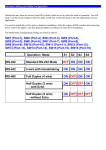
The Mode Block Configuration Settings are listed as follows:
SW1 (Port-1), SW2 (Port-2), SW3 (Port-3), SW4 (Port-4),
SW5 (Port-5), SW6 (Port-6), SW7 (Port-7), SW8 (Port-8)
Operation Mode
S1
S2
S3
ON
ON
RS-422
4 wire with Handshaking
ON
RS-485
Full Duplex (4 wire)
OFF
Half Duplex (2 wire)
- with Echo
OFF OFF ON
Half Duplex (2 wire)
- without Echo
OFF OFF OFF
ON ON
JP3 (Port-1), JP4 (Port-2), JP5 (Port-3), JP6 (Port-4)
JP7 (Port-5), JP8 (Port-6), JP9 (Port-7), JP10 (Port-8)
for Termination and Biasing Option Configuration
Inside the unit, there are eight 2 x 7 (14 pin) header blocks which are jumpered to enable Tx, Rx, CTS
120 Ohm termination resistors and Tx, Rx 750 Ohm BIASing resistor.
You will need to open up the metal case and set the jumper setting for RS-422 mode or RS-485 mode as
per the requirements of your application.
Settings are listed as follows:
Jumper
Function
1-2
Tx Termination of 120 Ohm.
This jumper should always be populated for RS-485 mode.
3-4
Pull-up Tx+ to VCC by 750 Ohm Bias resistor.
This jumper should be populated for pull-up Tx+.
5-6
Pull-down Tx- to GND by 750 Ohm Bias resistor.
This jumper should be populated for pull-down Tx- .
7-8
Rx Termination of 120 Ohm.
This jumper should always be populated for RS-422 mode.
9-10
Pull-up Rx+ to VCC by 750 Ohm Bias resistor.
This jumper should be populated for pull-up Rx+
11-12
Pull-down Rx- to GND by 750 Ohm Bias resistor.
This jumper should be populated for pull-down Rx- .
13-14
CTS Termination of 120 Ohm.
This jumper should always be populated for RS-422 mode.
Note : Sometimes, when operating in RS-422 or RS-485, it is necessary to configure termination
and biasing of the data transmission lines. Generally this must be done in the cabling, since this
depends on the installation of connections. Before applying the option, check your cable
specification for proper impedance matching.
RS-422/485 Pin-outs & Signals Wiring
RS-422 Signal Pin-outs of DB-9 Male
Pin 1
TxD- (A)
Pin 2
TxD+(B)
Pin 3
RxD+(B)
Pin 4
RxD-(A)
Pin 5
GND
Pin 6
RTS- (A)
Pin 7
RTS+(B)
Pin 8
CTS+(B)
Pin 9
CTS- (A)
RS-422 Signal Wiring
Point-to-Point 4 Wire Full Duplex
RS-422 with Handshaking
RS-485 4-Wire (Full duplex) Signal Pin-outs of DB-9 Male
Pin 1
Tx- (A)
Pin 2
Tx+(B)
Pin 3
Rx+(B)
Pin 4
Rx-(A)
Pin 5
GND
RS-485 2-Wire (Half duplex) Signal Pin-outs of DB-9 Male
Pin 1
Data- (A)
Pin 2
Data+(B)
Pin 5
GND
RS-485 Signal Wiring
Point-to-Point 4-Wire Full Duplex
Multidrop RS-485 2-Wire Half-duplex