1
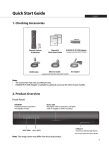
Quick Start Guide
Inserting the CI-Module
Detaching the HDD Cartridge
1. Insert the Smartcard into the CI-Module.
2. Insert the CI-Module into the slot.
1. Turn off the power.
2. Press down the HDD cartridge gently until you hear a clicking sound.
3. Keep pressing down and pull out the HDD cartridge.
2
3
Assembling the HDD
1. Mount the HDD into the HDD cartridge.
2. Assemble the HDD with four screws on the bottom of the cartridge.
Attaching the HDD Cartridge
1. Turn off the power.
2. Push in the HDD cartridge until you hear a clicking sound.
2
3
HDD (2.5”)
GB6
2
Note:
• If you attach a HUMAX HDD cartridge during operation, the system may reboot automatically.
• The HUMAX HDD cartridge is inserted in the HDD slot upon purchase.
• HUMAX does not guarantee proper operation for all HDD or SD card models.