1
Multi-Channel Setup
Multi-Channel Setup
Dynaudio loudspeakers are designed to offer the most advanced performance in both
stereo and multi-channel applications. When connecting a loudspeaker to a multi-channel
setup, in general the same guidelines as mentioned in the text above will apply.
Note
When setting up a home theatre system, the loudspeakers should create a realistic
soundstage with similar sound characteristics on each channel. It is therefore important
that all speakers should match the same quality level. This is especially important with
regards to the center channel loudspeaker, as this is critical aspect of any multi-channel
soundstage.
Dynaudio has developed various models suitable for multi-channel applications: Compact
and floor standing models with a matching center channel, all optimized for use with
Dynaudio active subwoofers and Dynaudio optional accessory products.
1
Loudspeakers for multi-channel setups
For a multi-channel setup, in addition to the two main (stereo) loudspeakers, additional
channels (speakers) may be added to reproduce dialogue and surround effects. With the
center channel and compact models, it is possible to achieve the same high level of
performance and sound on every channel.
Center speaker
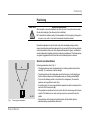
The center is responsible for the information directed from the middle of the screen and
should be positioned between the right and left main loudspeakers.
In a home theater/surround setup, the center supports the images and should be placed
close to the screen.
Owners Manual
9