1
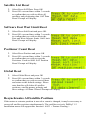
Back Light Timeout
1. Select Back Light Set. Press OK
2. Select the length of time the backlight will
3.
4.
be lighted and press OK. An arrow will
appear to the right of the selected time
setting.
Select Save. Press OK
Select Quit and press OK to return to the
main menu.
Satellite List and Polarity Programming
If a DiSEqC 1.2 enable receiver will be used to program and control the ASC1, connect
the STB to the REC port and use the receiver's Satellite Installation menu and DiSEqC
1.2 sub menu to program the satellite motor positions then skip to steps 25 - 28. Please
note that your receiver may have preassigned DiSEqC 1.2 positions or limit the number
of programmable DiSEqC 1.2 motor positions. Contact your receiver reseller for any
questions on the operation and programming of these DiSEqC 1.2 settings.
Manual ASC1 Programming
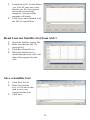
4. Select Satellite Set and press OK.
5. Select DiSEqC 1.2 motor position number (example: 00:) and press OK. A black
6.
7.
8.
color block will flash over this two digit
number. Use either the numeric remote
control keys to enter a two digit number
01-99 (for example:01) or use the front
panel Up/Down keys to select the motor
position number. Press OK to exit the DiSEqC setting line.
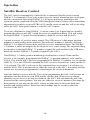
Select Position: Use the East/West keys to
drive the motor to the first satellite. The
motor count increases or decreases as the
motor positions the dish. W< or >E
symbols indicate West or East direction of
travel.
Bump the Dish East and West one count at a time to be sure that the signal is
optimized on your signal quality meter or attached STB meter.
Place an attached signal meter or STB on both horizontal and vertical
transponders to be sure that the feedhorn is properly positioned. If using a
polarity servo it is suggested to align the feedhorn with the ASC1 default
polarity settings of Horizontal: -45 and Vertical +45.
12